

Il software per la formazione dei partner ti aiuta a gestire, erogare e monitorare i programmi formativi per il tuo ecosistema di partner, così ogni rivenditore, distributore e affiliato rimane allineato con la tua azienda. Se cerchi la piattaforma giusta per semplificare l’onboarding, migliorare le certificazioni e ampliare l’abilitazione dei partner, evitando che soluzioni obsolete o improvvisate rendano difficile proteggere le tue partnership esterne, offrire un’esperienza coerente e misurare i risultati.
In questa guida analizzerò le migliori opzioni software per la formazione dei partner di canale, così potrai trovare quella più adatta al tuo programma per i partner, confrontare le funzionalità più importanti e migliorare le prestazioni dei partner con sicurezza.
Perché fidarsi dei nostri consigli sui software
6,700+
Reviews
20
Industry experts
16+
Evaluation factors
14
Years
Le nostre recensioni riflettono il nostro giudizio indipendente, non un discorso di vendita. Scopri come manteniamo la trasparenza.
Per questa guida, abbiamo valutato gli strumenti attraverso test pratici e ricerche indipendenti, assegnando un punteggio agli strumenti in base ai nostri criteri di selezione.
Le nostre recensioni riflettono il nostro giudizio editoriale umano, non un discorso di vendita.
Tabella di confronto: software per la formazione dei partner
Questa tabella di confronto riassume i dettagli sui prezzi delle mie migliori selezioni di software per la formazione dei partner.
| Tool | Best For | Trial Info | Price | ||
|---|---|---|---|---|---|
| 1 | Ideale per la certificazione dei partner e la preparazione sul campo | Prova gratuita disponibile | A partire da $6.91/utente/mese (fatturato annualmente) | Website | |
| 2 | Ideale per progetti di formazione partner scalabili | Piano gratuito + demo gratuita disponibile | Da $119/mese (fatturazione annuale) | Website | |
| 3 | Ideale grazie agli strumenti integrati per webinar e riunioni | Prova gratuita di 14 giorni | Prezzi su richiesta | Website | |
| 4 | Ideale per portali partner multilingue | Demo gratuita disponibile | Da $250/mese | Website | |
| 5 | Ideale per automatizzare l'onboarding dei partner | Demo gratuita disponibile | Prezzo su richiesta | Website | |
| 6 | Ideale per ambienti di apprendimento multi-dominio | Demo gratuita disponibile | Prezzo su richiesta | Website | |
| 7 | Ideale per la configurazione con integrazioni HRIS e SSO | Non disponibile | Prezzo su richiesta | Website | |
| 8 | Ideale per portali white-label | Demo gratuita disponibile | Prezzo su richiesta | Website | |
| 9 | Ideale per percorsi di certificazione automatizzati | Demo gratuita disponibile | Prezzo su richiesta | Website | |
| 10 | Ideale per certificazioni di canale tecnologico | Demo gratuita disponibile | Da $1.899/mese (fatturato annualmente) | Website |


Recensioni dei migliori software per la formazione dei partner
Di seguito trovi i miei riepiloghi dettagliati dei migliori software per la formazione dei partner inclusi nella mia selezione. Le mie recensioni offrono uno sguardo approfondito alle funzionalità, alle integrazioni e ai casi d’uso migliori di ciascuna piattaforma, per aiutarti a trovare quella più adatta alle tue esigenze.
 Ideale per la certificazione dei partner e la preparazione sul campo
- Prova gratuita disponibile
- A partire da $6.91/utente/mese (fatturato annualmente)
Visit WebsiteCustomer Rating:4.6/5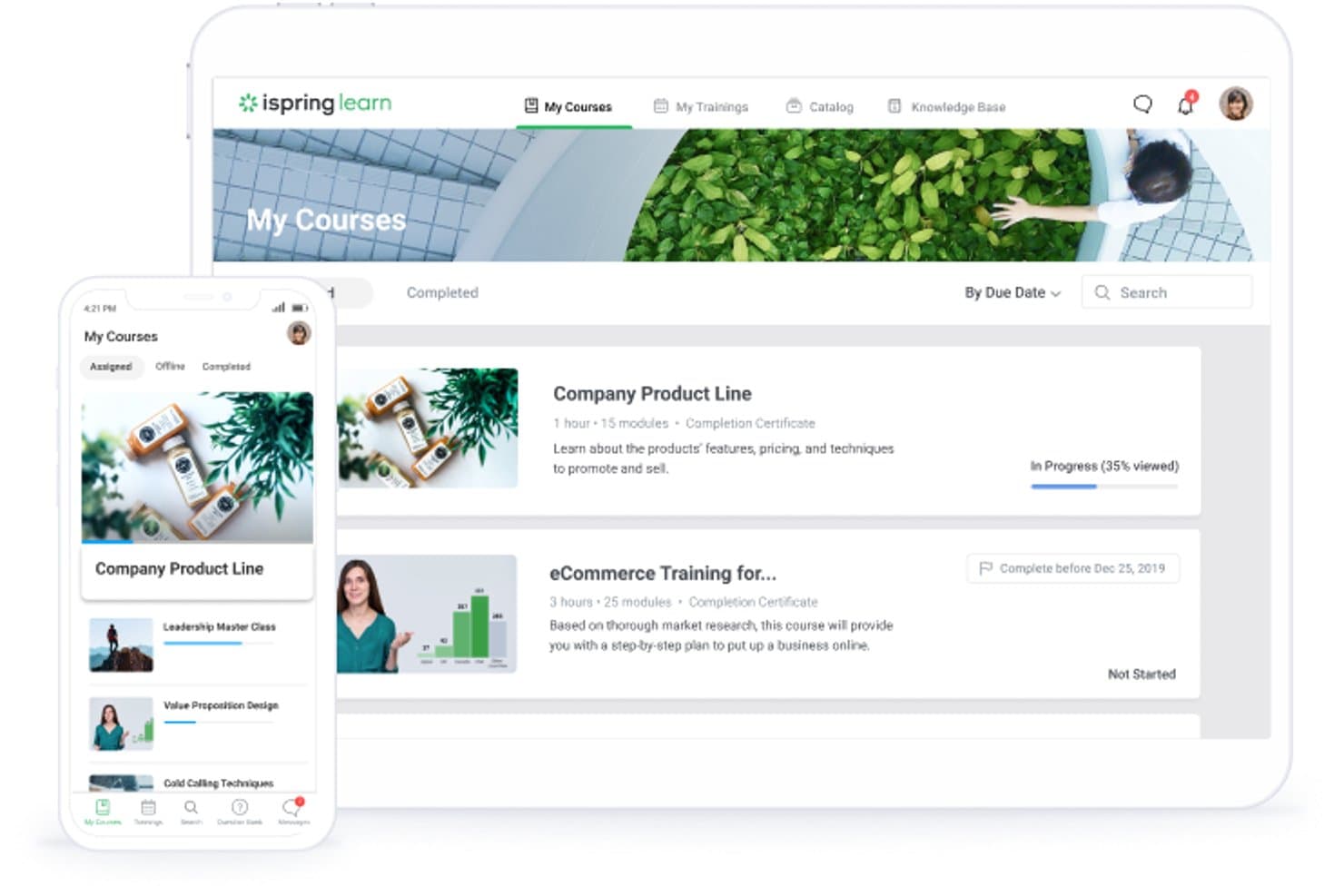
iSpring LMS consente ai partner di accedere ai corsi assegnati sul Web e sui dispositivi mobili. iSpring LMS è un sistema di gestione dell'apprendimento progettato per la formazione delle aziende estese, che offre creazione di corsi, gestione delle certificazioni, iscrizione automatizzata e apprendimento mobile per utenti esterni come partner di canale, rivenditori e affiliati.
Per chi è più adatto iSpring LMS?
iSpring LMS è particolarmente adatto ai responsabili dell'abilitazione dei partner presso aziende del mercato medio che devono gestire programmi di certificazione strutturati attraverso reti di concessionari, rivenditori o affiliati.
Perché ho scelto iSpring LMS
iSpring LMS è entrato nella mia rosa dei candidati soprattutto per quanto il suo motore di certificazione sia stato progettato specificamente per i programmi di canale. Apprezzo il fatto che gestisca l'intero ciclo di vita della certificazione: monitoraggio automatico delle scadenze, promemoria per il rinnovo e rilascio di credenziali personalizzate con il marchio, direttamente collegato al completamento dei percorsi di apprendimento. In una vera rete di concessionari o rivenditori, ciò significa che un rappresentante del partner sul campo può completare la formazione offline sull'app mobile e ricevere automaticamente la certificazione non appena torna online.
Caratteristiche principali di iSpring LMS
- Apprendimento mobile offline: le app native per iOS e Android consentono ai rappresentanti dei partner di scaricare e completare la formazione senza connessione Internet, sincronizzando automaticamente i progressi quando si riconnettono.
- Traduzione dei corsi basata sull'intelligenza artificiale: i contenuti possono essere tradotti automaticamente in oltre 70 lingue, rendendo pratico gestire un unico programma di formazione attraverso reti di partner globali.
- Archiviazione di certificati esterni: gli utenti dei partner possono archiviare e monitorare nei propri profili le credenziali rilasciate esternamente, con avvisi automatici di scadenza per segnalare i rinnovi.
- Fatturazione per utente attivo: paghi solo per gli utenti che effettuano l'accesso ogni mese, mantenendo i costi proporzionati all'effettivo coinvolgimento dei partner anziché al numero totale di utenti registrati.
Integrazioni di iSpring LMS
iSpring LMS si integra con Salesforce, Microsoft Entra ID, BambooHR, Zoom, Microsoft Teams, Shopify, Tilda, LinkedIn Learning, Udemy e Go1. Supporta le API REST e SOAP, oltre a Zapier e Albato per connettività personalizzata.
Pros and Cons
Pros:
- Monitora le certificazioni dei partner con rinnovi automatici
- Include funzionalità di traduzione dei corsi basata sull'intelligenza artificiale
- App mobile offline completa
Cons:
- Non supporta portali per partner multi-tenant
- I report non offrono visibilità sui ricavi a livello di partner
Learn more about iSpring LMS: Ideale per progetti di formazione partner scalabili
- Piano gratuito + demo gratuita disponibile
- Da $119/mese (fatturazione annuale)
Visit WebsiteCustomer Rating:4.6/5
TalentLMS offre una dashboard sulle prestazioni dei partner che confronta il progresso reale con quello ideale tramite indicatori di crescita. TalentLMS è un sistema di gestione dell'apprendimento basato su cloud con un ambiente dedicato alla formazione dei partner, che include portali personalizzati (branche), erogazione di corsi multilingue, percorsi formativi, certificazioni e strumenti di automazione.
Per chi è ideale TalentLMS?
TalentLMS è adatto ad aziende di medie e grandi dimensioni che devono formare e certificare reti di partner esterni su larga scala.
Perché ho scelto TalentLMS
Ho incluso TalentLMS nelle mie migliori scelte perché la funzione branche è pensata per scalare la formazione dei partner su reti ampie e distribuite. È possibile creare portali di formazione separati e personalizzabili per ogni gruppo di partner, ognuno con il proprio marchio, contenuto e utenti, tutto gestito da un unico account amministratore. Apprezzo anche che le azioni di massa consentano di iscrivere, aggiornare o disattivare centinaia di utenti tra le branche in pochi clic, velocizzando così l'onboarding di nuovi rivenditori o distributori.
Funzionalità principali di TalentLMS
- Percorsi formativi: Collega più corsi in una sequenza fissa affinché i partner completino la formazione in un ordine strutturato e definito.
- Iscrizioni automatizzate: Imposta regole per assegnare automaticamente i corsi agli utenti in base al gruppo, alla branca o al ruolo al momento dell'accesso alla piattaforma.
- Creazione corsi tramite IA: Genera schemi di corsi, quiz e contenuti da un semplice prompt testuale direttamente all'interno del costruttore di corsi.
- Erogazione corsi multilingue: Traduci i contenuti dei corsi in oltre 40 lingue grazie agli strumenti di traduzione IA integrati.
Integrazioni di TalentLMS
TalentLMS si integra con Salesforce, BambooHR, ADP Workforce Now, HubSpot, Zoom, Okta, Zendesk, Trello, Microsoft Teams, Shopify, WooCommerce, Stripe, PayPal e altri ancora. Funziona anche con Zapier. È disponibile un'API per integrazioni personalizzate.
Pros and Cons
Pros:
- Branche personalizzate per ciascuna organizzazione partner
- Costruttore di corsi integrato che non richiede strumenti aggiuntivi
- Supporta molteplici tipologie di domande nei test
Cons:
- I report non consentono analisi approfondite dei dati
- I corsi multilingue richiedono duplicati separati
Learn more about TalentLMS: Ideale grazie agli strumenti integrati per webinar e riunioni
- Prova gratuita di 14 giorni
- Prezzi su richiesta
Visit WebsiteCustomer Rating:4.7/5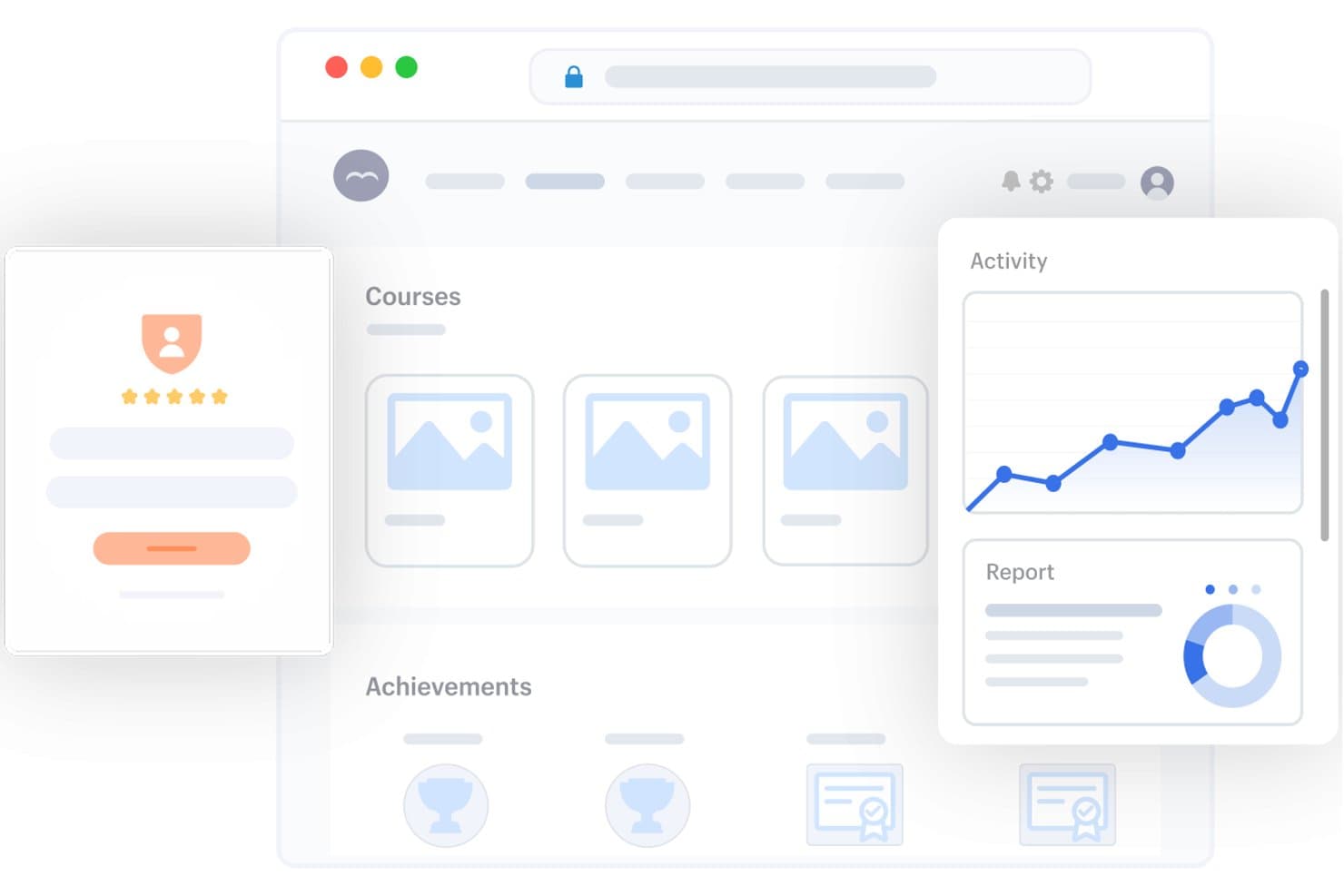
SkyPrep offre una dashboard completa per la gestione dell'apprendimento, con librerie di corsi, monitoraggio dei risultati, grafici delle attività e strumenti di reportistica per la formazione dei partner. SkyPrep è un LMS per la formazione dei partner che combina portali per partner con marchio personalizzato, percorsi di apprendimento basati sui ruoli, gestione delle certificazioni e ambienti con tenant separati per l'erogazione a discenti esterni tra diversi livelli e regioni dei partner.
A chi è più adatto SkyPrep?
SkyPrep è particolarmente adatto alle aziende del mercato medio che gestiscono programmi per canali o rivenditori e necessitano di una formazione strutturata per i partner, con ambienti separati, senza una complessa implementazione aziendale.
Perché ho scelto SkyPrep
Ho scelto SkyPrep perché i suoi strumenti per la creazione di corsi basati sull'intelligenza artificiale possono aiutare le aziende a creare ed erogare la formazione ai partner esterni in modo più efficiente. Le sue funzionalità di intelligenza artificiale aiutano a generare contenuti per i corsi, quiz e valutazioni, mentre gli strumenti di gestione dell'apprendimento consentono di organizzare la formazione per diversi gruppi di partner in un'unica piattaforma. Questa combinazione rende SkyPrep un'opzione valida per le aziende che desiderano creare corsi incentrati sui partner senza dover sviluppare ogni elemento dei contenuti formativi da zero.
Funzionalità principali di SkyPrep
- Portali per partner con tenant separati: Crea portali completamente personalizzati e segmentati per ogni azienda partner, livello o regione.
- Automazione dei percorsi per ruolo e livello: Assegna automaticamente la formazione in base al ruolo, alla regione o al livello del partner, con prerequisiti e scadenze preimpostati.
- Dashboard di analisi a livello di account: Visualizza il coinvolgimento nella formazione, i completamenti e le certificazioni per account partner, livello o sede.
- Certificazioni e micro-credenziali: Rilascia certificazioni strutturate e micro-credenziali per i partner, collegate ai requisiti del programma partner.
Integrazioni di SkyPrep
SkyPrep offre integrazioni native con Salesforce, HubSpot, ADP, Zoom, Google Workspace e provider SSO. È disponibile un'API per le integrazioni personalizzate.
Pros and Cons
Pros:
- Strumenti nativi integrati per la formazione dal vivo
- Portali dedicati per ogni organizzazione partner
- Rinnovi automatici delle certificazioni con monitoraggio delle scadenze
Cons:
- La reportistica non offre informazioni dettagliate a livello di account partner
- Opzioni limitate per la gestione in blocco degli utenti
Learn more about SkyPrep: Ideale per portali partner multilingue
- Demo gratuita disponibile
- Da $250/mese
Visit WebsiteCustomer Rating:4.9/5
AcademyOcean offre un’avanzata personalizzazione della lingua in tutto il LMS. AcademyOcean è un LMS per la formazione dei partner che supporta l’erogazione di corsi multilingue, portali separati e brandizzati per ogni partner, programmi di certificazione e hosting di webinar attraverso reti di partner globali.
Per chi è ideale AcademyOcean?
AcademyOcean è particolarmente adatto per aziende tecnologiche e SaaS di fascia media che distribuiscono tramite partner di canale internazionali in diverse lingue e regioni.
Perché ho scelto AcademyOcean
Ho incluso AcademyOcean tra le mie scelte principali per la sua capacità di gestire efficacemente la complessità della formazione dei partner in più lingue e aree geografiche. Ogni gruppo di partner riceve un portale brandizzato separatamente con impostazioni linguistiche dedicate, così un rivenditore in Germania e un distributore in Giappone non condividono la stessa interfaccia. Apprezzo inoltre che i contenuti dei corsi, la navigazione dell’interfaccia e le valutazioni siano disponibili nella lingua preferita dall’utente, non solo il testo del corso.
Caratteristiche principali di AcademyOcean
- Costruttore di quiz e sondaggi: Utilizza il course builder integrato per creare quiz, sondaggi e una libreria riutilizzabile di domande per valutare la conoscenza dei partner in qualsiasi fase della formazione.
- Costruttore di certificati: Rilascia certificati brandizzati e protetti dalla contraffazione utilizzando template preimpostati con il tuo logo e i tuoi colori.
- Profilo individuale del discente: Monitora la cronologia formativa, i punti di forza e le lacune di conoscenza di ogni partner tramite profili dedicati.
Integrazioni AcademyOcean
L’API di AcademyOcean si integra con piattaforme CRM come Salesforce e HubSpot, sistemi HR come BambooHR e Workday, strumenti di collaborazione come Slack e Microsoft Teams, piattaforme per webinar come Zoom e Webex, oltre a strumenti di analytics come Power BI e Tableau. Si collega anche con Zapier, e sono disponibili API e webhook per integrazioni personalizzate.
Pros and Cons
Pros:
- Portali brandizzati separati per ogni gruppo partner
- Corsi multilingue e interfaccia utente integrati
- Template di certificati protetti da contraffazione inclusi
Cons:
- Automazioni di esportazione CRM native limitate
- Prezzo di partenza più elevato per le piccole imprese
Learn more about AcademyOcean: Ideale per automatizzare l'onboarding dei partner
- Demo gratuita disponibile
- Prezzo su richiesta
Visit WebsiteCustomer Rating:4.6/5
LearnUpon organizza i contenuti di onboarding con moduli, iscrizioni e formazione dal vivo. LearnUpon è un sistema di gestione dell'apprendimento progettato per aziende che devono formare pubblici esterni, unendo la formazione dei clienti e l'onboarding dei partner in ambienti di apprendimento unificati e basati su portale.
Per chi è ideale LearnUpon?
LearnUpon è particolarmente adatto a società SaaS e tecnologiche che gestiscono grandi reti di partner e necessitano di automatizzare l'assegnazione, l'erogazione e il monitoraggio della formazione per tali pubblici.
Perché ho scelto LearnUpon
Ho incluso LearnUpon tra le mie scelte principali perché la sua piattaforma formativa utilizza la funzione Learning Journeys che elimina il lavoro manuale nell'onboarding dei partner. Puoi costruire una logica 'if/then' su una canvas e la piattaforma indirizza automaticamente i nuovi partner ai corsi corretti in base al loro ruolo, livello o tipologia di prodotto, senza necessità di intervento amministrativo. Apprezzo anche la sincronizzazione con il tuo CRM, così quando un nuovo partner viene aggiunto, viene immediatamente iscritto alla formazione appropriata.
Funzionalità chiave di LearnUpon
- Portali: Crea ambienti di apprendimento separati e personalizzabili per diversi tipi o livelli di partner, il tutto gestito da un unico account amministratore.
- Certificati di completamento: Emetti automaticamente certificati personalizzati quando i partner completano un corso, con notifiche configurabili per la ri-certificazione.
- Supporto multilingue: Eroga la formazione in oltre 20 lingue predefinite per raggiungere i partner in varie regioni.
Integrazioni di LearnUpon
LearnUpon offre integrazioni native con BambooHR, Zoom, Microsoft Teams, Slack, Shopify, Gong, Intercom e Okta, tra gli altri, coprendo categorie come CRM, HRIS, webinar, ecommerce e gestione accessi. È inoltre compatibile con Zapier e dispone di un'API con webhook per integrazioni personalizzate.
Pros and Cons
Pros:
- Portali separati e con marchio per ciascun pubblico partner
- Creazione corsi con intelligenza artificiale tramite Courseau
- Iscrizione automatizzata dai dati di CRM o HRIS
Cons:
- Registrazione in due fasi per eventi di formazione dal vivo causa confusione negli utenti
- Versionamento dei corsi poco flessibile che ingombra le dashboard
Learn more about LearnUpon: Ideale per ambienti di apprendimento multi-dominio
- Demo gratuita disponibile
- Prezzo su richiesta
Visit WebsiteCustomer Rating:4.4/5
Docebo offre una gestione degli utenti per filiale per ambienti di apprendimento multipli. Docebo è una piattaforma di gestione dell'apprendimento basata sull'IA che consente di gestire programmi di formazione per partner di canale a livello enterprise, con funzionalità che spaziano dall'erogazione dei corsi, alla gestione delle certificazioni, gamification e integrazione con Salesforce.
A Chi È Più Adatto Docebo?
Docebo è ideale per aziende di medie e grandi dimensioni che gestiscono ecosistemi di partner complessi su più brand, regioni o linee di prodotto.
Perché Ho Scelto Docebo
Ho scelto Docebo tra le mie migliori opzioni perché adoro come la sua Multi Domain App permetta di gestire ambienti di apprendimento completamente separati sulla stessa piattaforma. Ogni dominio può avere il proprio branding e diritti di amministrazione, un vero punto di forza quando si gestisce la formazione su più livelli di partner o canali regionali distinti. Apprezzo anche il Modulo Extended Enterprise, che consente di configurare autenticazioni separate per gruppi di utenti interni ed esterni—niente più credenziali condivise tra i partner del canale.
Funzionalità Principali di Docebo
- App per Certificazione & Retraining: Crea programmi di certificazione con politiche di erogazione e scadenza configurabili per il monitoraggio della conformità dei partner.
- Gamification: Aggiunge punti, badge e classifiche ai corsi di formazione dei partner per aumentare il coinvolgimento e il completamento dei corsi.
- Modulo eCommerce: Si collega con Shopify, Stripe e PayPal per monetizzare direttamente i programmi di formazione partner all'interno della piattaforma.
Integrazioni Docebo
Docebo offre oltre 400 integrazioni tramite il suo marketplace, incluse opzioni plug-and-play, connettori e personalizzazioni. Le integrazioni verificate includono Salesforce, HubSpot, Microsoft Teams, Dropbox, BambooHR, ADP Workforce Now, Amazon S3, Gong, Credly e Accredible. È disponibile un'API per integrazioni personalizzate e Docebo Connect funge da piattaforma di integrazione low-code per costruire connettori personalizzati.
Pros and Cons
Pros:
- Domini separati con branding personalizzato per ogni target di partner
- Ricerca avanzata nei contenuti e auto-tagging grazie all'IA
- Marketplace di integrazioni molto ampio e API fluida
Cons:
- Configurazione iniziale complessa e curva di apprendimento ripida
- Reportistica avanzata e dashboard personalizzate richiedono upgrade a pagamento
Learn more about Docebo: Ideale per la configurazione con integrazioni HRIS e SSO
- Non disponibile
- Prezzo su richiesta
Visit WebsiteCustomer Rating:4.5/5
Eloomi supporta la configurazione e l'impostazione di SSO, con parametri di integrazione personalizzati. Eloomi è una piattaforma LMS per la formazione dei partner che offre creazione di corsi, iscrizione automatica degli utenti tramite integrazioni HRIS, accesso SSO, monitoraggio del progresso in tempo reale e formazione sulla conformità integrata.
Per chi è più indicato Eloomi?
Eloomi è ideale per i team HR e L&D di aziende di medie dimensioni che devono inserire e formare partner esterni senza dover creare un'infrastruttura IT separata per gestire gli accessi.
Perché ho scelto Eloomi
Ho inserito Eloomi tra le mie scelte principali per la rapidità con cui si può avviare un programma di formazione per i partner. La configurazione HRIS è veramente 'punta e clicca', sincronizzando automaticamente gli utenti e risparmiando così l’importazione manuale delle liste dei partner. Mi piace anche che l’SSO sia disponibile su tutti i dispositivi, permettendo ai partner di accedere una sola volta e andare direttamente alla loro formazione. Con oltre 40 integrazioni HRIS disponibili 'pronte all'uso', la configurazione IT necessaria per iscrivere gli utenti esterni e renderli attivi è minima.
Funzionalità principali di Eloomi
- Piani di apprendimento e assegnazioni di gruppo: Automatizza l’erogazione della formazione con piani di apprendimento programmati, assegnazioni per gruppi, scadenze e promemoria automatici.
- Dashboard di reportistica in tempo reale: Monitora i tassi di completamento dei corsi dei partner, i punteggi delle valutazioni e le lacune di coinvolgimento da una vista analitica aggiornata in tempo reale.
- Accesso tramite app mobile: I partner possono accedere alla formazione da qualsiasi dispositivo tramite l’app mobile di Eloomi, senza dover utilizzare un computer desktop.
Integrazioni di Eloomi
Eloomi offre oltre 40 integrazioni HRIS native, tra cui BambooHR, Workday, SAP SuccessFactors, Personio, Gusto, Paylocity, HiBob, UKG Pro, Sage HR e ADP. Si integra inoltre nativamente con Microsoft Teams e LinkedIn Learning. È disponibile una REST API aperta per integrazioni personalizzate, e l’SSO è supportato per l’autenticazione degli utenti.
Pros and Cons
Pros:
- La mappatura delle competenze collega la formazione alla crescita dei partner
- Monitoraggio della conformità con registrazione dei tentativi di test
- Piani di apprendimento automatizzati con promemoria delle scadenze
Cons:
- La generazione di report rallenta con grandi set di dati
- Opzioni limitate per brandizzazione e font dei corsi
Learn more about eloomi: Ideale per portali white-label
- Demo gratuita disponibile
- Prezzo su richiesta
Visit WebsiteCustomer Rating:4.3/5
Paradiso LMS ti consente di monitorare corsi, iscrizioni e prossime sessioni formative. Paradiso LMS è una piattaforma di gestione dell'apprendimento (LMS) potenziata dall'IA, progettata per la formazione di partner e canali, con un'architettura multi-tenant che supporta portali completamente personalizzabili e con marchio proprio, creazione di corsi su misura, auto-iscrizione e monitoraggio in tempo reale dei progressi all'interno di reti di partner distribuite.
A chi si adatta meglio Paradiso LMS?
Paradiso LMS è particolarmente indicato per fornitori tecnologici e SaaS di medie e grandi dimensioni che necessitano di gestire portali formativi con marchio proprio per più organizzazioni partner indipendenti simultaneamente.
Perché ho scelto Paradiso LMS
Paradiso LMS si è guadagnato un posto nella mia shortlist grazie all'ampio livello di personalizzazione white-label dei portali partner. Ogni organizzazione partner dispone di un proprio dominio personalizzato, una pagina di accesso personalizzata e un certificato SSL, con le email di sistema inviate anche da tale dominio. Inoltre, mi piace che ciò si estenda anche al mobile, offrendo alle aziende partner un'app iOS e Android interamente con il loro marchio. Un livello di separazione dei portali così elevato è davvero difficile da trovare a questo prezzo.
Caratteristiche principali di Paradiso LMS
- Auto-iscrizione e assegnazione obbligatoria dei corsi: I partner possono auto-iscriversi ai corsi rilevanti per il loro ruolo oppure puoi assegnare forzatamente una formazione obbligatoria, garantendo una conoscenza uniforme in tutta la rete partner.
- SSO e integrazione nel portale: Integra Paradiso LMS direttamente all'interno del portale partner esistente tramite SSO, così i partner non dovranno mai effettuare un accesso separato o uscire dal tuo ecosistema per accedere alla formazione.
- Monitoraggio certificazioni e conformità: Tieni traccia delle certificazioni dei partner, monitora le scadenze di rinnovo e segnala lo stato di conformità dell'intera rete dei partner da una sola dashboard di amministrazione.
Integrazioni di Paradiso LMS
Paradiso LMS supporta oltre 100 integrazioni in categorie come CRM, HRIS, ERP, ecommerce, videoconferenza, librerie di contenuti e pagamenti, tra cui Salesforce, HubSpot, SAP, Oracle, Zoom, Microsoft Teams, Shopify, WooCommerce, LinkedIn Learning, OpenSesame, PayPal, Stripe, Google Analytics e Power BI. Si collega anche con Zapier ed è disponibile un'API per integrazioni personalizzate.
Pros and Cons
Pros:
- Architettura multi-tenant per portali partner isolati
- Authoring di corsi integrato e supporto SCORM
- La gamification stimola il coinvolgimento dei partner nella formazione
Cons:
- La velocità di navigazione delle pagine è sensibilmente lenta
- La configurazione iniziale della piattaforma richiede un tempo significativo
Learn more about Paradiso LMS: Ideale per percorsi di certificazione automatizzati
- Demo gratuita disponibile
- Prezzo su richiesta
Visit WebsiteCustomer Rating:4.4/5
Impartner consente di creare programmi di certificazione partner on-demand. Impartner è una piattaforma di gestione delle relazioni con i partner che offre un modulo integrato per la formazione e la certificazione, permettendo di creare corsi, costruire percorsi di certificazione, assegnare badge di competenza e segmentare i contenuti formativi in base al tipo di partner.
Per chi è più adatto Impartner?
Impartner è particolarmente indicato per aziende tecnologiche di grandi dimensioni che gestiscono reti di partner di canale ampie e strutturate su più livelli, le quali necessitano di programmi di certificazione organizzati su larga scala.
Perché ho scelto Impartner
Impartner si è guadagnato un posto nella mia shortlist grazie al modo in cui collega strettamente il completamento delle certificazioni ad azioni reali del programma. Le regole di scadenza automatica dei programmi di certificazione sono una funzionalità che utilizzo per mantenere le credenziali dei partner sempre aggiornate senza dover intervenire manualmente. Apprezzo anche il fatto che il completamento di una certificazione possa attivare flussi di lavoro a valle, come lo sblocco di livelli di contenuti, l’aggiornamento dello stato di conformità o l’attivazione di premi, tutto senza alcun intervento manuale da parte del mio team.
Funzionalità principali di Impartner
- Supporto contenuti SCORM: Carica e gestisci pacchetti SCORM esistenti direttamente su Impartner per offrire formazione interattiva senza dover ricreare i corsi da zero.
- Segmentazione dinamica dei partner: Assegna i contenuti formativi a specifici gruppi di partner utilizzando regole di segmentazione, così ogni tipo di partner vede solo i corsi pertinenti al proprio ruolo.
- Badge di competenza dei partner: Crea e assegna badge di riconoscimento che vengono visualizzati nei profili del portale partner e nelle inserzioni del marketplace dei partner al raggiungimento dei requisiti di competenza stabiliti.
Integrazioni di Impartner
Impartner offre integrazioni native con Salesforce, HubSpot, Microsoft Dynamics 365, Crossbeam e PartnerTap. Oltre a queste, l’Orchestration Studio di Impartner è un’applicazione iPaaS nativa che mette a disposizione connettori preconfigurati verso applicazioni esterne per la creazione di workflow avanzati e visivi attraverso il tuo stack tecnologico. Impartner si integra inoltre con Zapier e offre un’API per integrazioni personalizzate.
Pros and Cons
Pros:
- La certificazione è direttamente collegata alla conformità per i livelli
- Contenuti del portale segmentati per tipologia di partner
- La registrazione degli accordi è integrata e sincronizzata con il CRM
Cons:
- L’editor di testo nativo base risulta rigido per corsi complessi
- Curva di apprendimento amministrativa elevata e complessità di configurazione
Learn more about Impartner: Ideale per certificazioni di canale tecnologico
- Demo gratuita disponibile
- Da $1.899/mese (fatturato annualmente)

Channeltivity tiene traccia dei completamenti delle certificazioni partner e offre filtri per una ricerca rapida. Channeltivity è una piattaforma di partner relationship management (PRM) progettata per programmi di canale tecnologici, che combina la creazione di corsi di formazione, la distribuzione di contenuti SCORM/xAPI, la certificazione tramite quiz e la gestione delle credenziali a livello di rappresentante e partner in un unico portale dedicato ai partner.
Per chi è Channeltivity?
Channeltivity è particolarmente indicato per fornitori tecnologici B2B che gestiscono programmi di canale strutturati e che hanno bisogno di scalare le iniziative di abilitazione dei partner per formare, testare e certificare i rappresentanti dei rivenditori attraverso un unico portale.
Perché ho scelto Channeltivity
Ho scelto Channeltivity tra i migliori grazie al modo in cui la sua logica di certificazione si adatta al funzionamento reale dei programmi di canale tecnologici. È possibile assegnare certificazioni sia a livello di rappresentante che di organizzazione partner, una caratteristica importante quando i requisiti di accreditamento variano per livello o ruolo. Apprezzo inoltre che Channeltivity generi automaticamente certificati PDF ad alta risoluzione e permetta ai rappresentanti certificati di pubblicare direttamente le credenziali sui propri profili LinkedIn, offrendo visibilità reale al tuo programma senza necessità di interventi manuali.
Funzionalità principali di Channeltivity
- Supporto SCORM, AICC, cmi5 e xAPI: Carica e distribuisci contenuti formativi in qualsiasi di questi formati direttamente all'interno del portale partner.
- Distribuzione di formazione specifica per gruppo: Assegna corsi a profili utente e gruppi di partner specifici, così i diversi livelli di partner vedono solo i contenuti pertinenti.
- Reportistica completa sulle attività formative: Monitora l'avanzamento nei corsi digitali, la partecipazione alle sessioni in presenza, i risultati dei quiz e lo stato delle certificazioni di tutta la tua base partner da una vista di report unificata.
Integrazioni di Channeltivity
Channeltivity offre integrazioni native con Salesforce, HubSpot, Zoho e Microsoft Dynamics 365, coprendo registrazione offerte, distribuzione lead, referral e sincronizzazione organizzativa. Supporta inoltre il single sign-on SAML 2.0 e si collega con Zapier. API disponibili per integrazioni personalizzate.
Pros and Cons
Pros:
- Monitoraggio certificazioni a livello di rappresentante e organizzazione
- Supporta contenuti SCORM, AICC, cmi5 e xAPI
- Registra la formazione esterna, ad esempio sessioni in presenza
Cons:
- I report non includono grafici o diagrammi visivi
- La UI del portale risulta datata rispetto ai competitor
Learn more about Channeltivity:
Altri software per la formazione dei partner
Ecco alcune opzioni aggiuntive di software per la formazione dei partner che non sono state incluse nella mia selezione, ma che vale comunque la pena valutare:
- 11WorkRampIdeale per esperienze di apprendimento con branding personalizzato
- 12IntellumIdeale per onboarding automatizzato con IA
- 13ZINFIIdeale per l’accesso a contenuti co-brandizzati
- 14PifiniIdeale per raccomandazioni di contenuti basate sull'intelligenza artificiale
- 15Wahoo LearningIdeale per servizi di formazione completamente gestiti
Come Valuto il Software di Formazione per Partner
Valuto le piattaforme di formazione per partner su due livelli: i criteri di base che uno strumento deve soddisfare—come il tracciamento delle certificazioni e i portali partner—e i fattori differenzianti che rivelano la migliore corrispondenza.
Funzionalità Principali (Requisiti Minimi per Questa Lista)
Quando seleziono gli strumenti per la mia lista, assegno a ciascuno un punteggio da 0 (non offre la funzionalità) a 5 (eccelle in quest’area) per ogni funzionalità principale elencata di seguito. Poi, calcolo il punteggio totale dello strumento in percentuale. Ogni strumento deve raggiungere un punteggio totale minimo del 65% per essere considerato per l’inclusione.
- Gestione di Discenti Esterni: Verifico se la piattaforma segmenta i discenti per organizzazione partner, livello e regione—così un rivenditore Gold in APAC vede contenuti diversi rispetto a uno Silver.
- Creazione di Corsi & Erogazione dei Contenuti: Cerco la creazione nativa di corsi con supporto SCORM e percorsi formativi strutturati, non solo uno spazio dove i partner devono cercare le presentazioni di prodotto.
- Certificazione & Valutazione: Ogni strumento deve permetterti di rilasciare certificazioni legate a traguardi di competenza, con date di scadenza e flussi di rinnovo per attività come la ricertificazione annuale di prodotto.
- Portali Partner Multi-Tenant: Valuto se ogni organizzazione partner ottiene un portale personalizzato e autonomo con proprie funzioni di amministrazione, invece di un ambiente condiviso.
- Monitoraggio dei Progressi & Reportistica: La reportistica dovrebbe aggregare i progressi dei singoli discenti fino ai dashboard a livello di partner, così puoi individuare quali team partner sono in ritardo nella qualificazione.
- Integrazioni con lo Stack RevOps: Valuto la connettività con CRM e PRM—se i dati della formazione confluiscono nei record di Salesforce o HubSpot per permettere ai responsabili partner di collegare le certificazioni all’attività sulle trattative.
Una volta creata la lista degli strumenti che soddisfano i criteri, considero cosa distingue ciascuna piattaforma.
Fattori Differenzianti (Cosa Distingue i Fornitori)
Ecco come confronto e metto a paragone i diversi fornitori:
Funzionalità Distintive
Funzionalità di gamification come punti e classifiche mantengono alta la motivazione dei partner, soprattutto durante le campagne di certificazione che coinvolgono centinaia di rivenditori. Anche la personalizzazione basata sull’intelligenza artificiale è un fattore che valuto. I percorsi formativi adattivi possono indirizzare un partner tecnico verso approfondimenti di prodotto, mentre un commerciale riceve contenuti per gestire le obiezioni. Verifico inoltre la presenza di accesso mobile e offline, importante per i rappresentanti sul campo che devono completare la formazione tra un incontro e l’altro con i clienti.
Oltre le Funzionalità
La scalabilità è fondamentale quando il tuo programma partner cresce da 50 a 500 organizzazioni. Valuto se il prezzo cresce in base agli utenti attivi e se la piattaforma supporta il rilascio multilingua. La misurazione del ROI del programma partner è altrettanto importante—cerco strumenti che mettano in relazione il completamento della formazione con il pipeline generato dai partner, fornendo ai leader di canale i dati necessari per giustificare investimenti nel programma. La sicurezza e la conformità completano il quadro. L’idoneità a SOC 2 e GDPR, oltre al supporto SSO, sono requisiti minimi quando concedi a utenti esterni l’accesso ai tuoi sistemi.
Come scegliere un software per la formazione dei partner
È facile perdersi in lunghi elenchi di funzionalità e strutture tariffarie complesse. Per aiutarti a rimanere concentrato mentre affronti il tuo processo di selezione del software, unico per le tue esigenze, ecco una checklist dei fattori da tenere a mente:
| Fattore | Cosa considerare |
|---|---|
| FattoreScalabilità | Cosa considerareLo strumento è in grado di gestire il numero attuale e futuro dei tuoi partner senza aumenti imprevisti dei costi o un carico eccessivo per gli amministratori? |
| FattoreIntegrazioni | Cosa considerareSi connette ai tuoi sistemi HRIS, SSO, CRM o di data warehouse senza richiedere uno sviluppo personalizzato? |
| FattorePersonalizzazione | Cosa considerarePuoi personalizzare il marchio dell’esperienza e definire accessi o flussi di lavoro per diversi livelli o regioni di partner? |
| FattoreSemplicità d’uso | Cosa considerareSia gli amministratori sia gli utenti esterni potranno utilizzarlo senza formazione continua o un supporto IT significativo? |
| FattoreImplementazione e onboarding | Cosa considerareQuanto tempo e impegno saranno necessari alla tua organizzazione e ai tuoi partner per implementare il sistema e acquisire le competenze necessarie? |
| FattoreCosto | Cosa considerareI costi di licenza, onboarding e utilizzo a lungo termine sono chiari, prevedibili e in linea con i tuoi piani di budget? |
| FattoreMisure di sicurezza | Cosa considerareIl sistema è conforme alle tue policy di sicurezza, agli standard di gestione dei dati e ai requisiti di gestione del rischio di terze parti? |
| FattoreDisponibilità dell’assistenza | Cosa considerareTu e i tuoi partner avrete accesso a un supporto tecnico tempestivo e competente in tutte le lingue e le regioni necessarie? |
Che cos’è un software per la formazione dei partner?
Il software per la formazione dei partner è una piattaforma digitale progettata per erogare, gestire e monitorare programmi formativi destinati a partner esterni, come rivenditori, distributori o affiliati. Questi sistemi aiutano le organizzazioni a offrire onboarding, certificazioni e condivisione delle conoscenze coerenti, semplificando la misurazione del coinvolgimento dei partner, la verifica della conformità e il mantenimento di esperienze di apprendimento scalabili all’interno di reti di partner diversificate.
Funzionalità del software per la formazione dei partner
Quando selezioni un software per la formazione dei partner, presta attenzione alle seguenti funzionalità chiave:
- Strumenti per la creazione dei corsi: forniscono tutto ciò di cui hai bisogno per creare e organizzare moduli di formazione online utilizzando video, documenti, quiz e contenuti interattivi per migliorare la conoscenza tecnica dei prodotti.
- Gestione degli utenti: consente di iscrivere, raggruppare e monitorare gli utenti o le organizzazioni partner, facilitando la personalizzazione della formazione per diversi destinatari.
- Monitoraggio dei progressi: offre dashboard in tempo reale per monitorare chi è iscritto, quali corsi sono stati iniziati o completati e in quali punti gli utenti incontrano difficoltà.
- Valutazioni e quiz: consentono di creare test o verifiche delle conoscenze per verificare la comprensione e assegnare certificazioni o badge al completamento con successo.
- Gestione delle certificazioni: emette, archivia e gestisce automaticamente i certificati digitali quando i partner completano i corsi obbligatori o superano le valutazioni.
- Report e analisi: genera report di facile lettura sulla partecipazione, sui tassi di completamento dei corsi e sui risultati per dimostrare l'efficacia del programma.
- Supporto multilingue: garantisce che contenuti e navigazione siano accessibili ai partner globali nella loro lingua locale.
- Branding white label: consente di personalizzare aspetto, stile e comunicazioni in modo che corrispondano all'identità del marchio della tua azienda o del tuo partner.
- Autorizzazioni basate sui ruoli: consentono di controllare chi può accedere ai corsi, gestire gli utenti o visualizzare report sensibili in base al proprio ruolo.
- Promemoria automatici: invia e-mail o avvisi nell'app per ricordare ai partner di iniziare, proseguire o completare specifiche attività di apprendimento.
Funzionalità comuni dell'intelligenza artificiale nei software per la formazione dei partner
Oltre alle funzionalità standard dei software per la formazione dei partner elencate sopra, molte di queste soluzioni integrano l'intelligenza artificiale con funzionalità come:
- Raccomandazioni personalizzate per l'apprendimento: analizzano i comportamenti e i progressi dei singoli partner per suggerire i corsi o le risorse più pertinenti e più probabilmente in grado di aumentare il coinvolgimento e la conservazione delle conoscenze.
- Selezione automatica dei contenuti: utilizza l'apprendimento automatico per esaminare e organizzare vaste librerie di contenuti, garantendo che i partner visualizzino sempre per primi i materiali più aggiornati e pertinenti.
- Avvisi predittivi sul coinvolgimento: monitorano i modelli di attività dei partner e segnalano gli utenti che probabilmente perderanno interesse, aiutando gli amministratori a contattarli al momento giusto per migliorare i tassi di fidelizzazione.
- Valutazioni adattive: adattano le domande e il livello di difficoltà in tempo reale in base alle risposte precedenti di un partner, offrendo un'esperienza di valutazione personalizzata e una misurazione più accurata delle competenze.
- Supporto tramite chat con intelligenza artificiale: offre assistenza immediata e contestuale ai partner mentre seguono la formazione, risolvendo i problemi comuni e rispondendo alle domande frequenti senza intervento umano.
Vantaggi del software per la formazione dei partner
L'implementazione di un software per la formazione dei partner offre diversi vantaggi al tuo team e alla tua azienda. Ecco alcuni dei vantaggi che puoi aspettarti:
- Processo di onboarding unificato: offre un onboarding coerente e strutturato a ogni partner utilizzando moduli standardizzati e iscrizione automatica.
- Migliore gestione della conformità: monitora automaticamente la formazione obbligatoria, il completamento delle certificazioni e i requisiti normativi grazie a strumenti di monitoraggio integrati.
- Maggiore coinvolgimento dei partner: offre esperienze di apprendimento interattive, notifiche ed elementi di gamification che aumentano la motivazione e la partecipazione.
- Distribuzione scalabile della formazione: supporta la crescita raggiungendo un numero maggiore di partner in diverse aree geografiche senza aumentare il carico di lavoro manuale o la complessità amministrativa.
- Migliori decisioni basate sui dati: fornisce agli amministratori analisi e report in tempo reale per valutare il successo del programma e individuare le aree di miglioramento.
- Maggiore coerenza del marchio: personalizza i materiali di formazione e l'aspetto della piattaforma, permettendo ai partner di vivere il tuo marchio a ogni interazione.
- Risparmio di tempo e risorse: centralizza la gestione dei corsi, il monitoraggio degli utenti e gli aggiornamenti dei contenuti, riducendo le attività amministrative ripetitive.
Costi e prezzi del software per la formazione dei partner
La scelta di un software per la formazione dei partner richiede la comprensione dei vari modelli e piani tariffari disponibili. I costi variano in base alle funzionalità, alle dimensioni del team, ai componenti aggiuntivi e ad altri fattori. La tabella seguente riassume i piani più comuni, i relativi prezzi medi e le funzionalità tipicamente incluse nelle soluzioni software per la formazione dei partner:
Tabella di confronto dei piani per il software di formazione dei partner
| Tipo di piano | Prezzo medio | Funzionalità comuni |
|---|---|---|
| Tipo di pianoPiano gratuito | Prezzo medio$0 | Funzionalità comuniGestione di base degli utenti, creazione limitata di corsi, report di base e assistenza standard via email. |
| Tipo di pianoPiano personale | Prezzo medio$10-$30/utente/mese | Funzionalità comuniMonitoraggio dei progressi, valutazioni, certificati personalizzati con il marchio, maggiore spazio di archiviazione e integrazioni semplici. |
| Tipo di pianoPiano aziendale | Prezzo medio$25-$50/utente/mese | Funzionalità comuniPersonalizzazione del marchio, analisi avanzate, automazione, gestione dei gruppi e assistenza dedicata per l'avvio. |
| Tipo di pianoPiano aziendale avanzato | Prezzo medio$50-$100+/utente/mese | Funzionalità comuniSSO, accesso API, supporto multilingue, SLA personalizzati, sicurezza avanzata e flussi di lavoro configurabili. |
Domande frequenti sul software di formazione dei partner
Ecco alcune risposte alle domande comuni sul software di formazione dei partner:
Il software di formazione dei partner può integrarsi con il mio CRM o con altri sistemi aziendali?
Sì, la maggior parte dei software di formazione dei partner offre integrazioni con piattaforme CRM, di automazione del marketing e di analisi molto diffuse. Ciò consente di sincronizzare i dati dei partner, automatizzare le iscrizioni e consolidare i report nell’intero insieme di tecnologie.
Quanto è sicuro il software di formazione dei partner per la condivisione di contenuti sensibili?
La maggior parte delle soluzioni offre misure di sicurezza come l’archiviazione dei dati crittografata, controlli degli accessi basati sui ruoli e opzioni SSO per proteggere i materiali di formazione e le informazioni sui partner.
Potrò personalizzare i percorsi di formazione per diversi tipi di partner?
Sì, in genere è possibile progettare e assegnare corsi, moduli o percorsi di certificazione unici a diversi segmenti di partner, aree geografiche o ruoli.
Quale tipo di assistenza è disponibile per i nuovi utenti o amministratori?
I fornitori offrono solitamente assistenza per l’avvio, centri di assistenza online, webinar e supporto clienti in tempo reale per aiutare sia gli amministratori sia i partner a diventare operativi rapidamente.
Sono disponibili report per monitorare il coinvolgimento e le prestazioni dei partner?
Sì, il software di formazione dei partner include comunemente pannelli di controllo e report dettagliati per monitorare i progressi, il completamento dei corsi e l’impatto complessivo del programma.