

Avis sur KrispCall : Avantages, Inconvénients, Fonctionnalités et Tarifs
KrispCall se distingue par son interface conviviale et ses tarifs compétitifs, ce qui en fait un choix de premier plan pour un suivi efficace des appels de vente.

Nous évaluons les outils de manière indépendante, et les commissions contribuent au financement de nos tests. Consultez notre politique de transparence, notre méthodologie, ou suggérez un outil.
KrispCall is a sales call tracking software built on a cloud phone system that gives sales teams one place to make calls, log interactions, and manage shared numbers. If Aircall feels too enterprise-heavy or too expensive for your team's scale, KrispCall covers the same core call tracking and dialing workflows with less complexity and a lower per-seat cost.
KrispCall Evaluation Summary
3.9/5
- From $15/user/month
- Free demo available
Pourquoi faire confiance à nos recommandations de logiciels
6,700+
Reviews
20
Industry experts
16+
Evaluation factors
14
Years
Nos avis reflètent notre jugement indépendant — et non un argumentaire de vente. Découvrez comment nous restons transparents.
Pour ce guide, nous avons évalué les outils grâce à des tests pratiques et une recherche indépendante, en notant les outils selon nos critères de sélection.
Nos avis reflètent notre jugement éditorial humain, et non un argumentaire de vente.
KrispCall Overview
From my perspective, KrispCall is a solid choice for small to medium sales teams looking for budget-friendly call tracking. While it may not have the most intuitive interface, its affordability and feature set make it a contender. Its standout features, such as call analytics and integration capabilities, offer good value compared to pricier options. However, onboarding could be smoother, and support, while responsive, has room for improvement. If your team prioritizes cost-effectiveness and functional features over a sleek UI, KrispCall is worth considering.
Pros
- Call analytics help your team make data-driven decisions.
- User-friendly interface simplifies your call management tasks.
- Reliable call quality ensures smooth communication with your clients.
Cons
- Onboarding can take longer than expected for your team.
- Customer support might not always meet your expectations.
- The interface could be more intuitive for new users.
Is KrispCall Right For Your Needs?
Who Would be a Good Fit for KrispCall?
KrispCall suits small to medium-sized sales teams and customer support departments in tech startups and retail businesses. Its call analytics and user-friendly interface help your team manage calls efficiently and make data-driven decisions. If your work involves frequent client interactions and you’re looking for reliable call quality, KrispCall’s functionalities can support your needs. The ease of use helps your team get started quickly, making it ideal for businesses that prioritize simple yet effective call management.
- Retail Sales TeamsKrispCall's call analytics help your team understand customer interactions and improve sales strategies.
- Tech StartupsThe user-friendly interface allows your team to focus on innovation without getting bogged down by complex systems.
- Customer SupportReliable call quality ensures your team maintains smooth communication with clients, enhancing customer satisfaction.
- Small BusinessesAffordable pricing and essential features make KrispCall a great fit for managing your team's call activities on a budget.
- Remote WorkforcesThe software’s ease of use supports your distributed team in staying connected and productive.
- FreelancersKrispCall offers a straightforward solution for managing your client calls efficiently without unnecessary complications.
Who Would be a Bad Fit for KrispCall?
KrispCall isn't ideal for large enterprises or industries requiring complex integrations and highly customizable solutions. If your work demands advanced features beyond basic call tracking and analytics, you might find KrispCall lacking. Its onboarding process can be slow for teams with extensive training needs, and the interface might not meet the expectations of tech-savvy users. For businesses that rely on fast-paced scaling and require robust support, KrispCall may not be the best fit.
- Large CorporationsKrispCall's limited customization options won't meet your need for tailored solutions.
- Financial ServicesAdvanced security features are crucial, and KrispCall may not offer the level you require.
- Enterprise Sales TeamsIf your team needs complex integrations, KrispCall's capabilities might not suffice.
- Healthcare ProvidersThe lack of specialized compliance features could be a dealbreaker for your industry needs.
- Tech DevelopersIf your team expects a highly intuitive interface, KrispCall might fall short.
- Global Call CentersFor extensive support and scalability, KrispCall's offerings may not align with your expectations.
Comment nous testons et notons les outils
Nous avons passé des années à construire, affiner et améliorer notre système de test et de notation des logiciels. La grille d’évaluation est conçue pour saisir toutes les nuances dans le choix d’un logiciel et pour identifier ce qui rend un outil efficace, en mettant l’accent sur les aspects essentiels du processus de décision. Vous trouverez ci-dessous le détail exact de notre méthode de test et de notation selon sept critères. Cela nous permet de fournir une évaluation impartiale des logiciels basée sur la fonctionnalité principale, les fonctionnalités remarquables, la facilité d’utilisation, l’onboarding, le support client, les intégrations, les avis clients et le rapport qualité-prix.
Fonctionnalités principales (25 % de la note finale)
Le point de départ de notre évaluation est toujours la fonctionnalité principale de l’outil. Dispose-t-il des fonctions et caractéristiques de base auxquelles un utilisateur peut s’attendre ? Certaines de ces fonctionnalités de base sont-elles réservées à des formules plus onéreuses ? Nous attendons d’un outil qu’il tienne la comparaison avec les capacités minimales de ses concurrents.
Fonctionnalités remarquables (25 % de la note finale)
Nous évaluons ensuite les fonctionnalités remarquables, rares ou originales, qui vont au-delà des fonctionnalités principales habituellement trouvées dans ce type d’outils. Un score élevé reflète des fonctionnalités spécialisées ou innovantes qui accélèrent le produit, l’optimisent ou apportent une valeur ajoutée à l’utilisateur. Nous évaluons également la facilité d’intégration de l’outil aux autres logiciels généralement présents dans l’écosystème technologique, afin d’étendre ses fonctionnalités et son utilité. Les outils qui offrent de nombreuses intégrations natives, connexions tierces et accès API pour des intégrations personnalisées obtiennent la meilleure note.
Facilité d’utilisation (10 % de la note finale)
Nous évaluons la rapidité et la facilité d’exécution des tâches principales à l’aide de l’outil. Les logiciels les mieux notés sont bien conçus, intuitifs, proposent des applis mobiles, fournissent des modèles et facilitent la réalisation de tâches complexes.
Onboarding (10 % de la note finale)
Nous savons combien il est important d’adopter rapidement une nouvelle plateforme en équipe. Nous évaluons donc la facilité de prise en main de l’outil avec un minimum de formation. Nous étudions la rapidité avec laquelle un membre peut être opérationnel et commencer à utiliser l’outil sans expérience préalable. Un score élevé indique qu’aucun ou très peu de support est requis.
Support client (10 % de la note finale)
Nous examinons la rapidité et la facilité avec lesquelles il est possible de sortir d’une impasse et de trouver de l’aide par téléphone, chat en direct ou base de connaissances. Les outils et entreprises qui proposent une assistance en temps réel obtiennent la meilleure note, tandis que les chatbots sont les moins bien notés.
Avis clients (10 % de la note finale)
Au-delà de nos propres tests et évaluations, nous prenons en compte le score net d’appréciation des clients actuels et passés. Nous examinons la probabilité qu’ils choisissent à nouveau l’outil pour ses fonctionnalités principales. Un score élevé reflète une forte satisfaction des clients actuels ou passés.
Rapport qualité-prix (10 % de la note finale)
Enfin, en tenant compte de tous les autres critères, nous comparons le prix moyen des forfaits d’entrée de gamme avec les fonctionnalités de base et évaluons la valeur ajoutée selon les autres critères. Un logiciel offrant plus pour moins sera mieux noté.
Core Features
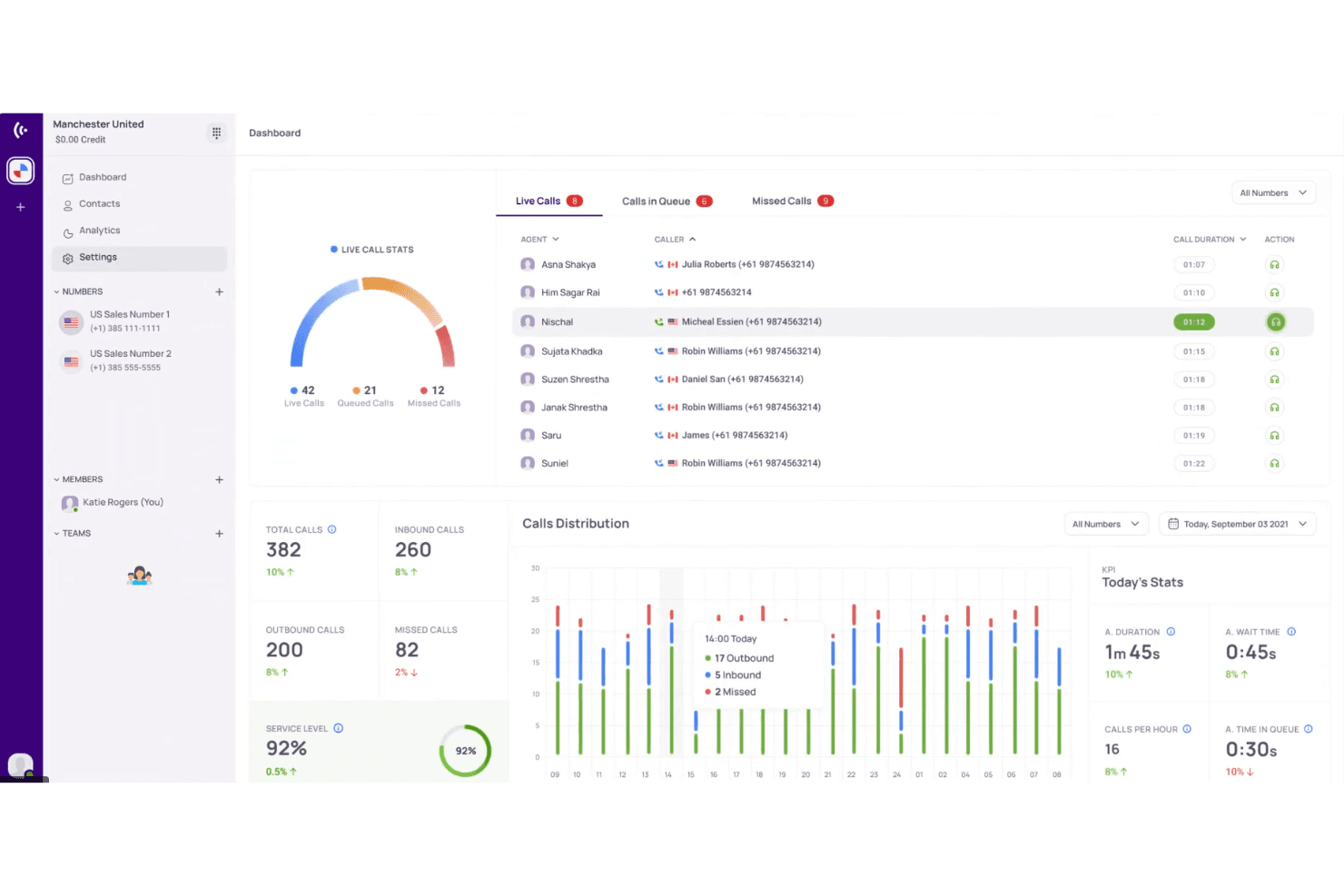
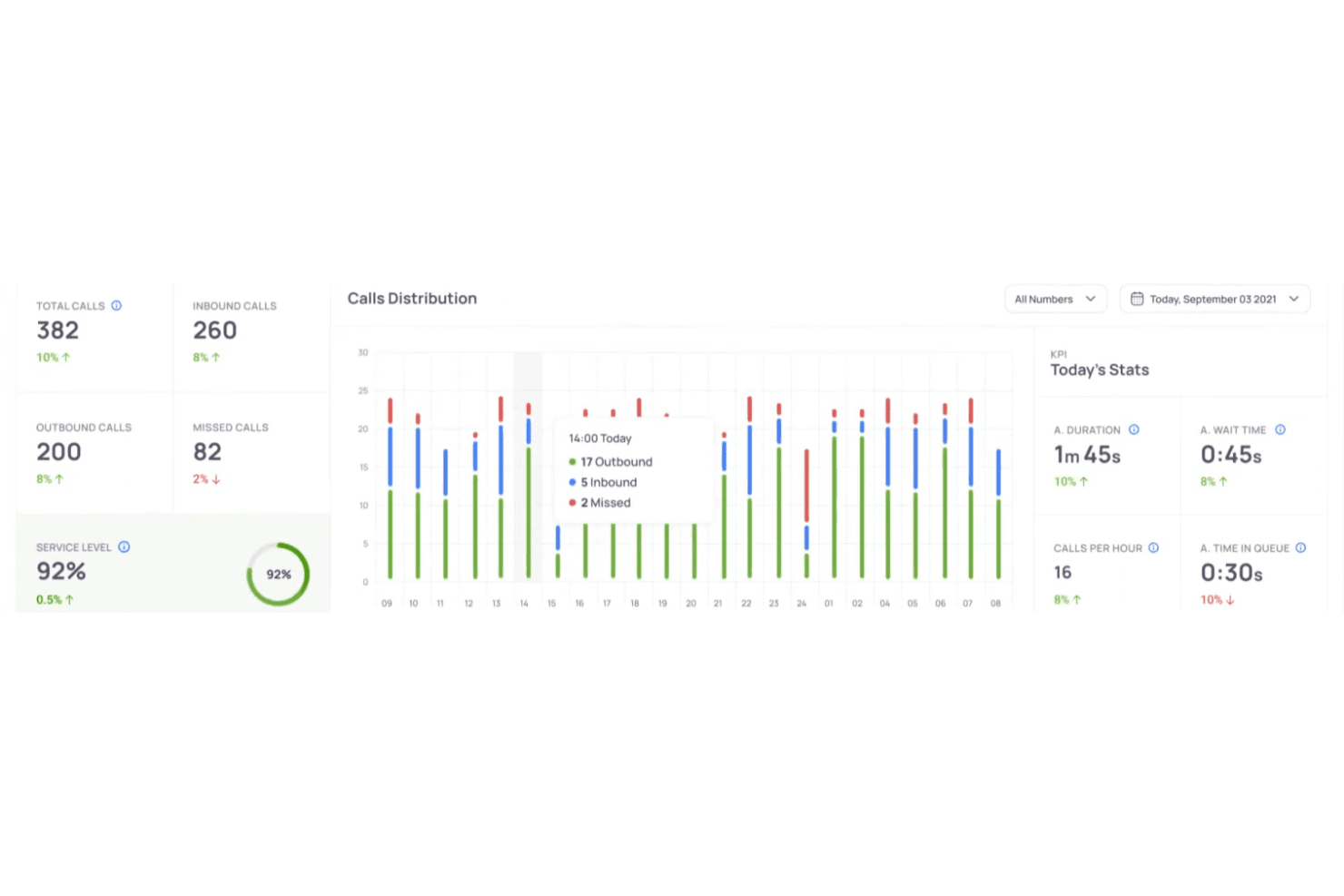
Call Analytics: This feature lets your team track call performance and gain insights into customer interactions. You can make data-driven decisions to improve your sales strategies.
Call Recording: KrispCall records your calls, allowing you to review conversations for quality assurance. It's a handy tool for training and performance evaluation.
Voicemail Transcription: Your voicemails are transcribed into text, making it easy to read and respond to messages without listening to them. This saves you time and keeps your workflow efficient.
Call Routing: KrispCall directs incoming calls to the right team members, ensuring your customers reach the right person quickly. This improves response times and customer satisfaction.
Call Monitoring: You can listen in on live calls to provide real-time feedback to your team. It helps you ensure quality control and offer immediate support.
Call Logs: KrispCall maintains detailed records of all calls, which you can access anytime to track interactions and follow up with clients. This keeps your records organized and accessible.
Ease of Use
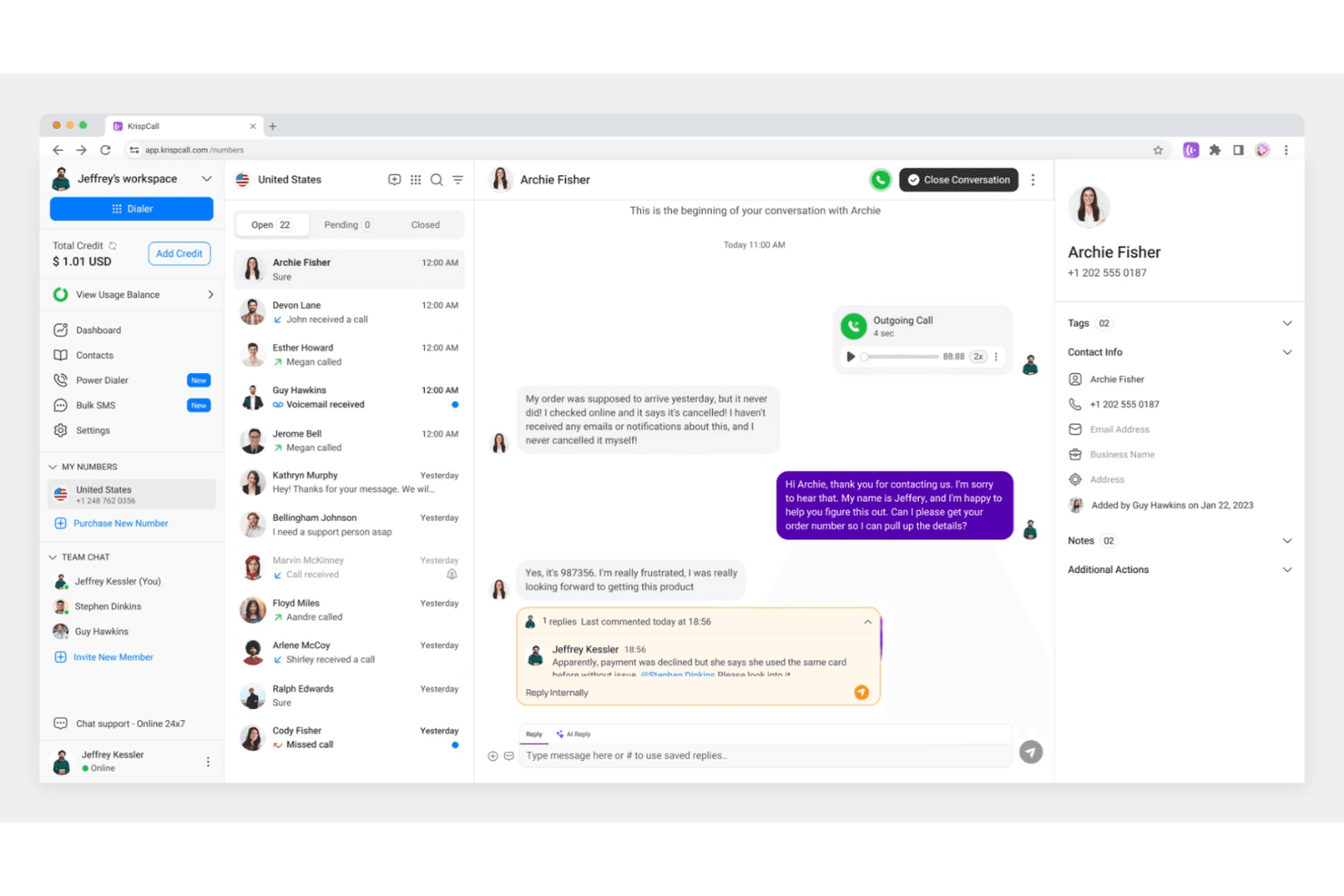
KrispCall's user-friendliness leaves room for improvement, especially if your team values an intuitive interface. While it offers a clean design, navigating through its features can be tricky for new users. You might find the onboarding process a bit lengthy, which can slow down your team's adoption. However, once your team gets the hang of it, the call management features become more manageable, offering a straightforward way to handle your sales calls.
Integrations
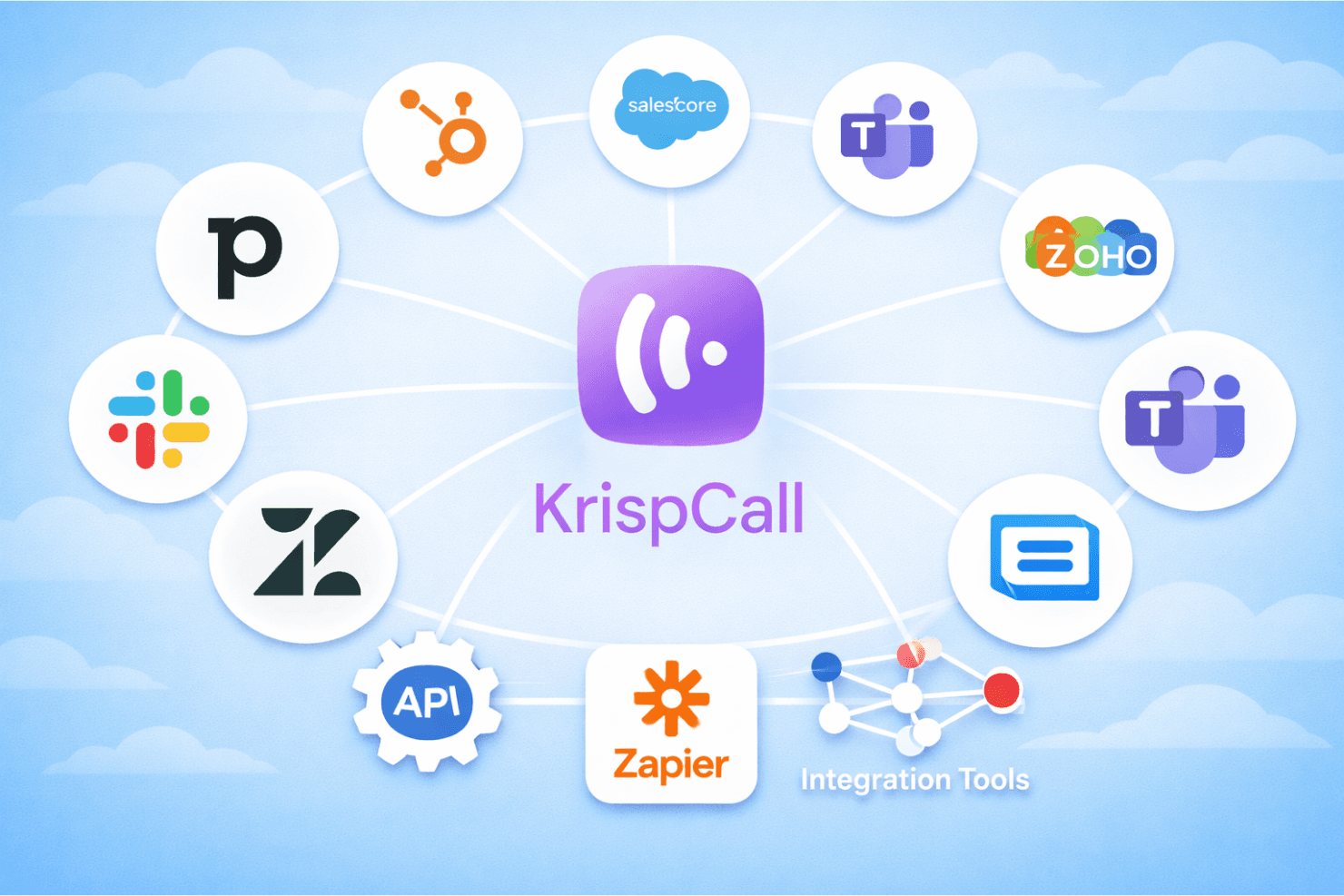
KrispCall integrates with HubSpot, Pipedrive, Salesforce, MS Teams, Zoho CRM, Slack, Zendesk, Intercom, ActiveCampaign, and SuperOffice. KrispCall also offers an API and connects with third-party integration tools like Zapier to enhance your workflow automation and productivity.
KrispCall Specs
- API: Yes
- Call Disposition: Yes
- Call Recording: Yes
- Call Tracking: Yes
- Click-to-Dial: Yes
- Custom Data Forms: Yes
- External Integrations: Yes
- Multi-User: Yes
- Notifications: Yes
- Scheduling: Yes


