

Analyse Approfondie du Logiciel Monday Sales CRM 2026

Nous évaluons les outils de manière indépendante, et les commissions contribuent au financement de nos tests. Consultez notre politique de transparence, notre méthodologie, ou suggérez un outil.
monday CRM is a customer relationship management (CRM) software that helps you organize and manage your sales pipeline effectively. It’s ideal for small to medium-sized businesses and teams in industries like tech startups and creative agencies, where collaboration and flexibility are key. monday sales CRM offers your team a streamlined way to track sales efforts and foster strong customer relationships, enhancing your ability to close deals efficiently.
monday CRM Evaluation Summary

4.6/5
- From $12/seat/month (billed annually)
- 14-day free trial + free demo available
Pourquoi faire confiance à nos recommandations de logiciels
6,700+
Reviews
20
Industry experts
16+
Evaluation factors
14
Years
Nos avis reflètent notre jugement indépendant — et non un argumentaire de vente. Découvrez comment nous restons transparents.
Pour ce guide, nous avons évalué les outils grâce à des tests pratiques et une recherche indépendante, en notant les outils selon nos critères de sélection.
Nos avis reflètent notre jugement éditorial humain, et non un argumentaire de vente.
monday CRM Overview
monday CRM is a customer relationship management (CRM) software that helps you organize and manage your sales pipeline effectively. It’s ideal for small to medium-sized businesses and teams in industries like tech startups and creative agencies, where collaboration and flexibility are key. monday sales CRM offers your team a streamlined way to track sales efforts and foster strong customer relationships, enhancing your ability to close deals efficiently.
Pros
- You can easily create automations without any coding.
- Its integrated proofing feature lets you add comments to files.
- You can create forms that live within your project as a view.
Cons
- The Gantt view isn't useful for building projects.
- Subtask columns don't replicate task structure, needing extra customization.
- Training videos use the old UI, which can confuse new users.


Is monday CRM Right For Your Needs?
Who Would be a Good Fit for monday CRM?
If you’re part of a small to medium-sized business or a creative team, monday sales CRM could be an excellent fit for you. Its flexible project management tools and customizable workflows make it ideal for tech startups and marketing agencies needing collaboration and adaptability. You can automate repetitive tasks and manage your sales pipeline effectively, which is especially beneficial for teams that prioritize efficiency and seamless communication.
- Tech Startupsmonday sales CRM is perfect for tech startups needing agile workflows and automation.
- Marketing AgenciesYour agency will benefit from its collaborative tools and proofing features for client work.
- Small BusinessesIf you’re a small business, you’ll find its ease of use and customization options invaluable.
- Project ManagersYou can streamline tasks and track progress easily with monday sales CRM’s visual tools.
- Sales TeamsIt helps your team manage leads and sales pipelines with integrated tracking features.
- Creative TeamsYour team can collaborate effectively using its integrated comments and file sharing.
Who Would be a Bad Fit for monday CRM?
If you’re part of a large enterprise with complex needs, monday sales CRM might not suit you well. Its functionality can be limited for massive data volumes and intricate reporting requirements. Manufacturing companies requiring detailed, customizable Gantt charts could find its project management features lacking. Teams relying heavily on in-depth training resources may struggle with outdated onboarding materials.
- Large EnterprisesComplex workflows and massive data handling might strain monday sales CRM’s capabilities.
- Manufacturing CompaniesYou’ll find its Gantt charts not detailed enough for intricate production schedules.
- Finance DepartmentsDetailed reporting needs may not be fully supported by monday sales CRM’s features.
- Legal FirmsThe lack of advanced document management could hinder your casework.
- Education InstitutionsIts features may not cater to the specific needs of academic administration.
- Healthcare OrganizationsRegulatory compliance and patient data management might be challenging with this CRM.
Comment nous testons et notons les outils
Nous avons passé des années à construire, affiner et améliorer notre système de test et de notation des logiciels. La grille d’évaluation est conçue pour saisir toutes les nuances dans le choix d’un logiciel et pour identifier ce qui rend un outil efficace, en mettant l’accent sur les aspects essentiels du processus de décision. Vous trouverez ci-dessous le détail exact de notre méthode de test et de notation selon sept critères. Cela nous permet de fournir une évaluation impartiale des logiciels basée sur la fonctionnalité principale, les fonctionnalités remarquables, la facilité d’utilisation, l’onboarding, le support client, les intégrations, les avis clients et le rapport qualité-prix.
Fonctionnalités principales (25 % de la note finale)
Le point de départ de notre évaluation est toujours la fonctionnalité principale de l’outil. Dispose-t-il des fonctions et caractéristiques de base auxquelles un utilisateur peut s’attendre ? Certaines de ces fonctionnalités de base sont-elles réservées à des formules plus onéreuses ? Nous attendons d’un outil qu’il tienne la comparaison avec les capacités minimales de ses concurrents.
Fonctionnalités remarquables (25 % de la note finale)
Nous évaluons ensuite les fonctionnalités remarquables, rares ou originales, qui vont au-delà des fonctionnalités principales habituellement trouvées dans ce type d’outils. Un score élevé reflète des fonctionnalités spécialisées ou innovantes qui accélèrent le produit, l’optimisent ou apportent une valeur ajoutée à l’utilisateur. Nous évaluons également la facilité d’intégration de l’outil aux autres logiciels généralement présents dans l’écosystème technologique, afin d’étendre ses fonctionnalités et son utilité. Les outils qui offrent de nombreuses intégrations natives, connexions tierces et accès API pour des intégrations personnalisées obtiennent la meilleure note.
Facilité d’utilisation (10 % de la note finale)
Nous évaluons la rapidité et la facilité d’exécution des tâches principales à l’aide de l’outil. Les logiciels les mieux notés sont bien conçus, intuitifs, proposent des applis mobiles, fournissent des modèles et facilitent la réalisation de tâches complexes.
Onboarding (10 % de la note finale)
Nous savons combien il est important d’adopter rapidement une nouvelle plateforme en équipe. Nous évaluons donc la facilité de prise en main de l’outil avec un minimum de formation. Nous étudions la rapidité avec laquelle un membre peut être opérationnel et commencer à utiliser l’outil sans expérience préalable. Un score élevé indique qu’aucun ou très peu de support est requis.
Support client (10 % de la note finale)
Nous examinons la rapidité et la facilité avec lesquelles il est possible de sortir d’une impasse et de trouver de l’aide par téléphone, chat en direct ou base de connaissances. Les outils et entreprises qui proposent une assistance en temps réel obtiennent la meilleure note, tandis que les chatbots sont les moins bien notés.
Avis clients (10 % de la note finale)
Au-delà de nos propres tests et évaluations, nous prenons en compte le score net d’appréciation des clients actuels et passés. Nous examinons la probabilité qu’ils choisissent à nouveau l’outil pour ses fonctionnalités principales. Un score élevé reflète une forte satisfaction des clients actuels ou passés.
Rapport qualité-prix (10 % de la note finale)
Enfin, en tenant compte de tous les autres critères, nous comparons le prix moyen des forfaits d’entrée de gamme avec les fonctionnalités de base et évaluons la valeur ajoutée selon les autres critères. Un logiciel offrant plus pour moins sera mieux noté.
Core Features
Contact Management: You get a central place to store all your contacts with details, communication histories, and linked deals. You can import them from Excel or auto-create contacts from your emails, so your team always has a clean, up-to-date list.
Lead Capturing and Pipeline Tracking: You can collect leads via forms or imports, track them through custom stages, and move deals with drag‑and‑drop. You see your entire sales funnel and can quickly spot where deals stall.
Email Sync and Tracking: You sync Gmail or Outlook to centralize email conversations, send bulk or templated emails, and get alerts when leads open or click. That way, you reach out at the right time and don’t miss follow‑up chances.
Automations: You set up no‑code rules that automate manual tasks like updating deal stages, sending reminders, or logging emails. It saves hours and keeps work consistent without extra effort.
Dashboards and Sales Forecasting: You get customizable dashboards that show pipeline status, team performance, and revenue forecasts by month or rep. These visuals help you spot trends and hit targets more reliably.
Activity Tracking And Team Goals: You track calls, meetings, and emails in one feed and monitor reps’ activity and quota progress. It gives you a clear picture of who’s doing what and where coaching might help.
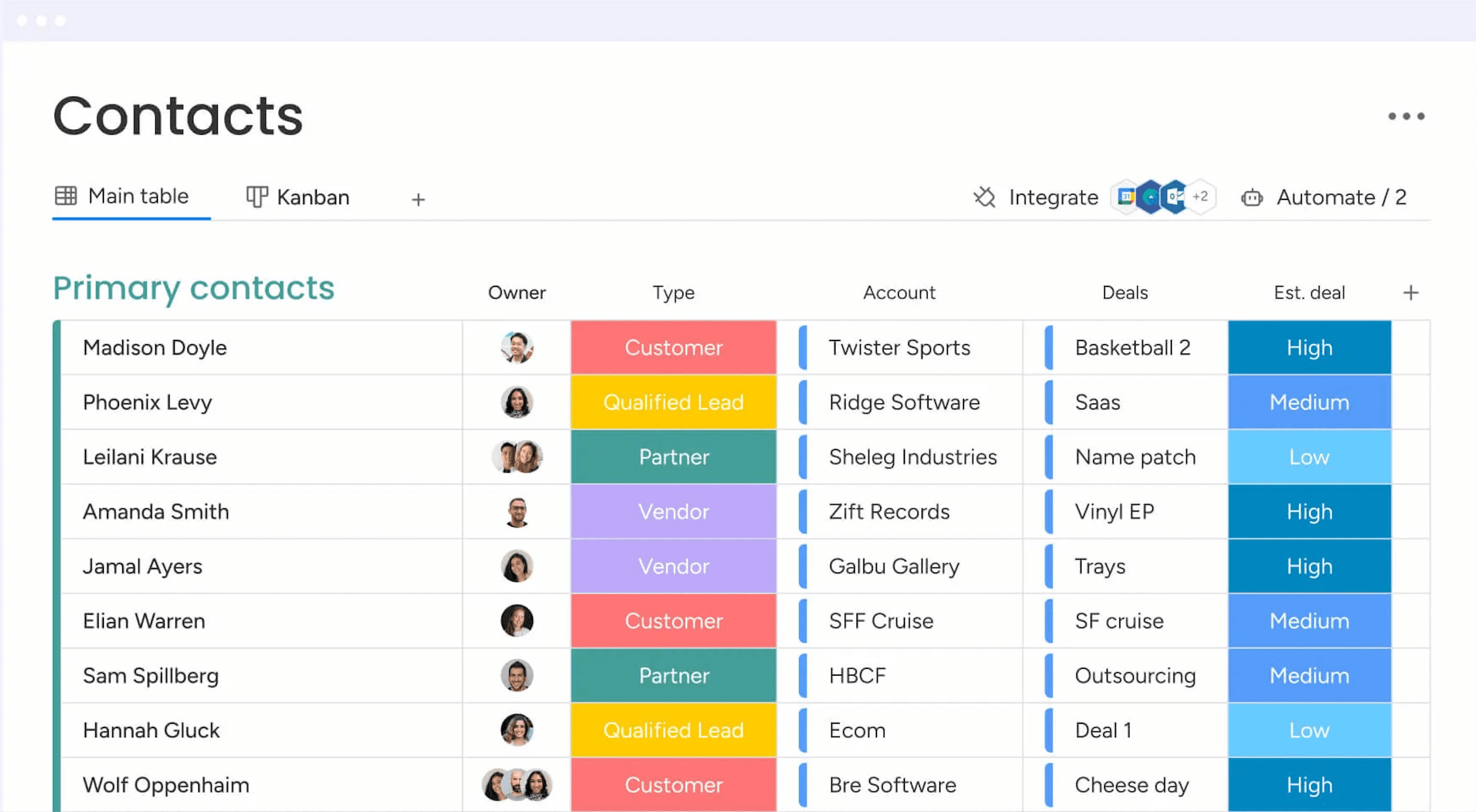
Standout Features
Quotes & Invoices: You can create, customize, send, and track quotes and invoices right within your CRM, pulling data from your contacts and deals. That means you skip back and forth between apps and speed up getting paid.
Sequences: You build multi‑step engagement flows (like email campaigns, reminders, task updates) that guide leads through your funnel automatically. You keep prospects moving without missing a beat or manually nudging them.
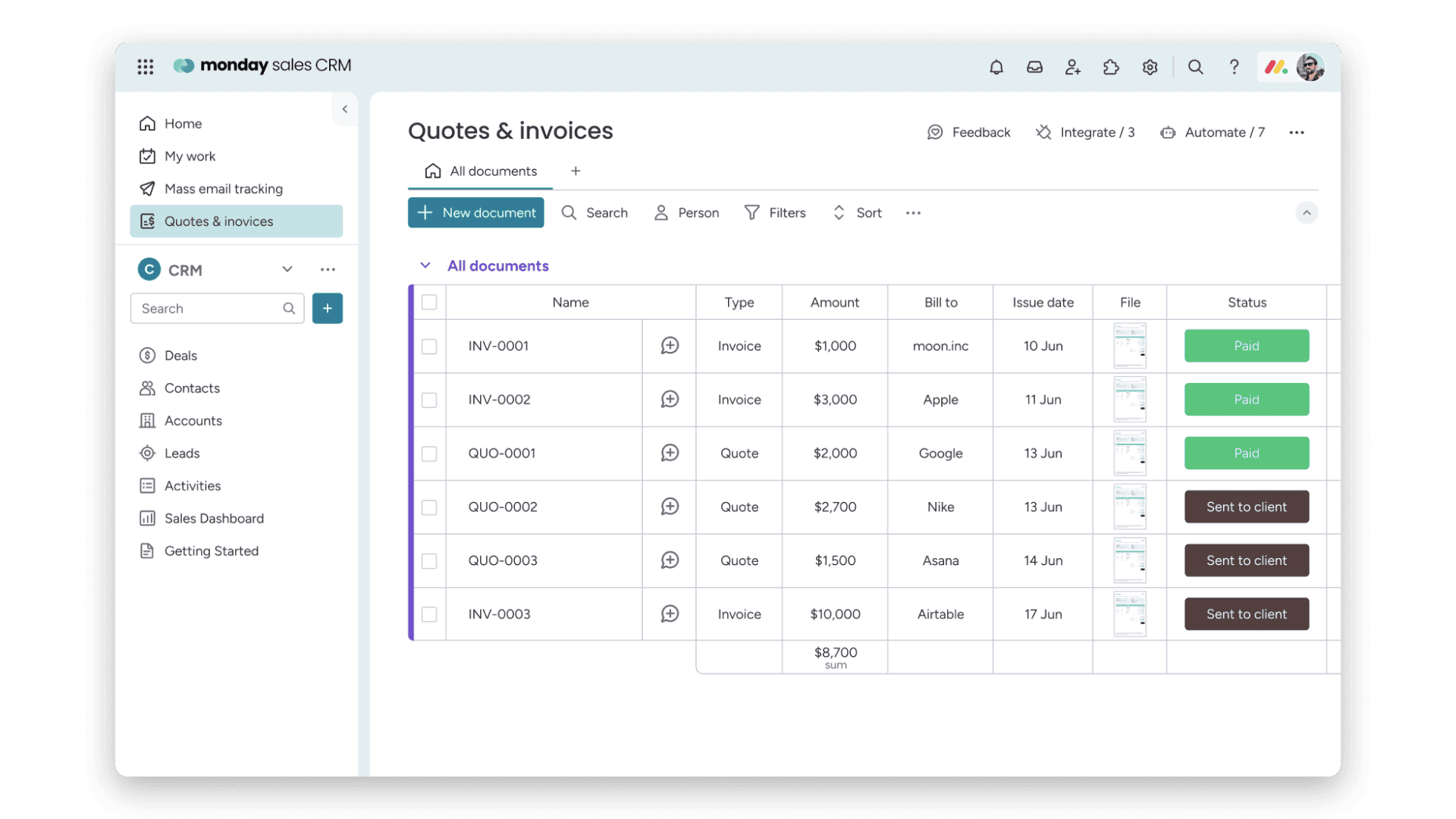
Ease of Use
Monday CRM offers a user-friendly interface that helps your team get up to speed quickly, though some users find the multitude of features a bit overwhelming. Its drag-and-drop functionality and visual dashboards make task management intuitive. However, if your team prefers simplicity, the extensive capabilities might require a learning curve. The platform's customization options provide flexibility, but you might need time to explore and configure them to best suit your workflow.
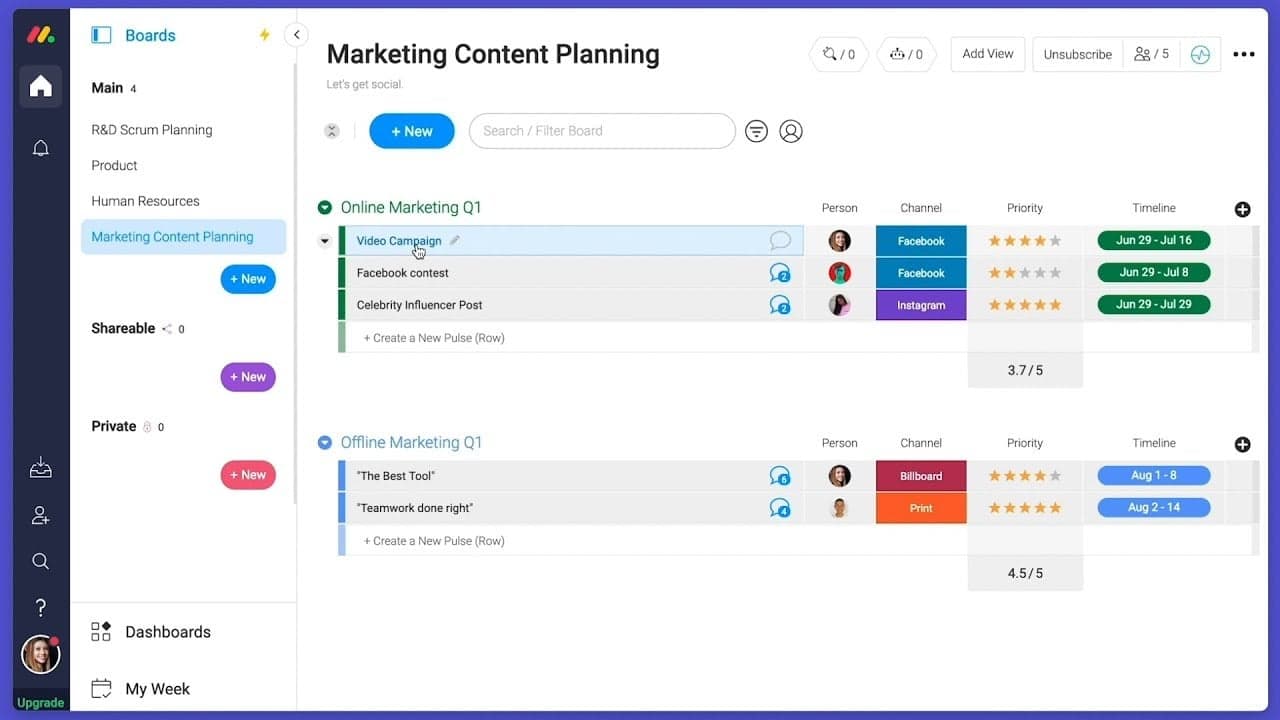
Onboarding
Monday CRM provides a smooth onboarding experience with clear tutorials and a user-friendly setup process that helps your team get started quickly. The platform offers a range of resources, including webinars and a knowledge base, to support new users. Its step-by-step guides and personalized onboarding sessions ensure you find value quickly. However, the depth of features might require some exploration to fully utilize, but the available support makes this manageable.

Customer Support
Monday CRM offers robust customer support with multiple channels like live chat, email, and an extensive help center to assist your team. Users appreciate the prompt and knowledgeable responses they receive from the support team. The availability of 24/7 support ensures you get help whenever needed. Additionally, the platform's comprehensive documentation and community forums provide valuable insights and solutions, helping you resolve issues efficiently and keep your projects on track. Monday CRM integrates natively with Slack, Google Drive, Microsoft Teams, Zoom, Trello, Dropbox, HubSpot, Shopify, LinkedIn, and Outlook.
Monday CRM also offers an API and connects with third-party integration tools like Zapier.

Value for Money
monday CRM pricing offers strong value, especially if your team wants something easy to use without sacrificing flexibility. Although there is no free plan, monday CRM does offer a 14-day free trial.
You get a lot at the lower tiers, including automation and reporting tools that work well for small to midsize teams. Higher plans add more control, but smaller teams won’t need Enterprise to get full use out of it.
- Basic Plan: Contact management, boards, and limited automations
- Standard Plan: Activity tracking, custom pipelines, and calendar view
- Pro Plan: Sales forecasting, advanced reporting, and higher automation limits
- Enterprise Plan: Admin controls, multi-level permissions, and enterprise-grade security features

monday CRM Specs
- 2-Factor Authentication: No
- API: Yes
- Calendar Management: Yes
- Call Tracking: No
- Campaign Management: No
- Click-to-Dial: No
- Contact Management: Yes
- Contact Sharing: No
- Custom Data Forms: Yes
- Customer Management: Yes
- Dashboard: Yes
- Data Export: Yes
- Data Import: Yes
- Data Visualization: Yes
- Email Integration: Yes
- External Integrations: Yes
- File Sharing: Yes
- File Transfer: Yes
- Google Apps Integration: Yes
- Lead Management: Yes
- Lead Scoring: Yes
- Marketing Automation: Yes
- Mobile App: No
- Multi-User: Yes
- Notifications: Yes
- Pipeline Management: Yes
- Sales Automation: Yes
- Scheduling: Yes
- Social-Media Integration: Yes
- Task Scheduling/Tracking: Yes
- Third-Party Plugins/Add-Ons: Yes
5 façons dont monday CRM se distingue du CRM que votre équipe déteste
Le fait que les équipes commerciales entretiennent une relation compliquée avec leurs CRM n’est un secret pour personne.Un rapport de monday CRM a révélé que 81 % des responsables commerciaux envisagent de changer de CRM cette année. Les causes en sont que les CRM sont notoirement difficiles à utiliser, chronophages et d’une rigidité douloureuse. Ce n’est […]

monday CRM FAQs
monday CRM Company Overview & History
Monday.com, initially named daPulse, was founded in 2012 by Roy Mann and Eran Zinman as an internal tool at Wix.com. Recognizing its potential, they spun it off as a separate company. After launching commercially in 2014, they rebranded to monday.com in 2017. The company evolved from a team management tool into a work operating system, and now offers CRM capabilities through its platform.