

Reseña de Oracle NetSuite: Ventajas, Desventajas, Funciones y Precios Explicados
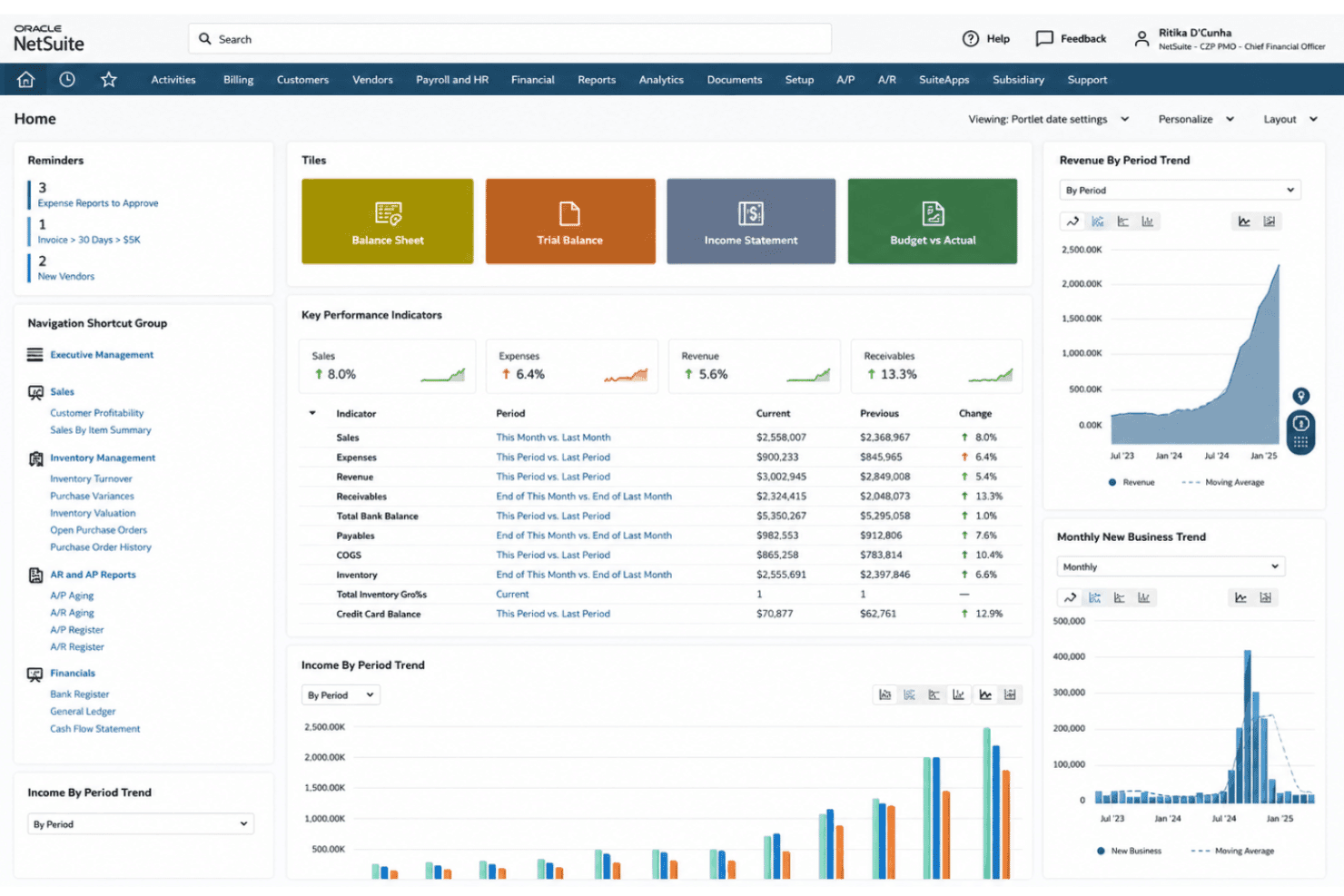
Habiendo probado Oracle NetSuite para la gestión de ingresos, he descubierto que su verdadero poder radica en unificar las finanzas y la automatización, aportando claridad cuando la complejidad amenaza el crecimiento.

Analizamos las herramientas de forma independiente, y las comisiones ayudan a financiar nuestras pruebas. Consulta nuestra política de transparencia, nuestra metodología, o sugiere una herramienta.
Oracle NetSuite is a revenue management system built into a full cloud ERP, covering revenue recognition, billing, financial close, and compliance reporting in one platform. It's worth considering if your team needs to manage complex revenue schedules and multi-element arrangements alongside core financials. If you're weighing it against something like Zuora, NetSuite is the stronger choice when revenue management is part of a broader operational and financial picture—not just a standalone subscription billing problem.
Oracle NetSuite Evaluation Summary
4.2/5
- Pricing upon request
- Free demo available
Por qué confiar en nuestras recomendaciones de software
6,700+
Reviews
20
Industry experts
16+
Evaluation factors
14
Years
Nuestras reseñas reflejan nuestro criterio independiente, no un discurso de ventas. Descubra cómo mantenemos la transparencia.
Para esta guía, evaluamos las herramientas mediante pruebas prácticas e investigación independiente, puntuando las herramientas según nuestros criterios de selección.
Nuestras reseñas reflejan nuestro criterio editorial humano, no un discurso de ventas.
Oracle NetSuite Overview
In my experience, Oracle NetSuite stands out for its deep automation, customizable revenue recognition, and reliable integrations, especially for businesses juggling global entities or shifting pricing models. Pricing is on the higher side and onboarding takes time—so I’d recommend choosing it if you need unified workflows and a complete view of financial performance versus the fastest setup or the lowest entry cost. I think finance-driven teams and growing companies seeking enterprise resource planning and revenue management in one platform will get the most value, especially if they already work with multiple business units or have complex compliance requirements.
Pros
- Automates multi-element revenue recognition for diverse contract types
- Provides real-time dashboards for compliance and revenue visibility
- Supports advanced audit trails and complex regulatory standards
Cons
- Pricing is higher than most similar solutions
- Customization and reporting often require expert configuration
- Initial setup is lengthy for most growing businesses
Is Oracle NetSuite Right For Your Needs?
Who Would be a Good Fit for Oracle NetSuite?
Oracle NetSuite is a great option for companies with complex requirements, multi-entity structures, or global operations that need unified workflows, automated compliance, and custom rule engines. The solution really shines for finance, accounting, project management, and RevOps teams in industries where regulatory demands, advanced analytics, or consolidated reporting are essential. Businesses planning for rapid growth and teams needing Oracle NetSuite ERP as a full-suite revenue management platform are going to get the most value.
- Multi-Subsidiary EnterprisesNetSuite’s global entity management makes it easy to consolidate revenue and comply with local rules worldwide.
- SaaS ProvidersAutomated subscription billing, usage-based revenue tracking, and audit-ready compliance suit software and recurring revenue models.
- Manufacturing FirmsAdvanced inventory, order management, and contract revenue scheduling work together for true end-to-end finance operations.
- Large Retail ChainsRetailers can handle complex billing, point-of-sale integration, and unified reporting across multiple storefronts and fulfillment types.
- Finance DepartmentsAccounting and finance teams, including CFOs, benefit from real-time dashboards, KPIs, compliance workflows, and advanced audit tracking.
- Publicly Traded CompaniesBuilt-in controls for ASC 606 and IFRS 15 help meet strict reporting deadlines and regulatory scrutiny.
Who Would be a Bad Fit for Oracle NetSuite?
Oracle NetSuite can be overkill for smaller businesses, teams with simple needs, or industries that don’t require detailed revenue controls or compliance management. The time and expertise needed for setup often outweigh the benefits for lean teams or those without a technical background. If you don’t need consolidated financials, advanced rule engines, or audit-level workflows, simpler or less expensive tools might fit better.
- Small StartupsStartups with a single revenue stream and basic invoicing don’t need NetSuite’s extensive automation and complexity.
- FreelancersSolo operators face long onboarding times and pay for features far beyond their needs.
- Nonprofit OrganizationsUnless they require global consolidation or complex grants, most nonprofits don’t need advanced revenue scheduling or compliance tools.
- Local Service FirmsPlumbers, small agencies, or local shops gain little from functions designed for high volume, multi-entity, or regulated industries.
- Teams with Limited ITTeams lacking tech resources or ERP experience are going to struggle with setup and configuration demands.
- Simple Project TeamsDepartments needing only basic billing or project financials might find NetSuite’s multi-layered controls and dashboards excessive.
Cómo Probamos y Evaluamos Herramientas
Hemos pasado años construyendo, refinando y mejorando nuestro sistema de pruebas y evaluación de software. La rúbrica está diseñada para capturar las complejidades de la selección de software y lo que hace que una herramienta sea efectiva, centrándose en aspectos críticos del proceso de toma de decisiones. A continuación, puede ver exactamente cómo funcionan nuestras pruebas y evaluación a través de siete criterios. Esto nos permite ofrecer una evaluación imparcial del software basada en la funcionalidad principal, características destacadas, facilidad de uso, incorporación, soporte al cliente, integraciones, opiniones de los clientes y relación calidad-precio.
Funcionalidad Principal (25% de la puntuación final)
El punto de partida de nuestra evaluación es siempre la funcionalidad principal de la herramienta. ¿Tiene las características y funciones básicas que un usuario esperaría ver? ¿Alguna de esas funciones principales está restringida a planes de precios superiores? En esencia, esperamos que una herramienta cumpla con las capacidades básicas de sus competidores.
Características Destacadas (25% de la puntuación final)
A continuación, evaluamos características poco comunes que van más allá de la funcionalidad principal que suelen ofrecer herramientas similares. Una puntuación alta refleja funciones especializadas o únicas que hacen que el producto sea más rápido, eficiente o aporte un valor adicional al usuario. También evaluamos lo fácil que es integrar la herramienta con las demás del stack tecnológico para ampliar la utilidad y el alcance del software. Las herramientas que ofrecen integraciones nativas, conexiones de terceros y acceso API para crear integraciones personalizadas reciben las mejores puntuaciones.
Facilidad de Uso (10% de la puntuación final)
Consideramos qué tan rápido y fácil es realizar las tareas definidas en la funcionalidad principal usando la herramienta. El software que obtiene una alta puntuación está bien diseñado, es intuitivo de usar, ofrece aplicaciones móviles, proporciona plantillas y hace que tareas relativamente complejas parezcan sencillas.
Incorporación (10% de la puntuación final)
Sabemos lo importante que es la rápida adopción por parte del equipo de una nueva plataforma, por lo que evaluamos lo fácil que es aprender y utilizar una herramienta con una formación mínima. Evaluamos qué tan rápido un miembro del equipo puede configurarse y empezar a usar la herramienta sin experiencia previa. Las soluciones con puntuación alta indican que se requiere poco o ningún soporte.
Soporte al Cliente (10% de la puntuación final)
Revisamos cuán rápido y sencillo es encontrar ayuda y resolver problemas a través de teléfono, chat en vivo o base de conocimientos. Las herramientas y compañías que brindan soporte en tiempo real obtienen las mejores puntuaciones, mientras que los chatbots reciben las peores.
Opiniones de Clientes (10% de la puntuación final)
Además de nuestras propias pruebas y evaluaciones, consideramos el puntaje neto de promotores de los clientes actuales y anteriores. Revisamos su probabilidad, si tuvieran la opción, de volver a elegir la herramienta para la funcionalidad principal. Un software con puntuación alta refleja un puntaje neto de promotores elevado por parte de clientes actuales o anteriores.
Relación Calidad-Precio (10% de la puntuación final)
Por último, considerando todos los demás criterios, revisamos el precio promedio de los planes de nivel inicial frente a las funciones principales y consideramos el valor de los otros criterios de evaluación. El software que ofrece más, por menos, obtendrá una puntuación más alta.
Core Features
Automated Revenue Recognition
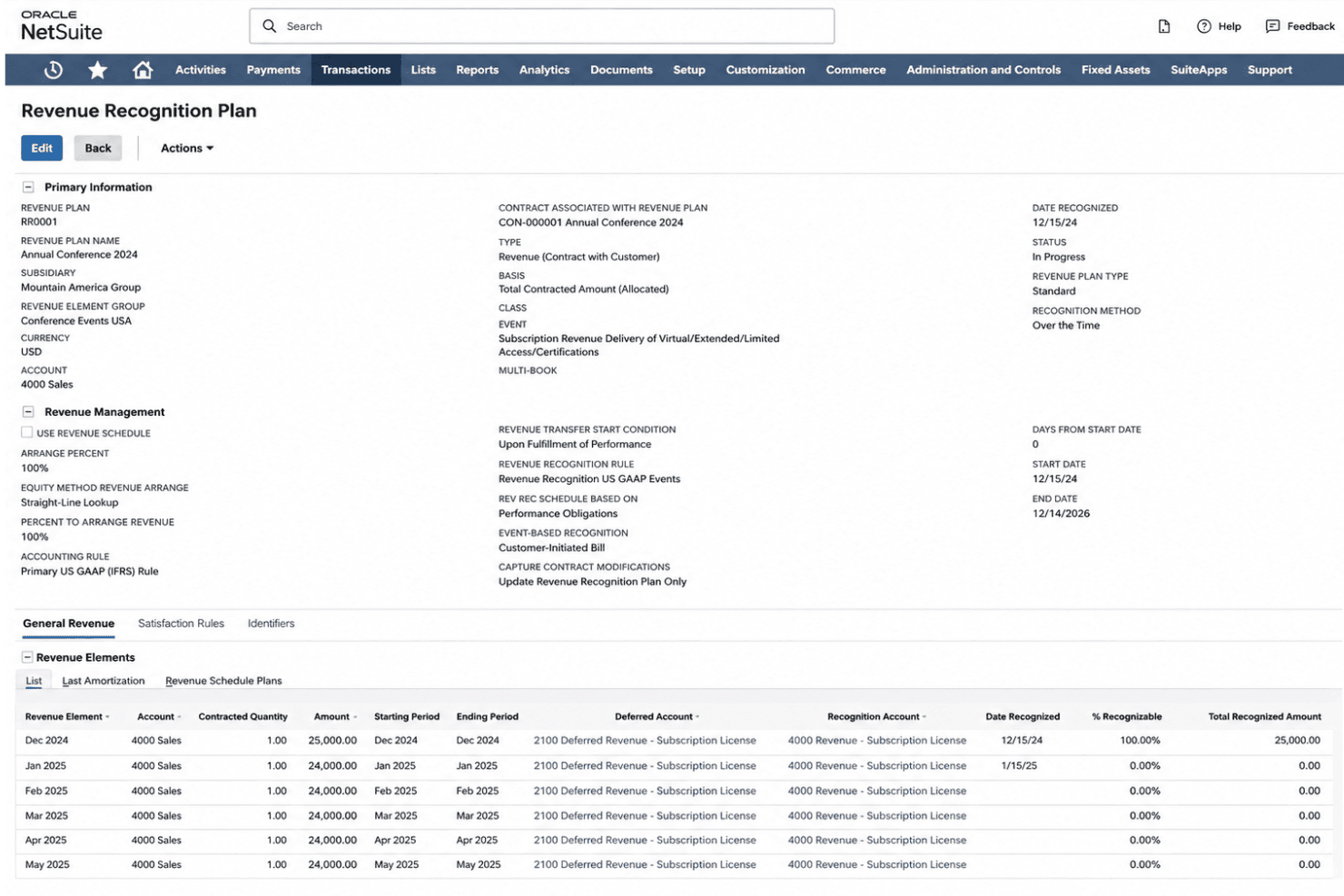
NetSuite recognizes revenue automatically based on contract terms and events. You can manage subscription billing, usage charges, and multi-element arrangements without spreadsheets.
Real-Time Revenue Reporting
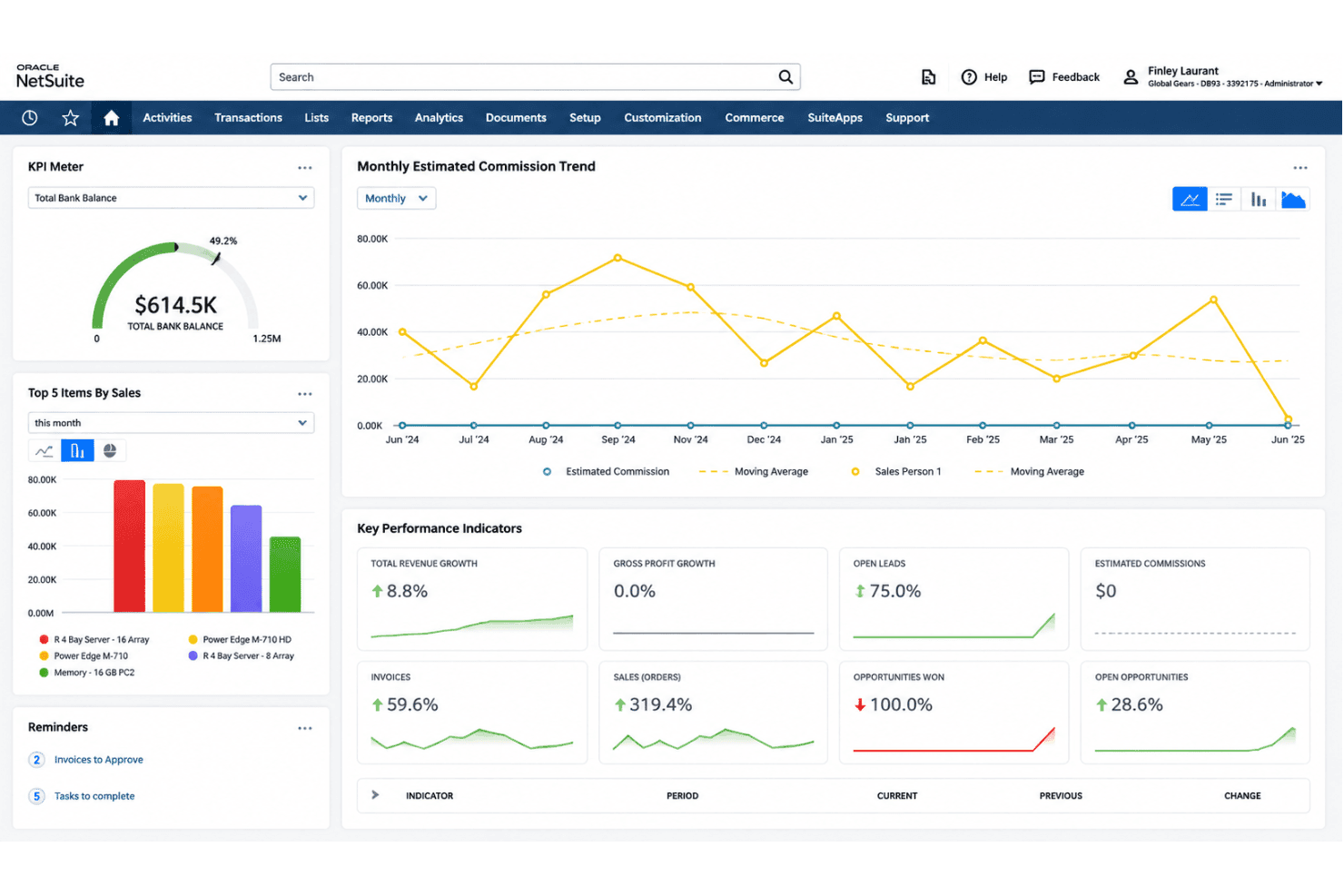
This feature delivers real-time reporting dashboards with drill-down analytics. Finance teams can track actuals, liabilities, and forecasts side by side.
Compliance Management
NetSuite includes built-in controls for ASC 606 and IFRS 15 compliance. Regulatory changes, tax management, and audit requests are managed through fully tracked processes.
Contract Management
Manage contract creation, amendments, renewals, and terminations all in one place. This keeps your billing, accounts payable, and revenue schedules accurate even with frequent contract changes.
Revenue Forecasting
Generate projectable revenue models and budgeting frameworks based on open deals, current contracts, and deferred revenue. You get clear pipeline-to-cashflow visibility for leadership reviews.
Automated Billing
The system supports flexible billing cycles, usage ratings, and milestone-based invoicing. This minimizes manual intervention and errors during complex billing periods, keeping accounts receivable current.
Ease of Use
Oracle NetSuite is packed with options, but users often say the interface feels dense and takes real effort to master. Once set up, I think the customizable dashboards, powerful rule engines, and audit trails justify the initial learning curve, especially for teams handling complex or global revenue processes. Still, expect onboarding to take time, especially for teams at the start of their digital transformation journey who aren’t yet familiar with advanced finance software.
Integrations
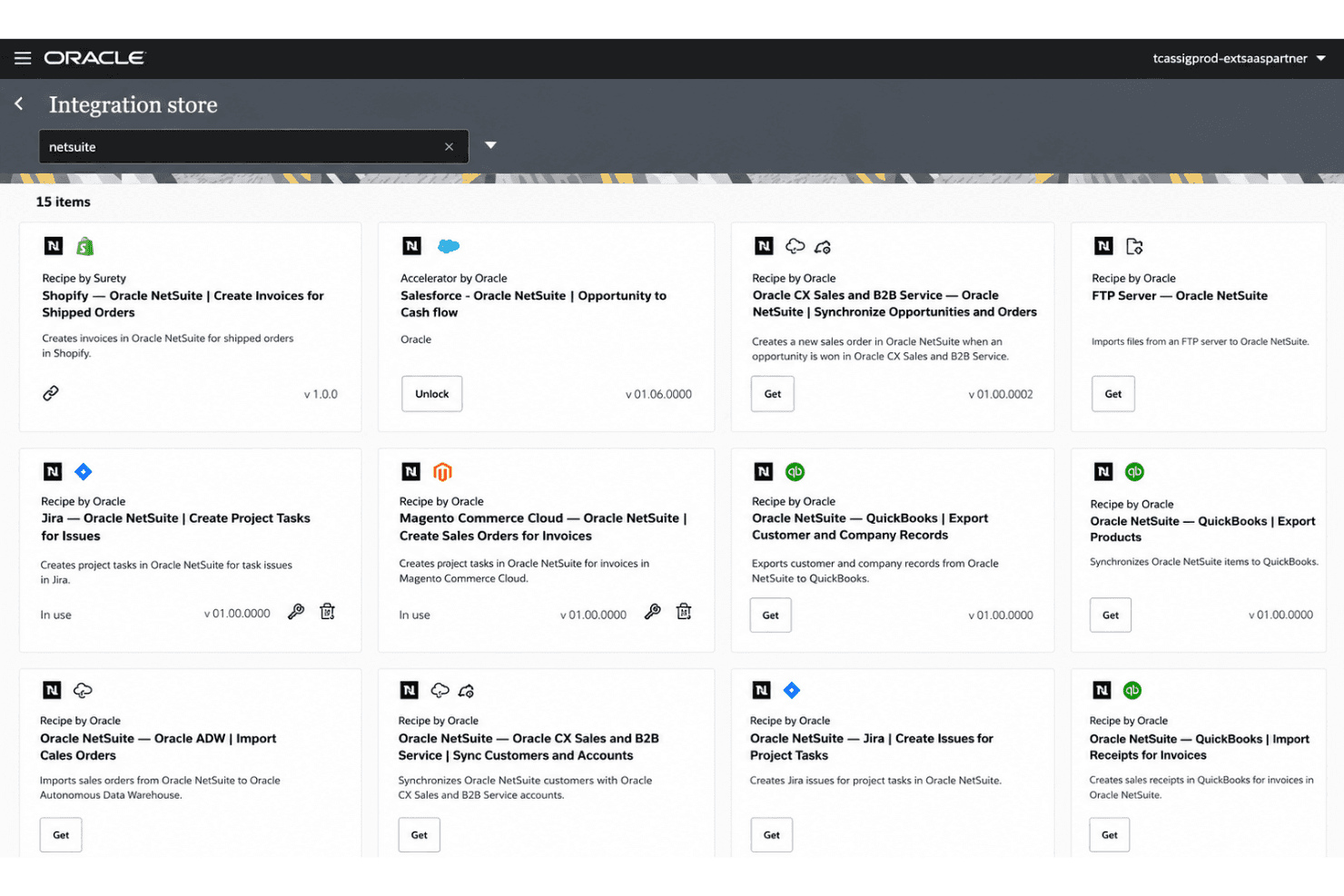
Oracle NetSuite integrates with Salesforce, Shopify, and Microsoft Office 365, among others.
NetSuite also offers a robust API and connects with third-party integration platforms—including Celigo and the NetSuite Connector—for extended connectivity. The SuiteApps marketplace further expands what’s possible, giving you access to a broad ecosystem of pre-built integrations across HR, finance, logistics, and more.
Notable commerce connections include Amazon, enabling unified order and inventory data across platforms. Teams migrating from QuickBooks or Xero will find dedicated migration tools and significantly deeper feature depth in the transition.
Oracle NetSuite Specs
- API: Yes
- Approval Workflows: Yes
- Audit Trail: Yes
- Budgeting: Yes
- Calendar Management: Yes
- Compliance Tracking: Yes
- Custom Reports: Yes
- Customer Management: Yes
- Dashboard: Yes
- Data Export: Yes
- Data Import: Yes
- Data Visualization: Yes
- Document Management: Yes
- Expense Tracking: Yes
- External Integrations: Yes
- Forecasting: Yes
- Inventory Tracking: Yes
- Multi-Currency: Yes
- Multi-User: Yes
- Notifications: Yes
- Prioritization: Yes
- Process Reporting: Yes
- Project Management: Yes
- Resource Management: Yes
- Risk Assessment: Yes
- Roadmapping: Yes
- Scheduling: Yes
- Supplier Management: Yes
- Third-Party Plugins/Add-Ons: Yes
- Workflow Management: Yes