

Reseña de SuiteCRM: Ventajas, Desventajas, Funciones y Precios
SuiteCRM destaca por su personalización y rentabilidad, lo que la convierte en la favorita de los equipos que buscan soluciones CRM de código abierto y flexibles.

Analizamos las herramientas de forma independiente, y las comisiones ayudan a financiar nuestras pruebas. Consulta nuestra política de transparencia, nuestra metodología, o sugiere una herramienta.
SuiteCRM is an open source crm software built for teams that need full control over their sales pipeline, contact data, and customer workflows without paying per-seat licensing fees. I'd mainly consider it if your team has the technical capacity to self-host and configure a CRM, but wants to avoid the recurring subscription costs that come with tools like Salesforce—while still getting a feature set that goes well beyond lightweight free-tier options.
SuiteCRM Evaluation Summary
4.2/5
- Pricing upon request
- 30-day free trial + free demo available
Por qué confiar en nuestras recomendaciones de software
6,700+
Reviews
20
Industry experts
16+
Evaluation factors
14
Years
Nuestras reseñas reflejan nuestro criterio independiente, no un discurso de ventas. Descubra cómo mantenemos la transparencia.
Para esta guía, evaluamos las herramientas mediante pruebas prácticas e investigación independiente, puntuando las herramientas según nuestros criterios de selección.
Nuestras reseñas reflejan nuestro criterio editorial humano, no un discurso de ventas.
SuiteCRM Overview
In my opinion, SuiteCRM is a solid choice for businesses that need a customizable and cost-effective CRM solution. Its standout features allow for great flexibility, but its ease of use might be a hurdle for some, especially those without technical expertise. Compared to other open source CRMs, SuiteCRM offers a good balance of features and affordability, making it a good fit for small to medium-sized businesses and non-profits.
However, its interface is less user friendly than some competitors, and onboarding can be complex without proper guidance. If you prioritize customization and don't mind a learning curve, SuiteCRM could be the right choice for your team.
Pros
- You can customize SuiteCRM to fit your team's unique needs.
- It offers a wide range of features without extra costs.
- It has strong community support for troubleshooting and advice.
Cons
- The user interface feels outdated compared to others.
- Your team might face a steep learning curve initially.
- It requires regular maintenance and updates to function smoothly.
Is SuiteCRM Right For Your Needs?
Who Would be a Good Fit for SuiteCRM?
SuiteCRM is great for small to mid-sized businesses that need a customizable CRM without hefty costs. If you're in tech startups or non-profits, you can use SuiteCRM since its innate flexibility can help tailor solutions to your unique processes. Its strong feature set, like sales automation and customer support tools, makes it ideal for teams focusing on customer relationship management. You can benefit from the active community support and extensive documentation, which help you solve issues quickly.
- Tech StartupsSuiteCRM's customization helps your team adapt quickly to changing business needs.
- Non-ProfitsIts cost-effective solution allows you to manage donor relationships efficiently.
- Healthcare ProvidersYou can manage patient interactions and streamline communication with its robust contact management.
- Educational InstitutionsSuiteCRM helps you track student interactions and improve recruitment processes.
- Sales TeamsWith its sales automation, you can streamline lead management and close deals faster.
- Marketing DepartmentsSuiteCRM's campaign management tools let you run targeted marketing campaigns effectively.
Who Would be a Bad Fit for SuiteCRM?
SuiteCRM isn't the best choice for large enterprises needing highly scalable solutions with advanced analytics and reporting. If your team requires a modern, intuitive interface, SuiteCRM might feel outdated. Industries like finance or legal, which demand top-tier security and compliance features, may find SuiteCRM lacking. Its steep learning curve can also be a barrier if you don't have dedicated IT support to manage the system.
- Large EnterpriseSuiteCRM struggles with scalability and lacks advanced analytics for big data needs.
- Financial ServicesYou might find its security features insufficient for stringent compliance requirements.
- Legal FirmsWithout specialized legal case management tools, SuiteCRM won't meet your specific needs.
- Retail ChainsSuiteCRM's inventory and supply chain management features are limited for large-scale retail operations.
- FreelancersIts complexity and feature set are overkill for simple client management tasks.
- Government AgenciesSuiteCRM doesn't offer the high-level security and compliance features you need for sensitive data.
Cómo Probamos y Evaluamos Herramientas
Hemos pasado años construyendo, refinando y mejorando nuestro sistema de pruebas y evaluación de software. La rúbrica está diseñada para capturar las complejidades de la selección de software y lo que hace que una herramienta sea efectiva, centrándose en aspectos críticos del proceso de toma de decisiones. A continuación, puede ver exactamente cómo funcionan nuestras pruebas y evaluación a través de siete criterios. Esto nos permite ofrecer una evaluación imparcial del software basada en la funcionalidad principal, características destacadas, facilidad de uso, incorporación, soporte al cliente, integraciones, opiniones de los clientes y relación calidad-precio.
Funcionalidad Principal (25% de la puntuación final)
El punto de partida de nuestra evaluación es siempre la funcionalidad principal de la herramienta. ¿Tiene las características y funciones básicas que un usuario esperaría ver? ¿Alguna de esas funciones principales está restringida a planes de precios superiores? En esencia, esperamos que una herramienta cumpla con las capacidades básicas de sus competidores.
Características Destacadas (25% de la puntuación final)
A continuación, evaluamos características poco comunes que van más allá de la funcionalidad principal que suelen ofrecer herramientas similares. Una puntuación alta refleja funciones especializadas o únicas que hacen que el producto sea más rápido, eficiente o aporte un valor adicional al usuario. También evaluamos lo fácil que es integrar la herramienta con las demás del stack tecnológico para ampliar la utilidad y el alcance del software. Las herramientas que ofrecen integraciones nativas, conexiones de terceros y acceso API para crear integraciones personalizadas reciben las mejores puntuaciones.
Facilidad de Uso (10% de la puntuación final)
Consideramos qué tan rápido y fácil es realizar las tareas definidas en la funcionalidad principal usando la herramienta. El software que obtiene una alta puntuación está bien diseñado, es intuitivo de usar, ofrece aplicaciones móviles, proporciona plantillas y hace que tareas relativamente complejas parezcan sencillas.
Incorporación (10% de la puntuación final)
Sabemos lo importante que es la rápida adopción por parte del equipo de una nueva plataforma, por lo que evaluamos lo fácil que es aprender y utilizar una herramienta con una formación mínima. Evaluamos qué tan rápido un miembro del equipo puede configurarse y empezar a usar la herramienta sin experiencia previa. Las soluciones con puntuación alta indican que se requiere poco o ningún soporte.
Soporte al Cliente (10% de la puntuación final)
Revisamos cuán rápido y sencillo es encontrar ayuda y resolver problemas a través de teléfono, chat en vivo o base de conocimientos. Las herramientas y compañías que brindan soporte en tiempo real obtienen las mejores puntuaciones, mientras que los chatbots reciben las peores.
Opiniones de Clientes (10% de la puntuación final)
Además de nuestras propias pruebas y evaluaciones, consideramos el puntaje neto de promotores de los clientes actuales y anteriores. Revisamos su probabilidad, si tuvieran la opción, de volver a elegir la herramienta para la funcionalidad principal. Un software con puntuación alta refleja un puntaje neto de promotores elevado por parte de clientes actuales o anteriores.
Relación Calidad-Precio (10% de la puntuación final)
Por último, considerando todos los demás criterios, revisamos el precio promedio de los planes de nivel inicial frente a las funciones principales y consideramos el valor de los otros criterios de evaluación. El software que ofrece más, por menos, obtendrá una puntuación más alta.
Core Features
Contact Management
Manage your contacts easily with SuiteCRM's centralized database. Track interactions and build stronger relationships with clients.
Lead & Opportunity Management
Capture leads, qualify them, and move deals through a clear pipeline. Helps sales teams stay organized from first touch to closed deal.
Quotes & Sales Tracking
Create and manage quotes and sales-related records inside the CRM. Useful for keeping deal details tied to the customer record.
Campaign Management
Plan and run email marketing campaigns directly in SuiteCRM using reusable templates, then track responses and results. This helps you measure what’s working and what’s not.
Case Management
Log customer issues as cases, assign them to the right people, and track progress to resolution. Keeps support work from getting messy.
Reporting Dashboards
Generate reports to monitor pipeline activities, forecasting, and support performance. This makes it easier to spot trends and improve decisions.
Knowledge Base
Build a self-serve help library so customers and agents can find answers faster. Helps reduce repetitive support questions.
Ease of Use
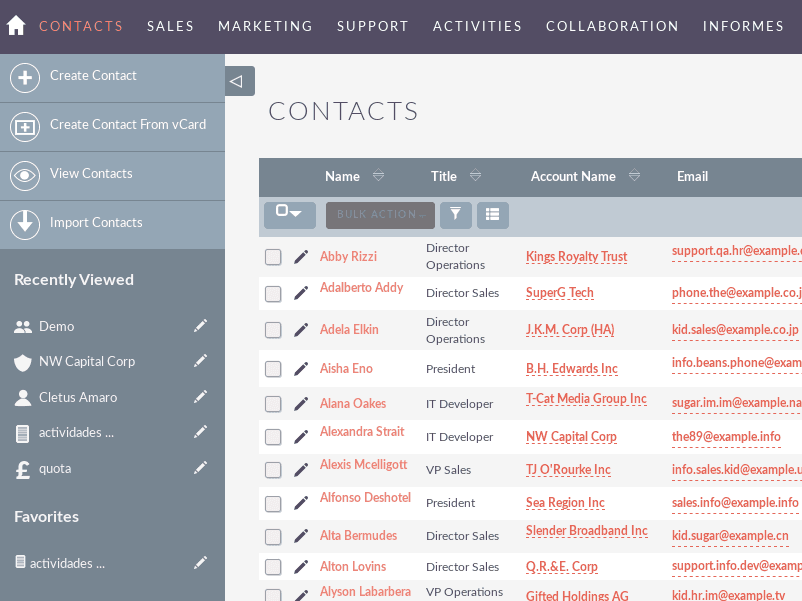
SuiteCRM's user interface can feel clunky and outdated, which makes navigation less intuitive for some users. You might find the learning curve steep, especially if your team lacks technical expertise. However, once you get the hang of it, the customization options offer flexibility that can be worth the initial effort. Compared to other open source CRMs, SuiteCRM requires more time to master but rewards you with tailored solutions for your business needs.
Integrations
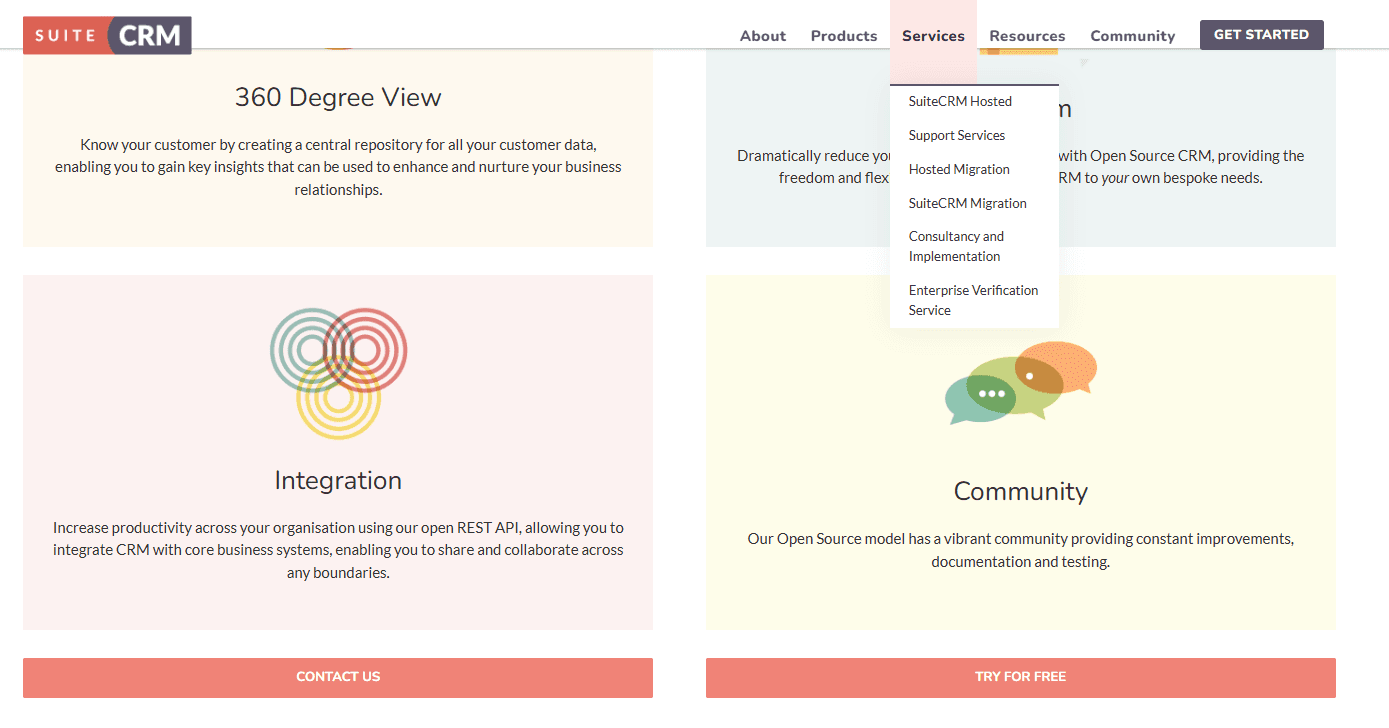
SuiteCRM integrates with QuickBooks, WhatsApp, Slack, Google Drive, Twilio, Mailchimp, Zoom, E-Signature Solutions, Customer Portal, and AI-Powered Tools. You can also extend functionality through community-built add-ons and plugins.
SuiteCRM also offers an API for custom integrations, and connects with third-party integration tools to expand its functionality.
SuiteCRM Specs
- 2-Factor Authentication: No
- API: Yes
- Calendar Management: Yes
- Call Tracking: Yes
- Campaign Management: No
- Click-to-Dial: No
- Contact Management: Yes
- Contact Sharing: Yes
- Custom Data Forms: No
- Customer Management: Yes
- Dashboard: Yes
- Data Export: Yes
- Data Import: Yes
- Data Visualization: Yes
- Email Integration: Yes
- External Integrations: Yes
- File Sharing: Yes
- File Transfer: No
- Google Apps Integration: Yes
- Lead Management: Yes
- Lead Scoring: Yes
- Marketing Automation: Yes
- Mobile App: No
- Multi-User: Yes
- Notifications: No
- Pipeline Management: No
- Sales Automation: Yes
- Scheduling: Yes
- Social-Media Integration: Yes
- Task Scheduling/Tracking: Yes
- Third-Party Plugins/Add-Ons: Yes


