

Reseña de Keap 2026: Ventajas, Desventajas, Características y Precios Explicados
Keap es un software CRM diseñado para gestionar clientes, ventas y automatización de marketing. Descubre cómo sus funciones ayudan a las empresas a organizar prospectos, automatizar flujos de trabajo y mejorar las relaciones con los clientes.

Analizamos las herramientas de forma independiente, y las comisiones ayudan a financiar nuestras pruebas. Consulta nuestra política de transparencia, nuestra metodología, o sugiere una herramienta.
Keap is a CRM software built for small businesses that need contact management, email marketing, and sales pipeline tracking in one place. I'd lean toward it over something like HubSpot if your team is small and you want native marketing automation without paying for a platform sized for enterprise use cases you'll never touch.
Keap Evaluation Summary

4.2/5
- From $299/month (billed annually)
- 14-day free trial
Por qué confiar en nuestras recomendaciones de software
6,700+
Reviews
20
Industry experts
16+
Evaluation factors
14
Years
Nuestras reseñas reflejan nuestro criterio independiente, no un discurso de ventas. Descubra cómo mantenemos la transparencia.
Para esta guía, evaluamos las herramientas mediante pruebas prácticas e investigación independiente, puntuando las herramientas según nuestros criterios de selección.
Nuestras reseñas reflejan nuestro criterio editorial humano, no un discurso de ventas.
Keap Overview
When judging Keap, I think its automation tools and simple interface set it apart for small teams without IT support. The pricing, though higher than some alternatives, includes robust onboarding and responsive support, which makes a difference for new users. Its integrations are solid, but you’ll want to confirm your key apps are supported.
If you’re choosing a CRM to automate follow-up, manage a growing pipeline, and avoid technical headaches, Keap is a strong contender, especially for solo operators or small businesses who value speed over endless customization.
Pros
- Built-in appointment scheduling and invoicing for complete client management.
- Powerful workflow automation for sales and marketing follow-up.
- Robust support and free coaching for onboarding and troubleshooting.
Cons
- Reporting features are basic for advanced pipeline analysis.
- Email template designer can feel restrictive and outdated.
- Mobile app has limited functionality for managing pipeline on the go.
Is Keap Right For Your Needs?
Who Would be a Good Fit for Keap?
Keap is best suited for small businesses that need an all-in-one system for handling sales, marketing automation, and client management. Service-based companies, solo entrepreneurs, and teams that prioritize quick onboarding and high-touch customer support will appreciate Keap’s workflow automations and strong lead management. Its built-in invoicing and appointment features are valuable for professionals seeking to reduce reliance on disconnected tools.
- Small Service FirmsKeap streamlines booking, invoicing, and follow-up for firms that handle lots of appointments.
- Solo EntrepreneursEntrepreneurs can automate email, sales, and payment tasks to save time and avoid manual work.
- Sales-Driven TeamsKeap’s pipelines and task assignments let sales teams track deals and automate next steps.
- Marketing AgenciesAgencies use the campaign builder to automate multi-step client nurture sequences and track engagement.
- Health and WellnessPractitioners manage client records, send reminders, and accept payments without extra tools or systems.
- Coaches and ConsultantsScheduling, contracts, and follow-up automations help solo coaches keep client management in one system.
Who Would be a Bad Fit for Keap?
Keap isn’t ideal for large enterprises or teams that require highly customizable reporting, advanced territory management, or extensive integrations out of the box. Product-based companies that need complex inventory management, as well as organizations with rigid workflows or heavy field service needs, may find Keap too limited. If your department already uses highly integrated systems or needs broad international support, Keap’s offering will feel lacking.
- Large EnterprisesKeap lacks the advanced customization and scalability that larger organizations need for workflow and reporting.
- E-Commerce GiantsProduct and inventory management is limited, making Keap a poor fit for high-volume, product-centric businesses.
- Field Service TeamsThere’s no native field dispatch or mobile job tracking, so teams in field operations will feel restricted.
- Manufacturing CompaniesManufacturing firms need inventory, supply chain, and production tools Keap doesn’t provide.
- International TeamsSupport for multiple currencies, languages, and global workflows is basic compared to alternatives.
- IT DepartmentsIT teams looking for advanced automation, development controls, or deep platform integrations will find Keap’s limits frustrating.
Cómo Probamos y Evaluamos Herramientas
Hemos pasado años construyendo, refinando y mejorando nuestro sistema de pruebas y evaluación de software. La rúbrica está diseñada para capturar las complejidades de la selección de software y lo que hace que una herramienta sea efectiva, centrándose en aspectos críticos del proceso de toma de decisiones. A continuación, puede ver exactamente cómo funcionan nuestras pruebas y evaluación a través de siete criterios. Esto nos permite ofrecer una evaluación imparcial del software basada en la funcionalidad principal, características destacadas, facilidad de uso, incorporación, soporte al cliente, integraciones, opiniones de los clientes y relación calidad-precio.
Funcionalidad Principal (25% de la puntuación final)
El punto de partida de nuestra evaluación es siempre la funcionalidad principal de la herramienta. ¿Tiene las características y funciones básicas que un usuario esperaría ver? ¿Alguna de esas funciones principales está restringida a planes de precios superiores? En esencia, esperamos que una herramienta cumpla con las capacidades básicas de sus competidores.
Características Destacadas (25% de la puntuación final)
A continuación, evaluamos características poco comunes que van más allá de la funcionalidad principal que suelen ofrecer herramientas similares. Una puntuación alta refleja funciones especializadas o únicas que hacen que el producto sea más rápido, eficiente o aporte un valor adicional al usuario. También evaluamos lo fácil que es integrar la herramienta con las demás del stack tecnológico para ampliar la utilidad y el alcance del software. Las herramientas que ofrecen integraciones nativas, conexiones de terceros y acceso API para crear integraciones personalizadas reciben las mejores puntuaciones.
Facilidad de Uso (10% de la puntuación final)
Consideramos qué tan rápido y fácil es realizar las tareas definidas en la funcionalidad principal usando la herramienta. El software que obtiene una alta puntuación está bien diseñado, es intuitivo de usar, ofrece aplicaciones móviles, proporciona plantillas y hace que tareas relativamente complejas parezcan sencillas.
Incorporación (10% de la puntuación final)
Sabemos lo importante que es la rápida adopción por parte del equipo de una nueva plataforma, por lo que evaluamos lo fácil que es aprender y utilizar una herramienta con una formación mínima. Evaluamos qué tan rápido un miembro del equipo puede configurarse y empezar a usar la herramienta sin experiencia previa. Las soluciones con puntuación alta indican que se requiere poco o ningún soporte.
Soporte al Cliente (10% de la puntuación final)
Revisamos cuán rápido y sencillo es encontrar ayuda y resolver problemas a través de teléfono, chat en vivo o base de conocimientos. Las herramientas y compañías que brindan soporte en tiempo real obtienen las mejores puntuaciones, mientras que los chatbots reciben las peores.
Opiniones de Clientes (10% de la puntuación final)
Además de nuestras propias pruebas y evaluaciones, consideramos el puntaje neto de promotores de los clientes actuales y anteriores. Revisamos su probabilidad, si tuvieran la opción, de volver a elegir la herramienta para la funcionalidad principal. Un software con puntuación alta refleja un puntaje neto de promotores elevado por parte de clientes actuales o anteriores.
Relación Calidad-Precio (10% de la puntuación final)
Por último, considerando todos los demás criterios, revisamos el precio promedio de los planes de nivel inicial frente a las funciones principales y consideramos el valor de los otros criterios de evaluación. El software que ofrece más, por menos, obtendrá una puntuación más alta.
Core Features
Contact Management
Store, organize, and tag all your leads and clients in one searchable database. Quickly access interaction history and apply custom tags for smarter segmentation.
Automated Sales Pipelines
Visually track deals with customizable pipeline stages and automate task assignments. Drag-and-drop cards make it easy to update deal progress and trigger follow-ups.
Built-In Email Marketing
Send broadcast emails, create campaigns, and track engagement directly from Keap. Prebuilt templates help your team launch branded emails without extra tools.
Task and Appointment Scheduling
Automate appointment booking with calendar integrations, reminders, and follow-up messages. Clients book themselves and Keap adds tasks to your dashboard.
Invoicing and Payments
Create and send invoices, accept payments, and track outstanding balances from within Keap. Built-in payments speed up cash flow without needing separate billing software.
Automated Workflows
Design workflows that trigger emails, reminders, and tasks based on user actions. Keap’s automation builder makes it simple to nurture leads and clients with minimal manual input.

Ease of Use
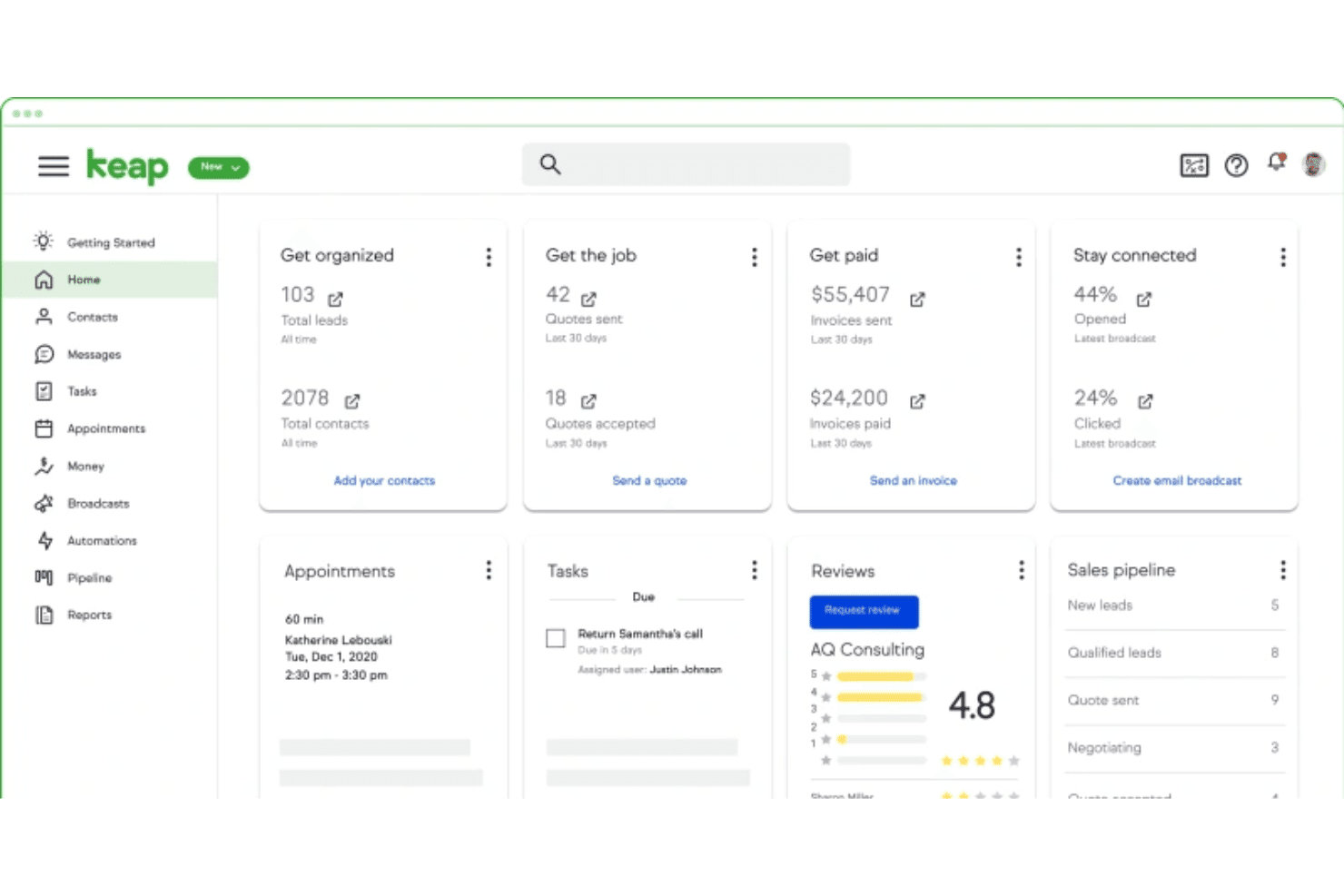
Keap stands out for its clean interface and guided setup that helps non-technical users get started fast. Drag-and-drop pipelines, easy appointment scheduling, and in-app tutorials make organizing contacts and automating tasks straightforward. Many users say onboarding support is a real differentiator, making day-to-day use less intimidating and more productive.
Integrations
Keap integrates with tools like QuickBooks, Gmail, Outlook, PayPal, and other business apps, with additional connections available through Zapier for platforms such as Shopify, Xero, BigCommerce, and more.
Keap also offers an open API, allowing businesses to build custom integrations and extend functionality.

Keap Specs
- A/B Testing: Yes
- Analytics: Yes
- API: Yes
- Audience Targeting: Yes
- Automated Conversion: Yes
- Batch Permissions & Access: No
- Behavioral Tracking: Yes
- Brand Management: No
- Campaign Management: Yes
- Contact Management: Yes
- Contact Sharing: Yes
- Conversion Tracking: Yes
- CRM Integration: Yes
- Customer Management: Yes
- Dashboards: Yes
- Data Export: Yes
- Data Import: Yes
- Email Integration: Yes
- External Integrations: Yes
- Keyword Tracking: No
- Landing Pages: Yes
- Lead Management: Yes
- Lead Scoring: Yes
- Link Tracking: Yes
- Marketing Automation: Yes
- Multi-User: Yes
- Notifications: Yes
- Password & Access Management: Yes
- Social-Media Integration: No


