

Los 10 Mejores Software de Verificación de Correos Electrónicos en 2026

10 Mejor lista corta de software de verificación de correos electrónicos


¿Cansado de ver que tus correos de marketing rebotan o terminan en la carpeta de spam? No eres el único. Validar los correos electrónicos es crucial para mejorar tu alcance, y estamos aquí para facilitarte la tarea. En esta guía, desglosaremos los 20 mejores softwares de verificación de correos electrónicos, ayudándote a encontrar la herramienta perfecta para optimizar tus campañas de email y aumentar la interacción.
Por qué confiar en nuestras recomendaciones de software
Nuestras reseñas reflejan nuestro criterio independiente, no un discurso de ventas. Descubra cómo mantenemos la transparencia.
Para esta guía, evaluamos las herramientas mediante pruebas prácticas e investigación independiente, puntuando las herramientas según nuestros criterios de selección.
Nuestras reseñas reflejan nuestro criterio editorial humano, no un discurso de ventas.
Resumen del mejor software de verificación de correos electrónicos
Esta tabla comparativa resume los detalles de precios de mis selecciones principales de software de verificación de correos electrónicos para ayudarte a encontrar el que mejor se adapta a tu presupuesto y a las necesidades de tu negocio.
| Tool | Best For | Trial Info | Price | ||
|---|---|---|---|---|---|
| 1 | Ideal para la verificación de correo electrónico en tiempo real y de varios pasos | Plan gratuito disponible | Desde $49/usuario/mes (facturado anualmente) | Website | |
| 2 | Mejor para verificación de correos electrónicos en tiempo real | Prueba gratuita disponible | Desde $99/mes | Website | |
| 3 | Mejor para la verificación masiva de correos electrónicos a gran volumen | Prueba gratuita disponible | Desde $40/mes por hasta 10,000 verificaciones | Website | |
| 4 | La mejor plataforma de validación de correos basada en la web con un 99 % de precisión | Demostración gratuita disponible | Desde $15/2,000 créditos | Website | |
| 5 | Ideal para la gestión integral de campañas de marketing | Plan gratuito disponible | Desde $9/mes | Website | |
| 6 | Mejor CRM con énfasis en la verificación de correos electrónicos | Prueba gratuita disponible | Desde $39/mes | Website | |
| 7 | Ideal para resultados precisos de verificación de correo electrónico | 100 verificaciones gratis + demo gratuita disponible | Desde $5/500 verificaciones | Website | |
| 8 | Ideal para necesidades de verificación de correo electrónico en la nube y en servidores locales | Prueba gratuita de 30 días | Desde $39.95/mes | Website | |
| 9 | La mejor para la protección continua de tus dominios | Plan gratuito disponible | Precio disponible bajo solicitud | Website | |
| 10 | Mejor para prospección B2B que te conecta con responsables de la toma de decisiones | Plan gratuito disponible | Desde $50/mes | Website |

Reseñas del mejor software de verificación de correos electrónicos
A continuación, tienes mis resúmenes detallados de los mejores softwares de verificación de correos electrónicos que forman parte de mi lista corta. Mis reseñas ofrecen un análisis profundo de las características clave, pros y contras, integraciones y casos de uso ideales de cada herramienta para ayudarte a encontrar la que más te convenga.

Ideal para la verificación de correo electrónico en tiempo real y de varios pasos
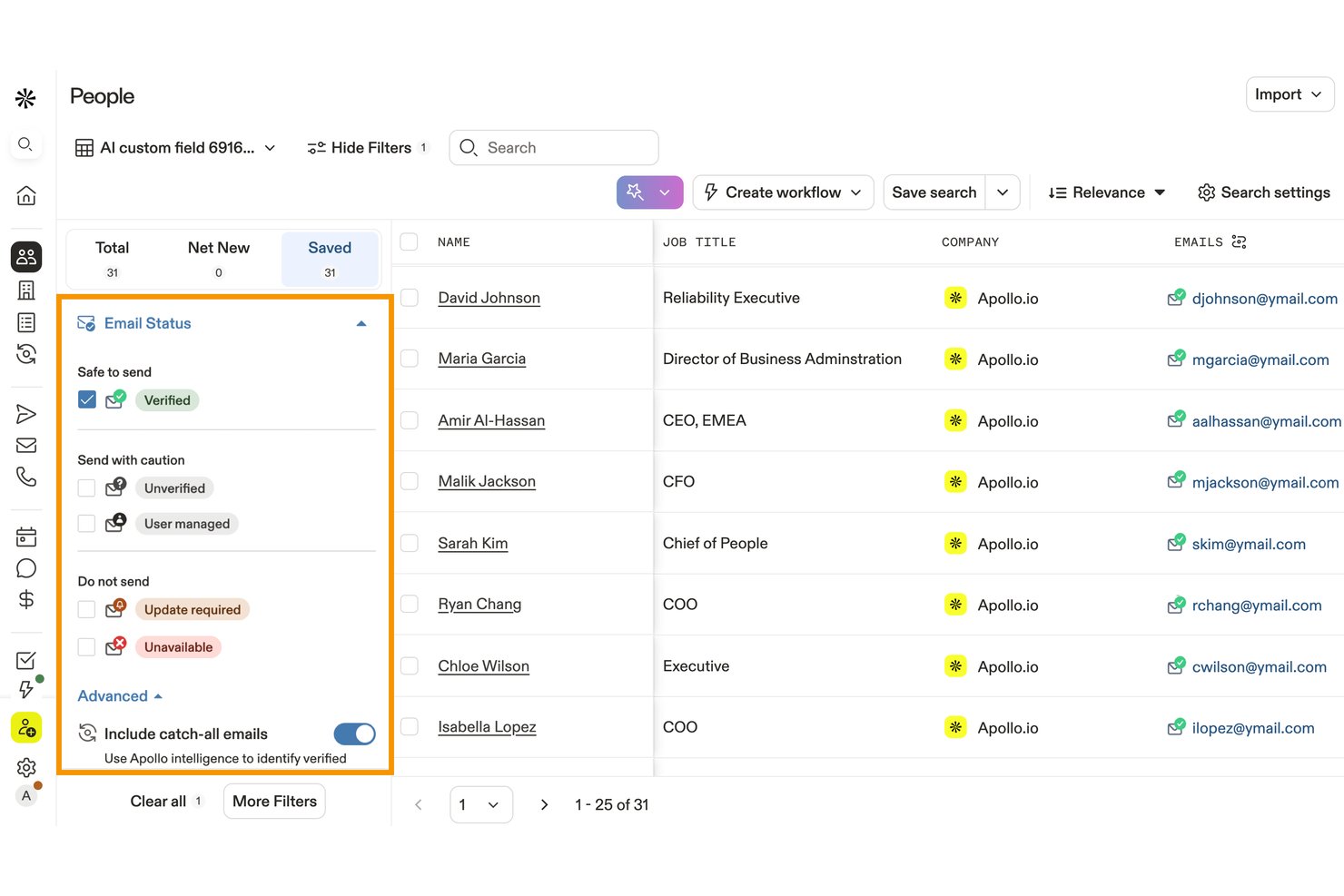
Apollo.io es una plataforma de inteligencia y participación comercial que incluye un motor propietario de verificación de correo electrónico de 7 pasos, validación masiva de listas, detección de dominios de recepción total y enriquecimiento de datos conectado al CRM.
¿Para quién es más adecuado Apollo.io?
Apollo.io es una opción sólida para los equipos de desarrollo de ventas que quieren prospección, secuencias y verificación de correo electrónico en una sola plataforma, en lugar de combinar herramientas independientes.
Por qué elegí Apollo.io
Apollo.io ocupa un lugar en mi lista de opciones principales porque su proceso de verificación de 7 pasos va mucho más allá del sondeo SMTP y utiliza una red de colaboradores para detectar si un correo electrónico de un dominio de recepción total ha recibido tráfico real recientemente. Esa diferencia es importante al validar grandes listas de prospección saliente, en las que las herramientas de terceros simplemente marcarían todo un dominio como riesgoso. También me gusta que los rebotes se detectan y se propagan automáticamente por toda la red, con los créditos reembolsados, para que mi equipo no pague dos veces por datos incorrectos.
Características principales de Apollo.io
- Verificación masiva de CSV: Sube y valida listas de prospección o del CRM por lotes.
- Clasificación de riesgos: Marca direcciones desechables, basadas en roles, de dominios de recepción total y no válidas.
- Verificación de API en tiempo real: Verifica direcciones individuales mediante la API REST de Apollo.
- Integraciones con CRM: Sincroniza los datos de contacto verificados con Salesforce, HubSpot y otras plataformas.
Integraciones de Apollo.io
Apollo ofrece integraciones nativas con Salesforce, HubSpot, Pipedrive, Outreach, Salesloft, Marketo, SendGrid y LinkedIn. También se conecta con Zapier y proporciona una API REST para integraciones personalizadas.
Pros and Cons
Pros:
- Verifica correos electrónicos de dominios de recepción total que otras herramientas marcan como no verificables
- Los rebotes se detectan y los créditos se reembolsan automáticamente
- La verificación de 7 pasos va más allá de las comprobaciones SMTP estándar
Cons:
- La precisión de los datos internacionales disminuye al 60–73%
- El sistema de créditos hace que los costos sean impredecibles a gran escala

Mejor para verificación de correos electrónicos en tiempo real
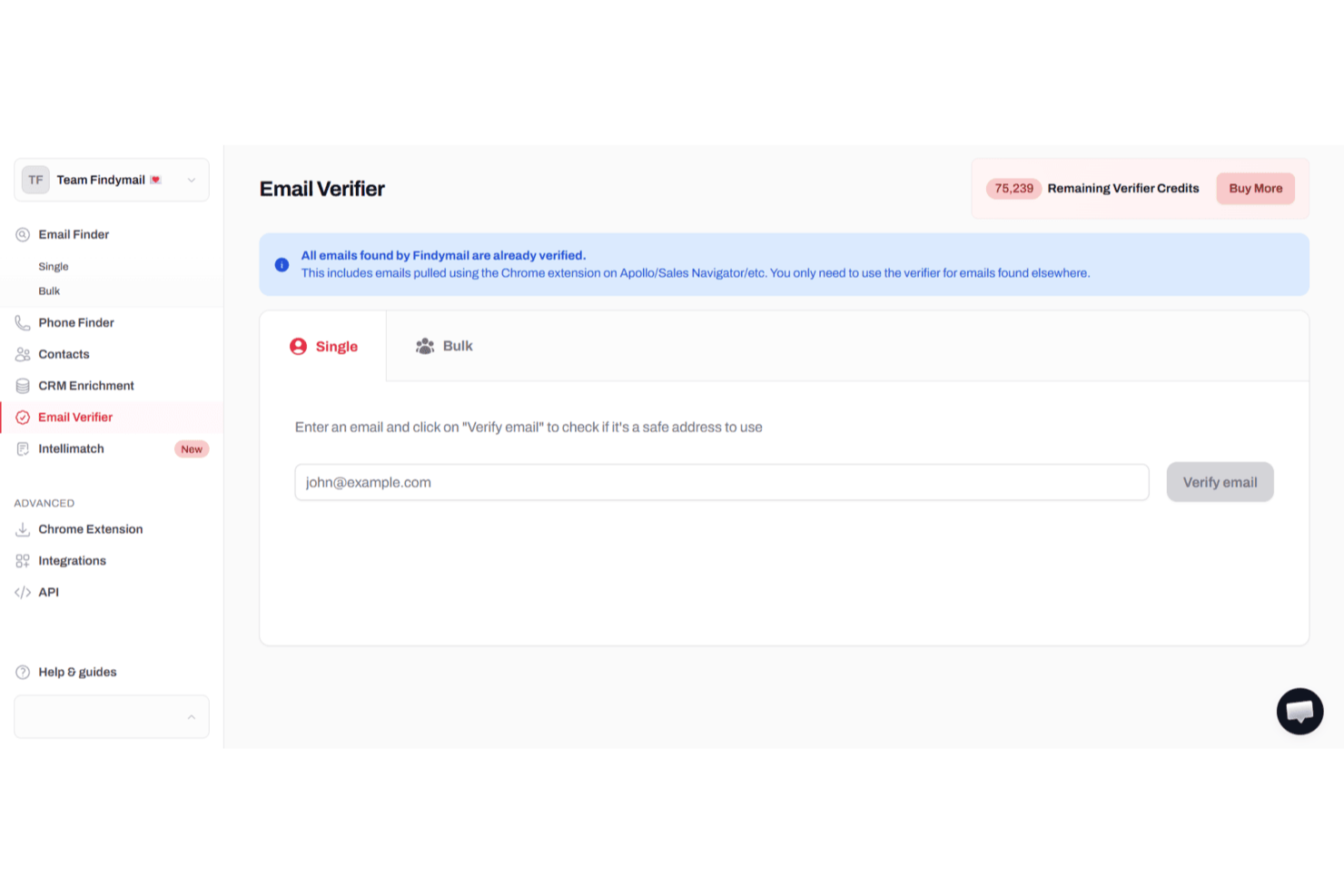
Para profesionales y equipos que buscan mejorar su alcance por correo electrónico y asegurar una alta entregabilidad, Findymail ofrece una solución sofisticada diseñada para satisfacer estas necesidades. Esta plataforma resulta especialmente atractiva para equipos de ventas, marketers y agencias que comprenden la importancia crítica de la verificación precisa de correos electrónicos para mantener una buena reputación de remitente y minimizar las tasas de rebote. Aprovechando los avanzados algoritmos de verificación de Findymail y su interfaz fácil de usar, puedes optimizar tus campañas de correo electrónico y enfocarte en conectar con prospectos reales, reduciendo el tiempo dedicado a gestionar contactos inválidos o de riesgo.
Por qué elegí Findymail
Elegí Findymail porque destaca al ofrecer verificación de correos electrónicos de alta precisión, un aspecto crucial para cualquiera que se tome en serio el email marketing. Los algoritmos avanzados del software aseguran que sólo te comuniques con direcciones de correo válidas, reduciendo significativamente el riesgo de tasas de rebote. Además, las funciones de exportación automática de datos y el enriquecimiento CRM de Findymail lo convierten en una herramienta invaluable para agilizar tu flujo de trabajo y mejorar la entregabilidad de tus correos. Estas capacidades están respaldadas por un soporte al cliente receptivo, asegurando que tengas asistencia cuando la necesites.
Funciones clave de Findymail
Además de la verificación de correos en tiempo real, Findymail ofrece:
- Procesamiento de archivos en bloque: Esta función te permite procesar grandes lotes de correos electrónicos de manera eficiente, ahorrando tiempo y esfuerzo.
- Extensión de Chrome: Findymail proporciona una extensión para el navegador que permite la verificación de correos electrónicos en tiempo real, facilitando la verificación al navegar.
- Algoritmo de verificación propietario: Findymail verifica cada dirección de correo electrónico en tiempo real utilizando múltiples comprobaciones, incluyendo validación de sintaxis, registros DNS, verificación de servidor SMTP, detección catch-all y filtrado de correos desechables. Solo las direcciones válidas y entregables pasan el proceso.
- Verificación de datos de correo y teléfono: Verifica direcciones de correo y números de teléfono B2B en un solo lugar, para que tu equipo siempre alcance a los prospectos correctos con datos de contacto precisos.
Integraciones de Findymail
Las integraciones incluyen Google Sheets, Close CRM, Super Send, Instantly, Attio, Apollo, Zoho Forms y Typeform. Además, hay una API disponible para integraciones personalizadas.
Pros and Cons
Pros:
- La alta precisión en la verificación de correos reduce las tasas de rebote durante las campañas
- La sólida cobertura de datos B2B mejora los resultados de prospección y enriquecimiento de leads
- El equipo de soporte ayuda a resolver rápidamente problemas de verificación y enriquecimiento
Cons:
- Fuerte dependencia de LinkedIn para obtener información de contacto
- Datos de contacto limitados más allá del correo electrónico en comparación con otras plataformas de enriquecimiento más completas

Bouncer
Mejor para la verificación masiva de correos electrónicos a gran volumen
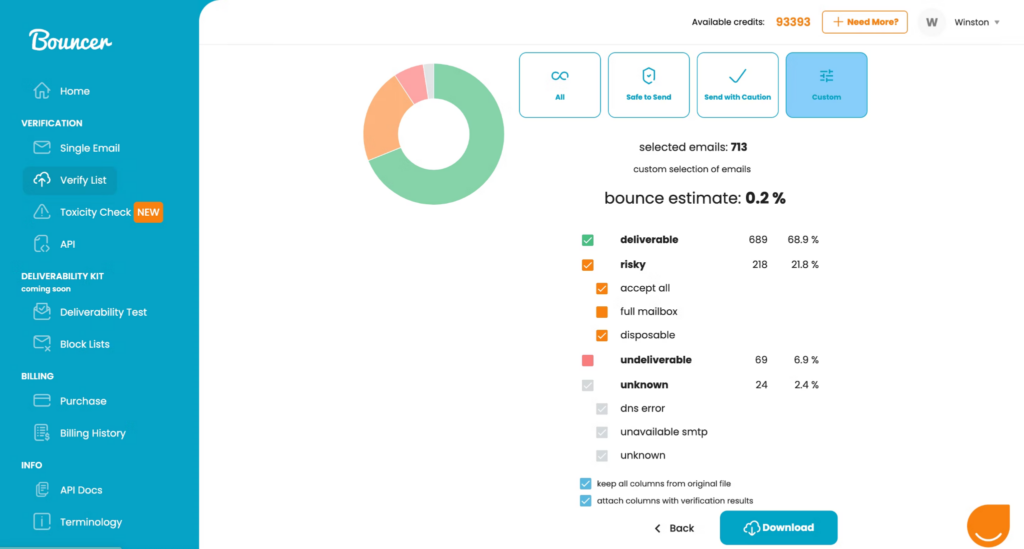
Bouncer es una aplicación fácil de usar que te permite arrastrar y soltar tus listas de correos electrónicos directamente en el verificador para una comprobación instantánea. Puedes añadir hasta 250.000 direcciones a la vez y la plataforma determinará direcciones seguras, desechables y aceptadas por todos.
Por qué elegí Bouncer: Esta herramienta de marketing por correo electrónico está en mi lista gracias a su función de muestra de verificación gratuita. Puedes probar la calidad de tu lista sin necesidad de verificarla realmente ni usar créditos. Bouncer te indicará si tu lista va a funcionar o si es necesario verificarlas para eliminar direcciones no válidas.
Características destacadas e integraciones de Bouncer
Características destacadas incluyen una estimación de la tasa de rebote que te indica qué esperar de cada lista de correos electrónicos, incluyendo cuántos correos son entregables, riesgosos o desconocidos, cumplimiento con el RGPD para una mayor seguridad de los datos y un proceso de validación de ocho niveles.
Integraciones incluyen Aweber, Constant Contact, Convertkit, GetResponse, HubSpot, Integrately, Klaviyo, LemList, Mailchimp y Moosend.
Pros and Cons
Pros:
- Interfaz muy legible y fácil de usar
- Opciones de panel personalizables
- Múltiples niveles de verificación para detectar direcciones no válidas
Cons:
- Las previsualizaciones de expectativas de rebote pueden tardar en cargarse
- Algunas verificaciones devuelven un resultado desconocido

La mejor plataforma de validación de correos basada en la web con un 99 % de precisión
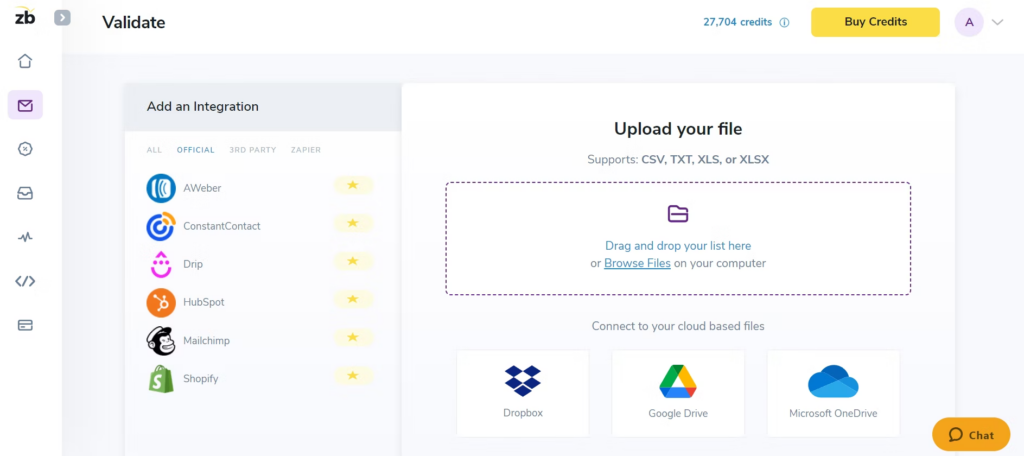
Este servicio de verificación de correos electrónicos te ofrece una plataforma basada en la web que se integra con todas tus herramientas más importantes de marketing y prospección, para una importación y exportación simplificada de datos de correo electrónico. Su validador de emails elimina automáticamente trampas de spam, bots y quejas de spam de tus listas para reconectar con suscriptores, llegar a nuevos contactos y mejorar las tasas de clics.
Por qué elegí ZeroBounce: Me gusta la plataforma ZeroBounce por dos razones: ofrecen tasas de precisión más altas y velocidades de verificación más rápidas. Mientras que la mayoría de las mejores herramientas de verificación de correos electrónicos presume una tasa de precisión del 95%, ZeroBounce ofrece una tasa de precisión del 99%. También garantizan la depuración de unos 100,000 correos electrónicos en 45 minutos en su plataforma y una validación en aproximadamente tres segundos a través de su API.
Características destacadas e integraciones de ZeroBounce
Las características destacadas incluyen cifrado de datos de nivel militar para mantener seguros los correos electrónicos y la información de la empresa durante la verificación, verificación de correos electrónicos en tiempo real en el momento del ingreso a través de su API y soporte al cliente 24/7 mediante chat, teléfono y correo electrónico.
Las integraciones incluyen ActiveCampaign, Asana, CapSumo, Constant Contact, Drip, easysendy, Gmail, JotForm, Make y MassMailer. Hay integraciones nativas, de terceros y mediante Zapier disponibles.
Pros and Cons
Pros:
- Capacidades de verificación de correos en tiempo real
- Muy buen soporte al cliente
- Precisión muy alta en comparación con otras herramientas
Cons:
- Sin opción de estructura tarifaria por suscripción
- Panel y navegación algo desactualizados

Ideal para la gestión integral de campañas de marketing
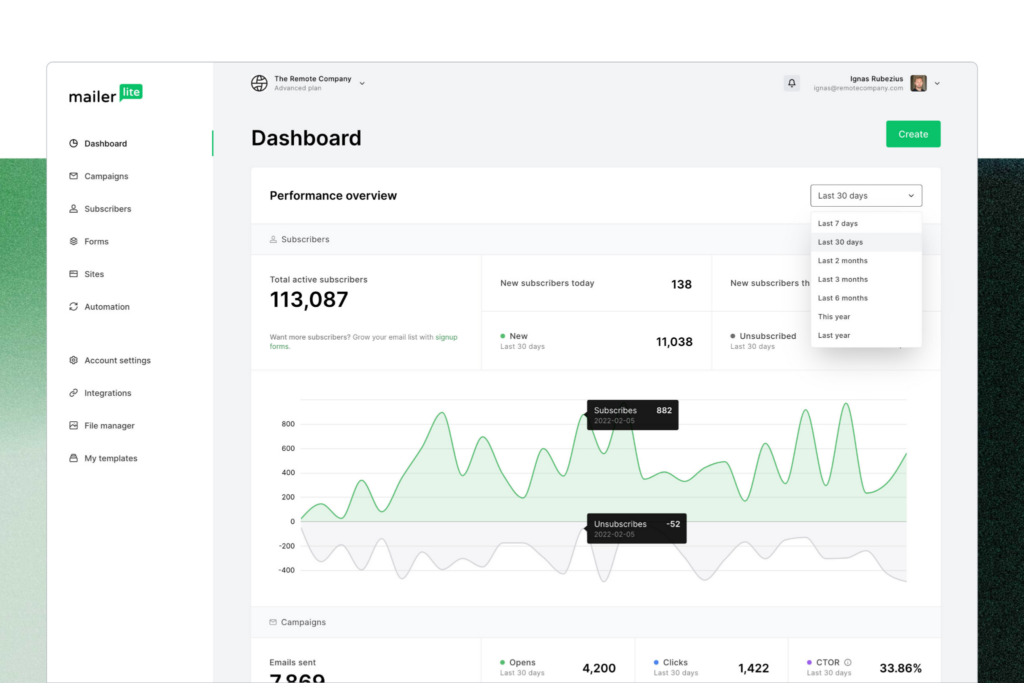
MailerLite es una plataforma integral de marketing por correo electrónico con una variedad de herramientas para optimizar tu alcance. Su función integrada MailerCheck es lo que utilizas para verificar direcciones de correo electrónico mediante la comprobación de sintaxis y la detección de correos electrónicos desechables. También obtienes informes de uso de la verificación y un desglose de las direcciones de correo inválidas.
Por qué elegí MailerLite: Elegí la plataforma MailerLite porque ofrece una funcionalidad más holística para tus campañas de marketing por correo electrónico que la mayoría del software de verificación de correos de esta lista. Además de la verificación de correos, también cuentas con edición de boletines, automatización de correos y creación de sitios web, todo en un solo lugar.
Características destacadas e integraciones de MailerLite
Características destacadas incluyen correos transaccionales automatizados para confirmar compras y pedidos de clientes, formularios de marketing por correo electrónico para captar nuevas inscripciones y suscripciones, y una gran selección de plantillas de correo electrónico con formularios para cada ocasión.
Las integraciones incluyen BigCommerce, Facebook Audiences, JotForm Sign, MailerCheck, Make, Shopify, Stripe, WooCommerce y WordPress. También hay integraciones disponibles a través de Zapier.
Pros and Cons
Pros:
- Plan base gratuito disponible
- Plataforma de marketing integral con complemento de verificación
- Fácil de navegar y aprender
Cons:
- Capacidades limitadas de informes para correos electrónicos
- Algunas integraciones aún están en fase de prueba

Snovio
Mejor CRM con énfasis en la verificación de correos electrónicos
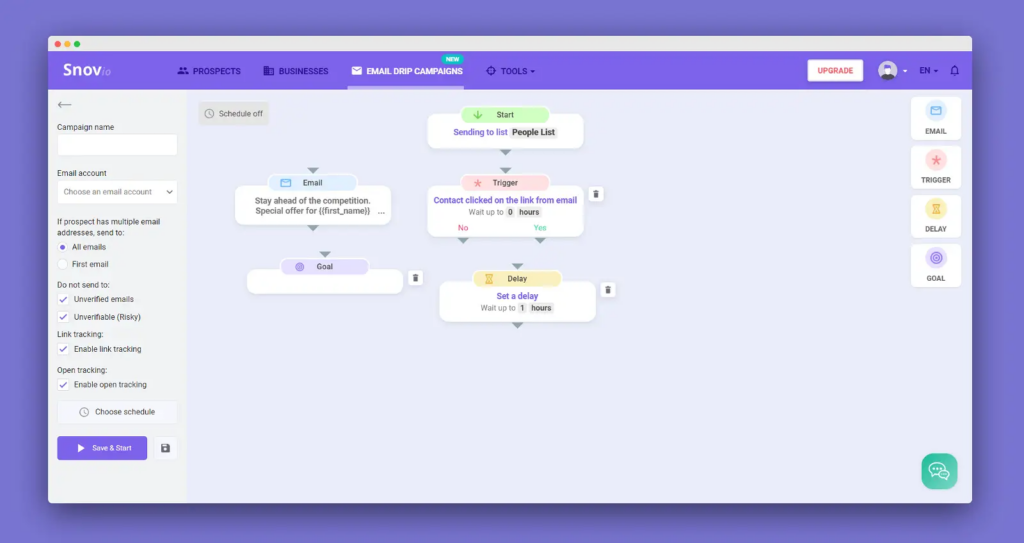
Como una plataforma CRM centrada en el correo electrónico, Snov.io ofrece una gestión eficiente de contactos y prospección en frío con una serie de funciones para encontrar y verificar correos electrónicos. Puedes utilizar Snov.io para encontrar, rastrear y convertir prospectos en un solo lugar, con verificación de correos electrónicos individual y masiva que reduce los rebotes y mejora la entregabilidad.
Por qué elegí Snov.io: Esta plataforma entró en mi lista de mejores herramientas de verificación de correo por su capacidad de integración. Actualmente, Snov.io ofrece más de 5.000 integraciones con tus herramientas y aplicaciones favoritas. Puedes complementar casi cualquier combinación de stack tecnológico con esta herramienta para asegurar una mejor comunicación entre todas tus plataformas de ventas y marketing.
Características destacadas e integraciones de Snov.io
Características destacadas incluyen un verificador de direcciones de correo electrónico en tiempo real vía API, integrado directamente en tu plataforma para el registro de leads y validación de correos al momento del registro, además de un proceso de validación en siete etapas que incluye comprobaciones de ping SMTP y registros MX.
Las integraciones incluyen Google Forms, Hippo Video, HubSpot, Intercom, LinkedIn Lead Gen Forms, Pipedrive, Phantombuster, Salesforce, Slack y Trello.
Pros and Cons
Pros:
- Interfaz muy fácil de usar
- Conjunto robusto de funciones de marketing
- Plan gratuito disponible para principiantes
Cons:
- Sin opciones de pago por uso
- Tiempos de carga lentos en algunas funciones
Kickbox
Ideal para resultados precisos de verificación de correo electrónico
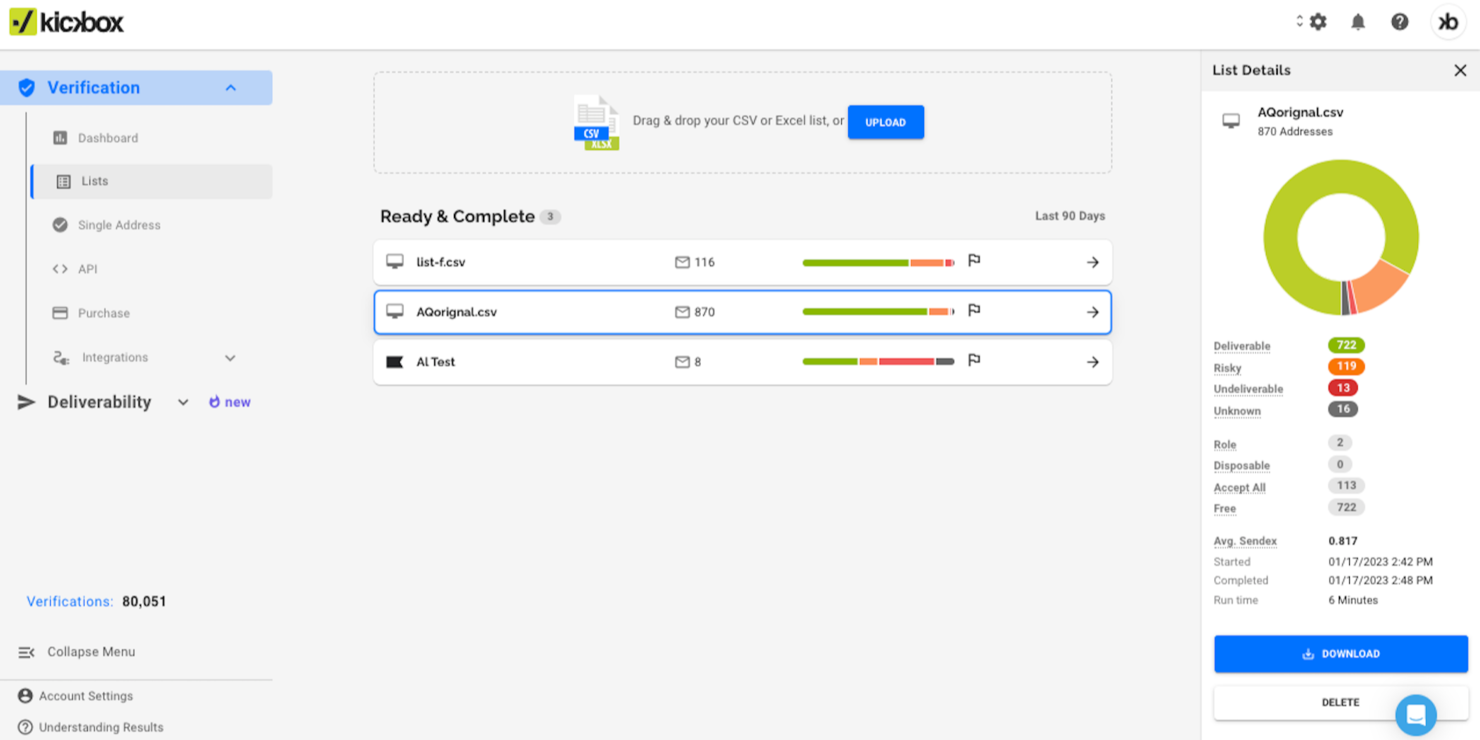
Kickbox está diseñado para empresas que buscan mejorar sus campañas de email marketing asegurando la precisión de sus listas de correo y reduciendo los correos no entregados. Ya seas desarrollador, agencia, empresa u organización sin ánimo de lucro, Kickbox se adapta a tu necesidad de una comunicación fiable por correo electrónico en sectores como tecnología, comercio electrónico y servicios financieros. Al abordar desafíos como altas tasas de rebote y quejas por spam, Kickbox ayuda a proteger tu reputación como remitente y a mejorar el compromiso general.
Por qué elegí Kickbox
Elegí Kickbox por su capacidad de ofrecer resultados precisos de verificación de emails mediante sus funciones de Verificación de Listas de Correo Electrónico y API de Verificación. La Verificación de Listas de Correo Electrónico te permite limpiar tus listas eliminando direcciones inválidas o de riesgo, un paso clave para mantener una reputación saludable como remitente. La API de Verificación permite la integración en tus sistemas actuales, facilitando la verificación en tiempo real y evitando que correos inválidos ingresen a tu base de datos. Estas funciones responden directamente a la necesidad de una comunicación precisa por correo, haciendo de Kickbox una herramienta valiosa para cualquier organización que desee optimizar su estrategia de email marketing.
Características clave de Kickbox
Además de sus funciones principales de verificación, Kickbox ofrece otros servicios y características para mejorar tu experiencia de gestión de correos electrónicos:
- Consultoría en Entregabilidad: Ofrece asesoramiento experto para mejorar tus tasas de entregabilidad y abordar posibles problemas.
- Verificador de Spam: Identifica posibles desencadenantes de spam en tus correos electrónicos para ayudarte a evitar problemas de entregabilidad.
- Verificador de Correos Temporales: Detecta direcciones de correo temporales para impedir que entren en tus listas.
- Cumplimiento con GDPR y CCPA: Garantiza que tu proceso de verificación de correos cumpla con las regulaciones de protección de datos.
Integraciones principales de Kickbox
Las integraciones incluyen HubSpot, Mailchimp, Klaviyo, SendGrid, Zapier, ActiveCampaign, Constant Contact, Brevo, GetResponse y más.
Pros and Cons
Pros:
- El procesamiento rápido de listas de correos electrónicos mejora la eficiencia para el usuario
- El modelo de pago por uso beneficia a empresas pequeñas
- Verificaciones iniciales gratuitas disponibles para nuevos usuarios
Cons:
- La herramienta ocasionalmente puede marcar como de riesgo o inválidas direcciones de correo que sí son válidas
- Menos certificaciones de seguridad de datos en comparación con competidores

Ideal para necesidades de verificación de correo electrónico en la nube y en servidores locales
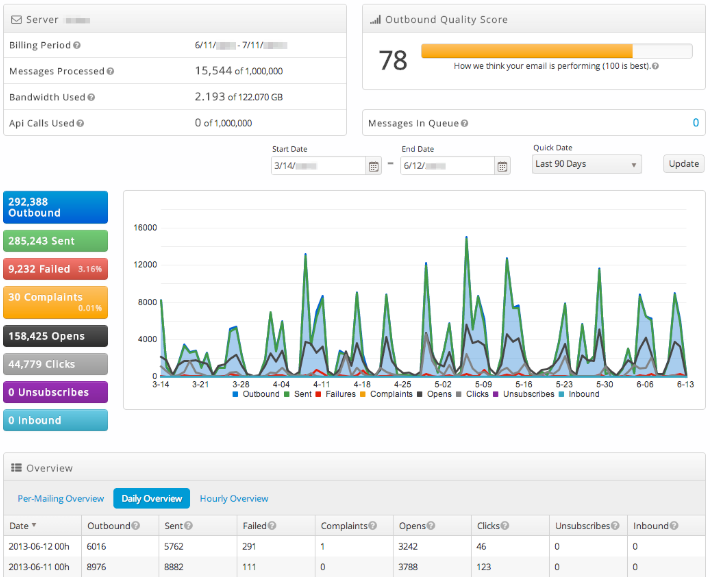
SocketLabs utiliza tecnología propietaria de servidores de correo electrónico, soporte al cliente personalizado y análisis avanzados para garantizar que puedas enviar correos electrónicos transaccionales y de marketing esenciales a los buzones de tus clientes, obtener información sobre tu rendimiento con análisis visuales, y capturar y almacenar nuevas direcciones de correo electrónico en su sistema de gestión de correos altamente seguro.
Por qué elegí SocketLabs: Esta plataforma está en mi lista gracias a su función StreamScore, que utiliza un sistema de colores fácil de entender para ayudarte a monitorear la reputación de tu dominio. No tendrás que pasar horas investigando y revisando con esta herramienta única a tu disposición.
Características destacadas e integraciones de SocketLabs
Las características destacadas incluyen funcionalidad de búsqueda de destinatarios que te muestra el ID del correo y la fecha, así como una línea de tiempo de eventos de recepción, apertura y clic de cada correo electrónico. SocketLabs también ofrece cifrado SSL con un solo clic y cifrado TLS forzado por MTA-STS mientras los correos están en tránsito.
Las integraciones incluyen EmailDelivery.com, Limo Anywhere, Okta, Ongage, Qualtrics CoreXM, Qualtrics CustomerXM, Qualtrics EmployeeXM, Storage Commander Cloud y WordPress.
Pros and Cons
Pros:
- Fácil de aprender y usar
- Configuración simple y directa
- Soporte muy confiable y receptivo
Cons:
- Detalles limitados en informes y análisis
- No se pueden tener múltiples credenciales SMTP

Valimail
La mejor para la protección continua de tus dominios
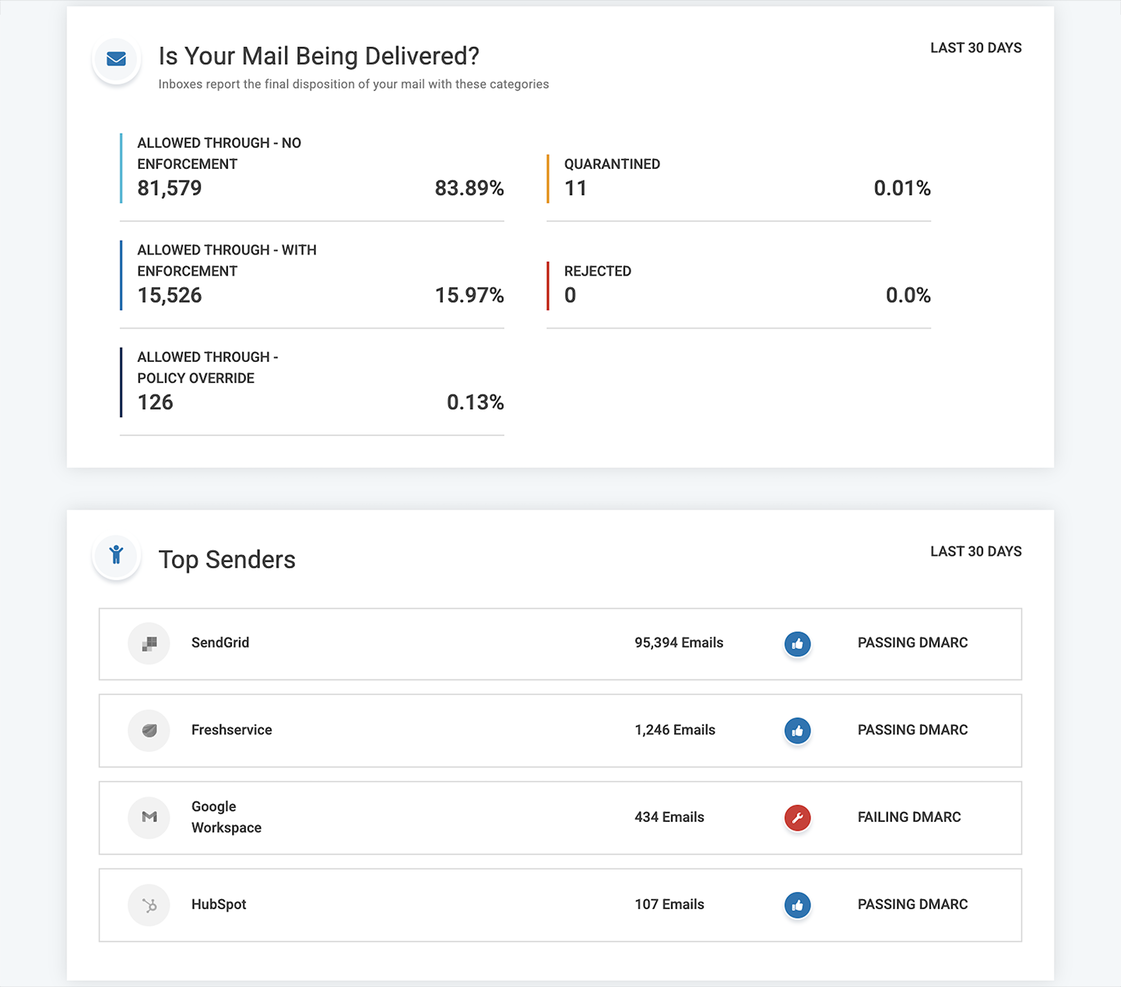
Esta plataforma no es exactamente igual que los otros servicios de validación de correo electrónico en esta lista. En vez de verificar las direcciones en tu lista, rastrea la cantidad de correos electrónicos y dominios que envían mensajes en tu nombre. Valimail ofrece DMARC como servicio para detener los ataques de suplantación de identidad y proteger la reputación del remitente para que tus mensajes más importantes nunca terminen en la carpeta de spam.
Por qué elegí Valimail: Esta plataforma está en mi lista de los mejores servicios de verificación de correo electrónico porque promueve la confianza y seguridad continuas en el ecosistema del correo electrónico. También me gusta Valimail porque es un socio aprobado de Microsoft 365 y Twilio SendGrid, y ocupa posiciones destacadas en cada una de las organizaciones más importantes de estándares de autenticación de correo electrónico.
Funciones e integraciones destacadas de Valimail
Las funciones destacadas incluyen monitoreo DMARC para identificar todos los servicios de envío en tu ecosistema de correo electrónico y prevenir correos duplicados y poner en lista negra dominios no confiables, así como acceso a búsquedas SPF ilimitadas para que nunca corras el riesgo de bloquear un buen correo electrónico.
Las integraciones incluyen ActiveDirectory, IBM Cloud, Microsoft 365, Okta, SendGrid y Twilio.
Pros and Cons
Pros:
- Interfaz intuitiva e integración sin complicaciones
- Fácil de implementar en tu flujo de trabajo
- Óptimo servicio de atención al cliente
Cons:
- La configuración inicial puede ser compleja
- Sin opciones de alertas o notificaciones

RocketReach
Mejor para prospección B2B que te conecta con responsables de la toma de decisiones
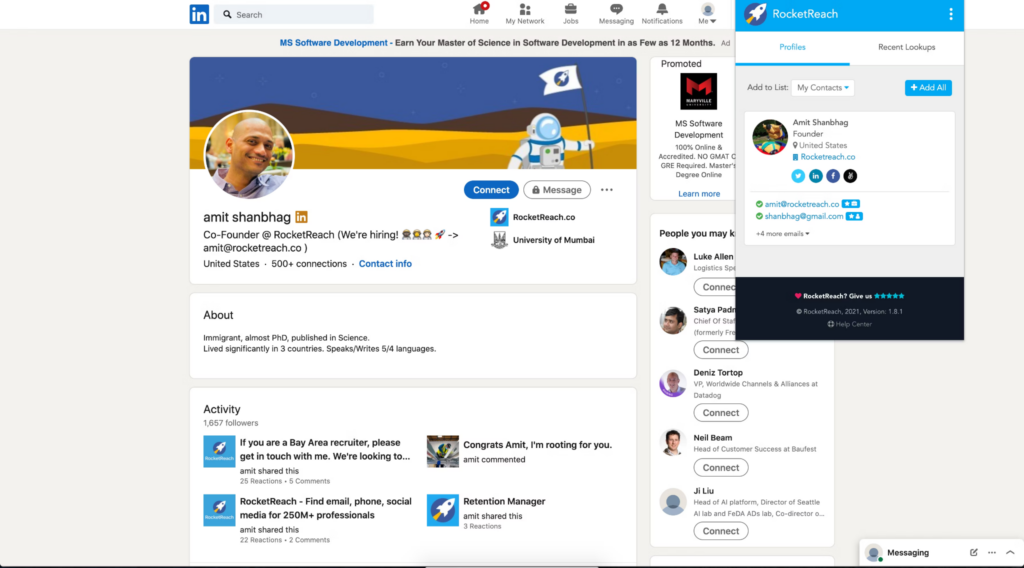
Esta herramienta de validación de correos electrónicos ayuda a las organizaciones a encontrar y conectar con audiencias para aumentar sus esfuerzos de marketing y ventas automatizando el proceso de generación de oportunidades. RocketReach cuenta con una enorme base de datos de números de teléfono y correos electrónicos verificados para conectarte con los responsables de la toma de decisiones en startups, universidades, hospitales y grandes corporaciones.
Por qué elegí RocketReach: Me gusta RocketReach porque va más allá de simplemente verificar correos para marketing: esta plataforma ya ha reunido una base de datos para ti usando más de 100 bases públicas, incluyendo listados gubernamentales, redes sociales y directorios telefónicos. Puedes buscar entre más de 700 millones de perfiles y 35 millones de empresas con filtros como ubicación, industria y detalles de la empresa.
Funciones destacadas e integraciones de RocketReach
Las funciones destacadas incluyen una extensión de navegador que te permite prospectar en los sitios de redes sociales más populares, búsquedas masivas que te permiten descargar grandes listas de cualquier persona que cumpla con tus criterios específicos, y exportación de datos en CSV para que puedas llevarte los detalles esenciales a donde vayas.
Las integraciones incluyen elay, Gmail, HubSpot, Salesforce, SalesLoft, Slack, Outreach, Tracker y Zapier. También puedes crear integraciones personalizadas o utilizar la API de RocketReach.
Pros and Cons
Pros:
- Gran cantidad de créditos gratuitos
- Diseño de panel simple
- Organización y navegación intuitivas
Cons:
- Leve retraso en las actualizaciones en tiempo real
- No tiene función de copiar; cada contacto se abre automáticamente en tu correo electrónico
Otros programas de verificación de correos electrónicos
Aquí tienes algunas otras opciones de software de verificación de correos electrónicos que no entraron en mi lista corta, pero que aún vale la pena revisar:
- Elastic Email
El mejor para verificación y envío integrados
- Clearout.io
La mejor opción para verificar tanto listas compradas como listas de correos personalizadas
- DeBounce
Ideal para validación de correos electrónicos con tecnología anti-greylisting
- Proofy.io
Ideal para proteger la puntuación de reputación de tu dominio
- Interseller
La mejor opción para combinar la búsqueda confiable de correos electrónicos y el alcance a prospectos
- Listclean
Ideal para comunicaciones por correo electrónico basadas en roles


Cómo evalúo el software de verificación de correos electrónicos
Divido la evaluación en dos capas: las capacidades básicas que toda herramienta debe tener—verificación SMTP, procesamiento masivo de listas, clasificación de riesgos—y los diferenciadores que destacan a las mejores opciones.
Funcionalidad central (Requisitos básicos para esta lista)
Cuando selecciono herramientas para mi lista, califico cada una en una escala de 0 (no ofrece la funcionalidad) a 5 (sobresale en esta área) para cada funcionalidad esencial mencionada a continuación. Luego, calculo la puntuación total de la herramienta en porcentaje. Cada una debe alcanzar una puntuación total mínima del 65% para considerarse su inclusión.
- Validación de sintaxis y formato: Verifico si la herramienta detecta direcciones mal formateadas, dominios con errores tipográficos y violaciones de RFC antes de aplicar chequeos más profundos—como "gmial.com" o TLD ausentes.
- Verificación SMTP y de buzón: Aquí evalúo qué tan bien confirma la herramienta la existencia real de una bandeja de entrada mediante el protocolo SMTP, sin enviar un correo electrónico real.
- Procesamiento masivo de listas: Busco la capacidad de subir archivos CSV grandes de prospectos o datos CRM y obtener rápidamente resultados segmentados—especialmente para limpiar listas antes de campañas.
- Verificación por API en tiempo real: Aquí importa una API REST bien documentada con tiempos de respuesta por debajo del segundo, en particular para validar correos al capturarlos en formularios.
- Clasificación de riesgo y entregabilidad: Más allá de válido/no válido, evalúo si la herramienta marca dominios catch-all, direcciones desechables, correos basados en roles y trampas de spam con etiquetas claras.
- Integraciones CRM & MAP: Las conexiones nativas con plataformas como Salesforce, HubSpot y Marketo me muestran qué tan bien se integra la herramienta al flujo de trabajo existente de un equipo de RevOps.
Una vez que tengo una lista de herramientas que cumplen este criterio, considero qué distingue a cada plataforma.
Factores diferenciadores (Qué distingue a los proveedores)
Así comparo y contrasto diferentes proveedores:
Funciones destacadas
La higiene automática de listas CRM es un gran diferenciador—busco herramientas que revalidan registros en un cronograma recurrente para que tu base de Salesforce o HubSpot se mantenga limpia sin exportaciones manuales. La detección de dominios catch-all también es importante, ya que estos dominios dan falsos positivos que aumentan el riesgo de rebote en campañas frías. Evalúo qué tan bien cada herramienta puntúa o identifica direcciones catch-all en lugar de sólo etiquetarlas como "desconocidas". Un panel de análisis de entregabilidad que rastrea tendencias de salud de la lista a lo largo del tiempo ayuda a los equipos de RevOps a informar a la dirección sobre mejoras en la calidad de los datos.
Más allá de las funciones
La flexibilidad en el modelo de precios es una de las primeras cosas que evalúo. Los equipos de RevOps suelen realizar grandes limpiezas puntuales de listas junto con verificaciones API continuas, así que reviso si el proveedor ofrece créditos por uso y planes de suscripción con acumulación. La seguridad de los datos también es un aspecto clave—al subir listas de prospectos que contienen datos personales, busco cumplimiento SOC 2 y políticas claras de eliminación de datos. La precisión y garantías de rebote completan mi evaluación, ya que los proveedores que respaldan sus resultados con tasas de precisión publicadas te dan la confianza necesaria antes de lanzar una campaña de prospección importante.
Cómo elegir un software de verificación de correos electrónicos
Es fácil perderse entre listas largas de funciones y estructuras de precios complejas. Para ayudarte a mantenerte enfocado mientras avanzas en tu propio proceso de selección de software, aquí tienes una lista de factores a considerar:
| Factor | Qué considerar |
|---|---|
| Escalabilidad | ¿Puede el software manejar el crecimiento de tus listas de correos? Verifica si soporta grandes volúmenes sin problemas de rendimiento. |
| Integraciones | ¿Se integra con tus herramientas actuales de CRM o marketing? Asegúrate de que funcione sin inconvenientes con tus sistemas existentes. |
| Personalización | ¿Puedes adaptar el software a tus flujos de trabajo? Busca opciones que te permitan ajustar configuraciones o informes. |
| Facilidad de uso | ¿La interfaz resulta intuitiva para tu equipo? Prueba la demostración para ver si es fácil de usar y navegar. |
| Implementación y capacitación | ¿Qué tan rápido puede tu equipo comenzar a utilizarlo? Considera la disponibilidad de recursos de formación y soporte durante la configuración. |
| Costo | ¿El precio se adapta a tu presupuesto? Compara los costos de varios proveedores, considerando tanto las tarifas iniciales como los gastos continuos. |
| Medidas de seguridad | ¿Existen mecanismos para proteger tu información? Busca cifrado, políticas de privacidad de datos y cumplimiento con normas. |
| Disponibilidad de soporte | ¿Qué opciones de soporte existen? Averigua si hay atención 24/7 y la rapidez de respuesta a las consultas. |
¿Qué es un software de verificación de correos electrónicos?
El software de verificación de correos electrónicos es una herramienta que comprueba si las direcciones de correo electrónico de tu lista son reales, seguras y listas para recibir mensajes. Los equipos de marketing, ventas y cualquier persona que realice campañas por correo la utilizan para evitar enviar mensajes a direcciones falsas, mal escritas o riesgosas. Tendrás menos rebotes, ahorrarás dinero al no enviar correos a contactos defectuosos y protegerás tu reputación de remitente, mientras concentras tus esfuerzos en personas que realmente pueden responder.
Características
Al seleccionar un software de verificación de correos electrónicos, debes prestar atención a las siguientes características clave:
- Validación en tiempo real: Comprueba instantáneamente las direcciones de correo electrónico a medida que se ingresan para asegurarse de que sean válidas y estén activas, reduciendo la tasa de rebote.
- Eliminación de duplicados: Identifica y elimina entradas duplicadas en tu lista de correos, manteniendo tus datos limpios y organizados.
- Detección de errores de sintaxis: Detecta y corrige errores comunes de formato en las direcciones de correo, asegurando la precisión en tu base de datos.
- Verificación masiva: Permite verificar grandes listas de direcciones de correo electrónico de una sola vez, ahorrando tiempo y esfuerzo en la gestión de listas.
- Puntuación de correos electrónicos: Califica la calidad de las direcciones de correo, ayudándote a priorizar contactos de alto valor para tus campañas.
- Enriquecimiento de datos: Mejora las direcciones de correo con información adicional, proporcionando más detalles para esfuerzos de marketing dirigidos.
- Integración con retransmisión SMTP: Garantiza una entrega confiable al integrarse con tus sistemas de correo existentes para un envío sin problemas.
- Cumplimiento con el RGPD: Ofrece funciones que te ayudan a cumplir con las regulaciones de protección de datos, asegurando el cumplimiento legal.
- Seguimiento de datos de actividad: Monitorea los niveles de participación de tus direcciones de correo, permitiéndote ajustar tus estrategias de comunicación.
- Informes avanzados: Brinda análisis y reportes detallados sobre tus procesos de verificación de correos, ayudando a optimizar el rendimiento.
Beneficios
Implementar un software de verificación de correos electrónicos brinda varios beneficios para tu equipo y tu negocio. Aquí tienes algunos que puedes esperar:
- Mejor entregabilidad: Al validar las direcciones de correo electrónico, aseguras que más mensajes lleguen a los destinatarios previstos, reduciendo las tasas de rebote.
- Calidad de datos mejorada: La eliminación de duplicados y la detección de errores de sintaxis mantienen tus listas de correos precisas y organizadas, facilitando una mejor gestión de datos.
- Ahorro de costes: Verificar los correos antes de enviarlos reduce el desperdicio de recursos en direcciones inválidas, optimizando tu presupuesto de marketing.
- Mayor interacción: La puntuación de correos te ayuda a identificar los contactos de más valor, permitiéndote enfocar tus esfuerzos en los leads más prometedores.
- Cumplimiento legal: Funciones como el cumplimiento con el RGPD aseguran que tus prácticas de correo se adhieran a las regulaciones de protección de datos, evitando problemas legales.
- Mejor toma de decisiones: Los informes avanzados brindan información sobre tus procesos de verificación, ayudando a tomar decisiones de marketing informadas.
- Eficiencia de tiempo: La verificación masiva permite procesar grandes listas rápidamente, liberando tiempo para otras tareas.
Costos y precios
Seleccionar un software de verificación de correos electrónicos requiere comprender los diferentes modelos y planes de precios disponibles. Los costos varían según las funciones, el tamaño del equipo, los complementos y más. La siguiente tabla resume los planes más comunes, sus precios promedios y las características típicas incluidas en soluciones de software de verificación de correos electrónicos:
Tabla comparativa de planes para software de verificación de correos electrónicos
| Tipo de plan | Precio promedio | Características comunes |
|---|---|---|
| Plan gratuito | $0 | Verificación básica, comprobaciones de correo limitadas y acceso a soporte. |
| Plan personal | $5-$25/user/month | Validación en tiempo real, detección de errores de sintaxis y eliminación de duplicados. |
| Plan empresarial | $30-$100/user/month | Verificación masiva, puntuación de correos electrónicos, cumplimiento con el RGPD y seguimiento de datos de actividad. |
| Plan corporativo | $150-$500/user/month | Informes avanzados, integraciones personalizables, soporte prioritario y acceso a la API. |
Preguntas frecuentes sobre software de verificación de emails
Aquí tienes algunas respuestas a preguntas comunes sobre el software de verificación de emails:
¿Con qué frecuencia deberías verificar tu lista de emails?
Deberías verificar tu lista de emails cada pocos meses si añades nuevos contactos regularmente. Hacer esto te ayuda a mantener una lista limpia y evitar enviar a direcciones que pueden haber quedado inactivas. Para nuevos suscriptores, verifica los emails en el momento del registro para evitar que datos incorrectos ingresen a tu sistema desde el principio.
¿Qué sucede si no verificas tu lista de emails regularmente?
Si te saltas la verificación durante demasiado tiempo, corres el riesgo de enviar a direcciones inválidas o inactivas. Esto puede llevar a mayores tasas de rebote y una mala reputación del remitente con el tiempo. Además, hace que las métricas de tu campaña sean menos fiables, lo que puede hacerte tomar malas decisiones sobre tu estrategia de email.
¿Qué tipos de emails se suelen marcar durante la verificación?
Los emails que se suelen marcar incluyen direcciones desechables, cuentas basadas en roles como “info@” o “support@”, y dominios que no pueden recibir correo. Algunas direcciones también pueden marcarse como de riesgo si han rebotado antes o pertenecen a usuarios inactivos. Lo mejor es revisar estas categorías y decidir cuáles eliminar o monitorizar.
¿Cómo ayuda la verificación de emails al seguimiento del rendimiento de campañas?
Al verificar tu lista, puedes confiar en que las métricas de interacción como aperturas y clics provienen de personas reales. Esto te ayuda a hacer ajustes en tus mensajes y segmentación basados en datos reales. Sin verificación, los datos inexactos de direcciones falsas o inactivas pueden distorsionar tus resultados y malgastar los esfuerzos de tu equipo.
¿Qué sigue?
Si estás investigando software para bases de datos de clientes, conéctate con un asesor de SoftwareSelect para obtener recomendaciones gratuitas.
Completarás un formulario y tendrás una breve charla donde analizarán los detalles de tus necesidades. Luego recibirás una lista reducida de software para revisar. Incluso te apoyarán durante todo el proceso de compra, incluida la negociación de precios.