

Gestionar una operación de ventas exitosa puede ser difícil, especialmente cuando el presupuesto es limitado. Necesitas herramientas que ayuden a tu equipo a gestionar clientes potenciales, realizar un seguimiento del rendimiento y cerrar acuerdos sin exceder el presupuesto. Tanto si eres propietario de una pequeña empresa como si formas parte de un equipo en crecimiento, encontrar la solución gratuita adecuada puede marcar la diferencia. Ahí es donde entra en juego el software gratuito de gestión de ventas.
En este artículo, compartiré mis principales recomendaciones de software gratuito de gestión de ventas. Analizaré lo que ofrece cada herramienta y cómo puede abordar los desafíos específicos de tu equipo. Encontremos la opción perfecta para tus necesidades de ventas.
Por qué confiar en nuestras recomendaciones de software
6,700+
Reviews
20
Industry experts
16+
Evaluation factors
14
Years
Nuestras reseñas reflejan nuestro criterio independiente, no un discurso de ventas. Descubra cómo mantenemos la transparencia.
Para esta guía, evaluamos las herramientas mediante pruebas prácticas e investigación independiente, puntuando las herramientas según nuestros criterios de selección.
Nuestras reseñas reflejan nuestro criterio editorial humano, no un discurso de ventas.
Tabla comparativa de software gratuito de gestión de ventas
Estos son los costes básicos de cada una de las herramientas que han entrado en mi selección:
| Tool | Best For | Trial Info | Price | ||
|---|---|---|---|---|---|
| 1 | Mejor para la automatización de flujos de trabajo multicanal | Prueba gratuita de 14 días | Desde $49/usuario/mes (facturado anualmente) | Website | |
| 2 | Ideal para herramientas de automatización de marketing | Plan gratuito + demo gratis disponible | Desde $11.04/usuario/mes (facturación bienal) | Website | |
| 3 | Ideale per la qualificazione automatica dei lead | Piano gratuito + demo gratuita disponibile | Da $29/mese | Website | |
| 4 | Mejor para integración con Gmail | Prueba gratuita de 14 días + demostración gratuita disponible | Desde $49/usuario/mes (facturado anualmente) | Website | |
| 5 | Ideal para una amplia integración de aplicaciones | Prueba gratuita de 30 días + plan gratuito disponible | Desde $25/usuario/mes (facturado anualmente) | Website | |
| 6 | Ideal para herramientas de colaboración en equipo | Prueba gratuita de 15 días + plan gratuito + demo gratuita disponible | Desde $49/organización/mes (facturado anualmente) | Website | |
| 7 | Mejor integración con Outlook | Prueba gratuita + plan gratuito disponible | Desde $18/usuario/mes (facturado anualmente) | Website | |
| 8 | Ideal para la gestión del embudo de ventas de pequeñas y medianas empresas | Demostración gratuita + plan gratuito disponible | Desde $39.99/usuario/mes (facturado anualmente) | Website | |
| 9 | Mejor para usuarios del ecosistema Microsoft | Plan gratuito disponible | Desde $14/usuario/mes (facturado anualmente) | Website | |
| 10 | Ideal para CRM básico sin coste por usuario | Plan gratuito disponible | Desde $10/mes | Website |


Análisis del mejor software gratuito de gestión de ventas
A continuación encontrarás mis resúmenes detallados del mejor software gratuito de gestión de ventas que ha entrado en mi selección. Mis análisis ofrecen una visión detallada de las funciones principales, las ventajas y desventajas, las integraciones y los casos de uso ideales de cada herramienta para ayudarte a encontrar la mejor opción para ti. Aunque algunas de estas herramientas ofrecen una versión completamente gratuita, otras ofrecen un periodo de prueba gratuito. He añadido una nota sobre lo que es gratuito en cada uno de mis análisis.
 Mejor para la automatización de flujos de trabajo multicanal
- Prueba gratuita de 14 días
- Desde $49/usuario/mes (facturado anualmente)
Visit WebsiteCustomer Rating:4.5/5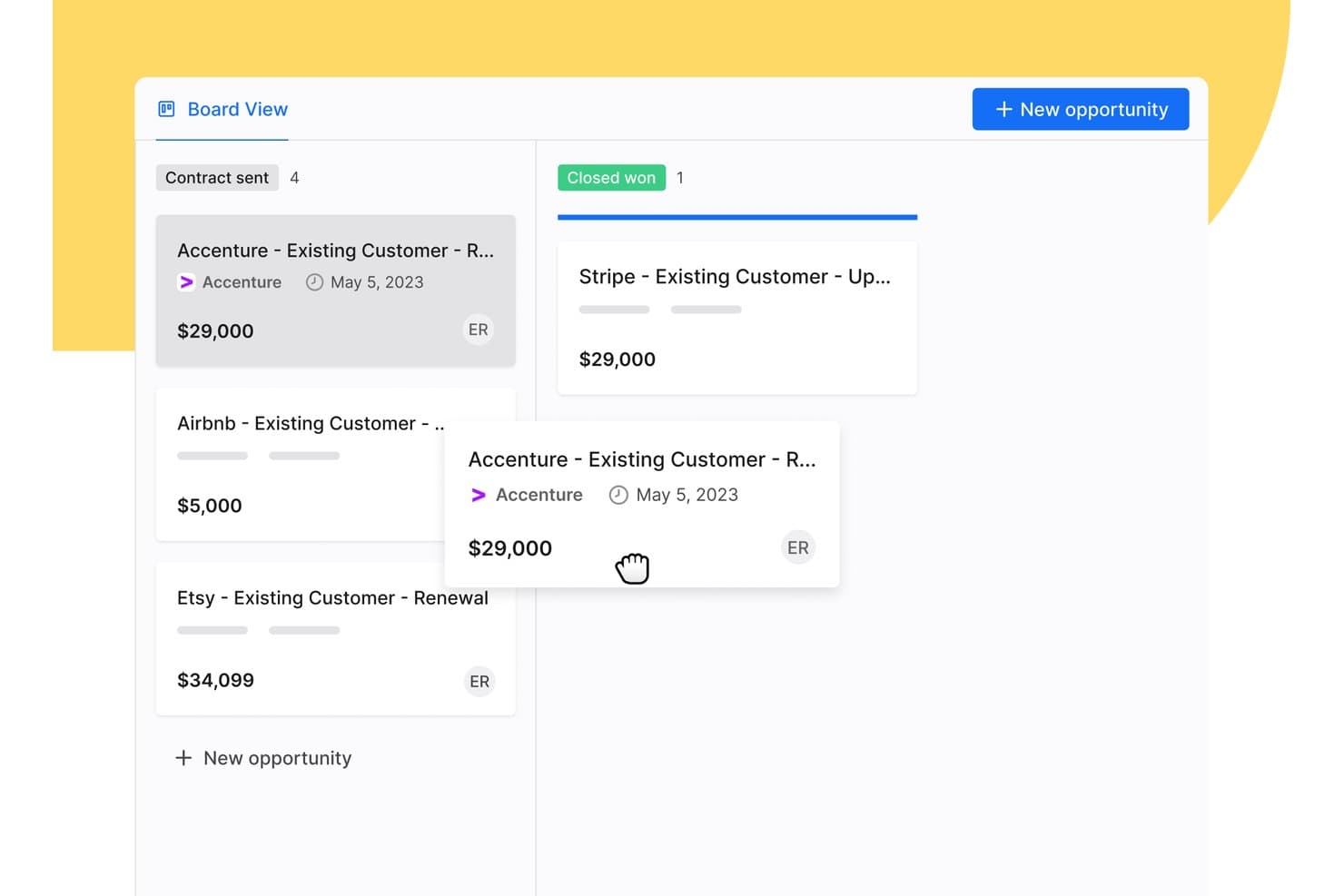
Apollo.io ofrece una vista de tablero de arrastrar y soltar para gestionar oportunidades de ventas en etapas del flujo como Contrato enviado y Ganada cerrada. Apollo.io es una plataforma de inteligencia y participación de ventas B2B que combina una amplia base de datos de contactos, gestión del flujo de acuerdos, secuencias de contacto multicanal y automatización de flujos de trabajo en un único espacio de trabajo gratuito para comenzar.
¿Para quién es más adecuado Apollo.io?
Apollo.io es adecuado para fundadores de startups en etapas iniciales y equipos de ventas de pequeñas y medianas empresas que gestionan flujos de ventas centrados en la prospección externa y necesitan prospección, secuencias y gestión básica de acuerdos en una sola herramienta gratuita para comenzar.
Por qué elegí Apollo.io
Elegí Apollo.io como una de las mejores opciones porque su creador de secuencias multicanal permite a mi equipo realizar contactos coordinados por correo electrónico, teléfono y LinkedIn desde un único flujo de trabajo. Puedo configurar pasos basados en activadores para que una llamada perdida ponga automáticamente en cola un correo electrónico de seguimiento o un contacto por LinkedIn, manteniendo los acuerdos en movimiento sin intervención manual. El creador de secuencias con IA también redacta textos personalizados para los pasos basándose en los datos de los contactos, lo que reduce el tiempo que dedico a crear nuevas estrategias de prospección externa.
Características principales de Apollo.io
- Extensión de Chrome: Prospecta en LinkedIn, Gmail, Salesforce o sitios web de empresas y añade contactos directamente a Apollo.
- Puntuación de clientes potenciales y cuentas: Asigna puntuaciones y prioriza clientes potenciales o cuentas mediante modelos de clasificación integrados y atributos personalizados.
- Gestión de acuerdos: Haz un seguimiento de las oportunidades con una vista de flujo de ventas y etapas de acuerdos personalizables para supervisar el progreso de las ventas.
- Enriquecimiento básico del CRM: Enriquece los registros de contactos y empresas mediante cargas de CSV o sincronización de datos con Salesforce y HubSpot.
Integraciones de Apollo.io
Apollo.io ofrece integraciones nativas con Salesforce, HubSpot, Gmail, Outlook, LinkedIn y Slack. Se conecta con Zapier y también proporciona una API para integraciones personalizadas.
¿Qué es gratuito?
Apollo.io ofrece un plan gratuito para siempre con acceso a funciones principales como secuencias de correo electrónico, filtros básicos y la base de datos de contactos. El plan gratuito limita tus exportaciones mensuales y créditos de correo electrónico, además de restringir el acceso a análisis avanzados, funciones de IA y determinados pasos de automatización, que están reservados para los planes de pago.
Pros and Cons
Pros:
- Base de datos de contactos integrada con millones de registros
- Las secuencias de correo electrónico de varios pasos están incluidas en el plan gratuito
- La extensión de Chrome extrae automáticamente los datos de los prospectos
Cons:
- Los créditos de exportación mensuales se agotan rápidamente
- El flujo de acuerdos es limitado para ventas complejas
Learn more about Apollo.io: Ideal para herramientas de automatización de marketing
- Plan gratuito + demo gratis disponible
- Desde $11.04/usuario/mes (facturación bienal)
Visit WebsiteCustomer Rating:4.7/5
EngageBay fusiona las ventas, el marketing y el soporte en un solo centro. EngageBay está diseñado para pequeñas y medianas empresas, ofreciendo herramientas para la automatización de marketing, CRM y soporte al cliente. Su objetivo es ayudar a las empresas a gestionar sus esfuerzos de ventas y marketing en una sola plataforma unificada.
Por qué elegí EngageBay: La oferta gratuita de EngageBay incluye herramientas esenciales de CRM y automatización de marketing, como el email marketing, la gestión de contactos potenciales y la segmentación de contactos.
Tu equipo también puede acceder a herramientas básicas de helpdesk y creadores de páginas de destino. Su enfoque todo en uno lo convierte en una opción versátil para empresas que buscan simplificar sus operaciones.
Características destacadas e integraciones:
Características incluyen un creador de páginas de destino que ayuda a crear páginas profesionales sin necesidad de programar, un helpdesk que da soporte a las consultas de los clientes y un generador de formularios para captar contactos potenciales. Estas funciones permiten que tu equipo gestione las tareas de ventas y marketing de manera eficiente.
Integraciones incluyen Zapier, Mailchimp, Shopify, HubSpot, Stripe, PayPal, QuickBooks, Xero, Twilio, SendGrid y más.
¿Qué es gratis? EngageBay ofrece un plan gratuito para siempre con limitaciones en los correos enviados, contactos almacenados y número de usuarios, lo que lo hace ideal para equipos pequeños.
Pros and Cons
Pros:
- Incluye herramientas básicas de helpdesk
- Creador de páginas de destino disponible
- Generador de formularios para captación de contactos
Cons:
- Restricciones en los envíos de correos electrónicos
- Curva de aprendizaje para nuevos usuarios
Learn more about EngageBay: Ideale per la qualificazione automatica dei lead
- Piano gratuito + demo gratuita disponibile
- Da $29/mese
Visit WebsiteCustomer Rating:4.4/5
Origami trova e valuta lead con dati di contatto verificati per le campagne di outreach. Origami offre un agente di vendita potenziato dall’IA progettato per automatizzare la prospezione outbound per i team B2B. È particolarmente indicato per professionisti delle vendite e responsabili delle operazioni di fatturato che desiderano aumentare la portata senza espandere l’organico. Gestendo ricerca, messaggistica e follow-up, Origami aiuta i team a concentrarsi su attività di vendita a maggior valore aggiunto.
A Chi si Rivolge Origami?
Origami è ideale per i team di vendita B2B di aziende in crescita che desiderano automatizzare e scalare la prospezione outbound.
Perché Ho Scelto Origami
Ciò che distingue Origami per me è la sua attenzione nel fornire un agente di vendita AI che automatizza completamente la prospezione outbound. La piattaforma gestisce tutto: dalla ricerca dei lead alla creazione di messaggi personalizzati di contatto e follow-up, il che è particolarmente utile per i team che desiderano scalare senza aumentare il personale. Mi piace che l’IA di Origami possa adattare i messaggi in base alle risposte dei potenziali clienti, rendendo l’approccio più umano e pertinente. Per chiunque cerchi uno strumento di vendita AI che vada oltre la semplice automazione e gestisca effettivamente l’intero processo outbound, Origami è una scelta solida.
Funzionalità Principali di Origami
Altre funzionalità che rendono Origami utile per i team di vendita includono:
- Reperimento automatizzato dei lead: la piattaforma identifica e importa nuovi lead in base ai criteri target impostati.
- Sequenze di contatto multi-canale: Origami supporta campagne di contatto coordinate tramite email, LinkedIn e altri canali.
- Dashboard di monitoraggio conversazioni: gli utenti possono monitorare tutte le conversazioni con i prospect e l’engagement in un unico posto.
- Strumenti di collaborazione per il team: più membri del team possono condividere note, assegnare lead e coordinare le attività di outreach all’interno della piattaforma.
Integrazioni Origami
Non sono attualmente elencate integrazioni native.
Pros and Cons
Pros:
- Generazione ed arricchimento rapido di liste di lead
- Contatto multi-canale da un’unica piattaforma
- Raccolta e ricerca dati guidata dall’IA
Cons:
- Alcune funzionalità sono ancora in fase di sviluppo o beta
- Nessuna funzione integrata di chiamata telefonica
Learn more about HubSpot: Mejor para integración con Gmail
- Prueba gratuita de 14 días + demostración gratuita disponible
- Desde $49/usuario/mes (facturado anualmente)
Visit WebsiteCustomer Rating:4.5/5
Streak organiza pipelines y automatiza tareas dentro de tu bandeja de entrada de Gmail. Streak es una herramienta CRM dentro de Gmail, ideal para pequeñas y medianas empresas que buscan gestionar ventas directamente desde su bandeja de entrada. Ayuda a los usuarios a seguir oportunidades, gestionar relaciones con clientes y automatizar flujos de trabajo sin salir del correo electrónico.
Por qué elegí Streak: Streak destaca por su integración con Gmail, permitiendo que tu equipo gestione los procesos de ventas dentro del entorno familiar del correo electrónico. La versión gratuita de la herramienta incluye funciones como gestión de pipelines, seguimiento de correos electrónicos y recordatorios de tareas.
Tu equipo también puede utilizar campos personalizables para adaptar el CRM a sus necesidades específicas. Esta integración nativa con Gmail lo convierte en una opción conveniente para equipos que dependen mucho de la comunicación por email.
Características e integraciones destacadas:
Funciones incluyen seguimiento de correos electrónicos que proporciona información sobre cuándo se abren, recordatorios de tareas que mantienen a tu equipo en horario y combinaciones de correspondencia para enviar emails personalizados en masa. Estas funciones mejoran la capacidad de tu equipo para gestionar las comunicaciones.
Integraciones incluyen Google Workspace, Mailchimp, Zapier, Slack, Calendly, LinkedIn y más.
¿Qué es gratis? Streak ofrece una prueba gratuita de 14 días con funcionalidades básicas de CRM, adecuada para uso personal o equipos pequeños con necesidades limitadas.
Pros and Cons
Pros:
- Integración directa con Gmail
- Campos personalizables en el pipeline
- Priorización fácil de seguimientos
Cons:
- Restringido a usuarios de Gmail
- Menos competitivo que otras herramientas
Learn more about Streak: Ideal para una amplia integración de aplicaciones
- Prueba gratuita de 30 días + plan gratuito disponible
- Desde $25/usuario/mes (facturado anualmente)
Visit WebsiteCustomer Rating:4.4/5
Salesforce ofrece paneles de ventas personalizables con visualizaciones. Salesforce es una plataforma de gestión de relaciones con los clientes basada en la nube utilizada por empresas de todos los tamaños y de muchos sectores. Apoya a los equipos de ventas, servicio, marketing y comercio electrónico al brindarles herramientas para gestionar las interacciones con los clientes, hacer seguimiento de prospectos y automatizar procesos.
Por qué elegí Salesforce: La prueba gratuita de Salesforce da acceso a tu equipo a Sales Cloud, que incluye funciones como gestión de contactos y cuentas, seguimiento de generación de prospectos y acceso móvil. También puedes usar paneles e informes personalizables para supervisar tu pipeline. Las herramientas integradas impulsadas por IA te permiten establecer recordatorios de tareas y flujos de trabajo de ventas.
Funciones destacadas e integraciones:
Funciones incluyen puntuación de prospectos y reglas de asignación, gestión de territorios y herramientas de previsión. Puedes configurar procesos de ventas que se adapten al flujo de trabajo de tu equipo y utilizar Einstein Activity Capture para sincronizar correos electrónicos y eventos de calendario. Los caminos de ventas guían a los representantes en cada etapa para que sepan qué hacer a continuación.
Integraciones incluyen Slack, Google Workspace, Mailchimp, QuickBooks, Docusign, Dropbox, LinkedIn y más.
¿Qué es gratis? Salesforce ofrece una prueba gratuita de 30 días con acceso a las funciones de Sales Cloud para un usuario, sin acceso prolongado una vez finalizada la prueba.
Pros and Cons
Pros:
- Herramientas de informes flexibles
- Herramientas de ventas con IA integradas
- Fácil de agregar aplicaciones de terceros
Cons:
- Difícil de usar sin capacitación
- Las funciones móviles son más limitadas
Learn more about Salesforce : Ideal para herramientas de colaboración en equipo
- Prueba gratuita de 15 días + plan gratuito + demo gratuita disponible
- Desde $49/organización/mes (facturado anualmente)
Visit WebsiteCustomer Rating:4.2/5
Bitrix24 ofrece un panel de gestión de leads detallado con columnas estilo Kanban. Bitrix24 es una plataforma integral de gestión de ventas diseñada para empresas de todos los tamaños, que ofrece herramientas para la gestión de leads, automatización de ventas y seguimiento del rendimiento. Ayuda a los equipos a gestionar todo el ciclo de ventas, desde la generación de leads hasta la retención de clientes, utilizando una sola plataforma.
Por qué elegí Bitrix24: La cuenta gratuita de Bitrix24 proporciona 35 herramientas, incluyendo la gestión de leads y tratos, comunicación omnicanal y herramientas de colaboración. Tu equipo puede utilizar las capacidades analíticas de la plataforma, el CRM móvil y las herramientas de gestión de tareas sin coste alguno. Su versatilidad y variedad de funciones la convierten en una herramienta valiosa para mejorar el rendimiento de las ventas.
Características destacadas e integraciones:
Características incluyen gestión de tareas y proyectos que ayuda a optimizar los esfuerzos de tu equipo, seguimiento del desempeño de los empleados que proporciona información sobre la productividad del equipo, y funciones de creación de sitios web que apoyan las iniciativas de marketing. Estas funciones aseguran que tu equipo pueda gestionar las ventas y el marketing de manera eficaz.
Integraciones incluyen Google Workspace, Microsoft Office 365, Zoho CRM, Mailchimp, QuickBooks, Zoom, Trello, WordPress, Asana y más.
¿Qué es gratis? Bitrix24 ofrece un plan gratuito para siempre con funciones esenciales de gestión de ventas, lo que lo hace accesible para empresas de cualquier tamaño.
Pros and Cons
Pros:
- Más de 35 herramientas gratuitas
- Disponible en la nube y autohospedado
- Soporta todo el ciclo de ventas
Cons:
- Soporte al cliente inconsistente
- Algunas integraciones requieren configuración adicional
Learn more about Bitrix24: Mejor integración con Outlook
- Prueba gratuita + plan gratuito disponible
- Desde $18/usuario/mes (facturado anualmente)
Visit WebsiteCustomer Rating:4/5
El pipeline de ventas visual de eWay-CRM para la gestión de ofertas personalizable. eWay-CRM está integrado con Microsoft Outlook y está dirigido a pequeñas y medianas empresas. Ayuda a los equipos a gestionar las relaciones con los clientes, las ventas y las campañas de marketing directamente desde su cliente de correo electrónico.
Por qué elegí eWay-CRM: eWay-CRM ofrece funcionalidades gratuitas de CRM que se integran con Outlook, lo que lo hace muy accesible para equipos que ya utilizan esta plataforma. Funciones como la gestión de contactos, el seguimiento de ventas y la gestión de proyectos están disponibles en el plan gratuito.
Tu equipo también puede disfrutar de la gestión de tareas y comunicaciones, además de la posibilidad de integrar con Outlook. Esto es ideal para empresas que buscan un CRM que se adapte de manera natural a su flujo de trabajo existente.
Funciones y integraciones destacadas:
Funciones incluye herramientas de gestión de proyectos que ayudan a organizar tareas y cronogramas, gestión de documentos para almacenar archivos importantes en un solo lugar y automatización de marketing para organizar campañas. Estas funciones garantizan que tu equipo pueda gestionar fácilmente sus esfuerzos de ventas y marketing.
Integraciones incluyen Microsoft Outlook, Microsoft Office 365, Microsoft Teams, SharePoint, Zapier, QuickBooks, WordPress, LinkedIn y más.
¿Qué es gratis? eWay-CRM ofrece un plan gratuito para siempre con limitaciones en el almacenamiento y algunas funciones avanzadas, haciéndolo adecuado para equipos pequeños.
Pros and Cons
Pros:
- Incluye herramientas de gestión de proyectos
- Capacidades de gestión de documentos
- Usuarios ilimitados
Cons:
- Carga lenta en Outlook
- Problemas de rendimiento
Learn more about eWay-CRM: Ideal para la gestión del embudo de ventas de pequeñas y medianas empresas
- Demostración gratuita + plan gratuito disponible
- Desde $39.99/usuario/mes (facturado anualmente)
Visit WebsiteCustomer Rating:4.5/5
Teamgate facilita las ventas guiadas con herramientas de visibilidad del embudo. Teamgate es un CRM de ventas diseñado para pequeñas y medianas empresas, centrado en la gestión del embudo de ventas y el seguimiento de clientes potenciales. Ayuda a los equipos a gestionar clientes potenciales, hacer un seguimiento de las actividades de ventas y mejorar sus procesos comerciales.
Por qué elegí Teamgate: La oferta gratuita de Teamgate destaca su gestión personalizable del embudo de ventas, lo que ayuda a los equipos que buscan mejorar estratégicamente sus procesos comerciales. Su versión gratuita incluye funciones como la puntuación de clientes potenciales, la previsión de ventas y la gestión de contactos. Su interfaz fácil de usar permite que los equipos de ventas la adopten y utilicen con facilidad.
Características e integraciones destacadas:
Las funciones incluyen herramientas de previsión que ayudan a predecir las ventas futuras, puntuación de clientes potenciales para priorizar a los clientes potenciales y funciones de informes que proporcionan información sobre el rendimiento de las ventas. Estas funciones mejoran la capacidad de tu equipo para gestionar eficazmente las actividades comerciales.
Las integraciones incluyen Mailchimp, Google Workspace, Slack, Zapier, Xero, QuickBooks, LinkedIn, Microsoft Office 365, Dropbox, Trello y más.
¿Qué incluye el plan gratuito? Teamgate ofrece un plan gratuito para un máximo de dos usuarios, lo que permite a los equipos explorar las herramientas básicas de contacto y comunicación de la plataforma antes de comprometerse.
Pros and Cons
Pros:
- Herramientas de previsión de ventas incluidas
- Puntuación de clientes potenciales para priorización
- Atención al cliente rápida
Cons:
- La configuración inicial puede ser compleja
- Integraciones limitadas
Learn more about Teamgate: Mejor para usuarios del ecosistema Microsoft
- Plan gratuito disponible
- Desde $14/usuario/mes (facturado anualmente)

Dynamics 365 Sales ayuda a los equipos a gestionar clientes potenciales, oportunidades y pipelines dentro del ecosistema de Microsoft. Dynamics 365 Sales es una solución CRM diseñada para organizaciones que ya utilizan herramientas de Microsoft como Office 365, Teams y Power BI. Apoya a los equipos de ventas que desean una integración más estrecha entre los datos de clientes, las herramientas de colaboración y los informes, sin tener que adoptar una plataforma completamente separada.
Por qué elegí Dynamics 365 Sales:
Dynamics 365 Sales destaca para equipos que ya forman parte del ecosistema de Microsoft. Conecta los datos de ventas directamente con Outlook, Teams y Excel, reduciendo la necesidad de alternar entre herramientas. Desarrollado sobre la Power Platform, ofrece sólidas opciones de personalización para flujos de trabajo, paneles e iniciativas de automatización, lo que lo convierte en una opción flexible para equipos de ventas en crecimiento que requieren procesos a medida en lugar de un CRM estándar.
Aunque la configuración inicial requiere planificación, es una opción sólida si tu organización ya utiliza productos de Microsoft y desea que los datos del CRM estén en el mismo entorno.
Funciones y conexiones destacadas:
Funciones incluyen gestión de oportunidades y clientes potenciales, paneles personalizables para previsiones de ventas y automatización mediante Power Automate para reducir tareas manuales. Los análisis de ventas pueden ampliarse utilizando Power BI para una mayor visibilidad y profundidad en los informes y el pipeline.
Integraciones incluyen Microsoft Outlook, Teams, Excel, Power BI, SharePoint, OneDrive, LinkedIn Sales Navigator, Azure y toda la suite Dynamics 365.
¿Qué es gratis? Microsoft Dynamics 365 Sales no ofrece un plan gratuito para siempre. Sin embargo, puedes probar Dynamics 365 Sales sin coste con una prueba gratuita de 30 días, que te permite explorar sus funciones CRM básicas, herramientas de pipeline y análisis impulsados por IA antes de comprometerte con una licencia de pago.
Pros and Cons
Pros:
- Integración profunda con Microsoft 365 y Teams
- Altamente personalizable mediante Power Platform
- Informes potentes con Power BI
Cons:
- La configuración y personalización requieren conocimientos de Power Platform
- Sin plan gratuito
Learn more about Microsoft Dynamics 365 Sales:

FreeCRM rastrea contactos, ventas y campañas en un solo lugar. FreeCRM está diseñado para empresas de todos los tamaños, especialmente pequeñas empresas en sectores como automotriz, bienes raíces y servicios profesionales. Ofrece herramientas para el seguimiento de actividades de ventas, la gestión de interacciones con clientes y la ejecución de campañas de marketing.
Por qué elegí FreeCRM: La propuesta de FreeCRM incluye el seguimiento del embudo de ventas, lo que permite a tu equipo gestionar tratos e interacciones con los clientes de manera eficaz. También están disponibles funciones clave como la gestión de contactos y la automatización de marketing.
La plataforma facilita el seguimiento de tareas y la gestión de campañas de marketing dirigidas, apoyando los esfuerzos de productividad de tu equipo. Su panel personalizable ofrece información en tiempo real, lo que lo convierte en una herramienta valiosa para mejorar el desempeño de ventas.
Funciones e integraciones destacadas:
Funciones incluyen un panel de control personalizable que te permite monitorizar tareas y eventos en tiempo real, herramientas de gestión de tratos y embudos de ventas que mantienen a tu equipo organizado y un software de seguimiento de llamadas que ayuda a gestionar las interacciones con los clientes.
Integraciones incluyen Zapier, WhatsApp, Facebook, Twitter, Google Workspace, QuickBooks, Amazon AWS y más.
¿Qué es gratis? FreeCRM ofrece un plan gratuito para siempre con funciones esenciales de CRM, haciéndolo accesible para empresas de todos los tamaños.
Pros and Cons
Pros:
- Monitoreo de tareas en tiempo real
- Funciones de automatización de marketing
- Servicios en la nube seguros
Cons:
- Almacenamiento bajo en el plan gratuito
- Personalización limitada
Learn more about FreeCRM:
Otro software de gestión de ventas
Estas son algunas opciones adicionales de software de gestión de ventas que también ofrecen planes o pruebas gratuitas. Aunque estas herramientas no han entrado en mi selección, merece la pena echarles un vistazo:
- 11CapsuleIdeal para la gestión sencilla de contactos
- 12monday AI WorkspaceIdeal para el seguimiento visual de proyectos
- 13FreshsalesIdeal para un CRM gratuito impulsado por IA para equipos de ventas
- 14ClickUpIdeal para flujos de trabajo personalizables
Cómo Evalúo el Software Gratuito de Gestión de Ventas
Cuando un equipo de operaciones de ingresos (RevOps) necesita hacer seguimiento de acuerdos y registrar actividades sin una licencia de pago, divido mi evaluación en dos niveles: los requisitos básicos y los diferenciadores que distinguen a cada opción.
Funcionalidad Central (Requisitos Básicos para Esta Lista)
Cuando selecciono herramientas para mi lista, califico cada una en una escala del 0 (no ofrece la funcionalidad) al 5 (sobresale en esta área) para cada funcionalidad central que se indica a continuación. Después, calculo la puntuación total de la herramienta como un porcentaje. Cada herramienta debe alcanzar una puntuación total mínima del 65% para ser considerada.
- Gestión de Pipeline y Etapas del Acuerdo: Busco pipelines visuales donde los representantes puedan arrastrar acuerdos a través de etapas personalizadas, como mover a un prospecto de "demostración programada" a "propuesta enviada" sin cambiar de vista.
- Gestión de Contactos y Prospectos: Es importante contar con una base de datos centralizada para prospectos, contactos y cuentas. Verifico si se pueden etiquetar registros, añadir campos personalizados y segmentar por criterios como tamaño del acuerdo o fuente.
- Disponibilidad de Plan Gratuito: Cada herramienta debe ofrecer un plan realmente gratuito y sin vencimiento. Evalúo si las funciones clave de gestión de ventas siguen siendo accesibles o si quedan bloqueadas tras el registro.
- Informes y Paneles de Ventas: Los paneles que muestran el valor del pipeline, la velocidad de los acuerdos y la actividad de los representantes brindan al equipo RevOps la visibilidad necesaria. Busco funciones para filtrar, exportar y al menos una personalización básica.
- Registro de Tareas y Actividades: Los representantes necesitan registrar llamadas, programar seguimientos y asignar tareas con fecha de vencimiento. Verifico que las actividades se vinculen directamente a los registros de acuerdos y contactos para ofrecer una línea de tiempo clara.
- Automatización de Flujos de Trabajo de Ventas: Incluso las automatizaciones básicas aportan valor, como asignar automáticamente una tarea cuando un acuerdo pasa a una nueva etapa o enviar una notificación cuando un prospecto se enfría. Evalúo qué funciones están disponibles sin actualizar el plan.
Una vez que tengo una lista de herramientas que cumplen estos criterios, considero qué distingue a cada plataforma.
Factores Diferenciadores (Qué Distingue a los Proveedores)
Así es como comparo y contrasto los diferentes proveedores:
Funciones Destacadas
La integración y el seguimiento del correo electrónico marcan una gran diferencia. Busco sincronización bidireccional con Gmail u Outlook para que los representantes puedan enviar correos y rastrear aperturas directamente desde los registros de acuerdos, manteniendo limpia la información de actividad para los informes. Las herramientas de comunicación integradas, como llamadas nativas o chat en vivo, reducen la necesidad de añadir aplicaciones adicionales, lo cual es importante cuando se cuenta con presupuesto cero. Una aplicación móvil completa también marca la diferencia para los representantes que actualizan acuerdos y registran llamadas entre reuniones en lugar de desde el escritorio.
Más Allá de las Funciones
La generosidad del plan gratuito es tan relevante como las características. Evalúo cuántos puestos de usuario y registros de contacto se incluyen, porque un equipo de ventas de tres personas que alcanza el límite de registros en un trimestre tendrá que actualizar el plan antes de lo planeado. El ecosistema de integraciones también es importante. Reviso si existen conexiones nativas con herramientas como Google Workspace, Mailchimp o QuickBooks, además de acceso mediante API abierta o Zapier para flujos de trabajo personalizados. También considero el tiempo hasta obtener valor, buscando procesos de incorporación autogestionados, importación de archivos CSV y plantillas de pipeline prediseñadas que permitan al equipo comenzar a vender la misma semana.
Cómo elegir un software gratuito de gestión de ventas
Las listas de funciones y las estructuras de precios complejas pueden dificultar saber qué estás obteniendo realmente de un software gratuito de gestión de ventas. Para ayudarte a mantener la atención mientras avanzas en el proceso de selección del software, estos son algunos factores que debes tener en cuenta:
| Factor | Qué debes tener en cuenta |
| Alcance de la oferta gratuita | Comprueba qué incluye el plan gratuito. ¿Cubre funciones esenciales como la gestión de contactos y el seguimiento de ventas? Asegúrate de que satisface tus necesidades básicas. |
| Escalabilidad | Considera si el software puede crecer junto con tu equipo. ¿Admitirá más usuarios o funciones avanzadas a medida que tu empresa se expanda? |
| Integraciones | Busca compatibilidad con las herramientas que ya utilizas, como clientes de correo electrónico o software de contabilidad. Esto ayudará a optimizar tu flujo de trabajo. |
| Facilidad de uso | Evalúa la interfaz de usuario. ¿Es intuitiva y fácil de utilizar para tu equipo? Un diseño sencillo facilita el trabajo y reduce las necesidades de formación. |
| Atención al cliente | Comprueba la disponibilidad de las opciones de asistencia. ¿Ofrece el proveedor asistencia por chat, correo electrónico o teléfono? Una buena atención puede ayudar a resolver los problemas rápidamente. |
| Seguridad | Asegúrate de que el software cumple la normativa de protección de datos. Los datos de tu equipo deben estar protegidos y ser accesibles únicamente para los usuarios autorizados. |
| Personalización | Evalúa la capacidad de adaptar el software a tus procesos. ¿Puedes personalizar los campos o los paneles para ajustarlos al flujo de trabajo de tu equipo? |
¿Qué es el software gratuito de gestión de ventas?
El software de gestión de ventas está diseñado para ayudar a las empresas a gestionar sus procesos de ventas, realizar un seguimiento de las interacciones con los clientes y organizar los clientes potenciales. Normalmente, las opciones gratuitas incluyen versiones limitadas de estas herramientas, a menudo con menos funciones o límites de usuarios. Estas herramientas son utilizadas habitualmente por profesionales de ventas, propietarios de pequeñas empresas y equipos que buscan mejorar su eficiencia comercial sin incurrir en costes. Aportan valor al organizar las actividades de ventas, mejorar la gestión de las relaciones con los clientes y aumentar la productividad. Funciones como la gestión de contactos, el seguimiento de ventas y la automatización de tareas ayudan a organizar los flujos de trabajo, mejorar la productividad y gestionar las relaciones con los clientes de forma eficaz.
Funciones
Repasemos las funciones que se encuentran habitualmente en el software de gestión de ventas y cuáles suelen estar incluidas en los planes gratuitos y de pago.
Funciones habituales del software gratuito de gestión de ventas
- Gestión de contactos: Ayuda a organizar y almacenar la información de contacto, lo que facilita el seguimiento de las interacciones con los clientes y el mantenimiento de las relaciones.
- Seguimiento de ventas: Permite a los usuarios supervisar el progreso y el rendimiento de las ventas, ayudando a los equipos a mantenerse al día con sus objetivos comerciales.
- Automatización de tareas: Automatiza las tareas repetitivas, liberando tiempo para que los equipos de ventas se centren en actividades más importantes.
- Integración del correo electrónico: Se conecta con plataformas de correo electrónico para mejorar la comunicación y realizar un seguimiento de las interacciones dentro del CRM.
- Gestión de clientes potenciales: Proporciona herramientas para captar, realizar un seguimiento y gestionar clientes potenciales, ayudando a los equipos de ventas a convertirlos en clientes.
- Informes básicos: Ofrece informes sencillos que proporcionan información sobre las actividades y el rendimiento de las ventas, facilitando la toma de decisiones.
- Gestión del embudo de ventas: Visualiza los embudos de ventas para ayudar a los equipos a gestionar y priorizar las oportunidades de forma eficaz.
- Acceso móvil: Permite a los usuarios acceder al CRM desde dispositivos móviles, garantizando que puedan gestionar las actividades de ventas desde cualquier lugar.
Funciones habituales del software de gestión de ventas de pago
- Análisis avanzados: Proporcionan un análisis exhaustivo de los datos de ventas y ofrecen información valiosa para la toma de decisiones estratégicas.
- Paneles personalizables: Permiten a los usuarios adaptar los paneles para mostrar las métricas y los datos clave relevantes para sus necesidades específicas.
- Automatización del marketing: Automatiza tareas de marketing, como las campañas de correo electrónico, para mejorar la nutrición de clientes potenciales y la interacción con los clientes.
- Herramientas de atención al cliente: Incluyen funciones avanzadas de asistencia, como sistemas de tickets y chat en directo, para mejorar el servicio de atención al cliente.
- Integración con herramientas avanzadas: Ofrece conexiones con herramientas especializadas, como software de contabilidad y plataformas avanzadas de marketing.
- Funciones de seguridad mejoradas: Proporcionan opciones de seguridad avanzadas para proteger los datos confidenciales de los clientes y garantizar el cumplimiento de la normativa.
- Acceso a la API: Permite a los usuarios integrar el CRM con otras soluciones de software y personalizar sus funciones.
- Herramientas de colaboración: Facilitan la colaboración del equipo mediante funciones como calendarios compartidos y uso compartido de documentos, mejorando el trabajo en equipo.
Ventajas
Implementar un software gratuito de gestión de ventas ofrece varias ventajas para tu equipo y tu empresa. Estas son algunas de las que puedes esperar:
- Ahorro de costes: Proporciona herramientas esenciales de gestión de ventas sin coste, ayudando a tu empresa a ahorrar dinero mientras gestiona sus actividades comerciales.
- Mejor organización: Ofrece funciones como la gestión de contactos y el seguimiento de ventas, que ayudan a tu equipo a mantenerse organizado y centrado en los objetivos comerciales.
- Mayor productividad: Automatiza las tareas repetitivas y se integra con plataformas de correo electrónico, liberando tiempo para que tu equipo se centre en cerrar acuerdos.
- Accesibilidad: Permite el acceso desde dispositivos móviles, lo que permite a tu equipo gestionar las actividades de ventas desde cualquier lugar y mantenerse conectado.
- Comunicación mejorada: Se integra con herramientas de correo electrónico y comunicación, mejorando la colaboración y las interacciones con los clientes.
- Escalabilidad: Ofrece un punto de partida para equipos pequeños, con la opción de actualizar el plan a medida que crece tu empresa.
- Información basada en datos: Proporciona funciones básicas de elaboración de informes que ofrecen información sobre el rendimiento de las ventas y respaldan una toma de decisiones fundamentada.
Costes y precios
Soy consciente de que has llegado a este artículo buscando las mejores opciones de software de gestión de ventas disponibles de forma gratuita. Sin embargo, dado que los planes gratuitos solo ofrecen funciones limitadas, es muy probable que necesites ampliar tu plan en el futuro.
La tabla siguiente resume los planes habituales, sus precios medios y las funciones habituales incluidas en las soluciones de software de gestión de ventas:
Tabla comparativa de planes para software de gestión de ventas
| Tipo de plan | Precio medio | Funciones habituales |
| Plan gratuito | $0 | Gestión básica de contactos, seguimiento de ventas e informes limitados. |
| Plan personal | $5-$25/usuario/mes | Gestión mejorada de contactos, integración del correo electrónico y automatización básica. |
| Plan empresarial | $30-$60/usuario/mes | Informes avanzados, automatización del marketing y compatibilidad con varios usuarios. |
| Plan para empresas | $70-$150/usuario/mes | Paneles personalizables, funciones de seguridad avanzadas y asistencia especializada al cliente. |
Preguntas frecuentes sobre el software gratuito de gestión de ventas
Aquí tienes algunas respuestas a preguntas habituales sobre el software gratuito de gestión de ventas:
¿Puede el software gratuito de gestión de ventas crecer con mi empresa?
El software gratuito de gestión de ventas puede ser un excelente punto de partida, pero puede presentar limitaciones a medida que crezca tu empresa. Comprueba si el software ofrece opciones escalables o planes de pago con funciones más avanzadas. De este modo, podrás actualizarlo cuando tu equipo necesite más funcionalidades sin cambiar de sistema.
¿Cuáles son las limitaciones habituales del software gratuito de gestión de ventas?
Las versiones gratuitas suelen presentar limitaciones, como un número máximo de usuarios, almacenamiento limitado y funciones restringidas. Estos planes suelen incluir funcionalidades básicas, que pueden ser suficientes para equipos pequeños o empresas emergentes. Revisa los detalles del plan gratuito para saber qué incluye y conocer sus posibles limitaciones.
¿Hasta qué punto están seguros mis datos con el software gratuito de gestión de ventas?
La seguridad de los datos es fundamental, incluso cuando se utiliza software gratuito. Asegúrate de que el proveedor cumple las normativas de protección de datos y ofrece funciones como cifrado y copias de seguridad periódicas. Es importante verificar que tus datos permanezcan seguros y solo sean accesibles para los usuarios autorizados.
¿Las soluciones gratuitas de gestión de ventas ofrecen asistencia al cliente?
La asistencia al cliente de los planes gratuitos puede variar. Algunos proveedores ofrecen asistencia básica, como preguntas frecuentes y foros de la comunidad, mientras que otros pueden incluir asistencia por correo electrónico o chat. Comprueba las opciones de asistencia disponibles en el plan gratuito para asegurarte de que tu equipo pueda obtener ayuda cuando la necesite.
¿Existen costes ocultos asociados al software gratuito de gestión de ventas?
Aunque el software en sí puede ser gratuito, podría haber costes ocultos, como cargos por funciones adicionales, integraciones o más almacenamiento. Revisa detenidamente los detalles de precios del proveedor para conocer los posibles costes asociados al uso de la versión gratuita.