

Salesforce Financial Services Bewertung: Vorteile, Nachteile, Funktionen und Preise
Salesforce Financial Services glänzt durch anpassbare CRM-Lösungen, die speziell auf Finanzdienstleister zugeschnitten sind, und ist daher eine herausragende Wahl für Ihr Team.

Wir bewerten Tools unabhängig, und Provisionen helfen, unsere Tests zu finanzieren. Sehen Sie unsere transparente Richtlinie, unsere Methodik oder schlagen Sie ein Tool vor.
Salesforce Financial Services Cloud is a financial services CRM built for wealth management firms, banks, and insurance providers that need to manage complex client relationships, household data, and financial goals across large teams. I'd consider it if your firm has outgrown a tool like Redtail CRM and needs deeper data modeling, enterprise-grade workflow automation, and access to a much broader ecosystem of native integrations built on the Salesforce platform.
Salesforce Financial Services Cloud Evaluation Summary
4.3/5
- From $325/user/month (billed annually)
- 30-day free trial + free demo available
Warum Sie unseren Software-Empfehlungen vertrauen können
6,700+
Reviews
20
Industry experts
16+
Evaluation factors
14
Years
Unsere Bewertungen spiegeln unser unabhängiges Urteilsvermögen wider – keine Verkaufsstrategie. Erfahren Sie, wie wir transparent bleiben.
Für diesen Leitfaden haben wir Tools mithilfe von praktischen Tests und unabhängiger Recherche bewertet und dabei unsere Bewertungskriterien angewendet.
Unsere Bewertungen spiegeln unser menschliches redaktionelles Urteilsvermögen wider, keine Verkaufsstrategie.
Salesforce Financial Services Cloud Overview
From my perspective, Salesforce Financial Services offers a solid CRM solution for financial services, particularly excelling in customer support and onboarding. Its customizable features and adaptability make it a great fit for wealth management teams and financial advisors. While the interface might seem complex initially, the robust support compensates well. Compared to others, it stands out with its specialized features but may fall short in ease of use for beginners. If your team values strong support and onboarding, this CRM should be on your shortlist.
Pros
- It offers excellent customer support to assist your team when needed.
- Customizable features let your team tailor the CRM to your needs.
- Onboarding is smooth, helping your team get started quickly.
Cons
- The interface can be complex, making it harder for new users to navigate.
- It may require more training for your team to fully utilize its features.
- Some users find it less intuitive compared to other CRMs.
Is Salesforce Financial Services Cloud Right For Your Needs?
Who Would be a Good Fit for Salesforce Financial Services Cloud?
Salesforce Financial Services is ideal for wealth management teams and financial advisors who need tailored CRM solutions. It helps you manage client relationships, asset lifecycles, and streamline operations with customizable features. Insurance companies benefit from its excellent customer support, ensuring your team gets timely assistance. If your work involves complex financial services and requires adaptable tools, Salesforce Financial Services provides the flexibility and support you need.
- Wealth ManagementIts customizable features help your team manage client portfolios and financial goals efficiently.
- Financial AdvisorsYou can improve client interactions with its client management tools.
- Insurance CompaniesYour team benefits from its strong support and tailored solutions.
- Commercial BankingIt enhances client relationship management with its specialized features for borrowers and managing referrals.
- Small Financial FirmsYou get a CRM that adapts to your specific needs and scale.
- Corporate Finance TeamsIts onboarding process helps your team quickly adapt and work efficiently.
Who Would be a Bad Fit for Salesforce Financial Services Cloud?
Salesforce Financial Services isn't ideal for small businesses or startups with limited budgets and resources. Its complex interface can be overwhelming for teams without dedicated IT support. If your work involves simple, straightforward CRM needs, you might find its extensive features unnecessary and cumbersome. Teams that prefer intuitive, easy-to-use systems may struggle with its learning curve and complexity.
- Small StartupsYour team may find the complexity and cost prohibitive for basic CRM needs.
- Non-Financial IndustriesIts specialized financial features won't align with your industry needs.
- Budget-Conscious TeamsYou could find its pricing too high for your limited budget.
- Simple CRM NeedsYour team might be overwhelmed by its extensive features.
- IT-Limited TeamsWithout dedicated support, you may struggle with its complex setup.
- Beginner UsersYour team may find the learning curve too steep compared to simpler options.
Wie wir Tools testen & bewerten
Wir haben Jahre damit verbracht, unser System zur Softwarebewertung und -prüfung aufzubauen, zu verfeinern und kontinuierlich zu verbessern. Der Bewertungsmaßstab ist darauf ausgelegt, die Feinheiten der Software-Auswahl und die Effektivität eines Tools abzubilden, wobei der Fokus auf entscheidende Aspekte des Auswahlprozesses gelegt wird. Nachfolgend können Sie genau sehen, wie unser Test- und Bewertungssystem anhand von sieben Kriterien funktioniert. Dadurch sind wir in der Lage, eine objektive Einschätzung der Software auf Basis von Kernfunktionalität, besonderen Merkmalen, Benutzerfreundlichkeit, Onboarding, Kundensupport, Integrationen, Kundenbewertungen und Preis-Leistungs-Verhältnis zu geben.
Kernfunktionalität (25% der Gesamtnote)
Unser Bewertungsprozess beginnt immer mit der Kernfunktionalität eines Tools. Verfügt es über die grundlegenden Funktionen und Merkmale, die ein Nutzer erwarten würde? Sind einige dieser Kernfunktionen nur in teureren Tarifen verfügbar? Grundsätzlich erwarten wir, dass ein Tool mit den Grundfunktionen seiner Wettbewerber mithalten kann.
Besondere Merkmale (25% der Gesamtnote)
Im nächsten Schritt bewerten wir außergewöhnliche Zusatzfunktionen, die über den üblichen Funktionsumfang hinausgehen. Eine hohe Bewertung spiegelt spezialisierte oder einzigartige Eigenschaften wider, welche das Produkt schneller, effizienter oder für den Nutzer wertvoller machen. Wir bewerten außerdem, wie einfach sich andere typische Tools zur Erweiterung der Funktionalität und des Nutzens integrieren lassen. Lösungen mit zahlreichen nativen Integrationen, Drittanbieter-Anbindungen und API-Zugängen für eigene Anpassungen schneiden am besten ab.
Benutzerfreundlichkeit (10% der Gesamtnote)
Wir berücksichtigen, wie schnell und einfach sich Aufgaben mit der Kernfunktionalität durch das Tool erledigen lassen. Hoch bewertete Software ist gut gestaltet, intuitiv bedienbar, bietet mobile Apps, Vorlagen und gestaltet sogar komplexe Aufgaben einfach.
Onboarding (10% der Gesamtnote)
Uns ist wichtig, wie schnell Teams eine neue Plattform übernehmen, daher bewerten wir, wie leicht ein Tool ohne umfangreiche Schulungen erlernbar und nutzbar ist. Wir betrachten, wie schnell Teammitglieder ohne Vorerfahrung loslegen können. Hoch bewertete Lösungen zeichnen sich dadurch aus, dass nur wenig oder keine Unterstützung notwendig ist.
Kundensupport (10% der Gesamtnote)
Wir prüfen, wie schnell und einfach es ist, Unterstützung per Telefon, Live-Chat oder Wissensdatenbank zu erhalten. Anbieter, die Echtzeit-Support bieten, erzielen die besten Noten, während Chatbots am schlechtesten abschneiden.
Kundenbewertungen (10% der Gesamtnote)
Zusätzlich zu unseren eigenen Tests berücksichtigen wir den Net Promoter Score von aktuellen und früheren Kunden. Wir prüfen, ob Nutzer das Tool für die Kernfunktionalitäten erneut wählen würden. Eine hohe Softwarebewertung spiegelt einen hohen Weiterempfehlungswert aktueller oder früherer Kunden wider.
Preis-Leistungs-Verhältnis (10% der Gesamtnote)
Abschließend bewerten wir unter Berücksichtigung aller Kriterien den durchschnittlichen Preis für Einstiegs-Tarife im Verhältnis zu den Kernfunktionen und dem Wert der übrigen Kriterien. Software, die mehr Leistung für weniger Geld bietet, erzielt eine höhere Bewertung.
Core Features
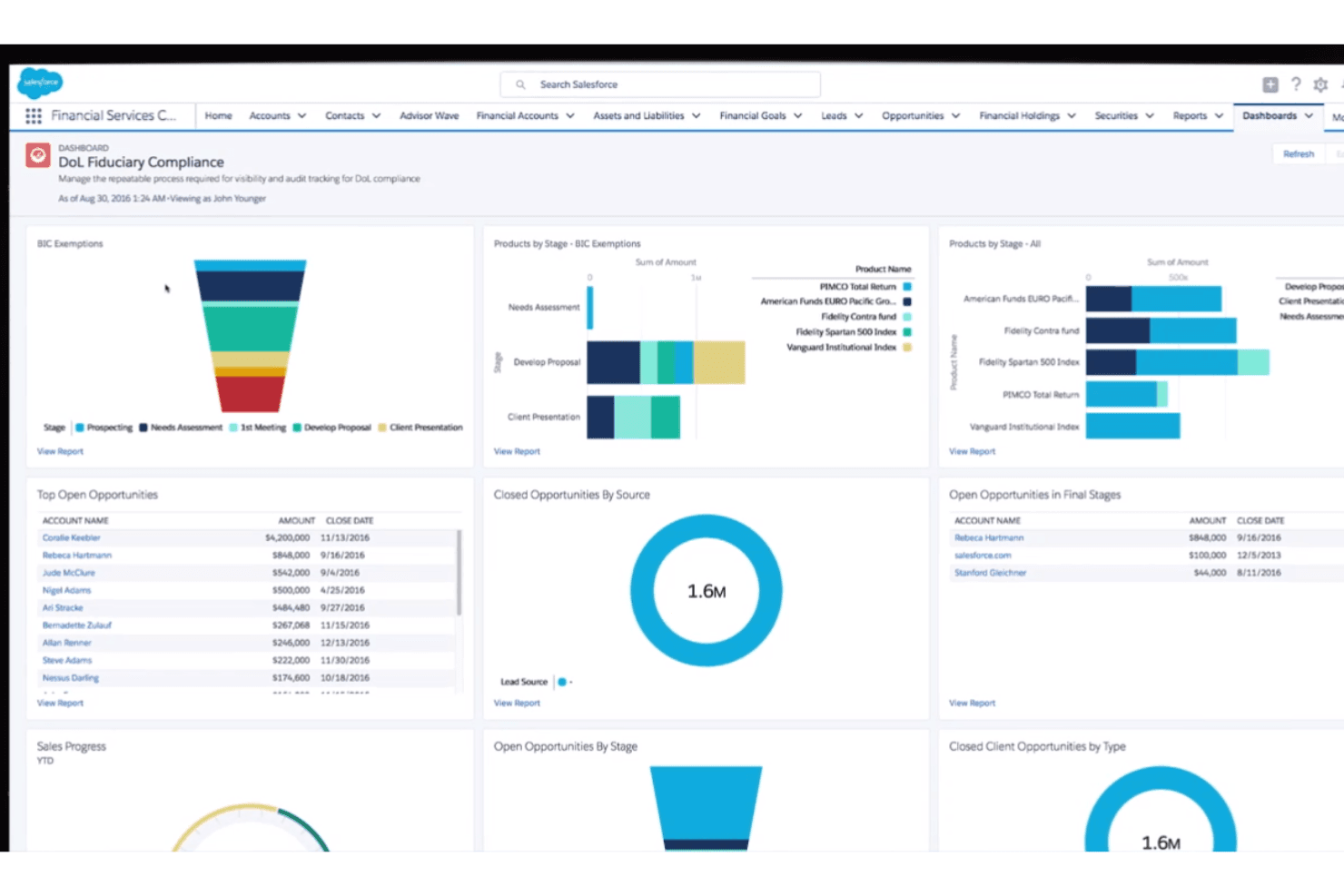
Customer Relationship Management (CRM): Salesforce centralizes customer data, interactions, and communication history using industry-specific data models, helping teams manage relationships and deliver more personalized experiences.
Workflow Automation: Automate tasks, approvals, and processes using Salesforce automation tools to improve efficiency and reduce manual work across teams.
Data & Document Management: Store, organize, and access files directly within Salesforce, ensuring teams can easily retrieve important documents and records.
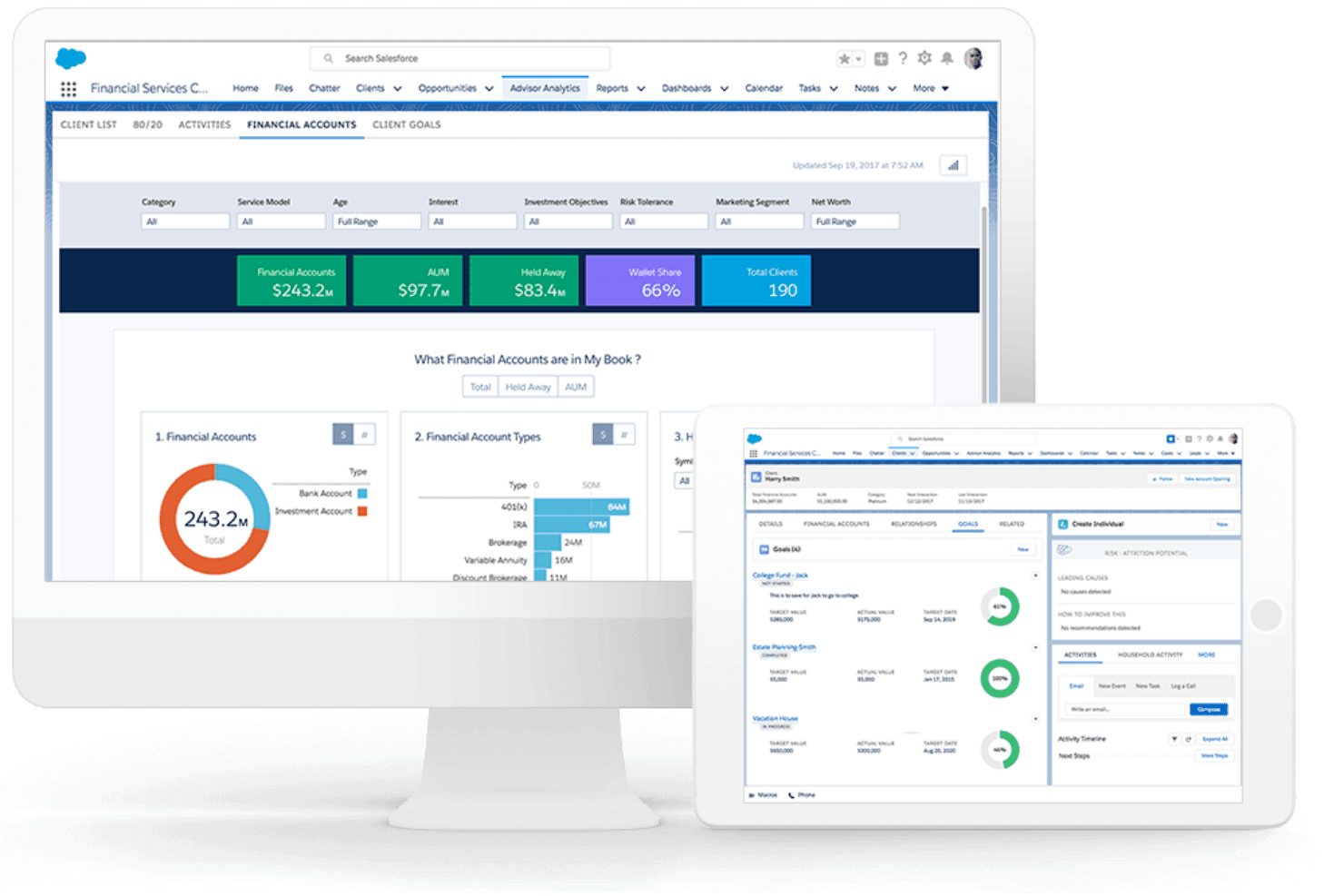
Reporting and Analytics: Generate real-time reports and analytics to track performance, monitor trends, and support data-driven decision-making.
Security and Compliance: Salesforce includes enterprise-grade security, role-based access controls, data encryption, and compliance tools to protect sensitive business data.
Ease of Use
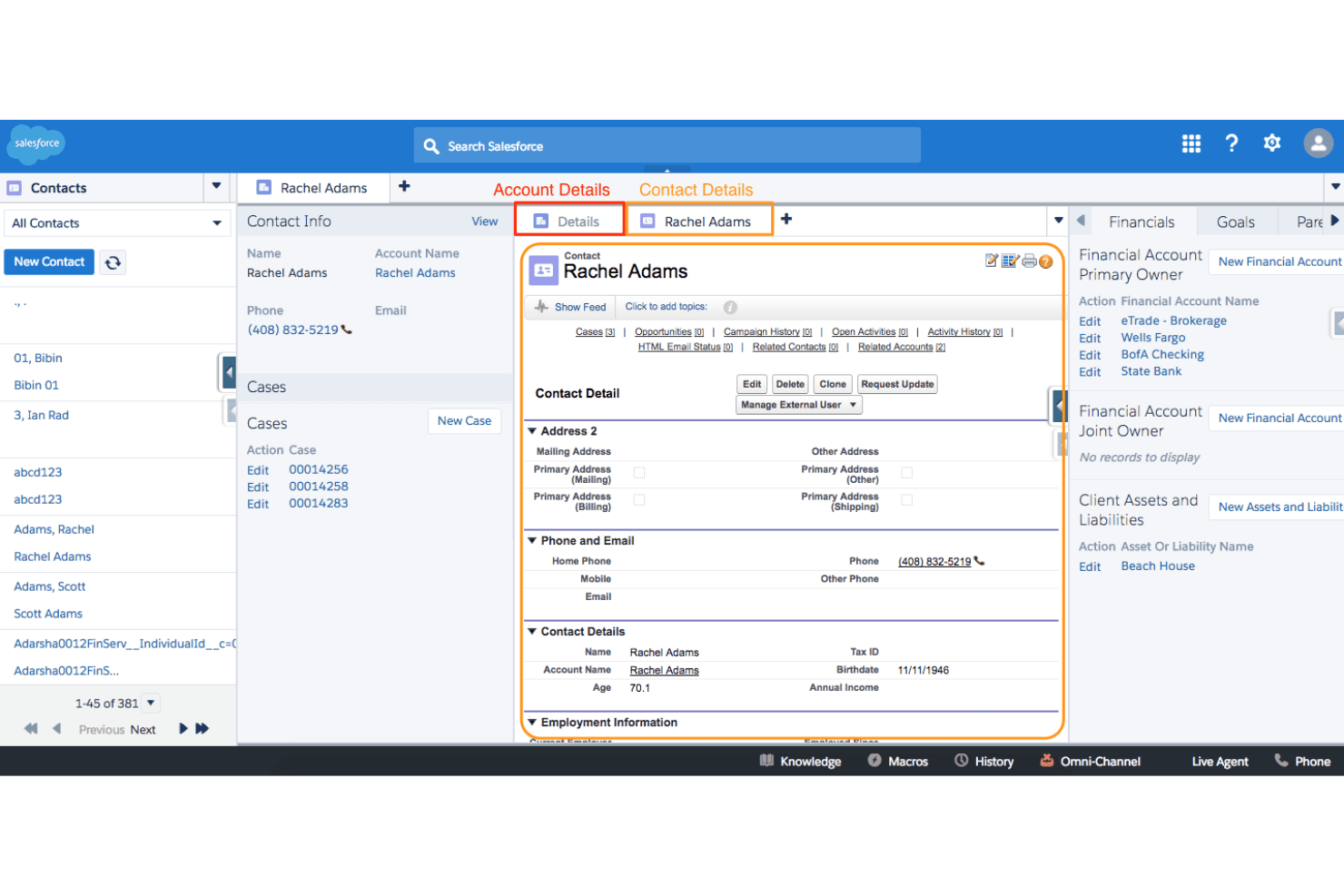
Salesforce Financial Services offers a wealth of features, but its complexity can be daunting for new users. Your team might find the interface less intuitive, requiring extra training to unlock its full potential. While it provides powerful tools for financial services, the learning curve can slow down initial adoption. Once you're familiar with its setup, though, the customization options and advanced functionalities can significantly enhance your team's efficiency.
Integrations
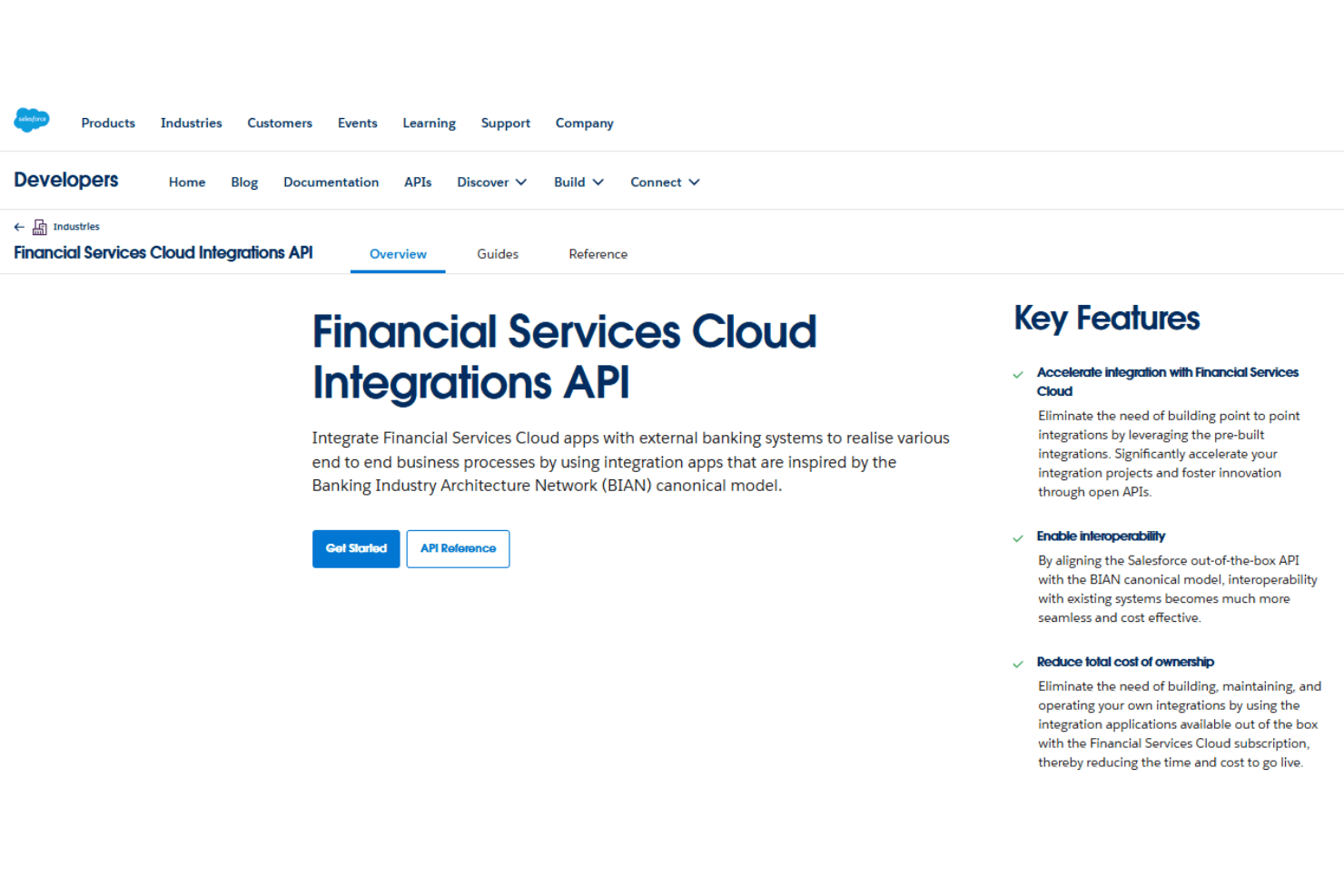
Salesforce Financial Services Cloud supports integrations through its robust APIs and third-party tools. It can connect with accounting platforms like QuickBooks and Xero, access financial data from providers such as Schwab Advisor Center (for RIAs), and integrate credit and data services like D&B Credit Check via AppExchange or middleware. Additional systems, including payments and custom applications, can be connected using Salesforce APIs and integration platforms.
Salesforce Financial Services Cloud Specs
- 2-Factor Authentication: Yes
- A/B Testing: Yes
- Analytics: Yes
- API: Yes
- BitCoin: Yes
- Conversion Tracking: Yes
- Dashboard: Yes
- Data Export: Yes
- Data Import: Yes
- Data Visualization: Yes
- Design Templates: Yes
- External Integrations: Yes
- Inventory Tracking: Yes
- Keyword Tracking: Yes
- Marketing Automation: Yes
- Multi-User: Yes
- Notifications: Yes
- Order Management: Yes
- Payment Gateway Integration: Yes
- Payment Processor: Yes
- PayPal: Yes
- Product Catalog: Yes
- Review Monitoring: Yes
- SAP Integration: Yes
- Scheduling: Yes
- Stripe: Yes
- Third-Party Plugins/Add-Ons: Yes


