

Intuit Enterprise Suite vs. Dynamics 365 Business Central: Vergleich und Bewertungen für 2026
Sowohl die Intuit Enterprise Suite als auch Microsoft Dynamics 365 Business Central unterstützen das Umsatzmanagement durch Berichte, Prognosen, Transparenz beim Cashflow und betriebliche Kontrollen. Erfahren Sie, wie sich ihre Funktionen, Preise, Stärken und Kompromisse im Jahr 2026 vergleichen lassen.

Wir bewerten Tools unabhängig, und Provisionen helfen, unsere Tests zu finanzieren. Sehen Sie unsere transparente Richtlinie, unsere Methodik oder schlagen Sie ein Tool vor.
When revenue, payments, reporting, and operational data are spread across separate tools, it becomes harder to see what’s driving growth. Teams need a clearer way to track cash flow, forecast performance, and keep finance, sales, and operations aligned.
Intuit Enterprise Suite and Microsoft Dynamics 365 Business Central are both evaluated among revenue management systems because they help growing organizations improve revenue visibility and financial control. Intuit Enterprise Suite focuses on revenue visibility, cash flow, payments, forecasting, and connected financial operations through the Intuit ecosystem, while Business Central supports broader business processes across finance, sales, service, inventory, projects, and operations.
In this comparison, I’ll break down their features, pricing, pros and cons, security, ease of use, and ideal use cases to help you decide which platform fits your business best.
Intuit Enterprise Suite
4.6/5
- Free demo available
- Pricing upon request
Microsoft Dynamics 365 Business Central
4/5
- Free plan available
- From $80/user/month (billed annually)
Warum Sie unseren Software-Empfehlungen vertrauen können
6,700+
Reviews
20
Industry experts
16+
Evaluation factors
14
Years
Unsere Bewertungen spiegeln unser unabhängiges Urteilsvermögen wider – keine Verkaufsstrategie. Erfahren Sie, wie wir transparent bleiben.
Für diesen Leitfaden haben wir Tools mithilfe von praktischen Tests und unabhängiger Recherche bewertet und dabei unsere Bewertungskriterien angewendet.
Unsere Bewertungen spiegeln unser menschliches redaktionelles Urteilsvermögen wider, keine Verkaufsstrategie.
| Intuit Enterprise Suite | Microsoft Dynamics 365 Business Central | |
|---|---|---|
| Free Trial | Free demo available | Free plan available |
| Pricing | Pricing upon request | From $80/user/month (billed annually) |
Intuit Enterprise Suite vs. Microsoft Dynamics 365 Business Central – Preise & versteckte Kosten
Die Intuit Enterprise Suite verwendet eine kundenspezifische, angebotsbasierte Preisgestaltung, sodass die Kosten von der Anzahl der Nutzer, der verbundenen Unternehmen, den ausgewählten Funktionen, Add-ons, Integrationen und dem Implementierungsaufwand abhängen. Microsoft Dynamics 365 Business Central bietet eine transparentere Preisstruktur mit einer kostenlosen Testversion sowie separaten Tarifen für Vollnutzer, Premium-Funktionen und Teammitglieder mit eingeschränktem Zugriff.
Bei den versteckten Kosten können bei beiden Plattformen zusätzliche Ausgaben für Implementierung, Datenmigration, Schulungen, Workflowerstellung, Integrationen, Anpassungen, Premium-Support und laufende Administration anfallen. Business Central ist hinsichtlich der Vorabkalkulation einfacher einzuschätzen, da die Tarifpreise öffentlich einsehbar sind, während die Intuit Enterprise Suite ein individuell zugeschnittenes Angebot je nach Komplexität des Unternehmens erfordert. Für einen fairen Vergleich sollten Sie sich von beiden Anbietern eine vollständige Kostenaufstellung geben lassen, die auch Einrichtung, Support, Integrationen, Add-ons und künftige Skalierungsbedürfnisse umfasst.
| Intuit Enterprise Suite | Microsoft Dynamics 365 Business Central | |
|---|---|---|
| Accounts Payable | Yes | Yes |
| Accounts Receivable | Yes | Yes |
| API | Yes | Yes |
| Budgeting | Yes | Yes |
| Calendar Management | No | No |
| Customer Management | No | Yes |
| Dashboard | Yes | Yes |
| Data Export | Yes | Yes |
| Data Import | Yes | Yes |
| Data Visualization | Yes | Yes |
| Expense Tracking | Yes | Yes |
| External Integrations | Yes | Yes |
| Forecasting | Yes | Yes |
| Inventory Tracking | Yes | Yes |
| Multi-User | Yes | Yes |
| Notifications | Yes | Yes |
| Payroll | Yes | Yes |
| Project Management | Yes | Yes |
| Scheduling | No | Yes |
| Supplier Management | Yes | Yes |
| Third-Party Plugins/Add-Ons | Yes | Yes |
| Integration | Intuit Enterprise Suite | Microsoft Dynamics 365 Business Central |
|---|---|---|
| IntegrationShopify | Intuit Enterprise Suite✅ | Microsoft Dynamics 365 Business Central ✅ |
| IntegrationBILL/Bill Pay | Intuit Enterprise Suite✅ | Microsoft Dynamics 365 Business Central ✅* |
| IntegrationPayPal | Intuit Enterprise Suite✅ | Microsoft Dynamics 365 Business Central ✅ |
| IntegrationStripe | Intuit Enterprise Suite✅ | Microsoft Dynamics 365 Business Central ✅* |
| IntegrationSalesforce | Intuit Enterprise Suite✅ | Microsoft Dynamics 365 Business Central ✅* |
| IntegrationSquare | Intuit Enterprise Suite✅ | Microsoft Dynamics 365 Business Central ✅* |
| IntegrationAmazon Marketplace | Intuit Enterprise Suite✅ | Microsoft Dynamics 365 Business Central ✅* |
| IntegrationHubSpot | Intuit Enterprise Suite✅ | Microsoft Dynamics 365 Business Central ✅* |
| IntegrationKnowify | Intuit Enterprise Suite✅ | Microsoft Dynamics 365 Business Central ❌ |
| IntegrationWix | Intuit Enterprise Suite✅ | Microsoft Dynamics 365 Business Central ✅* |
| IntegrationAPI | Intuit Enterprise Suite✅ | Microsoft Dynamics 365 Business Central ✅ |
| IntegrationZapier | Intuit Enterprise Suite❌ | Microsoft Dynamics 365 Business Central ✅ |
*Verfügbar über einen Drittanbieter-Connector, eine Microsoft AppSource-App, API/iPaaS-Connector oder Zapier statt einer eindeutig nativen Integration, die von Microsoft selbst entwickelt wurde.
Sowohl Intuit Enterprise Suite als auch Microsoft Dynamics 365 Business Central unterstützen Integrationen über E-Commerce, Zahlungen, CRM, Finanzen und Umsatz-Workflows. Die Intuit Enterprise Suite setzt auf direkte App-Verbindungen und das größere Intuit-Ökosystem, während Business Central viele Verbindungen über Microsoft AppSource, APIs, Partner-Connectors oder Zapier unterstützt. Insgesamt ist die Intuit Enterprise Suite am besten für Teams geeignet, die vernetzte Umsatz-Workflows wünschen, während Business Central flexiblere Integrationsoptionen für Microsoft-basierte Teams bietet.
| Faktor | Intuit Enterprise Suite | Microsoft Dynamics 365 Business Central |
|---|---|---|
| FaktorDatenverschlüsselung | Intuit Enterprise SuiteVerschlüsselt Daten bei der Übertragung und im Ruhezustand zum Schutz von Umsatz-, Finanz-, Lohn- und Betriebsdaten. | Microsoft Dynamics 365 Business CentralVerschlüsselt Kundendaten im Ruhezustand und während der Übertragung in Microsoft-Cloud-Umgebungen. |
| FaktorRegulatorische Compliance | Intuit Enterprise SuiteUnterstützt SOC-Berichte, ISO 27001-zertifizierte Verfahren, PCI DSS für relevante Zahlungsdienste und VPAT-Dokumentation. | Microsoft Dynamics 365 Business CentralUnterstützt Compliance-Programme der Microsoft-Cloud, einschließlich ISO 27001, SOC-Berichten und globalen Datenschutzstandards. |
| FaktorZugriffskontrollen | Intuit Enterprise SuiteNutzt rollenbasierte Zugriffskontrollen, um den Zugriff auf sensible Umsatz-, Finanz-, Lohn- und Betriebsdaten zu beschränken. | Microsoft Dynamics 365 Business CentralVerwendet Microsoft Entra ID, rollenbasierte Zugriffe, bedingten Zugriff und MFA-Optionen. |
| FaktorAudit- & Aktivitätsverfolgung | Intuit Enterprise SuiteUnterstützt Prüfungsanforderungen durch Berechtigungen, Finanzkontrollen, Transaktionsübersicht und Berichtskontrollen. | Microsoft Dynamics 365 Business CentralBietet Auditprotokollierung, Aktivitätsverfolgung und von Microsoft verwaltetes Sicherheitsmonitoring. |
| FaktorZahlungssicherheit | Intuit Enterprise SuiteUnterstützt PCI DSS-Compliance für relevante Zahlungsdienste. | Microsoft Dynamics 365 Business CentralUnterstützt sichere Zahlungs- und Finanzprozesse durch Microsoft-Cloud-Kontrollen und Partnerintegrationen. |
Die Intuit Enterprise Suite deckt wichtige Sicherheitsanforderungen für Umsatz- und Finanzprozesse ab, darunter Verschlüsselung, rollenbasierte Zugriffe, SOC-Berichte, ISO 27001-zertifizierte Verfahren, PCI DSS für relevante Zahlungsdienste und Unterstützung bei der Auditierung. Business Central bietet ebenfalls starke Microsoft-Cloud-Sicherheit, aber die Intuit Enterprise Suite gewährleistet wachsenden Teams einen soliden Schutz für Zahlungen, Berichte, Lohnabrechnung und Finanzprozesse.
| Faktor | Intuit Enterprise Suite | Microsoft Dynamics 365 Business Central |
|---|---|---|
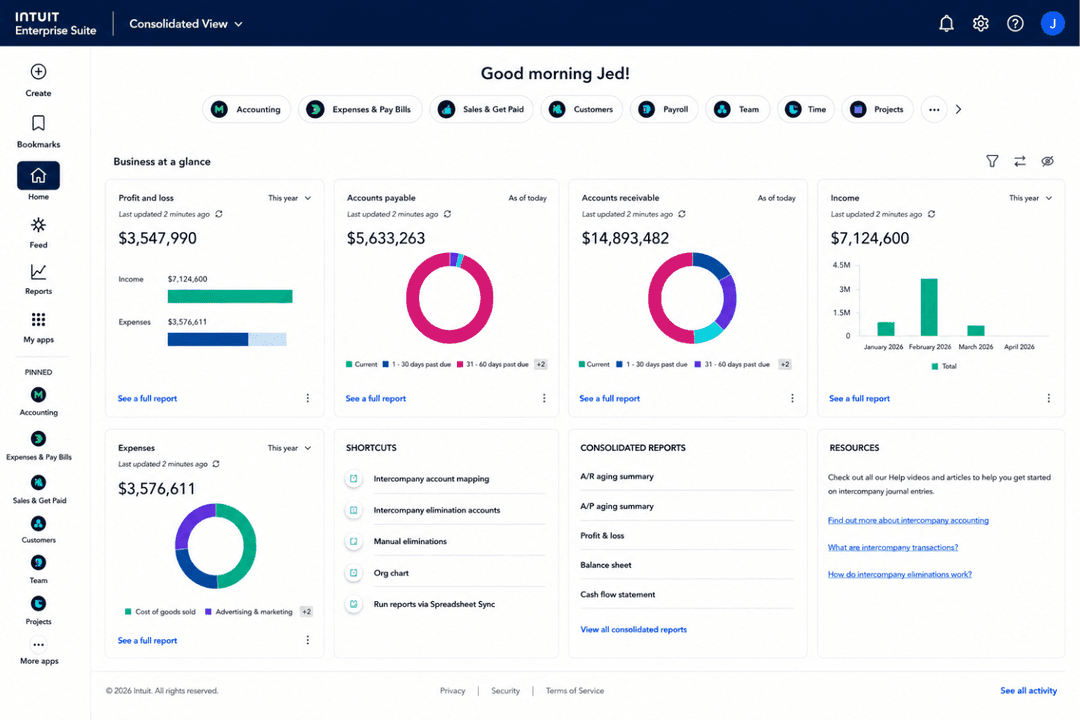
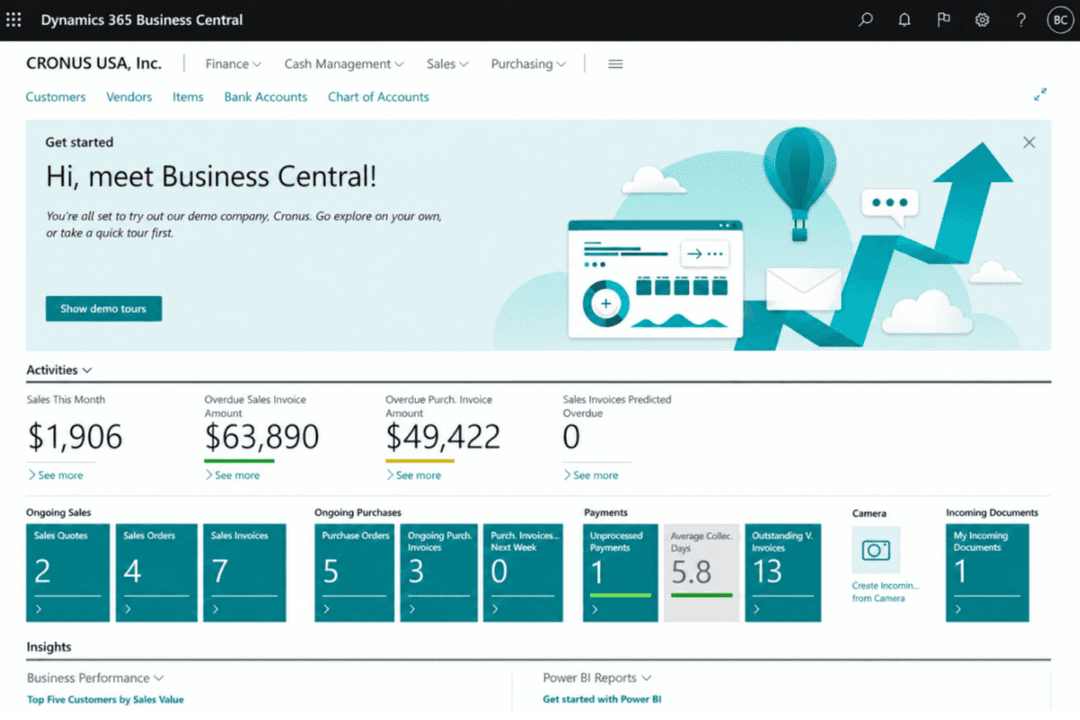
| FaktorBenutzeroberfläche | Intuit Enterprise SuiteModerne Intuit-typische Benutzererfahrung für Teams, die Umsatz, Zahlungsflüsse, Zahlungen und Finanzberichte steuern. | Microsoft Dynamics 365 Business CentralRollenbasiertes Arbeitsumfeld, das vom Benutzer, von Aufgaben und von Unternehmensfunktionen personalisiert werden kann. |
| FaktorOnboarding | Intuit Enterprise SuiteGeführte Implementierung mit dediziertem Customer Success Manager, Migrationshilfe, Schulungen, Reporting-Einrichtung und Systemanbindungen. | Microsoft Dynamics 365 Business CentralBietet Microsoft Learn-Ressourcen, unterstützten Einstieg und Partner-geführte Implementierungsunterstützung. |
| FaktorLernkurve | Intuit Enterprise SuiteFür Intuit-erfahrene Teams leichter, dennoch erfordern Mandanteneinrichtung, Reporting und Umsatzprozesse Planung. | Microsoft Dynamics 365 Business CentralKann mehr Schulung erfordern, da es Finanzen, Vertrieb, Service, Lager, Projekte und Betrieb abdeckt. |
| FaktorSupport-Ressourcen | Intuit Enterprise SuiteStellt Produktsupport, Customer-Success-Beratung, Schulung und Implementierungsressourcen bereit. | Microsoft Dynamics 365 Business CentralBietet Microsoft Learn, Dokumentation, Hilferessourcen, technische Supportpfade und Partnersupport. |
| FaktorAnpassbarkeit | Intuit Enterprise SuiteErmöglicht konfigurierbare Prozesse, Berichte, Berechtigungen, Integrationen und Geschäftsprozesse ohne aufwendigen ERP-Aufbau. | Microsoft Dynamics 365 Business CentralUnterstützt rollenbasierte Personalisierungen, Seitenlayouts, Berichte, Dashboards und mit Microsoft 365 verbundene Arbeitsabläufe. |
Unter dem Gesichtspunkt der Benutzerfreundlichkeit ist die Intuit Enterprise Suite besonders zugänglich für Teams, die sich auf Umsatztransparenz, Zahlungsflüsse, Zahlungen, Reporting und Finanzprozesse konzentrieren. Durch geführtes Onboarding, dedizierten Customer-Success-Support und die Intuit-typische Bedienoberfläche gelingt die Einführung wachsenden Teams deutlich leichter. Business Central bietet mehr Microsoft-basierte Personalisierungsoptionen, kann durch den breiteren Funktionsumfang jedoch mehr Einrichtung und Schulung erfordern.
Intuit Enterprise Suite
- Connects revenue, cash flow, payments, and financial data for clearer visibility.
- Supports AI-powered reporting, forecasting, and insights for teams managing revenue performance.
- Helps manage multi-entity financial operations as the business grows.
- Setup requires planning around entities, reporting, workflows, and integrations.
- May be more than smaller teams need if they only want basic revenue tracking.
- Not a dedicated revenue tool, so advanced revenue recognition or subscription billing may require add-ons.
Microsoft Dynamics 365 Business Central
- Handles multi-entity and multi-currency revenue consolidation well
- Provides detailed, drill-down financial reporting and audit trails
- Strong workflow automation for recurring revenue processes
- Steep per-user pricing for growing revenue teams
- Advanced revenue recognition features require custom configurations
- Native customer support response times can be inconsistent
Intuit Enterprise Suite
- Multi-Entity OrganizationsManage revenue and financial performance across multiple legal entities while consolidating reporting from one system.
- Professional Services FirmsTrack project revenue, manage financial performance, and improve visibility across teams and client work.
- Technology & SaaS CompaniesSupport growing revenue operations with AI-powered reporting, forecasting, and financial controls.
- Construction & Project-Based BusinessesManage project accounting, budgets, and revenue-related reporting for project-driven work.
- Manufacturing, Wholesale & DistributionMonitor revenue and financial performance across products, locations, and business units.
- Growing Mid-Market BusinessesUse enterprise-level financial management and reporting without taking on the full complexity of a traditional ERP.
Microsoft Dynamics 365 Business Central
- Midsize EnterprisesIts feature set balances depth and usability for organizations scaling up from basic accounting software.
- Multi-Entity BusinessesBusiness Central consolidates revenue, warehouse management, and reporting across branches, subsidiaries, and global locations in one unified view.
- Subscription-Based CompaniesRecurring billing, revenue recognition, and contract management help SaaS and service firms get revenue clarity.
- Finance DepartmentsCustomizable dashboards, compliance tools, and audit trails support detailed revenue analysis and regulatory requirements.
- International FirmsMulti-currency support, language packs, and region-specific compliance make cross-border revenue management straightforward.
- Project-Based TeamsIntegrated project accounting, project costing, job costing, and time tracking enable granular visibility into project revenues and costs.
Wer sollte die Intuit Enterprise Suite nutzen und wer sollte Microsoft Dynamics 365 Business Central verwenden?
Die Intuit Enterprise Suite eignet sich besonders für wachsende und mittelständische Unternehmen, die eine bessere Umsatztransparenz, Zahlungsflussverfolgung, Zahlungen, Forecasting und Finanzberichterstattung ohne aufwendige ERP-Implementierung benötigen. Sie ist besonders geeignet für Teams, die bereits das Intuit-Ökosystem nutzen und vernetzte Umsatz- und Finanzprozesse, konsolidiertes Reporting über mehrere Einheiten, KI-gestützte Einblicke und geführte Einführung wünschen.
Microsoft Dynamics 365 Business Central hingegen eignet sich eher für mittelständische Unternehmen, die eine umfassendere operative Unterstützung in den Bereichen Finanzen, Vertrieb, Service, Lagerhaltung, Projekte, Einkauf und Lieferantenmanagement benötigen. Insgesamt ist die Intuit Enterprise Suite für Teams sinnvoller, die einen leichteren Weg zu mehr Umsatz- und Finanztransparenz suchen, während Business Central besser zu Microsoft-orientierten Teams passt, die ein breiteres Spektrum an Geschäftsprozessen steuern müssen.
| Intuit Enterprise Suite | Microsoft Dynamics 365 Business Central | |
|---|---|---|
| Ecosystem Fit | Intuit Enterprise Suite Built around Intuit tools for finance, payroll, payments, workforce management, marketing, and supported apps. | Microsoft Dynamics 365 Business Central Built around Microsoft 365, Power BI, Teams, Copilot, AppSource, and Microsoft partner tools. |
| Implementation Approach | Intuit Enterprise Suite Uses guided onboarding with a dedicated customer success manager, migration help, training, reporting setup, and system connections. | Microsoft Dynamics 365 Business Central Often involves assisted setup, Microsoft Learn resources, and partner-led implementation depending on complexity. |
| Operational Scope | Intuit Enterprise Suite Centers revenue, cash flow, payments, payroll, reporting, and financial workflows. | Microsoft Dynamics 365 Business Central Extends into sales, service, inventory, projects, purchasing, and operations. |
| Pricing Structure | Intuit Enterprise Suite Uses custom, quote-based pricing based on users, entities, capabilities, add-ons, integrations, and implementation needs. | Microsoft Dynamics 365 Business Central Uses public subscription plans based on user access and functionality level. |
| Product Orientation | Intuit Enterprise Suite Focuses on revenue visibility, cash flow, payments, forecasting, and connected financial operations. | Microsoft Dynamics 365 Business Central Supports broader business management across finance, sales, service, inventory, projects, purchasing, and operations. |
| Cloud-Based Access | Both are cloud-based systems that help teams manage financial and revenue-related data online. |
|---|---|
| Reporting & Analytics | Both provide dashboards, reports, and analytics to help teams monitor performance and business health. |
| Security Controls | Both support key security needs through encryption, access controls, and compliance-related protections. |
| User Permissions | Both include roles and permissions to help protect sensitive financial and revenue data. |
| Workflow Automation | Both support automation for approvals, finance processes, and operational tasks. |