

Visdum Review: Pros, Cons, Features and Pricing
I judge Visdum by whether it makes sales compensation easier to trust—not just by its feature list. Here’s how its strengths, trade-offs, and pricing stack up.

We review tools independently, and commissions help fund our testing. See our transparency policy, our methodology, or suggest a tool.
Visdum is a sales compensation software that automates commission calculations and includes a no-code incentive plan builder. I’d consider it when a lean finance or RevOps team needs to update plans without relying on compensation specialists. Compared with Xactly, Visdum offers self-service plan changes, making it a better fit for teams that don’t need a broader sales performance management suite.
Visdum Evaluation Summary
4.8/5
- Pricing upon request
- Free demo available
Why Trust Our Software Recommendations
6,700+
Reviews
20
Industry experts
16+
Evaluation factors
14
Years
Our reviews reflect our independent judgment—not a sales pitch. Learn how we stay transparent.
For this guide, we evaluated tools using hands-on testing and independent research, scoring tools using our selection criteria.
Our reviews reflect our human editorial judgment, not a sales pitch.
Visdum Overview
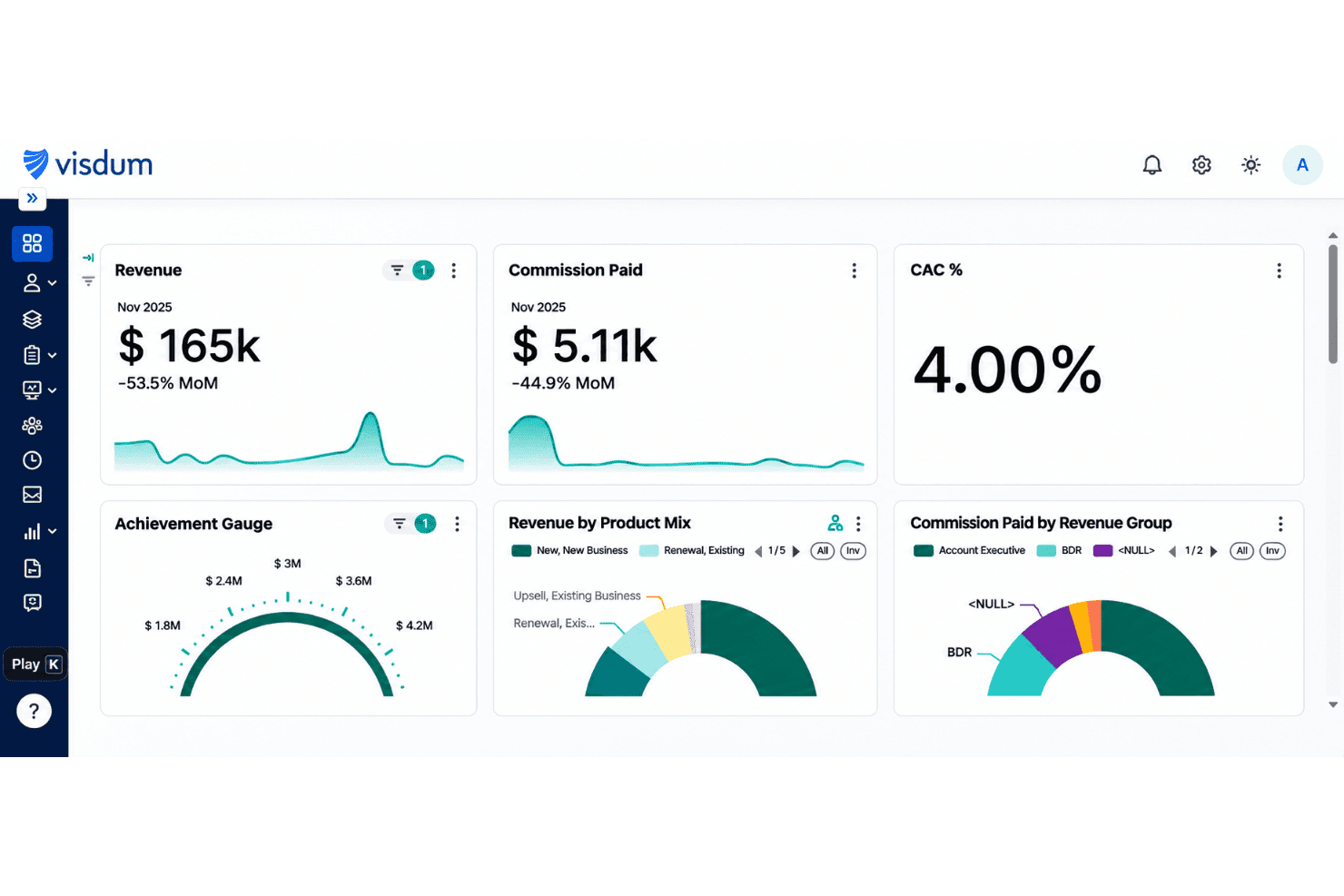
I’d choose Visdum when your finance or RevOps team needs flexible commission plans without depending on specialists. Its no-code builder handles tiered rates, accelerators, clawbacks, and splits, while rep dashboards show deal-level earnings and support disputes. Compared with broader sales performance suites, its focused commission workflow is easier to manage, but it won’t suit teams seeking a wider planning platform. The interface earns strong usability feedback, and native CRM, ERP, and payroll connections cover common data flows. Pricing starts in the low five figures, plus implementation; a named support contact and typical two-to-four-week onboarding help teams judge the investment before committing.
Pros
- Flexible rules cover tiers, splits, clawbacks, and product-specific rates.
- Deal-level earnings statements and forecasts give reps payout visibility.
- Automated calculations and dispute tools reduce spreadsheet reconciliation.
Cons
- Custom reports require training and offer limited drill-downs.
- Large data refreshes can pause the app or slow dashboards.
- Complex plan formulas take setup effort, despite the no-code builder.


How We Test & Score Tools
We’ve spent years building, refining, and improving our software testing and scoring system. The rubric is designed to capture the nuances of software selection and what makes a tool effective, focusing on critical aspects of the decision-making process.
Below, you can see exactly how our testing and scoring works across seven criteria. It allows us to provide an unbiased evaluation of the software based on core functionality, standout features, ease of use, onboarding, customer support, integrations, customer reviews, and value for money.
Core Functionality (25% of final scoring)
The starting point of our evaluation is always the core functionality of the tool. Does it have the basic features and functions that a user would expect to see? Are any of those core features locked to higher-tiered pricing plans? At its core, we expect a tool to stand up against the baseline capabilities of its competitors.
Standout Features (25% of final scoring)
Next, we evaluate uncommon standout features that go above and beyond the core functionality typically found in tools of its kind. A high score reflects specialized or unique features that make the product faster, more efficient, or offer additional value to the user.
We also evaluate how easy it is to integrate with other tools typically found in the tech stack to expand the functionality and utility of the software. Tools offering plentiful native integrations, 3rd party connections, and API access to build custom integrations score best.
Ease of Use (10% of final scoring)
We consider how quick and easy it is to execute the tasks defined in the core functionality using the tool. High scoring software is well designed, intuitive to use, offers mobile apps, provides templates, and makes relatively complex tasks seem simple.
Onboarding (10% of final scoring)
We know how important rapid team adoption is for a new platform, so we evaluate how easy it is to learn and use a tool with minimal training. We evaluate how quickly a team member can get set up and start using the tool with no experience. High scoring solutions indicate little or no support is required.
Customer Support (10% of final scoring)
We review how quick and easy it is to get unstuck and find help by phone, live chat, or knowledge base. Tools and companies that provide real-time support score best, while chatbots score worst.
Customer Reviews (10% of final scoring)
Beyond our own testing and evaluation, we consider the net promoter score from current and past customers. We review their likelihood, given the option, to choose the tool again for the core functionality. A high scoring software reflects a high net promoter score from current or past customers.
Value for Money (10% of final scoring)
Lastly, in consideration of all the other criteria, we review the average price of entry level plans against the core features and consider the value of the other evaluation criteria. Software that delivers more, for less, will score higher.
Core Features
No-Code Commission Plan Builder
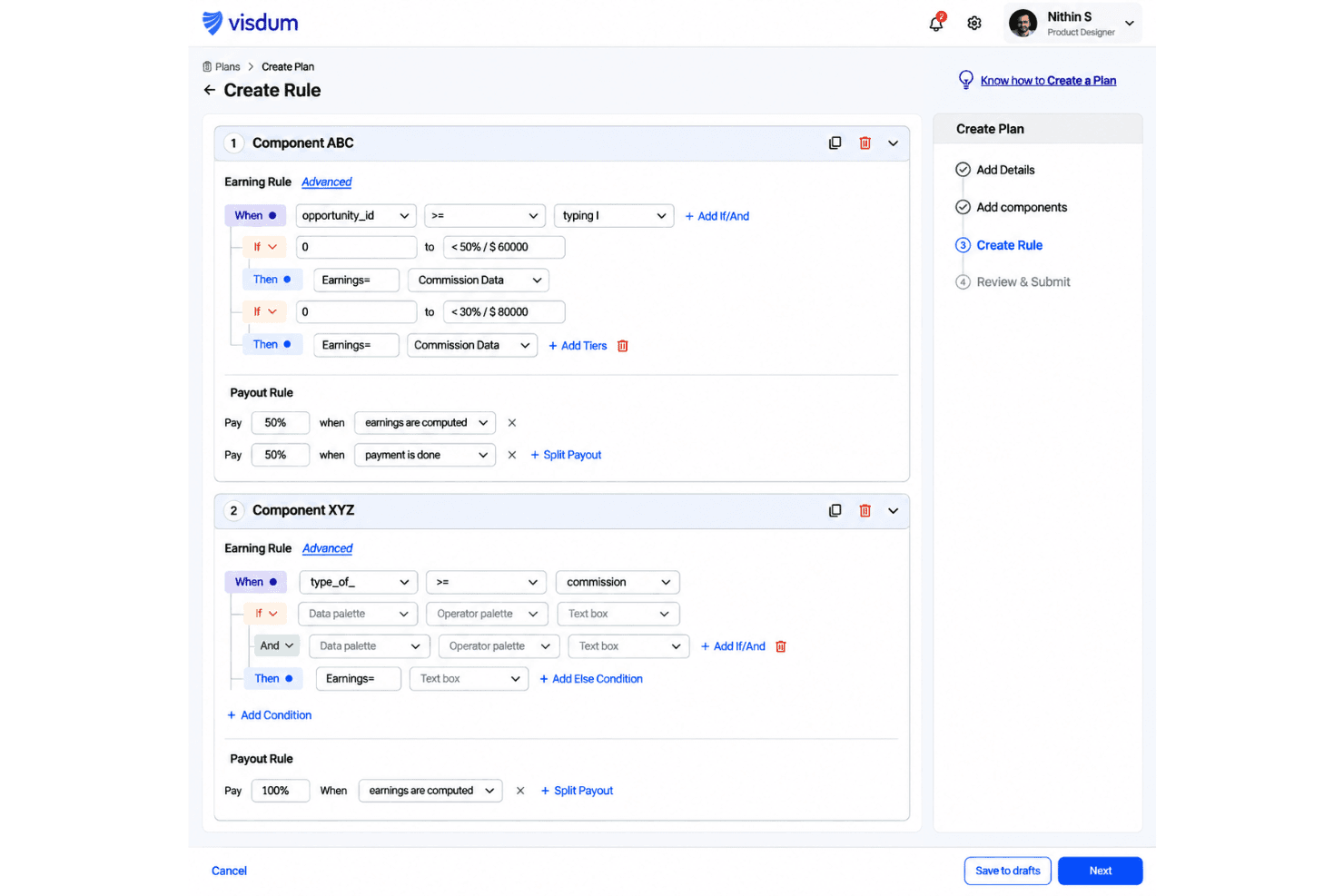
Visdum lets admins configure plans with tiered rates, accelerators, splits, clawbacks, and product-specific rules. You can model payout scenarios before assigning a plan, which helps check how a quota or rate change affects commissions.
Automated Commission Calculations
Visdum calculates commissions from deal data and supports adjustments, overrides, clawbacks, and top-ups. This gives finance a consistent calculation record to review instead of reconciling each payout across separate spreadsheets.
Rep Earnings Dashboards
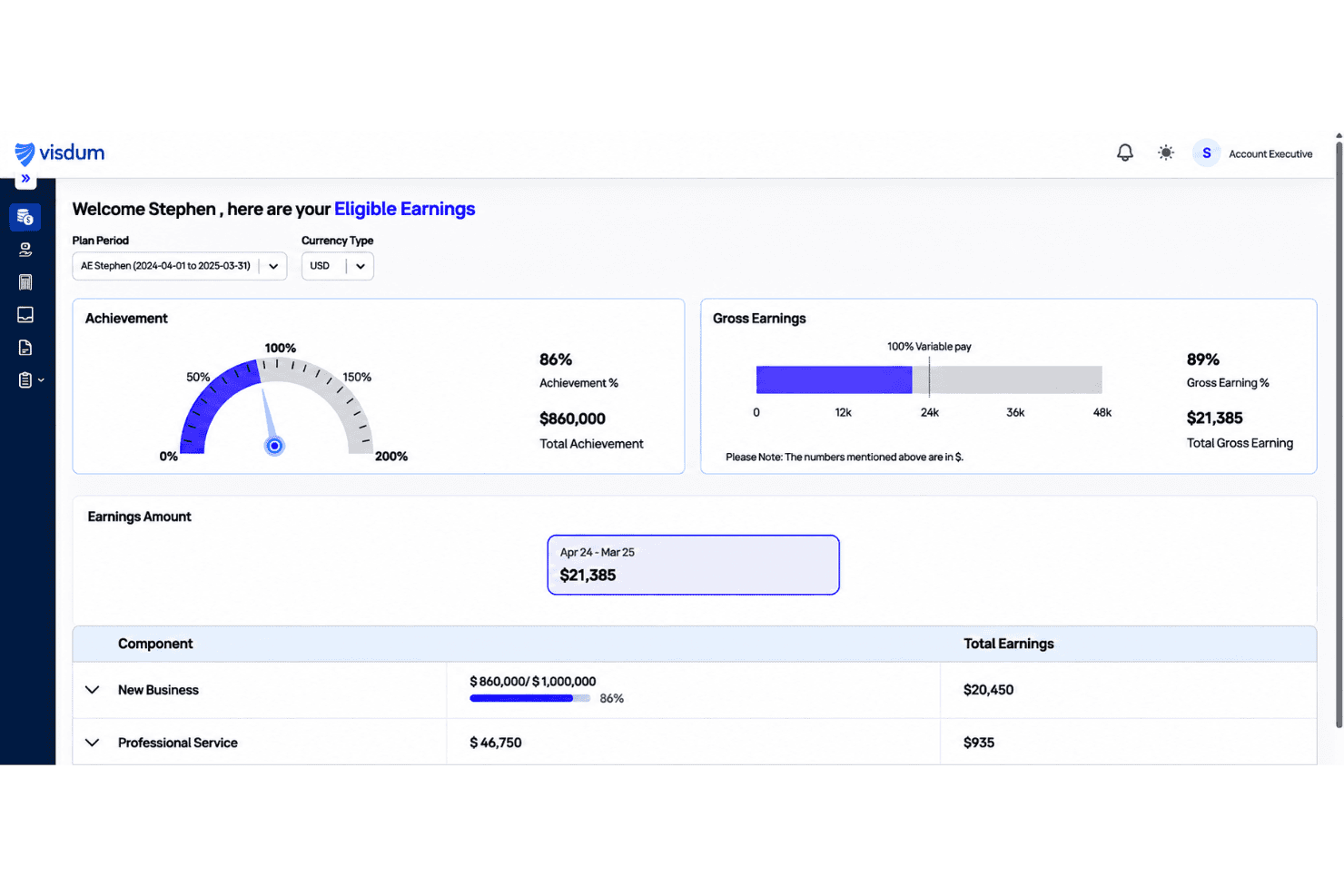
Reps can view deal-level commission statements, performance, and attainment, then use an estimator to explore potential payouts. That visibility helps them check how specific deals contribute to earnings and raise questions with context.
Approvals and Dispute Resolution
Visdum includes approval workflows, reminders, and an in-app process for commission disputes with notifications and an audit trail. Reviewers can trace a payout question and its resolution rather than handling the discussion in disconnected messages.
Reporting and Forecasting
Customizable dashboards and reports track team performance, rep attainment, budgets, and forecasted commissions. Finance and RevOps can use those views to compare payout scenarios with actual results and monitor plan performance.
ASC 606 Amortization Reporting
Visdum provides ASC 606 amortization reporting alongside commission calculations. Finance teams can use the reports to review commission expenses across accounting periods and support revenue recognition workflows.
Ease of Use
Visdum offers a straightforward approach to commission management, with a no-code builder for tiers, splits, and clawbacks and dashboards that show deal-level earnings. Its intuitive interface makes commission tracking accessible to sales teams, although complex compensation plans may require additional setup. Reporting customization also has some limitations, making Visdum suitable for teams that prioritize accessible commission workflows over extensive reporting flexibility.
Integrations
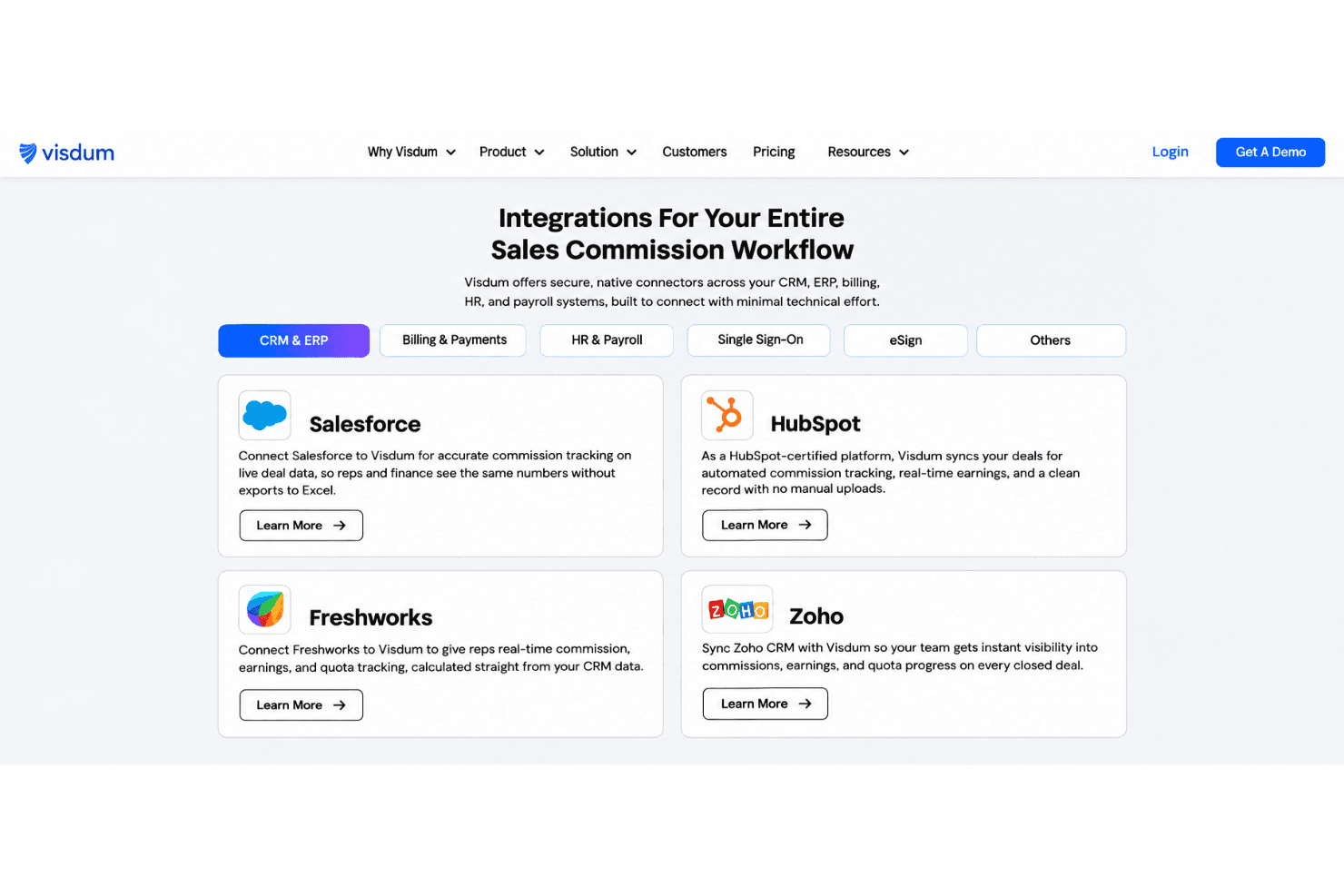
Visdum integrates with Salesforce, HubSpot, Freshworks, Zoho CRM, QuickBooks, Oracle NetSuite, Sage Intacct, Chargebee, Workday, and ADP, among others.
Visdum also provides native API access for custom integrations and supports API-based connections with platforms such as Deel and Snowflake.
Visdum Specs
- 2-Factor Authentication: Yes
- API: Yes
- Audience Targeting: No
- Budgeting: Yes
- Calendar Management: No
- Call Recording: No
- Click-to-Dial: No
- Contact Management: No
- Contact Sharing: No
- Conversion Tracking: No
- Customer Management: No
- Dashboard: Yes
- Data Export: Yes
- Data Import: Yes
- Data Visualization: Yes
- Email Integration: No
- Expense Tracking: Yes
- External Integrations: Yes
- Forecasting: Yes
- Google Apps Integration: Yes
- Inventory Tracking: No
- Lead Management: No
- Lead Scoring: No
- Marketing Automation: No
- Multi-User: Yes
- Notifications: Yes
- Payroll: No
- Project Management: No
- Referral Tracking: No
- Sales Motivator: Yes
- Scheduling: Yes
- Social-Media Integration: No
- Supplier Management: No
- Tax Management: No
- Third-Party Plugins/Add-Ons: No
- Travel Management: No


