

Gelir operasyonlarında çalışıyorsanız satış ve erişim süreçlerini yönetmenin zorluklarını biliyor olabilir ve ekibinizin kendine özgü ihtiyaçlarına uygun satış etkileşimi araçlarına ihtiyaç duyabilirsiniz. Outreach.io popüler bir platformdur, ancak herkes için doğru seçenek olmayabilir. Daha fazla özelleştirme, mevcut sistemlerinizle daha iyi entegrasyon veya yalnızca daha uygun maliyetli bir çözüm arıyor olabilirsiniz.
Doğru alternatifi bulmanıza yardımcı olmak için çeşitli yazılımları test edip inceledim. Bu makalede, her aracı uygun bir seçenek haline getiren özelliklere odaklanarak en iyi seçimlerimi paylaşacağım. Özelliklere, avantajlara ve dezavantajlara tarafsız bir bakış sunarak ekibiniz için en iyi kararı vermenize yardımcı olacağım.
Outreach Nedir?
Outreach, satış ekiplerinin potansiyel müşteriler ve müşterilerle iletişimlerini yönetmesine ve geliştirmesine yardımcı olmak için tasarlanmış bir satış etkileşimi platformudur. Üretkenliği artırmak ve geliri yükseltmek isteyen satış profesyonelleri, hesap yöneticileri ve iş geliştirme ekipleri tarafından yaygın olarak kullanılır. Otomatik iş akışları, e-posta takibi ve analizler, ekiplerin erişim çalışmalarını yönetmesine yardımcı olur. Genel olarak Outreach, iletişim ve satış süreçlerini geliştirmek için uygulamaya dönük bir yaklaşım sunar.
Outreach Alternatifleri Karşılaştırma Tablosu
En iyi Outreach alternatiflerimin fiyatlandırma ayrıntılarını karşılaştırmak için bu karşılaştırma tablosunu kullanın.
Score legend (out of 5)
- Excellent4.5–5
- Good4–4.4
- Average3–3.9
- Below average2–2.9
- Poor1–1.9
Sorted by: Default
| Tool | Starting Price | Website | |||||||
|---|---|---|---|---|---|---|---|---|---|
Best for inbox management | 2.7 out of 5 | 2 | 2 | 2 | 3 | 4 | 3 | $47/month Free trial + demo available | Website |
Best for ready-to-use lead lists | Not rated | 1 | Not rated | 2 | 2 | 2 | 2 | $597/month Free plan + free demo available | Website |
Best for social outreach | 3.5 out of 5 | 4 | 4 | 4 | 3 | 3 | 3 | $39/month Free plan + 7-day trial + demo available | Website |
Best for multi-step processes | 3.8 out of 5 | 4 | 4 | 4 | 4 | 4 | 3 | $50/month 14-day free trial + free demo available | Website |
Best for multi-channel outreach | 3.3 out of 5 | 2 | 3 | 4 | 4 | 4 | 3 | $49/user/month 14-day free trial + demo available | Website |
Best for Gmail-based sales work | 2.3 out of 5 | 1 | 3 | 1 | 3 | 3 | 3 | $59/user/month Free plan + 14-day free trial available | Website |
Best for built-in lead sourcing | 3.7 out of 5 | 4 | 4 | 4 | 3 | 4 | 3 | Pricing upon request Free plan + trial + demo available | Website |
Best for managing full sales cycles | 3.8 out of 5 | 4 | 4 | 4 | 3 | 4 | 4 | Pricing upon request Free demo available | Website |
Best for cold emailing | 3.2 out of 5 | 3 | 4 | 3 | 3 | 3 | 3 | $29/user/month Free trial + free demo available | Website |
Best for AI agent support | 3.2 out of 5 | 3 | 4 | 3 | 3 | 3 | 3 | Pricing upon request Free demo available | Website |


Why Trust Our Software Recommendations
6,700+
Reviews
20
Industry experts
16+
Evaluation factors
14
Years
Our reviews reflect our independent judgment—not a sales pitch. Learn how we stay transparent.
For this guide, we evaluated tools using hands-on testing and independent research, scoring tools using our selection criteria.
Our reviews reflect our human editorial judgment, not a sales pitch.
En İyi Outreach Alternatifleri İncelemeleri
Aşağıda, kısa listeme giren en iyi Outreach alternatiflerine ilişkin ayrıntılı özetlerimi bulabilirsiniz. İncelemelerim; her aracın temel özelliklerine, avantajlarına ve dezavantajlarına, entegrasyonlarına ve ideal kullanım alanlarına ayrıntılı bir bakış sunarak sizin için en uygun seçeneği bulmanıza yardımcı olur.
 Best for inbox management
- Free trial + demo available
- From $47/month
Visit WebsiteCustomer Rating:4.8/5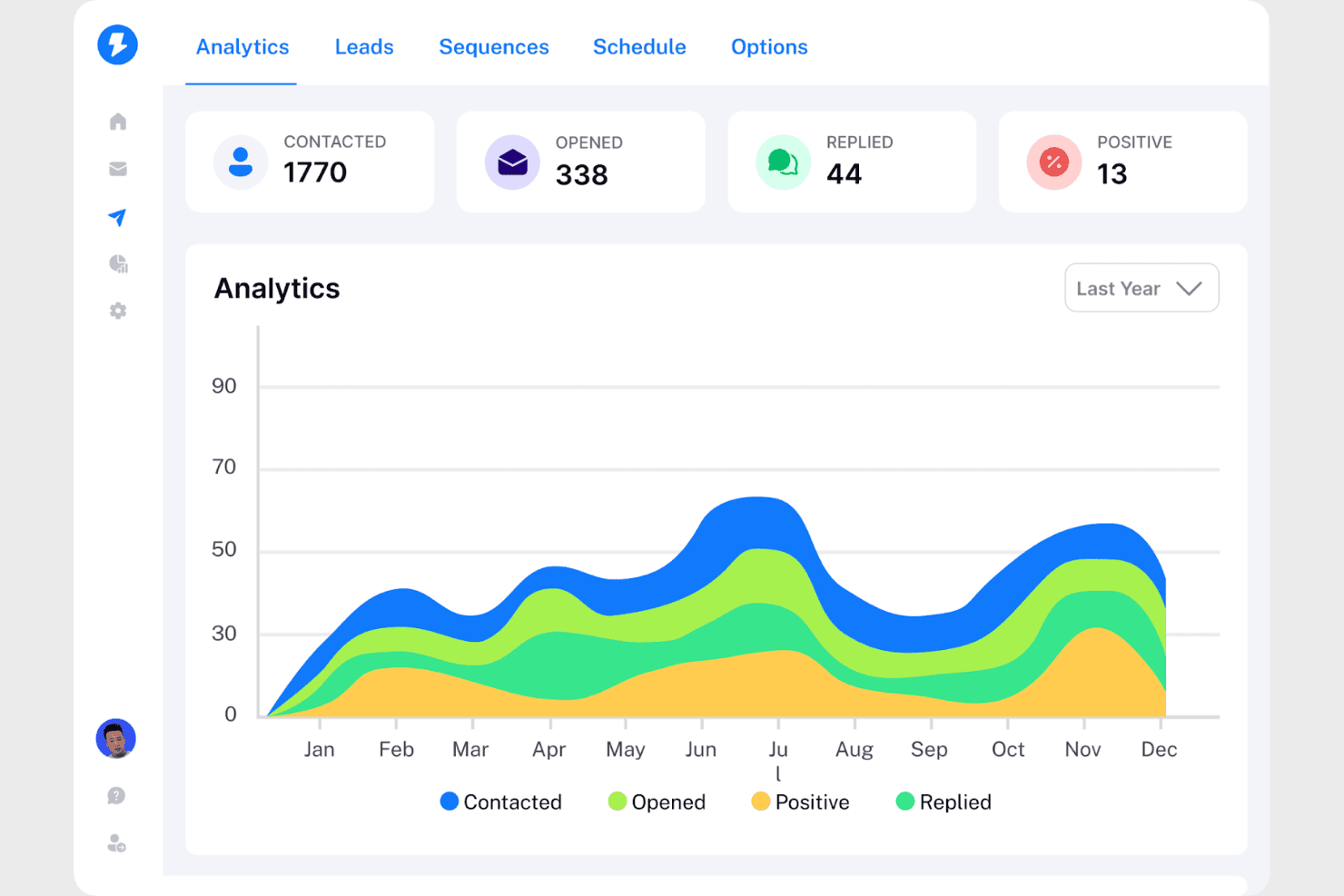
Instantly tracks email outreach metrics like opens, replies, and positives. Instantly is a cold email platform built for SDRs and lean outreach teams who need to run high-volume email campaigns with strong deliverability, automated follow-ups, and centralized reply management.
Who Is Instantly Best For?
Instantly suits SDRs and lean outreach teams running high-volume cold email campaigns who need strong deliverability tooling and centralized reply management without a full enterprise sales engagement suite.
Why I Picked Instantly
I picked Instantly as one of the best because inbox management is where it genuinely shines: Unibox pulls replies from every connected sending account into one place, so my team can respond, label, and route leads without jumping between accounts. AI reply labels automatically categorize incoming responses, which means I can prioritize hot leads from a single queue rather than manually sorting through hundreds of replies across dozens of inboxes.
Instantly Key Features
- A/Z email testing: Test multiple campaign variants simultaneously and let Instantly automatically favor the winning version.
- Lead Finder Signals: Filter roughly 5.8 million fresh weekly buying signals—including funding events, tech adoption, and LinkedIn activity—matched against a 450M+ contact database.
- Deliverability dashboard: Monitor your sending accounts' inbox-versus-spam placement rates, blacklist status, and SPF/DKIM/DMARC authentication from one view.
- Workflow automation builder: Set up multi-condition automations triggered by replies, opens, clicks, bounces, or CRM events, with built-in conditions, delays, branching paths, and human approval steps.
Instantly Integrations
Instantly offers native integrations with Google and Microsoft email accounts, plus marketplace integrations for HubSpot, Slack, and Pipedrive. It also supports Zapier, REST API v2, webhooks, a TypeScript SDK, CLI, and MCP for custom connectivity.
Pros and Cons
Pros:
- Buying signals help prioritize prospects
- Reviewers praise quick campaign setup
- Centralizes replies across sending inboxes
Cons:
- CRM calls lack automatic logging
- Email-first sequences limit multichannel selling
Learn more about Instantly: Best for ready-to-use lead lists
- Free plan + free demo available
- From $597/month
Visit WebsiteCustomer Rating:4.9/5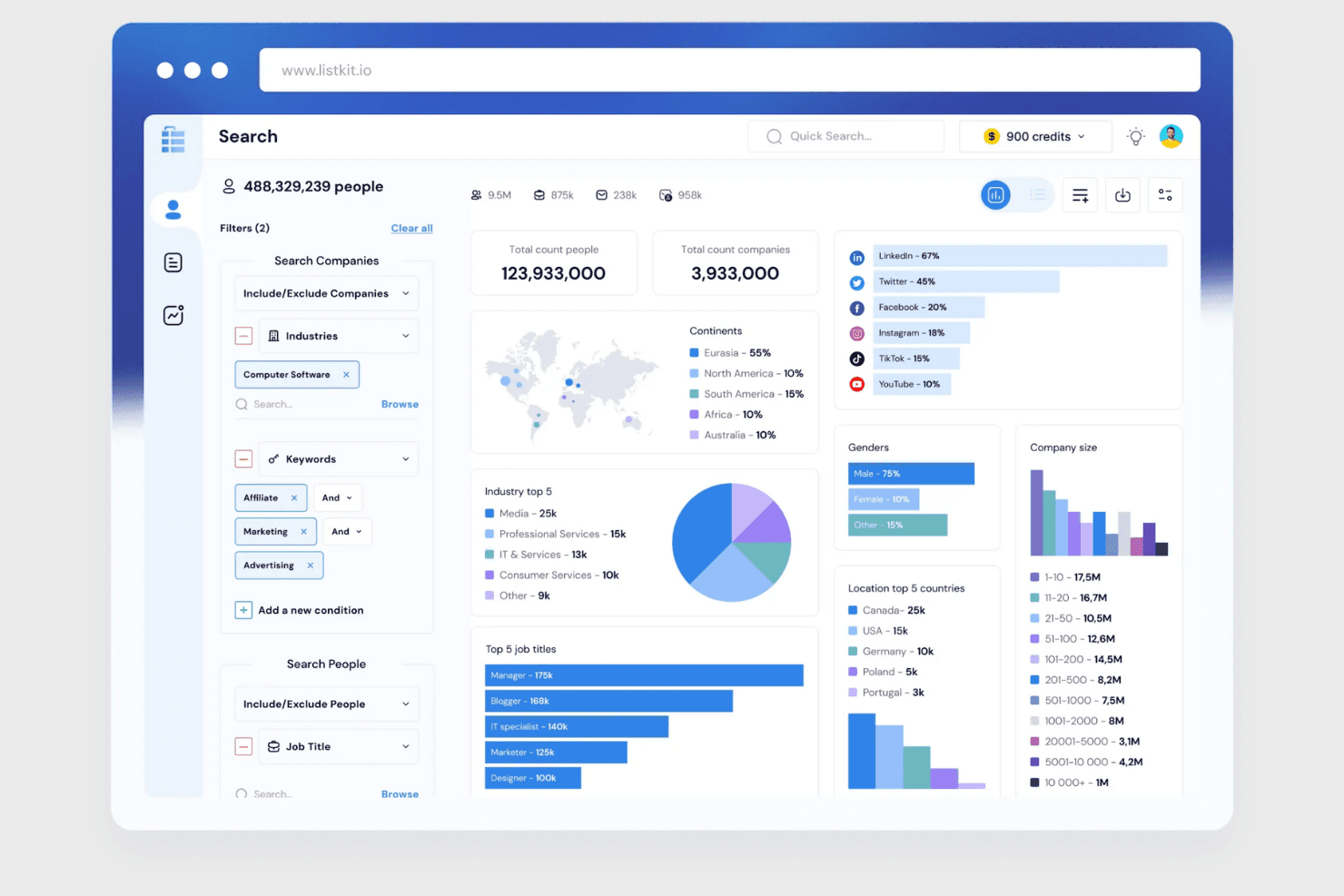
ListKit lets users filter and visualize prospect data with detailed analytics. ListKit is a cold email platform that bundles a B2B lead database, email sequencing, and sending infrastructure in one subscription, making it a fit for founders and sales reps who want to run outbound email campaigns without stitching together separate tools.
Who Is ListKit Best For?
ListKit suits founders and sales reps who want a ready-to-go cold email setup—lead lists, sending infrastructure, and sequencing—without managing multiple tools.
Why I Picked ListKit
I picked ListKit as one of the best because it ships a ready-to-use lead list pipeline that most outreach tools don't include. Its triple-verified B2B contact database covers 977M+ contacts, and the AI Search lets me describe my ideal customer in plain English to generate a targeted list instantly. I also rely on the Buying Intent filter to surface companies actively researching relevant topics before I build a sequence.
ListKit Key Features
- Triple-verified contact database: ListKit checks every contact email three times before export, and you're only charged credits for verified addresses.
- Company-Level Auto-Pause: When one contact at a company replies, ListKit automatically pauses outreach to other contacts at that same company.
- A/B variant testing: You can create multiple email variants within a single campaign step and track replies and positive replies per variant to identify a winner.
- Webhook event delivery: ListKit pushes lead reply, category change, and inbox warmup events to any HTTPS URL you choose, with field mapping handled in your receiving tool.
ListKit Integrations
ListKit documents integrations with HubSpot, Pipedrive, and Zoho, plus signed webhooks for sending reply, lead-category, and inbox-warmup events to custom tools. API availability is documented inconsistently, and its Zapier app is no longer available.
Pros and Cons
Pros:
- Reply and variant reports guide campaign adjustments
- Buying Intent helps prioritize researched companies
- Triple-verified leads simplify contact sourcing
Cons:
- Reviewers report off-target leads and uneven results
- Email-only outreach excludes calls and LinkedIn
Learn more about ListKit: Best for social outreach
- Free plan + 7-day trial + demo available
- From $39/month (billed annually)
Visit WebsiteCustomer Rating:4.7/5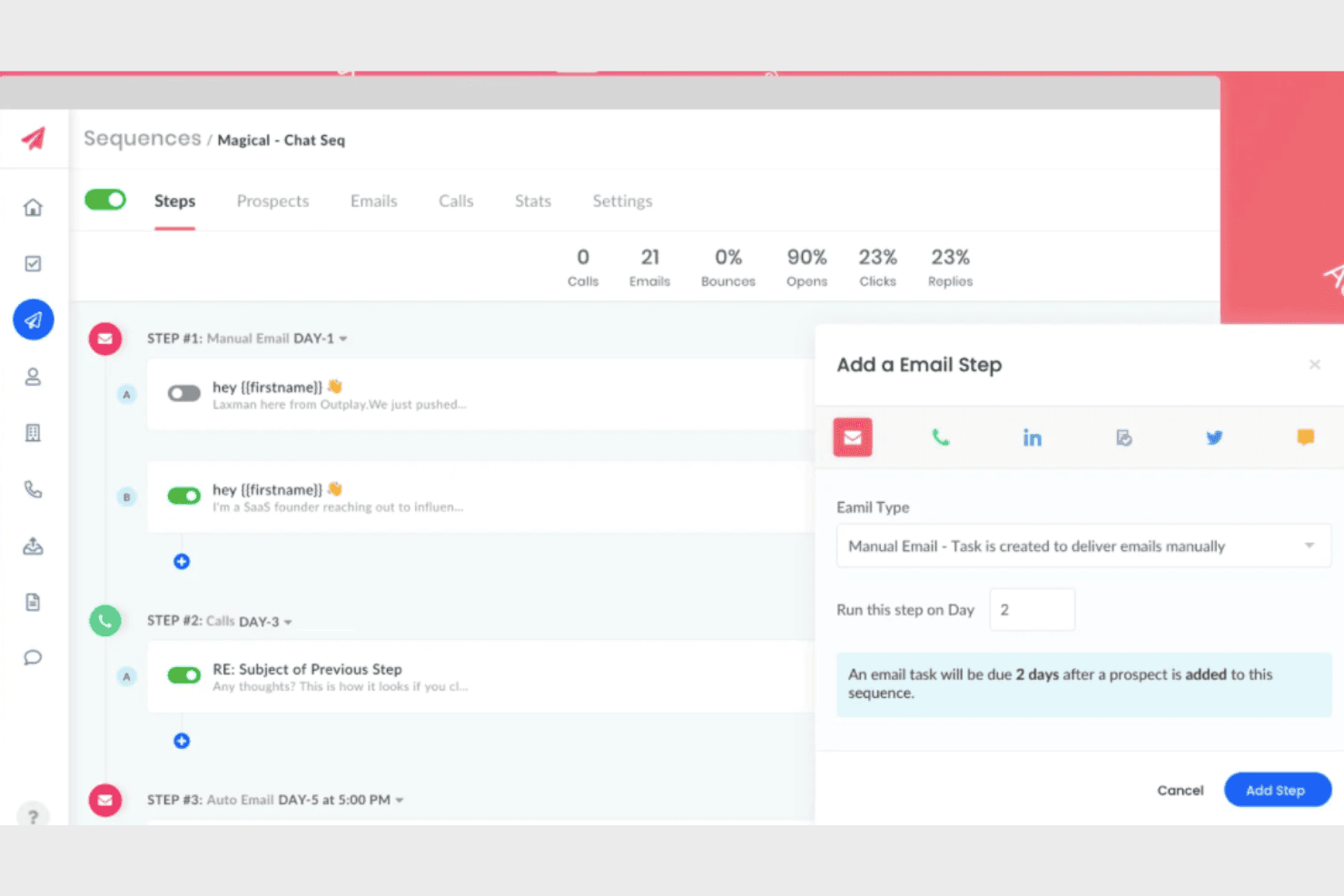
Outplay lets users build multi-step email sequences with scheduling. Outplay is a multichannel sales engagement platform built for outbound sales teams who want to run sequences across email, calls, SMS, LinkedIn, and WhatsApp from a single workspace.
Who Is Outplay Best For?
Outplay is a strong fit for outbound sales teams that run multichannel sequences across email, calls, SMS, and social and want a lower-cost alternative to Outreach or SalesLoft.
Why I Picked Outplay
I picked Outplay as one of the best because it's the only tool on this list that treats LinkedIn and WhatsApp as first-class outreach channels inside a single sequence builder, not afterthoughts. I love how Dynamic Sequences automatically move prospects based on real activity, so if someone opens an email but doesn't reply, they shift into a LinkedIn touchpoint without me manually intervening. The AI objection-handling flashcards are a genuinely useful addition, surfacing suggested responses in real time when a prospect pushes back over email.
Outplay Key Features
- Built-in sales dialer: Place and receive calls directly from your browser with one click, with call recording storage included from the Starter plan up.
- A/B testing for sequences: Test different messaging variations within sequences to compare performance across steps and channels.
- CRM sync with Salesforce and HubSpot: Two-way synchronization keeps outreach activity and prospect data aligned between Outplay and your CRM in real time.
- Mobile app: Access due tasks, log call outcomes, track email engagement, and manage prospects and accounts from your phone.
Outplay Integrations
Outplay offers native integrations with Salesforce, HubSpot, Pipedrive, Zoho, Microsoft Dynamics, Gong, Slack, Google Calendar, and Calendly. Salesforce and HubSpot support bidirectional sync; API availability isn’t documented.
Pros and Cons
Pros:
- Built-in calling keeps rep activity together
- Sequences shift prospects based on engagement
- Email, calls, SMS, and WhatsApp share sequences
Cons:
- Reporting lacks granular attribution and sequence detail
- LinkedIn automation can require manual steps
Learn more about Outplay: Best for multi-step processes
- 14-day free trial + free demo available
- From $50/month (billed annually)
Visit WebsiteCustomer Rating:4.6/5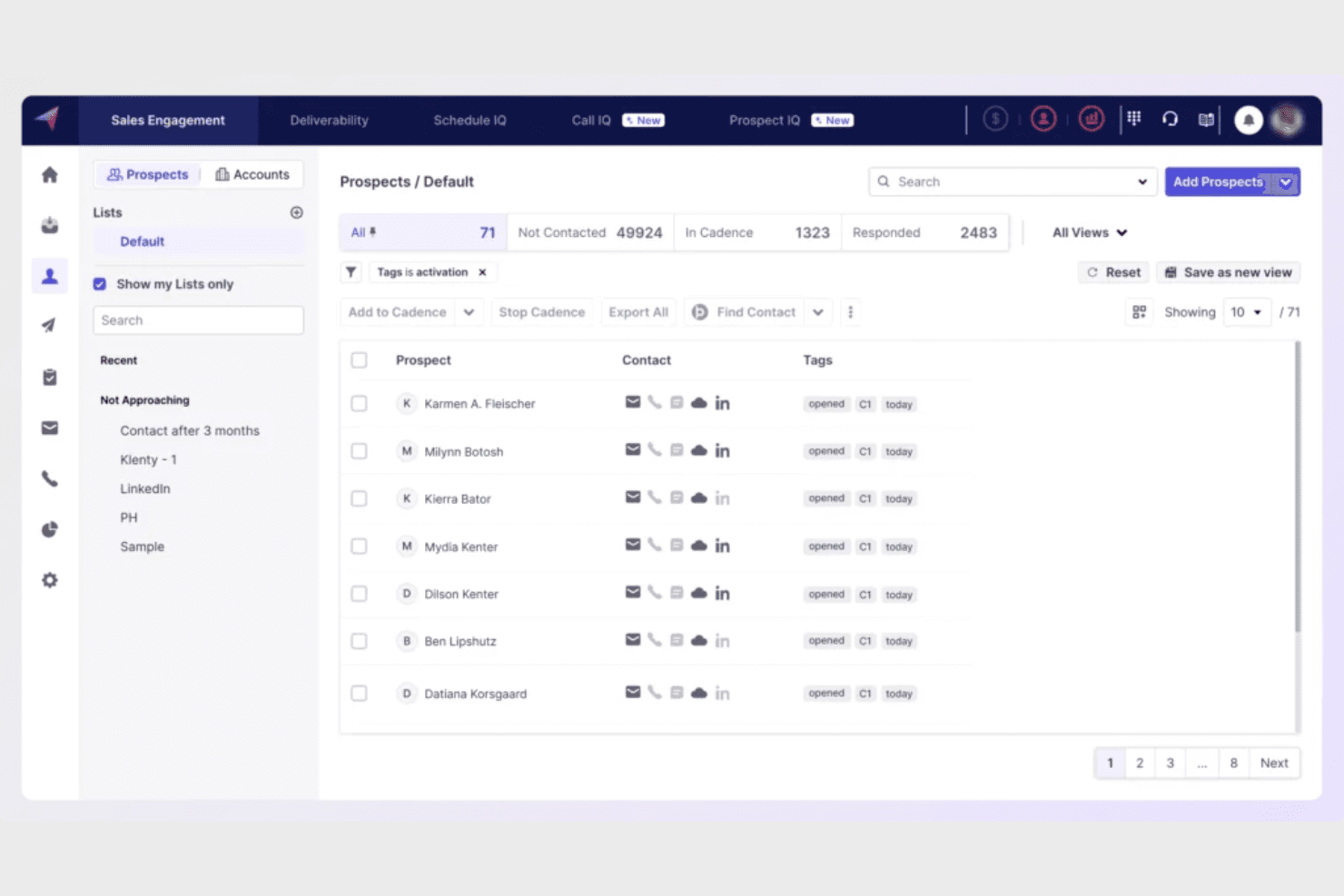
Klenty lets users manage and filter prospects by tags and cadence status. Klenty is a sales engagement platform built for SDR teams running high-volume outbound, combining multichannel cadences, a built-in dialer, and deep CRM sync to cut down on manual work across email, calls, SMS, and social.
Who Is Klenty Best For?
Klenty is a strong fit for SDR teams running high-volume outbound who need multichannel cadences, a built-in dialer, and deep CRM sync in one place.
Why I Picked Klenty
Klenty earns its spot on my shortlist because of how well it handles multi-step outreach sequences across channels. I particularly like its Cadence Playbooks, which automatically reroute follow-up paths based on how a prospect responds—switching channels or adjusting messaging depending on whether they answered a call, ignored an email, or went to voicemail. Paired with Action AI, which drafts follow-up emails and creates next-step tasks directly from call outcomes, Klenty keeps complex sequences moving without manual intervention between steps.
Klenty Key Features
- Multichannel inbox: Consolidates phone, email, SMS, and WhatsApp conversations into a single inbox so reps can manage all prospect communication in one place.
- Email deliverability suite: Includes domain warmup, inbox rotation, email validation across 16+ providers, and spam alerts to protect sender reputation.
- SmartLists: Automatically prioritizes prospect lists using signals like missed calls, prior engagement, and next-step activity so reps always know who to contact first.
- Account-based selling tools: Groups prospects by account and lets teams define account stages, trigger account-level playbooks, and track coverage from a single account panel.
Klenty Integrations
Klenty offers five native CRM integrations: Salesforce, HubSpot, Pipedrive, Zoho CRM, and Microsoft Dynamics 365. It also connects to 1,000+ apps through Zapier and provides a REST API plus webhooks for custom revenue-system connections.
Pros and Cons
Pros:
- Reviewers praise responsive setup and troubleshooting support
- Post-call AI turns conversations into follow-ups
- Conditional cadences reroute follow-ups by engagement
Cons:
- Users report cadence glitches and CRM data inaccuracies
- Reports can obscure campaign-level performance
Learn more about Klenty: Best for Gmail-based sales work
- Free plan + 14-day free trial available
- From $59/user/month
Visit WebsiteCustomer Rating:4.5/5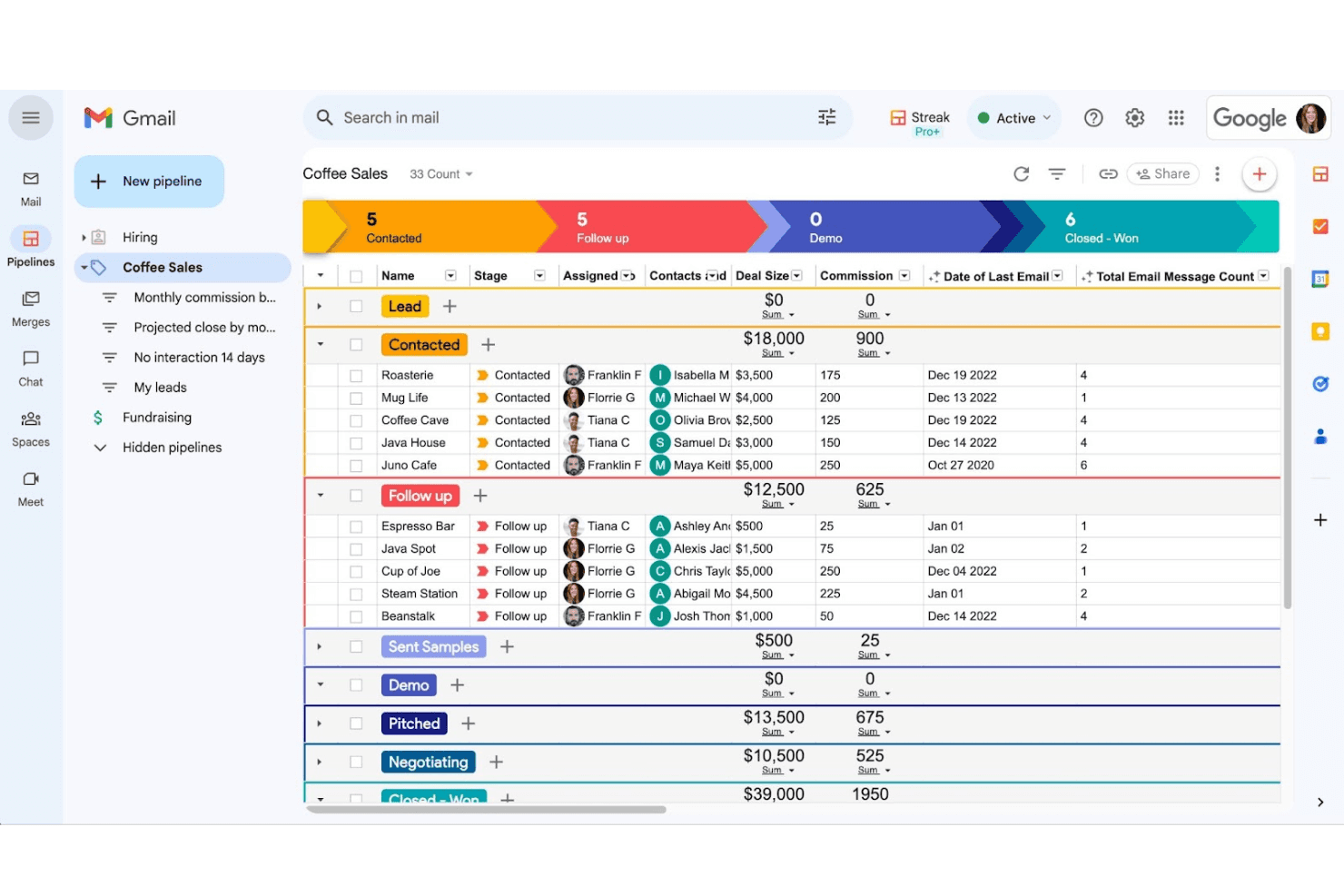
Streak organizes sales leads by pipeline stage within Gmail. Streak is a Gmail-native CRM that lets sales teams manage pipelines, track email engagement, and run personalized outreach without leaving their inbox.
Who Is Streak Best For?
Streak is a strong fit for small sales teams that live in Gmail and want pipeline tracking, email outreach, and deal management without leaving their inbox.
Why I Picked Streak
I picked Streak as one of the best because it's the only tool on my list that turns Gmail itself into a full sales workspace. I love how mail merge lets me send personalized outreach to hundreds of contacts and then automatically trigger follow-up sequences when someone doesn't reply, all without leaving my inbox. Duplicate outreach detection flags when my team has already contacted a prospect, which keeps us from stepping on each other's toes mid-deal.
Streak Key Features
- Email and link tracking: Monitor when recipients open your emails and click links, with per-message, per-thread, and per-campaign visibility.
- AI Autofill: Automatically populate CRM fields by pulling data from deal emails, notes, meeting records, or web research using AI.
- Pipeline notifications and task automation: Trigger task creation and team assignments automatically based on stage changes or deal inactivity.
- LinkedIn lead capture: Pull contacts and company data directly from LinkedIn profiles into your Streak pipelines without manual data entry.
Streak Integrations
Streak offers integrations with LinkedIn, Allo, Google Sheets, Google Forms, Slack, Google Calendar, and Google Drive, plus Zapier. It also provides a REST API, with webhooks available on Pro+ and Enterprise.
Pros and Cons
Pros:
- Shared email history reduces duplicate outreach
- Open alerts help time follow-ups
- Gmail keeps prospect context beside outreach
Cons:
- External CRM syncing lacks documented two-way support
- Email-only sequences miss call and social steps
Learn more about Streak: Best for built-in lead sourcing
- Free plan + trial + demo available
- Pricing upon request
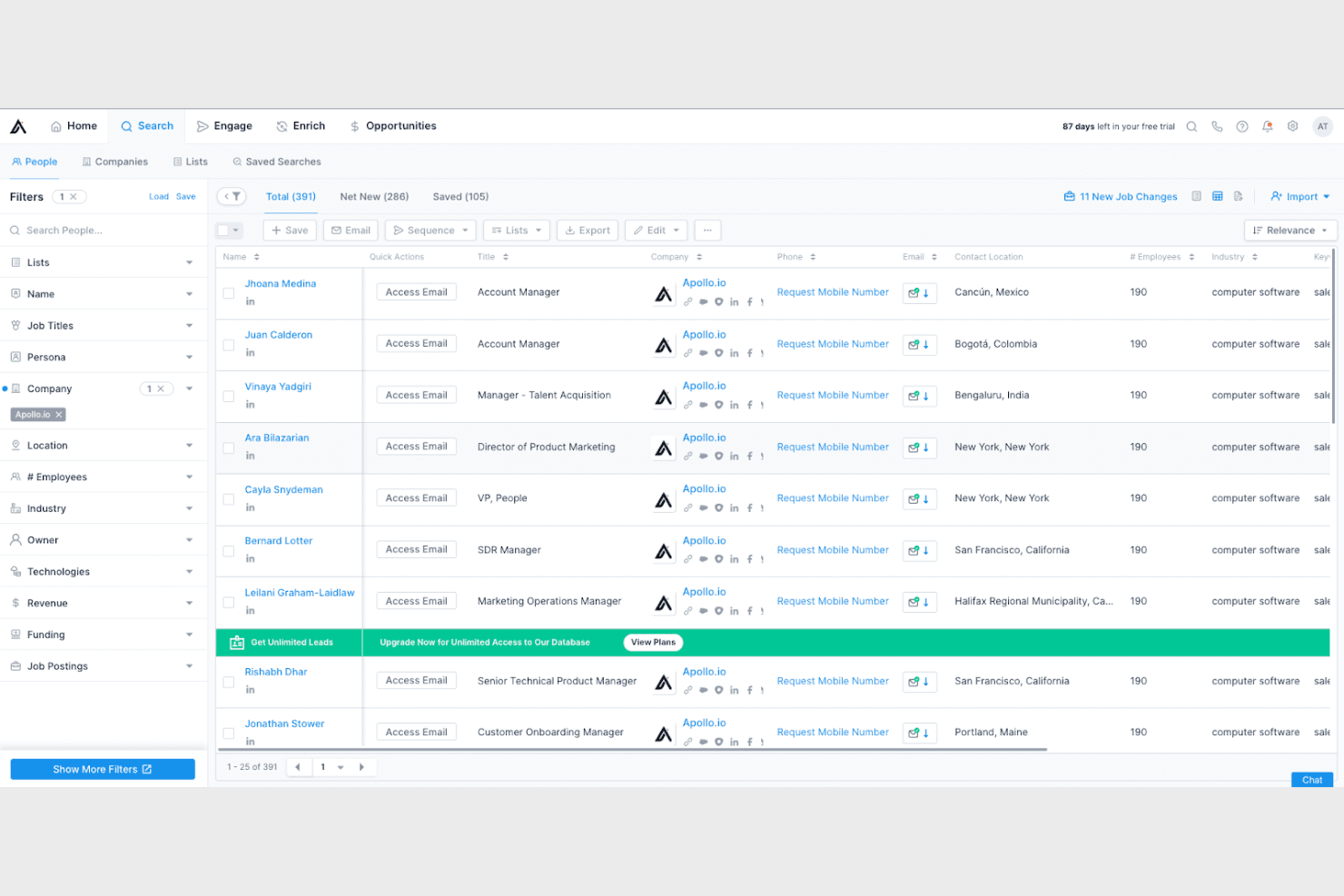
Apollo.io lets users search and filter leads by company, title, and location. Apollo.io is a GTM platform that combines a 240M+ contact database with multichannel sales engagement, making it a strong fit for sales teams that want prospecting, sequencing, dialing, and pipeline intelligence without stitching together separate tools.
Who Is Apollo.io Best For?
Apollo.io is a strong fit for SDR-led sales teams that want prospecting and outreach in one place, without paying for a separate data provider.
Why I Picked Apollo.io
I picked Apollo.io as one of the best because it's the only tool on this list where the contact database and the outreach engine are genuinely the same product. I can build a list from 240M+ contacts using filters like funding stage, hiring trends, or intent signals, then enroll those contacts directly into a multichannel sequence without ever leaving the platform. That built-in connection between sourcing and sequencing is what sets it apart from dedicated sales engagement tools that require a separate data provider.
Apollo.io Key Features
- Built-in dialer with automatic call logging: Make calls directly within Apollo and have call records, recordings, and transcriptions logged automatically without manual entry.
- Behavior-based workflow triggers: Set up automated workflows that fire when prospects open emails, click links, book meetings, or visit your website.
- Waterfall data enrichment: Fill gaps in contact and account records using Apollo's database plus 20+ third-party data sources, with built-in email and phone verification.
- Bi-directional CRM sync: Keep Salesforce and HubSpot records current with configurable two-way sync covering contacts, accounts, deals, and activities.
Apollo.io Integrations
Apollo.io offers 200+ marketplace integrations, including Salesforce, HubSpot, Slack, Adobe Marketo, and ChatGPT. It also provides a REST API with 70+ endpoints, plus CLI and MCP access for custom workflows.
Pros and Cons
Pros:
- Outreach sequence migration eases switching
- Buying signals help prioritize outbound lists
- Prospecting and sequencing share one workspace
Cons:
- Contact records can need verification
- LinkedIn steps still require manual completion
Learn more about Apollo.io:
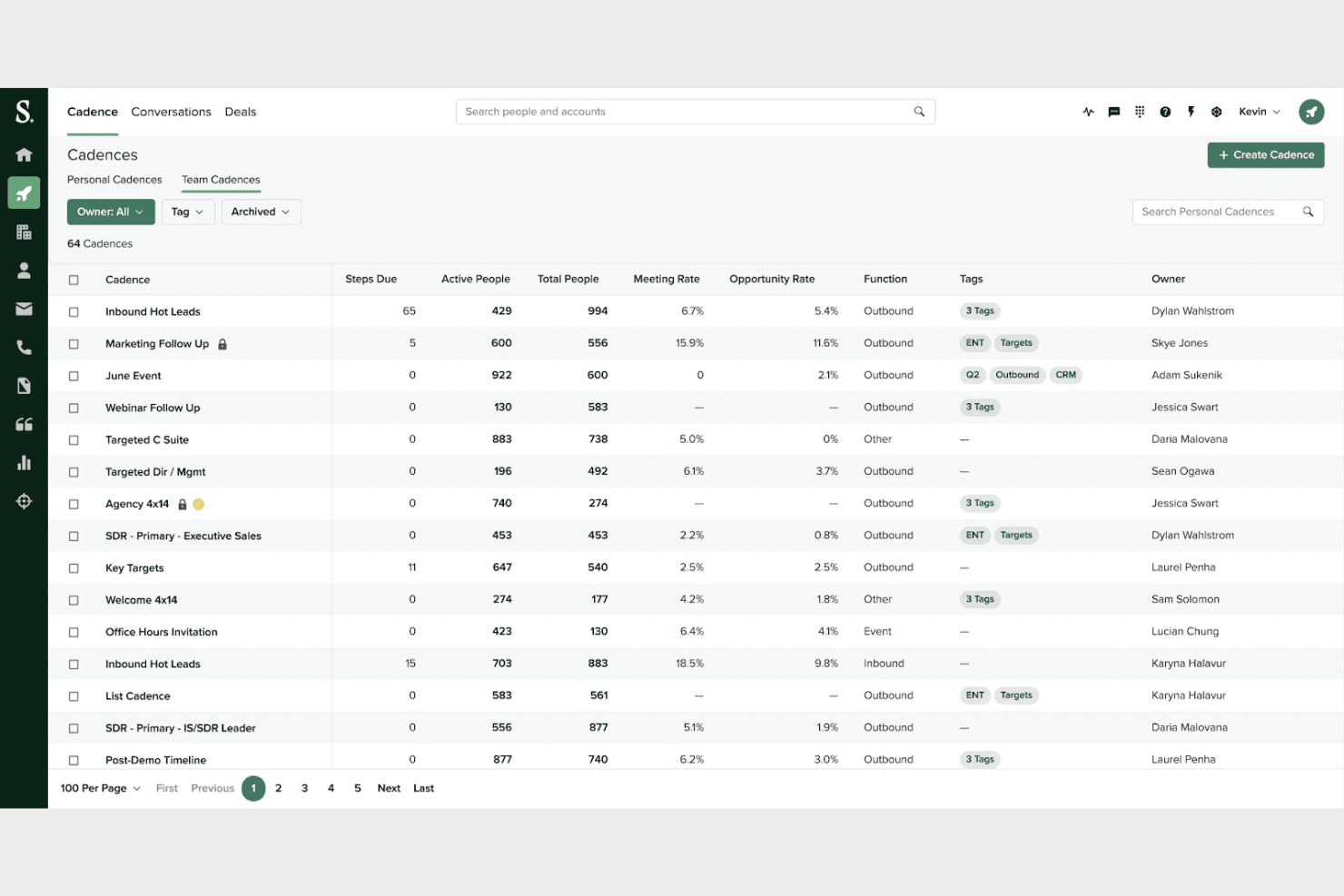
Salesloft lets users manage and track team cadences in one view. Salesloft is a sales engagement platform that helps revenue teams run multichannel outreach, manage deals, and coach reps across the full sales cycle—from first touch to closed-won.
Who Is Salesloft Best For?
Salesloft fits revenue teams that need one platform to manage prospecting, deal execution, and pipeline visibility without stitching together separate tools.
Why I Picked Salesloft
Salesloft earns its spot on my shortlist because it covers the entire sales cycle in one place, from first prospecting touch through closed-won, without forcing your team to stitch together separate tools. I particularly like how Cadences handle multichannel sequencing across email, calls, and LinkedIn, while Deals and Conversation Intelligence keep managers and reps aligned on what's actually happening inside each opportunity. The Rhythm feature is what sets it apart for me: it pulls buyer signals from across your connected systems and surfaces a prioritized daily action list, so reps always know exactly where to focus.
Salesloft Key Features
- CRM sync: Bi-directional syncing with Salesforce and Microsoft Dynamics 365 keeps activity, contacts, and opportunity data current across both platforms.
- Automation rules: Trigger-based workflows fire on email replies, link clicks, cadence changes, and meeting bookings to automatically add or remove contacts from cadences.
- Conversation Intelligence: AI generates call summaries, extracts key moments like objections and competitors, and turns coaching insights into actionable seller tasks.
- Deals dashboard: A shared deal view consolidates emails, calls, CRM history, and buying-group contacts so teams can spot stalled opportunities and assign next steps.
Salesloft Integrations
Salesloft supports CRM integrations with Salesforce and Microsoft Dynamics 365, plus marketplace integrations with LinkedIn Sales Navigator, ZoomInfo, 6sense, Demandbase, Zoom, Google Meet, and Zapier. Its marketplace lists 256 partners, and its API and webhooks support custom integrations.
Pros and Cons
Pros:
- Call summaries give managers concrete coaching cues
- Rhythm prioritizes daily actions from buyer signals
- Cadences keep email and call follow-ups coordinated
Cons:
- CRM sync delays can undermine activity visibility
- Reporting exports can misalign columns
Learn more about Salesoft:
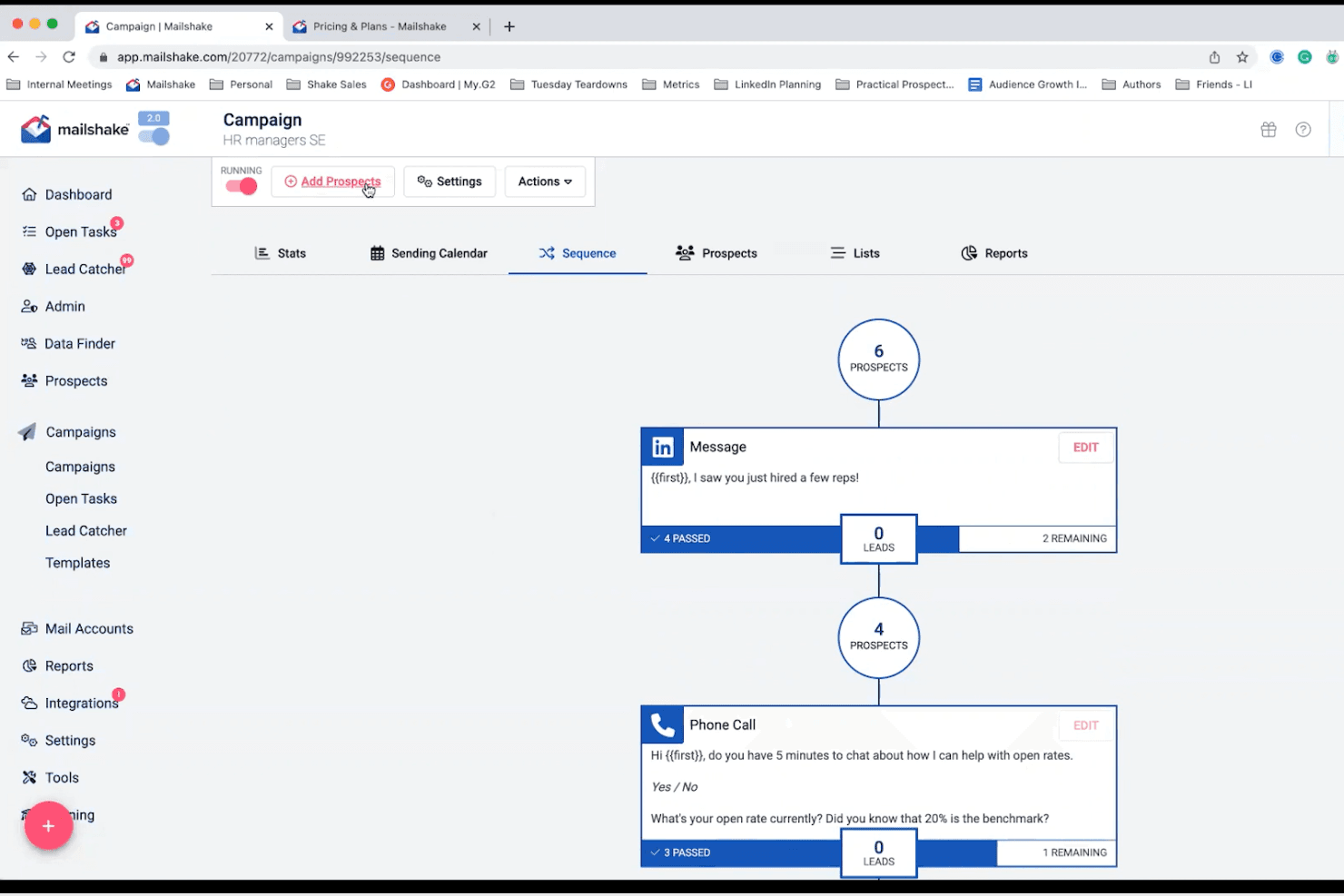
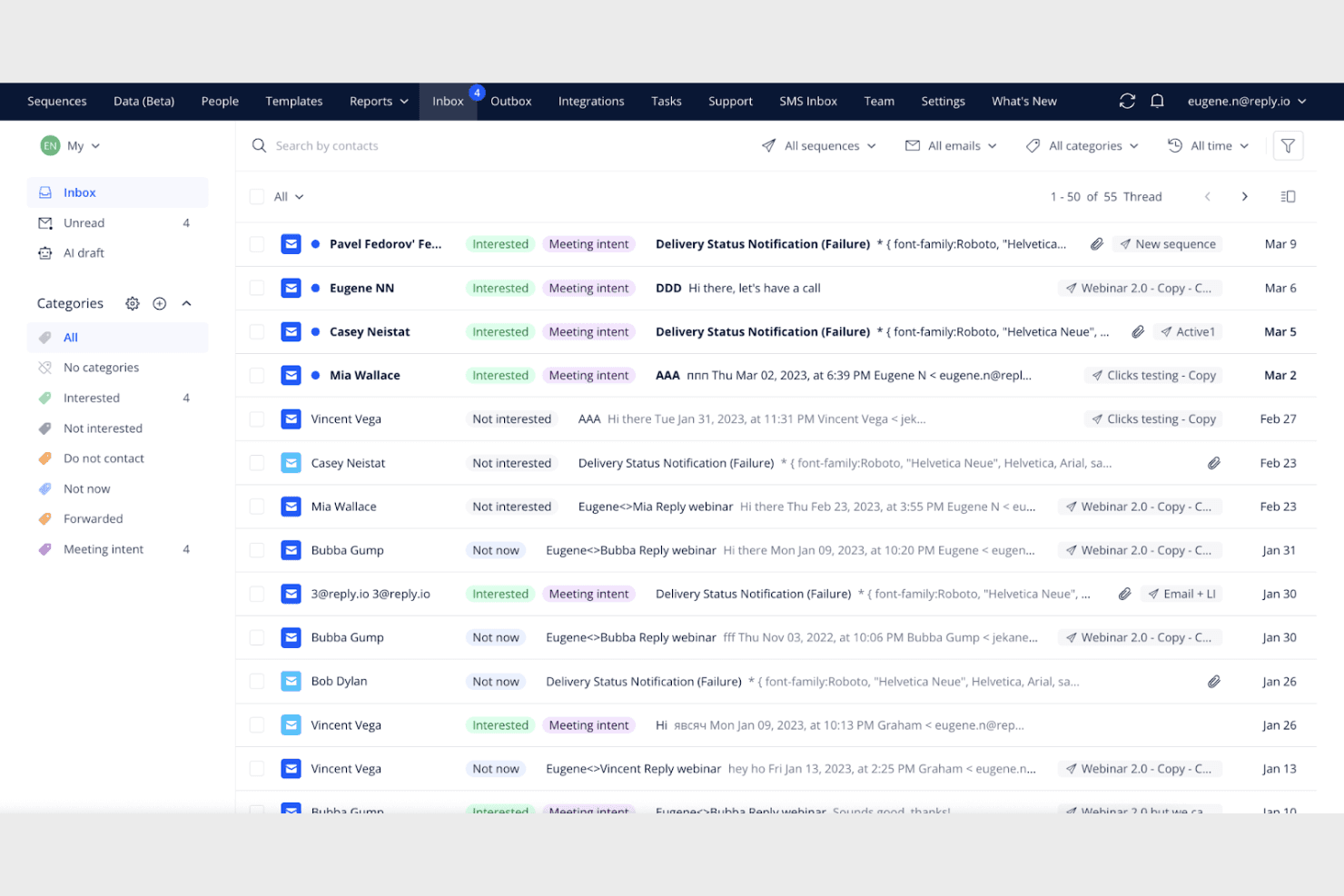
Mailshake lets users build multi-step outreach sequences with LinkedIn and calls. Mailshake is a cold email and sales engagement platform built for SDRs and sales teams who want to run personalized outbound campaigns, automate follow-ups, and combine email with phone and social outreach tasks.
Who Is Mailshake Best For?
Mailshake is a strong fit for SDRs and small sales teams that run high-volume cold email campaigns and want simple, affordable outbound automation without enterprise complexity.
Why I Picked Mailshake
I picked Mailshake as one of the best because it's purpose-built for cold email in a way most sales engagement tools aren't. I appreciate how its built-in email warm-up gradually builds sender reputation before a campaign goes live, and how email rotation spreads sends across multiple addresses to protect deliverability. Pair that with Lead Temperature, which flags prospects as Cold, Warm, or Hot based on opens, clicks, and replies, and you get a focused cold outreach engine that keeps SDRs working the hottest leads first.
Mailshake Key Features
- Power Dialer: Automatically moves through a call queue, letting reps dial or skip prospects without manually initiating each call.
- A/B testing: Tests different emails, follow-ups, or full campaign sequences to compare performance across variations.
- SHAKEspeare AI email writer: Generates multiple email drafts and Spintax variations from your business details for use in campaigns.
- Trigger-based follow-ups: Sends follow-up emails automatically when a prospect clicks a link, with Zapier support for form submissions and CRM lead-status changes.
Mailshake Integrations
Mailshake has native integrations with Pipedrive, HubSpot, and Salesforce, plus 1,000+ integrations via Zapier. It also offers a REST-style API, webhooks, and a Node.js package for custom integrations.
Pros and Cons
Pros:
- Engagement reports clarify campaign performance
- Follow-ups stop when prospects reply
- Built-in warm-up earns reviewer praise
Cons:
- LinkedIn outreach tasks still require manual action
- Reporting doesn't connect activity to revenue
Learn more about Mailshake:
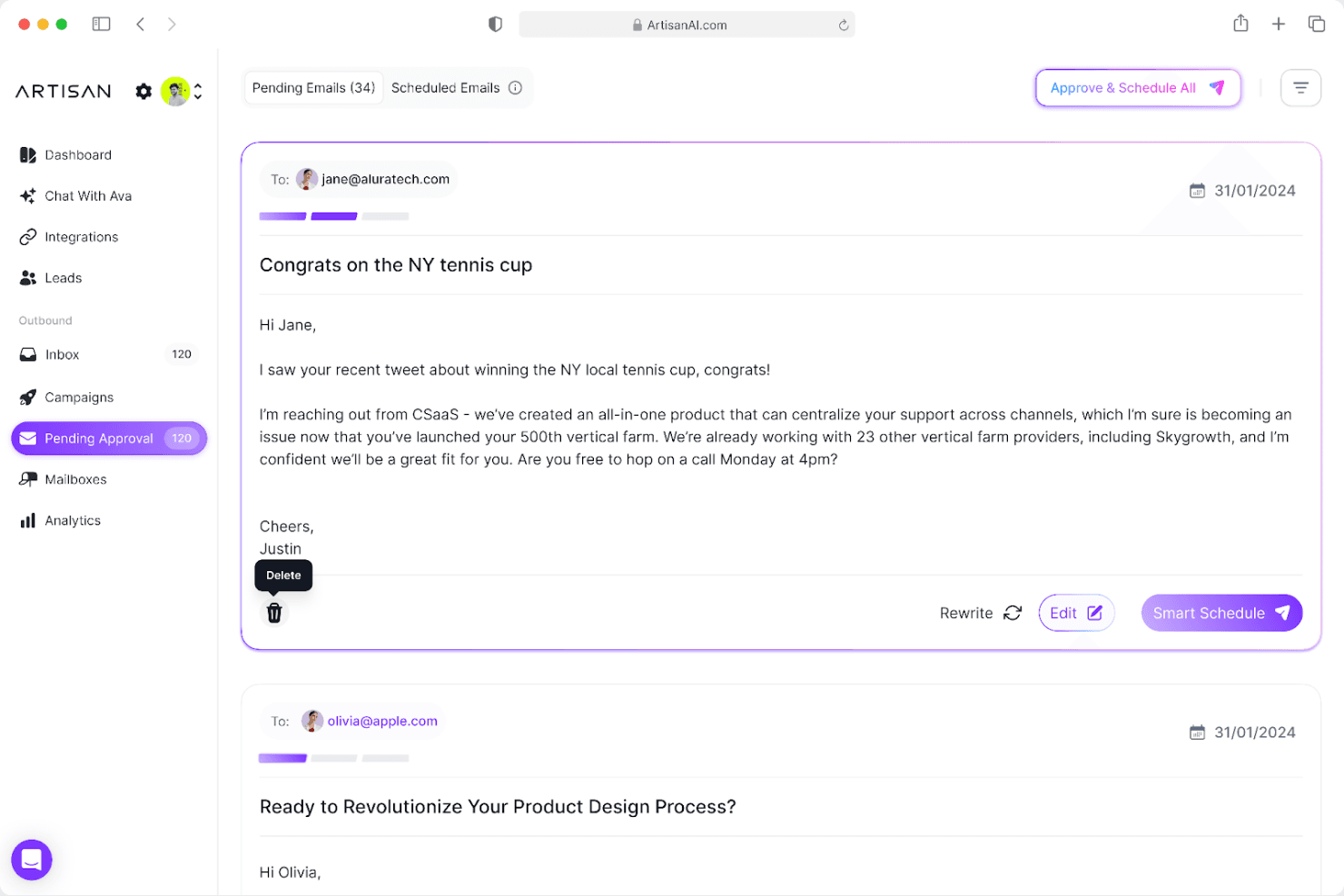
Artisan lets users review and approve AI-drafted outbound emails before sending. Artisan brings an AI sales agent called Ava to outbound sales teams looking to automate prospecting, personalized outreach, and meeting booking without expanding their headcount.
Who Is Artisan Best For?
Artisan is a strong fit for outbound sales teams that want an AI agent to handle prospecting, outreach, and meeting booking end-to-end without adding headcount.
Why I Picked Artisan
I picked Artisan as one of the best because it's the only tool on this list that replaces SDR headcount with an actual AI agent, Ava, rather than just automating tasks for a human rep. Ava handles the full outbound loop: sourcing leads from a 250M+ contact database, triggering personalized sequences when buying signals like funding rounds or hiring spikes occur, and autonomously booking meetings on your calendar.
Artisan Key Features
- Deliverability management: Ava handles domain warm-up, infrastructure rotation, send throttling, bounce monitoring, and inbox-placement optimization automatically.
- Buying signal campaigns: Ava triggers outreach based on signals like funding rounds, hiring activity, job changes, and website visits.
- Power dialer with AI call prep: The dialer queues leads for reps and provides talking points, an AI lead summary, live transcripts, and post-call follow-up drafts.
- Knowledge base for autonomous replies: Teams can store objection-response pairs that Ava draws on when handling prospect replies without human intervention.
Artisan Integrations
Artisan integrates with Salesforce, HubSpot, and Slack, with one CRM active per workspace and one Slack workspace per account. Custom webhooks support additional data connections.
Pros and Cons
Pros:
- Handles replies and books meetings
- Triggers outreach from buying signals
- Automates prospecting and personalized follow-ups
Cons:
- AI messages may need accuracy checks
- Lead targeting can return poor-fit contacts
Learn more about Artisan:

Diğer Outreach Alternatifleri
İşte kısa listeme giremeyen ancak yine de göz atmaya değer bazı ek Outreach alternatifleri:
- 11CronoBest for small- to medium-sized businesses
- 12LemlistBest for personalization features
- 13SaleshandyBest for scalable outreach
- 14ZoomInfoBest for deep company data
- 15HunterBest for a strong API ecosystem
- 16MixmaxBest for native inbox workflows
- 17SmartReach.ioBest for agency outreach
- 18SmartLeadBest for inbox rotation setups
- 19HubSpot Sales HubBest for CRM-led sales
- 20Revenue.ioBest for Salesforce users
Related Reviews
How I Evaluate Outreach Alternatives
I evaluate every platform on two layers: core capabilities like sequencing and CRM sync that every Outreach alternative must have, and the differentiators that matter for RevOps teams.
Core Functionality (Table Stakes For This List)
When I'm selecting tools for my list, I rank each one on a scale from 0 (does not offer the functionality) to 5 (excels in this area) for each core functionality listed below. Then, I calculate the tool's total score into a percentage. Each tool needs to achieve a minimum total score of 65% to be considered for inclusion.
- Multi-Channel Sequence Building: I look for platforms where reps can build cadences that combine email, calls, LinkedIn, and SMS into a single automated workflow with conditional branching.
- Email Automation & Personalization: Each tool's templating, merge fields, A/B testing, and scheduling capabilities matter—especially for teams running high-volume prospecting.
- Integrated Sales Dialer: I check whether the dialer is native or bolted on, and whether it supports call recording, logging, and features like local presence or parallel dialing.
- CRM Sync & Integration: Bi-directional sync with Salesforce, HubSpot, or similar CRMs is what I evaluate here, including how cleanly activity data flows back to contact and deal records.
- Engagement Analytics & Reporting: Dashboards that track opens, replies, call outcomes, and sequence conversion rates help me gauge how well a platform supports RevOps reporting needs.
- Prospect & Task Management: I look at how the platform surfaces daily rep workflows—automated task queues, prioritized follow-ups, and triggers based on prospect engagement signals.
Once I have a list of tools that meet this criteria, I consider what sets each platform apart.
Differentiating Factors (What Sets Vendors Apart)
Here's how I compare and contrast different vendors:
Standout Features
Deliverability tools like inbox rotation and domain warm-up matter a lot when your SDR team is sending thousands of emails per week—one blacklisted domain can stall an entire quarter's pipeline. I also evaluate whether a platform offers AI-generated email copy, since reps who can auto-draft personalized openers from prospect data move faster through daily task queues. Buyer intent signals are another differentiator, especially when a platform can trigger sequences based on prospect actions like visiting a pricing page.
Beyond Features
Pricing transparency matters here—many teams leave Outreach partly because of cost, so I check whether vendors publish clear per-seat pricing and offer flexible contract terms. Implementation speed is another factor I weigh, especially for RevOps teams migrating existing sequences and CRM mappings. Platforms with import tooling that get reps back to selling in days rather than months stand out. Tech stack fit rounds out my evaluation—native integrations with tools like ZoomInfo, LinkedIn Sales Navigator, and Calendly keep the revenue stack connected without custom workarounds.
Neden Bir Outreach Alternatifi Aramalısınız?
Outreach iyi bir satış etkileşimi platformu seçeneği olsa da bazı kullanıcıların alternatif çözümler aramasının çeşitli nedenleri vardır. Şu nedenlerle bir Outreach.io alternatifi arıyor olabilirsiniz…
- Mevcut araçlarla daha iyi entegrasyona ihtiyacınız vardır
- Ekibiniz daha fazla özelleştirme seçeneğine ihtiyaç duyuyordur
- Outreach fiyatlandırması nedeniyle bütçe kısıtlamalarıyla karşı karşıyasınızdır
- Daha büyük bir ekip boyutu için desteğe ihtiyacınız vardır
- Daha basit bir kullanıcı arayüzü arıyorsunuzdur
- Gelişmiş veri analizi özelliklerine ihtiyaç duyuyorsunuzdur
Bunlardan herhangi biri size uyuyorsa doğru yere geldiniz. Listemde, Outreach ile ilgili bu zorluklarla karşılaşan ve alternatif çözümler arayan ekipler için daha uygun olan çeşitli satış etkileşimi platformu seçenekleri bulunuyor.
Özellikler
Outreach'in sunduğu özellikleri alternatif çözümlerin sunduklarıyla karşılaştırmanıza yardımcı olacak bazı temel özellikleri aşağıda bulabilirsiniz:
- Yapay Zekâ Aracıları: Ekibinizin üretkenliğini %60 artırmak için iş akışlarını otomatikleştirin.
- Kapsamlı Satış Çözümü: Tahmin, anlaşma yönetimi ve müşteri elde tutma süreçlerini kolaylaştırır.
- Gelişmiş Üretkenlik: Yapay zekâ içgörüleriyle potansiyel müşterileri belirlemeye ve anlaşmaların sonuçlandırılmasını hızlandırmaya yardımcı olur.
- Gerçek Zamanlı Koçluk: Ekibinizin performansını iyileştirmek için uygulanabilir içgörüler sağlar.
- Doğru Tahmin: Yapay zekâ modellemesiyle ekibiniz için gelirin öngörülebilirliğini artırır.
- Güvenlik ve Gizlilik: Yapılandırılabilir erişim denetimleriyle veri güvenliğini sağlar.