

Üretim CRM yazılımları, üretim şirketleri için önemlidir; ekiplerin üretim verimliliğini artırmasına ve müşteri deneyimlerini güçlendirmesine yardımcı olur. Ancak mevcut seçeneklerin geniş yelpazesi nedeniyle doğru yazılımı seçmek zor olabilir.
Gelir operasyonları yazılımı konusundaki deneyimimi kullanarak, mevcut en iyi üretim CRM yazılımlarından birkaçını test edip karşılaştırdım. Ardından sonuçlarımı, ihtiyaçlarınıza en uygun yazılımı bulmanıza yardımcı olacak ayrıntılı incelemeler hâlinde derledim.
Why Trust Our Software Recommendations
6,700+
Reviews
20
Industry experts
16+
Evaluation factors
14
Years
Our reviews reflect our independent judgment—not a sales pitch. Learn how we stay transparent.
For this guide, we evaluated tools using hands-on testing and independent research, scoring tools using our selection criteria.
Our reviews reflect our human editorial judgment, not a sales pitch.
Üretim CRM Yazılımları Karşılaştırma Tablosu
Bu karşılaştırma tablosu, en iyi üretim CRM yazılımı seçimlerimin fiyatlandırma ayrıntılarını özetlemektedir.
Sorted by: Default
| Tool | Starting Price | Website | |
|---|---|---|---|
Best for tracking customer orders | 4.5 out of 5 | $49/user/month 15 + 15-day free trial available | Website |
Best for AI process automation | 4.7 out of 5 | $40/user/month Not available | Book Demo |
Best for distributor order management | 4.6 out of 5 | $69/rep/month Free trial available | Website |
Best for mobile accessibility | 4.7 out of 5 | $23/user/month 15-day free trial | Website |
Best for small to medium businesses | 4.6 out of 5 | $9/user/month 21-day free trial | Website |
Best for simple CRM needs | 4.7 out of 5 | $22/user/month Free plan + 14-day free trial available | Website |
Best for sales pipeline automation | 4.5 out of 5 | $14/user/month 14-day free trial | Website |
Best for lead management | 4.4 out of 5 | Pricing upon request Free demo available | Website |
Best for pipeline management | 4.4 out of 5 | $29/user/month 14-day free trial + free demo available | Website |
Best for enterprise-level solutions | Not rated | Pricing upon request Free demo available | Website |


En İyi Üretim CRM Yazılımları İncelemeleri
Aşağıda, kısa listeme giren en iyi üretim CRM yazılımlarına ilişkin ayrıntılı özetlerimi bulabilirsiniz. İncelemelerim, sizin için en uygun seçeneği bulmanıza yardımcı olmak amacıyla her aracın temel özelliklerine, artılarına ve eksilerine, entegrasyonlarına ve ideal kullanım alanlarına ayrıntılı bir bakış sunuyor.
 Best for tracking customer orders
- 15 + 15-day free trial available
- From $49/user/month
Visit WebsiteCustomer Rating:4.5/5
MRPeasy provides a visual pipeline for tracking customer orders from quotation to shipment. MRPeasy is a manufacturing ERP and MRP platform for small manufacturers that combines production planning, inventory management, procurement, and a built-in CRM module for managing customer orders, quotes, and shipments.
Who Is MRPeasy Best For?
MRPeasy is a good fit for small and mid-sized manufacturers who need a single system to manage both production operations and customer order workflows.
Why I Picked MRPeasy
I picked MRPeasy as one of the best because of how directly its CRM connects customer orders to the production floor. When a customer order gets confirmed, I can instantly raise manufacturing orders for items not yet in stock and purchase orders for any missing materials—all from the same screen. I also like the color-coded pipeline view, which makes it easy to see order status at a glance without digging through reports. That level of visibility across the order lifecycle, from quote to shipment, is what makes MRPeasy stand out for manufacturers.
MRPeasy Key Features
- Quote cost estimation: Calculate production costs and lead times automatically when building customer quotes.
- Shipment planning: Generate picking lists and waybills directly from confirmed customer orders.
- Sales reporting: View sales statistics and cost-of-goods-sold data broken down by customer or product.
- Customer and contact management: Store customer details, communication history, and related orders in a single customer record.
Pros and Cons
Pros:
- Allows businesses to optimize purchasing with automatic PO generation
- Provides a clear sales pipeline view for tracking orders
- Helps estimate production costs and lead times quickly
Cons:
- Mobile app functionality is less robust than the desktop version
- Initial setup can take time to configure properly
Learn more about MRPeasy:
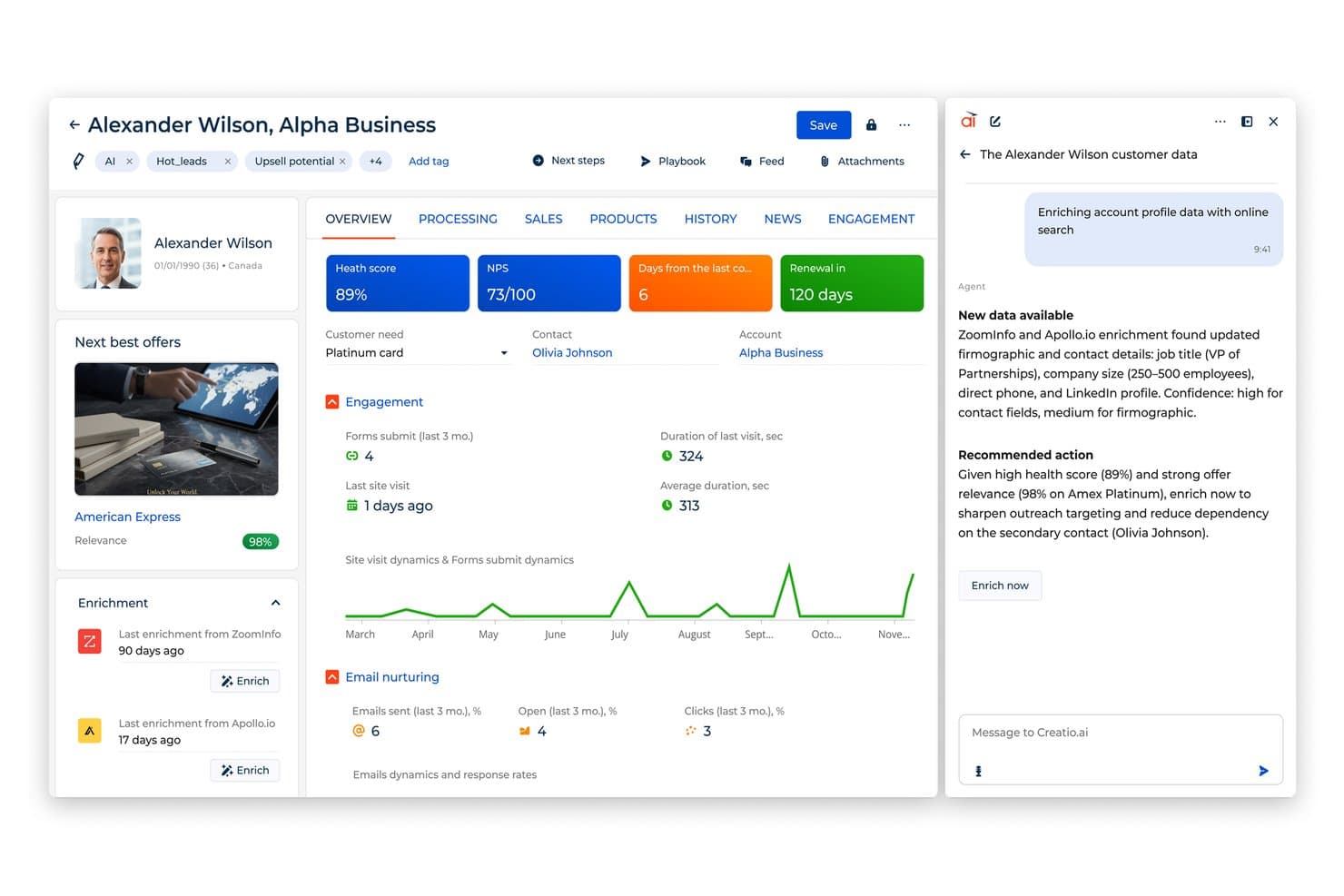
Creatio AI CRM enriches CRM profiles with real-time firmographic data. Creatio AI CRM is an AI-native, no-code agentic CRM and workflow platform built for manufacturers, combining sales automation, supply chain management, order processing, and AI-driven process automation across the full manufacturing lifecycle.
Who Is Creatio AI CRM Best For?
Creatio AI CRM is a strong fit for mid-market and enterprise manufacturing companies that need to coordinate complex sales, distribution, and production workflows across multiple teams.
Why I Picked Creatio AI CRM
I picked Creatio AI CRM because its no-code process automation extends beyond standard CRM workflows. I can build end-to-end manufacturing processes—like order intake, BOM change approvals, and shipment scheduling—without writing a single line of code. The built-in AI agents handle lead scoring and sales forecasting automatically, so my team spends less time updating records and more time moving deals forward.
Creatio AI CRM Key Features
- Field sales mobile app: Manage customer visits, route scheduling, order placement, and post-visit reporting from a mobile device.
- Trade promotion management: Build and track promotional campaigns for distributors and channel partners, including rebate automation.
- 360-degree account view: Access a unified profile combining contact history, orders, contracts, and active opportunities in one record.
- Compliance and certification tracking: Log regulatory certifications, manage audit workflows, and track compliance status across accounts.
Creatio AI CRM Integrations
Integrations include Accelo, Act!, ActiveCampaign, Acumatica, Adobe Analytics, Asana, Microsoft Exchange, Excel, Mailchimp, HubSpot Marketing Hub, Google Calendar, and Tableau.
Pros and Cons
Pros:
- AI-native, no-code platform
- No-code platform with built-in AI agents
- Extensive customization options
- Supports scaling businesses
Cons:
- Customization can be time-consuming
- Data migration may be complex
Learn more about Creatio AI CRM: Best for distributor order management
- Free trial available
- From $69/rep/month (billed annually)
Visit WebsiteCustomer Rating:4.6/5
SimplyDepo dashboard displaying sales metrics, order activity, route performance, and field rep insights across desktop and mobile views. SimplyDepo is a field sales and distribution management platform for CPG brands and distributors that combines account CRM, B2B order management, route planning, and retail execution tracking in one mobile system.
Who Is SimplyDepo Best For?
SimplyDepo is a strong fit for CPG brands and distributors that rely on field sales teams to manage wholesale accounts and place orders on the go.
Why I Picked SimplyDepo
SimplyDepo earns its spot on my shortlist because its B2B order management is built specifically around how distributors work in the field. I like that field reps can capture orders directly at the store level, while product pricing and availability sync automatically to cut out manual entry errors. The B2B order portal also lets customers reorder online, which keeps order volume consistent without requiring rep intervention on every transaction.
SimplyDepo Key Features
- Route planning: Field reps can build and optimize daily visit routes to ensure account coverage stays consistent.
- Retail execution tracking: Reps can log in-store tasks, shelf conditions, and merchandising activity directly from the mobile app.
- Product catalog management: A digital catalog with product details, images, and pricing that reps access during customer visits.
- Sales rep performance reporting: Reporting on individual rep activity, visit frequency, and order history across all accounts in one dashboard.
Pros and Cons
Pros:
- Route planning and territory mapping
- Integrated CRM for account tracking
- Built-in B2B order management system
Cons:
- No transparent API documentation
- Limited advanced reporting customization
Learn more about SimplyDepo: Best for mobile accessibility
- 15-day free trial
- From $23/user/month (billed annually)
Visit WebsiteCustomer Rating:4.7/5
Salesmate delivers dynamic lead management and communication tools for mobile sales. Salesmate is a CRM platform built for manufacturing teams that combines contact and distributor management, pipeline tracking, quote management, order cycle communication, built-in ticketing, and sales automation in one system.
Who Is Salesmate Best For?
Salesmate is a good fit for small to mid-sized manufacturing businesses that need a flexible CRM with built-in sales automation and distributor management.
Why I Picked Salesmate
Salesmate earns a spot on my shortlist because of how well its mobile app holds up for manufacturing sales reps who are constantly on the floor or visiting distributors. I love that you can access contact and deal records, drag deals through pipeline stages, log calls, and add notes all from your phone without any sync issues. The geolocation feature is a standout for field reps: locate nearby prospects, pull up their contact info, and plan your route before your next site visit. Product management is also accessible on mobile, so you can associate SKUs and product details to deals on the spot.
Salesmate Key Features
- Quote builder: Create customizable quotes with product line items, pricing, and digital approval directly from a deal record.
- Built-in ticketing: Log and manage client or production-related support tickets with priority levels and real-time status tracking.
- Sales automation: Set up automated follow-up sequences, task assignments, and order update notifications based on deal stage triggers.
- Revenue forecasting: Track pipeline value, quota attainment, and projected revenue with configurable dashboards and goal tracking.
Pros and Cons
Pros:
- Easy sales tracking
- Integrated calling feature
- Excellent mobile app
Cons:
- Basic reporting features
- Limited customization options
Learn more about Salesmate: Best for small to medium businesses
- 21-day free trial
- From $9/user/month (billed annually)
Visit WebsiteCustomer Rating:4.6/5
Freshsales optimizes sales for small to medium businesses with automation tools. Freshsales is a cloud-based sales CRM with AI-driven lead scoring, multi-channel contact management, pipeline visualization, workflow automation, and customizable modules built for managing complex B2B sales cycles in the manufacturing space.
Who Is Freshsales Best For?
Freshsales is a strong fit for small to mid-sized manufacturing companies that need a straightforward CRM without the complexity or cost of enterprise-grade platforms.
Why I Picked Freshsales
I've included Freshsales in my top picks because it gives small manufacturing teams a sales CRM that doesn't require a dedicated admin to manage. The built-in product catalog lets reps attach SKUs, pricing tiers, and specifications directly to deals, which I find genuinely useful for quoting in manufacturing sales cycles. Freddy AI also flags at-risk deals and suggests next steps, so smaller teams without dedicated RevOps support can still maintain solid pipeline accuracy.
Freshsales Key Features
- Multi-pipeline management: Create and manage separate pipelines for direct sales, distributor channels, and OEM accounts simultaneously.
- Custom modules: Add manufacturing-specific data fields to records, such as order quantities, lead times, and product specifications.
- Sales sequences: Automate outreach cadences so reps follow up with distributors or prospects at defined intervals without manual tracking.
- Territory management: Assign leads and accounts to reps based on geographic region or account type using rule-based routing.
Pros and Cons
Pros:
- Visual sales pipeline
- Built-in communication tools
- Effective lead scoring
Cons:
- Basic reporting options
- Limited advanced features
Learn more about Freshsales: Best for simple CRM needs
- Free plan + 14-day free trial available
- From $22/user/month
Visit WebsiteCustomer Rating:4.7/5
Capsule CRM offers intuitive contact management and sales tracking for small businesses. Capsule CRM is a small business CRM that combines contact management, visual sales pipeline tracking, task and calendar management, and project delivery tools in one platform.
Who Is Capsule CRM Best For?
Capsule CRM is a good fit for small manufacturing businesses that need a straightforward way to manage contacts, track deals, and coordinate follow-ups without complex configuration.
Why I Picked Capsule CRM
Capsule CRM is one of my top picks because I love how little setup it requires to get a working sales process running. For small manufacturing teams that don't have a dedicated RevOps function, that matters. I use Tracks to build out sequential task checklists tied to specific pipeline stages, so when a quote moves to "negotiation," the right follow-up tasks fire automatically. Custom milestones and custom fields also let me shape the pipeline around a manufacturing workflow without rebuilding anything from scratch.
Capsule CRM Key Features
- Projects: Link post-sale delivery work directly to CRM contacts and deals in a shared project view.
- Sales analytics: Track pipeline value, win rates, and forecast revenue across your active sales stages.
- Mobile app: Access contacts, tasks, and pipeline data from iOS or Android while visiting client or supplier sites.
- Tags and filtering: Categorize contacts and accounts with custom tags to segment by product line, region, or supplier type.
Pros and Cons
Pros:
- Quick setup process
- Suitable for small teams
- Simple contact management
Cons:
- Requires manual data entry
- Basic reporting capabilities
Learn more about Capsule CRM: Best for sales pipeline automation
- 14-day free trial
- From $14/user/month (billed annually)
Visit WebsiteCustomer Rating:4.5/5
Pipedrive's drag-and-drop interface lets you manage contacts and move them through various stages in the pipeline. Pipedrive is a sales CRM built around visual pipeline management, deal tracking, workflow automation, and email and communication tracking for sales teams across industries including manufacturing.
Who Is Pipedrive CRM Best For?
Pipedrive is a strong fit for small to mid-sized manufacturing sales teams that need a structured, visual way to manage complex B2B sales cycles and multi-stakeholder deals.
Why I Picked Pipedrive CRM
Pipedrive earns its spot as one of the best on my shortlist because its pipeline automation is genuinely built around how sales reps work. I like that you can set automated triggers to move deals between stages based on specific actions, like a quote being sent or a site visit being logged, which maps well to manufacturing sales cycles. The "rotting deals" feature also flags stalled opportunities automatically, so nothing slips through during long B2B negotiation periods.
Pipedrive CRM Key Features
- Custom fields: Add manufacturer-specific data points to deal and contact records, such as SKU numbers, order volumes, or production lead times.
- Two-way email sync: Connect your inbox to Pipedrive so all client and distributor correspondence is logged directly against the relevant deal or contact.
- Sales reporting dashboards: Build visual reports tracking deal value, stage conversion rates, and rep activity across your entire pipeline.
- Document templates: Create reusable quote and proposal templates that auto-fill with contact and deal data pulled from your CRM records.
Pros and Cons
Pros:
- Automation of repetitive tasks
- Customizable sales stages
- Drag-and-drop pipelines
Cons:
- Accessing advanced features may incur additional costs
- Lacks native support for complex manufacturing needs
Learn more about Pipedrive CRM:

LeadSquared simplifies lead management with automation and efficient nurturing tools. LeadSquared is a sales CRM built for high-velocity sales teams that covers lead capture, scoring, distribution, pipeline management, sales automation, and field sales tracking, with a dedicated manufacturing CRM for managing dealer, distributor, and influencer networks.
Who Is LeadSquared Best For?
LeadSquared is a strong fit for mid-to-large manufacturing companies managing multi-tier dealer and distributor sales networks with high lead volumes.
Why I Picked LeadSquared
I've included LeadSquared in my top picks because its lead management depth is genuinely hard to match in a manufacturing context. It consolidates lead capture from every channel—web forms, ads, referrals, WhatsApp—into a single pipeline with zero leakage, then automatically scores and routes each lead to the right rep based on territory, product line, or dealer type. I also like the automated lead distribution, which removes the manual work of assigning inquiries across large dealer and distributor networks.
LeadSquared Key Features
- Field sales tracking: Monitor field reps with GPS-based check-in/check-out and geo-fencing to track visits to dealer and distributor locations.
- Sales workflow automation: Build rule-based workflows that trigger follow-up tasks, emails, or reassignments based on deal stage or rep activity.
- Dealer and distributor portal: Give channel partners a dedicated portal to submit leads, track order status, and view their pipeline.
- Custom reports and dashboards: Build role-specific dashboards to track pipeline health, lead conversion rates, and rep performance across territories.
Pros and Cons
Pros:
- Detailed analytics
- Strong automation workflows
- Effective lead scoring
Cons:
- Limited offline features
- Complex setup process
Learn more about LeadSquared: Best for pipeline management
- 14-day free trial + free demo available
- From $29/user/month
Visit WebsiteCustomer Rating:4.4/5
Pipeline CRM provides tools to track and optimize sales processes. Pipeline CRM is a cloud-based sales CRM built for field-driven and B2B sales teams, with tools for sales pipeline management, lead tracking, contract management, email automation, and sales forecasting across industries like manufacturing and distribution.
Who Is Pipeline CRM Best For?
Pipeline CRM is a good fit for small to mid-sized B2B sales teams in manufacturing and distribution who need structured deal tracking across long, multi-touch sales cycles.
Why I Picked Pipeline CRM
Pipeline CRM earns its spot on my shortlist because of how well it handles multi-pipeline setups for manufacturing sales teams. I like that you can run separate pipelines for different product lines or customer segments at the same time, with up to 25 custom fields per deal to track things like material specs or lead times. The visual drag-and-drop board lets me move deals through custom stages that mirror a real manufacturing sales cycle.
Pipeline CRM Key Features
- Instant Docs: Generate quotes and proposals directly inside the CRM with fields for pricing, line items, and terms, without switching to a separate tool.
- Sales forecasting: View projected revenue by rep, deal stage, or time period using built-in forecast reports tied to live pipeline data.
- Email drip campaigns: Set up automated email sequences triggered by deal stage changes or inactivity to keep contacts engaged across long sales cycles.
- Activity tracking: Log calls, meetings, and tasks against individual deals and contacts to keep a full record of every customer touchpoint.
Pros and Cons
Pros:
- Efficient task management
- Detailed sales reporting
- Flexible pipeline customization
Cons:
- Basic mobile app functionality
- Limited advanced customization
Learn more about Pipeline CRM:

Infor integrates business processes to enhance operational efficiency for large enterprises. Infor CRM is a cloud-based CRM and ERP platform built for manufacturers, combining sales management, customer service, and industry-specific workflows with AI-driven analytics and tight integration across finance, procurement, and production operations.
Who Is Infor Best For?
Infor is a strong fit for large manufacturing organizations that need CRM functionality deeply integrated with ERP, supply chain, and production systems across multiple sites or business units.
Why I Picked Infor
Infor earns its spot as one of the best on my shortlist because no other CRM on this list is as deeply wired into enterprise manufacturing operations. I'm particularly impressed by how Infor CRM connects directly with CloudSuite Industrial, meaning my team can pull live order history, inventory data, and production schedules right into customer records without any manual syncing. The multi-site and multi-entity support is genuinely built for scale—I can manage accounts across dozens of facilities under one unified system.
Infor Key Features
- Xbar for Microsoft Outlook: Sync emails, contacts, and calendar events directly between Outlook and Infor CRM without leaving your inbox.
- Customer service and contract management: Log service cases, track warranties, and manage support contracts tied to specific customer accounts.
- Mobile CRM access: Update customer records, log calls, and view account data from a mobile device while on-site with customers.
- Opportunity and quote management: Track deals through configurable sales stages with quote creation built into the pipeline workflow.
Pros and Cons
Pros:
- Efficient supply chain management
- Advanced analytics capabilities
- Comprehensive enterprise solutions
Cons:
- Requires technical expertise
- Complex implementation process
Learn more about Infor:
Diğer Üretim CRM Yazılımları
Kısa listeme giremeyen ancak yine de göz atmaya değer bazı ek üretim CRM yazılımı seçenekleri şunlardır:
- 11InsightlyBest for user-friendly interface
- 12Spotler CRMBest for email marketing integration
- 13ClickUpBest for project management integration
- 14ZendeskBest for customer support teams
- 15SugarAIBest for scalable solutions
- 16Zoho CRMBest for customizable workflows
- 17NutshellBest for team collaboration
- 18monday CRMBest for visual project tracking
How I Evaluate Manufacturing CRM Software
I evaluate manufacturing CRM tools in two layers: the baseline requirements—ERP integration, CPQ, and channel management—and the differentiators for specific manufacturing contexts.
Core Functionality (Table Stakes For This List)
When I'm selecting tools for my list, I rank each one on a scale from 0 (does not offer the functionality) to 5 (excels in this area) for each core functionality listed below. Then, I calculate the tool's total score into a percentage. Each tool needs to achieve a minimum total score of 65% to be considered for inclusion.
- ERP/MRP Integration: I check whether the CRM syncs bidirectionally with manufacturing ERPs like SAP, Epicor, or NetSuite so sales teams see live production and inventory data.
- Quote & CPQ Management: Configurable product quoting matters here—I look for tools that handle BOMs, custom pricing rules, and approval routing for complex manufactured goods.
- Channel & Dealer Management: Many manufacturers sell through distributors, so I evaluate deal registration, territory assignment, and partner portal capabilities within each platform.
- Manufacturing Pipeline Forecasting: Standard weighted pipelines aren't enough. I look for forecasting that factors in production lead times and long, multi-touch B2B sales cycles.
- Account & Contact Hierarchies: Multi-level account structures come up constantly—think OEMs with subsidiary plants and separate procurement teams. I check how each CRM handles those layers.
- Order & Inventory Visibility: Sales reps need real-time order status and stock levels inside the CRM record, so I evaluate how each tool surfaces that data without forcing users into the ERP.
Once I have a list of tools that meet this criteria, I consider what sets each platform apart.
Differentiating Factors (What Sets Vendors Apart)
Here's how I compare and contrast different vendors:
Standout Features
Equipment and installed-base tracking is a big differentiator. Linking serialized assets to customer accounts opens up aftermarket revenue from spare parts, consumables, and service contracts. I also evaluate AI demand signals that flag reorder patterns or churn risk based on historical order cadence. For manufacturers with high-volume B2B buyers, EDI support and self-service portals for RFQs and reorders can remove significant friction from the sales cycle.
Beyond Features
I pay close attention to manufacturing sub-vertical fit. A CRM built for discrete, make-to-order shops handles workflows very differently than one designed for process manufacturers. The integration ecosystem matters just as much—I check for prebuilt connectors to ERPs like Epicor or Infor and iPaaS compatibility with tools like Workato or Boomi. Compliance is another factor I weigh, especially for manufacturers subject to ITAR or CMMC requirements where role-based access and audit trails are table stakes.
Üretim CRM Yazılımı Nasıl Seçilir?
Uzun özellik listeleri ve karmaşık fiyatlandırma yapılarına takılıp kalmak kolaydır. Kendinize özgü yazılım seçim sürecinizi yürütürken odağınızı korumanıza yardımcı olmak için göz önünde bulundurmanız gereken faktörleri içeren bir kontrol listesi hazırladım:
| Faktör | Neleri Göz Önünde Bulundurmalı? |
| Ölçeklenebilirlik | Yazılım, işletmenizin ihtiyaçlarıyla birlikte büyüyebilir mi? |
| Entegrasyonlar | Ekip üyelerinizin günlük olarak kullandığı diğer araçlarla bağlantı kurabiliyor mu? |
| Özelleştirilebilirlik | Yazılımı özel süreçlerinize uyacak şekilde uyarlayabilir misiniz? |
| Kullanım Kolaylığı | Arayüz ekip üyeleriniz için sezgisel mi? |
| Bütçe | Fiyat, mali kısıtlarınıza uygun mu? |
| Güvenlik Önlemleri | Verilerinizi korumak için güçlü önlemler var mı? |
| Destek | Sorunlar ortaya çıktığında güvenilir müşteri desteği sunuluyor mu? |
| Raporlama | İhtiyaç duyduğunuz içgörüleri ve analizleri sağlıyor mu? |
Üretim CRM Yazılımlarındaki Trendler
Araştırmam sırasında farklı üretim CRM yazılımı sağlayıcılarından sayısız ürün güncellemesi, basın bülteni ve sürüm günlüğü derledim. Takip ettiğim yeni trendlerden bazıları şunlar:
- Yapay Zekâ Destekli İçgörüler: Yapay zekâ, müşteri verileri hakkında daha derin içgörüler sağlamak, işletmelerin trendleri öngörmesine ve karar alma süreçlerini iyileştirmesine yardımcı olmak için kullanılıyor. Bazı tedarikçiler, tahmine dayalı analizler ve kişiselleştirilmiş öneriler sunmak amacıyla yapay zekâyı sistemlerine dâhil ediyor.
- Bulut Tabanlı Çözümler: Daha fazla tedarikçi, CRM sistemlerini buluta taşıyarak daha fazla esneklik ve her yerden gerçek zamanlı verilere erişim olanağı sağlıyor. Bu eğilim, ölçeklenebilirliği güvence altına alırken BT altyapısı maliyetlerini azaltmak isteyen işletmeler için büyük önem taşıyor.
- Gelişmiş Veri Güvenliği: Veri ihlalleriyle ilgili endişelerin artmasıyla birlikte CRM sağlayıcıları, veri güvenliği önlemlerini iyileştirmeye odaklanıyor. Şifreleme, iki faktörlü kimlik doğrulama ve düzenli güvenlik güncellemeleri gibi özellikler standart hâle geliyor.
- Sürdürülebilirlik Özellikleri: Çevresel endişeler arttıkça bazı CRM araçları, işletmelerin sürdürülebilirlik ölçütlerini takip etmesine ve bunlarla ilgili rapor hazırlamasına yardımcı olan özellikler ekliyor. Bu eğilim, çevre dostu uygulamalarını geliştirmek isteyen üreticiler açısından özellikle önem taşıyor.
- Sektöre Özel Özelleştirme: Tedarikçiler, belirli üretim sektörlerinin ihtiyaçlarına yönelik daha özelleştirilmiş çözümler sunuyor. Belirli sektörler için tasarlanan özel modüller ve özellikler, işletmelerin kendilerine özgü süreçleri ve gereksinimleri daha etkili bir şekilde yönetmesine yardımcı oluyor.
Üretim CRM Yazılımı Nedir?
Üretim CRM yazılımı, üreticilerin müşteri ilişkilerini ve satış döngülerini verimli bir şekilde yönetmesine yardımcı olur. İletişimi geliştirmek, operasyonları kolaylaştırmak ve müşteri memnuniyetini artırmak için satış yöneticileri, üretim planlayıcıları ve müşteri hizmetleri temsilcileri tarafından yaygın olarak kullanılır.
Üretim planlama, envanter yönetimi ve sipariş yönetimi gibi özellikler daha iyi bir organizasyon ve müşteri ihtiyaçlarına daha hızlı yanıt verilmesini destekler. Bu araçlar, süreçleri optimize ederek ve müşteri ilişkilerini güçlendirerek değer sağlar.
Üretim CRM Yazılımının Özellikleri
Üretim CRM yazılımı seçerken aşağıdaki temel özelliklere dikkat edin:
- Üretim Planlama: Verimli iş akışı ve kaynak tahsisi sağlamak için üretim zaman çizelgelerinin yönetilmesine ve optimize edilmesine yardımcı olur.
- Envanter Yönetimi: Stok seviyelerini ve hareketlerini takip ederek envanterin ideal düzeyde tutulmasına yardımcı olur ve stok tükenmesini veya fazla stok oluşmasını önler.
- Sipariş Takibi: Sipariş durumu hakkında gerçek zamanlı güncellemeler sunarak daha iyi müşteri iletişimi ve memnuniyeti sağlar.
- Özelleştirilebilir Gösterge Panelleri: Kullanıcıların temel ölçütlerin ve raporların görüntülenme biçimini, kendi özel işletme ihtiyaçlarına uyacak şekilde düzenlemesine olanak tanır.
- Potansiyel Müşteri Yönetimi: Takip ve dönüşüm oranlarını artırmak için olası satış fırsatlarını düzenler ve önceliklendirir.
- Analiz ve Raporlama: Satış ve operasyon verileri hakkında içgörüler sunarak bilinçli karar alma süreçlerini destekler.
- Tedarik Zinciri Yönetimi: Farklı aşamalar arasındaki koordinasyonu ve görünürlüğü iyileştirmek için tedarik zinciri süreçlerini entegre eder.
- Otomatik İş Akışları: Zaman kazanmak ve operasyonlarda insan hatası olasılığını azaltmak için tekrarlayan görevleri kolaylaştırır.
- Veri Güvenliği: Şifreleme ve diğer güvenlik önlemleri sayesinde müşteri ve işletme verilerinin korunmasını sağlar.
- Mobil Erişim: Satış ve müşteri verilerini mobil cihazlardan yönetme olanağı sunarak esnekliği ve erişilebilirliği artırır.
Üretim CRM Yazılımının Faydaları
Üretim CRM yazılımını uygulamak, ekibiniz ve işletmeniz için çeşitli faydalar sağlar. Yararlanabileceğiniz bazı avantajlar şunlardır:
- Geliştirilmiş Verimlilik: Otomatik iş akışları manuel görevleri azaltarak ekibinizin önceliği yüksek faaliyetlere odaklanmasını sağlar.
- Artırılmış Müşteri Memnuniyeti: Sipariş takibi ve potansiyel müşteri yönetimi özellikleri, zamanında iletişim ve daha iyi hizmet sunulmasını sağlar.
- Daha İyi Karar Alma: Analiz ve raporlama, işletme performansı hakkında içgörüler sunarak bilinçli seçimler yapmanıza yardımcı olur.
- Optimize Edilmiş Envanter Düzeyleri: Envanter yönetimi stokları takip ederek operasyonları etkileyebilecek stok tükenmelerini ve fazlalıkları önler.
- Artan Satış Fırsatları: Potansiyel müşteri yönetimi, olası müşterilerin belirlenmesine ve önceliklendirilmesine yardımcı olarak satış dönüşümlerini artırır.
- Daha Fazla Esneklik: Mobil erişim, ekibinizin görevleri ve verileri her yerden yönetmesine olanak tanıyarak işlerin sorunsuz şekilde devam etmesini sağlar.
- Güvenli Veri İşleme: Veri güvenliği özellikleri hassas bilgileri koruyarak işletmeniz ve müşterileriniz için gönül rahatlığı sağlar.
Üretim CRM Yazılımının Maliyetleri & Fiyatlandırması
Üretim CRM yazılımını seçmek, mevcut çeşitli fiyatlandırma modellerinin ve planların anlaşılmasını gerektirir. Maliyetler özelliklere, ekip büyüklüğüne, eklentilere ve diğer unsurlara göre değişir. Aşağıdaki tabloda üretim CRM yazılımı çözümlerindeki yaygın planlar, ortalama fiyatları ve genellikle sunulan özellikler özetlenmiştir:
Üretim CRM Yazılımı İçin Plan Karşılaştırma Tablosu
| Plan Türü | Ortalama Fiyat | Yaygın Özellikler |
| Ücretsiz Plan | $0/user/month | Temel kişi yönetimi, sınırlı raporlama ve e-posta desteği |
| Bireysel Plan | $5-$25/user/month | Gelişmiş kişi yönetimi, temel analizler ve mobil erişim |
| İşletme Planı | $30-$60/user/month | Gelişmiş analizler, özel panolar ve otomatik iş akışları |
| Kurumsal Plan | $70-$150/user/month | Tam özelleştirme, öncelikli destek ve gelişmiş güvenlik özellikleri |
Üretim CRM yazılımı plan türlerinin, maliyetlerinin ve özelliklerinin dökümü.
Üretim CRM Yazılımı Hakkında SSS
Üretim CRM yazılımı hakkında sık sorulan soruların bazı yanıtları:
Bir CRM sistemini uygulamanın başlıca dezavantajı nedir?
Başlıca dezavantajlardan biri, şirket içinde bağlılık eksikliği veya değişime karşı direnç bulunmasıdır. Ekibiniz CRM sistemini kullanmaya tamamen bağlı değilse müşteri ilişkileri zarar görebilir ve bu durum potansiyel olarak gelir kaybına yol açabilir. CRM uygulamasından gerçekten faydalanmak için herkesin sürece dahil olması ve operasyonlara müşterinin bakış açısından yaklaşması büyük önem taşır.
CRM uygulamasındaki sorunlar ve problemler nelerdir?
Yaygın sorunlar arasında düşük kullanıcı benimsemesi ve entegrasyon zorlukları yer alır. Ekibiniz kullanmıyorsa veya mevcut sistemlerle iyi bir şekilde entegre olmuyorsa CRM’niz etkili olmayacaktır. Güncel olmayan veriler, kullanıcı dostu olmayan yapı ve sınırlı özelleştirme de sorunlara yol açabilir. Başarılı bir uygulama sağlamak için bu sorunları erkenden ele alın.
CRM üretim süreçlerini nasıl iyileştirebilir?
CRM, müşteri verilerini ve etkileşimlerini yönetmek için merkezi bir platform sağlayarak üretim süreçlerini iyileştirebilir. Ekibinizin talebi daha doğru tahmin etmesine yardımcı olarak stok yönetimini ve üretim planlamasını geliştirir. Müşteri ihtiyaçlarına ilişkin daha iyi içgörüler sayesinde üretim verimliliğini ve müşteri memnuniyetini artırabilirsiniz.
Üretim CRM yazılımı müşteri siparişlerinin yönetilmesine nasıl yardımcı olur?
Üretim CRM yazılımı, müşteri siparişlerini üretim süreci boyunca takip ederek ekibinize gerçek zamanlı güncellemeler sağlar. Sipariş yönetimini üretim programlarıyla entegre ederek zamanında teslimatları ve müşterilerle sipariş durumları hakkında doğru iletişimi güvence altına alır.
CRM yazılımı üretim şirketleri için tahmin süreçlerinde nasıl bir rol oynar?
Üretim CRM’leri genellikle geçmiş satış verilerini ve müşteri eğilimlerini analiz eden tahmin araçları içerir. Bu araçlar ekibinizin talebi öngörmesine ve üretim programlarını buna göre ayarlamasına yardımcı olarak gereğinden fazla veya az üretim yapmamanızı sağlar.
Üretim CRM yazılımı satış sonrası hizmetlere nasıl yardımcı olabilir?
Üretim CRM’leri genellikle müşteri hizmeti taleplerini, garanti taleplerini ve bakım programlarını yönetmeye yönelik araçlar içerir. Bu sayede ekibiniz satış sonrası sorunları verimli bir şekilde takip edip çözebilir, müşteri memnuniyetini ve bağlılığını artırabilir.