

Bu kadar çok farklı satış bölgesi tasarım yazılımı varken hangisinin sizin için doğru olduğunu belirlemek zor olabilir. Satış bölgelerinin adil ve stratejik bir şekilde dağıtılmasını sağlamak istediğinizi biliyorsunuz, ancak hangi aracın en iyisi olduğunu bulmanız gerekiyor. Size yardımcı olacağım! Bu yazıda, en iyi satış bölgesi tasarım yazılımı seçeneklerimi paylaşarak seçiminizi kolaylaştıracağım. Bunun için çeşitli ekipler ve bölgelerle düzinelerce farklı satış bölgesi tasarım aracı kullanırken edindiğim kişisel deneyimlerimden yararlanacağım.
Why Trust Our Software Recommendations
6,700+
Reviews
20
Industry experts
16+
Evaluation factors
14
Years
Our reviews reflect our independent judgment—not a sales pitch. Learn how we stay transparent.
For this guide, we evaluated tools using hands-on testing and independent research, scoring tools using our selection criteria.
Our reviews reflect our human editorial judgment, not a sales pitch.
Karşılaştırma Tablosu: Satış Bölgesi Tasarım Yazılımı
Bu karşılaştırma tablosu, en iyi satış bölgesi tasarım yazılımı seçimlerimin fiyatlandırma ayrıntılarını özetlemektedir.
Sorted by: Default
| Tool | Starting Price | Website | |
|---|---|---|---|
Best for automated territory balancing | 4.3 out of 5 | Pricing upon request Free demo available | Website |
Best for transforming your data into custom Google maps | 4.7 out of 5 | $250 for a 45-day pass 10-day free trial available | Website |
Best route planner for field sales | 4.6 out of 5 | $58/user/month Free demo + 14-day free trial available | Website |
Best for pre-built templates for a variety of use cases | 4.4 out of 5 | $99/user/year 7-day free trial + free demo available | Website |
Best for built-in mapping capabilities with location intelligence | Not rated | Pricing upon request 30-day free trial + free demo available | Website |
Best for creating maps based on state, county, and postal code boundaries | Not rated | Custom pricing available Free plan available | Website |
Best for understanding how geography affects your organization | Not rated | $695/year Free trial + free demo available | Website |
Best for optimizing territories to unlock unseen sales potential | Not rated | $1,495/user/year Free trial available | Website |
Best for mapping your Salesforce data | Not rated | $70/month 15-day free trial available | Website |
Best for automated route planning to maximize customer visits | Not rated | $89.95/user/month 30-day free trial | Website |


En İyi Satış Bölgesi Tasarım Yazılımı İncelemesi
Aşağıda, kısa listeme giren en iyi satış bölgesi tasarım yazılımlarının ayrıntılı özetlerini bulabilirsiniz. İncelemelerim, sizin için en iyisini bulmanıza yardımcı olmak amacıyla her aracın temel özelliklerine, artılarına ve eksilerine, entegrasyonlarına ve ideal kullanım alanlarına ayrıntılı bir bakış sunuyor.
 Best for automated territory balancing
- Free demo available
- Pricing upon request
Visit WebsiteCustomer Rating:4.3/5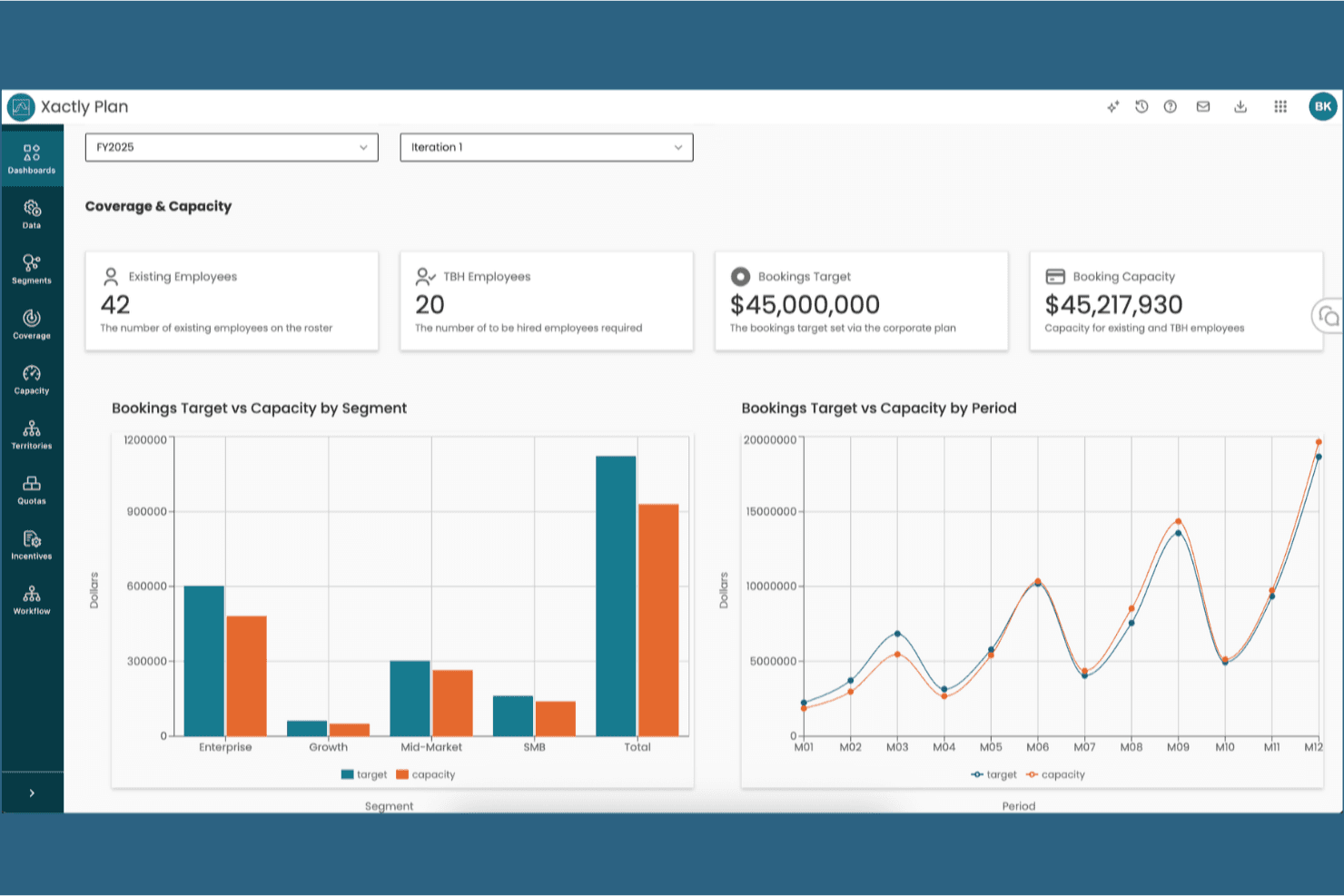
Xactly offers a Coverage & Capacity dashboard displaying bookings targets, employee headcount, and segment-level capacity comparisons. Xactly is a sales performance platform that combines map-based territory design, AI-powered balancing optimization, quota and capacity planning, and scenario modeling to support end-to-end sales coverage decisions.
Who Is Xactly Best For?
Xactly is a strong fit for enterprise sales planning and RevOps teams managing large, complex rep structures where territory design, quota allocation, and compensation all need to stay in sync.
Why I Picked Xactly
I picked Xactly as one of the best because its AI-powered Optimizer inside AlignStar balances territories across multiple variables (TAM, workload, travel efficiency) simultaneously, then grades each alignment against your objectives with an automated report card. What I really like is how territory design connects directly into quota allocation and capacity planning within the same platform. You're not exporting a map and rebuilding the numbers somewhere else.
Xactly Key Features
- Interactive territory mapping: Build and adjust territories using a real-time, map-based interface with layers for accounts, reps, and metrics.
- Automated account assignment rules: Create dynamic, multi-attribute rules to segment and assign accounts across territories with conflict management.
- What-if scenario modeling: Compare multiple territory and quota plans side by side, tracking projected revenue and headcount impact as you go.
- Bi-directional CRM and ERP integrations: Connects to Salesforce, Microsoft, HubSpot, and ERP systems for data syncing and alignment across platforms.
Xactly Integrations
Xactly offers native integrations with Salesforce, ServiceNow, Workday, and SAP. An API is available for custom integrations.
Pros and Cons
Pros:
- Scenario modeling with real-time impact scoring
- Links territory design directly to quota planning
- AI-driven optimization across multiple territory variables
Cons:
- Overkill for smaller or simpler sales teams
- Heavy implementation often requires vendor support
Learn more about Xactly: Best for transforming your data into custom Google maps
- 10-day free trial available
- From $250 for a 45-day pass
Visit WebsiteCustomer Rating:4.7/5
You can create a custom color-coded pin map with any metrics you choose. Maptive is a unique territory optimization tool that allows you to create insightful custom maps from your business’s geolocation data sets. With a series of mapping tools you can use to enhance your Google Maps foundation, you can experiment with sale density maps, heat maps, store locators, and territory maps that ensure you can optimize sales performance.
Why I picked Maptive: This tool caught my eye because it’s specifically designed to work with Google tools. You have Google Street View, Google Geographic Search, and Google Places Search, all available directly on the platform. You can leverage Google’s comprehensive information to get an on-the-ground understanding of any location.
Maptive Standout Features and Integrations
Standout features include turn-by-turn navigation in-app when you link it to your mobile device and custom markers and images that you can upload yourself.
Integrations include Google Maps. CRM integrations coming soon.
Pros and Cons
Pros:
- Great customer service team
- Incredibly user friendly
- Very fast for geocoding addresses
Cons:
- Some loading delays can slow your workflow
- Pricing can be a little high
Learn more about Maptive: Best route planner for field sales
- Free demo + 14-day free trial available
- From $58/user/month (billed annually)
Visit WebsiteCustomer Rating:4.6/5
Badger Maps provides you with routing recommendations that take your entire day of appointments into consideration. As a field sales management software, Badger Maps is designed to help businesses manage representative routes, explore new opportunities, collect new data, and follow up on previous visits. This territory mapping tool has a mobile app, as well as a built-in mapping tool that can help you create sales routes, estimate arrival times, and streamline every drive.
Why I picked Badger Maps: I added this tool to my list because it prioritizes route planning to help you cut down on prep and drive time. Badger Maps reports that salespeople who use this software drive as much as 20% less and spend only 10 minutes prepping per day.
Badger Maps Standout Features and Integrations
Standout features include customized data visualization set up for you by the Badger Maps specialists and personalized onboarding and training to speed up implementation and adoption.
Integrations include HubSpot, Insightly, Microsoft Dynamics, NetSuite, RESTAPI, Salesforce, Zapier, and Zoho CRM.
Pros and Cons
Pros:
- Robust customer support team
- Super user-friendly interface
- Native mobile app for iPhones and Android
Cons:
- Requires internet connection to operate
- No free or affordable option for small businesses
Learn more about Badger Maps: Best for pre-built templates for a variety of use cases
- 7-day free trial + free demo available
- From $99/user/year (billed annually)
Visit WebsiteCustomer Rating:4.4/5
SmartDraw offers pre-built map templates of every territory and region for distribution and sales. Unlike some other solutions on my list, SmartDraw is more about designing and drawing diagrams than territory management. As a design tool, it can be incredibly useful for mapping with its alternative features, like wireframes, mockups, templates, diagrams, and pre-built charts. SmartDraw automates a lot of the design process to ensure you can add, move, and delete shapes more easily.
Why I picked SmartDraw: I like this tool because it provides a single-use solution to sales territory design. If you’re not looking for advanced features and in-depth analytics, SmartDraw is the tool for you. It offers simple, custom, automated map and territory design that addresses your unique needs.
SmartDraw Standout Features and Integrations
Standout features include editable map templates from every region and an intelligent formatting engine to automatically adjust shapes and positions.
Integrations include AWS, box, Confluence, Dropbox, Google, Jira, Microsoft Azure, Microsoft Teams, and Trello.
Pros and Cons
Pros:
- Affordable pricing for all businesses
- Intuitive navigation
- Easy to learn
Cons:
- Templates have preloaded data that must be cleared
- Limited reporting and analytics
Learn more about SmartDraw: Best for built-in mapping capabilities with location intelligence
- 30-day free trial + free demo available
- Pricing upon request

Yellowfin combines business intelligence with sales territory design to enhance sales activities. Since Yellowfin is primarily a Business Intelligence platform, it offers data exploration, dashboards, and self-service BI experience in addition to mapping and territory planning capabilities. With advanced visualization features, this solution offers you a no-coding interface that simplifies analytics to better support your sales operations.
Why I picked Yellowfin: Even though it’s a BI platform, this solution caught my eye because you do get location intelligence functionality that merges traditional and spatial business analytics to improve your decision-making. Use Yellowfin’s built-in mapping tools or Google Maps API to design maps based on demographic data, real-time business data, and other essential metrics.
Yellowfin Standout Features and Integrations
Standout features include native mobile apps that ensure analytics and mapping accessibility and guided NLQ to help you answer difficult questions about your sales process.
Integrations include Dynamics 365, GitHub, Google Analytics 360, Google Sheets, Instagram, Meta for Business, Salesforce Sales Cloud, Tableau, Xero, and Zendesk Suite.
Pros and Cons
Pros:
- Has effective online training tools
- Specifically designed for self-service
- Simple interface for non-technical users
Cons:
- Online accessibility only, no cloud-based options
- Some customizations will require coding
Learn more about Yellowfin: Best for creating maps based on state, county, and postal code boundaries
- Free plan available
- Custom pricing available

Mapline allows you to visualize your customer and sales data in a real-world context. Mapline is a web-based intelligence and sales mapping design software that’s meant to help organizations of any size upload customer and company data for visualization. You can also use this platform to manage scheduling, routine, and dispatch operations from a single hub, as well as get analytics and insights from reporting tools.
Why I picked Mapline: I like this platform because it helps you organize your territories using whatever metrics make sense to you. Whether you need to create a design based on government boundaries, like counties, states, and postal codes, or input your own data to get custom shapes and segmentation, Mapline offers the flexibility and customization you want.
Mapline Standout Features and Integrations
Standout features include map creation by importing data from spreadsheets and heat mapping to see the concentration of your data.
Integrations include an API solution that provides the tools for custom integration.
Pros and Cons
Pros:
- Customer support team provides plenty of guidance
- Tons of customization options for territory design
- Add-ons that help you link maps and spreadsheets
Cons:
- Customer support through email only
- Inaccuracy in some regions
Learn more about Mapline: Best for understanding how geography affects your organization
- Free trial + free demo available
- From $695/year

Maptitude can help you model routes for any number of vehicles to create the most efficient setup. As a GIS and mapping software, Maptitude strives to offer a cost-effective solution for optimizing your sales territories, site locations, and vehicle routes, as well as analyze, visualize, and present the most critical data about your profits, workflow, and resource allocation. Discover geographic patterns that make a big difference to your decision-making.
Why I picked Maptitude: This tool seems incredibly useful to me due to its spatial mapping feature. With this feature, you can estimate the population of any given area to design custom territories that identify and address over and under-served areas, determine ideal trade areas, and find valuable sites for physical stores based on the geography of the location.
Maptitude Standout Features and Integrations
Standout features include map creation using data from your choice of source, including Excel, SQL Server, or Access, and online sharing with maps embedded into your website.
Integrations include Access, Google Maps, Microsoft Access, Microsoft Excel, and TransCAD.
Pros and Cons
Pros:
- Friendly and supportive customer service
- Affordable options for small businesses
- User-friendly design and navigation
Cons:
- Can be slow to upload large data sets
- Advanced features are a little complicated to learn
Learn more about Maptitude: Best for optimizing territories to unlock unseen sales potential
- Free trial available
- From $1,495/user/year

With eSpatial, you can design and realign territories by workload, overlap, and balanced assignments. This cloud-based territory mapping software uses location technology to deliver geographic solutions to international organizations. eSpatial specializes in territory alignment, routing, data visualization, target marketing, prospecting, and gap analysis. Your team also gets dynamic visual insights at street, zip code, country, and coordinate levels.
Why I picked eSpatial: This tool made my list because of its territory management features. Whether you design geographic or account-based territories, eSpatial can warn you where there are pockets of underperforming areas, high employee turnover, areas that aren’t meeting expectations, and high mileage expenses.
eSpatial Standout Features and Integrations
Standout features include template creation for maps that display only what you want to see and radius maps that provide data points for relevant information to help with territory planning.
Integrations include Salesforce.
Pros and Cons
Pros:
- Intuitive tools and navigation
- Very easy to use
- Appealing user interface
Cons:
- Adding multiple map elements is time-consuming
- Very expensive pricing at the lowest tier
Learn more about eSpatial: Best for mapping your Salesforce data
- 15-day free trial available
- From $70/month

Geopointe allows you to see how any territory adjustments affect daily operations. A web-based platform from Ascent Cloud, Geopointe is designed to help you schedule routes and trips, redesign and align territory maps, and create unique marketing campaigns based on demographic data in a variety of geographic areas. This platform can also help your sales reps fill in meeting cancellations and log notes to keep your central hub up-to-date.
Why I picked Geopointe: This tool made my list because it offers several territory design-specific features for Salesforce data, including a Shapes Editor and Automated Assignments. The Shape Editor shows how territory adjustments impact business operations, while Automated Assignments distribute leads and territory assignments based on your rules to ensure fairness.
Geopointe Standout Features and Integrations
Standout features include route optimization and trip planning to save on drive time and resources, as well as geographic search and analysis for location-specific insights.
Integrations include Salesforce Sales Cloud and Territory Planner.
Pros and Cons
Pros:
- Range of price points for any business size
- User-friendly interface design
- Knowledgeable customer support team
Cons:
- Navigation isn’t very intuitive
- May take up too much storage
Learn more about Geopointe: Best for automated route planning to maximize customer visits
- 30-day free trial
- From $89.95/user/month (billed quarterly)

Portatour has call settings with customer information that is designed to optimize route planning. This cloud-based sales route planning software is made to help your sales team plan and optimize sales routes from home base or on the road. Use this tool to reduce mileage and emissions, increase sales rep productivity through automated scheduling suggestions based on previous customer interactions, and enjoy route calculations that take holidays, business hours, and customer preferences into account.
Why I picked Portatour: What made me add this platform to my list was the automatic route planner app. Once you’ve designed your territories and added in customer requests, you can use the Portatour app to automatically schedule routes in just a few seconds based on current conditions.
Portatour Standout Features and Integrations
Standout features include configurable customer assignments and restrictions and lead management to record and store customer data.
Integrations include Microsoft Dynamics, Microsoft Excel, Salesforce, and Veeva. Portatour also offers API data exchange PowerShell scripts for custom integrations.
Pros and Cons
Pros:
- Easy to learn how to use
- Mobile accessibility for field teams
- Automation-first approach to speed up operations
Cons:
- Cost prohibitive for small businesses
- A little complicated to set up
Learn more about Portatour:
Diğer Satış Bölgesi Tasarım Yazılımları
İşte kısa listeme giremeyen, ancak yine de göz atmaya değer bazı ek satış bölgesi tasarım yazılımı seçenekleri:
- 11AlignMixBest for click-to-edit map design drawing
- 12GeoMetrxBest for aggregating census-based, location-specific data
- 13SPOTIOBest for multi-channel communication and multi-device support
- 14MapBusinessOnlineBest for having access to up-to-date base maps and current street data
- 15SeismicBest for building content profiles for outside and field sales roles that address their specific needs
- 16BatchGeoBest for transferring your mapping data from spreadsheets to maps in just three steps
- 17VaricentBest for making data-driven decisions with access to data visualizations, reports, and analytics
- 18ZeeMapsBest for creating and publishing interactive maps that you can embed in websites
- 19CallproofBest sales territory design software with an attached CRM for your outside sales team
- 20EasyTerritoryBest territory design software for pairing with Microsoft Dynamics 365 and Power BI
How I Evaluate Sales Territory Design Software
I split my evaluation into two layers: the baseline capabilities a tool must have—like geo-mapping, rule-based assignment, and scenario modeling—and the differentiators that separate the best options.
Core Functionality (Table Stakes For This List)
When I'm selecting tools for my list, I rank each one on a scale from 0 (does not offer the functionality) to 5 (excels in this area) for each core functionality listed below. Then, I calculate the tool's total score into a percentage. Each tool needs to achieve a minimum total score of 65% to be considered for inclusion.
- Territory Mapping & Visualization: I look for interactive geo-maps where you can layer in accounts, reps, and revenue data to spot coverage gaps or overlaps across regions at a glance.
- Account & Rep Assignment Rules: The rule engine should handle multi-attribute logic like industry, company size, and named accounts so you're not manually sorting spreadsheets every planning cycle.
- Balancing & Optimization Engine: I evaluate whether the tool can balance territories across multiple variables like TAM, deal count, and workload rather than just splitting accounts evenly by count.
- Scenario Modeling & Planning: I check for side-by-side what-if comparisons so you can model changes like adding a new rep in a region and see the downstream impact before committing.
- CRM & Data Integration: Syncing with your CRM is foundational. I look at whether the tool supports bi-directional sync with platforms like Salesforce, HubSpot, or Microsoft Dynamics.
- Quota & Capacity Alignment: Territory plans should connect to quota and headcount inputs. I evaluate whether the tool links coverage ratios and capacity data to the territories it produces.
Once I have a list of tools that meet this criteria, I consider what sets each platform apart.
Differentiating Factors (What Sets Vendors Apart)
Here's how I compare and contrast different vendors:
Standout Features
I pay close attention to AI-powered recommendations—tools that suggest optimal account groupings or flag imbalanced territories save hours of manual analysis. Change impact analytics matter just as much, especially when you need to show leadership exactly how a mid-year realignment affects pipeline coverage and quota distribution. I also evaluate collaborative planning workflows, since territory design rarely happens in a vacuum. Strong options let RevOps, sales managers, and finance weigh in through structured approval chains rather than endless email threads.
Beyond Features
Ecosystem fit is a big one—I check whether a tool connects to your existing planning stack, like quota management or compensation platforms, since territory design feeds directly into both. Implementation speed also matters. Some tools require weeks of professional services, while others let a RevOps team build their first plan within days. I also evaluate pricing transparency, looking at whether core optimization and integration capabilities are included or gated behind higher tiers.
Satış Bölgesi Tasarım Yazılımı Nasıl Seçilir?
Uzun özellik listeleri ve karmaşık fiyatlandırma yapıları içinde kaybolmak kolaydır. Kendinize özgü yazılım seçim sürecinizi yürütürken odağınızı korumanıza yardımcı olmak için aklınızda bulundurmanız gereken faktörleri içeren bir kontrol listesi hazırladım:
| Faktör | Dikkat Edilmesi Gerekenler |
|---|---|
| FaktörÖlçeklenebilirlik | Dikkat Edilmesi GerekenlerYazılım ekibinizle birlikte büyüyecek mi? Gelecekteki büyümeyi ve aracın sınırlara takılmadan veya yavaşlamadan artan veri ve kullanıcı sayısını yönetip yönetemeyeceğini değerlendirin. |
| FaktörEntegrasyonlar | Dikkat Edilmesi GerekenlerCRM veya ERP gibi mevcut sistemlerinize bağlanıyor mu? Manuel veri girişinden kaçınmak ve platformlar arasında sorunsuz veri akışı sağlamak için uyumluluğu kontrol edin. |
| FaktörÖzelleştirilebilirlik | Dikkat Edilmesi GerekenlerAracı kendinize özgü süreçlere uyacak şekilde uyarlayabilir misiniz? Raporları, gösterge panellerini ve iş akışı ayarlarını ihtiyaçlarınıza göre özelleştirmenize olanak tanıyan esnek seçenekleri arayın. |
| FaktörKullanım kolaylığı | Dikkat Edilmesi GerekenlerArayüz ekibiniz için sezgisel mi? Kullanıcıların kapsamlı eğitim veya destek almadan yazılımı ne kadar hızlı öğrenip kullanmaya başlayabileceğini değerlendirin. |
| FaktörUygulama ve kullanıma alıştırma | Dikkat Edilmesi GerekenlerNe kadar hızlı çalışmaya başlayabilirsiniz? Gerekli eğitim veya veri taşıma çalışmaları da dahil olmak üzere kurulum için gereken zaman ve kaynakları değerlendirin. |
| FaktörMaliyet | Dikkat Edilmesi GerekenlerYazılımı şimdi ve uzun vadede karşılayabilir misiniz? Farklı sağlayıcıların fiyatlandırma yapılarını, gizli ücretlerini ve fiyat-performans değerini karşılaştırın. |
| FaktörGüvenlik önlemleri | Dikkat Edilmesi GerekenlerVerileriniz korunuyor mu? Hassas verileri korumak için yazılımın güvenlik standartlarına uygun olduğundan ve şifreleme ile erişim kontrolleri gibi özellikler sunduğundan emin olun. |
Satış Bölgesi Tasarım Yazılımı Nedir?
Satış bölgesi tasarım yazılımı, işletmelerin satış bölgelerini tahsis etmek ve yönetmek için kullandığı bir araçtır. Müşteri demografisi, pazar potansiyeli ve coğrafi konum gibi faktörlere dayalı olarak bölgeleri düzenlemek için coğrafi haritalama ile veri analizini bir araya getirir. Yazılım, optimize edilmiş ve dengeli satış bölgeleri oluşturmak için satış ve müşteri verilerini entegre eder; performans analizi ve gerçek zamanlı güncellemeler için araçlar sunar.
Özellikler
Satış bölgesi tasarım yazılımı seçerken aşağıdaki temel özelliklere dikkat edin:
- Bölge haritalama: Bölgeleri görsel olarak oluşturmanıza ve ayarlamanıza olanak tanır; dengeli kapsam ve verimli kaynak tahsisi sağlar.
- Veri görselleştirme: Satış verilerinin grafiksel gösterimlerini sunarak ekiplerin eğilimleri belirlemesine ve bilinçli kararlar almasına yardımcı olur.
- Performans takibi: Satış metriklerini ve ekip performansını izleyerek iyileştirme gerektiren alanlara ilişkin içgörüler sağlar.
- CRM entegrasyonu: Mevcut CRM sistemlerine bağlanarak bilgilerin sorunsuz biçimde akmasını sağlar ve manuel veri girişini azaltır.
- Özelleştirilebilir raporlama: Belirli iş ihtiyaçlarını karşılamak ve temel performans göstergelerini izlemek için özel raporlar oluşturmanızı sağlar.
- Yapay zekâ destekli içgörüler: Bölge düzenlemeleri için öngörücü analizler ve stratejik öneriler sunmak üzere yapay zekâdan yararlanır.
- Mobil uygulama erişimi: Bölge verilerine hareket hâlindeyken erişim sağlayarak satış ekiplerinin sahadayken bilgili ve hızlı yanıt verebilir durumda kalmasına olanak tanır.
- Gerçek zamanlı iş birliği: Birden fazla kullanıcının bölge verilerine aynı anda erişmesine ve bunları düzenlemesine olanak tanıyarak ekip iş birliğini kolaylaştırır.
- Otomatik bölge düzenlemeleri: Önceden belirlenmiş ölçütlere göre bölgeleri otomatik olarak düzenleyerek zaman kazandırır ve dengeyi korur.
- Güvenlik önlemleri: Şifreleme ve erişim kontrolleri aracılığıyla hassas iş verilerini koruyarak güvenlik standartlarına uyumu sağlar.
Avantajlar
Satış bölgesi tasarım yazılımını uygulamak, ekibiniz ve işletmeniz için çeşitli avantajlar sağlar. Yararlanabileceğiniz avantajlardan bazıları şunlardır:
- İyileştirilmiş kapsam: Tüm bölgelerin eşit biçimde kapsanmasını sağlayarak satış fırsatlarını en üst düzeye çıkarır ve örtüşmeleri azaltır.
- Artırılmış verimlilik: Bölge düzenlemelerini ve veri girişini otomatikleştirerek satış ekibinizin satış yapmaya odaklanması için zaman kazandırır.
- Daha iyi karar alma: Veri görselleştirme ve yapay zekâ destekli içgörüler sunarak bilinçli stratejik kararlar almanıza yardımcı olur.
- Geliştirilmiş iş birliği: Gerçek zamanlı iş birliğini mümkün kılarak ekibinizin bölgeler genelinde uyumlu ve bilgili kalmasını sağlar.
- Optimize edilmiş kaynak tahsisi: Kaynakları en çok ihtiyaç duyulan yerlere tahsis etmek için performans takibinden yararlanarak verimliliği artırır.
- Daha fazla esneklik: Özelleştirilebilir raporlama ve mobil erişim sunarak ekibinizin değişen ihtiyaçlara hızla uyum sağlamasına olanak tanır.
- Güvenli veri yönetimi: Hassas bilgileri güvenlik önlemleriyle koruyarak uyumluluğu ve içinizin rahat olmasını sağlar.
Maliyetler & Fiyatlandırma
Satış bölgesi tasarım yazılımı seçerken mevcut çeşitli fiyatlandırma modellerini ve planları anlamak gerekir. Maliyetler özelliklere, ekip büyüklüğüne, eklentilere ve daha birçok unsura göre değişir. Aşağıdaki tablo, satış bölgesi tasarım yazılımı çözümlerinde yaygın planları, ortalama fiyatlarını ve genellikle sunulan özellikleri özetlemektedir:
Satış Bölgesi Tasarım Yazılımı İçin Plan Karşılaştırma Tablosu
| Plan Türü | Ortalama Fiyat | Yaygın Özellikler |
|---|---|---|
| Plan TürüÜcretsiz Plan | Ortalama Fiyat$0 | Yaygın ÖzelliklerTemel haritalama, sınırlı veri görselleştirme ve temel raporlama. |
| Plan TürüKişisel Plan | Ortalama Fiyat$10-$30/kullanıcı/ay | Yaygın ÖzelliklerGelişmiş haritalama, CRM entegrasyonu ve özelleştirilebilir raporlar. |
| Plan Türüİşletme Planı | Ortalama Fiyat$40-$70/kullanıcı/ay | Yaygın ÖzelliklerGelişmiş analizler, mobil uygulama erişimi ve gerçek zamanlı iş birliği. |
| Plan TürüKurumsal Plan | Ortalama Fiyat$80-$150/kullanıcı/ay | Yaygın ÖzelliklerYapay zekâ destekli içgörüler, otomatik bölge düzenlemeleri ve özel destek. |
Satış Bölgesi Tasarım Yazılımı SSS
Satış bölgesi tasarım yazılımı hakkında sık sorulan bazı soruların yanıtları aşağıdadır:
Satış bölgesini nasıl tasarlarsınız?
Ekip performansını optimize etmek ve geliri en üst düzeye çıkarmak için bir satış bölgesi tasarlamakla ilgileniyorsanız, başlamak için bu adım adım kılavuza göz atın:
- Müşteri tabanınızı, performansınızı, pazar potansiyelinizi ve satış kaynaklarınızı daha iyi anlamak için mevcut operasyonlarınızı değerlendirin.
- Coğrafi konumun, hesap büyüklüğünün ve müşteri türünün satışları artırma veya maliyetleri azaltma planınıza uygun olmasını sağlamak amacıyla hedeflerinizi ve satış kriterlerinizi tanımlayın.
- İlk kriterlerinize ve hedeflerinize göre satış bölgelerinizi oluşturmak ve test etmek için manuel haritalama veya tasarım yazılımı kullanın.
- Yeni bölge tasarımınızın etkisini ölçmek için tasarımınızı uygulayın ve performansı izleyin.
- Hedeflerinize ulaşana kadar bölgeleri ve metrikleri gerektiğinde düzenleyin ve değiştirin.
İşletmemin satış bölgesi tasarım yazılımına ihtiyacı olduğunu nasıl anlarım?
Satış ekibiniz dengesiz iş yükleri veya kaçırılan fırsatlarla mücadele ediyorsa satış bölgesi tasarım yazılımına ihtiyacınız olabilir. Bu araç, bölgeleri verimli bir şekilde düzenleyerek potansiyel müşterilerin ve kaynakların adil bir şekilde dağıtılmasını sağlar. Örneğin, satış temsilcileri sık sık aynı alanlarda çalışıyor veya potansiyel müşterileri kaçırıyorsa bu yazılımı değerlendirmenin zamanı gelmiş demektir.
Satış bölgesi tasarım yazılımı ne kadar güvenlidir?
Çoğu satış bölgesi tasarım yazılımı, şifreleme ve erişim kontrolleri gibi güçlü güvenlik özellikleri sunar. Ancak yazılımın sektör standartlarına ve düzenlemelere uygun olduğunu doğrulamalısınız. Verilerinizin korunmaya devam etmesini sağlamak için satıcılara güvenlik önlemlerini sorun ve incelemeleri okuyun.
Bölge haritalama yazılımında nasıl çalışır?
Konum, gelir veya hesap verilerini kullanarak harita üzerinde bölgeleri çizmenize veya otomatik olarak oluşturmanıza olanak tanır. Daha sonra sınırları ayarlayabilir ve iş yükündeki veya kapsamadaki değişiklikleri anında görebilirsiniz.
Yazılım otomasyon özelliklerini içermeli mi?
Evet. Otomatik dengeleme, atama kuralları ve veri yenilemeleri zaman kazandırır ve insan hatalarını azaltır. Bunlar, büyük veya sık sık değişen satış ekipleri için vazgeçilmezdir.
Raporlama özellikleri satış planlamasını nasıl destekler?
Bölge performansını zaman içinde izleyerek büyüme alanlarını belirlemenize, temsilcilerin iş yüklerini ayarlamanıza ve değişiklikleri yönetime gerekçelendirmenize yardımcı olur.