

Intuit Enterprise Suite vs. Dynamics 365 Business Central: Comparison and Reviews for 2026
Intuit Enterprise Suite and Microsoft Dynamics 365 Business Central both support revenue management through reporting, forecasting, cash flow visibility, and operational controls. Learn how their features, pricing, strengths, and tradeoffs compare in 2026.

We review tools independently, and commissions help fund our testing. See our transparency policy, our methodology, or suggest a tool.
When revenue, payments, reporting, and operational data are spread across separate tools, it becomes harder to see what’s driving growth. Teams need a clearer way to track cash flow, forecast performance, and keep finance, sales, and operations aligned.
Intuit Enterprise Suite and Microsoft Dynamics 365 Business Central are both evaluated among revenue management systems because they help growing organizations improve revenue visibility and financial control. Intuit Enterprise Suite focuses on revenue visibility, cash flow, payments, forecasting, and connected financial operations through the Intuit ecosystem, while Business Central supports broader business processes across finance, sales, service, inventory, projects, and operations.
In this comparison, I’ll break down their features, pricing, pros and cons, security, ease of use, and ideal use cases to help you decide which platform fits your business best.
Intuit Enterprise Suite
4.6/5
- Free demo available
- Pricing upon request
Microsoft Dynamics 365 Business Central
4/5
- Free plan available
- From $80/user/month (billed annually)
Why Trust Our Software Recommendations
6,700+
Reviews
20
Industry experts
16+
Evaluation factors
14
Years
Our reviews reflect our independent judgment—not a sales pitch. Learn how we stay transparent.
For this guide, we evaluated tools using hands-on testing and independent research, scoring tools using our selection criteria.
Our reviews reflect our human editorial judgment, not a sales pitch.
| Intuit Enterprise Suite | Microsoft Dynamics 365 Business Central | |
|---|---|---|
| Free Trial | Free demo available | Free plan available |
| Pricing | Pricing upon request | From $80/user/month (billed annually) |
Intuit Enterprise Suite vs. Microsoft Dynamics 365 Business Central Pricing & Hidden Costs
Intuit Enterprise Suite uses custom, quote-based pricing, so costs depend on users, entities, selected capabilities, add-ons, integrations, and implementation needs. Microsoft Dynamics 365 Business Central has more transparent pricing, with a free trial and separate plans for full users, premium functionality, and limited-access team members.
When it comes to hidden costs, both platforms may require added budget for implementation, data migration, training, workflow setup, integrations, customizations, premium support, and ongoing admin work. Business Central is easier to estimate upfront because its plan pricing is public, while Intuit Enterprise Suite requires a tailored quote based on business complexity. To compare both fairly, ask for a full cost breakdown that includes setup, support, integrations, add-ons, and future scaling needs.
| Intuit Enterprise Suite | Microsoft Dynamics 365 Business Central | |
|---|---|---|
| Accounts Payable | Yes | Yes |
| Accounts Receivable | Yes | Yes |
| API | Yes | Yes |
| Budgeting | Yes | Yes |
| Calendar Management | No | No |
| Customer Management | No | Yes |
| Dashboard | Yes | Yes |
| Data Export | Yes | Yes |
| Data Import | Yes | Yes |
| Data Visualization | Yes | Yes |
| Expense Tracking | Yes | Yes |
| External Integrations | Yes | Yes |
| Forecasting | Yes | Yes |
| Inventory Tracking | Yes | Yes |
| Multi-User | Yes | Yes |
| Notifications | Yes | Yes |
| Payroll | Yes | Yes |
| Project Management | Yes | Yes |
| Scheduling | No | Yes |
| Supplier Management | Yes | Yes |
| Third-Party Plugins/Add-Ons | Yes | Yes |
| Integration | Intuit Enterprise Suite | Microsoft Dynamics 365 Business Central |
|---|---|---|
| IntegrationShopify | Intuit Enterprise Suite✅ | Microsoft Dynamics 365 Business Central ✅ |
| IntegrationBILL/Bill Pay | Intuit Enterprise Suite✅ | Microsoft Dynamics 365 Business Central ✅* |
| IntegrationPayPal | Intuit Enterprise Suite✅ | Microsoft Dynamics 365 Business Central ✅ |
| IntegrationStripe | Intuit Enterprise Suite✅ | Microsoft Dynamics 365 Business Central ✅* |
| IntegrationSalesforce | Intuit Enterprise Suite✅ | Microsoft Dynamics 365 Business Central ✅* |
| IntegrationSquare | Intuit Enterprise Suite✅ | Microsoft Dynamics 365 Business Central ✅* |
| IntegrationAmazon Marketplace | Intuit Enterprise Suite✅ | Microsoft Dynamics 365 Business Central ✅* |
| IntegrationHubSpot | Intuit Enterprise Suite✅ | Microsoft Dynamics 365 Business Central ✅* |
| IntegrationKnowify | Intuit Enterprise Suite✅ | Microsoft Dynamics 365 Business Central ❌ |
| IntegrationWix | Intuit Enterprise Suite✅ | Microsoft Dynamics 365 Business Central ✅* |
| IntegrationAPI | Intuit Enterprise Suite✅ | Microsoft Dynamics 365 Business Central ✅ |
| IntegrationZapier | Intuit Enterprise Suite❌ | Microsoft Dynamics 365 Business Central ✅ |
*Available through a third-party connector, Microsoft AppSource app, API/iPaaS connector, or Zapier rather than a clearly native Microsoft-built integration.
Both Intuit Enterprise Suite and Microsoft Dynamics 365 Business Central support integrations across ecommerce, payments, CRM, finance, and revenue workflows. Intuit Enterprise Suite leans on direct app connections and the broader Intuit ecosystem, while Business Central supports many connections through Microsoft AppSource, APIs, partner connectors, or Zapier. Overall, Intuit Enterprise Suite is best for teams that want connected revenue workflows, while Business Central offers more flexible integration options for Microsoft-based teams.
| Factor | Intuit Enterprise Suite | Microsoft Dynamics 365 Business Central |
|---|---|---|
| FactorData Encryption | Intuit Enterprise SuiteEncrypts data in transit and at rest to protect revenue, financial, payroll, and operational data. | Microsoft Dynamics 365 Business Central Encrypts customer data at rest and in transit across Microsoft cloud environments. |
| FactorRegulatory Compliance | Intuit Enterprise SuiteSupports SOC reports, ISO 27001-certified practices, PCI DSS for applicable payment services, and VPAT documentation. | Microsoft Dynamics 365 Business Central Supports Microsoft cloud compliance programs, including ISO 27001, SOC reports, and global privacy standards. |
| FactorAccess Controls | Intuit Enterprise SuiteUses role-based access controls to limit access to sensitive revenue, financial, payroll, and operational data. | Microsoft Dynamics 365 Business Central Uses Microsoft Entra ID, role-based access, Conditional Access, and MFA options. |
| FactorAudit & Activity Tracking | Intuit Enterprise SuiteSupports audit needs through permissions, financial controls, transaction visibility, and reporting oversight. | Microsoft Dynamics 365 Business Central Provides audit logging, activity tracking, and Microsoft-managed security monitoring. |
| FactorPayment Security | Intuit Enterprise SuiteSupports PCI DSS compliance for applicable payment services. | Microsoft Dynamics 365 Business Central Supports secure payment and financial workflows through Microsoft cloud controls and partner integrations. |
Intuit Enterprise Suite covers key security needs for revenue and financial operations, including encryption, role-based access, SOC reports, ISO 27001-certified practices, PCI DSS for applicable payment services, and audit support. Business Central also offers strong Microsoft cloud security, but Intuit Enterprise Suite gives growing teams solid protection for payments, reporting, payroll, and financial workflows.
| Factor | Intuit Enterprise Suite | Microsoft Dynamics 365 Business Central |
|---|---|---|
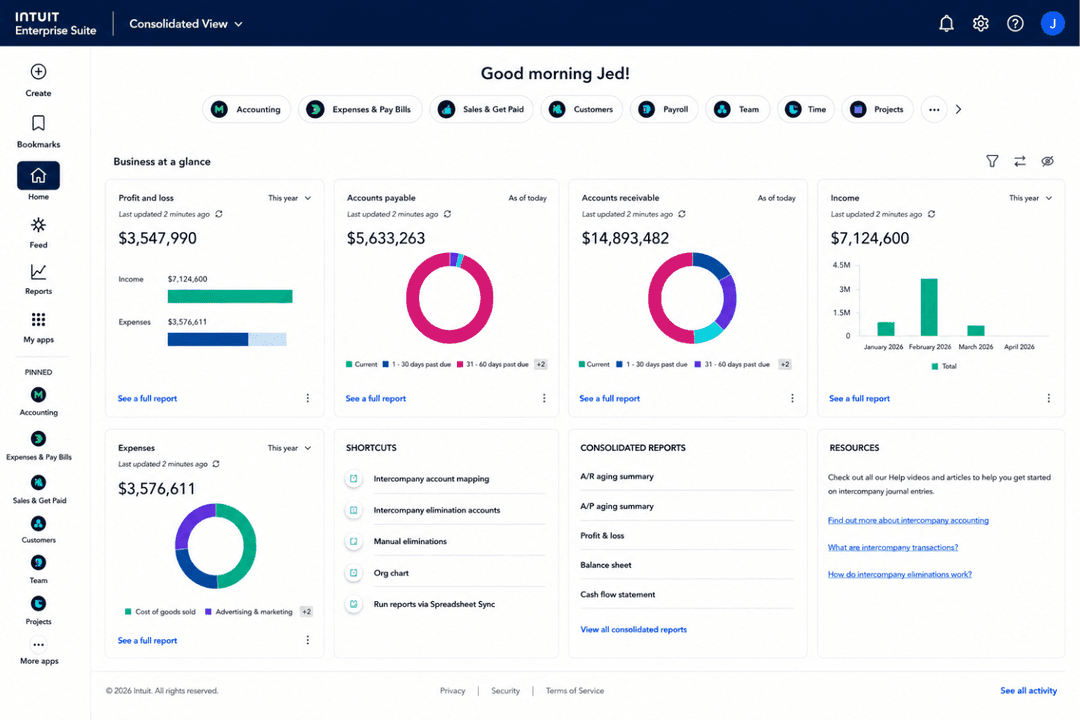
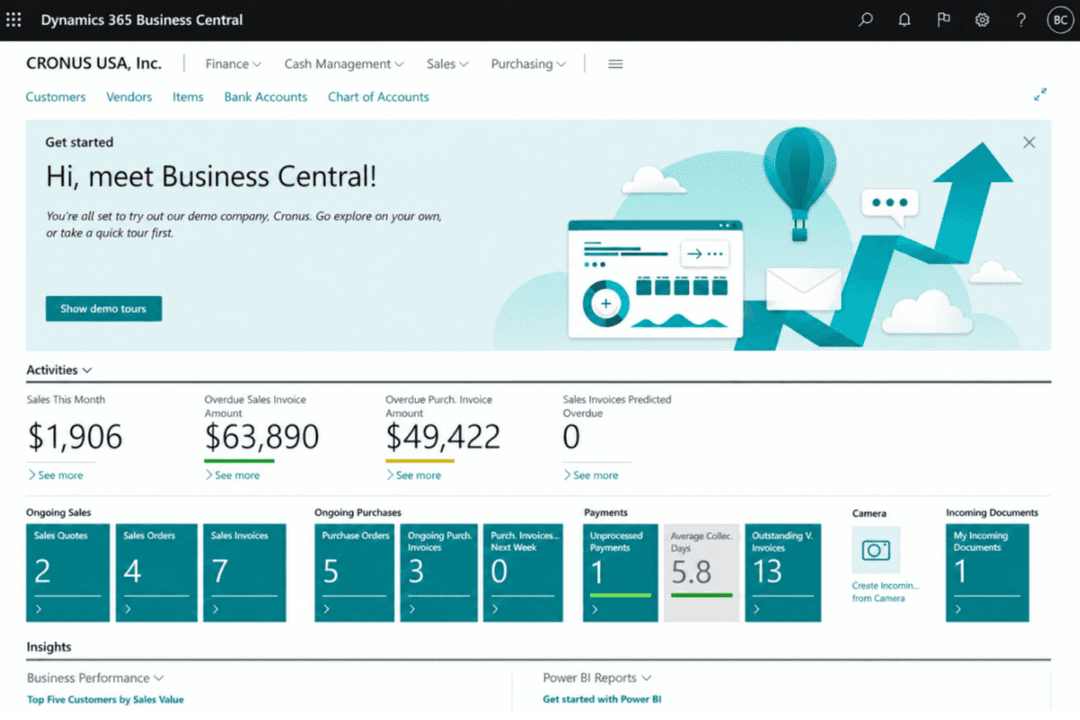
| FactorUser Interface | Intuit Enterprise SuiteModern Intuit-style experience for teams managing revenue, cash flow, payments, and financial reporting. | Microsoft Dynamics 365 Business Central Role-based workspace that can be personalized by user, task, and business function. |
| FactorOnboarding | Intuit Enterprise SuiteGuided implementation with a dedicated customer success manager, migration help, training, reporting setup, and system connections. | Microsoft Dynamics 365 Business Central Offers Microsoft Learn resources, assisted setup, and partner-led implementation support. |
| FactorLearning Curve | Intuit Enterprise SuiteEasier for Intuit-familiar teams, though entity setup, reporting, and revenue workflows still need planning. | Microsoft Dynamics 365 Business Central May take more training because it covers finance, sales, service, inventory, projects, and operations. |
| FactorSupport Resources | Intuit Enterprise SuiteProvides product support, customer success guidance, training, and implementation resources. | Microsoft Dynamics 365 Business Central Provides Microsoft Learn, documentation, help resources, technical support paths, and partner support. |
| FactorCustomization | Intuit Enterprise SuiteSupports configurable workflows, reports, permissions, integrations, and business processes without a heavy ERP build. | Microsoft Dynamics 365 Business Central Supports role-based personalization, page layouts, reports, dashboards, and Microsoft 365-connected workflows. |
From an ease-of-use perspective, Intuit Enterprise Suite is more approachable for teams focused on revenue visibility, cash flow tracking, payments, reporting, and finance workflows. Its guided onboarding, dedicated customer success support, and Intuit-style experience make adoption easier for growing teams. Business Central offers more Microsoft-based personalization, but it may require more setup and training because it covers a wider range of operations.
Intuit Enterprise Suite
- Connects revenue, cash flow, payments, and financial data for clearer visibility.
- Supports AI-powered reporting, forecasting, and insights for teams managing revenue performance.
- Helps manage multi-entity financial operations as the business grows.
- Setup requires planning around entities, reporting, workflows, and integrations.
- May be more than smaller teams need if they only want basic revenue tracking.
- Not a dedicated revenue tool, so advanced revenue recognition or subscription billing may require add-ons.
Microsoft Dynamics 365 Business Central
- Handles multi-entity and multi-currency revenue consolidation well
- Provides detailed, drill-down financial reporting and audit trails
- Strong workflow automation for recurring revenue processes
- Steep per-user pricing for growing revenue teams
- Advanced revenue recognition features require custom configurations
- Native customer support response times can be inconsistent
Intuit Enterprise Suite
- Multi-Entity OrganizationsManage revenue and financial performance across multiple legal entities while consolidating reporting from one system.
- Professional Services FirmsTrack project revenue, manage financial performance, and improve visibility across teams and client work.
- Technology & SaaS CompaniesSupport growing revenue operations with AI-powered reporting, forecasting, and financial controls.
- Construction & Project-Based BusinessesManage project accounting, budgets, and revenue-related reporting for project-driven work.
- Manufacturing, Wholesale & DistributionMonitor revenue and financial performance across products, locations, and business units.
- Growing Mid-Market BusinessesUse enterprise-level financial management and reporting without taking on the full complexity of a traditional ERP.
Microsoft Dynamics 365 Business Central
- Midsize EnterprisesIts feature set balances depth and usability for organizations scaling up from basic accounting software.
- Multi-Entity BusinessesBusiness Central consolidates revenue, warehouse management, and reporting across branches, subsidiaries, and global locations in one unified view.
- Subscription-Based CompaniesRecurring billing, revenue recognition, and contract management help SaaS and service firms get revenue clarity.
- Finance DepartmentsCustomizable dashboards, compliance tools, and audit trails support detailed revenue analysis and regulatory requirements.
- International FirmsMulti-currency support, language packs, and region-specific compliance make cross-border revenue management straightforward.
- Project-Based TeamsIntegrated project accounting, project costing, job costing, and time tracking enable granular visibility into project revenues and costs.
Who Should Use Intuit Enterprise Suite, and Who Should Use Microsoft Dynamics 365 Business Central?
Intuit Enterprise Suite is a strong fit for growing and mid-market businesses that need clearer revenue visibility, cash flow tracking, payments, forecasting, and financial reporting without a heavy ERP setup. It works especially well for teams already using the Intuit ecosystem that want connected revenue and finance workflows, multi-entity reporting, AI-powered insights, and guided implementation.
Microsoft Dynamics 365 Business Central, on the other hand, may fit midsized companies that need broader operational coverage across finance, sales, service, inventory, projects, purchasing, and vendor management. Overall, Intuit Enterprise Suite is better for teams seeking a more manageable path to revenue and financial visibility, while Business Central is better suited for Microsoft-based teams managing broader business operations.
| Intuit Enterprise Suite | Microsoft Dynamics 365 Business Central | |
|---|---|---|
| Ecosystem Fit | Intuit Enterprise Suite Built around Intuit tools for finance, payroll, payments, workforce management, marketing, and supported apps. | Microsoft Dynamics 365 Business Central Built around Microsoft 365, Power BI, Teams, Copilot, AppSource, and Microsoft partner tools. |
| Implementation Approach | Intuit Enterprise Suite Uses guided onboarding with a dedicated customer success manager, migration help, training, reporting setup, and system connections. | Microsoft Dynamics 365 Business Central Often involves assisted setup, Microsoft Learn resources, and partner-led implementation depending on complexity. |
| Operational Scope | Intuit Enterprise Suite Centers revenue, cash flow, payments, payroll, reporting, and financial workflows. | Microsoft Dynamics 365 Business Central Extends into sales, service, inventory, projects, purchasing, and operations. |
| Pricing Structure | Intuit Enterprise Suite Uses custom, quote-based pricing based on users, entities, capabilities, add-ons, integrations, and implementation needs. | Microsoft Dynamics 365 Business Central Uses public subscription plans based on user access and functionality level. |
| Product Orientation | Intuit Enterprise Suite Focuses on revenue visibility, cash flow, payments, forecasting, and connected financial operations. | Microsoft Dynamics 365 Business Central Supports broader business management across finance, sales, service, inventory, projects, purchasing, and operations. |
| Cloud-Based Access | Both are cloud-based systems that help teams manage financial and revenue-related data online. |
|---|---|
| Reporting & Analytics | Both provide dashboards, reports, and analytics to help teams monitor performance and business health. |
| Security Controls | Both support key security needs through encryption, access controls, and compliance-related protections. |
| User Permissions | Both include roles and permissions to help protect sensitive financial and revenue data. |
| Workflow Automation | Both support automation for approvals, finance processes, and operational tasks. |