

Monday CRM-recension

We review tools independently, and commissions help fund our testing. See our transparency policy, our methodology, or suggest a tool.
monday CRM is a customer relationship management (CRM) software that helps you organize and manage your sales pipeline effectively. It’s ideal for small to medium-sized businesses and teams in industries like tech startups and creative agencies, where collaboration and flexibility are key. monday sales CRM offers your team a streamlined way to track sales efforts and foster strong customer relationships, enhancing your ability to close deals efficiently.
monday CRM Evaluation Summary

4.6/5
- From $12/seat/month (billed annually)
- 14-day free trial + free demo available
Varför du kan lita på våra programvarurekommendationer
6,700+
Reviews
20
Industry experts
16+
Evaluation factors
14
Years
Våra recensioner speglar vårt oberoende omdöme — inte ett säljbudskap. Läs mer om hur vi förblir transparenta.
För den här guiden utvärderade vi verktyg genom praktisk testning och oberoende research, och betygsatte verktygen enligt våra urvalskriterier.
Våra recensioner speglar vårt mänskliga redaktionella omdöme, inte ett säljbudskap.
monday CRM Overview
monday CRM is a customer relationship management (CRM) software that helps you organize and manage your sales pipeline effectively. It’s ideal for small to medium-sized businesses and teams in industries like tech startups and creative agencies, where collaboration and flexibility are key. monday sales CRM offers your team a streamlined way to track sales efforts and foster strong customer relationships, enhancing your ability to close deals efficiently.
Pros
- You can easily create automations without any coding.
- Its integrated proofing feature lets you add comments to files.
- You can create forms that live within your project as a view.
Cons
- The Gantt view isn't useful for building projects.
- Subtask columns don't replicate task structure, needing extra customization.
- Training videos use the old UI, which can confuse new users.


Is monday CRM Right For Your Needs?
Who Would be a Good Fit for monday CRM?
If you’re part of a small to medium-sized business or a creative team, monday sales CRM could be an excellent fit for you. Its flexible project management tools and customizable workflows make it ideal for tech startups and marketing agencies needing collaboration and adaptability. You can automate repetitive tasks and manage your sales pipeline effectively, which is especially beneficial for teams that prioritize efficiency and seamless communication.
- Tech Startupsmonday sales CRM is perfect for tech startups needing agile workflows and automation.
- Marketing AgenciesYour agency will benefit from its collaborative tools and proofing features for client work.
- Small BusinessesIf you’re a small business, you’ll find its ease of use and customization options invaluable.
- Project ManagersYou can streamline tasks and track progress easily with monday sales CRM’s visual tools.
- Sales TeamsIt helps your team manage leads and sales pipelines with integrated tracking features.
- Creative TeamsYour team can collaborate effectively using its integrated comments and file sharing.
Who Would be a Bad Fit for monday CRM?
If you’re part of a large enterprise with complex needs, monday sales CRM might not suit you well. Its functionality can be limited for massive data volumes and intricate reporting requirements. Manufacturing companies requiring detailed, customizable Gantt charts could find its project management features lacking. Teams relying heavily on in-depth training resources may struggle with outdated onboarding materials.
- Large EnterprisesComplex workflows and massive data handling might strain monday sales CRM’s capabilities.
- Manufacturing CompaniesYou’ll find its Gantt charts not detailed enough for intricate production schedules.
- Finance DepartmentsDetailed reporting needs may not be fully supported by monday sales CRM’s features.
- Legal FirmsThe lack of advanced document management could hinder your casework.
- Education InstitutionsIts features may not cater to the specific needs of academic administration.
- Healthcare OrganizationsRegulatory compliance and patient data management might be challenging with this CRM.
How We Test & Score Tools
We’ve spent years building, refining, and improving our software testing and scoring system. The rubric is designed to capture the nuances of software selection and what makes a tool effective, focusing on critical aspects of the decision-making process.
Below, you can see exactly how our testing and scoring works across seven criteria. It allows us to provide an unbiased evaluation of the software based on core functionality, standout features, ease of use, onboarding, customer support, integrations, customer reviews, and value for money.
Core Functionality (25% of final scoring)
The starting point of our evaluation is always the core functionality of the tool. Does it have the basic features and functions that a user would expect to see? Are any of those core features locked to higher-tiered pricing plans? At its core, we expect a tool to stand up against the baseline capabilities of its competitors.
Standout Features (25% of final scoring)
Next, we evaluate uncommon standout features that go above and beyond the core functionality typically found in tools of its kind. A high score reflects specialized or unique features that make the product faster, more efficient, or offer additional value to the user.
We also evaluate how easy it is to integrate with other tools typically found in the tech stack to expand the functionality and utility of the software. Tools offering plentiful native integrations, 3rd party connections, and API access to build custom integrations score best.
Ease of Use (10% of final scoring)
We consider how quick and easy it is to execute the tasks defined in the core functionality using the tool. High scoring software is well designed, intuitive to use, offers mobile apps, provides templates, and makes relatively complex tasks seem simple.
Onboarding (10% of final scoring)
We know how important rapid team adoption is for a new platform, so we evaluate how easy it is to learn and use a tool with minimal training. We evaluate how quickly a team member can get set up and start using the tool with no experience. High scoring solutions indicate little or no support is required.
Customer Support (10% of final scoring)
We review how quick and easy it is to get unstuck and find help by phone, live chat, or knowledge base. Tools and companies that provide real-time support score best, while chatbots score worst.
Customer Reviews (10% of final scoring)
Beyond our own testing and evaluation, we consider the net promoter score from current and past customers. We review their likelihood, given the option, to choose the tool again for the core functionality. A high scoring software reflects a high net promoter score from current or past customers.
Value for Money (10% of final scoring)
Lastly, in consideration of all the other criteria, we review the average price of entry level plans against the core features and consider the value of the other evaluation criteria. Software that delivers more, for less, will score higher.
Core Features
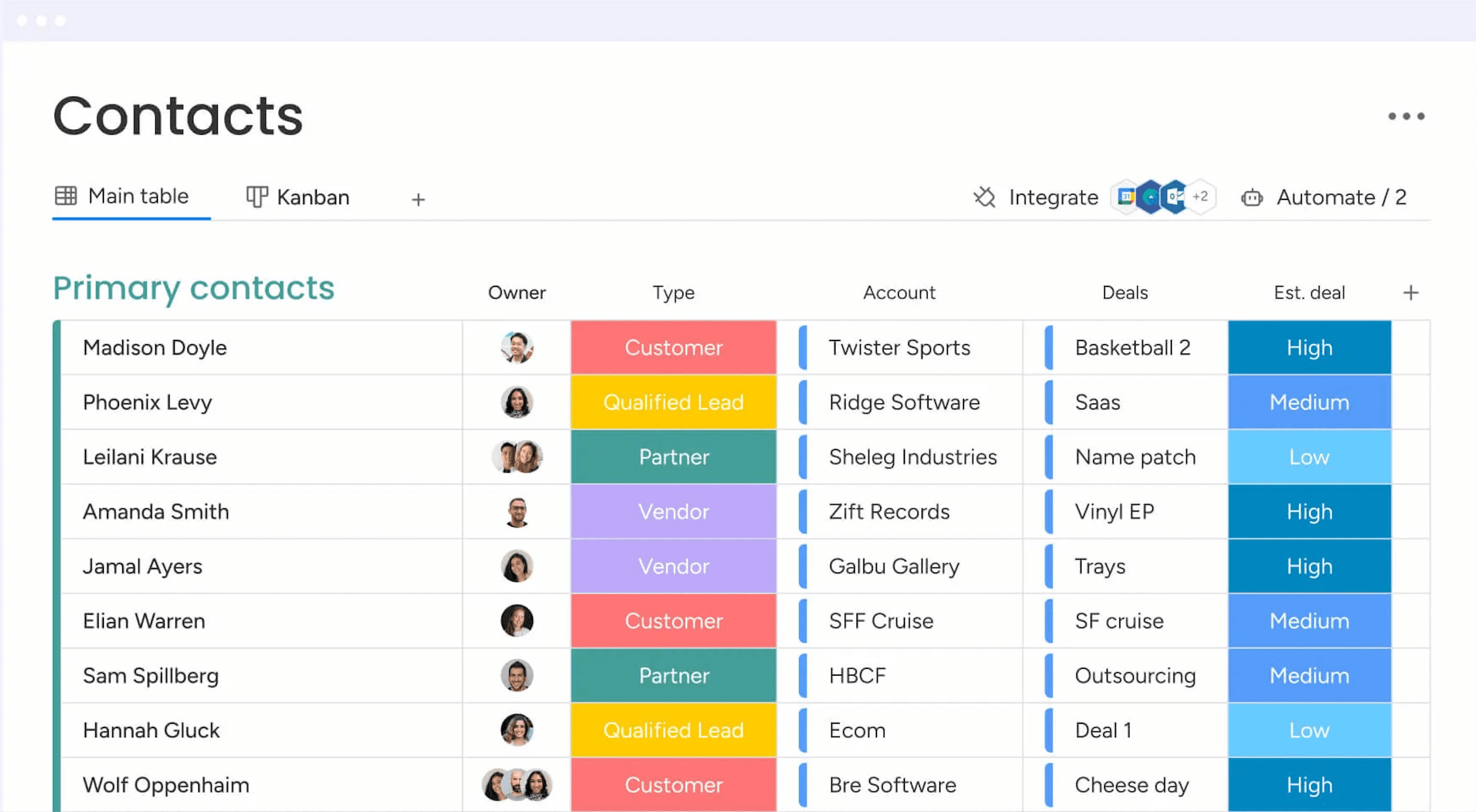
Contact Management: You get a central place to store all your contacts with details, communication histories, and linked deals. You can import them from Excel or auto-create contacts from your emails, so your team always has a clean, up-to-date list.
Lead Capturing and Pipeline Tracking: You can collect leads via forms or imports, track them through custom stages, and move deals with drag‑and‑drop. You see your entire sales funnel and can quickly spot where deals stall.
Email Sync and Tracking: You sync Gmail or Outlook to centralize email conversations, send bulk or templated emails, and get alerts when leads open or click. That way, you reach out at the right time and don’t miss follow‑up chances.
Automations: You set up no‑code rules that automate manual tasks like updating deal stages, sending reminders, or logging emails. It saves hours and keeps work consistent without extra effort.
Dashboards and Sales Forecasting: You get customizable dashboards that show pipeline status, team performance, and revenue forecasts by month or rep. These visuals help you spot trends and hit targets more reliably.
Activity Tracking And Team Goals: You track calls, meetings, and emails in one feed and monitor reps’ activity and quota progress. It gives you a clear picture of who’s doing what and where coaching might help.
Standout Features
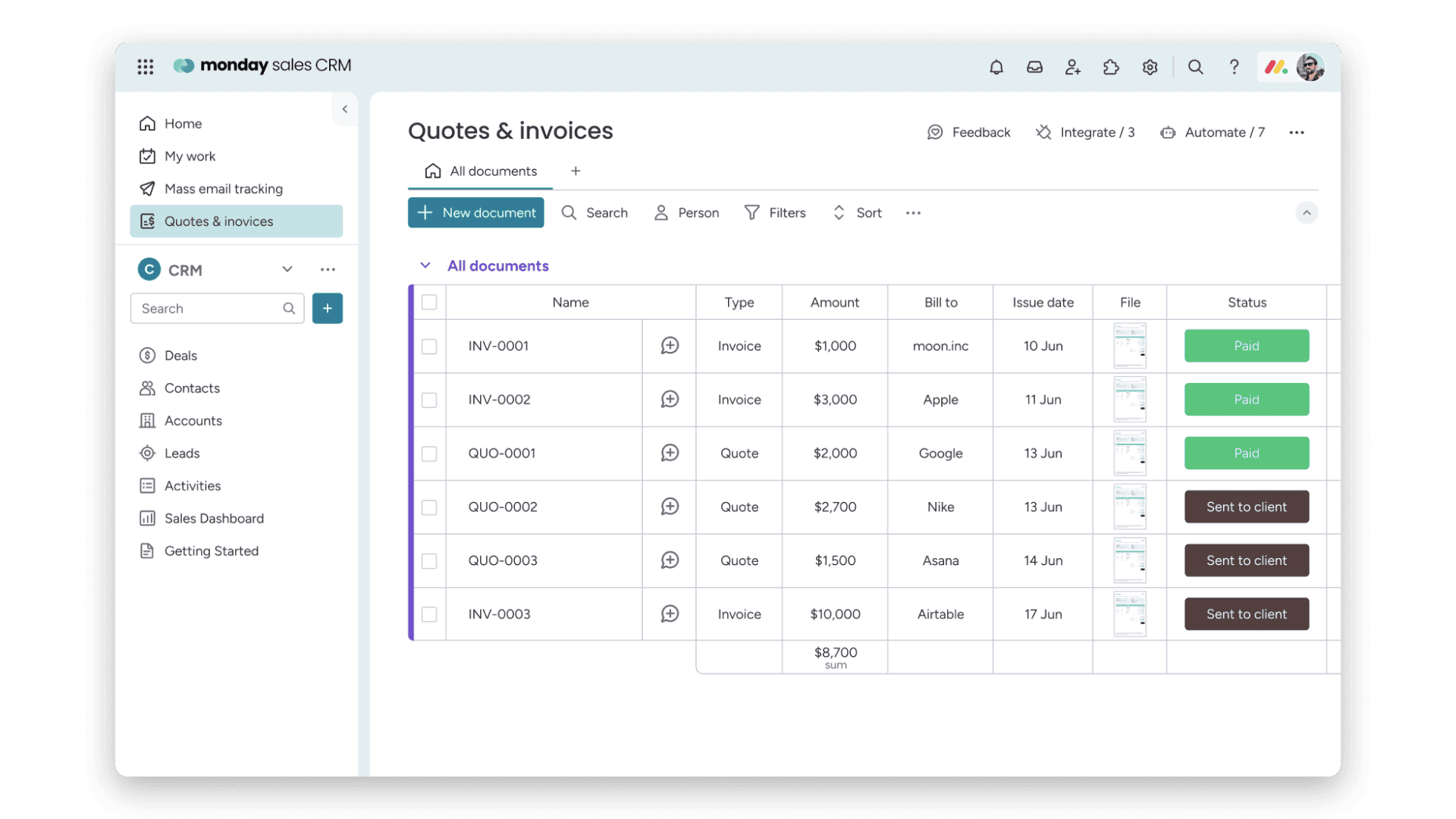
Quotes & Invoices: You can create, customize, send, and track quotes and invoices right within your CRM, pulling data from your contacts and deals. That means you skip back and forth between apps and speed up getting paid.
Sequences: You build multi‑step engagement flows (like email campaigns, reminders, task updates) that guide leads through your funnel automatically. You keep prospects moving without missing a beat or manually nudging them.
Ease of Use
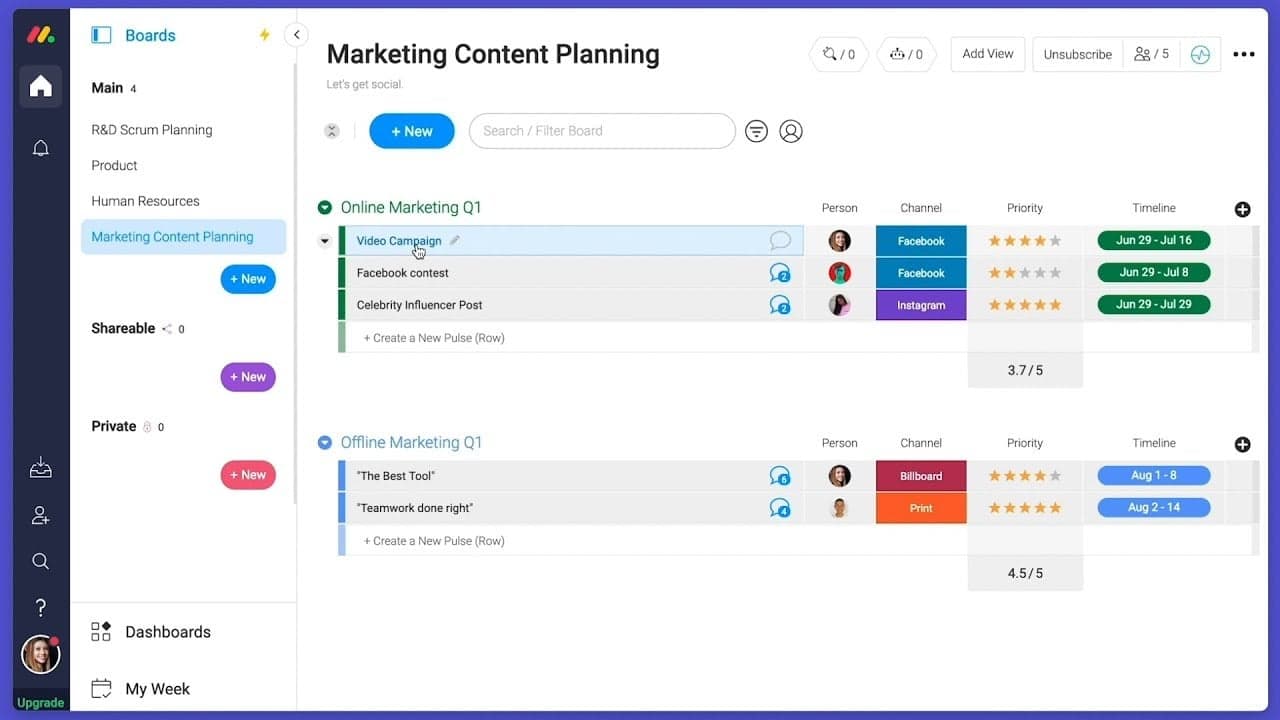
Monday CRM offers a user-friendly interface that helps your team get up to speed quickly, though some users find the multitude of features a bit overwhelming. Its drag-and-drop functionality and visual dashboards make task management intuitive. However, if your team prefers simplicity, the extensive capabilities might require a learning curve. The platform's customization options provide flexibility, but you might need time to explore and configure them to best suit your workflow.
Onboarding
Monday CRM provides a smooth onboarding experience with clear tutorials and a user-friendly setup process that helps your team get started quickly. The platform offers a range of resources, including webinars and a knowledge base, to support new users. Its step-by-step guides and personalized onboarding sessions ensure you find value quickly. However, the depth of features might require some exploration to fully utilize, but the available support makes this manageable.

Customer Support
Monday CRM offers robust customer support with multiple channels like live chat, email, and an extensive help center to assist your team. Users appreciate the prompt and knowledgeable responses they receive from the support team. The availability of 24/7 support ensures you get help whenever needed. Additionally, the platform's comprehensive documentation and community forums provide valuable insights and solutions, helping you resolve issues efficiently and keep your projects on track. Monday CRM integrates natively with Slack, Google Drive, Microsoft Teams, Zoom, Trello, Dropbox, HubSpot, Shopify, LinkedIn, and Outlook.
Monday CRM also offers an API and connects with third-party integration tools like Zapier.

Value for Money
monday CRM pricing offers strong value, especially if your team wants something easy to use without sacrificing flexibility. Although there is no free plan, monday CRM does offer a 14-day free trial.
You get a lot at the lower tiers, including automation and reporting tools that work well for small to midsize teams. Higher plans add more control, but smaller teams won’t need Enterprise to get full use out of it.
- Basic Plan: Contact management, boards, and limited automations
- Standard Plan: Activity tracking, custom pipelines, and calendar view
- Pro Plan: Sales forecasting, advanced reporting, and higher automation limits
- Enterprise Plan: Admin controls, multi-level permissions, and enterprise-grade security features

monday CRM Specs
- 2-Factor Authentication: No
- API: Yes
- Calendar Management: Yes
- Call Tracking: No
- Campaign Management: No
- Click-to-Dial: No
- Contact Management: Yes
- Contact Sharing: No
- Custom Data Forms: Yes
- Customer Management: Yes
- Dashboard: Yes
- Data Export: Yes
- Data Import: Yes
- Data Visualization: Yes
- Email Integration: Yes
- External Integrations: Yes
- File Sharing: Yes
- File Transfer: Yes
- Google Apps Integration: Yes
- Lead Management: Yes
- Lead Scoring: Yes
- Marketing Automation: Yes
- Mobile App: No
- Multi-User: Yes
- Notifications: Yes
- Pipeline Management: Yes
- Sales Automation: Yes
- Scheduling: Yes
- Social-Media Integration: Yes
- Task Scheduling/Tracking: Yes
- Third-Party Plugins/Add-Ons: Yes
5 sätt som monday CRM skiljer sig från CRM-systemet ditt team avskyr
Det är ingen hemlighet att säljteam har en komplicerad relation till sina CRM-system.En rapport från monday CRM visade att 81 % av alla säljledare överväger att byta CRM-system i år. Några av anledningarna är att CRM-system är ökända för att vara svåra att använda, tidskrävande och frustrerande rigida. Men det är inte så att säljteam […]

monday CRM FAQs
monday CRM Company Overview & History
Monday.com, initially named daPulse, was founded in 2012 by Roy Mann and Eran Zinman as an internal tool at Wix.com. Recognizing its potential, they spun it off as a separate company. After launching commercially in 2014, they rebranded to monday.com in 2017. The company evolved from a team management tool into a work operating system, and now offers CRM capabilities through its platform.