

Palette Review 2026: Pros, Cons, Features and Pricing
I see Palette’s edge as pairing commission automation with rep visibility—not just calculating payouts. This review weighs its features, trade-offs, and pricing to help you decide if it fits your team.

We review tools independently, and commissions help fund our testing. See our transparency policy, our methodology, or suggest a tool.
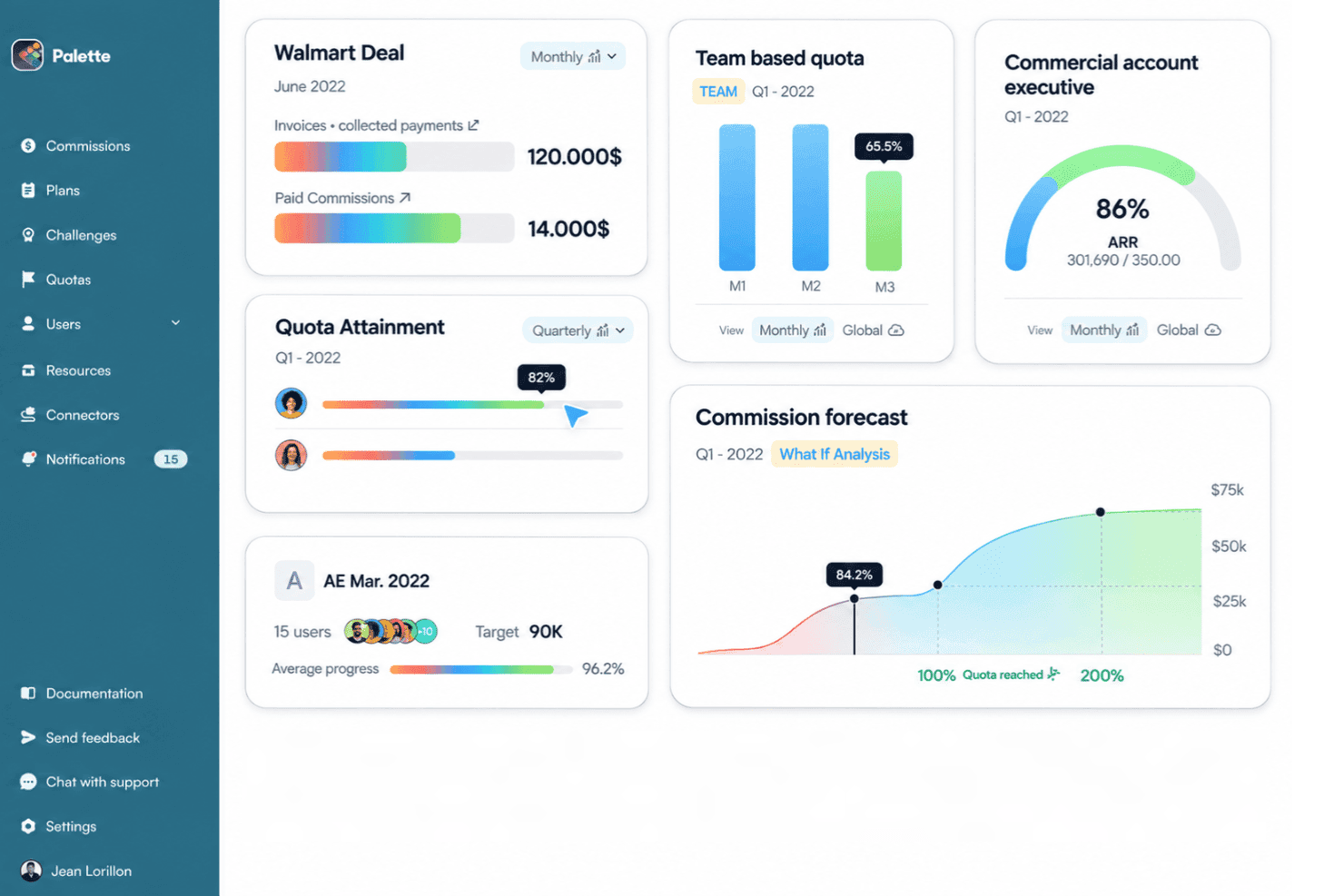
Palette is sales compensation software that automates commission calculations and gives reps real-time visibility into earnings. It’s a good fit for revenue teams managing complex plans that want reps to check commissions and model earnings with what-if scenarios. If those rep-facing dashboards and planning tools are priorities, Palette is a better choice than CaptivateIQ.
Palette Evaluation Summary
4.9/5
- Pricing upon request
- Free demo available
Why Trust Our Software Recommendations
6,700+
Reviews
20
Industry experts
16+
Evaluation factors
14
Years
Our reviews reflect our independent judgment—not a sales pitch. Learn how we stay transparent.
For this guide, we evaluated tools using hands-on testing and independent research, scoring tools using our selection criteria.
Our reviews reflect our human editorial judgment, not a sales pitch.
Palette Overview
I’d choose Palette for revenue teams managing complex commission plans that want more than payout calculations. Its automation pairs with real-time rep dashboards and what-if scenarios, so a rep can check earnings or model how a deal change affects commission. That makes it a stronger fit than calculation-only tools when rep self-service matters, though simpler teams may not need the planning layer. Before selecting Palette, compare its quoted pricing and check that its integrations, onboarding support, and interface fit your CRM and compensation rules.
Pros
- Reps praise deal-level breakdowns and widgets for tracking commission progress.
- Real-time dashboards and what-if simulations let teams test plan changes.
- Automates complex rules, accruals, splits, and payout triggers.
Cons
- Some users found the dashboard less intuitive than deal-level views.
- Some backend fields remain outside the interface for administrators.
- Multi-currency support, clawbacks, and commission draws require a higher-tier plan.


How We Test & Score Tools
We’ve spent years building, refining, and improving our software testing and scoring system. The rubric is designed to capture the nuances of software selection and what makes a tool effective, focusing on critical aspects of the decision-making process.
Below, you can see exactly how our testing and scoring works across seven criteria. It allows us to provide an unbiased evaluation of the software based on core functionality, standout features, ease of use, onboarding, customer support, integrations, customer reviews, and value for money.
Core Functionality (25% of final scoring)
The starting point of our evaluation is always the core functionality of the tool. Does it have the basic features and functions that a user would expect to see? Are any of those core features locked to higher-tiered pricing plans? At its core, we expect a tool to stand up against the baseline capabilities of its competitors.
Standout Features (25% of final scoring)
Next, we evaluate uncommon standout features that go above and beyond the core functionality typically found in tools of its kind. A high score reflects specialized or unique features that make the product faster, more efficient, or offer additional value to the user.
We also evaluate how easy it is to integrate with other tools typically found in the tech stack to expand the functionality and utility of the software. Tools offering plentiful native integrations, 3rd party connections, and API access to build custom integrations score best.
Ease of Use (10% of final scoring)
We consider how quick and easy it is to execute the tasks defined in the core functionality using the tool. High scoring software is well designed, intuitive to use, offers mobile apps, provides templates, and makes relatively complex tasks seem simple.
Onboarding (10% of final scoring)
We know how important rapid team adoption is for a new platform, so we evaluate how easy it is to learn and use a tool with minimal training. We evaluate how quickly a team member can get set up and start using the tool with no experience. High scoring solutions indicate little or no support is required.
Customer Support (10% of final scoring)
We review how quick and easy it is to get unstuck and find help by phone, live chat, or knowledge base. Tools and companies that provide real-time support score best, while chatbots score worst.
Customer Reviews (10% of final scoring)
Beyond our own testing and evaluation, we consider the net promoter score from current and past customers. We review their likelihood, given the option, to choose the tool again for the core functionality. A high scoring software reflects a high net promoter score from current or past customers.
Value for Money (10% of final scoring)
Lastly, in consideration of all the other criteria, we review the average price of entry level plans against the core features and consider the value of the other evaluation criteria. Software that delivers more, for less, will score higher.
Core Features
Commission Rule Automation
Set rules using CRM fields and criteria tied to opportunities, deals, invoices, meetings, or engagement. Palette calculates commissions for complex plans, so your team can apply different rules to different sales activities.
Conditional Payout Scheduling
Set payment timing separately from commission calculation, with conditions based on deal terms. For example, you can pay commission on an annual deal the following month and split payment for a monthly deal across four installments.
Rep Dashboards and Earnings Visibility
Give each rep a personalized dashboard with real-time commission and plan progress. Reps can check whether they’re on target and use what-if scenarios to see how a deal change could affect earnings.
Plan Design and Scenario Testing
Build plans from templates, then compare plans and test scenarios or back-tests. This helps your team assess how a proposed rule change could affect sales performance before rolling it out.
Commission Splits and Adjustments
Manage commission splits and manually overwrite data when a deal needs an exception. Comments and change tracking help explain adjustments to reps and administrators.
Monthly Statements and Calculation History
Generate monthly commission statements and export payout data for payroll workflows. Palette keeps calculation details and history logs, giving your team a record to review when a payout needs verification.

Ease of Use
Palette provides clear commission breakdowns, progress widgets, and what-if scenarios that help sales reps understand their earnings and estimate potential payouts. However, navigating the main dashboard may be less intuitive than accessing individual deal details. Administrators may also encounter limitations when managing certain backend fields, requiring additional effort when configuring complex commission plans.
Integrations
Palette integrates with Salesforce, HubSpot, Pipedrive, Close, Outreach, Stripe, Chargebee, QuickBooks Online, Xero, and NetSuite, among others. Palette also supports Snowflake, Amazon Redshift, Google BigQuery, MySQL, Microsoft SQL Server, Google Sheets, and CSV imports. Public API availability and support for third-party integration tools are not explicitly documented.

Palette Specs
- 2-Factor Authentication: Yes
- Accounts Payable: No
- Accounts Receivable: No
- API: Yes
- Approval Workflows: Yes
- Balance Sheet: No
- Billing/Invoicing: No
- Budgeting: Yes
- Calendar Management: No
- Comparative Reporting: Yes
- CRM Integration: Yes
- Custom Reports: Yes
- Customer Management: No
- Dashboard: Yes
- Data Export: Yes
- Data Import: Yes
- Data Visualization: Yes
- Expense Tracking: No
- External Integrations: Yes
- Forecasting: Yes
- General Account Ledger: No
- Historical Data Analysis: Yes
- Inventory Tracking: No
- Multi-Currency: Yes
- Multi-User: Yes
- Notifications: Yes
- P&L: No
- Payroll: No
- Scenario Planning: Yes
- Scheduling: No
- Supplier Management: No
- Tax Management: No
- Time Management: No


