

Software-ul pentru negocierea contractelor este o platformă pentru redactarea, revizuirea, modificarea, aprobarea și semnarea acordurilor comerciale. Pentru echipele RevOps, instrumentul potrivit conectează negocierile la datele din CRM, fluxurile de aprobare și momentul prognozat, fără ca reprezentanții de vânzări să fie nevoiți să urmărească actualizările în e-mailuri și documente.
Am evaluat 18 opțiuni pentru a vă ajuta să comparați controalele asupra clauzelor, funcțiile de colaborare, integrările, analizele și compatibilitatea cu implementarea.
Why Trust Our Software Recommendations
6,700+
Reviews
20
Industry experts
16+
Evaluation factors
14
Years
Our reviews reflect our independent judgment—not a sales pitch. Learn how we stay transparent.
For this guide, we evaluated tools using hands-on testing and independent research, scoring tools using our selection criteria.
Our reviews reflect our human editorial judgment, not a sales pitch.
Tabel comparativ pentru software-ul de negociere a contractelor
Comparați prețurile și specificațiile, unul lângă altul, pentru software-ul de negociere a contractelor inclus în lista mea scurtă.
Score legend (out of 5)
- Excellent4.5–5
- Good4–4.4
- Average3–3.9
- Below average2–2.9
- Poor1–1.9
Sorted by: Default
| Tool | Starting Price | Website | |||||||
|---|---|---|---|---|---|---|---|---|---|
Best for unlimited-user contract redlining | 3.8 out of 5 | 4 | 4 | 3 | 3 | 4 | 5 | Pricing upon request 14-day free trial | Website |
Best for AI-guided redlining with CRM sync | 3.8 out of 5 | 4 | 5 | 4 | 3 | 3 | 4 | Pricing upon request Free demo available | Website |
Best for no-code approval routing on clause changes | 3.8 out of 5 | 3 | 4 | 5 | 4 | 2 | 5 | Pricing upon request Free demo available | Website |
Best for legal teams negotiating in Word | 4.0 out of 5 | 4 | 5 | 4 | 4 | 2 | 5 | Pricing upon request Free demo available | Website |
Best for AI-driven clause risk across enterprise deals | 4.0 out of 5 | 4 | 4 | 3 | 5 | 3 | 5 | Pricing upon request Free demo available | Website |
Best for enterprise-grade AI-assisted redline workflows | 4.0 out of 5 | 3 | 5 | 5 | 4 | 3 | 4 | Pricing upon request Free demo available | Website |
Best for negotiation analytics across deal stages | 4.5 out of 5 | 4 | 5 | 4 | 5 | 4 | 5 | Pricing upon request Free demo available | Website |
Best for cross-team redlining with CRM sync | 4.0 out of 5 | 4 | 4 | 4 | 3 | 4 | 5 | $499/month Free demo available | Website |
Best for playbook-driven AI redlining at scale | 4.7 out of 5 | 4 | 5 | 5 | 5 | 4 | 5 | Pricing upon request Free demo available | Website |
Best for revenue-stack contract negotiation | 4.0 out of 5 | 4 | 5 | 3 | 4 | 4 | 4 | $19/user/month Free plan + 14-day free trial available | Website |


Recenzii ale celor mai bune software-uri pentru negocierea contractelor
Mai jos sunt rezumatele mele ale celor mai bune software-uri pentru negocierea contractelor din lista mea scurtă. Recenziile analizează funcțiile, integrările și cele mai potrivite cazuri de utilizare ale fiecărei platforme, pentru a vă ajuta să găsiți opțiunea potrivită.
 Best for unlimited-user contract redlining
- 14-day free trial
- Pricing upon request
Visit WebsiteCustomer Rating:4.7/5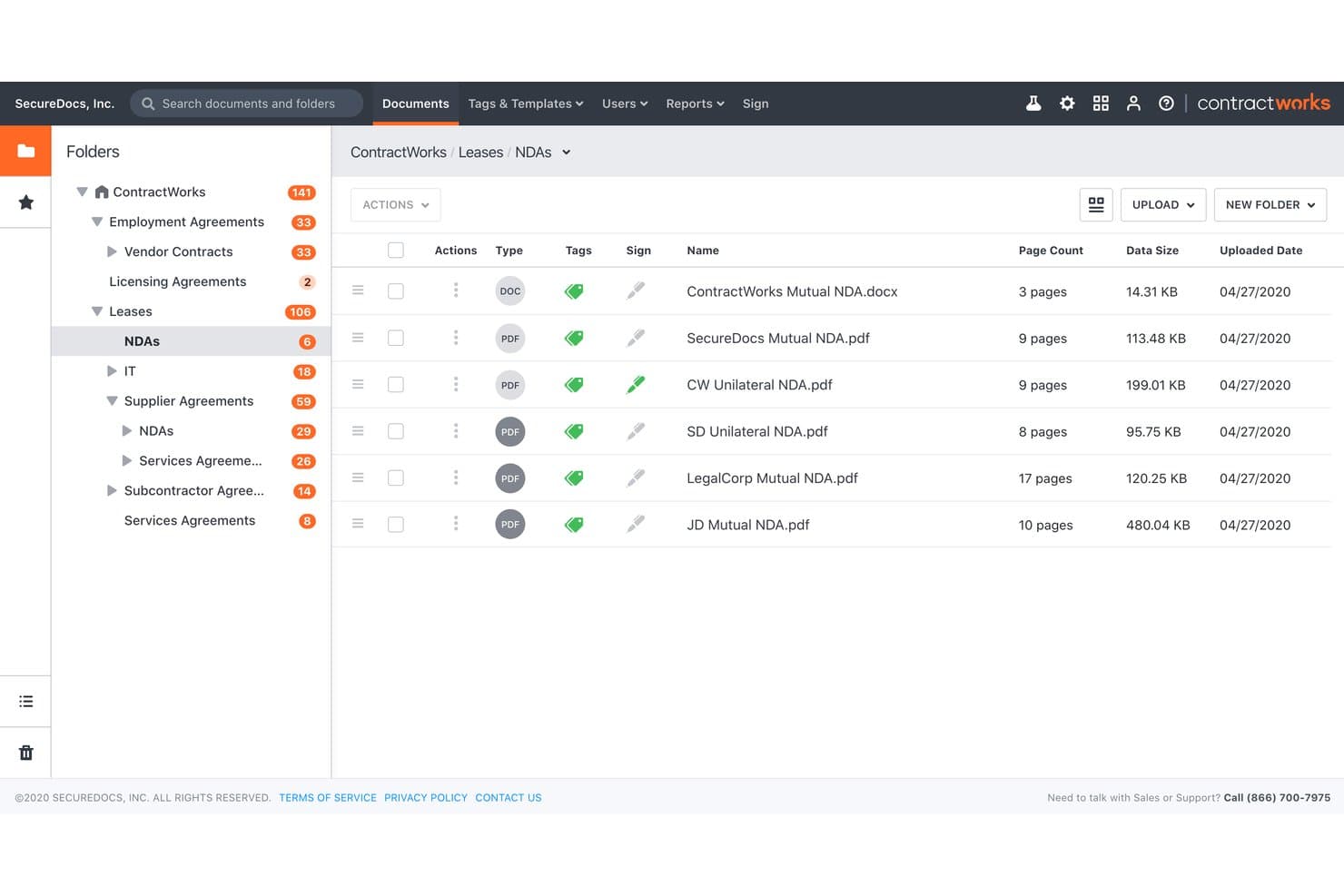
ContractWorks organizes NDAs and leases in a structured folder system. ContractWorks is a contract lifecycle management platform that covers drafting, real-time redlining, clause libraries, approval workflows, e-signatures, and a searchable contract repository.
Who Is ContractWorks Best For?
ContractWorks is a strong fit for legal and contracts teams at mid-market companies that need cross-functional contract access without paying per seat.
Why I Picked ContractWorks
ContractWorks earns its spot on my shortlist because its unlimited-user pricing model means your entire legal, sales, and procurement team can redline contracts without you worrying about seat costs adding up. I particularly like the Collaborative Editor, which lets counterparties negotiate in real time directly in the platform, no sign-in required on their end. Version control is thorough too: you can compare any two versions side by side and roll back changes with one click, with a full audit trail showing exactly who approved which redlines.
ContractWorks Key Features
- GPT-3 AI clause creator: Generate new contract clauses using built-in AI directly from the clause library without leaving the platform.
- AnySign link signing: Create a self-serve signing link from any template to embed in an email or on a webpage for recipient signing.
- Contract requests intake module: Collect and route contract requests through a structured intake form before drafting begins.
- Automated date alerts: Set milestone and renewal date alerts that trigger automatic notifications so no deadline slips through.
ContractWorks Integrations
ContractWorks offers documented integrations with Salesforce, Microsoft Word, Microsoft Active Directory, OneLogin, Okta, and Fujitsu ScanSnap. It also supports third-party e-signature integrations and public register or database connections, but no API or broader marketplace is documented.
Pros and Cons
Pros:
- Version comparison includes one-click rollback
- External parties negotiate without platform accounts
- Unlimited users support cross-functional redlining
Cons:
- AI does not summarize counterparty redlines
- Negotiation analytics lack dedicated cycle-time dashboards
Learn more about ContractWorks: 2Best for AI-guided redlining with CRM sync
Juro
- Free demo available
- Pricing upon request
Visit WebsiteCustomer Rating:4.8/5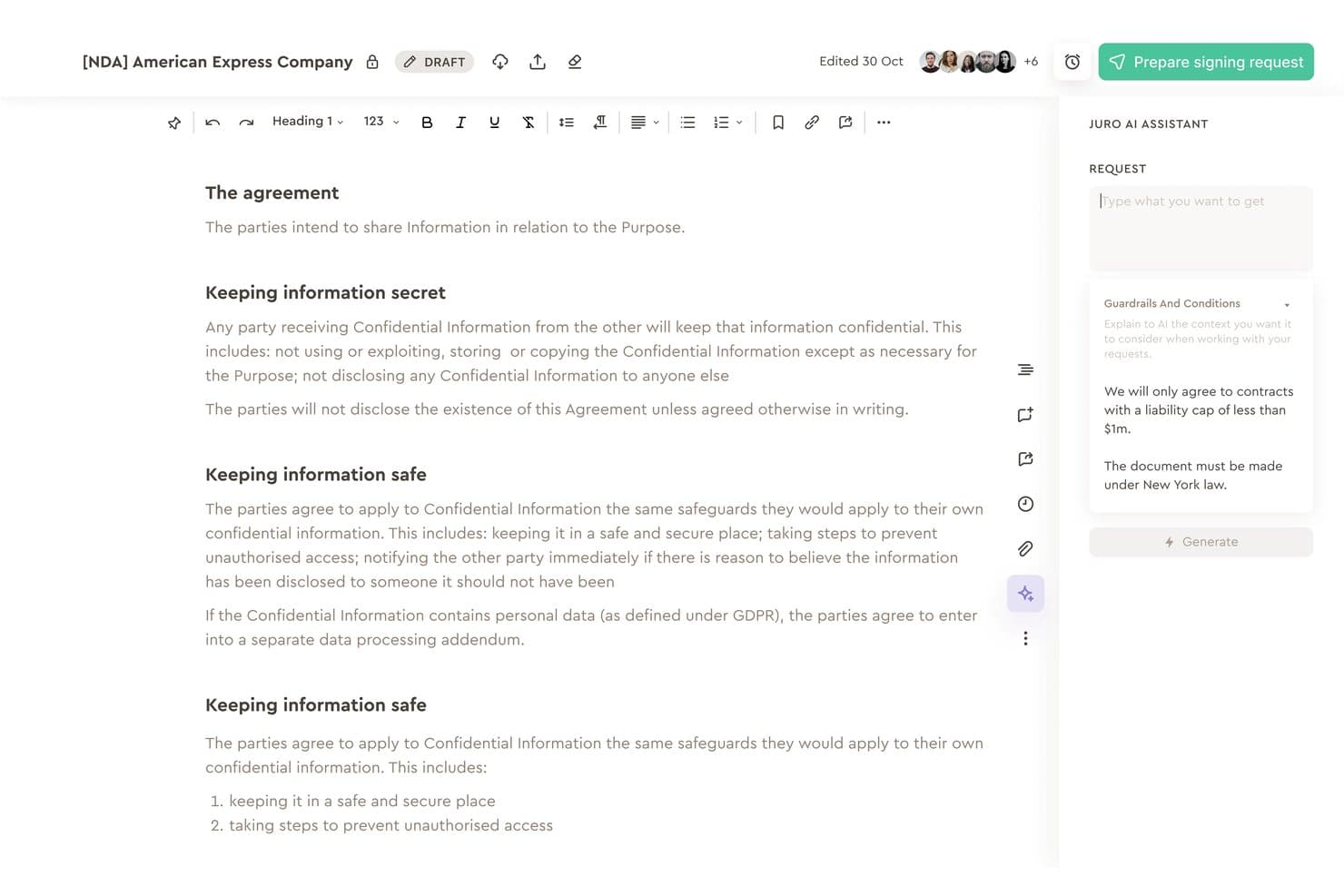
Juro's AI assistant reviews NDA contracts using custom guardrails. Juro is a contract negotiation platform with browser-native redlining, AI-powered review and playbook enforcement, no-code approval workflows, native eSignature, and CRM integrations for Salesforce and HubSpot.
Who Is Juro Best For?
Juro works well for sales ops and legal teams that negotiate a high volume of contracts and need redlining, approvals, and e-signature connected to Salesforce or HubSpot in one place.
Why I Picked Juro
I've included Juro in my top picks because its AI-guided redlining is genuinely different from what most contract tools offer. The AI playbook enforcement flags clause deviations in real time and suggests pre-approved fallback language, so legal standards hold even when sales reps are editing. Pair that with bi-directional Salesforce and HubSpot sync, and your team can generate, negotiate, and track contracts without ever leaving the CRM.
Juro Key Features
- Native eSignature: Sign contracts directly in-browser with eIDAS Advanced Electronic Signature compliance, sequential signing waterfalls, and bulk signing—no third-party signing tool required.
- No-code approval workflow builder: Configure conditional, multi-step approval waterfalls at the template level, with auto-resend triggered when contract edits are made.
- Internal vs. external comment toggling: Keep internal team discussions hidden from counterparties while collaborating on the same document, eliminating the need for parallel files.
- AI-powered contract repository: Query your contract data in natural language, extract metadata like renewal dates and contract values, and surface insights through customizable dashboards.
Juro Integrations
Juro offers native integrations with Salesforce, HubSpot, DocuSign, Microsoft Word, Google Drive, Slack, Greenhouse, and Ashby. Enterprise plans add REST API and webhooks, while Zapier is also available.
Pros and Cons
Pros:
- Visual timeline records edits and approvals
- Native signing includes approval waterfalls
- AI flags deviations and suggests fallback language
Cons:
- Word imports can break formatting
- Complex negotiations can feel constrained
Learn more about Juro: Best for no-code approval routing on clause changes
- Free demo available
- Pricing upon request
Visit WebsiteCustomer Rating:4.7/5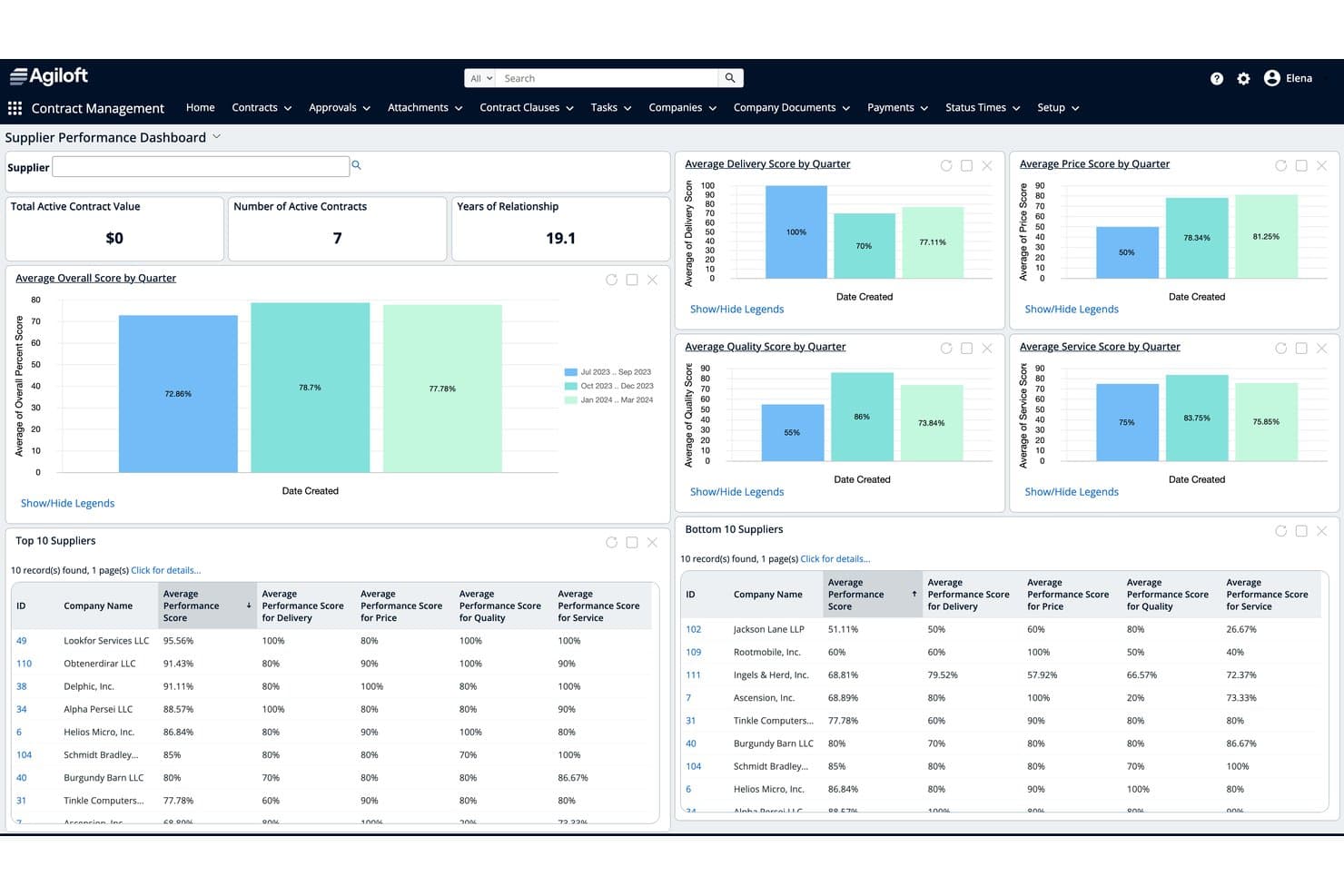
Agiloft tracks supplier performance scores across delivery, price, quality, and service. Agiloft is a contract lifecycle management platform with AI-assisted redlining, no-code approval workflow automation, a clause and template library, and integrations with CRM and ERP systems.
Who Is Agiloft Best For?
Agiloft is a strong fit for legal and sales operations teams in mid-to-large enterprises that need complex, rules-based approval workflows triggered by clause-level contract changes.
Why I Picked Agiloft
Agiloft earns its spot on my shortlist because its no-code approval routing is genuinely clause-aware, not just contract-level. When a counterparty swaps in non-standard language, Agiloft automatically routes that specific clause deviation to the right subject matter expert, whether that's legal, finance, or procurement. I also like that approvals can be actioned directly from Teams or Slack, so reviewers aren't forced into the platform. The Astra Word add-in rounds this out by letting reviewers compare redlines against pre-approved playbooks without leaving the document.
Agiloft Key Features
- AI-assisted redlining in Word: Agiloft Astra reviews third-party paper and suggests edits with explanations directly inside Microsoft Word, without requiring you to switch platforms.
- Clause and template library: A searchable library of pre-approved standard and fallback clauses is accessible both in the web app and from the Word add-in during active review.
- Obligation management: Extract, categorize, and track post-signature obligations with automated reminders, deadline tracking, and dashboards for upcoming and past-due commitments.
- E-signature integrations: Trigger DocuSign or Adobe Sign directly from the contract record, with automatic storage of executed agreements and stakeholder status notifications.
Agiloft Integrations
Agiloft offers 1,000+ pre-built Integration Hub connectors, including Salesforce, SAP, Oracle Fusion Cloud, NetSuite, Microsoft Word, Microsoft Teams, Slack, DocuSign, and Adobe Sign. Its custom API platform supports additional integrations.
Pros and Cons
Pros:
- Word-based AI redlining with explanations
- Auditable clause-level version history
- Clause-triggered approval routing
Cons:
- Configuration requires specialist administration
- Counterparty negotiation relies on email and Word
Learn more about Agiloft: Best for legal teams negotiating in Word
- Free demo available
- Pricing upon request
Visit WebsiteCustomer Rating:4.7/5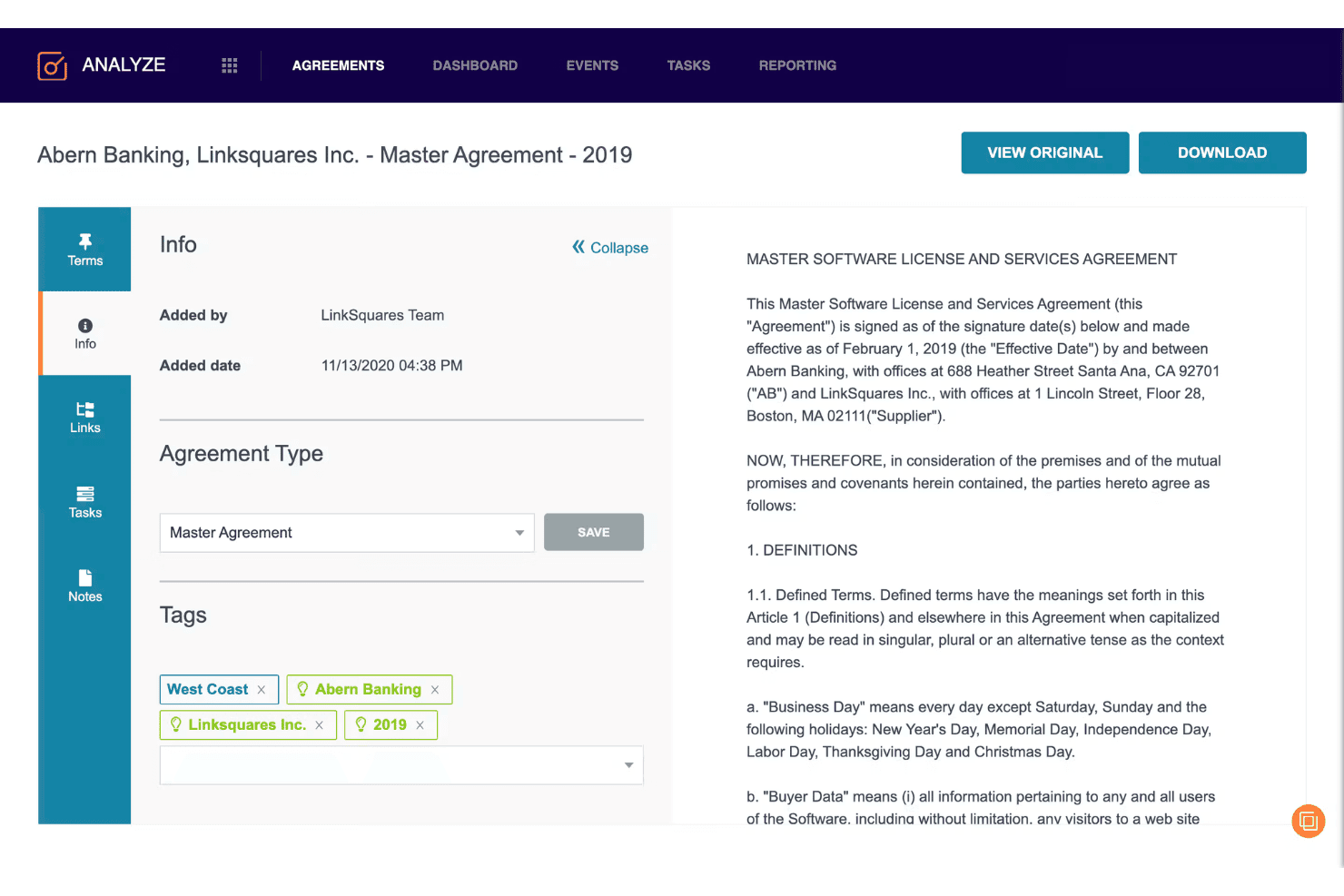
LinkSquares lets users tag and review contract agreements in one view. LinkSquares is a contract lifecycle management platform built for legal teams that covers pre-signature workflows—drafting, redlining, negotiation, and approval routing—alongside a post-signature repository with AI-powered clause extraction and analytics.
Who Is LinkSquares Best For?
LinkSquares is a strong fit for in-house legal teams that live in Microsoft Word and need pre-signature negotiation, approval routing, and post-signature analytics in one platform.
Why I Picked LinkSquares
I picked LinkSquares as one of the best because it keeps legal teams inside Microsoft Word while adding the structure most Word-based workflows lack. The Word add-in gives you clause library access, AI redline summaries, and simultaneous co-editing without ever leaving the document. What I find genuinely useful is the Playbooks feature, which flags deviations from pre-approved positions and inserts tracked-change edits inline, so you're not manually cross-referencing a separate document during negotiation.
LinkSquares Key Features
- Negotiation Hub: Tracks all contract versions, internal comments, and counterparty exchanges in one place, with automatic version capture and timestamps.
- Native e-signature: LinkSquares Sign handles execution directly in the platform, with real-time signer status tracking and automatic archiving of signed agreements and certificates.
- AI Workflow Builder: Lets you create or modify approval workflows using plain-language descriptions, which the AI converts into configured routing rules for your review before publishing.
- Post-signature analytics: Extracts key terms, dates, and obligations from executed contracts and surfaces renewal tracking, obligation management, and negotiation performance dashboards.
LinkSquares Integrations
LinkSquares offers native integrations with Salesforce, Microsoft Word, DocuSign, Adobe Sign, Slack, Ramp Procurement, Google Drive, OneDrive, SharePoint, and Box. Its public API supports custom workflow integrations.
Pros and Cons
Pros:
- Automatic version capture preserves negotiation history
- Playbooks flag deviations during redlining
- Negotiates directly inside Microsoft Word
Cons:
- AI extraction can produce inconsistent results
- Counterparty collaboration remains email-centric
Learn more about LinkSquares: Best for AI-driven clause risk across enterprise deals
- Free demo available
- Pricing upon request
Visit WebsiteCustomer Rating:4.5/5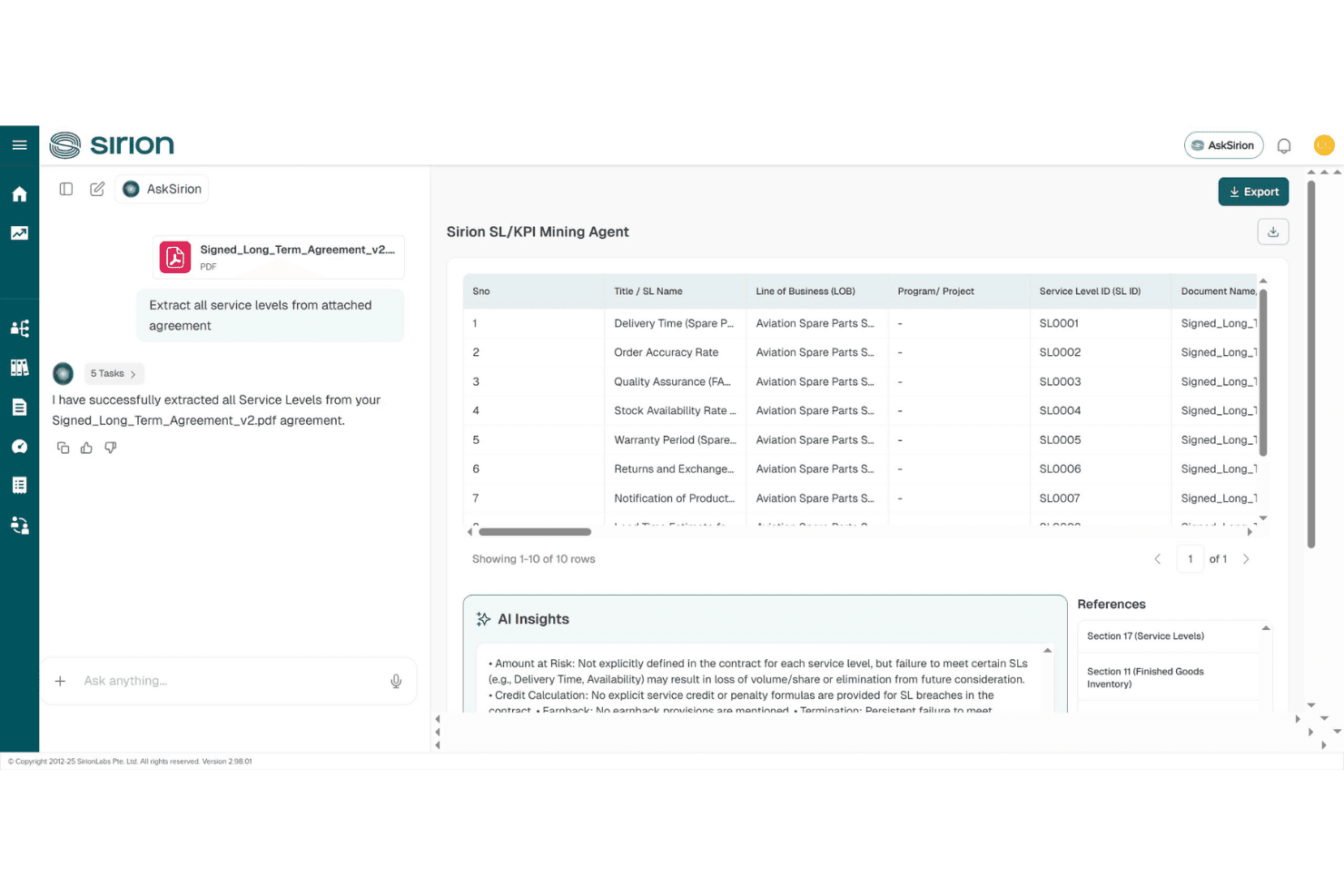
Sirion automatically extracts and structures service levels from contracts. Sirion is an AI-native contract lifecycle management platform that handles drafting, redlining, playbook-based clause detection, approval routing, and post-signature obligation tracking across enterprise agreements.
Who Is Sirion Best For?
Sirion is built for enterprise legal, procurement, and sales operations teams managing high-volume, high-complexity contracts where AI-driven clause risk detection and post-signature obligation tracking matter most.
Why I Picked Sirion
I picked Sirion as one of the best because its IssueDetection Agent catches clause-level risk with a precision I haven't seen matched elsewhere, flagging deviations against your negotiation playbook in real time, including missing must-have terms, across complex multi-document packages like an MSA bundled with SOWs and exhibits. What I really like is how the Redline Agent pairs with it, proposing targeted edits with a plain-language rationale for each change so your legal team can accept, reject, or refine without losing the thread of why a change was made.
Sirion Key Features
- Multi-document negotiation: Sirion treats bundled agreements like an MSA paired with SOWs and exhibits as a single package, preserving order of precedence throughout the negotiation.
- AskSirion conversational interface: Submit plain-language requests and AI agents execute them with explanations and source links, without requiring you to navigate complex menus.
- Post-signature obligation tracking: The Obligations Agent monitors milestones, deliverables, SLAs, and renewal dates with direct traceability back to specific contract clauses.
- Counterparty collaboration portal: A secure external portal lets you collaborate with outside parties on contract review without leaving the Sirion environment.
Sirion Integrations
Sirion offers integrations with Microsoft Word, Outlook, DocuSign, Adobe Sign, Salesforce, Slack, and SAP. It also supports CRM, ERP, and procure-to-pay synchronization for contract status and data.
Pros and Cons
Pros:
- Tracks clause risk across versions
- Handles bundled agreements and commercial terms
- Playbook-linked redlines explain every proposed change
Cons:
- Implementation requires substantial enterprise configuration
- Interface complexity slows new-user adoption
Learn more about Sirion: Best for enterprise-grade AI-assisted redline workflows
- Free demo available
- Pricing upon request
Visit WebsiteCustomer Rating:4.7/5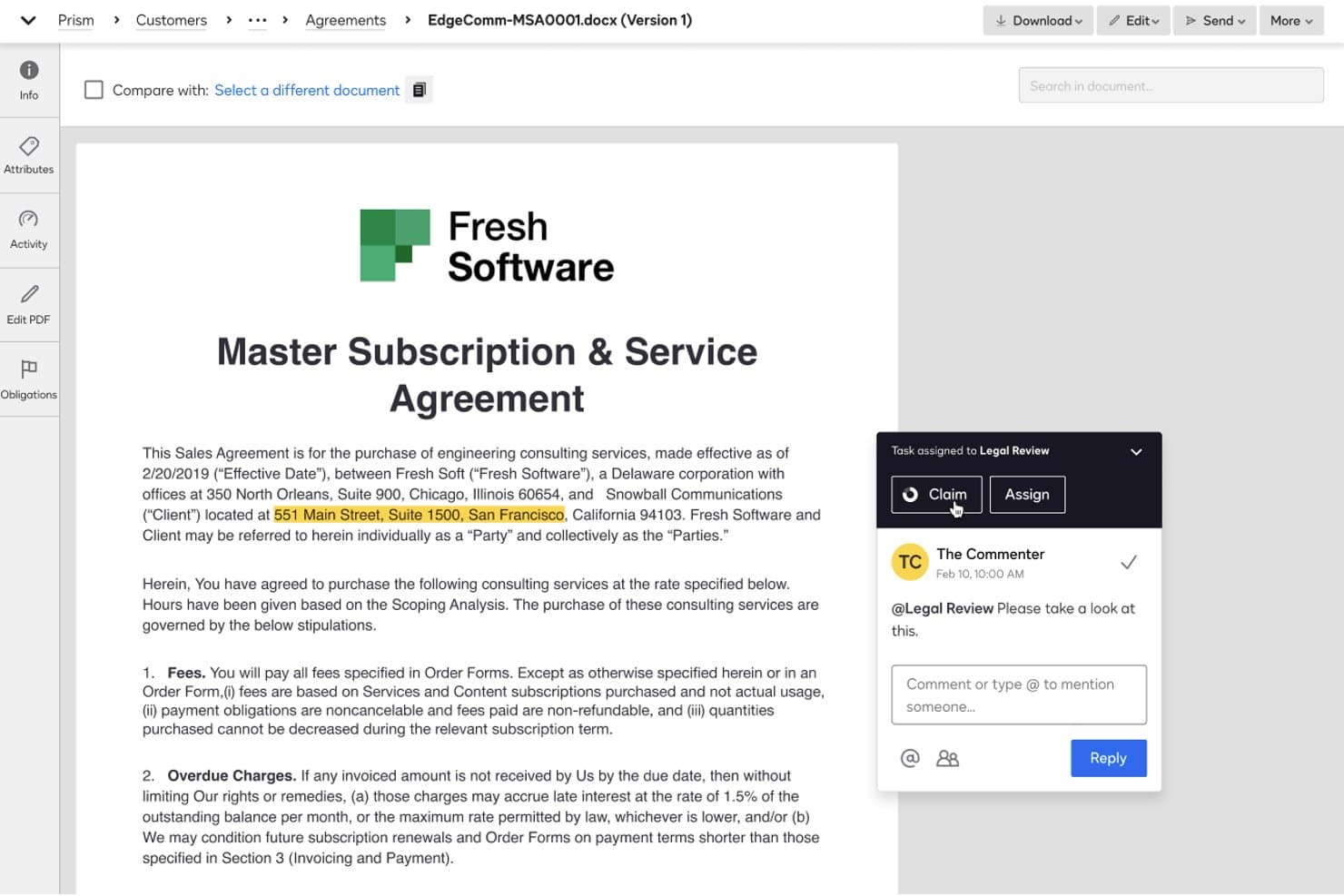
DocuSign CLM lets users assign contract review tasks and add comments. Docusign CLM is a contract lifecycle management platform that handles contract creation, AI-assisted redlining via a Word add-in, approval workflow routing, clause library management, obligation tracking, and e-signature in a single connected system.
Who Is Docusign CLM Best For?
Docusign CLM is a strong fit for enterprise legal and sales operations teams that need AI-assisted redlining, multi-step approval routing, and e-signature in one connected system.
Why I Picked Docusign CLM
Docusign CLM earns its spot on my shortlist because of how well its AI-Assisted Review playbook system works inside Microsoft Word, where legal teams actually do their redlining. I like that the Word add-in checks contract language against pre-approved playbooks, flags misaligned clauses, and suggests compliant alternatives without pulling reviewers out of their existing workflow. The platform's AI risk scoring also acts as a conditional routing trigger, so higher-risk redlines automatically escalate through the right approval steps.
Docusign CLM Key Features
- Drag-and-drop workflow editor: Build multi-step approval workflows using 100+ pre-configured steps covering contract generation, review, approval, and signature routing.
- Obligation and renewal management: Track post-signature commitments, renewal dates, and key milestones with built-in reporting to surface upcoming obligations.
- AI-powered contract repository: Store, search, and filter agreements by keyword, concept, or metadata using Docusign's Iris AI engine, which runs on 100+ pre-trained models.
- Native eSignature integration: Send contracts for signature directly within CLM workflows, with a real-time audit trail and no account required for recipients.
Docusign CLM Integrations
Docusign CLM offers 100+ CLM connectors, including Salesforce, SAP Ariba, Coupa, Microsoft Word, Microsoft Teams, Slack, and Google Workspace. Its APIs support custom integrations.
Pros and Cons
Pros:
- Native signing preserves negotiation audit trails
- Risk scoring routes complex approvals automatically
- AI-assisted redlining checks approved playbooks
Cons:
- Negotiation workflows involve excessive clicks
- Word-based redlining limits live collaboration
Learn more about Docusign CLM: Best for negotiation analytics across deal stages
- Free demo available
- Pricing upon request
Visit WebsiteCustomer Rating:4.7/5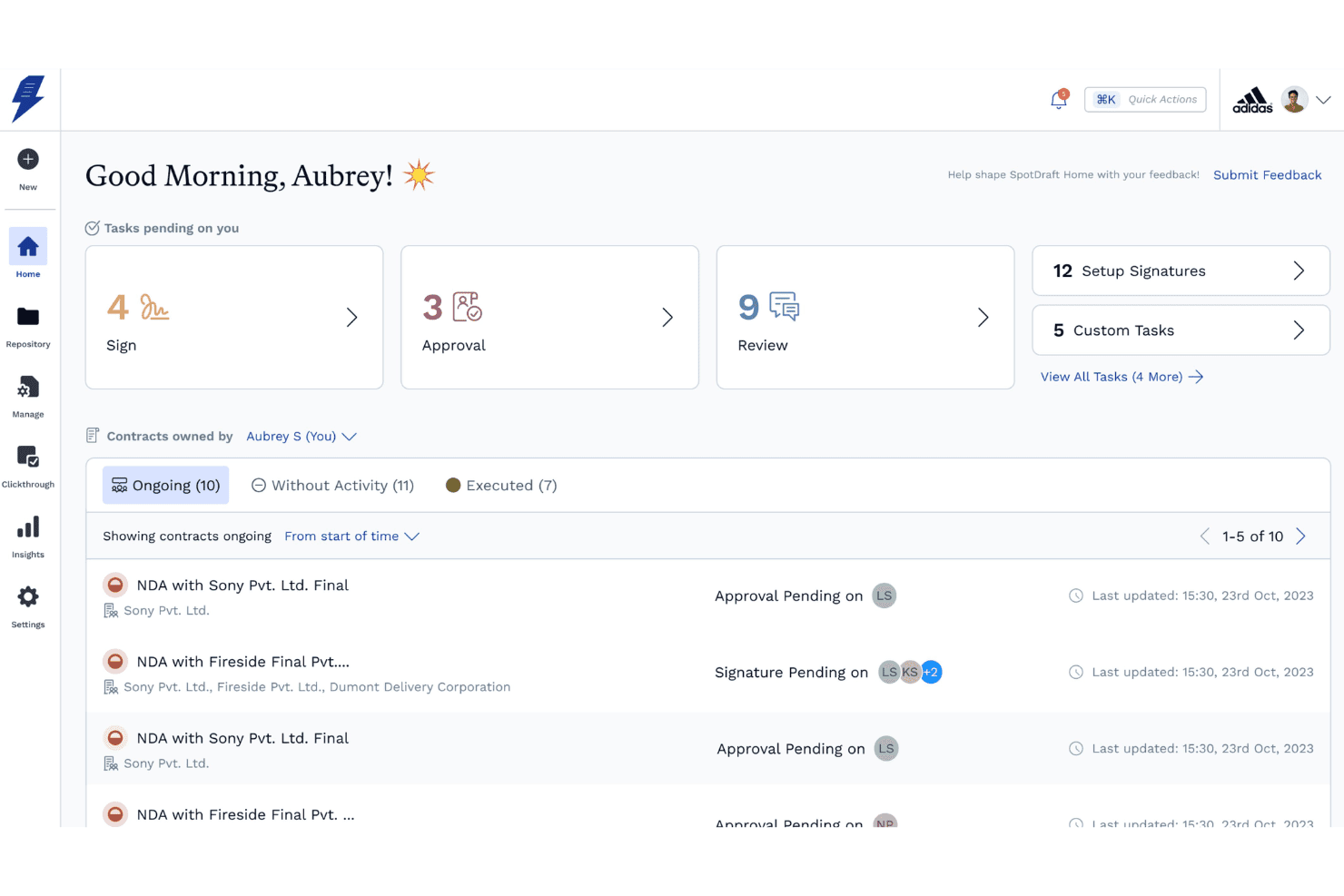
SpotDraft's home dashboard centralizes pending tasks and contract statuses. SpotDraft is a contract lifecycle management platform that combines AI-powered redlining, clause and playbook libraries, multi-party negotiation workflows, approval routing, native e-signature, and negotiation analytics.
Who Is SpotDraft Best For?
SpotDraft is a strong fit for revenue operations and legal teams that need to track where deals stall across every contract stage—from internal redlines to counterparty review to final signatures.
Why I Picked SpotDraft
SpotDraft earns its spot on my shortlist because of its negotiation analytics dashboards, which break down turnaround time by stage: drafting, internal redline, counterparty redline, review, approval, and signature collection. I love that you can pinpoint exactly where deals stall across 30+ metrics, including approval bottlenecks by department and SLA tracking. VerifAI adds another layer by flagging clause deviations against playbook positions with Met/Not Met verdicts in real time.
SpotDraft Key Features
- VerifAI clause deviation flagging: Compares drafted contract language against your playbook's preferred wording and fallback positions, returning Met/Not Met verdicts with AI reasoning for each clause.
- Multi-party workflow builder: Supports contract negotiation and signing with up to 10 parties simultaneously, with configurable role aliases and sequential or parallel routing.
- Native e-signature with signing order: Collect unlimited signatures directly in SpotDraft, with configurable signing sequences, OTP identity verification, and automated reminders.
- Salesforce two-way sync: Pushes contract status, approvals, and executed PDFs back to Salesforce on defined triggers, with contract generation and approval routing available without leaving the CRM.
SpotDraft Integrations
SpotDraft offers 30+ native integrations, including Salesforce, HubSpot, Microsoft Word, DocuSign, Adobe Sign, Coupa, SAP, Slack, Microsoft SharePoint, and Zapier. Salesforce supports two-way syncing for contract status, approvals, and executed PDFs.
Pros and Cons
Pros:
- Playbook verdicts guide consistent clause decisions
- Word-based redlining preserves familiar lawyer workflows
- Stage-level negotiation analytics expose bottlenecks
Cons:
- Complex approval hierarchies need more configuration
- Word editing remains single-user at once
Learn more about SpotDraft: Best for cross-team redlining with CRM sync
- Free demo available
- From $499/month (billed annually)
Visit WebsiteCustomer Rating:4.5/5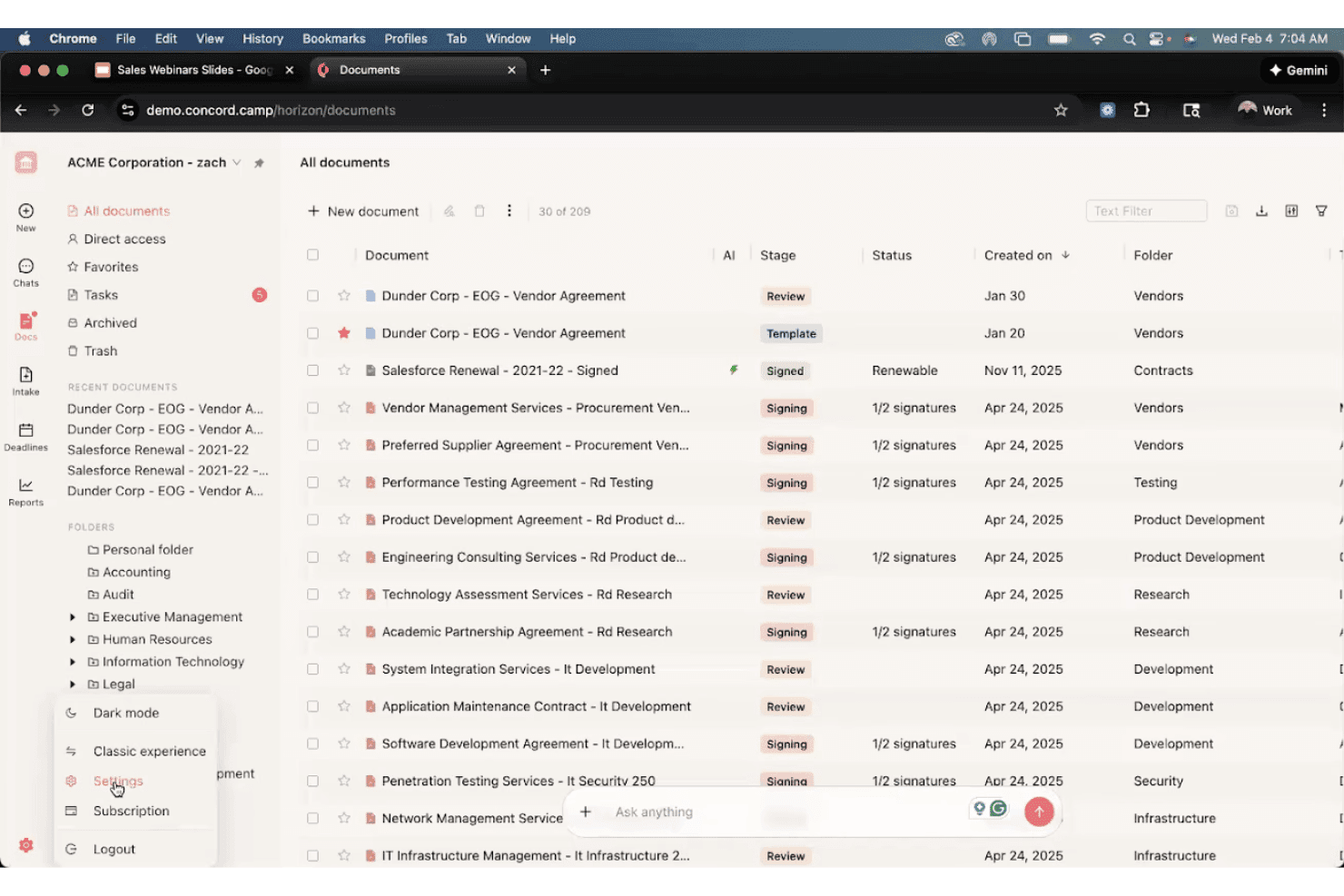
Concord organizes contracts by stage, status, and folder for easy tracking. Concord is a contract negotiation platform with a Word/Google Docs-style editor that supports live redlining, tracked changes, version control, approval workflows, a governed clause library, native e-signature, and CRM integrations with Salesforce and HubSpot.
Who Is Concord Best For?
Concord is a strong fit for sales operations and legal teams at mid-market companies that need non-lawyers to negotiate and redline contracts without a steep learning curve.
Why I Picked Concord
Concord earns its spot on my shortlist because it's the only tool I've found where sales reps and legal can redline the same live document together, without anyone needing to export a Word file or manage email chains. What makes it click for cross-team negotiation is the Salesforce and HubSpot sync: a rep can generate a contract directly from a Salesforce Opportunity, share it for redlining, and both sides negotiate inside Concord without switching tools. The tamper-proof audit trail captures every tracked change, comment, and approval with timestamps, which gives legal the defensibility they need while keeping sales moving.
Concord Key Features
- AI Copilot: Detects missing or non-standard clauses, suggests safer revisions, and links directly to the relevant document section for editing.
- Native e-signature: Sign contracts without any third-party tool, with compliance across eIDAS, UETA, and the U.S. ESIGN Act, valid in 150+ countries.
- Intake forms: Standardize contract requests from sales, procurement, and other teams, feeding directly into approval routing workflows.
- Contract repository with OCR search: Store, tag, and search across your full contract portfolio, including bulk-uploaded legacy and scanned paper contracts.
Concord Integrations
Concord offers native integrations with Salesforce, HubSpot, DocuSign, Google Drive, Box, and Dropbox. Enterprise plans include the Concord REST API, while Business plans add Zapier and Slack integration.
Pros and Cons
Pros:
- AI detects non-standard clauses and suggests revisions
- Tamper-proof audit trails preserve negotiation history
- Live redlining keeps negotiations in one document
Cons:
- Negotiation analytics lack bottleneck visibility
- Offline editing can lose recent changes
Learn more about Concord: Best for playbook-driven AI redlining at scale
- Free demo available
- Pricing upon request
Visit WebsiteCustomer Rating:4.4/5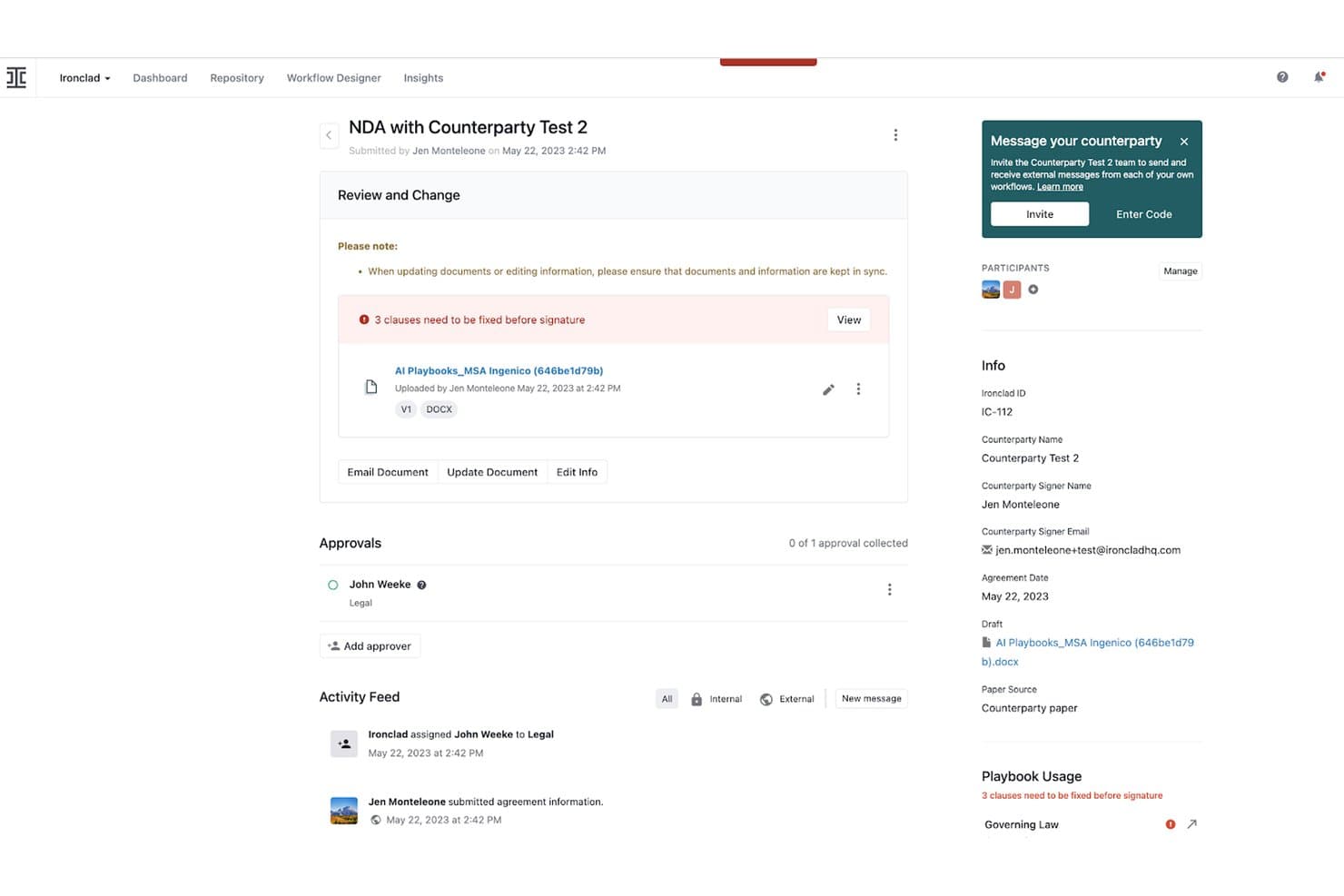
Ironclad flags contract clauses needing fixes before signature. Ironclad is a contract lifecycle management platform that handles redlining, AI-driven clause review, approval routing, e-signature, and negotiation analytics across the full contract process.
Who Is Ironclad Best For?
Ironclad is a strong fit for enterprise legal and revenue operations teams that negotiate high volumes of contracts and need AI-driven redlining built around pre-approved playbooks.
Why I Picked Ironclad
I picked Ironclad as one of the best because its AI Playbooks handle redlining at a scale that's genuinely hard to replicate. The Jurist Redlining Agent scans counterparty paper, compares it against your pre-approved playbook, and delivers a sourced first-pass redline in minutes rather than hours. Teams like AES cut that process from up to two hours down to minutes. On top of that, the Workflow Designer routes flagged clauses to the right approver automatically, based on detected risk level.
Ironclad Key Features
- Ironclad Insights dashboard: Track negotiation cycle times, redline frequency by contract type, and median counterparty turnaround across customizable, shareable dashboards.
- Ironclad Signature and Clickwrap: Send contracts for signature via email, direct link, or embedded flow, with approval history surfaced to signers before they sign.
- Activity Feed: Captures every version save, comment, approval, and counterparty turn in a single chronological record tied to each contract.
- Microsoft Word add-in: Manage redlines, tracked changes, and counterparty turns directly inside Word without switching to a separate platform.
Ironclad Integrations
Ironclad offers native integrations with Salesforce, SAP, NetSuite, Slack, Microsoft Teams, OneDrive, Box, Dropbox, DocuSign, and Adobe Acrobat Sign. It also supports custom integrations through its public API and Zapier.
Pros and Cons
Pros:
- Conditional routing sends risks to approvers
- Activity Feed tracks every negotiation turn
- Playbook-driven AI redlining handles first passes
Cons:
- Repository cleanup can require manual tagging
- Advanced workflows require dedicated administrator time
Learn more about Ironclad: 10Best for revenue-stack contract negotiation
PandaDoc
- Free plan + 14-day free trial available
- From $19/user/month (billed annually)
Visit WebsiteCustomer Rating:4.5/5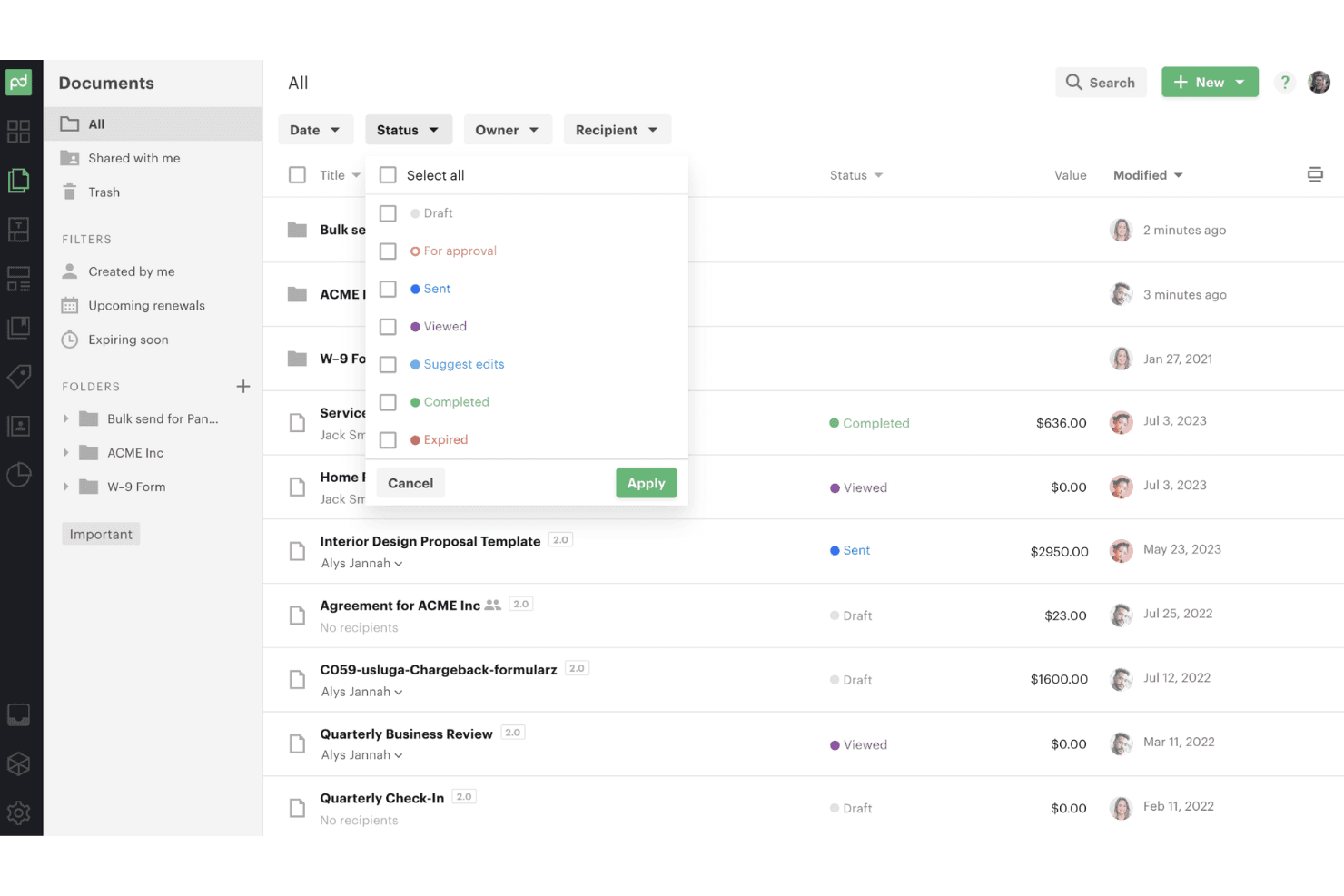
PandaDoc lets users filter documents by status with a dropdown menu. PandaDoc is a document and contract management platform that combines real-time redlining, clause libraries, approval workflows, native e-signature, and CRM-connected quoting in one workspace.
Who Is PandaDoc Best For?
PandaDoc is a strong fit for revenue-focused teams that need contract creation, negotiation, and e-signature in one connected workflow alongside their CRM.
Why I Picked PandaDoc
I picked PandaDoc as one of the best because it's the only tool on my shortlist that connects contract redlining directly to CPQ and CRM deal stages in a single workflow. When a rep closes a quote in Salesforce or HubSpot, PandaDoc pulls that data into the contract automatically, so redlining starts from an accurate, pre-approved clause library rather than a blank draft. I also love that external counterparties can mark up, comment, and sign via a shared link without buying a seat.
PandaDoc Key Features
- Content library: Store and insert pre-approved legal clauses, templates, and pricing tables directly into contracts from a centralized, role-governed library.
- Audit trail: Every edit, approval, status change, and signature is logged with timestamps and user IDs in a step-by-step record visible from the document sidebar.
- AI contract repository: Automatically extracts 100+ data fields from signed contracts, including renewal dates, payment terms, and counterparties, with deadline alerts.
- Native e-signature: Legally binding e-signatures are built into the document workflow, with multi-signer support, signing order, ID verification, and QES for EU/UK compliance.
PandaDoc Integrations
PandaDoc offers native integrations with Salesforce, HubSpot CRM, Pipedrive, Microsoft Dynamics, Zoho, Google Drive, Dropbox, and OneDrive. It also supports Zapier and an open API for custom integrations, with API access on Enterprise.
Pros and Cons
Pros:
- Contract repository extracts renewal obligations
- Native signatures complete negotiation workflows
- Real-time redlining with external collaborators
Cons:
- Legal playbook risk scoring remains absent
- Audit trails cannot export separately
Learn more about PandaDoc:
Alte software-uri pentru negocierea contractelor
Iată câteva opțiuni suplimentare de software pentru negocierea contractelor care nu au ajuns în lista mea scurtă, dar merită totuși verificate:
- 11Conga CLMBest for Salesforce-native CLM
- 12GatekeeperBest for vendor negotiation with procurement depth
- 13IcertisBest for enterprise-scale redline accuracy
- 14ContractbookBest for post-signature obligation tracking
- 15MalbekBest for CLM-to-CRM contract visibility
- 16CobblestoneBest for AI-guided clause playbook negotiation
- 17OneflowBest for live contract edits with CRM sync
- 18DocJurisBest for legal-engineer-built negotiation workflows
How I Evaluate Contract Negotiation Software
I split my evaluation into baseline functionality every tool must nail—redlining, version control, approval routing—and the differentiators that separate tools built for RevOps speed from those built purely for legal compliance.
Core Functionality (Table Stakes For This List)
When I'm selecting tools for my list, I rank each one on a scale from 0 (does not offer the functionality) to 5 (excels in this area) for each core functionality listed below. I then calculate the tool's total score into a percentage, and use that to help me assess its overall fit for the list.
- Real-time redlining: I check whether multiple parties can mark up the same document simultaneously with live change visibility, not just sequential editing.
- Version control and audit trail: Every edit, author, and timestamp should be tracked automatically so you can compare versions side by side or roll back a prior state.
- Approval workflow routing: I evaluate how flexibly the tool routes contracts through multi-step approval chains based on deal value, clause risk, or region.
- Clause and template library: Pre-approved clause variations mapped to negotiation scenarios matter more than a flat folder of static templates.
- External party collaboration: Counterparties should be able to redline and comment directly without purchasing a license or creating a full account.
- E-signature integration: I look for one-click signature routing triggered straight from the final approved redline, with automatic archiving after execution.
Once I have a list of tools that meet the criteria, I consider what sets each platform apart.
Differentiating Factors (What Sets Vendors Apart)
Here's how I compare and contrast different vendors:
Standout Features
I look for AI clause risk scoring that flags non-standard language against your playbook in real time—not after a reviewer spots it manually. Negotiation analytics dashboards matter just as much. I evaluate whether a tool surfaces cycle-time bottlenecks and fallout rates so you can pinpoint exactly where deals stall. Obligation management post-signature is another separator; tools like Sirion and Gatekeeper track renewals and deliverables that prevent revenue leakage after execution. Finally, I check CRM/CLM native sync depth, because a contract status that's out of step with your deal record breaks forecast accuracy.
Beyond Features
I evaluate how quickly a tool shortens time-to-signature by looking for vendor-published benchmark data or customer case studies. Cross-functional adoption matters just as much—if your sales team avoids the platform because the UI buries redline history behind legal-centric views, you'll end up with shadow processes in email. I also check integration depth beyond just "connects to Salesforce," focusing on whether contract status syncs bi-directionally and in real time with your CRM and CPQ so forecast data stays accurate without manual updates.
Cum să alegeți software-ul pentru negocierea contractelor
Alegeți software-ul pentru negocierea contractelor corelând problema de negociere cu cel mai mare risc cu dovezi pe care le puteți verifica înainte de achiziție.
| Dacă prioritatea dumneavoastră este | Căutați |
|---|---|
| Dacă prioritatea dumneavoastră esteAcuratețea prognozei | CăutațiO specificație scrisă pentru actualizări bidirecționale ale stărilor din CRM și gestionarea sincronizărilor eșuate |
| Dacă prioritatea dumneavoastră esteConcesii controlate | CăutațiUn ghid al clauzelor care prezintă formulări alternative, responsabilii pentru aprobare și pragurile de escaladare |
| Dacă prioritatea dumneavoastră estePregătirea pentru audit | CăutațiUn istoric al versiunilor care poate fi exportat și care conține autori, marcaje temporale, comentarii și decizii de aprobare |
| Dacă prioritatea dumneavoastră esteParticiparea celeilalte părți | CăutațiUn flux de testare care permite unui evaluator extern să modifice documentul fără un loc plătit |
| Dacă prioritatea dumneavoastră esteTransferuri mai rapide către departamentul juridic | CăutațiO matrice de direcționare documentată pentru aprobări în funcție de valoare, regiune, clauză și responsabilul de business |
Cum să vă evaluați lista scurtă
- Rulați o probă de modificare a documentului: Oferiți fiecărui furnizor un acord cu trei clauze nestandard și solicitați echipei dumneavoastră să finalizeze analiza în termen de cinci zile lucrătoare.
- Solicitați un export pentru audit: Cereți un document-model care să prezinte fiecare versiune, comentariu, aprobare, marcaj temporal și copia finală semnată.
- Testați sincronizarea cu CRM-ul: Creați o oportunitate de test, modificați-i de două ori etapa contractului și verificați maparea documentată a câmpurilor și momentul actualizării în termen de 24 de ore.
- Cereți în scris gestionarea excepțiilor: Solicitați răspunsul scris al furnizorului pentru o clauză de răspundere nestandard, o suprascriere a aprobării și un eveniment de integrare eșuat.
- Alegeți compromisul: Decideți dacă preferați un control mai aprofundat al clauzelor pentru departamentul juridic sau un flux de negociere cu mai puține obstacole pentru vânzări, deoarece puține platforme le prioritizează pe ambele în mod egal.
Ce este software-ul pentru negocierea contractelor?
Software-ul pentru negocierea contractelor este o platformă pentru redactarea, revizuirea, modificarea, aprobarea și semnarea acordurilor comerciale. Acesta păstrează versiunile documentelor, comentariile, modificările clauzelor, deciziile de aprobare și semnăturile într-un singur flux de lucru. Echipele RevOps îl folosesc pentru a conecta starea contractului la înregistrările CRM, regulile de aprobare și prognozele veniturilor, oferind în același timp departamentelor de vânzări, juridic și financiar, precum și celeilalte părți, un loc comun pentru negocieri.
Funcțiile software-ului pentru negocierea contractelor
Atunci când selectați un software pentru negocierea contractelor, urmăriți următoarele funcții esențiale:
- Marcarea modificărilor în timp real: Permite mai multor recenzori să editeze, să comenteze și să compare modificările contractului într-un singur document partajat. Toată lumea poate vedea revizuirile propuse fără a schimba fișiere separate.
- Controlul versiunilor: Înregistrează fiecare versiune a documentului, editorul, marca temporală, comentariul și modificarea. Echipele pot compara revizuirile, pot restaura schițe anterioare și pot menține un istoric fiabil al negocierilor.
- Direcționarea aprobărilor: Trimite acordurile către recenzorii potriviți pe baza valorii tranzacției, tipului de clauză, regiunii sau unității de afaceri. Fluxurile de lucru condiționale pot solicita o aprobare suplimentară atunci când negocierile depășesc limitele predefinite.
- Biblioteca de clauze: Stochează clauze aprobate, formulări alternative și îndrumări pentru negocieri într-o colecție care permite căutarea. Utilizatorii pot insera formulări consecvente în loc să copieze clauze din acorduri mai vechi.
- Colaborarea externă: Oferă contrapărților o modalitate sigură de a revizui, comenta și marca modificările din documente. Accesul pentru invitați îi ajută pe recenzorii externi să participe fără a achiziționa licențe complete de utilizator.
- Integrarea semnăturii electronice: Trimite acordurile aprobate pentru semnare electronică din spațiul de lucru pentru negocieri. Platforma înregistrează starea semnăturii și atașează acordul finalizat la înregistrarea contractului.
- Detectarea riscurilor: Analizează formularea contractului în raport cu ghidurile de negociere aprobate și semnalează termenii neobișnuiți, prevederile lipsă sau abaterile inacceptabile. Echipele juridice și de vânzări își pot concentra analiza asupra clauzelor care necesită atenție.
- Analiza negocierilor: Urmărește indicatori precum durata analizei, întârzierile aprobărilor, modificările clauzelor și rezultatele negocierilor. Echipele RevOps pot folosi aceste rapoarte pentru a identifica tranzacțiile blocate și blocajele recurente ale aprobărilor.
- Integrarea CRM: Conectează înregistrările contractelor cu oportunitățile, conturile și etapele tranzacțiilor din CRM-ul dumneavoastră. Actualizările de stare, datele importante și evenimentele de aprobare pot susține raportarea exactă a fluxului de oportunități și a previziunilor.
Beneficiile software-ului pentru negocierea contractelor
Implementarea software-ului pentru negocierea contractelor oferă mai multe beneficii echipei și companiei dumneavoastră. Iată câteva dintre avantajele pe care le puteți aștepta:
- Finalizarea mai rapidă a tranzacțiilor: Marcarea partajată a modificărilor, comentariile în timp real și direcționarea automată a aprobărilor reduc întârzierile dintre vânzări, departamentul juridic, finanțe și contrapărți.
- Termeni contractuali mai consecvenți: Bibliotecile de clauze stochează formulări aprobate, poziții alternative și îndrumări pentru negocieri, pentru acorduri repetitive.
- Pregătire mai bună pentru audit: Controlul versiunilor înregistrează fiecare editare, autor, marcă temporală, comentariu, decizie de aprobare și document executat.
- Precizie mai bună a previziunilor: Integrările CRM conectează etapele contractelor, evenimentele de aprobare și datele importante cu înregistrările oportunităților.
- Riscuri contractuale reduse: Detectarea riscurilor cu ajutorul inteligenței artificiale semnalează formulările neobișnuite, prevederile lipsă și abaterile de la ghidurile de negociere aprobate.
- Claritate sporită asupra performanței negocierilor: Analizele evidențiază duratele analizelor, blocajele aprobărilor, modificările clauzelor și rezultatele negocierilor în cadrul tranzacțiilor.
Costurile și prețurile software-ului pentru negocierea contractelor
Alegerea software-ului pentru negocierea contractelor necesită înțelegerea modelelor și planurilor de preț disponibile. Costurile variază în funcție de caracteristici, dimensiunea echipei, suplimente și alți factori. Tabelul de mai jos rezumă planurile obișnuite, prețurile medii și caracteristicile tipice:
Tabel comparativ al planurilor
| Tipul planului | Preț mediu | Caracteristici comune |
|---|---|---|
| Tipul planuluiPlan gratuit | Preț mediu$0/utilizator/lună | Caracteristici comuneStocare de bază a documentelor, șabloane limitate, colaborare simplă și acces restricționat pentru utilizatori. |
| Tipul planuluiPlan personal | Preț mediu$10-$30/utilizator/lună | Caracteristici comuneȘabloane de contracte, controlul versiunilor documentelor, integrarea semnăturii electronice și fluxuri de lucru de bază pentru aprobări. |
| Tipul planuluiPlan pentru companii | Preț mediu$30-$100/utilizator/lună | Caracteristici comuneMarcare avansată a modificărilor, biblioteci de clauze, direcționarea aprobărilor, integrări CRM și analiză a negocierilor. |
| Tipul planuluiPlan pentru întreprinderi | Preț mediu$100-$300/utilizator/lună | Caracteristici comuneFluxuri de lucru personalizate, detectarea riscurilor cu ajutorul inteligenței artificiale, raportare avansată, asistență dedicată și controale de securitate pentru întreprinderi. |
Întrebări frecvente despre software-ul de negociere a contractelor
Iată câteva răspunsuri la întrebări frecvente despre software-ul de negociere a contractelor:
Poate software-ul de negociere a contractelor să înlocuiască o platformă de gestionare a ciclului de viață al contractelor?
Nu, software-ul de negociere a contractelor gestionează de obicei procesul de dinaintea semnării, nu fiecare etapă a ciclului de viață al contractului. Acesta sprijină redactarea, marcarea modificărilor, aprobările și pregătirea semnării. O platformă CLM poate gestiona, de asemenea, depozitele de contracte, reînnoirile, obligațiile și raportarea de după semnare. Unii furnizori combină ambele categorii într-un singur produs. Înainte de achiziție, cartografiați fluxul de lucru actual, de la solicitare până la reînnoire. Confirmați dacă platforma acceptă stocarea contractelor semnate, urmărirea obligațiilor și alertele de reînnoire, dacă aceste funcții sunt importante pentru echipa dumneavoastră.
Cum se conectează software-ul de negociere a contractelor la sistemele CRM și CPQ?
Software-ul de negociere a contractelor poate conecta înregistrările CRM și CPQ la starea contractului, detaliile tranzacției, prețuri și evenimentele de aprobare. Verificați dacă această conexiune funcționează în ambele direcții. De asemenea, trebuie să întrebați despre maparea câmpurilor, intervalul de actualizare, alertele pentru sincronizări eșuate și înregistrările duplicate. O conexiune Salesforce, de una singură, nu confirmă un schimb de date util. Testați o oportunitate demonstrativă parcurgând mai multe etape ale contractului. Apoi verificați dacă reprezentanții de vânzări văd aceeași stare în CRM și în spațiul de lucru pentru negociere.
Pot părțile externe să marcheze modificări în contracte fără să cumpere licențe de utilizator?
Deseori, da, dar regulile privind accesul invitaților diferă în funcție de furnizor și de plan. Întrebați dacă părțile contractante pot comenta, sugera modificări, compara versiuni și aproba modificările prin intermediul unui browser. Confirmați dacă au nevoie de un cont, de un loc plătit sau de verificarea adresei de e-mail. Verificați, de asemenea, ce acțiuni apar în jurnalul de audit. Un test practic folosește un acord real cu evaluatori interni și externi. Consultați istoricul activității ulterior pentru a confirma că fiecare participant și fiecare modificare apar corect.
Ce ar trebui să măsoare echipele RevOps după implementarea software-ului?
Urmăriți durata ciclului de negociere, timpul de așteptare pentru aprobare, numărul de modificări marcate, excepțiile de la clauze și timpul dintre aprobare și semnare. Segmentați aceste valori după echipa de vânzări, tipul contractului, regiune și dimensiunea tranzacției. Acest lucru vă ajută să separați întârzierile de proces de acordurile complexe. Analizați datele CRM împreună cu înregistrările negocierilor. Dacă sistemele afișează etape diferite ale contractului, investigați integrarea înainte de a modifica prognoza vânzărilor. Stabiliți o valoare de referință înainte de implementare, apoi comparați aceleași măsurători lunar.