

Platformele de automatizare RevOps sunt instrumente specializate care conectează, automatizează și optimizează procesele de vânzări, marketing și succes al clienților într-un singur loc. Dacă sunteți în căutarea celor mai bune platforme de automatizare RevOps, probabil doriți să vă aliniați echipele responsabile de venituri, să îmbunătățiți calitatea datelor și să obțineți o vizibilitate mai clară asupra conductei de vânzări.
Cu soluția potrivită, puteți reduce sarcinile manuale și vă puteți asigura că sistemele funcționează cu adevărat împreună — fără ore petrecute cu soluții improvizate sau probleme tehnice. În acest ghid veți găsi principalele platforme pe care merită să le luați în considerare în 2026, fiecare având puncte forte și funcții care răspund provocărilor construirii unui motor unificat de venituri.
Why Trust Our Software Recommendations
6,700+
Reviews
20
Industry experts
16+
Evaluation factors
14
Years
Our reviews reflect our independent judgment—not a sales pitch. Learn how we stay transparent.
For this guide, we evaluated tools using hands-on testing and independent research, scoring tools using our selection criteria.
Our reviews reflect our human editorial judgment, not a sales pitch.
Tabel comparativ al platformelor de automatizare RevOps
Acest tabel comparativ sintetizează detaliile de preț pentru selecția mea de platforme de automatizare RevOps:
Sorted by: Default
| Tool | Starting Price | Website | |
|---|---|---|---|
Best for integrating complex tech stacks | 4.7 out of 5 | $19.99/month Free plan + 14-day trial + demo available | Book Demo |
Best for analyzing team interactions | 4.7 out of 5 | Pricing upon request Free demo available | Website |
Best for building code-less custom automations | 4.7 out of 5 | $75/month Free plan + free demo available | Website |
Best for unifying marketing and sales | 4.4 out of 5 | $20/user/month Free plan available | Website |
Best for enriching operations | 4.4 out of 5 | Pricing upon request Free trial + demo available | Website |
Best for intent-driven prospecting | Not rated | Pricing upon request Free plan + trial + demo available | Website |
Best for AI-driven revenue forecasting | Not rated | Pricing upon request Free demo available | Website |
Best for customizable go-to-market | Not rated | $185/month Free plan available | Website |
Best for GTM data sync across 300+ connectors | Not rated | Pricing upon request 30-day free trial available | Website |
Best for auto-capturing revenue activities | Not rated | Pricing upon request Free demo available | Website |


Recenzii ale celor mai bune platforme de automatizare RevOps
Mai jos sunt prezentate rezumatele mele detaliate ale celor mai bune platforme de automatizare RevOps care au ajuns pe lista mea scurtă. Recenziile mele oferă o analiză detaliată a funcțiilor, integrărilor și celor mai potrivite cazuri de utilizare pentru fiecare platformă, pentru a vă ajuta să o găsiți pe cea mai potrivită pentru dumneavoastră.
 Best for integrating complex tech stacks
- Free plan + 14-day trial + demo available
- From $19.99/month
Visit WebsiteCustomer Rating:4.7/5
Zapier’s no-code automation platform connects apps and automates workflows. Zapier is a no-code automation platform that connects apps, triggers actions across systems, and moves data between tools through workflow-based automations called Zaps.
Who Is Zapier Best For?
Zapier is a strong fit for RevOps teams managing fragmented tech stacks who need to automate data flows between tools without relying on engineering resources.
Why I Picked Zapier
Zapier earns its spot on my shortlist because no other tool handles cross-system automation at this breadth without requiring a developer. I particularly like the Paths feature, which lets me build conditional logic so a single trigger can route data differently depending on field values in my CRM. Zapier Canvas also lets my team map out entire automation architectures visually before building them, which is a real asset when documenting complex revenue workflows.
Zapier Key Features
- Zapier Tables: A built-in database that stores, filters, and triggers automations based on record changes.
- Formatter: A native data transformation tool that cleans, reformats, and manipulates field values before passing them to connected apps.
- Zap history: A run log that records every automation attempt, its status, and the data processed at each step.
- AI Zap builder: A copilot that generates a Zap structure from a plain-language description of the automation you need.
Zapier Integrations
Zapier offers 9,000+ app integrations, including Salesforce, HubSpot, Marketo, ActiveCampaign, Salesloft, Slack, Google Sheets, Mailchimp, Airtable, and Calendly. Webhooks and an API are available for custom integrations.
Pros and Cons
Pros:
- Error notifications pinpoint exact failure steps
- Webhooks handle custom APIs without code
- Largest app catalog at 8,000+ connections
Cons:
- Multi-branch logic requires higher tiers
- Multi-step Zaps consume tasks per step
Learn more about Zapier: 2Best for analyzing team interactions
Gong
- Free demo available
- Pricing upon request
Visit WebsiteCustomer Rating:4.7/5
Gong analyzes calls, emails, and meetings to deliver revenue and deal insights. Gong is a revenue intelligence platform that captures and analyzes customer-facing interactions across calls, emails, and meetings to surface deal insights, pipeline signals, and rep coaching data for sales operations teams.
Who Is Gong Best For?
Gong is a strong fit for B2B sales organizations where RevOps teams need visibility into what's actually happening across rep conversations to manage the pipeline and forecast accurately.
Why I Picked Gong
Gong earns its spot on my shortlist because no other tool in this space analyzes team interactions at the depth it does. I rely on Gong's Revenue Graph to connect CRM data, call recordings, and email signals into a single picture of pipeline health. What I find most useful is how its AI flags execution risks inside live deals before they miss forecast, without me needing to manually review calls. It turns interaction data into actionable insights for your revenue engine.
Gong Key Features
- Engagement timeline: View every buyer touchpoint across calls, emails, and meetings in a single account-level activity log.
- Forecast roll-ups: Collect structured forecast submissions from reps and managers with AI-generated overlays for comparison.
- Topic trackers: Monitor specific keywords, competitor names, or objection themes across all recorded conversations at scale.
- Scorecard builder: Define rep evaluation criteria and score calls against them to standardize coaching across the team.
Gong Integrations
Integrations include Salesforce, HubSpot, Microsoft Dynamics 365, Zoom, Microsoft Teams, Google Meet, Slack, Outreach, Salesloft, Aircall, Dialpad, and RingCentral. Gong also offers APIs for CRM, calls, transcripts, users, and engagement data.
Pros and Cons
Pros:
- Topic tracking monitors competitor mentions at scale
- Conversation data enriches pipeline reporting
- AI flags at-risk deals automatically
Cons:
- Forecast tools require significant admin setup
- Limited value without high call volume
Learn more about Gong: Best for building code-less custom automations
- Free plan + free demo available
- From $75/month
Visit WebsiteCustomer Rating:4.7/5
Workato automates revenue workflows by connecting sales, marketing, and CS systems. Built for enterprise-grade automation, Workato is a no-code integration platform that connects sales, marketing, and customer success systems through event-driven workflows, conditional logic, and a shared automation layer across the full revenue stack.
Who Is Workato Best For?
Workato is well-suited to RevOps operations managers and systems architects who own the automation layer across a complex, multi-tool go-to-market stack.
Why I Picked Workato
Workato earns its spot on my shortlist because it handles genuinely complex automation logic without requiring a developer. I rely on its formula editor to transform and map data between systems mid-workflow, like reformatting lead source values from Marketo before they write to Salesforce fields. I also like that Workato's AI-assisted recipe builder can generate automation logic from a plain-language description, which cuts the time it takes to go from a process idea to a live, running workflow.
Workato Key Features
- Pre-built recipe templates: A community library of automation templates lets you deploy common RevOps workflows without building from scratch.
- Real-time event triggers: Workato fires automations the moment a defined condition is met, like a deal stage change in Salesforce.
- WorkBot: A native chatbot for Slack and Microsoft Teams that lets team members trigger automations directly from their messaging app.
- Recipe lifecycle management: Built-in dev, test, and production environments let you validate automations before going live.
Workato Integrations
Workato offers 1,200+ pre-built connectors, including Salesforce, HubSpot, Marketo, NetSuite, Snowflake, Slack, Microsoft Teams, Workday, Jira, and Zuora. It also supports custom API connections through universal connectors and provides an API for custom integrations.
Pros and Cons
Pros:
- Enterprise-grade governance and audit controls
- Massive library of pre-built connectors
- No-code recipe builder for complex workflows
Cons:
- Task-based pricing scales up quickly
- Steep administrative learning curve
Learn more about Workato: Best for unifying marketing and sales
- Free plan available
- From $20/user/month
Visit WebsiteCustomer Rating:4.4/5
HubSpot offers an analytics dashboard to track onboarding status, tasks, and completion timeline. HubSpot is a CRM platform that brings together marketing, sales, and customer service tools with built-in automation, pipeline management, and reporting across the full customer journey.
Who Is HubSpot Best For?
HubSpot is a strong fit for small to mid-sized businesses that want a single platform to manage marketing, sales, and customer success teams without stitching together multiple tools.
Why I Picked HubSpot
HubSpot earns its spot on my shortlist because it's one of the few platforms where marketing and sales truly operate from the same data set, not synced copies of it. I like that marketing-qualified leads flow directly into sales sequences without any manual handoff, and that revenue attribution reporting connects campaign performance to closed deals in one view. HubSpot's shared contact timeline also means sales reps can see every marketing touchpoint before their first outreach, which cuts down on the usual back-and-forth between teams.
HubSpot Key Features
- Workflow automation: Build multi-step workflows triggered by CRM property changes, form submissions, or deal stage updates.
- Deal pipeline management: Create and customize multiple pipelines to track deals across different sales process or product lines
- Predictive lead scoring: AI-based scoring that ranks contacts by their likelihood to convert using behavioral and demographic signals.
- Custom report builder: Pull data across contacts, deals, companies, and activities into a single configurable report.
HubSpot Integrations
HubSpot's App Marketplace has over 2,000 apps, including marketplace integrations with Salesforce, Slack, Google Workspace, Microsoft 365, Zoom, Shopify, Snowflake, Gong, DocuSign, and Aircall. It also connects with Zapier, and an API is available for custom integrations.
Pros and Cons
Pros:
- Automation workflows trigger across multiple hubs
- Built-in revenue attribution reporting
- Shared CRM database across all revenue teams
Cons:
- Custom object limits on lower plans
- Advanced reporting locked behind higher tiers
Learn more about HubSpot: Best for enriching operations
- Free trial + demo available
- Pricing upon request
Visit WebsiteCustomer Rating:4.4/5
ZoomInfo Operations helps RevOps teams enrich data and automate lead routing. Built specifically for RevOps teams, ZoomInfo Operations covers CRM data enrichment, deduplication, lead routing, and account scoring across the full go-to-market stack.
Who Is ZoomInfo Best For?
ZoomInfo Operations is best suited to B2B sales and marketing operations teams that rely on large contact databases and need consistent, trustworthy data across multiple go-to-market systems.
Why I Picked ZoomInfo
ZoomInfo Operations earns its spot on my shortlist because of how it handles enrichment at scale. My team uses the automated enrichment triggers to update records the moment a data point changes, rather than waiting for scheduled batch runs. I also like the lead-to-account matching engine, which uses firmographic and behavioral signals to map contacts to the right accounts automatically.
ZoomInfo Key Features
- Intelligent lead routing: Routes inbound leads to the correct sales rep or queue using territory, account ownership, and firmographic rules.
- Account scoring: Scores accounts using fit and intent signals to help prioritize outreach across your pipeline.
- CRM data health reporting: Provides dashboards showing record completeness, decay rates, and enrichment coverage across your database.
- Deduplication rules engine: Detects and merges duplicate records using fuzzy matching logic across name, domain, and contact fields.
ZoomInfo Integrations
Integrations include Salesforce, HubSpot, Microsoft Dynamics 365, Marketo, Oracle Eloqua, Pardot, Outreach, Salesloft, Pipedrive, Bullhorn, Zoho CRM, DocuSign, and G2. ZoomInfo also supports data warehouse connections with Snowflake, Databricks, AWS, and Google Cloud. An API is available for custom integrations.
Pros and Cons
Pros:
- Best direct-dial mobile number coverage
- Org charts reveal decision-maker hierarchies
- No-code workflows with strong deduplication
Cons:
- Rigid auto-renewal and cancellation terms
- Stale records in the mid-market and SMB segments
Learn more about ZoomInfo: Best for intent-driven prospecting
- Free plan + trial + demo available
- Pricing upon request

Apollo.io combines B2B data, intent signals, sales engagement, and analytics. Built for go-to-market teams, Apollo.io brings together a B2B contact database, intent data, sales engagement, and pipeline analytics in one connected platform.
Who Is Apollo.io Best For?
Apollo.io suits RevOps and sales ops leaders who need to standardize prospecting data and outreach processes across a growing sales team.
Why I Picked Apollo.io
Apollo.io earns its spot on my shortlist because of how precisely it ties intent signals to prospecting action. I use Apollo's buying intent filters alongside job change alerts to time outreach around real trigger events, not arbitrary cadences. My team can then build automated sequences that only fire when an account crosses a signal threshold, keeping our pipeline focused on accounts most likely to convert now.
Apollo.io Key Features
- A/B testing for sequences: Test subject lines and message variants across active sequences to identify which version will drive revenue and replies.
- Territory assignment rules: Automatically assign new accounts to reps based on firmographic attributes like industry, company size, or region.
- Power dialer: Make back-to-back outbound follow-up calls from a prospect queue inside Apollo, with automatic CRM logging after each call.
- ICP scoring model: Score contacts and accounts against a custom ideal customer profile using firmographic and technographic filters.
Apollo.io Integrations
Integrations include Salesforce, HubSpot, Pipedrive, Zoho CRM, Gmail, Microsoft Outlook, Marketo, Chili Piper, Clay, and Census. Apollo also connects with 50+ tools through its integrations marketplace, and an API is available for custom integrations.
Pros and Cons
Pros:
- Sequences support A/B testing and conditional logic
- Job change alerts surface champion movements
- 65+ filters for building targeted prospect lists
Cons:
- Intent data accuracy is inconsistent
- Credit system pushes frequent plan upgrades
Learn more about Apollo.io:

Clari helps revenue teams forecast, inspect pipelines, and analyze revenue with AI. Clari is a revenue operations platform built to streamline AI-powered forecasting, pipeline inspection, CRM activity capture, and revenue analytics across sales, marketing, customer success, and finance.
Who Is Clari Best For?
Clari is a strong fit for mid-market to enterprise B2B companies with complex sales cycles that need tighter forecasting accuracy across multiple revenue teams.
Why I Picked Clari
I picked Clari as one of the best because its AI-driven forecasting rolls up across teams, product lines, geographies, and segments automatically, without anyone touching a spreadsheet. I like how Clari's activity autocapture maps emails, calls, and meetings to the right accounts and opportunities in the CRM, keeping pipeline data current without relying on rep input. That means my team gets forecast submissions that reflect reality, not what reps remember to log.
Clari Key Features
- Revenue cadence management: Run structured forecast calls and pipeline reviews using live CRM data pulled directly into Clari's meeting workflow.
- Deal inspection: Surface potential churn and at-risk deals based on engagement signals, stage progression, and activity gaps across the full pipeline.
- Conversation intelligence: Record, transcribe, and analyze sales calls to track talk patterns, competitor mentions, and coaching moments.
- Pipeline waterfall analysis: Visualize how the pipeline is created, converted, or lost across any time period or team segment.
Clari Integrations
Integrations include Salesforce, HubSpot, Slack, Microsoft Teams, Zoom, Google Workspace, Outreach, Salesloft, Gong, and Snowflake. An API is available for custom integrations and data ingestion.
Pros and Cons
Pros:
- Automatic activity capture reduces manual data entry and CRM updates
- Forecast accuracy improves 20–30% after adoption
- Time-series pipeline view tracks historical trends
Cons:
- Platform updates can reset custom views
- Premium pricing limits small business adoption
Learn more about Clari:

Clay offers a GTM platform for data enrichment, lead scoring, and workflow automation. Clay is a GTM data enrichment and workflow automation platform that pulls from 100+ data providers to build custom prospecting tables, lead scoring models, and outbound sequences without writing code.
Who Is Clay Best For?
Clay is a strong fit for GTM engineers and RevOps teams at high-growth B2B companies who need to build custom, data-heavy outbound workflows without relying on engineering.
Why I Picked Clay
Clay earns its spot on my shortlist because no other tool in this space lets me build a fully custom GTM data layer the way it does. I use Clay's waterfall enrichment across 150+ data providers to fill contact and account fields that a single provider would miss. I can also layer in AI web research to pull signals my best reps would otherwise find manually, then route the enriched records directly into my CRM or trigger actions in downstream tools, all inside one workflow.
Clay Key Features
- No-code table builder: Build enrichment and outbound workflows in a spreadsheet-style interface without writing any code.
- Claygent: An AI agent that browses the web autonomously to research prospects and pull custom signals at scale.
- Personalized outreach copy generation: Use enriched data fields to auto-generate tailored messaging for each prospect directly inside Clay.
- Prospecting list builder: Source and build targeted lead lists from web data and filters inside the platform without a separate tool.
Clay Integrations
Integrations include Salesforce, HubSpot, Pipedrive, Outreach, Salesloft, Airtable, Google Sheets, and Snowflake. APIs and webhooks are available for custom integrations.
Pros and Cons
Pros:
- AI agent automates manual prospect research
- Unlimited seats on every paid plan
- Waterfall enrichment pulls from 150+ providers
Cons:
- Fast data burn exhausts credits
- Credit-based billing makes costs unpredictable
Learn more about Clay: Best for GTM data sync across 300+ connectors
- 30-day free trial available
- Pricing upon request
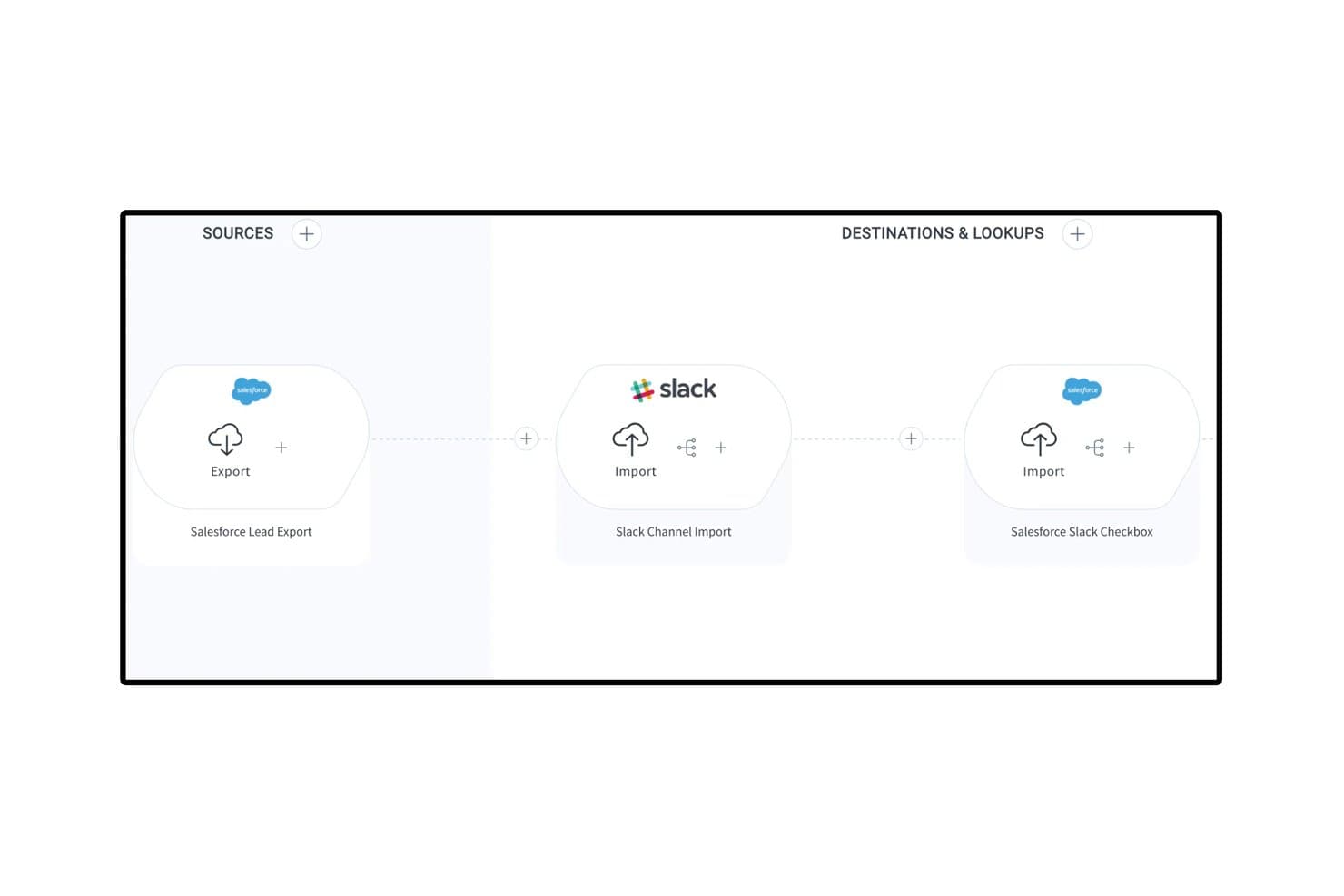
Celigo connects Salesforce and Slack in automated lead engagement flows. Celigo is an iPaaS and automation platform that connects your GTM stack through 1,000+ pre-built connectors, enabling bi-directional data sync, lead lifecycle automation, and quote-to-cash workflows across CRM, marketing automation, ERP, and billing systems.
Who Is Celigo Best For?
Celigo is a strong fit for RevOps and systems teams managing a broad, multi-tool GTM stack that needs reliable, bi-directional data sync across CRM, ERP, and billing systems.
Why I Picked Celigo
Celigo earns its spot on my shortlist because it's the best option I've found for syncing data across a sprawling GTM stack without building custom code for every connection. With 1,000+ pre-built, bi-directional connectors, I can link Salesforce, HubSpot, NetSuite, and Stripe in a single flow, keeping leads, accounts, and revenue data consistent across every system. I also rely on Celigo Ora, its embedded AI assistant, to build and troubleshoot those flows in plain language, which cuts setup time significantly. The AI error management layer auto-resolves roughly 96% of integration exceptions, so data pipelines don't quietly break between systems.
Celigo Key Features
- Quote-to-cash automation: Connects your CRM, ERP, and billing systems to automate the full quote, order, and invoicing process end to end.
- Visual low-code flow builder: A drag-and-drop interface for building multi-step, conditional integration workflows without writing custom code.
- Sandbox environment with environment promotion: Test and validate integration changes in a sandbox before promoting them to production, with full change tracking.
- Data warehouse sync: Native connectors to Snowflake, BigQuery, and Redshift move GTM data into your analytics environment for downstream reporting.
Celigo Integrations
Celigo offers 300+ pre-built connectors, including Salesforce, HubSpot, NetSuite, Stripe, Marketo, Snowflake, BigQuery, Zendesk, Gainsight, and Slack. It also supports custom connectivity through HTTP, FTP, JDBC, GraphQL, WebSockets, and APIs.
Pros and Cons
Pros:
- Connects 1,000+ GTM and back-office tools
- Visual builder supports low-code automation flows
- AI resolves most integration errors automatically
Cons:
- No built-in lead-to-account fuzzy matching
- No native revenue dashboards or forecasting
Learn more about Celigo: Best for auto-capturing revenue activities
- Free demo available
- Pricing upon request

People.ai uses AI to capture sales activity and deliver revenue insights. People.ai is an AI-driven revenue intelligence platform that automatically captures sales activity data, maps it to CRM records, and surfaces deal insights, forecast signals, and rep performance patterns across your go-to-market teams.
Who Is People.ai Best For?
People.ai is a strong fit for enterprise sales organizations that run large field teams and need reliable activity data without depending on manual CRM input.
Why I Picked People.ai
I picked People.ai as one of the best because it captures every email, call, and meeting automatically and maps that activity directly to the right account, opportunity, and contact in Salesforce, without requiring reps to log anything manually. What I find genuinely useful is the account engagement score, which shows exactly how much activity is happening across each deal and flags relationships going cold before they drop out of the forecast.
People.ai Key Features
- Pipeline health monitoring: Flags deals at risk of slipping based on actual engagement patterns across emails, calls, and meetings, before they miss a forecast call.
- Waterfall chart reporting: Visualizes exactly what moved in your forecast, including slipped deals, new pipeline, wins, and losses, for QBR and board-level reporting.
- Rep performance benchmarking: Identifies which activity patterns and engagement behaviors your top reps use so you can coach the rest of the team against a real standard.
- Multi-threading detection: Surfaces single-threaded deals and missing stakeholder coverage so you can act before a gap becomes a lost deal.
People.ai Integrations
Integrations include Salesforce, Microsoft Dynamics 365, Oracle, Gmail, Google Calendar, Outlook, Zoom, Slack, Webex, Snowflake, Tableau, Power BI, Outreach, Salesloft, and Clari. An API is available for custom integrations.
Pros and Cons
Pros:
- Relationship maps show stakeholder connections visually
- Detects competitor mentions in sales conversations
- Surfaces deal with visibility without manual CRM updates
Cons:
- Limited dashboard customization for individual reps
- Highly dependent on data cleanliness
Learn more about People.ai:
Alte platforme de automatizare RevOps
Iată câteva opțiuni suplimentare de platforme de automatizare RevOps care nu au ajuns pe lista mea scurtă, dar merită totuși analizate:
- 11LeanDataBest for automated lead routing
- 12GainsightBest for account health tracking
- 136senseBest for AI-driven intent data integration
- 14CognismBest for GDPR-compliant contact data sourcing
- 15DefaultBest for automated quota compliance
- 16Salesforce Best for sales lifecycle management
- 17FullcastBest for territory planning automation
- 18DealHubBest for guided selling configuration
- 19ForecastioBest for predictive deal forecasting
- 20WarmlyBest for real-time buyer identification
Criterii de selecție pentru platformele de automatizare RevOps
Atunci când am selectat cele mai bune platforme de automatizare RevOps pentru a le include în această listă, am luat în considerare nevoile și problemele obișnuite ale cumpărătorilor, precum conectarea sistemelor disparate de vânzări și marketing și reducerea activităților manuale și repetitive de prelucrare a datelor. De asemenea, am folosit următorul cadru pentru a-mi menține evaluarea structurată și echitabilă:
How I Evaluate RevOps Automation Platforms
I split my evaluation into two layers: baseline capabilities like lead routing and CRM data sync, and the differentiators that make one platform the right fit for a specific RevOps team.
Core Functionality (Table Stakes For This List)
When I'm selecting tools for my list, I rank each one on a scale from 0 (does not offer the functionality) to 5 (excels in this area) for each core functionality listed below. Then, I calculate the tool's total score into a percentage. Each tool needs to achieve a minimum total score of 75% to be considered for inclusion.
- Lead-to-Account Automation: I check whether a platform can match inbound leads to existing accounts and route them by territory, segment, or hierarchy—not just round-robin across a rep pool.
- Revenue Data Orchestration: The tool should sync data bi-directionally across CRM, MAP, billing, and warehouse systems so RevOps teams aren't reconciling pipeline numbers in spreadsheets.
- GTM Workflow Automation: I look for a no-code or low-code builder that handles real multi-step workflows—like triggering a CS handoff when a deal closes and updating the billing system simultaneously.
- Territory & Quota Management: Platforms that support dynamic territory carving and quota distribution tied to GTM planning cycles score higher than those limited to static list uploads.
- Data Hygiene & Enrichment: I evaluate how the platform handles deduplication, normalization, and enrichment—especially whether it can keep CRM records clean continuously rather than as a one-time batch job.
- Pipeline & Forecasting Analytics: Beyond basic dashboards, I look for deal inspection, forecast roll-ups, and the ability to flag at-risk deals based on pipeline activity signals.
Once I have a list of tools that meet this criteria, I consider what sets each platform apart.
Differentiating Factors (What Sets Vendors Apart)
Here's how I compare and contrast different vendors:
Standout Features
AI-powered insights are a major differentiator—I look for platforms that flag at-risk deals or recommend next-best actions based on activity patterns, not just static reports. Revenue attribution modeling also matters when teams need to trace marketing spend back to closed-won revenue across multiple touchpoints. Sandbox environments and version control round things out. Being able to test a new routing rule or workflow change without disrupting live GTM processes is something I always check for.
Beyond Features
Tech stack fit is one of the first things I evaluate. A platform's depth of integration with your primary CRM—whether that's Salesforce, HubSpot, or Dynamics—shapes how much value you'll actually get from it. Pricing model matters too, since per-user pricing scales very differently than per-workflow or usage-based models as your GTM team grows. I also check for SOC 2 Type II certification and role-based access controls, especially when RevOps teams handle sensitive pipeline and billing data across multiple departments.
Cum să alegeți platformele de automatizare RevOps
Este ușor să vă pierdeți în liste lungi de funcții și structuri complexe de prețuri. Pentru a vă ajuta să rămâneți concentrați în timp ce parcurgeți procesul unic de selectare a software-ului, iată o listă de factori de care trebuie să țineți cont:
| Factor | Aspecte de luat în considerare |
| Scalabilitate | Poate platforma să susțină creșterea estimată a numărului de utilizatori și a volumului de date în următorii doi-trei ani fără creșteri majore de preț sau limitări ale sistemului? |
| Integrări | Se va conecta nativ la stiva tehnologică existentă — instrumente CRM, de analiză, marketing și financiare — sau veți avea nevoie de soluții improvizate ori sincronizări manuale? |
| Posibilități de personalizare | Vă permite platforma să adaptați fluxurile de lucru la procesele unice ale echipei dumneavoastră sau sunteți limitați la șabloane ori declanșatoare rigide? |
| Ușurința utilizării | Este interfața de utilizare ușor de înțeles pentru utilizatorii care nu sunt ingineri? Vor avea echipele dumneavoastră nevoie de instruire extinsă pentru a crea sau gestiona automatizări? |
| Implementare și integrare inițială | Ce tip de ajutor este disponibil pentru a începe — asistență dedicată la integrarea inițială, instrumente de migrare, materiale de instruire sau biblioteci de șabloane? |
| Cost | Există niveluri de preț clare, care corespund nevoilor dumneavoastră de astăzi și pe măsură ce vă extindeți? Fiți atenți la costurile ascunse pentru integrări, utilizatori sau volumul sarcinilor automatizate. |
| Măsuri de securitate | Oferă platforma permisiuni bazate pe roluri, piste de audit, SSO și criptarea datelor? Cum gestionează informațiile sensibile despre venituri și clienți? |
| Disponibilitatea asistenței | Cât de repede și prin ce canale puteți primi ajutor în timpul implementării sau al perioadelor de nefuncționare — chat, e-mail, telefon sau un manager de cont dedicat? |
Ce sunt platformele de automatizare RevOps?
Platformele de automatizare RevOps sunt soluții software care oferă orchestrare de la un capăt la altul pentru procesele operațiunilor de venituri din sistemele de vânzări, marketing și succes al clienților. Aceste platforme vă ajută echipa să sincronizeze datele, să declanșeze fluxuri de lucru și să asigure consecvența proceselor. Prin reducerea activității manuale și eliminarea silozurilor, platformele de automatizare RevOps vă oferă o vizibilitate mai clară asupra conductei de vânzări, o calitate mai bună a datelor și un motor de venituri mai previzibil.
Funcții
Atunci când selectați platforme de automatizare RevOps, urmăriți următoarele funcții esențiale:
- Automatizarea fluxurilor de lucru: Automatizează procesele cu mai mulți pași din vânzări, marketing și succesul clienților fără intervenție manuală, asigurând o execuție consecventă și reducând erorile umane.
- Integrarea datelor: Conectează și sincronizează informațiile de-a lungul ciclului de viață al clientului din sistemele CRM, platformele de automatizare a marketingului, sistemele financiare și instrumentele de asistență.
- Declanșatoare condiționale: Configurează acțiuni bazate pe logică, care declanșează fluxuri de lucru sau alerte în funcție de modificările datelor, evoluția conductei de vânzări sau interacțiunile dintre sisteme.
- Permisiuni bazate pe roluri: Controlează cine poate accesa, edita sau implementa diferite automatizări, asigurându-te că numai utilizatorii autorizați pot face modificări ale proceselor critice generatoare de venituri.
- Jurnale de audit: Urmărește toate automatizările, modificările fluxurilor de lucru și acțiunile utilizatorilor, oferind transparență și sprijinind conformitatea sau depanarea.
- Maparea câmpurilor personalizate: Definește și sincronizează câmpuri unice între sisteme, astfel încât echipa ta să nu fie limitată la structurile de date de bază disponibile implicit.
- Acces API: Extinde funcționalitatea platformei sau creează integrări personalizate, permițându-le dezvoltatorilor să adapteze sistemul la cerințele unice ale echipei tale.
- Procesare în loturi: Mută sau actualizează volume mari de înregistrări simultan, ceea ce este util pentru migrări de date, curățare sau modificări majore ale proceselor.
- Gestionarea erorilor și alertele: Identifică automat automatizările sau sincronizările eșuate și notifică utilizatorii, astfel încât problemele să poată fi rezolvate rapid, înainte să afecteze operațiunile generatoare de venituri.
Funcții AI comune
Pe lângă funcțiile standard ale platformelor de automatizare RevOps enumerate mai sus, multe dintre aceste soluții integrează inteligența artificială prin funcții precum:
- Prognoză predictivă: Utilizează învățarea automată pentru a analiza datele istorice privind vânzările și tendințele actuale ale conductei, ajutând echipele să prevadă rezultatele veniturilor și să identifice tranzacțiile expuse riscului înainte ca acestea să eșueze.
- Detectarea intenției: Monitorizează semnalele din datele privind interacțiunile digitale pentru a identifica conturile sau clienții potențiali cu cea mai mare probabilitate de conversie, pentru a prioritiza contactarea și a descoperi grupurile de cumpărare ascunse.
- Îmbogățirea automată a datelor: Actualizează și completează continuu înregistrările contactelor sau companiilor, colectând și validând informații din baze de date publice și proprietare.
- Recomandări inteligente pentru fluxurile de lucru: Sugerează ajustări ale proceselor sau automatizări noi pe baza tiparelor de utilizare, a indicatorilor de performanță și a blocajelor observate în întregul motor de venituri.
- Detectarea anomaliilor: Analizează activitatea conductei și datele despre procese pentru a semnala neregularități, precum scăderi bruște ale ratelor de conversie sau creșteri neașteptate ale tranzițiilor între etapele tranzacțiilor, astfel încât echipele să poată reacționa rapid.
Beneficii
Implementarea platformelor de automatizare RevOps oferă mai multe beneficii pentru echipa și compania ta. Iată câteva dintre acestea:
- Echipe generatoare de venituri aliniate: Aduce echipele de vânzări, marketing și succesul clienților în sincronizare prin automatizarea fluxurilor de lucru și a schimbului de date.
- Vizibilitate mai bună asupra conductei: Centralizează procesele și datele în timp real, astfel încât echipele operaționale și conducerea să știe întotdeauna în ce stadiu se află tranzacțiile și conturile.
- Execuție consecventă a proceselor: Minimizează sarcinile manuale și erorile prin fluxuri de lucru automatizate, bazate pe reguli, și validări ale câmpurilor.
- Calitate îmbunătățită a datelor: Curăță, mapează și îmbogățește înregistrările între platforme pentru raportări și prognoze precise și de încredere.
- Rezolvarea mai rapidă a problemelor: Oferă jurnale de audit, notificări privind erorile și alerte automate, astfel încât echipele să identifice și să remedieze rapid deficiențele proceselor.
- Agilitate sporită: Îți permite să actualizezi automatizările, să creezi fluxuri de lucru noi și să adaptezi procesele fără să aștepți resurse de inginerie sau IT.
- Operațiuni generatoare de venituri previzibile: Sprijină prognozarea și identificarea riscurilor prin automatizare standardizată și, atunci când este disponibilă, analiză bazată pe inteligență artificială.
Costuri și prețuri
Selectarea platformelor de automatizare RevOps necesită înțelegerea diferitelor modele și planuri tarifare disponibile. Costurile variază în funcție de funcții, dimensiunea echipei, suplimente și alți factori. Tabelul de mai jos rezumă planurile comune, prețurile medii ale acestora și funcțiile incluse de obicei în platformele de automatizare RevOps:
Tabel comparativ al planurilor pentru platformele de automatizare RevOps
| Tipul planului | Preț mediu | Funcții comune |
| Plan gratuit | $0 | Automatizarea limitată a fluxurilor de lucru, integrări de bază, număr limitat de utilizatori și asistență din partea comunității. |
| Plan personal | $20-$50/user/month | Automatizări individuale, integrări standard, spațiu de stocare moderat, raportare de bază și asistență prin e-mail. |
| Plan de afaceri | $50-$120/user/month | Fluxuri de lucru cu mai mulți pași, acces API, integrări avansate, tablouri de bord personalizabile, permisiuni bazate pe roluri și asistență prin chat live. |
| Plan pentru întreprinderi | $120-$250/user/month | Automatizări nelimitate, integrare inițială dedicată, securitate avansată, jurnale de audit, asistență prioritară și garanții SLA. |
Întrebări frecvente despre platformele de automatizare RevOps
Iată câteva răspunsuri la întrebările frecvente despre platformele de automatizare RevOps:
Platformele de automatizare RevOps necesită expertiză tehnică pentru configurare?
Nu, majoritatea platformelor de automatizare RevOps sunt concepute astfel încât utilizatorii din zona de business să poată crea fluxuri de lucru și să gestioneze integrările prin interfețe fără cod sau cu puțin cod. Este posibil să aveți nevoie de ajutorul departamentului IT pentru configurări API complexe sau personalizări avansate, însă gestionarea de zi cu zi a proceselor este de obicei accesibilă utilizatorilor fără cunoștințe tehnice.
Platformele de automatizare RevOps se pot integra atât cu instrumentele CRM, cât și cu cele de automatizare a marketingului?
Da, aproape toate platformele de automatizare RevOps oferă integrări predefinite pentru sistemele CRM populare și instrumentele de automatizare a marketingului. Verificați dacă există conectori nativi compatibili cu sistemele dvs. actuale, pentru a evita întârzierile sau costurile suplimentare asociate dezvoltării personalizate.
Cum îmbunătățesc platformele de automatizare RevOps acuratețea datelor?
Platformele de automatizare RevOps sincronizează, curăță și standardizează datele din întregul dvs. ecosistem tehnologic pentru venituri, reducând numărul înregistrărilor duplicate, al greșelilor de introducere manuală și al informațiilor învechite. Actualizările automatizate și regulile de validare contribuie la menținerea unor date de încredere pentru raportare și luarea deciziilor.
Sunt platformele de automatizare RevOps potrivite pentru echipele mici?
Da, multe platforme oferă planuri flexibile care pot fi adaptate echipelor mici și startupurilor. Începeți cu automatizarea fluxurilor de lucru esențiale și cu integrările, apoi adăugați funcții pe măsură ce echipa și complexitatea activităților cresc. Asigurați-vă că prețul inițial și condițiile contractuale nu vă obligă să plătiți pentru mai mult decât aveți nevoie.
Ce ar trebui să iau în considerare atunci când evaluez securitatea unei platforme de automatizare RevOps?
Căutați permisiuni bazate pe roluri, jurnale de audit, opțiuni SSO, criptarea datelor și certificări de conformitate relevante pentru domeniul dvs. Întrebați furnizorii despre procesul lor de notificare în cazul unei breșe de securitate, politicile de păstrare a datelor și opțiunile pentru gestionarea datelor sensibile ale companiei și clienților.