

O software CRM para empresas de fabrico é importante para as empresas do setor, ajudando as equipas a aumentar a eficiência da produção e a melhorar as experiências dos clientes. No entanto, escolher o software certo pode ser um desafio devido à grande variedade de opções disponíveis.
Com base na minha experiência com software de operações de receitas, testei e comparei vários dos principais softwares CRM para empresas de fabrico disponíveis. Depois, compilei os meus resultados em análises detalhadas para ajudar a encontrar o melhor software para as suas necessidades.
Why Trust Our Software Recommendations
6,700+
Reviews
20
Industry experts
16+
Evaluation factors
14
Years
Our reviews reflect our independent judgment—not a sales pitch. Learn how we stay transparent.
For this guide, we evaluated tools using hands-on testing and independent research, scoring tools using our selection criteria.
Our reviews reflect our human editorial judgment, not a sales pitch.
Tabela de comparação de software CRM para empresas de fabrico
Esta tabela de comparação resume os detalhes de preços das minhas principais escolhas de software CRM para empresas de fabrico.
| Tool | Best For | Trial Info | Price | ||
|---|---|---|---|---|---|
| 1 | Best for tracking customer orders | 15 + 15-day free trial available | From $49/user/month | Website | |
| 2 | Best for AI process automation | Not available | From $40/user/month | Website | |
| 3 | Best for distributor order management | Free trial available | From $69/rep/month (billed annually) | Website | |
| 4 | Best for mobile accessibility | 15-day free trial | From $23/user/month (billed annually) | Website | |
| 5 | Best for small to medium businesses | 21-day free trial | From $9/user/month (billed annually) | Website | |
| 6 | Best for simple CRM needs | Free plan + 14-day free trial available | From $22/user/month | Website | |
| 7 | Best for sales pipeline automation | 14-day free trial | From $14/user/month (billed annually) | Website | |
| 8 | Best for lead management | Free demo available | Pricing upon request | Website | |
| 9 | Best for pipeline management | 14-day free trial + free demo available | From $29/user/month | Website | |
| 10 | Best for enterprise-level solutions | Free demo available | Pricing upon request | Website |


Análises dos melhores softwares CRM para empresas de fabrico
Abaixo encontram-se os meus resumos detalhados dos melhores softwares CRM para empresas de fabrico que entraram na minha lista restrita. As minhas análises apresentam uma visão detalhada das principais funcionalidades, vantagens e desvantagens, integrações e casos de utilização ideais de cada ferramenta, para ajudar a encontrar a melhor opção para si.
 Best for tracking customer orders
- 15 + 15-day free trial available
- From $49/user/month
Visit WebsiteCustomer Rating:4.5/5
MRPeasy provides a visual pipeline for tracking customer orders from quotation to shipment. MRPeasy is a manufacturing ERP and MRP platform for small manufacturers that combines production planning, inventory management, procurement, and a built-in CRM module for managing customer orders, quotes, and shipments.
Who Is MRPeasy Best For?
MRPeasy is a good fit for small and mid-sized manufacturers who need a single system to manage both production operations and customer order workflows.
Why I Picked MRPeasy
I picked MRPeasy as one of the best because of how directly its CRM connects customer orders to the production floor. When a customer order gets confirmed, I can instantly raise manufacturing orders for items not yet in stock and purchase orders for any missing materials—all from the same screen. I also like the color-coded pipeline view, which makes it easy to see order status at a glance without digging through reports. That level of visibility across the order lifecycle, from quote to shipment, is what makes MRPeasy stand out for manufacturers.
MRPeasy Key Features
- Quote cost estimation: Calculate production costs and lead times automatically when building customer quotes.
- Shipment planning: Generate picking lists and waybills directly from confirmed customer orders.
- Sales reporting: View sales statistics and cost-of-goods-sold data broken down by customer or product.
- Customer and contact management: Store customer details, communication history, and related orders in a single customer record.
Pros and Cons
Pros:
- Allows businesses to optimize purchasing with automatic PO generation
- Provides a clear sales pipeline view for tracking orders
- Helps estimate production costs and lead times quickly
Cons:
- Mobile app functionality is less robust than the desktop version
- Initial setup can take time to configure properly
Learn more about MRPeasy:
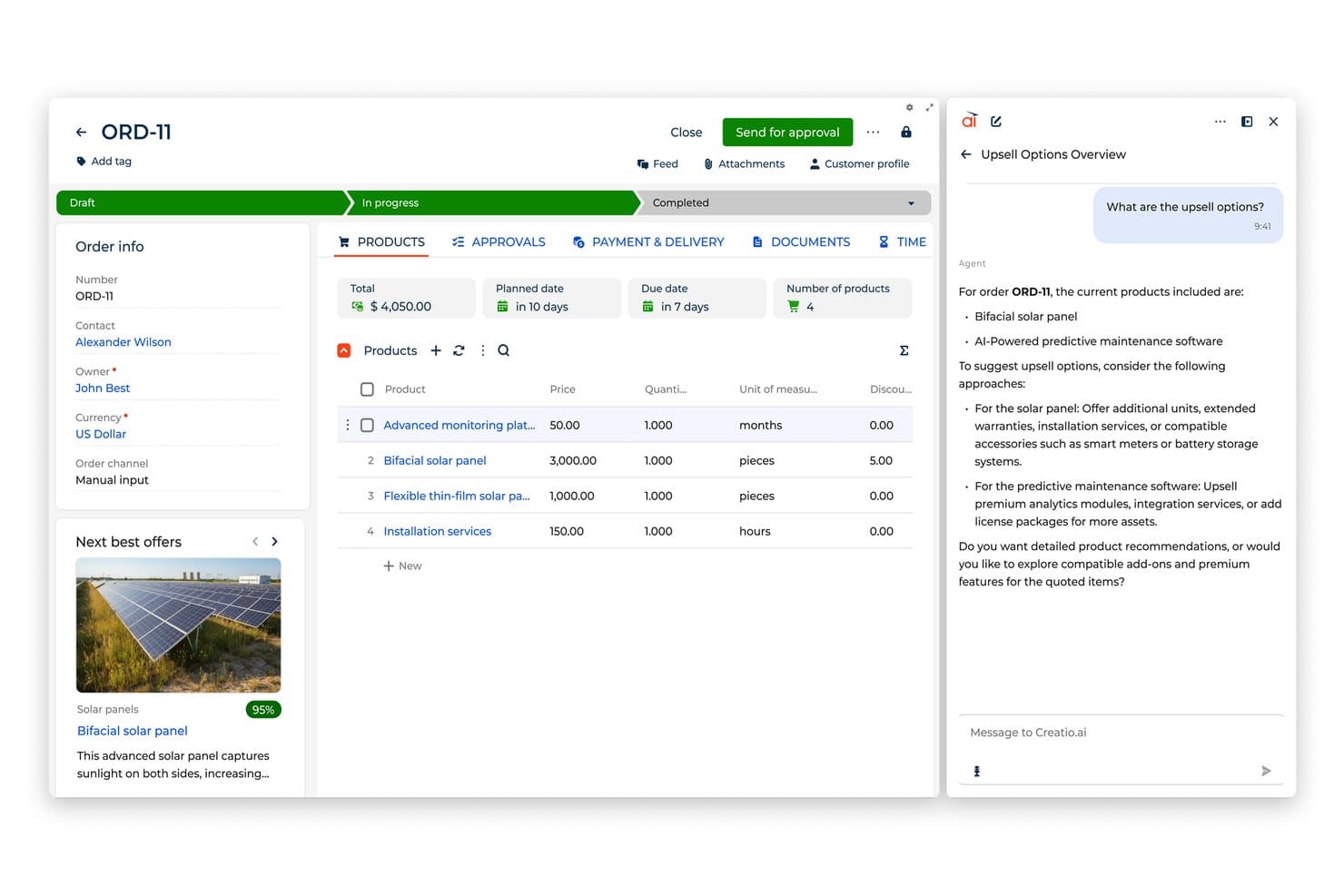
Creatio AI CRM surfaces AI-driven upsell suggestions within order records. Creatio AI CRM is an AI CRM and workflow platform built for manufacturers, combining sales automation, supply chain management, order processing, and AI-driven process automation across the full manufacturing lifecycle.
Who Is Creatio AI CRM Best For?
Creatio AI CRM is a strong fit for mid-market and enterprise manufacturing companies that need to coordinate complex sales, distribution, and production workflows across multiple teams.
Why I Picked Creatio AI CRM
I picked Creatio AI CRM because its AI-powered, no-code process automation extends beyond standard CRM workflows. I can build end-to-end manufacturing processes—like order intake, BOM change approvals, and shipment scheduling—without writing a single line of code. The built-in AI agents handle lead scoring and sales forecasting automatically, so my team spends less time updating records and more time moving deals forward.
Creatio AI CRM Key Features
- Field sales mobile app: Manage customer visits, route scheduling, order placement, and post-visit reporting from a mobile device.
- Trade promotion management: Build and track promotional campaigns for distributors and channel partners, including rebate automation.
- 360-degree account view: Access a unified profile combining contact history, orders, contracts, and active opportunities in one record.
- Compliance and certification tracking: Log regulatory certifications, manage audit workflows, and track compliance status across accounts.
Pros and Cons
Pros:
- No-code platform with built-in AI agents
- Extensive customization options
- Supports scaling businesses
Cons:
- Customization can be time-consuming
- Data migration may be complex
Learn more about Creatio AI CRM: Best for distributor order management
- Free trial available
- From $69/rep/month (billed annually)
Visit WebsiteCustomer Rating:4.6/5
SimplyDepo dashboard displaying sales metrics, order activity, route performance, and field rep insights across desktop and mobile views. SimplyDepo is a field sales and distribution management platform for CPG brands and distributors that combines account CRM, B2B order management, route planning, and retail execution tracking in one mobile system.
Who Is SimplyDepo Best For?
SimplyDepo is a strong fit for CPG brands and distributors that rely on field sales teams to manage wholesale accounts and place orders on the go.
Why I Picked SimplyDepo
SimplyDepo earns its spot on my shortlist because its B2B order management is built specifically around how distributors work in the field. I like that field reps can capture orders directly at the store level, while product pricing and availability sync automatically to cut out manual entry errors. The B2B order portal also lets customers reorder online, which keeps order volume consistent without requiring rep intervention on every transaction.
SimplyDepo Key Features
- Route planning: Field reps can build and optimize daily visit routes to ensure account coverage stays consistent.
- Retail execution tracking: Reps can log in-store tasks, shelf conditions, and merchandising activity directly from the mobile app.
- Product catalog management: A digital catalog with product details, images, and pricing that reps access during customer visits.
- Sales rep performance reporting: Reporting on individual rep activity, visit frequency, and order history across all accounts in one dashboard.
Pros and Cons
Pros:
- Route planning and territory mapping
- Integrated CRM for account tracking
- Built-in B2B order management system
Cons:
- No transparent API documentation
- Limited advanced reporting customization
Learn more about SimplyDepo: Best for mobile accessibility
- 15-day free trial
- From $23/user/month (billed annually)
Visit WebsiteCustomer Rating:4.7/5
Salesmate delivers dynamic lead management and communication tools for mobile sales. Salesmate is a CRM platform built for manufacturing teams that combines contact and distributor management, pipeline tracking, quote management, order cycle communication, built-in ticketing, and sales automation in one system.
Who Is Salesmate Best For?
Salesmate is a good fit for small to mid-sized manufacturing businesses that need a flexible CRM with built-in sales automation and distributor management.
Why I Picked Salesmate
Salesmate earns a spot on my shortlist because of how well its mobile app holds up for manufacturing sales reps who are constantly on the floor or visiting distributors. I love that you can access contact and deal records, drag deals through pipeline stages, log calls, and add notes all from your phone without any sync issues. The geolocation feature is a standout for field reps: locate nearby prospects, pull up their contact info, and plan your route before your next site visit. Product management is also accessible on mobile, so you can associate SKUs and product details to deals on the spot.
Salesmate Key Features
- Quote builder: Create customizable quotes with product line items, pricing, and digital approval directly from a deal record.
- Built-in ticketing: Log and manage client or production-related support tickets with priority levels and real-time status tracking.
- Sales automation: Set up automated follow-up sequences, task assignments, and order update notifications based on deal stage triggers.
- Revenue forecasting: Track pipeline value, quota attainment, and projected revenue with configurable dashboards and goal tracking.
Pros and Cons
Pros:
- Easy sales tracking
- Integrated calling feature
- Excellent mobile app
Cons:
- Basic reporting features
- Limited customization options
Learn more about Salesmate: Best for small to medium businesses
- 21-day free trial
- From $9/user/month (billed annually)
Visit WebsiteCustomer Rating:4.6/5
Freshsales optimizes sales for small to medium businesses with automation tools. Freshsales is a cloud-based sales CRM with AI-driven lead scoring, multi-channel contact management, pipeline visualization, workflow automation, and customizable modules built for managing complex B2B sales cycles in the manufacturing space.
Who Is Freshsales Best For?
Freshsales is a strong fit for small to mid-sized manufacturing companies that need a straightforward CRM without the complexity or cost of enterprise-grade platforms.
Why I Picked Freshsales
I've included Freshsales in my top picks because it gives small manufacturing teams a sales CRM that doesn't require a dedicated admin to manage. The built-in product catalog lets reps attach SKUs, pricing tiers, and specifications directly to deals, which I find genuinely useful for quoting in manufacturing sales cycles. Freddy AI also flags at-risk deals and suggests next steps, so smaller teams without dedicated RevOps support can still maintain solid pipeline accuracy.
Freshsales Key Features
- Multi-pipeline management: Create and manage separate pipelines for direct sales, distributor channels, and OEM accounts simultaneously.
- Custom modules: Add manufacturing-specific data fields to records, such as order quantities, lead times, and product specifications.
- Sales sequences: Automate outreach cadences so reps follow up with distributors or prospects at defined intervals without manual tracking.
- Territory management: Assign leads and accounts to reps based on geographic region or account type using rule-based routing.
Pros and Cons
Pros:
- Visual sales pipeline
- Built-in communication tools
- Effective lead scoring
Cons:
- Basic reporting options
- Limited advanced features
Learn more about Freshsales: Best for simple CRM needs
- Free plan + 14-day free trial available
- From $22/user/month
Visit WebsiteCustomer Rating:4.7/5
Capsule CRM offers intuitive contact management and sales tracking for small businesses. Capsule CRM is a small business CRM that combines contact management, visual sales pipeline tracking, task and calendar management, and project delivery tools in one platform.
Who Is Capsule CRM Best For?
Capsule CRM is a good fit for small manufacturing businesses that need a straightforward way to manage contacts, track deals, and coordinate follow-ups without complex configuration.
Why I Picked Capsule CRM
Capsule CRM is one of my top picks because I love how little setup it requires to get a working sales process running. For small manufacturing teams that don't have a dedicated RevOps function, that matters. I use Tracks to build out sequential task checklists tied to specific pipeline stages, so when a quote moves to "negotiation," the right follow-up tasks fire automatically. Custom milestones and custom fields also let me shape the pipeline around a manufacturing workflow without rebuilding anything from scratch.
Capsule CRM Key Features
- Projects: Link post-sale delivery work directly to CRM contacts and deals in a shared project view.
- Sales analytics: Track pipeline value, win rates, and forecast revenue across your active sales stages.
- Mobile app: Access contacts, tasks, and pipeline data from iOS or Android while visiting client or supplier sites.
- Tags and filtering: Categorize contacts and accounts with custom tags to segment by product line, region, or supplier type.
Pros and Cons
Pros:
- Quick setup process
- Suitable for small teams
- Simple contact management
Cons:
- Requires manual data entry
- Basic reporting capabilities
Learn more about Capsule CRM: Best for sales pipeline automation
- 14-day free trial
- From $14/user/month (billed annually)
Visit WebsiteCustomer Rating:4.5/5
Pipedrive's drag-and-drop interface lets you manage contacts and move them through various stages in the pipeline. Pipedrive is a sales CRM built around visual pipeline management, deal tracking, workflow automation, and email and communication tracking for sales teams across industries including manufacturing.
Who Is Pipedrive CRM Best For?
Pipedrive is a strong fit for small to mid-sized manufacturing sales teams that need a structured, visual way to manage complex B2B sales cycles and multi-stakeholder deals.
Why I Picked Pipedrive CRM
Pipedrive earns its spot as one of the best on my shortlist because its pipeline automation is genuinely built around how sales reps work. I like that you can set automated triggers to move deals between stages based on specific actions, like a quote being sent or a site visit being logged, which maps well to manufacturing sales cycles. The "rotting deals" feature also flags stalled opportunities automatically, so nothing slips through during long B2B negotiation periods.
Pipedrive CRM Key Features
- Custom fields: Add manufacturer-specific data points to deal and contact records, such as SKU numbers, order volumes, or production lead times.
- Two-way email sync: Connect your inbox to Pipedrive so all client and distributor correspondence is logged directly against the relevant deal or contact.
- Sales reporting dashboards: Build visual reports tracking deal value, stage conversion rates, and rep activity across your entire pipeline.
- Document templates: Create reusable quote and proposal templates that auto-fill with contact and deal data pulled from your CRM records.
Pros and Cons
Pros:
- Automation of repetitive tasks
- Customizable sales stages
- Drag-and-drop pipelines
Cons:
- Accessing advanced features may incur additional costs
- Lacks native support for complex manufacturing needs
Learn more about Pipedrive CRM:

LeadSquared simplifies lead management with automation and efficient nurturing tools. LeadSquared is a sales CRM built for high-velocity sales teams that covers lead capture, scoring, distribution, pipeline management, sales automation, and field sales tracking, with a dedicated manufacturing CRM for managing dealer, distributor, and influencer networks.
Who Is LeadSquared Best For?
LeadSquared is a strong fit for mid-to-large manufacturing companies managing multi-tier dealer and distributor sales networks with high lead volumes.
Why I Picked LeadSquared
I've included LeadSquared in my top picks because its lead management depth is genuinely hard to match in a manufacturing context. It consolidates lead capture from every channel—web forms, ads, referrals, WhatsApp—into a single pipeline with zero leakage, then automatically scores and routes each lead to the right rep based on territory, product line, or dealer type. I also like the automated lead distribution, which removes the manual work of assigning inquiries across large dealer and distributor networks.
LeadSquared Key Features
- Field sales tracking: Monitor field reps with GPS-based check-in/check-out and geo-fencing to track visits to dealer and distributor locations.
- Sales workflow automation: Build rule-based workflows that trigger follow-up tasks, emails, or reassignments based on deal stage or rep activity.
- Dealer and distributor portal: Give channel partners a dedicated portal to submit leads, track order status, and view their pipeline.
- Custom reports and dashboards: Build role-specific dashboards to track pipeline health, lead conversion rates, and rep performance across territories.
Pros and Cons
Pros:
- Detailed analytics
- Strong automation workflows
- Effective lead scoring
Cons:
- Limited offline features
- Complex setup process
Learn more about LeadSquared: Best for pipeline management
- 14-day free trial + free demo available
- From $29/user/month
Visit WebsiteCustomer Rating:4.4/5
Pipeline CRM provides tools to track and optimize sales processes. Pipeline CRM is a cloud-based sales CRM built for field-driven and B2B sales teams, with tools for sales pipeline management, lead tracking, contract management, email automation, and sales forecasting across industries like manufacturing and distribution.
Who Is Pipeline CRM Best For?
Pipeline CRM is a good fit for small to mid-sized B2B sales teams in manufacturing and distribution who need structured deal tracking across long, multi-touch sales cycles.
Why I Picked Pipeline CRM
Pipeline CRM earns its spot on my shortlist because of how well it handles multi-pipeline setups for manufacturing sales teams. I like that you can run separate pipelines for different product lines or customer segments at the same time, with up to 25 custom fields per deal to track things like material specs or lead times. The visual drag-and-drop board lets me move deals through custom stages that mirror a real manufacturing sales cycle.
Pipeline CRM Key Features
- Instant Docs: Generate quotes and proposals directly inside the CRM with fields for pricing, line items, and terms, without switching to a separate tool.
- Sales forecasting: View projected revenue by rep, deal stage, or time period using built-in forecast reports tied to live pipeline data.
- Email drip campaigns: Set up automated email sequences triggered by deal stage changes or inactivity to keep contacts engaged across long sales cycles.
- Activity tracking: Log calls, meetings, and tasks against individual deals and contacts to keep a full record of every customer touchpoint.
Pros and Cons
Pros:
- Efficient task management
- Detailed sales reporting
- Flexible pipeline customization
Cons:
- Basic mobile app functionality
- Limited advanced customization
Learn more about Pipeline CRM:

Infor integrates business processes to enhance operational efficiency for large enterprises. Infor CRM is a cloud-based CRM and ERP platform built for manufacturers, combining sales management, customer service, and industry-specific workflows with AI-driven analytics and tight integration across finance, procurement, and production operations.
Who Is Infor Best For?
Infor is a strong fit for large manufacturing organizations that need CRM functionality deeply integrated with ERP, supply chain, and production systems across multiple sites or business units.
Why I Picked Infor
Infor earns its spot as one of the best on my shortlist because no other CRM on this list is as deeply wired into enterprise manufacturing operations. I'm particularly impressed by how Infor CRM connects directly with CloudSuite Industrial, meaning my team can pull live order history, inventory data, and production schedules right into customer records without any manual syncing. The multi-site and multi-entity support is genuinely built for scale—I can manage accounts across dozens of facilities under one unified system.
Infor Key Features
- Xbar for Microsoft Outlook: Sync emails, contacts, and calendar events directly between Outlook and Infor CRM without leaving your inbox.
- Customer service and contract management: Log service cases, track warranties, and manage support contracts tied to specific customer accounts.
- Mobile CRM access: Update customer records, log calls, and view account data from a mobile device while on-site with customers.
- Opportunity and quote management: Track deals through configurable sales stages with quote creation built into the pipeline workflow.
Pros and Cons
Pros:
- Efficient supply chain management
- Advanced analytics capabilities
- Comprehensive enterprise solutions
Cons:
- Requires technical expertise
- Complex implementation process
Learn more about Infor:
Outros softwares CRM para empresas de fabrico
Eis algumas opções adicionais de software CRM para empresas de fabrico que não entraram na minha lista restrita, mas que vale a pena conhecer:
- 11InsightlyBest for user-friendly interface
- 12Spotler CRMBest for email marketing integration
- 13ClickUpBest for project management integration
- 14ZendeskBest for customer support teams
- 15SugarAIBest for scalable solutions
- 16Zoho CRMBest for customizable workflows
- 17NutshellBest for team collaboration
- 18monday CRMBest for visual project tracking
How I Evaluate Manufacturing CRM Software
I evaluate manufacturing CRM tools in two layers: the baseline requirements—ERP integration, CPQ, and channel management—and the differentiators for specific manufacturing contexts.
Core Functionality (Table Stakes For This List)
When I'm selecting tools for my list, I rank each one on a scale from 0 (does not offer the functionality) to 5 (excels in this area) for each core functionality listed below. Then, I calculate the tool's total score into a percentage. Each tool needs to achieve a minimum total score of 65% to be considered for inclusion.
- ERP/MRP Integration: I check whether the CRM syncs bidirectionally with manufacturing ERPs like SAP, Epicor, or NetSuite so sales teams see live production and inventory data.
- Quote & CPQ Management: Configurable product quoting matters here—I look for tools that handle BOMs, custom pricing rules, and approval routing for complex manufactured goods.
- Channel & Dealer Management: Many manufacturers sell through distributors, so I evaluate deal registration, territory assignment, and partner portal capabilities within each platform.
- Manufacturing Pipeline Forecasting: Standard weighted pipelines aren't enough. I look for forecasting that factors in production lead times and long, multi-touch B2B sales cycles.
- Account & Contact Hierarchies: Multi-level account structures come up constantly—think OEMs with subsidiary plants and separate procurement teams. I check how each CRM handles those layers.
- Order & Inventory Visibility: Sales reps need real-time order status and stock levels inside the CRM record, so I evaluate how each tool surfaces that data without forcing users into the ERP.
Once I have a list of tools that meet this criteria, I consider what sets each platform apart.
Differentiating Factors (What Sets Vendors Apart)
Here's how I compare and contrast different vendors:
Standout Features
Equipment and installed-base tracking is a big differentiator. Linking serialized assets to customer accounts opens up aftermarket revenue from spare parts, consumables, and service contracts. I also evaluate AI demand signals that flag reorder patterns or churn risk based on historical order cadence. For manufacturers with high-volume B2B buyers, EDI support and self-service portals for RFQs and reorders can remove significant friction from the sales cycle.
Beyond Features
I pay close attention to manufacturing sub-vertical fit. A CRM built for discrete, make-to-order shops handles workflows very differently than one designed for process manufacturers. The integration ecosystem matters just as much—I check for prebuilt connectors to ERPs like Epicor or Infor and iPaaS compatibility with tools like Workato or Boomi. Compliance is another factor I weigh, especially for manufacturers subject to ITAR or CMMC requirements where role-based access and audit trails are table stakes.
Como escolher software CRM para empresas de fabrico
É fácil ficar preso a listas extensas de funcionalidades e a estruturas de preços complexas. Para ajudar a manter o foco enquanto percorre o seu processo único de seleção de software, eis uma lista de verificação dos fatores a ter em conta:
| Fator | O que deve considerar? |
| Escalabilidade | O software acompanhará o crescimento das necessidades da sua empresa? |
| Integrações | É compatível com as outras ferramentas que a sua equipa utiliza diariamente? |
| Personalização | Pode adaptar o software aos seus processos específicos? |
| Facilidade de utilização | A interface é intuitiva para os membros da sua equipa? |
| Orçamento | O preço enquadra-se nas suas limitações financeiras? |
| Medidas de segurança | Existem medidas robustas para proteger os seus dados? |
| Suporte | Existe um suporte ao cliente fiável quando surgem problemas? |
| Relatórios | Fornece os dados e as análises de que necessita? |
Tendências no software CRM para empresas de fabrico
Durante a minha pesquisa, recolhi inúmeras atualizações de produtos, comunicados de imprensa e registos de lançamentos de diferentes fornecedores de software CRM para empresas de fabrico. Eis algumas das tendências emergentes que estou a acompanhar:
- Informações baseadas em IA: A IA está a ser utilizada para fornecer informações mais aprofundadas sobre os dados dos clientes, ajudando as empresas a prever tendências e a melhorar a tomada de decisões. Alguns fornecedores estão a incorporar IA para disponibilizar análises preditivas e recomendações personalizadas.
- Soluções baseadas na nuvem: Cada vez mais fornecedores estão a transferir os seus sistemas de CRM para a nuvem, permitindo maior flexibilidade e acesso a dados em tempo real a partir de qualquer lugar. Esta tendência é essencial para as empresas que procuram reduzir os custos da infraestrutura de TI, assegurando simultaneamente a escalabilidade.
- Segurança de dados reforçada: Com o aumento das preocupações relacionadas com as violações de dados, os fornecedores de CRM estão a concentrar-se na melhoria das medidas de segurança dos dados. Funcionalidades como a encriptação, a autenticação de dois fatores e as atualizações de segurança regulares estão a tornar-se padrão.
- Funcionalidades de sustentabilidade: À medida que aumentam as preocupações ambientais, algumas ferramentas de CRM estão a adicionar funcionalidades que ajudam as empresas a acompanhar e comunicar métricas de sustentabilidade. Esta tendência é particularmente relevante para os fabricantes que procuram melhorar as suas práticas ecológicas.
- Personalização específica do setor: Os fornecedores estão a disponibilizar mais soluções adaptadas a setores específicos da indústria transformadora. Os módulos e as funcionalidades personalizados, concebidos para setores específicos, ajudam as empresas a gerir processos e requisitos únicos de forma mais eficaz.
O que é o software de CRM para a indústria transformadora?
O software de CRM para a indústria transformadora ajuda os fabricantes a gerir eficazmente as relações com os clientes e os ciclos de vendas. É normalmente utilizado por gestores de vendas, planeadores de produção e representantes do serviço de apoio ao cliente para melhorar a comunicação, simplificar as operações e aumentar a satisfação dos clientes.
Funcionalidades como o planeamento da produção, a gestão de inventário e a gestão de encomendas contribuem para uma melhor organização e respostas mais rápidas às necessidades dos clientes. Estas ferramentas acrescentam valor ao otimizar processos e reforçar as relações com os clientes.
Funcionalidades do software de CRM para a indústria transformadora
Ao selecionar um software de CRM para a indústria transformadora, tenha em atenção as seguintes funcionalidades principais:
- Planeamento da produção: Ajuda a gerir e otimizar os calendários de produção para garantir um fluxo de trabalho eficiente e uma afetação adequada dos recursos.
- Gestão de inventário: Acompanha os níveis e os movimentos do stock, contribuindo para manter um inventário ideal e evitar ruturas ou excesso de stock.
- Acompanhamento de encomendas: Fornece atualizações em tempo real sobre o estado das encomendas, permitindo uma melhor comunicação com os clientes e uma maior satisfação.
- Painéis personalizáveis: Permite aos utilizadores adaptar a apresentação das principais métricas e relatórios às necessidades específicas da sua empresa.
- Gestão de potenciais clientes: Organiza e estabelece prioridades entre potenciais oportunidades de vendas para melhorar o acompanhamento e as taxas de conversão.
- Análises e relatórios: Disponibiliza informações sobre os dados de vendas e operacionais, apoiando uma tomada de decisões informada.
- Gestão da cadeia de abastecimento: Integra os processos da cadeia de abastecimento para melhorar a coordenação e a visibilidade nas diferentes fases.
- Fluxos de trabalho automatizados: Simplifica tarefas repetitivas para poupar tempo e reduzir a probabilidade de erro humano nas operações.
- Segurança de dados: Garante que os dados dos clientes e da empresa estão protegidos através de encriptação e de outras medidas de segurança.
- Acesso móvel: Permite gerir as vendas e os dados dos clientes a partir de dispositivos móveis, aumentando a flexibilidade e a acessibilidade.
Benefícios do software de CRM para a indústria transformadora
A implementação de um software de CRM para a indústria transformadora proporciona vários benefícios à sua equipa e à sua empresa. Eis alguns dos benefícios que pode esperar:
- Maior eficiência: Os fluxos de trabalho automatizados reduzem as tarefas manuais, permitindo à sua equipa concentrar-se nas atividades prioritárias.
- Maior satisfação dos clientes: As funcionalidades de acompanhamento de encomendas e gestão de potenciais clientes garantem uma comunicação atempada e uma melhor prestação de serviços.
- Melhor tomada de decisões: As análises e os relatórios fornecem informações sobre o desempenho da empresa, ajudando-o a tomar decisões fundamentadas.
- Níveis de inventário otimizados: A gestão de inventário acompanha o stock, evitando ruturas e excessos que podem afetar as operações.
- Mais oportunidades de vendas: A gestão de potenciais clientes ajuda a identificar e estabelecer prioridades entre potenciais clientes, aumentando as conversões de vendas.
- Maior flexibilidade: O acesso móvel permite à sua equipa gerir tarefas e dados a partir de qualquer lugar, garantindo a continuidade fluida do trabalho.
- Gestão segura dos dados: As funcionalidades de segurança de dados protegem informações sensíveis, proporcionando tranquilidade à sua empresa e aos seus clientes.
Custos e preços do software de CRM para a indústria transformadora
Selecionar software de CRM para a indústria exige compreender os vários modelos de preços e planos disponíveis. Os custos variam consoante as funcionalidades, a dimensão da equipa, os complementos e outros fatores. A tabela abaixo resume os planos comuns, os respetivos preços médios e as funcionalidades normalmente incluídas nas soluções de software de CRM para a indústria:
Tabela de comparação de planos de software de CRM para a indústria
| Tipo de plano | Preço médio | Funcionalidades comuns |
| Plano gratuito | $0/utilizador/mês | Gestão básica de contactos, relatórios limitados e apoio por e-mail |
| Plano pessoal | $5-$25/utilizador/mês | Gestão melhorada de contactos, análise básica e acesso móvel |
| Plano empresarial | $30-$60/utilizador/mês | Análise avançada, painéis personalizados e fluxos de trabalho automatizados |
| Plano para empresas | $70-$150/utilizador/mês | Personalização completa, apoio prioritário e funcionalidades de segurança avançadas |
Uma análise dos tipos de planos de software de CRM para a indústria, dos respetivos custos e funcionalidades.
Perguntas frequentes sobre software de CRM para a indústria
Eis algumas respostas a perguntas comuns sobre software de CRM para a indústria:
Qual é a principal desvantagem da implementação de um sistema de CRM?
Uma das principais desvantagens é a falta de empenho ou a resistência à mudança dentro da empresa. Se a sua equipa não estiver totalmente empenhada em utilizar o sistema de CRM, as relações com os clientes podem ser prejudicadas, podendo levar a uma perda de receitas. É essencial que todos estejam alinhados e encarem as operações da perspetiva do cliente para beneficiarem verdadeiramente da implementação do CRM.
Quais são as dificuldades e os problemas da implementação de um CRM?
Os problemas comuns incluem uma fraca adoção por parte dos utilizadores e desafios de integração. O seu CRM não será eficaz se a sua equipa não o utilizar ou se não se integrar bem com os sistemas existentes. Dados desatualizados, falta de facilidade de utilização e personalização limitada também podem criar problemas. Resolva estas questões antecipadamente para garantir uma implementação bem-sucedida.
Como pode o CRM melhorar os processos de fabrico?
O CRM pode melhorar os processos de fabrico ao fornecer uma plataforma centralizada para gerir os dados e as interações com os clientes. Ajuda a sua equipa a prever a procura com maior precisão, melhorando a gestão de inventário e o planeamento da produção. Com melhores informações sobre as necessidades dos clientes, pode aumentar a eficiência da produção e a satisfação dos clientes.
Como ajuda o software de CRM para a indústria a gerir as encomendas dos clientes?
O software de CRM para a indústria acompanha as encomendas dos clientes ao longo do processo de produção, fornecendo atualizações em tempo real à sua equipa. Integra a gestão de encomendas com os calendários de produção, garantindo entregas atempadas e uma comunicação precisa com os clientes sobre o estado das suas encomendas
Que papel desempenha o software de CRM na previsão para as empresas industriais?
Os sistemas de CRM para a indústria incluem frequentemente ferramentas de previsão que analisam dados históricos de vendas e tendências dos clientes. Isto ajuda a sua equipa a prever a procura e a ajustar os calendários de produção em conformidade, garantindo que não produz em excesso nem em quantidade insuficiente.
Como pode o software de CRM para a indústria ajudar no serviço pós-venda?
Os sistemas de CRM para a indústria incluem frequentemente ferramentas para gerir pedidos de serviço dos clientes, reclamações ao abrigo da garantia e calendários de manutenção. Isto garante que a sua equipa consegue acompanhar e resolver problemas pós-venda de forma eficiente, melhorando a satisfação e a fidelização dos clientes.