

As plataformas de automação de RevOps são ferramentas especializadas que ligam, automatizam e otimizam os processos de vendas, marketing e sucesso do cliente num único local. Se está à procura das melhores plataformas de automação de RevOps, é provável que queira alinhar as suas equipas de receitas, melhorar a qualidade dos dados e obter uma visão mais clara do seu pipeline.
Com a solução certa, pode reduzir as tarefas manuais e garantir que os seus sistemas funcionam verdadeiramente em conjunto — sem passar horas a procurar soluções alternativas ou a lidar com problemas tecnológicos. Neste guia, encontrará as principais plataformas a considerar este 2026, cada uma com pontos fortes e funcionalidades que respondem aos desafios de criar um motor de receitas unificado.
Why Trust Our Software Recommendations
6,700+
Reviews
20
Industry experts
16+
Evaluation factors
14
Years
Our reviews reflect our independent judgment—not a sales pitch. Learn how we stay transparent.
For this guide, we evaluated tools using hands-on testing and independent research, scoring tools using our selection criteria.
Our reviews reflect our human editorial judgment, not a sales pitch.
Tabela de comparação de plataformas de automação de RevOps
Esta tabela de comparação resume os detalhes de preços das minhas principais escolhas de plataformas de automação de RevOps:
| Tool | Best For | Trial Info | Price | ||
|---|---|---|---|---|---|
| 1 | Best for GTM data sync across 300+ connectors | 30-day free trial available | Pricing upon request | Website | |
| 2 | Best for integrating complex tech stacks | Free plan available; 14-day free trial | From $19.99/month (billed annually) | Website | |
| 3 | Best for analyzing team interactions | Free demo available | Pricing upon request | Website | |
| 4 | Best for building code-less custom automations | Free plan + free demo available | From $75/month | Website | |
| 5 | Best for unifying marketing and sales | Free plan available | From $45/user/month (billed annually) | Website | |
| 6 | Best for enriching operations | Free trial available | Pricing upon request | Website | |
| 7 | Best for intent-driven prospecting | 14-day free trial + free plan available | From $49/user/month (billed annually) | Website | |
| 8 | Best for AI-driven revenue forecasting | Free demo available | Pricing upon request | Website | |
| 9 | Best for customizable go-to-market | Free plan + 14-day free trial + free demo available | From $167/month (billed annually) | Website | |
| 10 | Best for auto-capturing revenue activities | Free demo available | Pricing upon request | Website |


Avaliações das melhores plataformas de automação de RevOps
Abaixo encontram-se os meus resumos detalhados das melhores plataformas de automação de RevOps que entraram na minha lista restrita. As minhas avaliações apresentam uma análise detalhada das funcionalidades, integrações e melhores casos de utilização de cada plataforma, para o ajudar a encontrar a opção mais adequada para si.
 Best for GTM data sync across 300+ connectors
- 30-day free trial available
- Pricing upon request
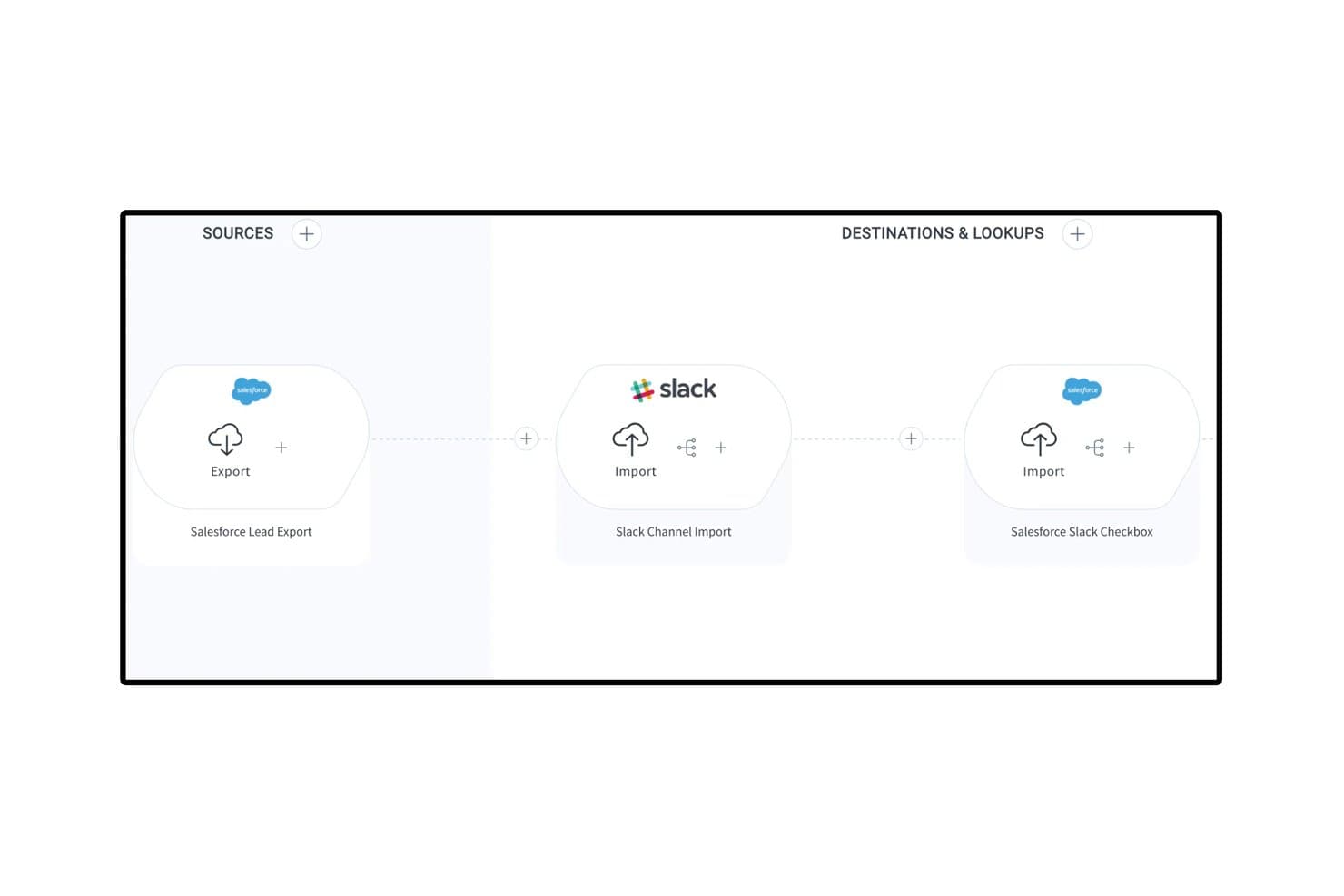
Celigo connects Salesforce and Slack in automated lead engagement flows. Celigo is an iPaaS and automation platform that connects your GTM stack through 1,000+ pre-built connectors, enabling bi-directional data sync, lead lifecycle automation, and quote-to-cash workflows across CRM, marketing automation, ERP, and billing systems.
Who Is Celigo Best For?
Celigo is a strong fit for RevOps and systems teams managing a broad, multi-tool GTM stack that needs reliable, bi-directional data sync across CRM, ERP, and billing systems.
Why I Picked Celigo
Celigo earns its spot on my shortlist because it's the best option I've found for syncing data across a sprawling GTM stack without building custom code for every connection. With 1,000+ pre-built, bi-directional connectors, I can link Salesforce, HubSpot, NetSuite, and Stripe in a single flow, keeping leads, accounts, and revenue data consistent across every system. I also rely on Celigo Ora, its embedded AI assistant, to build and troubleshoot those flows in plain language, which cuts setup time significantly. The AI error management layer auto-resolves roughly 96% of integration exceptions, so data pipelines don't quietly break between systems.
Celigo Key Features
- Quote-to-cash automation: Connects your CRM, ERP, and billing systems to automate the full quote, order, and invoicing process end to end.
- Visual low-code flow builder: A drag-and-drop interface for building multi-step, conditional integration workflows without writing custom code.
- Sandbox environment with environment promotion: Test and validate integration changes in a sandbox before promoting them to production, with full change tracking.
- Data warehouse sync: Native connectors to Snowflake, BigQuery, and Redshift move GTM data into your analytics environment for downstream reporting.
Celigo Integrations
Celigo offers 300+ pre-built connectors, including Salesforce, HubSpot, NetSuite, Stripe, Marketo, Snowflake, BigQuery, Zendesk, Gainsight, and Slack. It also supports custom connectivity through HTTP, FTP, JDBC, GraphQL, WebSockets, and APIs.
Pros and Cons
Pros:
- Connects 1,000+ GTM and back-office tools
- Visual builder supports low-code automation flows
- AI resolves most integration errors automatically
Cons:
- No built-in lead-to-account fuzzy matching
- No native revenue dashboards or forecasting
Learn more about Celigo: Best for integrating complex tech stacks
- Free plan available; 14-day free trial
- From $19.99/month (billed annually)
Visit WebsiteCustomer Rating:4.7/5
Zapier’s no-code automation platform connects apps and automates workflows. Zapier is a no-code automation platform that connects apps, triggers actions across systems, and moves data between tools through workflow-based automations called Zaps.
Who Is Zapier Best For?
Zapier is a strong fit for RevOps teams managing fragmented tech stacks who need to automate data flows between tools without relying on engineering resources.
Why I Picked Zapier
Zapier earns its spot on my shortlist because no other tool handles cross-system automation at this breadth without requiring a developer. I particularly like the Paths feature, which lets me build conditional logic so a single trigger can route data differently depending on field values in my CRM. Zapier Canvas also lets my team map out entire automation architectures visually before building them, which is a real asset when documenting complex revenue workflows.
Zapier Key Features
- Zapier Tables: A built-in database that stores, filters, and triggers automations based on record changes.
- Formatter: A native data transformation tool that cleans, reformats, and manipulates field values before passing them to connected apps.
- Zap history: A run log that records every automation attempt, its status, and the data processed at each step.
- AI Zap builder: A copilot that generates a Zap structure from a plain-language description of the automation you need.
Zapier Integrations
Zapier offers 9,000+ app integrations, including Salesforce, HubSpot, Marketo, ActiveCampaign, Salesloft, Slack, Google Sheets, Mailchimp, Airtable, and Calendly. Webhooks and an API are available for custom integrations.
Pros and Cons
Pros:
- Error notifications pinpoint exact failure steps
- Webhooks handle custom APIs without code
- Largest app catalog at 8,000+ connections
Cons:
- Multi-branch logic requires higher tiers
- Multi-step Zaps consume tasks per step
Learn more about Zapier: 3Best for analyzing team interactions
Gong
- Free demo available
- Pricing upon request
Visit WebsiteCustomer Rating:4.7/5
Gong analyzes calls, emails, and meetings to deliver revenue and deal insights. Gong is a revenue intelligence platform that captures and analyzes customer-facing interactions across calls, emails, and meetings to surface deal insights, pipeline signals, and rep coaching data for sales operations teams.
Who Is Gong Best For?
Gong is a strong fit for B2B sales organizations where RevOps teams need visibility into what's actually happening across rep conversations to manage the pipeline and forecast accurately.
Why I Picked Gong
Gong earns its spot on my shortlist because no other tool in this space analyzes team interactions at the depth it does. I rely on Gong's Revenue Graph to connect CRM data, call recordings, and email signals into a single picture of pipeline health. What I find most useful is how its AI flags execution risks inside live deals before they miss forecast, without me needing to manually review calls. It turns interaction data into actionable insights for your revenue engine.
Gong Key Features
- Engagement timeline: View every buyer touchpoint across calls, emails, and meetings in a single account-level activity log.
- Forecast roll-ups: Collect structured forecast submissions from reps and managers with AI-generated overlays for comparison.
- Topic trackers: Monitor specific keywords, competitor names, or objection themes across all recorded conversations at scale.
- Scorecard builder: Define rep evaluation criteria and score calls against them to standardize coaching across the team.
Gong Integrations
Integrations include Salesforce, HubSpot, Microsoft Dynamics 365, Zoom, Microsoft Teams, Google Meet, Slack, Outreach, Salesloft, Aircall, Dialpad, and RingCentral. Gong also offers APIs for CRM, calls, transcripts, users, and engagement data.
Pros and Cons
Pros:
- Topic tracking monitors competitor mentions at scale
- Conversation data enriches pipeline reporting
- AI flags at-risk deals automatically
Cons:
- Forecast tools require significant admin setup
- Limited value without high call volume
Learn more about Gong: Best for building code-less custom automations
- Free plan + free demo available
- From $75/month
Visit WebsiteCustomer Rating:4.7/5
Workato automates revenue workflows by connecting sales, marketing, and CS systems. Built for enterprise-grade automation, Workato is a no-code integration platform that connects sales, marketing, and customer success systems through event-driven workflows, conditional logic, and a shared automation layer across the full revenue stack.
Who Is Workato Best For?
Workato is well-suited to RevOps operations managers and systems architects who own the automation layer across a complex, multi-tool go-to-market stack.
Why I Picked Workato
Workato earns its spot on my shortlist because it handles genuinely complex automation logic without requiring a developer. I rely on its formula editor to transform and map data between systems mid-workflow, like reformatting lead source values from Marketo before they write to Salesforce fields. I also like that Workato's AI-assisted recipe builder can generate automation logic from a plain-language description, which cuts the time it takes to go from a process idea to a live, running workflow.
Workato Key Features
- Pre-built recipe templates: A community library of automation templates lets you deploy common RevOps workflows without building from scratch.
- Real-time event triggers: Workato fires automations the moment a defined condition is met, like a deal stage change in Salesforce.
- WorkBot: A native chatbot for Slack and Microsoft Teams that lets team members trigger automations directly from their messaging app.
- Recipe lifecycle management: Built-in dev, test, and production environments let you validate automations before going live.
Workato Integrations
Workato offers 1,200+ pre-built connectors, including Salesforce, HubSpot, Marketo, NetSuite, Snowflake, Slack, Microsoft Teams, Workday, Jira, and Zuora. It also supports custom API connections through universal connectors and provides an API for custom integrations.
Pros and Cons
Pros:
- Enterprise-grade governance and audit controls
- Massive library of pre-built connectors
- No-code recipe builder for complex workflows
Cons:
- Task-based pricing scales up quickly
- Steep administrative learning curve
Learn more about Workato: Best for unifying marketing and sales
- Free plan available
- From $45/user/month (billed annually)
Visit WebsiteCustomer Rating:4.4/5
HubSpot offers an analytics dashboard to track onboarding status, tasks, and completion timeline. HubSpot is a CRM platform that brings together marketing, sales, and customer service tools with built-in automation, pipeline management, and reporting across the full customer journey.
Who Is HubSpot Best For?
HubSpot is a strong fit for small to mid-sized businesses that want a single platform to manage marketing, sales, and customer success teams without stitching together multiple tools.
Why I Picked HubSpot
HubSpot earns its spot on my shortlist because it's one of the few platforms where marketing and sales truly operate from the same data set, not synced copies of it. I like that marketing-qualified leads flow directly into sales sequences without any manual handoff, and that revenue attribution reporting connects campaign performance to closed deals in one view. HubSpot's shared contact timeline also means sales reps can see every marketing touchpoint before their first outreach, which cuts down on the usual back-and-forth between teams.
HubSpot Key Features
- Workflow automation: Build multi-step workflows triggered by CRM property changes, form submissions, or deal stage updates.
- Deal pipeline management: Create and customize multiple pipelines to track deals across different sales process or product lines
- Predictive lead scoring: AI-based scoring that ranks contacts by their likelihood to convert using behavioral and demographic signals.
- Custom report builder: Pull data across contacts, deals, companies, and activities into a single configurable report.
HubSpot Integrations
HubSpot's App Marketplace has over 2,000 apps, including marketplace integrations with Salesforce, Slack, Google Workspace, Microsoft 365, Zoom, Shopify, Snowflake, Gong, DocuSign, and Aircall. It also connects with Zapier, and an API is available for custom integrations.
Pros and Cons
Pros:
- Automation workflows trigger across multiple hubs
- Built-in revenue attribution reporting
- Shared CRM database across all revenue teams
Cons:
- Custom object limits on lower plans
- Advanced reporting locked behind higher tiers
Learn more about HubSpot: Best for enriching operations
- Free trial available
- Pricing upon request
Visit WebsiteCustomer Rating:4.4/5
ZoomInfo Operations helps RevOps teams enrich data and automate lead routing. Built specifically for RevOps teams, ZoomInfo Operations covers CRM data enrichment, deduplication, lead routing, and account scoring across the full go-to-market stack.
Who Is ZoomInfo Best For?
ZoomInfo Operations is best suited to B2B sales and marketing operations teams that rely on large contact databases and need consistent, trustworthy data across multiple go-to-market systems.
Why I Picked ZoomInfo
ZoomInfo Operations earns its spot on my shortlist because of how it handles enrichment at scale. My team uses the automated enrichment triggers to update records the moment a data point changes, rather than waiting for scheduled batch runs. I also like the lead-to-account matching engine, which uses firmographic and behavioral signals to map contacts to the right accounts automatically.
ZoomInfo Key Features
- Intelligent lead routing: Routes inbound leads to the correct sales rep or queue using territory, account ownership, and firmographic rules.
- Account scoring: Scores accounts using fit and intent signals to help prioritize outreach across your pipeline.
- CRM data health reporting: Provides dashboards showing record completeness, decay rates, and enrichment coverage across your database.
- Deduplication rules engine: Detects and merges duplicate records using fuzzy matching logic across name, domain, and contact fields.
ZoomInfo Integrations
Integrations include Salesforce, HubSpot, Microsoft Dynamics 365, Marketo, Oracle Eloqua, Pardot, Outreach, Salesloft, Pipedrive, Bullhorn, Zoho CRM, DocuSign, and G2. ZoomInfo also supports data warehouse connections with Snowflake, Databricks, AWS, and Google Cloud. An API is available for custom integrations.
Pros and Cons
Pros:
- Best direct-dial mobile number coverage
- Org charts reveal decision-maker hierarchies
- No-code workflows with strong deduplication
Cons:
- Rigid auto-renewal and cancellation terms
- Stale records in the mid-market and SMB segments
Learn more about ZoomInfo: Best for intent-driven prospecting
- 14-day free trial + free plan available
- From $49/user/month (billed annually)

Apollo.io combines B2B data, intent signals, sales engagement, and analytics. Built for go-to-market teams, Apollo.io brings together a B2B contact database, intent data, sales engagement, and pipeline analytics in one connected platform.
Who Is Apollo.io Best For?
Apollo.io suits RevOps and sales ops leaders who need to standardize prospecting data and outreach processes across a growing sales team.
Why I Picked Apollo.io
Apollo.io earns its spot on my shortlist because of how precisely it ties intent signals to prospecting action. I use Apollo's buying intent filters alongside job change alerts to time outreach around real trigger events, not arbitrary cadences. My team can then build automated sequences that only fire when an account crosses a signal threshold, keeping our pipeline focused on accounts most likely to convert now.
Apollo.io Key Features
- A/B testing for sequences: Test subject lines and message variants across active sequences to identify which version will drive revenue and replies.
- Territory assignment rules: Automatically assign new accounts to reps based on firmographic attributes like industry, company size, or region.
- Power dialer: Make back-to-back outbound follow-up calls from a prospect queue inside Apollo, with automatic CRM logging after each call.
- ICP scoring model: Score contacts and accounts against a custom ideal customer profile using firmographic and technographic filters.
Apollo.io Integrations
Integrations include Salesforce, HubSpot, Pipedrive, Zoho CRM, Gmail, Microsoft Outlook, Marketo, Chili Piper, Clay, and Census. Apollo also connects with 50+ tools through its integrations marketplace, and an API is available for custom integrations.
Pros and Cons
Pros:
- Sequences support A/B testing and conditional logic
- Job change alerts surface champion movements
- 65+ filters for building targeted prospect lists
Cons:
- Intent data accuracy is inconsistent
- Credit system pushes frequent plan upgrades
Learn more about Apollo.io:

Clari helps revenue teams forecast, inspect pipelines, and analyze revenue with AI. Clari is a revenue operations platform built to streamline AI-powered forecasting, pipeline inspection, CRM activity capture, and revenue analytics across sales, marketing, customer success, and finance.
Who Is Clari Best For?
Clari is a strong fit for mid-market to enterprise B2B companies with complex sales cycles that need tighter forecasting accuracy across multiple revenue teams.
Why I Picked Clari
I picked Clari as one of the best because its AI-driven forecasting rolls up across teams, product lines, geographies, and segments automatically, without anyone touching a spreadsheet. I like how Clari's activity autocapture maps emails, calls, and meetings to the right accounts and opportunities in the CRM, keeping pipeline data current without relying on rep input. That means my team gets forecast submissions that reflect reality, not what reps remember to log.
Clari Key Features
- Revenue cadence management: Run structured forecast calls and pipeline reviews using live CRM data pulled directly into Clari's meeting workflow.
- Deal inspection: Surface potential churn and at-risk deals based on engagement signals, stage progression, and activity gaps across the full pipeline.
- Conversation intelligence: Record, transcribe, and analyze sales calls to track talk patterns, competitor mentions, and coaching moments.
- Pipeline waterfall analysis: Visualize how the pipeline is created, converted, or lost across any time period or team segment.
Clari Integrations
Integrations include Salesforce, HubSpot, Slack, Microsoft Teams, Zoom, Google Workspace, Outreach, Salesloft, Gong, and Snowflake. An API is available for custom integrations and data ingestion.
Pros and Cons
Pros:
- Automatic activity capture reduces manual data entry and CRM updates
- Forecast accuracy improves 20–30% after adoption
- Time-series pipeline view tracks historical trends
Cons:
- Platform updates can reset custom views
- Premium pricing limits small business adoption
Learn more about Clari: 9Best for customizable go-to-market
Clay
- Free plan + 14-day free trial + free demo available
- From $167/month (billed annually)

Clay offers a GTM platform for data enrichment, lead scoring, and workflow automation. Clay is a GTM data enrichment and workflow automation platform that pulls from 100+ data providers to build custom prospecting tables, lead scoring models, and outbound sequences without writing code.
Who Is Clay Best For?
Clay is a strong fit for GTM engineers and RevOps teams at high-growth B2B companies who need to build custom, data-heavy outbound workflows without relying on engineering.
Why I Picked Clay
Clay earns its spot on my shortlist because no other tool in this space lets me build a fully custom GTM data layer the way it does. I use Clay's waterfall enrichment across 150+ data providers to fill contact and account fields that a single provider would miss. I can also layer in AI web research to pull signals my best reps would otherwise find manually, then route the enriched records directly into my CRM or trigger actions in downstream tools, all inside one workflow.
Clay Key Features
- No-code table builder: Build enrichment and outbound workflows in a spreadsheet-style interface without writing any code.
- Claygent: An AI agent that browses the web autonomously to research prospects and pull custom signals at scale.
- Personalized outreach copy generation: Use enriched data fields to auto-generate tailored messaging for each prospect directly inside Clay.
- Prospecting list builder: Source and build targeted lead lists from web data and filters inside the platform without a separate tool.
Clay Integrations
Integrations include Salesforce, HubSpot, Pipedrive, Outreach, Salesloft, Airtable, Google Sheets, and Snowflake. APIs and webhooks are available for custom integrations.
Pros and Cons
Pros:
- AI agent automates manual prospect research
- Unlimited seats on every paid plan
- Waterfall enrichment pulls from 150+ providers
Cons:
- Fast data burn exhausts credits
- Credit-based billing makes costs unpredictable
Learn more about Clay: Best for auto-capturing revenue activities
- Free demo available
- Pricing upon request

People.ai uses AI to capture sales activity and deliver revenue insights. People.ai is an AI-driven revenue intelligence platform that automatically captures sales activity data, maps it to CRM records, and surfaces deal insights, forecast signals, and rep performance patterns across your go-to-market teams.
Who Is People.ai Best For?
People.ai is a strong fit for enterprise sales organizations that run large field teams and need reliable activity data without depending on manual CRM input.
Why I Picked People.ai
I picked People.ai as one of the best because it captures every email, call, and meeting automatically and maps that activity directly to the right account, opportunity, and contact in Salesforce, without requiring reps to log anything manually. What I find genuinely useful is the account engagement score, which shows exactly how much activity is happening across each deal and flags relationships going cold before they drop out of the forecast.
People.ai Key Features
- Pipeline health monitoring: Flags deals at risk of slipping based on actual engagement patterns across emails, calls, and meetings, before they miss a forecast call.
- Waterfall chart reporting: Visualizes exactly what moved in your forecast, including slipped deals, new pipeline, wins, and losses, for QBR and board-level reporting.
- Rep performance benchmarking: Identifies which activity patterns and engagement behaviors your top reps use so you can coach the rest of the team against a real standard.
- Multi-threading detection: Surfaces single-threaded deals and missing stakeholder coverage so you can act before a gap becomes a lost deal.
People.ai Integrations
Integrations include Salesforce, Microsoft Dynamics 365, Oracle, Gmail, Google Calendar, Outlook, Zoom, Slack, Webex, Snowflake, Tableau, Power BI, Outreach, Salesloft, and Clari. An API is available for custom integrations.
Pros and Cons
Pros:
- Relationship maps show stakeholder connections visually
- Detects competitor mentions in sales conversations
- Surfaces deal with visibility without manual CRM updates
Cons:
- Limited dashboard customization for individual reps
- Highly dependent on data cleanliness
Learn more about People.ai:
Outras plataformas de automação de RevOps
Eis algumas opções adicionais de plataformas de automação de RevOps que não entraram na minha lista restrita, mas que ainda vale a pena conhecer:
- 11LeanDataBest for automated lead routing
- 12GainsightBest for account health tracking
- 136senseBest for AI-driven intent data integration
- 14CognismBest for GDPR-compliant contact data sourcing
- 15DefaultBest for automated quota compliance
- 16Salesforce Best for sales lifecycle management
- 17FullcastBest for territory planning automation
- 18DealHubBest for guided selling configuration
- 19ForecastioBest for predictive deal forecasting
- 20WarmlyBest for real-time buyer identification
Critérios de seleção de plataformas de automação de RevOps
Ao selecionar as melhores plataformas de automação de RevOps para incluir nesta lista, considerei necessidades e dificuldades comuns dos compradores, como ligar sistemas de vendas e marketing que não comunicam entre si e reduzir o trabalho manual e repetitivo com dados. Utilizei também o seguinte modelo para manter a minha avaliação estruturada e justa:
How I Evaluate RevOps Automation Platforms
I split my evaluation into two layers: baseline capabilities like lead routing and CRM data sync, and the differentiators that make one platform the right fit for a specific RevOps team.
Core Functionality (Table Stakes For This List)
When I'm selecting tools for my list, I rank each one on a scale from 0 (does not offer the functionality) to 5 (excels in this area) for each core functionality listed below. Then, I calculate the tool's total score into a percentage. Each tool needs to achieve a minimum total score of 75% to be considered for inclusion.
- Lead-to-Account Automation: I check whether a platform can match inbound leads to existing accounts and route them by territory, segment, or hierarchy—not just round-robin across a rep pool.
- Revenue Data Orchestration: The tool should sync data bi-directionally across CRM, MAP, billing, and warehouse systems so RevOps teams aren't reconciling pipeline numbers in spreadsheets.
- GTM Workflow Automation: I look for a no-code or low-code builder that handles real multi-step workflows—like triggering a CS handoff when a deal closes and updating the billing system simultaneously.
- Territory & Quota Management: Platforms that support dynamic territory carving and quota distribution tied to GTM planning cycles score higher than those limited to static list uploads.
- Data Hygiene & Enrichment: I evaluate how the platform handles deduplication, normalization, and enrichment—especially whether it can keep CRM records clean continuously rather than as a one-time batch job.
- Pipeline & Forecasting Analytics: Beyond basic dashboards, I look for deal inspection, forecast roll-ups, and the ability to flag at-risk deals based on pipeline activity signals.
Once I have a list of tools that meet this criteria, I consider what sets each platform apart.
Differentiating Factors (What Sets Vendors Apart)
Here's how I compare and contrast different vendors:
Standout Features
AI-powered insights are a major differentiator—I look for platforms that flag at-risk deals or recommend next-best actions based on activity patterns, not just static reports. Revenue attribution modeling also matters when teams need to trace marketing spend back to closed-won revenue across multiple touchpoints. Sandbox environments and version control round things out. Being able to test a new routing rule or workflow change without disrupting live GTM processes is something I always check for.
Beyond Features
Tech stack fit is one of the first things I evaluate. A platform's depth of integration with your primary CRM—whether that's Salesforce, HubSpot, or Dynamics—shapes how much value you'll actually get from it. Pricing model matters too, since per-user pricing scales very differently than per-workflow or usage-based models as your GTM team grows. I also check for SOC 2 Type II certification and role-based access controls, especially when RevOps teams handle sensitive pipeline and billing data across multiple departments.
Como escolher plataformas de automação de RevOps
É fácil perder-se em listas extensas de funcionalidades e estruturas de preços complexas. Para o ajudar a manter o foco enquanto percorre o seu processo específico de seleção de software, eis uma lista de verificação dos fatores a ter em conta:
| Fator | O que considerar |
| Escalabilidade | A plataforma consegue suportar o crescimento previsto do número de utilizadores e do volume de dados nos próximos dois a três anos sem aumentos significativos de preços ou limitações do sistema? |
| Integrações | Permite ligar nativamente à sua infraestrutura tecnológica existente — CRM, ferramentas de análise, marketing e finanças — ou precisará de soluções alternativas ou sincronizações manuais? |
| Personalização | A plataforma permite adaptar os fluxos de trabalho aos processos específicos da sua equipa ou fica limitado a modelos ou acionadores rígidos? |
| Facilidade de utilização | A interface do utilizador é compreensível para utilizadores que não são engenheiros? As suas equipas precisarão de formação extensa para criar ou gerir automatizações? |
| Implementação e integração inicial | Que tipo de ajuda está disponível para começar a utilizar a plataforma — apoio dedicado à integração inicial, ferramentas de migração, materiais de formação ou bibliotecas de modelos? |
| Custo | Existem níveis de preços claros que correspondem às suas necessidades atuais e futuras à medida que cresce? Esteja atento a custos ocultos relacionados com integrações, utilizadores ou volume de tarefas automatizadas. |
| Medidas de segurança | A plataforma disponibiliza permissões baseadas em funções, registos de auditoria, SSO e encriptação de dados? Como trata informações sensíveis sobre receitas e clientes? |
| Disponibilidade do apoio | Com que rapidez e através de que canais pode obter ajuda durante a implementação ou em caso de indisponibilidade — chat, e-mail, telefone ou um gestor de conta dedicado? |
O que são as plataformas de automatização de RevOps?
As plataformas de automatização de RevOps são soluções de software que fornecem orquestração de ponta a ponta para os processos de operações de receita nos sistemas de vendas, marketing e sucesso do cliente. Estas plataformas ajudam a sua equipa a sincronizar dados, acionar fluxos de trabalho e garantir a consistência dos processos. Ao reduzirem o trabalho manual e eliminarem os silos, as plataformas de automatização de RevOps proporcionam-lhe uma visibilidade mais clara do pipeline, uma melhor qualidade dos dados e um motor de receita mais previsível.
Funcionalidades
Ao selecionar plataformas de automatização de RevOps, tenha em atenção as seguintes funcionalidades principais:
- Automatização de fluxos de trabalho: Automatize processos de várias etapas nas áreas de vendas, marketing e sucesso do cliente sem intervenção manual, garantindo uma execução consistente e reduzindo o erro humano.
- Integração de dados: Ligue e sincronize informações ao longo do ciclo de vida do cliente provenientes de CRM, plataformas de automatização de marketing, sistemas financeiros e ferramentas de suporte.
- Acionadores condicionais: Configure ações baseadas em lógica que ativem fluxos de trabalho ou alertas com base em alterações aos dados, na evolução do pipeline ou nas interações entre sistemas.
- Permissões baseadas em funções: Controle quem pode aceder, editar ou implementar diferentes automatizações, garantindo que apenas os utilizadores autorizados fazem alterações aos processos críticos de receita.
- Registos de auditoria: Acompanhe todas as automatizações, alterações aos fluxos de trabalho e ações dos utilizadores, proporcionando transparência e apoiando a conformidade ou a resolução de problemas.
- Mapeamento de campos personalizados: Defina e sincronize campos únicos entre sistemas, para que a sua equipa não fique limitada a estruturas de dados básicas disponíveis de origem.
- Acesso à API: Expanda a funcionalidade da plataforma ou crie integrações personalizadas, permitindo aos programadores adaptar o sistema aos requisitos específicos da sua equipa.
- Processamento em lote: Mova ou atualize grandes volumes de registos de uma só vez, o que é útil para migrações de dados, limpeza de dados ou alterações importantes aos processos.
- Gestão de erros e alertas: Identifique automaticamente automatizações ou sincronizações falhadas e notifique os utilizadores para que os problemas possam ser resolvidos rapidamente, antes de afetarem as operações de receita.
Funcionalidades comuns de IA
Para além das funcionalidades padrão das plataformas de automatização de RevOps acima indicadas, muitas destas soluções estão a incorporar IA com funcionalidades como:
- Previsão preditiva: Utiliza aprendizagem automática para analisar dados históricos de vendas e tendências atuais do pipeline, ajudando as equipas a prever os resultados de receita e a identificar negócios em risco antes de estes falharem.
- Deteção de intenção: Monitoriza sinais provenientes dos dados de interação digital para identificar as contas ou os contactos com maior probabilidade de conversão, dar prioridade ao contacto e detetar grupos de compradores ocultos.
- Enriquecimento automatizado de dados: Atualiza e completa continuamente os registos de contactos ou empresas, obtendo e validando informações provenientes de bases de dados públicas e proprietárias.
- Recomendações inteligentes de fluxos de trabalho: Sugere ajustes aos processos ou novas automatizações com base nos padrões de utilização, nas métricas de desempenho e nos estrangulamentos observados no seu motor de receita.
- Deteção de anomalias: Analisa a atividade do pipeline e os dados dos processos para assinalar irregularidades, como quedas súbitas nas taxas de conversão ou aumentos inesperados nas transições entre fases dos negócios, para que as equipas possam reagir rapidamente.
Benefícios
A implementação de plataformas de automatização de RevOps proporciona vários benefícios à sua equipa e à sua empresa. Eis alguns dos benefícios que pode esperar:
- Equipas de receita alinhadas: Coloca as equipas de vendas, marketing e sucesso do cliente em sintonia, automatizando os fluxos de trabalho e a troca de dados.
- Maior visibilidade do pipeline: Centraliza os processos e os dados em tempo real, para que as operações e a liderança saibam sempre em que ponto se encontram os negócios e as contas.
- Execução consistente dos processos: Minimiza as tarefas manuais e os erros através de fluxos de trabalho automatizados e baseados em regras, bem como da validação de campos.
- Melhor qualidade dos dados: Limpa, mapeia e enriquece os registos entre plataformas para garantir relatórios e previsões precisos e fiáveis.
- Resolução mais rápida de problemas: Fornece registos de auditoria, notificações de erros e alertas automatizados, para que as equipas detetem e corrijam rapidamente as falhas nos processos.
- Maior agilidade: Permite-lhe atualizar automatizações, criar novos fluxos de trabalho e adaptar processos sem esperar pelos recursos de engenharia ou de TI.
- Operações de receita previsíveis: Apoia a previsão e a identificação de riscos com automatização padronizada e, quando disponível, análises baseadas em IA.
Custos e preços
A seleção de plataformas de automatização de RevOps requer uma compreensão dos vários modelos de preços e planos disponíveis. Os custos variam consoante as funcionalidades, a dimensão da equipa, os complementos e outros fatores. A tabela abaixo resume os planos comuns, os respetivos preços médios e as funcionalidades normalmente incluídas nas plataformas de automatização de RevOps:
Tabela de comparação de planos para plataformas de automatização de RevOps
| Tipo de plano | Preço médio | Funcionalidades comuns |
| Plano gratuito | $0 | Automatização limitada de fluxos de trabalho, integrações básicas, número restrito de utilizadores e apoio da comunidade. |
| Plano pessoal | $20-$50/utilizador/mês | Automatizações individuais, integrações padrão, armazenamento moderado, relatórios básicos e apoio por e-mail. |
| Plano empresarial | $50-$120/utilizador/mês | Fluxos de trabalho com várias etapas, acesso à API, integrações avançadas, painéis personalizáveis, permissões baseadas em funções e apoio por chat em direto. |
| Plano empresarial de grande dimensão | $120-$250/utilizador/mês | Automatizações ilimitadas, integração inicial dedicada, segurança avançada, registos de auditoria, apoio prioritário e garantias de SLA. |
Perguntas frequentes sobre plataformas de automatização de RevOps
Eis algumas respostas a perguntas comuns sobre plataformas de automatização de RevOps:
As plataformas de automatização de RevOps requerem conhecimentos técnicos para serem configuradas?
Não, a maioria das plataformas de automatização de RevOps foi concebida para que os utilizadores empresariais possam criar fluxos de trabalho e gerir integrações através de interfaces sem código ou com pouco código. Poderá necessitar da ajuda da equipa de TI para configurações complexas de API ou personalizações avançadas, mas a gestão diária dos processos é normalmente acessível a utilizadores sem conhecimentos técnicos.
As plataformas de automatização de RevOps podem integrar-se com ferramentas de CRM e de automatização de marketing?
Sim, quase todas as plataformas de automatização de RevOps oferecem integrações pré-construídas para CRMs e ferramentas de automatização de marketing populares. Procure conectores nativos compatíveis com os seus sistemas atuais, para evitar atrasos ou custos adicionais associados ao desenvolvimento personalizado.
Como é que as plataformas de automatização de RevOps melhoram a precisão dos dados?
As plataformas de automatização de RevOps sincronizam, limpam e normalizam os dados em toda a sua pilha tecnológica de receitas, reduzindo os registos duplicados, os erros de introdução manual e as informações desatualizadas. As atualizações automáticas e as regras de validação ajudam a manter os seus dados fiáveis para efeitos de elaboração de relatórios e tomada de decisões.
As plataformas de automatização de RevOps são adequadas para equipas pequenas?
Sim, muitas plataformas oferecem planos flexíveis que se adaptam a equipas pequenas e empresas em fase inicial. Comece com a automatização dos fluxos de trabalho essenciais e as integrações e, em seguida, adicione funcionalidades à medida que a sua equipa e a complexidade aumentarem. Certifique-se de que o preço inicial e os termos do contrato não o comprometem com mais do que aquilo de que necessita.
O que devo considerar ao avaliar a segurança de uma plataforma de automatização de RevOps?
Procure permissões baseadas em funções, registos de auditoria, opções de SSO, encriptação de dados e certificações de conformidade relevantes para o seu setor. Pergunte aos fornecedores sobre o processo de notificação de violações, as políticas de retenção de dados e as opções para gerir dados empresariais e de clientes sensíveis.