


Most of the tools in a revenue stack are easy to put in a plan. You know next year's headcount, you know the price per user, and the line item mostly writes itself. The AI line is harder. What it costs depends on how many follow-up emails your reps draft with AI, how many customer calls get summarized, how often an agent researches an account before a meeting, and which models do that work. None of those numbers live in your HR system.
That gap is getting harder to ignore. In Creatio's 2026 State of Enterprise AI Adoption report, a survey of 608 IT and business decision-makers, 78% said they expect to be scaling AI agents across departments or use cases within twelve months. The same report shows the budget question growing as companies mature. Commercial models and budgets were named as a barrier to broader adoption by 24% of organizations at the earliest stage and by 35% of the most advanced ones.
I'd add one thing before anyone opens a spreadsheet. One of the biggest risks I see in AI adoption is introducing agents into existing processes without reconsidering how those processes should run. If reps still coordinate every step by hand and copy information between disconnected systems, much of AI's potential stays untapped. For RevOps, that has a practical consequence: a credit forecast is only as good as the workflow it describes.
This guide covers how AI credits work in Creatio, what makes a revenue workflow use more or fewer of them, how the AI packages are structured, and how to build a forecast and keep to it once agents are live.
Key Takeaways
- An AI credit is Creatio's common unit for metered AI work, shared across supported models, providers and channels.
- One request can use several credits, because an agent may make more than one AI call to finish a task. Calls to other business systems don't use credits on their own.
- Unused Creatio AI credits roll over from month to month and across subscription years within the contracted term.
- Forecast from revenue activities and how often they run, measure real usage in a test environment, then compare actual usage with the plan every month.
What Is an AI Credit in Creatio?
An AI credit is the standardized unit Creatio uses to measure how much of its supported AI services an organization consumes. Each time an AI feature performs a metered operation, it uses credits. Drafting a personalized sales email, summarizing a customer meeting, extracting terms from a contract and answering a question from your knowledge base are all examples. The same unit covers the AI in Creatio AI CRM and in the custom applications and agents companies build on the Creatio platform, from a rep's personal agent to an enterprise agent that runs a multi-step process.
Credits sit on top of tokens, the units of text a model actually processes. Input tokens are everything the model reads: your prompt, the account history pulled from the CRM, an attached document, the conversation so far. Output tokens are what it writes back. Token counts swing widely from task to task, and each model has its own token rates. Credits roll all of that into a single usage figure you can plan and monitor in one place. They aren't a fixed conversion from tokens, so a thousand tokens on a lightweight model and a thousand on a reasoning model will usually use a different number of credits.
First forecasts often go wrong by treating a request and a credit as the same thing. Say a rep asks an agent to prepare for tomorrow's renewal call. To answer, the agent may classify the request, retrieve the relevant information, analyze a contract, draft talking points and check the result. Each of those can be a separate model call, and each one adds to the total. So if you plan one credit per request, your forecast will be too low.
Why One Credit Allowance Across Models Matters for Budgeting
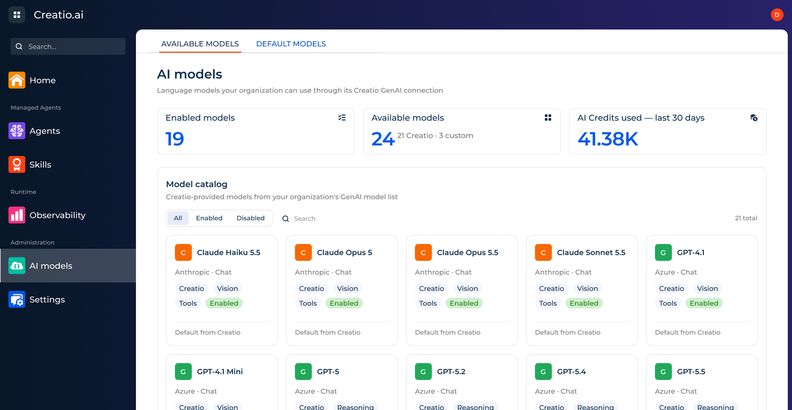
Creatio supports several AI model providers through the same credit framework. Depending on your package and setup, you can run models from OpenAI, Google and Anthropic for different tasks, and all of them draw from one allowance. There's no separate balance to buy, track or reconcile for each provider. The allowance also reaches past text, covering voice, document and image understanding, speech-to-text and text-to-speech.
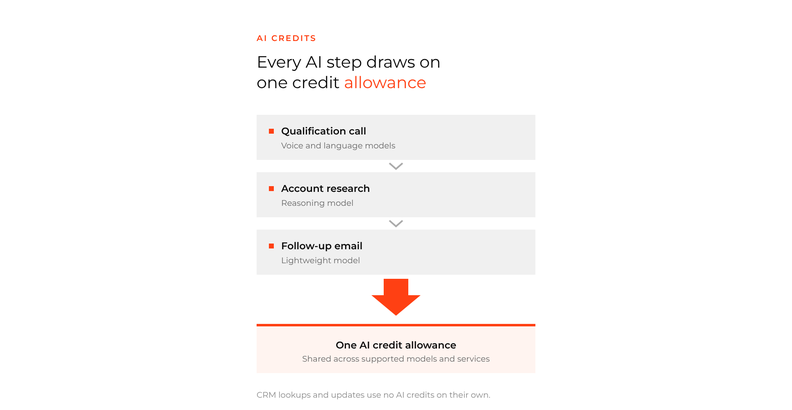
Picture an inbound call from a prospect. A voice agent turns the caller's speech into text, a language model works out what they're asking for, the agent finds the facts it needs, and the answer is spoken back. Different providers may power different steps of that one conversation. Each step has its own rate, and every metered AI service in the call draws on the same pool of credits.
For me, the budgeting case for this comes from how fast the model market moves. Any time you wake up in the morning, there's a new benchmark-breaking model. I don't think a software company can match what the frontier model providers are investing, and Creatio doesn't try to. Its approach is to adopt best-of-breed models and keep the architecture open, so customers can ride each new wave as it arrives.
For a RevOps team, that means moving a workflow to a newer or cheaper model happens inside the plan you already have. You change the model selected for the agent, and the credits keep coming from the same allowance.
What Makes a Revenue Workflow Use More or Fewer AI Credits
Four things decide how many credits a piece of revenue work uses, and RevOps can influence all of them.
Model choice comes first. Lightweight models handle routine classification, extraction and drafting well, which covers a lot of daily sales work: tagging inbound leads, pulling fields out of an email signature, writing a first-draft follow-up. More capable reasoning models earn their cost on complex analysis, such as working out why a strategic deal has stalled across six months of emails, meetings and notes. Put the same task on a different model and the credits it uses can change noticeably.
Then there's volume, meaning how much the model reads and writes. Long prompts, long conversation histories, large documents and knowledge pulled in from the CRM all add processing, and so does a long answer. Input and output can also be metered differently, depending on the model. An account brief built from three years of activity on a large customer will use more than a brief for a lead who signed up last week.
Steps add up as well. Creatio's own teaching example is an agent that handles a customer request in three model calls: it analyzes the request, summarizes the relevant information and generates a recommended response. On OpenAI GPT-4.1 mini, with each call rounded to a whole credit, that comes to about three credits per interaction. The figures are illustrative rather than published rates, but the shape holds: every metered step counts. When the agent calls the CRM or another business system along the way, that call doesn't use credits on its own.
Voice and document work bring extra services into the mix. Speech recognition, speech generation and document or image processing all add usage, which is why voice agents deserve their own line in a forecast. A single qualification call can run several services from start to finish.
There's also a decision that sits above all four. Not every workflow needs the same level of autonomy, and the goal shouldn't be to maximize it at every opportunity. Some revenue workflows should stay human-led, with agents doing the research, analysis and admin while a rep makes the calls that matter. Others can become agent-led, with the agent coordinating several steps and bringing a person in for a decision, an approval or an exception. The right level for each workflow depends on its complexity, its risk and what the business needs from it.
That choice shows up in the budget. An agent-led workflow often runs more AI steps per transaction than one where the agent only suggests a next step, so it tends to use more credits each time it runs. It may also take hours of work off the team. A forecast that records the intended level of autonomy next to each workflow is much easier to defend when someone asks why one line costs more than another.
How Creatio AI Packages Are Structured
Creatio sells AI capacity in packages, and each package is more than a bundle of tokens. Along with an annual allowance of AI credits, it adds AI infrastructure, meaning more platform resources and computing power for complex agents and bigger workloads. Credits are also only one part of running AI. Agents need to be governed, usage needs to be forecast and controlled, and that work happens in Creatio AI Studio, the environment on the Creatio platform where enterprise agents are built, run and governed. Policies, observability and usage controls sit there, next to the agents that use the credits. Each package also includes a level of advisory support. The advisory part ranges from online playbooks in the entry package to hours with AI strategists and engineers, and help designing specific agents, in the larger ones. The reasoning is practical: a strong product doesn't help much if the team using it is new to AI or still redesigning its processes.
| Package | AI credits included per year | Where it fits |
| Start | 500,000 | First AI use cases, on OpenAI models |
| Grow | 1,500,000 | Initial AI adoption and production rollout of priority use cases |
| Accelerate | 4,000,000 | Several AI agents, expanded infrastructure and adoption across teams |
| Scale | 8,000,000 | Enterprise-wide AI adoption, higher-volume workloads and advanced governance |
| Freedom | Custom | Tailored capacity, with bring your own model and cloud or on-premises deployment |
Credits and infrastructure don't have to grow together. Additional AI credits come in blocks of 500,000 that can be added at any package level, so a revenue team that runs more volume through the same agents can buy more usage without moving to a bigger package. That separation matches what buyers say they want. In Creatio's adoption report, 95% of respondents chose an option centered on expanding AI, workflows or workforce capacity without new commercial barriers as adoption grows.
How Credit Rollover Handles the Jump From Pilot to Production
Unused Creatio AI credits roll over from month to month and across subscription years within the contracted term. That matters because AI usage rarely climbs in a straight line.
Financial services tends to move first, and the biggest change I've seen there over the last six to twelve months is that organizations went from interest in testing to full-on execution. They're now using AI in operational processes across the front office and the back office.
Credit usage tends to follow the same path. There are a few quiet months while the first agents are built and tested, then a sharp step up once they go into production, then another step each time a new team or workflow comes on board.
With rollover, the credits you don't use during the build phase are still there after go-live. RevOps doesn't need to spend down a balance before a month or a year closes, and a low burn rate in the first quarter isn't a sign the package was oversized. Because rollover applies within the contracted term, the useful unit for planning is the whole term, with checkpoints at each phase of the rollout.
How to Forecast AI Credits for a Revenue Team
A useful forecast starts with the work your revenue team does. License count says very little on its own, because two teams of the same size can need very different amounts of AI, depending on which activities they hand to agents and how often those activities run.
Begin by listing the workflows you expect to run with AI in the coming year. For a revenue organization, that usually means a mix of enterprise agents, such as one that researches accounts before meetings or drafts quotes, and personal agents that individual reps build for themselves. Next to each workflow, write down the activity it performs and how often it will run. Base the volume on real numbers: how many reps or customer success managers will use it, how many times a day, and how quickly you expect adoption to grow. Then note the model and any extra services each activity needs, because usage varies with both.
The credits per activity are best measured rather than guessed. Run typical scenarios in a test environment that looks like your real work, with long account histories alongside short ones, simple requests alongside messy ones, and the full set of agent steps. The average from those runs is a far better input than any rule of thumb.
Creatio's own planning examples show how the arithmetic works. Take AI-drafted follow-up emails for a sales team of 100 reps. If each rep sends 10 a day over 20 working days, that's 20,000 emails a month. Assume OpenAI GPT-4.1 mini, around 3,000 input tokens and 1,000 output tokens per email, and one model call rounded up to one credit. The team would use about 20,000 credits a month, or 240,000 a year.
Where does a figure like 3,000 input tokens come from? It's everything the model reads to write one email: the agent's instructions, the opportunity and relationship details pulled from the CRM, and the last few messages in the thread. As a rough guide, a token is about three quarters of an English word, so 3,000 tokens is a little over 2,000 words of context. The 1,000 output tokens leave generous room for the draft itself. Your own numbers will differ with how much history the agent pulls in, which is why the test runs matter. Usage analytics in Creatio AI Studio show AI credits, calls and tokens, so you can replace these assumptions with measured values. For a second workflow, add a customer success team of 50 people who each summarize 30 customer conversations a day and get suggested next steps. With roughly 6,000 input tokens and 500 output tokens per summary, also rounded to one credit, that's 30,000 credits a month and 360,000 a year.
These are illustrative calculations, not measured Creatio benchmarks. On those assumptions, the two workflows together need around 600,000 credits a year. That's more than the Start package includes and well inside Grow, which would leave room for multi-step agents and voice later on.
Two adjustments make the forecast more realistic. The first is timing. Revenue work has its own rhythm, and AI usage will follow it, with more quotes, forecast preparation and renewal outreach at the end of a quarter than in its first weeks. Phase each workflow in from its planned go-live month, too, rather than spreading it evenly across the year.
The second is the AI your people already use. Plenty of reps open ChatGPT or Claude on their own because they can't wait for IT to roll out a new agent. When that work moves into personal agents built with Creatio AI Twin, it becomes visible and governed, and it draws on the same credit allowance as everything else. Leave room for it in the plan.
Add the workflows together for a monthly and annual total. Use it to choose a package, then refine it as real usage data comes in.
How to Keep AI Spend on Plan After Go-Live
Once agents are live, a monthly review keeps the forecast honest. Compare actual credits per activity and actual volumes with what you planned, and look closely at any large gap. A higher-than-expected cost per follow-up email usually points to the agent itself, such as longer context or extra steps. Higher volume is often good news, since it means adoption is running ahead of plan.
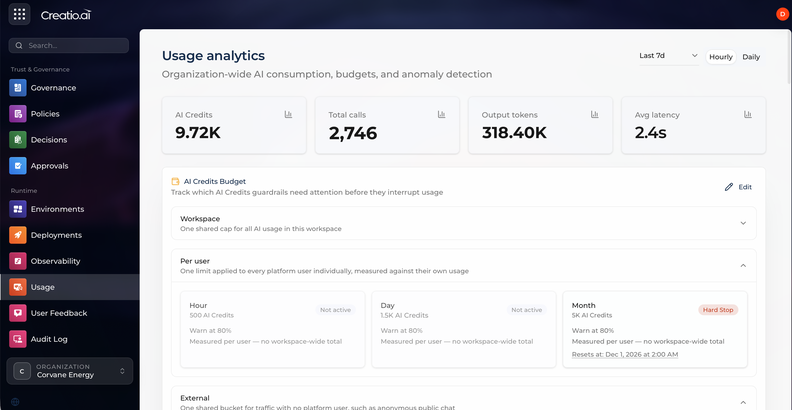
Creatio AI Studio holds the data and the controls for that review. It tracks credit usage across agents and AI operations, so you can see usage trends and how much of the allowance remains. Budgets and usage limits can be set by the hour, day or month, with a warning threshold and an optional hard stop, so a runaway workflow gets flagged, or stopped, long before it uses a quarter's credits in a week.
The review is also the moment to tune. Routine tasks rarely need the strongest model, so move them to an efficient one and keep the reasoning models for work that needs them. Trim agents that make extra model calls, carry more context than they use or repeat work, without letting output quality slip.
Cost per activity is only half the picture, though. Creatio's adoption report found that only 55% of organizations pursuing AI for cost savings actually measure cost savings. Michael Partridge, Partner, Service Excellence at Deloitte, put the risk this way in the same report: "A company celebrating a low AI token cost on a customer interaction is blind to the human cost, orders of magnitude greater, generated when a failed fix forces a second call." For a revenue team, the equivalent is a cheap follow-up email that nobody answers. Track credits next to the outcome each workflow is meant to move, such as meetings booked, renewals touched or response time, and judge the spend by both.
Frequently Asked Questions
Do unused Creatio AI credits expire?
Unused Creatio AI credits roll over from month to month and across subscription years within the contracted term. An organization can use fewer credits while it builds its first agents and more after the production rollout, without losing the capacity it didn't use early on.
Does Creatio charge per user or per agent for AI?
Creatio's pricing has no per-user, per-agent, per-application or per-API charges. AI usage is measured in AI credits, which come with Creatio's AI packages and can be extended with additional blocks of 500,000 credits.
Are AI credits the same as tokens?
No. Tokens are the units of content a model processes, and each model has its own token rates. Creatio AI credits are a common usage unit that sits on top of tokens and covers all supported models and AI services, including voice and document processing. There's no fixed one-to-one conversion between the two.
Can you bring your own AI model to Creatio?
Yes. The Freedom package supports bring your own model (BYOM), so you can use your own provider agreements, model endpoints or supported AI infrastructure. BYOM doesn't remove the need for an AI package. You manage model access yourself, and your credit usage reflects the Creatio platform services you still use, such as running agents and workflows, security, governance and monitoring.
Build the AI Budget Around Your Revenue Workflows
AI credits give revenue teams a single unit for AI work across models, providers and channels, and the packages give that unit a home with the infrastructure and controls to run it. The budget still depends on decisions only your team can make: which workflows change, how much autonomy each one gets, and how quickly people adopt them. Start with a short list of those workflows, measure what they really use, plan the whole term rather than each month, and review actual usage every month. The forecast will be wrong in places at first, and the monthly review is how it gets better.