

Ask a sales rep where the week went, and the answer is rarely "selling." Time goes into researching accounts, preparing for calls, logging notes, chasing follow-ups and rebuilding the forecast before Monday's pipeline review. That administrative layer is where AI agents are arriving first. In Creatio's 2026 State of Enterprise AI Adoption report, a survey of 608 IT and business decision-makers, 79% of organizations said they are exploring or deploying AI agents in sales, marketing, service or customer success.
The same survey shows what leaders expect from the shift. Only 9% expect AI agents to significantly reduce headcount, while 89% expect agents to augment their people, add capacity or create new roles. Karolina Drózd, Head of Sales Operations at PSI, described the opportunity in the report: "AI can take over many of the administrative tasks so salespeople can focus on what they really want to do – being closer to their customers."
So which tasks can an agent take on, and which should stay with your team? This article follows a deal from first research to the forecast call through ten sales tasks that Creatio AI agents handle, with what the agent does, what the rep or manager still decides and one practical tip for each. It closes with a template for choosing the first task to hand over.
Key takeaways
- An AI agent in a CRM works through a task from start to finish, using the records, activity history and rules already in the system, and hands the result to a person to approve or act on.
- Ten everyday sales tasks, from account research to the forecast call, map to specific Creatio AI agents for sales.
- In each task the agent prepares the work, while reps and managers keep the decisions that carry risk: the price, the commitment, the forecast call.
- Start with one task that is high in impact and easy to achieve, keep a person approving every output, and agree on the metric before you scale.
What can AI agents do in a CRM?
An AI agent in a CRM is software that reasons over customer records, activity history and business rules, then works through a multi-step task toward an outcome, such as researching an account, drafting a quote or flagging a deal at risk. It does this within the permissions and approval steps the organization has set.
The difference from an AI assistant is initiative. An assistant answers when a user asks a question. An agent gathers the context a task needs, decides which steps to take, carries them out with the CRM's own tools and returns a result for review. The more of a deal's history lives in the CRM, the more specific that result becomes.
Creatio is an AI CRM and workflow platform where people and AI agents work together, with no limits on users, agents, workflows or scale. The Creatio AI CRM covers marketing, sales and service, and its sales agents work in the same accounts, contacts, leads, opportunities, quotes and orders that reps use every day. Every agent operates under the platform's security model, with role-based access, least-privilege data access and full audit logging, and teams can tune agents to their own sales process with no-code tools.
Which Creatio AI agent handles which sales task
| # | Sales task | Creatio AI agent | What the person still decides |
| 1 | Research a newly assigned account | Creatio Account Research Agent | Which stakeholders to approach, and the outreach angle |
| 2 | Decide which inbound leads to call first | Creatio Lead Scoring Agent | Whether a lead deserves the rep's time today |
| 3 | Prepare for a customer meeting | Creatio Meeting Preparation Agent | The meeting goal and what to propose |
| 4 | Keep CRM records current after calls and emails | Creatio CRM Data Update Agent | Which suggested updates get saved |
| 5 | Write follow-up emails from the inbox | Creatio MS Outlook Agent | What gets sent, and when |
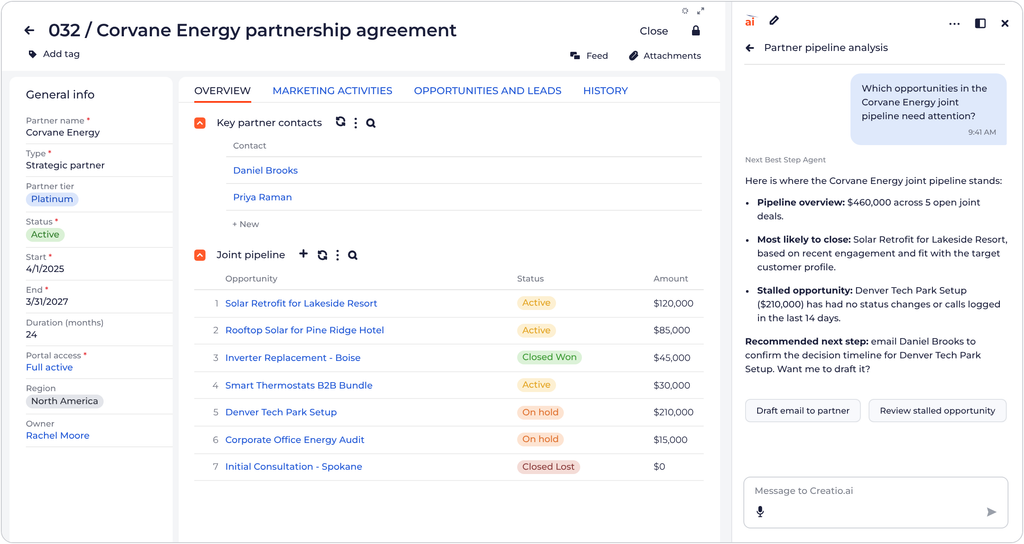
| 6 | Choose the next step on every open deal | Creatio Next Best Step Agent | Which recommendation to act on |
| 7 | Check deal qualification against MEDDPICC | Creatio AI-Powered Forecasting & Revenue Intelligence | The final qualification score |
| 8 | Build a quote and proposal | Creatio Quote Generation Agent | Price, discount and terms |
| 9 | Turn a signed deal into an order | Creatio Order Fulfillment Agent | Exceptions such as delivery or availability conflicts |
| 10 | Review the forecast and explain the gap | Creatio Forecast Agent | The forecast call submitted to leadership |
The sections below follow the same order, starting with the work that happens before a rep's first conversation with a buyer.
Building pipeline: tasks before the first sales conversation
Pipeline quality is decided early, by how well reps understand an account and how quickly they reach the right leads. Both tasks in this stage are research-heavy, which makes them a natural first job for an agent.
1. Research a newly assigned account
When an account lands in a rep's territory, the usual routine is a dozen browser tabs and whatever notes a previous owner left in the CRM. The Creatio Account Research Agent does that groundwork as soon as the account is created or assigned, or whenever a rep asks. It fills in missing firmographic details, pulls recent news and public updates, and identifies decision-makers, influencers and buying-group roles nobody has contacted yet. The result is an account summary with a stakeholder map and the signals that suggest why the account may be relevant now, such as a leadership change or an expansion announcement.
What the rep decides: which stakeholders to approach first and what angle the first message takes.
Tip: Ask the agent to flag missing buying-group roles, not only the contacts it found. Gaps in the stakeholder map are where single-threaded deals start.
2. Decide which inbound leads to call first
A full lead queue on Monday morning forces a choice, and most reps make it by recency or gut feel. The Creatio Lead Scoring Agent scores every lead on fit, engagement, intent and the conversion patterns in the organization's own history, then ranks the queue so the leads most likely to convert sit at the top. Each score comes with its positive factors, such as a strong match to the ideal customer profile, and its negative ones, such as missing company data.
What the rep decides: whether a highly scored lead deserves time today, or a lower-scored one deserves a call anyway because of context the data does not hold.
Tip: Share the score explanations with marketing. When both teams read the same rationale, the argument about what counts as a sales-ready lead moves from opinion to evidence.
Working deals: tasks around every customer conversation
Once a deal is open, most of a rep's administrative time clusters around conversations: getting ready for them, recording them and following up after them. Five agents cover this stage, from the meeting brief to the qualification check.
3. Prepare for a customer meeting
Good preparation means reading recent email threads, checking open opportunities and service cases, and scanning the news before every call. The Creatio Meeting Preparation Agent runs from the calendar or the opportunity page and assembles that context into one brief. It highlights the stakeholders attending, recent customer concerns and timely account signals, then proposes an agenda, discovery questions and talking points matched to the meeting goal, along with risk indicators on the deal.
What the rep decides: the meeting goal and what to propose in the room.
Tip: Give the agent a specific objective, such as "secure a technical validation date," instead of "check-in call." The questions and talking points become much sharper.
4. Keep CRM records current after calls and emails
Managers make pipeline decisions from CRM data, and that data is often a week behind reality because logging calls competes with selling. The Creatio CRM Data Update Agent converts recent customer interactions into structured updates: topics discussed, customer concerns, decisions, next steps and action items with owners. It then suggests changes to the opportunity, account and contact records, such as a new close date or a stakeholder added during the call.
What the rep decides: which suggested updates are saved. Reps review and confirm each change before it reaches the record.
Tip: After a few weeks, look at which kinds of updates reps accept almost every time. Those are the candidates for saving automatically, while changes to amount, stage and close date stay under review.
5. Write follow-up emails from the inbox
The window after a meeting is when buyer attention is highest, yet follow-ups often wait until the end of the day and arrive generic. The Creatio MS Outlook Agent works inside the rep's inbox. It summarizes long threads, finds meeting times and turns meeting notes and deal context into a follow-up that restates the buyer's concerns and the agreed next steps. The Creatio MS Teams Agent brings the same CRM context into Microsoft Teams, so reps can check a deal or record an update without leaving the conversation.
What the rep decides: what gets sent, to whom and when.
Tip: Ask the agent to open every follow-up with the agreed next steps and owners. When the buyer replies to confirm, the commitment is in writing.
6. Choose the next step on every open deal
A rep with thirty open opportunities cannot inspect each one daily, so the deals that stall are usually the quiet ones. The Creatio Next Best Step Agent analyzes deal stage, recent activity, buyer engagement and open tasks to recommend the action most likely to move each deal forward. It flags opportunities that have gone idle and suggests how to re-engage the buyer, guided by the sales process the organization has configured, and it explains the reasoning behind every recommendation.
What the rep decides: which recommendation to act on, and which to set aside.
Tip: Recommendations follow the sales process defined in the CRM. If stage exit criteria are vague, tighten them first, and the guidance becomes more specific.
7. Check deal qualification against MEDDPICC
MEDDPICC (metrics, economic buyer, decision criteria, decision process, paper process, identify pain, champion and competition) is a common qualification framework in B2B sales, and its scores often reflect a rep's optimism more than the evidence. In Creatio AI-Powered Forecasting & Revenue Intelligence, the account executive still scores each criterion, and an AI agent validates every score against evidence in the CRM: stakeholders, tasks, emails, calls, call transcripts and external parties on the deal. It explains why each score stands where it does and what comes next.
The agent also catches gaps a busy rep misses, such as a new stakeholder who joined a call but never made it into the CRM. Because it can see every opportunity in the system, it compares the deal with closed-won patterns. If most won deals of this size, stage and product mix had the CEO as executive sponsor and this one has no CEO identified, it recommends fixing that, and the rep can schedule the next step from the same screen.
What the rep decides: the final score for each criterion and whether to act on the recommendation.
Tip: Use the agent's gap list as the agenda for deal reviews. Discussing missing evidence is a faster conversation than debating a rep's confidence.
Closing deals: tasks from proposal to order
The last stretch of a deal is where delays cost the most. A slow quote gives a competitor time to respond, and a slow handoff to operations puts the customer's first experience at risk.
8. Build a quote and proposal
Building a quote often means switching between the opportunity, the product catalog, past proposals and a pricing spreadsheet. The Creatio Quote Generation Agent starts from the opportunity. It recommends products or bundles based on the account profile and similar past deals, drafts the product descriptions, proposal language and summary email, and highlights missing inputs or pricing details before the quote goes out. Discount requests can route through an approval workflow.
What the rep decides: price, discount and terms, within the approval limits the organization sets.
Tip: Keep discount approvals in a workflow even when the agent drafts everything else. The agent saves the rep's time, and the approval step protects the margin.
9. Turn a signed deal into an order
After the signature, the rep's job is to make sure the order the customer receives matches what was sold. The Creatio Order Fulfillment Agent works within Creatio's order and contract management, where products, quotes, orders, contracts and documents sit in one connected workflow. It carries the accepted quote into order capture, takes product availability into account, sets up payment and delivery schedules, and prepares the invoice. Exceptions go to a person through the approval workflow.
What the rep decides: how to resolve exceptions and what to tell the customer about them.
Tip: Agree in advance which exceptions the agent escalates and to whom. A delivery conflict on a strategic account may need the account executive, not only operations.
Managing the number: the weekly forecast call
Every task so far feeds one number. The final task belongs to sales managers and revenue leaders, who have to stand behind that number each week.
10. Review the forecast and explain the gap
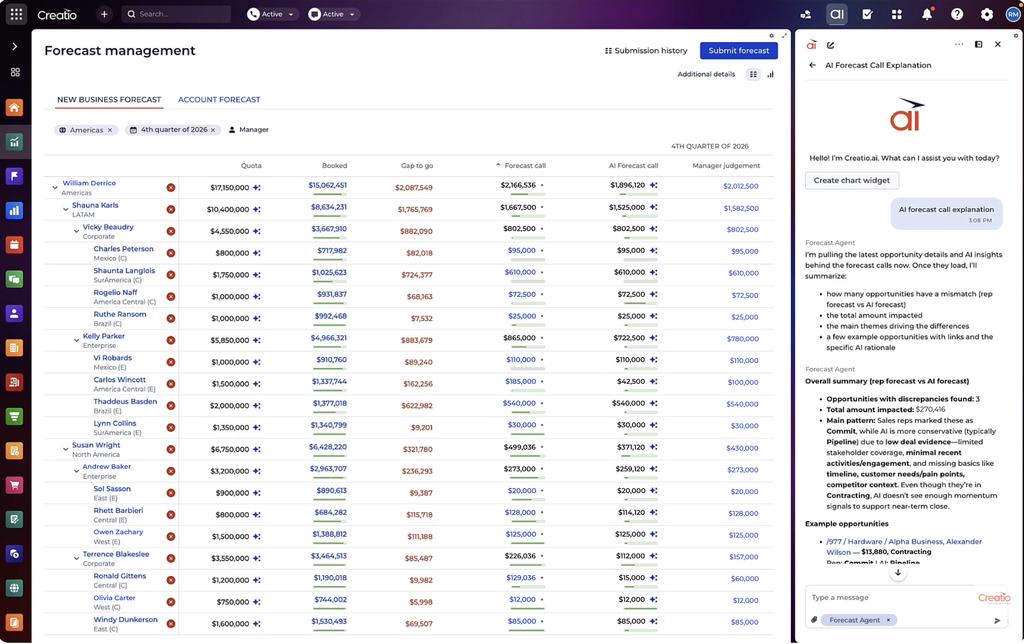
Forecast reviews often start with a manager asking reps to talk through deals one by one. In Creatio AI-Powered Forecasting & Revenue Intelligence, managers and reps share a live view of the forecast by territory and rep, with quota, bookings and the gap between them, and they can see which deals changed amount or close date since the last review.
The Creatio Forecast Agent adds an AI forecast call alongside the human one and explains where the two differ. It names the patterns behind the discrepancy, such as forecast stage, MEDDPICC scores or missing next steps, and highlights the opportunities that create the gap. Forecast stages are configurable, so the analysis follows the organization's own forecasting method.
What the manager decides: the forecast call submitted to leadership.
Tip: Run the AI call next to your own for a few cycles before relying on it. Spend review time only on the deals where the two calls disagree.
How much should a Creatio AI agent do on its own?
A wrong account summary costs a few minutes, while a wrong discount costs margin. Creatio describes three modes of human involvement that help match each agent to its risk:
- Suggest. The agent proposes, and the person decides. Lead scoring, next step recommendations and the MEDDPICC check fit here.
- Assist. The person delegates a task, and the agent reports back for approval. Meeting briefs, follow-up emails, CRM updates and quote drafts fit here.
- Act. The agent runs a workflow end to end within defined guardrails and escalates exceptions. Account research on assignment and routine record updates are candidates once teams trust the output.
Creatio's guidance is to start with supervision and scale autonomy as confidence grows. In every mode, agents work within role-based access, sensitive actions such as discounts route through approvals, and an audit trail records what each agent did. Those controls are still far from universal: in the State of Enterprise AI Adoption report, only 36% of organizations have established human review of AI decisions. Yet organizations with fully established AI governance were more than four times as likely to feel very confident about scaling AI (71% versus 17%).
Template: pick the first sales task to hand to an AI agent
Choosing where to start is the decision that most affects whether agents earn their place. Creatio's approach to prioritizing AI CRM use cases ranks each candidate on impact and achievability, so that basic use cases build confidence before advanced ones. Score the ten tasks with your RevOps lead and the managers whose teams will use the agent.
| Field | What to record |
| Sales task | One task from the list above |
| Time spent today | Rough hours per rep per week, from a quick team survey |
| Data the agent needs | Which records and activity it must read, and whether that data is in the CRM today |
| Cost of a wrong output | Low (a draft someone edits), medium (a record someone relies on) or high (a price or commitment to a customer) |
| Impact | High, medium or low effect on pipeline, win rate, cycle time or forecast quality |
| Achievability | High, medium or low, based on data readiness and process clarity |
| Starting mode | Suggest, Assist or Act |
| Owner | The manager accountable for the outcome |
| Success metric | One measure agreed before go-live, with a review date |
Pick the task that scores high on both impact and achievability, start it in Suggest or Assist mode, and agree on the metric before the agent goes live. That last step is often skipped: in the report, only 56% of organizations pursuing better customer experience from AI measure customer satisfaction. Thomas Wieberneit, CEO and Principal Analyst at aheadCRM, offered a practical rule in the report: "If the metrics you measure haven't moved after a set period, treat the AI as a cost rather than an investment, and don't scale it."
Once the first task proves itself, add the next one. Organizations that use AI in more than half of their workflows are about twice as likely to report increased revenue from AI as those using it in fewer than 10% (33% versus 14%).
Frequently asked questions
What is a CRM AI agent?
A CRM AI agent is software that uses customer records, activity history and business rules to complete multi-step sales, marketing or service tasks, such as researching an account, drafting a quote or explaining a forecast gap. It works within the permissions and approval steps set by the organization and records what it did.
How do AI agents improve sales forecast accuracy?
They replace self-reported confidence with evidence. In Creatio AI-Powered Forecasting & Revenue Intelligence, the Creatio Forecast Agent places an AI forecast call next to the human call, explains where the two differ and highlights the deals driving the gap, while a MEDDPICC check validates qualification scores against activity in the CRM.
Will AI agents replace sales reps?
Few leaders expect that. In Creatio's 2026 State of Enterprise AI Adoption survey, 9% of organizations expect AI agents to significantly reduce headcount, while 89% expect agents to augment people, add capacity or create new roles. In sales, agents take on research, preparation and administration, and reps keep the relationships and the decisions.
Can Creatio AI agents be tailored to a specific sales process?
Yes. Teams can adjust Creatio's sales agents to their own stages, rules and approvals with no-code tools. Organizations that need new enterprise agents can build, run and govern them in Creatio AI Studio, and individual employees can create personal agents by describing what they need in natural language with Creatio AI Twin.
From ten tasks to one first step
The ten tasks share a pattern. An agent gathers context the rep would otherwise collect by hand, prepares the work and explains its reasoning, while the person makes the call that carries risk. Reps get time back for customers, and managers get pipeline data they can trust.
The practical move is to start small. Score the ten tasks with the template, pick the one with the clearest payoff, keep a person approving the output and agree on how you will measure it. When the metric moves, the case for the next agent makes itself.
To see how that can work in practice, explore Creatio CRM.