

Med så mange ulike programmer for salgskartlegging tilgjengelig er det vanskelig å finne ut hvilket som passer for deg. Du vet at du ønsker å forbedre effektiviteten og virkningen av salgsdriften ved å utnytte geografisk innsikt, men må finne ut hvilket verktøy som er best. Jeg hjelper deg! I dette innlegget gjør jeg valget enklere ved å dele mine personlige erfaringer med bruk av dusinvis av ulike verktøy for salgskartlegging med forskjellige team og kontoer, samt mine anbefalinger av den beste programvaren for salgskartlegging.
Why Trust Our Software Recommendations
6,700+
Reviews
20
Industry experts
16+
Evaluation factors
14
Years
Our reviews reflect our independent judgment—not a sales pitch. Learn how we stay transparent.
For this guide, we evaluated tools using hands-on testing and independent research, scoring tools using our selection criteria.
Our reviews reflect our human editorial judgment, not a sales pitch.
Sammenligningstabell for programvare for salgskartlegging
Denne sammenligningstabellen oppsummerer prisdetaljene for mine beste utvalgte programmer for salgskartlegging:
| Tool | Best For | Trial Info | Price | ||
|---|---|---|---|---|---|
| 1 | Best for visit prep & next-best-action guidance | Not available | Pricing upon request | Website | |
| 2 | Best for customizable automations for your sales pipeline | 14-day free trial; Free demo available | From $18/user/month | Website | |
| 3 | Best for Google integration and global coverage | 10-day free trial available | From $250 for a 45-day pass | Website | |
| 4 | Best for integrated field sales and B2B ordering | 14-day free trial | From $200/month | Website | |
| 5 | Best for customizing the look of your maps for engaging visualizations | Free trial available | From $99/month | Website | |
| 6 | Best for creating and publishing interactive maps | Free plan available | From $19.95/month | Website | |
| 7 | Best for combining action-based dashboards, data storytelling, and automated analysis | 30-day free trial + free demo available | Pricing upon request | Website | |
| 8 | Best for all-in-one geo operations with dispatch and scheduling | Free plan available | Custom pricing available | Website | |
| 9 | Best for analyzing and understanding the impact of geography on your organization | Free trial + free demo available | From $695/year | Website | |
| 10 | Best for mapping the most efficient routes — even when things change | Free trial available | From $1,495/user/year | Website |


Anmeldelser av den beste programvaren for salgskartlegging
Nedenfor finner du mine detaljerte sammendrag av den beste programvaren for salgskartlegging som kom med på kortlisten min. Anmeldelsene mine gir en detaljert gjennomgang av de viktigste funksjonene, fordelene og ulempene, integrasjonene og ideelle bruksområdene for hvert verktøy, slik at du kan finne det som passer best for deg.
 Best for visit prep & next-best-action guidance
- Not available
- Pricing upon request
Visit WebsiteCustomer Rating:4.3/5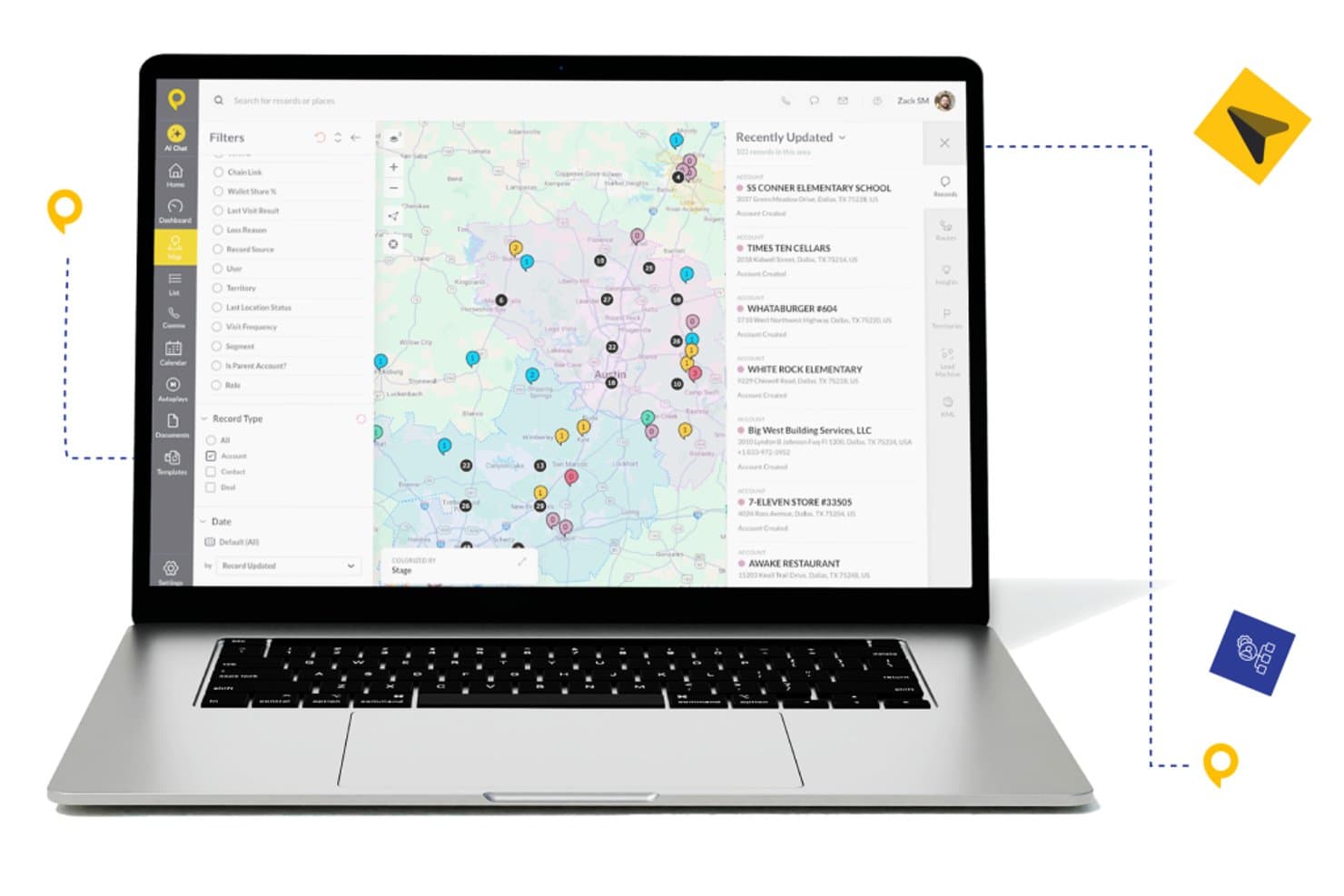
SPOTIO offers an interactive sales mapping view with color-coded account pins, territory filters, and a recently updated records panel for field sales teams. SPOTIO is a field sales mapping and execution platform that combines territory management, interactive account mapping, route optimization, and AI-powered visit guidance for outside sales teams.
Who Is SPOTIO Best For?
SPOTIO is a strong fit for B2C field sales teams in industries like solar, roofing, telecom, and home services that run door-to-door or territory-based outside sales operations.
Why I Picked SPOTIO
SPOTIO earns its spot on my shortlist because of how it layers AI directly into the field rep's workflow. The DASH AI co-pilot preps reps before each visit, surfacing account context so they walk in informed rather than guessing. I also like how the Next Best Action module uses predictive scoring to tell reps which accounts to prioritize next, turning territory maps from static visuals into active sales playbooks.
SPOTIO Key Features
- Territory creation and management: Build, edit, and assign sales territories using zip codes, counties, or custom-drawn boundaries on a map.
- Mobile field sales app: Access leads, manage appointments, and check in at locations from an iOS or Android device, even offline.
- Real-time CRM data synchronization: Bidirectional sync with Salesforce and integration with HubSpot, Dynamics, and custom systems through Zapier or API.
- Route planning and optimization: Generate multi-stop driving routes that minimize travel time and help field reps plan efficient schedules.
SPOTIO Integrations
SPOTIO offers native integration with Salesforce and supports integrations with HubSpot, Microsoft Dynamics, Zoho CRM, and over 5,000 apps via Zapier. An open API is available for custom integrations.
Pros and Cons
Pros:
- Next Best Action scoring prioritizes territory visits
- Mobile app supports offline field check-ins
- AI visit prep surfaces account context automatically
Cons:
- Built primarily for B2C door-to-door teams
- Territory scenario modeling is relatively limited
Learn more about SPOTIO: Best for customizable automations for your sales pipeline
- 14-day free trial; Free demo available
- From $18/user/month
Visit WebsiteCustomer Rating:4.6/5
Monday Sales CRM distinguishes itself with its visually engaging and highly customizable workspaces. Monday sales CRM is a customer relationship management platform designed to manage sales pipelines and client communications effectively. It distinguishes itself with extensive customization options, including email integration, automations, and customizable dashboards, which offer a detailed view of sales operations, making it a preferred solution for businesses seeking tailored sales tracking capabilities.
Why I Picked monday sales CRM: monday.com's sales CRM tool includes AI-assisted email composition, which streamlines the process of writing emails with advanced HTML editing and customizable templates. It also offers the capability to send mass personalized emails, useful for large-scale communication efforts. The CRM features activity management to keep track of sales-related tasks, performance tracking to gauge sales success, and customizable dashboards for a visual representation of sales metrics. Additionally, it provides sales forecasting to anticipate future trends, centralizes data for easy access, and includes lead capturing from various sources.
monday sales CRM Standout Features & Integrations
Features include lead and contact management, customizable pipelines, sales automation, performance tracking, integration with various tools, advanced reporting and analytics, email tracking and synchronization, task and project management, mobile app support, and customizable templates and forms.
Integrations include Slack, Google Drive, Gmail, Google Calendar, Jira, GitHub, Trello, Dropbox, Typeform and many more, accessible through a paid plan with Zapier.
Pros and Cons
Pros:
- Advanced reporting and analytics
- Robust integration capabilities
- High customizability & automation-friendly
Cons:
- Slight learning curve
- Limited native email marketing features
 Best for Google integration and global coverage
- 10-day free trial available
- From $250 for a 45-day pass
Visit WebsiteCustomer Rating:4.7/5
Maptive can help you map anything, including the locations of Nobel Prize winners. As a cloud-based, web-accessible mapping solution, Maptive targets the creation of insightful, custom maps with beautiful visualization of data to enhance your Google Maps foundation. Build a variety of different map types for local or global needs, including territory maps, heat maps, sales density maps, and store locators so users can plan the optimal route between every location on their list.
Why I picked Maptive: This platform caught my eye because of their Google-centric functionality. Maptive specifically integrates with Google Maps to utilize additional data and features for more flexibility. You can access Google Places and Google Street View for street views, real-time traffic, updated geographic information, and satellite imagery.
Maptive Standout Features and Integrations
Standout features include fully customizable maps and location markers that are unique to your organizational needs, turn-by-turn navigation in-platform in Google Maps, and one-click interactive map sharing to provide access to everyone who needs it.
Integrations include Google Maps, Google Places, and Google Street View.
Pros and Cons
Pros:
- Mobile app for use on every device
- Fast load speeds for mapping and routing
- User-friendly visuals and navigation
Cons:
- Limited integration options — still in development
- Is a little bit more expensive than other solutions
Learn more about Maptive: Best for integrated field sales and B2B ordering
- 14-day free trial
- From $200/month
Visit WebsiteCustomer Rating:4.4/5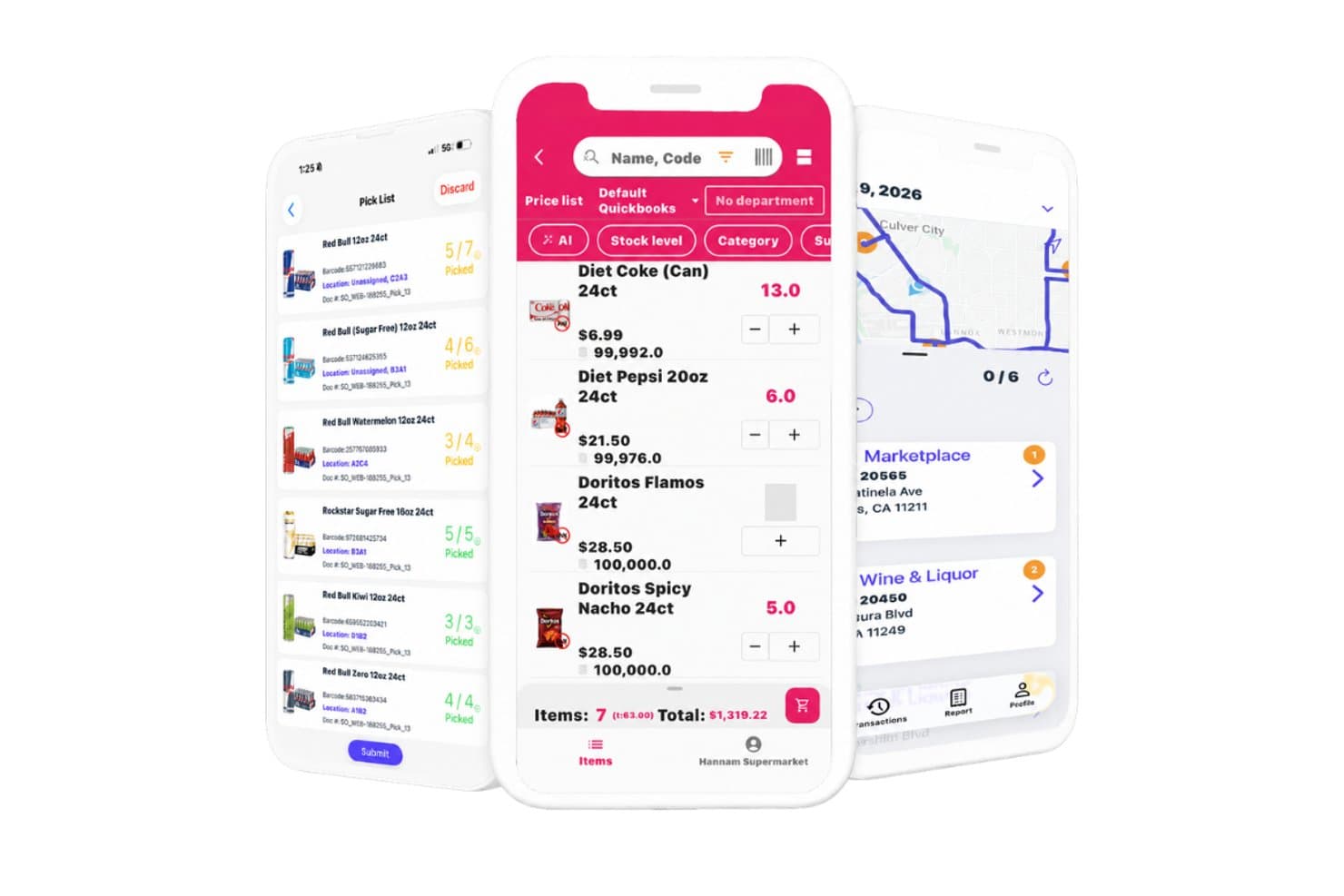
InSitu Sales offers a mobile app suite featuring pick list management, an order entry screen with product pricing, and a route mapping view for sales reps. InSitu Sales is a mobile field sales and B2B order management platform that combines route optimization, GPS tracking, territory-based account management, and real-time inventory visibility for wholesale distribution teams.
Who Is InSitu Sales Best For?
InSitu Sales is a strong fit for wholesale distributors and food & beverage companies whose outside reps manage accounts, take orders, and process payments in the field.
Why I Picked InSitu Sales
I picked InSitu Sales because it's one of the few tools that fully closes the loop between field routing and B2B order capture in one platform. When my reps are standing in front of a restaurant buyer, they can pull up real-time inventory levels, place the order on the spot, and process payment without switching apps. The DSD route optimization and dispatch app means the whole cycle, from stop planning to proof of delivery, lives in one place.
InSitu Sales Key Features
- Live GPS tracking: Lets managers monitor sales reps’ real-time locations and movements during field activities.
- Custom barcode scanning: Allows reps to scan products in the field for fast inventory checks and order creation.
- Customer-specific pricing lists: Supports the assignment of unique pricing and discounts per customer record.
- Proof of delivery and signature capture: Captures customer signatures and photo proof directly within the delivery workflow.
InSitu Sales Integrations
InSitu Sales offers native integrations with QuickBooks Online, QuickBooks Desktop, Oracle NetSuite, SAP Business One, Xero, Zoho, Odoo, Epicor, Siigo, and Fishbowl, and provides an API for custom integrations.
Pros and Cons
Pros:
- Supports customer-specific pricing structure
- Built-in order management and payments
- Real-time GPS tracking for field reps
Cons:
- Lacks multi-territory and coverage analytics
- No native CRM or salesforce integration
Learn more about InSitu Sales: Best for customizing the look of your maps for engaging visualizations
- Free trial available
- From $99/month

BatchGeo allows you to choose your preferred map style once all the data is in the system. This web-based tool is designed to allow the creation of custom maps from location data in just a few minutes through drag-and-drop uploads that accept spreadsheet and CSV file information. With BatchGeo, you can also visualize your data and gain new insights with advanced tools like batch processing that allows you to plot thousands of data points at the same time and geocoding that automatically matches addresses with longitude and latitude.
Why I picked BatchGeo: The feature that sets BatchGeo apart and assured it a spot on my list is the powerful customization options for your map style. Choose from street view, satellite, and terrain maps, along with unique colors, labels, and markers that ensure your maps are readable, informative, and engaging for your team.
BatchGeo Standout Features and Integrations
Standout features include Map Badges with a dynamic map thumbnail for your website, Map Grouping to break down data and spot trends, and map marker clustering to sum the value of potential leads, existing appointments, or current accounts.
Integrations include Google Docs, Google Maps, and Microsoft Excel.
Pros and Cons
Pros:
- Quick to set up and start mapping
- Easy to use with intuitive navigation
- Native mobile app for Apple devices
Cons:
- Editing maps is difficult and it’s easier to restart
- Free version has some limitations
Learn more about BatchGeo: Best for creating and publishing interactive maps
- Free plan available
- From $19.95/month

ZeeMaps provides step by step guidance for creating and publishing maps to your site. This platform is a geographic information system that’s designed to help you make and publish your maps across various websites, as well as capture information from spreadsheets, GeoRSS feeds, and location lists. You can use ZeeMaps to analyze spatial locations, show real-time traffic overlays, display visual information with 3D maps, and aggregate regional data in one place.
Why I picked ZeeMaps: This tool made my list because of how many customization options they offer in map creation. In addition to customizable marker icons that utilize your preferred images, you can also leverage searchable custom fields, hand-draw regions, and color regions based on zip code, county, city, or state information.
ZeeMaps Standout Features and Integrations
Standout features include private mapping through HIPAA-compliant infrastructure, multimedia capabilities that add videos and images to your markers, and multi-point route optimization for planning trips.
Integrations include Google Analytics 360, Google Sheets, and Microsoft Excel.
Pros and Cons
Pros:
- Great customer service
- Offers a lot of flexibility through customization
- Very easy to learn how to use
Cons:
- Design is a little outdated
- Some locations are not 100% accurate
Learn more about ZeeMaps: Best for combining action-based dashboards, data storytelling, and automated analysis
- 30-day free trial + free demo available
- Pricing upon request

Yellowfin has location intelligence capabilities to enhance your geospatial marketing campaigns. Unlike most other apps on my list, Yellowfin is a comprehensive Business Intelligence platform that delivers data, dashboards, and collaborative BI experiences. With advanced BI features that enable charts, tables, maps, and graphic components, like images and video, Yellowfin provides you with a no-code platform that strives to simplify analytics.
Why I picked Yellowfin: I chose this platform for my sales mapping list because it does offer location intelligence functionality to merge spatial and traditional business analytics for better decision-making. You can use the Google Maps API or Yellowfin’s built-in mapping capabilities to put your business on the map.
Yellowfin Standout Features and Integrations
Standout features include augmented dashboards to visualize and monitor essential data, Automated Business Monitoring with threshold alerts and signals, and data storytelling for presentations and reports.
Integrations include Dynamics 365, GitHub, Google Analytics 360, Google Sheets, Instagram, Meta for Business, Salesforce Sales Cloud, Tableau, Xero, and Zendesk Suite.
Pros and Cons
Pros:
- Effective online training tools
- No-code (SQL) interface and tools
- Easy to use and navigate
Cons:
- Some customizations require coding
- No cloud-based option available
Learn more about Yellowfin: Best for all-in-one geo operations with dispatch and scheduling
- Free plan available
- Custom pricing available

Mapline allows you to automatically optimize your routes based on customer locations. This web-based sales mapping and intelligence software is designed for individuals and businesses of every size, as it allows you to upload your data, visualize it on a map, and create reports and charts. Manage dispatch, scheduling, routing, and other operation essentials in one place to get analytics and insights that add real-world context to your data.
Why I picked Mapline: This software caught my eye because in addition to meeting your basic routing and mapping needs, Mapline also provides automated route optimization with their Dispatch feature. This essential function can route your salespeople based on visit urgency, location priority, vehicle availability, and various other custom factors.
Mapline Standout Features and Integrations
Standout features include mapping analytics with detailed maps through features like custom territories and heat mapping, GEO Dispatch to automate daily routing and optimize stops, and Geo Scheduling with appointment and recurring visit scheduling for deliveries or servicing.
Integrations include Mapline’s API that can help you integrate it into your tech stack to update data and configure your data visualizations.
Pros and Cons
Pros:
- Customization options for territory mapping
- Excel add-on to link maps and spreadsheets
- Outstanding customer support and guidance
Cons:
- No phone number for customer support — email only
- UK regions are inaccurate and require support to configure
Learn more about Mapline: Best for analyzing and understanding the impact of geography on your organization
- Free trial + free demo available
- From $695/year

You can leverage Maptitude tools to identify geo-demographic statistics for market research. Maptitude from Caliper provides businesses with a GIS solution with customer demographic data and maps that enable you to visualize data and explore geographic patterns. With data that relates to customer location, drive time, and sales opportunities, you can deploy field sales people more effectively.
Why I picked Maptitude: I like this platform because they have a spatial mapping tool that allows you to estimate the population of a specific area to build custom territories that will help you identify under and over-served areas, find valuable sites, and determine trade areas. You can visualize your data as charts, heat maps, and 3D prism maps.
Maptitude Standout Features and Integrations
Standout features include pin map creation by postal code, address, or coordinates, drive-time and distance ring estimator, distance measuring to find the most efficient routes.
Integrations include Google Maps, Microsoft Access, Microsoft Excel, and TransCAD.
Pros and Cons
Pros:
- Affordable for small businesses
- Knowledgeable and responsive customer service
- User-friendly interface and design
Cons:
- Advanced features require extra effort to learn
- Navigation could be a little more intuitive
Learn more about Maptitude: 10Best for mapping the most efficient routes — even when things change
eSpatial
- Free trial available
- From $1,495/user/year

eSpatial allows you to route flights and drives to ensure more efficient territory planning. With its cloud-based mapping software, eSpatial delivers geographic solutions for international businesses through data visualization, target marketing, routing, site selection, prospecting, gap analysis, and territory management. Use eSpatial’s interactive map tools to optimize sales routes, merge and realign territories, and analyze drive time to improve sales activities.
Why I picked eSpatial: This sales mapping software made my list because of the real-time changes you can make to routes. Whether a client cancels or someone needs emergency services, eSpatial can help you determine which team member should be rerouted and provide you with an edited, updated route right away.
eSpatial Standout Features and Integrations
Standout features include territory optimization to perfect alignments and identify inefficient territories, mileage calculations and comparisons to enhance routes, and advanced map styling for better visualizations.
Integrations include Microsoft Excel and Salesforce Sales Cloud.
Pros and Cons
Pros:
- Knowledgeable and accessible customer service team
- Easy to use for map creation
- User-friendly interface with intuitive navigation
Cons:
- Has a higher price point than other mapping software
- Time-consuming learning curve for advanced features
Learn more about eSpatial:
Annen programvare for salgskartlegging
Her er noen flere alternativer for programvare for salgskartlegging som ikke kom med på kortlisten min, men som likevel er verdt å undersøke:
- 11GeopointeBest for mapping all your Salesforce data
- 12Ascent CloudBest for building, balancing, and optimizing your territories
- 13AlignMixBest for account-based or geographical realignment
- 14GeoMetrxBest for gathering census-based, site-specific data
- 15XactlyBest for compensation-linked territory planning
- 16Badger MapsBest tool for sales rep route planning to automate and optimize routes
- 17AnaplanBest for unifying sales, finance, supply chain, and workforce management
- 18MapBusinessOnlineBest cloud-based solution for small and medium-sized businesses
- 19PipedriveBest for combining sales mapping with automation and lead management
- 20PortatourBest tool for automated route planning to visit more customers in one day
- 21CallproofBest outside sales-focused CRM tool with route planning and mapping
- 22Google MapsBest for getting detailed geospatial data with dynamic location info
How I Evaluate Sales Mapping Software
I split my evaluation into baseline criteria—territory design, CRM sync, geospatial mapping—and the differentiators, like scenario modeling and mobile access, that separate good tools from great ones.
Core Functionality (Table Stakes For This List)
When I'm selecting tools for my list, I rank each one on a scale from 0 (does not offer the functionality) to 5 (excels in this area) for each core functionality listed below. Then, I calculate the tool's total score into a percentage. Each tool needs to achieve a minimum total score of 65% to be considered for inclusion.
- Territory Design & Management: I evaluate whether I can draw, adjust, and balance territories on a map using attributes like ZIP code, revenue, or account count per rep.
- Geospatial Account Mapping: Every tool should let me plot accounts on an interactive map and layer data points like deal stage or account size onto those pins.
- CRM Data Integration: I check for bidirectional sync with CRMs like Salesforce or HubSpot so territory changes flow back into the system of record automatically.
- Route Planning & Optimization: Field teams need multi-stop routing that accounts for distance and time. I look at how each tool handles daily or weekly visit planning.
- Segmentation & Filtering: The map view should support filtering by CRM fields such as industry, annual revenue, or opportunity stage to isolate target accounts quickly.
- Territory Analytics & Reporting: I look for dashboards that show coverage gaps, account distribution, and rep workload so RevOps teams can back up territory decisions with data.
Once I have a list of tools that meet this criteria, I consider what sets each platform apart.
Differentiating Factors (What Sets Vendors Apart)
Here's how I compare and contrast different vendors:
Standout Features
Scenario modeling is a big differentiator. I look for tools that let me build side-by-side territory plans—say, splitting a high-density region two ways versus three—and compare projected workload and coverage before committing. Whitespace analysis matters just as much; the best tools surface untapped accounts by geography so your GTM team can prioritize expansion zones. A dedicated mobile app also makes a real difference for field-heavy teams, giving reps map access, check-ins, and route updates without needing to open a laptop between meetings.
Beyond Features
Integration depth matters a lot here. I check whether a tool connects to your broader stack—BI platforms, marketing automation, sales engagement—beyond just the CRM. Pricing structure is another factor I evaluate closely, especially how vendors license admin seats versus field rep seats, since mapping tools often serve very different user types. I also consider deployment scale. A tool built for a 10-rep team may fall apart when you're managing territories across hundreds of reps and multiple regions, so I look at how well each platform scales with organizational complexity.
Slik velger du programvare for salgskartlegging
Det er lett å gå seg vill i lange funksjonslister og komplekse prisstrukturer. For å hjelpe deg med å holde fokus mens du arbeider deg gjennom den unike prosessen med å velge programvare, får du her en sjekkliste over faktorer du bør ha i tankene:
| Faktor | Hva du bør vurdere |
|---|---|
| FaktorSkalerbarhet | Hva du bør vurdereVil programvaren vokse sammen med virksomheten din? Kontroller om den kan håndtere mer data og flere brukere etter hvert som du ekspanderer. Se etter trinnvise abonnementer eller funksjoner som passer for virksomheter av ulik størrelse. |
| FaktorIntegrasjoner | Hva du bør vurdereKan den kobles til verktøyene du allerede bruker? Sørg for at programvaren integreres med CRM-systemet, e-posten og andre applikasjoner for å unngå datasiloer og forbedre effektiviteten i arbeidsflyten. |
| FaktorTilpasningsmuligheter | Hva du bør vurdereKan du tilpasse den etter behovene dine? Se etter programvare som lar deg endre kart, felt og rapporter slik at de samsvarer med de spesifikke arbeidsflytene og målene dine. |
| FaktorBrukervennlighet | Hva du bør vurdereEr den brukervennlig for teamet ditt? Vurder grensesnittet og navigeringen. Et verktøy som er vanskelig å bruke, kan forsinke innføringen og redusere produktiviteten. |
| FaktorImplementering og oppstart | Hva du bør vurdereHvor lang tid tar det å komme i gang? Vurder ressursene som kreves til oppsett og opplæring. Se etter verktøy med veiledet oppstart, veiledninger eller egne brukerstøtteteam. |
| FaktorKostnad | Hva du bør vurderePasser den inn i budsjettet ditt? Sammenlign prisplaner, inkludert skjulte gebyrer eller nødvendige tillegg. Vurder de totale eierkostnadene over tid, ikke bare den opprinnelige prisen. |
| FaktorSikkerhetstiltak | Hva du bør vurdereEr dataene og personvernet ditt beskyttet? Kontroller kryptering, samsvar med personvernregler og brukertillatelser for å sikre at opplysningene dine er trygge. |
| FaktorTilgjengelig kundestøtte | Hva du bør vurdereHvilken hjelp kan du forvente? Se etter brukerstøtte døgnet rundt, flere kontaktalternativer og et raskt team som kan hjelpe med problemer eller spørsmål når de oppstår. |
Hva er programvare for salgskartlegging?
Programvare for salgskartlegging er et verktøy som lar deg se salgsdataene dine på et kart, og viser hvor kundene dine befinner seg, hvordan områdene er delt inn, og hvordan hvert område presterer. Salgsledere, områdeplanleggere og feltrepresentanter bruker den til å organisere salgsruter, balansere salgsområder og oppdage skjulte markedsmuligheter. Dette sparer tid, reduserer reiseutfordringer og hjelper deg med å ta smartere beslutninger om hvor du bør rette salgsinnsatsen.
Funksjoner
Når du velger programvare for salgskartlegging, bør du se etter følgende viktige funksjoner:
- Geografisk visualisering: Lar brukere se salgsområder og kundeplasseringer på et kart, noe som gir en tydelig oversikt over markedsfordelingen.
- Områdehåndtering: Hjelper med å definere og administrere salgsregioner for å sikre balansert arbeidsbelastning og effektiv ressursfordeling.
- Ruteoptimalisering: Planlegger de mest effektive reiserutene for salgsteam, sparer tid og reduserer reisekostnader.
- Dataintegrasjon: Kobler seg til CRM og andre datakilder for å gi en helhetlig oversikt over kundeinformasjon og salgsaktiviteter.
- Tilpassbare kart: Lar brukere tilpasse kartvisninger og datalag etter spesifikke forretningsbehov og mål.
- Varmekartlegging: Visualiserer datatetthet og trender, og gjør det enklere å identifisere områder med muligheter eller utfordringer.
- Sanntidsoppdateringer: Sikrer at teamene har tilgang til den nyeste informasjonen, noe som forbedrer beslutningstaking og reaksjonsevne.
- Demografisk analyse: Gir innsikt i markedspotensialet ved å legge demografiske data over salgskart.
- Interaktiv deling: Gjør det mulig for team å dele kart og innsikt enkelt, noe som fremmer samarbeid og informerte beslutninger.
- Balansering av arbeidsbelastning: Sikrer en rettferdig fordeling av oppgaver mellom teammedlemmer og optimaliserer produktivitet og effektivitet.
Fordeler
Implementering av programvare for salgskartlegging gir flere fordeler for teamet og virksomheten din. Her er noen av fordelene du kan se frem til:
- Bedre beslutningstaking: Visualisering av salgsdata på kart hjelper deg med å ta informerte beslutninger om områder og ressurser.
- Økt effektivitet: Ruteoptimalisering reduserer reisetid og kostnader, slik at teamet ditt kan fokusere mer på salg.
- Bedre ressursfordeling: Områdehåndtering sikrer balansert arbeidsbelastning og maksimerer teamets produktivitet.
- Bedre samarbeid: Interaktiv deling av kart og data fremmer teamarbeid og informerte strategier.
- Dypere markedsinnsikt: Demografisk analyse gir en tydeligere forståelse av markedspotensialet og kundenes behov.
- Reaksjonsevne i sanntid: Tilgang til oppdatert informasjon gjør at teamet ditt kan reagere raskt på endringer i markedet.
- Rettferdig fordeling av arbeidsbelastning: Balansering av arbeidsbelastningen sikrer at oppgavene fordeles jevnt, slik at motivasjon og prestasjon opprettholdes på et høyt nivå.
Kostnader & priser
Valg av programvare for salgskartlegging krever en forståelse av de ulike prismodellene og abonnementene som er tilgjengelige. Kostnadene varierer basert på funksjoner, teamstørrelse, tillegg og mer. Tabellen nedenfor oppsummerer vanlige abonnementer, gjennomsnittsprisene deres og typiske funksjoner som inngår i løsninger for programvare for salgskartlegging:
Sammenligningstabell for abonnementer for programvare for salgskartlegging
| Abonnementstype | Gjennomsnittspris | Vanlige funksjoner |
|---|---|---|
| AbonnementstypeGratisabonnement | Gjennomsnittspris$0 | Vanlige funksjonerGrunnleggende kartlegging, begrenset antall datapunkter og grunnleggende visualiseringsverktøy. |
| AbonnementstypePersonlig abonnement | Gjennomsnittspris$10-$30 per bruker per måned | Vanlige funksjonerTilpassbare kart, ruteoptimalisering og funksjoner for import og eksport av data. |
| AbonnementstypeBedriftsabonnement | Gjennomsnittspris$40-$70 per bruker per måned | Vanlige funksjonerAvansert områdehåndtering, demografisk analyse og integrasjonsalternativer. |
| AbonnementstypeVirksomhetsabonnement | Gjennomsnittspris$80-$150 per bruker per måned | Vanlige funksjonerSanntidsoppdateringer av data, prioritert brukerstøtte og omfattende tilpasningsmuligheter. |
Vanlige spørsmål om programvare for salgskartlegging
Her er noen svar på vanlige spørsmål om programvare for salgskartlegging:
Hvordan oppretter man et salgskart?
Selv om hver plattform er litt forskjellig, er det noen standardtrinn du må følge når du oppretter et salgskart, blant annet:
- Evaluere kundeinformasjon (postnumre, delstatsgrenser, eksisterende kunder og demografiske opplysninger om potensielle kunder)
- Opprette kundesegmenter for å gruppere kunder og fordele dem jevnt mellom salgsrepresentantene
- Ta hensyn til salgsmålene dine for å sikre at salgsrepresentantene får like muligheter til å nå disse målene
- Bruke en SWOT-analyse for å vurdere mulighetene og truslene i et salgsområde, samt styrkene og svakhetene til representantene dine
- Fastsette antallet eksisterende kontoer i hvert salgsområde eller hver region og finne detaljer om potensielle kunder
- Fordele hvert salgsområde basert på salgsrepresentantenes erfaring, ferdigheter og kapasitet til å håndtere ulike volumnivåer
Hvilke data trenger jeg for å bruke programvare for salgskartlegging?
Du trenger grunnleggende stedsdata, for eksempel adresser eller geografiske koordinater, for å bruke programvare for salgskartlegging. Disse dataene lar deg plotte kundeplasseringer og salgsområder på et kart. Detaljert kundeinformasjon, som salgshistorikk eller demografiske data, kan forbedre analysen din. Sørg for at dataene er rene og godt organiserte før du importerer dem til programvaren. Dette bidrar til å sikre nøyaktig kartlegging og meningsfulle innsikter.
Er det vanskelig å lære å bruke programvare for salgskartlegging?
Nei, det meste av programvaren for salgskartlegging er utviklet for å være brukervennlig, med intuitive grensesnitt og nyttige veiledninger. Læringskurven kan imidlertid variere avhengig av hvor komplekst verktøyet er, og hvor kjent teamet ditt er med kartleggingskonsepter. Se etter programvare som tilbyr opplæringsressurser, for eksempel videoveiledninger eller interaktive guider, slik at teamet ditt raskt kommer i gang.
Kan eksterne eller hybride salgsrepresentanter bruke programvare for salgskartlegging effektivt?
Ja – selv om teamet ditt ikke alltid er ute i felten, bidrar de visuelle kartene og kontoklyngene fortsatt til å holde alle samkjørte. Sørg for at de eksterne salgsrepresentantene har tilgang og kan se de geografiske oversiktene, selv om de ikke reiser hver dag. På den måten unngår du avvik i dekningen og sikrer at alle ser hvor de prioriterte kontoene befinner seg.
Hvilke vanlige feil gjør team når de tar i bruk kartleggingsverktøy?
En vanlig feil er å hoppe over trinnet med datarensing: unøyaktige adresser, duplikater eller manglende regionmerking skaper problemer på kartet. En annen feil er å ikke tilpasse teamrollene til kartvisningene – hvis representantene ikke vet hvilke kontoer de har ansvar for, blir verktøyet en kilde til forvirring i stedet for en hjelp. Manglende opplæring i hvordan man leser og handler ut fra kart, kan også føre til lav bruk.