

I den hektiske verdenen innen inntektsoperasjoner er det en konstant utfordring å håndtere leads effektivt. Du må hver dag sørge for at hvert lead raskt når riktig teammedlem. Programvare for lead-ruting kan lette denne byrden ved å dirigere leads nøyaktig og øke teamets produktivitet.
Jeg har testet og vurdert ulike løsninger for lead-ruting for å hjelpe deg med å finne det beste alternativet for dine behov. Etter min erfaring kan det å velge riktig programvare utgjøre en betydelig forskjell i hvordan du håndterer leads.
I denne artikkelen deler jeg mine beste anbefalinger og gir deg objektiv, grundig undersøkt innsikt. Du får en tydelig forståelse av hva hvert alternativ tilbyr, slik at teamet ditt kan ta informerte beslutninger.
Why Trust Our Software Recommendations
6,700+
Reviews
20
Industry experts
16+
Evaluation factors
14
Years
Our reviews reflect our independent judgment—not a sales pitch. Learn how we stay transparent.
For this guide, we evaluated tools using hands-on testing and independent research, scoring tools using our selection criteria.
Our reviews reflect our human editorial judgment, not a sales pitch.
Sammenligningstabell for programvare for lead-ruting
Denne sammenligningstabellen oppsummerer prisopplysningene for mine beste utvalg av programvare for lead-ruting:
| Tool | Best For | Trial Info | Price | ||
|---|---|---|---|---|---|
| 1 | Best for built-in meeting scheduling | Free plan + 14-day free trial + free demo available | From $49/user/month (billed annually) | Website | |
| 2 | Best for white-label partner portals | Free demo available | Pricing upon request | Website | |
| 3 | Best for automated email sequences | 30-day free trial | From $39/user/month | Website | |
| 4 | Best for customizable routing rules | Free demo available | Pricing upon request | Website | |
| 5 | Best for quick lead alerts | Free demo available | Pricing upon request | Website | |
| 6 | Best with global phone numbers in 160+ countries | 14-day free trial | From $25/user/month (billed annually) | Website | |
| 7 | Best sales boosting software for B2B revenue teams | Free demo available | From $1250/month (billed annually) | Website | |
| 8 | Best for reducing routing times by sending the right lead to the right person | Free demo available | Pricing upon request | Website | |
| 9 | Best for more control over your lead distribution process | Free demo available | Pricing upon request | Website | |
| 10 | Best for more flexible lead routing through intelligent software | Six-month free trial is available | From $99/company/month | Website |


Vurderinger av den beste programvaren for lead-ruting
Du kan bruke de korte oversiktene over hvert verktøy nedenfor for å forstå hvordan hvert verktøy skiller seg ut fra annen programvare for salgsstøtte.
 Best for built-in meeting scheduling
- Free plan + 14-day free trial + free demo available
- From $49/user/month (billed annually)
Visit WebsiteCustomer Rating:4.5/5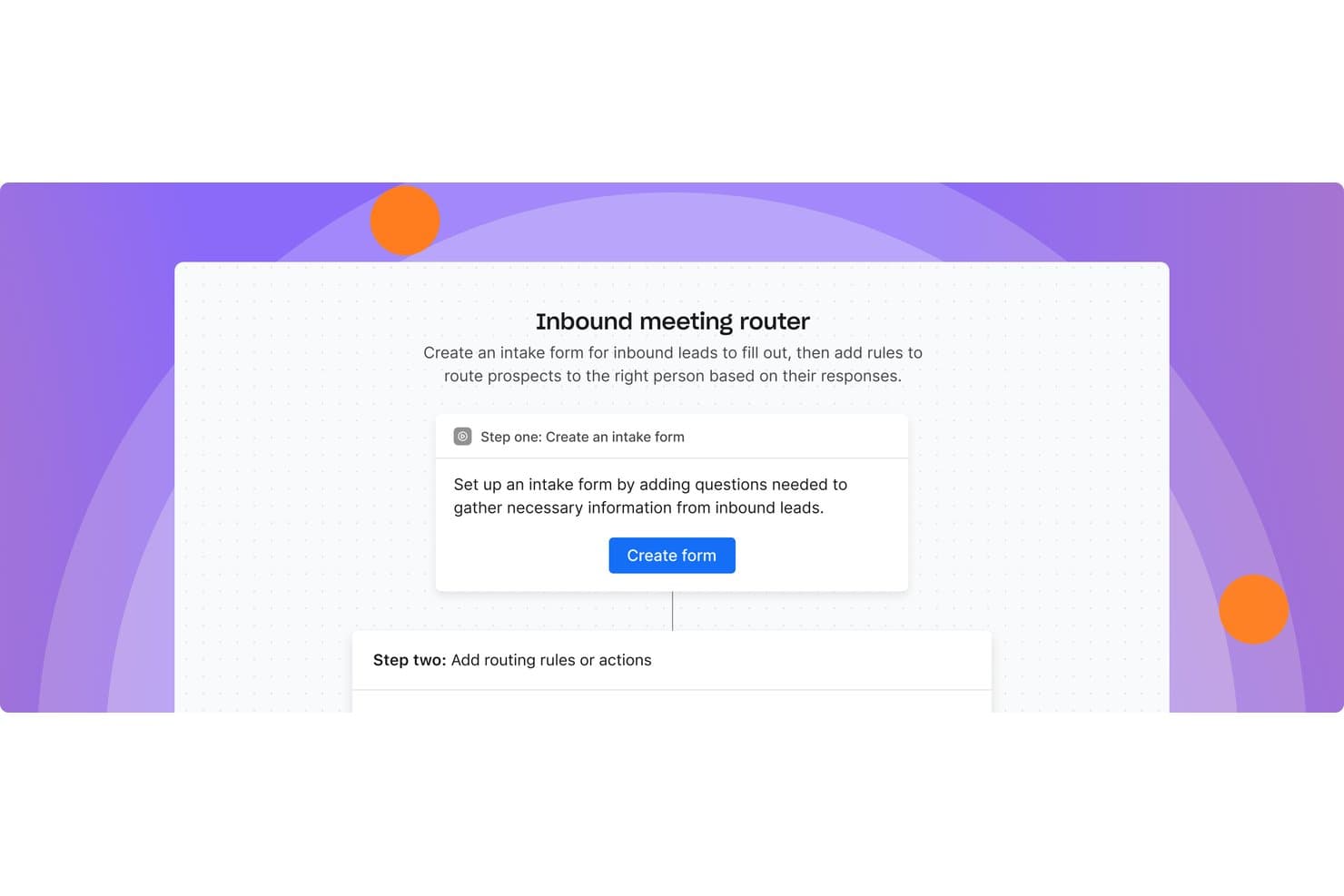
Apollo.io offers an inbound meeting router that lets users create intake forms and set routing rules to direct leads to the right person. Apollo.io is a sales intelligence and GTM platform that bundles inbound lead routing, meeting scheduling, CRM enrichment, and multichannel sales engagement into one workspace.
Who Is Apollo.io Best For?
Apollo.io suits B2B sales and revenue operations teams at SMBs and mid-market companies that want to consolidate their sales stack rather than manage multiple point solutions.
Why I Picked Apollo.io
Apollo.io earns its spot on my shortlist because meeting scheduling and lead routing live inside the same platform, with no separate tools to manage. When a lead submits a web form, Apollo enriches the record, routes it by CRM owner or round-robin, and queues a booking link in one motion. I've seen teams replace Chili Piper after switching, and Apollo's mid-2026 Inbound Optimization update, which drove a 300% improvement in routing accuracy, makes that a straightforward decision.
Apollo.io Key Features
- CRM integration: Syncs bi-directionally with Salesforce, HubSpot, and Pipedrive for lead data and assignments.
- Custom routing rules: Enables multi-criteria routing based on attributes like territory, deal size, or account ownership.
- Lead-to-account matching: Uses AI to match new leads with existing accounts and avoid duplicate assignments.
- SLA performance tracking: Offers built-in dashboards for routing speed, assignment accuracy, and SLA compliance.
Apollo.io Integrations
Apollo.io offers native integrations with Salesforce, HubSpot, Pipedrive, Marketo, and Slack. An API is available for custom integrations.
Pros and Cons
Pros:
- Round-robin and weighted distribution included natively
- Native data enrichment fires before routing decisions
- Meeting scheduling is built into routing workflows
Cons:
- Data accuracy issues flagged by real users
- Routing rules lack depth of dedicated vendors
Learn more about Apollo.io: Best for white-label partner portals
- Free demo available
- Pricing upon request
Visit WebsiteCustomer Rating:5/5
Phonexa is a lead routing platform that manages calls, partners, and payouts for agencies and marketers. Phonexa is a lead routing platform that combines lead distribution, call tracking, partner management, and automated accounting in a single system. It helps agencies, lead generators, and performance marketers manage and route high volumes of inbound leads across multiple channels while maintaining visibility into performance and payouts.
Who Is Phonexa Best For?
Phonexa is best suited for marketing agencies, affiliate networks, and lead generation companies that need to route leads to multiple buyers or teams using customizable rules and partner-specific controls.
Why I Picked Phonexa
I picked Phonexa for its strong white-label capabilities, especially for partner portals. Agencies can present a fully branded experience to buyers and partners, including customized dashboards, reports, and access controls. This makes it easier to manage lead distribution at scale while maintaining a consistent brand presence across the entire partner ecosystem.
Phonexa Key Features
- Lead distribution engine: Route leads using customizable rules, including ping post and priority-based routing.
- Call tracking: Track and attribute inbound calls alongside digital leads for unified routing and reporting.
- Multi-channel lead capture: Collect and manage leads from web forms, calls, and API integrations in one platform.
- Lead validation and compliance tools: Screen leads and apply compliance rules before routing to buyers.
- White-label partner portals: Provide partners and buyers with branded access to leads, reporting, and performance data.
Phonexa Integrations
Phonexa integrates with Salesforce, HubSpot, Mailgun, Twilio, and Google Analytics. An API is available for additional integrations.
Pros and Cons
Pros:
- Real-time ping post lead distribution
- White-label portals for partner management
- Built-in call tracking and lead analytics
Cons:
- Setup process can be time-consuming for new users
- No free-forever plan is available
Learn more about Phonexa: Best for automated email sequences
- 30-day free trial
- From $39/user/month
Visit WebsiteCustomer Rating:4.7/5
Salesflare's workflow automation streamlines email outreach with timed sequences, performance tracking, and smart triggers based on contact behavior. Salesflare is a CRM designed specifically for small and medium-sized B2B businesses. It simplifies the sales process by offering a suite of tools that help you manage leads and customer relationships more effectively.
Salesflare stands out as a top lead routing software because of its automated email sequences feature. This allows you to engage with leads through personalized follow-ups without lifting a finger, making sure no lead falls through the cracks. Additionally, the lead finder tool is a great asset for discovering new leads, saving you the hassle of juggling multiple tools or data files.
Another compelling reason for picking Salesflare is its relationship intelligence feature. It gives you access to metrics on team relationships, enabling you to strengthen customer connections and improve your sales strategy. This feature is particularly beneficial if you're looking to enhance the way your team interacts with clients.
Salesflare Standout Features and Integrations
Features include visual sales pipelines, AI-driven suggestions, which provide valuable insights to improve your sales strategy, and customizable dashboards.
Integrations include Google Workspace, Slack, Mailchimp, Shopify, Google Drive, Google Sheets, Intercom, Calendly, QuickBooks Online, Stripe, Asana, and RingCentral.
Pros and Cons
Pros:
- Excellent automation features
- Customizable dashboards
- User-friendly interface
Cons:
- Limited reporting capabilities
- Limited advanced features
Learn more about Salesflare: Best for customizable routing rules
- Free demo available
- Pricing upon request
Visit WebsiteCustomer Rating:4.8/5
Users can create conversion-optimized forms that integrate directly into their website to capture leads. Default is an innovative platform designed to automate workflows for fast-growing B2B teams. It excels in managing inbound, outbound, and self-serve go-to-market functions, making it an essential tool for enhancing sales and marketing efficiency.
Default stands out as a lead routing software with its advanced lead routing capabilities that ensure leads are assigned to the right sales representatives. This is achieved through customizable routing rules based on various criteria such as geography, lead score, and team availability. By automating the distribution of leads, Default minimizes response times, ensuring that no lead is left unattended.
In addition to its lead routing capabilities, Default provides real-time notifications and alerts, keeping sales teams informed about new lead assignments and status changes. This feature enhances responsiveness and ensures that leads are followed up on quickly. The platform also includes comprehensive reporting and analytics tools that offer insights into lead management performance
Default Standout Features and Integrations
Features include workflow automation, lead scoring, contact and account management, task automation, email tracking, CRM integration, form building, data enrichment, scheduling tools, and customizable templates.
Integrations include Salesforce, HubSpot, Outreach, SalesLoft, Apollo, Google Calendar, Zoom, and Zapier. Other integrations are supported with Webhooks.
Pros and Cons
Pros:
- Customizable routing logic
- Wide range of integrations
- Drag-and-drop builder
Cons:
- Limited offline capabilities
- Learning curve when getting started
Learn more about Default:

When a new lead comes in, LeadBotics notifies relevant salespeople who can then accept or reject the lead. LeadBotics is an AI-powered lead management system designed to enhance the efficiency and performance of sales teams by optimizing lead routing and assignment. It allows sales representatives to respond to leads quickly through alerts via SMS and email, ensuring that no lead goes unattended.
LeadBotics stands out due to its advanced features that leverage artificial intelligence and machine learning. These technologies facilitate optimal lead routing and distribution, ensuring that leads are acted upon swiftly and accurately. The real-time visibility into leads allows businesses to tailor the software to their specific needs, making it highly adaptable to various operational requirements.
The customizable routing rules also provide businesses with the flexibility to prioritize leads based on factors like deal value, territory, or specific sales rep expertise. This ensures that high-value leads are given the attention they deserve, thereby boosting overall sales performance.
LeadBotics Standout Features and Integrations
Features include tools to accept and reject leads, real-time notifications, automatic lead assignment, cross-channel visibility, and analytics that track lead velocity, partner performance, and channel performance.
Integrations include SalesForce, Keap, Monday, Zoho, HubSpot, Mailchimp, Oracle, Pipedrive, and Zapier. You can also integrate with more via Webhooks and REST APIs.
Pros and Cons
Pros:
- Integrates with popular CRMs
- Users can configure lead routing rules
- Quick access to leads on mobile or desktop
Cons:
- Could offer more features for customer nurturing
- Only available in English
Learn more about LeadBotics: Best with global phone numbers in 160+ countries
- 14-day free trial
- From $25/user/month (billed annually)
Visit WebsiteCustomer Rating:4.4/5
CloudTalk’s calling interface with office-based call routing. CloudTalk is a cloud-based call center platform for lead routing that offers advanced call distribution, call flow automation, and integrations with CRM and helpdesk tools.
Who Is CloudTalk Best For?
CloudTalk is a good fit for sales and support teams at companies with distributed or international operations that need advanced call routing and integrations.
Why I Picked CloudTalk
I picked CloudTalk as one of the best because I can assign local or toll-free numbers in over 160 countries, which is a huge advantage for global lead routing. My team uses the platform to instantly set up numbers for new markets and route calls based on caller location. I also like that we can manage all these numbers from a single dashboard, making it easy to support international sales and support teams.
CloudTalk Key Features
- Interactive voice response (IVR): Set up multi-level menus to direct callers to the right team or agent.
- Skill-based routing: Route incoming calls to agents based on their expertise or language skills.
- Call queuing: Organize incoming calls into queues with customizable rules and wait messages.
- Real-time call monitoring: Listen in on live calls and provide coaching or support to agents as needed.
CloudTalk Integrations
CloudTalk offers 35+ native integrations, including Salesforce, HubSpot, Pipedrive, Zendesk, Intercom, Freshdesk, Zoho CRM, Microsoft Dynamics 365, Slack, and Aircall. It also connects with Zapier and provides an API for custom integrations.
Pros and Cons
Pros:
- Automated call distribution based on custom rules
- Native integrations with major CRMs and helpdesks
- Multi-level IVR for complex call flows
Cons:
- Setup for advanced workflows can be time-consuming
- SMS features not available in all countries
Learn more about CloudTalk: Best sales boosting software for B2B revenue teams
- Free demo available
- From $1250/month (billed annually)
Visit WebsiteCustomer Rating:4.6/5
Chili Piper takes a three-pronged approach to close deals and ensure customer satisfaction. Chili Piper is a powerful meeting lifecycle automation platform that can handle lead routing no matter which channels your prospects choose to use for communication with your team. From forms and calls to emails and scheduled meetings, they can help provide the solution to qualify leads and turn them into customers.
This platform is designed to enhance inbound conversion rates for B2B businesses with tools like the Form Concierge that qualifies, routes, and books leads from your existing forms, Distro to prevent leaks in your sales funnel, and Handoff to schedule meetings with one click — no Excel sheet needed!
Whether you’re an SMB or an enterprise-level organization, Chili Piper can handle every workload and workflow. They provide solutions for demand generation, customer success, sales, and revenue operations across a number of different industries.
Chili Piper Standout Features and Integrations
Features include Form Concierge, Handoff, Distro, Instant Booker, access controls and permissions, collaboration tools, lead generation, call management, web forms, room booking, group scheduling, and source tracking.
Integrations include Ada, HubSpot, Google Hangouts, Clearbit, Eloqua, Partner Fleet, Slack, Gong, Duplicate Check, and Unbounce.
Price: From $30/user/month + $150 platform fee
Free Trial: Free demo available
PROS
Robust integration capabilities
Affordable tiered plans
Simple and quick setup
CONS
Requires an additional platform fee
Scheduling can get complicated with different time zones
Pros and Cons
Pros:
- Simple and quick setup
- Affordable tiered plans
- Robust integration capabilities
Cons:
- Scheduling can get complicated with different time zones
- Requires an additional platform fee
Learn more about Chili Piper: Best for reducing routing times by sending the right lead to the right person
- Free demo available
- Pricing upon request
Visit WebsiteCustomer Rating:4.6/5
LeanData delivers precise routing for every lead with intelligent lead delivery. If you’re looking for the gold standard in modern lead management, LeanData offers you a revenue orchestration platform with simple, no-code automation that accelerates the sales funnel through intelligent routing, smart algorithms, lead-to-account matching, accurate data, and lead data automation across all integrations.
One of the best tools for your sales process is the routing tool, which captures, filters, and consolidates customer data. It can identify duplicate and follow-up calls to eliminate low-priority prospects and route return calls to the correct sales rep. LeanData claims it can deliver up to a 99% reduction in response time with its tools!
LeanData is a great choice for SMBs that are focusing on sales development, demand generation, and operations. Some of their customers include Zoom, DocuSign, and Intercom, showing that they can handle CRM support for enterprise-level businesses as well.
LeanData Standout Features and Integrations
Features include account-level insights, lead analysis, segmentation, account identification, priority matching, account tie-breakers, fuzzy matching, match and route, multi-objects, territory routing, working hours routing, audit logs, duplicate match, and analytics.
Integrations include 6Sense, Clearbit, Cloudingo, Kronologic, Outreach, Crossbeam, SalesIntel, Microsoft Teams, Cognism, and Salesforce Sales Engagement.
Pros and Cons
Pros:
- Great notification feature
- Has auditing for quick identification of errors
- Many possibilities for managing record assignment
Cons:
- Extra customization can lead to complex workflows
- Bookit still has a few glitches to work out
Learn more about LeanData: Best for more control over your lead distribution process
- Free demo available
- Pricing upon request
Visit WebsiteCustomer Rating:4.4/5
Charting new lead distribution with LeadSquared to better visualize data. While LeadSquared offers a full-service CRM with lots of essential features, they also focus on intelligent lead distribution that helps you organize, manage, and control each deal from start to finish. When you reduce response time through automated distribution, you improve prospect experience before you’ve even started talking to them!
Whether you choose to distribute leads based on agent or lead attributes or you limit leads with automated capping logic, there are many ways to ensure streamlined distribution channels that won’t clog up your call lines. One of the unique aspects of LeadSquared’s distribution offerings is the way you can auto-distribute a churned agent’s leads. Prevent breaks in communication when you send those leads to more available sales reps.
LeadSquared helps you capture leads from every possible source, including phone calls, email, chat, social media, blogs, online ads, and even events. They can also ensure your industry has targeted solutions with a tailored platform designed for anyone from the financial industry and education to travel and automotive.
LeadSquared Standout Features and Integrations
Features include intelligent lead distribution, lead capping, auto-redistribution, sales management and automation, lead tracking, call center CRM, B2C opportunities, remote sales solutions, field force automation and management, and field force reporting.
Integrations include Gmail, Salesforce, WordPress, Acuity Scheduling, Shopify, Zapier, Freshdesk, Zendesk, LiveChat, and Meta for Business.
Pros and Cons
Pros:
- Easy to track calls from any source
- All the features you need for sales automation
- Intuitive product that requires minimal training
Cons:
- Needs a call recording saving option
- Still adding more software integrations
Learn more about LeadSquared: Best for more flexible lead routing through intelligent software
- Six-month free trial is available
- From $99/company/month
Visit WebsiteCustomer Rating:4.8/5
LeadAngel lead routing is based on powerful segmentation and flexible distribution. LeadAngel is lead management software that helps unleash your sales team with smart lead routing that’s easy to set up and maintain. Their lead routing software works with any CRM and delivers insightful reports that ensure you gain actionable insights on your sales team and customer needs.
One of the key features of their lead routing is the segmentation software that categorizes leads based on any characteristic you choose, including industry, product interest, geographic location, business size, email domain, and account status. Create custom lists and rules for each type of lead to route it to the right sales rep right away.
As a cloud and browser-based solution, LeadAngel can help maximize routing for inbound calls that ensure streamlined services for SMBs and enterprise-level organizations. If you’re looking to intelligently enhance your lead distribution process while integrating with a third-party CRM, LeadAngel can help.
LeadAngel Standout Features and Integrations
Features include lead matching, lead attendant, routing, data cleanup, reporting, alerts/notifications, lead qualification, opportunity management, real-time data, data mapping, segmentation, target account identification, and interaction tracking.
Integrations include Salesforce Essentials, Eloqua, Marketo, and API Interface.
Pros and Cons
Pros:
- Top-notch customer service
- More flexibility for lead-to-account matching
- Easy to set up
Cons:
- No campaign contribution reporting
Learn more about LeadAngel:
Annen programvare for lead-ruting
Her er noen flere alternativer som ikke kom med på listen over den beste programvaren for lead-ruting:
- 11Bitrix24Best for an all-in-one business solution
- 12boberdooBest as a simple, single-tool solution for SMBs
- 13Distribution EngineBest for using lead routing with Salesforce
- 14Lead AssignBest for real-time visibility across every partner
- 15NextivaBest for AI-powered lead management
- 16FreshsalesBest for lead management and customer support
- 17CoeveraBest for a visual approach to customer care
- 18Lead LiaisonBest for driving traffic to your website and turning it into leads
- 19LeadfeederBest for generating sales leads from website visitors
- 20BlitzBest for commission-tracking to minimize manual data input and extra effort
- 21AdrackBest for building campaigns and managing leads
- 22ClickPointBest for call centers and sales teams that provide customer support
- 23Lead CapsuleBest for aggregation, distribution, and commerce
- 24LeadByteBest for real-time automated lead generation from multiple channels through a web-based platform
- 25LeadsPediaBest for lead validation and verification to prevent duplicate and low-quality prospects
How I Evaluate Lead Routing Software
I evaluate lead routing tools in two layers—must-haves like real-time CRM assignment and lead-to-account matching, then differentiators that set certain platforms apart for specific RevOps needs.
Core Functionality (Table Stakes For This List)
When I'm selecting tools for my list, I rank each one on a scale from 0 (does not offer the functionality) to 5 (excels in this area) for each core functionality listed below. Then, I calculate the tool's total score into a percentage. Each tool needs to achieve a minimum total score of 65% to be considered for inclusion.
- Automated Lead Assignment: I check whether a tool can instantly assign inbound leads from forms, chat, and marketing automation without a rep manually claiming them from a queue.
- Custom Routing Rules: Each tool should let me build multi-attribute rules—like routing enterprise leads by industry and region to named account owners—using AND/OR logic.
- Distribution Methods: I look for support across round-robin, weighted, and capacity-based models so teams can balance workload during ramp periods or territory transitions.
- CRM Integration: Bidirectional sync with platforms like Salesforce and HubSpot matters here, including the ability to read custom objects and write assignments back in real time.
- Lead-to-Account Matching: I evaluate how well a tool connects new leads to existing accounts—whether it handles parent/child hierarchies, fuzzy domain matching, or subsidiary structures.
- SLA & Performance Tracking: Built-in dashboards that surface response times, assignment accuracy, and rep workload distribution help RevOps teams spot routing bottlenecks fast.
Once I have a list of tools that meet this criteria, I consider what sets each platform apart.
Differentiating Factors (What Sets Vendors Apart)
Here's how I compare and contrast different vendors:
Standout Features
Built-in meeting scheduling is a big one—tools that let a qualified lead book directly onto a rep's calendar cut out an entire handoff step and shave hours off response time. I also look for data enrichment that appends firmographic details before routing decisions fire, since a lead's company size or tech stack often determines which rep should own it. Buying group orchestration matters for enterprise sales motions where multiple contacts from one account need to land with the same owner, not scatter across the team.
Beyond Features
Tech stack compatibility is something I evaluate closely—a routing tool needs to connect with your marketing automation, chat platforms, and enrichment vendors so leads flow through without manual imports. Implementation and time-to-value also weigh heavily in my assessment. A tool with pre-built routing templates gets a RevOps team live in days, while others may require weeks of professional services to configure complex territory models. I also consider scalability, especially whether pricing and architecture can handle growing rep counts and surging lead volumes during peak campaign periods.
Slik velger du programvare for lead-ruting
Det er lett å gå seg vill i lange funksjonslister og kompliserte prisstrukturer. For å hjelpe deg med å holde fokus mens du går gjennom den unike prosessen med å velge programvare, får du her en sjekkliste over faktorer du bør ha i tankene:
| Faktor | Hva du bør vurdere |
|---|---|
| FaktorSkalerbarhet | Hva du bør vurdereKan programvaren vokse sammen med virksomheten din? Vurder fremtidig utvidelse, hvor mange leads den kan håndtere, og om den støtter større team uten ekstra kostnader. |
| FaktorIntegrasjoner | Hva du bør vurdereKan den kobles til de eksisterende verktøyene dine, for eksempel CRM- eller e-postplattformer? Se etter innebygde integrasjoner for å redusere avhengigheten av tredjepartskoblinger. |
| FaktorTilpasningsmuligheter | Hva du bør vurdereKan du tilpasse programvaren slik at den passer arbeidsflyten din? Se etter justerbare rutingsregler og oversikter som samsvarer med de unike prosessene dine. |
| FaktorBrukervennlighet | Hva du bør vurdereEr grensesnittet brukervennlig? Vurder læringskurven og om det kreves omfattende opplæring for å bruke det effektivt. |
| FaktorImplementering og innføring | Hva du bør vurdereHvor raskt kan du komme i gang? Vurder tiden og ressursene som kreves for oppsettet, inkludert tilgjengelige veiledninger eller støtte fra leverandøren. |
| FaktorKostnad | Hva du bør vurdereEr prisen tydelig og innenfor budsjettet ditt? Sammenlign abonnementer, skjulte gebyrer og om kostnaden samsvarer med funksjonene og fordelene som tilbys. |
| FaktorSikkerhetstiltak | Hva du bør vurdereOppfyller den sikkerhetsstandardene dine? Sørg for at den har datakryptering og brukertillatelser, og at den overholder relevante regler, som GDPR eller CCPA. |
| FaktorTilgjengelig brukerstøtte | Hva du bør vurdereEr hjelp tilgjengelig når du trenger det? Se etter brukerstøtte døgnet rundt, responstider og kvaliteten på ressurser som vanlige spørsmål eller livechat. |
Hva er programvare for lead-ruting?
Programvare for leadruting er et verktøy som automatisk fordeler innkommende salgsemner til riktig salgsrepresentant eller team. Salgspersonell, markedsføringsteam og kundeserviceagenter bruker vanligvis disse verktøyene for å sikre at leads håndteres effektivt. Automatisering, integrasjon med CRM-systemer og tilpassbare rutingsregler bidrar til å håndtere leadflyten og forbedre responstidene. Samlet sett forbedrer disse verktøyene leadhåndteringen og øker salgsteamets produktivitet.
Funksjoner
Når du velger programvare for leadruting, bør du se etter følgende viktige funksjoner:
- Automatisk fordeling av leads: Tildeler automatisk leads til riktig teammedlem, noe som sikrer rask oppfølging og reduserer responstidene.
- CRM-integrasjon: Kobler seg sømløst til eksisterende CRM-systemer for å opprettholde en samlet oversikt over kundedata og interaksjoner.
- Tilpassbare rutingsregler: Lar brukere angi spesifikke kriterier for tildeling av leads og tilpasse prosessen til virksomhetens unike behov.
- Analyse og rapportering: Gir innsikt i resultatene fra leadhåndteringen og hjelper team med å ta datadrevne beslutninger.
- Leadinnsamling fra flere kanaler: Samler inn leads fra ulike kilder, som nettskjemaer, sosiale medier og e-post, og sentraliserer dem for enklere håndtering.
- KI-drevet leadscoring: Bruker kunstig intelligens til å prioritere leads basert på sannsynligheten for at de konverterer, noe som forbedrer salgseffektiviteten.
- Varsler i sanntid: Varsler salgsrepresentanter umiddelbart når et nytt lead tildeles, slik at de kan ta kontakt raskt.
- Brukervennlig grensesnitt: Har et enkelt og intuitivt design som reduserer læringskurven og hjelper team med å komme raskt i gang.
- Sikkerhetstiltak: Sikrer databeskyttelse gjennom kryptering og overholdelse av regelverk som GDPR og CCPA.
- Opplæringsressurser: Gir tilgang til veiledninger, webinarer og kundestøtte for å legge til rette for en smidig innføring og effektiv bruk av programvaren.
Fordeler
Implementering av programvare for leadruting gir flere fordeler for teamet og virksomheten din. Her er noen av fordelene du kan se frem til:
- Forbedrede responstider: Automatisk fordeling av leads sikrer at leads raskt tildeles riktig teammedlem, noe som reduserer forsinkelser.
- Bedre prioritering av leads: KI-drevet leadscoring bidrar til å rette innsatsen mot leads med størst sannsynlighet for å konvertere, noe som øker salgseffektiviteten.
- Sentralisert datahåndtering: CRM-integrasjon samler all leadinformasjon på ett sted, noe som gjør den enklere å få tilgang til og håndtere.
- Økt produktivitet i teamet: Tilpassbare rutingsregler og sanntidsvarsler gjør det mulig for teamet å arbeide mer effektivt og holde oversikt over nye leads.
- Bedre beslutningstaking: Analyse og rapportering gir innsikt i resultatene fra leadhåndteringen og hjelper team med å forbedre strategiene sine.
- Strømlinjeformet innføring: Brukervennlige grensesnitt og opplæringsressurser gjør det enkelt for nye brukere å komme raskt i gang.
- Overholdelse av datasikkerhetskrav: Sikkerhetstiltak sikrer at leaddata er beskyttet og i samsvar med relevante regelverk.
Kostnader & priser
Valg av programvare for leadruting krever en forståelse av de ulike prismodellene og abonnementene som er tilgjengelige. Kostnadene varierer basert på funksjoner, teamstørrelse, tillegg og mer. Tabellen nedenfor oppsummerer vanlige abonnementer, gjennomsnittsprisene deres og typiske funksjoner som er inkludert i løsninger for leadruting:
Sammenligningstabell for programvare for leadruting
| Abonnementstype | Gjennomsnittspris | Vanlige funksjoner |
|---|---|---|
| AbonnementstypeGratisabonnement | Gjennomsnittspris$0 | Vanlige funksjonerGrunnleggende leadruting, begrenset CRM-integrasjon og grunnleggende analyse. |
| AbonnementstypePersonlig abonnement | Gjennomsnittspris$10-$30/bruker/måned | Vanlige funksjonerAvanserte rutingsregler, CRM-integrasjon og grunnleggende rapportering. |
| AbonnementstypeForretningsabonnement | Gjennomsnittspris$40-$70/bruker/måned | Vanlige funksjonerTilpassbare kontrollpaneler, KI-drevet leadscoring og forbedret analyse. |
| AbonnementstypeEnterprise-abonnement | Gjennomsnittspris$80-$150/bruker/måned | Vanlige funksjonerFull CRM-integrasjon, sanntidsvarsler, avanserte sikkerhetsfunksjoner og dedikert kundestøtte. |
Vanlige spørsmål om leadruting: Viktig innsikt for inntektsansvarlige som vil oppnå raskere konverteringer
Når potensielle kunder faller mellom sprekkene, går det ut over inntektene. Denne FAQ-en tar for seg de største utfordringene for inntektsansvarlige – fra lange responstider til ubalansert fordeling av potensielle kunder – og hjelper deg med å finne et leadrutingssystem som øker salgstakten og driver vekst.