

CRM-programvare for callsentre er en verdifull ressurs for alle selskaper. Med riktig programvare kan team forbedre kundeinteraksjonene og styrke kommunikasjonen. Det kan imidlertid være utfordrende å finne riktig CRM-programvare for callsentre, særlig når det finnes så mange tilgjengelige alternativer.
Med utgangspunkt i min erfaring med programvare for inntektsdrift testet og sammenlignet jeg flere av de beste tilgjengelige CRM-programmene for callsentre. Deretter samlet jeg resultatene i detaljerte vurderinger for å hjelpe deg med å finne den beste programvaren for dine behov.
Hvorfor du kan stole på våre programvareanbefalinger
6,700+
Reviews
20
Industry experts
16+
Evaluation factors
14
Years
Anmeldelsene våre bygger på vår uavhengige vurdering, ikke på salgsargumenter. Les hvordan vi sørger for åpenhet.
I denne guiden har vi vurdert verktøyene gjennom praktisk testing og uavhengig research og gitt dem poeng ut fra våre utvelgelseskriterier.
Anmeldelsene våre bygger på vår egen redaksjonelle vurdering. De er ikke et salgsargument.
Sammenligningstabell for CRM-programvare for callsentre
Denne sammenligningstabellen oppsummerer prisopplysningene for den beste CRM-programvaren for callsentre:
| Tool | Best For | Trial Info | Price | ||
|---|---|---|---|---|---|
| 1 | Best for AI-assisted agent workflows | Free trial available | From $15/user/month (billed annually) | Website | |
| 2 | Best for AI voice integration | Free demo available | From $25/month (billed annually) | Website | |
| 3 | Best for call analytics | Free plan + 14-day trial + free demo available | From $25/user/month (billed annually) | Website | |
| 4 | 14-day free trial | From $35/user/month (billed annually) | Website | ||
| 5 | Best for cost-effective CRM | Free plan available | From $14.99/user/month | Website | |
| 6 | Best for small sales teams | Free demo available | Pricing upon request | Website | |
| 7 | Best for efficient call routing | 7-day free trial | From $19/month | Website | |
| 8 | Best for marketing automation | Free demo available | Pricing upon request | Website | |
| 9 | Best for predictive dialing | Free demo available | From $199/user/month | Website | |
| 10 | Best for international calling | 14-day free trial | From $29/user/month (billed annually) | Website |


Anmeldelser av den beste CRM-programvaren for callsentre
Nedenfor finner du mine detaljerte oppsummeringer av den beste CRM-programvaren for callsentre på kortlisten min. I vurderingene ser jeg på de viktigste funksjonene, fordeler og ulemper, integrasjoner og ideelle bruksområder for hvert verktøy, slik at du kan finne det beste alternativet.
 Best for AI-assisted agent workflows
- Free trial available
- From $15/user/month (billed annually)
Visit WebsiteCustomer Rating:4.5/5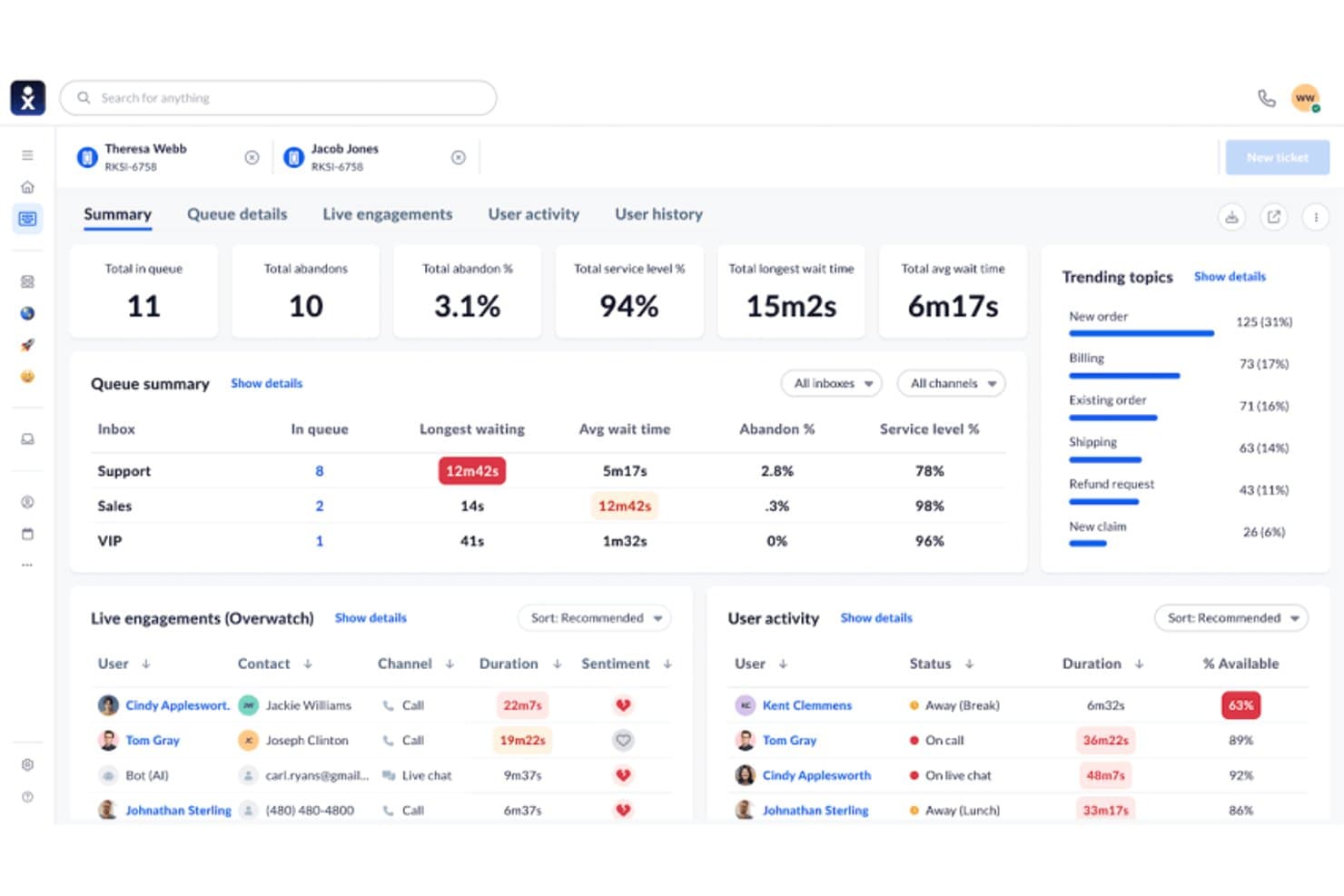
Nextiva displays real-time queue metrics and agent activity in one dashboard. Nextiva is a contact center platform that combines AI-assisted agent workflows, omnichannel routing, outbound dialing, and CRM integrations to manage inbound and outbound call operations.
Who Is Nextiva Best For?
Nextiva suits contact center directors and operations teams who want AI-driven agent workflows—including real-time assist, transcription, and predictive analytics—layered on top of their existing CRM.
Why I Picked Nextiva
I picked Nextiva as one of the best because its AI-assisted agent workflows go well beyond basic call handling. XBert delivers real-time agent assist with next-best-action suggestions and sentiment flagging mid-conversation, while AI transcription and post-call summaries with action items remove manual note-taking entirely. I also like that predictive analytics surface upsell and churn signals, giving contact center teams forward-looking insight, not just call logs.
Nextiva Key Features
- Omnichannel routing: Routes inbound contacts across voice, SMS, chat, email, and social channels within a single conversation thread.
- Outbound dialer modes: Supports predictive, power, progressive, and preview dialing modes for outbound call campaigns.
- CRM screen pops: Surfaces customer records from Salesforce or HubSpot automatically when a call connects, without agents switching applications.
- AI quality management: Scores agent interactions using AI-generated scorecards to support performance reviews and coaching.
Nextiva Integrations
Nextiva lists 32+ integrations, including Salesforce, HubSpot, Zoho CRM, Pipedrive, Microsoft Dynamics, Zendesk, Marketo, Power BI, and Zapier. It also describes a REST API for custom integrations.
Pros and Cons
Pros:
- Omnichannel context follows customers across conversations
- Predictive signals expose upsell and churn risk
- AI summaries reduce manual after-call work
Cons:
- Reporting gaps limit contact center visibility
- Native customer records remain unavailable
Learn more about Nextiva: Best for AI voice integration
- Free demo available
- From $25/month (billed annually)
Visit WebsiteCustomer Rating:4.8/5
Squaretalk's dashboard for managing call center operations effectively. Running a call center out of your CRM means every conversation needs to be logged, visible, and easy for your team to act on without bouncing between tabs. Squaretalk gives sales and support teams a contact-center layer that sits on top of tools like Zoho, Salesforce, Freshworks, and Pipedrive, so calls, notes, and follow-ups live right next to deal and customer data.
Why I Picked Squaretalk
The platform’s centralized contact management brings key customer details, history, and notes into a single view for quicker, more relevant conversations. I also like its unique ability to integrate AI voice agents with predictive dialers, providing a sophisticated approach to automating customer interactions. This combination enhances communication efficiency while offering valuable insights through AI-powered conversation analytics. Additionally, the platform's global HD voice SIP trunking ensures high-quality voice communication, making it ideal for businesses aiming to maintain excellent customer service standards.
Squaretalk Key Features
In addition to its AI voice agents and predictive dialers, Squaretalk offers other valuable features for call center CRM software users:
- WhatsApp Messaging: Facilitates direct communication with customers through a popular messaging platform.
- Spam Checker: Protects your communication channels by filtering out unwanted and potentially harmful calls.
- Unlimited Free Call Recording: Allows for comprehensive call monitoring and quality assurance without additional costs.
- Interactive Voice Response (IVR): Automates call routing and enhances customer self-service options.
Squaretalk Integrations
Integrations include Zoho, Salesforce, Freshworks, Pipedrive, Zendesk, HubSpot, Microsoft Dynamics, and SugarCRM.
Pros and Cons
Pros:
- Comprehensive analytics tools provide valuable insights for decision-making.
- Reliable call management with minimal downtime ensures continuous operation.
- AI integration enhances productivity and customer interaction efficiency.
Cons:
- Limited dashboard customization options compared to competitors.
- Lack of mobile optimization may hinder on-the-go accessibility.
Learn more about Squaretalk: Best for call analytics
- Free plan + 14-day trial + free demo available
- From $25/user/month (billed annually)
Visit WebsiteCustomer Rating:4.2/5
CloudTalk delivers flexible call routing, real-time tracking, and call management for remote and international teams. CloudTalk is a call center solution primarily for sales and support teams. It offers advanced call analytics to improve communication strategies and helps businesses monitor and optimize their call operations.
Why I picked CloudTalk: It provides detailed call analytics that allows your team to gain insights into call performance and customer interactions. The platform's custom reporting can be tailored to your specific needs, offering flexibility in how data is viewed. If you want to enhance your team's communication efficiency, CloudTalk's analytics capabilities aim to help.
Standout features & integrations:
Features include call monitoring, which allows you to listen in on calls and provide real-time feedback. Call recording helps ensure quality and compliance by storing conversations for review.
Integrations include Salesforce, HubSpot, Zendesk, Pipedrive, Intercom, Freshdesk, Zoho CRM, Slack, Shopify, and Google Workspace.
Pros and Cons
Pros:
- Effective call monitoring
- Customizable reporting options
- Detailed call analytics
Cons:
- Call waiting times aren't easily trackable
- Delays in call connection initialization
Learn more about CloudTalk:
 Learn more about Close CRM:
 Best for cost-effective CRM
- Free plan available
- From $14.99/user/month
Visit WebsiteCustomer Rating:4.6/5
EngageBay integrates marketing and call management, automating tasks while offering detailed reporting for efficient team operations. EngageBay is an all-in-one CRM solution for small to medium businesses looking for a cost-effective way to manage customer interactions. It offers marketing, sales, and service automation, making it a versatile tool for various business functions.
Why I picked EngageBay: It provides a budget-friendly CRM option that combines marketing, sales, and support features into one platform. Your team can benefit from email marketing, lead management, and customer support tools without breaking the bank. The simple interface makes navigating and utilizing its features easy for your team.
Standout features & integrations:
Features include email marketing, which allows you to create and send campaigns to engage your audience effectively. Lead management helps you track and nurture potential customers through the sales funnel. Customer support tools ensure your team can handle inquiries and issues efficiently, keeping your clients satisfied.
Integrations include Salesforce, HubSpot, Mailchimp, Shopify, Zapier, QuickBooks, Stripe, Xero, Slack, and Google Workspace.
Pros and Cons
Pros:
- Easy email marketing tools
- All-in-one platform
- Cost-effective for small teams
Cons:
- Inconsistent call connection stability
- Limited call queue management features
Learn more about EngageBay:

CallTools handles high call volumes with customizable routing, real-time tracking, and reporting for call centers. CallTools is a call center CRM designed for small sales teams. It focuses on outbound calling and lead management. This customer relationship management tool enhances sales efficiency by automating dialing processes and providing real-time data analytics.
Why I picked CallTools: It efficiently caters to small sales teams by offering auto-dialing and call-monitoring features that maximize your team's or helpdesk’s productivity. The predictive dialer reduces downtime between calls, allowing your team to follow up on more leads. Real-time analytics offer insights to refine your sales strategy. This contact center CRM solution is suitable for boosting your team's reps' call efficiency without added complexity.
Standout features & integrations:
Features include auto-dialing, which reduces manual dialing time and increases your team's efficiency. Real-time analytics provide insights into call performance, helping refine your sales strategies and avoid customer issues. Call monitoring allows for quality assurance and training opportunities, ensuring your team consistently improves.
Integrations include Salesforce, Zoho CRM, HubSpot, Pipedrive, Infusionsoft, Freshsales, SugarCRM, Microsoft Dynamics, Zendesk, and Slack.
Pros and Cons
Pros:
- Detailed real-time analytics
- Effective call monitoring
- Easy setup process
Cons:
- Call quality can fluctuate
- Requires regular manual updates
Learn more about CallTools:

TalkRoute allows your call centre to set up rules for call distribution based on criteria like time of day or specific departments, navigating unnecessary delays. TalkRoute is a virtual phone system designed for businesses to enhance communication by integrating talking, messaging, and meeting functionalities within a single application. It offers features such as call forwarding, text messaging, video conferencing, voicemail management, and customizable settings. The platform supports different phone number types, including toll-free and local numbers, and is accessible via desktop, mobile, and web applications.
Why I picked TalkRoute: One reason TalkRoute stood out to me in regards to call center CRM needs is its call forwarding and routing feature. This function lets you manage incoming calls efficiently, ensuring they reach the right team members without unnecessary delays. You can set up rules for call distribution based on criteria like time of day or specific departments. This means your customers won't be left waiting, and your team can handle calls more effectively, improving overall customer satisfaction. Plus, the ability to customize these routing options allows you to tailor the system to your specific business needs.
TalkRoute Standout Features and Integrations
Features include call forwarding, call recording, custom greetings, various phone number options (toll-free, vanity, local), voicemail access through apps, customizable greetings, unlimited voicemail storage, SMS and MMS messaging, video conferencing for up to 100 participants, screen sharing, whiteboard feature, call routing adjustments.
Integrations include Zapier, Google Sheets, HubSpot, Slack, Gmail, Facebook Leads, Mailchimp, Shopify, Trello, WooCommerce, ActiveCampaign, and Pipedrive
Pros and Cons
Pros:
- Multi-level auto-attendant enhances customer experience by reducing wait times
- Customizable greetings create a professional image
- Call stacking feature prevents busy tones, ensuring no calls are missed
Cons:
- Supports a maximum of 100 participants in meetings
- Absence of a virtual fax feature may limit some businesses
Learn more about TalkRoute: Best for marketing automation
- Free demo available
- Pricing upon request
Visit WebsiteCustomer Rating:4.4/5
LeadSquared offers customizable call workflows, detailed reporting, and scalable solutions for high-volume call handling and campaign management. LeadSquared is a marketing automation and CRM tool for sales and marketing teams. It aims to enhance lead management by supporting key functions like lead scoring, nurturing, and tracking to optimize sales efforts.
I picked LeadSquared: It provides marketing automation features that allow your team to automate lead capturing. With tools for nurturing leads through custom workflows, your team can focus on converting prospects into customers. The platform's analytics offer insights into lead behavior, helping you refine marketing strategies.
Standout features & integrations:
Features include lead capture and scoring, which helps businesses automatically track and prioritize leads from multiple sources such as websites, social media, and email. Additionally, it provides workflow automation and detailed analytics to optimize sales and marketing strategies, improving overall efficiency and revenue growthlead scoring, which helps your team prioritize high-value prospects.
Integrations include Salesforce, HubSpot, Microsoft Dynamics, Mailchimp, Zapier, Google Analytics, WordPress, Shopify, Zoho CRM, and QuickBooks.
Pros and Cons
Pros:
- Detailed lead analytics
- Customizable lead workflows
- Effective marketing automation
Cons:
- Requires manual setup for call workflows
- Difficult to track call bounce rates
Learn more about LeadSquared: Best for predictive dialing
- Free demo available
- From $199/user/month
Visit WebsiteCustomer Rating:4.5/5
Readymode provides scalable solutions for high-volume calls with real-time monitoring, automation, and workflow customization. Readymode is a call center CRM for sales teams seeking predictive dialing solutions. It helps streamline outbound call processes, making it ideal for sales-focused environments.
Why I picked Readymode: This contact center solution offers predictive dialing, enabling your team to maximize call efficiency by minimizing wait times. It also provides advanced call routing to ensure calls are directed to suitable agents. Real-time monitoring allows you to track performance and make necessary customer journey adjustments.
Standout features & integrations:
Features include predictive dialing that significantly reduces idle time between calls, making your team's outreach more efficient. Advanced call routing ensures that calls go to the most suitable agents, improving response quality. Real-time monitoring lets you keep track of performance metrics, allowing you to make informed adjustments to your strategy.
Integrations include Salesforce, HubSpot, Zendesk, Pipedrive, Freshdesk, Zoho CRM, Intercom, Slack, Microsoft Teams, and Google Workspace.
Pros and Cons
Pros:
- Real-time performance monitoring
- Advanced call routing
- Effective predictive dialing
Cons:
- Needs frequent updates for optimal use
- Limited call recording storage options
Learn more about Readymode: 10Best for international calling
JustCall
- 14-day free trial
- From $29/user/month (billed annually)
Visit WebsiteCustomer Rating:4.1/5
JustCall manages international calls, automates workflows, and provides real-time tracking for growing teams. JustCall is a cloud-based phone system that improves businesses' international calling capabilities. It serves sales and support teams by providing features that facilitate global communication and collaboration.
Why I picked JustCall: It offers features like international phone numbers and call forwarding, which makes it a strong choice for teams managing global clients. Your team can leverage its contact center software capabilities to enhance communication with clients worldwide. The real-time call monitoring feature allows for quality assurance and training.
Standout features & integrations:
Features include international phone numbers, allowing your team to connect with clients globally. Call forwarding ensures that calls are directed to the right person regardless of location. Real-time call monitoring helps you maintain quality and provides opportunities for training and improvement.
Integrations include Salesforce, HubSpot, Zoho CRM, Pipedrive, Slack, Intercom, Freshdesk, Zapier, Help Scout, and Microsoft Dynamics.
Pros and Cons
Pros:
- Real-time call monitoring
- Effective call forwarding
- Supports international numbers
Cons:
- Voicemail transcription is unreliable
- Difficult to manage agent call queues
Learn more about JustCall:
Annen CRM-programvare for callsentre
Her er noen flere alternativer for CRM-programvare for callsentre som ikke kom med på kortlisten min, men som likevel er verdt å undersøke.
- 11NUACOMBest for remote workforces
- 12
- 13Keona HealthBest for healthcare teams
- 14Ricochet360 Best for lead management
- 15ICTContactBest for broadcasting campaigns
- 16Bitrix24Best for free collaboration
- 17Creatio CRMBest for 360 customer views
- 18LiveAgentBest for automatic call distribution
- 19RingCentralBest for unified communications
- 20Agile CRMBest for small businesses
How I Evaluate Call Center CRM Software
I look at these tools in two layers—baseline requirements like embedded telephony and auto-logged call records, and differentiators like AI coaching and dialer modes that determine the right fit.
Core Functionality (Table Stakes For This List)
When I'm selecting tools for my list, I rank each one on a scale from 0 (does not offer the functionality) to 5 (excels in this area) for each core functionality listed below. Then, I calculate the tool's total score into a percentage. Each tool needs to achieve a minimum total score of 65% to be considered for inclusion.
- Integrated Telephony & CRM: I check whether agents can place, receive, and manage calls from within the CRM itself rather than toggling between a standalone dialer and a separate contact database.
- Unified Customer Profiles: Each tool should surface a complete view of a contact's call history, deal stage, support tickets, and notes so agents aren't asking callers to repeat information.
- Automatic Call Logging: I look for platforms that capture call recordings, duration, disposition codes, and outcomes against the right contact or deal record without manual agent input.
- Screen Pops & Call Routing: When an inbound call arrives, agents should see account context instantly and the system should route calls using CRM data like account tier or assigned rep.
- Call Analytics & Reporting: Dashboards should cover more than basic call counts. I evaluate whether the tool can break down metrics like conversion rates, talk time by rep, and pipeline sourced from calls.
- Revenue Stack Integrations: The platform needs to connect with the tools RevOps teams already rely on, such as Salesforce, HubSpot, marketing automation platforms, and helpdesk systems.
Once I have a list of tools that meet the criteria, I consider what sets each platform apart.
Differentiating Factors (What Sets Vendors Apart)
Here's how I compare and contrast different vendors:
Standout Features
AI conversation intelligence is a big differentiator—I look for tools that can flag deal risk or coaching moments from recorded calls without a manager listening to every one. Predictive and power dialers also matter for outbound teams running high-volume campaigns, where connect rates directly impact pipeline generation. Omnichannel support is worth evaluating too, since many revenue teams now handle follow-ups over SMS or chat alongside voice.
Beyond Features
Compliance is a major consideration—I check whether a platform supports call recording consent workflows, data redaction, and standards like PCI-DSS and GDPR, especially for teams handling payment information over the phone. Pricing structure matters too, since some vendors bundle voice minutes into seat licenses while others charge usage-based fees that can spike with high call volumes. I also evaluate scalability, looking at how easily you can add or remove agent seats during seasonal peaks without long-term contract penalties.
Slik velger du CRM-programvare for callsentre
Det er lett å gå seg vill i lange funksjonslister og kompliserte prisstrukturer. Her er en sjekkliste over faktorer du bør huske på, slik at du kan holde fokus mens du går gjennom den unike prosessen med å velge programvare.
| Faktor | Hva du bør vurdere |
| Skalerbarhet | Vil programvaren vokse sammen med teamet ditt? |
| Integrasjoner | Kan den kobles til de eksisterende verktøyene dine? |
| Tilpasningsmuligheter | Kan du tilpasse den etter dine spesifikke behov? |
| Brukervennlighet | Er programvaren intuitiv for teamet ditt å bruke? |
| Budsjett | Holder den seg innenfor de økonomiske rammene dine? |
| Sikkerhetstiltak | Er dataene og kundeopplysningene dine beskyttet? |
| Støtte | Er kundestøtte lett tilgjengelig når det trengs? |
| Rapportering | Gir den innsikt som er nyttig for driften din? |
Trender innen CRM-programvare for callsentre
I undersøkelsene mine hentet jeg inn utallige produktoppdateringer, pressemeldinger og versjonslogger fra ulike leverandører av CRM-programvare for callsentre. Her er noen av trendene som vokser frem, og som jeg følger med på.
- AI-drevet kundeinnsikt: Flere leverandører integrerer AI for å analysere kundeinteraksjoner og gi handlingsrettet innsikt. Dette hjelper virksomheter med å forstå kundenes preferanser og forbedre servicekvaliteten. Noen verktøy tilbyr for eksempel nå sentimentanalyse i sanntid for å måle kundetilfredsheten under samtaler.
- Omnikanalkommunikasjon: Det blir stadig større fokus på å tilby en samlet oversikt over kundeinteraksjoner på tvers av ulike kanaler. Denne trenden gjør det mulig for kundesentre å håndtere henvendelser enkelt via telefon, e-post eller sosiale medier. Leverandørene videreutvikler plattformene sine for å støtte denne helhetlige tilnærmingen til kundeservice.
- Stemmebiometri for sikkerhet: Enkel CRM-programvare for kundesentre inkluderer nå stemmebiometri for å styrke sikkerheten. Denne teknologien bekrefter innringerens identitet basert på unike stemmemønstre, noe som reduserer risikoen for svindel. Det blir en stadig viktigere funksjon for bransjer som håndterer sensitiv informasjon.
- Alternativer for selvbetjening: Kundene foretrekker i økende grad å løse problemer på egen hånd før de kontakter kundestøtten. Leverandører av CRM-programvare for kundesentre integrerer selvbetjeningsportaler som lar brukerne finne løsninger eller følge opp saker selv. Denne trenden gir ikke bare kundene større kontroll, men reduserer også arbeidsmengden i kundesentrene.
- Støtte for eksternt arbeidende medarbeidere: Etter hvert som flere team arbeider eksternt, tilpasser CRM-løsninger for kundesentre seg for å støtte fjernbasert drift. Funksjoner som skybasert tilgang og virtuelle kundesentre blir stadig vanligere. Leverandørene fokuserer på verktøy som lar medarbeidere koble seg til og samarbeide fra hvor som helst, slik at kundestøtten kan opprettholdes uten avbrudd.
Hva er CRM-programvare for kundesentre?
CRM-programvare for kundesentre er utviklet for å administrere kundeinteraksjoner og effektivisere kundeservicen i kundesentre. Den brukes vanligvis av kundeservicemedarbeidere, salgsteam og kundestøttepersonell for å styrke kundeengasjementet og forenkle kommunikasjonen.
Funksjoner som AI-drevet innsikt, omnikanal kommunikasjon og selvbetjeningsalternativer bidrar til å forstå kundenes behov, levere konsekvent service og redusere arbeidsmengden. Disse verktøyene gir betydelig verdi ved å forbedre kundetilfredsheten og øke den operative produktiviteten.
Funksjoner i CRM-programvare for kundesentre
Se etter følgende viktige funksjoner når du velger CRM-programvare for kundesentre:
- Samtaleanalyse: Gir innsikt i samtaleytelse og kundeinteraksjoner, noe som bidrar til å optimalisere kommunikasjonsstrategiene.
- Omnikanalkommunikasjon: Gir en samlet oversikt over interaksjoner på tvers av flere kanaler og sikrer en konsekvent kundeservice.
- AI-drevet kundeinnsikt: Analyserer kundeinteraksjoner for å levere handlingsrettet innsikt, noe som forbedrer servicekvaliteten og forståelsen av kundene.
- Alternativer for selvbetjening: Gir kundene mulighet til å løse problemer på egen hånd, noe som reduserer arbeidsmengden i kundesentrene.
- Stemmebiometri: Styrker sikkerheten ved å bekrefte innringerens identitet gjennom unike stemmemønstre og minimerer risikoen for svindel.
- Prediktiv oppringing: Reduserer nedetiden mellom samtaler og øker teamets produktivitet ved å automatisere oppringingsprosessen. Noen salgsteam velger også automatiske oppringere eller dedikert oppringingsprogramvare for salg med lignende funksjoner.
- Tilpassbare dashbord: Lar brukerne tilpasse visninger og rapporter etter egne behov, noe som gjør løsningen enklere å bruke.
- Samtaleopptak: Lagrer samtaler for kvalitetssikring og etterlevelse, slik at servicestandardene oppfylles.
- Håndtering av potensielle kunder: Følger opp og utvikler potensielle kunder gjennom salgstrakten og støtter salgsarbeidet.
- Overvåking i sanntid: Gjør det mulig for ledere å lytte med på samtaler og gi tilbakemeldinger underveis, noe som forbedrer medarbeidernes prestasjoner.
Fordeler med CRM-programvare for kundesentre
Implementering av CRM-programvare for kundesentre gir flere fordeler for teamet og virksomheten din. Her er noen av fordelene du kan se frem til.
- Forbedret kundetilfredshet: AI-drevne innsikter og kommunikasjon på tvers av kanaler forbedrer kvaliteten og konsistensen i interaksjonene, noe som fører til mer fornøyde kunder.
- Økt effektivitet: Funksjoner som prediktiv oppringing og selvbetjeningsalternativer reduserer manuelle oppgaver og fremskynder prosesser, noe som øker produktiviteten.
- Bedre sikkerhet: Stemmebiometri gir et ekstra beskyttelseslag ved å verifisere identiteter, noe som bidrar til å forhindre svindel og sikre kundedata.
- Bedre beslutningstaking: Samtaleanalyse og overvåking i sanntid gir verdifulle data som gjør det mulig å ta informerte beslutninger for å forbedre service og ytelse.
- Kostnadsbesparelser: Automatisering av rutineoppgaver og optimalisering av arbeidsflyter med tilpassbare kontrollpaneler sparer tid og ressurser og reduserer driftskostnadene.
- Bedre konvertering av potensielle kunder: Funksjoner for håndtering av potensielle kunder bidrar til å spore opp og følge opp potensielle kunder, noe som øker sannsynligheten for å gjøre dem til kunder.
Kostnader og priser for CRM-programvare for callsentre
Når du velger CRM-programvare for callsentre, må du forstå de ulike prismodellene og abonnementene som er tilgjengelige. Kostnadene varierer basert på funksjoner, teamstørrelse, tillegg og mer. Tabellen nedenfor oppsummerer standardabonnementer, gjennomsnittspriser og vanlige funksjoner i CRM-programvareløsninger for callsentre.
Sammenligningstabell for CRM-programvare for callsentre
| Abonnementstype | Gjennomsnittlig pris | Vanlige funksjoner |
| Gratisabonnement | $0 | Grunnleggende samtalehåndtering, begrenset analyse og viktige verktøy for kundeinteraksjon. |
| Personlig abonnement | $5-$25/user/month | Forbedret samtaleruting, grunnleggende rapportering og integrasjon med e-posttjenester. |
| Bedriftsabonnement | $30-$60/user/month | Avansert analyse, støtte for flere kanaler og tilpassbare kontrollpaneler. |
| Storbedriftsabonnement | $70-$150/user/month | Fullstendige AI-drevne innsikter, omfattende sikkerhetsfunksjoner og prioritert brukerstøtte. |
En oversikt over abonnementstyper, kostnader og funksjoner for CRM-programvare for callsentre.
Vanlige spørsmål om CRM-programvare for callsentre
Her er noen svar på vanlige spørsmål om CRM-programvare for callsentre.
Hva er betydningen av callsenteradministrasjon ved implementering av CRM-programvare for callsentre?
Når callsenteradministrasjon er integrert med CRM-programvare, kan agenter håndtere kundedata effektivt og automatisere arbeidsflyter. Dette gjør det mulig for teamet ditt å løse kundenes behov og problemer mer effektivt, noe som forbedrer kunderelasjonene. Denne integrasjonen sørger for at callsentre fungerer problemfritt, noe som gir mer fornøyde kunder og bedre forretningsresultater.
Hvordan bruker man CRM-programvare for callsentre til kundeservice?
For å bruke CRM-programvare til kundeservice velger du et CRM-system som passer behovene dine. Legg til brukere, angi rollene deres og opprett automatiserte prosesser. Integrer CRM-systemet med tredjepartsverktøy for å utvide funksjonaliteten. Når du administrerer kundedata, bør du følge med på ytelsen for å forbedre driften kontinuerlig.
Hva er forskjellen mellom CRM-programvare for callsentre og et kontaktsenter?
Et CRM-system sentraliserer data om kundeinteraksjoner og markedsføring, med fokus på håndtering av relasjoner og salgsprosesser. Et kontaktsenter er derimot utviklet for å sentralisere og støtte kundeservicedriften, og håndterer henvendelser og supportproblemer. Begge har ulike roller, men kan samarbeide for å forbedre kundeopplevelsen.
Hvordan kan CRM-programvare for callsentre forbedre effektiviteten?
CRM-programvare forbedrer effektiviteten i callsentre ved å automatisere rutineoppgaver og gi verdifull kundeinnsikt. Funksjoner som prediktiv oppringing reduserer manuelt arbeid, mens analyse gir data som kan brukes til å forbedre strategier. Dette fører til raskere svartider og bedre servicekvalitet, til fordel for både teamet og kundene.
Hvilken rolle spiller AI i CRM-programvare for callsentre?
AI i CRM-programvare for callsentre gir innsikt ved å analysere kundeinteraksjoner og hjelper teamet ditt med å forstå preferanser og trender. Teknologien kan automatisere rutineprosesser og frigjøre tid til mer komplekse oppgaver. AI-drevne verktøy som følelsesanalyse gir tilbakemeldinger i sanntid, slik at agenter kan tilpasse tilnærmingen sin under samtaler.