

Plattformer for RevOps-automatisering er spesialiserte verktøy som kobler sammen, automatiserer og optimaliserer salgs-, markedsførings- og kundesuksessprosesser på ett sted. Hvis du leter etter de beste plattformene for RevOps-automatisering, ønsker du sannsynligvis å samkjøre inntektsteamene dine, forbedre datakvaliteten og få bedre oversikt over salgspipelinen.
Med den rette løsningen kan du redusere manuelle oppgaver og sørge for at systemene dine faktisk fungerer sammen – uten timevis med omveier eller tekniske problemer. I denne veiledningen finner du de beste plattformene du bør vurdere i 2026, hver med styrker og funksjoner som svarer på utfordringene ved å bygge en samlet inntektsmotor.
Why Trust Our Software Recommendations
6,700+
Reviews
20
Industry experts
16+
Evaluation factors
14
Years
Our reviews reflect our independent judgment—not a sales pitch. Learn how we stay transparent.
For this guide, we evaluated tools using hands-on testing and independent research, scoring tools using our selection criteria.
Our reviews reflect our human editorial judgment, not a sales pitch.
Sammenligningstabell for plattformer for RevOps-automatisering
Denne sammenligningstabellen oppsummerer prisdetaljene for mine utvalgte plattformer for RevOps-automatisering:
| Tool | Best For | Trial Info | Price | ||
|---|---|---|---|---|---|
| 1 | Best for GTM data sync across 300+ connectors | 30-day free trial | Pricing upon request | Website | |
| 2 | Best for integrating complex tech stacks | 14-day free trial and free plan available | From $19.99/month (billed annually) | Website | |
| 3 | Best for analyzing team interactions | Free demo available | Pricing upon request | Website | |
| 4 | Best for building code-less custom automations | Free plan available | From $100/month | Website | |
| 5 | Best for unifying marketing and sales | Free plan available | From $20/user/month | Website | |
| 6 | Best for enriching operations | Free trial available | Pricing upon request | Website | |
| 7 | Best for intent-driven prospecting | 14-day free trial + free plan available | From $49/user/month (billed annually) | Website | |
| 8 | Best for AI-driven revenue forecasting | Free demo available | Pricing upon request | Website | |
| 9 | Best for customizable go-to-market | Free plan + 14-day free trial + free demo available | From $167/month (billed annually) | Website | |
| 10 | Best for auto-capturing revenue activities | Free demo available | Pricing upon request | Website |


Anmeldelser av de beste plattformene for RevOps-automatisering
Nedenfor finner du mine detaljerte sammendrag av de beste plattformene for RevOps-automatisering som kom med på kortlisten. Anmeldelsene mine gir en detaljert gjennomgang av funksjonene, integrasjonene og de beste bruksområdene for hver plattform, slik at du kan finne den beste for deg.
 Best for GTM data sync across 300+ connectors
- 30-day free trial
- Pricing upon request
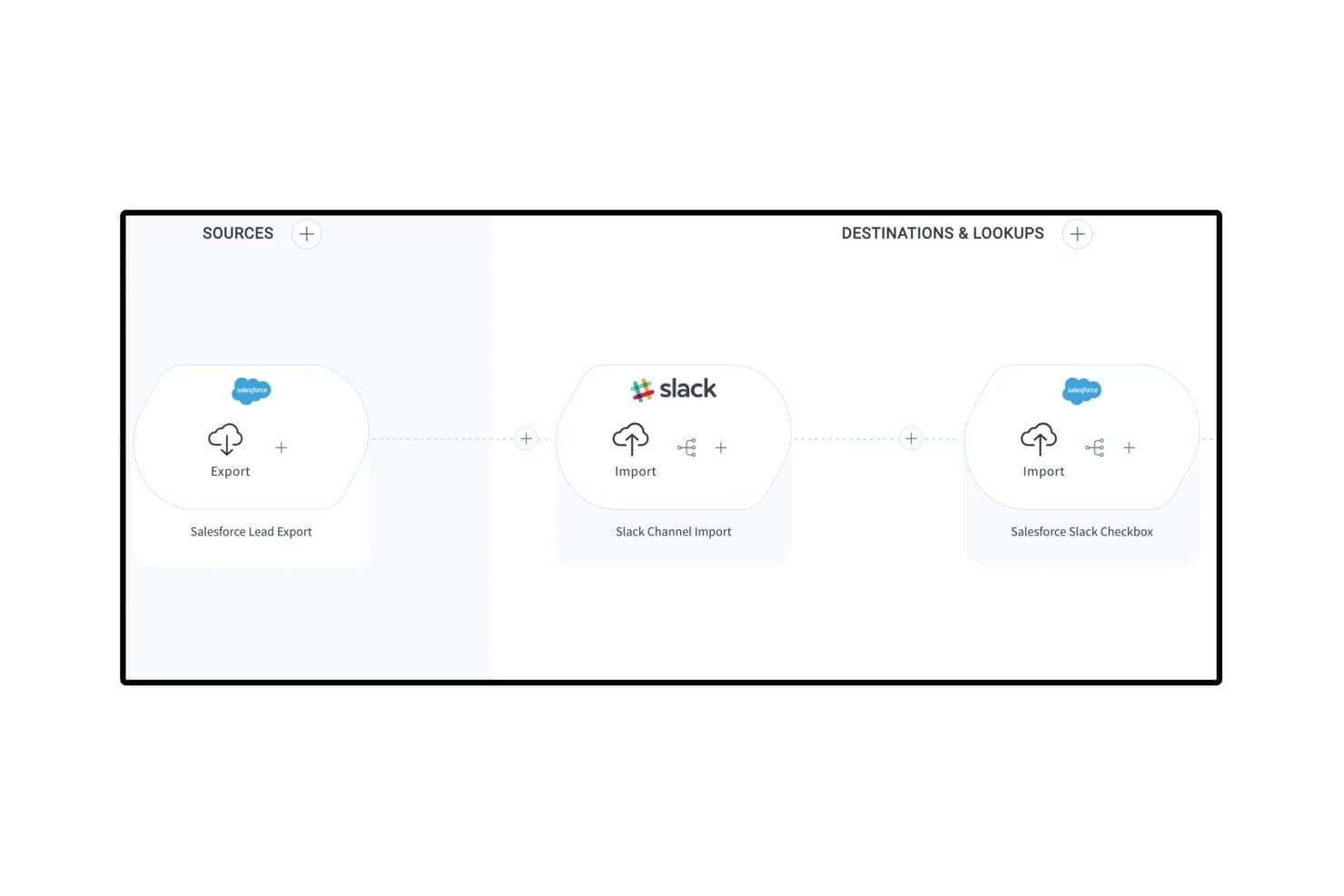
Celigo connects Salesforce and Slack in automated lead engagement flows. Celigo is an iPaaS and automation platform that connects your GTM stack through 1,000+ pre-built connectors, enabling bi-directional data sync, lead lifecycle automation, and quote-to-cash workflows across CRM, marketing automation, ERP, and billing systems.
Who Is Celigo Best For?
Celigo is a strong fit for RevOps and systems teams managing a broad, multi-tool GTM stack that needs reliable, bi-directional data sync across CRM, ERP, and billing systems.
Why I Picked Celigo
Celigo earns its spot on my shortlist because it's the best option I've found for syncing data across a sprawling GTM stack without building custom code for every connection. With 1,000+ pre-built, bi-directional connectors, I can link Salesforce, HubSpot, NetSuite, and Stripe in a single flow, keeping leads, accounts, and revenue data consistent across every system. I also rely on Celigo Ora, its embedded AI assistant, to build and troubleshoot those flows in plain language, which cuts setup time significantly. The AI error management layer auto-resolves roughly 96% of integration exceptions, so data pipelines don't quietly break between systems.
Celigo Key Features
- Quote-to-cash automation: Connects your CRM, ERP, and billing systems to automate the full quote, order, and invoicing process end to end.
- Visual low-code flow builder: A drag-and-drop interface for building multi-step, conditional integration workflows without writing custom code.
- Sandbox environment with environment promotion: Test and validate integration changes in a sandbox before promoting them to production, with full change tracking.
- Data warehouse sync: Native connectors to Snowflake, BigQuery, and Redshift move GTM data into your analytics environment for downstream reporting.
Celigo Integrations
Celigo offers 300+ pre-built connectors, including Salesforce, HubSpot, NetSuite, Stripe, Marketo, Snowflake, BigQuery, Zendesk, Gainsight, and Slack. It also supports custom connectivity through HTTP, FTP, JDBC, GraphQL, WebSockets, and APIs.
Pros and Cons
Pros:
- Connects 1,000+ GTM and back-office tools
- Visual builder supports low-code automation flows
- AI resolves most integration errors automatically
Cons:
- No built-in lead-to-account fuzzy matching
- No native revenue dashboards or forecasting
Learn more about Celigo: Best for integrating complex tech stacks
- 14-day free trial and free plan available
- From $19.99/month (billed annually)
Visit WebsiteCustomer Rating:4.7/5
Zapier’s no-code automation platform connects apps and automates workflows. Zapier is a no-code automation platform that connects apps, triggers actions across systems, and moves data between tools through workflow-based automations called Zaps.
Who Is Zapier Best For?
Zapier is a strong fit for RevOps teams managing fragmented tech stacks who need to automate data flows between tools without relying on engineering resources.
Why I Picked Zapier
Zapier earns its spot on my shortlist because no other tool handles cross-system automation at this breadth without requiring a developer. I particularly like the Paths feature, which lets me build conditional logic so a single trigger can route data differently depending on field values in my CRM. Zapier Canvas also lets my team map out entire automation architectures visually before building them, which is a real asset when documenting complex revenue workflows.
Zapier Key Features
- Zapier Tables: A built-in database that stores, filters, and triggers automations based on record changes.
- Formatter: A native data transformation tool that cleans, reformats, and manipulates field values before passing them to connected apps.
- Zap history: A run log that records every automation attempt, its status, and the data processed at each step.
- AI Zap builder: A copilot that generates a Zap structure from a plain-language description of the automation you need.
Zapier Integrations
Zapier offers 9,000+ app integrations, including Salesforce, HubSpot, Marketo, ActiveCampaign, Salesloft, Slack, Google Sheets, Mailchimp, Airtable, and Calendly. Webhooks and an API are available for custom integrations.
Pros and Cons
Pros:
- Error notifications pinpoint exact failure steps
- Webhooks handle custom APIs without code
- Largest app catalog at 8,000+ connections
Cons:
- Multi-branch logic requires higher tiers
- Multi-step Zaps consume tasks per step
Learn more about Zapier: 3Best for analyzing team interactions
Gong
- Free demo available
- Pricing upon request
Visit WebsiteCustomer Rating:4.7/5
Gong analyzes calls, emails, and meetings to deliver revenue and deal insights. Gong is a revenue intelligence platform that captures and analyzes customer-facing interactions across calls, emails, and meetings to surface deal insights, pipeline signals, and rep coaching data for sales operations teams.
Who Is Gong Best For?
Gong is a strong fit for B2B sales organizations where RevOps teams need visibility into what's actually happening across rep conversations to manage the pipeline and forecast accurately.
Why I Picked Gong
Gong earns its spot on my shortlist because no other tool in this space analyzes team interactions at the depth it does. I rely on Gong's Revenue Graph to connect CRM data, call recordings, and email signals into a single picture of pipeline health. What I find most useful is how its AI flags execution risks inside live deals before they miss forecast, without me needing to manually review calls. It turns interaction data into actionable insights for your revenue engine.
Gong Key Features
- Engagement timeline: View every buyer touchpoint across calls, emails, and meetings in a single account-level activity log.
- Forecast roll-ups: Collect structured forecast submissions from reps and managers with AI-generated overlays for comparison.
- Topic trackers: Monitor specific keywords, competitor names, or objection themes across all recorded conversations at scale.
- Scorecard builder: Define rep evaluation criteria and score calls against them to standardize coaching across the team.
Gong Integrations
Integrations include Salesforce, HubSpot, Microsoft Dynamics 365, Zoom, Microsoft Teams, Google Meet, Slack, Outreach, Salesloft, Aircall, Dialpad, and RingCentral. Gong also offers APIs for CRM, calls, transcripts, users, and engagement data.
Pros and Cons
Pros:
- Topic tracking monitors competitor mentions at scale
- Conversation data enriches pipeline reporting
- AI flags at-risk deals automatically
Cons:
- Forecast tools require significant admin setup
- Limited value without high call volume
Learn more about Gong: Best for building code-less custom automations
- Free plan available
- From $100/month
Visit WebsiteCustomer Rating:4.7/5
Workato automates revenue workflows by connecting sales, marketing, and CS systems. Built for enterprise-grade automation, Workato is a no-code integration platform that connects sales, marketing, and customer success systems through event-driven workflows, conditional logic, and a shared automation layer across the full revenue stack.
Who Is Workato Best For?
Workato is well-suited to RevOps operations managers and systems architects who own the automation layer across a complex, multi-tool go-to-market stack.
Why I Picked Workato
Workato earns its spot on my shortlist because it handles genuinely complex automation logic without requiring a developer. I rely on its formula editor to transform and map data between systems mid-workflow, like reformatting lead source values from Marketo before they write to Salesforce fields. I also like that Workato's AI-assisted recipe builder can generate automation logic from a plain-language description, which cuts the time it takes to go from a process idea to a live, running workflow.
Workato Key Features
- Pre-built recipe templates: A community library of automation templates lets you deploy common RevOps workflows without building from scratch.
- Real-time event triggers: Workato fires automations the moment a defined condition is met, like a deal stage change in Salesforce.
- WorkBot: A native chatbot for Slack and Microsoft Teams that lets team members trigger automations directly from their messaging app.
- Recipe lifecycle management: Built-in dev, test, and production environments let you validate automations before going live.
Workato Integrations
Workato offers 1,200+ pre-built connectors, including Salesforce, HubSpot, Marketo, NetSuite, Snowflake, Slack, Microsoft Teams, Workday, Jira, and Zuora. It also supports custom API connections through universal connectors and provides an API for custom integrations.
Pros and Cons
Pros:
- Enterprise-grade governance and audit controls
- Massive library of pre-built connectors
- No-code recipe builder for complex workflows
Cons:
- Task-based pricing scales up quickly
- Steep administrative learning curve
Learn more about Workato: Best for unifying marketing and sales
- Free plan available
- From $20/user/month
Visit WebsiteCustomer Rating:4.4/5
HubSpot offers an analytics dashboard to track onboarding status, tasks, and completion timeline. HubSpot is a CRM platform that brings together marketing, sales, and customer service tools with built-in automation, pipeline management, and reporting across the full customer journey.
Who Is HubSpot Best For?
HubSpot is a strong fit for small to mid-sized businesses that want a single platform to manage marketing, sales, and customer success teams without stitching together multiple tools.
Why I Picked HubSpot
HubSpot earns its spot on my shortlist because it's one of the few platforms where marketing and sales truly operate from the same data set, not synced copies of it. I like that marketing-qualified leads flow directly into sales sequences without any manual handoff, and that revenue attribution reporting connects campaign performance to closed deals in one view. HubSpot's shared contact timeline also means sales reps can see every marketing touchpoint before their first outreach, which cuts down on the usual back-and-forth between teams.
HubSpot Key Features
- Workflow automation: Build multi-step workflows triggered by CRM property changes, form submissions, or deal stage updates.
- Deal pipeline management: Create and customize multiple pipelines to track deals across different sales process or product lines
- Predictive lead scoring: AI-based scoring that ranks contacts by their likelihood to convert using behavioral and demographic signals.
- Custom report builder: Pull data across contacts, deals, companies, and activities into a single configurable report.
HubSpot Integrations
HubSpot's App Marketplace has over 2,000 apps, including marketplace integrations with Salesforce, Slack, Google Workspace, Microsoft 365, Zoom, Shopify, Snowflake, Gong, DocuSign, and Aircall. It also connects with Zapier, and an API is available for custom integrations.
Pros and Cons
Pros:
- Automation workflows trigger across multiple hubs
- Built-in revenue attribution reporting
- Shared CRM database across all revenue teams
Cons:
- Custom object limits on lower plans
- Advanced reporting locked behind higher tiers
Learn more about HubSpot: Best for enriching operations
- Free trial available
- Pricing upon request
Visit WebsiteCustomer Rating:4.4/5
ZoomInfo Operations helps RevOps teams enrich data and automate lead routing. Built specifically for RevOps teams, ZoomInfo Operations covers CRM data enrichment, deduplication, lead routing, and account scoring across the full go-to-market stack.
Who Is ZoomInfo Best For?
ZoomInfo Operations is best suited to B2B sales and marketing operations teams that rely on large contact databases and need consistent, trustworthy data across multiple go-to-market systems.
Why I Picked ZoomInfo
ZoomInfo Operations earns its spot on my shortlist because of how it handles enrichment at scale. My team uses the automated enrichment triggers to update records the moment a data point changes, rather than waiting for scheduled batch runs. I also like the lead-to-account matching engine, which uses firmographic and behavioral signals to map contacts to the right accounts automatically.
ZoomInfo Key Features
- Intelligent lead routing: Routes inbound leads to the correct sales rep or queue using territory, account ownership, and firmographic rules.
- Account scoring: Scores accounts using fit and intent signals to help prioritize outreach across your pipeline.
- CRM data health reporting: Provides dashboards showing record completeness, decay rates, and enrichment coverage across your database.
- Deduplication rules engine: Detects and merges duplicate records using fuzzy matching logic across name, domain, and contact fields.
ZoomInfo Integrations
Integrations include Salesforce, HubSpot, Microsoft Dynamics 365, Marketo, Oracle Eloqua, Pardot, Outreach, Salesloft, Pipedrive, Bullhorn, Zoho CRM, DocuSign, and G2. ZoomInfo also supports data warehouse connections with Snowflake, Databricks, AWS, and Google Cloud. An API is available for custom integrations.
Pros and Cons
Pros:
- Best direct-dial mobile number coverage
- Org charts reveal decision-maker hierarchies
- No-code workflows with strong deduplication
Cons:
- Rigid auto-renewal and cancellation terms
- Stale records in the mid-market and SMB segments
Learn more about ZoomInfo: Best for intent-driven prospecting
- 14-day free trial + free plan available
- From $49/user/month (billed annually)

Apollo.io combines B2B data, intent signals, sales engagement, and analytics. Built for go-to-market teams, Apollo.io brings together a B2B contact database, intent data, sales engagement, and pipeline analytics in one connected platform.
Who Is Apollo.io Best For?
Apollo.io suits RevOps and sales ops leaders who need to standardize prospecting data and outreach processes across a growing sales team.
Why I Picked Apollo.io
Apollo.io earns its spot on my shortlist because of how precisely it ties intent signals to prospecting action. I use Apollo's buying intent filters alongside job change alerts to time outreach around real trigger events, not arbitrary cadences. My team can then build automated sequences that only fire when an account crosses a signal threshold, keeping our pipeline focused on accounts most likely to convert now.
Apollo.io Key Features
- A/B testing for sequences: Test subject lines and message variants across active sequences to identify which version will drive revenue and replies.
- Territory assignment rules: Automatically assign new accounts to reps based on firmographic attributes like industry, company size, or region.
- Power dialer: Make back-to-back outbound follow-up calls from a prospect queue inside Apollo, with automatic CRM logging after each call.
- ICP scoring model: Score contacts and accounts against a custom ideal customer profile using firmographic and technographic filters.
Apollo.io Integrations
Integrations include Salesforce, HubSpot, Pipedrive, Zoho CRM, Gmail, Microsoft Outlook, Marketo, Chili Piper, Clay, and Census. Apollo also connects with 50+ tools through its integrations marketplace, and an API is available for custom integrations.
Pros and Cons
Pros:
- Sequences support A/B testing and conditional logic
- Job change alerts surface champion movements
- 65+ filters for building targeted prospect lists
Cons:
- Intent data accuracy is inconsistent
- Credit system pushes frequent plan upgrades
Learn more about Apollo.io:

Clari helps revenue teams forecast, inspect pipelines, and analyze revenue with AI. Clari is a revenue operations platform built to streamline AI-powered forecasting, pipeline inspection, CRM activity capture, and revenue analytics across sales, marketing, customer success, and finance.
Who Is Clari Best For?
Clari is a strong fit for mid-market to enterprise B2B companies with complex sales cycles that need tighter forecasting accuracy across multiple revenue teams.
Why I Picked Clari
I picked Clari as one of the best because its AI-driven forecasting rolls up across teams, product lines, geographies, and segments automatically, without anyone touching a spreadsheet. I like how Clari's activity autocapture maps emails, calls, and meetings to the right accounts and opportunities in the CRM, keeping pipeline data current without relying on rep input. That means my team gets forecast submissions that reflect reality, not what reps remember to log.
Clari Key Features
- Revenue cadence management: Run structured forecast calls and pipeline reviews using live CRM data pulled directly into Clari's meeting workflow.
- Deal inspection: Surface potential churn and at-risk deals based on engagement signals, stage progression, and activity gaps across the full pipeline.
- Conversation intelligence: Record, transcribe, and analyze sales calls to track talk patterns, competitor mentions, and coaching moments.
- Pipeline waterfall analysis: Visualize how the pipeline is created, converted, or lost across any time period or team segment.
Clari Integrations
Integrations include Salesforce, HubSpot, Slack, Microsoft Teams, Zoom, Google Workspace, Outreach, Salesloft, Gong, and Snowflake. An API is available for custom integrations and data ingestion.
Pros and Cons
Pros:
- Automatic activity capture reduces manual data entry and CRM updates
- Forecast accuracy improves 20–30% after adoption
- Time-series pipeline view tracks historical trends
Cons:
- Platform updates can reset custom views
- Premium pricing limits small business adoption
Learn more about Clari: 9Best for customizable go-to-market
Clay
- Free plan + 14-day free trial + free demo available
- From $167/month (billed annually)

Clay offers a GTM platform for data enrichment, lead scoring, and workflow automation. Clay is a GTM data enrichment and workflow automation platform that pulls from 100+ data providers to build custom prospecting tables, lead scoring models, and outbound sequences without writing code.
Who Is Clay Best For?
Clay is a strong fit for GTM engineers and RevOps teams at high-growth B2B companies who need to build custom, data-heavy outbound workflows without relying on engineering.
Why I Picked Clay
Clay earns its spot on my shortlist because no other tool in this space lets me build a fully custom GTM data layer the way it does. I use Clay's waterfall enrichment across 150+ data providers to fill contact and account fields that a single provider would miss. I can also layer in AI web research to pull signals my best reps would otherwise find manually, then route the enriched records directly into my CRM or trigger actions in downstream tools, all inside one workflow.
Clay Key Features
- No-code table builder: Build enrichment and outbound workflows in a spreadsheet-style interface without writing any code.
- Claygent: An AI agent that browses the web autonomously to research prospects and pull custom signals at scale.
- Personalized outreach copy generation: Use enriched data fields to auto-generate tailored messaging for each prospect directly inside Clay.
- Prospecting list builder: Source and build targeted lead lists from web data and filters inside the platform without a separate tool.
Clay Integrations
Integrations include Salesforce, HubSpot, Pipedrive, Outreach, Salesloft, Airtable, Google Sheets, and Snowflake. APIs and webhooks are available for custom integrations.
Pros and Cons
Pros:
- AI agent automates manual prospect research
- Unlimited seats on every paid plan
- Waterfall enrichment pulls from 150+ providers
Cons:
- Fast data burn exhausts credits
- Credit-based billing makes costs unpredictable
Learn more about Clay: Best for auto-capturing revenue activities
- Free demo available
- Pricing upon request

People.ai uses AI to capture sales activity and deliver revenue insights. People.ai is an AI-driven revenue intelligence platform that automatically captures sales activity data, maps it to CRM records, and surfaces deal insights, forecast signals, and rep performance patterns across your go-to-market teams.
Who Is People.ai Best For?
People.ai is a strong fit for enterprise sales organizations that run large field teams and need reliable activity data without depending on manual CRM input.
Why I Picked People.ai
I picked People.ai as one of the best because it captures every email, call, and meeting automatically and maps that activity directly to the right account, opportunity, and contact in Salesforce, without requiring reps to log anything manually. What I find genuinely useful is the account engagement score, which shows exactly how much activity is happening across each deal and flags relationships going cold before they drop out of the forecast.
People.ai Key Features
- Pipeline health monitoring: Flags deals at risk of slipping based on actual engagement patterns across emails, calls, and meetings, before they miss a forecast call.
- Waterfall chart reporting: Visualizes exactly what moved in your forecast, including slipped deals, new pipeline, wins, and losses, for QBR and board-level reporting.
- Rep performance benchmarking: Identifies which activity patterns and engagement behaviors your top reps use so you can coach the rest of the team against a real standard.
- Multi-threading detection: Surfaces single-threaded deals and missing stakeholder coverage so you can act before a gap becomes a lost deal.
People.ai Integrations
Integrations include Salesforce, Microsoft Dynamics 365, Oracle, Gmail, Google Calendar, Outlook, Zoom, Slack, Webex, Snowflake, Tableau, Power BI, Outreach, Salesloft, and Clari. An API is available for custom integrations.
Pros and Cons
Pros:
- Relationship maps show stakeholder connections visually
- Detects competitor mentions in sales conversations
- Surfaces deal with visibility without manual CRM updates
Cons:
- Limited dashboard customization for individual reps
- Highly dependent on data cleanliness
Learn more about People.ai:
Andre plattformer for RevOps-automatisering
Her er noen flere alternativer for plattformer for RevOps-automatisering som ikke kom med på kortlisten min, men som likevel er verdt å se nærmere på:
- 11LeanDataBest for automated lead routing
- 12GainsightBest for account health tracking
- 136senseBest for AI-driven intent data integration
- 14CognismBest for GDPR-compliant contact data sourcing
- 15DefaultBest for automated quota compliance
- 16Salesforce Best for sales lifecycle management
- 17FullcastBest for territory planning automation
- 18DealHubBest for guided selling configuration
- 19ForecastioBest for predictive deal forecasting
- 20WarmlyBest for real-time buyer identification
Kriterier for valg av plattformer for RevOps-automatisering
Da jeg valgte hvilke av de beste plattformene for RevOps-automatisering som skulle inkluderes i denne listen, tok jeg hensyn til vanlige kjøperbehov og utfordringer, som å koble sammen adskilte salgs- og markedsføringssystemer og redusere manuelt, gjentakende dataarbeid. Jeg brukte også følgende rammeverk for å holde evalueringen strukturert og rettferdig:
How I Evaluate RevOps Automation Platforms
I split my evaluation into two layers: baseline capabilities like lead routing and CRM data sync, and the differentiators that make one platform the right fit for a specific RevOps team.
Core Functionality (Table Stakes For This List)
When I'm selecting tools for my list, I rank each one on a scale from 0 (does not offer the functionality) to 5 (excels in this area) for each core functionality listed below. Then, I calculate the tool's total score into a percentage. Each tool needs to achieve a minimum total score of 75% to be considered for inclusion.
- Lead-to-Account Automation: I check whether a platform can match inbound leads to existing accounts and route them by territory, segment, or hierarchy—not just round-robin across a rep pool.
- Revenue Data Orchestration: The tool should sync data bi-directionally across CRM, MAP, billing, and warehouse systems so RevOps teams aren't reconciling pipeline numbers in spreadsheets.
- GTM Workflow Automation: I look for a no-code or low-code builder that handles real multi-step workflows—like triggering a CS handoff when a deal closes and updating the billing system simultaneously.
- Territory & Quota Management: Platforms that support dynamic territory carving and quota distribution tied to GTM planning cycles score higher than those limited to static list uploads.
- Data Hygiene & Enrichment: I evaluate how the platform handles deduplication, normalization, and enrichment—especially whether it can keep CRM records clean continuously rather than as a one-time batch job.
- Pipeline & Forecasting Analytics: Beyond basic dashboards, I look for deal inspection, forecast roll-ups, and the ability to flag at-risk deals based on pipeline activity signals.
Once I have a list of tools that meet this criteria, I consider what sets each platform apart.
Differentiating Factors (What Sets Vendors Apart)
Here's how I compare and contrast different vendors:
Standout Features
AI-powered insights are a major differentiator—I look for platforms that flag at-risk deals or recommend next-best actions based on activity patterns, not just static reports. Revenue attribution modeling also matters when teams need to trace marketing spend back to closed-won revenue across multiple touchpoints. Sandbox environments and version control round things out. Being able to test a new routing rule or workflow change without disrupting live GTM processes is something I always check for.
Beyond Features
Tech stack fit is one of the first things I evaluate. A platform's depth of integration with your primary CRM—whether that's Salesforce, HubSpot, or Dynamics—shapes how much value you'll actually get from it. Pricing model matters too, since per-user pricing scales very differently than per-workflow or usage-based models as your GTM team grows. I also check for SOC 2 Type II certification and role-based access controls, especially when RevOps teams handle sensitive pipeline and billing data across multiple departments.
Slik velger du plattformer for RevOps-automatisering
Det er lett å gå seg vill i lange funksjonslister og komplekse prismodeller. For å hjelpe deg med å holde fokus mens du arbeider deg gjennom den unike programvarevalgsprosessen din, får du her en sjekkliste over faktorer du bør ha i bakhodet:
| Faktor | Hva du bør vurdere |
| Skalerbarhet | Kan plattformen støtte den forventede veksten i bruker- og datamengde de neste to til tre årene uten store prishopp eller systembegrensninger? |
| Integrasjoner | Kan den kobles direkte til den eksisterende teknologistakken din – CRM, analyse-, markedsførings- og økonomiverktøy – eller trenger du omveier eller manuell synkronisering? |
| Tilpasningsmuligheter | Lar plattformen deg tilpasse arbeidsflyter slik at de samsvarer med teamets unike prosesser, eller er du bundet til rigide maler eller utløsere? |
| Brukervennlighet | Er brukergrensesnittet forståelig for brukere uten ingeniørbakgrunn? Vil teamene dine trenge omfattende opplæring for å bygge eller administrere automatiseringer? |
| Implementering og oppstart | Hva slags hjelp er tilgjengelig for å komme i gang – dedikert støtte ved oppstart, migreringsverktøy, opplæringsmateriell eller malbiblioteker? |
| Kostnad | Finnes det tydelige prisnivåer som passer behovene dine i dag og når du skalerer? Vær oppmerksom på skjulte kostnader knyttet til integrasjoner, brukere eller volumet av automatiseringsoppgaver. |
| Sikkerhetstiltak | Tilbyr plattformen rollebaserte tillatelser, revisjonsspor, SSO og datakryptering? Hvordan håndterer den sensitive inntekts- og kundeopplysninger? |
| Tilgjengelig kundestøtte | Hvor raskt, og gjennom hvilke kanaler, kan du få hjelp under implementering eller nedetid – chat, e-post, telefon eller en dedikert kundeansvarlig? |
Hva er automatiseringsplattformer for RevOps?
Automatiseringsplattformer for RevOps er programvareløsninger som tilbyr ende-til-ende-orkestrering av prosesser for inntektsoperasjoner på tvers av salgs-, markedsførings- og kundesuksessystemer. Disse plattformene hjelper teamet ditt med å synkronisere data, utløse arbeidsflyter og sikre konsistente prosesser. Ved å redusere manuelt arbeid og bryte ned siloer gir automatiseringsplattformer for RevOps deg bedre oversikt over salgspipelinen, høyere datakvalitet og en mer forutsigbar inntektsmotor.
Funksjoner
Når du velger automatiseringsplattformer for RevOps, bør du se etter følgende nøkkelfunksjoner:
- Automatisering av arbeidsflyter: Automatiser flertrinnsprosesser på tvers av salg, markedsføring og kundesuksess uten manuell inngripen. Dette sikrer konsekvent gjennomføring og reduserer menneskelige feil.
- Dataintegrasjon: Koble sammen og synkroniser informasjon på tvers av kundelivssyklusen fra CRM-systemer, plattformer for markedsføringsautomatisering, økonomisystemer og støtteverktøy.
- Betingede utløsere: Sett opp logikkbaserte handlinger som utløser arbeidsflyter eller varsler basert på endringer i data, bevegelser i salgspipelinen eller samspill mellom systemer.
- Rollebaserte tillatelser: Kontroller hvem som kan få tilgang til, redigere eller ta i bruk ulike automatiseringer, slik at bare autoriserte brukere kan gjøre endringer i kritiske inntektsprosesser.
- Revisjonsspor: Spor alle automatiseringer, endringer i arbeidsflyter og brukerhandlinger for å gi åpenhet og støtte samsvar eller feilsøking.
- Tilpasset feltkobling: Definer og synkroniser unike felt mellom systemer, slik at teamet ditt ikke er begrenset til grunnleggende datastrukturer som følger med løsningen.
- API-tilgang: Utvid plattformens funksjonalitet eller bygg tilpassede integrasjoner, slik at utviklere kan tilpasse systemet til teamets unike krav.
- Batchbehandling: Flytt eller oppdater store mengder poster samtidig, noe som er nyttig ved datamigrering, datarensing eller større prosessendringer.
- Feilhåndtering og varsler: Identifiser automatisk mislykkede automatiseringer eller synkroniseringer, og varsle brukere slik at problemer kan løses raskt før de påvirker inntektsoperasjonene.
Vanlige AI-funksjoner
I tillegg til standardfunksjonene i automatiseringsplattformer for RevOps som er nevnt ovenfor, tar mange av disse løsningene i bruk AI med funksjoner som:
- Prediktiv prognostisering: Bruker maskinlæring til å analysere historiske salgsdata og aktuelle trender i salgspipelinen, slik at team kan forutsi inntektsresultater og identifisere avtaler med risiko før de går tapt.
- Intensjonsdeteksjon: Overvåker signaler fra digitalt engasjement for å identifisere kontoer eller potensielle kunder som med størst sannsynlighet vil konvertere, prioritere oppfølging og avdekke skjulte kjøpsgrupper.
- Automatisert dataforbedring: Oppdaterer og kompletterer kontinuerlig kontakt- eller firmaposter ved å hente og validere informasjon fra offentlige og proprietære databaser.
- Smarte anbefalinger for arbeidsflyter: Foreslår prosessjusteringer eller nye automatiseringer basert på bruksmønstre, resultatmålinger og observerte flaskehalser i inntektsmotoren.
- Avviksdeteksjon: Skanner aktivitet i salgspipelinen og prosessdata for å flagge uregelmessigheter, for eksempel plutselige fall i konverteringsrater eller uventede økninger i overganger mellom avtalestadier, slik at team kan reagere raskt.
Fordeler
Implementering av automatiseringsplattformer for RevOps gir flere fordeler for teamet og virksomheten din. Her er noen av fordelene du kan se frem til:
- Samkjørte inntektsteam: Samkjører salgs-, markedsførings- og kundesuksessteam ved å automatisere arbeidsflyter og datautveksling.
- Bedre oversikt over salgspipelinen: Sentraliserer prosesser og sanntidsdata, slik at drifts- og ledelsesteam alltid vet hvor avtaler og kontoer står.
- Konsekvent gjennomføring av prosesser: Reduserer manuelle oppgaver og feil med automatiserte, regelbaserte arbeidsflyter og feltvalideringer.
- Forbedret datakvalitet: Renser, kobler og beriker poster på tvers av plattformer for å gi nøyaktig og pålitelig rapportering og prognostisering.
- Raskere problemløsning: Gir revisjonsspor, feilmeldinger og automatiserte varsler, slik at team raskt kan oppdage og rette opp prosessbrudd.
- Økt smidighet: Lar deg oppdatere automatiseringer, bygge nye arbeidsflyter og tilpasse prosesser uten å vente på ressurser fra utvikling eller IT.
- Forutsigbare inntektsoperasjoner: Støtter prognostisering og identifisering av risiko med standardisert automatisering og, når det er tilgjengelig, AI-drevet analyse.
Kostnader og priser
Valg av plattformer for RevOps-automatisering krever en forståelse av de ulike prismodellene og planene som er tilgjengelige. Kostnadene varierer basert på funksjoner, teamstørrelse, tillegg og mer. Tabellen nedenfor oppsummerer vanlige planer, gjennomsnittsprisene deres og typiske funksjoner som er inkludert i plattformer for RevOps-automatisering:
Sammenligningstabell for plattformer for RevOps-automatisering
| Plantype | Gjennomsnittspris | Vanlige funksjoner |
| Gratisplan | $0 | Begrenset arbeidsflytautomatisering, grunnleggende integrasjoner, begrenset antall brukerplasser og brukerstøtte fra fellesskapet. |
| Personlig plan | $20-$50/per bruker/måned | Individuelle automatiseringer, standardintegrasjoner, moderat lagringsplass, grunnleggende rapportering og brukerstøtte via e-post. |
| Forretningsplan | $50-$120/per bruker/måned | Arbeidsflyter med flere trinn, API-tilgang, avanserte integrasjoner, tilpassbare dashbord, rollebaserte tillatelser og brukerstøtte via direktechat. |
| Virksomhetsplan | $120-$250/per bruker/måned | Ubegrensede automatiseringer, dedikert onboarding, avansert sikkerhet, revisjonsspor, prioritert brukerstøtte og SLA-garantier. |
Vanlige spørsmål om plattformer for RevOps-automatisering
Her er noen svar på vanlige spørsmål om plattformer for RevOps-automatisering:
Krever plattformer for RevOps-automatisering teknisk ekspertise for å settes opp?
Nei, de fleste plattformer for RevOps-automatisering er utformet slik at forretningsbrukere kan opprette arbeidsflyter og administrere integrasjoner gjennom grensesnitt uten kode eller med lite kode. Det kan være lurt å få hjelp fra IT ved komplekse API-oppsett eller avanserte tilpasninger, men den daglige prosesshåndteringen er vanligvis tilgjengelig for ikke-tekniske brukere.
Kan plattformer for RevOps-automatisering integreres med både CRM- og markedsføringsautomatiseringsverktøy?
Ja, nesten alle plattformer for RevOps-automatisering tilbyr forhåndsbygde integrasjoner for populære CRM- og markedsføringsautomatiseringsverktøy. Se etter innebygde koblinger som passer med de nåværende systemene dine, slik at du kan unngå forsinkelser eller ekstra kostnader forbundet med spesialutvikling.
Hvordan forbedrer plattformer for RevOps-automatisering datanøyaktigheten?
Plattformer for RevOps-automatisering synkroniserer, renser og standardiserer data på tvers av inntektsverktøystakken din, noe som reduserer antallet duplikatoppføringer, feil ved manuell registrering og utdatert informasjon. Automatiske oppdateringer og valideringsregler bidrar til å holde dataene pålitelige for rapportering og beslutningstaking.
Passer plattformer for RevOps-automatisering for små team?
Ja, mange plattformer tilbyr fleksible planer som kan skaleres ned for små team og oppstartsbedrifter. Begynn med grunnleggende arbeidsflytautomatisering og integrasjoner, og legg deretter til funksjoner etter hvert som teamet og kompleksiteten vokser. Sørg for at de innledende prisene og avtalevilkårene ikke binder deg til mer enn du trenger.
Hva bør jeg vurdere når jeg evaluerer sikkerheten i en plattform for RevOps-automatisering?
Se etter rollebaserte tillatelser, revisjonslogger, SSO-alternativer, datakryptering og samsvarssertifiseringer som er relevante for bransjen din. Spør leverandørene om prosessen deres for varsling om datainnbrudd, retningslinjer for oppbevaring av data og alternativer for håndtering av sensitive virksomhets- og kundedata.