

Programvare for kontraktsautomatisering er en verdifull ressurs for alle selskaper. Med riktig programvare kan team øke effektiviteten og redusere manuelle feil i kontraktsbehandlingen. Men det kan være utfordrende å finne den rette programvaren for kontraktsautomatisering, særlig når det finnes så mange alternativer.
Med utgangspunkt i min erfaring med programvare for inntektsoperasjoner testet og sammenlignet jeg flere av de beste tilgjengelige løsningene for kontraktsautomatisering. Deretter samlet jeg resultatene i detaljerte anmeldelser for å hjelpe deg med å finne den beste programvaren for dine behov.
Hvorfor du kan stole på våre programvareanbefalinger
6,700+
Reviews
20
Industry experts
16+
Evaluation factors
14
Years
Anmeldelsene våre bygger på vår uavhengige vurdering, ikke på salgsargumenter. Les hvordan vi sørger for åpenhet.
I denne guiden har vi vurdert verktøyene gjennom praktisk testing og uavhengig research og gitt dem poeng ut fra våre utvelgelseskriterier.
Anmeldelsene våre bygger på vår egen redaksjonelle vurdering. De er ikke et salgsargument.
Sammenligningstabell for programvare for kontraktsautomatisering
Denne sammenligningstabellen oppsummerer prisdetaljene for mine beste utvalgte løsninger for kontraktsautomatisering.
| Tool | Best For | Trial Info | Price | ||
|---|---|---|---|---|---|
| 1 | Best for SAP-connected contract approvals | Free demo available | Pricing upon request | Website | |
| 2 | Best with Salesforce data integration | Free demo available | From $399/month (billed annually) | Website | |
| 3 | Best for e-signature simplicity | Free plan available | From $10/month (billed annually) | Website | |
| 4 | Best for document management | Free demo available | From $50/user/month | Website | |
| 5 | Best for digital workflow integration | Free demo available | Pricing upon request | Website | |
| 6 | Best for compliance tracking | Free demo available | Pricing upon request | Website | |
| 7 | Best for enterprise scalability | Free demo available | Pricing upon request | Website | |
| 8 | Best for lifecycle management | Free demo available | Pricing upon request | Website | |
| 9 | Best for sales teams | Free demo available | Pricing upon request | Website | |
| 10 | Best for secure data storage | Free demo available | Pricing upon request | Website |


Anmeldelser av den beste programvaren for kontraktsautomatisering
Nedenfor finner du mine detaljerte sammendrag av den beste programvaren for kontraktsautomatisering som kom med på kortlisten min. Anmeldelsene mine gir et detaljert innblikk i de viktigste funksjonene, fordelene & ulempene, integrasjonene og de ideelle bruksområdene for hvert verktøy, slik at du kan finne det beste alternativet for deg.
 Best for SAP-connected contract approvals
- Free demo available
- Pricing upon request
Visit WebsiteCustomer Rating:4.8/5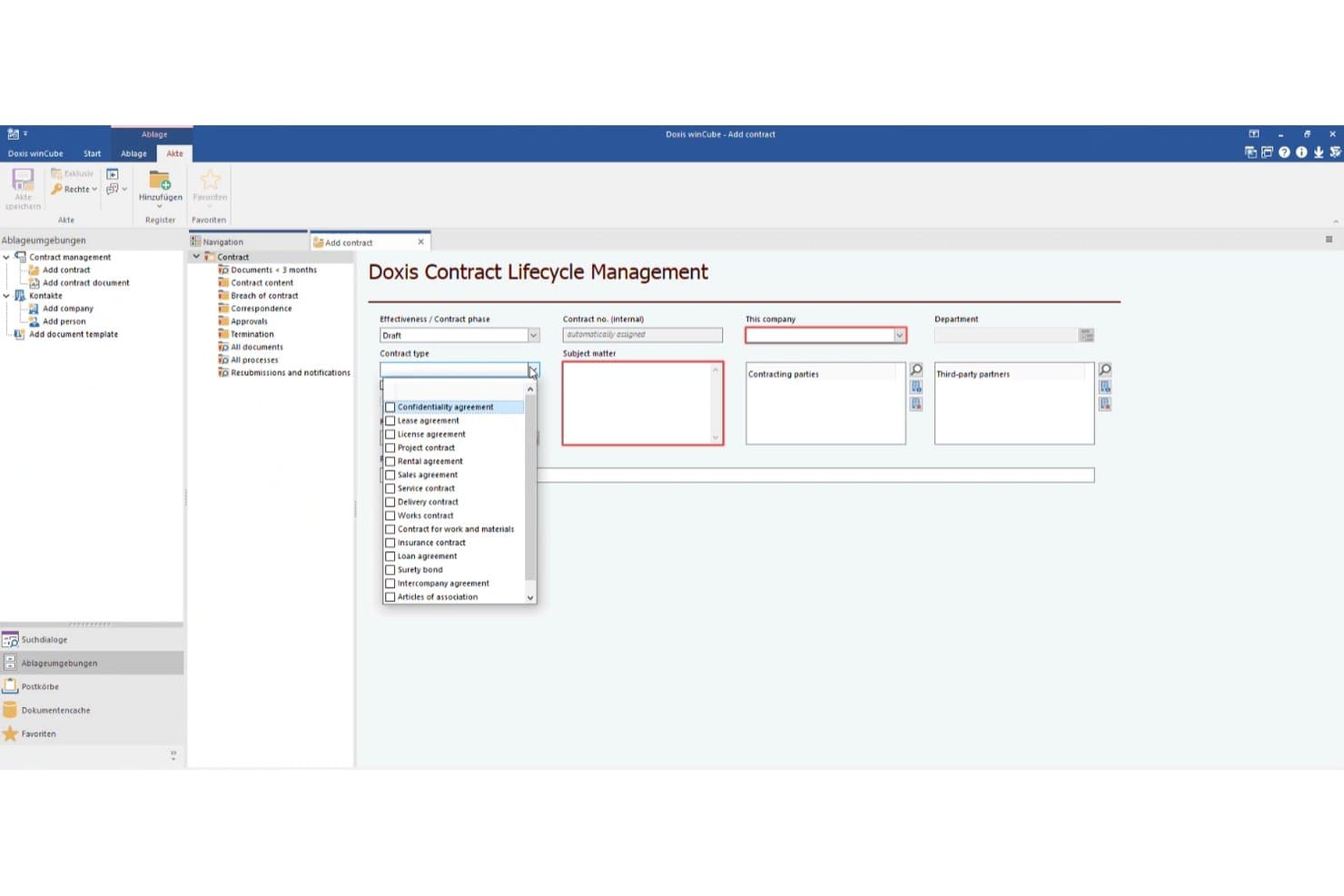
Doxis lets users classify contracts by type during creation. Doxis is an enterprise content management platform that includes contract management capabilities spanning template-based drafting, conditional approval routing, obligation tracking, AI-powered repository search, and integrations with e-signature providers.
Who Is Doxis Best For?
Doxis fits large enterprises that run SAP and need contract approvals integrated directly into their existing ERP workflows.
Why I Picked Doxis
I've included Doxis in my top picks because its SAP integration is genuinely class-apart for enterprises running approval workflows inside an existing ERP. When a high-value contract lands, Doxis automatically routes it to Legal based on preset value thresholds, logs every step, and files the countersigned document back against the originating SAP record. I also like Ask Doxi, which lets you query your entire contract portfolio in plain language and traces every answer to its source clause.
Doxis Key Features
- AI-powered data extraction: Doxis AI.dp pulls key data like parties, dates, and clauses from third-party or scanned contracts and flags them for human confirmation.
- Contract-type input forms: Each contract type has its own structured input screen with fields for term, notice period, liability, and penalties that auto-populate document templates.
- Multilingual document generation: Doxis Doc Gen maps contract data into language-specific templates, supporting drafting across multiple languages without manual reformatting.
- Legal-hold and retention controls: Contracts involved in disputes or audits can be locked from deletion, with automated retention schedules and tamper-proof archiving in PDF/A and TIFF formats.
Doxis Integrations
Doxis integrates with SAP ERP, SAP S/4HANA, Microsoft Dynamics 365, Salesforce, Microsoft 365, DocuSign, Adobe Sign, FP Sign, MOXIS, and Xitrust. Its SAP-certified connectors support contract workflows across ERP, CRM, office, and e-signature systems.
Pros and Cons
Pros:
- Conditional approvals preserve audit trails
- Scales across large enterprise deployments
- Reliable document handling praised by reviewers
Cons:
- Few contract-specific user reviews available
- No collaborative external redlining or negotiation playbooks
Learn more about Doxis: Best with Salesforce data integration
- Free demo available
- From $399/month (billed annually)
Visit WebsiteCustomer Rating:4.5/5
altaFlow automates contract creation, document renaming, data export, and multi-step approvals through a visual workflow builder. altaFlow is a contract automation platform that combines contract lifecycle management, no-code workflow automation, and multi-system data integration for businesses managing complex agreements.
Who Is altaFlow Best For?
altaFlow is a good fit for operations and legal teams at mid-sized to large businesses that need to automate and manage complex contract workflows.
Why I Picked altaFlow
I picked altaFlow as one of the best because its Salesforce data integration is the most seamless I’ve used for contract automation. My team can sync contract data directly with Salesforce objects, keeping everything up to date without manual entry. I also like that we can trigger contract workflows based on Salesforce events, which helps us automate approvals and renewals right from our CRM.
altaFlow Key Features
- No-code workflow builder: Build and customize contract workflows without writing any code.
- Automated document generation: Create contracts and related documents automatically from templates and data fields.
- Multi-system data syncing: Sync contract data across multiple business platforms beyond Salesforce.
- Audit trails: Track every change and action taken on a contract for compliance and transparency.
altaFlow Integrations
altaFlow offers native integrations with Salesforce and DocuSign. An API is available for custom integrations.
Pros and Cons
Pros:
- Detailed audit trails for compliance tracking
- Automated document generation from templates
- Real-time syncing across multiple business systems
Cons:
- Requires sales contact for onboarding and setup
- Few native integrations beyond Salesforce and DocuSign
Learn more about altaFlow: Best for e-signature simplicity
- Free plan available
- From $10/month (billed annually)
Visit WebsiteCustomer Rating:4.9/5
SignWell simplifies e-signatures with multi-signer workflows and document tracking. SignWell is an e-signature solution designed for businesses that need a straightforward way to sign and manage documents electronically. It caters to small teams and individual users who require an easy-to-use platform for contract signing and document management.
Why I picked SignWell: It simplifies the e-signature process, making it ideal for those who want a no-fuss approach to electronic signing. The platform supports multiple signers, allowing you to manage complex signing and approval processes effortlessly. SignWell also offers document tracking, so you can see when your team or clients have opened and signed documents. Its intuitive interface ensures that you and your team can start using it without a steep learning curve.
Standout features & integrations:
Features include automated document workflows, allowing you to specify signing orders, track document statuses, and send automatic reminders, so contracts move smoothly from one step to the next. SignWell also offers a template library, enabling you to create reusable contract templates with placeholders, which makes contract preparation faster.
Integrations include Salesforce, Dropbox, Google Drive, Box, Evernote, Microsoft OneDrive, Slack, HubSpot, Zapier, and Trello.
Pros and Cons
Pros:
- Customizable templates for consistent document preparation
- Detailed audit trails improve accountability
- Quick to set up and start using
Cons:
- Limited collaboration tools
- Basic reporting features may not meet advanced needs
Learn more about Signwell: Best for document management
- Free demo available
- From $50/user/month
Visit WebsiteCustomer Rating:4.5/5
Square 9 simplifies document management with digitization, search, and automation tools. Square 9 is a document management solution designed for businesses that need to organize and manage their document assets effectively. It serves industries like healthcare, finance, and education, offering tools for capturing, storing, and retrieving documents.
Why I picked Square 9: It's tailored for document management, providing features that simplify how your team handles documents. The platform includes document capture tools that help digitize paper documents quickly, and its search functionality allows you to find documents using metadata and keywords. Square 9 also offers workflow automation to streamline document processing, ensuring your team can work efficiently.
Standout features & integrations:
Features include automated workflows that simplify contract review and approval, and complex search capabilities, so you can quickly locate contracts by details like creation date or contract party. Square 9 also provides a centralized archive for all contract records, making it easy for your team to access, organize, and retain essential contract history for compliance and audit purposes.
Integrations include Microsoft Office, QuickBooks, Sage, Salesforce, Docusign, Dropbox, Google Drive, SharePoint, Box, and SAP.
Pros and Cons
Pros:
- Templates for consistent contract formats
- Automated reminders help manage contract deadlines
- Supports version-controlled archives for contract history
Cons:
- Limited custom reporting options for specific metrics
- Initial setup can be time-consuming for teams
Learn more about Square 9: Best for digital workflow integration
- Free demo available
- Pricing upon request
Visit WebsiteCustomer Rating:4.4/5
Ironclad excels in digital workflows, real-time editing, and contract tracking. Ironclad is a contract lifecycle management platform designed for businesses that need to automate and integrate their contract workflows digitally. It serves legal and procurement teams, helping them manage contracts from creation through to execution.
Why I picked Ironclad: Its strength lies in digital workflow integration, facilitating smooth transitions between contract stages. The platform offers a workflow designer that lets your team set up custom workflows easily. Ironclad also features a document editor that supports real-time collaboration. Additionally, its dashboard provides a comprehensive view of all contract activities, ensuring your team stays informed.
Standout features & integrations:
Features include a dynamic repository, where contracts and their histories are stored, ensuring quick retrieval and version tracking for compliance. Its advanced analytics tool provides insights into contract metrics and lifecycle efficiency, enabling teams to identify bottlenecks and improve processes continually.
Integrations include Salesforce, Docusign, Adobe Sign, Google Drive, Box, Dropbox, Slack, Microsoft Teams, SAP, and Oracle.
Pros and Cons
Pros:
- Secure document management with strong version control
- Real-time collaboration for efficient team reviews
- Easily customizable workflows for varied contract types
Cons:
- Complex setup process that may be time consumin
- Limited notification customization for contract deadlines
Learn more about Ironclad: Best for compliance tracking
- Free demo available
- Pricing upon request
Visit WebsiteCustomer Rating:4.4/5
Gatekeeper excels in compliance tracking with AI, workflow automation, and e-signature. Gatekeeper is a vendor management platform tailored for businesses seeking to streamline contract and vendor processes. It primarily serves legal, finance, and procurement teams, offering solutions for contract lifecycle management and compliance tracking.
Why I picked Gatekeeper: It excels with its compliance tracking capabilities, making it ideal for industries with strict regulatory requirements. Gatekeeper’s compliance tracking tools, which ensure contracts meet industry standards. The platform's interface is intuitive, minimizing the learning curve and boosting adoption.
Standout features & integrations:
Features include AI-powered data extraction, automated workflows for contract processes, and a user-friendly e-signature solution. Gatekeeper’s self-service portals allow vendors and employees to manage their own data, freeing up your team’s time while maintaining a comprehensive audit trail and full visibility over contract processes.
Integrations include Salesforce, NetSuite, Slack, Google Drive, Dropbox, Microsoft Teams, Box, Okta, Zapier, and QuickBooks.
Pros and Cons
Pros:
- Advanced contract sorting by multiple criteria
- Highly customizable workflows for various needs
- Allows bulk importing for faster setup
Cons:
- Custom reporting options could be more flexible
- Setup may require external help for advanced workflows
Learn more about Gatekeeper: Best for enterprise scalability
- Free demo available
- Pricing upon request
Visit WebsiteCustomer Rating:4.3/5
Icertis excels in scalability, complex workflows, analytics, and compliance support. Icertis is a contract lifecycle management software tailored for large enterprises that require comprehensive management of complex contract portfolios. It caters to procurement, legal, and compliance teams, offering solutions that cover the entire contract lifecycle.
Why I picked Icertis: It’s ideal for enterprises due to its scalability and ability to handle a high volume of contracts. The platform features a flexible workflow engine that supports complex contract management processes. Its advanced analytics provide insights that help your team make data-driven decisions. Additionally, Icertis offers a robust compliance framework, ensuring that all contracts adhere to industry regulations.
Standout features & integrations:
Features include rule-based automation to standardize clauses and create tailored approval workflows, reducing manual effort across high-volume contracts. Icertis further supports post-signature tracking with automated alerts and monitoring, helping your team stay on top of contract renewals and obligations over time.
Integrations include Salesforce, Microsoft Dynamics 365, SAP Ariba, Oracle, IBM, Workday, Docusign, Adobe Sign, Coupa, and Slack.
Pros and Cons
Pros:
- Intelligent clause recommendations
- Efficient deployment on a secure cloud platform
- Advanced risk management and compliance tracking
Cons:
- Occasional complexity in setting up multi-department workflows
- Limited flexibility in ad-hoc contract creation without templates
Learn more about Icertis: Best for lifecycle management
- Free demo available
- Pricing upon request
Visit WebsiteCustomer Rating:4.2/5
Contract Logix streamlines lifecycle management with alerts, storage, and custom templates. Contract Logix is a contract management solution designed for organizations that need to efficiently manage the entire contract lifecycle. It caters to legal, procurement, and compliance teams, offering functionalities to streamline contract creation, tracking, and management.
Why I picked Contract Logix: This platform is good for its contract lifecycle management features, which help ensure your contracts are handled from start to finish. The platform provides automated alerts and notifications to keep your team updated on contract milestones, and its document management system allows you to store and retrieve contracts easily. With customizable templates, your team can create contracts that suit your specific business needs.
Standout features & integrations:
Features include AI-driven data extraction, which quickly identifies and auto-populates critical contract details, reducing the need for manual data entry and minimizing errors. The platform also provides a visual workflow designer, allowing your team to customize contract workflows with a simple drag-and-drop interface for notifications, approvals, and document reviews.
Integrations include Salesforce, Microsoft Dynamics 365, QuickBooks, SAP, Oracle, Docusign, Adobe Sign, Box, Dropbox, and Google Drive.
Pros and Cons
Pros:
- Real-time collaboration tools improve contract negotiation
- Centralized digital repository offers quick, secure access
- Customizable workflows allow tailored contract processes
Cons:
- Mobile access somewhat limited
- May require additional training for non-technical teams
Learn more about Contract Logix:

DealHub boosts sales with guided playbooks, deal rooms, and automated CPQ. DealHub is a sales engagement platform designed to streamline the sales process for sales teams. It focuses on contract management, quoting, and proposal generation, making it easier for sales professionals to close deals efficiently.
Why I picked DealHub: It's tailored specifically for sales teams, offering features that enhance the sales process from start to finish. DealHub provides a guided selling playbook that helps your team follow best practices. The platform includes interactive deal rooms that foster collaboration between salespeople and clients. Its automated CPQ (Configure, Price, Quote) functionality reduces manual effort, allowing your team to focus on selling.
Standout features & integrations:
Features include automated contract approval workflows, which route contracts through creation and approval steps based on predefined criteria. DealHub also provides in-app redlining, allowing teams to collaborate directly on contracts while maintaining version control, so every change is tracked in real-time.
Integrations include Salesforce, Microsoft Dynamics 365, HubSpot, Oracle Sales Cloud, Zoho CRM, SugarCRM, Slack, LinkedIn, DocuSign, and Adobe Sign.
Pros and Cons
Pros:
- Streamlined redlining and approval workflows in-app
- Fast support team that actively implements feedback
- Highly customizable workflows to match complex needs
Cons:
- Tracking changes across versions can be challenging
- Reporting functionality is limited and somewhat basic
Learn more about DealHub: Best for secure data storage
- Free demo available
- Pricing upon request

DiliTrust ensures secure data storage with encryption, contract management, and ease of use. DiliTrust Governance Suite is a platform that serves legal and compliance teams looking for secure data management. It provides solutions for document management, board meeting organization, and contract lifecycle management.
Why I picked DiliTrust Governance Suite: It excels in secure data storage, offering features that ensure your sensitive information is protected. The platform includes encrypted document storage and access controls, which enhance data security for your team. Meanwhile, its contract management tool helps manage the entire contract lifecycle efficiently.
Standout features & integrations:
Features include AI-powered risk detection that identifies potential issues in contracts, helping your team proactively manage risks before they become problems. DiliTrust also offers a centralized contract repository with secure access controls, allowing teams to store and manage contracts in a structured, searchable archive.
Integrations include Microsoft Office 365, Google Workspace, Box, Dropbox, Docusign, Adobe Sign, SAP, Salesforce, SharePoint, and IBM.
Pros and Cons
Pros:
- Customizable dashboards streamline tracking and reporting
- Centralized repository allows easy access to contract records
- Comprehensive audit trails for accountability and compliance
Cons:
- Complex features may require additional user training
- Initial setup and configuration can be time-consuming
Learn more about DiliTrust Governance Suite:
Annen programvare for kontraktsautomatisering
Her er noen andre alternativer for kontraktsautomatisering som ikke kom med på kortlisten min, men som likevel er verdt å se nærmere på:
- 11LegalOnBest for contract analytics
- 12OntraBest for legal departments
- 13UpdraftBest for small businesses
- 14Deel HRBest for global employment contracts
- 15ContractSafeBest for quick searchability
- 16CobbleStone Contract InsightBest for contract lifecycle
- 17JuroBest for contract collaboration
- 18AgiloftBest for customization options
- 19ConcordBest for legal compliance
- 20Docusign CLMBest for electronic signatures
How I Evaluate Contract Automation Software
I look for two things in contract automation tools: baseline table stakes like CRM-connected templates and approval routing, and differentiators that matter to RevOps and deal desk teams.
Core Functionality (Table Stakes For This List)
When I'm selecting tools for my list, I rank each one on a scale from 0 (does not offer the functionality) to 5 (excels in this area) for each core functionality listed below. Then, I calculate the tool's total score into a percentage. Each tool needs to achieve a minimum total score of 65% to be considered for inclusion.
- Template & Clause Library: I check whether you can build reusable contract templates with dynamic fields that pull deal data, plus a governed clause library reps can draw from.
- CRM/CPQ Data Integration: A tool earns points here when it syncs opportunity and quote data bidirectionally with platforms like Salesforce, HubSpot, or Dynamics 365.
- Approval Workflow Automation: I evaluate whether routing logic can branch based on real deal conditions—discount thresholds, non-standard terms, or contract value tiers.
- eSignature Support: Whether native or embedded through a provider like DocuSign, I look for in-platform signing that keeps the contract moving without switching tools.
- Redlining & Version Control: Counterparty negotiation matters, so I check for in-platform redlining, clause-level commenting, and clean version history across rounds.
- Contract Repository & Search: Post-execution storage should include metadata tagging and search so your team can quickly locate renewal dates, obligations, or specific terms.
Once I have a list of tools that meet this criteria, I consider what sets each platform apart.
Differentiating Factors (What Sets Vendors Apart)
Here's how I compare and contrast different vendors:
Standout Features
Deal desk playbooks are a major differentiator—I look for tools that let RevOps define fallback clauses and discount guardrails so reps can negotiate within approved boundaries without waiting on legal. AI contract analytics also carry weight, especially when a tool flags risky language or non-standard terms against your playbook during redlining. Renewal and obligation automation rounds this out by surfacing upcoming dates inside CRM records, giving your team time to plan expansion plays before contracts lapse.
Beyond Features
Cross-functional adoption matters a lot here. A tool that embeds inside your CRM for reps but also supports Word-based editing for legal is far more likely to stick than one that forces everyone into an unfamiliar interface. I also evaluate how quickly a platform can go live—pre-built CRM connectors and starter workflow templates cut weeks off deployment. Scalability for high-velocity sales motions is another factor I check, particularly whether the tool handles bulk contract generation without ballooning seat costs as your team grows.
Slik velger du programvare for kontraktsautomatisering
Det er lett å gå seg vill i lange funksjonslister og komplekse prisstrukturer. For å hjelpe deg med å holde fokus mens du arbeider deg gjennom den unike prosessen med å velge programvare, får du her en sjekkliste over faktorer du bør ha i mente:
| Faktor | Hva du bør vurdere |
| Skalerbarhet | Vil programvaren vokse i takt med virksomhetens behov? |
| Integrasjoner | Kan den integreres med verktøyene og systemene du allerede bruker? |
| Tilpasningsmuligheter | Kan du tilpasse programvaren til de spesifikke prosessene dine? |
| Brukervennlighet | Hvor intuitiv er programvaren for teamet ditt i den daglige bruken? |
| Budsjett | Holder programvaren seg innenfor de økonomiske rammene dine? |
| Sikkerhetstiltak | Finnes det solide tiltak for å beskytte dataene dine? |
| Kundestøtte | Hvilket nivå av støtte tilbyr leverandøren? |
| Samsvar | Oppfyller den bransjespesifikke krav og forskrifter du er underlagt? |
Trender innen programvare for kontraktsautomatisering
I undersøkelsen min samlet jeg inn utallige produktoppdateringer, pressemeldinger og lanseringslogger fra ulike leverandører av programvare for kontraktsautomatisering. Her er noen av trendene som er i ferd med å vokse frem, og som jeg følger med på:
- AI-drevet analyse: AI brukes i stadig større grad til å gi innsikt i kontraktsdata, og hjelper brukere med å identifisere risikoer og muligheter. Dette gjør det enklere for juridiske team å ta informerte beslutninger raskt. Leverandører som LegalOn integrerer AI for å forbedre funksjonene for kontraktsanalyse.
- Blokkjede for sikkerhet: Noen verktøy utforsker blokkjedeteknologi for å styrke kontraktssikkerheten og åpenheten. Denne trenden er særlig relevant for bransjer som krever høy grad av dataintegritet og tillit. Selskaper undersøker hvordan blokkjede kan brukes til å sikre dokumentenes autentisitet.
- Integrasjon av smarte kontrakter: Fremveksten av smarte kontrakter gjør det mulig å gjennomføre kontraktsvilkår automatisk. Denne funksjonen blir stadig mer populær i bransjer som finans, der betingelser kan programmeres til å utløse handlinger uten menneskelig inngripen. Dette gir økt effektivitet og færre feil.
Hva er programvare for kontraktsautomatisering?
Programvare for kontraktsautomatisering er et sett med digitale verktøy som er utviklet for å automatisere og administrere kontrakters livssyklus. Juridiske fagfolk, innkjøpsansvarlige og samsvarsansvarlige bruker vanligvis disse verktøyene for administrasjon av kontrakters livssyklus for å redusere manuelt arbeid og sikre nøyaktighet i kontraktshåndteringen. Automatiserte arbeidsflyter, AI-drevet analyse og sikker dokumentlagring bidrar til risikostyring, effektivitet og datasikkerhet. Samlet sett gir disse verktøyene brukerne en mer effektiv måte å håndtere forretningskontrakter på, samtidig som de sparer tid og reduserer feil.
Funksjoner i programvare for kontraktsautomatisering
Når du velger programvare for kontraktsautomatisering, bør du se etter følgende viktige funksjoner:
- Automatiserte arbeidsflyter: Effektiviserer kontraktsprosessen ved å automatisere repetitive oppgaver, spare tid og redusere feil.
- AI-drevet analyse: Gir innsikt i kontraktsdata for å bidra til å identifisere risikoer og muligheter, slik at du kan ta informerte beslutninger.
- Sikker dokumentlagring: Sikrer at alle kontrakter lagres trygt og enkelt kan hentes frem, samtidig som sensitiv informasjon beskyttes.
- Tilpassbare maler: Gjør det mulig for brukere å opprette kontrakter som er tilpasset spesifikke forretningsbehov, noe som forbedrer effektiviteten og ensartetheten.
- Samarbeid i sanntid: Gjør det mulig for flere brukere å arbeide med kontrakter samtidig, noe som legger til rette for samarbeid og raskere ferdigstillelse.
- Samsvarssporing: Overvåker kontrakter for å sikre at de oppfyller bransjereguleringer, reduserer juridisk risiko og opprettholder standarder.
- Administrasjon av kontrakters livssyklus: Håndterer kontrakter fra opprettelse til gjennomføring og sikrer en smidig prosess samt oversikt hele veien.
- Avanserte søkefunksjoner: Hjelper brukere med raskt å finne bestemte kontrakter eller opplysninger ved hjelp av nøkkelord eller metadata, noe som sparer tid.
- Varsler og meldinger: Holder brukerne informert om kontraktsfrister og milepæler, slik at man unngår tapte muligheter eller forpliktelser.
Fordeler med programvare for kontraktsautomatisering
Implementering av programvare for kontraktsautomatisering gir flere fordeler for teamet og virksomheten din. Her er noen av fordelene du kan se frem til:
- Tidsbesparelser: Automatiserte arbeidsflyter reduserer behovet for manuelle oppgaver, slik at teamet ditt kan fokusere på viktigere aktiviteter.
- Bedre nøyaktighet: AI-drevet analyse og samsvarssporing bidrar til å minimere feil og sikrer at kontraktene er presise og pålitelige.
- Forbedret sikkerhet: Sikker dokumentlagring beskytter sensitiv kontraktsinformasjon og gir deg trygghet.
- Bedre samarbeid: Funksjoner for samarbeid i sanntid gjør det mulig for teammedlemmer å arbeide effektivt sammen, noe som fremskynder kontraktsprosessen.
- Økt samsvar: Samsvarssporing sikrer at alle kontrakter oppfyller bransjestandarder og reduserer juridisk risiko.
- Bedre innsikt: Avansert analyse gir verdifull innsikt i kontraktsdata, slik at du kan ta informerte forretningsbeslutninger.
- Effektiv administrasjon: Administrasjon av kontrakters livssyklus organiserer hvert stadium i en kontrakt og forenkler oppfølging og administrasjon.
Kostnader og priser for programvare for kontraktsautomatisering
Valg av programvare for kontraktsautomatisering krever en forståelse av de ulike prismodellene og abonnementene som er tilgjengelige. Kostnadene varierer basert på funksjoner, teamstørrelse, tillegg og mer. Tabellen nedenfor oppsummerer vanlige abonnementer, gjennomsnittsprisene deres og typiske funksjoner som er inkludert i løsninger for kontraktsautomatisering:
Sammenligningstabell for abonnementer for programvare for kontraktsautomatisering
| Plantype | Gjennomsnittspris | Vanlige funksjoner |
| Gratisabonnement | $0 | Grunnleggende dokumentlagring, begrensede maler og e-poststøtte. |
| Personlig abonnement | $5-$25/bruker/måned | Dokumentlagring, grunnleggende analyse, elektroniske signaturer og tilpassbare maler. |
| Forretningsabonnement | $30-$75/bruker/måned | Avansert analyse, automatisering av arbeidsflyter, samsvarssporing og integrasjoner. |
| Virksomhetsabonnement | $100-$200/bruker/måned | Fullstendig håndtering av kontrakters livssyklus, KI-drevne innsikter, dedikert støtte og avansert sikkerhet. |
Vanlige spørsmål om programvare for kontraktsautomatisering
Her er noen svar på vanlige spørsmål om programvare for kontraktsautomatisering:
Hvordan integreres programvare for kontraktsautomatisering med eksisterende systemer?
Programvare for kontraktsautomatisering tilbyr vanligvis integrasjoner med populære plattformer som Salesforce, Microsoft Dynamics og Google Workspace. Disse integrasjonene bidrar til å sikre at kontraktsdataene dine flyter sømløst mellom systemene, noe som reduserer manuell dataregistrering og feil. Før du velger programvare, bør du sjekke om den kan integreres med verktøyene teamet ditt allerede bruker.
Kan programvare for kontraktsautomatisering håndtere komplekse kontrakter?
Ja, mange verktøy for kontraktsautomatisering er utviklet for å håndtere komplekse kontrakter med flere klausuler og interessenter. De tilbyr funksjoner som klausulbiblioteker, versjonssporing og automatiserte arbeidsflyter for å håndtere omfattende kontraktskrav. Sørg for å velge en løsning som støtter kompleksitetsnivået virksomheten din trenger.
Hvilke sikkerhetstiltak tilbyr programvare for kontraktsautomatisering?
Det meste av programvaren for kontraktsautomatisering inkluderer sikkerhetstiltak som datakryptering, tilgangskontroller og revisjonsspor. Disse funksjonene bidrar til å beskytte sensitive kontraktsdata mot uautorisert tilgang og sikre samsvar med bransjereguleringer. Gå alltid gjennom sikkerhetsfunksjonene i programvaren for å sikre at de oppfyller organisasjonens standarder.
Hvordan kan programvare for kontraktsautomatisering forbedre samsvar?
Programvare for kontraktsautomatisering bidrar til bedre samsvar ved å spore regulatoriske krav og sikre at kontrakter oppfyller disse standardene. Automatiserte varsler og samsvarskontroller varsler teamet ditt om mulige problemer. Dette reduserer risikoen for manglende samsvar og bidrar til å opprettholde en konsekvent standard på tvers av alle kontrakter.
Hvilke støttealternativer er tilgjengelige for programvare for kontraktsautomatisering?
Støttealternativene varierer fra leverandør til leverandør, men inkluderer ofte e-poststøtte, direktechat, telefonstøtte og dedikerte kundeansvarlige. Noen leverandører tilbyr også hjelp med oppstart, opplæringsmateriell og brukerfora for å hjelpe teamet ditt med å få mest mulig ut av programvaren. Vurder hvilket støttenivå du trenger når du evaluerer ulike løsninger.
Er det mulig å tilpasse kontraktsmaler i programvaren?
Ja, det meste av programvaren for kontraktsautomatisering lar deg tilpasse kontraktsmaler etter virksomhetens behov. Du kan endre klausuler, legge til merkevareelementer og opprette maler for ulike kontraktstyper. Denne tilpasningen bidrar til å sikre konsistens og sparer tid når du utarbeider nye kontrakter.