

Det kan være krevende å drive en vellykket salgsvirksomhet, særlig når budsjettene er stramme. Du trenger verktøy som hjelper teamet ditt med å administrere potensielle kunder, følge med på resultater og sluttføre avtaler uten å sprenge budsjettet. Enten du er eier av en liten bedrift eller del av et team i vekst, kan det å finne den rette gratisløsningen utgjøre hele forskjellen. Det er her gratis programvare for salgsstyring kommer inn.
I denne artikkelen deler jeg mine beste anbefalinger for gratis programvare for salgsstyring. Jeg går gjennom hva hvert verktøy tilbyr, og hvordan det kan løse teamets unike utfordringer. La oss finne den perfekte løsningen for salgsbehovene dine.
Hvorfor du kan stole på våre programvareanbefalinger
6,700+
Reviews
20
Industry experts
16+
Evaluation factors
14
Years
Anmeldelsene våre bygger på vår uavhengige vurdering, ikke på salgsargumenter. Les hvordan vi sørger for åpenhet.
I denne guiden har vi vurdert verktøyene gjennom praktisk testing og uavhengig research og gitt dem poeng ut fra våre utvelgelseskriterier.
Anmeldelsene våre bygger på vår egen redaksjonelle vurdering. De er ikke et salgsargument.
Sammenligningstabell for gratis programvare for salgsstyring
Her er grunnkostnadene for hvert av verktøyene som kom med på kortlisten min:
| Tool | Best For | Trial Info | Price | ||
|---|---|---|---|---|---|
| 1 | Best with multi-channel workflow automation | Free plan + 14-day free trial + free demo available | From $49/user/month (billed annually) | Website | |
| 2 | Best for marketing automation tools | Free plan available | From $14.99/user/month | Website | |
| 3 | Best for small business CRM needs | Free plan available | From $20/user/month | Website | |
| 4 | Best for Gmail integration | 14-day free trial | From $59/user/month | Website | |
| 5 | Best for extensive app integrations | 30-day free trial | From $25/user/month | Website | |
| 6 | Best for team collaboration tools | 15-day free trial + free demo available | From $49/month (billed annually) | Website | |
| 7 | Best for Outlook integration | Free plan available | From $20/user/month | Website | |
| 8 | Best for SMB sales pipeline management | Free demo + free plan available | From $39.99/user/month (billed annually) | Website | |
| 9 | Best for Microsoft ecosystem users | Free plan available | From $14/user/month (billed annually) | Website | |
| 10 | Best for basic CRM with no per-user cost | Free plan available | From $10/month | Website |


Anmeldelse av den beste gratis programvaren for salgsstyring
Nedenfor finner du mine detaljerte sammendrag av den beste gratis programvaren for salgsstyring som kom med på kortlisten min. Anmeldelsene mine gir en detaljert gjennomgang av de viktigste funksjonene, fordelene og ulempene, integrasjonene og de ideelle bruksområdene for hvert verktøy, slik at du kan finne det beste alternativet for deg. Noen av disse verktøyene tilbyr en helt gratis versjon, mens andre tilbyr en gratis prøveperiode. Jeg har lagt til en merknad om hva som er gratis i hver av anmeldelsene mine.
 Best with multi-channel workflow automation
- Free plan + 14-day free trial + free demo available
- From $49/user/month (billed annually)
Visit WebsiteCustomer Rating:4.5/5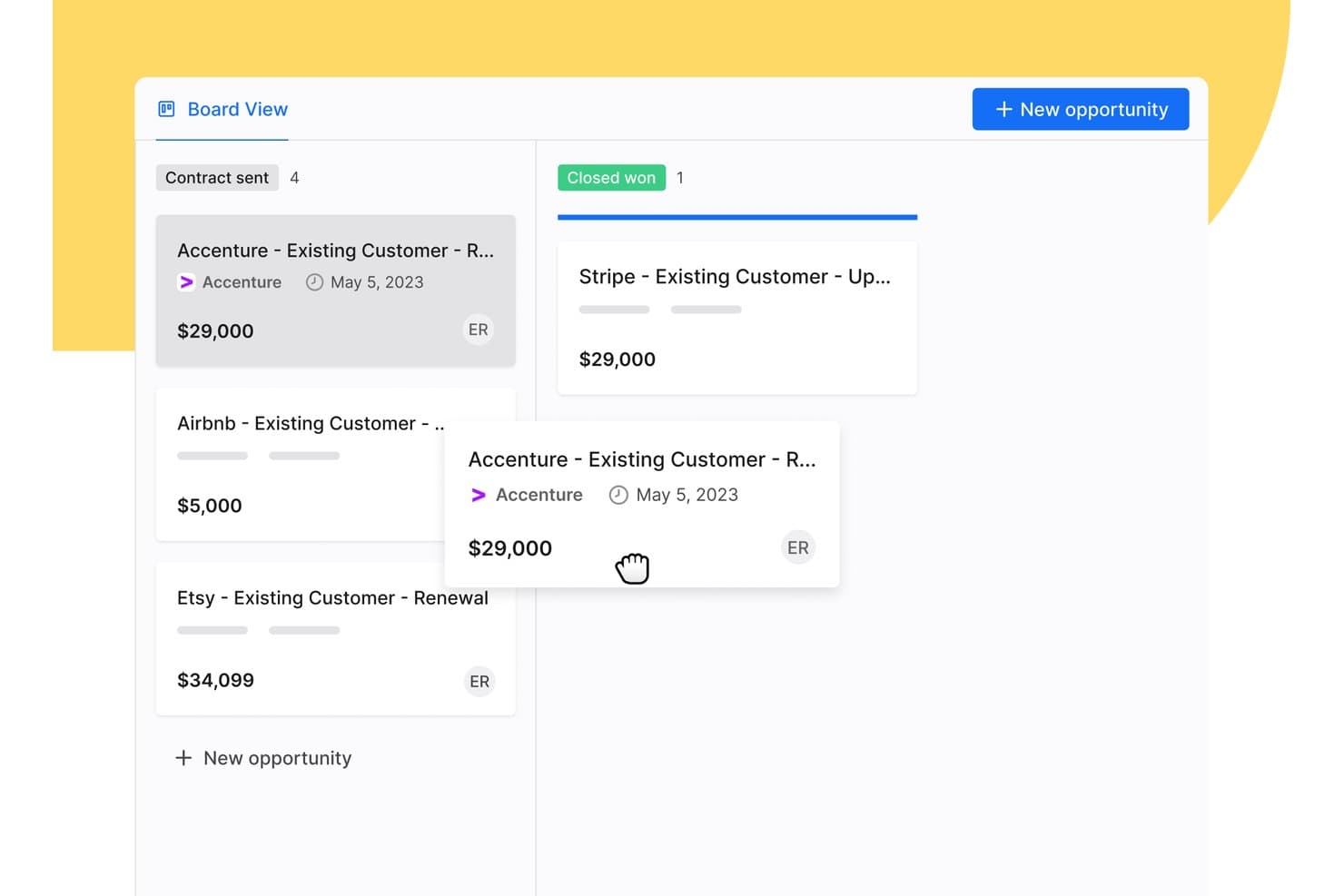
Apollo.io offers a drag-and-drop Board View for managing sales opportunities across pipeline stages like Contract Sent and Closed Won. Apollo.io is a B2B sales intelligence and engagement platform that combines a large contact database, deal pipeline management, multi-channel outreach sequencing, and workflow automation in a single free-to-start workspace.
Who Is Apollo.io Best For?
Apollo.io suits early-stage startup founders and SMB sales teams running outbound-heavy pipelines who need prospecting, sequencing, and basic deal management in one free-to-start tool.
Why I Picked Apollo.io
I picked Apollo.io as one of the best because its multi-channel sequence builder lets my team run coordinated outreach across email, phone, and LinkedIn from a single workflow. I can set trigger-based steps so a missed call automatically queues a follow-up email or LinkedIn touch, keeping deals moving without manual intervention. The AI Sequence Builder also drafts personalized step copy based on contact data, which cuts the time I spend building new outbound plays.
Apollo.io Key Features
- Chrome extension: Prospect on LinkedIn, Gmail, Salesforce, or company websites and add contacts directly to Apollo.
- Lead and account scoring: Score and prioritize leads or accounts using built-in ranking models and custom attributes.
- Deal management: Track opportunities with a pipeline view and customizable deal stages to monitor sales progress.
- Basic CRM enrichment: Enrich contact and company records via CSV uploads or data sync with Salesforce and HubSpot.
Apollo.io Integrations
Apollo.io offers native integrations with Salesforce, HubSpot, Gmail, Outlook, LinkedIn, and Slack. It connects with Zapier and also provides an API for custom integrations.
What's Free?
Apollo.io offers a free-forever plan with access to core features like email sequences, basic filters, and the contact database. The free plan caps your monthly export and email credits and restricts access to advanced analytics, AI features, and certain automation steps, which are reserved for paid tiers.
Pros and Cons
Pros:
- Chrome extension pulls prospect data automatically
- Multi-step email sequences included on free plan
- Built-in contact database with millions of records
Cons:
- Deal pipeline is shallow for complex sales
- Monthly export credits run out quickly
Learn more about Apollo.io: Best for marketing automation tools
- Free plan available
- From $14.99/user/month
Visit WebsiteCustomer Rating:4.6/5
EngageBay merges sales, marketing, and support in one hub. EngageBay is designed for small and medium-sized businesses, offering tools for marketing automation, CRM, and customer support. It aims to help businesses manage their sales and marketing efforts in one unified platform.
Why I picked EngageBay: EngageBay's free offering includes essential CRM and marketing automation tools, such as email marketing, lead management, and contact segmentation.
Your team can also access basic helpdesk tools and landing page builders. Its all-in-one approach makes it a versatile choice for businesses aiming to simplify their operations.
Standout features and integrations:
Features include a landing page builder that helps create professional pages without coding, a helpdesk that supports customer inquiries, and a form builder for capturing leads. These features ensure your team can manage sales and marketing tasks efficiently.
Integrations include Zapier, Mailchimp, Shopify, HubSpot, Stripe, PayPal, QuickBooks, Xero, Twilio, SendGrid, and more.
What's free? EngageBay offers a free-forever plan with limitations on emails sent, contacts stored, and the number of users, making it ideal for small teams.
Pros and Cons
Pros:
- Form builder for lead capture
- Landing page builder available
- Includes basic helpdesk tools
Cons:
- Learning curve for new users
- Restrictions on email sends
Learn more about EngageBay: Best for small business CRM needs
- Free plan available
- From $20/user/month
Visit WebsiteCustomer Rating:4.4/5
HubSpot offers customizable dashboards for visual lead-generation tracking. HubSpot is one of the best free CRM platforms designed for businesses of all sizes, offering tools for marketing, sales, and customer service. It helps teams manage leads, automate marketing efforts, and support customers efficiently.
Why I picked HubSpot: The tool’s free offering includes essential functionalities like contact management and deal pipelines. What sets HubSpot CRM apart is the extensive range of free marketing tools, such as email marketing and ad management.
Your team can also benefit from live chat and basic reporting features. Its vast array of features makes it a good option for small businesses looking to reinforce their sales efforts.
Standout features and integrations:
Features include customizable dashboards that provide insights into sales performance, email templates that save time on outreach, and task automation that boosts productivity. The ability to track customer interactions in one place ensures your team stays informed and aligned.
Integrations include Gmail, Outlook, Shopify, Zapier, Slack, Meta Ads, LinkedIn, WordPress, Mailchimp, Zoom, Salesforce, and more.
What's free? HubSpot offers a free-forever plan with limitations on advanced features and user seats. Users can access basic CRM tools and certain marketing functionalities without a time limit.
Pros and Cons
Pros:
- Task automation included
- Email tracking available
- User-friendly interface
Cons:
- Restricted reporting capabilities
- Advanced features require upgrades
Learn more about HubSpot:

Streak organizes pipelines and automates tasks inside your Gmail inbox. Streak is a CRM tool within Gmail, ideal for small to medium-sized businesses looking to manage sales directly from their inbox. It helps users track leads, manage customer relationships, and automate workflows without leaving their email.
Why I picked Streak: Streak emphasizes its integration with Gmail, allowing your team to manage sales processes within the familiar email environment. The tool’s free version includes features like pipeline management, email tracking, and task reminders.
Your team can also utilize customizable fields to tailor the CRM to their specific needs. This native integration with Gmail makes it a convenient choice for teams that rely heavily on email communication.
Standout features and integrations:
Features include email tracking that provides insights on when emails are opened, task reminders that keep your team on schedule, and mail merge for sending personalized emails in bulk. These features enhance your team's ability to manage communications.
Integrations include Google Workspace, Mailchimp, Zapier, Slack, Calendly, LinkedIn, and more.
What's free? Streak offers a 14-day free trial with basic CRM functionalities, suitable for personal use or small teams with limited needs.
Pros and Cons
Pros:
- Prioritize follow-ups easily
- Customizable pipeline fields
- Direct Gmail integration
Cons:
- Less competitive than other tools
- Restricted to Gmail users
Learn more about Streak: Best for extensive app integrations
- 30-day free trial
- From $25/user/month
Visit WebsiteCustomer Rating:4.4/5
Salesforce offers customizable sales dashboards with visualizations. Salesforce is a cloud-based customer relationship management platform used by businesses of all sizes across many industries. It supports sales, service, marketing, and ecommerce teams by giving them tools to manage customer interactions, track leads, and automate processes.
Why I picked Salesforce: Salesforce's free trial gives your team access to Sales Cloud, which has features such as contact and account management, lead generation tracking, and mobile access. You can also use customizable dashboards and reports to monitor your pipeline. The built-in AI-powered tools let you set up task reminders and sales workflows.
Standout features and integrations:
Features include lead scoring and assignment rules, territory management, and forecasting tools. You can set up sales processes that match your team’s workflow and use Einstein Activity Capture to sync emails and calendar events. Sales paths guide reps through each stage, so they know what to do next.
Integrations include Slack, Google Workspace, Mailchimp, QuickBooks, Docusign, Dropbox, LinkedIn, and more.
What's free? Salesforce offers a 30-day free trial with access to Sales Cloud features for one user, with no long-term access after the trial expires.
Pros and Cons
Pros:
- Easy to add third-party apps
- Built-in AI sales tools
- Flexible reporting tools
Cons:
- Mobile features are more limited
- Hard to use without training
Learn more about Salesforce : Best for team collaboration tools
- 15-day free trial + free demo available
- From $49/month (billed annually)
Visit WebsiteCustomer Rating:4.2/5
Bitrix24 offers a detailed lead management dashboard with Kanban-style columns. Bitrix24 is an all-in-one sales management platform designed for businesses of all sizes, offering tools for lead management, sales automation, and performance tracking. It helps teams manage the entire sales cycle, from lead generation to customer retention, using a single platform.
Why I picked Bitrix24: Bitrix24's free account provides 35 tools, including lead and deal management, omnichannel communication, and collaboration tools. Your team can use the platform's analytics, mobile CRM capabilities, and task management tools without any cost. Its versatility and variety of features make it a valuable tool for enhancing sales performance.
Standout features and integrations:
Features include task and project management that helps streamline your team's efforts, employee performance tracking that provides insights into team productivity, and website creation features that support marketing initiatives. These features ensure your team can manage sales and marketing effectively.
Integrations include Google Workspace, Microsoft Office 365, Zoho CRM, Mailchimp, QuickBooks, Zoom, Trello, WordPress, Asana, and more.
What's free? Bitrix24 offers a free-forever plan with essential sales management features, making it accessible for businesses of all sizes.
Pros and Cons
Pros:
- Supports the entire sales cycle
- Available in cloud and self-hosted
- Over 35 free tools
Cons:
- Some integrations require additional setup
- Inconsistent customer support
Learn more about Bitrix24:

eWay-CRM’s visual sales pipeline for customizable deal management. eWay-CRM is integrated with Microsoft Outlook, aimed at small to medium-sized businesses. It helps teams manage customer relationships, sales, and marketing campaigns directly from their email client.
Why I picked eWay-CRM: eWay-CRM offers free CRM functionalities that integrate with Outlook, making it highly accessible for teams already using this platform. Features like contact management, sales tracking, and project management are available on the free plan.
Your team can also enjoy task and communication management, and the ability to integrate with Outlook. This is ideal for businesses seeking a CRM that fits naturally into their existing workflow.
Standout features and integrations:
Features include project management tools that help organize tasks and timelines, document management that stores important files in one place, and marketing automation to organize campaigns. These features ensure your team can easily manage their sales and marketing efforts.
Integrations include Microsoft Outlook, Microsoft Office 365, Microsoft Teams, SharePoint, Zapier, QuickBooks, WordPress, LinkedIn, and more.
What's free? eWay-CRM offers a free-forever plan with limitations on storage and some advanced features, making it suitable for small teams.
Pros and Cons
Pros:
- Unlimited users
- Document management capabilities
- Includes project management tools
Cons:
- Performance issues
- Slow loading in Outlook
Learn more about eWay-CRM: Best for SMB sales pipeline management
- Free demo + free plan available
- From $39.99/user/month (billed annually)
Visit WebsiteCustomer Rating:4.5/5
Teamgate supports guided selling with pipeline visibility tools. Teamgate is a sales CRM designed for small to medium-sized businesses, focusing on sales pipeline management and lead tracking. It helps teams manage leads, track sales activities, and improve their sales processes.
Why I picked Teamgate: Teamgate's free offering highlights its customizable sales pipeline management, supporting teams looking to strategically improve their sales processes. Its free version includes features like lead scoring, sales forecasting, and contact management. Its user-friendly interface makes it easy for sales teams to adopt and utilize.
Standout features and integrations:
Features include forecasting tools that help predict future sales, lead scoring to prioritize potential customers, and reporting features that provide insights into sales performance. These features enhance your team's ability to manage sales activities efficiently.
Integrations include Mailchimp, Google Workspace, Slack, Zapier, Xero, QuickBooks, LinkedIn, Microsoft Office 365, Dropbox, Trello, and more.
What's free? Teamgate offers a free plan for up to two users, allowing teams to explore the platform's basic contact and communication tools before committing.
Pros and Cons
Pros:
- Responsive customer support
- Lead scoring for prioritization
- Sales forecasting tools included
Cons:
- Limited integrations
- Initial setup can be complex
Learn more about Teamgate: Best for Microsoft ecosystem users
- Free plan available
- From $14/user/month (billed annually)

Dynamics 365 Sales helps teams manage leads, opportunities, and pipelines within the Microsoft ecosystem. Dynamics 365 Sales is a CRM solution designed for organizations that already rely on Microsoft tools like Office 365, Teams, and Power BI. It supports sales teams that want tighter integration between customer data, collaboration tools, and reporting—without adopting a completely separate platform.
Why I picked Dynamics 365 Sales:
Dynamics 365 Sales stands out for teams embedded in Microsoft’s ecosystem. It connects sales data directly to Outlook, Teams, and Excel, reducing the need to switch between tools. Built on the Power Platform, it offers strong customization options for workflows, dashboards, and automation, making it a flexible choice for growing sales teams that need tailored processes rather than an off-the-shelf CRM.
While setup and configuration still require planning, it’s a solid option if your organization already uses Microsoft products and wants CRM data to live in the same environment.
Standout features and integrations:
Features include lead and opportunity management, customizable dashboards for sales forecasting, and automation through Power Automate to reduce manual tasks. Sales insights can be extended using Power BI for deeper reporting and pipeline visibility.
Integrations include Microsoft Outlook, Teams, Excel, Power BI, SharePoint, OneDrive, LinkedIn Sales Navigator, Azure, and the broader Dynamics 365 suite.
What's Free? Microsoft Dynamics 365 Sales does not offer a free-forever plan. However, you can try Dynamics 365 Sales at no cost with a 30-day free trial, which lets you explore its core CRM features, pipeline tools, and AI-driven insights before committing to a paid license.
Pros and Cons
Pros:
- Strong reporting with Power BI
- Highly customizable via Power Platform
- Deep integration with Microsoft 365 and Teams
Cons:
- No free plan
- Configuration and customization require Power Platform knowledge
Learn more about Microsoft Dynamics 365 Sales:

FreeCRM tracks contacts, sales, and campaigns in one place. FreeCRM is designed for businesses of all sizes, particularly small businesses in industries such as automotive, real estate, and professional services. It offers tools for tracking sales activities, managing customer interactions, and executing marketing campaigns.
Why I picked FreeCRM: FreeCRM's offering includes sales pipeline tracking, allowing your team to manage deals and customer interactions effectively. Key features like contact management and marketing automation are also available.
The platform supports task tracking and targeted marketing campaigns, supporting your team's productivity efforts. Its customizable dashboard provides real-time insights, making it a valuable tool for improving sales performance.
Standout features and integrations:
Features include a customizable dashboard that lets you monitor tasks and events in real time, deal and sales pipeline management tools that keep your team organized, and call-tracking software that helps manage customer interactions.
Integrations include Zapier, WhatsApp, Facebook, Twitter, Google Workspace, QuickBooks, Amazon AWS, and more.
What's free? FreeCRM offers a free-forever plan with essential CRM features, making it accessible for businesses of all sizes.
Pros and Cons
Pros:
- Secure cloud services
- Marketing automation features
- Real-time task monitoring
Cons:
- Limited customization
- Low storage on the free plan
Learn more about FreeCRM:
Annen programvare for salgsstyring
Her er noen flere alternativer for programvare for salgsstyring som også tilbyr gratis abonnementer eller prøveperioder. Selv om disse verktøyene ikke kom med på kortlisten min, er de likevel verdt å se nærmere på:
- 11monday AI WorkspaceBest for visual project tracking
- 12CapsuleBest for simple contact management
- 13EspoCRMBest for open-source flexibility
- 14FreshsalesBest for AI-driven free CRM for sales teams
- 15ClickUpBest for customizable workflows
How I Evaluate Free Sales Management Software
When a RevOps team needs to track deals and log activity without a paid license, I split my evaluation into two layers: baseline qualifiers and the differentiators that set options apart.
Core Functionality (Table Stakes For This List)
When I'm selecting tools for my list, I rank each one on a scale from 0 (does not offer the functionality) to 5 (excels in this area) for each core functionality listed below. Then, I calculate the tool's total score into a percentage. Each tool needs to achieve a minimum total score of 65% to be considered for inclusion.
- Pipeline & Deal Stage Management: I look for visual pipelines where reps can drag deals across custom stages, like moving a prospect from "demo scheduled" to "proposal sent" without switching views.
- Contact & Lead Management: A centralized database for leads, contacts, and accounts matters here. I check whether you can tag records, add custom fields, and segment by criteria like deal size or source.
- Free Plan Availability: Each tool must offer a genuinely free, non-expiring plan. I evaluate whether core sales management features remain accessible or get locked behind a paywall after signup.
- Sales Reporting & Dashboards: Dashboards that surface pipeline value, deal velocity, and rep activity give RevOps teams the visibility they need. I look for filtering, exports, and at least basic customization.
- Task & Activity Tracking: Reps need to log calls, schedule follow-ups, and assign tasks with due dates. I check whether activities tie directly to deal and contact records for a clear timeline.
- Sales Workflow Automation: Even basic automations add value, like auto-assigning a task when a deal hits a new stage or sending a notification when a lead goes cold. I evaluate what's available without upgrading.
Once I have a list of tools that meet this criteria, I consider what sets each platform apart.
Differentiating Factors (What Sets Vendors Apart)
Here's how I compare and contrast different vendors:
Standout Features
Email integration and tracking is a big differentiator. I look for two-way sync with Gmail or Outlook so reps can send and track opens directly from deal records, keeping activity data clean for reporting. Built-in communication tools like native calling or live chat reduce the need to bolt on separate apps, which matters on a zero-budget stack. A full-featured mobile app also makes a real difference for reps who update deals and log calls between meetings rather than back at a desk.
Beyond Features
Free plan generosity matters just as much as features. I evaluate how many user seats and contact records come included, because a three-person sales team that hits the record cap within a quarter will face an unplanned upgrade. The integration ecosystem is equally important. I check for native connections to tools like Google Workspace, Mailchimp, or QuickBooks, plus open API or Zapier access for custom workflows. I also consider time-to-value, looking for self-serve onboarding, CSV imports, and pre-built pipeline templates that get a team selling the same week.
Slik velger du gratis programvare for salgsstyring
Komplekse funksjonslister og prisstrukturer kan gjøre det vanskelig å finne ut hva du egentlig får med gratis programvare for salgsstyring. For å hjelpe deg med å holde fokus mens du går gjennom prosessen med å velge programvare, er det noen faktorer du bør ha i bakhodet:
| Faktor | Hva du bør vurdere |
| Omfanget av gratistilbudet | Kontroller hva som er inkludert i gratisabonnementet. Dekker det viktige funksjoner som kontaktadministrasjon og salgssporing? Sørg for at det dekker de grunnleggende behovene dine. |
| Skalerbarhet | Vurder om programvaren kan vokse sammen med teamet ditt. Vil den støtte flere brukere eller avanserte funksjoner etter hvert som virksomheten utvides? |
| Integrasjoner | Se etter kompatibilitet med verktøy du allerede bruker, for eksempel e-postklienter eller regnskapsprogramvare. Dette vil bidra til å effektivisere arbeidsflyten din. |
| Brukervennlighet | Vurder brukergrensesnittet. Er det intuitivt og enkelt for teamet ditt å navigere i? Et brukervennlig design sparer tid og reduserer behovet for opplæring. |
| Kundestøtte | Kontroller hvilke støttealternativer som er tilgjengelige. Tilbyr leverandøren støtte via chat, e-post eller telefon? God kundestøtte kan bidra til å løse problemer raskt. |
| Sikkerhet | Forsikre deg om at programvaren overholder regelverket for databeskyttelse. Teamets data må være sikre og kun tilgjengelige for autoriserte brukere. |
| Tilpasning | Vurder muligheten til å tilpasse programvaren til prosessene dine. Kan du tilpasse felt eller oversikter slik at de passer til teamets arbeidsflyt? |
Hva er gratis programvare for salgsstyring?
Programvare for salgsstyring er utviklet for å hjelpe virksomheter med å administrere salgsprosessene sine, følge opp kundeinteraksjoner og organisere potensielle kunder. Gratisløsninger inkluderer vanligvis begrensede versjoner av disse verktøyene, ofte med færre funksjoner eller begrensninger på antall brukere. Disse verktøyene brukes ofte av salgsfagfolk, småbedriftseiere og team som ønsker å forbedre salgseffektiviteten uten å pådra seg kostnader. De gir verdi ved å organisere salgsaktiviteter, forbedre administrasjonen av kunderelasjoner og øke produktiviteten. Funksjoner som kontaktadministrasjon, salgssporing og automatisering av oppgaver bidrar til å organisere arbeidsflyter, forbedre produktiviteten og håndtere kunderelasjoner effektivt.
Funksjoner
La oss se nærmere på funksjonene som vanligvis finnes i programvare for salgsstyring, og hvilke som vanligvis er inkludert i gratis- og betalingsabonnementer.
Funksjoner som vanligvis finnes i gratis programvare for salgsstyring
- Kontaktadministrasjon: Hjelper med å organisere og lagre kontaktinformasjon, slik at det blir enkelt å følge opp kundeinteraksjoner og opprettholde relasjoner.
- Salgssporing: Gjør det mulig for brukere å følge med på salgsfremdrift og resultater, slik at teamene kan holde oversikt over salgsmålene sine.
- Automatisering av oppgaver: Automatiserer repetitive oppgaver og frigjør tid for salgsteam, slik at de kan fokusere på viktigere aktiviteter.
- E-postintegrasjon: Kobler seg til e-postplattformer for å forbedre kommunikasjonen og følge opp interaksjoner i CRM-systemet.
- Administrasjon av potensielle kunder: Tilbyr verktøy for å registrere, følge opp og administrere potensielle kunder, slik at salgsteamene kan konvertere dem til kunder.
- Grunnleggende rapportering: Tilbyr enkle rapporter som gir innsikt i salgsaktiviteter og resultater, og som støtter beslutningstaking.
- Styring av salgspipeline: Visualiserer salgspipeliner for å hjelpe teamene med å administrere og prioritere avtaler på en effektiv måte.
- Mobil tilgang: Gjør det mulig for brukere å få tilgang til CRM-systemet fra mobile enheter, slik at de kan administrere salgsaktiviteter mens de er på farten.
Funksjoner som vanligvis finnes i betalingsløsninger for salgsstyring
- Avansert analyse: Gir dyptgående analyser av salgsdata og verdifull innsikt for strategisk beslutningstaking.
- Tilpassbare dashbord: Gjør det mulig for brukere å tilpasse dashbordene slik at de viser nøkkeltall og data som er relevante for deres spesifikke behov.
- Markedsføringsautomatisering: Automatiserer markedsføringsoppgaver, for eksempel e-postkampanjer, for å forbedre oppfølgingen av potensielle kunder og kundeengasjementet.
- Verktøy for kundestøtte: Inkluderer avanserte støttefunksjoner som supportsystemer og direktechat for å forbedre kundeservicen.
- Integrasjon med avanserte verktøy: Tilbyr tilkoblinger til spesialiserte verktøy som regnskapsprogramvare og avanserte markedsføringsplattformer.
- Forbedrede sikkerhetsfunksjoner: Tilbyr avanserte sikkerhetsalternativer for å beskytte sensitive kundedata og sikre samsvar med regelverk.
- API-tilgang: Gjør det mulig for brukere å integrere CRM-systemet med andre programvareløsninger og tilpasse funksjonaliteten.
- Samarbeidsverktøy: Legger til rette for teamsamarbeid med funksjoner som delte kalendere og dokumentdeling, noe som styrker samarbeidet.
Fordeler
Implementering av gratis programvare for salgsstyring gir flere fordeler for teamet og virksomheten din. Her er noen av fordelene du kan se frem til:
- Kostnadsbesparelser: Gir tilgang til viktige verktøy for salgsstyring uten kostnad, slik at virksomheten kan spare penger samtidig som salgsaktivitetene administreres.
- Bedre organisering: Tilbyr funksjoner som kontaktadministrasjon og salgssporing, noe som hjelper teamet med å holde seg organisert og fokusert på salgsmålene.
- Økt produktivitet: Automatiserer repetitive oppgaver og integreres med e-postplattformer, slik at teamet får mer tid til å fokusere på å avslutte avtaler.
- Tilgjengelighet: Gir tilgang fra mobile enheter, slik at teamet kan administrere salgsaktiviteter mens det er på farten, og holde kontakten.
- Forbedret kommunikasjon: Integreres med e-post- og kommunikasjonsverktøy, noe som forbedrer samarbeidet og kundeinteraksjonene.
- Skalerbarhet: Gir et utgangspunkt for små team, med mulighet til å oppgradere etter hvert som virksomheten vokser.
- Datainnsikt: Tilbyr grunnleggende rapporteringsfunksjoner som gir innsikt i salgsresultater og støtter informert beslutningstaking.
Kostnader og priser
Jeg forstår at du kom til denne artikkelen på jakt etter de beste alternativene for programvare for salgsstyring som er tilgjengelige gratis. Siden gratisabonnementer bare tilbyr begrensede funksjoner, er det en god sjanse for at du må oppgradere abonnementet ditt senere.
Tabellen nedenfor oppsummerer vanlige abonnementer, gjennomsnittsprisene deres og typiske funksjoner som inngår i løsninger for programvare for salgsstyring:
Sammenligningstabell for abonnementer på programvare for salgsstyring
| Abonnementstype | Gjennomsnittspris | Vanlige funksjoner |
| Gratisabonnement | $0 | Grunnleggende kontaktadministrasjon, salgssporing og begrenset rapportering. |
| Personlig abonnement | $5-$25/bruker/måned | Forbedret kontaktadministrasjon, e-postintegrasjon og grunnleggende automatisering. |
| Bedriftsabonnement | $30-$60/bruker/måned | Avansert rapportering, markedsføringsautomatisering og støtte for flere brukere. |
| Storbedriftsabonnement | $70-$150/bruker/måned | Tilpassbare dashbord, avanserte sikkerhetsfunksjoner og dedikert kundestøtte. |
Vanlige spørsmål om gratis programvare for salgsstyring
Her er noen svar på vanlige spørsmål om gratis programvare for salgsstyring:
Kan gratis programvare for salgsstyring vokse med virksomheten min?
Gratis programvare for salgsstyring kan være et godt utgangspunkt, men den kan ha begrensninger når virksomheten din vokser. Sjekk om programvaren tilbyr skalerbare alternativer eller betalte abonnementer med mer avanserte funksjoner. På denne måten kan du oppgradere når teamet ditt trenger mer funksjonalitet, uten å bytte system.
Hva er de vanligste begrensningene ved gratis programvare for salgsstyring?
Gratisversjoner har ofte begrensninger som et tak på antall brukere, begrenset lagringsplass og begrenset tilgang til funksjoner. Disse abonnementene omfatter vanligvis grunnleggende funksjonalitet, noe som kan være tilstrekkelig for små team eller oppstartsbedrifter. Les detaljene om gratisabonnementet for å forstå hva som er inkludert, og hvilke begrensninger som kan gjelde.
Hvor sikre er dataene mine med gratis programvare for salgsstyring?
Datasikkerhet er avgjørende, også med gratis programvare. Sørg for at leverandøren overholder personvernregler og tilbyr funksjoner som kryptering og regelmessige sikkerhetskopier. Det er viktig å kontrollere at dataene dine forblir sikre og bare er tilgjengelige for autoriserte brukere.
Tilbyr gratis løsninger for programvare for salgsstyring kundestøtte?
Kundestøtten for gratisabonnementer kan variere. Noen leverandører tilbyr grunnleggende støtte, for eksempel vanlige spørsmål og brukerfora, mens andre kan inkludere støtte via e-post eller chat. Sjekk hvilke støttealternativer som er tilgjengelige i gratisabonnementet, slik at du sikrer at teamet ditt kan få hjelp ved behov.
Finnes det skjulte kostnader knyttet til gratis programvare for salgsstyring?
Selv om selve programvaren kan være gratis, kan det finnes skjulte kostnader, for eksempel gebyrer for ekstra funksjoner, integrasjoner eller mer lagringsplass. Gå nøye gjennom leverandørens prisopplysninger for å forstå eventuelle kostnader knyttet til bruk av gratisversjonen.