

Å finne riktig e-postadresse kan være frustrerende, spesielt når du håndterer flere oppgaver og stramme tidsfrister. Som CFO vet du hvor viktig det er å komme raskt i kontakt med de riktige personene. Det er her e-postfinnere kommer inn i bildet – de hjelper deg med å spare tid og fokusere på det som virkelig betyr noe.
Etter min erfaring kan en god e-postfinner utgjøre en stor forskjell i arbeidsflyten din. Jeg har testet og vurdert flere alternativer for å gi deg de beste på markedet. I denne artikkelen deler jeg mine beste anbefalinger og fremhever de unike styrkene og fordelene hvert verktøy tilbyr teamet ditt.
Hvorfor du kan stole på våre programvareanbefalinger
6,700+
Reviews
20
Industry experts
16+
Evaluation factors
14
Years
Anmeldelsene våre bygger på vår uavhengige vurdering, ikke på salgsargumenter. Les hvordan vi sørger for åpenhet.
I denne guiden har vi vurdert verktøyene gjennom praktisk testing og uavhengig research og gitt dem poeng ut fra våre utvelgelseskriterier.
Anmeldelsene våre bygger på vår egen redaksjonelle vurdering. De er ikke et salgsargument.
Sammenligningstabell for e-postfinnere
Denne sammenligningstabellen oppsummerer prisdetaljene for mine beste anbefalinger av e-postfinnere:
| Tool | Best For | Trial Info | Price | ||
|---|---|---|---|---|---|
| 1 | Best for real-time multi-source contact enrichment | Free plan + 14-day free trial + free demo available | From $49/user/month (billed annually) | Website | |
| 2 | Best for CRM integration | Free 14-day trial + free plan + free demo available | From $49/user/month (billed annually) | Website | |
| 3 | Best for small business outreach | Free plan available | From $27/month (billed annually) | Website | |
| 4 | Best for verifying emails quickly | Free plan available | From $49/month | Website | |
| 5 | Best for email tracking | Free 7-day trial available | From $25/month | Website | |
| 6 | Best for sales engagement | 14-day free trial + free plan available | From $49/user/month (billed annually) | Website | |
| 7 | Best for email drip campaigns | Free plan + free demo available | From $29.25/month | Website | |
| 8 | Best for Chrome extension use | Free plan available | From $39/two users/month (billed annually) | Website | |
| 9 | Best for Gmail integration | Free plan + free trial available | From $4.99/sender/month | Website | |
| 10 | Best for bulk email searches | 14-day free trial | From $37/month | Website |


Anmeldelser av de beste e-postfinnerne
Nedenfor finner du mine detaljerte sammendrag av de beste e-postfinnerne som kom med på listen min. Anmeldelsene mine gir en grundig gjennomgang av de viktigste funksjonene, fordelene og ulempene, integrasjonene og ideelle bruksområdene for hvert verktøy, slik at du kan finne det som passer best for deg.
 Best for real-time multi-source contact enrichment
- Free plan + 14-day free trial + free demo available
- From $49/user/month (billed annually)
Visit WebsiteCustomer Rating:4.5/5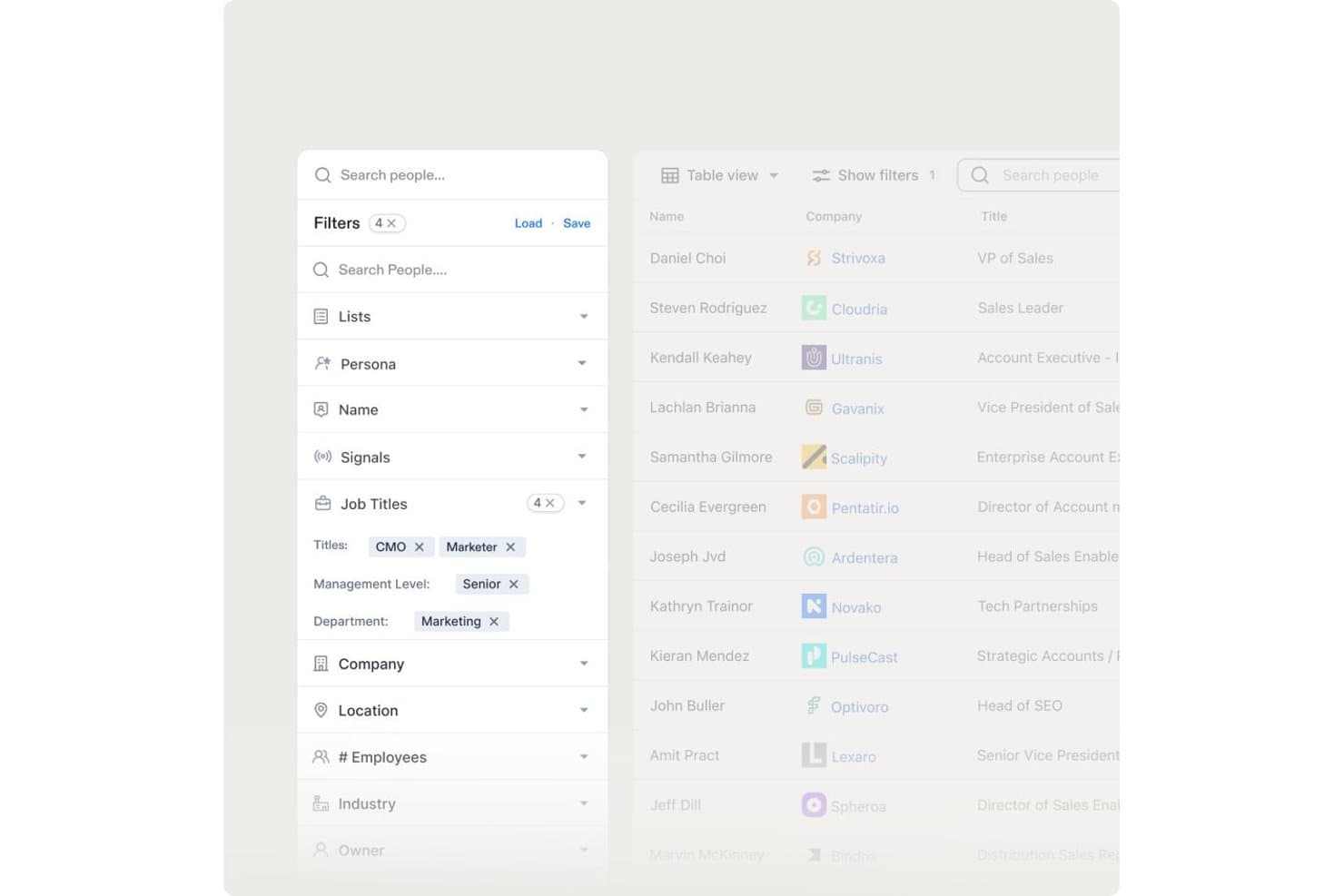
Apollo.io offers advanced people search filters including Job Titles, Management Level, and Department to help users find targeted contacts. Apollo.io is a B2B sales intelligence platform that combines a 200M+ contact database with email finding, multi-source contact enrichment, real-time verification, bulk prospecting, and built-in sales sequencing.
Who Is Apollo.io Best For?
Apollo.io is a strong fit for SDRs and outbound sales teams at startups and SMBs running high-volume, US-focused prospecting campaigns.
Why I Picked Apollo.io
Apollo.io earns its spot on my shortlist because of how it handles enrichment at the source level. Rather than pulling from a single proprietary database, Apollo aggregates contact data from web crawlers, user contributions, and third-party feeds simultaneously. I particularly like the waterfall enrichment setup, where partners like ContactOut, Datagma, and Dropcontact fill gaps when Apollo's own records fall short, giving me the most complete contact record available, not just the first match.
Apollo.io Key Features
- Granular ICP filters: Search using over 65 filters, including job title, department, location, seniority, and tech stack.
- AI assistant for prospecting: Receive automated recommendations for high-potential leads based on intent and engagement signals.
- Built-in sales engagement: Launch multi-step email sequences directly from your contact lists without leaving the platform.
- Real-time CRM enrichment: Sync updated contact, company, and phone data automatically into Salesforce and HubSpot.
Apollo.io Integrations
Apollo.io offers native integrations with Salesforce, HubSpot, Outreach, SalesLoft, Marketo, SendGrid, Chili Piper, Asana, ClickUp, and Airtable. It also provides API access for custom integrations.
Pros and Cons
Pros:
- Real-time verification flags risky email addresses
- 200M+ contact database covers broad prospect reach
- Waterfall enrichment maximizes email match rates
Cons:
- Credit caps limit high-volume bulk enrichment
- Weaker contact coverage outside North America
Learn more about Apollo.io: Best for CRM integration
- Free 14-day trial + free plan + free demo available
- From $49/user/month (billed annually)
Visit WebsiteCustomer Rating:4.9/5
Surfe helps sales teams find accurate professional emails and mobile numbers. Surfe is an email finder for sales teams and professionals, providing accurate email addresses and phone numbers for CRM-based prospecting.
Why I picked Surfe: It integrates with CRMs like HubSpot, Salesforce, and Pipedrive to manage leads within your existing systems. The Pipeline Builder helps your team organize sales workflows, and the Waterfall Enrichment system draws from 15+ contact databases, delivering a 93% find rate for reliable prospecting.
Standout features and integrations:
Features a Waterfall Enrichment system that improves accuracy by selecting the best data source. The Pipeline Builder lets you create sales pipelines quickly, and bulk data enrichment allows efficient management of large contact lists.
Integrations include HubSpot, Salesforce, Google Sheets, and more.
Pros and Cons
Pros:
- Efficient pipeline building
- Smooth CRM integration
- High accuracy in email finding
Cons:
- Waterfall Enrichment system may be less effective for niche or international contacts
- Requires CRM for optimal use
Learn more about Surfe: Best for small business outreach
- Free plan available
- From $27/month (billed annually)
Visit WebsiteCustomer Rating:4.8/5
Prospeo helps small businesses and sales teams find verified email addresses. Prospeo helps small businesses and sales teams find and verify professional email addresses, making outreach and prospecting more efficient.
Why I picked Prospeo: The tool offers a bulk email search feature that lets you upload a list of names and companies to find verified email addresses. Its email verification system helps you pay only for valid emails, reducing wasted resources. With a Chrome extension, you can perform email searches directly from your browser, increasing efficiency. The tool's simplicity and affordability make it accessible for small businesses with limited budgets.
Standout features and integrations:
Features include a bulk email search that lets you find emails by uploading a list of names and companies. The email verification system guarantees over 98% deliverability, giving you confidence in your contact lists. You can also use the Chrome extension to search email addresses on any website.
Integrations are not publicly listed.
Pros and Cons
Pros:
- Simple and user-friendly interface
- High email deliverability rate
- Affordable pricing for small businesses
Cons:
- Basic reporting features
- Relies on Chrome for its extension
Learn more about Prospeo: Best for verifying emails quickly
- Free plan available
- From $49/month
Visit WebsiteCustomer Rating:4.5/5
Hunter helps you find verified professional email addresses. Hunter is an email finding tool designed for professionals looking to locate email addresses using a person's name and company domain. It’s widely used by sales teams and marketers to find email addresses for lead generation.
Why I picked Hunter: Hunter offers a large database of more than 100 million email addresses and provides a confidence score for each result. Its bulk email search and email verification features help reduce bounce rates. With a Google Sheets add-on and API, your team can easily integrate it into existing workflows. The browser extension adds convenience by allowing quick access while searching.
Standout features and integrations:
Features include a bulk email search that helps you gather multiple email addresses at once. Its email verification feature eliminates high bounce rates. The confidence score for each email result provides an idea of reliability.
Integrations include Google Sheets, Salesforce, HubSpot, Pipedrive, Zoho CRM, Zapier, and more.
Pros and Cons
Pros:
- Useful API access
- Accurate verification scores
- Large email database
Cons:
- No built-in email outreach
- Bulk searches and verifications can consume credits quickly
Learn more about Hunter:

Saleshandy helps teams track, schedule, and automate email outreach. Saleshandy is an email productivity tool designed for sales teams and professionals who need to track, schedule, and automate their email outreach. It helps users analyze email performance and optimize their communication strategies.
Why I picked Saleshandy: The tool offers real-time email tracking, letting you know when recipients open your emails. This feature helps you gauge interest and plan follow-ups effectively. With email scheduling, your team can send emails at the best times for engagement. The automated follow-up feature helps you track interactions with each contact, making it a valuable asset for sales teams.
Standout features and integrations:
Features include the ability to create and manage email templates, which saves time on repetitive tasks. The tool provides detailed analytics on email performance, helping you refine your strategies. You can also use mail merge to send personalized emails in bulk.
Integrations include Salesforce, HubSpot, Pipedrive, Zoho CRM, Zapier, and more.
Pros and Cons
Pros:
- Detailed analytics and reports
- Automated follow-up emails
- Real-time email tracking
Cons:
- Bulk email sending may be restricted by plan limits or email provider quotas
- Basic plan limits key features
Learn more about Saleshandy: Best for sales engagement
- 14-day free trial + free plan available
- From $49/user/month (billed annually)

Apollo.io helps sales teams improve prospecting and engage leads effectively. Apollo.io is a sales engagement platform that helps sales teams find and engage with leads to boost outreach and prospecting.
Why I picked Apollo.io: The platform provides a vast database of contacts, making it easier for your team to find potential leads. Its sales engagement features, such as automated sequences and task management, help optimize your process. With its advanced analytics, you can track campaign performance and make data-driven decisions. The platform's CRM integration lets you keep all your sales data in one place for a cohesive workflow.
Standout features and integrations:
Features include a large contact database that provides access to millions of leads. The automated sequence feature allows you to set up follow-up emails, saving time and effort. With its task management system, you can prioritize and organize your sales activities efficiently.
Integrations include Salesforce, HubSpot, Pipedrive, and more.
Pros and Cons
Pros:
- Automated email sequences
- Detailed analytics capabilities
- Extensive contact database
Cons:
- Bulk email and sequence limits vary by plan
- Some contact data may be outdated or inaccurate for niche industries
Learn more about Apollo.io:

Snov.io helps teams find emails, manage leads, and run outreach campaigns. Snov.io is a lead generation tool used by sales and marketing teams to verify email addresses, manage leads, and conduct campaigns. It helps businesses automate their outreach efforts, increasing efficiency in contacting potential clients.
Why I picked Snov.io: The email drip campaign feature allows your team to send automated follow-up emails to keep in contact with leads. You can manage your prospects with the built-in CRM, and the email verification tool reduces errors, increasing deliverability. The visual campaign builder helps optimize the frequency of contact.
Standout features and integrations:
Features include a visual campaign builder that simplifies creating and managing email sequences. The email warm-up feature helps improve your sender reputation by gradually increasing email volume. With the automation tool, you can program connections and messages on LinkedIn.
Integrations include Salesforce, HubSpot, Pipedrive, Zoho CRM, Slack, Google Sheets, Asana, Trello, LinkedIn, Zapier, and more.
Pros and Cons
Pros:
- Effective email warm-up
- Intuitive visual campaign builder
- Advanced LinkedIn automation
Cons:
- The interface can feel overwhelming for beginners
- Limited personalization on the free and low-tier plans
Learn more about Snov.io: Best for Chrome extension use
- Free plan available
- From $39/two users/month (billed annually)

Skrapp.io helps professionals find and verify business email addresses. Skrapp.io is an email finder tool for professionals who need to verify business email addresses for lead generation. It's especially popular among marketing teams and sales professionals looking to build targeted email lists.
Why I picked Skrapp.io: The Chrome extension lets you extract emails directly from LinkedIn profiles, making it convenient for those who rely heavily on that platform for networking. You can save contacts directly to your email lists within Skrapp.io for easy access later. The tool also includes an email verification feature to help maintain the quality of your email lists. With its user-friendly interface, your team can quickly start using the tool effectively.
Standout features and integrations:
Features include a bulk email finder that lets you gather numerous emails at once. The verification tool helps confirm the emails you collect are valid and deliverable. You can also organize your leads within the platform using customizable lists.
Integrations include Salesforce, HubSpot, Pipedrive, LinkedIn, and more.
Pros and Cons
Pros:
- Customizable lead lists
- Quick setup with Chrome extension
- Convenient LinkedIn integration
Cons:
- Requires LinkedIn for optimal use
- Can be slow with large lists
Learn more about Skrapp.io: Best for Gmail integration
- Free plan + free trial available
- From $4.99/sender/month

Mailmeteor lets you send personalized bulk emails directly from Gmail. Mailmeteor is an email sending tool that works with Gmail for outreach tasks. It enables users to send personalized bulk emails directly from their Gmail accounts.
Why I picked Mailmeteor: The tool integrates well with Gmail, allowing you to send hundreds of personalized emails at once. Its user-friendly interface helps you manage and track your email campaigns. With personalization fields, you can tailor each email to make it feel more personal to the recipient. The built-in tracking feature provides insights into email opens and clicks, which is valuable feedback.
Standout features and integrations:
Features include email scheduling, which lets you plan your campaigns in advance. The tool supports personalization fields to make your emails more engaging. Additionally, email tracking provides you with insights into how recipients interact with your messages.
Integrations include Gmail, Zoho CRM, Outlook, and more.
Pros and Cons
Pros:
- Efficient bulk sending
- Easy email personalization
- Direct Gmail integration
Cons:
- Limited advanced automation features
- No built-in CRM
Learn more about Mailmeteor:

Emailchaser helps teams find and verify email addresses in bulk. Emailchaser is a tool designed for businesses and professionals who need to find and verify email addresses in bulk. It is useful for marketing teams and sales professionals to support campaigns.
Why I picked Emailchaser: The tool offers a bulk email search feature that allows you to find multiple email addresses at once. Its email verification system verifies that the emails you gather are valid and deliverable. With a user-friendly interface, your team can quickly adapt and start using the tool. The tool’s focus on bulk searching makes it a valuable resource for large-scale outreach efforts.
Standout features and integrations:
Features include bulk email verification for high deliverability, real-time tracking of email searches, and detailed reports to analyze campaign results.
Integrations include Salesforce, HubSpot, Pipedrive, Slack, and more.
Pros and Cons
Pros:
- Simple user interface
- Detailed search reports
- High deliverability rates
Cons:
- Limited customer support options
- Basic reporting capabilities
Learn more about Emailchaser:
Andre verktøy for å finne e-postadresser
Her er noen flere alternativer for å finne e-postadresser som ikke kom med på listen min, men som likevel er verdt å se nærmere på:
- 11ContactOutBest for LinkedIn email extraction
- 12GetProspectBest for B2B lead generation
- 13FindymailBest for finding personal emails
- 14RocketReachBest for finding hard-to-reach emails
- 15LeadFuzeBest for automated lead generation
- 16CognismBest for GDPR compliance
- 17KasprBest for LinkedIn contact extraction
How I Evaluate Email Finder
I evaluate email finders on two levels: core table stakes like bulk domain search and SMTP verification, and differentiators like waterfall enrichment and GDPR compliance.
Core Functionality (Table Stakes For This List)
When I'm selecting tools for my list, I rank each one on a scale from 0 (does not offer the functionality) to 5 (excels in this area) for each core functionality listed below. Then, I calculate the tool's total score into a percentage. Each tool needs to achieve a minimum total score of 65% to be considered for inclusion.
- Email Discovery: I check whether a tool can find professional emails from basic inputs like a name and company, and whether it supports LinkedIn URLs or other identifiers.
- Email Verification: Each tool should validate addresses beyond syntax checks, including SMTP and catch-all detection, so your outbound sequences don't tank domain reputation.
- Bulk Search & Enrichment: I look for CSV upload support and batch processing that lets you enrich an entire target account list in one pass rather than searching contacts one by one.
- Domain & Company Search: Searching a company domain should return a filterable contact list by role or seniority, useful when you're mapping out a buying committee at a target account.
- CRM & Sales Tool Integrations: I evaluate native connections to platforms like Salesforce, HubSpot, Outreach, and Salesloft so enriched contacts flow directly into your existing workflows.
- API & Browser Extension Access: A functional API and browser extension matter for day-to-day use, especially when SDRs need to pull contact data while prospecting on LinkedIn or Sales Navigator.
Once I have a list of tools that meet this criteria, I consider what sets each platform apart.
Differentiating Factors (What Sets Vendors Apart)
Here's how I compare and contrast different vendors:
Standout Features
Waterfall enrichment is a big differentiator. Tools that cascade through multiple data providers on a single lookup consistently return higher match rates than those relying on one source. I also look for intent and signal data like job change alerts or technographic triggers, which help SDRs prioritize who to contact first. Automated list building rounds this out by surfacing new ICP-matched prospects on an ongoing basis without manual re-searching.
Beyond Features
Data accuracy matters more than database size. I check whether a vendor publishes bounce rate guarantees and how often they re-verify their records. Compliance is equally important—tools that handle GDPR and CCPA suppression lists protect your team from legal exposure when prospecting across regions. Pricing structure also shapes the decision. Credit-based models vary widely, so I evaluate whether unused credits roll over and how costs scale as your team grows beyond a handful of seats.
Slik velger du en e-postfinner
Det er lett å gå seg vill i lange lister over funksjoner og komplekse prisstrukturer. For å hjelpe deg med å holde fokus mens du går gjennom den unike prosessen din for valg av programvare, får du her en sjekkliste over faktorer du bør ha i tankene:
| Faktor | Hva du bør vurdere |
| Skalerbarhet | Vil verktøyet vokse sammen med teamet ditt? Vurder om det kan håndtere et økende antall søk og brukere etter hvert som selskapet ditt vokser. |
| Integrasjoner | Kan det kobles til de eksisterende systemene dine? Se etter kompatibilitet med CRM-systemet, e-postplattformene og andre verktøy teamet ditt bruker daglig. |
| Tilpasningsmuligheter | Kan du tilpasse verktøyet etter behovene dine? Sjekk om du kan justere innstillinger, arbeidsflyter eller dashbord slik at de passer til de spesifikke prosessene dine. |
| Brukervennlighet | Er verktøyet intuitivt for teamet ditt? Vurder hvor raskt teamet kan lære å bruke det uten omfattende opplæring eller teknisk støtte. |
| Implementering og oppstart | Hvor lang tid tar det å komme i gang? Vurder tiden og ressursene som kreves for oppsettet, inkludert datamigrering og opplæring av brukere. |
| Kostnad | Holder verktøyet seg innenfor budsjettet ditt? Sammenlign prisplanene og vurder eventuelle skjulte gebyrer eller langsiktige bindinger som kan påvirke den økonomiske planleggingen din. |
| Sikkerhetstiltak | Beskytter det dataene dine? Bekreft at verktøyet har sterke sikkerhetstiltak, som kryptering og overholdelse av personvernlovgivning, for å beskytte informasjonen din. |
| Tilgjengelig kundestøtte | Hvor lett er det å få hjelp når du trenger det? Se etter responsiv kundestøtte som er tilgjengelig gjennom flere kanaler, slik at teamet ditt får hjelp når problemer oppstår. |
Hva er en e-postfinner?
En e-postsøker er et verktøy som hjelper med å finne og bekrefte e-postadresser for enkeltpersoner eller virksomheter. Selgere, markedsførere og rekrutterere bruker ofte slike verktøy for å forbedre arbeidet med oppsøkende kontakt og nettverksbygging. Funksjoner for søk etter flere e-postadresser, e-postverifisering og CRM-integrasjon bidrar til å finne nøyaktig kontaktinformasjon, for eksempel firmanavn og stillingstittel. Validering av denne informasjonen forbedrer leveringsgraden og gjør det enklere å administrere potensielle kunder. Disse verktøyene sparer også tid og gjør kommunikasjonen mer effektiv.
Funksjoner
Når du velger en e-postsøker, bør du se etter følgende viktige funksjoner:
- Søk etter flere e-postadresser: Gjør det mulig å finne flere e-postadresser på bedriftsnettsteder eller sosiale medier samtidig, noe som sparer tid og arbeid ved oppsøkende kontakt i stor skala.
- E-postverifisering: Bekrefter at e-postadressene du samler inn, er gyldige og kan leveres, noe som reduserer avvisningsfrekvensen og forbedrer kommunikasjonseffektiviteten.
- CRM-integrasjon: Kobler seg til de eksisterende CRM-systemene dine, slik at du kan administrere og organisere potensielle kunder effektivt.
- Uthenting av e-postadresser fra LinkedIn: Henter kontaktinformasjon direkte fra LinkedIn-profiler, noe som forbedrer mulighetene for profesjonell nettverksbygging.
- Automatiserte e-postsekvenser: Gjør det mulig å sette opp oppfølgings-e-poster for konsekvent kommunikasjon med potensielle kunder.
- Sporing av e-post i sanntid: Gir innsikt i når e-poster åpnes, slik at du kan vurdere interessen og planlegge oppfølging.
- Datautvidelse: Legger til ytterligere informasjon, for eksempel en persons fulle navn, og forbedrer kvaliteten på potensielle kunder.
- Tilpassbare maler: Gjør det mulig å opprette og lagre e-postmaler for rask og konsekvent kommunikasjon.
- Sikkerhetstiltak: Beskytter dataene dine med kryptering og samsvar med personvernlover, slik at personvern og sikkerhet opprettholdes.
- Brukervennlig grensesnitt: Tilbyr et intuitivt og lettnavigert design som reduserer læringskurven for nye brukere.
Fordeler
Implementering av en e-postsøker gir flere fordeler for teamet og virksomheten din. Her er noen av fordelene du kan se frem til:
- Tidsbesparende: Funksjoner for søk etter flere e-postadresser hjelper deg med å samle inn flere kontakter raskt, slik at du får mer tid til andre oppgaver.
- Forbedret nøyaktighet: E-postverifisering bekrefter at du arbeider med gyldige e-postadresser, noe som reduserer avvisningsfrekvensen og forbedrer kommunikasjonen.
- Bedre organisering: CRM-integrasjon lar deg administrere potensielle kunder effektivt og sørger for at kontaktdataene dine er organiserte og tilgjengelige.
- Bedre oppsøkende kontakt: Automatiserte e-postsekvenser opprettholder konsekvent kommunikasjon med potensielle kunder og styrker kampanjer for forretningsutvikling.
- Økt synlighet: Sporing av e-post i sanntid viser når e-poster åpnes, slik at du kan forstå mottakernes interesse.
- Potensielle kunder av høyere kvalitet: Datautvidelse kombinert med et verktøy for e-postverifisering gir ytterligere kontekst, forbedrer profilene til potensielle kunder og styrker målrettingen.
- Brukervennlig opplevelse: Intuitive grensesnitt gjør det enkelt for teamet ditt å komme i gang og bruke verktøyene effektivt.
Kostnader og priser
Ved valg av en e-postsøker er det nødvendig å forstå de ulike prismodellene og abonnementene som er tilgjengelige. Kostnadene varierer avhengig av funksjoner, teamstørrelse, tillegg og mer. Tabellen nedenfor oppsummerer vanlige abonnementer, gjennomsnittsprisene deres og typiske funksjoner som er inkludert i e-postsøkerløsninger:
Sammenligningstabell for abonnementer for e-postsøkere
| Abonnementstype | Gjennomsnittspris | Vanlige funksjoner |
| Gratisabonnement | $0 | Grunnleggende e-postsøk, begrenset e-postverifisering og minimal brukerstøtte. |
| Personlig abonnement | $4-$25/user/month | Ubegrensede e-postsøk, grunnleggende analyse og e-postsporing. |
| Bedriftsabonnement | $20-$60/user/month | Avansert e-postverifisering, CRM-integrasjon og automatiserte e-postsekvenser. |
| Abonnement for store virksomheter | $70-$150/user/month | Tilpassbare funksjoner, dedikert kontostøtte og forbedrede sikkerhetstiltak. |
Vanlige spørsmål om e-postfinnere
Her er noen svar på vanlige spørsmål om e-postfinnere:
Kan e-postfinnere garantere 100 % nøyaktighet?
Nei, e-postfinnere kan ikke garantere 100 % nøyaktighet. Selv om mange verktøy har høy treffsikkerhet, kan feil oppstå på grunn av utdatert informasjon eller endringer i e-postadresser. Kontroller alltid e-postadressene du samler inn, spesielt hvis de er viktige for kontakten med målgruppen din. Noen verktøy tilbyr innebygde bekreftelsesfunksjoner for å unngå ugyldige e-postadresser. Det er lurt å teste et lite utvalg før du setter i gang en omfattende kampanje.
Er det lovlig å bruke e-postfinnere?
Ja, det er lovlig å bruke e-postfinnere, men du må overholde personvernregler. Gjør deg kjent med regelverk som GDPR eller CAN-SPAM, som regulerer hvordan du kan samle inn og bruke e-postadresser. Innhent alltid samtykke hvis du legger personer til på en e-postliste. Det er god praksis å tilby en mulighet for å reservere seg i kommunikasjonen din, slik at du respekterer mottakernes personvernpreferanser.
Krever e-postfinnere teknisk kunnskap for å brukes?
Nei, de fleste e-postfinnere er utviklet for å være brukervennlige og krever ikke teknisk ekspertise. De leveres ofte med intuitive grensesnitt og tydelige instruksjoner som hjelper deg i gang. Hvis du planlegger å integrere verktøyet for e-postoppslag med annen programvare eller bruke avanserte funksjoner, kan det likevel være nyttig med noe teknisk kunnskap. Se etter verktøy som tilbyr kundestøtte eller veiledninger som hjelper deg gjennom konfigurasjonsprosessen.