

Med så mange ulike typer B2B-salgsprogramvare tilgjengelig er det vanskelig å finne ut hvilken som passer for deg. Du vet at du ønsker å støtte og effektivisere salgsprosessen mellom bedrifter, men må finne ut hvilket verktøy som er best. Jeg hjelper deg! I dette innlegget vil jeg gjøre valget enklere ved å dele mine personlige erfaringer med bruk av dusinvis av ulike B2B-salgsverktøy på tvers av forskjellige team og kontoer, samt mine anbefalinger av den beste B2B-salgsprogramvaren.
Hvorfor du kan stole på våre programvareanbefalinger
6,700+
Reviews
20
Industry experts
16+
Evaluation factors
14
Years
Anmeldelsene våre bygger på vår uavhengige vurdering, ikke på salgsargumenter. Les hvordan vi sørger for åpenhet.
I denne guiden har vi vurdert verktøyene gjennom praktisk testing og uavhengig research og gitt dem poeng ut fra våre utvelgelseskriterier.
Anmeldelsene våre bygger på vår egen redaksjonelle vurdering. De er ikke et salgsargument.
Sammenligningstabell for B2B-salgsprogramvare
Denne sammenligningstabellen oppsummerer prisdetaljene for mine beste utvalgte B2B-salgsprogrammer.
| Tool | Best For | Trial Info | Price | ||
|---|---|---|---|---|---|
| 1 | Best with automated sales workflow builder | Free plan + 14-day free trial + free demo available | From $49/user/month (billed annually) | Website | |
| 2 | Best for AI-driven lead suggestions | 30-day free trial | From $39/user/month | Website | |
| 3 | Best for territory mapping and route optimization | Not available | Pricing upon request | Website | |
| 4 | Best for customizable quote templates | Free demo available | From $39/user/month | Website | |
| 5 | Best for AI-guided quote optimization | Free demo available | Pricing upon request | Website | |
| 6 | Best for AI-driven conversation insights | Free plan + 14-day trial + free demo available | From $25/user/month (billed annually) | Website | |
| 7 | Best for order tracking | Free trial available | From $69/rep/month (billed annually) | Website | |
| 8 | Best for action planning in digital sales rooms | Free plan + free demo available | From $350/month (billed annually) | Website | |
| 9 | Best for lead verification and qualification | 7-day free trial + free demo available | From $74/month (billed annually) | Website | |
| 10 | Best for enterprises who use Salesforce or Salesforce Industry Clouds | Not available | Pricing upon request | Website |


Anmeldelse av den beste B2B-salgsprogramvaren
Med denne informasjonen i bakhodet er det på tide å gå gjennom oppsummeringene av verktøyene mine for å finne ut mer om hvilket verktøy for generering av potensielle kunder eller dataregistrering som passer for ditt bruksområde. Finn bemerkelsesverdige funksjoner og et øyeblikksbilde av hvert grensesnitt for en kort oversikt.
 Best with automated sales workflow builder
- Free plan + 14-day free trial + free demo available
- From $49/user/month (billed annually)
Visit WebsiteCustomer Rating:4.5/5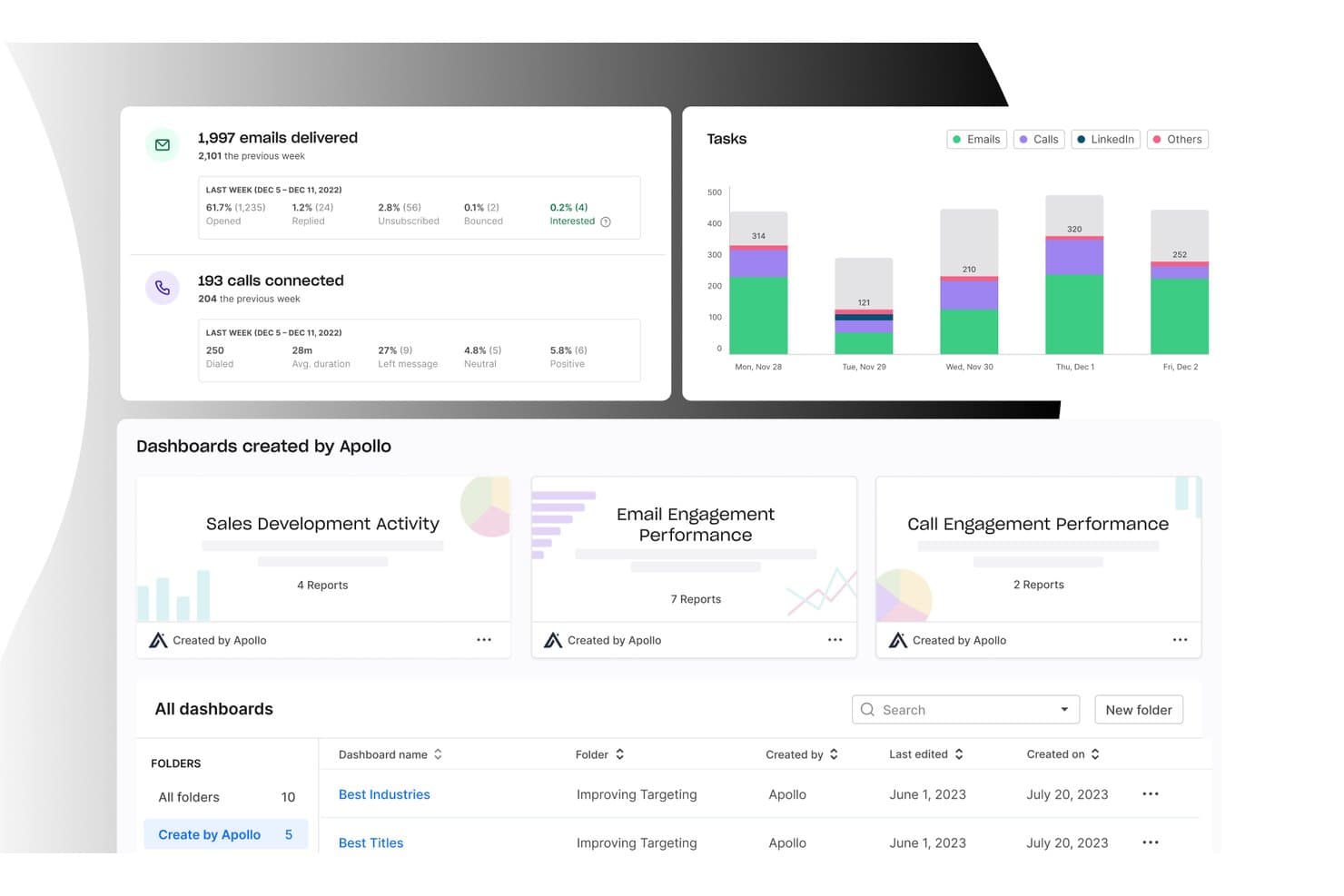
Apollo.io offers a detailed analytics dashboard displaying email delivery stats, call connection metrics, task activity charts, and pre-built sales dashboards for B2B sales teams. Apollo.io is a B2B sales intelligence and engagement platform that combines a 210M+ contact database with multi-channel sequencing, an integrated dialer, workflow automation, and deal management in one workspace.
Who Is Apollo.io Best For?
Apollo.io is a strong fit for outbound sales teams at SMBs and mid-market B2B companies that need to consolidate prospecting, outreach, and pipeline management without stitching together multiple tools.
Why I Picked Apollo.io
I picked Apollo.io as one of the best because its workflow automation engine genuinely replaces the need for separate sequencing and routing tools. I like how it handles multi-channel sequences across email, phone, and LinkedIn automatically, with trigger-based enrollment and auto-logging back to the CRM. Its agentic AI can build a prospect list and draft a full outreach sequence from a single natural language prompt, which cuts hours off what used to be a manual setup process.
Apollo.io Key Features
- Conversation intelligence: Records and analyzes sales calls to surface key moments for coaching and deal risk.
- Enrichment engine: Automatically adds missing firmographic and contact data to CRM records in real time.
- Lead scoring: Uses AI to rate and prioritize leads for outbound and inbound sales motions.
- Multi-CRM integration: Syncs contacts, accounts, and engagement data with Salesforce, HubSpot, Marketo, and more.
Apollo.io Integrations
Apollo.io offers native integrations with Salesforce, HubSpot, Outreach, Airtable, Amplitude, Asana, and Gmail, and provides an API for custom integrations.
Pros and Cons
Pros:
- Trigger-based enrollment automates multi-channel outreach
- AI builds prospect lists from a prompt
- Database, dialer, and sequences in one
Cons:
- Pipeline analytics lack depth for revenue forecasting
- Contact data accuracy inconsistent outside North America
Learn more about Apollo.io: Best for AI-driven lead suggestions
- 30-day free trial
- From $39/user/month
Visit WebsiteCustomer Rating:4.7/5
Salesflare's visual sales pipeline tracks opportunities by stage, value, and interaction history in a drag-and-drop interface. Salesflare is a smart CRM crafted specifically for small and medium-sized B2B businesses. It offers a suite of features that enhance your sales processes, making it easier to manage leads and boost sales success.
Why I Picked Salesflare: I chose Salesflare as a B2B sales software for its strong focus on sales intelligence, offering features like relationship insights, AI-driven lead suggestions, LinkedIn integration, and a built-in lead finder to keep your pipeline full. Its visual sales pipelines, automated reminders, and collaboration tools streamline deal tracking, reduce admin work, and help teams focus on closing more deals efficiently.
Salesflare Standout Features and Integrations
Features include automated email sequences that allow for personalized engagement with your leads, enhancing your relationship-building efforts. The platform also offers a lead finder that helps you streamline lead generation, ensuring that your sales pipeline remains robust. Additionally, Salesflare's relationship intelligence feature enhances team collaboration by providing insights that help prioritize leads and improve decision-making.
Integrations include QuickBooks Online, Slack, KrispCall, Nectar Desk, Typeform, Facebook Lead Ads, Google Contacts, CalendarHero, Bit Integrations, Google Sheets, Intercom, and MailChimp.
Pros and Cons
Pros:
- Strong integration capabilities with popular tools like Outlook and LinkedIn
- Effective automation features boost productivity by reducing manual tasks
- Unlimited contacts and users with advanced filtering
Cons:
- Limited email templates available
- Initial setup for automated workflows can be challenging for some users
Learn more about Salesflare: Best for territory mapping and route optimization
- Not available
- Pricing upon request
Visit WebsiteCustomer Rating:4.3/5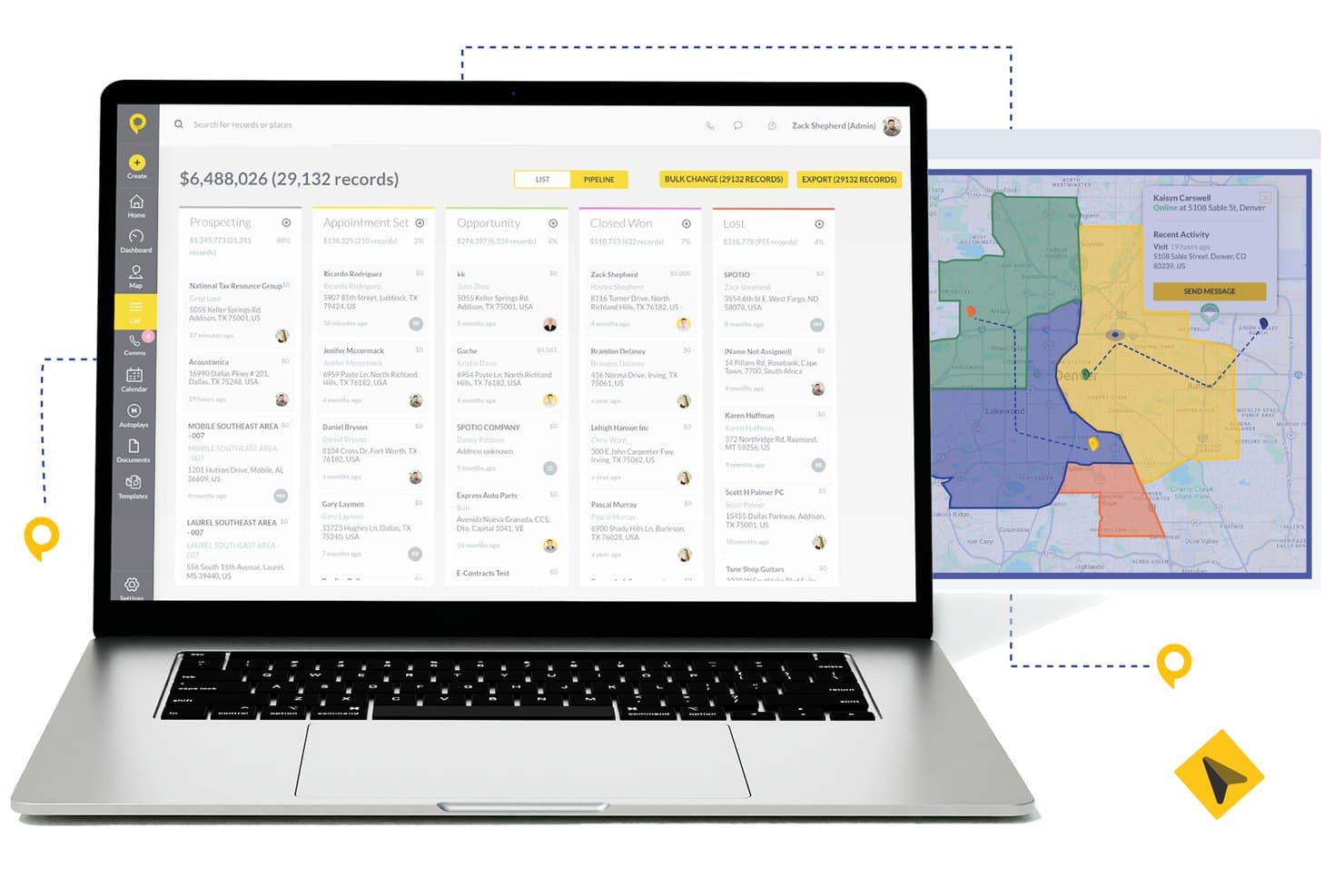
SPOTIO offers a pipeline management view with kanban-style deal stages, bulk actions, and an integrated territory map for field sales teams. SPOTIO is a field sales execution platform that combines territory management, route optimization, lead tracking, pipeline management, and rep activity monitoring in one mobile-first solution.
Who Is SPOTIO Best For?
SPOTIO is a strong fit for outside and door-to-door sales teams in industries like telecom, solar, roofing, and commercial services that manage large geographic territories.
Why I Picked SPOTIO
I picked SPOTIO as one of the best because its territory mapping goes well beyond drawing boundaries. I love that you can build territories by zip code, county, or custom shape and layer on 200+ demographic data overlay points to prioritize the highest-value areas. The route optimization engine then sequences stops to cut drive time and pack more face-to-face visits into each rep's day, which is something I haven't seen executed this precisely in competing field sales tools.
SPOTIO Key Features
- Multi-channel communications: Call, email, and text prospects and customers directly from the platform.
- Activity tracking dashboard: Monitor rep activity and location-verified check-ins in real time.
- Native CRM integrations: Sync accounts, contacts, and deal data with Salesforce, HubSpot, and Microsoft Dynamics 365.
- DASH AI co-pilot: Use AI to capture field data, draft emails, and suggest next steps during sales visits.
SPOTIO Integrations
SPOTIO offers native integrations with Salesforce, HubSpot, Microsoft Dynamics 365, Zoho CRM, and Pipedrive. Zapier and an open API are also available for additional connectivity and custom integrations.
Pros and Cons
Pros:
- Mobile-first design suited for on-the-road reps
- Real-time rep activity tracking and check-ins
- Strong territory mapping for field sales teams
Cons:
- Reporting depth limited for complex B2B pipelines
- Limited forecasting depth for inside sales teams
Learn more about SPOTIO: Best for customizable quote templates
- Free demo available
- From $39/user/month
Visit WebsiteCustomer Rating:4.8/5
iQuoteXpress provides a dashboard for tracking proposal activity, sales trends, and quote conversion rates. iQuoteXpress is a configure, price, quote (CPQ) platform that gives B2B sales teams tools for product configuration, branded proposal creation, quote tracking, and multi-currency pricing management.
Who Is iQuoteXpress Best For?
iQuoteXpress is a good fit for B2B sales teams in product-heavy industries that need to generate accurate, professional quotes without a lengthy manual process.
Why I Picked iQuoteXpress
I've included iQuoteXpress in my top picks because its quote template system goes well beyond selecting a layout. Admins define template categories by segment, region, or product line, and reps get the right template loaded automatically, with logos, fonts, colors, and legal language already locked in. I also like that T&Cs are managed in a dedicated panel, so any updates apply instantly on the next generated proposal without any copy-paste work. The document library feature lets you attach cover pages, spec sheets, and contracts in one click, and iQuoteXpress assembles everything into a single proposal packet.
iQuoteXpress Key Features
- Product catalog management: Build and organize a searchable product and services catalog with pricing, descriptions, and images that reps pull directly into quotes.
- Quote tracking and analytics: Monitor quote status, open rates, and win/loss data from a centralized dashboard to identify where deals stall.
- Multi-currency pricing: Set and display pricing in multiple currencies to support sales across different markets.
- eSignature support: Collect client signatures directly within the platform without routing documents to a separate signing tool.
iQuoteXpress Integrations
iQuoteXpress works as a standalone solution or integrates with CRM and ERP platforms through out-of-the-box connections with single sign-on. Native integrations include Salesforce, Microsoft Dynamics 365, Zoho CRM, Zoho Books, Oracle, and HubSpot CRM, as well as QuickBooks Online Advanced and DocuSign. It also connects with Acumatica and Shopify for ERP and ecommerce workflows. A REST API is available for building custom integrations with third-party applications.
Pros and Cons
Pros:
- Reps generate quotes without manager involvement
- Cuts new rep onboarding time significantly
- Multi-level product configurators for complex quotes
Cons:
- Configurator setup requires vendor assistance
- No mobile app for quoting on-the-go
Learn more about iQuoteXpress: Best for AI-guided quote optimization
- Free demo available
- Pricing upon request
Visit WebsiteCustomer Rating:4.7/5
DealHub AI lets sales teams manage, track, and update all active proposals in one organized dashboard. DealHub AI is a quote-to-revenue platform built for B2B sales teams, combining CPQ, contract lifecycle management, subscription billing, and digital deal rooms in a single system.
Why I picked DealHub AI: I picked DealHub AI because of how it surfaces buyer behavior and lets you act on it. Its dealstream feature tracks buyer engagement within proposals and surfaces intent signals—so your team can follow up at the right moment. Also, its built-in AI agents provide pricing and product mix suggestions based on historical wins, helping reps optimize their quotes. And its adaptive pricing models support usage-based, tiered, and fixed pricing, letting you handle complex deals and prevent manual mispricing.
DealHub AI Standout Features and Integrations
Standout features include the digital sales room or dealroom, which centralizes all deal assets, content, communications, and real-time notifications, letting buyers and sellers collaborate in one branded space. It also includes contract management tools such as dynamic contract creation, clause libraries, and negotiation workflows to speed approvals.
Integrations include Salesforce, HubSpot, Microsoft Dynamics 365, Slack, Gong, DocuSign, Google, LinkedIn, Optimizely, Solarwinds, SalesLoft, and Meta Platforms.
Pros and Cons
Pros:
- Supports subscription billing and renewals
- AI agents guide reps on pricing and product mix
- Accelerates deal cycles via digital sales rooms
Cons:
- Advanced feature setup takes more time, effort, and support than expected
- Slow loading or lag with large deals or complex proposal pages
Learn more about DealHub AI: Best for AI-driven conversation insights
- Free plan + 14-day trial + free demo available
- From $25/user/month (billed annually)
Visit WebsiteCustomer Rating:4.2/5
CloudTalk dashboard displaying real-time call metrics and performance analytics for sales teams. For businesses seeking to enhance their B2B sales efforts, CloudTalk offers a dynamic cloud-based call center solution tailored to meet the needs of sales teams across various industries. With features designed to streamline communication and improve sales performance, CloudTalk appeals to sales professionals and organizations looking to optimize their customer interactions and drive better outcomes. Whether you need advanced call management, global reach, or robust analytics, CloudTalk addresses the challenges of managing sales calls efficiently and effectively.
Why I Picked CloudTalk
I picked CloudTalk for its unique capability to enhance sales performance through AI-driven conversation intelligence. This feature provides automated call summaries, scoring, and sentiment analysis, allowing your team to focus on meaningful interactions. Additionally, its AI sales dialer, which includes options like parallel dialing and voicemail drop, maximizes your team's outreach potential by ensuring high-value conversations are prioritized. These functionalities are particularly beneficial for teams aiming to boost their sales efficiency and achieve better results.
CloudTalk Key Features
In addition to its AI-driven tools, I also found the following useful:
- Custom Call Routing: Directs calls to the right team members based on predefined criteria, ensuring efficient handling and customer satisfaction.
- Interactive Voice Response (IVR): Automates call handling with a menu system that guides callers to the appropriate department or service.
- Real-Time Analytics: Offers insights into call performance and team productivity, helping you make informed decisions.
- Global SMS and WhatsApp Support: Enables multi-channel communication, allowing your team to reach customers through their preferred platforms.
CloudTalk Integrations
Integrations include Salesforce, HubSpot, Zoho, Pipedrive, Zendesk, Shopify, Intercom, Freshdesk, Aircall, and Microsoft Dynamics.
Pros and Cons
Pros:
- Extensive CRM integration options
- Multiple outbound dialer modes
- AI-powered conversation intelligence tools
Cons:
- International number availability can be inconsistent
- Parallel dialer stability issues
Learn more about CloudTalk: Best for order tracking
- Free trial available
- From $69/rep/month (billed annually)
Visit WebsiteCustomer Rating:4.6/5
SimplyDepo dashboard displaying sales metrics, order activity, route performance, and field rep insights across desktop and mobile views. SimplyDepo offers a tailored solution for brands, distributors, and merchandisers seeking to enhance their B2B sales operations. Designed with startups and growing businesses in mind, it addresses challenges in retail execution, order management, and customer relationship management. By integrating essential features like route planning and field sales tools, SimplyDepo aims to streamline processes and drive growth.
Why I Picked SimplyDepo
I picked SimplyDepo for its specialized focus on enhancing B2B sales efficiency through its unique combination of retail execution and field sales tools. Its B2B order management system is particularly appealing for those looking to streamline their sales processes and improve customer relationships. The inclusion of CRM capabilities further strengthens its position as a comprehensive solution for managing business-client interactions and optimizing sales routes.
SimplyDepo Key Features
In addition to its strengths in order management and CRM, I also found the following to be useful:
- Route Planning: Optimize delivery and sales routes to enhance efficiency and reduce operational costs.
- Sales Rep App: Equip your sales team with a mobile app to manage tasks and customer interactions on the go.
- Prospect Management: Track and manage potential clients to ensure no opportunity is missed.
- Task Management: Organize and prioritize tasks to maintain focus and productivity across your team.
SimplyDepo Integrations
Integrations include Stripe, Twilio SendGrid, ShipStation, and QuickBooks.
Pros and Cons
Pros:
- Route planning and territory mapping
- Integrated CRM for account tracking
- Built-in B2B order management system
Cons:
- No transparent API documentation
- Limited advanced reporting customization
Learn more about SimplyDepo: 8Best for action planning in digital sales rooms
Dock
- Free plan + free demo available
- From $350/month (billed annually)
Visit WebsiteCustomer Rating:4.9/5
Dock's digital sales rooms offer mutual action plans, analytics, and a centralized place for client-facing documents and notes. Dock is a B2B sales software that provides a comprehensive platform for managing sales, onboarding, and client interactions. It offers features such as digital sales rooms, onboarding portals, and client-facing workspaces, which help businesses organize and share content with customers in a branded environment.
Why I picked Dock: I like that Dock offers a centralized space for sales teams to manage client-facing content, while also providing tools and templates to standardize sales processes. Its digital sales room particularly stands out with features like mutual action plans to guide buyers through different stages of the process. Additionally, Dock's analytics-focused customer experience tracks interactions and progress, helping sales teams gather metrics and follow up with leads effectively.
Dock Standout Features and Integrations
Standout features include buying signals, dynamic action plans, a flexible workspace editor, custom branding, pricing and order forms, secure sharing, digital signature collection, and customizable templates.
Integrations include Airtable, Pandadoc, Typeform, HubSpot, Salesforce, Slack, Zoom, and more.
Pros and Cons
Pros:
- Analytics for customer engagement
- Mutual action plans
- Templates for standardizing processes
Cons:
- Learning curve for new users wanting to maximize the features
- HubSpot and Salesforce integration only available for higher tiers
Learn more about Dock: Best for lead verification and qualification
- 7-day free trial + free demo available
- From $74/month (billed annually)
Visit WebsiteCustomer Rating:4.7/5
UpLead allows users to filter and target contacts by technology, revenue, employees, and type. This lead generation software was built to help SMBs and large organizations manage their sales workflow through account-based marketing, targeted sales generation, real-time email verification, and opportunity engagement. You can build customizable B2B lists with criteria for lead qualification that eliminates bad-fit buyers and low quality leads.
Why I picked UpLead: The reason I chose UpLead was due to their comprehensive lead filtering tools. It’s not enough to find high-quality leads, they also need to be a good fit for your product or service. Using their filtering tool, you can target leads by technology, number of employees, revenue, and over 50 other search filters.
UpLead Standout Features and Integrations
Standout features include access to over 100 million contacts with 95% data accuracy, appending key contact data from disorganized lists, Chrome extension for grabbing leads straight from the browser, and an email checker tool that helps verify valid addresses.
Integrations include Close, Copper, Dynamics 365, Insightly, Mailshake, Nimble, Outreach, Pipedrive, Salesforce Sales Cloud, and Zapier.
Pros and Cons
Pros:
- CSV file upload functionality for non-integrated CRMs
- Can generate lists quickly
- Low email bounce back
Cons:
- Limited lead coverage
- Pricing isn’t as flexible
Learn more about UpLead: 10Best for enterprises who use Salesforce or Salesforce Industry Clouds
Groove
- Not available
- Pricing upon request
Visit WebsiteCustomer Rating:4.7/5
Groove dashboard shows territory organization, metrics and analytics, and provides coaching. This sales productivity platform is designed to enable sales leaders to boost the revenue-per-rep across the entire organization by automating admin tasks, making it easier to update and access Salesforce, and generating repeatable playbooks by leveraging AI to transform complicated data into actionable insights.
Why I picked Groove: I chose Groove for this list because it’s the only current Salesforce-native market leader. With Groove, you won’t have any data latency or sync issues, you get industry-leading security and compliance, and it works with even the most customized versions of Salesforce.
Groove Standout Features and Integrations
Standout features include campaign automation through email, SMS, and calls; visibility on sales calls for better coaching; real-time insights into sales activity; and dedicated implementation and onboarding specialists.
Integrations include CloudTalk, Constant Contact, ExecVision, Gmail, Gong, LinkedIn Sales Navigator, Microsoft Outlook, Seismic, Spinify, and Vidyard.
Pros and Cons
Pros:
- Powerful execution roadmap
- Great customer support
- Friendly user-interface
Cons:
- Not enough tutorials for combining with Zoom Phone, etc.
- Limited mass texting capabilities
Learn more about Groove:
Andre alternativer
Jeg valgte ut noen flere verktøy som jeg hadde på radaren, men som ikke kom med på den endelige listen, for å gi deg et virkelig omfattende utvalg av B2B-salgsprogramvare du kan utforske.
- 11CognismBest for unrestricted access to information, unfettered by credit limits or geography restrictions
- 12HunterBest all-in-one email outreach platform
- 13Pipedrive CRMBest for custom sales pipelines
- 14LushaBest for reaching company decision makers to close deals faster
- 15InSitu SalesBest with integrated field sales & B2B ecommerce
- 16ForecastioBest for sales forecasting and planning
- 17LeadinfoBest for tracking which companies are visiting your website
- 18EnlyftBest for discovering what technologies your prospects are already using
- 19BookYourDataBest for pay-as-you-go B2B prospecting
- 20LeadIQBest for improving prospecting for SaaS sales teams
How I Evaluate B2B Sales Software
I split my evaluation into two layers: baseline criteria a tool must hit—like pipeline management and CRM sync—and differentiators that separate the best options for RevOps teams.
Core Functionality (Table Stakes For This List)
When I'm selecting tools for my list, I rank each one on a scale from 0 (does not offer the functionality) to 5 (excels in this area) for each core functionality listed below. Then, I calculate the tool's total score into a percentage. Each tool needs to achieve a minimum total score of 65% to be considered for inclusion.
- Pipeline & Deal Management: I evaluate how well a tool handles multi-stage, multi-stakeholder deal cycles—things like separate pipelines for new business vs. expansion and stakeholder mapping within opportunities.
- Sales Engagement Tools: Multi-channel cadences matter here, so I look for sequencing across email, phone, and LinkedIn rather than just basic email templates with no follow-up logic.
- CRM Integration or Native CRM: Whether a platform is a CRM itself or syncs with one like Salesforce or HubSpot, I check for bi-directional data flow that keeps account and deal records consistent.
- Revenue Forecasting & Analytics: I look at how a tool surfaces pipeline health and predicted outcomes—weighted forecasts, deal velocity tracking, and stage conversion reporting all factor in.
- Lead & Account Management: B2B sales rarely involve a single buyer, so I evaluate support for account hierarchies, buying committees, and structured lead routing across territories or segments.
- Sales Workflow Automation: Repetitive tasks like activity logging, deal stage updates, and task assignment eat into selling time, so I check for rule-based triggers that handle these automatically.
Once I have a list of tools that meet this criteria, I consider what sets each platform apart.
Differentiating Factors (What Sets Vendors Apart)
Here's how I compare and contrast different vendors:
Standout Features
Conversation intelligence is a major differentiator—I look for tools that transcribe and analyze sales calls to surface deal risks or competitor mentions without manual review. AI deal scoring adds another layer, helping RevOps teams prioritize pipeline by predicted win probability rather than gut feel. I also evaluate territory and quota planning capabilities, especially for orgs managing multiple segments where balanced rep coverage directly impacts forecast accuracy.
Beyond Features
Integration depth matters a lot here—I check whether a platform connects natively to CRMs, marketing automation tools, and BI systems so RevOps teams aren't stuck building custom middleware. Scalability is equally important, especially for growing orgs that need to add business units or territories without rebuilding their workflows. I also evaluate pricing transparency, because hidden costs for add-on modules like forecasting or analytics can blow up a RevOps budget quickly.
Slik velger du B2B-salgsprogramvare
Det er lett å gå seg vill i lange funksjonslister og kompliserte prisstrukturer. For å hjelpe deg med å holde fokus mens du går gjennom den unike prosessen med å velge programvare, har jeg laget en sjekkliste over faktorer du bør ha i bakhodet:
| Faktor | Hva du bør vurdere |
|---|---|
| FaktorSkalerbarhet | Hva du bør vurdereKan programvaren vokse sammen med virksomheten din? Se etter verktøy som støtter flere brukere og økt datamengde uten redusert ytelse. |
| FaktorIntegrasjoner | Hva du bør vurdereKan den kobles til de eksisterende systemene dine, for eksempel CRM-, e-post- og analyseverktøy? Sørg for kompatibilitet for å unngå datasiloer. |
| FaktorTilpasningsmuligheter | Hva du bør vurdereKan du tilpasse verktøyet til de spesifikke arbeidsflytene dine? Se etter alternativer for å tilpasse felt, dashbord og rapporter. |
| FaktorBrukervennlighet | Hva du bør vurdereHvor intuitivt er grensesnittet? En bratt læringskurve kan forsinke innføringen. Se etter brukervennlig navigasjon og enkle prosesser. |
| FaktorImplementering og opplæring | Hva du bør vurdereHvilke ressurser trengs for å komme i gang? Ta hensyn til tiden og støtten som kreves for oppsett og opplæring. |
| FaktorKostnad | Hva du bør vurdereEr prisene tydelige og innenfor budsjettet? Sammenlign kostnadsstrukturer, inkludert skjulte gebyrer eller ekstra kostnader for viktige funksjoner. |
| FaktorSikkerhetstiltak | Hva du bør vurdereOverholder verktøyet bransjestandarder for sikkerhet? Se etter kryptering, databeskyttelse og regelmessige sikkerhetsoppdateringer for å beskytte dataene dine. |
| FaktorTilgjengelig support | Hva du bør vurdereHvilke supportalternativer er tilgjengelige? Sørg for rask hjelp via kanaler som telefon, e-post eller chat, særlig i virksomhetens kritiske åpningstider. |
Hva er B2B-salgsprogramvare?
B2B-salgsprogramvare er et verktøy som hjelper bedrifter med å administrere og forbedre salgsprosessene sine med andre bedrifter. Salgsmedarbeidere, kundeansvarlige og forretningsutviklingsteam bruker vanligvis disse verktøyene for å øke effektiviteten og avslutte avtaler raskere.
Funksjoner som kundeemnehåndtering, salgssporing og rapportering bidrar til å organisere salgsaktiviteter og gi kundeinnsikt. Alt i alt gir disse verktøyene en strukturert måte å administrere salgsinnsatsen på og drive forretningsvekst.
Funksjoner
Når du velger B2B-salgsprogramvare, bør du se etter følgende viktige funksjoner:
- Kundeemnehåndtering: Hjelper med å organisere og følge opp potensielle kunder, slik at ingen muligheter går tapt.
- Sporing av salgspipeline: Gir en visuell oversikt over salgsfasene og hjelper teamene med å administrere og prioritere avtaler.
- Rapportering og analyse: Gir innsikt i salgsresultater og bidrar til datadrevne beslutninger.
- Tilpassbare dashbord: Lar brukerne tilpasse visningene etter sine spesifikke behov, noe som gjør programvaren enklere å bruke.
- Integrasjonsmuligheter: Kobler seg til eksisterende verktøy som CRM og e-post, slik at arbeidsflyten blir sømløs.
- Mobiltilgang: Gjør det mulig for salgsteam å administrere oppgaver mens de er på farten, noe som gir større fleksibilitet.
- Automatiserte oppgaver: Reduserer manuelt arbeid ved å automatisere repetitive oppgaver, noe som sparer tid og krefter.
- Sikkerhetstiltak: Beskytter sensitive data med kryptering og samsvar med bransjestandarder.
- Brukervennlig grensesnitt: Sikrer enkel bruk med intuitiv navigasjon og et oversiktlig design.
- Kundeinnsikt: Gir detaljert informasjon om kundeatferd og bidrar til personlige salgsstrategier.
Fordeler
Implementering av B2B-salgsprogramvare gir flere fordeler for teamet og virksomheten din. Her er noen av fordelene du kan se frem til:
- Bedre organisering: Funksjoner for kundeemnehåndtering gjør det enklere å holde oversikt over potensielle kunder og reduserer kaos.
- Økt effektivitet: Automatiserte oppgaver sparer tid ved å håndtere repetitive oppgaver, slik at teamet kan konsentrere seg om mer strategiske aktiviteter.
- Bedre beslutningstaking: Rapportering og analyse gir innsikt i salgsresultater og støtter velinformerte valg.
- Større fleksibilitet: Mobiltilgang gjør det mulig for teamet å administrere salgsaktiviteter mens de er på farten, slik at de ikke er bundet til et skrivebord.
- Sterkere kunderelasjoner: Kundeinnsikt gir detaljert informasjon om atferd og gjør det enklere å tilpasse salgsmetodene.
- Forenklede arbeidsflyter: Integrasjonsmuligheter sikrer at programvaren fungerer problemfritt med eksisterende verktøy og reduserer avbrudd.
- Forbedret datasikkerhet: Sikkerhetstiltak beskytter sensitiv informasjon og gir trygghet.
Kostnader og priser
Valg av B2B-salgsprogramvare krever en forståelse av de ulike prismodellene og abonnementene som er tilgjengelige. Kostnadene varierer basert på funksjoner, teamstørrelse, tillegg og mer.
Tabellen nedenfor oppsummerer vanlige abonnementer, gjennomsnittsprisene deres og typiske funksjoner som er inkludert i B2B-salgsprogramvareløsninger:
Sammenligningstabell for B2B-salgsprogramvareabonnementer
| Abonnementstype | Gjennomsnittspris | Vanlige funksjoner |
|---|---|---|
| AbonnementstypeGratisabonnement | Gjennomsnittspris$0 | Vanlige funksjonerGrunnleggende kundeemnehåndtering, begrenset rapportering og e-postintegrasjon. |
| AbonnementstypePersonlig abonnement | Gjennomsnittspris$5-$25/bruker/måned | Vanlige funksjonerAvansert kundeemnehåndtering, salgssporing og grunnleggende analyse. |
| AbonnementstypeBedriftsabonnement | Gjennomsnittspris$30-$60/bruker/måned | Vanlige funksjonerFull CRM-integrasjon, tilpassbare dashbord og automatiseringsfunksjoner. |
| AbonnementstypeStorbedriftsabonnement | Gjennomsnittspris$70-$150/bruker/måned | Vanlige funksjonerAvansert sikkerhet, tilpassede integrasjoner og dedikert kundestøtte. |
Vanlige spørsmål om B2B-salgsprogramvare
Har du flere spørsmål? Her er svar på noen vanlige spørsmål.
Hva er hovedformålet med B2B-salgsprogramvare?
Hovedformålet med B2B-salgsprogramvare er å hjelpe bedrifter med å administrere salgsprosessene sine mer effektivt. Den organiserer kundeinformasjon, sporer salgsaktiviteter og gir innsikt i salgsresultater. Ved å sentralisere data kan teamet ditt få tilgang til alt de trenger på ett sted, noe som gjør det enklere å administrere potensielle kunder og inngå avtaler.
Hvordan fungerer B2B-programvare?
Mesteparten av programvaren som er oppført her, er knyttet til generering av potensielle kunder, så metoden avhenger av verktøyet. Noen av disse verktøyene hjelper deg med å samle inn informasjon om besøkende på nettstedet, andre samler data fra sosiale medier og andre offentlige profiler, og noen tilbyr ferdiglagde lister til en fast pris.
De fleste alternativene tilbyr også en garanti for datanøyaktighet som hjelper deg med å kontrollere gyldigheten til telefonnumre, e-postadresser og annen offentlig tilgjengelig informasjon før du tar kontakt med nye kontakter, slik at du ikke kaster bort tid på utilgjengelige potensielle kunder.
Hvordan vet jeg om teamet mitt er klart for B2B-salgsprogramvare?
Teamet ditt er klart for B2B-salgsprogramvare hvis det blir tungvint å håndtere et økende antall potensielle kunder og avtaler manuelt. Hvis dataene er spredt på tvers av regneark og e-poster, er det på tide å sentralisere dem.
Vurder om teamet ditt har utfordringer med å spore salgsaktiviteter eller generere rapporter. Se etter tegn på ineffektivitet eller tapte muligheter. Involver teamet i beslutningsprosessen for å sikre at de støtter beslutningen og er klare til å utnytte programvarens funksjoner.