

I inntektsdrift er effektivitet viktig. Teamet ditt håndterer sannsynligvis flere oppgaver samtidig, og manuell håndtering av ringelister kan virkelig gå ut over agentenes produktivitet. Det er her automatiske oppringere kommer inn i bildet. De hjelper deg med å spare tid, øke effektiviteten i samtalene og holde teamet fokusert på å avslutte avtaler.
Jeg har brukt tid på å gjennomgå og teste ulike automatiske oppringere for å gi deg en objektiv vurdering av de beste alternativene på markedet. I denne artikkelen finner du detaljerte gjennomganger av mine favoritter, slik at du kan ta en informert beslutning for teamet ditt. Enten du driver en liten bedrift eller en stor virksomhet, finnes det en løsning her som er tilpasset behovene dine.
Why Trust Our Software Recommendations
6,700+
Reviews
20
Industry experts
16+
Evaluation factors
14
Years
Our reviews reflect our independent judgment—not a sales pitch. Learn how we stay transparent.
For this guide, we evaluated tools using hands-on testing and independent research, scoring tools using our selection criteria.
Our reviews reflect our human editorial judgment, not a sales pitch.
Sammenligningstabell: Automatisk oppringer
Denne sammenligningstabellen oppsummerer prisopplysningene for mine beste utvalgte automatiske oppringere.
| Tool | Best For | Trial Info | Price | ||
|---|---|---|---|---|---|
| 1 | Best for built-in compliance | Free demo available | From $15/user/month (billed annually) | Website | |
| 2 | Best for AI-driven sales dialing | 14-day free trial | From $25/user/month (billed annually) | Website | |
| 3 | Best for real-time reporting | Free trial + free demo available | From $140/user/month (billed annually) | Website | |
| 4 | Best for call-center analytics | Free demo available | Pricing upon request | Website | |
| 5 | Best for CRM integration | Free demo available | From $79/user/month (billed annually) | Website | |
| 6 | Best for an all-in-one dialer | 14-day free trial | From £18/user/month | Website | |
| 7 | Best for remote sales teams | 14-day free trial | From $29/user/month (billed annually) | Website | |
| 8 | Best for predictive dialing | 30-day free trial + free demo available | From $19/agent/month | Website | |
| 9 | Best for triple-line sales calls | Free demo available | From $89/month + $10 agent access | Website | |
| 10 | Best for simple cloud dialing | 30-day free trial available | From $79/user/month | Website |


Gjennomgang av de beste automatiske oppringerne
Nedenfor finner du mine detaljerte sammendrag av de beste automatiske oppringerne som kom med på kortlisten. Gjennomgangene mine gir et detaljert innblikk i de viktigste funksjonene, fordelene og ulempene, integrasjonene og ideelle bruksområdene for hvert verktøy, slik at du kan finne det som passer best for deg.
 Best for built-in compliance
- Free demo available
- From $15/user/month (billed annually)
Visit WebsiteCustomer Rating:4.5/5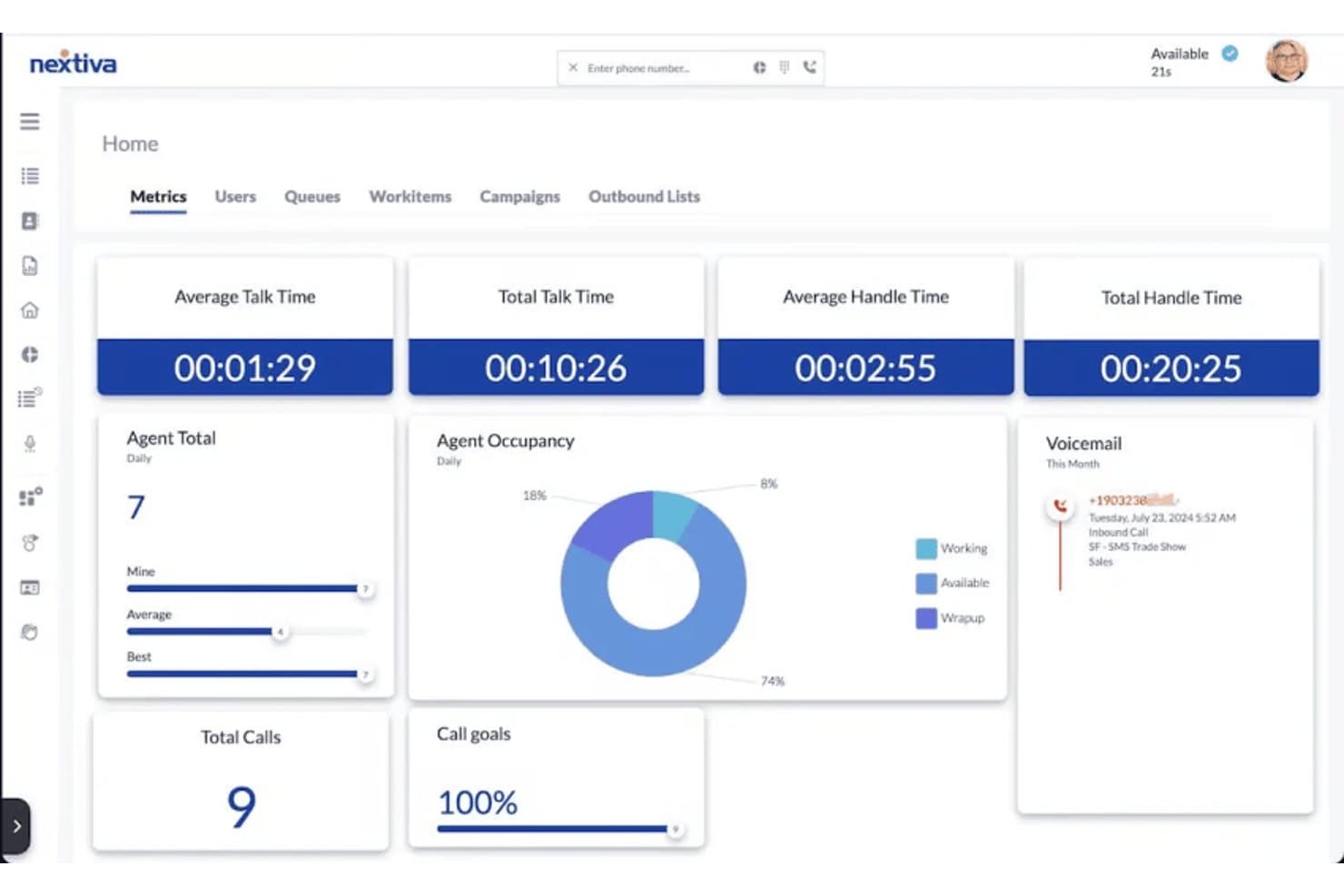
Nextiva tracks call metrics and agent occupancy in real time. Nextiva is a contact center and business communications platform that combines progressive, predictive, and Quarterback dialing modes with call recording, AI transcription, compliance controls, and CRM integrations.
Who Is Nextiva Best For?
Nextiva suits contact centers that need configurable outbound dialing with built-in compliance controls like two-party consent handling and DNC management.
Why I Picked Nextiva
I've included Nextiva in my top picks because its built-in compliance controls are genuinely hard to find at this level in a contact center dialer. I like that it handles two-party consent automatically, holding or blocking recordings until consent is confirmed, and manages nine distinct consent types including DNC and Opt-Out by channel. Its Quarterback dialing mode adds configurable pacing controls like abandon percentage, cooling-off periods, and answering machine detection that give contact center teams real control over compliant outbound campaigns.
Nextiva Key Features
- Progressive dialing with auto-dial timer: Agents move automatically to the next call after a configurable delay of 1–600 seconds, reducing idle time between outbound calls.
- Campaign-level lead list management: Each outbound campaign supports lead filters, priority fields, maximum daily attempt limits, and callback timing controls across alternate contact numbers.
- AI call transcription and summaries: Every recorded call is automatically transcribed and summarized, with sensitive data redaction available for compliance-sensitive campaigns.
- Native Salesforce Lightning integration: Agents can create, read, update, and delete Salesforce contacts directly from the NCC softphone using Open CTI and configurable screen layouts.
Nextiva Integrations
Nextiva offers native Salesforce Lightning integration and lists 14 CRM integrations, including HubSpot, Zoho, Microsoft Dynamics, and Bullhorn. It also supports REST APIs, webhooks, and Google BigQuery export for custom data flows.
Pros and Cons
Pros:
- Call summaries support coaching and review
- Configurable pacing supports controlled calling volumes
- Built-in consent controls protect outbound campaigns
Cons:
- Dialing modes vary across documentation
- No confirmed parallel or multi-line dialing
Learn more about Nextiva: Best for AI-driven sales dialing
- 14-day free trial
- From $25/user/month (billed annually)
Visit WebsiteCustomer Rating:4.4/5
CloudTalk auto dialer streamlines outbound calls with lead tracking. For businesses seeking a reliable auto dialer, CloudTalk offers an intuitive and feature-rich solution tailored to optimize sales and support operations. Designed for call centers and sales teams, this tool streamlines communication by automating routine tasks, leaving your team to focus on meaningful customer interactions. Whether you're aiming to enhance productivity or improve customer engagement, CloudTalk provides the tools necessary to transform your call management processes.
Why I Picked CloudTalk
I picked CloudTalk for its innovative AI Sales Dialer, which supports multiple dialing modes such as preview, power, and parallel dialing, making it ideal for efficient call management. This functionality is complemented by its Answering Machine Detection, which automatically skips voicemails, allowing your team to focus on live conversations. Additionally, the Voicemail Drop feature enables quick sending of pre-recorded messages, ensuring that your communication remains seamless and effective.
CloudTalk Key Features
In addition to its auto-dialer capabilities, CloudTalk offers:
- Real-Time Monitoring and Analytics: Provides insights into call performance to enhance efficiency and decision-making.
- CRM Integration: Seamlessly connects with platforms like HubSpot, Salesforce, and Zoho, ensuring smooth workflow automation.
- IVR and Smart Routing: Enhances call handling with intelligent routing options, improving customer experience.
- Global SMS/MMS Messaging: Facilitates communication beyond voice calls, broadening your reach and engagement.
CloudTalk Integrations
Integrations include HubSpot, Salesforce, Zendesk, Pipedrive, Zoho CRM, Intercom, Freshdesk, Slack, Microsoft Teams, and Shopify.
Pros and Cons
Pros:
- Quick setup process with minimal technical configuration
- Clear interface reduces time switching between call tasks
- AI summaries reduce manual reporting time
Cons:
- Users report inconsistent call quality
- Additional costs for numbers and contact scaling
Learn more about CloudTalk: Best for real-time reporting
- Free trial + free demo available
- From $140/user/month (billed annually)
Visit WebsiteCustomer Rating:4.8/5
PhoneBurner shows dashboards with dial stats, talk time, and team metrics. PhoneBurner is an auto dialer solution tailored for sales teams to maximize outreach and efficiency. It helps automate the dialing process, making it ideal for teams focused on lead conversion and customer engagement.
Why I picked PhoneBurner: It excels at providing real-time reporting, so your team can track key metrics as they happen. PhoneBurner offers features such as call tracking and analytics that help you monitor performance and adjust strategies quickly. The platform's ability to handle large call volumes efficiently keeps your team productive. Its intuitive interface reduces the learning curve, making it accessible for teams of all sizes.
Standout features and integrations:
Features include a built-in CRM that helps you manage contacts, customer information, and track interactions effortlessly. The platform also offers email tracking, so you can see when your messages are opened, and voicemail drop, which saves your team time by letting you leave pre-recorded messages.
Integrations include Salesforce, HubSpot, Zoho CRM, Zapier, Nimble, Integrately, and more.
Pros and Cons
Pros:
- Email tracking feature
- Native contact management system
- Real-time analytics
Cons:
- Limited mobile app features
- Limited customization options
Learn more about PhoneBurner: Best for call-center analytics
- Free demo available
- Pricing upon request
Visit WebsiteCustomer Rating:4.8/5
CallTools dashboard shows agent status, call activity, and performance metrics. CallTools is an auto dialer platform tailored for call centers and sales teams that need to manage high call volumes efficiently. It improves communication by automating dialing and providing real-time analytics to optimize performance.
Why I picked CallTools: It offers detailed call analytics, enabling your team to track performance metrics and make informed decisions quickly. The platform supports predictive dialing, reducing downtime between calls and boosting agent productivity, while its real-time reporting features let you monitor call activity and adjust strategies as needed. CallTools also provides call recording, which helps in training and quality assurance.
Standout features and integrations:
Features include a power dialer that automates dialing, allowing your team to focus on conversations rather than manual dialing. The system handles inbound calls, ensuring no customer calls go unanswered, and provides lead management tools to organize and prioritize contacts.
Integrations include Salesforce, HubSpot, Zoho CRM, Microsoft Dynamics, Slack, Zapier, ActiveProspect, and more.
Pros and Cons
Pros:
- Advanced automated list scrubbing tools
- Strong list management and scrubbing tools
- Handles blended inbound and outbound campaigns
Cons:
- Complex configuration for smaller team
- Reporting exports can require manual cleanup
Learn more about CallTools: Best for CRM integration
- Free demo available
- From $79/user/month (billed annually)
Visit WebsiteCustomer Rating:4.7/5
DialedIn provides an analytics dashboard with call metrics and volume trends. DialedIn is an auto dialer solution for sales teams looking to enhance their outbound calling operations through efficient CRM integration. It simplifies lead management and boosts productivity by automating call processes.
Why I picked DialedIn: Its seamless CRM integration lets your team manage contacts and track interactions directly in the dialer. The platform offers advanced call routing, ensuring the right calls reach the right agents. With real-time analytics, you can monitor performance and make data-driven decisions. DialedIn's intuitive interface makes it easy for your team to adopt and use effectively.
Standout features and integrations:
Features include call recording for quality assurance and training, helping your team improve customer interactions. The predictive dialing feature reduces idle time and increases call efficiency, while the call scripting tool guides agents through conversations.
Integrations include Salesforce, HubSpot, Zoho CRM, Microsoft Dynamics, Slack, Zapier, and more.
Pros and Cons
Pros:
- High-volume dataset synchronization
- Highly rated ease of use scores
- Seven dialing modes
Cons:
- Complex campaign configuration
- Initial configuration can feel overwhelming
Learn more about DialedIn:

RingCentral offers analytics for campaigns, conversions, and agent insights. RingCentral is a cloud-based communication platform and phone system for businesses of all sizes. It offers tools for managing calls, messaging, and video conferencing, and supports key business functions such as team collaboration and customer communication.
Why I picked RingCentral: Its scalability makes it a great choice for growing businesses looking to expand their communication capabilities. The platform offers auto-dialing features that help your team manage outbound calls more efficiently, along with call monitoring and analytics to track performance and ensure high-quality interactions. RingCentral’s customizable settings allow you to tailor the system to your specific business needs, accommodating growth as it happens.
Standout features and integrations:
Features include call forwarding, which ensures your team never misses important calls by routing them to available agents. The platform also provides voicemail-to-email functionality, allowing you to access messages conveniently, and a mobile app that supports remote work by enabling access to communication tools on the go.
Integrations include Salesforce, Microsoft Teams, Slack, Google Workspace, Zendesk, Okta, Box, Dropbox, HubSpot, Zoho CRM, and more.
Pros and Cons
Pros:
- Suits large multichannel contact center deployments
- Strong compliance tooling
- Multiple dialing modes in one platform
Cons:
- Complex admin tools
- Struggles with heavy call volume
Learn more about RingCentral: Best for remote sales teams
- 14-day free trial
- From $29/user/month (billed annually)
Visit WebsiteCustomer Rating:4.1/5
JustCall provides analytics with call metrics, team stats, and call trends. JustCall is an auto dialer for remote sales teams, helping them automate calling tasks and improve outreach. It primarily serves businesses looking to boost their call efficiency and team collaboration.
Why I picked JustCall: The platform targets remote teams with local presence dialing, helping your team appear local to recipients and increasing answer rates. JustCall's call monitoring and recording features enable managers to effectively oversee team performance. Its advanced analytics provide insights into call metrics, helping you make data-driven decisions. The software's user-friendly interface ensures teams can adapt and use the tool to its full potential.
Standout features and integrations:
Features include a power dialer that automatically calls the next number, reducing idle time for your team. Call recording is available for quality assurance and training, and the platform offers SMS automation, enabling you to send personalized messages to leads.
Integrations include HubSpot, Salesforce, Pipedrive, Zoho CRM, Slack, Zapier, Zendesk Sell, Freshdesk, Intercom, Copper, and more.
Pros and Cons
Pros:
- Unified voice and texting workspace
- Conversation intelligence for coaching reps
- Strong SMS campaigns and templates
Cons:
- Limited reporting depth
- Occasional SMS delivery issues
Learn more about JustCall: Best for predictive dialing
- 30-day free trial + free demo available
- From $19/agent/month

Voicent provides campaign dashboards with dialer, SMS, email, and analytic Voicent is an auto dialer solution for small businesses looking to automate their calling processes and enhance customer outreach. It performs key functions, such as managing call campaigns and improving outbound call efficiency.
Why I picked Voicent: It's tailored for small businesses that need an affordable yet effective auto-dialing solution. Voicent offers features such as predictive dialing, which help your team minimize downtime between calls. The platform's easy-to-use interface lets small teams get up and running quickly, while its call scheduling functionality helps you plan and execute campaigns efficiently.
Standout features and integrations:
Features include call recording for quality control, which helps improve customer interactions. It offers a text-to-speech feature that lets you send automated voice messages and call transfer options, so your team can easily route calls to the right departments.
Integrations include Salesforce, Zoho CRM, SugarCRM, and more.
Pros and Cons
Pros:
- Answering machine detection
- Built-in text-to-speech engine
- Low entry cost for small teams
Cons:
- Fewer native integrations
- Dated interface
Learn more about Voicent: Best for triple-line sales calls
- Free demo available
- From $89/month + $10 agent access

Mojo Dialer displays contact management with call status and active dialing. Mojo Dialer is an auto dialer tool that helps sales teams boost productivity and reach more prospects. It automates the calling process, allowing users to focus on lead conversion and customer interactions.
Why I picked Mojo Dialer: It’s tailored specifically for sales teams looking to maximize their calling efficiency. The triple-line dialer feature lets your team call multiple numbers simultaneously, reducing downtime, and its lead management system helps organize and prioritize leads effectively. The user-friendly dashboard provides real-time insights into call activities, making it a valuable tool for any sales team.
Standout features and integrations:
Features include a power dialer that supports multiple dialing modes, giving your team flexibility in how they reach out. The platform also offers call recording for quality assurance and training, as well as an appointment-setting feature that helps your team schedule follow-ups seamlessly.
Integrations include Zapier and API Nation.
Pros and Cons
Pros:
- Strong cold-calling workflows for prospecting
- Built-in real estate lead tools
- Triple line dialing
Cons:
- Limited templates beyond real estate
- Limited third-party integration library
Learn more about Mojo Dialer: Best for simple cloud dialing
- 30-day free trial available
- From $79/user/month

Auto Dialer.net supports outbound calling and contact management. Auto Dialer.net is an outbound calling software for enhancing sales processes with efficient contact management and calling capabilities. It is ideal for improving communication and productivity in various environments, including high-security settings and call centers.
Why I picked Auto Dialer.net: The platform offers quick setup and minimal training. It provides predictive dialing to help your team make calls more efficiently, along with call tracking and analytics to monitor performance and make informed decisions. Auto Dialer.net's cloud-based architecture lets your team dial from any device, providing flexibility and convenience.
Standout features and integrations:
Features include call tracking and analytics, which provide insights into team performance and areas for improvement. The platform also offers lead segmentation, helping you organize contacts effectively, and voicemail drop, allowing your team to leave pre-recorded messages quickly.
Integrations include Zapier.
Pros and Cons
Pros:
- Cloud-based accessibility
- Minimal training required for setup
- Easy setup and onboarding
Cons:
- Basic analytics tools
- Limited engagement features
Learn more about Auto Dialer.net:
Andre automatiske oppringere
Her er noen flere alternativer for automatiske oppringere som ikke kom med på kortlisten min, men som likevel er verdt å se nærmere på:
- 11Zoom Auto DialerBest for Zoom-native dialing
- 12Power DialerBest for AI lead scoring
- 13ConnexAIBest for AI sentiment and insights
- 148x8Best for global reach
- 15Five9Best for call center operations
- 16SquaretalkBest for multi-channel communication
- 17AlowareBest for instant messaging integration
How I Evaluate Auto Dialers
For RevOps teams running high-volume outbound, I split my evaluation into two layers: the baseline every tool must clear, and the differentiators that distinguish the best options.
Core Functionality (Table Stakes For This List)
When I'm selecting tools for my list, I rank each one on a scale from 0 (does not offer the functionality) to 5 (excels in this area) for each core functionality listed below. Then, I calculate the tool's total score into a percentage. Each tool needs to achieve a minimum total score of 65% to be considered for inclusion.
- Automated Dialing Modes: I check whether a tool offers multiple modes like power, predictive, preview, and parallel dialing so reps can match their approach to different list types and campaigns.
- CRM Integration: Bi-directional syncing with major CRMs matters here—I look for real-time activity logging, custom field mapping, and support for platforms like Salesforce and HubSpot.
- Call Recording & Logging: Every call should be recorded, transcribed, and tied to a contact record with disposition codes, giving managers and RevOps leads a clear audit trail for coaching and reporting.
- Local Presence & Caller ID Management: I evaluate whether the tool supports dynamic caller ID rotation and local area code matching, since answer rates drop significantly when prospects see unfamiliar or flagged numbers.
- Voicemail Drop & Call Scripting: Reps burning time leaving live voicemails is a productivity killer, so I look for one-click pre-recorded drops paired with on-screen scripts or guided talk tracks.
- Analytics & Reporting Dashboards: The platform should surface call metrics like connect rate, talk time, and conversion at both rep and team levels, with dashboards that RevOps can use for forecasting and performance reviews.
Once I have a list of tools that meet this criteria, I consider what sets each platform apart.
Differentiating Factors (What Sets Vendors Apart)
Here's how I compare and contrast different vendors:
Standout Features
Spam number remediation is a big one—tools that automatically monitor caller ID reputation and swap flagged numbers protect the answer rates your team depends on. I also look for AI conversation intelligence that surfaces coaching moments from recorded calls, saving managers hours of manual review. Multi-line parallel dialing matters for high-volume SDR teams, where connecting on 5+ lines simultaneously can double or triple live conversations per hour.
Beyond Features
Compliance is a major differentiator—I evaluate whether a tool handles TCPA, DNC list scrubbing, and STIR/SHAKEN attestation natively, since gaps here create real legal exposure for outbound teams. Pricing transparency also matters. I check whether per-seat costs include minutes and number provisioning or hide them as add-ons that balloon as your SDR team scales. Open APIs and webhooks round out my evaluation, since RevOps teams need call data flowing into BI tools and data warehouses for full-funnel attribution.
Slik velger du en automatisk oppringer
Det er lett å gå seg vill i lange funksjonslister og kompliserte prismodeller. For å hjelpe deg med å holde fokus mens du går gjennom den unike prosessen med å velge programvare, får du her en sjekkliste over faktorer du bør ha i bakhodet:
| Faktor | Hva du bør vurdere |
| Skalerbarhet | Vil verktøyet vokse sammen med teamet ditt? Vurder hvor enkelt det er å legge til nye brukere eller funksjoner uten store avbrudd eller kostnader. |
| Integrasjoner | Fungerer det med den eksisterende programvaren din? Se etter innebygde integrasjoner med CRM-systemet, e-post og andre viktige verktøy. |
| Tilpasningsmuligheter | Kan du tilpasse verktøyet til arbeidsflytene dine? Se etter alternativer for å justere innstillinger, skript og oversikter slik at de passer teamets behov. |
| Brukervennlighet | Hvor raskt kan teamet ditt ta det i bruk? Vurder grensesnittets utforming og tilbakemeldinger fra brukerne for å sikre at det er intuitivt og ikke krever omfattende opplæring. |
| Implementering og innføring | Hvor lang tid vil oppsettet ta? Vurder ressursene som kreves for en smidig overgang, inkludert støttemateriell som veiledninger og guider. |
| Kostnad | Passer prisen budsjettet ditt? Sammenlign de totale eierkostnadene, inkludert skjulte gebyrer, og vurder om verdien forsvarer prisen. |
| Sikkerhetstiltak | Er dataene og samtalene dine sikre? Se etter kryptering, databeskyttelsestiltak og samsvar med regelverk som GDPR. |
| Tilgjengelig kundestøtte | Hvilke alternativer for kundestøtte er tilgjengelige? Sørg for at det finnes tilstrekkelig støtte via kanaler som chat, telefon eller e-post, særlig i kritiske perioder eller under oppsettet. |
Hva er en automatisk oppringer?
Et automatisk oppringingssystem er et programvareverktøy som automatisk ringer telefonnumre fra en liste og kobler besvarte telefonsamtaler til en tilgjengelig agent eller en innspilt melding. Salgsteam, kundeservicemedarbeidere og telefonselgere bruker vanligvis disse verktøyene for å øke effektiviteten i samtalene og nå flere potensielle kunder. Automatisert oppringing, samtalesporing og funksjoner for å legge igjen talemeldinger bidrar til å redusere dødtid og forbedre kundeemnehåndteringen. Samlet sett forbedrer disse verktøyene kommunikasjonseffektiviteten og øker produktiviteten for team som håndterer store samtalevolumer.
Funksjoner
Når du velger et automatisk oppringingssystem, bør du se etter følgende nøkkelfunksjoner:
- Automatisert oppringing: Ringer automatisk numre fra en liste, noe som sparer tid og reduserer manuelle oppringingsfeil.
- Samtalesporing: Gir innsikt i samtalemålinger og hjelper team med å analysere resultater og optimalisere strategier.
- Legge igjen talemeldinger: Gjør det mulig for brukere å legge igjen forhåndsinnspilte meldinger, slik at prosessen med å nå flere kontakter går raskere.
- Prediktiv oppringing: Ringer flere numre samtidig og kobler bare samtaler når noen svarer, noe som maksimerer agentenes effektivitet.
- CRM-integrasjon: Synkroniserer med verktøy for kunderelasjonshåndtering for å effektivisere kontaktadministrasjonen og tilpasse kommunikasjonen.
- Samtaleopptak: Tar opp samtaler for kvalitetssikring og opplæring, og bidrar til å forbedre teamets resultater og etterlevelse.
- Analysedashbord: Gir detaljert innsikt i samtaleaktivitet, slik at du kan følge med på resultater og ta bedre beslutninger.
- Oppringing med lokalt nummer: Viser lokale numre for å øke svarprosenten og gjøre det mer sannsynlig at samtalene blir besvart.
- Dynamiske samtaleskript: Gir tilpassbare skript som veileder agenter gjennom samtaler og forbedrer ensartethet og effektivitet.
Fordeler
Implementering av et automatisk oppringingssystem gir flere fordeler for teamet og virksomheten din. Her er noen av fordelene du kan se frem til:
- Økt effektivitet: Automatisert oppringing reduserer manuelle oppgaver, slik at teamet kan håndtere flere samtaler på kortere tid.
- Forbedret kundeemnehåndtering: Funksjoner som CRM-integrasjon og samtalesporing bidrar til å organisere kontakter og prioritere oppfølging på en effektiv måte.
- Bedre samtalekvalitet: Samtaleopptak og dynamiske samtaleskript sikrer ensartet kommunikasjon av høy kvalitet med kundene.
- Høyere tilkoblingsrate: Oppringing med lokalt nummer og muligheten til å legge igjen talemeldinger øker sannsynligheten for å nå potensielle kunder og legge igjen beskjeder.
- Datadrevne beslutninger: Analysedashbord gir innsikt i samtalemålinger og hjelper deg med å optimalisere resultater og strategier.
- Bedre ressursfordeling: Prediktiv oppringing sørger for at agenter bruker mer tid på å snakke med potensielle kunder enn på å vente på at samtaler skal kobles opp.
- Personlig kundekommunikasjon: CRM-integrasjon gjør det mulig å tilpasse kommunikasjonen, noe som forbedrer kundetilfredsheten og engasjementet.
Kostnader og priser
Ved valg av et automatisk oppringingssystem er det nødvendig å forstå de ulike prismodellene og abonnementene som er tilgjengelige. Kostnadene varierer basert på funksjoner, teamstørrelse, tillegg og mer. Tabellen nedenfor oppsummerer vanlige abonnementer, gjennomsnittsprisene deres og typiske funksjoner som inngår i løsninger for automatisk oppringing:
Sammenligningstabell for automatisk oppringing
| Abonnementstype | Gjennomsnittspris | Vanlige funksjoner |
| Personlig abonnement | $15-$30/bruker/måned | Grunnleggende automatisk oppringing, CRM-synkronisering og tilgang til mobilapp. |
| Bedriftsabonnement | $45-$90/bruker/måned | Effektiv oppringing, lokalt nummer, SMS-automatisering og AI-oppsummeringer. |
| Abonnement for store virksomheter | $140+/bruker/måned | AI-sentimentanalyse, global rekkevidde og avanserte verktøy for etterlevelse. |
Vanlige spørsmål om automatiske oppringere
Her er noen svar på vanlige spørsmål om automatiske oppringere:
Hva er forskjellen mellom en prediktiv oppringer og en progressiv oppringer?
En prediktiv oppringer ringer flere numre samtidig og kobler samtaler bare når noen svarer, slik at agentenes samtaletid optimaliseres. En progressiv oppringer ringer derimot numre etter hverandre og går automatisk videre til neste samtale når én avsluttes. Velg en prediktiv oppringer hvis du har et stort team og ønsker å minimere dødtid. En progressiv oppringer passer bedre for mindre team eller når du trenger mer kontroll over samtaletempoet.
Hvordan kan automatiske oppringere forbedre salgsteamets produktivitet?
Automatiske oppringere øker teamets produktivitet ved å automatisere oppringingsprosessen, slik at selgerne bruker mindre tid på å skrive inn numre manuelt. Dette gjør at teamet kan komme i kontakt med flere potensielle kunder hver dag, redusere dødtid og raskt følge opp potensielle kunder.
Kan automatiske oppringere brukes til innkommende samtaler?
Ja, noen automatiske oppringere kan håndtere innkommende samtaler. Disse systemene har ofte funksjoner som samtaleruting og køhåndtering for å sikre at samtalene rutes til riktig agent. Hvis teamet ditt håndterer både innkommende og utgående samtaler, bør du se etter en løsning som støtter samtaleblanding. Denne funksjonen gjør det mulig for agenter å bytte sømløst mellom innkommende og utgående samtaler, noe som forbedrer effektiviteten og kundetilfredsheten.
Er automatiske oppringere i samsvar med regler for samtaler og reserverte mot-å-ringe-lister?
Ja, de fleste moderne automatiske oppringere har funksjoner for regelverksetterlevelse, som å kontrollere kontakter mot reserverte mot-å-ringe-lister og følge retningslinjene i loven om beskyttelse av telefonforbrukere (TCPA). Kontroller alltid at plattformen du velger, oppdaterer disse listene regelmessig for å unngå risiko knyttet til regelverksetterlevelse.
Er automatiske oppringere lovlige?
Ja, automatiske oppringere er lovlige, men de må overholde regelverk som den amerikanske TCPA-loven. Disse lovene begrenser automatiserte samtaler til visse numre uten samtykke. Sørg for å forstå regelverket i regionen din og innhent nødvendige tillatelser fra kontaktene. Rådfør deg med juridiske eksperter hvis du er usikker på om regelverket følges, slik at du unngår straff.
Hvordan kan jeg sikre kvaliteten på samtaler som foretas av en automatisk oppringer?
For å sikre samtalekvaliteten bør du bruke funksjoner som samtaleopptak og overvåking. Disse verktøyene hjelper deg med å gjennomgå interaksjoner og gi tilbakemeldinger til teamet. Regelmessig opplæring og bruk av dynamiske samtaleskript kan også forbedre samtalekvaliteten. I tillegg bør du teste internettforbindelsen og maskinvaren for å forhindre tekniske problemer som kan påvirke tydeligheten i samtalene.