

Reseña de Adapt 2026: Ventajas, Desventajas, Características y Precios
Adapt destaca como un software de inteligencia de leads que ayuda a los equipos de ventas a encontrar prospectos, acceder a datos de contacto B2B y construir canales de alcance dirigidos.

Analizamos las herramientas de forma independiente, y las comisiones ayudan a financiar nuestras pruebas. Consulta nuestra política de transparencia, nuestra metodología, o sugiere una herramienta.
Adapt is a lead intelligence software built for sales and revenue teams that need accurate B2B contact data to fill their pipeline and reach the right buyers faster. I'd consider it a strong fit if you're looking at something like ZoomInfo but want a more accessible entry point—without giving up the depth of contact and company data that makes prospecting actually work.
Adapt Evaluation Summary
4.6/5
- From $49/month
- Free plan available + 7-day free trial
Por qué confiar en nuestras recomendaciones de software
6,700+
Reviews
20
Industry experts
16+
Evaluation factors
14
Years
Nuestras reseñas reflejan nuestro criterio independiente, no un discurso de ventas. Descubra cómo mantenemos la transparencia.
Para esta guía, evaluamos las herramientas mediante pruebas prácticas e investigación independiente, puntuando las herramientas según nuestros criterios de selección.
Nuestras reseñas reflejan nuestro criterio editorial humano, no un discurso de ventas.
Adapt Overview
In my judgment, Adapt stands out for its large, regularly refreshed contact database and fast onboarding. Pricing is competitive for teams prioritizing volume and basic CRM integrations. The interface is user-friendly, but those judging by advanced analytics or custom workflows might find it lacking. Support is responsive and the Chrome extension makes daily prospecting smoother than many alternatives.
If you're selecting a tool for SDRs or marketing teams that need reliable, quick access to B2B leads rather than deep customization or native reporting, Adapt should be high on your shortlist.
Pros
- Offers a large, regularly updated B2B contact database
- Provides precise filters for segmented lead lists
- Chrome extension enables fast lead export and enrichment
Cons
- No intent data or buyer intent signals available
- Data accuracy can vary by industry or region
- No built-in email sequencing or outreach tools
Is Adapt Right For Your Needs?
Who Would be a Good Fit for Adapt?
Adapt is a strong option for fast-growing B2B sales teams, recruitment agencies, and businesses in tech or business services who need lots of fresh contacts. Revenue operations, sales, and marketing departments who care about easy access to up-to-date decision-maker data will benefit from Adapt’s large database, export tools, and straightforward filtering.
It’s especially useful where outreach volume, rapid research, and team sharing drive lead generation workflows.
- B2B SaaS CompaniesYou’ll get value from Adapt’s vast tech company coverage and filters for job function, helping you build lists of decision-makers at relevant accounts.
- Recruitment AgenciesRecruiters benefit from direct dialing details and updated role information, speeding up candidate sourcing and outreach.
- SMB Sales TeamsSmall sales teams with limited resources can rapidly find new prospects and export leads, all within budget.
- Marketing DepartmentsMarketing teams looking to build segmented email lists for targeted campaigns can do this quickly with Adapt’s enriched data and CSV export.
- Consulting FirmsConsultants will appreciate quick research into company size, revenue, and contact data to prepare outreach lists for business development.
- Demand Generation TeamsTeams focused on outbound campaigns need to build and enrich contact lists at scale, something Adapt enables without complex workflows.
Who Would be a Bad Fit for Adapt?
Adapt falls short for industries with specialized prospecting needs, firms that rely on buying signals or intent data, and companies focused on markets outside Adapt’s strongest regions. Highly regulated industries, B2C sales models, or businesses needing tight workflow integration and automation may hit limits with Adapt’s focus on B2B and core lead data.
If you need industry-specific attributes or advanced CRM customization, Adapt probably won’t fully meet your needs.
- Financial ServicesRegulated sales teams may miss customizable compliance features and vertical-specific data not offered out of the box with Adapt.
- Healthcare ProvidersHealthcare organizations often require richer contact info and integrations with clinical platforms that Adapt doesn’t provide.
- Large EnterprisesBig companies needing advanced user permissions, deep customization, or global coverage may find Adapt too limited.
- B2C EcommerceAdapt’s database is focused on business contacts, so B2C marketers will not find relevant leads or consumer data.
- Government AgenciesPublic sector teams typically need highly niche or local public data sets that aren’t supported in Adapt’s B2B database.
- Companies Requiring Intent DataFirms who base prospecting on real-time buying signals or intent data should look elsewhere as Adapt doesn’t provide these features.
Cómo Probamos y Evaluamos Herramientas
Hemos pasado años construyendo, refinando y mejorando nuestro sistema de pruebas y evaluación de software. La rúbrica está diseñada para capturar las complejidades de la selección de software y lo que hace que una herramienta sea efectiva, centrándose en aspectos críticos del proceso de toma de decisiones. A continuación, puede ver exactamente cómo funcionan nuestras pruebas y evaluación a través de siete criterios. Esto nos permite ofrecer una evaluación imparcial del software basada en la funcionalidad principal, características destacadas, facilidad de uso, incorporación, soporte al cliente, integraciones, opiniones de los clientes y relación calidad-precio.
Funcionalidad Principal (25% de la puntuación final)
El punto de partida de nuestra evaluación es siempre la funcionalidad principal de la herramienta. ¿Tiene las características y funciones básicas que un usuario esperaría ver? ¿Alguna de esas funciones principales está restringida a planes de precios superiores? En esencia, esperamos que una herramienta cumpla con las capacidades básicas de sus competidores.
Características Destacadas (25% de la puntuación final)
A continuación, evaluamos características poco comunes que van más allá de la funcionalidad principal que suelen ofrecer herramientas similares. Una puntuación alta refleja funciones especializadas o únicas que hacen que el producto sea más rápido, eficiente o aporte un valor adicional al usuario. También evaluamos lo fácil que es integrar la herramienta con las demás del stack tecnológico para ampliar la utilidad y el alcance del software. Las herramientas que ofrecen integraciones nativas, conexiones de terceros y acceso API para crear integraciones personalizadas reciben las mejores puntuaciones.
Facilidad de Uso (10% de la puntuación final)
Consideramos qué tan rápido y fácil es realizar las tareas definidas en la funcionalidad principal usando la herramienta. El software que obtiene una alta puntuación está bien diseñado, es intuitivo de usar, ofrece aplicaciones móviles, proporciona plantillas y hace que tareas relativamente complejas parezcan sencillas.
Incorporación (10% de la puntuación final)
Sabemos lo importante que es la rápida adopción por parte del equipo de una nueva plataforma, por lo que evaluamos lo fácil que es aprender y utilizar una herramienta con una formación mínima. Evaluamos qué tan rápido un miembro del equipo puede configurarse y empezar a usar la herramienta sin experiencia previa. Las soluciones con puntuación alta indican que se requiere poco o ningún soporte.
Soporte al Cliente (10% de la puntuación final)
Revisamos cuán rápido y sencillo es encontrar ayuda y resolver problemas a través de teléfono, chat en vivo o base de conocimientos. Las herramientas y compañías que brindan soporte en tiempo real obtienen las mejores puntuaciones, mientras que los chatbots reciben las peores.
Opiniones de Clientes (10% de la puntuación final)
Además de nuestras propias pruebas y evaluaciones, consideramos el puntaje neto de promotores de los clientes actuales y anteriores. Revisamos su probabilidad, si tuvieran la opción, de volver a elegir la herramienta para la funcionalidad principal. Un software con puntuación alta refleja un puntaje neto de promotores elevado por parte de clientes actuales o anteriores.
Relación Calidad-Precio (10% de la puntuación final)
Por último, considerando todos los demás criterios, revisamos el precio promedio de los planes de nivel inicial frente a las funciones principales y consideramos el valor de los otros criterios de evaluación. El software que ofrece más, por menos, obtendrá una puntuación más alta.
Core Features
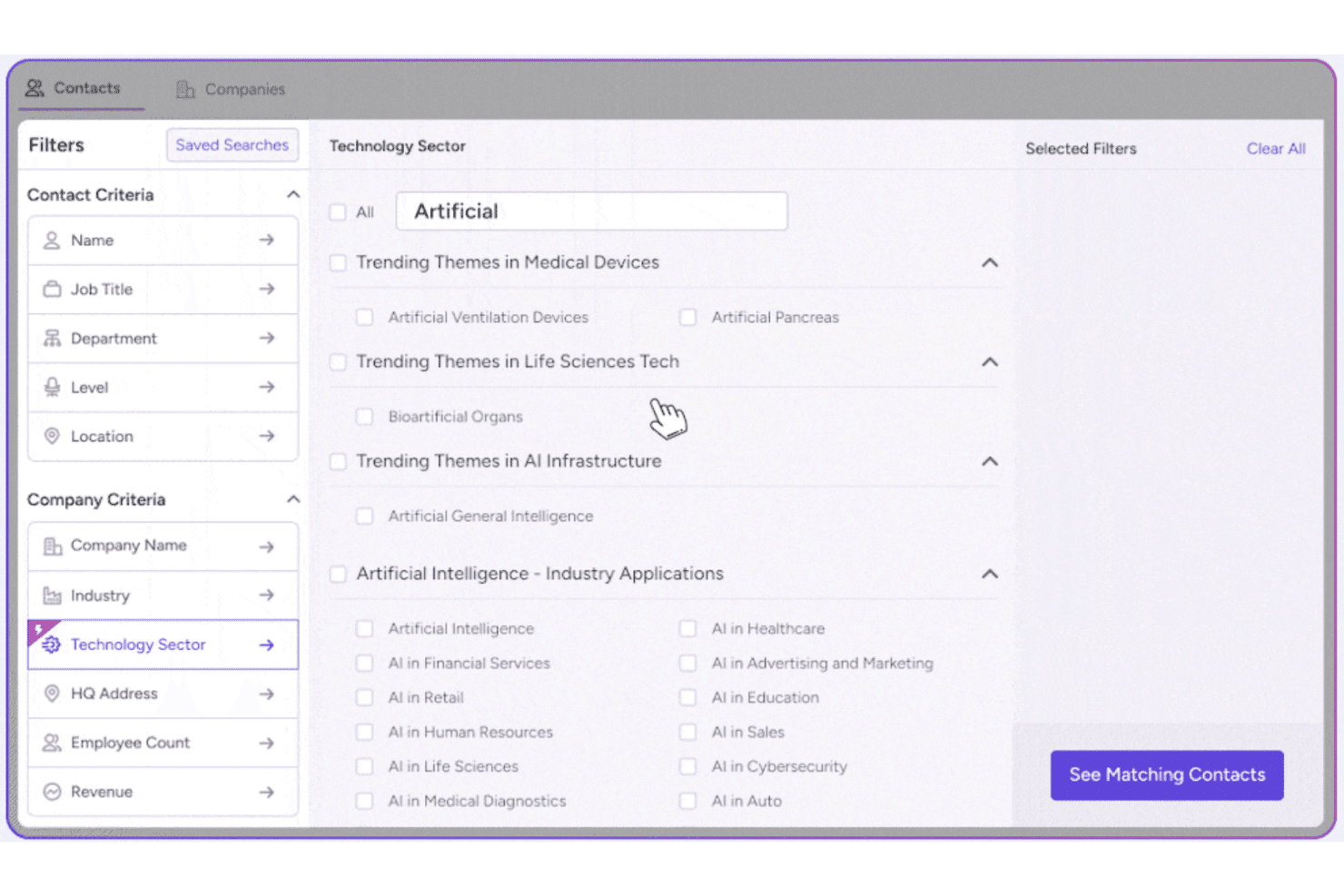
B2B Contact Database
Access millions of verified business emails and phone numbers. Continuously updated records help you avoid outdated or bounced contacts.
Advanced Lead Search Filters
Narrow leads by industry, company size, tech stack, or job title. Target specific segments to build focused prospecting lists quickly.
Chrome Extension
Find and save leads directly from LinkedIn and company websites. Export contact details to your workflow with one click.
Data Enrichment
Automatically add missing contact details to your CRM records. Get fresher data on companies, roles, and direct dials for leads.
Bulk List Export
Download large lists of qualified leads as CSV files. Quickly hand off data to sales or marketing for outreach.
Company Insights
See firmographic details like industry, revenue, and location. Understand more about your accounts without switching tools.
Ease of Use
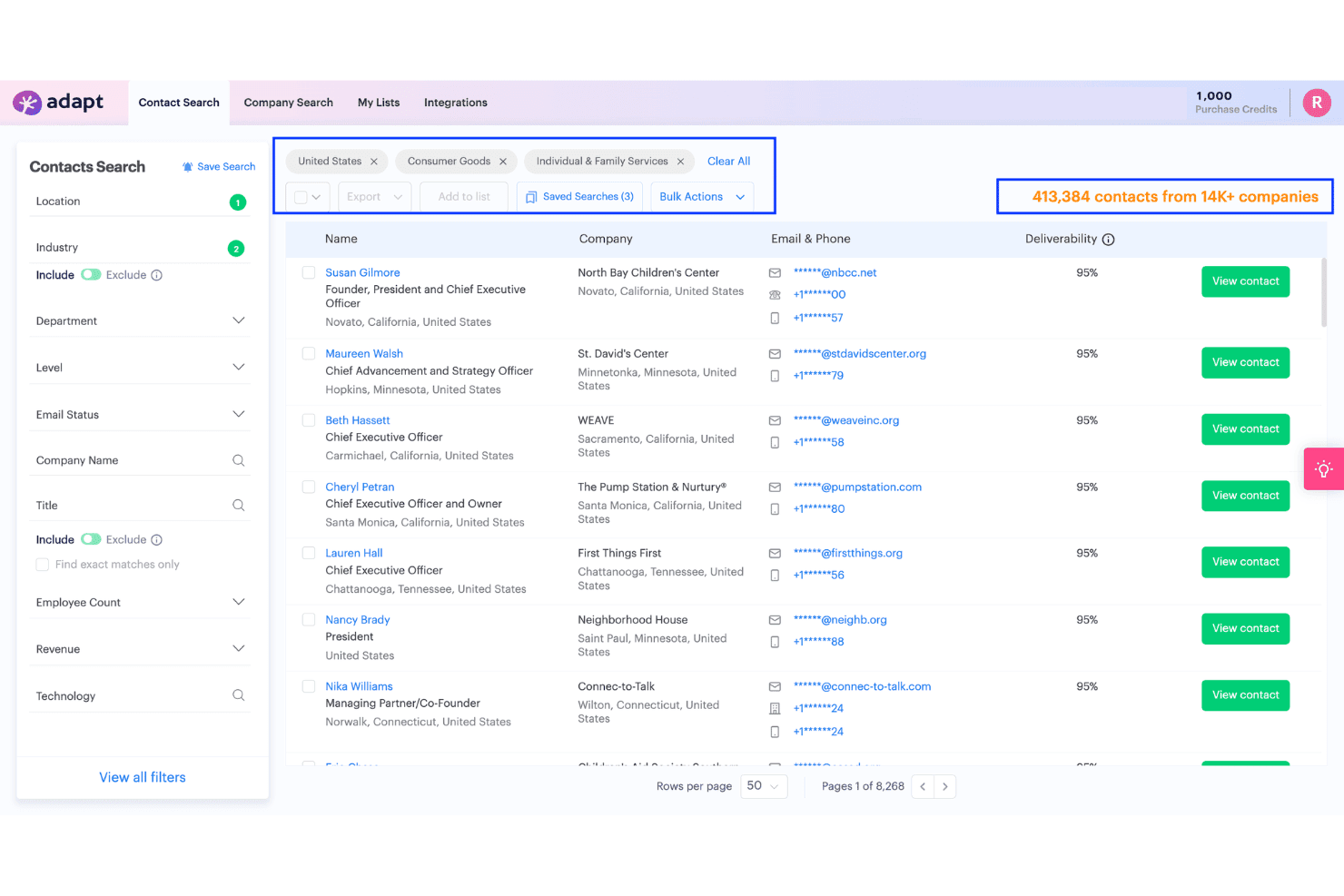
Adapt is easy to pick up, with intuitive navigation and practical filtering that lets users find leads in just a few clicks.
Users highlight the Chrome extension’s speed and how quick it is to export contacts. The saved searches, bulk actions, and in-app help guides stand out for making day-to-day prospecting simpler than most alternatives in the space.
Integrations
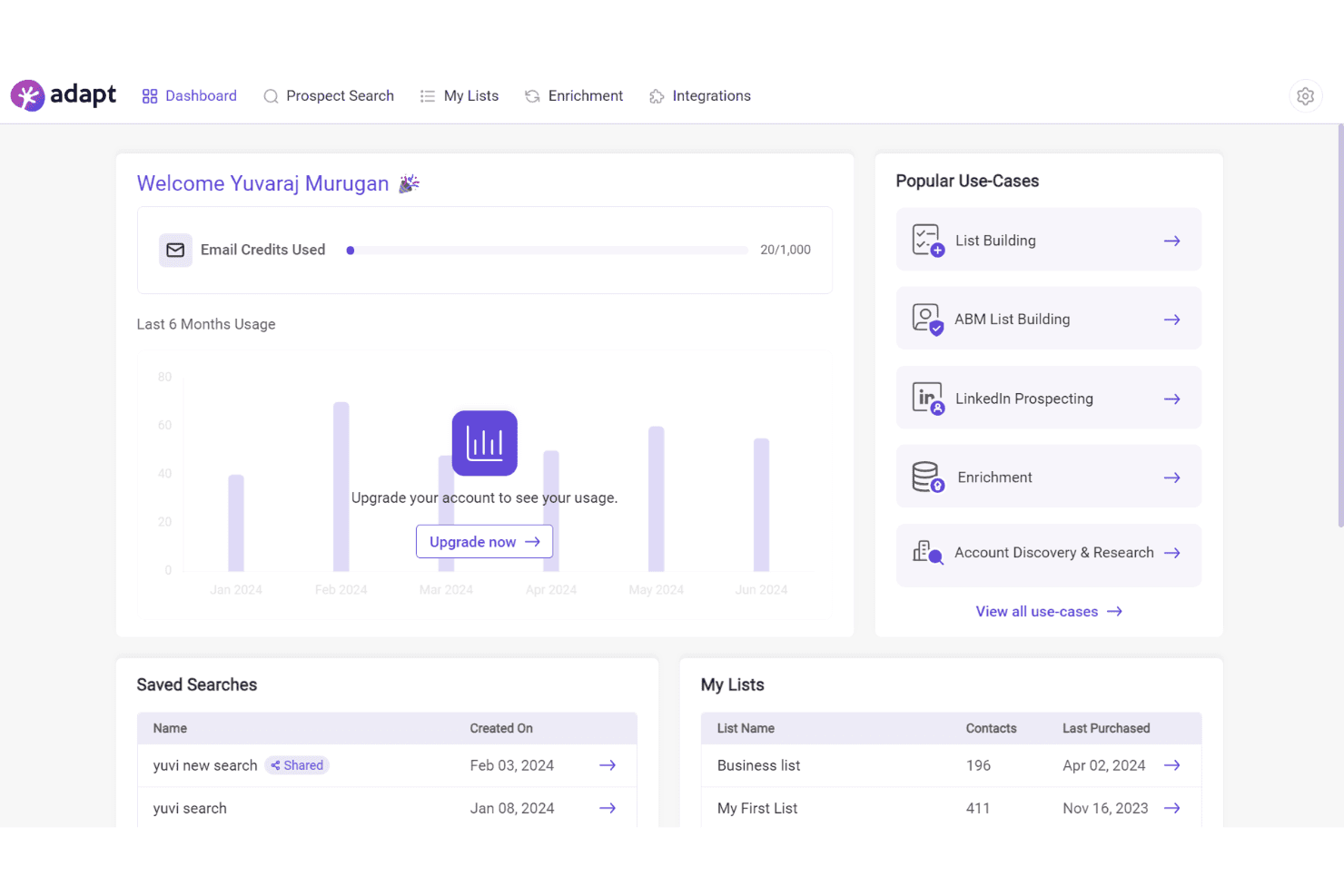
Adapt integrates with Salesforce, HubSpot, Pipedrive, Outreach, Zoho CRM, Freshsales, Microsoft Dynamics 365, Copper, Salesloft, and Zapier.
Adapt also offers an API and supports additional workflows through Zapier.
Adapt Specs
- A/B Testing: No
- Analytics: Yes
- API: Yes
- Audience Targeting: Yes
- Automated Conversion: No
- Batch Permissions & Access: No
- Behavioral Tracking: No
- Brand Management: No
- Campaign Management: No
- Contact Management: Yes
- Contact Sharing: No
- Conversion Tracking: No
- CRM Integration: Yes
- Customer Management: Yes
- Dashboards: No
- Data Export: Yes
- Data Import: Yes
- Email Integration: Yes
- External Integrations: Yes
- Keyword Tracking: No
- Landing Pages: No
- Lead Management: Yes
- Lead Scoring: Yes
- Link Tracking: No
- Marketing Automation: No
- Multi-User: Yes
- Notifications: Yes
- Password & Access Management: Yes
- Social-Media Integration: No


