

Una herramienta de asesoramiento de ventas con IA es un programa informático que utiliza inteligencia artificial para analizar conversaciones de ventas, proporcionar comentarios personalizados y guiar a los profesionales de ventas para mejorar sus habilidades. Si estás buscando las mejores herramientas de asesoramiento de ventas, probablemente quieras complementar el asesoramiento tradicional, ayudar a tu equipo a mejorar las tasas de éxito y obtener información práctica para aumentar las tasas de conversión de cada llamada.
Con tantas opciones disponibles, es difícil saber qué plataforma de asesoramiento se adapta a tu metodología de ventas, conjunto de tecnologías y programas de formación específicos. Esta guía analiza las principales opciones de asesoramiento de ventas con IA para que puedas comparar funciones, entender qué distingue a cada una y tomar una decisión fundamentada para tu equipo de ingresos.
Por qué confiar en nuestras recomendaciones de software
6,700+
Reviews
20
Industry experts
16+
Evaluation factors
14
Years
Nuestras reseñas reflejan nuestro criterio independiente, no un discurso de ventas. Descubra cómo mantenemos la transparencia.
Para esta guía, evaluamos las herramientas mediante pruebas prácticas e investigación independiente, puntuando las herramientas según nuestros criterios de selección.
Nuestras reseñas reflejan nuestro criterio editorial humano, no un discurso de ventas.
Tabla comparativa de herramientas de asesoramiento de ventas con IA
Esta tabla comparativa resume los detalles de precios de mi selección de los mejores programas de asesoramiento de ventas con IA.
| Tool | Best For | Trial Info | Price | ||
|---|---|---|---|---|---|
| 1 | Ideal para sugerencias contextuales y manejo de objeciones en llamadas | Demo gratuita disponible | Precios bajo solicitud | Website | |
| 2 | Ideal para el análisis de conversaciones en equipos de ventas | Demo gratuita disponible | Precios a consultar | Website | |
| 3 | Ideal para orientación en llamadas en tiempo real durante conversaciones en vivo | Prueba gratuita de 14 días + demo gratis | Desde $80/usuario/mes (facturado anualmente) | Website | |
| 4 | Ideal para simulaciones interactivas de roles con avatares de IA | Demostración gratuita disponible | Precio bajo solicitud | Website | |
| 5 | Mejor para el análisis de brechas de habilidades y coaching enfocado | Plan gratuito disponible | Precios disponibles bajo solicitud | Website | |
| 6 | Ideal para entrenamiento de juego de roles con IA | Demo gratuita disponible | Precio a consultar | Website | |
| 7 | Ideal para práctica de escenarios con simulaciones impulsadas por IA | Demostración gratis disponible | Precios bajo solicitud | Website | |
| 8 | Ideal para módulos de formación en ventas personalizados y automatizados | Demostración gratuita disponible | Precios bajo solicitud | Website | |
| 9 | Mejor para retroalimentación instantánea sobre el desempeño en llamadas de ventas | Demostración gratuita disponible | Precios bajo solicitud | Website | |
| 10 | Ideal para recomendaciones estratégicas de acuerdos impulsadas por IA | No disponible | Desde $59.99/mes | Website |


Análisis de herramientas de asesoramiento de ventas con IA
A continuación se incluyen mis resúmenes detallados de los mejores programas de asesoramiento de ventas con IA que llegaron a mi lista. Mis análisis ofrecen una visión detallada de las funciones, los casos de uso más adecuados y las integraciones de cada plataforma para ayudarte a encontrar la mejor opción para tu equipo.
 Ideal para sugerencias contextuales y manejo de objeciones en llamadas
- Demo gratuita disponible
- Precios bajo solicitud
Visit WebsiteCustomer Rating:4.9/5
Salesken es una plataforma de ventas con IA que ofrece a los reps orientación en tiempo real para gestionar objeciones y mantenerse alineados durante las llamadas. Salesken es una plataforma de conversaciones de ventas impulsada por IA, diseñada para equipos que buscan orientación en tiempo real durante las llamadas con clientes. Es especialmente útil para gerentes y representantes de ventas en entornos B2B dinámicos que necesitan ayuda para gestionar objeciones complejas y mantenerse alineados con el mensaje. Si buscas una herramienta que respalde activamente a los reps durante las llamadas, Salesken ofrece soluciones específicas.
¿Para quién es ideal Salesken?
Salesken es ideal para equipos y gerentes de ventas B2B que desean guía de IA en tiempo real durante llamadas con clientes.
Por qué elegí Salesken
Lo que destaca de Salesken es su capacidad para ofrecer sugerencias contextuales y gestionar objeciones directamente en las llamadas comerciales en vivo. La plataforma escucha las conversaciones en tiempo real y sugiere a los reps puntos clave o respuestas relevantes cuando surgen objeciones, lo que resulta especialmente valioso para entrenar a los miembros menos experimentados del equipo. Me gusta que la IA de Salesken no solo analiza las llamadas después de que ocurren, sino que apoya activamente al representante en el momento, ayudándolo a mantener el mensaje y las mejores prácticas de ventas. Esto la convierte en una excelente opción para equipos que buscan mejorar los resultados de las llamadas y la consistencia a través de coaching en tiempo real durante la llamada.
Funciones principales de Salesken
Otras funciones que encontré al revisar Salesken incluyen:
- IA para aseguramiento de calidad: Evalúa el 100% de las conversaciones de ventas con puntuación y monitoreo de cumplimiento impulsado por IA.
- Salesken Notetaker: Transcribe y resume automáticamente las llamadas, capturando los puntos clave y acciones a seguir.
- Analítica de ventas en campo: Registra y analiza conversaciones de ventas en terreno para generar insights de desempeño.
- Enriquecimiento automático de CRM: Envía resúmenes de llamada y puntos clave de datos del cliente directamente a tu CRM sin ingreso manual.
Integraciones de Salesken
Las integraciones incluyen Salesforce, HubSpot, Pipedrive, Zoom y Microsoft Teams.
Pros and Cons
Pros:
- Rastrea cumplimiento de guiones de ventas
- Analítica de llamadas incorporada
- Sólidas integraciones CRM
Cons:
- El audio de las llamadas puede ser inestable
- Requiere tiempo ajustar las alertas
Learn more about Salesken: 2Ideal para el análisis de conversaciones en equipos de ventas
Gong
- Demo gratuita disponible
- Precios a consultar
Visit WebsiteCustomer Rating:4.7/5
Gong utiliza IA para analizar llamadas de ventas y ofrecer información que ayuda a los equipos de ingresos a entrenar representantes y reducir el riesgo en los acuerdos. Gong utiliza inteligencia artificial para analizar conversaciones de ventas y ofrecer información procesable a los equipos de ingresos. Es una opción sólida para líderes de ventas y profesionales de habilitación que desean entender lo que ocurre en llamadas, demostraciones y reuniones a gran escala. Los equipos utilizan Gong para identificar oportunidades de coaching, detectar riesgos en acuerdos y lograr un rendimiento de ventas consistente.
¿Para quién es mejor Gong?
Gong es una buena opción para líderes de ventas y de ingresos en organizaciones B2B medianas y grandes que desean una visibilidad profunda de las conversaciones de equipo y el progreso de los acuerdos.
Por qué elegí Gong
Lo que distingue a Gong para mí es su capacidad para capturar y analizar cada conversación de ventas, ya sea en llamadas, reuniones por video o correos electrónicos, brindando a los líderes una visión completa de las interacciones del equipo. Elegí Gong porque su análisis conversacional detecta patrones en el tiempo de conversación, los temas tratados y los riesgos de los acuerdos que son difíciles de identificar manualmente. Las perspectivas impulsadas por IA de la plataforma ayudan a los gerentes a señalar exactamente dónde los representantes necesitan entrenamiento y a seguir las mejoras a lo largo del tiempo. Esto hace que Gong sea especialmente valioso para los equipos que desean lograr un rendimiento de ventas consistente y escalar el coaching en equipos grandes y distribuidos.
Características clave de Gong
Otras funciones que llamaron mi atención al revisar Gong incluyen:
- Entrenamiento entre pares en ventas: Los representantes pueden revisar y aprender de las llamadas de sus compañeros compartiendo grabaciones y retroalimentación dentro de la plataforma.
- Herramientas de auto-entrenamiento: Los representantes individuales pueden acceder a sus propias grabaciones y transcripciones de llamadas para identificar áreas de mejora.
- Funcionalidad para compartir llamadas: Los usuarios pueden compartir fácilmente llamadas específicas o segmentos de llamadas con gerentes o compañeros para recibir retroalimentación enfocada.
- Consejos de coaching personalizados: Gong analiza las conversaciones y proporciona sugerencias personalizadas para ayudar a cada representante a mejorar su enfoque de ventas.
Principales integraciones de Gong
Las integraciones incluyen Salesforce, HubSpot, Zoom, Slack y Microsoft Teams.
Pros and Cons
Pros:
- Rastrea menciones de la competencia
- Se integra con todos los CRM
- Excelentes métricas de coaching
Cons:
- La IA tarda meses en entrenarse
- El soporte es lento para las pymes
Learn more about Gong: Ideal para orientación en llamadas en tiempo real durante conversaciones en vivo
- Prueba gratuita de 14 días + demo gratis
- Desde $80/usuario/mes (facturado anualmente)
Visit WebsiteCustomer Rating:4.3/5
El AI Sales Coach de Dialpad ayuda a los equipos de ventas a mejorar el rendimiento en llamadas con información en tiempo real y entrenamiento impulsado por IA. El AI Sales Coach de Dialpad está diseñado para equipos de ventas que desean mejorar el rendimiento en llamadas con información procesable. Utiliza inteligencia artificial para analizar conversaciones y resaltar oportunidades de entrenamiento mientras los representantes hablan con posibles clientes. Los líderes de ventas y los profesionales de habilitación pueden utilizarlo para identificar brechas de habilidades y estandarizar la capacitación en equipos distribuidos.
¿Para quién es mejor Dialpad?
Dialpad es ideal para equipos de ventas en entornos dinámicos que necesitan orientación y análisis de conversaciones en tiempo real durante llamadas en vivo.
Por qué elegí Dialpad
Elegí Dialpad porque su AI Sales Coach destaca al ofrecer orientación en tiempo real conforme se desarrollan las conversaciones. La plataforma utiliza IA para monitorizar las llamadas de ventas en vivo y proporcionar sugerencias o indicaciones instantáneas, ayudando a los representantes a manejar objeciones y mantener el mensaje sin perder el ritmo. Me gusta cómo las funciones de transcripción en tiempo real y seguimiento de palabras clave de Dialpad permiten a los gerentes configurar disparadores personalizados para momentos de entrenamiento. Esto lo hace especialmente útil para equipos que desean reforzar buenas prácticas y mejorar resultados mientras las llamadas aún están en curso.
Características clave de Dialpad
Otras funciones destacadas de AI Sales Coach de Dialpad para equipos de ventas incluyen:
- Grabación y reproducción de llamadas: Revisa llamadas de ventas anteriores para identificar oportunidades de entrenamiento y seguir el progreso de los representantes a lo largo del tiempo.
- Resúmenes de llamadas impulsados por IA: Genera automáticamente resúmenes concisos de cada conversación para facilitar el seguimiento y la documentación.
- Listas de reproducción para entrenamiento: Crea y comparte recopilaciones de llamadas de mejor desempeño o momentos clave de aprendizaje para el desarrollo continuo del equipo.
- Tarjetas de puntuación personalizables: Crea y aplica plantillas de evaluación para calificar el desempeño de los representantes y estandarizar la retroalimentación en todo el equipo.
Integraciones de Dialpad
Las integraciones incluyen Salesforce, Zendesk, HubSpot, Microsoft 365 y Google Workspace.
Pros and Cons
Pros:
- Gestión instantánea de objeciones
- Sistema de telefonía VoIP integrado
- Sigue la proporción de tiempo de habla de los representantes
Cons:
- Funciones premium costosas
- Depende de una buena conexión a internet
Learn more about Dialpad: Ideal para simulaciones interactivas de roles con avatares de IA
- Demostración gratuita disponible
- Precio bajo solicitud

Second Nature ofrece capacitación de ventas impulsada por IA con prácticas realistas para desarrollar la confianza y la coherencia de los representantes. Second Nature ofrece capacitación de ventas impulsada por IA, diseñada para equipos que desean practicar conversaciones del mundo real en un entorno sin riesgos. Los líderes de ventas y los profesionales de capacitación la utilizan para ayudar a los representantes a desarrollar confianza y coherencia antes de hablar con los clientes. Si necesita una solución que aporte prácticas interactivas y realistas a su capacitación de ventas, vale la pena considerar Second Nature.
¿Para quién es más adecuada Second Nature?
Second Nature es una excelente opción para líderes y formadores de capacitación de ventas en organizaciones medianas y grandes que desean ampliar el aprendizaje mediante simulaciones interactivas de roles impulsadas por IA en sus equipos.
Por qué elegí Second Nature
Lo que destaca de Second Nature es su uso de avatares de IA para simulaciones interactivas de roles, lo que acerca mucho más la capacitación de ventas a las situaciones de la vida real. La plataforma permite a los representantes practicar conversaciones con clientes virtuales que responden de forma dinámica, ayudándoles a perfeccionar sus mensajes y el manejo de objeciones en un entorno seguro. Valoro que los gerentes puedan revisar las transcripciones y las puntuaciones para identificar con precisión dónde necesitan más apoyo los representantes. Este enfoque facilita ampliar una capacitación coherente y de alta calidad en equipos de ventas grandes o distribuidos.
Características principales de Second Nature
Otras características que me llamaron la atención al explorar Second Nature incluyen:
- Informes de comentarios automatizados: La plataforma genera comentarios detallados después de cada simulación y destaca los puntos fuertes y las áreas de mejora.
- Herramientas de personalización de escenarios: Puede adaptar los escenarios de simulación de roles para que coincidan con sus procesos de ventas, productos o perfiles de compradores específicos.
- Panel de seguimiento del progreso: Los gerentes y los representantes pueden supervisar el desarrollo de habilidades y las tasas de finalización mediante un panel centralizado.
- Integración con sistemas de gestión del aprendizaje (LMS): Second Nature se conecta con plataformas LMS populares para optimizar las asignaciones de capacitación y los informes.
Integraciones de Second Nature
Las integraciones incluyen Salesforce, Gong, Chorus, Seismic y Highspot.
Pros and Cons
Pros:
- Comentarios objetivos instantáneos
- Capacitación de ventas gamificada
- Amplía la incorporación global
Cons:
- Precio empresarial elevado
- La IA de voz interpreta mal los acentos
Learn more about Second Nature AI: Mejor para el análisis de brechas de habilidades y coaching enfocado
- Plan gratuito disponible
- Precios disponibles bajo solicitud

Wonderway ofrece coaching de ventas con IA que ayuda a los líderes a mejorar el rendimiento de los representantes mediante información basada en datos. Wonderway ofrece coaching impulsado por IA diseñado para líderes de ventas y equipos de habilitación que buscan mejorar el rendimiento de los representantes mediante información basada en datos. La plataforma atrae a organizaciones que desean identificar y abordar brechas específicas de habilidades dentro de sus equipos de ventas. Su enfoque en el coaching personalizado y los resultados medibles ayuda a los equipos a crear planes de desarrollo dirigidos que generan resultados reales.
¿Para quién es mejor Wonderway?
Wonderway es una excelente opción para líderes y gerentes de habilitación de ventas en organizaciones B2B medianas a grandes que desean identificar y cerrar brechas de habilidades en sus equipos de ventas.
Por qué elegí Wonderway
Lo que destaca de Wonderway es su capacidad para identificar brechas de habilidades y ofrecer coaching enfocado basado en datos reales de desempeño en ventas. Elegí esta herramienta porque utiliza IA para analizar grabaciones de llamadas y actividades de ventas, y luego asocia esos conocimientos directamente con planes de coaching personalizados para cada representante. Las evaluaciones automáticas de habilidades y las rutas de aprendizaje adaptadas ayudan a los gerentes a enfocar su coaching donde tendrá mayor impacto. Este enfoque hace que Wonderway sea especialmente valioso para los equipos que desean ir más allá de la capacitación genérica y abordar las necesidades específicas de desarrollo de sus vendedores.
Características clave de Wonderway
Otras características que hacen que Wonderway sea útil para equipos de coaching de ventas incluyen:
- Evaluación automática de llamadas: La plataforma evalúa automáticamente las llamadas de ventas según criterios predefinidos para resaltar fortalezas y áreas de mejora.
- Gestión de biblioteca de contenidos: Almacena, organiza y comparte guías de ventas, guiones y materiales de formación en un centro centralizado.
- Controles de acceso basados en roles: Establece permisos y niveles de acceso para diferentes miembros del equipo para garantizar la seguridad de los datos y la visibilidad adecuada.
- Comparación de rendimiento: Compara el rendimiento individual y del equipo con estándares del sector o puntos de referencia internos para seguir el progreso a lo largo del tiempo.
Integraciones de Wonderway
Las integraciones incluyen Salesforce, HubSpot, Salesloft, Outreach y Slack.
Pros and Cons
Pros:
- Vincula la formación con los ingresos
- Ideal para gerentes de ventas
- Rutas de aprendizaje automatizadas
Cons:
- Se tarda en ver resultados
- Puede sentirse como una microgestión
Learn more about Wonderway: Ideal para entrenamiento de juego de roles con IA
- Demo gratuita disponible
- Precio a consultar
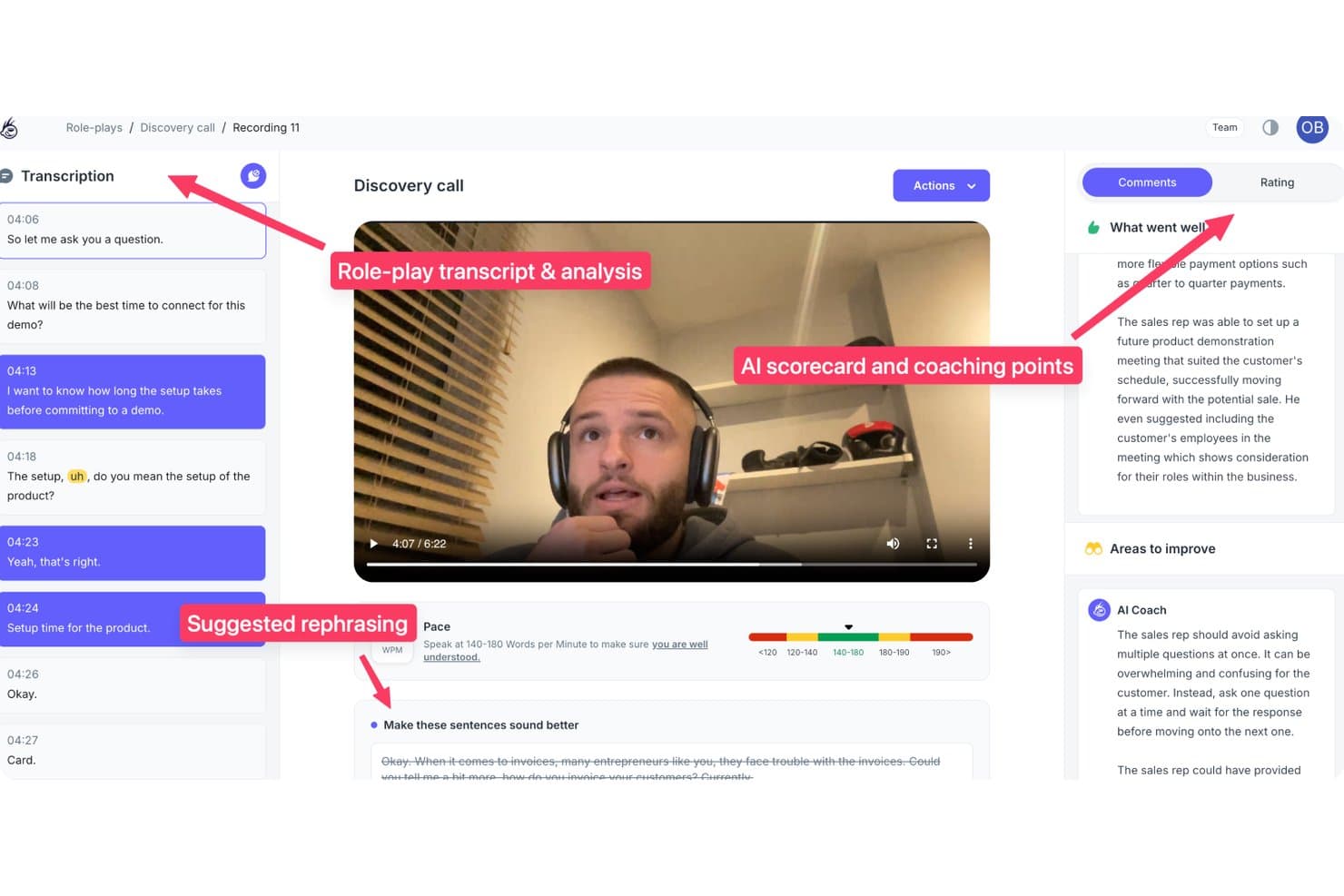
PitchMonster ofrece análisis de juego de roles de ventas impulsado por IA, con revisión de transcripción, puntuación y sugerencias de mejora del coach de IA, frases alternativas sugeridas y métricas de ritmo. PitchMonster es una plataforma de simulación de ventas y formación impulsada por IA que simula conversaciones con compradores, puntúa el rendimiento de los representantes según guías personalizadas y ofrece retroalimentación automatizada sobre llamadas en frío, descubrimiento, manejo de objeciones y escenarios de demostración.
¿Para quién es mejor PitchMonster?
PitchMonster es muy adecuado para equipos de habilitación de ventas de medianas y grandes empresas que gestionan programas estructurados de incorporación para grupos grandes o en rápido crecimiento de representantes.
Por qué elegí PitchMonster
PitchMonster merece su lugar en mi lista porque cierra la brecha entre la formación de incorporación y las llamadas reales. Me gusta que los nuevos representantes puedan generar un perfil de comprador desde la URL del sitio web de un prospecto en menos de dos minutos, y luego ejecutar inmediatamente un escenario completo de manejo de objeciones contra un avatar de IA. El informe del coach de IA después de la simulación invita a los representantes a autoevaluar los cambios en la conversación, lo que creo que acelera la retención mucho más que la retroalimentación pasiva y descendente.
Funciones clave de PitchMonster
- Biblioteca de escenarios listos para usar: Accede a una biblioteca de 48 escenarios de ventas impulsados por IA que cubren llamadas en frío, descubrimiento, demostraciones y manejo de objeciones.
- Panel de análisis para managers: Visualiza el rendimiento de los representantes, brechas de habilidades y métricas de uso en un panel centralizado de informes.
- Puntuaciones y rúbricas personalizables: Crea tarjetas de puntuación adaptadas a tu proceso de ventas y sigue la calidad de la práctica de los representantes a gran escala.
- Integración con CRM y Gong: Conecta Salesforce, HubSpot y Gong para importar datos de llamadas y personalizar automáticamente los ejercicios de juego de roles.
Integraciones de PitchMonster
PitchMonster ofrece integraciones nativas con Salesforce, HubSpot y Gong. Se dispone de una API para integraciones personalizadas.
Pros and Cons
Pros:
- El juego de roles incluye perfiles de prospecto generados por IA
- Los escenarios incluyen llamadas en frío, descubrimiento y demostraciones
- Los guías y rúbricas de puntuación son totalmente personalizables
Cons:
- La duración de las conversaciones está limitada en algunos escenarios
- El panel de análisis requiere exportaciones manuales en CSV
Learn more about PitchMonster: Ideal para práctica de escenarios con simulaciones impulsadas por IA
- Demostración gratis disponible
- Precios bajo solicitud

Zenarate utiliza simulaciones con IA para ayudar a los equipos de ventas a practicar escenarios reales y mejorar su desempeño. Zenarate utiliza simulaciones impulsadas por IA para ayudar a los equipos de ventas a practicar escenarios del mundo real en un entorno sin riesgos. Es una excelente opción para organizaciones que desean generar confianza y consistencia en sus representantes de ventas mediante capacitaciones prácticas e interactivas. La plataforma resulta atractiva para líderes de habilitación de ventas que buscan formas escalables de entrenar a sus equipos en conversaciones complejas y manejo de objeciones.
¿Para quién es ideal Zenarate?
Zenarate es adecuado para líderes de habilitación de ventas y formadores en organizaciones medianas y grandes que necesitan una práctica de escenarios impulsada por IA y a escala para sus equipos de ventas.
Por qué elegí Zenarate
Lo que me atrajo de Zenarate es su enfoque en la práctica basada en escenarios utilizando simulaciones con IA, lo que resulta especialmente valioso para equipos de ventas que necesitan dominar conversaciones complejas. La plataforma permite crear escenarios realistas de juego de roles en los que los representantes interactúan con avatares de IA que responden de forma dinámica, imitando el comportamiento y las objeciones de clientes reales. Valoro cómo Zenarate proporciona retroalimentación inmediata y análisis detallados de desempeño después de cada simulación, para que los gerentes puedan identificar exactamente en qué áreas los representantes necesitan más entrenamiento. Este enfoque facilita mucho la construcción de confianza y consistencia en grandes equipos de ventas sin depender de sesiones presenciales de juego de roles.
Funciones clave de Zenarate
Además de sus capacidades para la práctica basada en escenarios, también encontré destacables estas funciones:
- Motor de análisis de voz: La plataforma analiza las respuestas habladas en cuanto a tono, claridad y adherencia a los guiones durante las simulaciones.
- Rutas de aprendizaje específicas por rol: Puedes asignar módulos de formación personalizados según el puesto o nivel de experiencia.
- Sugerencias de coaching en tiempo real: Zenarate proporciona orientación instantánea y dentro de la simulación para ayudar a los usuarios a ajustar su enfoque en el momento.
- Herramientas de referencia de desempeño: Compara resultados individuales y de equipo con los estándares del sector o referencias internas.
Integraciones de Zenarate
Las integraciones incluyen Salesforce, Zendesk, Genesys, Avaya y Cisco.
Pros and Cons
Pros:
- Excelente para preparación en cumplimiento
- Entorno seguro de simulación
- Bueno para representantes de call centers
Cons:
- No apto para representantes de ventas de campo
- Las respuestas de audio pueden tener retraso
Learn more about Zenarate AI Coach: Ideal para módulos de formación en ventas personalizados y automatizados
- Demostración gratuita disponible
- Precios bajo solicitud

Hyperbound utiliza IA para ofrecer formación y onboarding personalizados en ventas para equipos modernos de ingresos y habilitación de ventas. Hyperbound utiliza IA para ofrecer módulos de formación en ventas personalizados para equipos de ingresos modernos. Está diseñado para líderes de habilitación de ventas y gerentes que desean automatizar el desarrollo de habilidades y la incorporación. Si necesitas personalizar la formación a gran escala y mantener a los representantes comprometidos con contenido actualizado, Hyperbound aborda esos desafíos directamente.
¿Para quién es mejor Hyperbound?
Hyperbound es una excelente opción para líderes y gerentes de habilitación de ventas en empresas orientadas al crecimiento que desean automatizar y personalizar la formación en ventas a gran escala.
Por qué elegí Hyperbound
Lo que me atrajo de Hyperbound es su enfoque en automatizar módulos de formación en ventas personalizados utilizando IA. La plataforma analiza el rendimiento y las necesidades de aprendizaje de cada representante, luego entrega contenido de formación dirigido que se adapta con el tiempo. Me gusta que Hyperbound puede generar ejercicios y cuestionarios basados en escenarios, adaptados a las brechas de habilidades individuales, haciendo la formación más relevante y aplicable. Este enfoque ayuda a los líderes de ventas a asegurar que cada miembro del equipo reciba la orientación adecuada sin esfuerzo manual ni contenido genérico.
Funciones clave de Hyperbound
Además de sus módulos de formación adaptativos, Hyperbound ofrece varias otras funciones que apoyan el coaching y la habilitación de ventas:
- Herramientas de autoría de contenido: Crea y personaliza materiales de formación directamente en la plataforma para adaptar los procesos y mensajes a tu equipo.
- Paneles de progreso: Supervisa el avance de aprendizaje individual y grupal con paneles visuales y métricas detalladas de finalización.
- Rutas de aprendizaje según el rol: Asigna itinerarios de formación específicos en función del puesto, la antigüedad o el territorio para asegurar un desarrollo de habilidades relevante.
- Evaluaciones y comprobaciones de conocimiento: Crea cuestionarios y evaluaciones interactivas para reforzar el aprendizaje y medir la retención después de cada módulo.
Integraciones de Hyperbound
Las integraciones incluyen Salesforce, HubSpot, Gong, Outreach, Salesloft, Orum, Google Meet, Zoom, Microsoft Teams y Webex.
Pros and Cons
Pros:
- Escala la formación de forma instantánea
- Métricas de puntuación automatizadas
- Útil para preparación de llamadas en frío
Cons:
- La configuración requiere mucho esfuerzo
- Más adecuado para SDR que para AE
Learn more about Hyperbound: Mejor para retroalimentación instantánea sobre el desempeño en llamadas de ventas
- Demostración gratuita disponible
- Precios bajo solicitud

Sales Closer AI analiza llamadas de ventas y entrena a los representantes para mejorar la calidad de las llamadas y el desempeño del equipo. Sales Closer AI utiliza inteligencia artificial para analizar llamadas de ventas y entrenar a los representantes sobre su desempeño. Está diseñado para gerentes de ventas y equipos de habilitación que desean mejorar la calidad y consistencia de las llamadas en su organización. La plataforma resulta atractiva para equipos que buscan información práctica y entrenamiento basado en conversaciones de ventas reales.
¿Para Quién Es Mejor Sales Closer AI?
Sales Closer AI es ideal para gerentes de ventas y líderes de habilitación en organizaciones medianas y grandes que desean ofrecer entrenamiento personalizado impulsado por IA, basado en datos reales de llamadas de ventas.
Por Qué Elegí Sales Closer AI
Lo que me atrajo de Sales Closer AI es su enfoque en brindar retroalimentación instantánea y práctica justo después de las llamadas de ventas. La plataforma utiliza IA para analizar las grabaciones de llamadas y proporcionar puntos de entrenamiento específicos, para que los representantes sepan exactamente qué mejorar en su próxima llamada. Me gusta que destaca momentos clave en las conversaciones, como el manejo de objeciones y las técnicas de cierre, haciendo que la retroalimentación sea muy relevante para los equipos de ventas. Este enfoque ayuda a los gerentes a escalar el entrenamiento sin esperar revisiones manuales o información retrasada.
Características Clave de Sales Closer AI
Además de retroalimentación inmediata sobre las llamadas de ventas, Sales Closer AI ofrece varias otras funciones que apoyan el entrenamiento continuo y la mejora del desempeño en ventas:
- Búsqueda en transcripciones de llamadas: Los usuarios pueden buscar y filtrar entre transcripciones de llamadas para encontrar rápidamente conversaciones o temas específicos.
- Tarjetas de puntuación personalizables: Los gerentes pueden configurar criterios de evaluación adaptados para alinearse con el proceso y los objetivos de ventas de su equipo.
- Flujos de trabajo para asignación de coaching: Asigna tareas de entrenamiento o seguimientos directamente en la plataforma para agilizar el desarrollo de los representantes.
- Análisis de tendencias de desempeño: Haz seguimiento del progreso individual y del equipo a lo largo del tiempo usando tableros visuales y herramientas de informe.
Integraciones de Sales Closer AI
Las integraciones incluyen Zoom, Google Meet, Microsoft Teams, Salesforce y HubSpot.
Pros and Cons
Pros:
- Fácil de revisar grabaciones de llamadas
- Enfocado en habilidades de cierre
- Implementación rápida para pequeñas organizaciones
Cons:
- Puntuación de IA subjetiva
- La interfaz no es muy pulida
Learn more about Sales Closer AI: Ideal para recomendaciones estratégicas de acuerdos impulsadas por IA
- No disponible
- Desde $59.99/mes

Trellus.AI proporciona información en tiempo real con IA para ayudar a los equipos de ventas a mejorar su estrategia de acuerdos y el rendimiento del pipeline. Trellus.AI lleva información impulsada por IA a los equipos de ventas que buscan mejorar los resultados de sus acuerdos y la estrategia. Está diseñado para líderes de ingresos y ejecutivos de cuentas que desean recomendaciones accionables basadas en datos del pipeline en tiempo real. Si necesitas una herramienta que vaya más allá del análisis de llamadas para ayudar a definir tácticas de cierre de acuerdos, Trellus.AI vale la pena considerarlo.
¿Para quién es mejor Trellus.AI?
Trellus.AI es una buena opción para líderes de ventas y de ingresos de organizaciones B2B que quieren recomendaciones impulsadas por IA para mejorar la estrategia de cierre y la gestión del pipeline.
Por qué elegí Trellus.AI
Lo que me atrajo de Trellus.AI es su enfoque en proporcionar recomendaciones estratégicas impulsadas por IA, yendo más allá del simple análisis de conversaciones de ventas. La plataforma revisa los datos de tu pipeline y brinda sugerencias personalizadas y accionables para cada acuerdo, ayudando a los equipos a priorizar los siguientes pasos e identificar riesgos. Valoro cómo Trellus.AI revela ideas estratégicas que los gerentes y representantes de ventas pueden usar para ajustar las tácticas en tiempo real. Esto lo hace especialmente valioso para organizaciones que quieren pasar de una gestión reactiva a proactiva de sus acuerdos con la ayuda de la inteligencia artificial.
Funciones clave de Trellus.AI
Otras funciones que hacen destacar a Trellus.AI para equipos de ventas incluyen:
- Puntaje de salud de acuerdos: La plataforma asigna un puntaje de salud a cada oportunidad basándose en múltiples datos, ayudando a los equipos a detectar rápidamente las oportunidades en riesgo.
- Revisiones automáticas del pipeline: Trellus.AI escanea tu pipeline regularmente y resalta los acuerdos que requieren atención, reduciendo el tiempo de revisión manual.
- Analítica del rendimiento de representantes: Hace seguimiento a métricas individuales y del equipo para identificar oportunidades de coaching y brechas de habilidades.
- Herramientas de colaboración: Las funciones integradas de comentarios y compartición permiten que gerentes y representantes discutan acuerdos y estrategias directamente en la plataforma.
Integraciones de Trellus.AI
Las integraciones incluyen Salesforce, HubSpot, Outreach, Salesloft y Apollo.
Pros and Cons
Pros:
- Sugerencias de guion durante la llamada
- Funciona bien para llamadas en frío
- Ayuda a crear confianza rápidamente
Cons:
- Ecosistema de herramientas pequeño
- La extensión para Chrome es pesada
Learn more about Trellus.AI:
Otras plataformas de asesoramiento de ventas con IA
Estas son algunas opciones adicionales de asesoramiento de ventas con IA que no llegaron a mi lista, pero que aún vale la pena consultar:
Wie ich KI-basierte Sales-Coach-Lösungen bewerte
Ich nehme nur Tools auf, die KI nutzen, um etwas zu leisten, was nicht schon eine Tabelle oder das Bauchgefühl eines Managers kann – wie z.B. automatische Bewertung von Gesprächen anhand Ihrer Methodik oder automatisiertes, mitarbeiterbezogenes Coaching, ohne auf das 1:1 zu warten. Meine Bewertung teile ich in Kernfunktionen, die jedes Tool für die Qualifizierung benötigt, und Differenzierungsmerkmale, die den idealen Anbieter hervorheben.
Kernfunktionen (Grundvoraussetzungen für diese Liste)
Wenn ich Tools auswähle, bewerte ich jedes einzelne auf einer Skala von 0 (Funktion nicht vorhanden) bis 5 (hervorragende Umsetzung) für jede unten stehende Kernfunktion. Danach berechne ich die Gesamtpunktzahl des Tools als Prozentwert. Jedes Tool muss insgesamt mindestens 65% erreichen, um berücksichtigt zu werden.
- Gesprächsintelligenz: Ich prüfe, ob das Tool aufgezeichnete Gespräche verarbeiten und KI-gesteuerte Erkenntnisse wie Gesprächsanteile, Themenanalyse und Erwähnungen von Wettbewerbern liefert – und nicht nur einfache Transkriptionen.
- KI-generiertes Coaching-Feedback: Jedes Tool sollte automatisierte, mitarbeiterbezogene Coaching-Empfehlungen nach Gesprächen bieten, anstatt Manager auf jede Aufnahme händisch prüfen zu lassen.
- Skills- & Methodik-Scorecards: Ich achte auf KI-gestützte Bewertungen nach Frameworks wie MEDDIC oder SPICED mit der Flexibilität, eigene Kompetenzmodelle passend zur eigenen Sales-Methode zu erstellen.
- KI-Rollenspiele & Simulation: Leistungsstarke Tools ermöglichen es Mitarbeitenden, mit KI-generierten Käufer-Personas, die sich nach den Antworten anpassen (anstatt statischer Skripte), Gespräche zu üben oder auf Einwände zu reagieren.
- Erfolgsmessung & Analysen: Dashboards sollten den Zusammenhang zwischen Coaching-Aktivitäten und Ergebnissen wie Einarbeitungszeit oder Abschlussquoten zeigen, sodass RevOps-Teams aussagekräftige Daten für die Führungsebene erhalten.
- CRM- & Kommunikationsintegration: Das Tool muss sich mit Plattformen wie Salesforce, HubSpot, Zoom und Dialern synchronisieren, damit Coaching-Einblicke dort verfügbar sind, wo Mitarbeitende und Manager ohnehin arbeiten.
Sobald ich eine Liste von Tools habe, die die Kriterien erfüllen, schaue ich, was jede Plattform einzigartig macht.
Differenzierungsmerkmale (Was Anbieter unterscheidet)
So vergleiche und kontrastiere ich verschiedene Anbieter:
Herausragende Funktionen
Echtzeit-Gesprächsunterstützung ist ein wesentlicher Pluspunkt – ich suche nach Tools, die Battlecards und Einwandbehandlungen schon während des Gesprächs anzeigen und nicht nur als Zusammenfassung danach. Coaching-Analysen auf Deal-Ebene wiegen ebenfalls schwer: Die besten Tools verknüpfen Coaching mit konkreten offenen Chancen und markieren Risikosignale, damit Manager rechtzeitig eingreifen können. Ich bewerte auch, ob eine Plattform automatisierte Coaching-Workflows auslösen kann, sobald die KI eine Kompetenzlücke erkennt, damit Mitarbeitende gezielt üben können, ohne auf eine Review zu warten.
Über die Funktionen hinaus
Messbarer Einfluss auf den Umsatz zählt hier besonders. Ich lege Wert darauf, dass eine Plattform einen klaren Zusammenhang zwischen Coaching-Aktivitäten und Resultaten wie Zielerreichung oder Einarbeitungszeit belegen kann – genau das brauchen RevOps-Verantwortliche, um die Investition zu rechtfertigen. Ökosystem-Kompatibilität ist mir ebenso wichtig, insbesondere wie gut sich ein Tool in vorhandene CRM-, Dialer- und Enablement-Umgebungen integrieren lässt, ohne dass Workarounds nötig werden. Auch die Skalierbarkeit bewerte ich: Flexible Lizensierung und Multi-Team-Strukturen sind wichtig, weil Coaching-Tools, die bei 20 Nutzenden funktionieren, bei 200 oft an ihre Grenzen stoßen.
Cómo elegir una solución de asesoramiento de ventas con IA
Es fácil perderse entre largas listas de funciones y estructuras de precios complejas. Para ayudarte a mantener la concentración mientras avanzas en tu proceso único de selección de software, aquí tienes una lista de factores que debes tener en cuenta:
| Factor | Qué debes tener en cuenta |
| Escalabilidad | ¿La herramienta será compatible con tu equipo a medida que crezca? Comprueba los límites de usuarios, los niveles de precios y los límites de almacenamiento de datos. |
| Integraciones | ¿Se conecta de forma nativa con tu CRM, marcador y otros sistemas principales? Confirma la compatibilidad antes de incluirla en tu lista de opciones. |
| Capacidad de personalización | ¿Puedes adaptar los flujos de trabajo, las indicaciones de asesoramiento o los informes a tu proceso de ventas? Ten cuidado con las plantillas rígidas. |
| Facilidad de uso | ¿Los representantes y gerentes la adoptarán rápidamente? Busca una navegación clara, pocos pasos manuales y paneles intuitivos. |
| Implementación e incorporación | ¿Cuánto tardará la configuración y qué recursos se necesitan? Pregunta por la asistencia para la migración, la formación y el tiempo necesario para obtener resultados. |
| Coste | ¿Los precios y las condiciones del contrato son claros? Ten en cuenta todos los usuarios, complementos y posibles cargos por exceso de uso. Compara el coste total de propiedad. |
| Medidas de seguridad | ¿La herramienta cumple las normas de privacidad y seguridad de datos de tu empresa? Pregunta por el cifrado, los controles de acceso y las certificaciones de cumplimiento. |
| Disponibilidad del soporte | ¿Qué canales de soporte se ofrecen y durante qué horarios? Considera si necesitas ayuda las 24 horas del día, los 7 días de la semana, o un gerente de cuenta exclusivo. |
¿Qué es un asesor de ventas con IA?
Un entrenador de ventas con IA es una herramienta de software que utiliza inteligencia artificial para analizar conversaciones de ventas, generar resúmenes de reuniones y poner de relieve ideas prácticas para la capacitación de los equipos de ventas. Estas plataformas capturan automáticamente los datos de las llamadas, identifican momentos clave y recomiendan los siguientes pasos, ayudando a los gerentes y representantes a mejorar su rendimiento. Los entrenadores de ventas con IA están diseñados para respaldar el desarrollo continuo de habilidades, la responsabilidad y la toma de decisiones basada en datos a lo largo del proceso de ventas.
Características de la solución de entrenamiento de ventas con IA
Al seleccionar un entrenador de ventas con IA, presta atención a las siguientes características clave:
- Grabación y transcripción de llamadas: Captura y transcribe automáticamente las llamadas de ventas, lo que facilita revisar las conversaciones y consultar los detalles más adelante.
- Resúmenes de reuniones generados por IA: Produce resúmenes concisos y estructurados de cada reunión, destacando los puntos clave de la conversación y las decisiones tomadas.
- Seguimiento de tareas pendientes: Identifica y organiza los seguimientos, las tareas y los siguientes pasos tratados durante las llamadas, ayudando a los equipos a mantener la responsabilidad.
- Integración con el CRM: Sincroniza directamente los datos de las llamadas, las notas y las ideas con tu CRM, garantizando que toda la información esté centralizada y accesible.
- Análisis del rendimiento: Realiza un seguimiento de la actividad de los representantes de ventas, la calidad de las conversaciones y los resultados de la capacitación mediante paneles e informes.
- Visualización de la cronología de las oportunidades: Representa todas las interacciones, notas e hitos de cada oportunidad, ofreciendo a los gerentes una visión clara de su progreso.
- Indicaciones automatizadas para la capacitación: Muestra sugerencias personalizadas de capacitación basadas en el análisis de las llamadas, ayudando a los gerentes a proporcionar comentarios específicos.
- Archivo de conversaciones con búsqueda: Permite a los usuarios buscar llamadas y reuniones anteriores por palabra clave, tema o participante para consultarlas rápidamente.
- Controles de seguridad y cumplimiento: Protege los datos confidenciales de los clientes mediante cifrado, controles de acceso y el cumplimiento de las normas del sector.
- Informes personalizables: Permite a los equipos adaptar los informes y paneles para que coincidan con sus procesos de ventas y sus indicadores clave de rendimiento.
Beneficios del entrenador de ventas con IA
Implementar un entrenador de ventas con IA ofrece varios beneficios para tu equipo y tu empresa. Estos son algunos de los que puedes esperar:
- Calidad constante de la capacitación: Las ideas basadas en IA garantizan que cada representante de ventas reciba comentarios prácticos y respaldados por datos después de cada llamada.
- Incorporación más rápida de nuevos representantes: Los resúmenes automatizados de reuniones y los archivos de llamadas con búsqueda ayudan a los nuevos miembros del equipo a adaptarse rápidamente.
- Mayor responsabilidad: El seguimiento de tareas pendientes y la integración con el CRM facilitan el seguimiento de los compromisos y la medición del progreso.
- Mayor visibilidad del embudo de ventas: La visualización de la cronología de las oportunidades y el análisis del rendimiento ofrecen a los gerentes una visión clara del estado de las oportunidades y de la actividad del equipo.
- Menos trabajo manual: La toma de notas, los resúmenes y los informes automatizados liberan tiempo para que los representantes de ventas y los gerentes se concentren en vender.
- Toma de decisiones basada en datos: Los análisis centralizados y los informes personalizables respaldan una capacitación más fundamentada y ajustes estratégicos más precisos.
- Mayor seguridad de los datos: Los controles integrados de seguridad y cumplimiento protegen la información confidencial de los clientes y de las oportunidades durante todo el proceso de ventas.
Costes y precios del entrenador de ventas con IA
Seleccionar un entrenador de ventas con IA requiere comprender los distintos modelos de precios y planes disponibles. Los costes varían según las características, el tamaño del equipo, los complementos y otros factores. La tabla siguiente resume los planes habituales, sus precios medios y las características que suelen incluir las soluciones de entrenadores de ventas con IA:
Tabla comparativa de planes para entrenadores de ventas con IA
| Tipo de plan | Precio medio | Características habituales |
| Plan gratuito | $0 | Grabación básica de llamadas, resúmenes de reuniones limitados, almacenamiento restringido y asistencia por correo electrónico. |
| Plan personal | $15-$49/usuario/mes | Transcripciones ilimitadas, resúmenes generados por IA, seguimiento de tareas pendientes, integración con el CRM y panel de análisis. |
| Plan empresarial | $50-$99/usuario/mes | Análisis del rendimiento del equipo, visualización de la cronología de las oportunidades, integraciones avanzadas, informes personalizables y asistencia prioritaria. |
| Plan corporativo | $100-$250/usuario/mes | Incorporación personalizada, gerente de cuenta dedicado, controles de seguridad mejorados, funciones de cumplimiento y acceso a la API. |
Preguntas frecuentes sobre el entrenador de ventas con IA
Aquí tienes respuestas a preguntas frecuentes sobre el entrenador de ventas con IA:
¿Cómo analiza las llamadas de ventas un entrenador de ventas con IA?
Un entrenador de ventas con IA utiliza el reconocimiento de voz y el procesamiento del lenguaje natural para transcribir las llamadas, identificar temas clave y señalar momentos importantes. Después, aplica algoritmos para extraer información útil, elementos de acción y oportunidades de asesoramiento basándose en el contenido de la conversación.
¿Pueden las herramientas de entrenador de ventas con IA integrarse con mi CRM actual?
Sí, la mayoría de las herramientas de entrenador de ventas con IA ofrecen integraciones con CRM populares como Salesforce y HubSpot. Esto permite que los datos de las llamadas, las notas y la información útil se sincronicen automáticamente, manteniendo los registros de ventas actualizados y reduciendo la introducción manual de datos.
¿Qué medidas de seguridad de datos ofrecen las plataformas de entrenador de ventas con IA?
Las plataformas de entrenador de ventas con IA suelen utilizar cifrado, controles de acceso y certificaciones de cumplimiento para proteger los datos confidenciales. Confirma siempre que una herramienta cumple los estándares de seguridad y los requisitos normativos de tu empresa antes de implementarla.
¿Funcionan las soluciones de entrenador de ventas con IA para equipos de ventas remotos o híbridos?
Sí, las soluciones de entrenador de ventas con IA están diseñadas para ayudar a equipos remotos, híbridos y presenciales. Capturan y analizan llamadas desde cualquier ubicación, lo que facilita que los responsables asesoren y supervisen a los representantes independientemente de dónde trabajen.
¿Cuánto se tarda en implementar una herramienta de entrenador de ventas con IA?
El tiempo de implementación varía, pero la mayoría de las plataformas ofrecen recursos de incorporación, como vídeos de formación, recorridos del producto y asistencia, para ayudar a los equipos a empezar rápidamente. En equipos pequeños, la configuración puede tardar unos días; las organizaciones más grandes pueden necesitar unas semanas para completar el despliegue.