

Siparişten tahsilata yazılımı, faturalandırma, tahsilat ve alacak hesaplarını tek bir sistemde birbirine bağlayarak işletmenizin satışın kaydedilmesinden ödeme tahsilatına kadar her adımı yönetmesine yardımcı olur. Süreçleriniz yavaş veya parçalı olduğunda gelir raporlaması güvenilirliğini yitirir ve nakit akışı zarar görür.
Bu kılavuz, siparişten tahsilata döngüsünün tamamını otomatikleştirmek, izlemek ve optimize etmek için tasarlanmış önde gelen araçları karşılaştırarak seçenekleri netleştirmenize yardımcı olacak. Hangi platformların teknoloji yığınınızla uyumlu olduğunu, büyümenizi desteklediğini ve ekibinizi zorlayan iş akışı sorunlarını çözdüğünü göreceksiniz.
Why Trust Our Software Recommendations
6,700+
Reviews
20
Industry experts
16+
Evaluation factors
14
Years
Our reviews reflect our independent judgment—not a sales pitch. Learn how we stay transparent.
For this guide, we evaluated tools using hands-on testing and independent research, scoring tools using our selection criteria.
Our reviews reflect our human editorial judgment, not a sales pitch.
Karşılaştırma Tablosu: Siparişten Tahsilata Yazılımları
Kısa listeme giren siparişten tahsilata yazılımlarının fiyatlarını ve teknik özelliklerini yan yana karşılaştırın.
Sorted by: Default
| Tool | Starting Price | Website | |
|---|---|---|---|
Best for flexible recurring billing management | 4.4 out of 5 | Pricing upon request Free plan available | Website |
Best for integrated financial and order workflows | 4.1 out of 5 | Pricing upon request Free demo available | Website |
Best for subscription and usage-based billing | 3.8 out of 5 | Pricing upon request Free demo available | Website |
Best for unified communications in AR processes | 2.3 out of 5 | Pricing upon request Free demo available | Website |
Best for AR and collections for small teams | Not rated | £545/user/month Free trial available | Website |
Best for enterprise-grade cash application | 4.5 out of 5 | Pricing upon request Free demo available | Website |
Best for integrated payment and invoicing | 4.4 out of 5 | Pricing upon request Free demo available | Website |
Best for modular automation across finance teams | 4.5 out of 5 | Pricing upon request Free demo available | Website |
Best for AI-powered receivables automation | Not rated | Pricing upon request Free demo available | Website |
Best for contract-to-cash process automation | Not rated | Pricing upon request Free demo available | Website |


En İyi Siparişten Tahsilata Yazılımları İncelemeleri
Aşağıda, kısa listeme giren en iyi siparişten tahsilata yazılımları hakkındaki ayrıntılı özetlerimi bulabilirsiniz. İncelemelerim, size en uygun seçeneği bulmanıza yardımcı olmak için her platformun özelliklerine, entegrasyonlarına ve en uygun kullanım alanlarına ayrıntılı bir bakış sunuyor.
 Best for flexible recurring billing management
- Free plan available
- Pricing upon request
Visit WebsiteCustomer Rating:4.4/5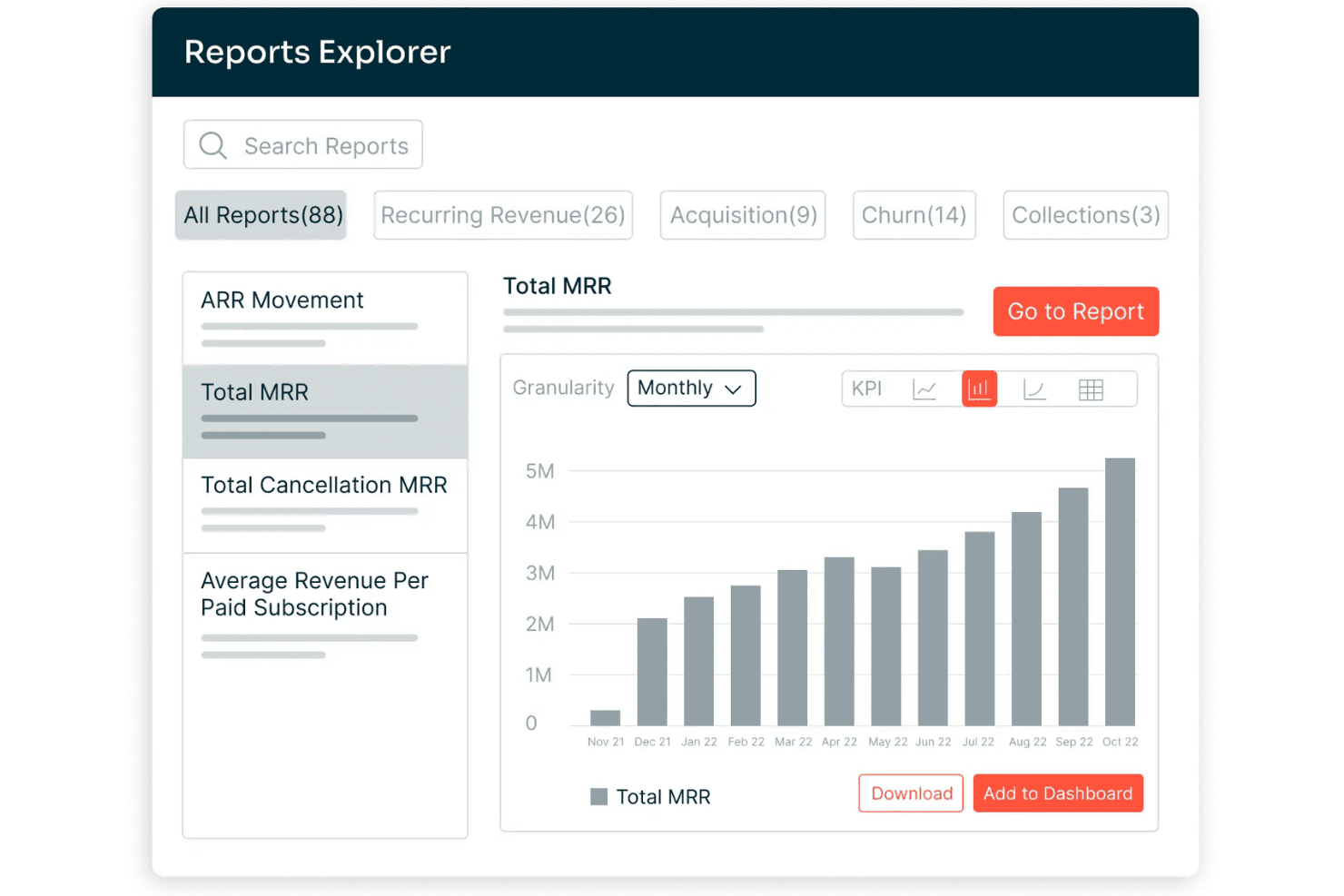
Chargebee offers a Reports Explorer with 88 prebuilt reports, including a Total MRR bar chart showing monthly revenue growth from Nov 2021 to Oct 2022. Chargebee is a billing and monetization platform covering subscription management, usage-based billing, invoicing, payment processing, revenue recognition, and accounts receivable automation across the quote-to-cash cycle.
Who Is Chargebee Best For?
Chargebee is a strong fit for SaaS and digital subscription businesses that run complex, hybrid pricing models combining recurring fees with usage-based charges.
Why I Picked Chargebee
I picked Chargebee as one of the best because its billing engine handles subscription, usage-based, and hybrid pricing models within a single product catalog, which most O2C platforms force you to manage separately. I particularly like how Smart Dunning uses ML to time payment retries based on customer behavior, not a fixed schedule. The Receivables module layers AI-powered collections on top, covering the full billing-to-cash leg.
Chargebee Key Features
- Multi-entity support: Manage billing, invoicing, and reporting for multiple brands, regions, or business units under one account.
- Product catalog management: Configure plans, add-ons, pricing rules, and billing frequencies centrally for all products.
- Compliance with global tax laws: Automate calculations for US Sales Tax, EU-VAT, and other international tax regimes.
- Native ERP and CRM integrations: Connect directly to Salesforce, NetSuite, Xero, and QuickBooks Online for real-time data sync.
Chargebee Integrations
Chargebee offers native integrations with Salesforce, HubSpot, NetSuite, Sage Intacct, Xero, QuickBooks Online, Stripe, Braintree, PayPal, Amazon Payments, Shopify, and Squarespace. An API is available for custom integrations.
Pros and Cons
Pros:
- Smart dunning reduces failed payment churn
- Revenue recognition is ASC 606 compliant
- Handles complex hybrid billing models natively
Cons:
- Cash application limited to gateway-captured payments
- No native credit risk management tools
Learn more about Chargebee: Best for integrated financial and order workflows
- Free demo available
- Pricing upon request
Visit WebsiteCustomer Rating:4.1/5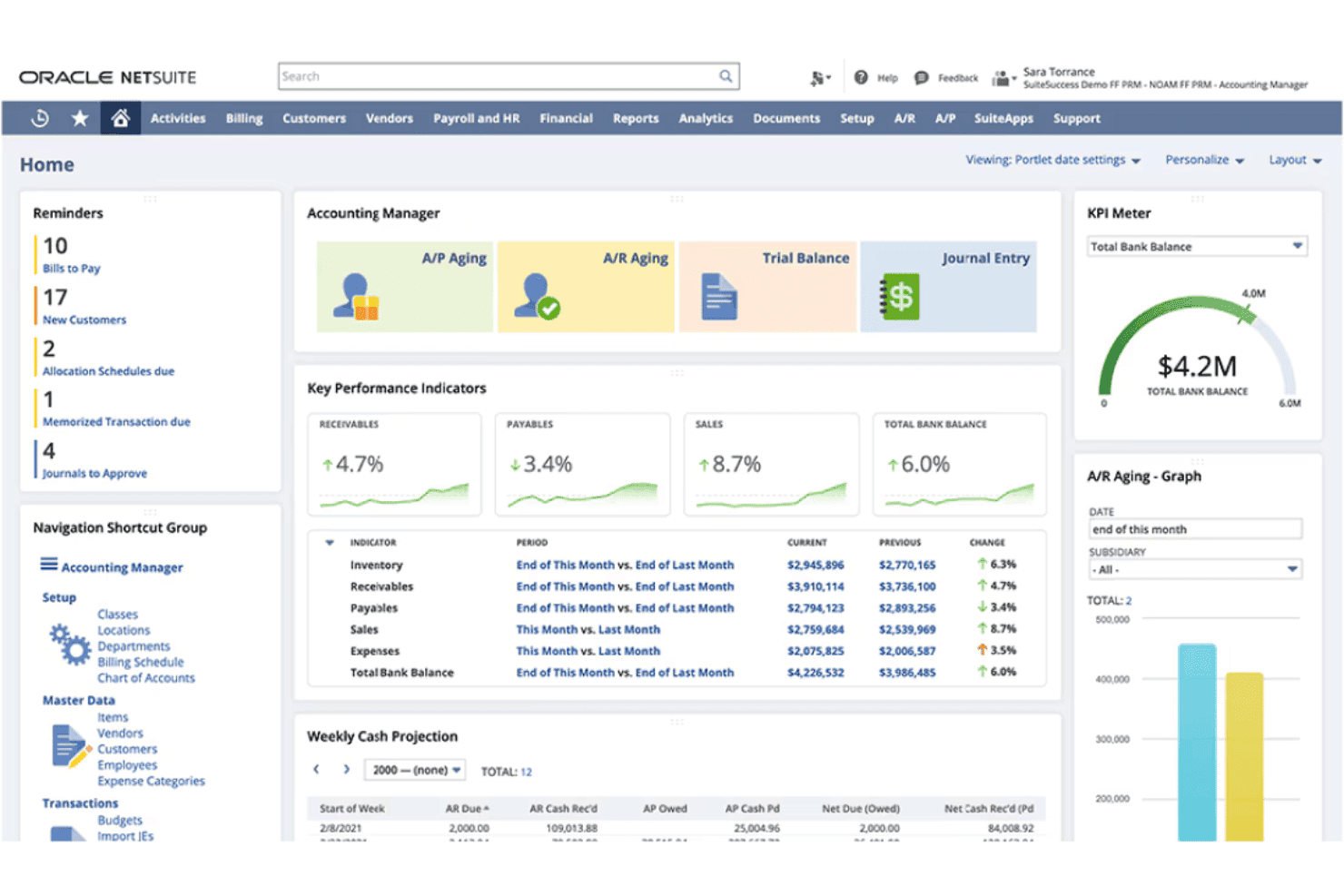
NetSuite ERP offers an Accounting Manager dashboard with KPIs, A/P and A/R aging, weekly cash projections, and a total bank balance KPI meter. NetSuite ERP is a cloud-based enterprise resource planning platform that combines order management, invoicing, accounts receivable, revenue recognition, and financial management in a single unified system.
Who Is NetSuite ERP Best For?
Mid-market companies with multi-entity structures, inventory complexity, or high order volumes that need finance and operations on one platform.
Why I Picked NetSuite ERP
I've included NetSuite ERP in my top picks because the order-to-cash workflow lives entirely within one database. When an order ships, the GL updates, the invoice generates, and AR aging reflects it instantly. I like that Advanced Order Management handles order promising, allocation, and orchestration natively, so my team isn't manually resolving fulfillment exceptions. SuiteBilling layered on top supports transaction, subscription, usage-based, and hybrid billing without a separate tool.
NetSuite ERP Key Features
- SuiteApps marketplace: Access hundreds of certified third-party apps to extend order to cash workflows.
- Native CRM module: Manage customer records, sales pipeline, and order history within the same system as financials.
- Multi-entity and currency management: Handle transactions, reporting, and compliance across subsidiaries and international operations.
- Pre-built ecommerce and POS integrations: Connect online stores and retail locations for unified order processing and fulfillment.
NetSuite ERP Integrations
NetSuite ERP offers native integrations with Salesforce, Shopify, Amazon, HubSpot, Outlook, and a range of POS and 3PL platforms through NetSuite Connector. The SuiteApps marketplace includes hundreds of certified third-party apps, and an API is available for custom integrations.
Pros and Cons
Pros:
- Real-time revenue recognition
- Handles subscription, usage, and hybrid billing
- Single database for orders, billing, and financials
Cons:
- Premium support requires paid add-on package
- Core features split across expensive modules
Learn more about NetSuite ERP: Best for subscription and usage-based billing
- Free demo available
- Pricing upon request
Visit WebsiteCustomer Rating:3.8/5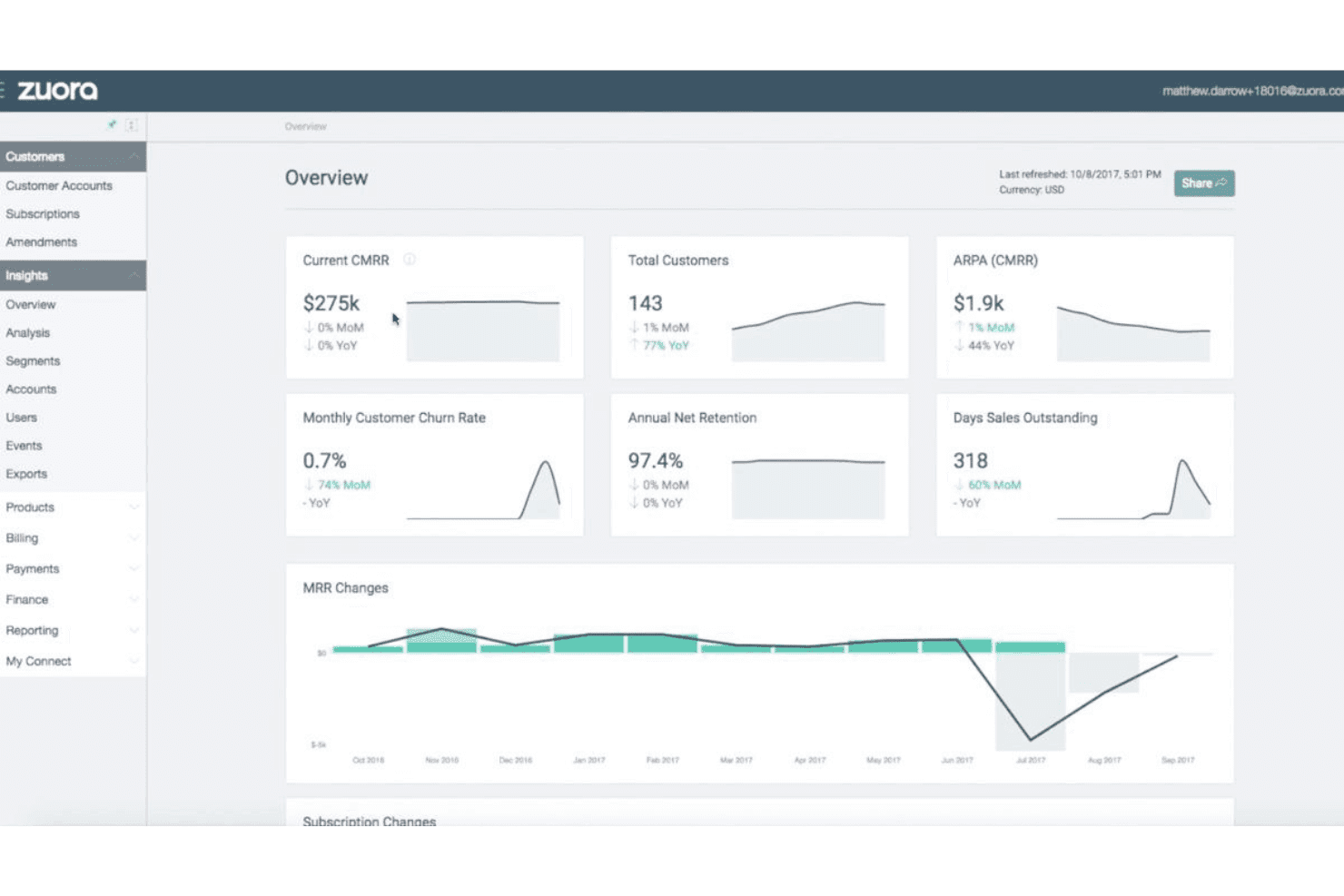
Zuora offers an insights overview dashboard displaying key subscription metrics like CMRR, customer count, churn rate, and MRR changes over time. Zuora is a quote-to-cash platform built around subscription and usage-based monetization, covering CPQ, billing, collections, cash application, and automated revenue recognition in a single system.
Who Is Zuora Best For?
Zuora is a strong fit for mid-market and enterprise companies running recurring revenue models, particularly in SaaS, media, and IoT.
Why I Picked Zuora
Zuora earns its spot as one of the best on my shortlist because no other platform handles the full complexity of usage-based billing at scale quite like this. The Usage Engine tracks real-time consumption and supports tiered, prepaid, overage, and high-water mark models in a single billing run. I also like that hybrid pricing, combining a flat subscription fee with metered usage charges, works natively without custom workarounds.
Zuora Key Features
- Multi-channel order capture: Accepts orders from sales reps, customer self-service portals, APIs, and partner channels with unified validation.
- Automated invoicing engine: Generates invoices for any combination of one-time, recurring, and milestone charges with flexible schedule settings.
- AI-driven collections workflows: Automates payment reminders, dunning schedules, and prioritization for outstanding receivables.
- Native ERP/CRM integrations: Offers real-time, bidirectional sync with platforms like Salesforce, NetSuite, SAP, and Workday.
Zuora Integrations
Zuora offers native integrations with Salesforce, NetSuite, SAP, Workday, HubSpot, and Snowflake, along with over 60 pre-built connectors. An API is available for custom integrations.
Pros and Cons
Pros:
- AI-driven collections with smart dunning routing
- Automated revenue recognition built in (ASC 606/IFRS 15)
- Handles complex usage-based billing models natively
Cons:
- Credit management relies on third-party data sources
- Rigid catalog structure for physical inventory
Learn more about Zuora: Best for unified communications in AR processes
- Free demo available
- Pricing upon request
Visit WebsiteCustomer Rating:2.3/5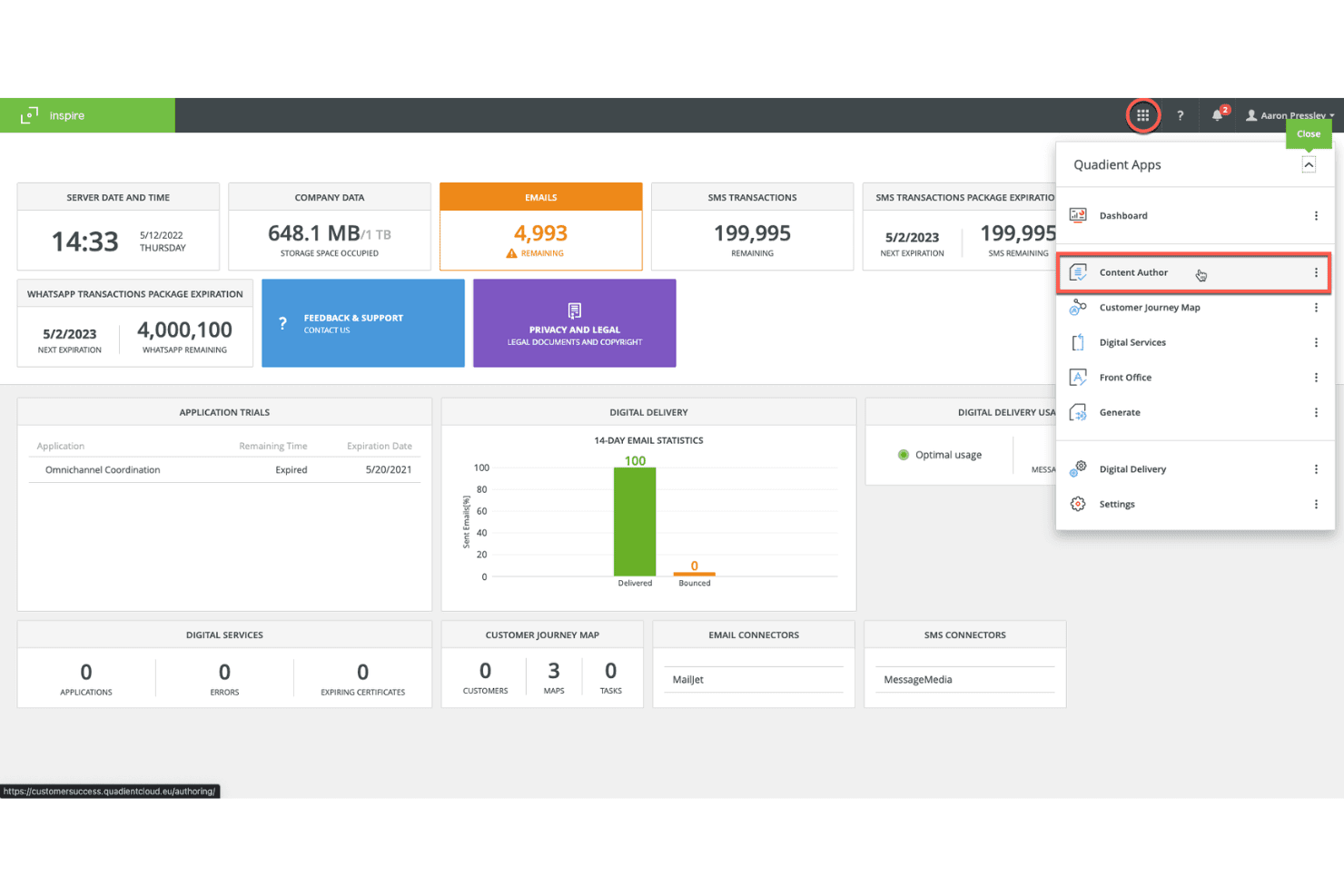
Quadient's Inspire platform displays a centralized dashboard with email, SMS, and WhatsApp transaction metrics alongside a Quadient Apps navigation panel. Quadient is an accounts receivable automation platform covering credit management, invoice delivery, collections workflows, dispute management, cash application, and self-service customer payments.
Who Is Quadient Best For?
Quadient is a good fit for mid-market and enterprise B2B finance teams managing high-volume invoicing, collections, and cash application across complex customer account portfolios.
Why I Picked Quadient
I've included Quadient in my top picks because it centralizes every AR communication touchpoint, from automated collection sequences and dispute tracking to self-service payment portals, in one connected workflow. I particularly like the AI-driven collections prioritization, which tells my team which customers to contact, through which channel, and exactly when. The self-service portal is a practical touch too, letting customers view invoices and submit payments without routing every query through my team.
Quadient Key Features
- Integrated deductions management: Automates categorization, routing, and resolution of disputes and short payments.
- Embedded payment portal: Lets customers view invoices and pay via ACH, card, or virtual card.
- ERP and CRM integration: Connects natively to NetSuite, SAP, Microsoft Dynamics, Salesforce, QuickBooks, and more.
- Cash flow forecasting dashboards: Provides real-time, AI-driven visibility into collections and DSO trends.
Quadient Integrations
Quadient AR offers native integrations with NetSuite, Acumatica, Sage (300, X3, Intacct), Microsoft Dynamics, SAP, SAP Business One, QuickBooks, Xero, Salesforce, and Zuora. An API is available for custom integrations.
Pros and Cons
Pros:
- Dedicated deductions management
- High auto-match rates in cash application
- AI-driven collections prioritization
Cons:
- Implementation timelines can run several months
- Limited order management capabilities
Learn more about Quadient: Best for AR and collections for small teams
- Free trial available
- From £545/user/month
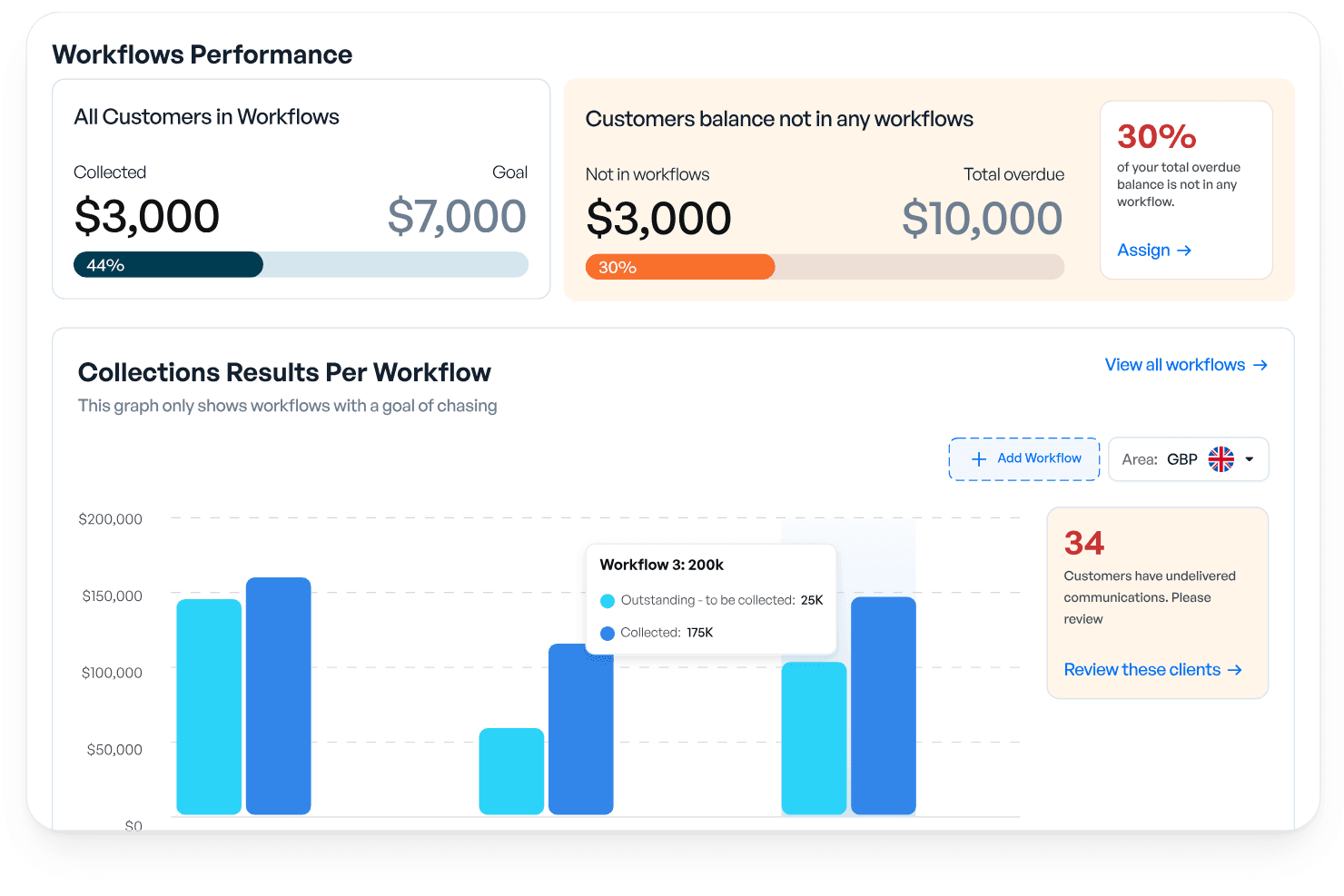
Kolleno offers a Workflows Performance dashboard that tracks collections, overdue balances, and per-workflow results with visual progress indicators. Kolleno is an AI-powered AR and order-to-cash platform covering collections automation, cash application, payments, disputes management, credit risk monitoring, and cash flow forecasting.
Who Is Kolleno Best For?
Kolleno is a strong fit for credit controllers and AR managers at SMBs who need to automate collections without growing their finance team headcount.
Why I Picked Kolleno
I've included Kolleno in my top picks because its AI Agents genuinely change what a small AR team can cover. I can configure each agent's autonomy level, from drafting follow-up emails for my review to firing off multi-channel dunning sequences entirely on its own. I also like that the cash application module uses pattern learning to handle complex matching scenarios, keeping my team out of exception queues.
Kolleno Key Features
- Embedded payment portal: Customers can pay, view invoice status, and resolve disputes directly in a branded online portal.
- Real-time dashboards: Access up-to-date AR analytics and cash flow forecasting from a central workspace.
- Disputes management: Track, categorize, and resolve invoice disputes within an integrated workflow.
- Native ERP and CRM integrations: Connect with systems like NetSuite, Xero, QuickBooks, and Salesforce for synchronized data across platforms.
Kolleno Integrations
Kolleno offers native integrations with NetSuite, Xero, QuickBooks, SAP S/4HANA, Sage Intacct, Microsoft Dynamics 365 Business Central, Salesforce, Clio, Stripe, Adyen, and GoCardless. An API is available for custom integrations.
Pros and Cons
Pros:
- Rapid setup for SMB teams without complex onboarding
- Dispute management is built into the AR workflow
- Prioritizes at-risk accounts before they go overdue
Cons:
- Reporting customization is limited
- Per-seat pricing limits cross-team AR visibility
Learn more about Kolleno: Best for enterprise-grade cash application
- Free demo available
- Pricing upon request
Visit WebsiteCustomer Rating:4.5/5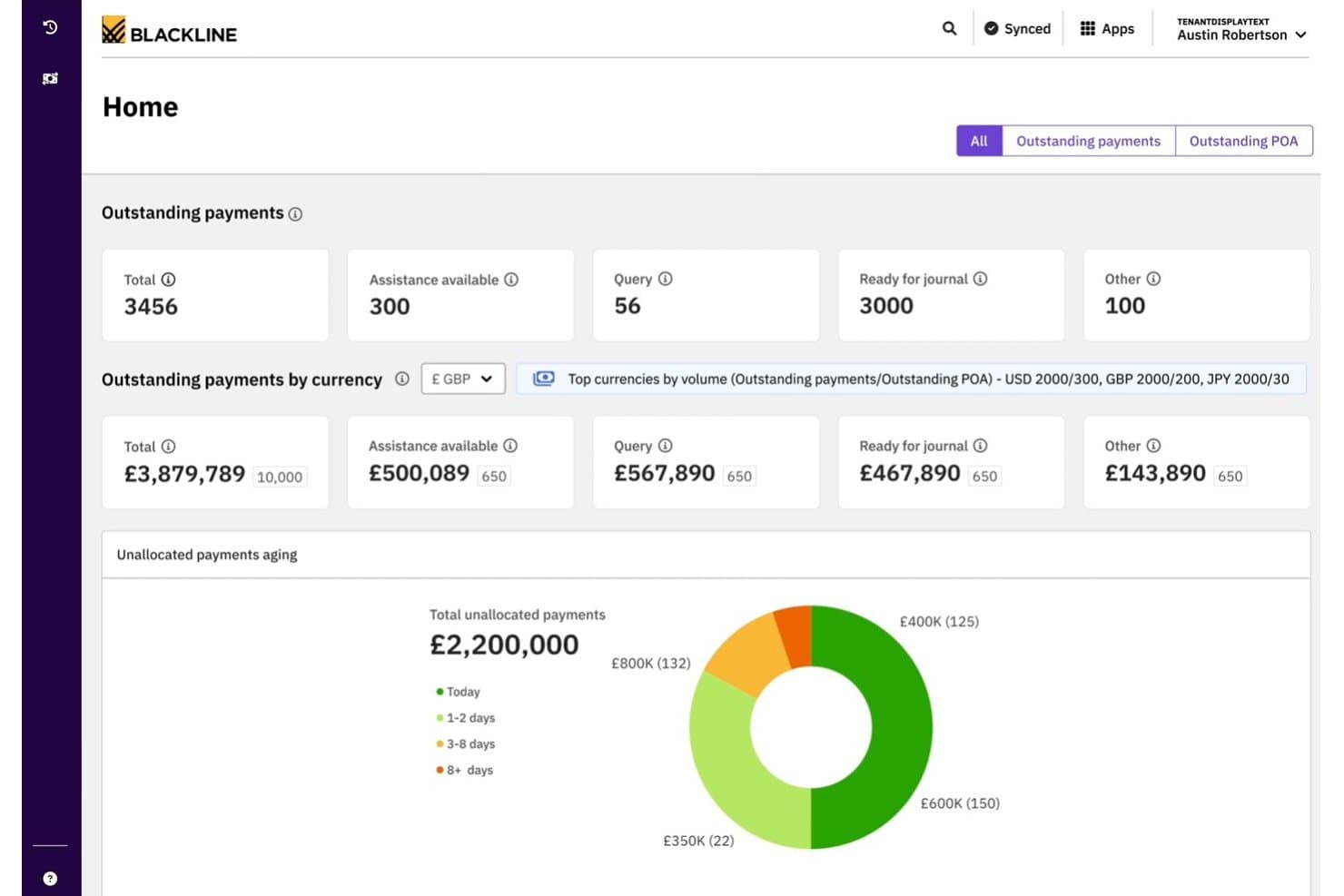
BlackLine offers a cash application dashboard displaying outstanding payments, currency breakdowns, and unallocated payments aging analytics. BlackLine Invoice-to-Cash is an AR automation platform covering cash application, collections management, eInvoicing, credit and risk management, dispute handling, and AI-driven payment matching.
Who Is BlackLine Best For?
BlackLine is a strong fit for enterprise finance teams managing high transaction volumes across multiple ERPs, banks, and regions.
Why I Picked BlackLine
BlackLine earns its spot on my shortlist because its Verity AI cash application consistently delivers match rates that bring unapplied cash close to zero. I particularly like the multi-format remittance ingestion, which handles everything from EDI to scanned documents without manual intervention. The automated deduction coding with reason codes and straight-through journal entries to the GL mean my team spends far less time reconciling exceptions at month-end.
BlackLine Key Features
- Integrated deductions management: Automatically logs, categorizes, and routes short payments and invoice disputes for resolution.
- Embedded payment portal: Provides customers with a self-service portal to view invoices, make payments, and submit inquiries.
- Cash flow forecasting: Includes AI-driven dashboards that forecast collections and predict DSO across segments.
- ERP-certified connectors: Offers native, bidirectional integrations with major ERP systems like SAP, Oracle, and NetSuite.
BlackLine Integrations
BlackLine offers native integrations with SAP, NetSuite, Oracle, Microsoft Dynamics, Acumatica, and Sage, plus native CRM integration for dispute management. An API is also available for custom integrations.
Pros and Cons
Pros:
- Real-time credit risk scoring across customer portfolio
- Automated deduction coding with root-cause analytics
- AI cash application achieves near-zero unapplied cash
Cons:
- Batch processing prevents real-time transaction updates
- High subscription cost for lower transaction volumes
Learn more about BlackLine: Best for integrated payment and invoicing
- Free demo available
- Pricing upon request
Visit WebsiteCustomer Rating:4.4/5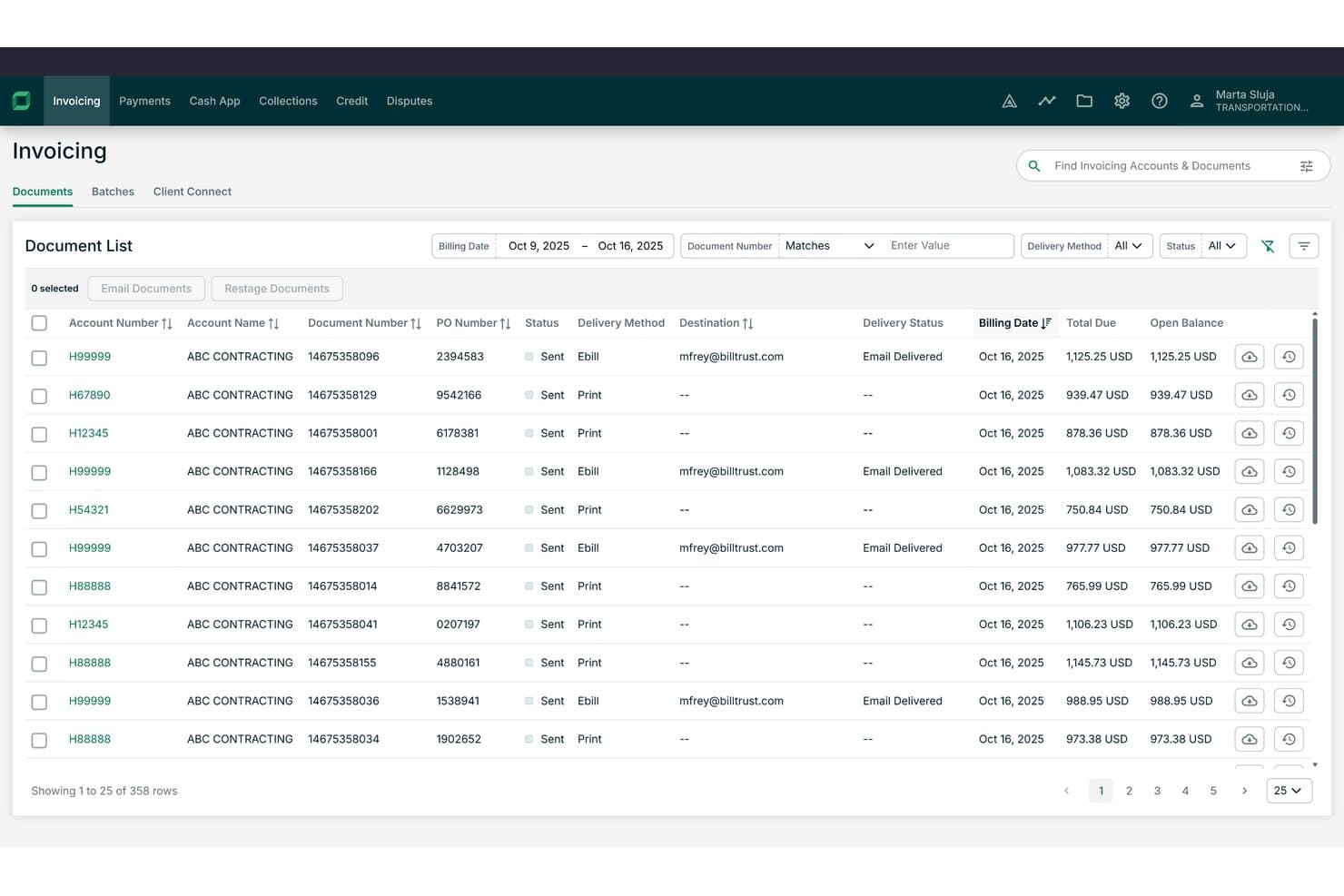
Billtrust offers a detailed invoicing document list with filtering, delivery method tracking, and open balance visibility across hundreds of records. Billtrust is a B2B order-to-cash platform built around invoicing, payments, collections, cash application, and credit management for mid-to-enterprise suppliers.
Who Is Billtrust Best For?
It's a strong fit for AR managers and finance leaders at B2B companies in manufacturing, distribution, or business services with high invoice volumes.
Why I Picked Billtrust
I picked Billtrust as one of the best because its invoicing and payments run as a single platform rather than separate modules. I like that the Digital Lockbox automatically processes emailed virtual cards without manual handling, and the 260+ AP portal connections push invoices directly into buyers' systems like Ariba and Coupa. The ML-based cash application consistently hits 95%+ straight-through processing rates.
Billtrust Key Features
- Agentic credit management: Automatically underwrites and monitors customer credit using real-time bureau data and behavioral signals.
- Collections workflow automation: Prioritizes delinquent accounts and generates agentic outreach through email and VoIP auto-transcription.
- Global e-invoicing compliance: Supports multi-country e-invoicing mandates, covering B2B and government requirements.
- ERP and AP portal integrations: Connects natively with 200+ ERPs, banks, and over 260 AP portals for invoicing and payment workflows.
Billtrust Integrations
Billtrust offers over 200 native integrations, including SAP, NetSuite, Microsoft Dynamics, Oracle, Ariba, Coupa, Basware, OB10, and more than 260 AP portals. An API is available for custom integrations.
Pros and Cons
Pros:
- Covers invoicing, credit, and collections in one platform
- Agentic AI handles collections outreach automatically
- Cash application achieves 95%+ auto-match rates
Cons:
- Implementation typically requires several months
- No order capture or management functionality
Learn more about Billtrust: Best for modular automation across finance teams
- Free demo available
- Pricing upon request
Visit WebsiteCustomer Rating:4.5/5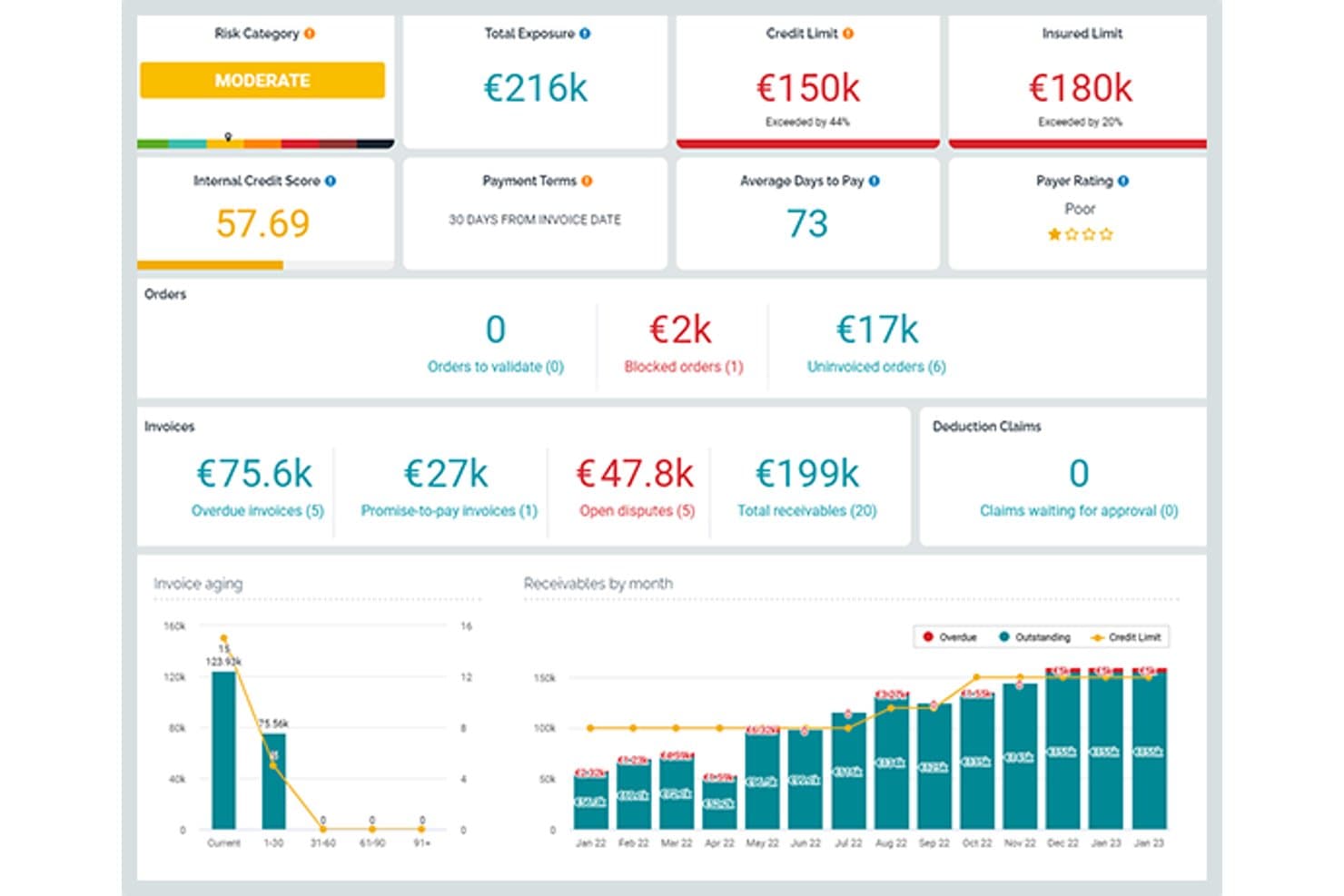
Esker offers a comprehensive order-to-cash dashboard displaying risk categories, credit limits, invoice aging, and receivables by month for streamlined AR management. Esker is a cloud-based order-to-cash platform with modular, AI-powered solutions spanning order management, credit management, invoice delivery, cash application, collections, and deductions management.
Who Is Esker Best For?
Esker is a strong fit for mid-to-large enterprises running SAP or other major ERPs that need modular O2C automation across AR and finance teams.
Why I Picked Esker
Esker earns its spot on my shortlist because its modular architecture lets finance teams activate only the O2C components they need. I like that Credit Management, Cash Application, and Collections can each be deployed standalone or as a full suite, which matters when phasing a rollout across a large finance org. Esker Synergy AI is what really sets the cash application module apart: it uses ML to extract remittance data and auto-match payments, cutting unapplied cash by up to 95%.
Esker Key Features
- Omnichannel order capture: Collects and digitizes B2B orders from email, EDI, customer portals, and fax with real-time tracking.
- Integrated deductions management: Categorizes and routes short-pay and chargeback disputes for fast resolution.
- Embedded payment portal: Allows customers to view, dispute, and pay invoices by ACH, card, or virtual card.
- Cash flow forecasting dashboard: Provides real-time DSO and collections forecasts with segmentation by customer or geography.
Esker Integrations
Esker offers native integrations with SAP, Oracle, Microsoft Dynamics, and NetSuite for bidirectional data sync. An API is available for custom integrations.
Pros and Cons
Pros:
- Strong deductions management with root-cause analytics
- AI cash application cuts unapplied cash significantly
- Modular deployment across individual O2C functions
Cons:
- Data gaps can appear between individual modules
- Implementation timelines can run several months
Learn more about Esker: Best for AI-powered receivables automation
- Free demo available
- Pricing upon request
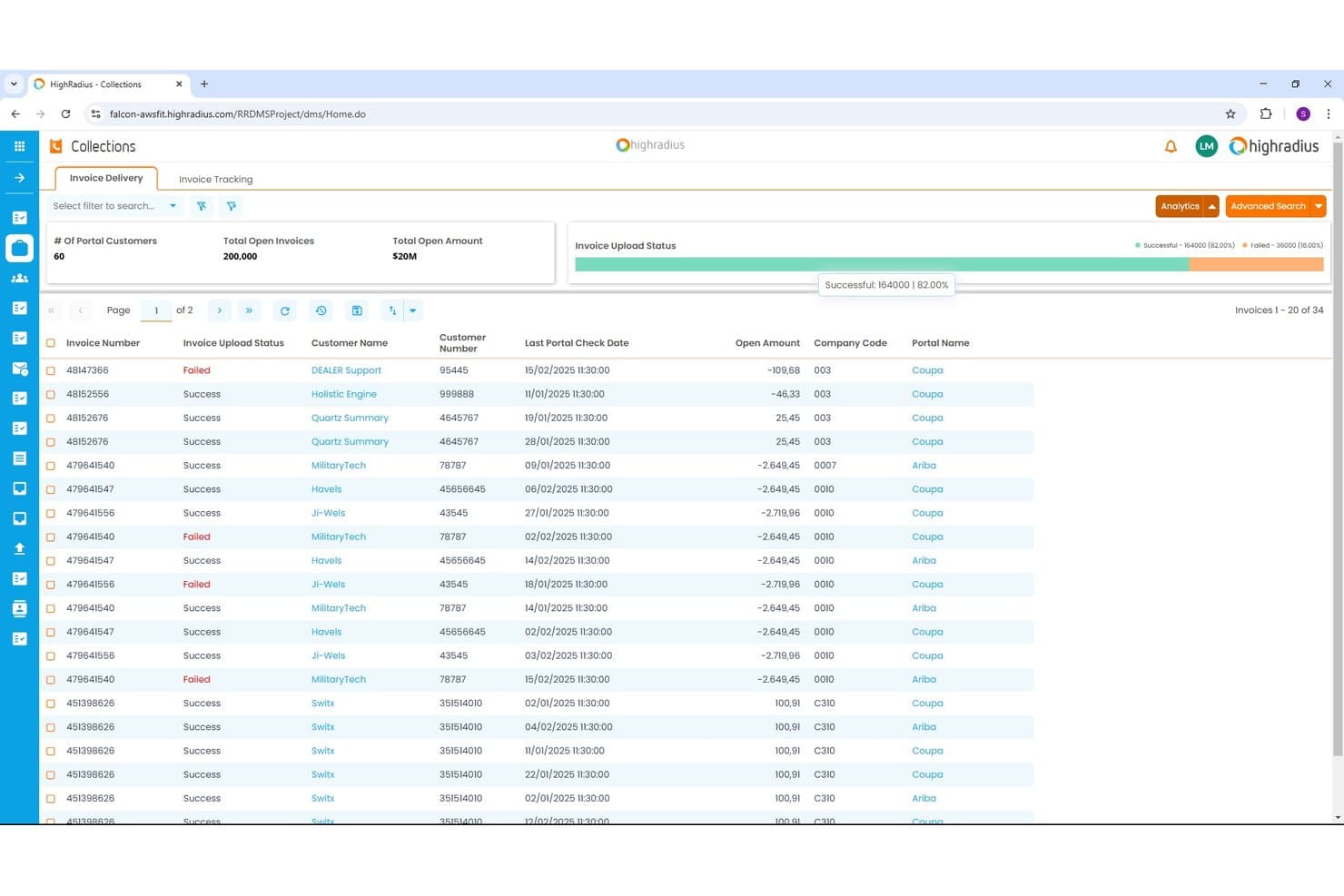
HighRadius offers an Invoice Delivery dashboard within its Collections module, displaying invoice upload status, open amounts, and portal tracking across multiple customers. HighRadius is an AI-powered order-to-cash platform covering collections, cash application, credit management, deductions, and e-invoicing for enterprise finance teams.
Who Is HighRadius Best For?
HighRadius is a strong fit for large enterprises running high-volume receivables across multiple ERPs, business units, or geographies.
Why I Picked HighRadius
HighRadius earns its spot on my shortlist because the Cash Application Cloud achieves 95% no-touch posting rates for checks, ACH, and wires by extracting remittance data from emails and AP portals automatically. I also like the AI Worklist in Collections Cloud, which prioritizes accounts dynamically so my team targets the highest-risk balances first. The Deductions Cloud aggregates portal and email claims into a single queue, so my team isn't chasing backup documents across systems.
HighRadius Key Features
- Predictive credit scoring: Uses real-time bureau data and payment patterns to automate credit risk decisions.
- Integrated deductions management: Centralizes short-pay claim capture and automates backup aggregation from portals and emails.
- Embedded payment portal: Lets customers view invoices and pay online using ACH or credit card.
- ERP-native connectors: Provides prebuilt integrations for SAP, Oracle, NetSuite, and Microsoft Dynamics for bidirectional invoice and payment data sync.
HighRadius Integrations
HighRadius offers native integrations with SAP, Oracle, NetSuite, and Microsoft Dynamics, plus connections to over 100 banks and 40 credit agencies. An API is available for custom integrations.
Pros and Cons
Pros:
- Credit scoring pulls live bureau data
- Centralizes short-pay claims automatically
- Cash posting hits 95% no-touch rates
Cons:
- Go-live takes three to six months
- Batch-based ERP sync delays data updates
Learn more about HighRadius:
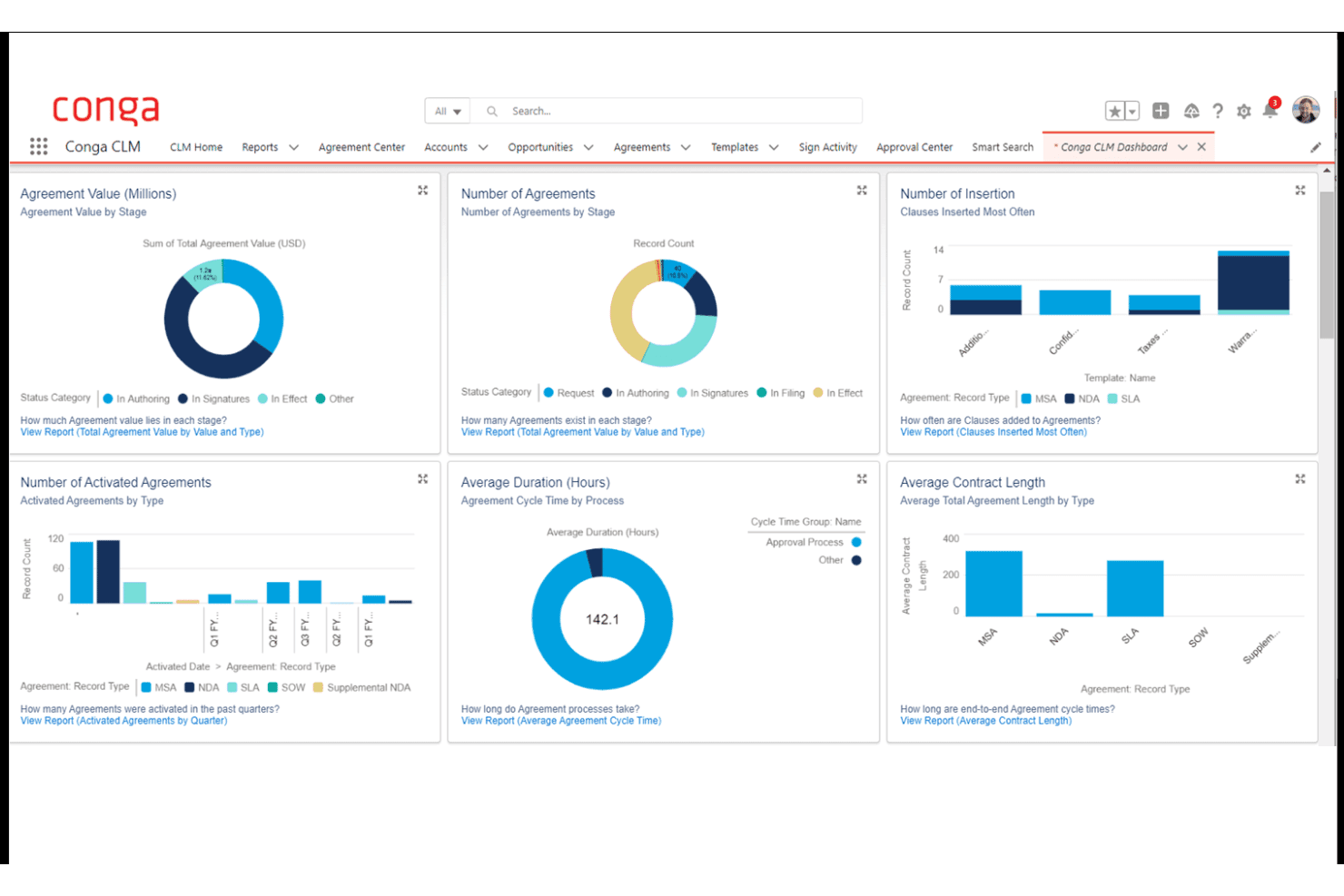
Conga CLM offers a comprehensive dashboard with visual analytics covering agreement value, number of agreements, insertion clauses, activated agreements, cycle time, and contract length by type. Conga is a revenue lifecycle platform that unifies CPQ, contract lifecycle management, billing, and subscription management across the contract-to-cash process.
Who Is Conga Best For?
Conga is a strong fit for enterprise B2B teams running complex, high-volume sales cycles on Salesforce who need CPQ, contracts, and billing managed in one connected system.
Why I Picked Conga
I picked Conga as one of the best because of how tightly it connects CPQ, contract management, and billing in a single data model. Where most O2C tools start at the order stage, Conga starts at the quote, meaning contract terms and pricing rules flow directly into invoices without manual re-entry. I particularly like its Billing module's mixed-order invoicing, where one customer invoice can consolidate subscription, usage, and one-time charges simultaneously.
Conga Key Features
- Salesforce-native integration: Leverages deep, bidirectional sync for product, quote, and contract data between Salesforce and Conga.
- Automated dunning workflows: Supports scheduled reminders and escalations for outstanding invoices and overdue accounts.
- Unified data model: Connects CPQ, contracts, billing, and revenue recognition under one data architecture for central audit trails.
- API and SDK extensibility: Offers APIs and SDKs to embed CPQ and billing processes in customer portals, internal tools, or partner platforms.
Conga Integrations
Conga offers native integrations with Salesforce, Workday, Oracle, HubSpot, Pipedrive, and Microsoft Dynamics 365. An API and SDK are available for building custom integrations and embedding processes in portals or internal systems.
Pros and Cons
Pros:
- Strong Salesforce-native architecture for revenue teams
- Handles complex subscription billing model changes
- Unifies CPQ, contracts, and billing natively
Cons:
- Weak credit management and risk scoring tools
- No native cash application or matching tools
Learn more about Conga:
Diğer Siparişten Tahsilata Yazılımları
Kısa listeme giremeyen, ancak yine de incelemeye değer bazı ek siparişten tahsilata yazılım seçenekleri şunlardır:
- 11Agentforce Revenue ManagementBest for CRM-driven revenue lifecycle management
- 12VersapayBest for collaborative AR with customer portal
- 13MaxioBest for SaaS billing complexity management
- 14DealHub AIBest for CPQ-integrated revenue processes
- 15TesorioBest for predictive cash flow insights
- 16UpflowBest for real-time collections analytics
- 17InvoicedBest for automated AR process control
- 18SerralaBest for global multi-ERP cash automation
- 19Paystand Best for blockchain-enabled B2B payments
- 20GavitiBest for collector workflow optimization
How I Evaluate Order-to-Cash Software
I split my evaluation into baseline criteria every tool must hit—like automated cash application and ERP connectivity—and differentiators that separate the best platforms from the rest.
Core Functionality (Table Stakes for This List)
When I'm selecting tools for my list, I rank each one on a scale from 0 (does not offer the functionality) to 5 (excels in this area) for each core functionality listed below. Then, I calculate the tool's total score into a percentage. Each tool needs to achieve a minimum total score of 75% to be considered for inclusion.
- Order Management: I evaluate how each platform captures and orchestrates orders across channels like web portals, EDI, and email, including whether it handles validation rules and exception routing before hitting fulfillment.
- Invoicing & Billing: The billing engine needs to support more than just one-time invoices. I look for platforms that handle recurring, usage-based, and milestone billing models within the same workflow.
- AR Automation: I check whether the tool offers configurable dunning sequences with multi-channel outreach, since teams juggling hundreds of open invoices need prioritized, automated follow-ups rather than manual email chasing.
- Cash Application: Matching payments to invoices manually is where AR teams lose the most time. I look for AI-assisted matching that can parse remittance data from lockbox files, emails, and EDI formats.
- Credit Management: I evaluate whether the platform can pull credit data from third-party bureaus, enforce dynamic credit limits, and flag high-risk accounts before orders ship rather than after invoices age out.
- ERP/CRM Integration: Bidirectional connectors to systems like SAP, NetSuite, and Salesforce matter here. I look for native integrations that sync invoice status, GL postings, and customer master data in real time.
Once I have a list of tools that meet the criteria, I consider what sets each platform apart.
Differentiating Factors (What Sets Vendors Apart)
Here's how I compare and contrast different vendors:
Standout Features
Integrated deductions management is a big differentiator I look for. When customers short-pay invoices, you need automated dispute workflows that categorize and route chargebacks rather than letting them pile up in spreadsheets. Cash flow forecasting also matters—AI-driven DSO predictions by customer or segment give finance leaders rolling visibility for accurate revenue planning. An embedded payment portal where customers can view invoices, raise disputes, and pay via multiple methods is another separator worth evaluating.
Beyond Features
Modularity is a key factor I evaluate—some teams only need a collections module, while others want the full order-to-cash suite. Buying more than you need slows adoption. I also check for global readiness, including multi-currency, multi-entity support, and compliance with regional e-invoicing mandates. Pricing structure matters too. Transaction-based models can balloon costs at high invoice volumes, so I compare those against flat subscription pricing to understand total cost of ownership.
Siparişten Tahsilata Yazılımı Nasıl Seçilir?
Uzun özellik listeleri ve karmaşık fiyatlandırma yapıları içinde kaybolmak kolaydır. Kendinize özgü yazılım seçimi sürecinizde ilerlerken odağınızı korumanıza yardımcı olmak için aklınızda bulundurmanız gereken faktörlerin kontrol listesi aşağıdadır:
| Faktör | Dikkat Edilmesi Gerekenler |
| Ölçeklenebilirlik | İşlem hacmi ve ekip büyüklüğü arttıkça yazılım buna ayak uydurabilecek mi? Birden fazla kuruluşu yönetme ve yeni pazarlara açılma konularını sorun. |
| Entegrasyonlar | ERP, CRM ve ödeme platformlarınıza yerel olarak bağlanıyor mu? Mevcut ve gelecekteki sistem ihtiyaçları için doğrudan entegrasyon ile ara yazılım entegrasyonunu karşılaştırın. |
| Özelleştirilebilirlik | Ağır bir BT müdahalesi olmadan iş akışlarını, kuralları ve raporlamayı yapılandırabilir misiniz? Esnek platformlar, işletmeniz geliştikçe değişiklikleri hızlandırır. |
| Kullanım kolaylığı | Finans ve operasyon ekipleri için öğrenme eğrisi ne kadar dik? Uygulamalı denemeler, gezinmesi kafa karıştırıcı veya ayarları gizli olan araçları belirlemenize yardımcı olur. |
| Uygulama ve işe alıştırma | Tipik canlıya geçiş takvimi nedir? Veri taşıma desteğini, API belgelerini ve eski süreçlerinizdeki boşlukları kapatmak için bir iş ortağına ihtiyaç duyup duymayacağınızı sorun. |
| Maliyet | Yalnızca lisans veya abonelik fiyatını değil; ödeme işleme, entegrasyonlar, ek modüller veya kullanıcı koltukları dâhil toplam sahip olma maliyetini anlayın. |
| Güvenlik önlemleri | SOC 2, ISO 27001 ve GDPR uyumluluğu sağlanıyor mu? Veri şifreleme, kullanıcı izinleri ve denetim izlerini kapsayan en iyi uygulamaları kontrol edin. |
| Uyumluluk gereksinimleri | Platform, e-fatura zorunluluklarına ve sektör standartlarına uyumluluğunuzu sürdürecek mi? KDV raporlaması, devlet sistemlerine yükleme veya gelecekteki kural değişiklikleriyle ilgili ihtiyaçları göz önünde bulundurun. |
Siparişten Tahsilata Yazılımı Nedir?
Siparişten tahsilata yazılımı, işletmelerin satış siparişi yakalamadan faturalama, ödeme tahsilatı ve nakit uygulamasına kadar tüm gelir sürecini otomatikleştirmesini ve yönetmesini sağlayan bir platformdur. Bu sistemler; ekiplerin doğruluğu artırmasına, nakit akışını hızlandırmasına ve gelir döngüsünün her adımında görünürlüğü korumasına yardımcı olmak için sipariş yönetimi, faturalama, alacak hesapları ve kredi işlevlerini merkezileştirir.
Siparişten Tahsilata Yazılımının Özellikleri
Siparişten tahsilata yazılımı seçerken aşağıdaki temel özelliklere dikkat edin:
- Sipariş yönetimi: Tüm satış kanallarındaki sipariş yakalama işlemlerini merkezileştirir, verileri doğrular ve sipariş girişinden teslimata kadar sipariş durumunu izler.
- Faturalama ve fatura düzenleme: Fatura oluşturmayı otomatikleştirir ve tek seferlik, yinelenen ve kilometre taşına dayalı faturalama da dahil olmak üzere birden fazla faturalama modelini destekleyerek tüm faturalama sürecini kolaylaştırır.
- Alacak hesapları otomasyonu: Ödeme hatırlatıcıları gönderir, tahsilat iş akışlarını yönetir ve manuel takip ihtiyacını azaltmak için vadesi geçmiş alacakları izler.
- Nakit uygulaması: Havale bilgilerini kullanarak gelen ödemeleri açık faturalarla eşleştirir, mutabakatı hızlandırır ve doğruluğu artırır.
- Kredi yönetimi: Riski yönetmek için müşterilerin kredi değerliliğini değerlendirir, limitleri izler ve siparişler gönderilmeden önce bekletme veya onay süreçlerini uygular.
- ERP ve CRM entegrasyonu: Verileri senkronize etmek ve kayıtları güncel tutmak için ERP, CRM ve ödeme platformları gibi sistemlere doğrudan bağlanır.
- Kesinti yönetimi: Eksik ödemeleri veya geri ödemeleri tespit eder ve işler, anlaşmazlıkların çözümünü otomatikleştirir ve kesintilere yol açan sorunların temel nedenlerini ortaya çıkarır.
- Müşteri ödeme portalı: Müşterilere faturaları görüntüleyebilecekleri, ödeme yapabilecekleri, hesap ekstrelerini indirebilecekleri ve anlaşmazlıkları yönetebilecekleri güvenli bir çevrimiçi alan sunar.
- Çoklu para birimi desteği: İşlemleri çeşitli para birimleriyle gerçekleştirir; ekiplerin doğru kayıt ve raporlamayı sürdürürken küresel olarak faaliyet göstermesine olanak tanır.
- Denetim ve raporlama araçları: Denetimleri, uyumluluk gerekliliklerini ve yönetim denetimini desteklemek için kapsamlı günlükler ve finansal raporlar sunar.
Yaygın Siparişten Tahsilata Yazılımı Yapay Zekâ Özellikleri
Yukarıda listelenen standart siparişten tahsilata yazılımı özelliklerinin ötesinde, bu çözümlerin çoğu aşağıdakiler gibi özelliklerle yapay zekâyı da bünyesine katıyor:
- Tahmine dayalı nakit akışı öngörüsü: Gelecekteki nakit girişlerini öngörmek için geçmiş ödeme verilerini ve müşteri eğilimlerini kullanır; finans ekiplerinin olası açıkları veya fazlalıkları önceden görmesine yardımcı olur.
- Otomatik ödeme eşleştirme: Ödemeleri birden fazla formatta faturalarla otomatik olarak eşleştirmek için makine öğrenmesinden yararlanır; manuel mutabakatı ve istisnaları azaltır.
- Dinamik kredi puanlaması: Kredi riski profillerini güncellemek ve kredi limiti ayarlamaları önermek için müşteri davranışlarını, ödeme geçmişini ve harici verileri sürekli analiz eder.
- Tahsilat önceliklendirmesi: Tahsilat ekibinin verimliliğini artırmak için hesapları segmentlere ayırmak ve müşteri ödeme olasılığına, fatura yaşına ve müşteri riskine göre iletişim önceliği belirlemek amacıyla yapay zekâdan yararlanır.
- Anlaşmazlık çözümü yönlendirmesi: Anlaşmazlıkları veya kesintileri kategorilere ayırmak ve doğru ekibe yönlendirmek için doğal dil işleme kullanır; çözümü hızlandırır ve birikmiş işleri azaltır.
Siparişten Tahsilata Yazılımının Faydaları
Siparişten tahsilata yazılımının uygulanması ekibiniz ve işletmeniz için çeşitli faydalar sağlar. İşte yararlanmayı bekleyebileceğiniz bazı faydalar:
- Daha hızlı nakit akışı: Otomatik faturalama, tahsilat ve ödeme eşleştirme, satışların tahsil edilmemiş gün sayısını azaltmaya ve nakit tahsilatını hızlandırmaya yardımcı olur.
- Geliştirilmiş doğruluk: Sorunsuz entegrasyonlar ve otomatik mutabakat, sipariş, faturalama ve alacak süreçlerinde insan hatasını azaltır.
- Daha iyi görünürlük: Merkezî panolar ve gerçek zamanlı raporlama, sipariş durumları, ödenmemiş faturalar ve tahmin edilen nakit girişleri hakkında net bilgiler sunar.
- Azaltılmış manuel iş yükü: Sipariş yakalama, kredi incelemeleri ve anlaşmazlık çözümü için otomatik iş akışları ekibinizin daha yüksek değerli işlere zaman ayırmasını sağlar.
- Daha düşük risk: Yapay zekâ destekli kredi yönetimi ve uyumluluk özellikleri, küresel operasyonlarda risk maruziyetinizi yönetmenize ve mevzuat gerekliliklerini karşılamanıza yardımcı olur.
- Geliştirilmiş müşteri deneyimi: Kendi kendine hizmet ödeme portalları ve daha hızlı anlaşmazlık yanıtları, müşterilerin ödeme yapmasını ve sorunları çözmesini kolaylaştırır.
Siparişten Tahsilata Yazılımının Maliyetleri ve Fiyatlandırması
Siparişten tahsilata yazılımı seçmek, mevcut çeşitli fiyatlandırma modellerini ve planları anlamayı gerektirir. Maliyetler özelliklere, ekip büyüklüğüne, eklentilere ve diğer unsurlara göre değişir. Aşağıdaki tabloda yaygın planlar, ortalama fiyatları ve siparişten tahsilata yazılımı çözümlerinde genellikle sunulan özellikler özetlenmiştir:
Siparişten Tahsilata Yazılımı için Plan Karşılaştırma Tablosu
| Plan Türü | Ortalama Fiyat | Yaygın Özellikler |
| Ücretsiz Plan | $0 | Temel sipariş girişi, standart faturalandırma, sınırlı raporlama ve manuel ödeme takibi. |
| Bireysel Plan | $20-$50/kullanıcı/ay | Faturalandırma, ticari alacak otomasyonu, basit kredi yönetimi, temel gösterge paneli ve müşteri ödeme portalı. |
| İşletme Planı | $75-$150/kullanıcı/ay | Otomatik nakit tahsisi, özelleştirilebilir iş akışları, çoklu para birimi desteği ve yerel ERP entegrasyonu. |
| Kurumsal Plan | $200-$350/kullanıcı/ay | Gelişmiş yapay zekâ özellikleri, küresel uyumluluk, gelişmiş analizler, tam modülerlik ve öncelikli destek. |
Siparişten Tahsilata Yazılımı SSS
Siparişten tahsilata yazılımı hakkında sık sorulan bazı soruların yanıtları aşağıdadır:
Siparişten tahsilata yazılımı ERP sistemleriyle nasıl entegre olur?
Genellikle OTC yazılımı olarak adlandırılan siparişten tahsilata otomasyon yazılımı, ERP sistemlerine genellikle yerel bağlantı araçları veya API’ler aracılığıyla bağlanır. Bu bağlantı; siparişleri, fatura işlemlerini, ödemeleri, envanter yönetimini, genel muhasebe güncellemelerini ve müşteri verilerini senkronize ederek platformlar veya ekipler arasında hiçbir şeyin gözden kaçmamasını sağlar.
Hangi işletme türleri siparişten tahsilata yazılımından en çok yararlanır?
Yüksek işlem hacmine, karmaşık faturalandırma süreçlerine veya küresel faaliyet alanlarına sahip işletmeler en fazla değeri elde eder. Finansal operasyon ekibiniz kredi kontrolleri gerçekleştirmek, müşteri kabulünü yönetmek, ödemelerin peşine düşmek, siparişlerin karşılanmasını sağlamak veya hesap mutabakatı sırasında istisna yönetimiyle ilgilenmek için çok fazla zaman harcıyorsa, yapay zekâ ile desteklenen bu platformlar günlük iş akışlarını dönüştürebilir.
Siparişten tahsilata yazılımı çoklu para birimi işlemlerini destekleyebilir mi?
Evet, çoğu platform çoklu para birimi desteği sunar. Bu, çeşitli bölgelerde fatura kesebileceğiniz, ödeme tahsil edebileceğiniz, işletme sermayenizi koruyabileceğiniz, temel performans göstergelerini (KPI’lar) izleyebileceğiniz ve geliri raporlayabileceğiniz anlamına gelir. Bu özellik, uluslararası faaliyet gösteren şirketler için özellikle değerlidir.
Uygulama genellikle ne kadar sürer?
Uygulama, kapsam ve entegrasyonlara bağlı olarak birkaç haftadan birkaç aya kadar sürebilir. Zaman çizelgesini tedarikçiyle netleştirmek ve ekibinizin gerekli süreç değişikliklerine hazır olduğundan emin olmak önemlidir.
Güvenlik ve uyumluluk hakkında neleri bilmeliyim?
Özellikle hassas finansal verileri işliyorsanız veya uluslararası faaliyet gösteriyorsanız SOC 2, ISO 27001 ve GDPR uyumluluğu arayın. Tedarikçilere verilerinizi nasıl koruduklarını; şifreleme, izinler ve denetim günlükleri dâhil olmak üzere sorun.