

Çağrı transkripsiyonu yazılımları, toplantı ve çağrı seslerini ekibinizin CRM, satış hattı ve koçluk sistemlerinde kullanabileceği yazılı metinlere otomatik olarak dönüştürür. Görüşmelerden doğru ayrıntıları yakalayıp bunları doğrudan gelir operasyonları iş akışlarınıza aktarmanız gerekiyorsa bu araçlar, veri girişiyle ilgili en büyük sorunları çözer.
Bu kılavuzda CRM entegrasyonu, yapay zekâ destekli anlaşma içgörüleri, koçluk sinyalleri ve çok dilli destek gibi gelir liderlerinin gerçek önceliklerine uyan çağrı transkripsiyonu platformlarını bulacaksınız. Hangi çözümlerin her ön saftaki etkileşimden daha iyi tahmin, görünürlük ve içgörüler elde etmenizi sağladığını keşfedin.
Why Trust Our Software Recommendations
6,700+
Reviews
20
Industry experts
16+
Evaluation factors
14
Years
Our reviews reflect our independent judgment—not a sales pitch. Learn how we stay transparent.
For this guide, we evaluated tools using hands-on testing and independent research, scoring tools using our selection criteria.
Our reviews reflect our human editorial judgment, not a sales pitch.
Çağrı Transkripsiyonu Yazılımları Karşılaştırma Tablosu
Kısa listeme giren çağrı transkripsiyonu yazılımlarının fiyatlarını ve teknik özelliklerini yan yana karşılaştırın:
Score legend (out of 5)
- Excellent4.5–5
- Good4–4.4
- Average3–3.9
- Below average2–2.9
- Poor1–1.9
Sorted by: Default
| Tool | Starting Price | Website | ||||||||||||
|---|---|---|---|---|---|---|---|---|---|---|---|---|---|---|
Best for VoIP teams scoring every call automatically | Not rated | 2 | 2 | 2 | 4 | 4 | 3 | Not rated | Not rated | Not rated | Not rated | Not rated | $25/user/month Free plan + 14-day trial + free demo available | Website |
Best for Salesforce-native call intelligence | Not rated | Not rated | Not rated | Not rated | 5 | Not rated | Not rated | 5 | 5 | 5 | 4 | 4 | Pricing upon request Free demo available | Website |
Best for revenue pipeline-linked call intelligence | Not rated | Not rated | Not rated | Not rated | 5 | Not rated | Not rated | 4 | 5 | 4 | 4 | 5 | Pricing upon request Not available | Website |
Best for closing the loop between calls and coaching | Not rated | Not rated | Not rated | Not rated | 5 | Not rated | Not rated | 5 | 5 | 4 | 4 | 5 | Pricing upon request Free demo available | Website |
Best for EU sales teams auto-filling CRM from calls | Not rated | Not rated | Not rated | Not rated | 5 | Not rated | Not rated | 5 | 5 | 5 | 4 | 4 | Pricing upon request Free demo available | Website |
Best for revenue teams scaling call intelligence | Not rated | Not rated | Not rated | Not rated | 5 | Not rated | Not rated | 5 | 5 | 5 | 5 | 5 | Pricing upon request Free demo available | Website |
Best for CRM autofill from sales calls | Not rated | Not rated | Not rated | Not rated | 5 | Not rated | Not rated | 5 | 5 | 4 | 4 | 5 | $30/user/month 14-day free trial + free plan + free demo available | Website |
Best for call transcription in 60+ languages | Not rated | Not rated | Not rated | Not rated | 5 | Not rated | Not rated | 5 | 5 | 5 | 4 | 5 | Pricing upon request 14-day free trial + free demo available | Website |
Best for all-in-one call intel and CRM sync | Not rated | Not rated | Not rated | Not rated | 5 | Not rated | Not rated | 5 | 5 | 5 | 4 | 5 | $19/user/month 14-day free trial + free demo available | Website |
Best for AI deal intelligence on call data | Not rated | Not rated | Not rated | Not rated | 5 | Not rated | Not rated | 5 | 5 | 5 | 4 | 4 | $10/user/month Free plan + free demo available | Website |


Çağrı Transkripsiyonu Yazılımları İncelemeleri
Aşağıda, kısa listeme giren en iyi çağrı transkripsiyonu yazılımlarına ilişkin ayrıntılı özetlerimi bulabilirsiniz. İncelemelerim, size en uygun olanı bulmanıza yardımcı olmak için her platformun özelliklerine, en iyi kullanım alanlarına ve entegrasyonlarına ayrıntılı bir bakış sunar.
 Best for VoIP teams scoring every call automatically
- Free plan + 14-day trial + free demo available
- From $25/user/month (billed annually)
Visit WebsiteCustomer Rating:4.2/5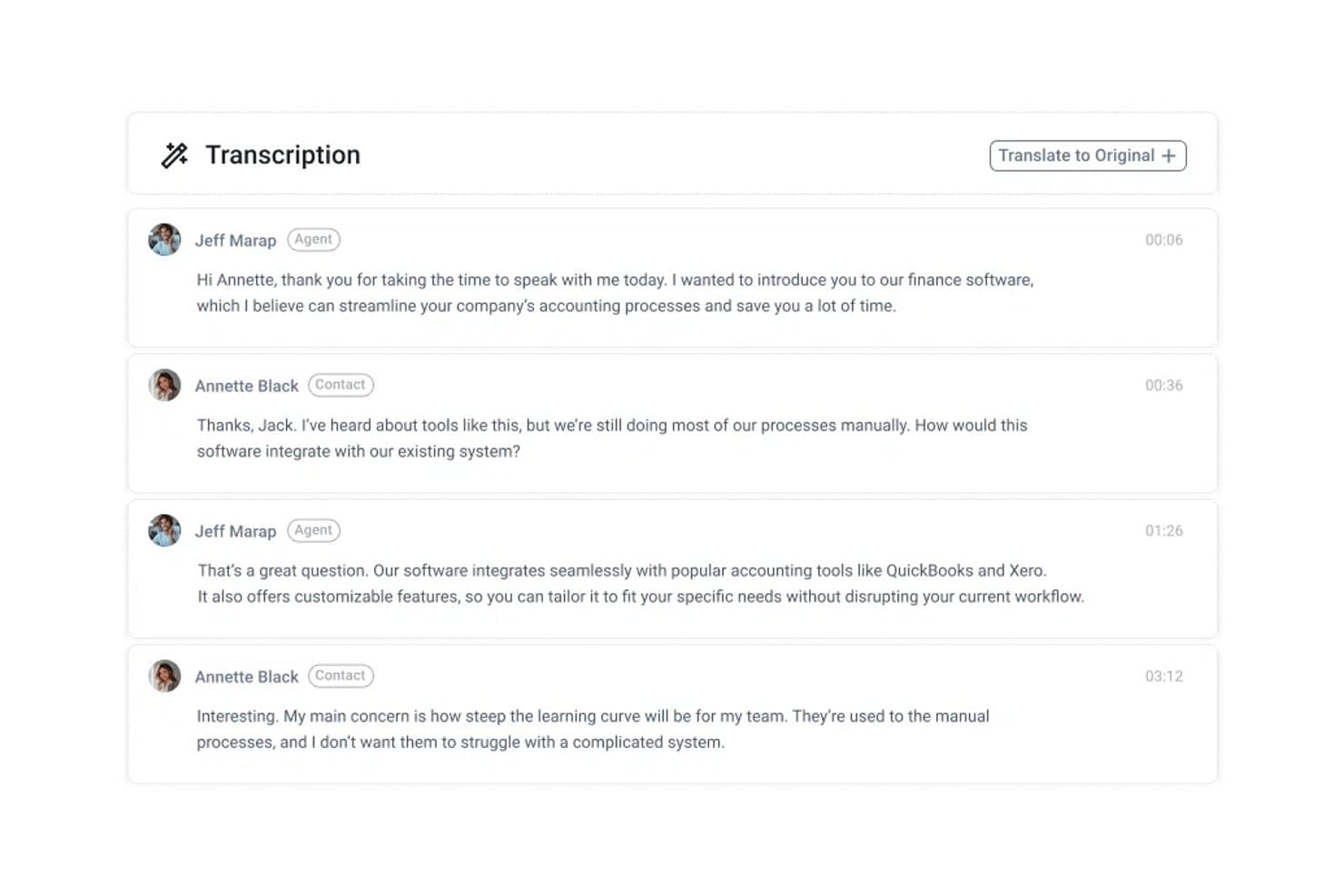
CloudTalk displays call transcriptions as timestamped chat-style dialogue. CloudTalk is a cloud-based VoIP business phone system that includes call recording, post-call transcription, and AI-powered conversation intelligence features like sentiment analysis, topic extraction, and automated call scoring.
Who Is CloudTalk Best For?
CloudTalk fits sales and support teams that already run a VoIP phone operation and want call scoring and AI insights built into the same platform.
Why I Picked CloudTalk
I picked CloudTalk as one of the best because it's the only VoIP phone system on this list that scores every call automatically using AI, without requiring a separate conversation intelligence tool. Its AI Conversation Intelligence add-on rates calls against custom templates, flags transcript highlights as scoring evidence, and rolls everything into AI Analytics where you can filter by agent, sentiment, topic, and score at once. That means a RevOps manager can pull up underperforming calls, see exactly where reps lost points, and coach from transcript evidence rather than memory.
CloudTalk Key Features
- Post-call transcript search: Search transcripts by exact word or phrase and see matching calls with highlighted previews directly in Analytics.
- Sentiment analysis: Automatically classifies each call as positive, neutral, or negative, with breakdowns visible across your entire call library.
- Smart Notes: Generates structured post-call notes with configurable sections including action items, decisions, deadlines, and customer feedback.
- CRM data sync: Pushes call records, AI call scores, extracted topics, and conversation details to connected CRMs like HubSpot, Salesforce, and Pipedrive within minutes of a call ending.
CloudTalk Integrations
CloudTalk lists 100+ integrations, including native integrations with Salesforce, HubSpot, Pipedrive, Zendesk, and Zoho. It also offers a REST API, webhooks, and Zapier for custom connectivity.
Pros and Cons
Pros:
- Reviewers value recordings for sales coaching
- Transcript-backed scoring gives coaching evidence
- Searchable transcripts surface exact call moments
Cons:
- Transcription arrives only after calls end
- Captures phone calls, not conferencing audio
Learn more about CloudTalk: Best for Salesforce-native call intelligence
- Free demo available
- Pricing upon request
Visit WebsiteCustomer Rating:4.7/5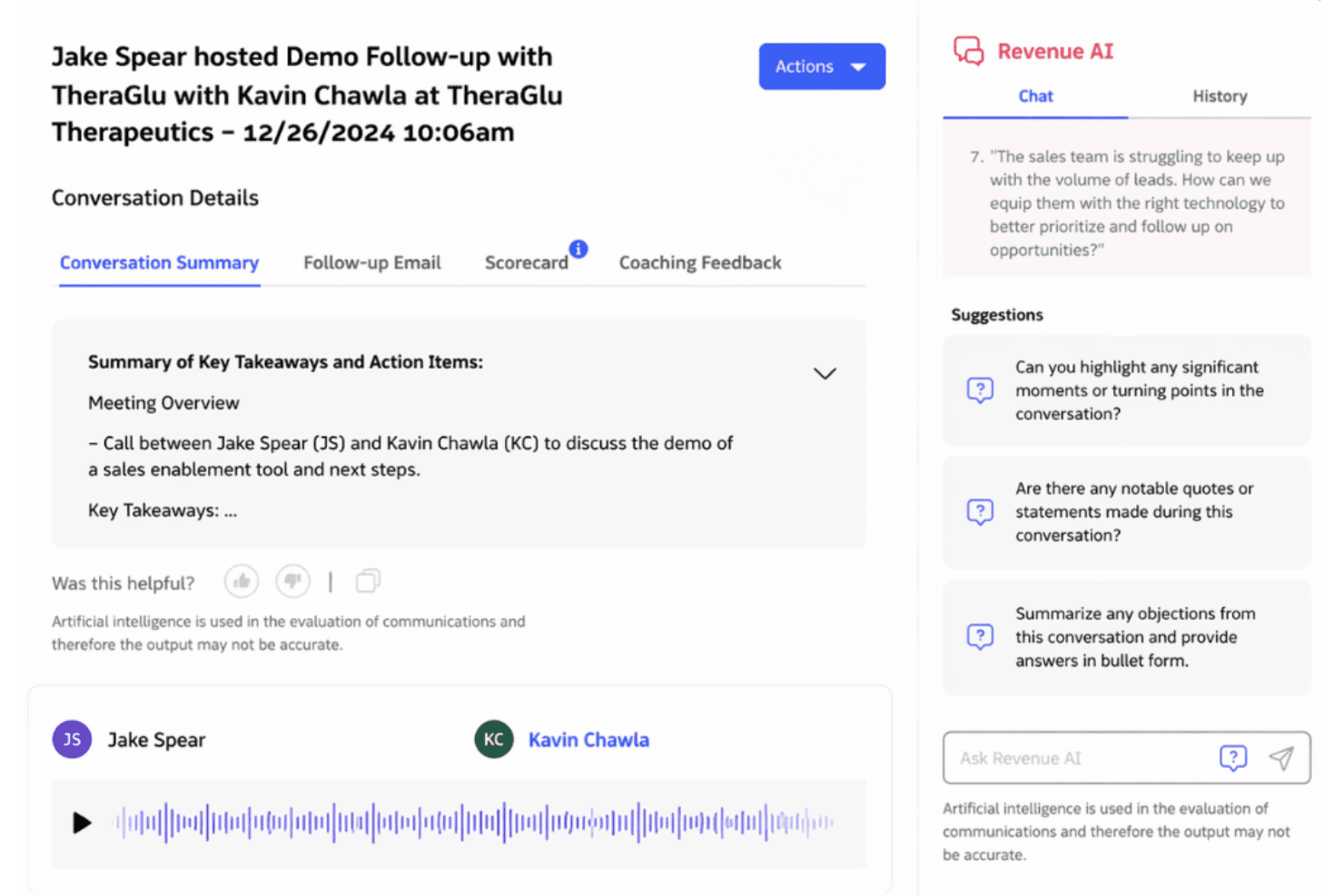
Revenue.io surfaces AI-generated call summaries and coaching insights post-demo. Revenue.io is a Salesforce-native call transcription and conversation intelligence platform that records, transcribes, and analyzes calls across phone, Zoom, Microsoft Teams, and Google Meet—with real-time in-call coaching, AI scorecards, and deal health signals built in.
Who Is Revenue.io Best For?
Revenue.io is built for mid-market and enterprise sales teams running Salesforce who need call intelligence, real-time rep coaching, and deal insights to live natively inside their CRM.
Why I Picked Revenue.io
Revenue.io earns its spot on my shortlist because of how deeply it runs inside Salesforce—not alongside it. Every transcript, AI summary, and deal health signal writes directly to Salesforce objects with no sync lag, which matters when your pipeline reporting depends on real-time data. I also like Moments™, which surfaces live battlecards and objection handlers during a call, not just after it's over.
Revenue.io Key Features
- AI scorecards: Evaluate rep calls against named sales methodologies like MEDDIC, BANT, SPICED, Sandler, and Challenger using automated scoring.
- Multilingual transcription: Automatically transcribes and analyzes calls in 23+ languages, supporting globally distributed sales teams.
- Ask Revenue™ AI: Lets you query your call and deal data conversationally to surface insights across your pipeline without manual report-building.
- Conversation Agents: AI agents that read call transcripts and automatically write structured insights directly into Salesforce fields.
Revenue.io Integrations
Revenue.io has native integrations with Salesforce, Zoom, Microsoft Teams, Google Meet, Gmail, and Microsoft Outlook.
Pros and Cons
Pros:
- Multilingual transcription for 23+ languages
- Real-time in-call coaching with Moments™
- Native Salesforce call data with zero sync lag
Cons:
- No transcription on entry-level plans
- Only works with Salesforce CRM
Learn more about Revenue.io: Best for revenue pipeline-linked call intelligence
- Not available
- Pricing upon request
Visit WebsiteCustomer Rating:4.5/5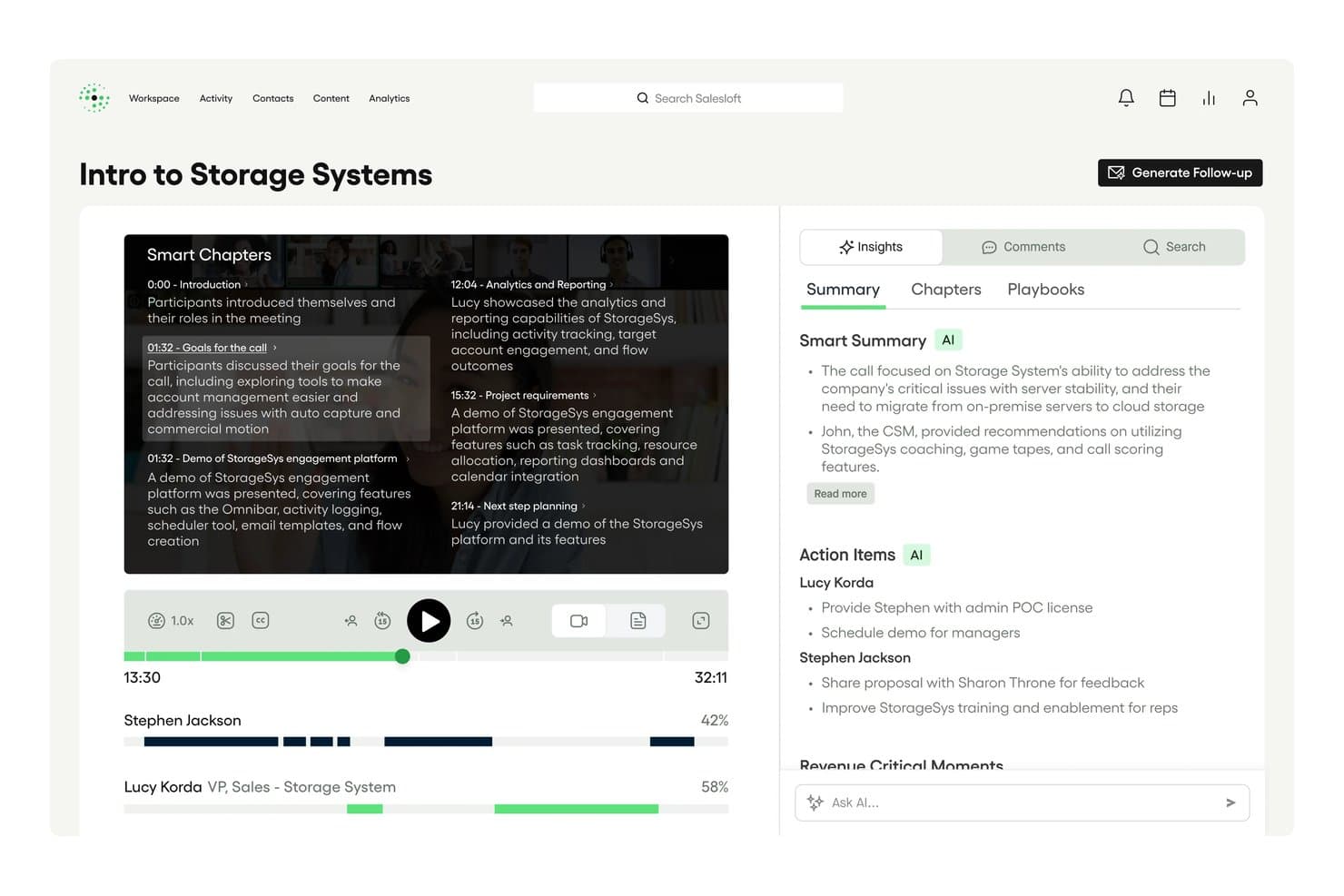
Salesloft auto-generates Smart Chapters and AI summaries from call recordings. Salesloft Conversations is a call recording and transcription product built into the Salesloft revenue platform, offering AI-generated summaries, keyword tracking, conversation scorecards, real-time battlecards, and bi-directional CRM sync with Salesforce and HubSpot.
Who Is Salesloft Best For?
Salesloft Conversations is a strong fit for enterprise revenue teams that already run—or plan to run—their full sales motion inside a single platform.
Why I Picked Salesloft
Salesloft earns its spot on my shortlist because conversation data doesn't just sit in a recording library—it flows directly into pipeline management. I love how AI-flagged Key Moments, objection signals, and deal risk indicators from recorded calls feed automatically into Salesloft Deals and Rhythm, so a rep's call with a hesitant buyer can trigger a pipeline alert without anyone manually reviewing the transcript. Real-time battlecards surfacing during live calls are another feature I think sets it apart from most transcription tools.
Salesloft Key Features
- Conversation scorecards: Evaluate recorded calls against methodology-based criteria to give managers a structured framework for rep coaching.
- Custom keyword and phrase trackers: Configure trackers for competitor names, pricing terms, or specific talk-track language to monitor how often they appear across calls.
- Smart Chapters: Automatically segment call recordings into navigable sections so reviewers can jump directly to relevant parts of a conversation.
- AI-generated follow-up emails: Draft post-call emails with extracted action items and next steps, ready to send or push into a Salesloft sequence.
Salesloft Integrations
Salesloft offers native Salesforce and HubSpot CRM sync, plus Zoom, Google Meet, Microsoft Teams, Highspot, and Seismic. It also supports custom integrations through its open API and webhooks, with Zapier available.
Pros and Cons
Pros:
- Advanced AI-generated follow-up emails
- Real-time battlecards for in-call coaching
- Conversation data flows into deal pipeline
Cons:
- Manual steps needed for Google Meet recording
- No standalone transcription-only option
Learn more about Salesloft: Best for closing the loop between calls and coaching
- Free demo available
- Pricing upon request
Visit WebsiteCustomer Rating:4.6/5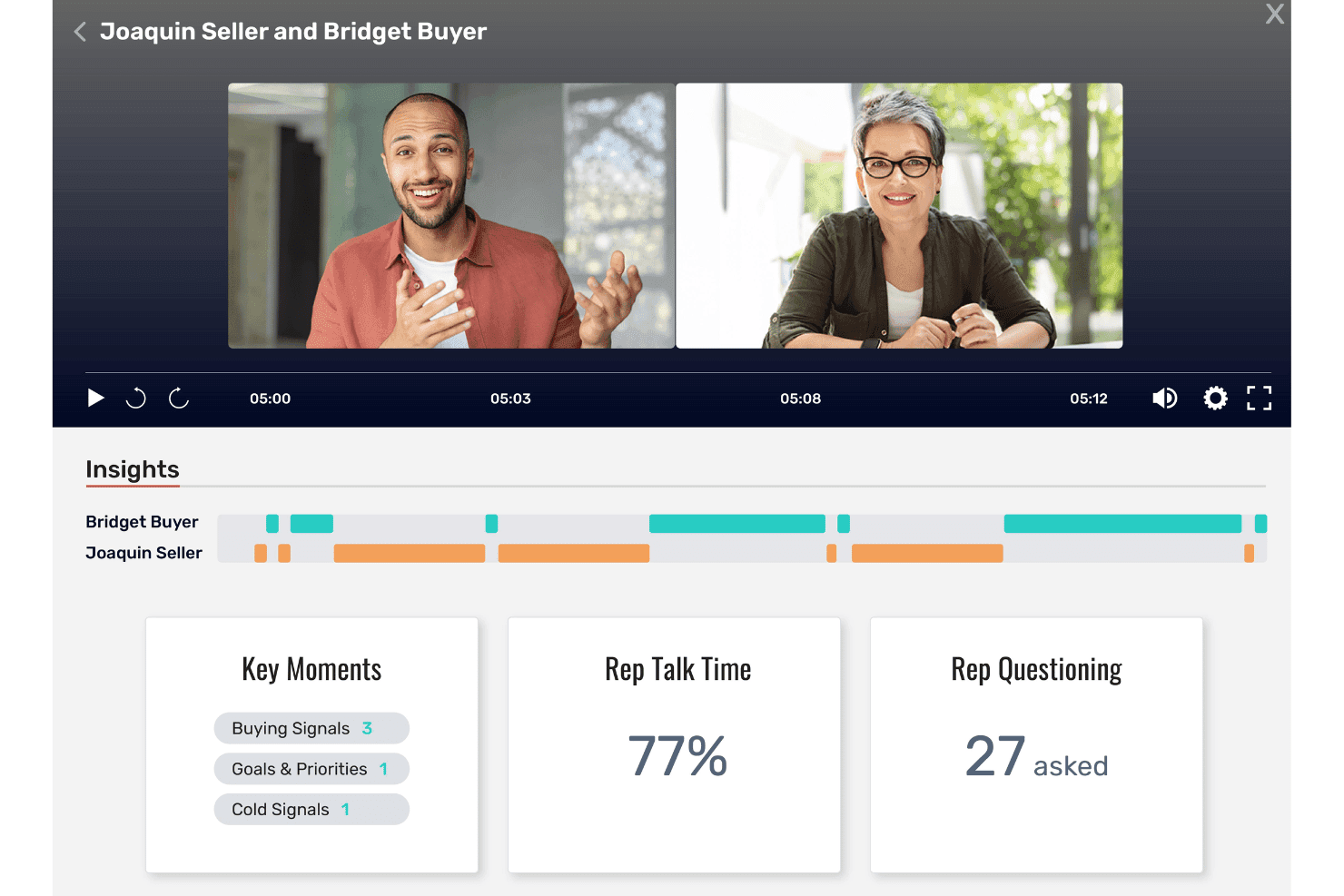
Allego surfaces call insights like talk time and buying signals. Allego is a revenue enablement platform with built-in conversation intelligence that captures and transcribes calls, surfaces AI-generated coaching signals, deal risk alerts, and methodology scorecards, and syncs insights directly into your CRM.
Who Is Allego Best For?
Allego is a strong fit for enterprise sales teams that want conversation intelligence wired directly into their coaching, training, and enablement workflows.
Why I Picked Allego
I picked Allego as one of the best because it's the only platform I've seen that takes a call insight and immediately turns it into a coaching action. When a rep's talk-to-listen ratio flags during a recorded call, Allego doesn't just log it: it can trigger a flash drill or AI role-play assignment tied to that specific gap. Manager-configurable scorecards aligned to MEDDIC, BANT, or SPICED mean coaching conversations are grounded in actual call data, not gut feeling.
Allego Key Features
- Multilingual transcription: Allego transcribes and translates calls in 99+ languages, making it usable for global sales teams operating across multiple regions.
- AI-generated follow-up emails: The platform auto-drafts post-call recap emails and action items directly from call transcripts.
- Deal health scoring: Allego surfaces deal risk signals and recommended next actions within pipeline views using AI Deal Alerts and Deal Navigator.
- CRM write-back: Call recordings, summaries, and engagement data sync to Salesforce, HubSpot, Dynamics 365, Pipedrive, and Close at the opportunity, contact, and activity levels.
Allego Integrations
Allego reports 120+ integrations, including Salesforce, HubSpot CRM, Microsoft Dynamics 365, Zoom, Microsoft Teams, Cisco Webex, Aircall, and Salesloft. It also provides an open API and an MCP API Server for custom connectivity.
Pros and Cons
Pros:
- Includes AI summaries and deal risk alerts
- Multilingual transcription supports global sales teams
- Turns call insights into immediate coaching actions
Cons:
- Platform may feel complex for small teams
- No public pricing or free trial
Learn more about Allego: Best for EU sales teams auto-filling CRM from calls
- Free demo available
- Pricing upon request
Visit WebsiteCustomer Rating:4.7/5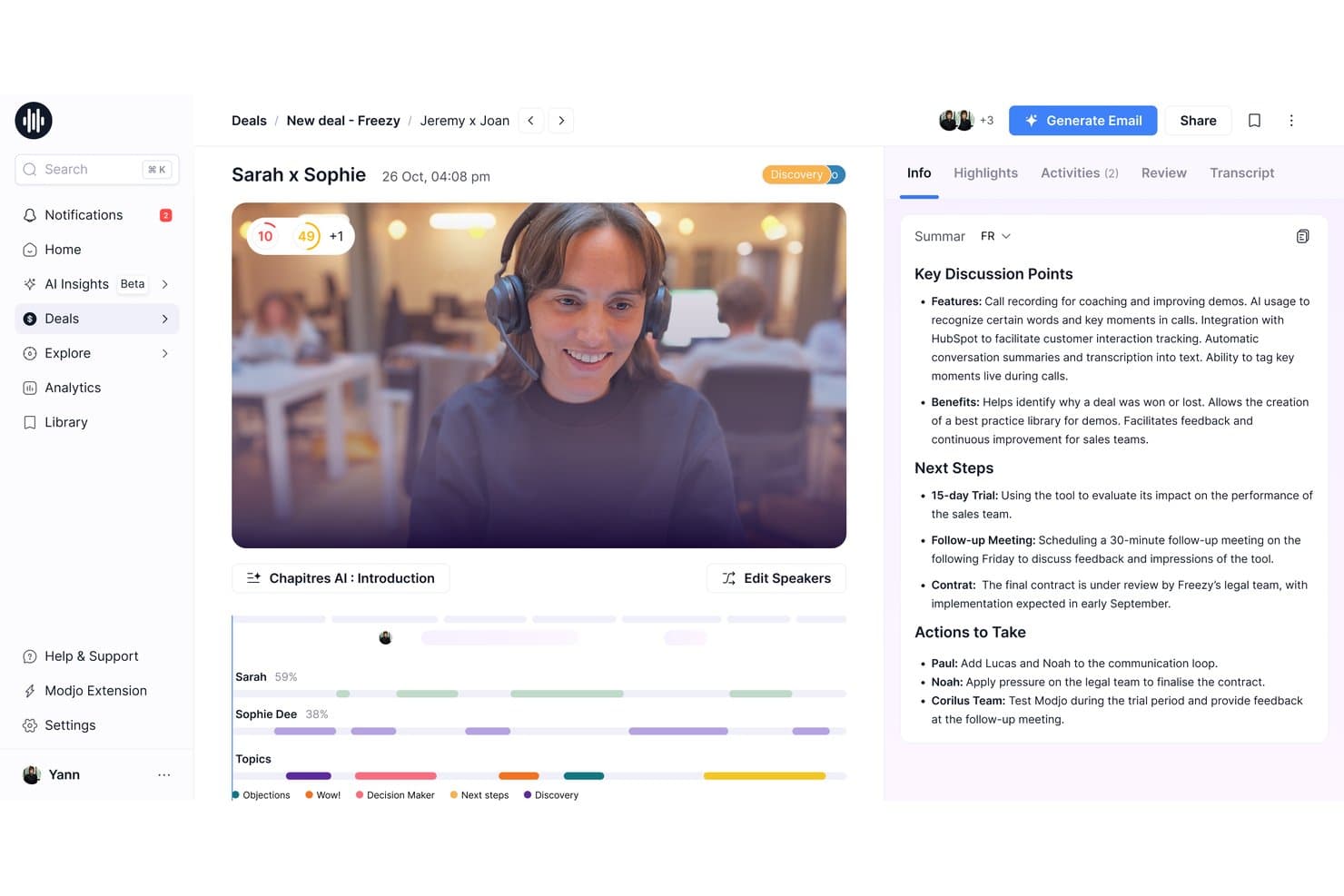
Modjo auto-generates AI call summaries with key discussion points and next steps. Modjo is a call transcription and conversation intelligence platform that records calls across video conferencing and VoIP dialers, transcribes in 100+ languages, and layers on AI-powered summaries, CRM auto-fill, deal intelligence, and coaching tools.
Who Is Modjo Best For?
Modjo is a strong fit for European B2B sales teams that need CRM data quality without relying on reps to manually log call details.
Why I Picked Modjo
I picked Modjo as one of the best because its AI CRM auto-fill is the strongest I've seen for European sales teams. After a call, Modjo automatically populates Salesforce or HubSpot fields, including custom objects and MEDDIC or SPICED qualification data, without reps touching the CRM. The Churn Detector agent also flags renewal risk directly from customer conversation signals, which is a genuinely useful layer beyond standard transcription.
Modjo Key Features
- AI call scoring: Modjo scores each call against sales methodologies like MEDDIC, BANT, or SPICED, surfacing where reps deviated from your playbook.
- Searchable call library: A centralized library lets you clip, playlist, and share call recordings across sales, marketing, and product teams.
- Talk ratio analytics: Per-participant talk time is tracked on every call, giving managers a clear view of rep listening habits across the team.
- Ask Modjo: A conversational AI interface lets you query across all recorded calls, deals, and CRM data without leaving Salesforce or HubSpot.
Modjo Integrations
Modjo documents integrations with Salesforce, HubSpot, Microsoft Teams, Zoom, Google Meet, Aircall, Ringover, CloudTalk, Slack, Gmail, and Outlook. A public API and MCP server support custom integrations, BI, and workflow routing.
Pros and Cons
Pros:
- Free listener seats for managers and leaders
- Transcribes over 100 languages accurately
- AI auto-fills CRM from call transcripts
Cons:
- CRM auto-fill only for Salesforce, HubSpot
- No real-time in-call assistance
Learn more about Modjo: 6Best for revenue teams scaling call intelligence
Gong
- Free demo available
- Pricing upon request
Visit WebsiteCustomer Rating:4.7/5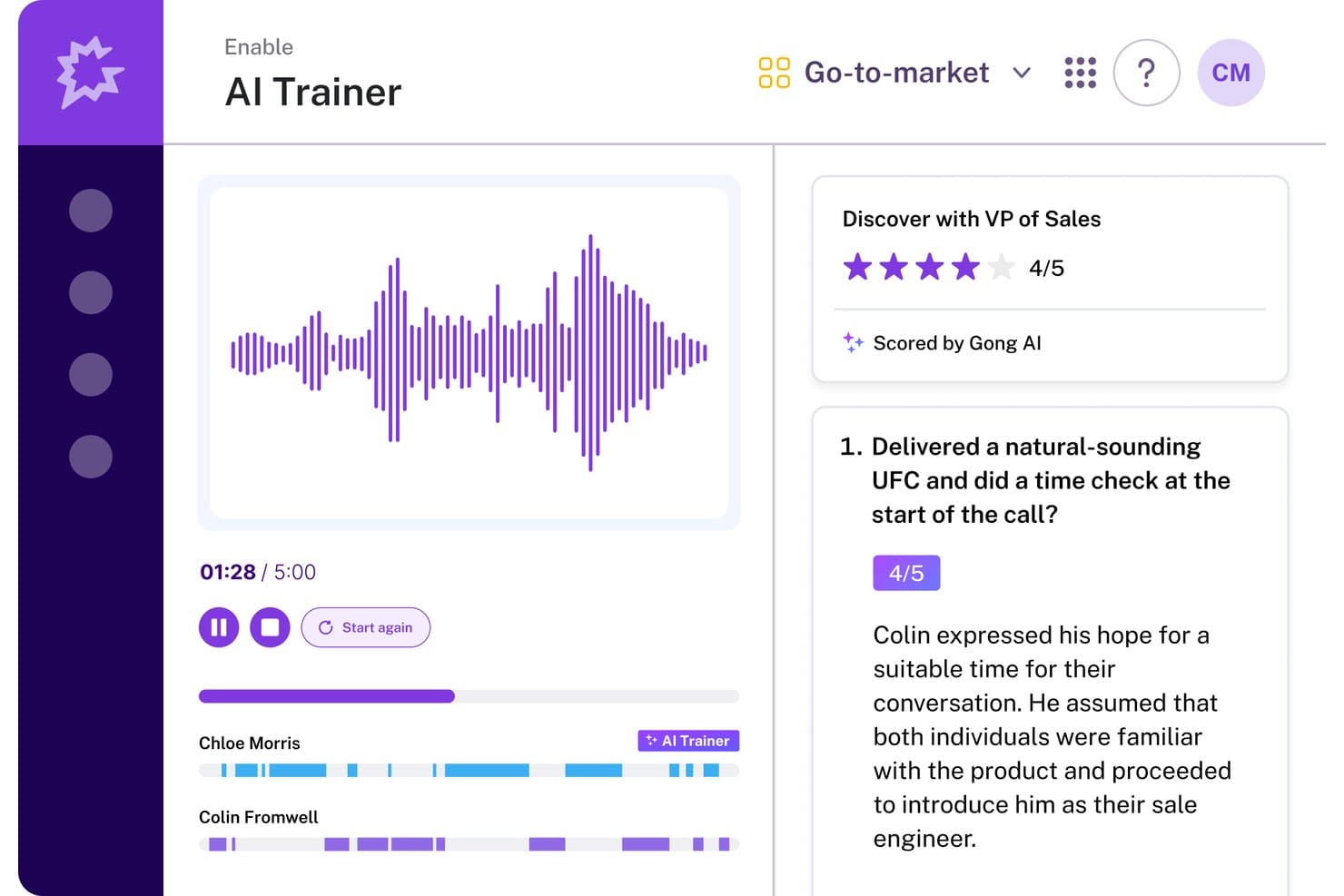
Gong's AI Trainer scores sales calls and gives feedback. Gong is a revenue intelligence platform that records, transcribes, and analyzes sales calls across Zoom, Google Meet, and Microsoft Teams, with AI-generated summaries, deal risk signals, coaching scorecards, and a searchable call library built into a single system.
Who Is Gong Best For?
Gong is built for B2B revenue teams—sales, enablement, and RevOps—that need conversation intelligence tied directly to pipeline data and coaching workflows.
Why I Picked Gong
Gong earns its spot on my shortlist because no other call transcription tool connects conversation data directly to pipeline health the way it does. I'm particularly impressed by Deal Likelihood scoring, which surfaces AI-predicted close probabilities on pipeline views based on conversation signals like buyer engagement and next-step commitments. Paired with the Ask Anything interface, where you can ask natural language questions about any recorded call, Gong gives revenue teams a way to turn transcripts into real pipeline decisions.
Gong Key Features
- Multi-speaker diarization: Gong labels each speaker by name and maps participants to CRM contacts, so you can filter playback or analysis by individual rep or buyer.
- 30+ language transcription: Calls are transcribed across more than 30 languages, with post-call translation available for multilingual and international teams.
- Custom trackers: Configure keyword and phrase trackers to monitor competitor mentions, objection patterns, or specific sales methodology adoption across every recorded call.
- Gong Enable call libraries: Build curated playlists of real calls for new hire onboarding or ongoing coaching, with AI automatically flagging coachable moments within recordings.
Gong Integrations
Gong offers native integrations with Salesforce, HubSpot, Zoom, Microsoft Teams, Google Meet, Outreach, Salesloft, Aircall, Snowflake, and Databricks. It also offers open APIs and webhooks for custom integrations.
Pros and Cons
Pros:
- CRM contact mapping for speaker identification
- Custom trackers for objection or competitor mentions
- AI-generated deal and conversation insights
Cons:
- Accuracy drops with accents or crosstalk
- No self-serve free trial available
Learn more about Gong: Best for CRM autofill from sales calls
- 14-day free trial + free plan + free demo available
- From $30/user/month (billed annually)
Visit WebsiteCustomer Rating:4.8/5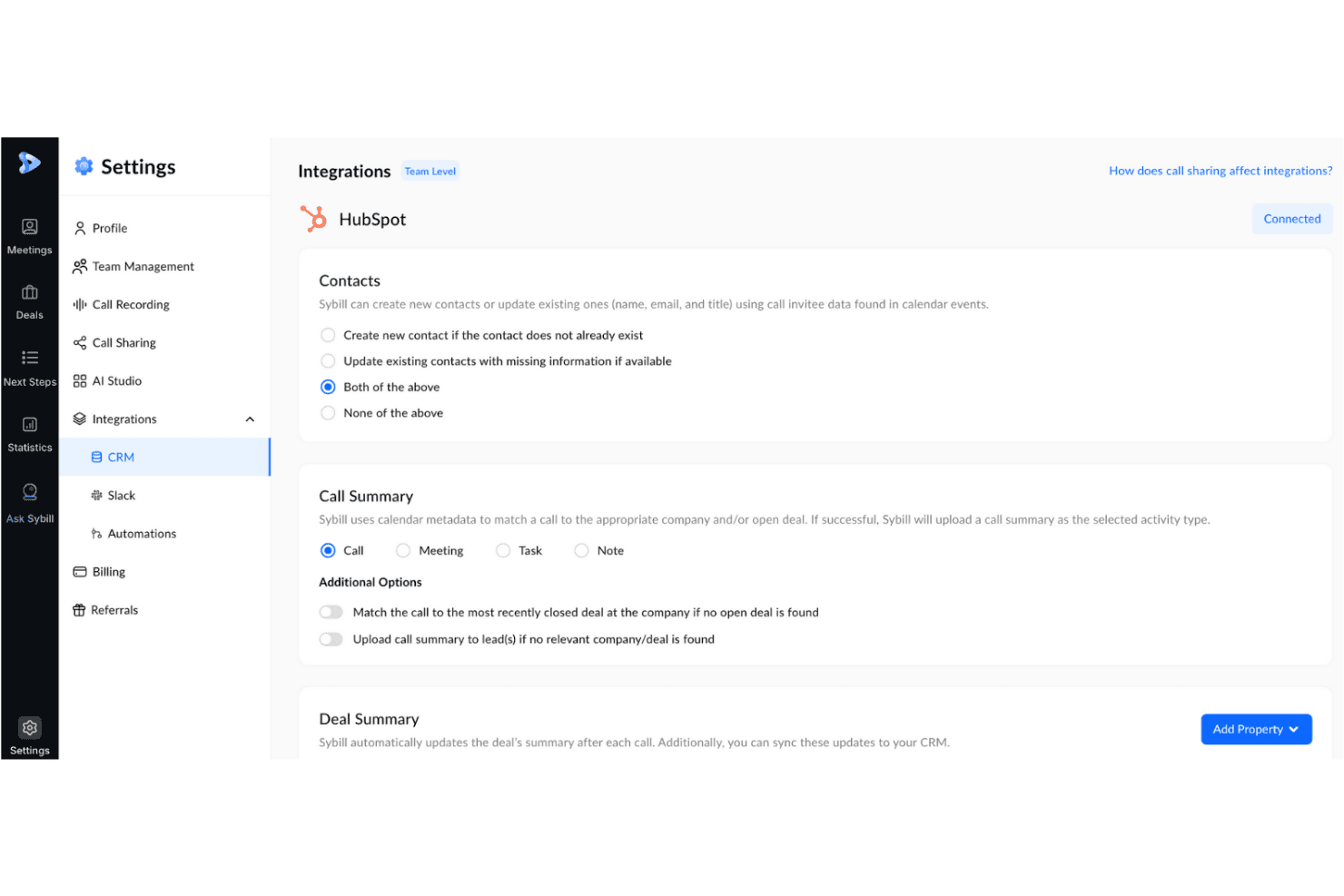
Sybill syncs call summaries and contacts directly to HubSpot CRM. Sybill is a conversation intelligence platform for B2B sales teams that records, transcribes, and analyzes sales calls, then surfaces deal insights, coaching signals, and CRM field updates from every meeting.
Who Is Sybill Best For?
Sybill is a strong fit for B2B sales teams where CRM hygiene is a persistent problem and reps spend too much time on post-call admin.
Why I Picked Sybill
Sybill earns its spot on my shortlist because CRM Autofill is genuinely one of the best implementations of post-call data capture I've seen. After every recorded call, Sybill populates CRM fields across HubSpot, Salesforce, Zoho CRM, and Dynamics 365 using custom AI prompts tuned to your team's terminology, covering MEDDPICC, BANT, deal stage, close date, and custom fields. I also like that it can backfill the last 30 deals retroactively, so you're not starting from zero on pipeline hygiene.
Sybill Key Features
- Magic Summaries: AI-generated post-call summaries that flag action items, next steps, and deal signals, delivered automatically to email, Slack, or your CRM after every meeting.
- Ask Sybill: A natural language query interface that lets you pull cross-deal intelligence—like stalled deals, objection patterns, or competitor mentions—from calls, emails, and Slack in plain English.
- Personal Coach: AI-driven call analysis that surfaces rep-level feedback on discovery, qualification, and objection handling without requiring managers to review full recordings.
- Pre-meeting briefs: AI-generated meeting prep documents that pull from calendar data, prior transcripts, CRM records, and external enrichment sources like Proxycurl and Diffbot.
Sybill Integrations
Sybill offers native integrations with Zoom, Google Meet, Microsoft Teams, HubSpot, Salesforce, Zoho CRM, and more. Business plans include API and MCP access.
Pros and Cons
Pros:
- AI-drafted follow-up emails match user style
- Unlimited call recordings on all plans
- Automatic CRM autofill after every call
Cons:
- CRM autofill limits complex data structures
- Key dialer platforms still unavailable
Learn more about Sybill: Best for call transcription in 60+ languages
- 14-day free trial + free demo available
- Pricing upon request
Visit WebsiteCustomer Rating:4.7/5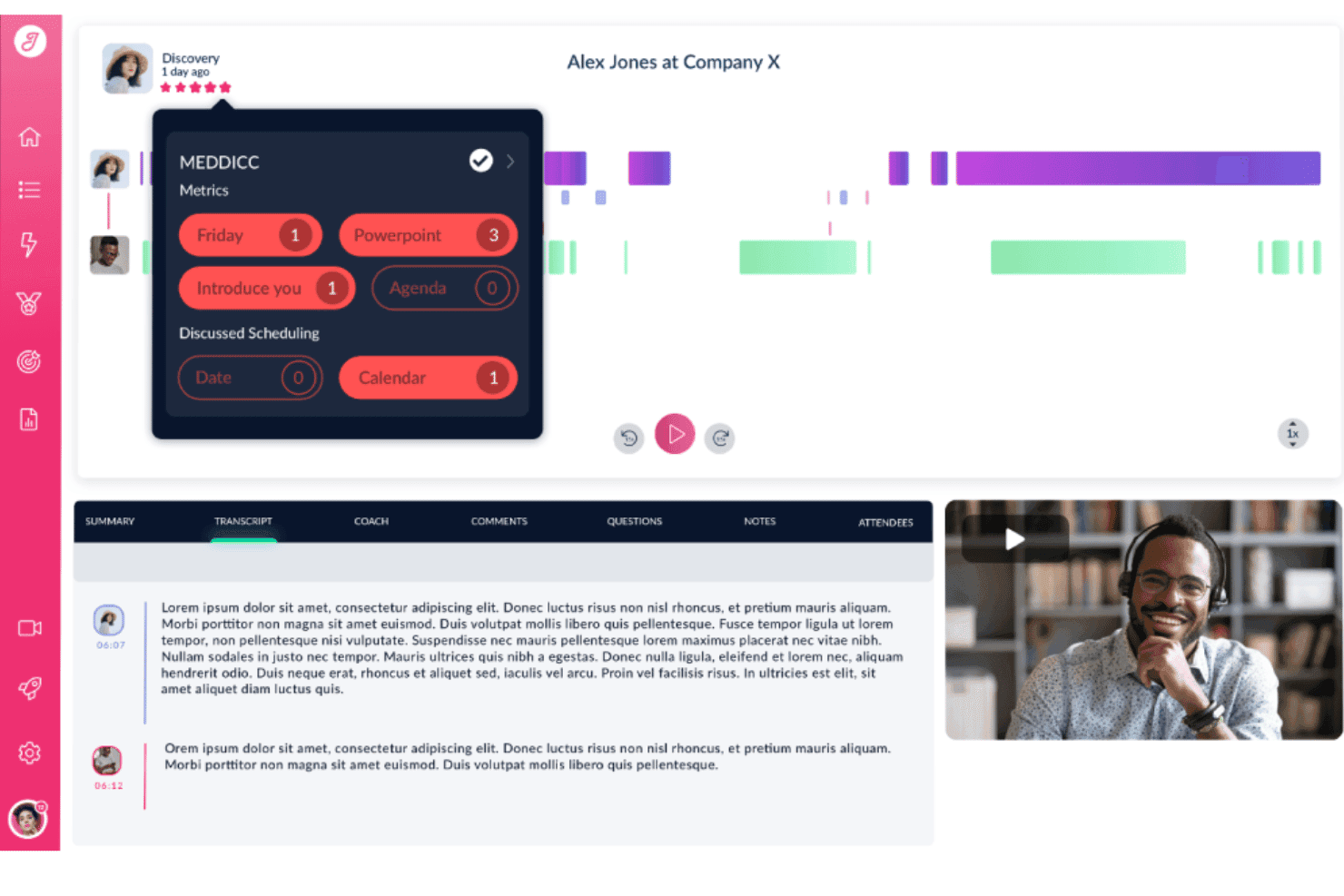
Jiminny tracks MEDDICC metrics and keywords from sales call recordings. Jiminny is a conversation intelligence platform that records, transcribes, and analyzes sales calls—with AI-generated summaries, deal risk alerts, coaching scorecards, CRM auto-filling, and a searchable call library across your entire revenue team.
Who Is Jiminny Best For?
Jiminny is a strong fit for revenue teams operating across multiple regions or languages who need call transcription, deal intelligence, and CRM automation in one platform.
Why I Picked Jiminny
Jiminny earns its spot on my shortlist because of how it handles transcription across 60+ languages, including automatic language detection that requires zero manual configuration. What I find genuinely impressive is multi-language transcription within a single call, so if a rep switches from English to Spanish mid-conversation, each section is transcribed in the language it was spoken. Pair that with AI-generated deal risk alerts that flag stalled pipelines and missed next steps, and you get a transcription tool that feeds directly into revenue decisions.
Jiminny Key Features
- AI CRM filling: Automatically extracts call and email data to populate Salesforce and HubSpot fields, with configurable append, override, or fill-empty modes and a CSV-exportable audit trail.
- Deal risk alerts: Flags stalled deals, missed next steps, dropped deal values, and overdue close dates based on conversation signals across your pipeline.
- Ask Jiminny: A plain-language AI query tool that lets you search across calls and deals for competitor mentions, common objections, or customer timelines without manually reviewing recordings.
- Coaching scorecards: Configurable scorecards tied to custom performance rubrics let managers score rep calls and track performance trends across the team.
Jiminny Integrations
Jiminny supports 25+ voice platforms, including Aircall, RingCentral, and Dialpad, plus native Salesforce, HubSpot, Zoom, Google Meet, and Microsoft Teams integrations. It also supports Pipedrive, Zoho CRM, an open API, webhooks, and Zapier.
Pros and Cons
Pros:
- Multi-language transcription within single call
- CRM fields auto-filled from call transcripts
- Transcribes 60+ languages with auto-detection
Cons:
- One-time setup fee required
- Occasional errors with technical jargon
Learn more about Jiminny: Best for all-in-one call intel and CRM sync
- 14-day free trial + free demo available
- From $19/user/month (billed annually)
Visit WebsiteCustomer Rating:4.6/5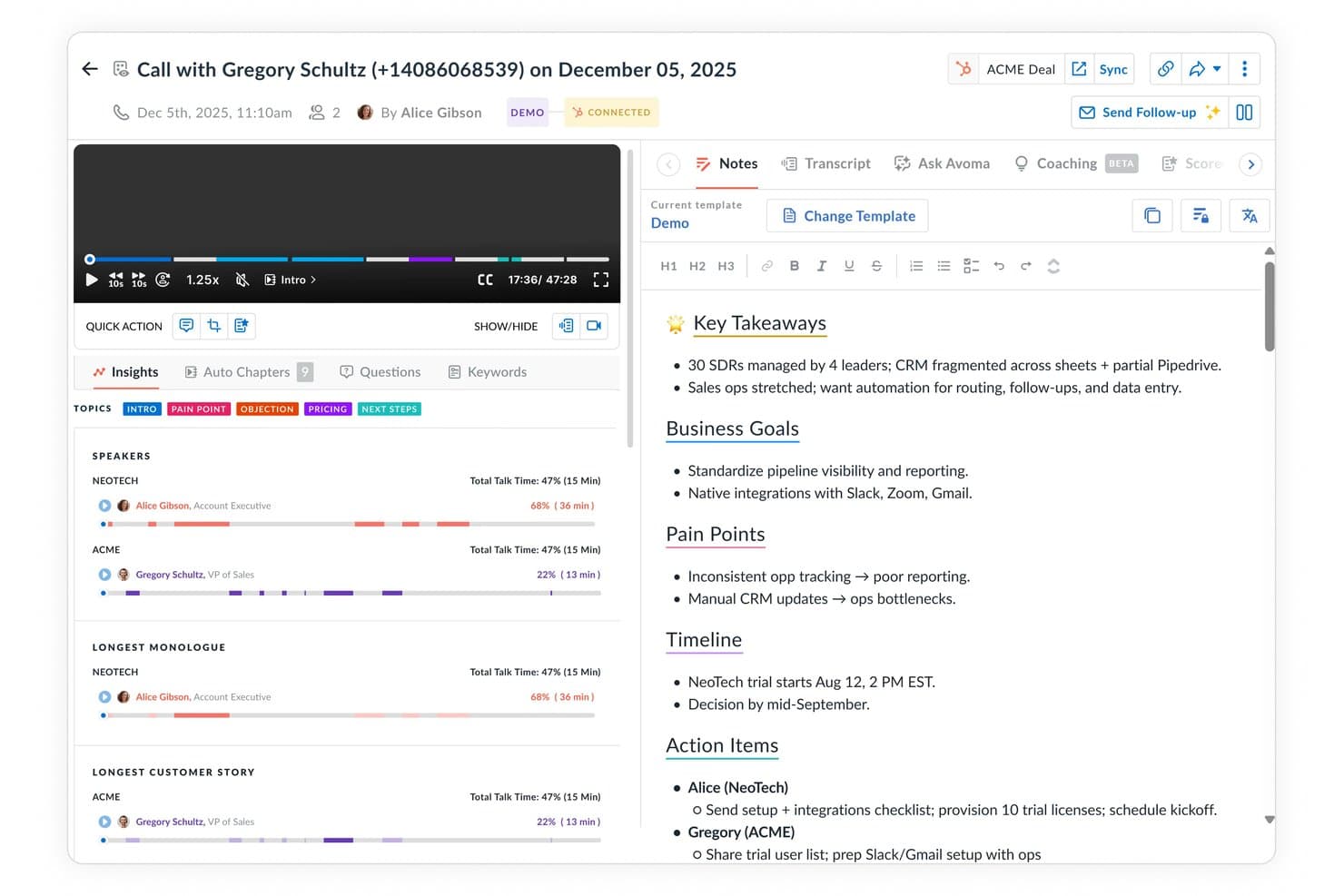
Avoma auto-generates structured call notes with key takeaways and action items. Avoma is a call transcription and conversation intelligence platform that records, transcribes, and analyzes sales calls across major conferencing tools and dialers, with built-in AI scoring, deal tracking, and bi-directional CRM sync.
Who Is Avoma Best For?
Avoma fits revenue teams that want call intelligence, CRM data entry, and pipeline visibility in one place without paying Gong-level prices.
Why I Picked Avoma
I've included Avoma in my top picks because it pulls call transcription, conversation intelligence, and CRM sync into one platform instead of making you stitch tools together. What I find genuinely useful is the bi-directional CRM sync: it auto-populates MEDDIC and BANT fields directly from conversation data, so reps never manually update deal records after a call. The "Ask Avoma" copilot also lets me query the entire call archive conversationally, pulling cited answers from real transcripts across hundreds of past deals.
Avoma Key Features
- Live Answer Assistant: Surfaces real-time, contextually triggered battlecards and objection-handling prompts to reps during an active call.
- Smart Trackers: NLP-based topic and keyword trackers that flag competitor mentions, pricing discussions, and custom-defined conversation moments across calls.
- AI-generated follow-up emails: Automatically drafts post-call recap emails with action items pulled directly from the call transcript.
- Multi-speaker diarization: Identifies and labels each speaker's dialogue individually, with per-speaker analytics covering talk-time ratios, filler words, and monologue length.
Avoma Integrations
Avoma offers native integrations with Zoom, Google Meet, Microsoft Teams, Webex, Aircall, Dialpad, RingCentral, Salesforce, HubSpot, and Pipedrive. It also supports webhooks, an open API, and Zapier.
Pros and Cons
Pros:
- Unlimited free collaborator seats for viewers
- Real-time AI prompts during live calls
- Bi-directional CRM sync auto-populates sales fields
Cons:
- Recording bot may miss or drop meetings
- Conversation intelligence features require paid add-on
Learn more about Avoma: Best for AI deal intelligence on call data
- Free plan + free demo available
- From $10/user/month (billed annually)
Visit WebsiteCustomer Rating:4.3/5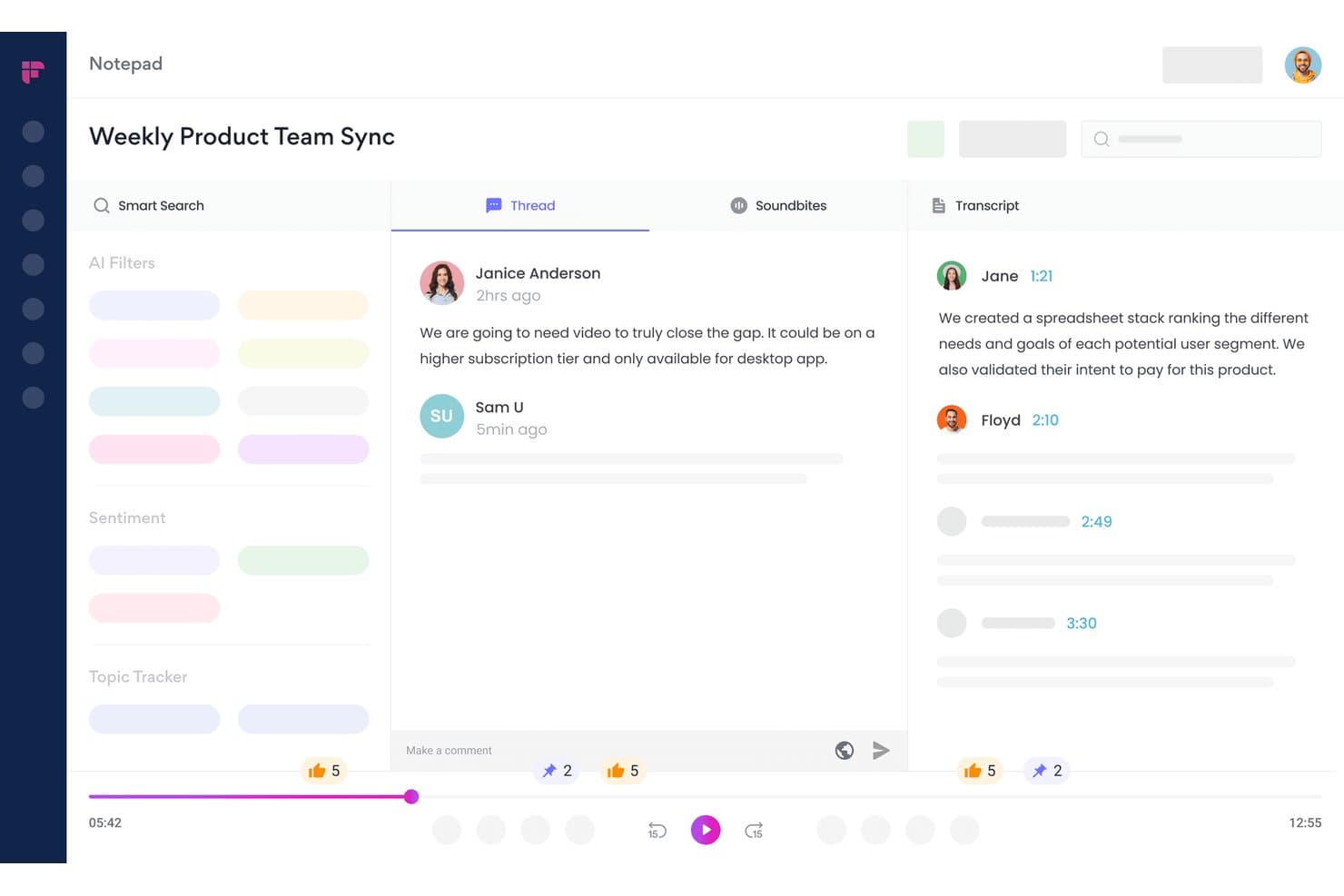
Fireflies.ai lets users review transcripts, threads, and soundbites in one view. Fireflies.ai is an AI meeting transcription and conversation intelligence platform that records calls across 10+ conferencing apps and dialers, auto-generates summaries and action items, and surfaces deal health signals, topic trackers, and rep performance analytics.
Who Is Fireflies.ai Best For?
Fireflies.ai is a strong fit for revenue teams that run high-volume sales calls and need deal health signals, coaching data, and CRM-synced call intelligence in one place.
Why I Picked Fireflies.ai
I picked Fireflies.ai as one of the best because its CRM Deal Intelligence layer turns call transcripts into live pipeline signals. Where most transcription tools stop at summaries, Fireflies surfaces deal health status (On Track, At Risk, Slipping) and an AI Close Probability score directly inside your HubSpot or Salesforce deal view. I also rely on its Topic Trackers to flag competitor mentions, objections, and pricing signals across every recorded call automatically.
Fireflies.ai Key Features
- Live Assist: Delivers real-time in-call coaching prompts, objection handling suggestions, and pre-meeting prospect briefings during active calls via the desktop app or Chrome extension.
- AskFred AI agent: Lets you query your entire call archive in natural language to pull answers, themes, or specifics from past meetings without manual transcript review.
- Topic trackers: User-configurable keyword monitors that automatically flag competitor mentions, pricing discussions, and custom signals across every recorded call.
- Soundbites: Lets you clip, label, and share specific moments from call recordings for rep coaching, onboarding, or async team review.
Fireflies.ai Integrations
Fireflies.ai offers 100+ native integrations, including Salesforce, HubSpot, Zoom, Google Meet, Microsoft Teams, Aircall, RingCentral, Slack, and Notion. An open API supports custom integrations and audio-processing pipelines.
Pros and Cons
Pros:
- Live Assist gives real-time sales coaching
- AskFred AI enables natural-language call queries
- CRM deal intelligence inside Salesforce and HubSpot
Cons:
- Speaker mislabeling happens in fast conversations
- CRM insights limited to Salesforce and HubSpot
Learn more about Fireflies.ai:
Diğer Çağrı Transkripsiyonu Yazılımları
Kısa listeme girmeyen ancak yine de göz atmaya değer bazı ek çağrı transkripsiyonu yazılımı seçenekleri şunlardır:
- 11RingCentralBest for UCaaS teams needing built-in transcription
- 12ChorusBest for pipeline intelligence tied to call data
- 13Clari CopilotBest for linking call signals to pipeline forecasting
- 14DialpadBest for real-time in-call coaching from transcripts
- 15JustCallBest for outbound teams coaching reps mid-call
- 16Observe.AIBest for contact center call QA at scale
- 17FathomBest for free unlimited call transcription
- 18GrainBest for bot-free call capture and clip sharing
- 19HubSpot Sales HubBest for CRM-native call transcription and AI summaries
- 20ReadAIBest for AI search across calls, email, and Slack
How I Evaluate Call Transcription Software
I split my evaluation into baseline criteria every tool must meet and differentiating factors that separate the ones worth recommending from the rest.
Core Functionality (Table Stakes for This List)
When I'm selecting tools for my list, I rank each one on a scale from 0 (does not offer the functionality) to 5 (excels in this area) for each core functionality listed below. I then calculate the tool's total score into a percentage, using 65% as a benchmark to help assess its overall fit for the list.
- Call recording and capture: I check whether the tool automatically records across major web conferencing platforms, VoIP dialers, and phone systems without manual intervention.
- Automated transcription: Accuracy matters, so I evaluate transcript quality across languages, looking for timestamps, punctuation, and speaker-separated output that's usable without heavy editing.
- Multi-speaker diarization: Sales calls involve multiple voices. I look for reliable speaker identification that maps dialogue to named participants, not just "Speaker 1" and "Speaker 2."
- Searchable transcript library: Teams need to find past conversations fast. I evaluate whether the library supports filters like rep, account, date, and topic—not just basic keyword matching.
- AI conversation insights: Beyond raw transcripts, I look for AI that surfaces deal risk signals, competitor mentions, action items, and coaching cues your managers can act on right away.
- CRM and workflow integrations: I check for native, bi-directional sync with CRMs like Salesforce and HubSpot, plus connections to dialers, enablement tools, and scheduling platforms your GTM team already uses.
Once I have a list of tools that meet the criteria, I consider what sets each platform apart.
Differentiating Factors (What Sets Vendors Apart)
Here's how I compare and contrast different vendors:
Standout Features
I look for live call assist that delivers battle cards and objection prompts mid-conversation, not after. A rep facing a competitor mention in a discovery call needs guidance in that moment. Deal intelligence scoring is equally important—I evaluate whether the tool auto-scores deal health from conversation signals like next-step commitments and stakeholder involvement, then surfaces those scores on pipeline views. I also check for methodology-based scorecards (MEDDIC, BANT, SPICED) managers can customize to match their coaching rubrics.
Beyond Features
I evaluate how deeply each tool syncs with your revenue tech stack beyond basic call logging. A platform that writes back to Salesforce or HubSpot at the opportunity and contact level saves RevOps hours of manual field updates. Coaching workflows matter too—I look for built-in call scoring, comment threads, and curated playlists managers can pull into weekly 1:1s. I also check pricing transparency, specifically whether non-recording users like managers or CS leads need paid seats, since that cost scales fast across cross-functional teams.
Çağrı Transkripsiyonu Yazılımı Nasıl Seçilir?
Hangi çağrı transkripsiyonu yazılımının RevOps iş akışlarınıza en iyi şekilde uyduğuna karar verirken platformun gerçek veri akışını ve koçluk gereksinimlerini nasıl ele aldığına odaklanın:
| Önceliğiniz... | Şunları arayın... |
|---|---|
| Önceliğiniz...CRM veri doğruluğu | Şunları arayın...Ana CRM'inizle doğrudan, çift yönlü senkronizasyon |
| Önceliğiniz...Doğru, birden fazla konuşmacılı transkripsiyon | Şunları arayın...Hem canlı hem de kaydedilmiş çağrılarda ayrıntılı konuşmacı ayrıştırma |
| Önceliğiniz...Yapay zekâ destekli anlaşma içgörüleri | Şunları arayın...Risk ve fırsat sinyallerinin otomatik olarak algılanması ve sunulması |
| Önceliğiniz...Koçluk entegrasyonu | Şunları arayın...Çağrı puanlama ve oynatma listesi paylaşımı için platform içi araçlar |
| Önceliğiniz...Çok uluslu ekipler | Şunları arayın...Birden fazla transkripsiyon dili için yerel destek |
Kısa Listenizi Nasıl Değerlendirmelisiniz?
- CRM'ye geri yazma kapsamını test edin: En az iki yakın tarihli anlaşmada fırsat, kişi ve etkinlik alanlarının otomatik olarak doldurulduğunu doğrulamak için canlı bir transkripsiyon çalıştırın.
- Konuşmacı ayrımını doğrulayın: Birden fazla kişinin yer aldığı bir kayıt yükleyin ve transkripsiyonun en az üç katılımcı için konuşmacı ayrıştırma doğruluğunu karşılaştırın.
- Canlı yapay zekâ içgörülerini kontrol edin: Bir çağrı planlayın ve eylem maddelerinin, rakip sözlerinin ve anlaşma risklerinin gerçek zamanlı olarak ve çağrı kapanış raporlarında ortaya çıkıp çıkmadığını belgeleyin.
- Koçluk çıktısı isteyin: Yakın tarihli gerçek bir ortamdan çağrı yorumlarını ve puanlarını gösteren örnek bir oynatma listesi veya koçluk panosu dışa aktarımını görmeyi talep edin.
- Taviz—esneklik ve entegrasyon: Bağımsız olarak çalışan sınıfının en iyisi transkripsiyon araçlarını mı, yoksa daha derin iş akışı bağlantıları karşılığında bir miktar özelleştirmeden vazgeçen entegre paketleri mi istediğinize karar verin.
Çağrı Transkripsiyonu Yazılımı Nedir?
Arama transkripsiyon yazılımı, telefon veya video aramalarındaki konuşmaları otomatik olarak aranabilir metin dökümlerine dönüştürür. Bu yazılım, gelir ekiplerinin aramaların ayrıntılı kayıtlarını tutmasına yardımcı olarak kritik içgörüleri gözden geçirmeyi, eylem maddelerini takip etmeyi ve CRM verilerinin kalitesini iyileştirmeyi kolaylaştırır. Doğru ve konuşmacılara göre ayrıştırılmış dökümler sunan bu araçlar; satış, müşteri başarısı ve destek operasyonlarında koçluğu, anlaşma analizini ve uyumluluğu destekler.
Arama Transkripsiyon Yazılımının Özellikleri
Arama transkripsiyon yazılımı seçerken aşağıdaki temel özelliklere dikkat edin:
- Arama kaydı ve yakalama: Web konferansı araçları, VoIP sistemleri ve geleneksel telefon hatları gibi çeşitli platformlardaki aramaların sesini otomatik olarak kaydeder. Bu, ek manuel adımlara gerek kalmadan ekibinize her görüşme için güvenilir bir ses kaynağı sağlar.
- Otomatik transkripsiyon: Kayıtlı aramalardaki konuşmaları yazılı metne dönüştürür. Belgeleri ve takip işlemlerini kolaylaştırmak için doğru noktalama işaretleri, zaman damgaları ve konuşmacı atıfları içeren dökümler oluşturur.
- Çok konuşmacılı ayrıştırma: Bir görüşme içindeki bireysel sesleri tanımlar ve birbirinden ayırır. Bu özellik, diyaloğu belirli katılımcılarla eşleştirerek birden fazla kişinin yer aldığı aramaları incelerken netliği artırır.
- Aranabilir döküm kitaplığı: Tüm dökümleri merkezi ve düzenli bir konumda saklar. Temsilciye, hesaba, tarihe veya konuya göre arama yapmanıza olanak tanıyarak geçmişteki herhangi bir görüşmeyi gerektiğinde hızlıca bulmanızı ve incelemenizi sağlar.
- Konuşmacı etiketleme: Her diyalog satırını doğru konuşmacının adı veya tanımlayıcısıyla otomatik olarak etiketler. Dökümlerdeki karışıklığı azaltır ve aramayı inceleyen herkes için bağlamı iyileştirir.
- Oynatma ve gezinme kontrolleri: Dökümün yanında ses oynatma araçları sunar. Ekibinizin ayrıntılı inceleme için aramanın belirli anlarını oynatmasına, duraklatmasına, geri sarmasına veya bu anlara atlamasına olanak tanır.
- Dışa aktarma ve paylaşma seçenekleri: Dökümleri çeşitli biçimlerde dışa aktarmanıza ve ekip üyeleriyle veya harici iş ortaklarıyla paylaşmanıza olanak tanır. Dökümlerinize ihtiyaç duyduğunuz yerde ve zamanda erişebilmenizi sağlar.
- İş akışı araçlarıyla entegrasyonlar: CRM, proje yönetimi platformları veya belge depolama sistemleriyle bağlantı kurar. Dökümleri ve arama verilerini ekibinizin hâlihazırda kullandığı platformlara otomatik olarak aktarır.
- Veri gizliliği ve uyumluluk ayarları: Kuruluşunuzun güvenlik gereksinimlerine göre veri depolama, saklama ve erişim için özelleştirilebilir kontroller sunar. İşletmenizin sektörel düzenlemelere uymasına ve hassas bilgileri korumasına yardımcı olur.
Arama Transkripsiyon Yazılımındaki Yaygın AI Özellikleri
Yukarıda listelenen standart arama transkripsiyon yazılımı özelliklerinin yanı sıra, bu çözümlerin çoğu aşağıdaki özelliklerle AI kullanmaya başlıyor:
- AI tarafından oluşturulan arama özetleri: Her aramanın temel tartışma noktalarını, kararlarını ve sonraki adımlarını öne çıkaran kısa ve yapılandırılmış özetler oluşturur. Bu, ekibinizin tam dökümleri okumadan görüşmeleri hızlıca gözden geçirmesine yardımcı olur.
- Gerçek zamanlı eylem maddesi çıkarma: Aramalar sırasında görüşülen eylem maddelerini tanımlar ve öne çıkarır; bunları katılımcılara atar veya bağlantılı iş akışı araçlarına kaydeder. Manuel not alma ihtiyacını ve takip hatalarını azaltır.
- Duygu analizi: Görüşme boyunca konuşmacıların duygusal tonunu algılamak için AI kullanır; hayal kırıklığı, heyecan veya tereddüt anlarını işaretler. Bu, yöneticilere müşterilerin veya potansiyel müşterilerin etkileşimi hakkında daha derin içgörüler sunar.
- Anlaşma riski ve fırsat tespiti: Arama içeriğini, ilerlemeyen sonraki adımlar veya rakiplerden bahsedilmesi gibi anlaşma riski sinyalleri açısından analiz eder ve olası fırsatları işaretler. Böylece satış ekiplerinin takip işlemlerine öncelik vermesine yardımcı olur.
- Otomatik koçluk önerileri: Arama dökümlerini inceler ve temsilcilere önerilen konuşma-dinleme oranları veya sorulmamış keşif soruları gibi AI destekli geri bildirimler ya da koçluk ipuçları sunarak becerilerin sürekli geliştirilmesini destekler.
Arama Transkripsiyon Yazılımının Faydaları
Arama transkripsiyon yazılımını uygulamak, ekibiniz ve işletmeniz için çeşitli faydalar sağlar. Yararlanmayı bekleyebileceğiniz faydalardan bazıları şunlardır:
- Doğru çağrı dokümantasyonu: Çağrıları otomatik olarak yakalayıp aranabilir ve konuşmacılara göre ayrılmış dökümlere dönüştürerek manuel not alma ve takip hatalarını azaltın.
- Geliştirilmiş koçluk ve eğitim: Konuşmaları incelemek, öğretici anları vurgulamak ve beceri gelişimini desteklemek için aranabilir döküm kitaplıklarını ve yerleşik çağrı puanlama araçlarını kullanın.
- Konuşmalara daha hızlı erişim: Büyük miktarda veriyi incelemek zorunda kalmadan geçmiş görüşmeleri hızla bulmak için temsilci, hesap, tarih veya konu filtrelerinden yararlanın.
- Geliştirilmiş CRM veri kalitesi: Dökümleri ve çağrı özetlerini otomatik olarak eşitlemek için CRM'inizle entegre olun; fırsat ve kişi kayıtlarını güncel tutun.
- Eyleme dönük yapay zekâ içgörüleri: Ekibinizin en önemli konulara odaklanmasına yardımcı olmak için çağrılar sırasında ve sonrasında gerçek zamanlı görevleri, anlaşma risklerini ve rakiplerden bahsedilen noktaları ortaya çıkarın.
- Güvenli uyumluluk ve gizlilik yönetimi: Çağrı kayıtlarını kurum içi ve yasal standartlarla uyumlu hâle getirmek için yerleşik veri gizliliği kontrollerine ve özelleştirilebilir saklama politikalarına güvenin.
- Ekipler arası sorunsuz iş birliği: Dökümleri farklı biçimlerde dışa aktarın ve paylaşın; böylece çağrı verileri gerektiğinde satış, müşteri başarısı ve yönetim ekiplerinin erişimine sunulsun.
Çağrı Dökümü Yazılımının Maliyetleri ve Fiyatlandırması
Çağrı dökümü yazılımı seçerken mevcut çeşitli fiyatlandırma modellerini ve planları anlamak gerekir. Maliyetler özelliklere, ekip büyüklüğüne, eklentilere ve diğer etkenlere göre değişir. Aşağıdaki tablo, çağrı dökümü yazılımı çözümlerinde yaygın planları, bunların ortalama fiyatlarını ve genellikle içerdikleri özellikleri özetlemektedir:
Çağrı Dökümü Yazılımı İçin Plan Karşılaştırma Tablosu
| Plan Türü | Ortalama Fiyat | Yaygın Özellikler |
|---|---|---|
| Plan TürüÜcretsiz Plan | Ortalama Fiyat$0 | Yaygın ÖzelliklerTemel çağrı kaydı, sınırlı sayıda çağrı için otomatik döküm ve basit arama. |
| Plan TürüKişisel Plan | Ortalama Fiyat$5-$25/kullanıcı/ay | Yaygın ÖzelliklerSınırsız döküm, aranabilir döküm kitaplığı, oynatma denetimleri ve tek kullanıcı desteği. |
| Plan Türüİşletme Planı | Ortalama Fiyat$30-$60/kullanıcı/ay | Yaygın ÖzelliklerÇok kullanıcılı erişim, CRM entegrasyonları, gelişmiş konuşmacı ayrıştırma, dışa aktarma seçenekleri ve veri gizliliği kontrolleri. |
| Plan TürüKurumsal Plan | Ortalama Fiyat$70-$120/kullanıcı/ay | Yaygın ÖzelliklerÖzel entegrasyonlar, canlı yapay zekâ içgörüleri, koçluk iş akışları, uyumluluk özellikleri ve özel destek. |
Çağrı Transkripsiyon Yazılımı SSS
Çağrı transkripsiyon yazılımı hakkında sık sorulan soruların bazı yanıtları:
Otomatik çağrı transkripsiyonları ne kadar doğrudur?
Doğruluk yazılıma, ses kalitesine ve konuşmacı sayısına bağlıdır. En iyi çağrı transkripsiyonu yazılımlarının çoğu, konuşmacıların net olduğu temiz ses kayıtlarında %85’in üzerinde doğruluk sunar. Arka plan gürültüsü, üst üste konuşma ve düşük kaliteli bağlantılar doğruluğu azaltabilir; bu nedenle bir hizmet sağlayıcıya karar vermeden önce gerçek ekip kayıtlarını yüklemenizi öneririm.
Çağrı transkripsiyon yazılımı CRM'imle entegre olabilir mi?
Evet, birçok çağrı transkripsiyonu çözümü Salesforce ve HubSpot gibi CRM’lerle doğrudan entegrasyonlar sunar. Transkriptleri, çağrıları ve anlaşma notlarını manuel işlem gerektirmeden doğru kişi ve fırsat kayıtlarıyla otomatik olarak senkronize edebilen araçları tercih edin. Bir çözümü kullanıma sunmadan önce CRM’inizle çift yönlü senkronizasyonu test etmeye değer.
Konuşmacı tanımlama tüm çağrı transkripsiyonu platformlarında mevcut mu?
Hayır, her platform çok konuşmacılı konuşmacı ayrıştırması veya doğru konuşmacı etiketleme özelliği sunmaz. Özellikle birden fazla katılımcının bulunduğu satış ya da destek çağrıları yürütüyorsanız, konuşmacıları adlarına veya rollerine göre etiketleyen yazılımları tercih etmeniz gerektiğini düşünüyorum. Sesleri ne kadar iyi ayırdığını görmek için yazılımı en az üç katılımcının bulunduğu çağrılarla test edin.
Bu araçlar hassas çağrı verilerini nasıl korur?
Çağrı transkripsiyonu platformlarının çoğu, yapılandırılabilir saklama politikaları, kullanıcı erişim denetimleri ve şifreleme gibi yerleşik veri gizliliği özellikleri sunar. Kuruluşunuzun katı uyumluluk gereksinimleri varsa hizmet sağlayıcının hangi sertifikaları (SOC 2 veya GDPR gibi) desteklediğini ve yönetici denetimlerinin nasıl çalıştığını doğrulayın.
Yöneticilerin ve satış temsilcisi olmayan kullanıcıların her zaman ücretli lisansa ihtiyacı var mı?
Hayır, bazı platformlar yöneticilerin, CS liderlerinin veya uyumluluk ekiplerinin tam lisans ücreti ödemeden görüntüleme, yorum yapma ya da koçluk gerçekleştirmesine olanak tanır. Ancak diğer hizmet sağlayıcılar erişimi olan her kullanıcı için ücret alır ve bu maliyet hızla artabilir. Sözleşmenizi kesinleştirmeden önce fiyatlandırma modellerini netleştirdiğinizden emin olun.
Çağrı transkripsiyon yazılımını İngilizce olmayan çağrılar için kullanabilir miyim?
Evet, önde gelen birçok araç birden fazla dilde transkripsiyonu destekler. Yine de doğruluk dile ve aksana göre değişebilir. Birden fazla bölgede çağrı gerçekleştiriyorsanız ekibinizin ihtiyaç duyduğu her dilde örnek transkriptler isteyin ve bunları kullanılabilirlik ile doğruluk açısından inceleyin.
Gerçek zamanlı transkripsiyon veya canlı AI yönlendirmesi mevcut mu?
Bazı hizmet sağlayıcılar, aktif çağrılar sırasında eylem maddesi çıkarma ve rakiplerden bahsedildiğinde uyarı verme gibi canlı transkripsiyon ve gerçek zamanlı AI özellikleri sunar. Bu özellikler, çağrı devam ederken koçluk önerileri veya anlaşma riskiyle ilgili hızlı sinyaller almak istiyorsanız özellikle kullanışlıdır. Karar vermeden önce canlı özelliklerin özel bir kurulum veya ek lisans gerektirip gerektirmediğini doğrulayın.