

Airtable, özelleştirilebilir elektronik tablolar aracılığıyla verileri düzenleme ve bunlar üzerinde iş birliği yapma kolaylığıyla tanınan popüler bir iş zekâsı yazılımıdır. Ancak bazı kullanıcılar, karmaşık veri ihtiyaçlarını karşılamadaki sınırlamaları veya daha büyük ekipler ya da projeler için uygun olmayabilecek fiyatlandırma modeli nedeniyle Airtable'a alternatif arayabilir.
Gelir operasyonları yazılımı konusundaki deneyimimi kullanarak, mevcut en iyi Airtable alternatiflerinden birkaçını test edip karşılaştırdım. Ardından, benzersiz ihtiyaçlarınıza en uygun yazılımı bulmanıza yardımcı olmak için sonuçlarımı ayrıntılı incelemeler hâline getirdim.
Airtable Nedir?
Airtable, elektronik tablo arayüzünü veritabanı işlevleriyle birleştiren ve kullanıcıların verileri düzenleyip yönetmesini kolaylaştıran bir iş zekâsı yazılımıdır. Genellikle etkili bir şekilde iş birliği yapması ve ilerlemeyi takip etmesi gereken proje yöneticileri, pazarlama ekipleri ve yaratıcı profesyoneller tarafından kullanılır. Airtable; sizin ve ekibinizin projeleri düzenlemesine, iş akışlarını yönetmesine ve bilgileri kolayca paylaşmasına yardımcı olmak için özelleştirilebilir şablonlar, sürükle ve bırak arayüzü ve gerçek zamanlı iş birliği özellikleri sunar.
Airtable Alternatifleri Karşılaştırma Tablosu
Bu karşılaştırma tablosu, en iyi Airtable alternatifleri seçimlerim için fiyatlandırma ayrıntılarını özetlemektedir.
Score legend (out of 5)
- Excellent4.5–5
- Good4–4.4
- Average3–3.9
- Below average2–2.9
- Poor1–1.9
Sorted by: Default
| Tool | Starting Price | Website | |||||||
|---|---|---|---|---|---|---|---|---|---|
Best for automated workflows | 3.5 out of 5 | 4 | 4 | 3 | 4 | 4 | 2 | $9/user/month Free plan + 14-day trial available | Book Demo |
Best for complex workflows | Not rated | 4 | 4 | Not rated | 3 | 4 | 3 | $10/user/month Free plan + 14-day trial + demo available | Book Demo |
Best for diverse integrations | 3.3 out of 5 | 4 | 2 | 4 | 4 | 3 | 3 | $4.2/user/month Free plan + demo available | Website |
Best for custom app creation | 3.5 out of 5 | 3 | 4 | 4 | 2 | 4 | 4 | $5/user/month Free plan + free trial available | Website |
Best for document integration | 3.7 out of 5 | 4 | 4 | 3 | 3 | 4 | 4 | $12/user/month Free plan + free trial available | Website |
Best for all-in-one productivity | 3.3 out of 5 | 4 | 4 | 2 | 3 | 5 | 2 | $12/user/month Free plan + free trial + free demo available | Website |
Best for project collaboration | 3.3 out of 5 | 4 | 3 | 2 | 4 | 4 | 3 | €8/user/month 14-day free trial + demo available | Website |
Best for no-code databases | 3.8 out of 5 | 4 | 4 | 4 | 4 | 3 | 4 | $12/user/month Free plan + trial + demo available | Website |
Best for precise oversight | Not rated | 3 | 2 | Not rated | 3 | 4 | 1 | $8/user/month 14-day free trial + demo available | Website |
Best for open-source flexibility | 3.3 out of 5 | 4 | 3 | 3 | 3 | 3 | 4 | $12/user/month Free plan + free trial + free demo available | Website |


Why Trust Our Software Recommendations
6,700+
Reviews
20
Industry experts
16+
Evaluation factors
14
Years
Our reviews reflect our independent judgment—not a sales pitch. Learn how we stay transparent.
For this guide, we evaluated tools using hands-on testing and independent research, scoring tools using our selection criteria.
Our reviews reflect our human editorial judgment, not a sales pitch.
En İyi Airtable Alternatifleri İncelemeleri
Aşağıda, kısa listemde yer alan en iyi Airtable alternatiflerinin ayrıntılı özetlerini bulabilirsiniz. İncelemelerim, size en uygun aracı bulmanıza yardımcı olmak için her aracın temel özelliklerine, artılarına & eksilerine, entegrasyonlarına ve ideal kullanım alanlarına ayrıntılı bir bakış sunar.
 Best for automated workflows
- Free plan + 14-day trial available
- From $9/user/month (billed annually)
Visit WebsiteCustomer Rating:4.6/5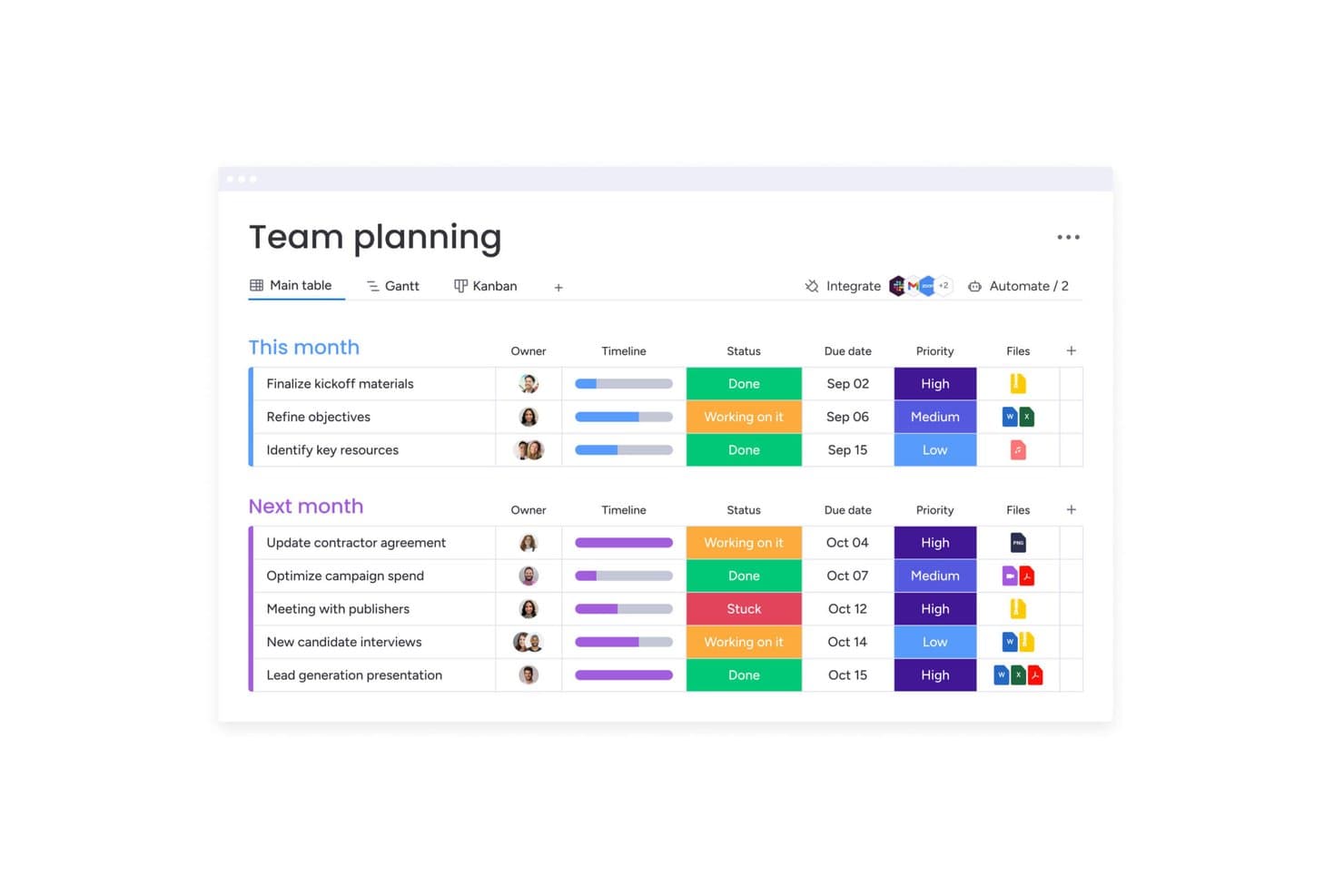
monday AI Workspace offers a team planning board with task status, priority levels, timelines, due dates, and file attachments organized into monthly groups. monday work management is a visual project and operations platform that helps teams planning and tracking work across multiple projects, making it a natural fit for operations managers and project leads who need flexibility, automation, and cross-team visibility without leaving a single workspace.
Who Is monday AI Workspace Best For?
monday work management is a strong fit for operations managers and project leads who need to coordinate work across multiple teams through visual boards, automations, and dashboards—without piecing together separate tools.
Why I Picked monday AI Workspace
I picked monday work management because its AI workflow builder is one of the most capable I've seen for teams running multi-step, cross-functional processes. I particularly like how you can describe a workflow in plain language and have it generate conditional branching logic, approval checkpoints, and cross-board item updates automatically. For a RevOps team coordinating handoffs between sales, marketing, and customer success, that means building and iterating on complex routing workflows without touching a single line of code.
monday AI Workspace Key Features
- Connect Boards column: Link items across multiple boards with optional two-way sync, so related records stay connected across projects.
- Dashboard widgets: Aggregate data from multiple boards into a single live dashboard using charts, progress indicators, and Gantt visualizations.
- AI-powered columns: Run actions like text extraction, sentiment detection, translation, and summarization directly within board columns.
- Workdocs with live board data: Create collaborative documents that display real-time, live-updating board data alongside written content.
monday AI Workspace Integrations
monday work management lists 850+ integrations and apps, including Salesforce, HubSpot, QuickBooks, Zendesk, Slack, GitHub, and Google Calendar. It also offers a GraphQL API and SDK for custom integrations.
Pros and Cons
Pros:
- Real-time docs pair narratives with live data
- Dashboards unify cross-team project visibility
- Conditional workflows route cross-board handoffs
Cons:
- Automation action caps can interrupt workflows
- Cross-board rollups and lookups are absent
Learn more about monday AI Workspace: Best for complex workflows
- Free plan + 14-day trial + demo available
- From $10/user/month (billed annually)
Visit WebsiteCustomer Rating:4.3/5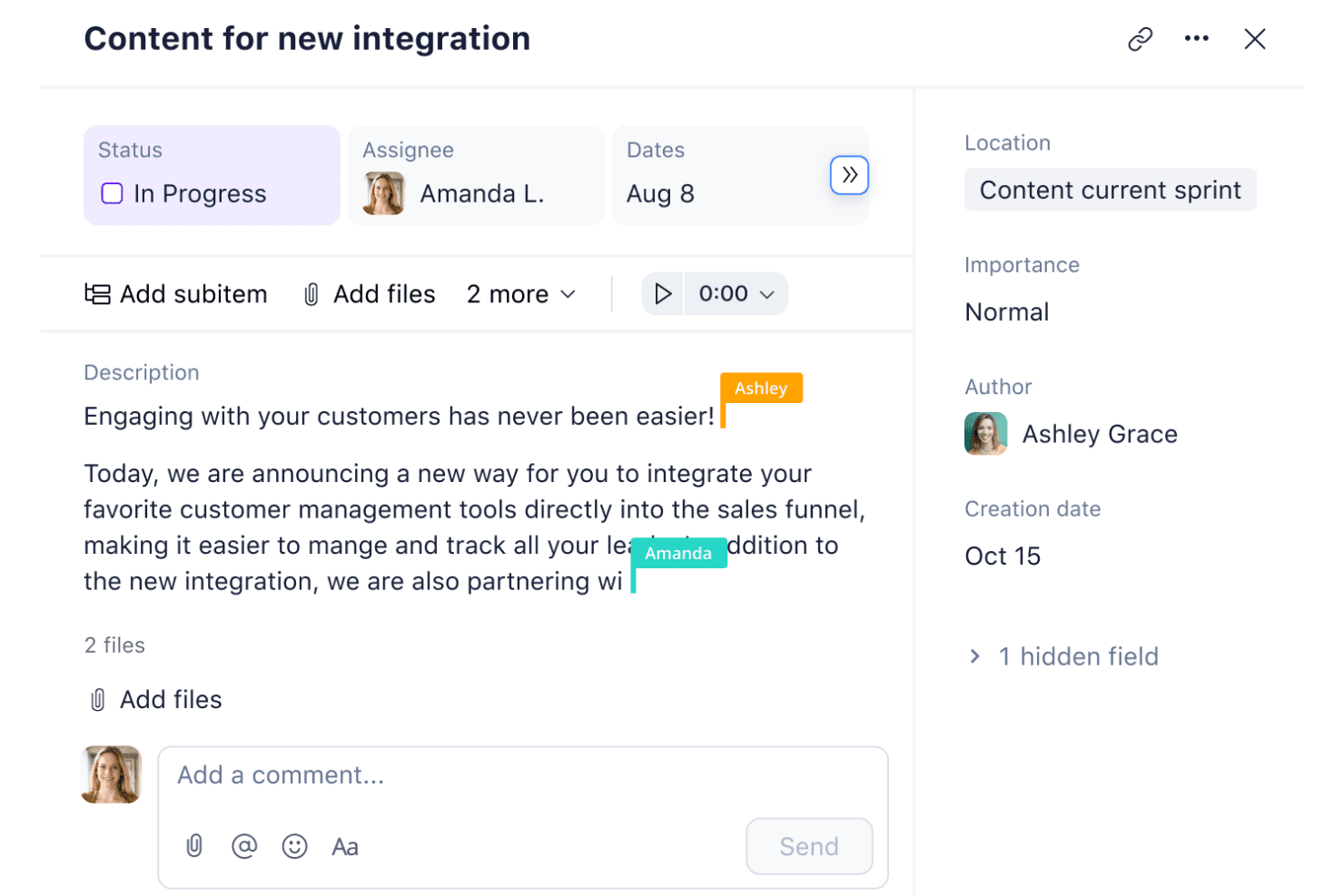
Wrike lets users collaborate on content tasks in real time. Wrike is a work management platform built for teams running complex, multi-stakeholder workflows—combining project planning, automation, and cross-team collaboration in one place.
Who Is Wrike Best For?
Wrike is a strong fit for mid-market and enterprise teams managing multi-stakeholder projects with layered workflows, dependencies, and cross-functional coordination needs.
Why I Picked Wrike
I picked Wrike as one of the best because it's built specifically for teams running layered, multi-stakeholder workflows where Airtable's database-first model starts to show its limits. I appreciate how Wrike's no-code automation rules (WHEN-IF-THEN logic) let my team trigger actions across cross-functional projects without writing a single line of code. Its Gantt charts and workload views make dependency management across complex, multi-team rollouts genuinely visible.
Wrike Key Features
- Dynamic request forms: Collect structured intake from internal or external stakeholders and automatically route requests into the right workflow.
- Proofing and approvals: Add visual feedback directly to task-attached assets and build multi-step approval chains, including for external reviewers.
- Wrike Datahub: Connect external data to projects and tasks to provide live context for automations, reporting, and dashboards.
- Cross-tagging: Link work items across spaces, folders, and projects without duplicating them, keeping multi-team work connected in one view.
Wrike Integrations
Wrike offers 400+ pre-built native integrations. Documented connectivity includes Airtable and Google Sheets through Wrike Sync, HubSpot through Wrike Integrate, plus an open REST API for custom connections.
Pros and Cons
Pros:
- Centralized approvals reduce status-chasing across teams
- Multiple views surface deadlines and workload
- Flexible workflows coordinate complex cross-team projects
Cons:
- No app-building layer for database applications
- Relational databases require Pinnacle or Apex
Learn more about Wrike: Best for diverse integrations
- Free plan + demo available
- From $4.2/user/month (billed annually)
Visit WebsiteCustomer Rating:4.7/5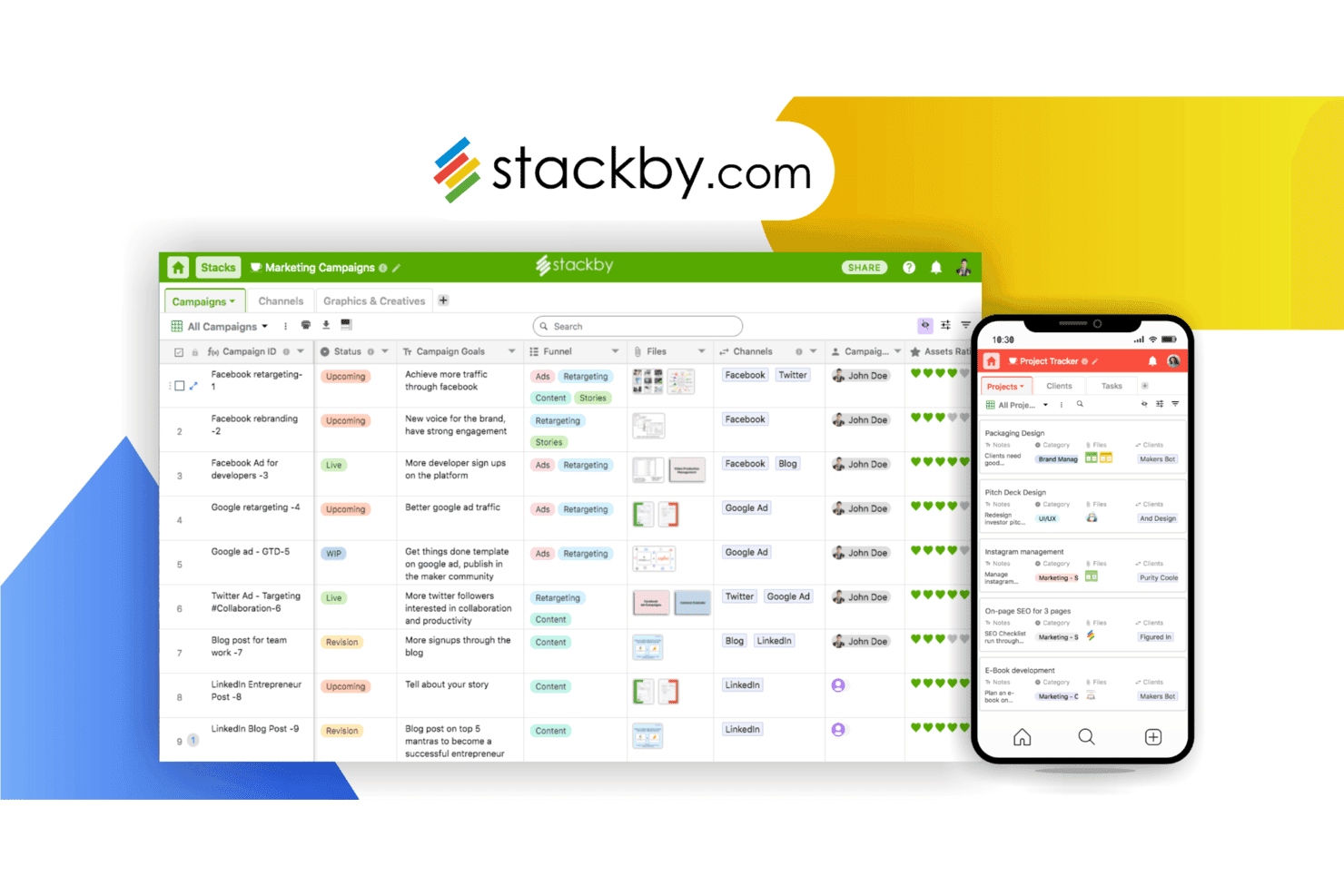
Stackby lets users manage marketing campaigns in a spreadsheet-database view. Stackby is a no-code database and app-building platform that blends spreadsheet familiarity with relational structure, making it a practical fit for small teams and project managers who want to organize data, connect APIs, and build lightweight apps without writing code.
Who Is Stackby Best For?
Stackby is a strong fit for small teams and project managers who want relational database structure without the complexity—or cost—of more enterprise-focused tools.
Why I Picked Stackby
I picked Stackby as one of the best because its column-level API connectors genuinely set it apart: you can pull live data from any external API directly into a column, no code required. That means connecting a CRM endpoint or a marketing platform's API to your database is a configuration task, not a development project. I also like that Zapier and Make extend that reach to 2,000+ and 500+ apps respectively, so the integration surface is wide from day one.
Stackby Key Features
- Relational linking across tables: A Link column connects records across different tables or within the same table, with support for lookups, lookup counts, and rollups.
- App Builder with multiple page layouts: Build no-code apps using List, Kanban, Calendar, Form, Timeline, Roadmap, Dashboard, and Overview pages, all within a single Stack.
- Role-based collaboration permissions: Invite teammates at the workspace or Stack level with Owner, Creator, Editor, Commentor, or Read-only access.
- AI field enrichment: Embed OpenAI, Google Gemini, or Anthropic models directly into columns to auto-enrich records when data is entered in a trigger column.
Stackby Integrations
Stackby connects columns to external APIs without code and lists integrations with Slack, Microsoft Teams, Make, Pabbly Connect, Integrately, and n8n, plus Zapier. It also provides REST API access, webhooks, and SDKs for custom integrations.
Pros and Cons
Pros:
- App Builder supports project-focused layouts and dashboards
- Kanban, calendar, and gallery views organize records
- Relational links add structure to spreadsheet-style data
Cons:
- Workspace permissions apply across every Stack inside it
- Reviewers report failed or duplicated automations
Learn more about Stackby: Best for custom app creation
- Free plan + free trial available
- From $5/user/month
Visit WebsiteCustomer Rating:4.7/5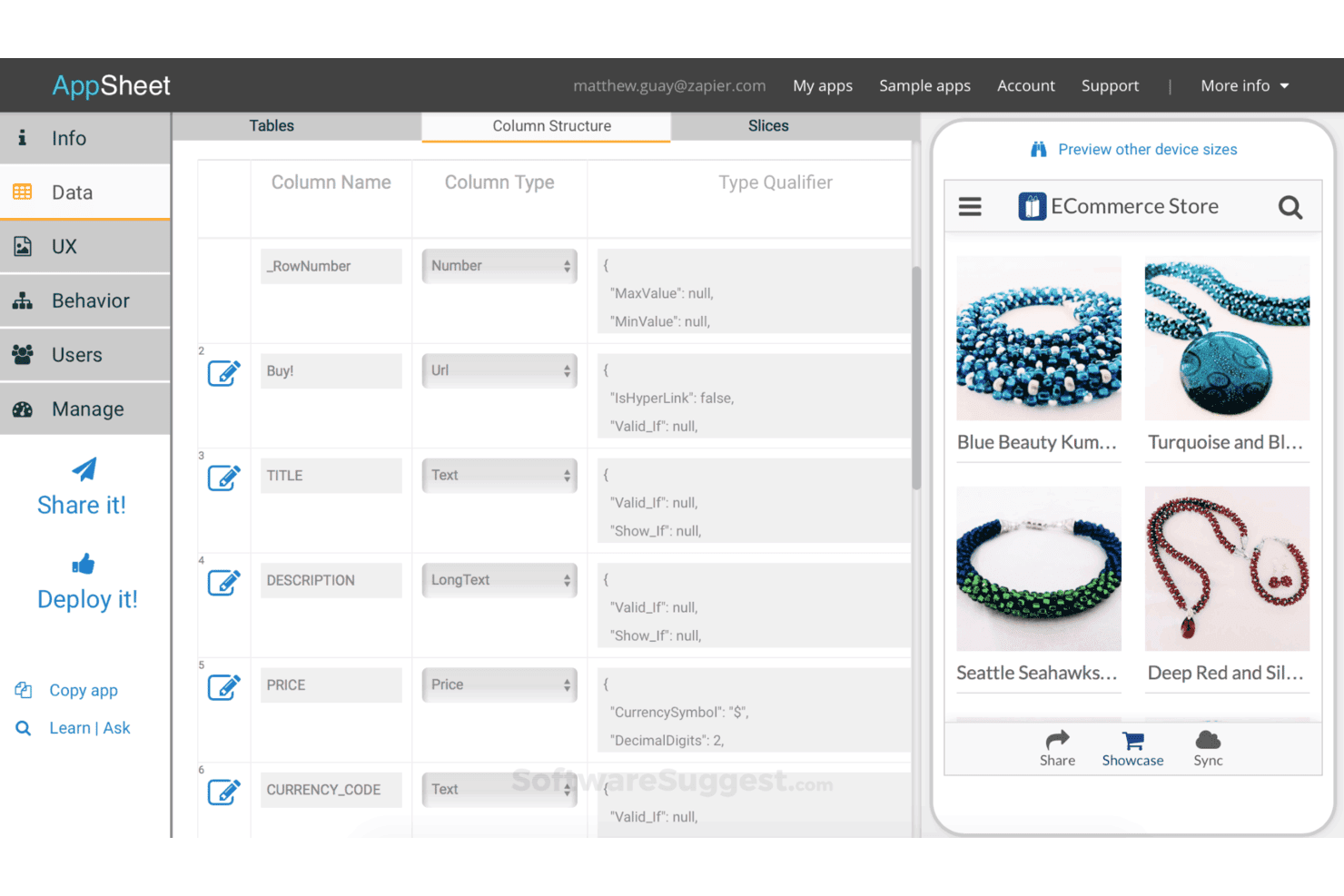
AppSheet lets users define column types and structure app data visually. AppSheet is Google's no-code app builder that lets operations teams, small business owners, and IT administrators turn spreadsheet data into custom mobile and web applications—without writing a single line of code.
Who Is AppSheet Best For?
AppSheet is a strong fit for operations managers and small business owners who want to turn their existing spreadsheet data into working mobile or web apps—without touching any code.
Why I Picked AppSheet
I picked AppSheet as one of the best because it's the only tool on this list that lets you turn spreadsheet data into a fully functional mobile or web app without touching code. I love that you can describe your app in plain language and let Gemini generate a working prototype, then layer in barcode scanning, photo capture, or digital signatures for real field workflows. The no-code bot builder handles multi-step automations with triggers, conditions, and branching that go well beyond what Airtable's automations offer.
AppSheet Key Features
- Offline app use: Apps run offline and sync data in the background when a connection is restored.
- Role-based access controls: App access and data visibility can be restricted by user, domain, role, or identity-provider group.
- Spreadsheet-like expressions: Configure filtering, dynamic UI elements, and automation logic using a formula-based expression language.
- App version history: Each saved version of your app is stored and can be viewed or restored within a configurable recovery window.
AppSheet Integrations
AppSheet offers native integrations with Airtable, Google Sheets, Microsoft Excel, Salesforce, Smartsheet, BigQuery, Dropbox, Box, and OData. It also supports inbound REST APIs, outbound webhooks, and cloud database, API, and SaaS connections on Enterprise Plus.
Pros and Cons
Pros:
- Automates conditional workflows beyond simple tables
- Captures field data offline with signatures
- Builds mobile apps from spreadsheet data
Cons:
- App views offer limited visual flexibility
- Concurrent row edits use last-writer-wins
Learn more about AppSheet: 5Best for document integration
Coda
- Free plan + free trial available
- From $12/user/month (billed annually)
Visit WebsiteCustomer Rating:4.7/5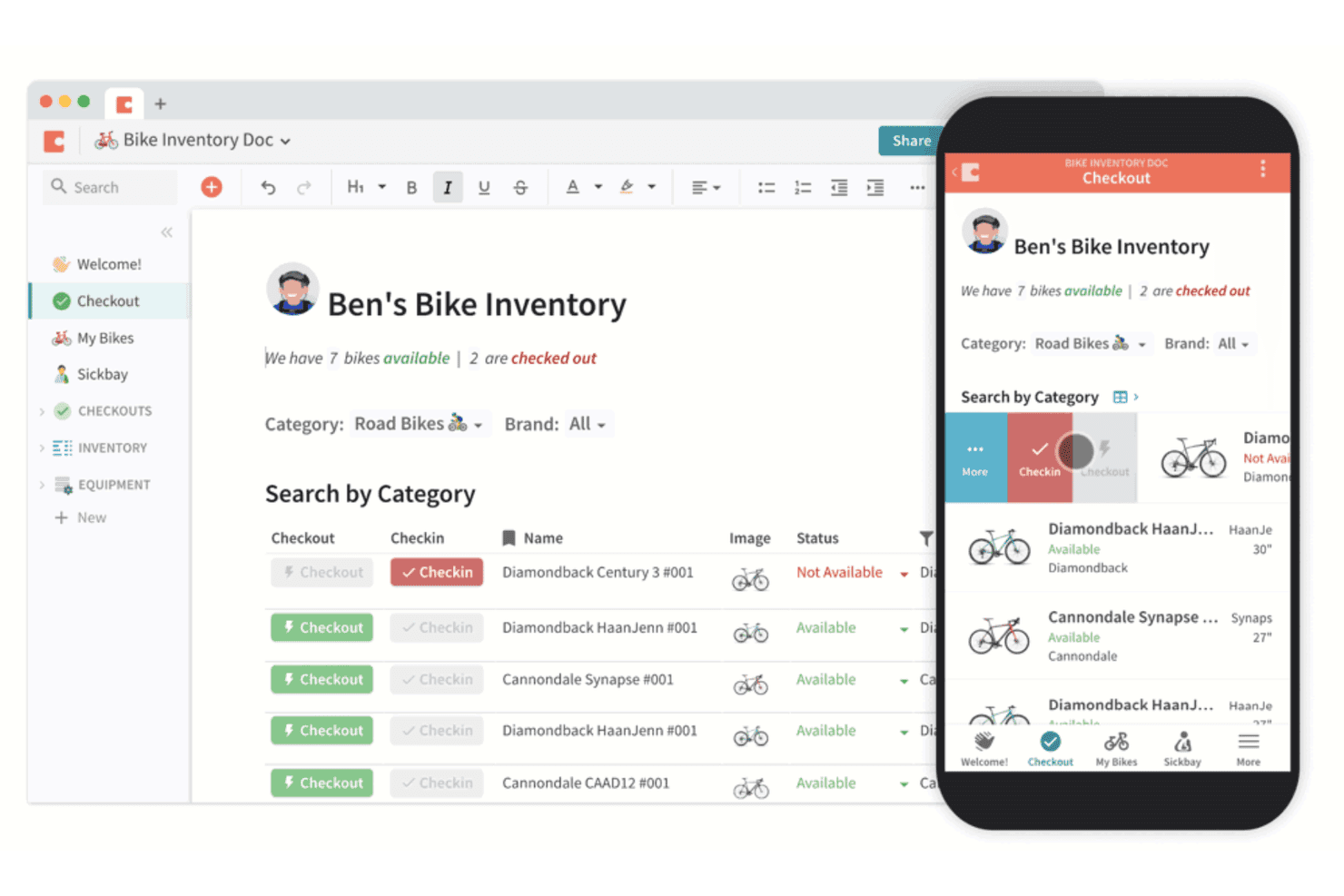
Coda lets users manage bike inventory with checkout tracking on desktop and mobile. Coda (now Superhuman Docs) is a flexible workspace that blends documents, relational tables, and automations in one place, making it a natural fit for operations and project teams who want to manage data, workflows, and team knowledge without juggling multiple tools.
Who Is Coda Best For?
Coda is a strong fit for operations and project teams that want to manage documents, data, and workflows in a single connected workspace instead of juggling separate tools.
Why I Picked Coda
I've included Coda in my top picks because it's the only tool here that genuinely blurs the line between a document and a database. Where most alternatives make you choose between a wiki and a relational table, Coda lets you embed connected tables, kanban boards, and timeline views directly inside a living doc, so your project brief and your task tracker are literally the same file. I particularly like that you can build approval workflows and intake forms right on top of that data using buttons and automations, without ever leaving the document context.
Coda Key Features
- Airtable importer: A built-in migration tool that transfers your selected Airtable bases, tables, and views into a new or existing Docs workspace.
- Pack sync tables: Two-way data sync tables that pull external tool data from sources like Jira, HubSpot, and GitHub directly into your doc.
- AI columns: Automated columns that tag, summarize, extract, or analyze row data as new entries are added, using a custom or preset prompt.
- Webhook triggers: Automation rules that fire based on incoming webhooks, enabling event-driven workflows connected to external systems.
Coda Integrations
Coda claims 800+ integrations, including Jira, Salesforce, HubSpot, Google Sheets, GitHub, Asana, and Slack. Pack sync tables support two-way sync for select tools, while the public REST API supports custom integrations.
Pros and Cons
Pros:
- Automations reduce manual updates and deadline tracking
- Connects tables across flexible project views
- Combines documents, data, and project context
Cons:
- Advanced formulas and workflows take technical effort
- Large, complex docs can lag
Learn more about Coda: Best for all-in-one productivity
- Free plan + free trial + free demo available
- From $12/user/month
Visit WebsiteCustomer Rating:4.7/5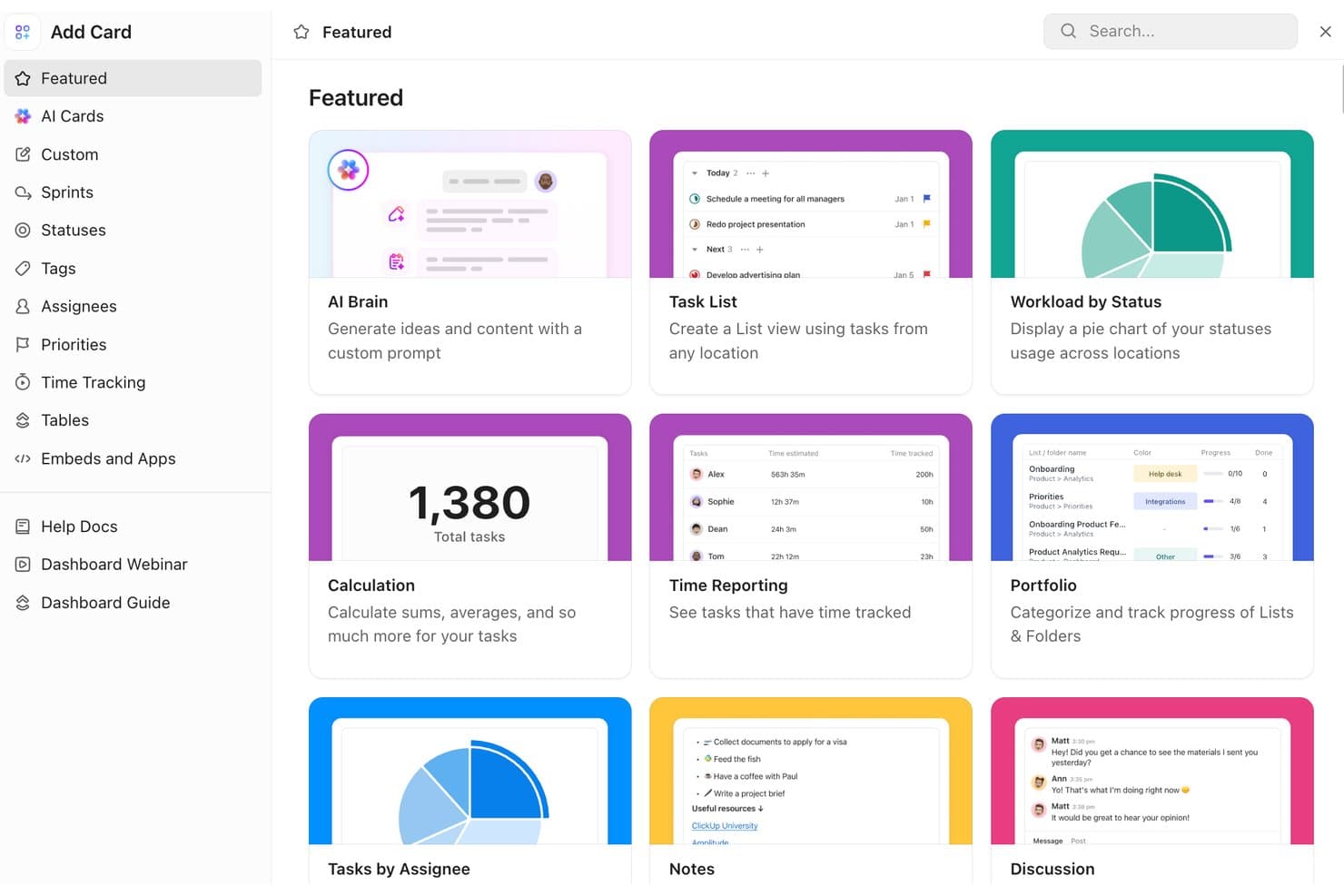
ClickUp lets users add featured dashboard cards like AI Brain and Task List. ClickUp is a project and work management platform that brings tasks, docs, automations, and reporting into one workspace, making it a natural fit for operations and project teams who want to consolidate tools rather than build a dedicated database system.
Who Is ClickUp Best For?
ClickUp suits operations and project teams that want tasks, docs, automations, and reporting in one workspace rather than a dedicated database tool.
Why I Picked ClickUp
I picked ClickUp as one of the best because it brings tasks, Docs, automations, and dashboards into a single workspace, which is exactly what operations and project teams need when they want to consolidate tools. I particularly like how ClickUp's Automations let my team trigger actions across tasks without manual follow-up, and how switching between Gantt, Board, and Workload views keeps every project visible at a glance.
ClickUp Key Features
- Relationship Custom Fields: Link tasks across your Workspace and surface rollup data from related tasks directly in List view.
- Spreadsheet import: Import
.csv,.xlsx, and other formats with column mapping to task fields or Custom Fields for structured data migration. - Workspace audit logs: Track selected user, task, Custom Field, and hierarchy events with date, role, and status details at the Enterprise level.
- Multiple views: Switch between 15+ view types—including Table, Gantt, Workload, and Mind Map—with filtering, grouping, and sharing options.
ClickUp Integrations
ClickUp offers 1,000+ integrations, including native connections with HubSpot, Salesforce, Slack, Google Drive, Google Calendar, Microsoft Teams, Zoom, GitHub, and Dropbox. It also supports a public REST API, webhooks, OAuth, MCP server, and Zapier.
Pros and Cons
Pros:
- Tasks, dependencies, and subtasks organize projects
- Automations reduce repetitive handoffs
- Flexible views support task-based workflows
Cons:
- Imports require rebuilding links and formulas
- Relationships fall short of Airtable's linked records
Learn more about ClickUp: Best for project collaboration
- 14-day free trial + demo available
- From €8/user/month (billed annually)
Visit WebsiteCustomer Rating:4.6/5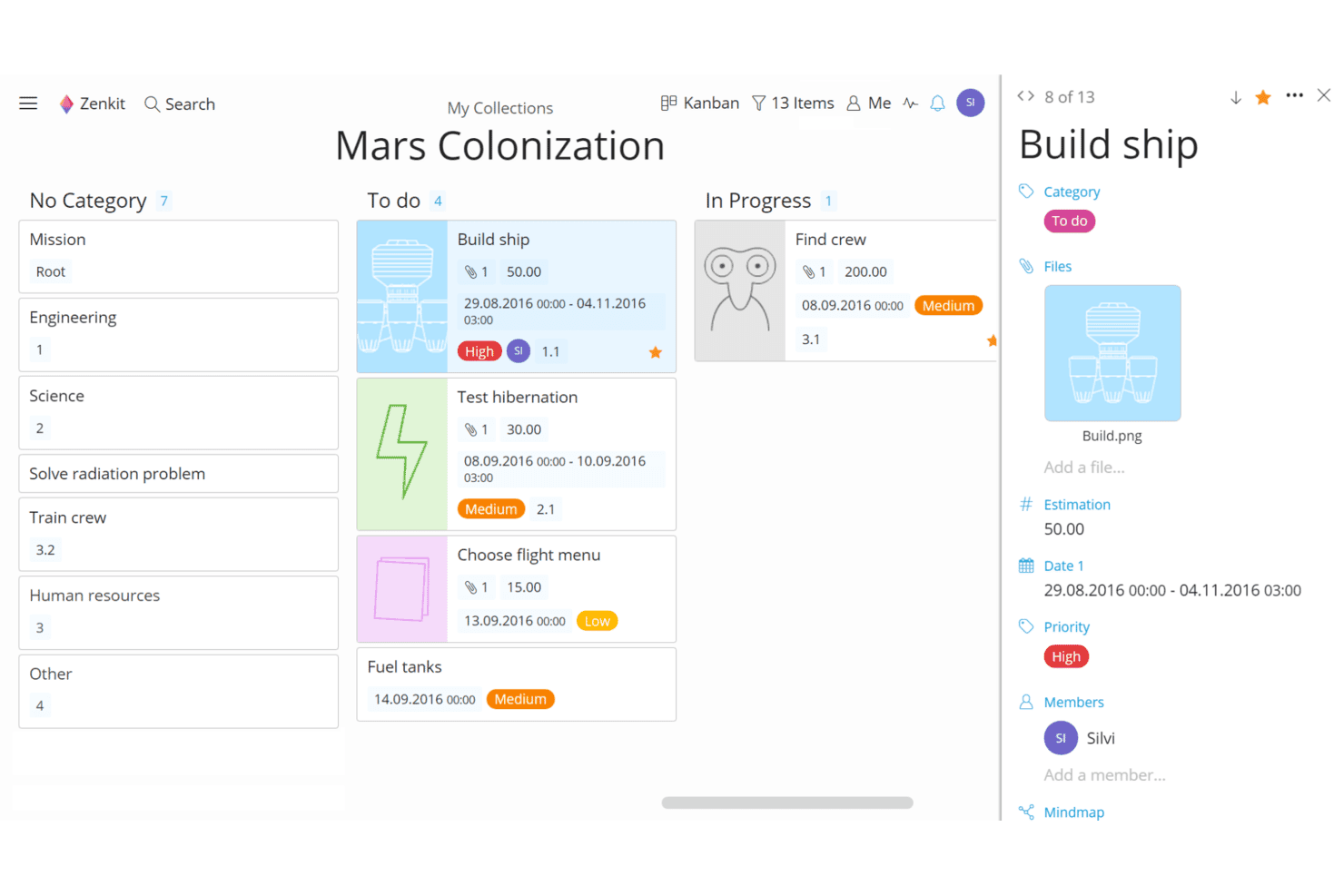
Zenkit organizes Mars Colonization tasks in a Kanban board view. Zenkit is a multi-view project management tool built for teams that need to organize work across Kanban, Gantt, calendar, and table views—with relational reference fields that let you connect data across collections without writing any code.
Who Is Zenkit Best For?
Zenkit suits project managers and cross-functional teams that need to run multiple projects simultaneously across different views without locking into a single methodology.
Why I Picked Zenkit
I picked Zenkit as one of the best because it handles cross-team project collaboration in a way that genuinely reflects how teams work. I love that you can pull tasks from multiple projects into a single global Kanban board, so everyone sees where work stands without digging through separate lists. The five-tier role system (Owner, Member, Editor, Commenter, and Guest) also gives me precise control over who can change, comment on, or simply view shared data.
Zenkit Key Features
- Gantt chart with critical path: Plan project schedules on a timeline with milestones, lag and lead settings, and critical path visibility to track dependencies.
- Global Kanban and calendar views: Pull tasks from multiple projects into a single aggregated Kanban board or calendar so your whole team sees work across collections at once.
- Reference fields for relational data: Link items across separate lists to build a relational structure, then use formula and aggregation fields to calculate and surface connected data.
- Workflow automations with AI assistance: Set up trigger-based automations from presets or from scratch, with AI-assisted options for text generation, classification, and process support.
Zenkit Integrations
Zenkit offers native integrations with iCal and Google Calendar, plus API access on Business and Enterprise plans. It connects with 500+ apps through Integrately and 1,000+ apps through Zapier, including Google Sheets, Slack, Asana, and Trello.
Pros and Cons
Pros:
- Global boards consolidate cross-project tasks
- Shared work supports six distinct views
- Relational references connect records across lists
Cons:
- Published lists offer no interactive editing
- Linking records between collections can feel cumbersome
Learn more about Zenkit: Best for no-code databases
- Free plan + trial + demo available
- From $12/user/month
Visit WebsiteCustomer Rating:4.7/5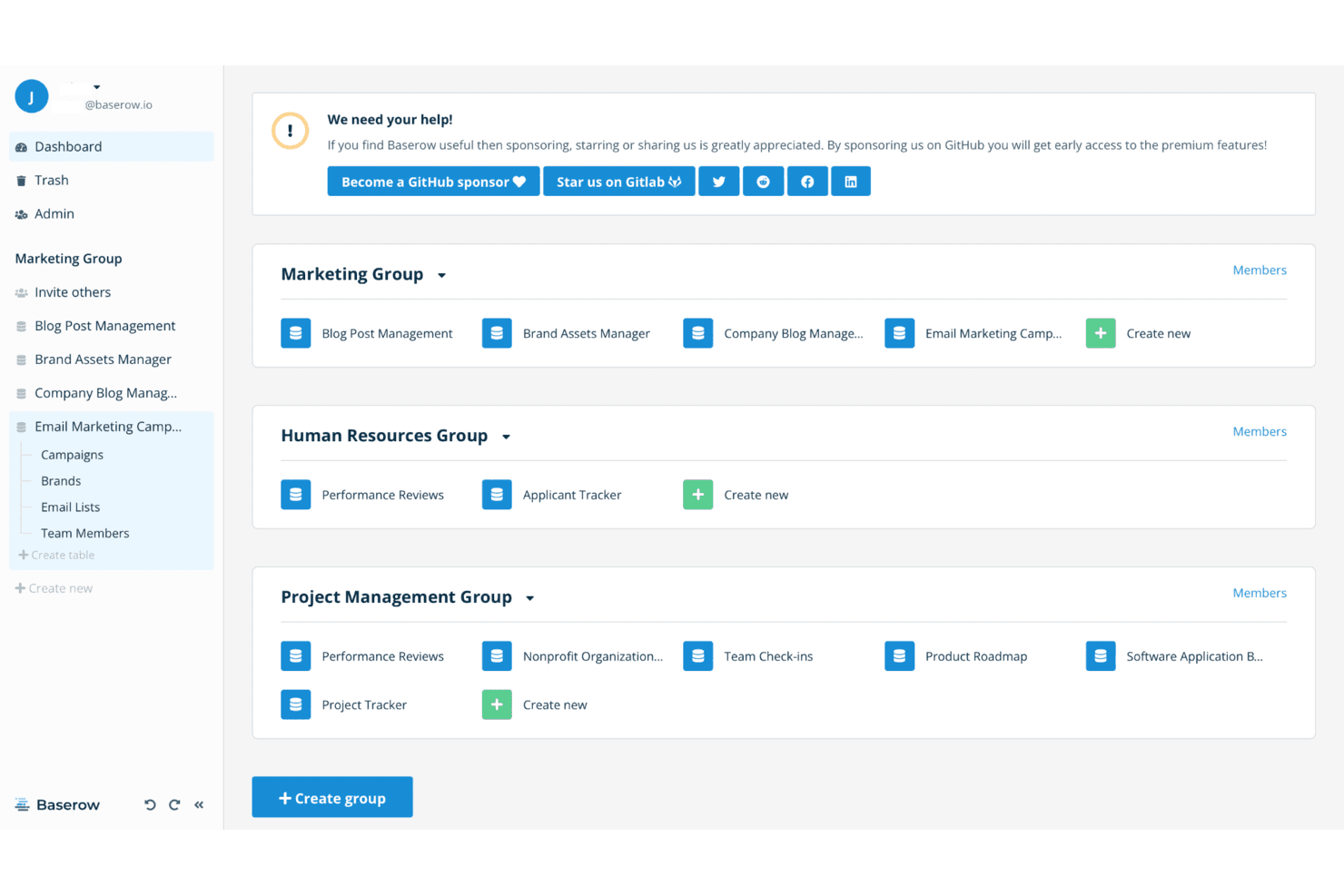
Baserow organizes databases into groups with shared workspaces. Baserow is an open-source, no-code database platform that lets teams build relational databases, internal tools, and client portals without writing code—making it a practical fit for operations managers, project teams, and small businesses moving away from spreadsheets.
Who Is Baserow Best For?
Baserow is a strong fit for small business owners and operations teams who want to build relational databases and internal tools without writing code—especially those who want the option to self-host their data.
Why I Picked Baserow
I picked Baserow as one of the best because it's the rare no-code database that lets you build genuine relational structures without touching a line of code. I love that the Link-to-table field creates reciprocal relationships across tables automatically, so I can run Lookup and Rollup fields in either direction and actually surface meaningful data connections. On top of that, the Application Builder lets me turn those linked tables into a published internal tool or client portal using a drag-and-drop canvas.
Baserow Key Features
- Workflow automation builder: Configure no-code workflows with triggers, branches, loops, and actions—including HTTP requests, email, Slack messages, and AI prompts—to automate multi-step processes.
- AI prompt field: Generate text, summaries, or classifications using an AI field that references other fields and can regenerate automatically when source data changes.
- Restricted views: Assign users access to filtered rows and hidden fields without granting them access to the broader workspace or table.
- Airtable base import: Transfer an existing Airtable base—including tables, records, attachments, relationships, and views—into Baserow using a shareable link.
Baserow Integrations
Baserow offers native data-sync integrations with Jira, GitHub, GitLab, HubSpot, iCal, and PostgreSQL. It also provides a REST API, webhooks, and connections through Make, n8n, and Zapier.
Pros and Cons
Pros:
- Drag-and-drop apps turn tables into internal tools
- Self-hosting gives teams data-location control
- Linked tables support reciprocal lookups and rollups
Cons:
- Reviewers report lag with large datasets
- Same-cell edits can overwrite earlier changes
Learn more about Baserow: Best for precise oversight
- 14-day free trial + demo available
- From $8/user/month (billed annually)
Visit WebsiteCustomer Rating:4.7/5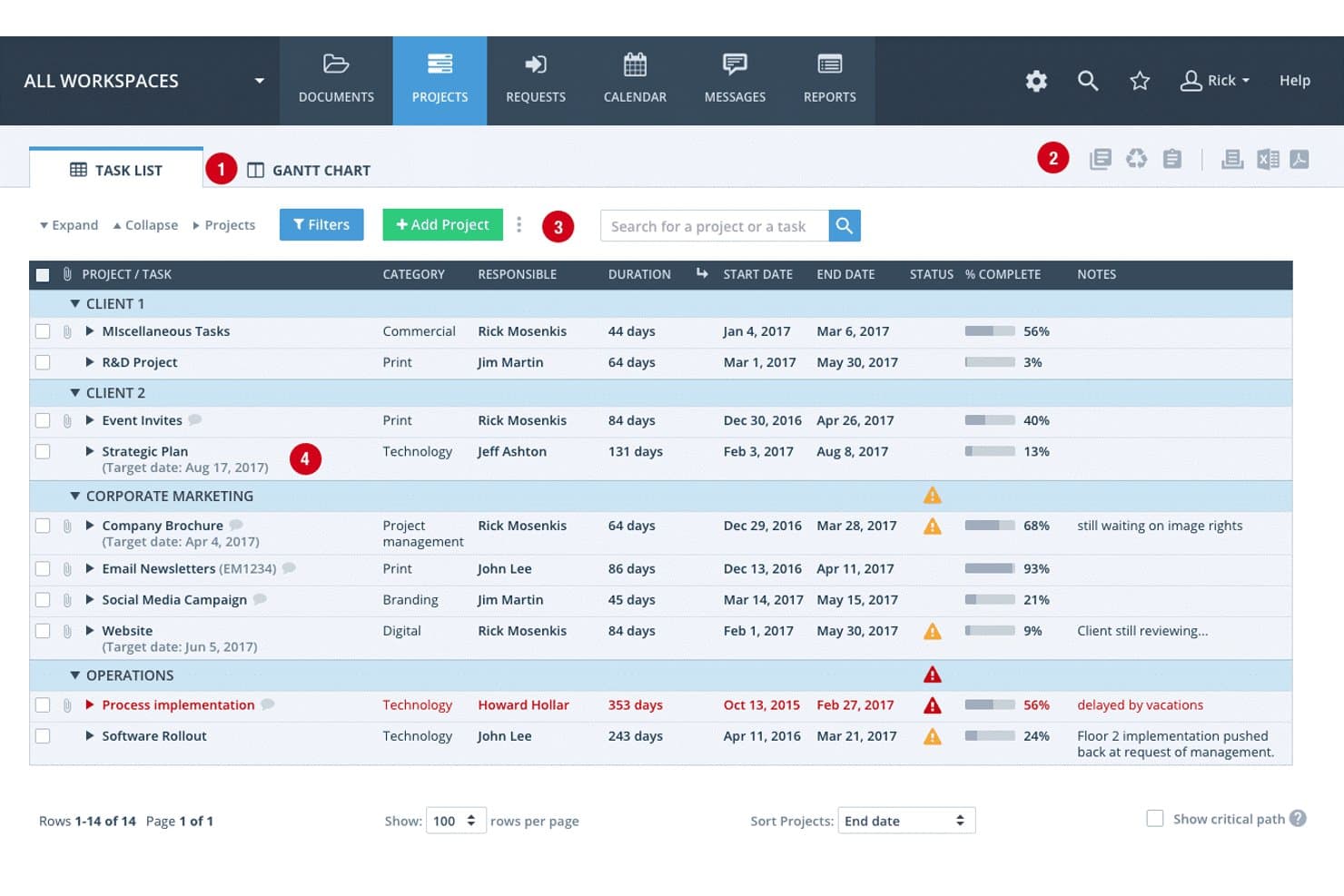
Workzone lets users track projects by status, progress, and deadlines. Workzone is a project management platform built for teams that need centralized visibility into tasks, deadlines, workloads, and approvals across multiple projects.
Who Is Workzone Best For?
Workzone is a strong fit for mid-size teams that need structured oversight across multiple projects, particularly in operations, marketing, and creative services.
Why I Picked Workzone
I picked Workzone for precise oversight because it gives you a centralized project dashboard where you can see status, milestones, deadlines, and project health across every active initiative at once. I especially like the workload and capacity planning views, which let you see exactly who's stretched and where bottlenecks are forming before they become problems. The approval workflows and proofing tools keep file reviews and feedback in one place, so nothing slips through the cracks.
Workzone Key Features
- Project intake forms: Capture incoming requests through customizable forms that automatically create new projects from submissions.
- Document proofing and markups: Review and annotate PDFs and images directly in Workzone, with file versioning to track changes over time.
- Role-based access controls: Assign users roles such as Administrator, Manager, Contributor, Reviewer, or Partner to manage who can view or edit project content.
- Zapier integration: Connect Workzone to 1,000+ external apps to trigger automated actions like sending new tasks to Jira or logging time entries in QuickBooks.
Workzone Integrations
Workzone has four documented native integrations: Microsoft Teams, Slack, Google Drive, and OneDrive. It also connects with Airtable, Google Sheets, Microsoft Excel, Notion, Salesforce, and HubSpot, with 1,000+ Zapier integrations and an Enterprise REST API for custom integrations.
Pros and Cons
Pros:
- Capacity views flag overloaded teams
- Proofing and approvals centralize asset feedback
- Cross-project dashboards expose task ownership
Cons:
- Only 20 custom fields, without relational modeling
- No linked tables, lookups, or rollups
Learn more about Workzone: 10Best for open-source flexibility
NocoDB
- Free plan + free trial + free demo available
- From $12/user/month (billed annually)
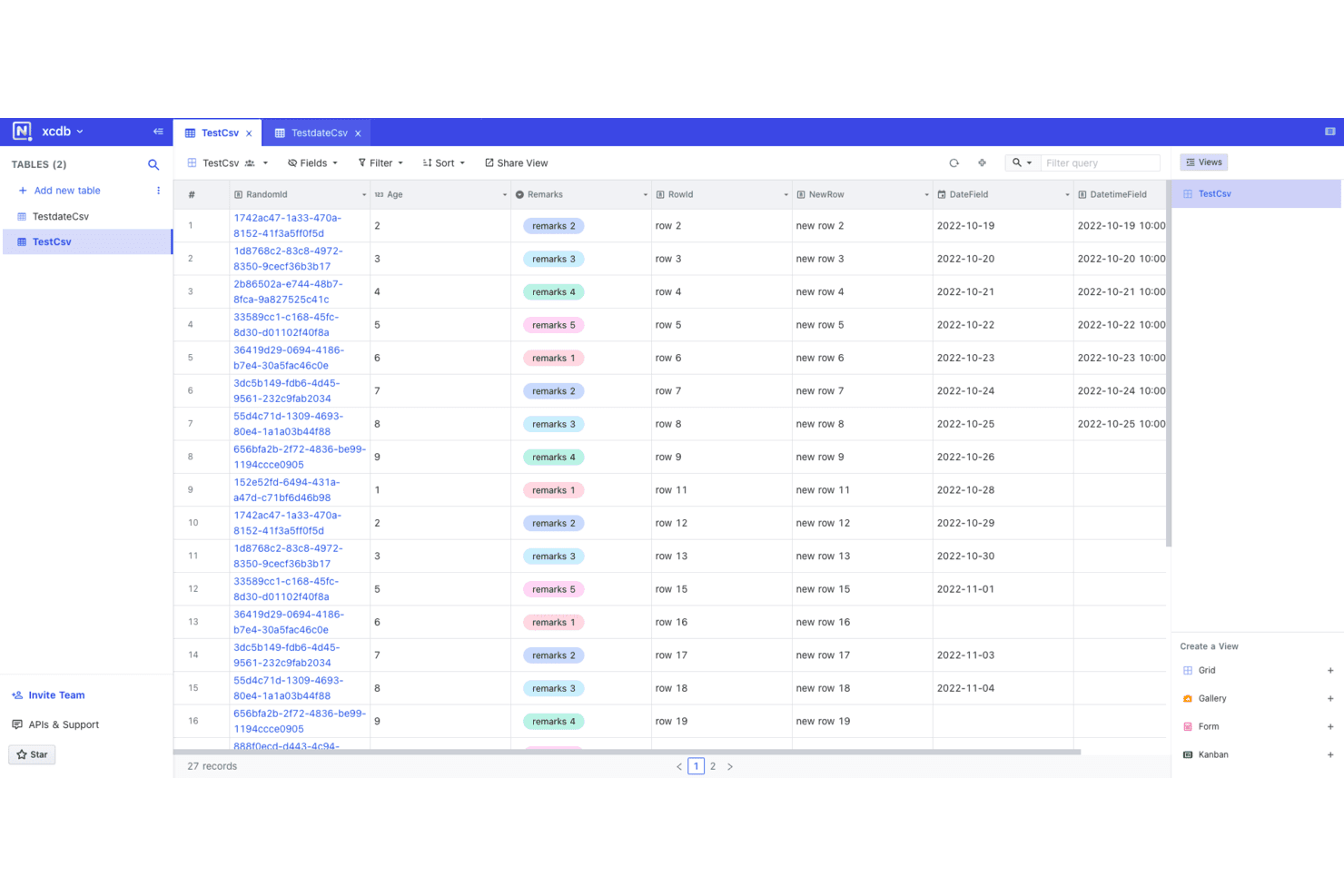
NocoDB displays spreadsheet data with filtering, sorting, and multiple view options. NocoDB is an open-source no-code database platform that lets technical and non-technical teams build relational databases, automate workflows, and connect to existing PostgreSQL or MySQL infrastructure—making it a strong fit for IT administrators and operations teams who want Airtable's flexibility without giving up control of their data.
Who Is NocoDB Best For?
NocoDB is a strong fit for IT administrators and technical teams who need Airtable's flexibility but want full control over where their data lives.
Why I Picked NocoDB
I picked NocoDB as one of the best because it's the only tool on this list that lets you point it directly at a PostgreSQL or MySQL database you already own and work with that data through a spreadsheet-style interface. I love that your data never has to leave your infrastructure, which matters a lot when you're dealing with sensitive pipeline or customer records. You also get seven view types, including kanban and calendar, plus multi-step workflow automation built on top of that same owned data.
NocoDB Key Features
- Airtable base import: Pull an existing Airtable base directly into NocoDB using your Airtable API key, with the option to migrate it into a PostgreSQL database.
- Role-based permissions: Assign Owner, Creator, Editor, Commenter, and Viewer roles at both the workspace and project level to control who can read, edit, or manage data.
- REST API and webhooks: Access and manage NocoDB data programmatically through a published v3 REST API, and trigger external systems via conditional webhooks with custom JSON payloads.
- Project snapshots: Create point-in-time backups of a project that can be restored as a separate project if you need to recover a previous state.
NocoDB Integrations
NocoDB offers native connections to PostgreSQL, MySQL, Jira, GitHub, GitLab, Zendesk, and HubSpot, plus workflow integrations with Slack, Gmail, Outlook, and Google Calendar. Its REST and metadata APIs support custom integrations, while Microsoft SQL Server and Oracle connections are Enterprise add-ons.
Pros and Cons
Pros:
- Relational links support structured spreadsheet replacement
- Kanban and calendar views aid task tracking
- Self-hosting keeps data on owned infrastructure
Cons:
- Users report unreliable search and import errors
- Self-hosted version misses graphs and comment resolution
- Community edition excludes real-time collaboration
Learn more about NocoDB:
Diğer Airtable Alternatifleri
Kısa listeme giremeyen ancak yine de göz atmaya değer bazı ek Airtable alternatifleri şunlardır:
How I Evaluate Airtable Alternatives
I split my evaluation into two layers: the core baseline—relational structure, automation, CRM connectivity—and the differentiating factors that separate the right pick for RevOps from the rest.
Core Functionality (Table Stakes For This List)
When I'm selecting tools for my list, I rank each one on a scale from 0 (does not offer the functionality) to 5 (excels in this area) for each core functionality listed below. Then, I calculate the tool's total score into a percentage. Each tool needs to achieve a minimum total score of 65% to be considered for inclusion.
- Relational Database Structure: I check whether a tool supports linked records, rollups, and lookups—essentials for modeling account-to-deal-to-contact relationships across a GTM dataset.
- Custom Views & Filtering: Each tool should let you build kanban views for deal stages, filtered grids by territory, and calendar views for renewal dates from the same data.
- Workflow Automation: I evaluate whether the automation builder handles real RevOps triggers like moving a deal to "closed-won" and auto-notifying the CS team for handoff.
- Native Integrations & API: The tool needs connectors to CRM and marketing platforms like Salesforce and HubSpot, plus a REST API for syncing with data warehouses.
- Collaboration & Permissions: I look at whether you can lock down sensitive fields (revenue forecasts, comp data) while still sharing pipeline views with cross-functional stakeholders.
- Dashboards & Reporting: The platform should support built-in charts and dashboards—things like weighted pipeline summaries or win-rate breakdowns—without exporting to a BI tool.
Once I have a list of tools that meet this criteria, I consider what sets each platform apart.
Differentiating Factors (What Sets Vendors Apart)
Here's how I compare and contrast different vendors:
Standout Features
Two-way CRM sync is a big differentiator—I want to know if updates in the platform flow back into Salesforce or HubSpot without manual re-entry. No-code app builders also matter because RevOps teams often need to spin up custom deal desks or renewal trackers without waiting on engineering. I also evaluate AI-powered features like formula generation and record summarization, which can save hours when you're working across hundreds of pipeline records.
Beyond Features
Scalability matters a lot here. RevOps datasets grow fast, so I check whether a platform can handle large record volumes without slowing down when you're linking deal tables to account and contact records. Pricing structure is another key consideration—per-seat models can get expensive quickly when you're giving access to sales, marketing, and CS teams. I also evaluate time-to-value by looking at whether a tool offers RevOps-ready templates and migration paths from Airtable or spreadsheets that let a small ops team get running without a lengthy implementation.
Neden Airtable Alternatifi Aramalısınız?
Airtable iyi bir iş zekâsı yazılımı seçeneği olsa da bazı kullanıcılar çeşitli nedenlerle alternatif çözümler arar. Şu nedenlerden biriyle Airtable alternatifi arıyor olabilirsiniz…
- Karmaşık veri analizlerini yeterince iyi işleyemiyor
- Büyük bir ekip için daha uygun fiyatlandırma arıyorsunuz
- Gelişmiş otomasyon özelliklerine ihtiyacınız var
- Ekibinizin verilere çevrim dışı erişmesi gerekiyor
- Daha iyi müşteri desteğine sahip bir araç arıyorsunuz
- Belirli sektör düzenlemelerine uygunluğa ihtiyacınız var
Bunlardan herhangi biri size uyuyorsa doğru yere geldiniz. Listemde, Airtable ile ilgili bu zorluklarla karşılaşan ve alternatif çözümler arayan ekipler için daha uygun olan çeşitli iş zekâsı yazılımı seçenekleri yer alıyor.
Airtable'ın Temel Özellikleri
Alternatif çözümlerin sunduklarını karşılaştırmanıza yardımcı olmak için Airtable'ın bazı temel özelliklerini burada bulabilirsiniz:
- Özelleştirilebilir görünümler: Ekibinizin iş akışının ihtiyaçlarına uygun olarak verilerinizi ızgaralarda, takvimlerde veya Kanban panolarında nasıl görselleştireceğinizi seçebilirsiniz.
- İş birliği araçları: Tabloları ve projeleri ekibinizle kolayca paylaşabilir, görevler atayabilir ve doğrudan platform içinde iletişim kurabilirsiniz.
- Üçüncü taraf uygulamalarla entegrasyon: Airtable, hâlihazırda kullandığınız araçlarla bağlantı kurarak Airtable ile Slack, Google Workspace ve Salesforce gibi harici uygulamalar arasında verileri senkronize etmenizi sağlar.
- Otomasyonlar: E-posta gönderme veya kayıtları güncelleme gibi tekrarlayan görevleri otomatikleştirerek ekibinizin zaman kazanmasını ve manuel iş yükünü azaltmasını sağlayabilirsiniz.
- Şablon kitaplığı: İster projeleri takip edin, ister müşterileri yönetin veya etkinlikleri planlayın, hızlıca başlamak için çok çeşitli hazır şablonlar arasından seçim yapabilirsiniz.
- Gelişmiş filtreleme ve sıralama: Verilerinizi nasıl filtreleyip sıralayacağınızı özelleştirerek, ilgisiz ayrıntıları elemek zorunda kalmadan ihtiyacınız olan bilgileri kolayca bulabilirsiniz.
- Özel formlar: Ekip üyelerinden veya müşterilerden bilgi toplamak için formlar oluşturabilirsiniz; bu bilgiler, kolay veri yönetimi için doğrudan Airtable veritabanlarınıza aktarılır.
- Mobil erişim: Airtable mobil uygulamasıyla verilerinize her yerden erişip bunları yönetebilir, hareket hâlindeyken bile ekibinizin üretken kalmasını sağlayabilirsiniz.
- Tablolar arasında senkronizasyon: Airtable, kayıtları birden fazla tablo veya veritabanı arasında senkronize etmenizi sağlar; böylece verileriniz nerede kullanılırsa kullanılsın tutarlı ve güncel kalır.