

Teklif ve faturalama yazılımları her şirket için değerli araçlardır. Doğru yazılımla ekipler faturalama verimliliğini artırabilir ve finansal doğruluğu geliştirebilir. Ancak özellikle çok sayıda seçenek mevcutken doğru teklif ve fatura yazılımını bulmak zor olabilir.
Gelir operasyonları yazılımları konusundaki deneyimimi kullanarak, mevcut en iyi teklif ve fatura yazılımlarından birkaçını test edip karşılaştırdım. Ardından sonuçlarımı, ihtiyaçlarınıza en uygun yazılımı bulmanıza yardımcı olacak ayrıntılı incelemeler hâlinde derledim.
Why Trust Our Software Recommendations
6,700+
Reviews
20
Industry experts
16+
Evaluation factors
14
Years
Our reviews reflect our independent judgment—not a sales pitch. Learn how we stay transparent.
For this guide, we evaluated tools using hands-on testing and independent research, scoring tools using our selection criteria.
Our reviews reflect our human editorial judgment, not a sales pitch.
Karşılaştırma Tablosu: Teklif ve Fatura Yazılımları
Bu karşılaştırma tablosu, en iyi teklif ve fatura yazılımı seçimlerimin fiyatlandırma ayrıntılarını özetlemektedir.
Sorted by: Default
| Tool | Starting Price | Website | |
|---|---|---|---|
Best for subscription lifecycle automation | 4.2 out of 5 | Pricing upon request Free demo available | Book Demo |
Best for unified quoting and contracting | 4.7 out of 5 | Pricing upon request Free demo available | Website |
Best for advanced reporting | 4.7 out of 5 | $38/month 30-day free trial | Website |
Best for mobile use | 4.7 out of 5 | $49/month Free plan + free trial available | Website |
Best for global transactions | 4.6 out of 5 | Pricing upon request Free plan + demo available | Website |
Best for small businesses | 4.4 out of 5 | $27/month 1-month free trial available | Website |
Best for branded invoice templates | 4.6 out of 5 | $9.99/month Free plan available | Website |
Best for free invoicing | 4.4 out of 5 | $19/month Free plan available | Website |
Best for SaaS companies | 4.6 out of 5 | $0.50 + 5% per transaction Free demo available | Website |
Best for multi-currency support | 4.3 out of 5 | Pricing upon request Free demo available | Website |


En İyi Teklif ve Fatura Yazılımı İncelemeleri
Aşağıda, kısa listeme giren en iyi teklif ve fatura yazılımlarının ayrıntılı özetlerini bulabilirsiniz. İncelemelerim, size en uygun seçeneği bulmanıza yardımcı olmak için her aracın temel özelliklerine, avantajlarına & dezavantajlarına, entegrasyonlarına ve ideal kullanım alanlarına ayrıntılı bir bakış sunuyor.
 Best for subscription lifecycle automation
- Free demo available
- Pricing upon request
Visit WebsiteCustomer Rating:4.2/5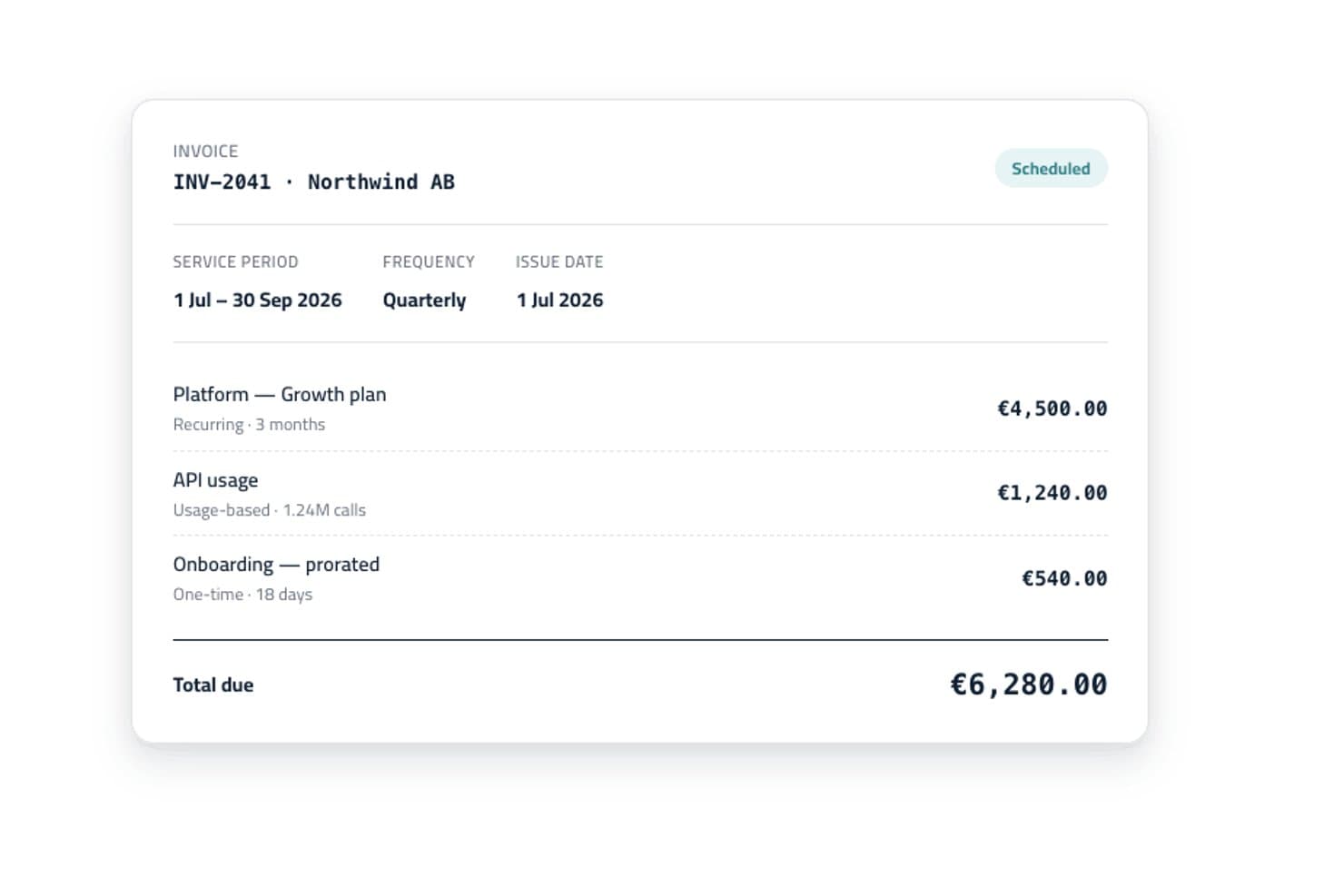
Younium offers automated invoice generation with itemized billing lines, service periods, and scheduling status for recurring and usage-based charges. Younium is a subscription management platform that combines CPQ, automated billing, revenue recognition, and CRM and ERP integrations for B2B recurring revenue businesses.
Who Is Younium Best For?
Younium is a strong fit for mid-market B2B SaaS and tech companies whose finance and RevOps teams manage complex, evolving subscription agreements.
Why I Picked Younium
Younium earns its spot on my shortlist because the connection between quoting and billing is genuinely tight. I like that the AI-powered CPQ Agent lets my team build quotes conversationally, adding products and adjusting pricing in real time, and what's quoted flows directly into subscription billing with no manual re-entry. Multi-level approval workflows trigger automatically on discount thresholds or non-standard terms, keeping every deal governed without slowing the process down.
Younium Key Features
- ASC 606 and IFRS 15 revenue recognition: Automates revenue schedules and compliance for every subscription order.
- Customer self-service portals: Lets your customers view quotes, accept terms, access invoices, and pay balances online.
- Multi-entity and multi-currency support: Handles billing across different legal entities, currencies, and geographies.
- Open API and webhooks: Enables real-time data sync and integration with downstream RevOps and finance systems.
Younium Integrations
Younium offers native integrations with HubSpot, Salesforce, NetSuite, QuickBooks, Xero, Microsoft Dynamics 365, Exact Online, Stripe, and GoCardless. An open API is available for custom integrations.
Pros and Cons
Pros:
- AI-powered CPQ speeds up quote creation
- Revenue recognition is built into billing
- Handles mid-cycle subscription changes natively
Cons:
- Onboarding takes longer than simpler alternatives
- Reporting dashboards have limited out-of-box options
Learn more about Younium: Best for unified quoting and contracting
- Free demo available
- Pricing upon request
Visit WebsiteCustomer Rating:4.7/5
DealHub AI offers a payments dashboard that tracks invoice statuses such alongside invoice numbers and start dates. DealHub AI is a quote-to-revenue platform that combines CPQ, contract lifecycle management, automated billing, and digital sales proposals in a single connected system.
Who Is DealHub AI Best For?
DealHub AI is a strong fit for B2B sales teams at mid-market and enterprise companies that manage complex, multi-stakeholder deals with custom pricing and contract requirements.
Why I Picked DealHub AI
DealHub AI earns its spot on my shortlist because it keeps quoting and contracting inside one platform instead of forcing your team to jump between a CPQ tool and a separate CLM. I like that you can generate a quote and convert it directly into a contract using pre-approved clause libraries and dynamic templates, with redlining and version tracking built in. That means my team isn't manually copying deal terms from one document to another, which is where errors tend to sneak in.
DealHub AI Key Features
- DealRoom: A buyer-facing portal where clients can view quotes, ask questions, and sign documents in one shared space.
- Guided selling playbooks: Rule-based configuration guides reps through product and pricing options based on deal criteria.
- Automated billing: Schedules recurring invoices, handles usage-based billing, and manages mid-cycle amendments like upgrades or co-terming.
- DealSign: A built-in eSign tool that lets buyers sign quotes and contracts without a third-party application.
DealHub AI Integrations
DealHub AI offers native integrations with Salesforce, HubSpot, Microsoft Dynamics 365, Docusign, Gong, Slack, NetSuite, and Avalara. An API is also available for custom integrations, such as connecting additional CRM and ERP systems. Zapier support is not clearly documented.
Pros and Cons
Pros:
- Supports line-item and deal-level approvals
- Unifies CPQ, CLM, and billing natively
- Admins build approval workflows without coding
Cons:
- Gaps in product documentation for admins
- Slow loading times on high-volume deals
Learn more about DealHub AI:

QuickBooks helps SMBs manage finances, payroll, and tax compliance efficiently. QuickBooks is an accounting and invoicing software widely used by small to medium-sized businesses for managing finances, payroll, and tax compliance. It offers features to streamline bookkeeping and financial reporting.
Why I picked QuickBooks: QuickBooks delivers in-depth reporting capabilities, making it ideal for those needing detailed financial insights. Its customizable reports help you track every aspect of your business finances. The software's invoicing tools automate billing, reducing manual work. Real-time tracking of income and expenses ensures your financial records stay up-to-date.
Standout features & integrations:
Features include automated sales tax calculations that simplify tax compliance for your business. The cash flow planner helps you forecast and manage your finances effectively. Receipt capture allows you to upload and track expenses easily, keeping your records organized.
Integrations include PayPal, Shopify, Square, TSheets, BILL, HubSpot, Salesforce, Expensify, Gusto, and Mailchimp.
Pros and Cons
Pros:
- Extensive reporting capabilities
- Automated sales tax calculations
- Real-time financial tracking
Cons:
- Can be complex for new users
- Limited customization for some features
Learn more about QuickBooks:

Square Invoices enables easy billing and payment for small to medium businesses. Square Invoices is an invoicing tool tailored for small to medium-sized businesses, enabling efficient billing and payment processing. It serves retail, service-based businesses, and freelancers, making invoicing and payment collection straightforward.
Why I picked Square Invoices: Square Invoices excels with its mobile accessibility, allowing you to manage invoices on the go. Its user-friendly app ensures you can send invoices and track payments easily from almost anywhere. Customizable invoice templates help you maintain brand consistency while the platform's integration with Square's payment processing offers an easy billing experience.
Standout features & integrations:
Features include recurring billing that automates invoice creation for regular clients. Payment reminders help reduce late payments by notifying clients automatically. The reporting tools give you insights into your financial health and help track outstanding invoices.
Integrations include QuickBooks, WooCommerce, BigCommerce, Wix, Adobe Commerce, Google Calendar, Acuity Scheduling, JotForm, Zapier, and Mailchimp.
Pros and Cons
Pros:
- Integrated payment processing
- Recurring billing options
- Automated payment reminders
Cons:
- Limited advanced features
- Not ideal for large enterprises
Learn more about Square Invoices: Best for global transactions
- Free plan + demo available
- Pricing upon request
Visit WebsiteCustomer Rating:4.6/5
PayPal offers versatile payment processing for businesses of all sizes globally. PayPal is a versatile payment processing and invoicing solution widely used by businesses of all sizes. Its main user base includes small to medium-sized enterprises looking for efficient financial transaction management. It facilitates global transactions and offers robust financial services.
Why I picked PayPal: PayPal is distinguished by its global reach and ability to handle international transactions easily. It offers features like multi-currency support and cross-border payment capabilities, essential for businesses operating in multiple countries. The platform's security measures, including encrypted transactions, ensure safe dealings. Its user-friendly interface helps streamline payment processes, making it ideal for businesses looking to expand internationally.
Standout features & integrations:
Features include multi-currency support, allowing your team to handle global transactions at scale. Advanced security measures keep your financial data protected. The "Pay in 4" option provides flexible payment plans for customers, enhancing your sales potential.
Integrations include QuickBooks, Xero, Shopify, WooCommerce, BigCommerce, Adobe Commerce, PrestaShop, Stripe, Salesforce, and Mailchimp.
Pros and Cons
Pros:
- Trusted brand with wide global acceptance
- Strong security features
- Flexible payment options
Cons:
- Transaction fees can be costly
- Holds on funds for new users
Learn more about PayPal: 6Best for small businesses
Xero
- 1-month free trial available
- From $27/month
Visit WebsiteCustomer Rating:4.4/5
Xero offers accounting with bank reconciliation and reporting for small businesses. Xero is an accounting software designed for small businesses and sole traders, offering features like automated bank reconciliation and customizable reporting. It supports various industries, including construction, real estate, and retail.
Why I picked Xero: Xero caters to small businesses with features such as automated transaction reconciliation and invoice reminders. Its customizable reporting tools help you manage finances efficiently. Xero's multi-tier pricing plans accommodate growing businesses, ensuring scalability. Plus, integrations with popular payment processors ensure streamlined invoice payments.
Standout features & integrations:
Features include automated bank reconciliation to keep your accounts updated effortlessly. Customizable reporting tools help you tailor financial insights to your needs. Invoice reminders ensure your clients pay on time, reducing late payments.
Integrations include QuickBooks, Shopify, HubSpot, PayPal, Stripe, Square, Gusto, Vend, Fathom, and Salesforce.
Pros and Cons
Pros:
- Extensive accounting features
- Supports multiple industries
- Flexible pricing plans
Cons:
- Occasional sync issues with banks
- High fees for advanced plans
Learn more about Xero: Best for branded invoice templates
- Free plan available
- From $9.99/month
Visit WebsiteCustomer Rating:4.6/5
Invoicely aids freelancers and SMBs with invoicing, expense, and time tracking. Invoicely is an online invoicing tool geared towards freelancers and small businesses. It provides essential functions like invoicing, expense tracking, and time tracking to help streamline financial management.
Why I picked Invoicely: Invoicely is recognized for its straightforward invoicing capabilities, making it ideal for those who need a simple solution without unnecessary complexity. It offers customizable invoice templates that help maintain your brand identity through customizable branded elements such as logos, icons, and colour schemes. The platform also includes time and expense tracking, allowing you to manage your projects and finances in one place. Its user-friendly interface ensures you can get started quickly with minimal training.
Standout features & integrations:
Features include time tracking, which helps you log billable hours efficiently. Expense tracking allows you to keep an eye on your business costs effortlessly. The customizable templates let you tailor invoices to suit your brand, enhancing your professional appearance.
Integrations include PayPal, Stripe, Authorize.Net, Mollie, WePay, Square, 2Checkout, BitPay, Payoneer, and BlueSnap.
Pros and Cons
Pros:
- Straightforward invoicing process
- Customizable invoice templates
- Time and expense tracking features
Cons:
- No native mobile app
- Not ideal for large teams
Learn more about Invoicely:

Wave provides free accounting with expense tracking and receipt scanning for small businesses. Wave is an online accounting and invoicing platform designed for small businesses and freelancers. It offers essential financial management tools like invoicing, expense tracking, and receipt scanning without monthly fees.
Why I picked Wave: Wave's standout feature is its free invoicing service, making it accessible for small businesses on a budget. It provides unlimited invoices, allowing you to send as many as needed without extra cost. The easy-to-use dashboard helps you stay on top of your finances. Its receipt scanning feature simplifies expense management by digitizing your receipts.
Standout features & integrations:
Features include automated receipt scanning, which helps you track expenses by digitizing paper receipts. Wave's invoicing tool lets you customize invoice templates to match your brand. The dashboard provides a clear overview of your business's financial health, helping you make informed decisions.
Integrations include PayPal, Etsy, Shoeboxed, Google Sheets, Zapier, Stripe, Shopify, Square, QuickBooks, and HubSpot.
Pros and Cons
Pros:
- Free unlimited invoicing
- Automated receipt scanning
- Clear financial dashboard
Cons:
- Limited advanced features
- No inventory management
Learn more about Wave: Best for SaaS companies
- Free demo available
- From $0.50 + 5% per transaction
Visit WebsiteCustomer Rating:4.6/5
Paddle offers billing, subscription management, and global compliance for SaaS companies. Paddle is a billing and subscription management platform tailored for SaaS companies, providing tools for payment processing, subscription management, and global compliance. It serves businesses looking to streamline their billing operations and expand internationally.
Why I picked Paddle: Paddle excels in serving SaaS companies by offering comprehensive billing and subscription management tools. It simplifies global transactions with built-in tax compliance and currency conversion. The platform's subscription management features help you handle recurring billing with ease. Paddle's analytics tools provide insights into customer behavior and revenue trends.
Standout features & integrations:
Features include a built-in tax compliance system that handles VAT and sales tax for global transactions. The currency conversion feature allows you to cater to international customers easily. Paddle’s analytics tools offer detailed insights into revenue and customer metrics, helping you make data-driven decisions.
Integrations include Salesforce, Xero, QuickBooks, Zapier, HubSpot, Slack, Google Analytics, Mailchimp, Shopify, and WordPress.
Pros and Cons
Pros:
- Built-in tax compliance
- Supports global transactions
- Complete subscription management
Cons:
- Limited customization options
- Requires onboarding for new users
Learn more about Paddle: Best for multi-currency support
- Free demo available
- Pricing upon request
Visit WebsiteCustomer Rating:4.3/5
Sage Accounting manages finances with expense tracking and cash flow tools for SMBs. Sage Accounting is a financial management tool designed for small and medium-sized businesses, offering features for invoicing, expense tracking, and cash flow management. It assists businesses in maintaining financial accuracy and compliance.
Why I picked Sage Accounting: Sage Accounting excels in multi-currency support, making it ideal for businesses dealing with international transactions. Its real-time currency conversion helps you manage global financial operations efficiently. The platform's automated invoicing reduces manual work. Additionally, its tax compliance features ensure your business meets local regulations.
Standout features & integrations:
Features include automated bank feeds that keep your transactions updated in real-time. Cash flow forecasts help you plan and manage your finances effectively. The intuitive dashboard provides a clear overview of your financial health.
Integrations include Microsoft 365, Stripe, PayPal, Shopify, Gusto, AutoEntry, Zapier, Expensify, Salesforce, and Paya.
Pros and Cons
Pros:
- Strong multi-currency capabilities
- Automated bank feeds
- Real-time currency conversion
Cons:
- Limited customization options
- Can be complex for beginners
Learn more about Sage Accounting:
Diğer Teklif ve Fatura Yazılımları
Kısa listeme giremeyen ancak yine de göz atmaya değer bazı ek teklif ve fatura yazılımı seçenekleri şunlardır:
- 11InSitu SalesBest for mobile invoicing and inventory
- 12HiveageBest for recurring billing
- 13HarvestBest for time tracking
- 14InvoiceNinjaBest for custom invoicing
- 15PaymoBest for project expense tracking
- 16StripeBest for online payments
- 17Invoice HomeBest for simple templates
- 18HoneyBookBest for creative professionals
- 19Zoho InvoiceBest for automation tools
- 20Float ForecastingBest for cash flow management
- 21XeroBest for accounting features
- 22ThryvBest for estimate approval and prepayment
- 23Paystand Best for blockchain technology
How I Evaluate Quote and Invoice Software
I split my evaluation into baseline requirements—like quote-to-invoice conversion and CRM sync—and the differentiators that separate tools worth recommending from those that fall short.
Core Functionality (Table Stakes For This List)
When I'm selecting tools for my list, I rank each one on a scale from 0 (does not offer the functionality) to 5 (excels in this area) for each core functionality listed below. Then, I calculate the tool's total score into a percentage. Each tool needs to achieve a minimum total score of 65% to be considered for inclusion.
- Quote Creation & Configuration: I look for product catalogs, bundle support, and template flexibility—things like building a multi-tier SaaS deal with add-ons and volume discounts directly in the quote.
- Invoice Generation & Billing: Each tool should handle one-time and recurring invoicing at minimum, with stronger platforms supporting usage-based and milestone billing for complex deal structures.
- Approval & Discount Workflows: I evaluate how a tool routes non-standard deals for sign-off, such as flagging quotes that exceed a set discount threshold before they reach the buyer.
- E-Signature & Quote Acceptance: Whether native or through a third-party integration like DocuSign, I check that buyers can review, accept, and sign quotes without leaving the platform.
- CRM & Accounting Integrations: Real-time sync between tools like Salesforce or HubSpot and accounting systems like QuickBooks or Xero keeps deal and financial data aligned across teams.
- Payment Collection & Tracking: I evaluate whether a platform accepts online payments, supports multiple gateways, and gives clear visibility into aging balances and collection status.
Once I have a list of tools that meet this criteria, I consider what sets each platform apart.
Differentiating Factors (What Sets Vendors Apart)
Here's how I compare and contrast different vendors:
Standout Features
I look for built-in analytics that track quote velocity, win rates, and invoice aging—metrics RevOps teams need to spot pipeline bottlenecks fast. Revenue recognition tied to quote and invoice data matters too, especially for teams managing ASC 606 compliance across mixed deal types. A customer self-service portal where buyers can review quotes, accept terms, and pay invoices on their own cuts back-and-forth and speeds up the quote-to-cash cycle considerably.
Beyond Features
How well a tool fits into your existing quote-to-cash stack matters. I check for bidirectional CRM and ERP sync, open APIs, and native connectors to tax engines like Avalara. Scalability is another key factor—particularly whether a platform handles SaaS, usage-based, and hybrid pricing models as your deal structures evolve. I also evaluate compliance posture, including SOC 2 Type II certification, regional tax support, and audit trail depth for teams operating under financial controls.
Teklif ve Fatura Yazılımı Nasıl Seçilir?
Uzun özellik listeleri ve karmaşık fiyatlandırma yapılarına takılıp kalmak kolaydır. Kendinize özgü yazılım seçimi sürecinizi yürütürken odaklanmanıza yardımcı olmak için göz önünde bulundurmanız gereken faktörleri içeren bir kontrol listesi hazırladım:
| Faktör | Dikkat Edilmesi Gerekenler |
| Ölçeklenebilirlik | Yazılımın işletmenizle birlikte büyüyebildiğinden emin olun. Performans sorunları yaşamadan artan işlem hacimlerini yönetebilen çözümler arayın. |
| Entegrasyonlar | Kesintisiz iş akışları ve veri tutarlılığı sağlamak için mevcut araçlarınızla, örneğin CRM veya muhasebe yazılımınızla, entegre olup olmadığını kontrol edin. |
| Özelleştirilebilirlik | Özel şablonlar veya işletmenize uyarlanmış iş akışları gibi seçeneklerle yazılımı belirli iş süreçlerinize ne ölçüde uyarlayabileceğinizi değerlendirin. |
| Kullanım Kolaylığı | Ek kapsamlı eğitim gerektirmeden ekibinizin kullanabileceği sezgisel arayüzler arayın. Mevcutsa ücretsiz denemelerle kullanılabilirliği test edin. |
| Bütçe | Hem peşin maliyetleri hem de yükseltmeler veya ek özellikler için gelecekte oluşabilecek masrafları göz önünde bulundurarak fiyatlandırmanın mali sınırlarınızla uyumlu olduğundan emin olun. |
| Güvenlik Önlemleri | Hassas bilgileri korumak için yazılımın şifreleme ve GDPR gibi düzenlemelere uyumluluk gibi güçlü veri koruma önlemleri sunduğunu doğrulayın. |
| Müşteri Desteği | İhtiyaç duyduğunuzda yardım alabilmeniz için canlı sohbet veya telefon gibi destek kanallarının kullanılabilirliğini ve kalitesini değerlendirin. |
| Mobil Erişim | Ekibinizin hareket hâlindeyken teklifleri ve faturaları yönetmesine olanak tanıyarak daha fazla esneklik sağlayan mobil erişim özelliğinin bulunup bulunmadığını değerlendirin. |
Teklif ve Fatura Yazılımlarındaki Trendler
Araştırmamda, farklı teklif ve fatura yazılımı sağlayıcılarından sayısız ürün güncellemesi, basın bülteni ve sürüm günlüğü derledim. Göz önünde bulundurduğum yeni trendlerden bazıları şunlar:
- Yapay zekâ destekli içgörüler: Yapay zekâ, faturalandırma verilerini analiz etmek ve işletmeler için eyleme geçirilebilir içgörüler sunmak amacıyla kullanılıyor. Bu, müşteri ödeme alışkanlıklarını anlamanıza ve nakit akışınızı optimize etmenize yardımcı olur. Örneğin Xero, finans araçlarında öngörücü analizler sunmak için yapay zekâyı entegre ediyor.
- Güvenlik için blok zinciri: Bazı yazılım çözümleri, işlem güvenliğini ve şeffaflığını artırmak için blok zincirinden yararlanıyor. Bu, tüm işlemlerin değiştirilemez bir kaydını sunar ve hassas finansal verilerle çalışan işletmeler için özellikle yararlıdır.
- Abonelik yönetimi: Daha fazla işletme abonelik modellerine geçtikçe araçlar, yinelenen faturalandırma ve abonelik yaşam döngüsü yönetimini destekleyecek şekilde uyarlanıyor. Bu trend, faturalandırma süreçlerini otomatikleştirmek isteyen SaaS şirketleri için kritik önem taşıyor.
- Çevre dostu faturalandırma: Dijital faturalandırma kâğıt ihtiyacını azaltıyor ve bazı sağlayıcılar çevre dostu çözümlere odaklanıyor. Buna gönderilen faturaların karbon ayak izini takip etme gibi özellikler de dâhil. İşletmeler sürdürülebilirliği hedefledikçe bu yaklaşım daha popüler hâle geliyor.
- Özelleştirilebilir müşteri portalları: Artık birçok sağlayıcı, markanıza uyacak şekilde özelleştirilebilen müşteri portalları sunuyor. Bu trend, fatura yönetimi ve ödemeler için markanıza özgü bir alan sağlayarak müşteri deneyimini geliştirmenize yardımcı oluyor.
Teklif ve Fatura Yazılımı Nedir?
Teklif ve fatura yazılımı, işletmelerin teklif ve fatura oluşturmasına ve bunları yönetmesine yardımcı olan bir dijital araç türüdür. Bu araçlar; serbest çalışanlar, küçük işletme sahipleri ve muhasebeciler tarafından faturalandırmayı kolaylaştırmak ve finansal kayıtları düzenli tutmak için yaygın olarak kullanılır. Otomatik faturalandırma, ödeme takibi ve özelleştirilebilir şablonlar gibi özellikler, verimli finansal yönetimi destekler ve kullanıcı deneyimini geliştirir. Genel olarak bu araçlar zamandan tasarruf sağlayarak, hataları azaltarak ve nakit akışı yönetimini iyileştirerek değer sunar.
Teklif ve Fatura Yazılımının Özellikleri
Teklif ve fatura yazılımı seçerken aşağıdaki temel özelliklere dikkat edin:
- Otomatik faturalandırma: Faturaları otomatik olarak oluşturup göndererek zamandan tasarruf sağlar ve manuel hataları azaltır.
- Ödeme takibi: Ödeme durumunu izler ve vadesi geçmiş faturaları takip etmenize yardımcı olarak sağlıklı bir nakit akışını korumanızı sağlar.
- Özelleştirilebilir şablonlar: Fatura şablonlarını markanıza uyacak şekilde düzenleyerek tutarlılık ve profesyonellik sağlar.
- Yinelenen faturalandırma: Abonelik hizmetleri için otomatik faturalandırma ayarlayarak devam eden müşteri ilişkilerini yönetmeyi kolaylaştırır.
- Çoklu para birimi desteği: İşlemleri farklı para birimleriyle gerçekleştirmenizi sağlar ve uluslararası müşterilerle çalışan işletmeler için faydalıdır.
- Gider takibi: İşletme giderlerini kaydetmenizi ve kategorilere ayırmanızı sağlayarak finansal durumunuza ilişkin net bir görünüm sunar.
- Zaman takibi: Faturalandırılabilir çalışma saatlerini doğru şekilde kaydederek proje bazlı işler için kesin faturalandırma sağlar.
- Yapay zekâ destekli içgörüler: Faturalandırma verilerini analiz etmek ve eyleme geçirilebilir içgörüler sunmak için yapay zekâyı kullanarak finansal operasyonlarınızı optimize etmenize yardımcı olur.
- Müşteri portalları: Müşterilere faturalarını görüntüleyip yönetebilecekleri kişiselleştirilmiş bir alan sunarak müşteri memnuniyetini artırır.
- Vergi uyumluluğu araçları: Yerel ve uluslararası vergi düzenlemelerine uyumu sağlamak için vergi hesaplamalarını otomatikleştirir.
Teklif ve Fatura Yazılımının Faydaları
Teklif ve fatura yazılımını uygulamak ekibiniz ve işletmeniz için çeşitli faydalar sağlar. Yararlanabileceğiniz faydalardan bazıları şunlardır:
- Zamandan tasarruf: Otomatik faturalandırma ve ödeme takibi, manuel işleri azaltarak ve zamanında faturalandırma sağlayarak zamandan tasarruf ettirir.
- İyileştirilmiş nakit akışı: Ödeme takibi ve hatırlatmalar, vadesi geçmiş faturaları yönetmenize ve takip etmenize yardımcı olarak nakit akışınızı istikrarlı tutar.
- Profesyonel marka imajı: Özelleştirilebilir şablonlar, markanızla uyumlu faturalar oluşturmanıza olanak tanıyarak işletmenizin profesyonel imajını güçlendirir.
- Doğru faturalandırma: Zaman takibi, müşterilerden çalışılan saatler için doğru ücret talep etmenizi sağlar ve tutarsızlıkları ve anlaşmazlıkları azaltır.
- Küresel erişim: Çoklu para birimi desteği, uluslararası müşterilerle çalışmanıza olanak tanıyarak işletme fırsatlarınızı genişletir.
- Finansal netlik: Gider takibi, işletmenizin finansal durumuna ilişkin net bir tablo sunarak daha iyi kararlar almanıza yardımcı olur.
- Müşteri memnuniyeti: Müşteri portalları, müşterilerin faturalarını yönetmeleri için kullanışlı bir yol sunarak genel deneyimlerini iyileştirir.
Teklif ve Fatura Yazılımının Maliyetleri ve Fiyatlandırması
Teklif ve fatura yazılımını seçmek, mevcut çeşitli fiyatlandırma modelleri ve planlarının anlaşılmasını gerektirir. Maliyetler özelliklere, ekip büyüklüğüne, eklentilere ve daha fazlasına göre değişir. Aşağıdaki tablo, teklif ve fatura yazılımı çözümlerinde yaygın planları, ortalama fiyatlarını ve genellikle dahil edilen özellikleri özetlemektedir:
Teklif ve Fatura Yazılımı İçin Plan Karşılaştırma Tablosu
| Plan Türü | Ortalama Fiyat | Yaygın Özellikler |
| Ücretsiz Plan | $0 | Temel faturalandırma, ödeme takibi ve sınırlı şablonlar. |
| Kişisel Plan | $5-$25 /kullanıcı /ay | Özelleştirilebilir şablonlar, zaman takibi, gider takibi ve temel raporlama. |
| İşletme Planı | $25-$50 /kullanıcı /ay | Çoklu para birimi desteği, otomatik hatırlatıcılar, gelişmiş raporlama ve müşteri portalları. |
| Kurumsal Plan | $50-$100 /kullanıcı /ay | Gelişmiş analizler, özel entegrasyonlar, özel destek ve kapsamlı güvenlik özellikleri. |
Teklif ve fatura yazılımı plan türleri ile bunların maliyet ve özelliklerinin dökümü.
Teklif ve Fatura Yazılımı Hakkında SSS
Teklif ve fatura yazılımı hakkında sık sorulan bazı soruların yanıtları aşağıdadır:
Bir faturadaki tutar tekliften daha yüksek olabilir mi?
Evet, bir fatura ilk tekliften daha yüksek olabilir. Bu durum genellikle işin kapsamı değiştiğinde veya ek hizmetler gerektiğinde ortaya çıkar. Vergi ve hizmet ücretleri de uygulanabilir. Herhangi bir değişikliği önceden müşterilere bildirmek önemlidir. Bu, fatura düzenlendiğinde sürprizlerle karşılaşılmasını önlemeye yardımcı olur.
Bir teklifi fatura olarak kullanabilir misiniz?
Hayır, teklif ve fatura farklı amaçlara hizmet eder. Teklif, mal veya hizmetler teslim edilmeden önce verilen tahmini bir maliyet bilgisidir. Fatura ise mal veya hizmetler sağlandıktan sonra gönderilen bir alacak belgesidir. Mali kayıtların açık tutulması için bu belgeleri doğru şekilde kullanmak çok önemlidir.
Faturalandırma yazılımı nasıl çalışır?
Faturalandırma yazılımı, hizmet ve ürünler için faturalandırma sürecini otomatikleştirir. Fatura oluşturmanıza, ödemeleri takip etmenize ve müşteri bilgilerini yönetmenize yardımcı olur. Bu yazılım, işletmenizin mali durumunu doğru şekilde görmenizi sağlayarak finansal yönetimi kolaylaştırır; ayrıca zamanında ödeme alma olasılığınızı artırarak nakit akışını ve kârlılığı iyileştirir.
Teklif ile vergi faturası arasındaki fark nedir?
Teklif, mal veya hizmetler teslim edilmeden önce tahmini bir maliyet sunar. Vergi faturası ise mal veya hizmetler sağlandıktan sonra düzenlenir ve gerçek maliyetleri ile geçerli vergileri ayrıntılı olarak gösterir. Doğru muhasebe işlemlerinin yapılabilmesi için bu belgelerin doğru aşamalarda düzenlenmesi önemlidir.
Faturamın zamanında ödenmesini nasıl sağlayabilirim?
Açık ödeme koşulları belirlemek ve faturaları zamanında göndermek çok önemlidir. Hatırlatıcıları ve yinelenen faturaları otomatikleştirmek, ayrıca vadesi geçmiş ödemeleri takip etmek üzere bildirimler ayarlamak için fatura yönetimi yazılımını kullanın. Bu, iyi bir nakit akışının korunmasına yardımcı olur ve geç ödemelerin işletmenizi etkileme olasılığını azaltır.
Bir teklife neleri dahil etmeliyim?
Bir teklifte mal veya hizmetlerin ayrıntılı bir listesi, tahmini maliyetler ve geçerli hüküm ve koşullar yer almalıdır. Ayrıca hizmetin veya ürün teslimatının tarihini ve müşteri bilgilerini de listelemelisiniz. Çevrim içi banka kartı veya ACH banka transferleri gibi ödeme seçeneklerini ve kredi kartıyla ödeme için alınan ek ücretler gibi diğer masrafları da açıklamak isteyebilirsiniz. Açık ve ayrıntılı teklifler, müşterilerle doğru beklentilerin oluşturulmasına yardımcı olur ve yanlış anlaşılmaları azaltır.