

E-posta listesi yönetim yazılımı; kişileri düzenlemenize, iletişimleri otomatikleştirmenize ve doğru kitleyi hedeflemenize yardımcı olur. Böylece birden fazla kampanyayı bunalmadan yönetmek çok daha kolay hale gelir.
Gelir operasyonlarında bu araçlardan çeşitli örnekleri test etmiş biri olarak, size en iyi e-posta listesi yönetim yazılımlarını, sundukları özellikleri ve ekibinizin yolunda ilerleyip başarılı olmasına nasıl yardımcı olabileceklerini göstereceğim.
Why Trust Our Software Recommendations
6,700+
Reviews
20
Industry experts
16+
Evaluation factors
14
Years
Our reviews reflect our independent judgment—not a sales pitch. Learn how we stay transparent.
For this guide, we evaluated tools using hands-on testing and independent research, scoring tools using our selection criteria.
Our reviews reflect our human editorial judgment, not a sales pitch.
Karşılaştırma Tablosu: E-posta Listesi Yönetim Yazılımları
Bu karşılaştırma tablosu, en iyi e-posta listesi yönetim yazılımı seçeneklerim için fiyatlandırma ayrıntılarını özetlemektedir.
Sorted by: Default
| Tool | Starting Price | Website | |
|---|---|---|---|
Best with advanced B2B data enrichment filters | 4.5 out of 5 | $49/user/month Free plan + 14-day trial + demo available | Book Demo |
Best for real-time email verification | 4.4 out of 5 | $4.9 for 2000 email credits Free trial available | Website |
Best for email validation | 4.7 out of 5 | $15/2,000 credits Free demo available | Website |
Best for beginners with templates | 4.7 out of 5 | Pricing upon request 30-day free trial available | Website |
Best for sharing curated product lists | 4.5 out of 5 | $33/month 14-day free trial available | Website |
Best for developers managing email at scale | 4.4 out of 5 | $15/month Free plan + free demo + 30-day free trial available | Website |
Best for personalized ecommerce marketing | 4.4 out of 5 | $39/month 14-day free trial + free demo available | Website |
Best for all-in-one marketing automation | 4.2 out of 5 | $19/month Free plan + 14-day trial + demo available | Website |
Best for managing growing contact lists | 4.2 out of 5 | $29/month Free plan available | Website |
Best for small business email tools | 4.2 out of 5 | $12/month 14-day free trial + free demo available | Website |


En İyi E-posta Listesi Yönetim Yazılımları İncelemeleri
Aşağıda, kısa listeme giren en iyi e-posta listesi yönetim yazılımlarına ilişkin ayrıntılı özetlerimi bulabilirsiniz. İncelemelerim; her aracın temel özelliklerine, artılarına ve eksilerine, entegrasyonlarına ve ideal kullanım alanlarına derinlemesine bir bakış sunarak sizin için en uygun olanı bulmanıza yardımcı olur.
 Best with advanced B2B data enrichment filters
- Free plan + 14-day trial + demo available
- From $49/user/month (billed annually)
Visit WebsiteCustomer Rating:4.5/5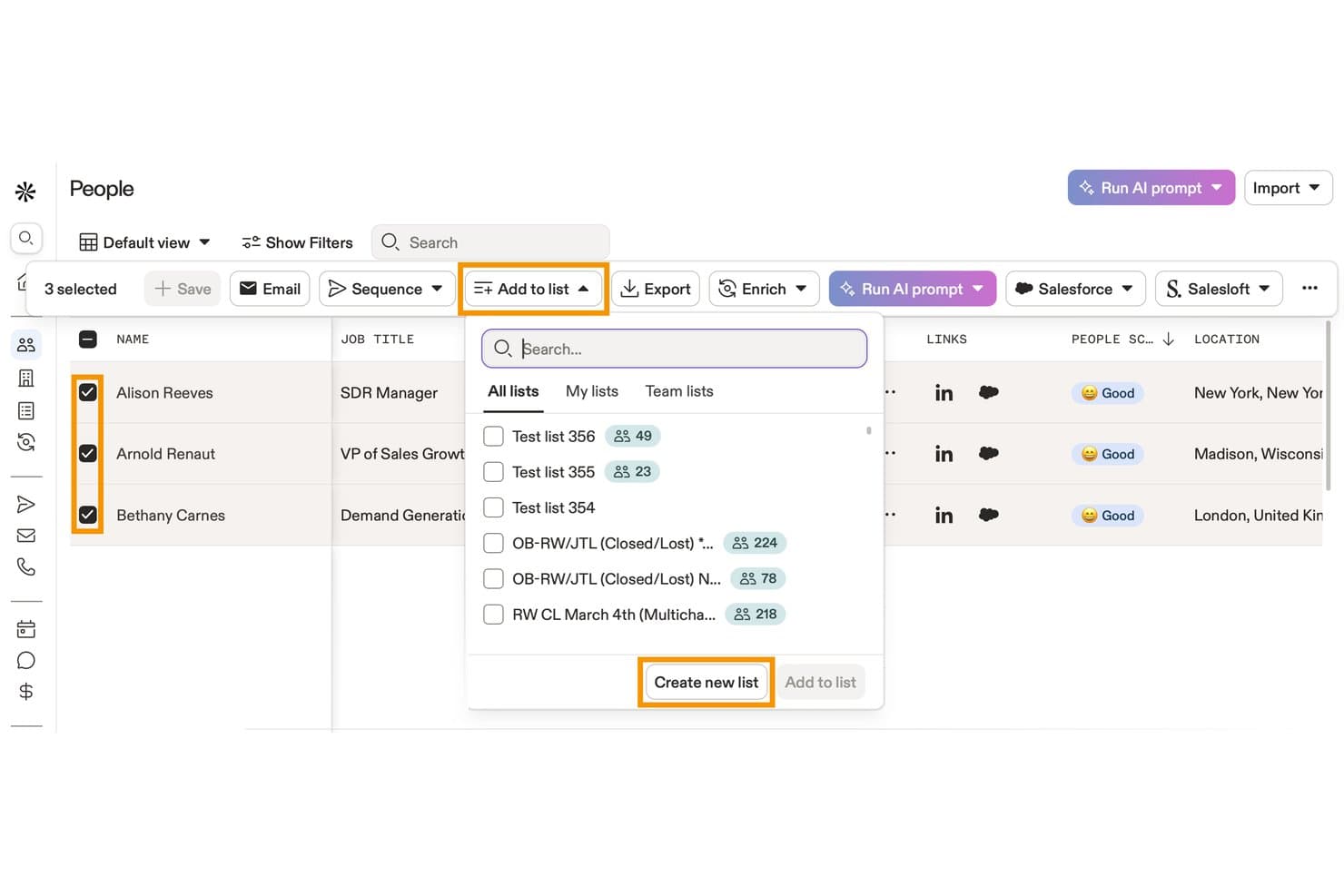
Apollo.io offers an 'Add to list' dropdown feature that lets users add selected contacts to existing lists or create a new list directly from the People view. Apollo.io is a B2B sales intelligence and engagement platform that combines a 210M+ contact database with list building, data enrichment, email sequencing, and CRM sync tools.
Who Is Apollo.io Best For?
Apollo.io suits outbound-focused revenue teams at SMBs and mid-market companies that need to build, enrich, and action prospect lists without juggling multiple tools.
Why I Picked Apollo.io
Apollo.io earns its spot on my shortlist because the enrichment filters go far deeper than most list tools offer. With 65+ attributes spanning job title, technographics, company headcount, funding stage, and topic-level buying intent, I can define an ICP and immediately surface a matching contact list. I also use the saved personas feature to lock those filter combinations in place, so my team builds from the same criteria every time rather than recreating searches from scratch.
Apollo.io Key Features
- Real-time CRM sync: Instantly updates and reflects changes between Apollo and connected CRMs like Salesforce or HubSpot.
- Bulk list import with field mapping: Supports uploading large contact lists and mapping custom fields for accurate data alignment.
- Automated email sequences: Enables users to schedule and send multi-step outreach campaigns to segmented lists.
- Engagement analytics dashboard: Tracks opens, clicks, replies, and unsubscribes at the individual contact level for each campaign.
Apollo.io Integrations
Apollo.io offers native integrations with Salesforce, HubSpot, Pipedrive, Marketo, Outreach, SalesLoft, and SendGrid. It connects with Zapier and provides an API for custom integrations.
Pros and Cons
Pros:
- Saved personas lock in repeatable ICP searches
- Built-in intent signals flag high-priority accounts
- 65+ data filters for precise list segmentation
Cons:
- Email sending limits cap high-volume outreach
- Contact data accuracy inconsistent outside North America
Learn more about Apollo.io: Best for real-time email verification
- Free trial available
- from $4.9 for 2000 email credits
Visit WebsiteCustomer Rating:4.4/5
MillionVerifier identifies invalid addresses in real-time to protect your sender score. MillionVerifier is a specialized deliverability platform built for high-growth marketing teams that need to stop email bounce issues before they start. While many tools focus on cleaning existing databases, this solution prioritizes the point of entry, ensuring only high-value, authentic leads enter your marketing funnel. By providing a secure infrastructure for real-time validation, MillionVerifier addresses the critical need for maintaining a pristine sender reputation across industries where inbox placement is a primary driver of revenue.
Why I Picked MillionVerifier
I selected MillionVerifier as the best for real-time email verification because of its exceptionally low-latency validation engine. While bulk cleaning is common, MillionVerifier excels at "live" verification, allowing you to catch typos, invalid domains, and risky addresses the moment a user hits "submit" on your signup form. This proactive approach not only keeps your database clean but also prevents the damage to sender authority that occurs when sending "welcome" sequences to non-existent accounts.
MillionVerifier Key Features
In addition to its live validation capabilities, MillionVerifier provides several technical tools to maintain long-term list hygiene:
- EverClean Automation: An automated maintenance system that connects directly to your ESP to identify and remove decaying email addresses on a daily basis without manual file uploads.
- Bulk Verifier Pro: A high-speed engine designed to process millions of records at once, providing detailed "safe-to-send" reports for legacy databases or purchased leads.
- Disposable Email Detection: Sophisticated detection logic that identifies and filters out "burnable" or temporary email addresses often used to bypass gated content.
- Global Data Privacy Compliance: Built with a security-first approach, the platform ensures all verification processes fully adhere to GDPR and international data protection standards.
MillionVerifier Integrations
Integrations include Mailchimp, Mailgun, Mailjet, Elastic Email, Campaign Monitor, Active Campaign, Zoho CRM, and Reply.
Pros and Cons
Pros:
- Automated workflows improve list management efficiency
- Flexible with various spreadsheet formats for ease of use
- High accuracy in verifying standard email types
- Automated workflows improve list management efficiency
- Flexible with various spreadsheet formats for ease of use
- High accuracy in verifying standard email types
Cons:
- Absence of an affiliate program noted by users
- Lacks features for email finding or data enrichment
- Absence of an affiliate program noted by users
- Lacks features for email finding or data enrichment
Learn more about MillionVerifier: Best for email validation
- Free demo available
- From $15/2,000 credits
Visit WebsiteCustomer Rating:4.7/5
ZeroBounce validates emails, removes invalids, detects spam traps, and enhances data. ZeroBounce is an email validation tool aimed at marketers and businesses needing to maintain clean and accurate mailing lists. It helps in verifying email addresses to improve deliverability and engagement rates.
Why I picked ZeroBounce: ZeroBounce’s main function is to validate and clean email lists, ensuring your messages reach the right people. The tool removes invalid emails and identifies spam traps and abuse emails. It also provides real-time email validation, which is vital for those who frequently update their lists. Along with these top features, ZeroBounce’s email appending feature adds missing information to your contacts, enhancing data quality.
Standout features & integrations:
Features include an email scoring system that ranks emails based on their quality and engagement potential, a data appending service that enriches contacts with missing data such as names and location, and an API integration that allows for real-time validation directly from your platform.
Integrations include HubSpot, Mailchimp, SendGrid, ActiveCampaign, Mailgun, Campaign Monitor, AWeber, Constant Contact, Salesforce, and Zapier.
Pros and Cons
Pros:
- Detects spam traps effectively
- Data appending for contacts
- Accurate email validation
Cons:
- Occasional false positives
- No manual list review
Learn more about ZeroBounce: Best for beginners with templates
- 30-day free trial available
- Pricing upon request
Visit WebsiteCustomer Rating:4.7/5
Moosend is beginner-friendly with easy templates and a drag-drop editor. Moosend is an email marketing tool designed for businesses of all sizes. It helps users create professional email campaigns, manage contacts, and automate marketing processes efficiently.
Why I picked Moosend: Moosend offers a straightforward platform ideal for beginners, thanks to its easy-to-use templates. The drag-and-drop email editor simplifies creating visually appealing campaigns without needing technical skills. It also includes segmentation and personalization features to target your audience effectively, and provides a 30-day free trial, so you can explore its features risk-free.
Standout features & integrations:
Features include a drag-and-drop email newsletter editor, A/B testing for content, and AI subject line optimization. The software also offers countdown timers and list segmentation to further enhance your campaigns.
Integrations include WordPress, Zapier, Magento, WooCommerce, Salesforce, HubSpot, PrestaShop, Mailchimp, and Shopify.
Pros and Cons
Pros:
- Real-time behavioral analytics
- Built-in landing page and form builders
- Advanced AI-powered personalization
Cons:
- Limited reporting customization
- Some advanced features need add-ons
Learn more about Moosend: 5Best for sharing curated product lists
Kit
- 14-day free trial available
- From $33/month (billed annually)
Visit WebsiteCustomer Rating:4.5/5
Kit organizes products visually with affiliate links, themed kits, and mobile support. Kit is a platform for creating and sharing curated product collections, primarily used by content creators, influencers, and enthusiasts. It helps users organize their favorite products into lists, making it easy to share recommendations with their audience.
Why I picked Kit: Kit offers a user-friendly interface that streamlines email marketing campaigns, enabling businesses to effectively manage subscriber lists and target audiences. Its AI-powered automation simplifies tasks like segmentation, personalized messaging, and performance tracking, making it an efficient tool for growing and nurturing email lists. Additionally, it allows users to create and showcase personalized recommendations for specific needs or niches, making it ideal for influencers, creators, and professionals.
Standout features & integrations:
Features include customizable product kits, mobile optimization for easy access, and the ability to embed lists directly on your platforms. It also offers simple tools for adding affiliate links, helping you monetize your recommendations effortlessly.
Integrations include Amazon, YouTube, Instagram, Twitter, Facebook, Pinterest, Shopify, WordPress, Squarespace, and Tumblr.
Pros and Cons
Pros:
- Monetization through affiliate links
- Mobile-friendly interface for easy use
- Ideal for content creators and influencers
Cons:
- Lacks advanced analytics for insights
- Limited customization for list designs
Learn more about Kit: Best for developers managing email at scale
- Free plan + free demo + 30-day free trial available
- From $15/month
Visit WebsiteCustomer Rating:4.4/5
Mailgun offers APIs, email validation, analytics, and bulk email support for developers. Mailgun is an email automation platform primarily used by developers for sending, receiving, and tracking emails. It offers high deliverability and advanced email validation to ensure messages reach the intended inboxes.
Why I picked Mailgun: Mailgun caters specifically to developers, providing powerful APIs for easy integration with various applications. Its email validation services enhance deliverability by verifying addresses before sending. The software’s detailed analytics also give insights into email performance, helping you tweak campaigns effectively, while its flexible infrastructure supports bulk email sending, making it suitable for businesses with large mailing lists.
Standout features & integrations:
Features include a strong API that allows you to send and receive welcome emails with ease. The platform also offers email validation services that help maintain a clean email list and detailed analytics and logs for tracking email performance and engagement.
Integrations include WordPress, Zapier, Slack, Magento, Shopify, Salesforce, HubSpot, WooCommerce, Heroku, and Microsoft Azure.
Pros and Cons
Pros:
- Detailed email analytics
- Flexible API integration
- High email deliverability rates
Cons:
- Can be slow for very large datasets
- Occasional email deliverability issues
Learn more about Mailgun: 7Best for personalized ecommerce marketing
Drip
- 14-day free trial + free demo available
- From $39/month
Visit WebsiteCustomer Rating:4.4/5
Drip offers tailored ecommerce tools with segmentation, automation, and analytics. Drip is an email marketing automation tool designed for ecommerce businesses aiming to boost customer engagement and sales. It focuses on creating personalized customer journeys and automating marketing workflows.
Why I picked Drip: Drip excels in providing tailored marketing solutions for ecommerce businesses. The platform offers advanced segmentation and personalization to target specific customer groups effectively, while its visual workflow builder simplifies the process of setting up automated campaigns. Additionally, the software provides strong analytics to track performance and optimize your marketing strategy.
Standout features & integrations:
Features include advanced segmentation, allowing for precise targeting based on customer behavior, a visual workflow builder to help you create complex automation sequences with ease, and comprehensive analytics to measure the effectiveness of your campaigns and make data-driven decisions.
Integrations include Shopify, WooCommerce, Magento, BigCommerce, Zapier, Facebook, Instagram, PayPal, Stripe, and OptinMonster.
Pros and Cons
Pros:
- Detailed analytics capabilities
- Intuitive workflow builder
- Effective segmentation features
Cons:
- Occasional delays in email delivery
- Limited design options for email templates
Learn more about Drip: Best for all-in-one marketing automation
- Free plan + 14-day trial + demo available
- From $19/month
Visit WebsiteCustomer Rating:4.2/5
GetResponse simplifies campaigns with automation, drag-drop editor, and analytics. GetResponse is a versatile marketing platform designed for businesses of all sizes, focusing on email marketing, lead generation, and campaign automation. It helps users create, manage, and analyze their marketing efforts through an intuitive and flexible interface.
Why I picked GetResponse: GetResponse combines email marketing with automation tools to simplify campaign management and enhance engagement. Its drag-and-drop email editor allows you to quickly design emails that look great on any device. You can also set up automated workflows to nurture leads or follow up with customers based on their behavior, while its built-in analytics help you monitor performance and make data-driven decisions.
Standout features & integrations:
Features include a landing page builder that helps you capture leads effectively, webinar hosting for engaging with your audience directly, and an autoresponder for automated follow-ups. You can also create advanced segmentation for targeting specific audience groups and use the conversion funnel feature for managing the entire customer journey.
Integrations include Shopify, WordPress, PayPal, WooCommerce, Salesforce, Magento, Zapier, Stripe, Facebook, and Google Analytics.
Pros and Cons
Pros:
- A/B testing for optimizing email content
- Conversion funnel to track user journeys
- Built-in webinar hosting for engagement
Cons:
- Occasional lag in reporting updates
- Limited advanced customization
Learn more about GetResponse: Best for managing growing contact lists
- Free plan available
- From $29/month
Visit WebsiteCustomer Rating:4.2/5
Elastic Email's dashboard gives quick access to contacts, campaigns, and reports Elastic Email helps marketing teams and small businesses organize contacts, segment audiences, and automate campaigns from one place. I like that it also combines email marketing with transactional email tools, which is useful if you need to manage subscriber lists and send different types of emails at scale.
Who Is Elastic Email Best For?
Agencies, marketers, and businesses that need to manage large email lists and send high-volume campaigns across multiple brands or clients.
Why I Picked Elastic Email
I picked Elastic Email because it works well for managing growing contact lists with audience segmentation, custom fields, and contact management tools in one place. You can group subscribers based on their data and campaign activity, which helps your team send more relevant emails to different audience segments. I also like that it supports automation, so your lists and campaigns can keep working as your subscriber base grows. This makes it a practical option for teams that need to organize contacts and run targeted email campaigns at scale.
Elastic Email Key Features
Some other features in Elastic Email help your team create, send, and track email campaigns more effectively:
- Contact import tools: Upload contacts through CSV files to add subscribers and keep your lists up to date.
- Email template editor: Create and customize marketing emails with a visual editor for faster campaign setup.
- Signup forms: Build forms to collect new subscribers and grow your contact lists directly from your website.
- Campaign reports: Review delivery, open, and click data to measure campaign performance and adjust future sends.
Elastic Email Integrations
Integrations include HubSpot, ClickUp, PayPal, WooCommerce, WordPress Sender, Integromat, Mautic, and Shopify.
Pros and Cons
Pros:
- Includes automation workflows for triggered and scheduled campaigns
- Offers API and SMTP options for flexible email integrations
- Supports high-volume email sending at a lower starting cost
Cons:
- Template editor offers limited design flexibility for custom emails
- Reporting tools lack the depth needed for advanced analysis
Learn more about Elastic Email: Best for small business email tools
- 14-day free trial + free demo available
- From $12/month
Visit WebsiteCustomer Rating:4.2/5
Constant Contact is intuitive and versatile, offering advanced email tools, templates, and analytics. Constant Contact is an email marketing tool geared towards small businesses and entrepreneurs. It focuses on simplifying email campaign management and customer engagement.
Why I picked Constant Contact: Constant Contact offers an intuitive interface that's perfect for small businesses with limited technical resources. Its email marketing features include customizable templates and an easy drag-and-drop editor. The software also provides tools for managing events and social media campaigns, while offering real-time tracking and analytics to help you understand campaign performance.
Standout features & integrations:
Features include event management tools that simplify organizing and promoting events, social media marketing features to help you manage your online presence effectively, and email automation capabilities that allow for personalized follow-ups with your audience.
Integrations include Shopify, WooCommerce, QuickBooks, Eventbrite, Salesforce, WordPress, Outlook, Google Analytics, Facebook, and Instagram.
Pros and Cons
Pros:
- AI content generator
- Event management tools
- High deliverability rates
Cons:
- Basic reporting capabilities
- Limited design customization
Learn more about Constant Contact:
Diğer E-posta Listesi Yönetim Yazılımları
Kısa listeme giremeyen ancak yine de göz atmaya değer bazı ek e-posta listesi yönetim yazılımı seçenekleri şunlardır:
- 11BrevoBest for seamless ecommerce integrations
- 12EmailOctopusBest for cost-effective email marketing
- 13BrazeBest for cross-channel engagement
- 14BloomreachBest for personalized campaigns
- 15YotpoBest for enhancing ecommerce loyalty programs
- 16MailchimpBest for all-in-one marketing for SMBs
- 17FrontBest for team collaboration
How I Evaluate Email List Management Software
I evaluate tools in two layers: the baseline capabilities a tool must have—like segmentation, data hygiene, and CRM sync—and the differentiators that set one platform apart for RevOps.
Core Functionality (Table Stakes For This List)
When I'm selecting tools for my list, I rank each one on a scale from 0 (does not offer the functionality) to 5 (excels in this area) for each core functionality listed below. Then, I calculate the tool's total score into a percentage. Each tool needs to achieve a minimum total score of 65% to be considered for inclusion.
- List Segmentation: I look for dynamic segment builders that let you filter contacts by lifecycle stage, deal status, or engagement recency—not just static tags.
- Data Hygiene & Validation: Good tools catch duplicates and verify addresses before they tank your sender reputation, so I check for automated hygiene workflows.
- Subscription & Compliance Management: I evaluate how each platform handles opt-ins, suppression lists, and consent tracking across GDPR, CAN-SPAM, and CCPA.
- CRM & Data Sync: Real-time bidirectional sync with platforms like Salesforce or HubSpot matters here, especially for keeping lifecycle stage and owner data aligned.
- List Import & Enrichment: I check whether you can map custom fields during bulk imports and enrich records with firmographic data from native or partner sources.
- Engagement Tracking: Subscriber-level metrics like opens, clicks, and unsubscribes should feed back into list health dashboards, not just sit in campaign reports.
Once I have a list of tools that meet this criteria, I consider what sets each platform apart.
Differentiating Factors (What Sets Vendors Apart)
Here's how I compare and contrast different vendors:
Standout Features
Account-based segmentation is a big differentiator for RevOps teams running ABM motions—I look for tools that group contacts by target account and buying committee role. Deliverability monitoring also matters here, since inbox placement tests and sender reputation scoring protect the lists you've worked hard to build. I check for predictive lead scoring that surfaces high-intent subscribers for sales handoff based on engagement patterns rather than manual tagging.
Beyond Features
Integration depth is one of the first things I evaluate—a tool needs native connectors to your CRM, MAP, and sales engagement platforms, plus API access for custom workflows. Pricing transparency matters just as much for RevOps teams managing budgets across quarters, so I look at whether costs scale predictably with contact volume or send limits. I also check for reporting that ties list engagement back to pipeline metrics, since that's how you justify the tool's value to leadership.
E-posta Listesi Yönetim Yazılımı Nasıl Seçilir?
Uzun özellik listeleri ve karmaşık fiyatlandırma yapıları içinde kaybolmak kolaydır. Kendinize özgü yazılım seçim sürecinizde ilerlerken odaklanmanızı korumanıza yardımcı olmak için göz önünde bulundurmanız gereken faktörleri içeren bir kontrol listesi hazırladım:
| Faktör | Dikkat Edilmesi Gerekenler |
| Ölçeklenebilirlik | Yazılımın ekibinizle birlikte büyüyebildiğinden emin olun. Performanstan ödün vermeden artan abone sayılarını karşılayıp karşılamadığını kontrol edin. |
| Entegrasyonlar | Sorunsuz bir iş akışı için mevcut CRM'niz, pazarlama platformlarınız ve diğer iş araçlarınızla entegre olabilen araçları tercih edin. |
| Özelleştirilebilirlik | Özel alanlar veya kişiselleştirilmiş e-posta şablonları gibi yazılımı özel ihtiyaçlarınıza ne ölçüde uyarlayabileceğinizi değerlendirin. |
| Kullanım Kolaylığı | Kapsamlı bir eğitim gerektirmeyecek, kullanıcı dostu bir arayüz seçin. Böylece ekibiniz araca hızla uyum sağlayabilir ve aracı verimli şekilde kullanabilir. |
| Bütçe | Maliyeti bütçenize göre değerlendirin. Olası gizli maliyetler de dahil olmak üzere başlangıç ve devam eden giderleri göz önünde bulundurun. |
| Güvenlik Önlemleri | Özellikle hassas müşteri bilgilerini işliyorsanız, güveni ve uyumluluğu korumak için güçlü veri koruma önlemlerine sahip araçlara öncelik verin. |
| Müşteri Desteği | Sorunlarla karşılaştığınızda veya rehberliğe ihtiyaç duyduğunuzda size yardımcı olacak hızlı yanıt veren ve erişilebilir destek seçeneklerini kontrol edin. |
| Raporlama Araçları | Performansı izlemek ve verilere dayalı kararlar almak için gelişmiş analiz özelliklerine sahip araçları tercih edin. |
E-posta Listesi Yönetim Yazılımlarındaki Trendler
Araştırmam sırasında farklı e-posta listesi yönetim yazılımı sağlayıcılarının sayısız ürün güncellemesini, basın bültenini ve sürüm günlüğünü inceledim. Takip ettiğim yeni trendlerden bazıları şunlardır:
- Yapay Zekâ Destekli Kişiselleştirme: Daha fazla araç, e-posta içeriğini kullanıcı davranışlarına ve tercihlerine göre kişiselleştirmek için yapay zekâ kullanıyor. Bu, işletmelerin daha ilgili mesajlar sunarak etkileşimi artırmasına yardımcı olur.
- Gelişmiş Veri Gizliliği: Veri düzenlemeleri sıkılaştıkça sağlayıcılar, gelişmiş gizlilik özellikleri sunmaya odaklanıyor. Bu eğilim, GDPR gibi yasalara uyulmasını sağlayarak kullanıcılara gönül rahatlığı verir.
- Etkileşimli E-postalar: Sağlayıcılar, anketler ve yoklamalar gibi etkileşimli unsurları doğrudan e-postalara ekliyor. Bu eğilim, alıcıların gelen kutularından ayrılmadan etkileşim kurmasına olanak tanıyarak etkileşimi artırır.
- Gerçek Zamanlı Analizler: E-posta kampanyalarını anında optimize etmek için gerçek zamanlı içgörülere yönelik artan bir talep var. Bunun sonucunda sağlayıcılar, kullanıcı etkileşimleri hakkında eyleme geçirilebilir veriler sunmak için analiz araçlarını geliştiriyor.
- Çok Kanallı İletişim: E-posta listesi yönetimi araçları, birden fazla kanaldaki iletişimi destekleyecek şekilde genişliyor. Bu eğilim, işletmelerin e-posta, SMS ve sosyal medya genelinde tutarlı bir mesaj sunmasına yardımcı olur.
E-posta Listesi Yönetimi Yazılımı Nedir?
E-posta listesi yönetimi yazılımı, pazarlama kampanyalarınız için e-posta kişilerinizi düzenlemenize, bölümlere ayırmanıza ve yönetmenize yardımcı olan bir araçtır. Pazarlamacılar, küçük işletme sahipleri ve e-ticaretle ilgilenenler; e-posta listelerini düzenli tutmak, doğru mesajları doğru kişilere göndermek ve nelerin işe yaradığını görmek için bu yazılımı kullanır. Aboneleri yönetmeyi kolaylaştırır, e-postalarınızı kişiselleştirmenizi sağlar ve kitlenizle daha iyi iletişim kurabilmeniz için sonuçları ölçmenize yardımcı olur.
E-posta Listesi Yönetimi Yazılımının Özellikleri
E-posta listesi yönetimi yazılımı seçerken aşağıdaki temel özelliklere dikkat edin:
- Bölümlere Ayırma: Daha hedefli pazarlama yapabilmeniz için kişilerinizi belirli gruplara ayırmanıza olanak tanır ve etkileşim oranlarını artırır.
- Kişiselleştirme: E-postaların alıcıya özel bilgilerle özelleştirilmesini sağlar; böylece mesajlar daha ilgili ve etkili hâle gelir.
- Analizler: Kampanya performansı hakkında içgörüler sunarak açılma oranlarını, tıklama oranlarını ve genel etkililiği analiz etmenize yardımcı olur.
- Otomasyon: Zamanlanmış e-postaların ve takip dizilerinin gönderilmesini kolaylaştırır; zamandan tasarruf sağlar ve tutarlı iletişim kurulmasını güvence altına alır.
- A/B Testi: Hangi seçeneğin en iyi performansı gösterdiğini belirlemek için farklı e-posta varyasyonlarını test etmenizi ve kampanyalarınızı optimize etmenizi sağlar.
- E-posta Doğrulama: Geçersiz e-posta adreslerini belirleyip kaldırarak temiz bir kişi listesi oluşturur ve teslim edilebilirliği artırır.
- Etkileşimli İçerik: Alıcı etkileşimini artırmak için e-postalara yoklama ve anket gibi unsurlar ekler.
- Uyumluluk Araçları: Pazarlama uygulamalarınızın GDPR gibi düzenlemelere uygun olmasını sağlar; kullanıcı verilerini korur ve güveni sürdürür.
- Çok Kanallı Destek: Birden fazla kanalda iletişim olanağı sunarak bütünleşik bir pazarlama yaklaşımına imkân tanır.
- Gerçek Zamanlı Güncellemeler: Anlık içgörüler ve veri güncellemeleri sunarak e-posta pazarlama stratejilerinizde hızlı ayarlamalar yapmanıza olanak tanır.
E-posta Listesi Yönetimi Yazılımının Faydaları
E-posta listesi yönetimi yazılımını uygulamak, ekibiniz ve işletmeniz için çeşitli faydalar sağlar. Yararlanabileceğiniz bazı avantajlar şunlardır:
- Daha İyi Hedefleme: Bölümlere ayırma özellikleri, doğru mesajı doğru kitleye göndermenize yardımcı olarak etkileşim ve dönüşüm oranlarını artırır.
- Zamandan Tasarruf: Otomasyon özellikleri manuel görevleri azaltır ve ekibinizin stratejiye ve yaratıcı içeriğe odaklanmasını sağlar.
- Gelişmiş Kişiselleştirme: Kişiselleştirme araçları e-postalarınızı daha ilgili hâle getirerek daha yüksek açılma ve tıklama oranları sağlar.
- Daha İyi Karar Verme: Analizler kampanya performansı hakkında içgörüler sunarak bilinçli pazarlama kararları almanıza yardımcı olur.
- Artan Teslim Edilebilirlik: E-posta doğrulama, temiz bir liste oluşturarak mesajlarınızın hedeflenen gelen kutularına ulaşmasını sağlar.
- Uyumluluk Güvencesi: Uyumluluk araçları, ekibinizin veri koruma düzenlemelerine uymasına yardımcı olarak işletmenizi ve müşteri güvenini korur.
- Kanallar Arası Tutarlılık: Çok kanallı destek, farklı iletişim platformlarında tutarlı bir mesaj sunmanızı sağlar.
E-posta Listesi Yönetimi Yazılımının Maliyetleri ve Fiyatlandırması
E-posta listesi yönetimi yazılımı seçmek, mevcut çeşitli fiyatlandırma modellerinin ve planların anlaşılmasını gerektirir. Maliyetler özelliklere, ekip büyüklüğüne, eklentilere ve daha fazlasına göre değişir. Aşağıdaki tabloda yaygın planlar, ortalama fiyatları ve e-posta listesi yönetimi yazılımı çözümlerinde genellikle bulunan özellikler özetlenmiştir:
E-posta Listesi Yönetim Yazılımı için Plan Karşılaştırma Tablosu
| Plan Türü | Ortalama Fiyat | Yaygın Özellikler |
| Ücretsiz Plan | $0 | Temel e-posta kampanyaları, sınırlı otomasyon ve basit analizler. |
| Kişisel Plan | $10-$30/kullanıcı/ay | Özelleştirilebilir şablonlar, temel segmentasyon ve zamanlanmış e-postalar. |
| İşletme Planı | $30-$100/kullanıcı/ay | Gelişmiş otomasyon, ayrıntılı analizler ve A/B testi yetenekleri. |
| Kurumsal Plan | $100+/kullanıcı/ay | Kişiselleştirilmiş destek, gelişmiş segmentasyon, çok kanallı destek ve uyumluluk araçları. |
E-posta Listesi Yönetim Yazılımı SSS
E-posta listesi yönetim yazılımı hakkında sık sorulan bazı soruların yanıtları:
Bir e-posta listesini nasıl yönetebilirim?
Bir e-posta listesini yönetmek, çift katılım süreci oluşturmak ve segmentasyon için kişi etiketlerini kullanmak gibi çeşitli en iyi uygulamaları içerir. Etkin olmayan aboneleri kaldırmak ve yeni aboneler eklemek için abone listenizi düzenli olarak temizleyin. Kişiselleştirilmiş e-posta içeriği ve yeniden etkileşim kampanyaları da kitlenizin ilgisini korumaya yardımcı olur.
E-posta listesi temizleme nasıl çalışır?
E-posta listesi temizleme, sahte veya geçersiz e-posta adreslerini kaldırarak listenize yeni bir başlangıç sağlar. Bu süreç, kampanyalarınızı teslim edilebilirlik sorunlarından korur ve mesajların doğru kişilere ulaşmasını sağlar. Listenizi düzenli olarak temizlemek, sağlıklı bir abone tabanını korumanıza yardımcı olur.
E-posta pazarlamasında liste yönetiminin faydaları nelerdir?
Etkili liste yönetimi, daha iyi teslim edilebilirlik ve daha yüksek etkileşim oranları sağlar. Müşteri ilişkilerini geliştirir ve çalışmaları etkin abonelere odaklayarak e-posta pazarlama maliyetlerini düşürebilir. Doğru liste yönetimi, hedefli pazarlama stratejilerini de destekler.
E-posta listesi yönetiminde segmentasyon neden önemlidir?
Segmentasyon, hedefli pazarlamayı mümkün kılacak şekilde kitlenizi davranış veya demografik özelliklere göre kategorilere ayırmanızı sağlar. Bu, daha kişiselleştirilmiş mesajlara yol açarak etkileşim ve dönüşüm oranlarını artırır. Segmentasyon, e-postalarınızın her alıcı için ilgili olmasını sağlamaya yardımcı olarak genel pazarlama kampanyası etkinliğini yükseltir.