

Doğru düşük kodlu entegrasyon platformunu seçmek göz korkutucu olabilir. Birden fazla araç ve uygulamayla uğraşıyor, bağlantısı kopuk verilerle mücadele ediyor veya yalnızca daha düzenli bir iş akışına ihtiyaç duyuyorsanız, düşük kodlu bir çözüm tam olarak ihtiyacınız olan şey olabilir. Bu platformlar, ekiplerin gelişmiş kodlama becerilerine ihtiyaç duymadan süreçleri otomatikleştirmesine, farklı sistemleri birbirine bağlamasına ve üretkenliği artırmasına olanak tanır.
Ancak piyasada bu kadar çok seçenek varken hangisinin kendine özgü iş ihtiyaçlarınıza en uygun olduğunu nasıl bilebilirsiniz? Gelir operasyonları yazılımları konusundaki deneyimimden yararlanarak en iyi düşük kodlu entegrasyon platformlarından bazılarını test edip karşılaştırdım. Aşağıda, ekibiniz için en iyi çözümü seçmenize yardımcı olacak ayrıntılı incelemeleri bulabilirsiniz.
Why Trust Our Software Recommendations
6,700+
Reviews
20
Industry experts
16+
Evaluation factors
14
Years
Our reviews reflect our independent judgment—not a sales pitch. Learn how we stay transparent.
For this guide, we evaluated tools using hands-on testing and independent research, scoring tools using our selection criteria.
Our reviews reflect our human editorial judgment, not a sales pitch.
Karşılaştırma Tablosu: Düşük Kodlu Entegrasyon Platformu
Bu karşılaştırma tablosu, en iyi düşük kodlu entegrasyon platformu seçimlerim için fiyatlandırma ayrıntılarını özetlemektedir.
Sorted by: Default
| Tool | Starting Price | Website | |
|---|---|---|---|
Best for managed IT service integrations | 4.5 out of 5 | Pricing upon request Not available | Website |
Best for supply chain orchestration | 4.3 out of 5 | Pricing upon request Free demo available | Website |
Best for AI-guided NetSuite and CRM sync | Not rated | Pricing upon request 30-day free trial available | Website |
Best for connecting apps and automating simple workflows | 4.7 out of 5 | $19.99/month Free plan available; 14-day free trial | Book Demo |
Best for IT teams | 4.7 out of 5 | $75/month Free plan + free demo available | Website |
Best for low-code process automation | 4.7 out of 5 | $15/user/month Not available | Website |
Best for building scalable database-driven apps | 4.5 out of 5 | $392/month 14-day free trial | Website |
Best for automating processes | 4.4 out of 5 | Pricing upon request Free plan + demo available | Website |
Best for enterprise scalability | 4.4 out of 5 | $1,090/month Free plan available | Website |
Best for small businesses | 4.3 out of 5 | Pricing upon request Free plan available; 15-day free trial | Website |


En İyi Düşük Kodlu Entegrasyon Platformu İncelemeleri
Aşağıda, kısa listeme giren en iyi düşük kodlu entegrasyon platformlarının ayrıntılı özetlerini bulabilirsiniz. İncelemelerim, sizin için en iyi olanı bulmanıza yardımcı olmak amacıyla her aracın temel özelliklerine, artılarına ve eksilerine, entegrasyonlarına ve ideal kullanım alanlarına ayrıntılı bir bakış sunmaktadır.
 Best for managed IT service integrations
- Not available
- Pricing upon request
Visit WebsiteCustomer Rating:4.5/5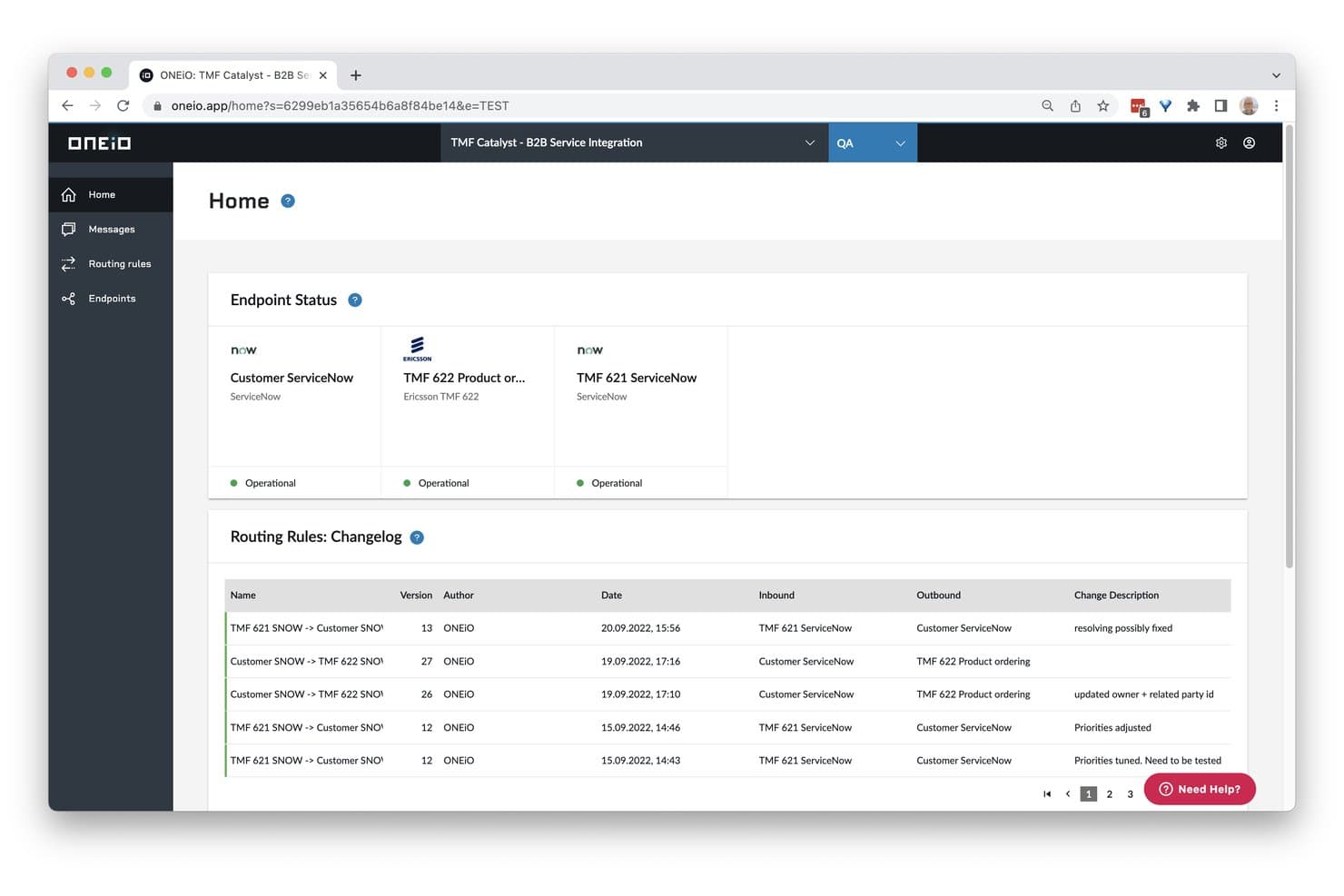
ONEiO displays endpoint status and routing rule changelogs in one view. ONEiO is a managed integration platform that connects IT service management, CRM, and enterprise tools through a hub-and-spoke architecture, with rule-based configuration, bidirectional data sync, and fully managed or self-managed service tiers.
Who Is ONEiO Best For?
ONEiO is a strong fit for IT and managed service teams that need to connect ITSM platforms like ServiceNow, Jira, or Zendesk without building or maintaining integrations in-house.
Why I Picked ONEiO
I've included ONEiO in my top picks because it's purpose-built for managed IT service integrations, which sets it apart from general-purpose iPaaS tools. I particularly like its fully managed service tier, where ONEiO's team handles the entire integration lifecycle, including monitoring, recovery, and incident response under SLAs. Its persistent message queues and automatic recovery mean that if ServiceNow or Zendesk goes offline, no data is lost and processing resumes without manual intervention.
ONEiO Key Features
- Hub-and-spoke architecture: Each connected system links to ONEiO once, so a single message flow can push data to multiple endpoints simultaneously.
- Routing rule engine: A tabbed form editor lets you build conditional rules with priority settings, version control, and bulk enable/disable actions.
- Persistent message queuing: Inbound messages are held in queue during outages and automatically re-processed in order once the target system comes back online.
- Multi-environment support: Enterprise and Service Provider plans include separate Production and QA environments with role-based access and audit logging.
ONEiO Integrations
ONEiO offers native integrations with Salesforce, HubSpot, Pipedrive, NetSuite, ServiceNow, Jira, Zendesk, Freshservice, BMC Remedy, and Azure DevOps. It supports custom REST and SOAP endpoints for additional connections.
Pros and Cons
Pros:
- Rule versioning supports safer changes
- Persistent queues recover during outages
- Fully managed lifecycle under SLAs
Cons:
- No drag-and-drop workflow canvas
- Form-based configuration can feel tricky
Learn more about ONEiO: Best for supply chain orchestration
- Free demo available
- Pricing upon request
Visit WebsiteCustomer Rating:4.3/5
Cleo Integration Cloud tracks EDI issues and resolutions across supply chain workflows. For businesses looking to streamline their operations and enhance connectivity, Cleo Integration Cloud offers a dynamic solution. It addresses the needs of industries such as logistics, manufacturing, and healthcare by providing automated order intake, trading partner onboarding, and comprehensive integration capabilities. This platform meets the demand for efficient, low-code integration, helping companies achieve end-to-end visibility and predictive control across their processes.
Why I Picked Cleo Integration Cloud
I picked Cleo Integration Cloud for its strong emphasis on supply chain orchestration and the ability to automate EDI and API transactions. Its automated order intake and trading partner onboarding features make it particularly appealing to businesses aiming to reduce manual processes and improve integration efficiency. The platform's focus on providing end-to-end visibility and predictive control aligns well with the needs of companies seeking to optimize their data flow and integration strategies in a low-code environment.
Cleo Integration Cloud Key Features
In addition to its robust orchestration capabilities, I also found:
- No-Code Trading Partner Onboarding: Enables quick, efficient integration of new trading partners without extensive coding knowledge.
- AI-Powered Error Resolution: Uses artificial intelligence to identify and resolve errors, enhancing the reliability of integration processes.
- Automated EDI and API Transactions: Streamlines transaction handling, reducing manual intervention and improving accuracy.
- End-to-End Visibility: Provides comprehensive insights into data flows across systems, aiding in better decision-making and operational efficiency.
Cleo Integration Cloud Integrations
Cleo Integration Cloud integrations include Dynamics 365, NetSuite, SAP, FedEx, UPS, and connectors for ecommerce platforms, CRM/ERP systems, TMS/WMS platforms, databases, and cloud storage solutions.
Pros and Cons
Pros:
- Reduces processing time with automated data transformation and integration flows
- Strong EDI mapping tools support fast integrations across multiple systems
- Quick setup for EDI mappings compared to traditional integration platforms
Cons:
- Some integrations require troubleshooting due to terminology and configuration complexity
- Complex integration features require training and deeper technical understanding
Learn more about Cleo Integration Cloud: Best for AI-guided NetSuite and CRM sync
- 30-day free trial available
- Pricing upon request
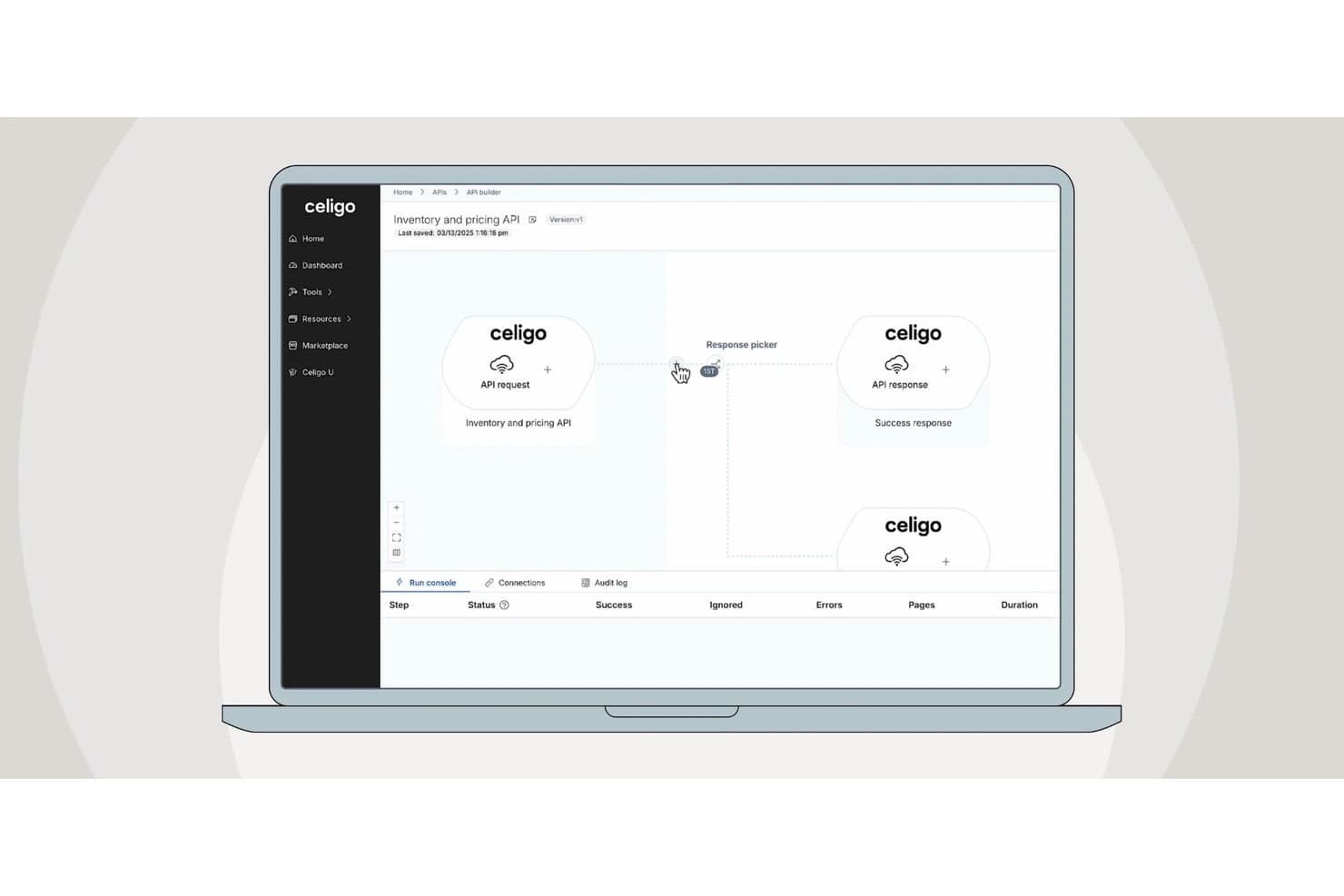
Celigo's API builder lets users visually design API workflows. Celigo is a low-code iPaaS that connects ERP, CRM, and marketing automation systems through a visual workflow builder, 300+ prebuilt connectors, and an AI-native assistant that generates and troubleshoots integration flows from natural language prompts.
Who Is Celigo Best For?
Celigo is a strong fit for RevOps and operations teams running NetSuite alongside a CRM like Salesforce or HubSpot who need AI-assisted integration without leaning on engineering.
Why I Picked Celigo
Celigo earns its spot on my shortlist because of how deeply it handles NetSuite-to-CRM sync, particularly when AI is doing the heavy lifting. I love that Celigo Ora lets you describe a workflow in plain language, like syncing Salesforce opportunities to NetSuite sales orders, and it generates the mappings, connections, and logic automatically. On top of that, the AI error engine resolves over 95% of integration errors monthly without manual intervention, which is a real operational edge when you're running bidirectional flows across your revenue stack.
Celigo Key Features
- Celigo Ora natural language builder: Describe a workflow in plain English and Ora generates the connections, mappings, and logic automatically, with a "walk me through it" mode that explains the plan before making any changes.
- Flat-rate pricing model: Plans are priced by endpoints and flows, not by tasks or data volume, so you won't face overage fees as your integration usage scales.
- API Builder: Available on Professional and Enterprise tiers, this feature lets you publish integration flows as secure, governed API endpoints you can share with internal teams or external partners.
- Data Ingestion module: A native ETL/ELT capability that pipes high-volume data directly into warehouses like Snowflake and Google BigQuery, extending Celigo beyond point-to-point sync into your broader data stack.
Celigo Integrations
Celigo offers 300+ prebuilt connectors, including NetSuite, Salesforce, HubSpot, Microsoft Dynamics 365, Snowflake, Google BigQuery, Slack, Zendesk, and Shopify. Universal connectors, APIs, and webhooks support custom integrations.
Pros and Cons
Pros:
- Flat-rate pricing avoids unexpected overage fees
- Error engine auto-resolves most integration issues
- AI assistant builds flows from plain English
Cons:
- Advanced data transformations are somewhat limited
- Pricing transparency is limited
Learn more about Celigo: Best for connecting apps and automating simple workflows
- Free plan available; 14-day free trial
- From $19.99/month (billed annually)
Visit WebsiteCustomer Rating:4.7/5
Zapier automates tasks by connecting apps, offering pre-built workflows without coding. Zapier is a low-code automation platform designed for businesses looking to connect various applications and automate workflows. Its primary users are small to medium-sized businesses that want to integrate and automate tasks across multiple applications. Zapier facilitates task automation, process integration, and workflow enhancement.
Why I picked Zapier: Zapier excels in connecting a vast array of apps, making it a versatile choice for integrating different tools your team uses daily. It allows you to automate repetitive tasks without needing coding skills. The platform offers pre-built templates called "Zaps" that simplify setting up automated workflows. Zapier's flexibility in connecting diverse applications makes it an ideal choice for teams looking to enhance efficiency and productivity.
Standout features & integrations:
Features include the ability to automate tasks across multiple applications without coding expertise. You can use pre-built Zaps to quickly set up workflows and save time. The platform offers extensive flexibility, allowing your team to connect a wide variety of applications.
Integrations include Google Workspace, Slack, Microsoft Teams, Salesforce, Trello, Dropbox, Mailchimp, HubSpot, Shopify, and QuickBooks.
Pros and Cons
Pros:
- Connects multiple applications
- Automates repetitive tasks
- Pre-built workflow templates
Cons:
- Limited complex automation capabilities
- Slight learning curve
Learn more about Zapier:

Workato simplifies app integration with scalable automation and strong security tools. Workato is an enterprise automation platform designed for IT teams looking to integrate applications and automate workflows. Its main users are organizations seeking to enhance operational efficiency through process automation and app integration. Workato supports process automation, data synchronization, and workflow optimization.
Why I picked Workato: Workato offers powerful automation tools that enable IT teams to integrate applications with ease. It includes pre-built connectors that simplify the setup of automated workflows. The platform's focus on scalability makes it suitable for businesses of all sizes. Workato also provides enterprise-grade security features, ensuring your team can automate processes safely.
Standout features & integrations:
Features include powerful automation tools that help your team integrate applications efficiently. You can use pre-built connectors to set up workflows quickly and effectively. The platform supports scalability, making it ideal for businesses of different sizes.
Integrations include Salesforce, Slack, ServiceNow, Jira, Google Workspace, Microsoft Dynamics 365, SAP, Oracle, NetSuite, and QuickBooks.
Pros and Cons
Pros:
- Enterprise-grade security features
- Supports large-scale automation
- Quick workflow setup
Cons:
- Limited customization options
- Performance tied to infrastructure
Learn more about Workato: Best for low-code process automation
- Not available
- From $15/user/month
Visit WebsiteCustomer Rating:4.7/5
Creatio integrates CRM and automation with no-code tools, supporting business workflows. Creatio is a low-code platform designed to unify CRM and process automation for enterprises. It caters to a wide range of industries, including financial services, healthcare, and telecommunications. Creatio excels in enabling businesses to manage customer relationships and automate workflows with a single, flexible platform.
Why I picked Creatio: Creatio stands out for its ability to integrate customer relationship management (CRM) with process automation, allowing teams to streamline sales, marketing, and service processes. The platform is user-friendly, offering a no-code/low-code approach that empowers business users to design and manage workflows without heavy IT involvement. Creatio’s intelligent process automation, powered by AI and machine learning, helps organizations rapidly adjust to changing business needs while driving efficiency.
Standout features & integrations:
Features include low-code tools for process modeling, case management, and workflow automation, allowing quick customization of business processes. Its CRM covers the full customer journey, from lead generation to support, ensuring a seamless experience across sales, marketing, and service. AI-driven insights and process analysis tools further enhance decision-making and performance.
Integrations include Microsoft Dynamics 365, Google Workspace, AWS, SAP, Oracle, Slack, and more.
Pros and Cons
Pros:
- Unified CRM and process automation platform
- Easy-to-use low-code/no-code environment
- AI and machine learning capabilities
Cons:
- Customization may require some technical expertise
- May require additional configuration for complex workflows
Learn more about Creatio: Best for building scalable database-driven apps
- 14-day free trial
- From $392/month
Visit WebsiteCustomer Rating:4.5/5
Caspio enables fast, no-code app creation with strong data security and templates. Caspio is a low-code platform primarily used to build custom database applications without complex coding. Its main user base includes small to medium sized businesses looking to manage data efficiently and create web-based applications. Caspio offers solutions for data management, reporting, and application development. Caspio excels at creating detailed, data-centric applications that require powerful database management, ideal for businesses with complex data needs
Why I picked Caspio: Caspio provides an intuitive platform for creating database applications, making it accessible for users with minimal coding knowledge. It features a drag-and-drop interface, allowing your team to build apps quickly. The platform includes a variety of templates and customization options to tailor apps to specific business needs. Caspio also offers strong support for data security and compliance, ensuring your data remains protected.
Standout features & integrations:
Features include a user-friendly drag-and-drop interface that simplifies app building for your team. You can access numerous templates to kickstart your projects and customize them to fit your business needs. The platform also emphasizes data security, providing compliance features to protect your information.
Integrations include Salesforce, Microsoft SharePoint, Google Workspace, Dropbox, Microsoft Office 365, QuickBooks, Mailchimp, PayPal, Stripe, and Twilio.
Pros and Cons
Pros:
- Easy and fast app customization and deployment
- Drag-and-drop interface
- Suitable for small businesses
Cons:
- Basic design limitations
- Learning curve for beginners
Learn more about Caspio: Best for automating processes
- Free plan + demo available
- Pricing upon request
Visit WebsiteCustomer Rating:4.4/5
Appian unifies CRM and automation with easy-to-use low-code tools for businesses. Appian is a low-code platform designed for enterprises seeking to automate their business processes. Its main user base includes organizations in various industries, such as financial services and government. Appian excels in business process management, mobile app development, and process intelligence.
Why I picked Appian: Appian offers a comprehensive suite of tools for end-to-end process automation, integrating AI, RPA, and IDP. The platform supports case management and delivers packaged applications tailored to industry needs. Its strong customer support and educational resources further enhance its appeal for process automation.
Standout features & integrations:
Features include tools for business process management that allow your team to automate workflows effectively. Mobile app development capabilities enable your team to create applications that support on-the-go access. Additionally, process intelligence tools help your team analyze and optimize business operations.
Integrations include Salesforce, Microsoft Dynamics 365, Google Workspace, AWS, SAP, Oracle, IBM, ServiceNow, Box, and Slack.
Pros and Cons
Pros:
- Strong customer support
- Industry-specific applications
- Integration with AI and RPA
Cons:
- Complex implementation
- Requires user training
Learn more about Appian: Best for enterprise scalability
- Free plan available
- From $1,090/month
Visit WebsiteCustomer Rating:4.4/5
Mendix simplifies large-scale app development with collaborative, cloud-native tools. Mendix is a low-code application development platform that targets enterprises needing scalable and flexible app development solutions. Its main user base includes large organizations looking to digitize operations and improve business processes through custom applications. Mendix excels in facilitating rapid application development and enabling cross-functional collaboration.
Why I picked Mendix: Mendix is designed to accommodate the complex needs of enterprises, offering features that support large-scale app deployment and management. It includes tools for collaborative development, allowing multiple team members to work on projects simultaneously. The platform's visual development tools simplify the creation of complex applications. Mendix also provides extensive support for cloud-native development, ensuring your applications can scale effectively.
Standout features & integrations:
Features include visual development tools that enable your team to build applications without deep coding expertise. Collaborative tools support teamwork and allow simultaneous project contributions. Cloud-native support ensures that your applications can scale efficiently as your business grows.
Integrations include SAP, Salesforce, IBM Cloud, AWS, Microsoft Azure, Google Cloud Platform, Slack, Twilio, Docusign, and ServiceNow.
Pros and Cons
Pros:
- Supports large-scale deployment
- Strong cloud-native capabilities
- Facilitates team collaboration
Cons:
- Complex customization processes
- Initial setup can be lengthy
Learn more about Mendix: Best for small businesses
- Free plan available; 15-day free trial
- Pricing upon request
Visit WebsiteCustomer Rating:4.3/5
Zoho Creator simplifies app creation with drag-and-drop tools and 800+ integrations. Zoho Creator is a low-code application development platform designed for small businesses looking to build custom web and mobile applications. Its main user base includes entrepreneurs and small teams needing efficient app development and data management. The platform facilitates business process automation and data-driven decision-making.
Why I picked Zoho Creator: Zoho Creator offers an intuitive drag-and-drop interface ideal for users with minimal coding experience. It provides over 800 prebuilt integrations, making it versatile for various business operations. The platform's multi-device app creation ensures your applications are accessible on any device. Its AI capabilities enhance analytics and automation, aligning well with the needs of small businesses.
Standout features & integrations:
Features include a drag-and-drop interface that simplifies app creation for your team. AI-powered tools provide analytics and automation, aiding in data-driven decisions. Multi-device app creation ensures your apps are accessible on any device.
Integrations include Salesforce, QuickBooks, Zapier, PayPal, Google Workspace, Dropbox, Slack, Mailchimp, Twilio, and Zoho CRM.
Pros and Cons
Pros:
- Easy drag-and-drop interface
- Extensive prebuilt integrations
- Supports multi-device apps
Cons:
- Limited advanced coding options
- Performance varies with complexity
Learn more about Zoho Creator:
Diğer Düşük Kodlu Entegrasyon Platformları
Kısa listeme girmeyen ancak yine de göz atmaya değer bazı ek düşük kodlu entegrasyon platformu seçenekleri şunlardır:
- 11FileMakerBest for tailored, custom-built business solutions
- 12Microsoft Power AppsBest for Microsoft-centric users
- 13CoefficientBest for spreadsheet data automation
- 14Neptune DXPBest for SAP users
- 15KissflowBest for workflow automation
- 16KnackBest for database-driven apps
- 17ProcessMakerBest for business process management
- 18NinoxBest for user-friendly customization without code
- 19WaveMakerBest for building cross-platform, multi-device apps
- 20OutSystemsBest for rapid app development
- 21AirtableBest for project tracking
- 22DronaHQBest for enterprise app builders
- 23KintoneBest for team collaboration
- 24AppSheetBest for mobile data collection
- 25JitterbitBest for API integration
- 26LANSABest for legacy system integration
- 27Oracle APEXBest for Oracle database users
- 28Quick BaseBest for complex workflows
How I Evaluate Low Code Integration Platforms
I evaluate every platform on two layers: whether it can sync data across a RevOps stack without code, and what sets it apart for non-technical operators building lead-to-cash workflows.
Core Functionality (Table Stakes For This List)
When I'm selecting tools for my list, I rank each one on a scale from 0 (does not offer the functionality) to 5 (excels in this area) for each core functionality listed below. Then, I calculate the tool's total score into a percentage. Each tool needs to achieve a minimum total score of 65% to be considered for inclusion.
- Visual Workflow Builder: I look for a drag-and-drop canvas where you can map out multi-step flows with branching logic, not just a basic form-based setup screen.
- Prebuilt RevOps Connectors: The platform should ship with native connectors for tools like Salesforce, HubSpot, Marketo, and NetSuite so you're not building every connection from scratch.
- Bidirectional Data Sync: I check whether the platform supports two-way, real-time sync with field-level mapping—like keeping contact ownership aligned between your CRM and sales engagement tool.
- Data Transformation Logic: Each tool needs to offer conditional logic, filters, and formulas so you can normalize data mid-flow, such as standardizing lead source values across systems.
- API & Webhook Support: I evaluate whether you can build custom connectors via REST or SOAP APIs for tools that lack a native integration, plus trigger workflows from inbound webhooks.
- Monitoring & Error Handling: Run logs, failure alerts, and retry mechanisms matter—especially when a broken sync between your CRM and billing platform can stall deal-to-cash handoffs.
Once I have a list of tools that meet the criteria, I consider what sets each platform apart.
Differentiating Factors (What Sets Vendors Apart)
Here's how I compare and contrast different vendors:
Standout Features
Prebuilt workflow templates are a big differentiator. Platforms that ship ready-made recipes for lead routing or opportunity-to-invoice handoffs let RevOps teams deploy integrations in hours instead of days. I also evaluate governance features like role-based access and sandbox environments, which matter once multiple ops teams are building flows in the same workspace. AI-assisted automation is worth watching too; some platforms can auto-suggest field mappings or generate workflows from plain-language descriptions, which speeds up builds considerably.
Beyond Features
RevOps ecosystem fit is where I spend the most time. I check whether a platform offers deep, certified integrations with major CRMs—not just surface-level connectors that only sync standard objects. Implementation speed matters too; if your first production integration takes months of professional services, the "low-code" promise falls flat. I also look at security posture, especially SOC 2 Type II and GDPR compliance, since these platforms handle sensitive pipeline and customer data flowing between systems.
Düşük Kodlu Entegrasyon Platformu Nasıl Seçilir?
Uzun özellik listeleri ve karmaşık fiyatlandırma yapılarına kendinizi kaptırmanız kolaydır. Kendinize özgü yazılım seçim sürecinizi yürütürken odağınızı korumanıza yardımcı olmak için aklınızda bulundurmanız gereken faktörlerin bir kontrol listesini aşağıda bulabilirsiniz:
| Faktör | Dikkat Edilmesi Gerekenler |
| Ölçeklenebilirlik | Platform, işletmenizin ihtiyaçlarıyla birlikte büyüyebilir mi? |
| Entegrasyonlar | Mevcut araçlarınıza bağlanabiliyor mu? |
| Özelleştirilebilirlik | Ekibinizin iş akışlarına uyacak şekilde özelleştirebilir misiniz? |
| Kullanım Kolaylığı | Platform ekibiniz için kullanıcı dostu mu? |
| Bütçe | Mali kısıtlarınıza uyuyor mu? |
| Güvenlik Önlemleri | Güçlü güvenlik önlemleri uygulanıyor mu? |
Yazılım seçim sürecinizi düzenli ve odaklanmış tutmak için bu kontrol listesini kullanın.
Düşük Kodlu Entegrasyon Platformu Trendleri
Araştırmam sırasında farklı düşük kodlu entegrasyon platformu sağlayıcılarından sayısız ürün güncellemesi, basın bülteni ve sürüm günlüğü topladım. Takip ettiğim yeni ortaya çıkan trendlerden bazıları şunlar:
- Yapay zekâ destekli geliştirme: Daha fazla platform, geliştiricilerin uygulamaları hızlı bir şekilde oluşturmasına ve geliştirmesine yardımcı olmak için yapay zekâ araçlarını kullanıma sunuyor. Bu eğilim, daha akıllı ve veriye dayalı karar alma süreçleri için yapay zekâdan yararlanmak isteyen ekipler açısından faydalıdır. Bazı sağlayıcılar, iyileştirmeler önermek ve iş akışlarını optimize etmek için yapay zekâyı kullanıyor.
- Vatandaş geliştiricilerin güçlendirilmesi: Sağlayıcılar, teknik olmayan kullanıcıların uygulamalar oluşturmasına ve yönetmesine olanak tanıyan özelliklere odaklanıyor. Bu eğilim, uygulama geliştirmeyi demokratikleştirmeyi amaçlayan işletmeler için önemlidir. Sağlayıcılar, giriş engelini azaltmak için sezgisel arayüzler ve önceden oluşturulmuş şablonlar sunuyor.
- Gelişmiş iş birliği araçları: Platformlar, geliştirme projelerinde daha iyi ekip çalışmasını ve iletişimi desteklemek için özellikler ekliyor. Bu eğilim, uzaktan çalışan ekipler ve farklı işlevlerden üyeleri bulunan ekipler için hayati önem taşır. Paylaşılan çalışma alanları ve gerçek zamanlı düzenleme özellikleri bunlara örnek olarak verilebilir.
- Güvenlik ve uyumluluğa odaklanma: Veri koruma kritik hâle gelirken sağlayıcılar, güvenlik özelliklerini ve uyumluluk desteğini geliştiriyor. Bu eğilim, katı düzenleyici gereksinimlere sahip sektörler için büyük önem taşır. Bazı platformlar, yerleşik uyumluluk kontrolleri ve geliştirilmiş şifreleme sunuyor.
- Nesnelerin interneti özelliklerinin entegrasyonu: Bazı sağlayıcılar, işletmelerin platformları üzerinden IoT cihazlarını ve verilerini yönetmesine olanak tanıyan IoT işlevlerini entegre etmeye başlıyor. Bu eğilim, operasyonlar ve izleme için IoT cihazlarını kullanan sektörler açısından dikkate değerdir. Sağlayıcılar, IoT bileşenlerini sorunsuz bir şekilde bağlamak ve kontrol etmek için araçlar sunuyor.
Düşük Kodlu Entegrasyon Platformu Nedir?
Düşük kodlu entegrasyon platformu, kullanıcıların farklı yazılım uygulamalarını birbirine bağlamasına ve minimum kodlamayla iş akışlarını otomatikleştirmesine olanak tanıyan bir araçtır. Bu araçlar genellikle sistemleri ve süreçleri verimli bir şekilde entegre etmesi gereken BT profesyonelleri, iş analistleri ve bazen teknik olmayan kullanıcılar tarafından kullanılır. Otomasyon, sürükle ve bırak arayüzleri ve önceden oluşturulmuş şablonlar, karmaşık entegrasyonları basitleştirmeye ve geliştirmeyi hızlandırmaya yardımcı olur. Genel olarak bu araçlar, değişen teknolojik ihtiyaçlara hızlı bir şekilde uyum sağlayarak işletmelere üretkenliklerini ve çevikliklerini artırma olanağı sunar.
Düşük Kodlu Entegrasyon Platformunun Özellikleri
Düşük kodlu bir entegrasyon platformu seçerken aşağıdaki temel özelliklere dikkat edin:
- Sürükle ve bırak arayüzü: Kapsamlı kodlama bilgisi olmadan iş akışları oluşturma ve yönetme sürecini basitleştirir.
- Önceden oluşturulmuş şablonlar: Zaman kazandıran ve özelleştirme için başlangıç noktası sağlayan kullanıma hazır iş akışı şablonları sunar.
- Gerçek zamanlı iş birliği: Ekip üyelerinin projeler üzerinde aynı anda birlikte çalışmasına olanak tanıyarak ekip çalışmasını ve üretkenliği artırır.
- Yapay zekâ destekli geliştirme: İyileştirmeler önermek ve iş akışlarını optimize etmek için yapay zekâyı kullanarak geliştirmeyi daha verimli hâle getirir.
- Güvenlik ve uyumluluk araçları: Yerleşik güvenlik özellikleriyle veri koruması sağlar ve sektör düzenlemelerine uyulmasına yardımcı olur.
- Birden çok cihazla uyumluluk: Uygulamalara ve iş akışlarına herhangi bir cihazdan erişim sağlayarak esnekliği ve hareketliliği artırır.
- Gelişmiş analiz: İş akışı performansı ve veri eğilimleri hakkında içgörüler sunarak kullanıcıların bilinçli kararlar almasına yardımcı olur.
- Özelleştirilebilir kullanıcı arayüzleri: Kullanıcıların arayüzü kendi özel ihtiyaçlarına ve tercihlerine göre uyarlamasına olanak tanır.
- IoT ile entegrasyon: IoT cihazlarının ve verilerinin yönetilmesini ve kontrol edilmesini sağlar; IoT teknolojisini kullanan sektörler için faydalıdır.
- Vatandaş geliştiricilerin güçlendirilmesi: Teknik olmayan kullanıcıları uygulamalar oluşturmak ve yönetmek için gereken araçlarla donatarak geliştirmeyi demokratikleştirir.
Düşük Kodlu Entegrasyon Platformlarının Faydaları
Düşük kodlu bir entegrasyon platformunun uygulanması, ekibiniz ve işletmeniz için çeşitli faydalar sağlar. Yararlanmayı bekleyebileceğiniz birkaç fayda şunlardır:
- Daha hızlı geliştirme döngüleri: Sürükle-bırak arayüzleri ve önceden oluşturulmuş şablonlar, uygulama geliştirme sürecini hızlandırarak ekibinizin çözümleri daha hızlı kullanıma sunmasını sağlayabilir.
- Geliştirilmiş iş birliği: Gerçek zamanlı iş birliği araçları, ekibinizin daha etkili bir şekilde birlikte çalışmasını sağlayarak iletişimi ve proje sonuçlarını iyileştirir.
- Artırılmış çeviklik: Yapay zekâ destekli geliştirme ve özelleştirilebilir arayüzler, ekibinizin iş akışlarını değişen iş gereksinimlerine hızla uyarlamasına olanak tanır.
- Gelişmiş güvenlik: Yerleşik güvenlik ve uyumluluk araçları, verilerinizi korumaya ve sektörel düzenlemelere uymaya yardımcı olarak içinizin rahat olmasını sağlar.
- Teknik bilgisi olmayan kullanıcıların güçlendirilmesi: Vatandaş geliştirici özellikleri, uzman olmayan kullanıcıların uygulamalar oluşturup yönetmesine olanak tanıyarak geliştirmeyi daha geniş bir kitle için erişilebilir hâle getirir.
- Ölçeklenebilirlik: Çoklu cihaz uyumluluğu ve IoT entegrasyonu, çözümlerinizin işletmenizle birlikte büyümesini ve çeşitli teknolojik gereksinimleri karşılamasını sağlar.
- Veriye dayalı içgörüler: Gelişmiş analizler, iş akışı performansı hakkında değerli içgörüler sunarak bilinçli karar almayı destekler.
Düşük Kodlu Entegrasyon Platformlarının Maliyetleri ve Fiyatlandırması
Düşük kodlu bir entegrasyon platformu seçmek, mevcut çeşitli fiyatlandırma modellerinin ve planların anlaşılmasını gerektirir. Maliyetler özelliklere, ekip büyüklüğüne, eklentilere ve daha fazlasına göre değişir. Aşağıdaki tablo, düşük kodlu entegrasyon platformu çözümlerinde yaygın planları, bunların ortalama fiyatlarını ve genellikle sunulan özellikleri özetlemektedir:
Düşük Kodlu Entegrasyon Platformu İçin Plan Karşılaştırma Tablosu
| Plan Türü | Ortalama Fiyat | Yaygın Özellikler |
| Ücretsiz Plan | $0 | Temel entegrasyonlar, sınırlı şablonlar ve topluluk desteği. |
| Kişisel Plan | $5-$25/user /month | Geliştirilmiş entegrasyonlar, özel şablonlar ve e-posta desteği. |
| İşletme Planı | $26-$50 /user/month | Gelişmiş analizler, öncelikli destek ve birden fazla kullanıcı erişimi. |
| Kurumsal Plan | $51-$100 /user/month | Özel destek, tam özelleştirme ve kurumsal düzeyde güvenlik. |
Düşük kodlu entegrasyon platformları için plan türlerinin, maliyetlerin ve özelliklerin dökümü.
Düşük Kodlu Entegrasyon Platformları Hakkında SSS
Düşük kodlu entegrasyon platformları hakkında sık sorulan soruların bazı yanıtları:
Düşük kodlu entegrasyon platformları mevcut teknoloji yığınlarına nasıl uyum sağlar?
Düşük kodlu entegrasyon platformları, mevcut araçlarınız ve sistemlerinizle birlikte çalışacak şekilde tasarlanmıştır. Farklı uygulamaları birbirine bağlayarak verilerin aralarında sorunsuz bir şekilde akmasını sağlar. Bu entegrasyon, mevcut iş akışlarını aksatmadan ekibinizin süreçleri otomatikleştirmesine yardımcı olur. Bu bağlantıları genellikle işletmenizin özel ihtiyaçlarına uyacak şekilde özelleştirebilirsiniz.
Düşük kodlu platformlar karmaşık iş gereksinimlerini karşılayabilir mi?
Evet, birçok düşük kodlu platform karmaşık iş ihtiyaçlarını yönetebilir. Koşullu mantık, API entegrasyonları ve süreç otomasyonu gibi gelişmiş özellikler sunarlar. Bu özellikler, gelişmiş iş akışlarını destekleyerek platformları daha büyük kuruluşlar için uygun hale getirir. İşletmeniz büyüdükçe ekibiniz çözümleri ölçeklendirebilir ve hedeflerinizle sürekli uyumu sağlayabilir.
Düşük kodlu entegrasyon platformları güvenli midir?
Çoğu düşük kodlu platform, verilerinizi korumak için güvenliğe öncelik verir. Bu platformlar genellikle yerleşik uyumluluk araçları ve şifreleme yöntemleriyle birlikte gelir. Bu özellikler, bilgilerinizin güvende kalmasını ve sektör standartlarını karşılamasını sağlamaya yardımcı olur. Her platformun güvenlik özelliklerini kuruluşunuzun gereksinimleriyle uyumlu olacak şekilde değerlendirmek çok önemlidir.
Düşük kodlu platform kullanıcıları için ne tür destekler sunulur?
Destek seçenekleri platforma göre değişir ancak genellikle eğitimler, forumlar ve müşteri hizmetleri gibi kaynakları içerir. Bazı platformlar uygulama ve sorun giderme konularında yardımcı olmak üzere özel destek ekipleri sunar. Ekibinizin platformdan en iyi şekilde yararlanmasına yardımcı olmak için web seminerleri ve eğitim oturumları da bulabilirsiniz. Planınıza hangi destek seçeneklerinin dahil olduğunu her zaman kontrol edin.
Düşük kodlu entegrasyon platformları ne ölçüde özelleştirilebilir?
Düşük kodlu platformlar, benzersiz iş ihtiyaçlarınıza uyacak şekilde yüksek düzeyde özelleştirilebilir. Hızlı kurulum için sürükle ve bırak arayüzleri ve önceden oluşturulmuş şablonlar sunarlar. Kapsamlı kod yazmadan iş akışlarını ve süreçleri ihtiyaçlarınıza göre uyarlayabilirsiniz. Bu esneklik, ekibinizin platformu özel gereksinimlerinize göre uyarlamasına olanak tanır.
Düşük kodlu platformlar kodlama bilgisi gerektirir mi?
Asgari düzeyde kodlama bilgisi faydalı olsa da her zaman gerekli değildir. Düşük kodlu platformlar, teknik olmayan kullanıcıların uygulamalar oluşturmasına olanak tanıyan sezgisel arayüzlerle kullanım kolaylığı sağlayacak şekilde tasarlanmıştır. Bununla birlikte, kodlama becerilerine sahip olmak platformu özelleştirme ve optimize etme yeteneğinizi geliştirebilir. Bu da platformları bir kuruluş içindeki geniş bir kullanıcı kitlesi için erişilebilir hale getirir.