

Insightly'nin CRM ihtiyaçlarınızı karşılamadığını mı düşünüyorsunuz? Belki ekibiniz sınırlı özelliklerle zorlanıyor veya diğer araçlarla daha iyi entegrasyona ihtiyaç duyuyor. Gelir operasyonları uzmanı olarak, müşteri ilişkilerini yönetmek ve büyümeyi desteklemek için doğru CRM'in ne kadar önemli olduğunu biliyorsunuz.
Doğru yazılımı bulmak ekibiniz için büyük bir fark yaratabilir. Insightly'nin en iyi alternatifleri hakkında tarafsız bir bakış açısı sunmak için çeşitli CRM çözümlerini inceledim ve test ettim.
Bu makalede, işletmenizin ihtiyaçlarına daha iyi uyabilecek temel özelliklere ve avantajlara odaklanarak en iyi seçimlerimi sizinle paylaşacağım. Sizin için mükemmel CRM'i bulalım.
Insightly nedir?
Insightly, işletmelerin müşteri ilişkilerini ve projelerini yönetmesine yardımcı olmak için tasarlanmış bir Müşteri İlişkileri Yönetimi (CRM) yazılımıdır. Potansiyel müşterileri takip etmek, projeleri yönetmek ve müşteri etkileşimlerini iyileştirmek için entegre bir çözüm arayan küçük ve orta ölçekli işletmeler ile profesyoneller tarafından yaygın olarak kullanılır. Kişi yönetimi, proje takibi ve iş akışı otomasyonu gibi özellikler verileri düzenlemeye, görevleri yönetmeye ve ekip iş birliğini geliştirmeye yardımcı olur. Genel olarak Insightly, ekibinizin müşteri ilişkilerini ve projeleri yönetmedeki verimliliğini artıran merkezi bir platform sunar.
Insightly Alternatifleri Karşılaştırma Tablosu
\u003cspan style=\u0022font-weight: 400\u0022\u003eBu karşılaştırma tablosu, bütçeniz ve işletmenizin ihtiyaçları için en iyi seçeneği bulmanıza yardımcı olmak amacıyla en iyi Insightly alternatifleri seçimlerimin fiyatlandırma ayrıntılarını özetlemektedir.\u003c/span\u003e
Score legend (out of 5)
- Excellent4.5–5
- Good4–4.4
- Average3–3.9
- Below average2–2.9
- Poor1–1.9
Sorted by: Default
| Tool | Starting Price | Website | |||||||
|---|---|---|---|---|---|---|---|---|---|
Best all-in-one CRM with a free plan | 3.2 out of 5 | 3 | 2 | 2 | 4 | 4 | 4 | Pricing upon request Free plan + free demo available | Website |
Best for offline mobile lead updates | 2.8 out of 5 | 3 | 3 | 1 | 4 | 3 | 3 | Pricing upon request 15-day free trial available | Website |
Best for importing Insightly contacts | 3.3 out of 5 | 3 | 3 | 2 | 4 | 4 | 4 | $24.90/user/month 14-day free trial available | Website |
Best for quotes priced from live stock | 3.5 out of 5 | 3 | 3 | 4 | 4 | 4 | 3 | ₹1,600/user/month 30-day free trial + free demo available | Website |
Best for small teams automating sales and marketing | 3.2 out of 5 | 3 | 3 | 2 | 4 | 4 | 3 | Pricing upon request Free plan available | Website |
Best for action-oriented lead management | 4.0 out of 5 | 4 | 4 | 3 | 5 | 4 | 4 | $12/user/month Free plan + 15-day trial + demo available | Website |
Best for teams avoiding per-seat CRM pricing | 3.8 out of 5 | 4 | 3 | 4 | 4 | 4 | 4 | €69/month Free plan + 15-day free trial + free demo available | Website |
Best for small teams needing quick setup | 3.3 out of 5 | 3 | 3 | 2 | 4 | 4 | 4 | $19/user/month 14-day free trial + demo available | Website |
Best for sales-to-finance workflows | 3.2 out of 5 | 3 | 3 | 2 | 3 | 4 | 4 | $47/user/month 30-day free trial + free demo available | Website |
Best for small business contact management | 3.3 out of 5 | 3 | 3 | 3 | 4 | 4 | 3 | $22/user/month Free plan + 14-day free trial available | Website |


Why Trust Our Software Recommendations
6,700+
Reviews
20
Industry experts
16+
Evaluation factors
14
Years
Our reviews reflect our independent judgment—not a sales pitch. Learn how we stay transparent.
For this guide, we evaluated tools using hands-on testing and independent research, scoring tools using our selection criteria.
Our reviews reflect our human editorial judgment, not a sales pitch.
Yazılım incelemelerimize neden güvenebilirsiniz?
2022'den beri Gelir Operasyonları yazılımlarını test ediyor ve inceliyoruz. Gelir operasyonları uzmanları olarak, yazılım seçerken doğru kararı vermenin ne kadar kritik ve zor olduğunu biliyoruz. Kitlemizin daha iyi yazılım satın alma kararları vermesine yardımcı olmak için kapsamlı araştırmalara yatırım yapıyoruz.
Farklı Gelir Operasyonları kullanım alanları için 2.000'den fazla aracı test ettik ve 1.000'in üzerinde kapsamlı yazılım incelemesi yazdık. Şeffaflığımızı nasıl koruduğumuzu öğrenin & yazılım inceleme metodolojimize göz atın.
En İyi Insightly Alternatifleri İncelemeleri
Insightly için kısa listeme giren en iyi alternatiflerin ayrıntılı özetlerini aşağıda bulabilirsiniz. İncelemelerim, size en uygun seçeneği bulmanıza yardımcı olmak için her aracın temel özelliklerine, artılarına ve eksilerine, entegrasyonlarına ve ideal kullanım alanlarına ayrıntılı bir bakış sunar.
 Best all-in-one CRM with a free plan
- Free plan + free demo available
- Pricing upon request
Visit WebsiteCustomer Rating:4.6/5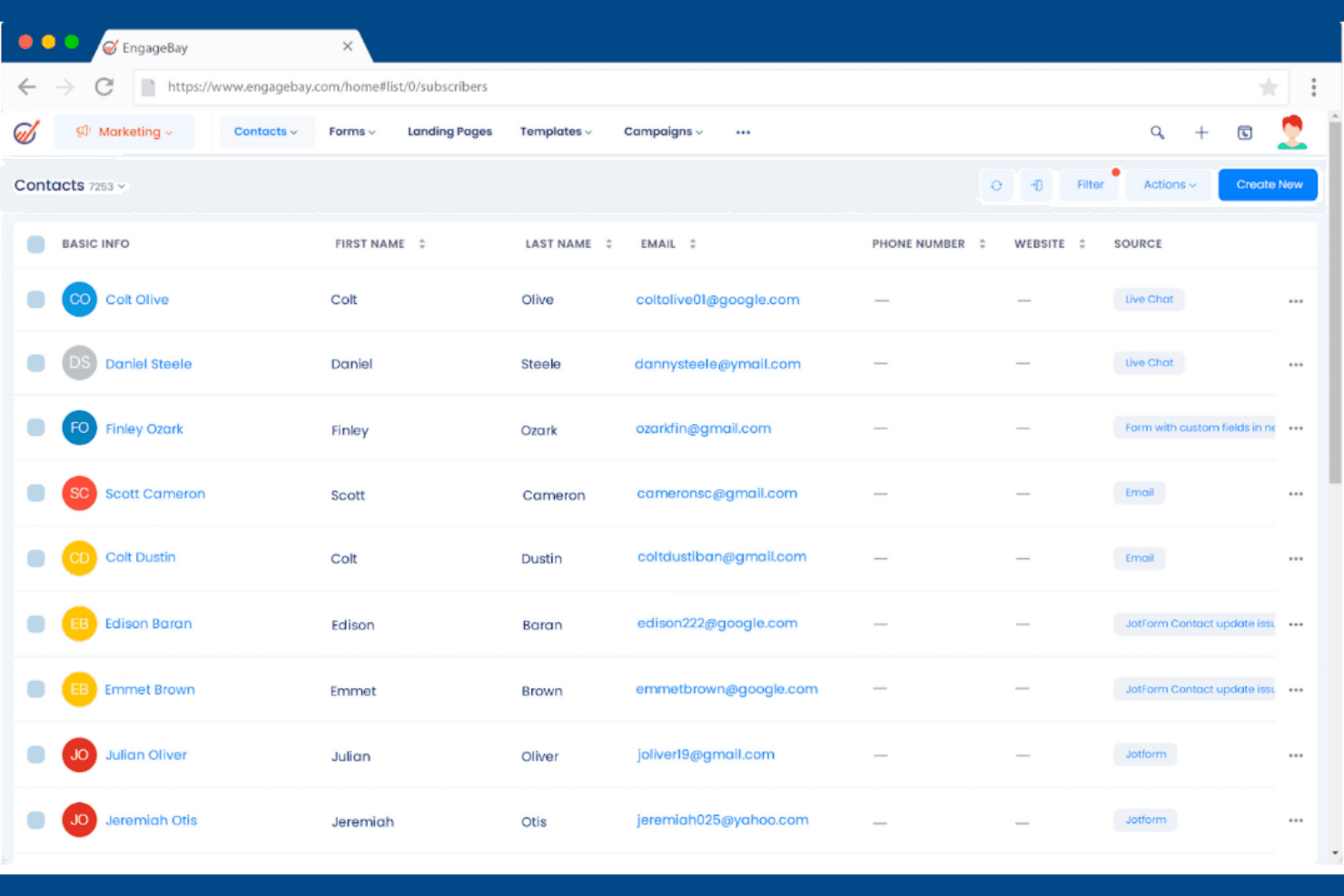
EngageBay lets users manage and view all contacts in one place. EngageBay is an all-in-one CRM platform that bundles sales pipelines, marketing automation, and customer support tools into a single system, making it a practical choice for small businesses that want to manage the full customer lifecycle without paying for multiple separate tools.
Who Is EngageBay Best For?
EngageBay is a strong fit for small businesses that want CRM, marketing, and customer support tools in one place without paying for three separate platforms.
Why I Picked EngageBay
I picked EngageBay as one of the best because it's the only tool on this list that bundles a genuine free CRM tier with built-in marketing automation and a helpdesk, so you're not stitching together separate platforms just to cover the basics. I especially like how deal records connect directly to proposals and products, letting sales reps attach a quoted price and discount without leaving the pipeline view. Role-based permissions and custom field configuration across contacts, deals, and companies are also available without touching a line of code.
EngageBay Key Features
- Predictive lead scoring: AI-powered scoring assigns point values to leads based on user-defined rules and predefined triggers like form submissions, so your team can prioritize follow-ups by sales readiness.
- Multi-step workflow automation: Workflows can add deals or tasks, update deal owners or milestones, set deal properties, and enroll records in a second workflow using conditional logic.
- Email sync across major providers: EngageBay connects with Gmail, Outlook, Office 365, Exchange, and IMAP accounts, letting you choose how existing and new conversations are synced as contacts.
- Scheduled report delivery: Sales reports covering contacts, deals, and activities can be saved and automatically emailed to your team on a daily, weekly, or monthly schedule.
EngageBay Integrations
EngageBay documents integrations with Shopify, Xero, SendGrid, Mailgun, Mandrill, Gmail, Outlook, Office 365, Exchange, and Zapier. It also offers a REST API for custom integrations.
Pros and Cons
Pros:
- Sales, marketing, and support share one platform
- Email sequences cut manual follow-up work
- Contacts, history, and tasks stay together
Cons:
- Closed deals don’t convert into project plans
- Reporting offers limited cross-team visibility
Learn more about EngageBay: Best for offline mobile lead updates
- 15-day free trial available
- Pricing upon request
Visit WebsiteCustomer Rating:4.7/5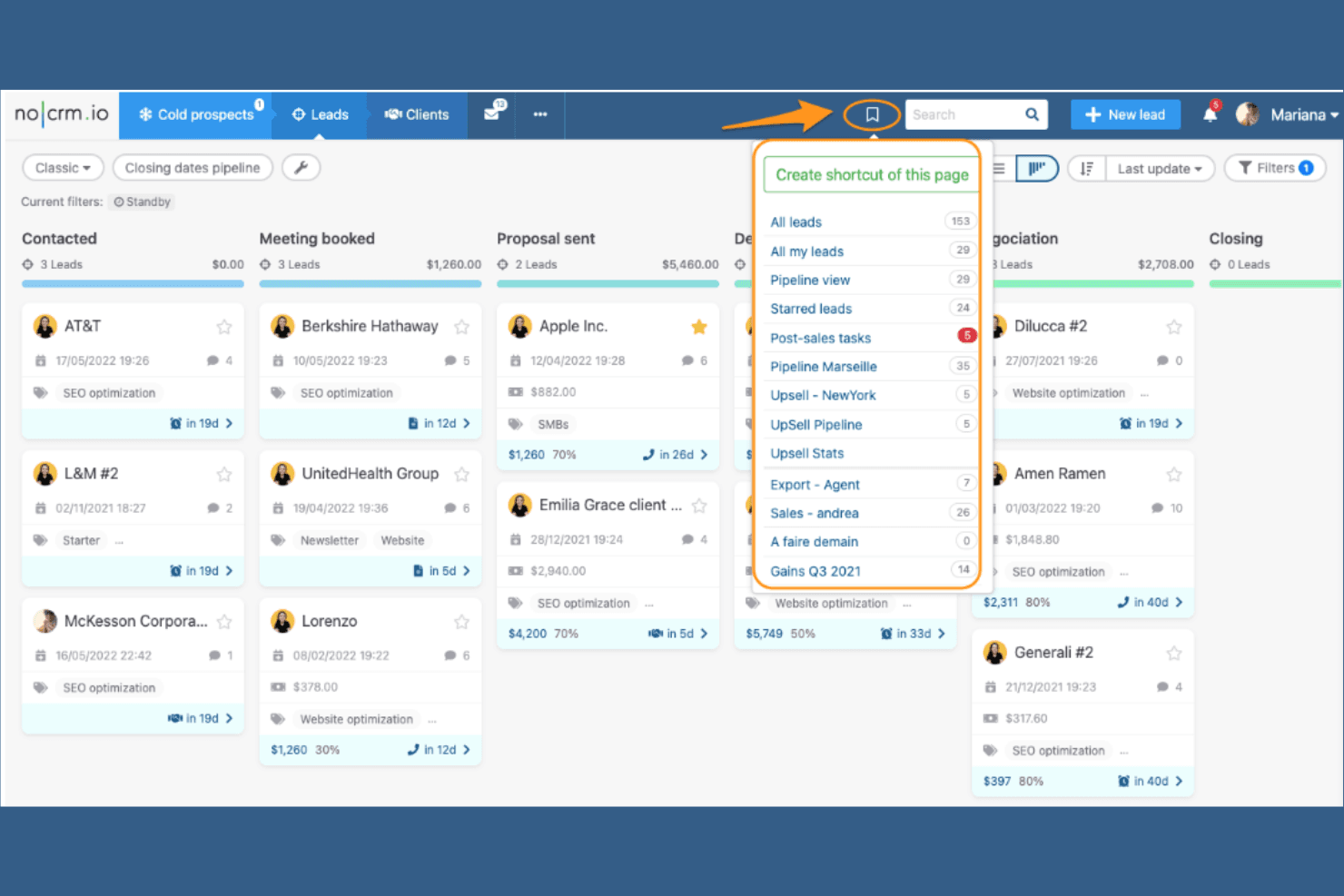
noCRM.io lets users save custom pipeline views as shortcuts. noCRM is a sales-focused lead management tool designed for small businesses and lean sales teams that want to spend less time on data entry and more time closing deals.
Who Is noCRM.io Best For?
noCRM.io is a strong fit for small sales teams that want to stay focused on follow-ups and closing deals rather than managing a complex CRM.
Why I Picked noCRM.io
I picked noCRM.io because it flips the typical CRM logic on its head: instead of logging data for data's sake, every lead opens with a required "next action," so your pipeline always reflects what actually needs to happen next. I love how Smart Follow-Ups automatically sync scheduled calls, meetings, and emails to your calendar, keeping reps on top of their pipeline without digging through records. The drag-and-drop Kanban pipeline also lets you move leads through customizable stages at a glance, which is exactly what lean sales teams switching from Insightly need to stay focused on closing.
noCRM.io Key Features
- Lead capture from multiple sources: Capture leads directly from email, WhatsApp, LinkedIn, web forms, and business-card scans without manual data entry.
- Quotes and invoices management: Create branded quotes, deposits, and invoices and track their status from the sales dashboard (Expert and Dream plans).
- Role and permission management: Control user access, exports, session activity, and sensitive data visibility across your team (Dream plan).
- Post-sales task checklists: Assign tasks and build structured checklists on leads to manage customer handovers after a deal closes.
noCRM.io Integrations
noCRM.io integrates with Gmail, Outlook, WhatsApp, Slack, QuickBooks, FreshBooks, Trello, and Mailchimp. It also supports REST API, webhooks, and Zapier for custom connectivity.
Pros and Cons
Pros:
- Quick setup reduces sales-team admin
- Kanban stages make deal progress visible
- Next-action reminders keep leads moving
Cons:
- Automation and reporting depth varies by plan
- Post-sale checklists don’t replace project tracking
Learn more about noCRM.io: Best for importing Insightly contacts
- 14-day free trial available
- From $24.90/user/month (billed annually)
Visit WebsiteCustomer Rating:4.5/5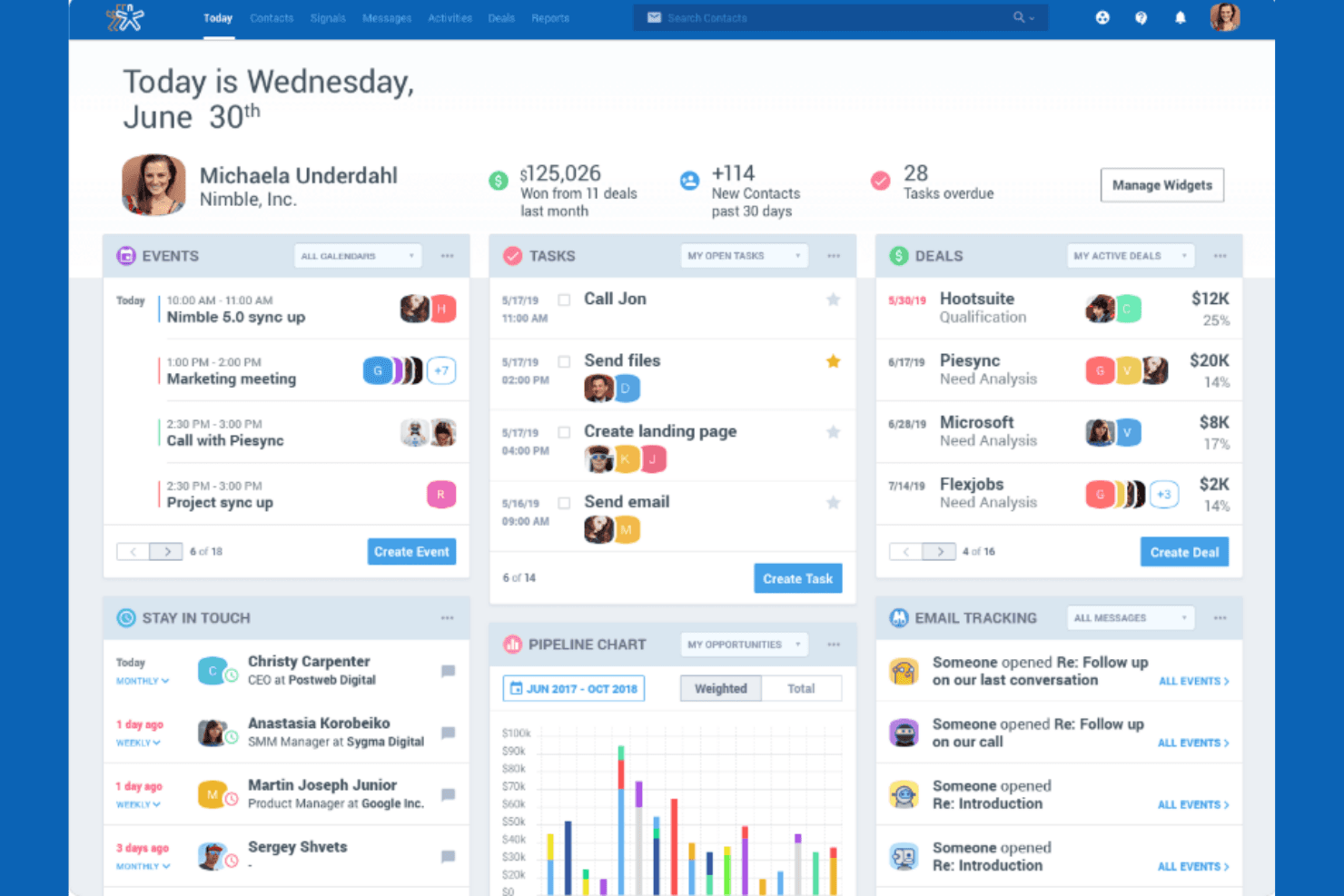
Nimble's dashboard centralizes tasks, deals, and events in one view. Nimble is a relationship-focused CRM built for small teams who want to unify contacts, deal pipelines, and conversation history in one place—making it a solid fit for sales professionals and small business owners who need to stay on top of prospects without juggling multiple tools.
Who Is Nimble Best For?
Nimble is a strong fit for small sales teams and solo business owners who want to build relationships through social prospecting and keep contacts, deals, and conversations in one place.
Why I Picked Nimble
I picked Nimble as one of the best because its social prospecting capabilities genuinely set it apart from Insightly. The Nimble Prospector browser extension lets me pull contact details, job titles, and company info directly from LinkedIn or any website and push them straight into CRM records without any manual entry. I also like that Nimble automatically matches social profiles to existing contact records, so conversation history and relationship context stay unified across channels.
Nimble Key Features
- Customizable deal pipelines: Build and manage multiple deal pipelines with Kanban or list views, custom fields, tags, currencies, and stage-level probability settings.
- Email sequences: Set up multi-step automated email follow-ups with time-based or activity-based triggers, If-Then conditions, and actions that move contacts into workflow stages.
- Contact segmentation and saved segments: Organize contacts using tags, custom fields, and custom groups, then save searches for targeted follow-up across your team.
- Role-based permission groups: Assign granular access controls for contacts, deal pipelines, workflows, and API access across individual users or groups.
Nimble Integrations
Nimble offers native integrations across Microsoft and Google ecosystems, including Microsoft 365, Outlook, Gmail, Google Workspace, Teams, OneDrive, and Google Drive. Its marketplace lists 120+ app integrations, including Mailchimp, ActiveCampaign, PandaDoc, and PhoneBurner, while its API supports custom integrations.
Pros and Cons
Pros:
- Customizable pipelines support sales forecasting
- Unified records preserve relationship and conversation context
- Social prospecting enriches contacts during research
Cons:
- No milestones or dependencies for post-sale projects
- Automation caps restrict high-volume follow-up
Learn more about Nimble: Best for quotes priced from live stock
- 30-day free trial + free demo available
- From ₹1,600/user/month (billed annually)
Visit WebsiteCustomer Rating:4.6/5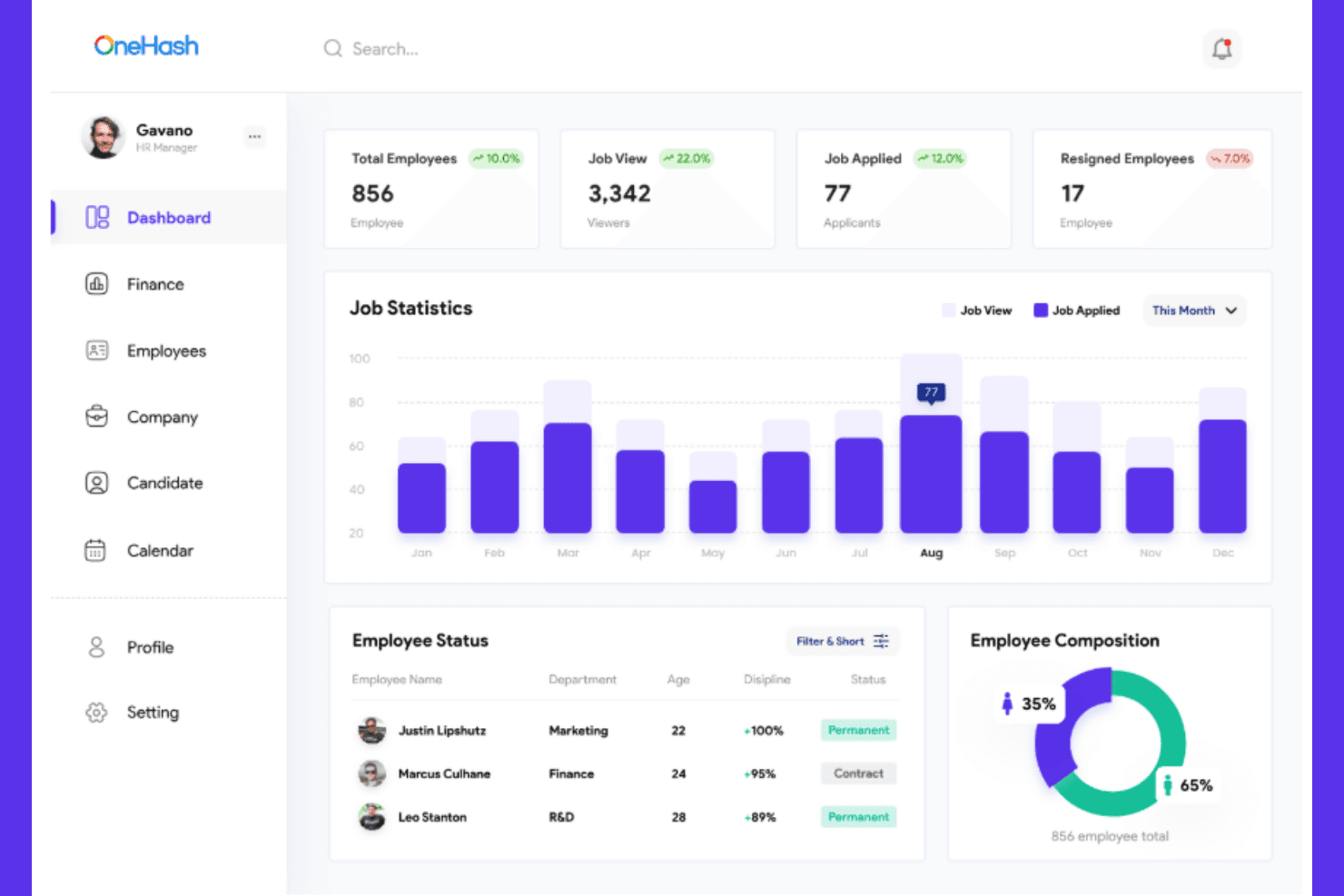
OneHash gives HR managers a full workforce overview dashboard. OneHash is an all-in-one business management platform that connects CRM, accounting, HR, inventory, and project management in a single system—making it a strong fit for growing teams that want to manage the full customer lifecycle without juggling separate tools.
Who Is OneHash Best For?
OneHash suits growing teams that need sales, projects, and back-office operations in one place without paying for separate tools.
Why I Picked OneHash
I picked OneHash as one of the best because it builds pipeline management directly into a broader business system rather than bolting it on. I like how teams can define their own sales stages, set targets by territory or salesperson, and have a won deal automatically raise an invoice and open a linked project, all without leaving the platform. That automatic handoff from sales to delivery is something I rarely see handled this cleanly in a single tool.
OneHash Key Features
- Customer segmentation: Filter contacts by behavior, value, region, or custom criteria to group and target specific customer sets.
- Drip campaign automation: Run timed email sequences that stop automatically when a recipient replies.
- Role-based field permissions: Control who can view or edit specific fields using permission settings defined in the browser.
- 150+ third-party integrations: Connect to tools like Mailchimp, Stripe, Shopify, Slack, and Zapier without custom development.
OneHash Integrations
OneHash lists 150+ integrations, including Gmail, Outlook, Google Calendar, WhatsApp Business, Mailchimp, Razorpay, Stripe, Shopify, Slack, and Zoom. It also supports REST API endpoints, webhooks, and Zapier for custom connectivity.
Pros and Cons
Pros:
- Targets break down by territory and seller
- Customer records connect sales and delivery
- Won deals trigger invoices and projects
Cons:
- Complex form changes can require programming
- Reviewers report gaps in reporting
Learn more about OneHash: Best for small teams automating sales and marketing
- Free plan available
- Pricing upon request
Visit WebsiteCustomer Rating:4.3/5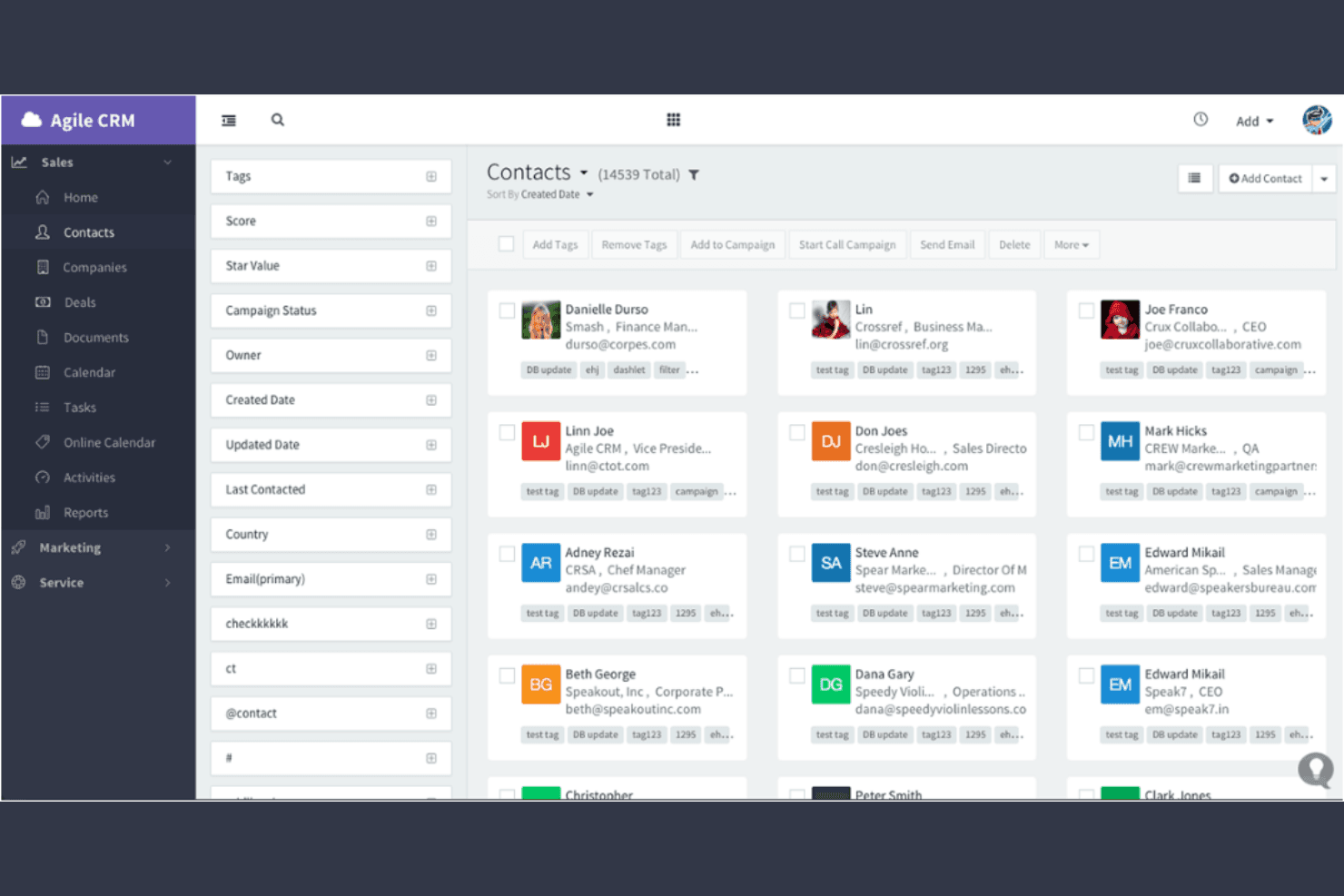
Agile CRM organizes and filters contacts with tags and campaign data. Agile CRM is an all-in-one platform for small businesses that brings sales pipelines, marketing automation, and customer support into a single system.
Who Is Agile CRM Best For?
Agile CRM is a strong fit for small business owners who want sales, marketing, and support tools in one place without paying for multiple separate platforms.
Why I Picked Agile CRM
I picked Agile CRM as one of the best because it folds sales pipelines, marketing automation, and helpdesk ticketing into a single platform, which is exactly what small teams need when they're trying to avoid juggling multiple tools. I especially like how the visual campaign builder lets you trigger deal milestone changes and lead score updates from the same workflow, so your sales and marketing motions stay in sync automatically. The built-in helpdesk with ticket routing and canned responses means support activity connects directly to contact records, not a separate system.
Agile CRM Key Features
- Lead scoring: Automatically scores contacts based on actions like email opens, link clicks, and form completions, then triggers real-time alerts when a lead hits your qualification threshold.
- Helpdesk ticketing: Routes incoming support tickets to the right team group, applies labels, and tracks resolution time through built-in helpdesk reports.
- Custom deal milestones: Lets you add, delete, and reorder milestones within each deal track so your pipeline stages match your actual sales process.
- Contact timeline: Displays every interaction with a contact in chronological order, including calls, emails, web activity, and notes, on a single page.
Agile CRM Integrations
Agile CRM offers 50+ marketplace integrations, including Google Apps, Microsoft Exchange, Office 365, Zendesk, Help Scout, Stripe, Shopify, QuickBooks, and FreshBooks. It also provides REST and language-specific APIs, webhooks, and Zapier.
Pros and Cons
Pros:
- Reviewers value combined campaign and sales workflows
- Deal-linked tasks keep follow-ups visible
- Sales, marketing, and support share contact records
Cons:
- Reviewers report glitches and limited forecast detail
- Project tasks lack documented milestones and dependencies
Learn more about Agile CRM: Best for action-oriented lead management
- Free plan + 15-day trial + demo available
- From $12/user/month (billed annually)
Visit WebsiteCustomer Rating:4.3/5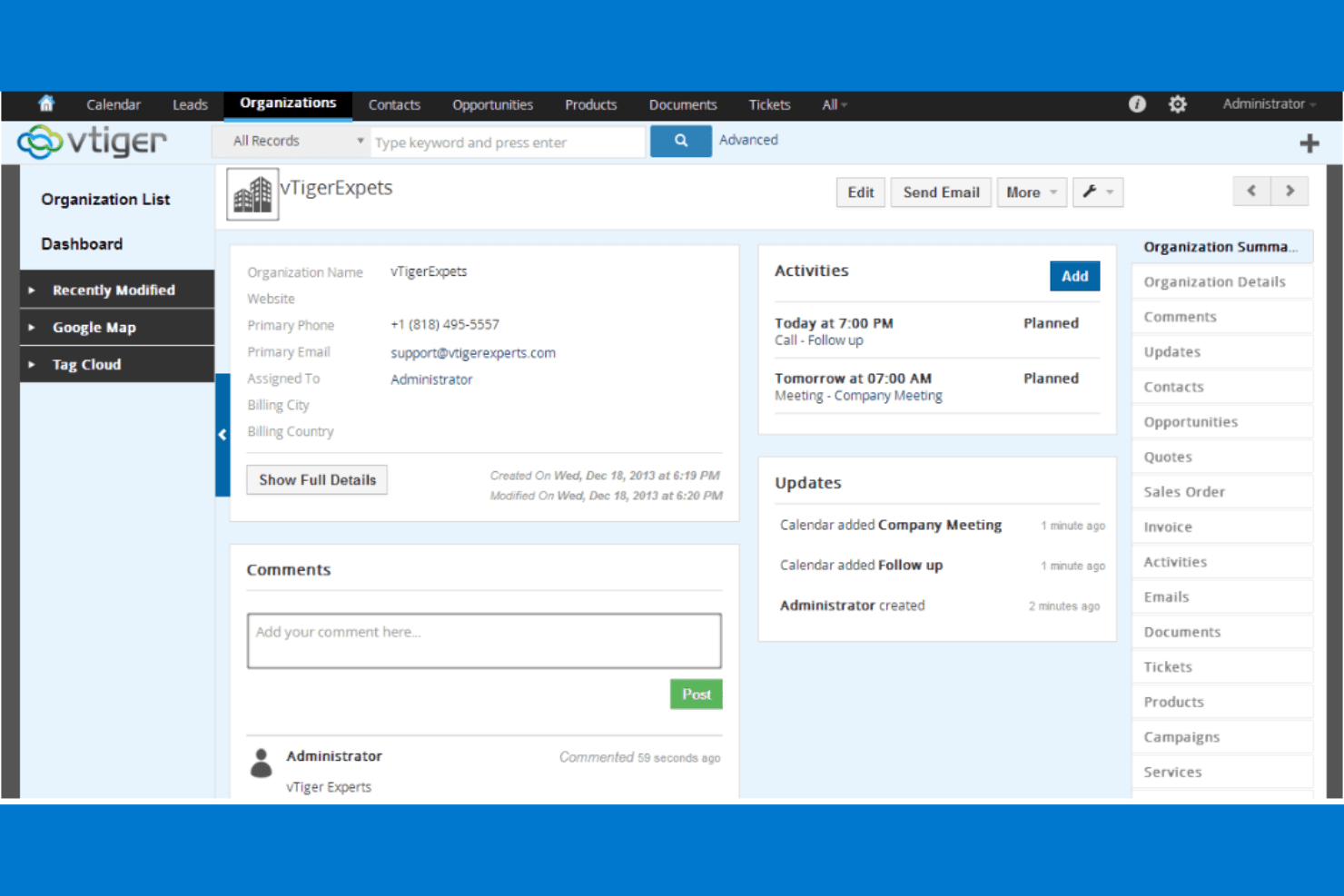
Vtiger centralizes organization details, activities, and updates in one view. Vtiger is an all-in-one CRM that bundles sales, marketing, and help desk tools in a single platform, making it a strong fit for small to mid-sized teams that want to manage leads, automate workflows, and handle customer support without juggling multiple systems.
Who Is Vtiger Best For?
Vtiger is a strong fit for small to mid-sized teams that need sales, marketing, and support tools in one place without paying for multiple platforms.
Why I Picked Vtiger
I picked Vtiger as one of the best because its Actions hub pulls every notification, alert, and follow-up reminder into a single queue, so your reps always know exactly what to do next. I especially like how Playbooks layer stage-by-stage task checklists directly onto deals, keeping the team on track without manual check-ins. Pair that with lead auto-assignment and idle alerts on stalled pipeline stages, and Vtiger keeps your whole revenue motion moving forward.
Vtiger Key Features
- Deal Playbooks: Layer stage-by-stage task checklists directly onto active deals to guide reps through each sales stage.
- Process Designer: Build, automate, and monitor multi-step business processes using flowcharts, rules, conditions, and approvals.
- VTAP low-code platform: Extend CRM functionality, create custom pages and REST APIs, and connect external applications without writing full code.
- Performance Insights dashboard: View team and pipeline statistics, including charts and tables, pulled from live CRM data.
Vtiger Integrations
Vtiger offers native integrations with more than 500 business applications, including Google Workspace, Microsoft Teams, WhatsApp, Mailchimp, QuickBooks, Xero, DocuSign, and Google Sheets. It also supports Zapier and REST APIs for custom integrations.
Pros and Cons
Pros:
- Low-code tools support tailored CRM processes
- Shared customer records connect sales and support
- Centralized actions and deal playbooks guide follow-ups
Cons:
- Workflow setup can challenge new administrators
- Project handoffs are less connected than Insightly’s
Learn more about Vtiger: Best for teams avoiding per-seat CRM pricing
- Free plan + 15-day free trial + free demo available
- From €69/month
Visit WebsiteCustomer Rating:4.2/5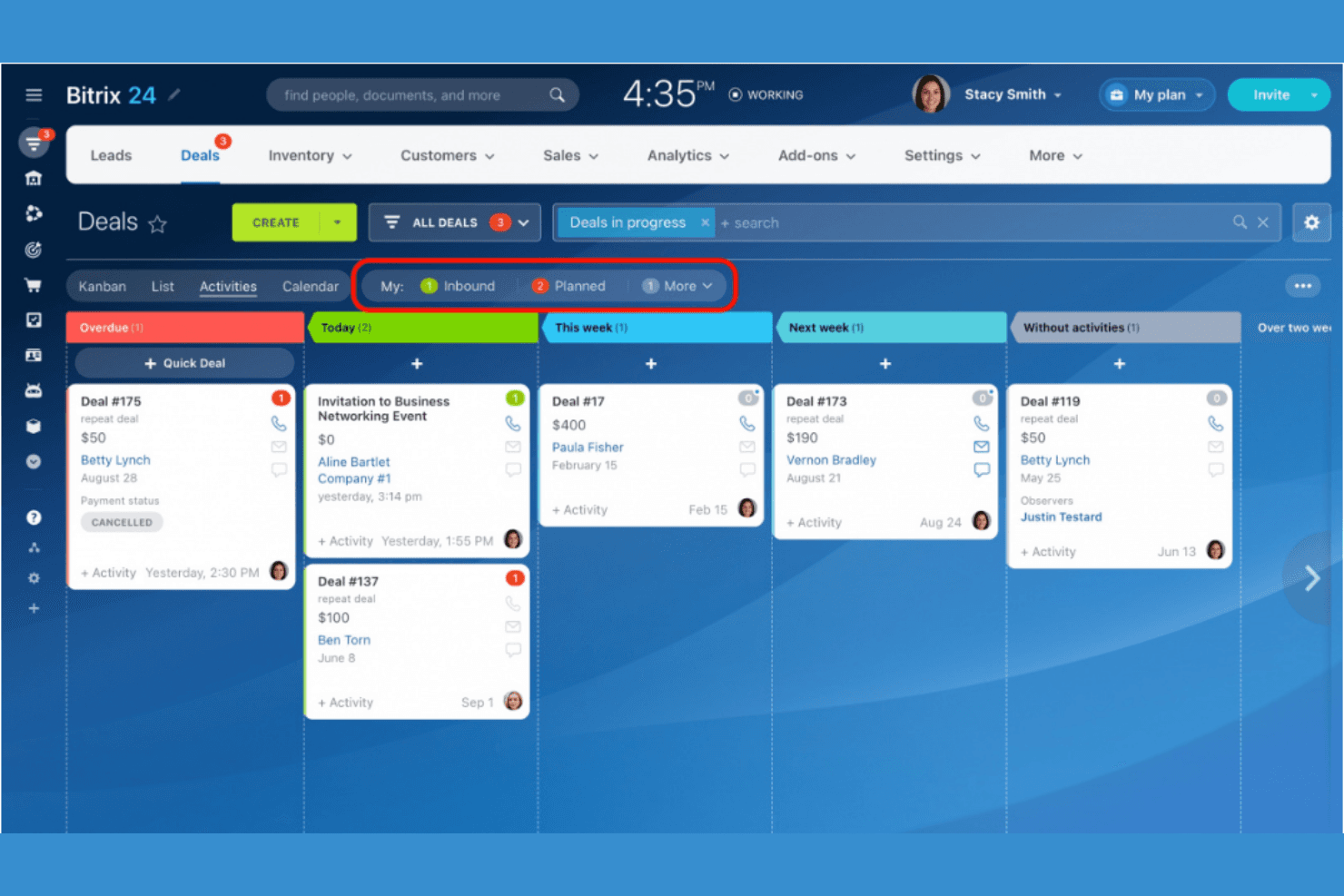
Bitrix24 organizes deals by activity timeline in a Kanban view. Bitrix24 is an all-in-one workspace that combines CRM, project management, and workflow automation, making it a strong fit for midsize teams that need more than a standalone CRM to manage sales pipelines, post-sale work, and internal processes together.
Who Is Bitrix24 Best For?
Bitrix24 suits growing midsize teams that need CRM, project management, and internal workflows in one place without paying per seat.
Why I Picked Bitrix24
I picked Bitrix24 as one of the best because it goes well beyond what Insightly offers by combining CRM with native project management in a single workspace. What I find genuinely useful is the CRM-linked task automation: when a deal hits a specific pipeline stage, Bitrix24 automatically creates a task, assigns it, and surfaces it in the deal timeline. You can also set up multiple pipelines with separate permissions and deal-form views for different teams or business lines, which is the kind of configuration midsize businesses actually need.
Bitrix24 Key Features
- CRM role-based permissions: Control which users can view, edit, delete, or import and export CRM records, with field-level visibility restrictions configurable per role.
- Contact Center: Collects customer messages from web forms, email, live chat, social media, and telephony, then converts them directly into CRM leads.
- AI sales scoring (CoPilot): Analyzes prospects and assigns priority scores to help sales teams identify and focus on the highest-probability deals.
- On-premise deployment: Lets your team run Bitrix24 on your own server or private cloud, with full source code access and support for LDAP and Active Directory.
Bitrix24 Integrations
Bitrix24 has native integrations with Gmail, Google Calendar, Google Drive, Microsoft Outlook, OneDrive, Dropbox, and Box, plus marketplace integrations for Xero and Mailchimp. It also offers a REST API and access to 750+ Market apps, extensions, and integrations.
Pros and Cons
Pros:
- Projects and customer records share one workspace
- Separate pipelines support distinct sales motions
- CRM stages can trigger assigned follow-up tasks
Cons:
- UTC+3 reporting can skew date comparisons
- Crowded screens can slow team adoption
Learn more about Bitrix24: Best for small teams needing quick setup
- 14-day free trial + demo available
- From $19/user/month
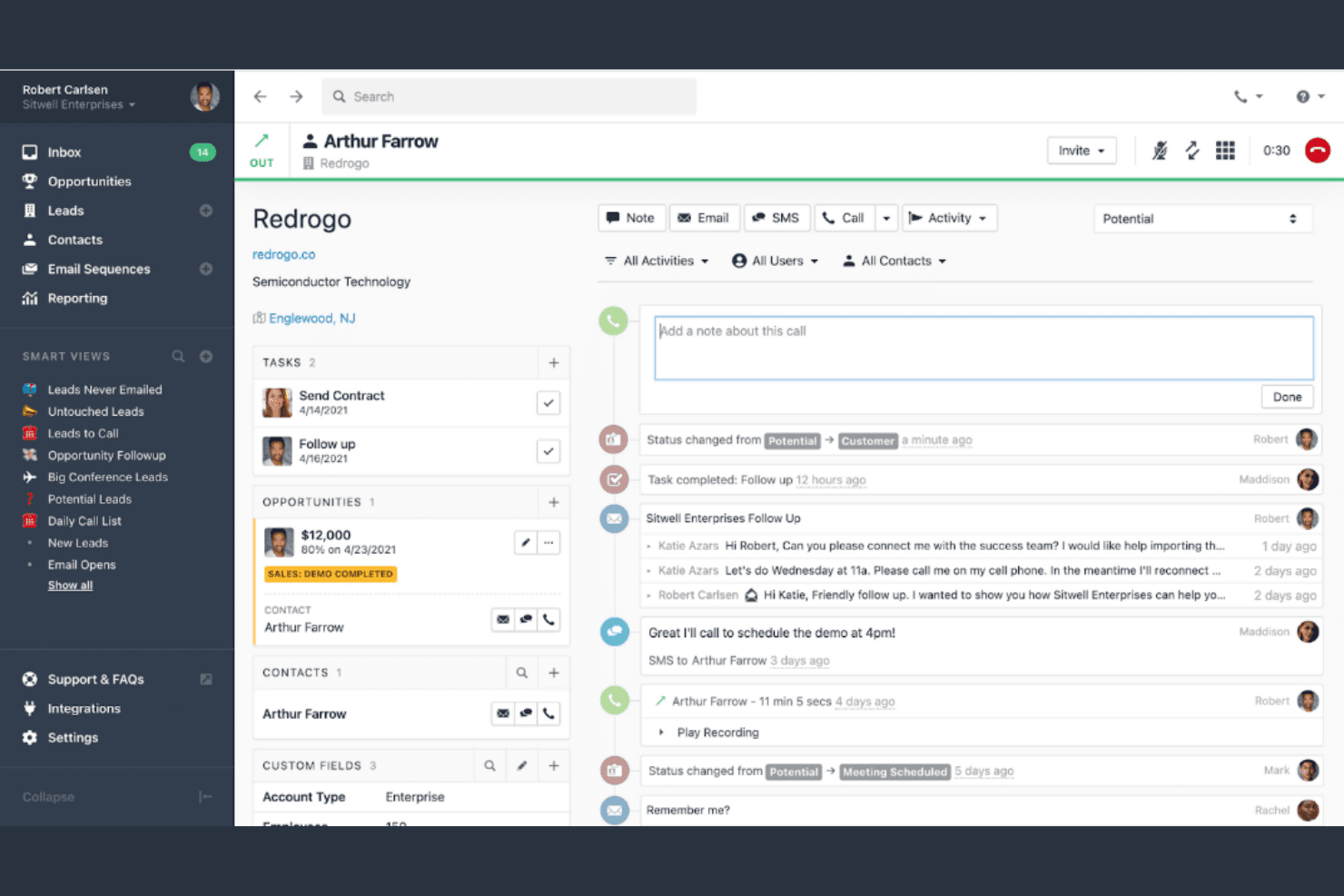
Close centralizes contact activity, tasks, and call notes in one view. Close is a sales-focused CRM built for small and scaling teams that want calling, email, SMS, pipeline management, and automation in one place—without stitching together multiple tools.
Who Is Close Best For?
Close is a strong fit for small sales teams that want calling, email, and pipeline management built in from day one—without piecing together a stack.
Why I Picked Close
I picked Close as one of the best because it's built for small sales teams that want to skip the multi-tool setup entirely. Calling, email, SMS, and pipeline management all live natively in one place, so a new rep can connect their email and calendar in minutes and start working leads the same day. I also like that the built-in power dialer lets teams run through call lists without leaving the CRM, which means zero context-switching from day one.
Close Key Features
- Insightly migration importer: Close's built-in Lead Importer lets admins migrate contacts, leads, and opportunities directly from Insightly, with a sample run to review field mappings before the full import.
- Smart Views: Dynamic, filtered lead lists that update automatically based on activity and record criteria, letting you segment and prioritize prospects without manual list management.
- Custom activities: Configurable activity templates for actions like form fills, payments, and support tickets that log against lead records for a complete interaction history.
- Role-based permissions: Assign predefined or custom roles to control what each user can view, edit, and access across the CRM.
Close Integrations
Close lists 100+ integrations, including HubSpot, Help Scout, Microsoft 365, Segment, Zoom, Gmail, Google Calendar, and Zapier. Its API, event-based webhooks, API keys, and OAuth support custom connections for marketing, support, finance, and reporting systems.
Pros and Cons
Pros:
- Reviewers praise quick onboarding for new reps
- Built-in dialer keeps outbound work in CRM
- Calls, emails, and texts share lead history
Cons:
- Pipeline reports offer limited customization
- Project tasks lack milestones and dependencies
Learn more about Close: Best for sales-to-finance workflows
- 30-day free trial + free demo available
- From $47/user/month (billed annually)
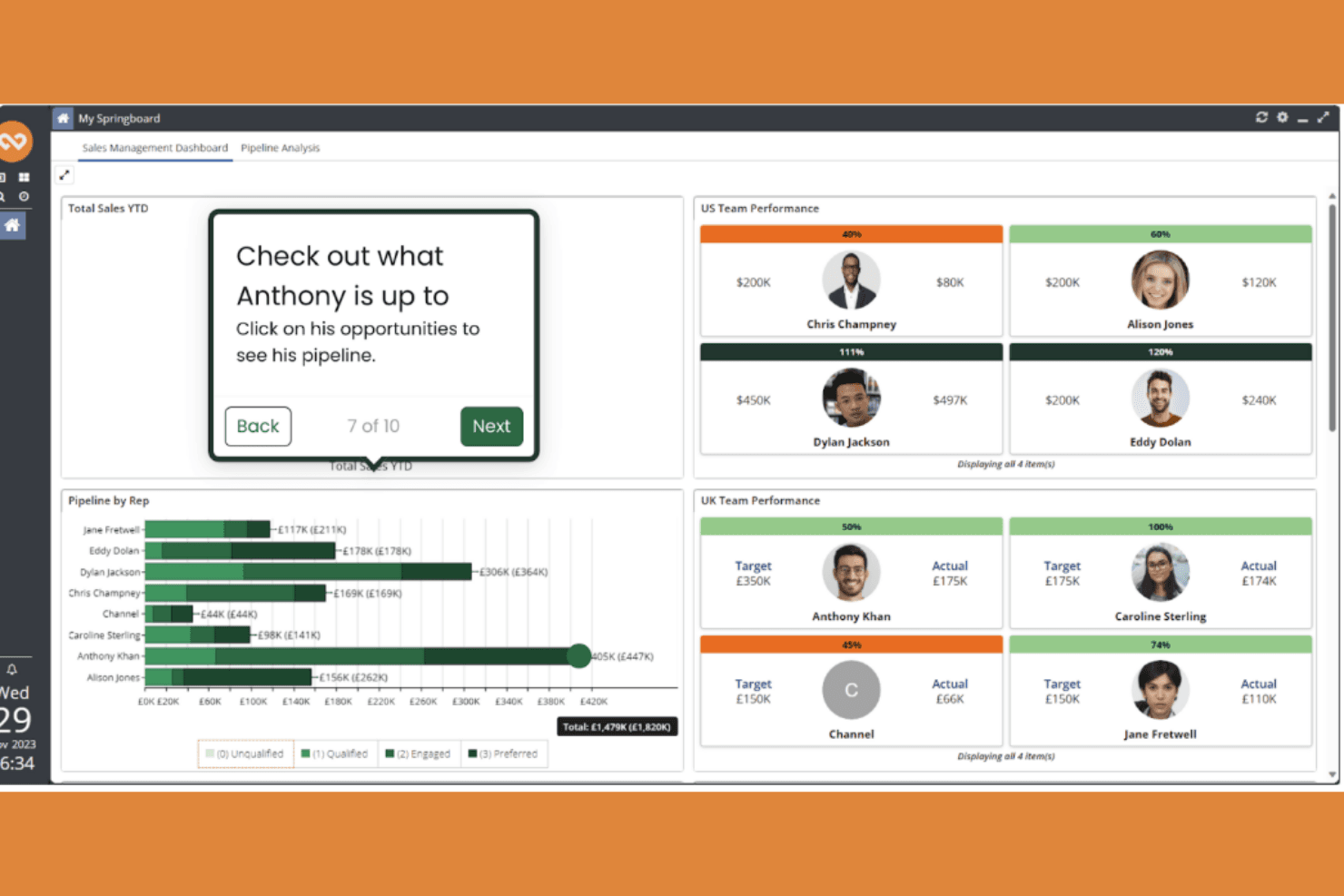
Workbooks displays team sales performance and pipeline data on one dashboard. Workbooks is a CRM built for midsize businesses that want deep pipeline visibility, flexible configuration, and finance-side tools—without the overhead of an enterprise platform.
Who Is Workbooks Best For?
Workbooks suits growing midsize businesses that need a configurable CRM with solid pipeline visibility and finance-side tools built into the same platform.
Why I Picked Workbooks
I picked Workbooks as one of the best because it's built specifically for midsize businesses that need a CRM they can actually shape around their processes. I love how the Opportunity Kanban lets you group deals by any picklist field, whether that's stage, rep, or close period, so your pipeline view reflects how your team actually sells. The Business Edition also adds native order management, invoicing, and accounting/ERP integration, which keeps finance-side workflows in the same platform as your sales data.
Workbooks Key Features
- Configurable custom fields: Create fields across record types using text, dates, numbers, picklists, multi-selects, and file types, with controls for defaults, required status, and grid visibility.
- AI Sales Hygiene: Reviews emails, meetings, notes, and tasks linked to an opportunity and recommends updates to stages, fields, and key data points.
- Scribe meeting transcription: Joins meetings on Teams, Google Meet, Zoom, GoToMeeting, and RingCentral to transcribe conversations, create summaries, and log actions in Workbooks.
- Business Edition order management: Manage orders, raise invoices and credit notes, and integrate with accounting and ERP software directly within the CRM.
Workbooks Integrations
Workbooks offers native Microsoft Exchange/Outlook Mail Sync and a RingCentral plugin. It also provides a Web Services API, pre-built connectors, integration platforms, and Zaps for connecting tools such as Mailchimp and Spotler.
Pros and Cons
Pros:
- Forecasting reports support sales decisions
- Custom fields fit varied sales processes
- Clear opportunity pipeline tracking
Cons:
- Customizations can take time to adjust
- Report building can feel complex
Learn more about Workbooks: 10Best for small business contact management
Capsule
- Free plan + 14-day free trial available
- From $22/user/month
Visit WebsiteCustomer Rating:4.7/5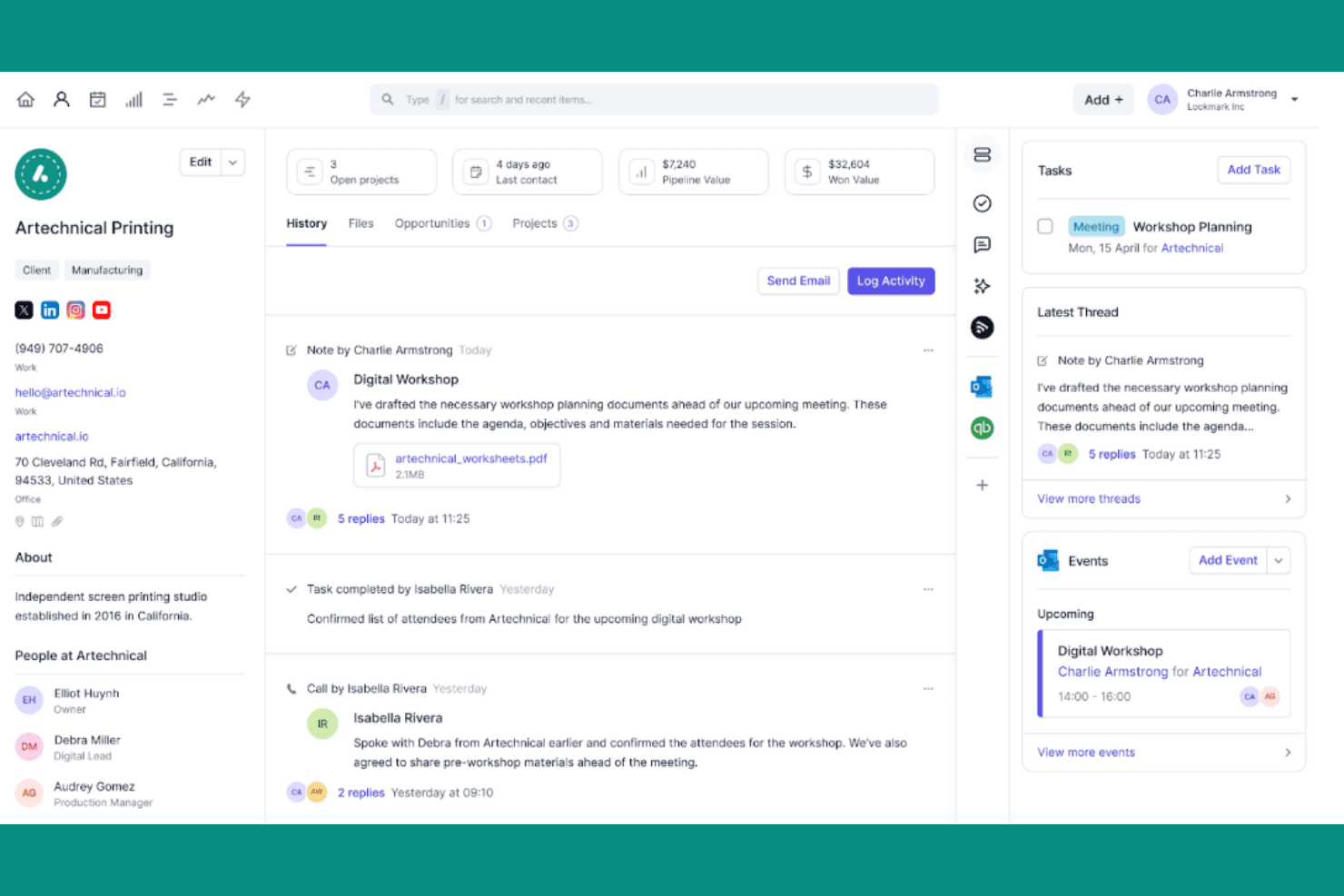
Capsule centralizes client history, tasks, and events in one view. Capsule CRM is a contact and pipeline management tool built for small businesses that want to keep customer relationships, sales opportunities, and follow-up work organized without the complexity of a larger CRM platform.
Who Is Capsule Best For?
Capsule is a strong fit for small business owners and their teams who need a clean, low-overhead way to manage contacts, track deals, and stay on top of follow-up work.
Why I Picked Capsule
I picked Capsule as one of the best Insightly alternatives because it's purpose-built for small business contact management, keeping every customer interaction, deal, and follow-up task in one clean view. I particularly like how contact records store the full relationship history alongside linked opportunities, so my team never loses context between touchpoints. Capsule's visual drag-and-drop pipeline with customizable milestones also makes it easy to track where each deal stands without the overhead of a heavier platform.
Capsule Key Features
- Workflow automation: Automatically assign users, add task sequences, create linked projects, or send emails when an opportunity hits a milestone or changes to Won or Lost.
- AI contact and business enrichment: Automatically populates and maintains contact records with details like revenue, headcount, and industry on Growth plans and above.
- Role-based access controls: Assign users to one of three roles and control which records each team member can view or edit.
- 100+ native integrations: Connect Capsule to accounting tools like Xero and QuickBooks Online, marketing platforms like Mailchimp, and support tools like Zendesk through the built-in app marketplace.
Capsule Integrations
Capsule has 100+ marketplace integrations, including Mailchimp, Zendesk, Xero, QuickBooks Online, Gmail, Google Calendar, Slack, and Shopify. It also offers a REST API and REST hooks for custom integrations, plus Zapier.
Pros and Cons
Pros:
- Linked projects organize post-sale follow-up
- Pipeline forecasts tie values to milestones
- Contact histories keep deal context visible
Cons:
- Project tracking trails Insightly for delivery
- Automation lacks branching for complex workflows
Learn more about Capsule:
Diğer Insightly Alternatifleri
İşte kısa listeme girmeyen ancak yine de göz atmaya değer bazı ek Insightly alternatifleri:
- 11AttioBest for integration with social media
- 12CentraHub CRMBest for midsize businesses with custom needs
- 13SugarAIBest for data privacy compliance
- 14Zendesk SellBest for sales automation features
- 15Zoho CRMBest for customizable CRM solutions
- 16FreshsalesBest for AI-driven lead scoring
- 17PipedriveBest for visual sales pipeline management
- 18HubSpot Sales HubBest for integration with marketing tools
- 19Copper CRMBest for Google Workspace integration
- 20Salesforce Sales CloudBest for scalability across industries
How I Evaluate Insightly Alternatives
I split my evaluation into two layers: the core CRM and pipeline functionality RevOps teams depend on, and the differentiators—like forecasting depth or stack integrations—that set one tool apart.
Core Functionality (Table Stakes For This List)
When I'm selecting tools for my list, I rank each one on a scale from 0 (does not offer the functionality) to 5 (excels in this area) for each core functionality listed below. Then, I calculate the tool's total score into a percentage. Each tool needs to achieve a minimum total score of 75% to be considered for inclusion.
- Contact & Account Management: I evaluate how each platform handles account hierarchies, contact segmentation, and interaction history—things like linking multiple stakeholders under one parent account.
- Pipeline & Opportunity Management: Each tool's ability to support multiple pipelines, custom deal stages, and deal-level forecasting matters when RevOps teams manage distinct sales motions.
- Workflow Automation: I look for multi-step automations with conditional logic, such as auto-assigning inbound leads by territory or triggering task sequences when a deal hits a new stage.
- Reporting & Revenue Analytics: Dashboards that cover pipeline velocity, win rates, and forecast accuracy are what I check for—not just canned reports, but ones you can build around your metrics.
- Third-Party Integrations: The tool's connector library and API quality determine how well it fits into a RevOps stack alongside marketing automation, billing, and BI platforms.
- Customization & Custom Objects: I evaluate whether you can create custom objects, fields, and permission structures that mirror your actual revenue process instead of forcing you into a rigid data model.
Once I have a list of tools that meet this criteria, I consider what sets each platform apart.
Differentiating Factors (What Sets Vendors Apart)
Here's how I compare and contrast different vendors:
Standout Features
Revenue forecasting is where I see the biggest gap between platforms. I look for weighted pipelines, scenario planning, and quota tracking that give RevOps leaders real visibility into what's likely to close. AI-powered deal scoring and next-best-action recommendations add another layer, helping reps prioritize the right opportunities. I also evaluate whether a platform includes a customer success module with health scores and renewal workflows, since unifying pre- and post-sale motions in one system is a major win for revenue teams.
Beyond Features
Scalability matters when you're switching from Insightly. Many teams outgrow their CRM mid-growth, so I check whether a platform can handle increasing data volumes, users, and custom objects without a forced tier jump. RevOps stack compatibility is another factor I weigh—specifically, whether the tool connects natively to your marketing automation, billing, and BI platforms or requires middleware. I also evaluate pricing transparency, including how add-on modules like AI or advanced analytics affect total cost of ownership as your team scales.
Neden bir Insightly alternatifi aramalısınız?
Insightly iyi bir Müşteri İlişkileri Yönetimi (CRM) yazılımı seçeneği olsa da bazı kullanıcıların alternatif çözümler aramasının çeşitli nedenleri vardır. Aşağıdaki nedenlerle bir Insightly alternatifi arıyor olabilirsiniz:
- Diğer araçlarla sınırlı entegrasyon
- Yeterli özelleştirme seçeneğinin olmaması
- Fiyatlandırmanın bütçenize uygun olmaması
- Daha iyi müşteri desteğine ihtiyaç duyulması
- Gelişmiş raporlama özelliklerinin eksik olması
- Büyüyen ekibinizle birlikte ölçeklenememesi
Bunlardan herhangi biri size uyuyorsa doğru yere geldiniz. Listemde, Insightly ile ilgili bu zorluklarla karşılaşan ve alternatif çözümler arayan ekipler için daha uygun olan çeşitli Müşteri İlişkileri Yönetimi (CRM) yazılımı seçenekleri bulunuyor.
Insightly Temel Özellikleri
Alternatif çözümlerin sunduklarını karşılaştırmanıza yardımcı olmak için Insightly'nin bazı temel özelliklerini aşağıda bulabilirsiniz:
- İletişim yönetimi: Ayrıntılı müşteri profillerini depolayın ve bunlara erişin; böylece ekibiniz etkileşimleri kişiselleştirebilir ve daha güçlü ilişkiler kurabilir.
- Potansiyel müşteri yönlendirme: Potansiyel müşterileri doğru ekip üyelerine atayın ve yönlendirin; böylece zamanında takip yapılmasını ve dönüşüm oranlarının artmasını sağlayın.
- Satış hattı yönetimi: Satış fırsatlarını her aşamada görselleştirin ve izleyin; böylece ekibiniz düzenli kalabilir ve anlaşmaları sonuçlandırmaya odaklanabilir.
- İş akışı otomasyonu: E-posta gönderme veya kayıtları güncelleme gibi tekrarlayan görevleri otomatikleştirin ve ekibinizin zamanını daha stratejik faaliyetlere ayırmasını sağlayın.
- E-posta entegrasyonu: İletişimleri doğrudan Insightly içinde yönetmek için e-posta hesaplarınızı senkronize edin; tüm yazışmaları kolayca başvurabilmeniz için tek bir yerde tutun.
- Proje yönetimi: Entegre araçlarla projeleri planlayın, yürütün ve izleyin; böylece ekibiniz verdiği sözleri yerine getirir ve son teslim tarihlerine uyar.
- Özelleştirilebilir panolar: Temel ölçümleri izlemek ve bilinçli iş kararları almak için gerçek zamanlı, özelleştirilebilir veri görselleştirmeleri oluşturun.
- Mobil erişim: Müşteri ilişkilerini ve projeleri hareket hâlindeyken yönetmek için Insightly'nin mobil uygulamalarını kullanın; ekibinizin her yerden bağlantıda ve üretken kalmasını sağlayın.
- Güvenlik ve uyumluluk: Veri şifreleme ve erişim denetimleri gibi özelliklerden yararlanın; müşteri bilgilerinizin güvende kalmasını ve sektör standartlarına uygun olmasını sağlayın.
- Entegrasyon özellikleri: Insightly'yi işletmenizin kullandığı diğer uygulamalara bağlayarak platformlar arasında kesintisiz bir iş akışı oluşturun.