

Bu kadar çok farklı sağlık hizmetleri CRM yazılımı varken hangisinin sizin için doğru olduğunu belirlemek zordur. Daha kişiselleştirilmiş ve verimli hasta bakımı sunmak istediğinizi biliyorsunuz, ancak hangi aracın en iyi olduğunu bulmanız gerekiyor. Size yardımcı olabilirim! Bu yazıda, en iyi sağlık hizmetleri CRM yazılımı seçimlerimi paylaşarak, çeşitli ekipler ve hastalarla düzinelerce farklı sağlık hizmetleri CRM aracını kullanma konusundaki kişisel deneyimlerimi aktaracak ve seçiminizi kolaylaştıracağım.
Why Trust Our Software Recommendations
6,700+
Reviews
20
Industry experts
16+
Evaluation factors
14
Years
Our reviews reflect our independent judgment—not a sales pitch. Learn how we stay transparent.
For this guide, we evaluated tools using hands-on testing and independent research, scoring tools using our selection criteria.
Our reviews reflect our human editorial judgment, not a sales pitch.
Sağlık Hizmetleri CRM Yazılımları Karşılaştırma Tablosu
Bu karşılaştırma tablosu, en iyi sağlık hizmetleri CRM yazılımı seçimlerimin fiyatlandırma ayrıntılarını özetlemektedir:
Sorted by: Default
| Tool | Starting Price | Website | |
|---|---|---|---|
Best for referral tracking in clinic workflows | 4.7 out of 5 | $29/user/month 14-day free trial + free demo available | Website |
Best for lowering operational costs and driving efficiency | 4.4 out of 5 | $350/user/month 30-day free trial | Website |
Best for marketing automation to engage with patients | 4.4 out of 5 | Pricing upon request Free demo available | Website |
Best for animal health and veterinary organizations | 4.1 out of 5 | Pricing upon request | Website |
Best for auto-assigning doctor’s appointments | 4.1 out of 5 | $19/user/month Free demo available | Website |
Best for predicting risk to improve patient outcomes | Not rated | $80/user/month 30-day free trial available | Website |
Best for delivering patient-centric experiences | Not rated | $29/user/month Free trial available | Website |
Best for automation to reduce errors | Not rated | Pricing upon request 30-day free trial | Website |
Best for integrating with all your essential data sources | Not rated | Pricing upon request Free demo available | Website |
Best for providing solutions to specific healthcare operations | Not rated | Pricing upon request Free trial available | Website |


En İyi Sağlık Hizmetleri CRM Yazılımları İncelemesi
Aşağıda, kısa listeme giren en iyi sağlık hizmetleri CRM yazılımlarının ayrıntılı özetlerini bulabilirsiniz. İncelemelerim, size en uygun aracı bulmanıza yardımcı olmak için her bir aracın temel özelliklerine, avantajlarına & dezavantajlarına, entegrasyonlarına ve ideal kullanım alanlarına ayrıntılı bir bakış sunmaktadır.
 Best for referral tracking in clinic workflows
- 14-day free trial + free demo available
- From $29/user/month
Visit WebsiteCustomer Rating:4.7/5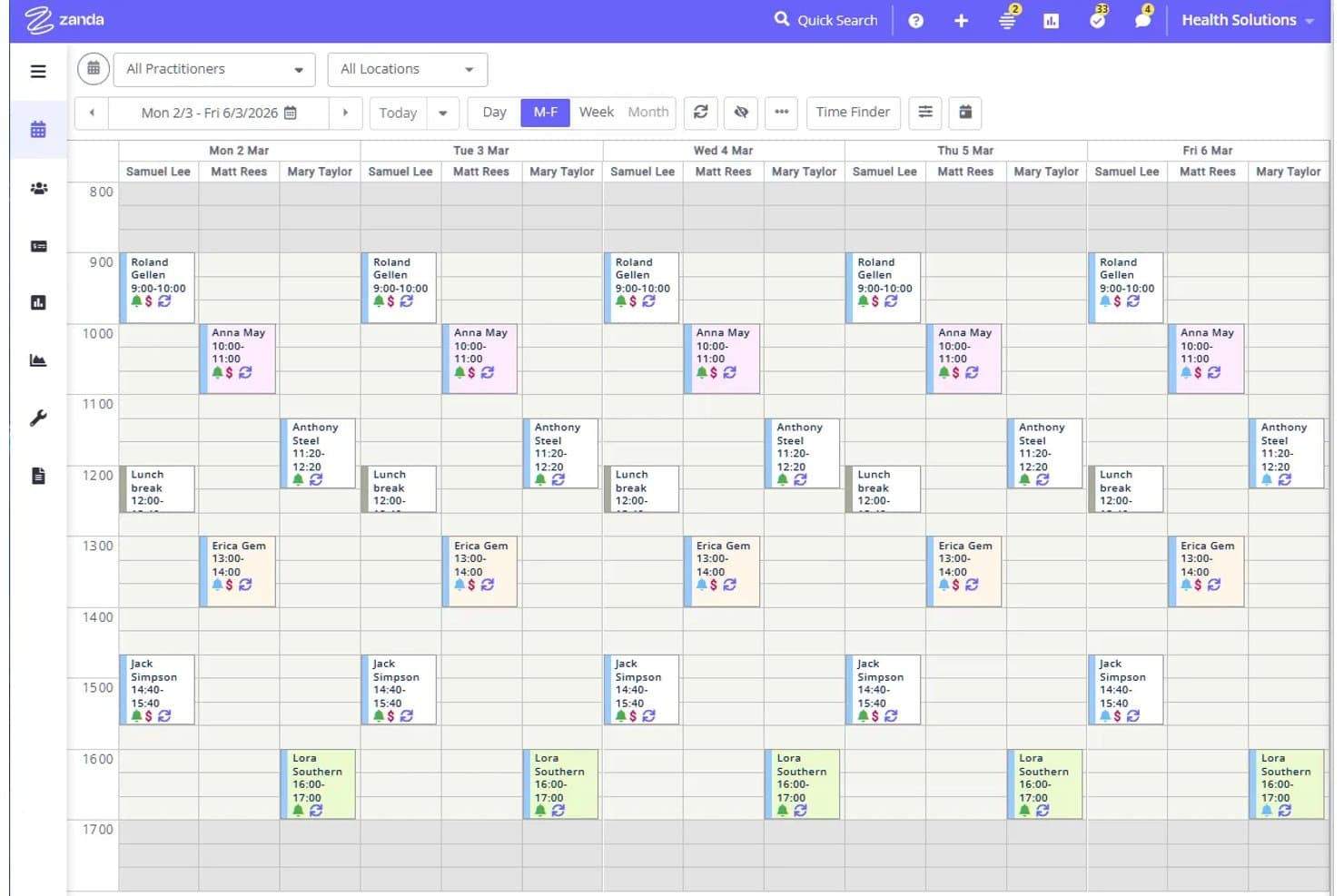
Zanda displays a weekly multi-practitioner appointment calendar view. Zanda is a practice management platform that combines appointment scheduling, client records, referral tracking, billing, and communication automation for health practices.
Who Is Zanda Best For?
Zanda suits solo practitioners and small-to-mid-sized health practices that need referral tracking built into their day-to-day scheduling and client management workflow.
Why I Picked Zanda
I picked Zanda as one of the best because referral tracking is genuinely woven into how the platform manages day-to-day clinical work. Each referrer gets a dedicated profile with a full log of referrals made, communication history, and customizable referrer types you can use to filter lists for targeted bulk outreach. I also like that the Recent Referrals and Inactive Referrers reports let you see referral volume and billed amounts at a glance, so you can spot which referral sources are active and which need re-engagement without leaving your scheduling workflow.
Zanda Key Features
- Client profile centralization: Client profiles consolidate contact details, appointment history, clinical notes, billing information, referrals, and insurance information in a single record.
- Post-appointment automation: Practices can configure automated SMS or email follow-ups triggered by appointment conditions such as service type, client status, location, and practitioner.
- Bulk messaging with merge fields: Users can send targeted bulk SMS and email campaigns using reusable templates that pull in client-specific data automatically.
- Client Sources report: A dedicated report shows where clients came from and how much revenue has been billed to each source, supporting marketing attribution across the practice.
Zanda Integrations
Zanda offers native integrations with Stripe, Xero, Physitrack, Google Calendar, Apple Calendar, Outlook Calendar, Mailchimp, Zoom, and Google Analytics. Its Public API is marked “COMING SOON,” with read-oriented access and beta enrollment currently closed.
Pros and Cons
Pros:
- Client records unite referrals, notes, and billing
- Automated reminders reduce routine outreach work
- Referrer profiles tie sources to billed revenue
Cons:
- No self-service portal for referring clinicians
- No configurable referral pipeline stages
Learn more about Zanda: Best for lowering operational costs and driving efficiency
- 30-day free trial
- From $350/user/month (billed annually)
Visit WebsiteCustomer Rating:4.4/5
Health Cloud provides revenue forecasting tools to improve sales predictability. This management software for healthcare providers is a cloud-based CRM and patient management solution that focuses on collaboration between providers, patients, and payors. Built on the Salesforce CRM platform, it meets the needs of the healthcare industry by allowing care coordinators, home nurses, and family members to securely engage with care teams.
Why I picked Health Cloud: One feature that caught my eye from this platform is the Health Cloud Timeline. Using this tool, providers can gain a 360-degree view of all clinical and non-clinical interactions with patients, families, and members. These interactions may include prescriptions, encounters, barriers to care, and care plan tasks tracking.
Health Cloud Standout Features and Integrations
Standout features include out-of-the-box, customizable data models for clinical and insurance decision-making and virtual care support to allow doctors to triage and diagnose patients digitally.
Integrations include Cadalys CareIQ, CancerNav, CareIQ for Salesforce, CharmHealth, Elixir CRM, HealtheCRM by Cerner, Optum Care Coordination, ProviderMatch, and SightCall Virtual Support.
Pros and Cons
Pros:
- Provides templates for most EHR, accounts, and medication needs
- Has solutions for healthcare and life sciences
- Centralizes every internal healthcare process
Cons:
- Functionality issue with automated call recording tool
- Too expensive for smaller organizations
Learn more about Salesforce Agentforce Health: Best for marketing automation to engage with patients
- Free demo available
- Pricing upon request
Visit WebsiteCustomer Rating:4.4/5
Leadsquared offers marketing tools that automate lead management and outreach. Leadsquared is an all-in-one healthcare CRM tool that’s designed to deliver workflow automation, personalized engagement, patient acquisition, segmented marketing, and journey tracking — all 100% HIPAA compliant.
Why I picked Leadsquared: What made me add this platform to my list was the way Leadsquared approached their marketing automation. With real-time patient analytics and omnichannel communication support, they focus on increasing patient retention rates through personalized outreach.
Leadsquared Standout Features and Integrations
Standout features include conversion tracking for marketing campaigns, automated patient journeys with event triggers, and patient intake automation with self-serve portals.
Integrations include Acuity Scheduling, Freshdesk, Gmail, Google Analytics 360, LiveChat, Microsoft Outlook, Salesforce Sales Cloud, Shopify, WordPress, and Zapier.
Pros and Cons
Pros:
- Granular segmentation capabilities
- Has a low barrier for entry
- Mobile app for onsite caregiving
Cons:
- Can be too expensive for SMBs
- Navigation is a little clunky
Learn more about LeadSquared: Best for animal health and veterinary organizations
- Pricing upon request
Visit WebsiteCustomer Rating:4.1/5
Veeva has a simple dashboard that automatically syncs with other apps and updates alerts and tasks. This medical CRM for healthcare professionals provides enterprise support for biotech, consumer health, pharmaceutical, and animal health organizations. The Veeva medical CRM delivers key tools for field teams, medical insights, stakeholder planning, and customer engagement. It’s also accessible via desktop or browser for full offline and online functionality.
Why I picked Veeva: This platform caught my eye because it specifically mentions a CRM for animal healthcare. With the ability to track patient records based on an animal’s information or their owner, you can keep better medical records for animal patients.
Veeva Standout Features and Integrations
Standout features include a visual configuration layer that allows you to implement new processes without coding and integrated reporting and dashboards to optimize next steps and action items.
Integrations include Adobe Acrobat Sign, BEE Pro, Board, Guidebook, Knak, Mobile Locker, ON24, Pipefy, Salesforce Sales Cloud, Sisense, and Workato.
Pros and Cons
Pros:
- Easy to learn and use
- Quick implementation and onboarding
- Cutting-edge features available on all devices
Cons:
- Onboarding requires customer support assistance
- Offline version isn’t well maintained for iOS
Learn more about Veeva CRM: Best for auto-assigning doctor’s appointments
- Free demo available
- From $19/user/month
Visit WebsiteCustomer Rating:4.1/5
Kapture CRM can automatically check doctor availability and schedule appointments. Designed to provide robust care across a variety of platforms without exposing patient data, Kapture CRM can support both patients and doctors with centralized access to all activities — from making appointments to reports on prescription usage and treatment history.
Why I picked Kapture CRM: One unique feature from this platform is the appointment auto-assignment for doctors. Instead of letting appointment requests clutter the inboxes of admins and assistants, Kapture CRM does the work for you, reading each request and assigning it to the right doctor.
Kapture CRM Standout Features and Integrations
Standout features include mobile notifications for both doctors and patients, cloud-based data storage for patient history, and a multi-channel feedback system to assess patient needs.
Integrations include Freshbooks, Google Analytics, Google Calendar, Grow, Meta for Business, Plivo, SAP Customer Experience, Shopify, Twilio, and WordPress.
Pros and Cons
Pros:
- Outstanding customer service team
- Simple navigation and dashboard
- Very user-friendly interface
Cons:
- Tool is not iOS friendly
- Loading time can be slow
Learn more about Kapture CRM: Best for predicting risk to improve patient outcomes
- 30-day free trial available
- From $80/user/month

Microsoft Dynamics 365 Healthcare offers tailored views of patient needs. As a healthcare CRM that prioritizes enhanced healthcare experiences across the entire patient journey, Microsoft Dynamics 365 Healthcare focuses on connecting people, processes, and data to ensure more unified patient profiles and better care coordination. They offer solutions for payors, providers, and life sciences.
Why I picked Microsoft Dynamics 365 Healthcare: This platform stands out because it strives to integrate pre-visit, post-visit, and care plan information for providers to improve clinical experiences and operational insights through data analytics. It does the same for payors through member engagement, case and care management, and member recruitment.
Microsoft Dynamics 365 Healthcare Standout Features and Integrations
Standout features include nurture-based marketing campaigns for new patient acquisition and AI-enabled scheduling to provide at-home medical care that reduces the burden on facilities.
Integrations include Adobe Acrobat Sign, ADP Workforce Now, DocuSign, Emburse Certify Expense, LinkedIn for Business, Microsoft Teams, PandaDoc, Salesforce Sales Cloud, signNow, and Zoho Expense.
Pros and Cons
Pros:
- Accessible customer support team
- Constant innovation resulting in new features
- Provides access to entire Microsoft suite
Cons:
- Overwhelming amount of features and tools
- Expensive for smaller organizations
Learn more about Microsoft Dynamics 365 Healthcare: Best for delivering patient-centric experiences
- Free trial available
- From $29/user/month

Insightly Health & Wellness CRM can track patient interactions in a single view. Designed for medical practices that really need to refocus on their patient relationship management, Insightly Health & Wellness CRM is designed to build patient relationships while accelerating growth and tracking key metrics. It helps you bring patients to the forefront with flexible record linking to ensure a better understanding of complex organizational relationships.
Why I picked Insightly Health & Wellness CRM: One thing that stands out to me about this patient engagement platform is its focus on quick time to value. Insightly has been designed to be easy to adopt, very flexible, and easily integratable so your organization can implement it right away.
Insightly Standout Features and Integrations
Standout features include ticketing application with a convenient patient portal and metrics tracking with data visualizations that are easy to understand.
Integrations include ADP Workforce Now, Asana, BambooHR, Calendly, DocuSign, Drift, Gong, Jira, Magento, Microsoft Power BI, NetSuite, and Okta. Insightly offers integrations with over 2,000 applications, including popular healthcare software.
Pros and Cons
Pros:
- Simple to learn most features
- Quick implementation and onboarding
- Very user-friendly interface
Cons:
- No native feature for form building
- Limited customization options
Learn more about Insightly Health & Wellness CRM: Best for automation to reduce errors
- 30-day free trial
- Pricing upon request

Pega Healthcare CRM allows you to build and customize processes for every case type. The Pegasystems healthcare solution for customer relationship management strives to integrate and coordinate with all people, systems, and data involved in the healthcare management process. This platform prioritizes task automation, including routing, queuing, escalation, and prioritization to reduce manual error and streamline workflows.
Why I picked Pega Healthcare CRM: The reason this tool made it onto my list is due to its healthcare automation management from the Build for Change platform. This framework is pre-built specifically for healthcare needs with healthcare-specific workflows, data models, and user interfaces.
Pega Healthcare CRM Standout Features and Integrations
Standout features include automations for Medicare and Medicaid program administration, as well as appeals and grievance processing.
Integrations include Abbyy, Avaya, Box, Cisco, DocuSign, Microsoft Outlook, qTest, React, Salesforce Sales Cloud, and Squirro.
Pros and Cons
Pros:
- Tons of integration options
- Low-code platform with more customization
- Training academy for onboarding support
Cons:
- Steep costs for small businesses
- Places a heavy focus on BPM instead of CRM
Learn more about Pega Healthcare CRM: Best for integrating with all your essential data sources
- Free demo available
- Pricing upon request

Mercury Healthcare CRM has visualized analytics to simplify your understanding of essential data. This healthcare CRM software solution is made to leverage the strengths of LinkedIn, Microsoft Power Platform, and other applications to grow your organization. It hosts your data in one place, regularly syncing with other apps to ensure your information is always up-to-date.
Why I picked Mercury Healthcare CRM: What makes this tool so valuable is how it integrates with hundreds of EMR feeds to ensure you have the data you need to make better decisions. In addition to behavioral data about patients through CRM functionality, you’ll also get clinical data, provider data, revenue cycle data, and operational data.
Mercury Healthcare CRM Standout Features and Integrations
Standout features include 360-degree profiles to help contact center agents gain a holistic view of patients and predictive models that help you create targeted marketing campaigns.
Integrations include HubSpot, LinkedIn Sales Navigator, Marketo, Microsoft Bookings, Microsoft Excel, Microsoft Power Platform, Oracle Eloqua, Salesforce, and Zoho CRM.
Pros and Cons
Pros:
- Great customer support
- Highly transparent to show ROI
- Customized plans to fit specific needs
Cons:
- Impossible to learn how to use all features
- Requires some training to learn
Learn more about Mercury Healthcare CRM: Best for providing solutions to specific healthcare operations
- Free trial available
- Pricing upon request

Sequence Health provides full functionality for all devices, including tablets and phones. This healthcare CRM provides patient engagement solutions to ensure targeted, patient-centered care with features that support specific healthcare needs with unique solutions for telehealth, bariatrics, primary care, general surgery, women’s health, cardiology, oncology, FDA trials, medical devices, organ transplants, vision care, behavioral health, and neurology.
Why I picked Sequence Health: One of the tools that ensured this platform made my list was the HIPAA-compliant telehealth audio and video functionality that your patients can access with a single click. New and current patients can request a telehealth appointment at any time, which triggers automated scheduling for both patients and administrative staff.
Sequence Health Standout Features and Integrations
Standout features include integrations with your EMR and with your website, as well as patient tracking software with real-time HIPAA-compliant data exchanges.
Integrations are not listed at this time.
Pros and Cons
Pros:
- Focus on patient data security
- Online training and support
- Targeted solutions for various healthcare needs
Cons:
- No free trail
- High pricing compared to competitors
Learn more about Sequence Health:
Diğer Sağlık Hizmetleri CRM Yazılımları
Kısa listeme giremeyen ancak yine de göz atmaya değer bazı ek sağlık hizmetleri CRM yazılımı seçenekleri şunlardır:
- 11HC1 Healthcare CRMBest for optimizing lab operations for growth and customer retention
- 12Creatio AI CRMBest for no-code enterprise workflow automation
- 13PipedriveBest for tracking medical history to ensure continuity of care that establishes patient trust
- 14ZendeskBest for improving your bottom line by addressing the needs of patients, vendors, payors, and providers
- 15FreshsalesBest comprehensive sales platform with omni-channel communication options and secure data storage
- 16PlanPlus OnlineBest for patient planning needs with a focus on appointment scheduling and calendar integrations
- 17VerioMedBest for laboratory solutions that address supply chain and inventory management needs
- 18Influence HealthBest for non-SQL search architecture that helps you better search patient records for unique demographics
- 19Kareo CRMBest for boosting insurance reimbursements with a claim guide that improves insurance approval rates
How I Evaluate Healthcare CRM Software
I evaluate tools on two layers: the must-haves like HIPAA-compliant data handling, patient records, and EHR integration, and the differentiators like referral pipeline depth and attribution reporting.
Core Functionality (Table Stakes For This List)
When I'm selecting tools for my list, I rank each one on a scale from 0 (does not offer the functionality) to 5 (excels in this area) for each core functionality listed below. Then, I calculate the tool's total score into a percentage. Each tool needs to achieve a minimum total score of 55% to be considered for inclusion.
- HIPAA-Compliant Data Handling: I check for signed BAAs, encryption standards, role-based access controls, and audit logs that prove PHI is protected throughout every workflow.
- Patient Relationship Management: Unified patient profiles matter here—I look for healthcare-specific fields like care journey stage, referral source, and communication preferences.
- Referral & Provider Tracking: I evaluate how each tool captures, routes, and reports on referrals from physicians and partners so RevOps teams can spot pipeline leakage early.
- Multi-Channel Patient Engagement: Automated outreach across email, SMS, and voice is table stakes—I look at segmentation depth and trigger-based campaign capabilities.
- EHR/EMR Integration: Real-time syncs with systems like Epic, Cerner, or Athenahealth are what I look for, including whether the integration is native, API-based, or flat-file.
- Revenue & Attribution Analytics: I evaluate whether the platform ties campaigns and referral sources back to actual patient revenue with multi-touch attribution and ROI dashboards.
Once I have a list of tools that meet this criteria, I consider what sets each platform apart.
Differentiating Factors (What Sets Vendors Apart)
Here's how I compare and contrast different vendors:
Standout Features
I look for AI-powered patient insights that surface churn risk and lifetime value scores, giving RevOps teams a clear way to prioritize outreach spend. Service line segmentation is another differentiator—tools that let you build distinct campaigns for cardiology vs. behavioral health make attribution reporting far more actionable. I also evaluate provider liaison features like mobile visit logging and territory management for field teams nurturing referral relationships.
Beyond Features
The integration ecosystem matters a lot here—I check whether tools support HL7 and FHIR standards alongside their EHR connectors, since that determines how well data flows into billing and RCM platforms. Implementation timelines vary widely too. A multi-location health system with an Epic integration can take months to go live, so I look for vendors with dedicated healthcare implementation teams. Pricing transparency rounds out my evaluation—I want to see clear per-user or per-location models that RevOps leaders can map to patient acquisition cost targets.
Sağlık Hizmetleri CRM Yazılımı Nasıl Seçilir?
Uzun özellik listeleri ve karmaşık fiyatlandırma yapıları arasında kaybolmak kolaydır. Kendinize özgü yazılım seçim sürecinizi yürütürken odağınızı korumanıza yardımcı olmak için göz önünde bulundurmanız gereken faktörleri içeren bir kontrol listesi hazırladım:
| Faktör | Göz önünde bulundurulması gerekenler |
|---|---|
| FaktörÖlçeklenebilirlik | Göz önünde bulundurulması gerekenlerYazılım uygulamanızla birlikte büyüyebilir mi? Desteklediği kullanıcı sayısını ve veri hacmini göz önünde bulundurun. Genişlemenizi sınırlayabilecek araçlardan kaçının. |
| FaktörEntegrasyonlar | Göz önünde bulundurulması gerekenlerMevcut elektronik sağlık kaydı veya faturalandırma yazılımı gibi sistemlere bağlanabiliyor mu? İş akışlarında kesinti yaşanmaması için uyumluluğu doğrulayın. |
| FaktörÖzelleştirilebilirlik | Göz önünde bulundurulması gerekenlerCRM’yi özel ihtiyaçlarınıza uyacak şekilde uyarlayabilir misiniz? Süreçlerinizle eşleşen esnek alanlar ve iş akışları arayın. |
| FaktörKullanım kolaylığı | Göz önünde bulundurulması gerekenlerArayüz ekibiniz için sezgisel mi? Hayal kırıklığı yaşamadan hızlı benimsenmesini sağlamak için kullanıcı deneyimi hakkında geri bildirim alın. |
| FaktörUygulama ve kullanıma alıştırma | Göz önünde bulundurulması gerekenlerBaşlamanız ne kadar sürer? Sorunsuz bir geçiş sağlamak için eğitim kaynaklarını ve desteği değerlendirin. |
| FaktörMaliyet | Göz önünde bulundurulması gerekenlerFiyatlandırma bütçenizle uyumlu mu? Beklenmedik durumlarla karşılaşmamak için gizli ücretleri ve uzun vadeli maliyetleri inceleyin. |
| FaktörGüvenlik önlemleri | Göz önünde bulundurulması gerekenlerCRM hasta verilerini nasıl koruyor? Uyumluluğu ve güveni sürdürmek için HIPAA gibi sektör standartlarını karşıladığından emin olun. |
| FaktörDestek erişilebilirliği | Göz önünde bulundurulması gerekenlerHangi destek seçenekleri mevcut? Sorunları hızlıca çözmek için 7/24 erişim veya özel hesap yöneticileri olup olmadığını kontrol edin. |
Sağlık Hizmetleri CRM Yazılımı Nedir?
Sağlık hizmetleri CRM yazılımı, sağlık hizmeti sağlayıcılarının hastalarla etkileşimlerini yönetmek ve iyileştirmek için kullandığı özel bir araçtır. Hasta bilgileri yönetimi, randevu planlama, iletişim araçları ve hasta etkileşimi stratejileri gibi işlevleri tek bir platformda bir araya getirir.
Bu yazılım, geleneksel CRM özelliklerini sağlık sektörünün özel ihtiyaçlarını karşılayacak şekilde uyarlar ve hasta ilişkileri yönetimi ile sağlık hizmetleri koordinasyonuna odaklanır.
Özellikler
Sağlık hizmetleri CRM yazılımı seçerken aşağıdaki temel özelliklere dikkat edin:
- Hasta verilerinin yönetimi: Hasta bilgilerini güvenli bir şekilde düzenler ve depolar, böylece sağlık hizmeti sağlayıcıları bu bilgilere kolayca erişebilir.
- Randevu planlama: Hasta randevularının verimli bir şekilde alınmasını ve yönetilmesini sağlar, randevuya gelmeme durumlarını azaltır ve zamanı en iyi şekilde kullanır.
- Otomatik iletişim: Hastalara otomatik olarak hatırlatmalar ve güncellemeler göndererek etkileşimi artırır ve manuel iş yükünü azaltır.
- Raporlama ve analiz: Sağlık hizmeti sağlayıcılarının bilinçli kararlar almasına ve bakım kalitesini artırmasına yardımcı olmak için hasta verilerinden içgörüler oluşturur.
- Entegrasyon özellikleri: Sorunsuz iş akışlarını sürdürmek için EHR ve faturalandırma yazılımı gibi mevcut sistemlere bağlanır.
- Özelleştirilebilir iş akışları: Belirli uygulama ihtiyaçlarına uyum sağlayarak süreçlerin kişiye özel düzenlenmesine ve verimliliğin artırılmasına olanak tanır.
- Tele sağlık entegrasyonu: Sanal görüşmeleri ve uzaktan hasta etkileşimlerini destekleyerek bakıma erişimi genişletir.
- HIPAA uyumluluk araçları: Hasta verilerinin güvenliğini sağlar ve güveni ve uyumluluğu korumak için sektör düzenlemelerini karşılar.
- Çoklu dil desteği: Farklı hasta gruplarının ihtiyaçlarını karşılamak için çeşitli dillerde iletişim sunar.
- Hasta portalları: Hastalara kendi bilgilerine erişim sağlayarak şeffaflığı ve etkileşimi artırır.
Avantajlar
Sağlık hizmetleri CRM yazılımının uygulanması, ekibiniz ve işletmeniz için çeşitli avantajlar sağlar. Yararlanabileceğiniz avantajlardan bazıları şunlardır:
- Hasta etkileşiminin artırılması: Otomatik iletişim ve hasta portalları, hastaların bakımları hakkında bilgi sahibi olmalarını ve sürece dahil olmalarını sağlar.
- Operasyonel verimliliğin artırılması: Randevu planlama ve özelleştirilebilir iş akışları, idari yüklerin azaltılmasına ve zamandan tasarruf edilmesine yardımcı olur.
- Daha iyi veri yönetimi: Hasta verilerinin yönetimi, tüm bilgilerin düzenli ve kolayca erişilebilir olmasını sağlayarak karar alma süreçlerine yardımcı olur.
- Uyumluluğun artırılması: HIPAA uyumluluk araçları, veri güvenliğinin korunmasına ve düzenleyici standartların karşılanmasına yardımcı olur.
- Bakıma erişimin genişletilmesi: Tele sağlık entegrasyonu uzaktan görüşmelere olanak tanıyarak hastaların sağlık hizmetlerine erişimini genişletir.
- Bilinçli karar alma: Raporlama ve analiz, daha iyi sağlık hizmeti stratejilerine ve sonuçlarına yön veren içgörüler sağlar.
- Kültürel kapsayıcılık: Çoklu dil desteği, farklı hasta gruplarıyla etkili iletişim kurulmasını sağlar.
Maliyetler ve Fiyatlandırma
Sağlık hizmetleri CRM yazılımını seçmek, mevcut çeşitli fiyatlandırma modellerinin ve planların anlaşılmasını gerektirir. Maliyetler özelliklere, ekip büyüklüğüne, eklentilere ve diğer unsurlara göre değişir. Aşağıdaki tablo, sağlık hizmetleri CRM yazılımı çözümlerinde yaygın olarak sunulan planları, ortalama fiyatlarını ve genellikle dahil edilen özellikleri özetlemektedir:
Sağlık Hizmetleri CRM Yazılımı İçin Plan Karşılaştırma Tablosu
| Plan Türü | Ortalama Fiyat | Yaygın Özellikler |
|---|---|---|
| Plan TürüÜcretsiz Plan | Ortalama Fiyat$0 | Yaygın ÖzelliklerTemel hasta verileri yönetimi, randevu planlama ve sınırlı raporlama. |
| Plan TürüKişisel Plan | Ortalama Fiyat$15-$30/kullanıcı/ay | Yaygın ÖzelliklerGelişmiş iletişim araçları, hasta portalları ve temel analiz. |
| Plan Türüİşletme Planı | Ortalama Fiyat$50-$75/kullanıcı/ay | Yaygın ÖzelliklerGelişmiş veri entegrasyonu, özelleştirilebilir iş akışları ve otomatik iletişim. |
| Plan TürüKurumsal Plan | Ortalama Fiyat$100-$200/kullanıcı/ay | Yaygın ÖzelliklerTam özelleştirme, tele sağlık entegrasyonu ve kapsamlı analiz. |
Sağlık Hizmetleri CRM Yazılımı SSS
Sağlık hizmetleri CRM yazılımı hakkında sık sorulan bazı soruların yanıtları:
Sağlık hizmetleri CRM'i ile EHR arasındaki fark nedir?
CRM, müşteri ilişkileri yönetimi anlamına gelir; EHR ise elektronik sağlık kayıtlarını ifade eder. Her ikisi de verileri depolayıp yönetir, iletişim ve iş birliği araçları sağlar ve analizlerden raporlar oluşturur. Ancak CRM’ler hasta ilişkilerini geliştirmeye odaklanırken EHR’ler bakımın belgelenmesi ve sunulması için tasarlanmıştır.
İkisi arasındaki bir diğer önemli fark, bilgilerinin kaynağıdır. CRM’ler verileri hasta formlarından alır; ancak daha fazla veri elde etmek için sosyal medyadan, web sitelerinden ve anketlerden de yararlanır. EHR’ler ise verileri ağırlıklı olarak laboratuvarlardan, eczanelerden ve tıbbi cihazlardan alır. Ayrıca CRM’ler çoğunlukla davranışsal veriler ve eğilimlerle ilgilenirken EHR’ler yalnızca tedavi, tanı, ilaçlar ve tıbbi geçmişle ilgilenir.
Sağlık hizmetleri CRM yazılımı güvenli midir?
Evet, sağlık hizmetleri CRM yazılımı güvenlik göz önünde bulundurularak tasarlanır ve genellikle veri şifreleme ile erişim denetimleri gibi özellikler içerir. Hasta bilgilerini korumak için HIPAA gibi sektörel standartlara uygun bir çözüm seçmek çok önemlidir. Bir CRM’in sunduğu güvenlik önlemlerini her zaman inceleyerek bunların uygulamanızın ihtiyaçlarını karşıladığından emin olun.
Sağlık hizmetleri CRM yazılımını uygulamak ne kadar sürer?
Uygulama süresi değişiklik gösterir; ancak genellikle birkaç hafta ile birkaç ay arasında sürer. Kuruluşunuzun büyüklüğü, mevcut sistemlerinizin karmaşıklığı ve gereken özelleştirme düzeyi gibi faktörler zaman çizelgesini etkileyebilir. Planlama yapmak ve tedarikçiyle iletişim kurmak, süreci hızlandırmaya ve başarılı bir kullanıma sunma süreci sağlamaya yardımcı olabilir.
Kullanılabilirliği kullanıma sunmadan önce nasıl test edebilirsiniz?
Gerçek kullanıcılar ve iş akışlarıyla bir pilot uygulama yürütün. Personelin CRM üzerinden hasta verilerini, takip işlemlerini ve iletişim çalışmalarını ne kadar kolay yönettiğini izleyin.