

Adapt-recension 2026: Fördelar, nackdelar, funktioner och priser
Adapt utmärker sig som en programvara för lead intelligence som hjälper säljteam att hitta prospekt, få tillgång till B2B-kontaktdata och bygga riktade prospekteringsflöden.

We review tools independently, and commissions help fund our testing. See our transparency policy, our methodology, or suggest a tool.
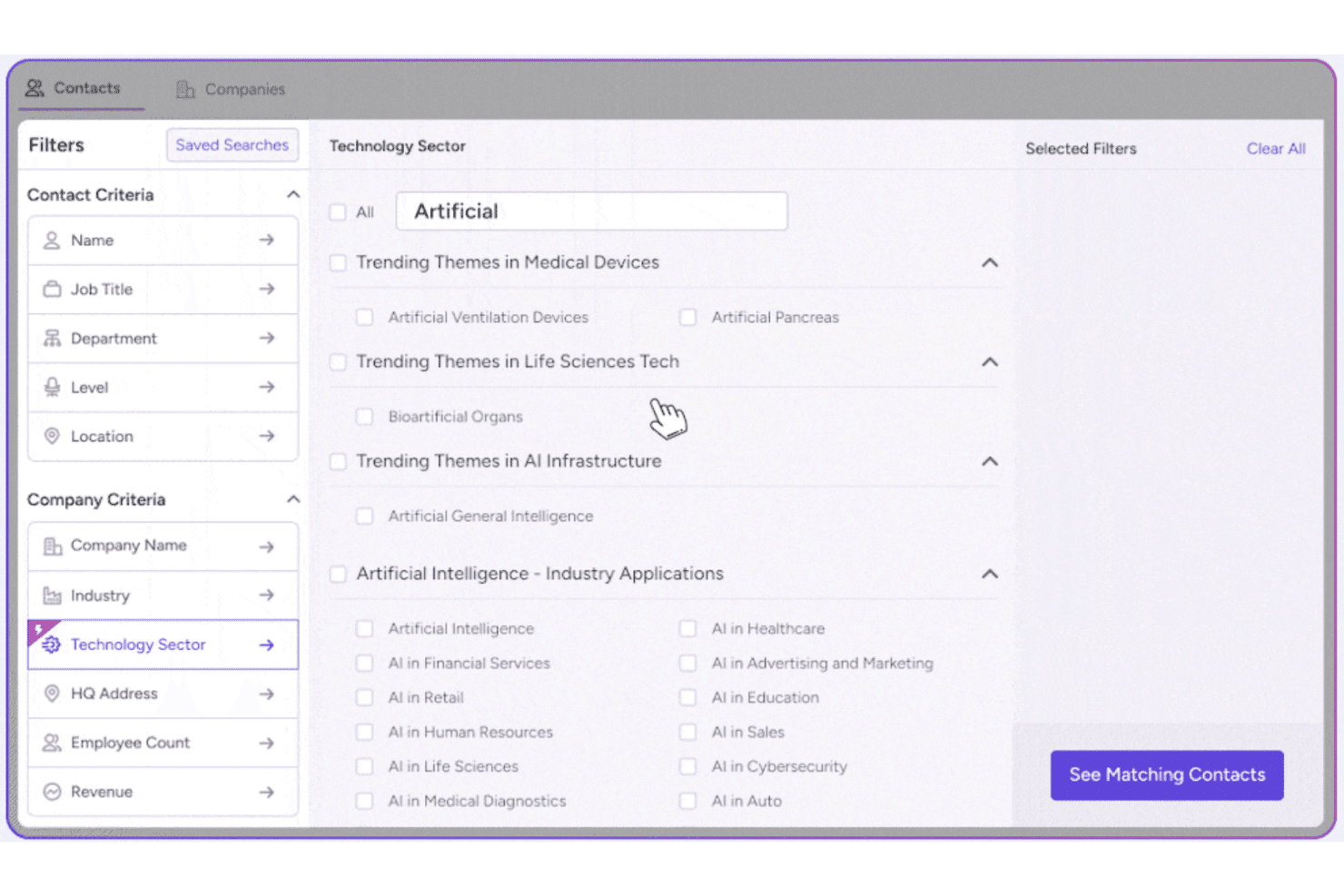
Adapt is a lead intelligence software built for sales and revenue teams that need accurate B2B contact data to fill their pipeline and reach the right buyers faster. I'd consider it a strong fit if you're looking at something like ZoomInfo but want a more accessible entry point—without giving up the depth of contact and company data that makes prospecting actually work.
Adapt Evaluation Summary
4.6/5
- From $49/month
- Free plan available + 7-day free trial
Varför du kan lita på våra programvarurekommendationer
6,700+
Reviews
20
Industry experts
16+
Evaluation factors
14
Years
Våra recensioner speglar vårt oberoende omdöme — inte ett säljbudskap. Läs mer om hur vi förblir transparenta.
För den här guiden utvärderade vi verktyg genom praktisk testning och oberoende research, och betygsatte verktygen enligt våra urvalskriterier.
Våra recensioner speglar vårt mänskliga redaktionella omdöme, inte ett säljbudskap.
Adapt Overview
In my judgment, Adapt stands out for its large, regularly refreshed contact database and fast onboarding. Pricing is competitive for teams prioritizing volume and basic CRM integrations. The interface is user-friendly, but those judging by advanced analytics or custom workflows might find it lacking. Support is responsive and the Chrome extension makes daily prospecting smoother than many alternatives.
If you're selecting a tool for SDRs or marketing teams that need reliable, quick access to B2B leads rather than deep customization or native reporting, Adapt should be high on your shortlist.
Pros
- Offers a large, regularly updated B2B contact database
- Provides precise filters for segmented lead lists
- Chrome extension enables fast lead export and enrichment
Cons
- No intent data or buyer intent signals available
- Data accuracy can vary by industry or region
- No built-in email sequencing or outreach tools
Is Adapt Right For Your Needs?
Who Would be a Good Fit for Adapt?
Adapt is a strong option for fast-growing B2B sales teams, recruitment agencies, and businesses in tech or business services who need lots of fresh contacts. Revenue operations, sales, and marketing departments who care about easy access to up-to-date decision-maker data will benefit from Adapt’s large database, export tools, and straightforward filtering.
It’s especially useful where outreach volume, rapid research, and team sharing drive lead generation workflows.
- B2B SaaS CompaniesYou’ll get value from Adapt’s vast tech company coverage and filters for job function, helping you build lists of decision-makers at relevant accounts.
- Recruitment AgenciesRecruiters benefit from direct dialing details and updated role information, speeding up candidate sourcing and outreach.
- SMB Sales TeamsSmall sales teams with limited resources can rapidly find new prospects and export leads, all within budget.
- Marketing DepartmentsMarketing teams looking to build segmented email lists for targeted campaigns can do this quickly with Adapt’s enriched data and CSV export.
- Consulting FirmsConsultants will appreciate quick research into company size, revenue, and contact data to prepare outreach lists for business development.
- Demand Generation TeamsTeams focused on outbound campaigns need to build and enrich contact lists at scale, something Adapt enables without complex workflows.
Who Would be a Bad Fit for Adapt?
Adapt falls short for industries with specialized prospecting needs, firms that rely on buying signals or intent data, and companies focused on markets outside Adapt’s strongest regions. Highly regulated industries, B2C sales models, or businesses needing tight workflow integration and automation may hit limits with Adapt’s focus on B2B and core lead data.
If you need industry-specific attributes or advanced CRM customization, Adapt probably won’t fully meet your needs.
- Financial ServicesRegulated sales teams may miss customizable compliance features and vertical-specific data not offered out of the box with Adapt.
- Healthcare ProvidersHealthcare organizations often require richer contact info and integrations with clinical platforms that Adapt doesn’t provide.
- Large EnterprisesBig companies needing advanced user permissions, deep customization, or global coverage may find Adapt too limited.
- B2C EcommerceAdapt’s database is focused on business contacts, so B2C marketers will not find relevant leads or consumer data.
- Government AgenciesPublic sector teams typically need highly niche or local public data sets that aren’t supported in Adapt’s B2B database.
- Companies Requiring Intent DataFirms who base prospecting on real-time buying signals or intent data should look elsewhere as Adapt doesn’t provide these features.
How We Test & Score Tools
We’ve spent years building, refining, and improving our software testing and scoring system. The rubric is designed to capture the nuances of software selection and what makes a tool effective, focusing on critical aspects of the decision-making process.
Below, you can see exactly how our testing and scoring works across seven criteria. It allows us to provide an unbiased evaluation of the software based on core functionality, standout features, ease of use, onboarding, customer support, integrations, customer reviews, and value for money.
Core Functionality (25% of final scoring)
The starting point of our evaluation is always the core functionality of the tool. Does it have the basic features and functions that a user would expect to see? Are any of those core features locked to higher-tiered pricing plans? At its core, we expect a tool to stand up against the baseline capabilities of its competitors.
Standout Features (25% of final scoring)
Next, we evaluate uncommon standout features that go above and beyond the core functionality typically found in tools of its kind. A high score reflects specialized or unique features that make the product faster, more efficient, or offer additional value to the user.
We also evaluate how easy it is to integrate with other tools typically found in the tech stack to expand the functionality and utility of the software. Tools offering plentiful native integrations, 3rd party connections, and API access to build custom integrations score best.
Ease of Use (10% of final scoring)
We consider how quick and easy it is to execute the tasks defined in the core functionality using the tool. High scoring software is well designed, intuitive to use, offers mobile apps, provides templates, and makes relatively complex tasks seem simple.
Onboarding (10% of final scoring)
We know how important rapid team adoption is for a new platform, so we evaluate how easy it is to learn and use a tool with minimal training. We evaluate how quickly a team member can get set up and start using the tool with no experience. High scoring solutions indicate little or no support is required.
Customer Support (10% of final scoring)
We review how quick and easy it is to get unstuck and find help by phone, live chat, or knowledge base. Tools and companies that provide real-time support score best, while chatbots score worst.
Customer Reviews (10% of final scoring)
Beyond our own testing and evaluation, we consider the net promoter score from current and past customers. We review their likelihood, given the option, to choose the tool again for the core functionality. A high scoring software reflects a high net promoter score from current or past customers.
Value for Money (10% of final scoring)
Lastly, in consideration of all the other criteria, we review the average price of entry level plans against the core features and consider the value of the other evaluation criteria. Software that delivers more, for less, will score higher.
Core Features
B2B Contact Database
Access millions of verified business emails and phone numbers. Continuously updated records help you avoid outdated or bounced contacts.
Advanced Lead Search Filters
Narrow leads by industry, company size, tech stack, or job title. Target specific segments to build focused prospecting lists quickly.
Chrome Extension
Find and save leads directly from LinkedIn and company websites. Export contact details to your workflow with one click.
Data Enrichment
Automatically add missing contact details to your CRM records. Get fresher data on companies, roles, and direct dials for leads.
Bulk List Export
Download large lists of qualified leads as CSV files. Quickly hand off data to sales or marketing for outreach.
Company Insights
See firmographic details like industry, revenue, and location. Understand more about your accounts without switching tools.
Ease of Use
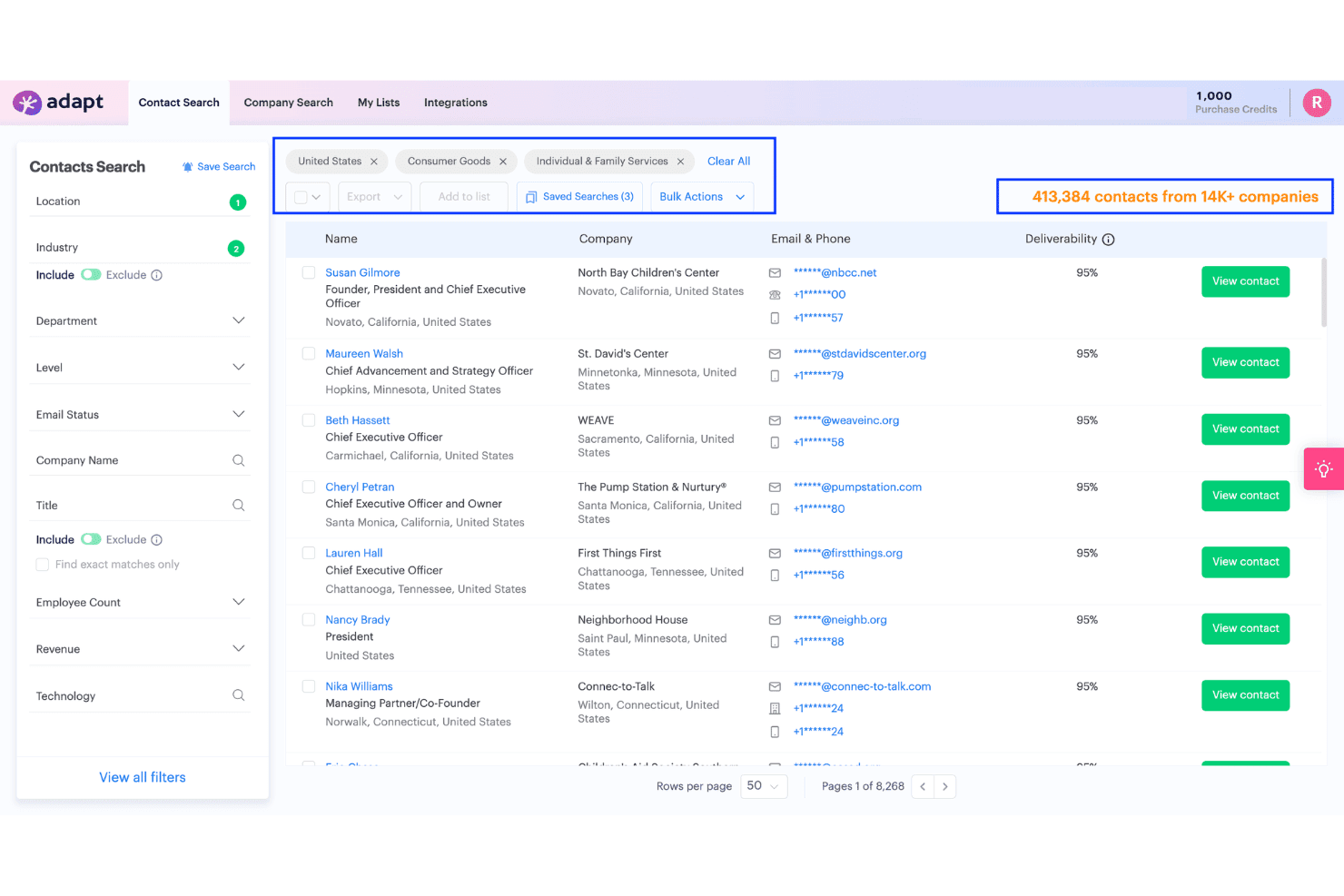
Adapt is easy to pick up, with intuitive navigation and practical filtering that lets users find leads in just a few clicks.
Users highlight the Chrome extension’s speed and how quick it is to export contacts. The saved searches, bulk actions, and in-app help guides stand out for making day-to-day prospecting simpler than most alternatives in the space.
Integrations
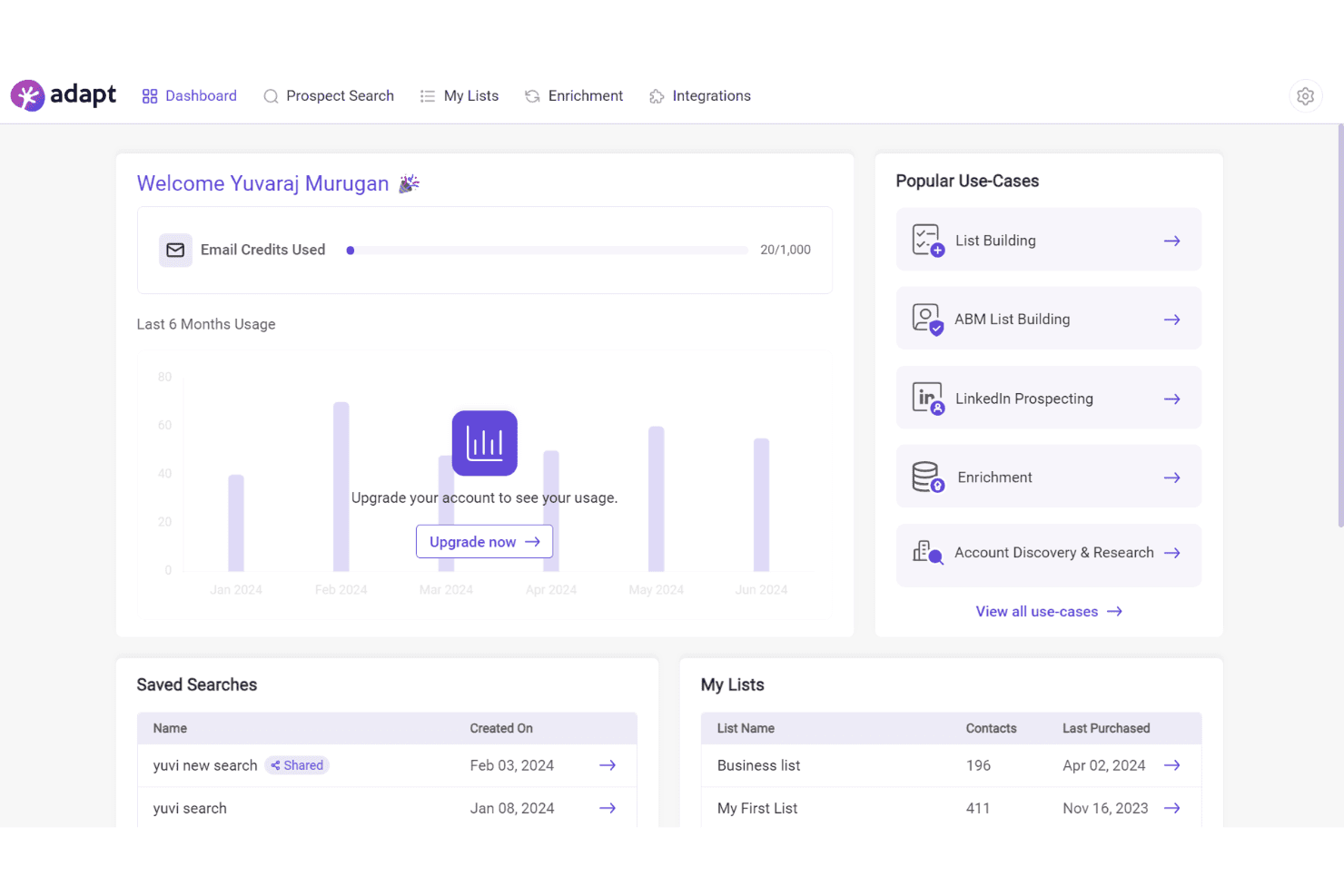
Adapt integrates with Salesforce, HubSpot, Pipedrive, Outreach, Zoho CRM, Freshsales, Microsoft Dynamics 365, Copper, Salesloft, and Zapier.
Adapt also offers an API and supports additional workflows through Zapier.
Adapt Specs
- A/B Testing: No
- Analytics: Yes
- API: Yes
- Audience Targeting: Yes
- Automated Conversion: No
- Batch Permissions & Access: No
- Behavioral Tracking: No
- Brand Management: No
- Campaign Management: No
- Contact Management: Yes
- Contact Sharing: No
- Conversion Tracking: No
- CRM Integration: Yes
- Customer Management: Yes
- Dashboards: No
- Data Export: Yes
- Data Import: Yes
- Email Integration: Yes
- External Integrations: Yes
- Keyword Tracking: No
- Landing Pages: No
- Lead Management: Yes
- Lead Scoring: Yes
- Link Tracking: No
- Marketing Automation: No
- Multi-User: Yes
- Notifications: Yes
- Password & Access Management: Yes
- Social-Media Integration: No


