

Software-ul pentru procesul de la comandă la încasare vă ajută să gestionați fiecare etapă, de la înregistrarea unei vânzări până la colectarea plății, conectând facturarea, colectarea creanțelor și conturile de încasat într-un singur sistem. Atunci când procesele sunt lente sau fragmentate, raportarea veniturilor devine nesigură, iar fluxul de numerar are de suferit.
Acest ghid vă va ajuta să treceți peste multitudinea de opțiuni și să comparați instrumentele de top concepute pentru a automatiza, urmări și optimiza întregul ciclu de la comandă la încasare. Veți vedea care platforme se aliniază cu stiva dvs. tehnologică, vă susțin dezvoltarea și rezolvă problemele fluxurilor de lucru care vă împovărează echipa.
Why Trust Our Software Recommendations
6,700+
Reviews
20
Industry experts
16+
Evaluation factors
14
Years
Our reviews reflect our independent judgment—not a sales pitch. Learn how we stay transparent.
For this guide, we evaluated tools using hands-on testing and independent research, scoring tools using our selection criteria.
Our reviews reflect our human editorial judgment, not a sales pitch.
Tabel comparativ: soluții software pentru procesul de la comandă la încasare
Comparați prețurile și specificațiile, unul lângă altul, pentru soluțiile software de la comandă la încasare incluse în lista mea scurtă.
Sorted by: Default
| Tool | Starting Price | Website | |
|---|---|---|---|
Best for flexible recurring billing management | 4.4 out of 5 | Pricing upon request Free plan available | Website |
Best for integrated financial and order workflows | 4.1 out of 5 | Pricing upon request Free demo available | Website |
Best for subscription and usage-based billing | 3.8 out of 5 | Pricing upon request Free demo available | Website |
Best for unified communications in AR processes | 2.3 out of 5 | Pricing upon request Free demo available | Website |
Best for AR and collections for small teams | Not rated | £545/user/month Free trial available | Website |
Best for enterprise-grade cash application | 4.5 out of 5 | Pricing upon request Free demo available | Website |
Best for integrated payment and invoicing | 4.4 out of 5 | Pricing upon request Free demo available | Website |
Best for modular automation across finance teams | 4.5 out of 5 | Pricing upon request Free demo available | Website |
Best for AI-powered receivables automation | Not rated | Pricing upon request Free demo available | Website |
Best for contract-to-cash process automation | Not rated | Pricing upon request Free demo available | Website |


Recenzii pentru cele mai bune soluții software de la comandă la încasare
Mai jos sunt rezumatele mele detaliate ale celor mai bune soluții software pentru procesul de la comandă la încasare incluse în lista mea scurtă. Recenziile mele oferă o analiză detaliată a funcțiilor, integrărilor și celor mai potrivite cazuri de utilizare pentru fiecare platformă, pentru a vă ajuta să o găsiți pe cea mai potrivită pentru dvs.
 Best for flexible recurring billing management
- Free plan available
- Pricing upon request
Visit WebsiteCustomer Rating:4.4/5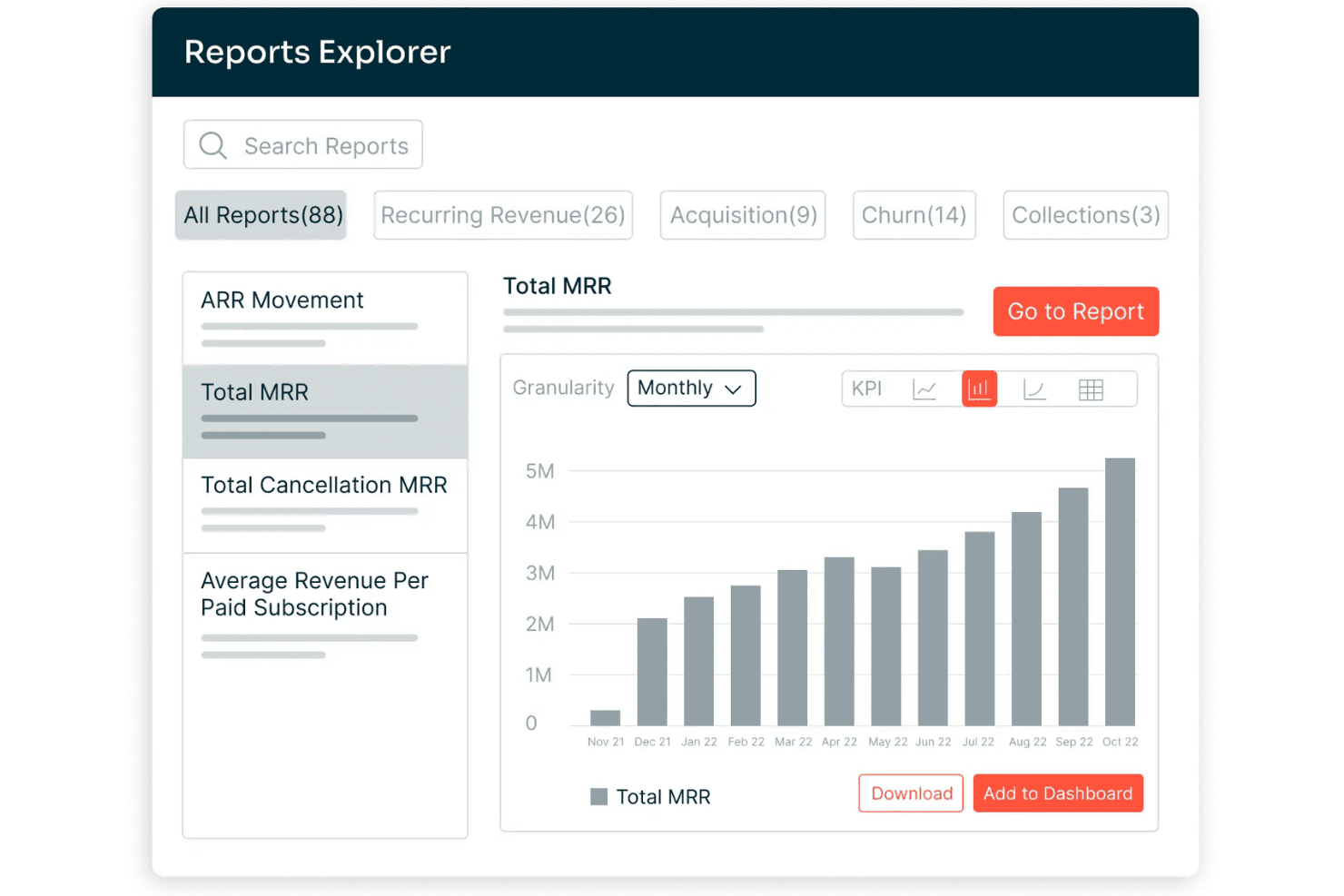
Chargebee offers a Reports Explorer with 88 prebuilt reports, including a Total MRR bar chart showing monthly revenue growth from Nov 2021 to Oct 2022. Chargebee is a billing and monetization platform covering subscription management, usage-based billing, invoicing, payment processing, revenue recognition, and accounts receivable automation across the quote-to-cash cycle.
Who Is Chargebee Best For?
Chargebee is a strong fit for SaaS and digital subscription businesses that run complex, hybrid pricing models combining recurring fees with usage-based charges.
Why I Picked Chargebee
I picked Chargebee as one of the best because its billing engine handles subscription, usage-based, and hybrid pricing models within a single product catalog, which most O2C platforms force you to manage separately. I particularly like how Smart Dunning uses ML to time payment retries based on customer behavior, not a fixed schedule. The Receivables module layers AI-powered collections on top, covering the full billing-to-cash leg.
Chargebee Key Features
- Multi-entity support: Manage billing, invoicing, and reporting for multiple brands, regions, or business units under one account.
- Product catalog management: Configure plans, add-ons, pricing rules, and billing frequencies centrally for all products.
- Compliance with global tax laws: Automate calculations for US Sales Tax, EU-VAT, and other international tax regimes.
- Native ERP and CRM integrations: Connect directly to Salesforce, NetSuite, Xero, and QuickBooks Online for real-time data sync.
Chargebee Integrations
Chargebee offers native integrations with Salesforce, HubSpot, NetSuite, Sage Intacct, Xero, QuickBooks Online, Stripe, Braintree, PayPal, Amazon Payments, Shopify, and Squarespace. An API is available for custom integrations.
Pros and Cons
Pros:
- Smart dunning reduces failed payment churn
- Revenue recognition is ASC 606 compliant
- Handles complex hybrid billing models natively
Cons:
- Cash application limited to gateway-captured payments
- No native credit risk management tools
Learn more about Chargebee: Best for integrated financial and order workflows
- Free demo available
- Pricing upon request
Visit WebsiteCustomer Rating:4.1/5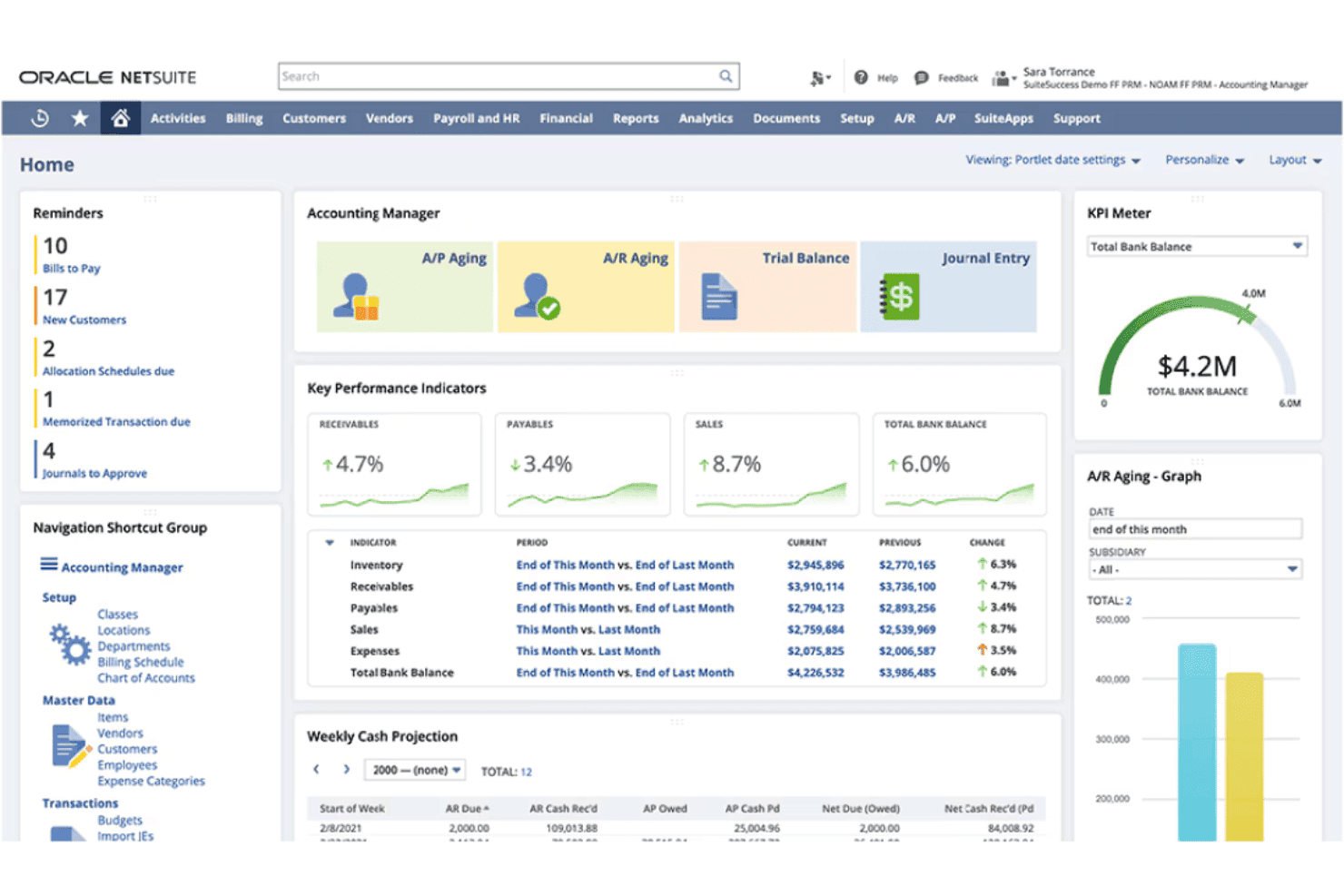
NetSuite ERP offers an Accounting Manager dashboard with KPIs, A/P and A/R aging, weekly cash projections, and a total bank balance KPI meter. NetSuite ERP is a cloud-based enterprise resource planning platform that combines order management, invoicing, accounts receivable, revenue recognition, and financial management in a single unified system.
Who Is NetSuite ERP Best For?
Mid-market companies with multi-entity structures, inventory complexity, or high order volumes that need finance and operations on one platform.
Why I Picked NetSuite ERP
I've included NetSuite ERP in my top picks because the order-to-cash workflow lives entirely within one database. When an order ships, the GL updates, the invoice generates, and AR aging reflects it instantly. I like that Advanced Order Management handles order promising, allocation, and orchestration natively, so my team isn't manually resolving fulfillment exceptions. SuiteBilling layered on top supports transaction, subscription, usage-based, and hybrid billing without a separate tool.
NetSuite ERP Key Features
- SuiteApps marketplace: Access hundreds of certified third-party apps to extend order to cash workflows.
- Native CRM module: Manage customer records, sales pipeline, and order history within the same system as financials.
- Multi-entity and currency management: Handle transactions, reporting, and compliance across subsidiaries and international operations.
- Pre-built ecommerce and POS integrations: Connect online stores and retail locations for unified order processing and fulfillment.
NetSuite ERP Integrations
NetSuite ERP offers native integrations with Salesforce, Shopify, Amazon, HubSpot, Outlook, and a range of POS and 3PL platforms through NetSuite Connector. The SuiteApps marketplace includes hundreds of certified third-party apps, and an API is available for custom integrations.
Pros and Cons
Pros:
- Real-time revenue recognition
- Handles subscription, usage, and hybrid billing
- Single database for orders, billing, and financials
Cons:
- Premium support requires paid add-on package
- Core features split across expensive modules
Learn more about NetSuite ERP: Best for subscription and usage-based billing
- Free demo available
- Pricing upon request
Visit WebsiteCustomer Rating:3.8/5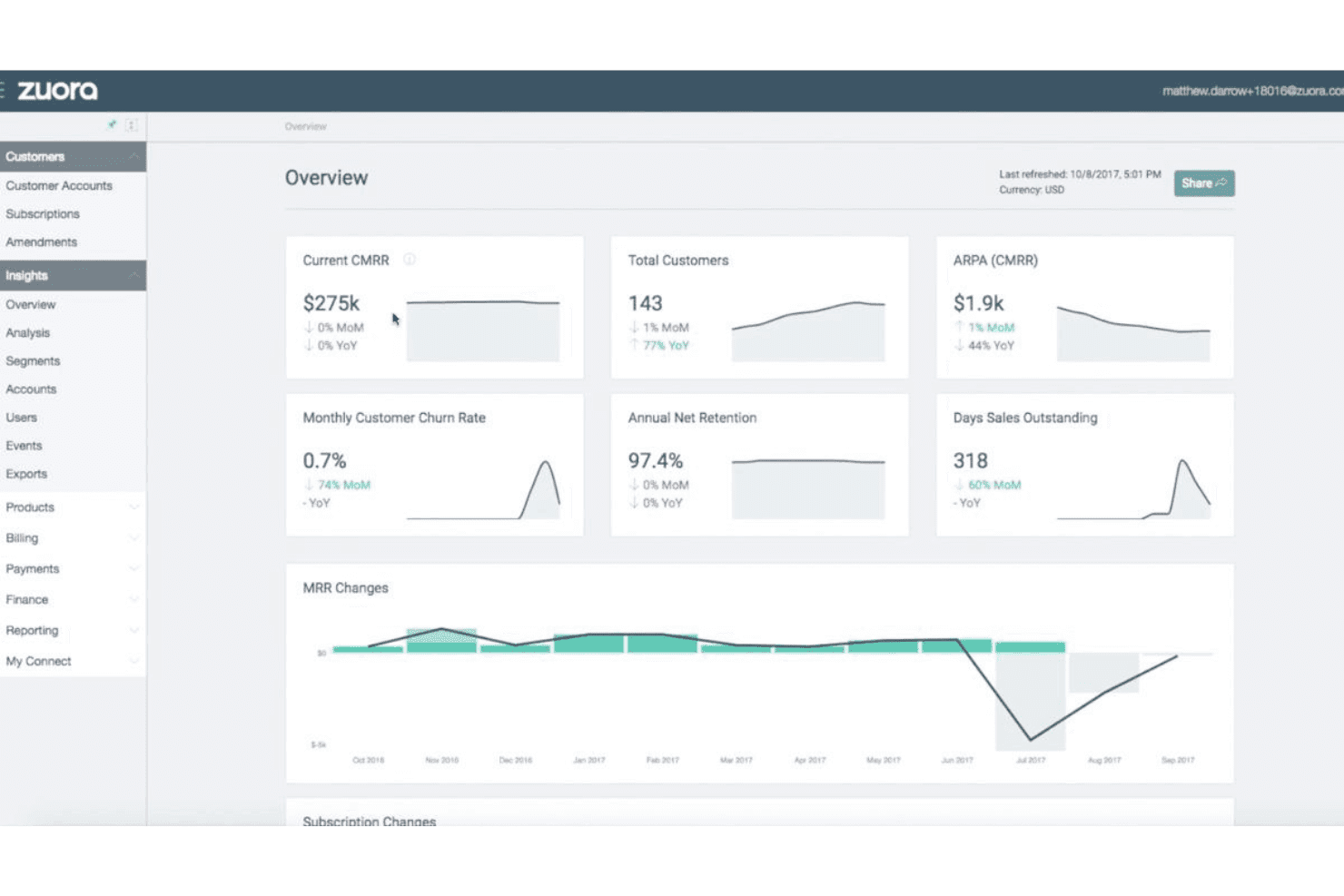
Zuora offers an insights overview dashboard displaying key subscription metrics like CMRR, customer count, churn rate, and MRR changes over time. Zuora is a quote-to-cash platform built around subscription and usage-based monetization, covering CPQ, billing, collections, cash application, and automated revenue recognition in a single system.
Who Is Zuora Best For?
Zuora is a strong fit for mid-market and enterprise companies running recurring revenue models, particularly in SaaS, media, and IoT.
Why I Picked Zuora
Zuora earns its spot as one of the best on my shortlist because no other platform handles the full complexity of usage-based billing at scale quite like this. The Usage Engine tracks real-time consumption and supports tiered, prepaid, overage, and high-water mark models in a single billing run. I also like that hybrid pricing, combining a flat subscription fee with metered usage charges, works natively without custom workarounds.
Zuora Key Features
- Multi-channel order capture: Accepts orders from sales reps, customer self-service portals, APIs, and partner channels with unified validation.
- Automated invoicing engine: Generates invoices for any combination of one-time, recurring, and milestone charges with flexible schedule settings.
- AI-driven collections workflows: Automates payment reminders, dunning schedules, and prioritization for outstanding receivables.
- Native ERP/CRM integrations: Offers real-time, bidirectional sync with platforms like Salesforce, NetSuite, SAP, and Workday.
Zuora Integrations
Zuora offers native integrations with Salesforce, NetSuite, SAP, Workday, HubSpot, and Snowflake, along with over 60 pre-built connectors. An API is available for custom integrations.
Pros and Cons
Pros:
- AI-driven collections with smart dunning routing
- Automated revenue recognition built in (ASC 606/IFRS 15)
- Handles complex usage-based billing models natively
Cons:
- Credit management relies on third-party data sources
- Rigid catalog structure for physical inventory
Learn more about Zuora: Best for unified communications in AR processes
- Free demo available
- Pricing upon request
Visit WebsiteCustomer Rating:2.3/5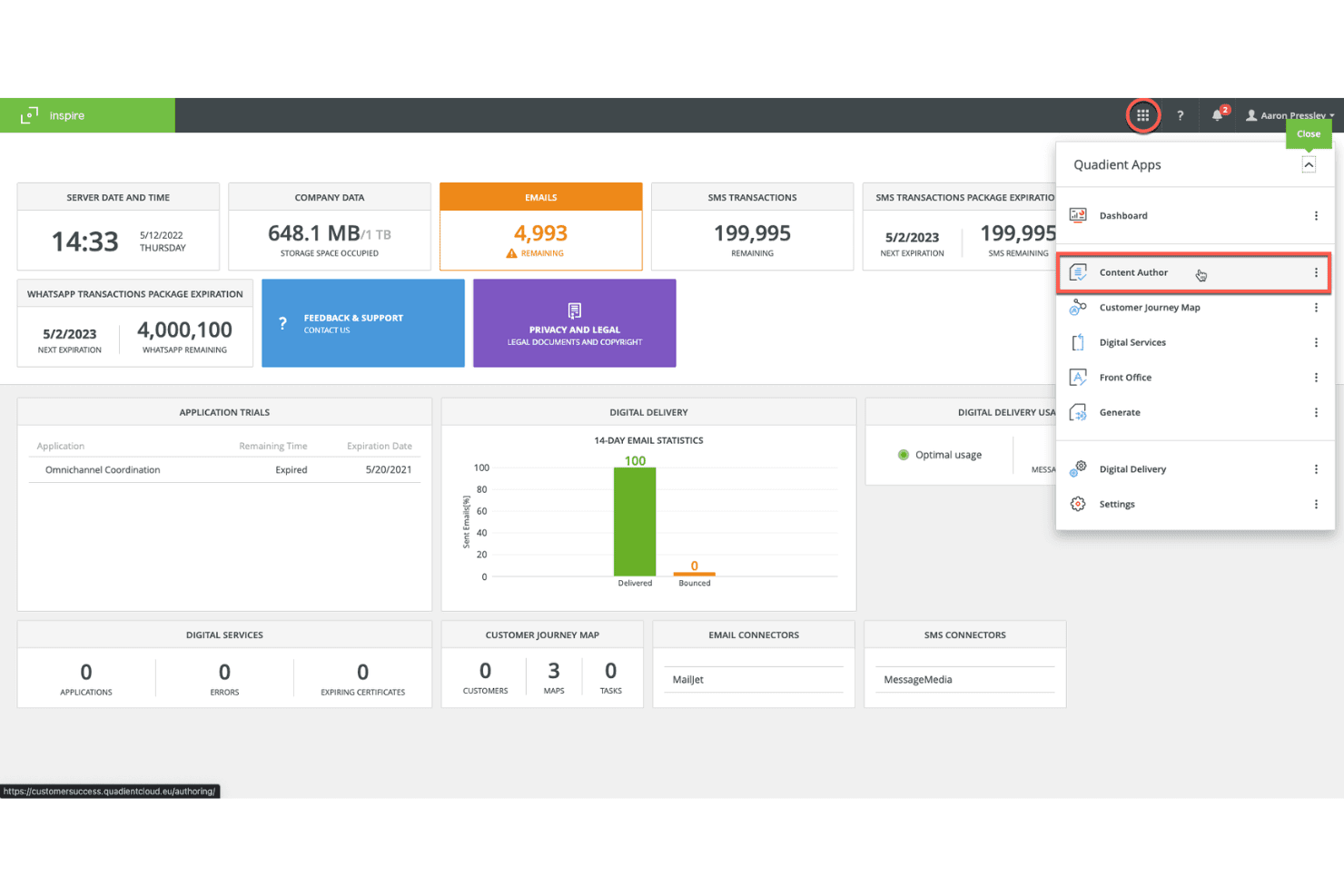
Quadient's Inspire platform displays a centralized dashboard with email, SMS, and WhatsApp transaction metrics alongside a Quadient Apps navigation panel. Quadient is an accounts receivable automation platform covering credit management, invoice delivery, collections workflows, dispute management, cash application, and self-service customer payments.
Who Is Quadient Best For?
Quadient is a good fit for mid-market and enterprise B2B finance teams managing high-volume invoicing, collections, and cash application across complex customer account portfolios.
Why I Picked Quadient
I've included Quadient in my top picks because it centralizes every AR communication touchpoint, from automated collection sequences and dispute tracking to self-service payment portals, in one connected workflow. I particularly like the AI-driven collections prioritization, which tells my team which customers to contact, through which channel, and exactly when. The self-service portal is a practical touch too, letting customers view invoices and submit payments without routing every query through my team.
Quadient Key Features
- Integrated deductions management: Automates categorization, routing, and resolution of disputes and short payments.
- Embedded payment portal: Lets customers view invoices and pay via ACH, card, or virtual card.
- ERP and CRM integration: Connects natively to NetSuite, SAP, Microsoft Dynamics, Salesforce, QuickBooks, and more.
- Cash flow forecasting dashboards: Provides real-time, AI-driven visibility into collections and DSO trends.
Quadient Integrations
Quadient AR offers native integrations with NetSuite, Acumatica, Sage (300, X3, Intacct), Microsoft Dynamics, SAP, SAP Business One, QuickBooks, Xero, Salesforce, and Zuora. An API is available for custom integrations.
Pros and Cons
Pros:
- Dedicated deductions management
- High auto-match rates in cash application
- AI-driven collections prioritization
Cons:
- Implementation timelines can run several months
- Limited order management capabilities
Learn more about Quadient: Best for AR and collections for small teams
- Free trial available
- From £545/user/month
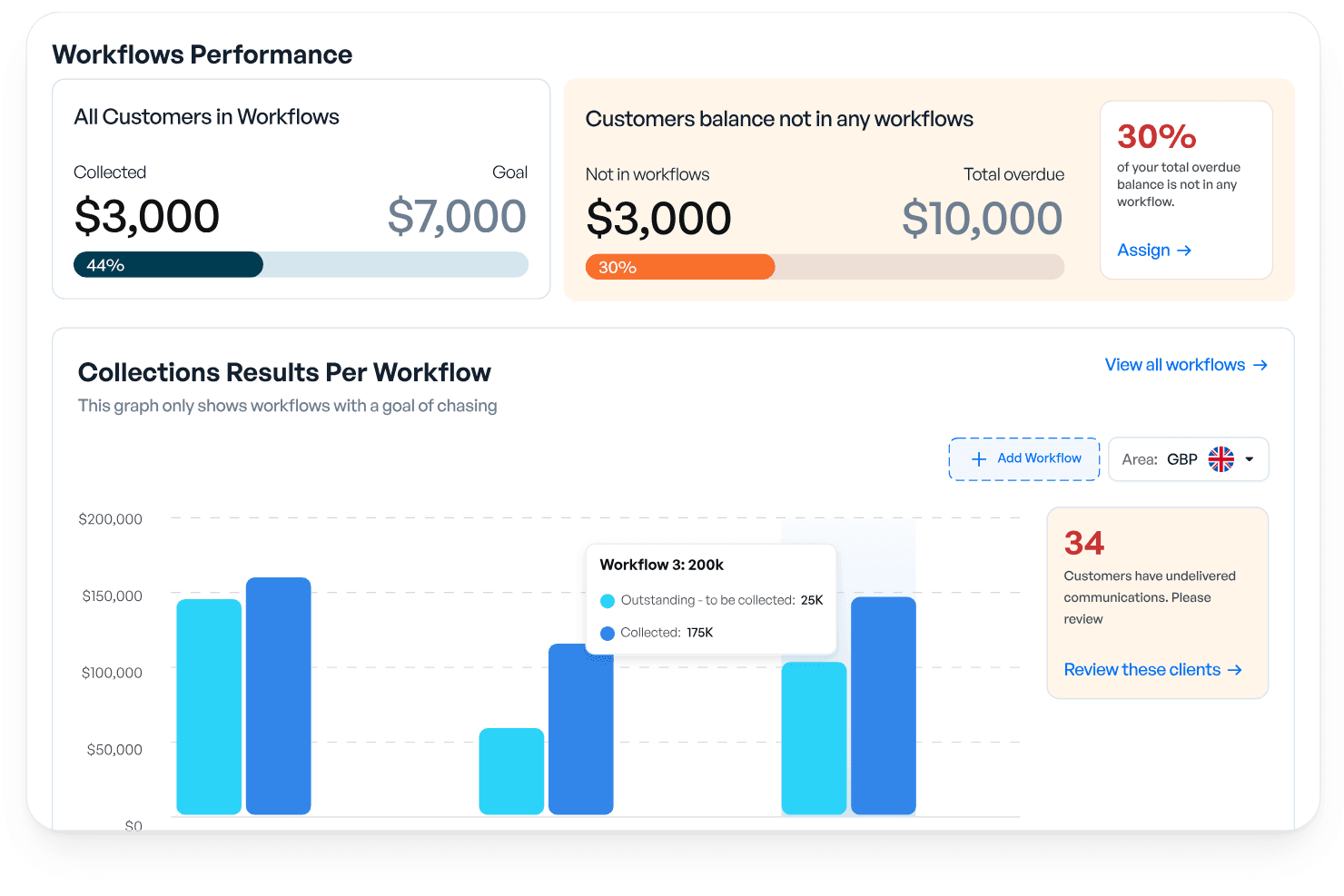
Kolleno offers a Workflows Performance dashboard that tracks collections, overdue balances, and per-workflow results with visual progress indicators. Kolleno is an AI-powered AR and order-to-cash platform covering collections automation, cash application, payments, disputes management, credit risk monitoring, and cash flow forecasting.
Who Is Kolleno Best For?
Kolleno is a strong fit for credit controllers and AR managers at SMBs who need to automate collections without growing their finance team headcount.
Why I Picked Kolleno
I've included Kolleno in my top picks because its AI Agents genuinely change what a small AR team can cover. I can configure each agent's autonomy level, from drafting follow-up emails for my review to firing off multi-channel dunning sequences entirely on its own. I also like that the cash application module uses pattern learning to handle complex matching scenarios, keeping my team out of exception queues.
Kolleno Key Features
- Embedded payment portal: Customers can pay, view invoice status, and resolve disputes directly in a branded online portal.
- Real-time dashboards: Access up-to-date AR analytics and cash flow forecasting from a central workspace.
- Disputes management: Track, categorize, and resolve invoice disputes within an integrated workflow.
- Native ERP and CRM integrations: Connect with systems like NetSuite, Xero, QuickBooks, and Salesforce for synchronized data across platforms.
Kolleno Integrations
Kolleno offers native integrations with NetSuite, Xero, QuickBooks, SAP S/4HANA, Sage Intacct, Microsoft Dynamics 365 Business Central, Salesforce, Clio, Stripe, Adyen, and GoCardless. An API is available for custom integrations.
Pros and Cons
Pros:
- Rapid setup for SMB teams without complex onboarding
- Dispute management is built into the AR workflow
- Prioritizes at-risk accounts before they go overdue
Cons:
- Reporting customization is limited
- Per-seat pricing limits cross-team AR visibility
Learn more about Kolleno: Best for enterprise-grade cash application
- Free demo available
- Pricing upon request
Visit WebsiteCustomer Rating:4.5/5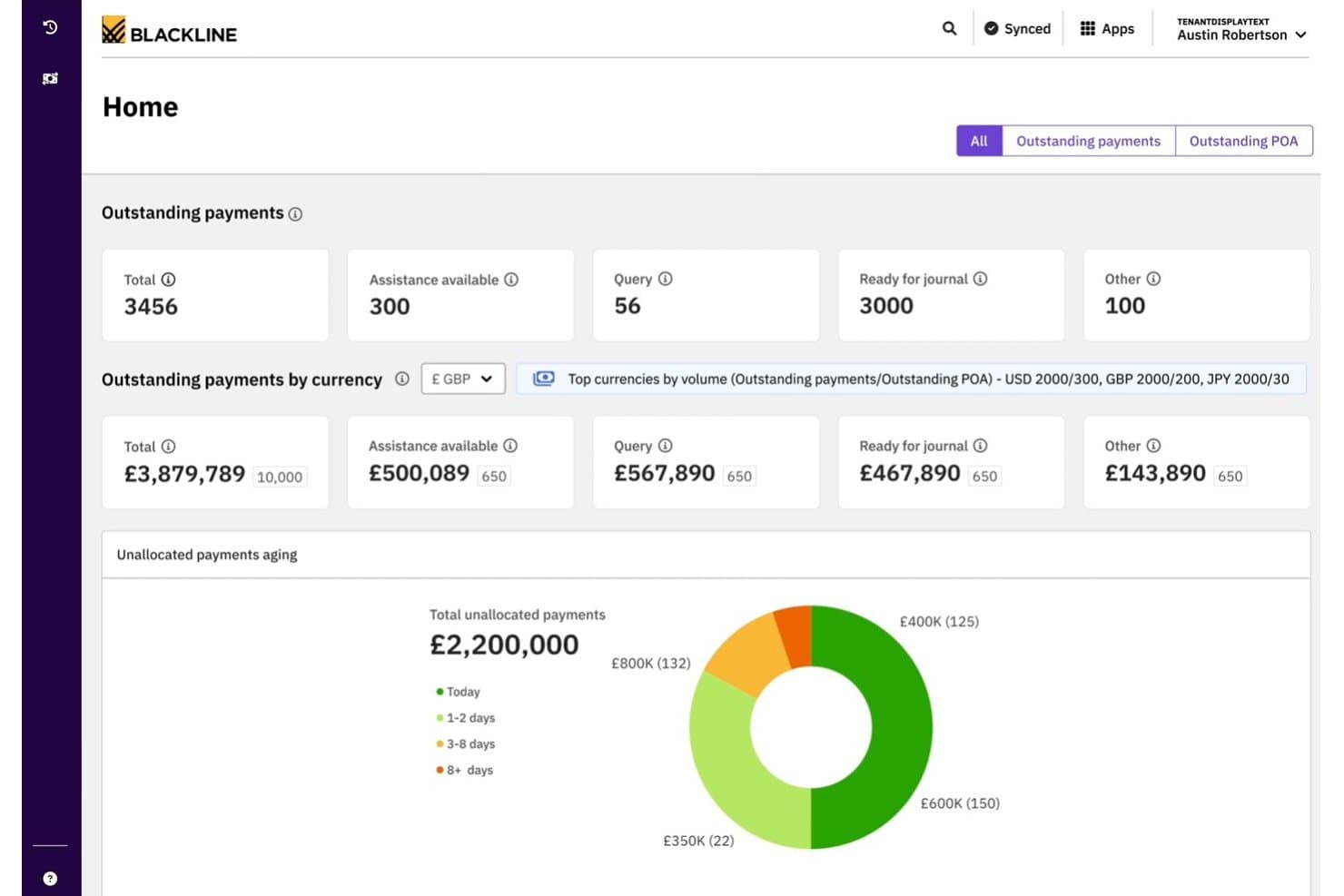
BlackLine offers a cash application dashboard displaying outstanding payments, currency breakdowns, and unallocated payments aging analytics. BlackLine Invoice-to-Cash is an AR automation platform covering cash application, collections management, eInvoicing, credit and risk management, dispute handling, and AI-driven payment matching.
Who Is BlackLine Best For?
BlackLine is a strong fit for enterprise finance teams managing high transaction volumes across multiple ERPs, banks, and regions.
Why I Picked BlackLine
BlackLine earns its spot on my shortlist because its Verity AI cash application consistently delivers match rates that bring unapplied cash close to zero. I particularly like the multi-format remittance ingestion, which handles everything from EDI to scanned documents without manual intervention. The automated deduction coding with reason codes and straight-through journal entries to the GL mean my team spends far less time reconciling exceptions at month-end.
BlackLine Key Features
- Integrated deductions management: Automatically logs, categorizes, and routes short payments and invoice disputes for resolution.
- Embedded payment portal: Provides customers with a self-service portal to view invoices, make payments, and submit inquiries.
- Cash flow forecasting: Includes AI-driven dashboards that forecast collections and predict DSO across segments.
- ERP-certified connectors: Offers native, bidirectional integrations with major ERP systems like SAP, Oracle, and NetSuite.
BlackLine Integrations
BlackLine offers native integrations with SAP, NetSuite, Oracle, Microsoft Dynamics, Acumatica, and Sage, plus native CRM integration for dispute management. An API is also available for custom integrations.
Pros and Cons
Pros:
- Real-time credit risk scoring across customer portfolio
- Automated deduction coding with root-cause analytics
- AI cash application achieves near-zero unapplied cash
Cons:
- Batch processing prevents real-time transaction updates
- High subscription cost for lower transaction volumes
Learn more about BlackLine: Best for integrated payment and invoicing
- Free demo available
- Pricing upon request
Visit WebsiteCustomer Rating:4.4/5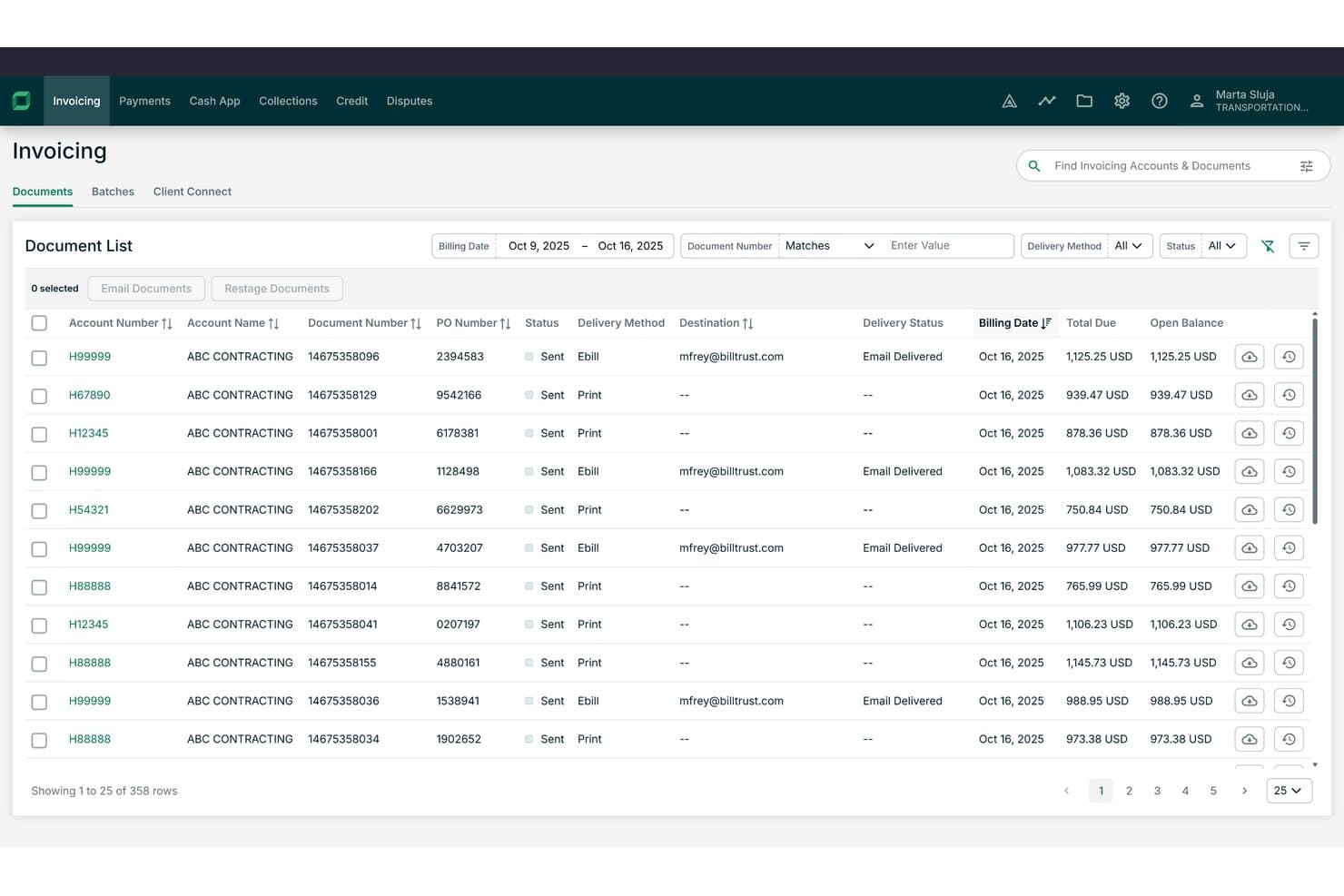
Billtrust offers a detailed invoicing document list with filtering, delivery method tracking, and open balance visibility across hundreds of records. Billtrust is a B2B order-to-cash platform built around invoicing, payments, collections, cash application, and credit management for mid-to-enterprise suppliers.
Who Is Billtrust Best For?
It's a strong fit for AR managers and finance leaders at B2B companies in manufacturing, distribution, or business services with high invoice volumes.
Why I Picked Billtrust
I picked Billtrust as one of the best because its invoicing and payments run as a single platform rather than separate modules. I like that the Digital Lockbox automatically processes emailed virtual cards without manual handling, and the 260+ AP portal connections push invoices directly into buyers' systems like Ariba and Coupa. The ML-based cash application consistently hits 95%+ straight-through processing rates.
Billtrust Key Features
- Agentic credit management: Automatically underwrites and monitors customer credit using real-time bureau data and behavioral signals.
- Collections workflow automation: Prioritizes delinquent accounts and generates agentic outreach through email and VoIP auto-transcription.
- Global e-invoicing compliance: Supports multi-country e-invoicing mandates, covering B2B and government requirements.
- ERP and AP portal integrations: Connects natively with 200+ ERPs, banks, and over 260 AP portals for invoicing and payment workflows.
Billtrust Integrations
Billtrust offers over 200 native integrations, including SAP, NetSuite, Microsoft Dynamics, Oracle, Ariba, Coupa, Basware, OB10, and more than 260 AP portals. An API is available for custom integrations.
Pros and Cons
Pros:
- Covers invoicing, credit, and collections in one platform
- Agentic AI handles collections outreach automatically
- Cash application achieves 95%+ auto-match rates
Cons:
- Implementation typically requires several months
- No order capture or management functionality
Learn more about Billtrust: Best for modular automation across finance teams
- Free demo available
- Pricing upon request
Visit WebsiteCustomer Rating:4.5/5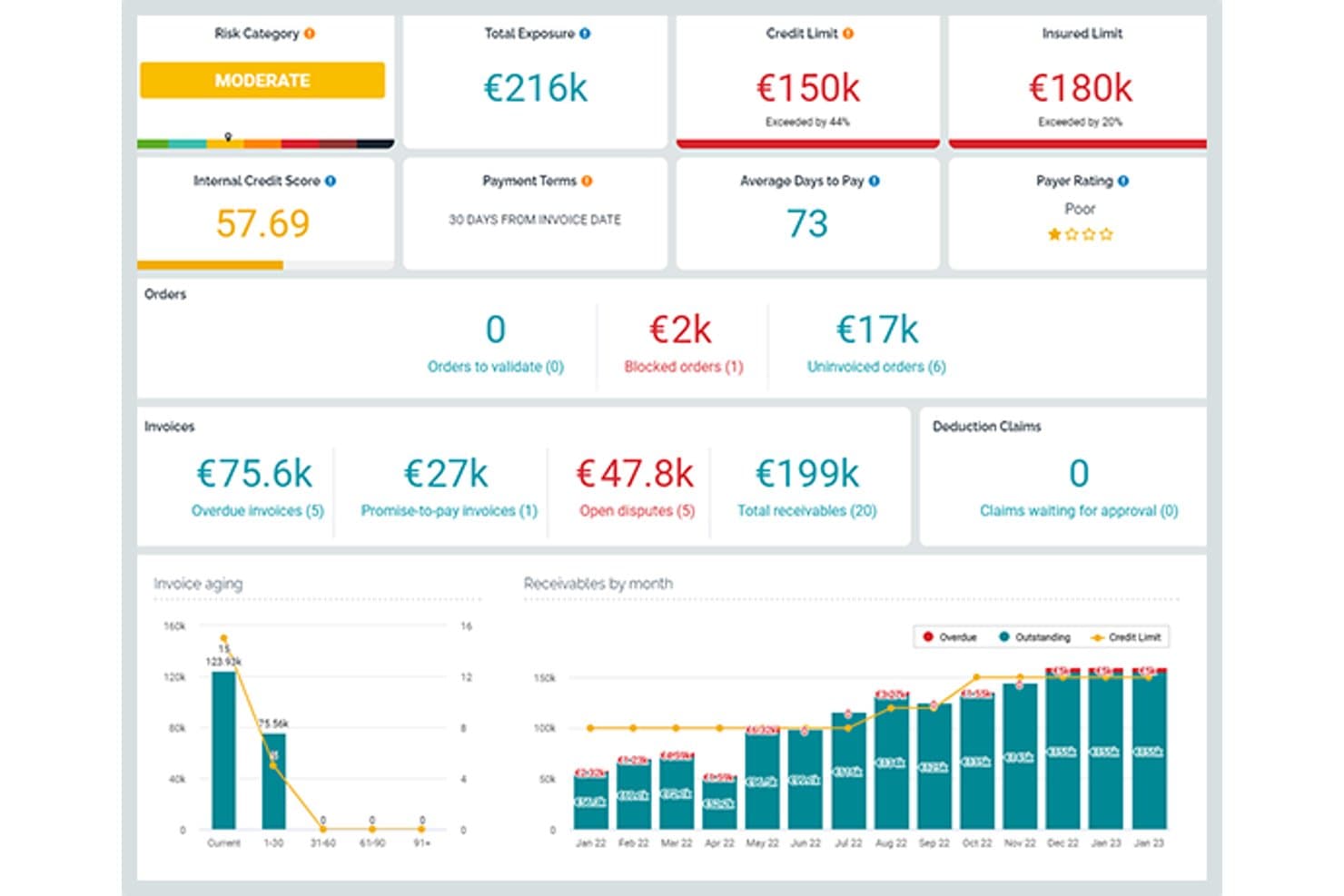
Esker offers a comprehensive order-to-cash dashboard displaying risk categories, credit limits, invoice aging, and receivables by month for streamlined AR management. Esker is a cloud-based order-to-cash platform with modular, AI-powered solutions spanning order management, credit management, invoice delivery, cash application, collections, and deductions management.
Who Is Esker Best For?
Esker is a strong fit for mid-to-large enterprises running SAP or other major ERPs that need modular O2C automation across AR and finance teams.
Why I Picked Esker
Esker earns its spot on my shortlist because its modular architecture lets finance teams activate only the O2C components they need. I like that Credit Management, Cash Application, and Collections can each be deployed standalone or as a full suite, which matters when phasing a rollout across a large finance org. Esker Synergy AI is what really sets the cash application module apart: it uses ML to extract remittance data and auto-match payments, cutting unapplied cash by up to 95%.
Esker Key Features
- Omnichannel order capture: Collects and digitizes B2B orders from email, EDI, customer portals, and fax with real-time tracking.
- Integrated deductions management: Categorizes and routes short-pay and chargeback disputes for fast resolution.
- Embedded payment portal: Allows customers to view, dispute, and pay invoices by ACH, card, or virtual card.
- Cash flow forecasting dashboard: Provides real-time DSO and collections forecasts with segmentation by customer or geography.
Esker Integrations
Esker offers native integrations with SAP, Oracle, Microsoft Dynamics, and NetSuite for bidirectional data sync. An API is available for custom integrations.
Pros and Cons
Pros:
- Strong deductions management with root-cause analytics
- AI cash application cuts unapplied cash significantly
- Modular deployment across individual O2C functions
Cons:
- Data gaps can appear between individual modules
- Implementation timelines can run several months
Learn more about Esker: Best for AI-powered receivables automation
- Free demo available
- Pricing upon request
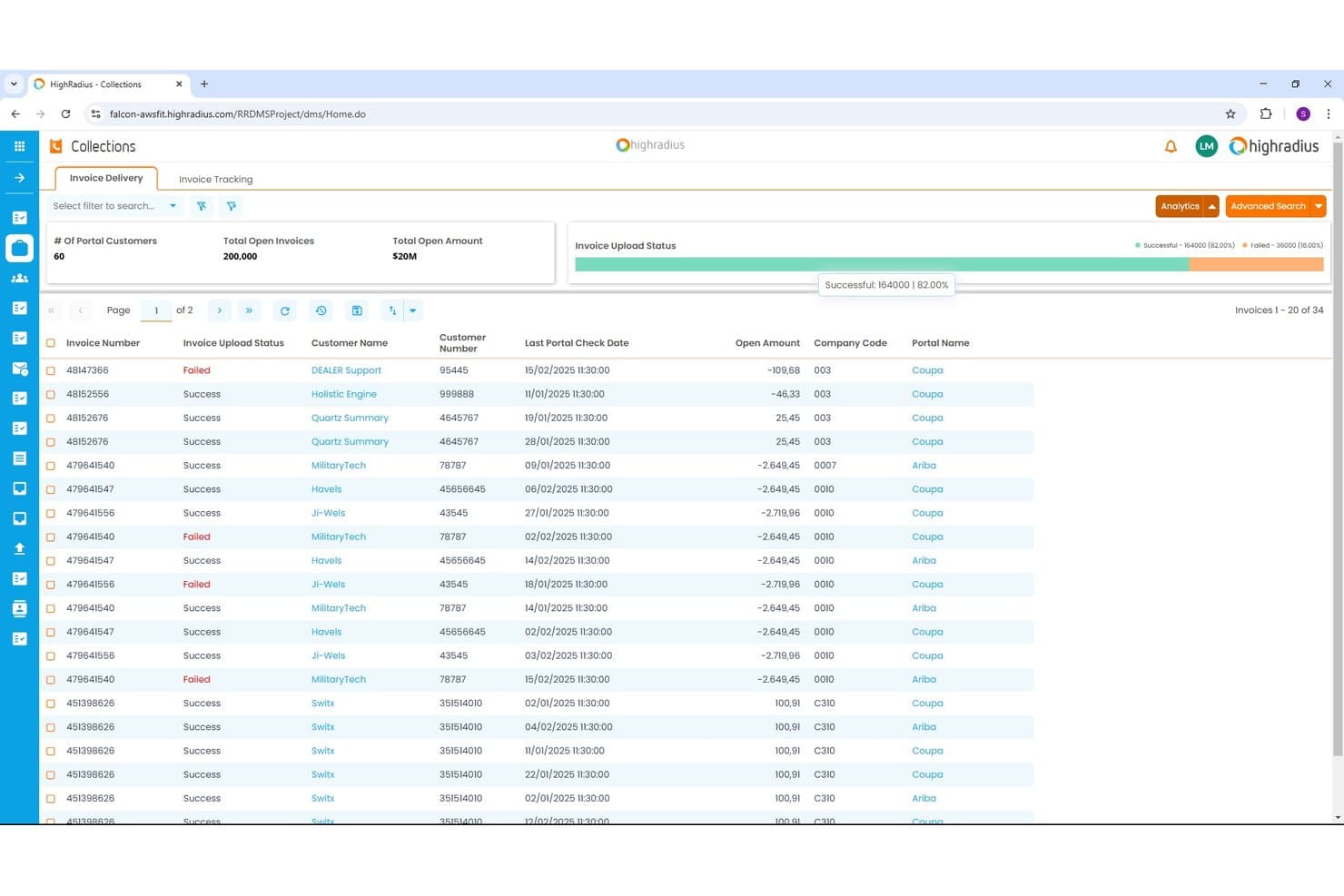
HighRadius offers an Invoice Delivery dashboard within its Collections module, displaying invoice upload status, open amounts, and portal tracking across multiple customers. HighRadius is an AI-powered order-to-cash platform covering collections, cash application, credit management, deductions, and e-invoicing for enterprise finance teams.
Who Is HighRadius Best For?
HighRadius is a strong fit for large enterprises running high-volume receivables across multiple ERPs, business units, or geographies.
Why I Picked HighRadius
HighRadius earns its spot on my shortlist because the Cash Application Cloud achieves 95% no-touch posting rates for checks, ACH, and wires by extracting remittance data from emails and AP portals automatically. I also like the AI Worklist in Collections Cloud, which prioritizes accounts dynamically so my team targets the highest-risk balances first. The Deductions Cloud aggregates portal and email claims into a single queue, so my team isn't chasing backup documents across systems.
HighRadius Key Features
- Predictive credit scoring: Uses real-time bureau data and payment patterns to automate credit risk decisions.
- Integrated deductions management: Centralizes short-pay claim capture and automates backup aggregation from portals and emails.
- Embedded payment portal: Lets customers view invoices and pay online using ACH or credit card.
- ERP-native connectors: Provides prebuilt integrations for SAP, Oracle, NetSuite, and Microsoft Dynamics for bidirectional invoice and payment data sync.
HighRadius Integrations
HighRadius offers native integrations with SAP, Oracle, NetSuite, and Microsoft Dynamics, plus connections to over 100 banks and 40 credit agencies. An API is available for custom integrations.
Pros and Cons
Pros:
- Credit scoring pulls live bureau data
- Centralizes short-pay claims automatically
- Cash posting hits 95% no-touch rates
Cons:
- Go-live takes three to six months
- Batch-based ERP sync delays data updates
Learn more about HighRadius:
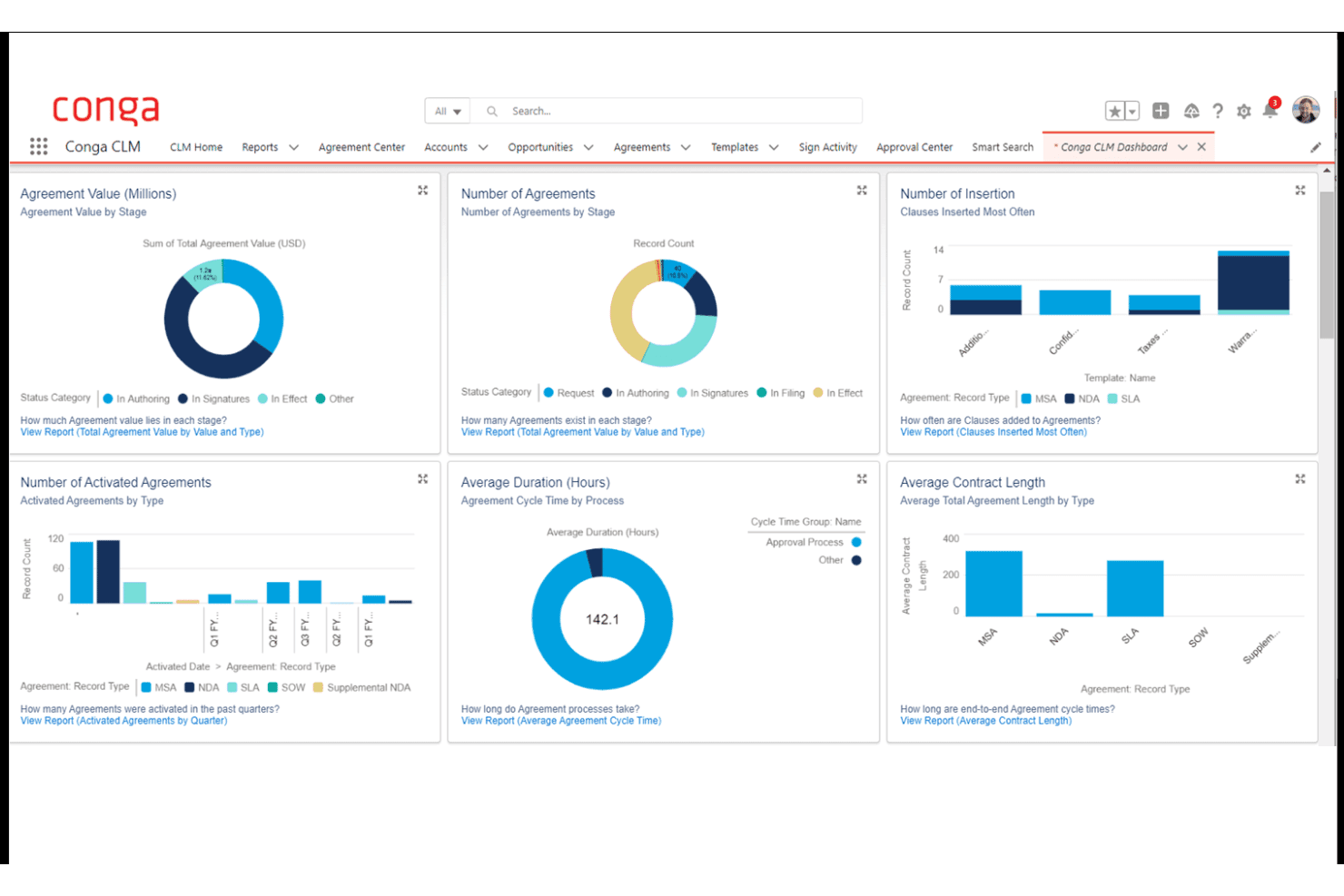
Conga CLM offers a comprehensive dashboard with visual analytics covering agreement value, number of agreements, insertion clauses, activated agreements, cycle time, and contract length by type. Conga is a revenue lifecycle platform that unifies CPQ, contract lifecycle management, billing, and subscription management across the contract-to-cash process.
Who Is Conga Best For?
Conga is a strong fit for enterprise B2B teams running complex, high-volume sales cycles on Salesforce who need CPQ, contracts, and billing managed in one connected system.
Why I Picked Conga
I picked Conga as one of the best because of how tightly it connects CPQ, contract management, and billing in a single data model. Where most O2C tools start at the order stage, Conga starts at the quote, meaning contract terms and pricing rules flow directly into invoices without manual re-entry. I particularly like its Billing module's mixed-order invoicing, where one customer invoice can consolidate subscription, usage, and one-time charges simultaneously.
Conga Key Features
- Salesforce-native integration: Leverages deep, bidirectional sync for product, quote, and contract data between Salesforce and Conga.
- Automated dunning workflows: Supports scheduled reminders and escalations for outstanding invoices and overdue accounts.
- Unified data model: Connects CPQ, contracts, billing, and revenue recognition under one data architecture for central audit trails.
- API and SDK extensibility: Offers APIs and SDKs to embed CPQ and billing processes in customer portals, internal tools, or partner platforms.
Conga Integrations
Conga offers native integrations with Salesforce, Workday, Oracle, HubSpot, Pipedrive, and Microsoft Dynamics 365. An API and SDK are available for building custom integrations and embedding processes in portals or internal systems.
Pros and Cons
Pros:
- Strong Salesforce-native architecture for revenue teams
- Handles complex subscription billing model changes
- Unifies CPQ, contracts, and billing natively
Cons:
- Weak credit management and risk scoring tools
- No native cash application or matching tools
Learn more about Conga:
Alte soluții software pentru procesul de la comandă la încasare
Iată câteva opțiuni suplimentare de software pentru procesul de la comandă la încasare care nu au ajuns pe lista mea scurtă, dar care merită totuși analizate:
- 11Agentforce Revenue ManagementBest for CRM-driven revenue lifecycle management
- 12VersapayBest for collaborative AR with customer portal
- 13MaxioBest for SaaS billing complexity management
- 14DealHub AIBest for CPQ-integrated revenue processes
- 15TesorioBest for predictive cash flow insights
- 16UpflowBest for real-time collections analytics
- 17InvoicedBest for automated AR process control
- 18SerralaBest for global multi-ERP cash automation
- 19Paystand Best for blockchain-enabled B2B payments
- 20GavitiBest for collector workflow optimization
How I Evaluate Order-to-Cash Software
I split my evaluation into baseline criteria every tool must hit—like automated cash application and ERP connectivity—and differentiators that separate the best platforms from the rest.
Core Functionality (Table Stakes for This List)
When I'm selecting tools for my list, I rank each one on a scale from 0 (does not offer the functionality) to 5 (excels in this area) for each core functionality listed below. Then, I calculate the tool's total score into a percentage. Each tool needs to achieve a minimum total score of 75% to be considered for inclusion.
- Order Management: I evaluate how each platform captures and orchestrates orders across channels like web portals, EDI, and email, including whether it handles validation rules and exception routing before hitting fulfillment.
- Invoicing & Billing: The billing engine needs to support more than just one-time invoices. I look for platforms that handle recurring, usage-based, and milestone billing models within the same workflow.
- AR Automation: I check whether the tool offers configurable dunning sequences with multi-channel outreach, since teams juggling hundreds of open invoices need prioritized, automated follow-ups rather than manual email chasing.
- Cash Application: Matching payments to invoices manually is where AR teams lose the most time. I look for AI-assisted matching that can parse remittance data from lockbox files, emails, and EDI formats.
- Credit Management: I evaluate whether the platform can pull credit data from third-party bureaus, enforce dynamic credit limits, and flag high-risk accounts before orders ship rather than after invoices age out.
- ERP/CRM Integration: Bidirectional connectors to systems like SAP, NetSuite, and Salesforce matter here. I look for native integrations that sync invoice status, GL postings, and customer master data in real time.
Once I have a list of tools that meet the criteria, I consider what sets each platform apart.
Differentiating Factors (What Sets Vendors Apart)
Here's how I compare and contrast different vendors:
Standout Features
Integrated deductions management is a big differentiator I look for. When customers short-pay invoices, you need automated dispute workflows that categorize and route chargebacks rather than letting them pile up in spreadsheets. Cash flow forecasting also matters—AI-driven DSO predictions by customer or segment give finance leaders rolling visibility for accurate revenue planning. An embedded payment portal where customers can view invoices, raise disputes, and pay via multiple methods is another separator worth evaluating.
Beyond Features
Modularity is a key factor I evaluate—some teams only need a collections module, while others want the full order-to-cash suite. Buying more than you need slows adoption. I also check for global readiness, including multi-currency, multi-entity support, and compliance with regional e-invoicing mandates. Pricing structure matters too. Transaction-based models can balloon costs at high invoice volumes, so I compare those against flat subscription pricing to understand total cost of ownership.
Cum să alegeți software-ul pentru procesul de la comandă la încasare
Este ușor să vă pierdeți în liste lungi de funcții și structuri complexe de prețuri. Pentru a vă menține concentrarea pe parcursul procesului unic de selectare a software-ului, iată o listă de verificare a factorilor de care trebuie să țineți cont:
| Factor | Aspecte de luat în considerare |
| Scalabilitate | Va ține pasul software-ul pe măsură ce cresc volumele tranzacțiilor și dimensiunea echipei? Întrebați despre gestionarea mai multor entități și extinderea pe piețe noi. |
| Integrări | Se conectează nativ la ERP-ul, CRM-ul și platformele dvs. de plăți? Luați în considerare integrarea directă în comparație cu integrarea prin intermediul unui strat intermediar, atât pentru nevoile actuale, cât și pentru cele viitoare ale sistemului. |
| Posibilități de personalizare | Puteți configura fluxuri de lucru, reguli și rapoarte fără implicarea semnificativă a departamentului IT? Platformele flexibile accelerează modificările pe măsură ce afacerea dvs. evoluează. |
| Ușurința de utilizare | Cât de abruptă este curba de învățare pentru echipele financiare și operaționale? Testele practice ajută la identificarea instrumentelor cu navigare confuză sau setări ascunse. |
| Implementare și integrare inițială | Care este durata obișnuită până la intrarea în producție? Întrebați despre asistența pentru migrare, documentația API și dacă veți avea nevoie de un partener pentru a acoperi lacunele din procesele dvs. existente. |
| Cost | Înțelegeți costul total de deținere, inclusiv procesarea plăților, integrările, modulele suplimentare sau licențele pentru utilizatori — nu doar prețul licenței sau al abonamentului. |
| Măsuri de securitate | Sunt asigurate conformitatea cu SOC 2, ISO 27001 și GDPR? Verificați existența celor mai bune practici pentru criptarea datelor, permisiunile utilizatorilor și pistele de audit. |
| Cerințe de conformitate | Vă va ajuta platforma să respectați obligațiile privind facturarea electronică și standardele din industrie? Luați în considerare nevoile privind raportarea TVA, încărcările către autorități sau viitoarele modificări ale regulilor. |
Ce este software-ul pentru procesul de la comandă la încasare?
Software-ul pentru procesul de la comandă la încasare este o platformă care permite companiilor să automatizeze și să gestioneze întregul proces de venituri, de la preluarea comenzilor de vânzare până la facturare, colectarea plăților și alocarea încasărilor. Aceste sisteme centralizează gestionarea comenzilor, facturarea, conturile de încasat și funcțiile de creditare, pentru a ajuta echipele să sporească acuratețea, să accelereze fluxul de numerar și să mențină vizibilitatea asupra fiecărei etape a ciclului veniturilor.
Funcțiile software-ului pentru procesul de la comandă la încasare
Atunci când selectați software pentru procesul de la comandă la încasare, urmăriți următoarele funcții esențiale:
- Gestionarea comenzilor: Centralizează preluarea comenzilor de pe toate canalele de vânzări, validează datele și urmărește starea comenzii de la introducere până la onorare.
- Facturare și emiterea facturilor: Automatizează generarea facturilor și acceptă mai multe modele de facturare — inclusiv facturarea unică, recurentă și pe etape — simplificând întregul proces de facturare.
- Automatizarea creanțelor: Trimite mementouri de plată, gestionează fluxurile de lucru pentru recuperare și urmărește creanțele restante pentru a reduce activitățile manuale de monitorizare.
- Alocarea încasărilor: Asociază plățile primite cu facturile neachitate folosind datele de remitere, accelerând reconcilierea și îmbunătățind acuratețea.
- Gestionarea creditului: Evaluează bonitatea clienților, urmărește limitele și impune blocaje sau aprobări înainte de expedierea comenzilor pentru a gestiona riscurile.
- Integrarea cu ERP și CRM: Se conectează direct la sisteme precum ERP, CRM și platforme de plată pentru a sincroniza datele și a menține înregistrările actualizate.
- Gestionarea deducerilor: Identifică și procesează plățile parțiale sau refuzurile de plată, automatizând soluționarea disputelor și eliminând cauzele problemelor care duc la deduceri.
- Portal de plată pentru clienți: Oferă clienților un spațiu online securizat în care pot vizualiza facturile, efectua plăți, descărca extrase și gestiona disputele.
- Suport pentru mai multe valute: Gestionează tranzacții în diverse valute, permițând echipelor să opereze la nivel global și să păstreze în același timp evidențe și rapoarte exacte.
- Instrumente de audit și raportare: Oferă jurnale complete și rapoarte financiare pentru a sprijini auditurile, cerințele de conformitate și supravegherea managerială.
Funcții AI frecvente ale software-ului pentru comenzi până la încasare
Pe lângă funcțiile standard ale software-ului pentru comenzi până la încasare prezentate mai sus, multe dintre aceste soluții integrează inteligența artificială prin funcții precum:
- Prognozarea predictivă a fluxului de numerar: Utilizează datele istorice privind plățile și tendințele clienților pentru a estima încasările viitoare, ajutând echipele financiare să anticipeze deficitele sau excedentele.
- Asocierea automată a plăților: Utilizează învățarea automată pentru a asocia automat plățile cu facturile în mai multe formate, reducând reconcilierea manuală și excepțiile.
- Evaluarea dinamică a bonității: Analizează continuu comportamentul clienților, istoricul plăților și datele externe pentru a actualiza profilurile de risc de credit și a recomanda ajustări ale limitelor de credit.
- Prioritizarea recuperării creanțelor: Utilizează inteligența artificială pentru a segmenta conturile și a prioritiza contactarea pe baza probabilității de plată, a vechimii facturii și a riscului asociat clientului, sporind productivitatea agenților de recuperare.
- Direcționarea soluționării disputelor: Utilizează procesarea limbajului natural pentru a clasifica și direcționa disputele sau deducerile către echipa potrivită, accelerând soluționarea și reducând volumul restant.
Beneficiile software-ului pentru comenzi până la încasare
Implementarea software-ului pentru comenzi până la încasare oferă mai multe beneficii echipei și companiei dumneavoastră. Iată câteva dintre acestea:
- Flux de numerar mai rapid: Facturarea automatizată, recuperarea creanțelor și asocierea plăților contribuie la reducerea numărului de zile până la încasarea creanțelor și la accelerarea colectării numerarului.
- Precizie îmbunătățită: Integrările fără întreruperi și reconcilierea automatizată reduc erorile umane în procesele de comenzi, facturare și creanțe.
- Vizibilitate mai bună: Tablourile de bord centralizate și raportarea în timp real oferă o perspectivă clară asupra stărilor comenzilor, facturilor restante și încasărilor de numerar prognozate.
- Reducerea volumului de muncă manuală: Fluxurile de lucru automatizate pentru preluarea comenzilor, verificarea creditului și soluționarea disputelor eliberează echipa pentru activități cu valoare mai mare.
- Risc mai redus: Funcțiile de gestionare a creditului și de conformitate bazate pe inteligență artificială vă ajută să gestionați expunerea și să respectați cerințele de reglementare în cadrul operațiunilor globale.
- Experiență îmbunătățită a clienților: Portalurile de plată cu autoservire și răspunsul mai rapid la dispute le facilitează clienților efectuarea plăților și soluționarea problemelor.
Costurile și prețurile software-ului pentru comenzi până la încasare
Selectarea software-ului pentru comenzi până la încasare necesită înțelegerea diferitelor modele și planuri de tarifare disponibile. Costurile variază în funcție de funcții, dimensiunea echipei, suplimente și alți factori. Tabelul de mai jos rezumă planurile comune, prețurile medii și funcțiile incluse de obicei în soluțiile software pentru comenzi până la încasare:
Tabel comparativ al planurilor pentru software-ul destinat comenzilor până la încasare
| Tipul planului | Preț mediu | Funcții comune |
| Plan gratuit | $0 | Introducerea de bază a comenzilor, facturare standard, raportare limitată și urmărirea manuală a plăților. |
| Plan personal | $20-$50/user/month | Facturare, automatizarea creanțelor, gestionarea simplă a creditului, tablouri de bord de bază și portal de plată pentru clienți. |
| Plan pentru companii | $75-$150/user/month | Alocarea automatizată a încasărilor, fluxuri de lucru personalizabile, suport pentru mai multe valute și integrare ERP nativă. |
| Plan pentru întreprinderi | $200-$350/user/month | Funcții AI avansate, conformitate globală, analize avansate, modularitate completă și asistență prioritară. |
Întrebări frecvente despre software-ul pentru procesul de la comandă la încasare
Iată câteva răspunsuri la întrebările frecvente despre software-ul pentru procesul de la comandă la încasare:
Cum se integrează software-ul pentru procesul de la comandă la încasare cu sistemele ERP?
Software-ul de automatizare a procesului de la comandă la încasare, denumit adesea software OTC, se conectează de obicei la sistemele ERP prin conectori nativi sau API-uri. Acesta sincronizează comenzile, procesarea facturilor, plățile, gestionarea stocurilor, actualizările registrului contabil general și datele clienților, astfel încât nimic să nu se piardă între platforme sau echipe.
Ce tipuri de companii beneficiază cel mai mult de software-ul pentru procesul de la comandă la încasare?
Companiile cu volume mari de tranzacții, facturare complexă sau prezență globală obțin cele mai mari beneficii. Dacă echipa dumneavoastră de operațiuni financiare petrece prea mult timp efectuând verificări de bonitate, gestionând integrarea clienților, urmărind plățile, coordonând onorarea comenzilor sau gestionând excepțiile în timpul reconcilierii conturilor, aceste platforme bazate pe inteligență artificială pot transforma fluxurile de lucru zilnice.
Poate software-ul pentru procesul de la comandă la încasare să accepte tranzacții în mai multe valute?
Da, majoritatea platformelor oferă suport pentru mai multe valute. Acest lucru înseamnă că puteți emite facturi, încasa plăți, vă puteți proteja capitalul circulant, puteți monitoriza indicatorii-cheie de performanță (KPIs) și raporta veniturile în diverse regiuni, ceea ce este deosebit de valoros pentru companiile care operează la nivel internațional.
Cât durează de obicei implementarea?
Implementarea poate dura de la câteva săptămâni la câteva luni, în funcție de amploarea proiectului și de integrări. Este important să clarificați termenele cu furnizorul și să vă asigurați că echipa dumneavoastră este pregătită pentru orice modificări necesare ale proceselor.
Ce ar trebui să știu despre securitate și conformitate?
Căutați conformitatea cu SOC 2, ISO 27001 și GDPR, mai ales dacă gestionați date financiare sensibile sau operați la nivel internațional. Întrebați furnizorii cum vă protejează datele, inclusiv prin criptare, permisiuni și jurnale de audit.