

Software-ul de gestionare a listelor de e-mail vă ajută să organizați contactele, să automatizați comunicările și să vizați publicul potrivit — ceea ce face mult mai ușoară gestionarea mai multor campanii fără să vă simțiți copleșit.
După ce am testat o gamă variată de astfel de instrumente în operațiunile de venituri, vă voi prezenta cele mai bune software-uri de gestionare a listelor de e-mail, funcțiile pe care le oferă și modul în care vă pot ajuta echipa să rămână organizată și să aibă succes.
Why Trust Our Software Recommendations
6,700+
Reviews
20
Industry experts
16+
Evaluation factors
14
Years
Our reviews reflect our independent judgment—not a sales pitch. Learn how we stay transparent.
For this guide, we evaluated tools using hands-on testing and independent research, scoring tools using our selection criteria.
Our reviews reflect our human editorial judgment, not a sales pitch.
Tabel comparativ: software de gestionare a listelor de e-mail
Acest tabel comparativ rezumă detaliile privind prețurile pentru selecțiile mele de top de software-uri de gestionare a listelor de e-mail.
Sorted by: Default
| Tool | Starting Price | Website | |
|---|---|---|---|
Best with advanced B2B data enrichment filters | 4.5 out of 5 | $49/user/month Free plan + 14-day trial + demo available | Book Demo |
Best for email validation | 4.7 out of 5 | $15/2,000 credits Free demo available | Website |
Best for beginners with templates | 4.7 out of 5 | Pricing upon request 30-day free trial available | Website |
Best for sharing curated product lists | 4.5 out of 5 | $33/month 14-day free trial available | Website |
Best for developers managing email at scale | 4.4 out of 5 | $15/month Free plan + free demo + 30-day free trial available | Website |
Best for personalized ecommerce marketing | 4.4 out of 5 | $39/month 14-day free trial + free demo available | Website |
Best for all-in-one marketing automation | 4.2 out of 5 | $19/month Free plan + 14-day trial + demo available | Website |
Best for managing growing contact lists | 4.2 out of 5 | $29/month Free plan available | Website |
Best for small business email tools | 4.2 out of 5 | $12/month Free trial available | Website |
Best for seamless ecommerce integrations | Not rated | $9/month Free plan + free demo available | Website |


Recenzii ale celor mai bune software-uri de gestionare a listelor de e-mail
Mai jos sunt rezumatele mele detaliate ale celor mai bune software-uri de gestionare a listelor de e-mail care au ajuns pe lista mea scurtă. Recenziile mele oferă o analiză aprofundată a funcțiilor esențiale, avantajelor și dezavantajelor, integrărilor și cazurilor de utilizare ideale pentru fiecare instrument, pentru a vă ajuta să îl găsiți pe cel mai potrivit pentru dumneavoastră.
 Best with advanced B2B data enrichment filters
- Free plan + 14-day trial + demo available
- From $49/user/month (billed annually)
Visit WebsiteCustomer Rating:4.5/5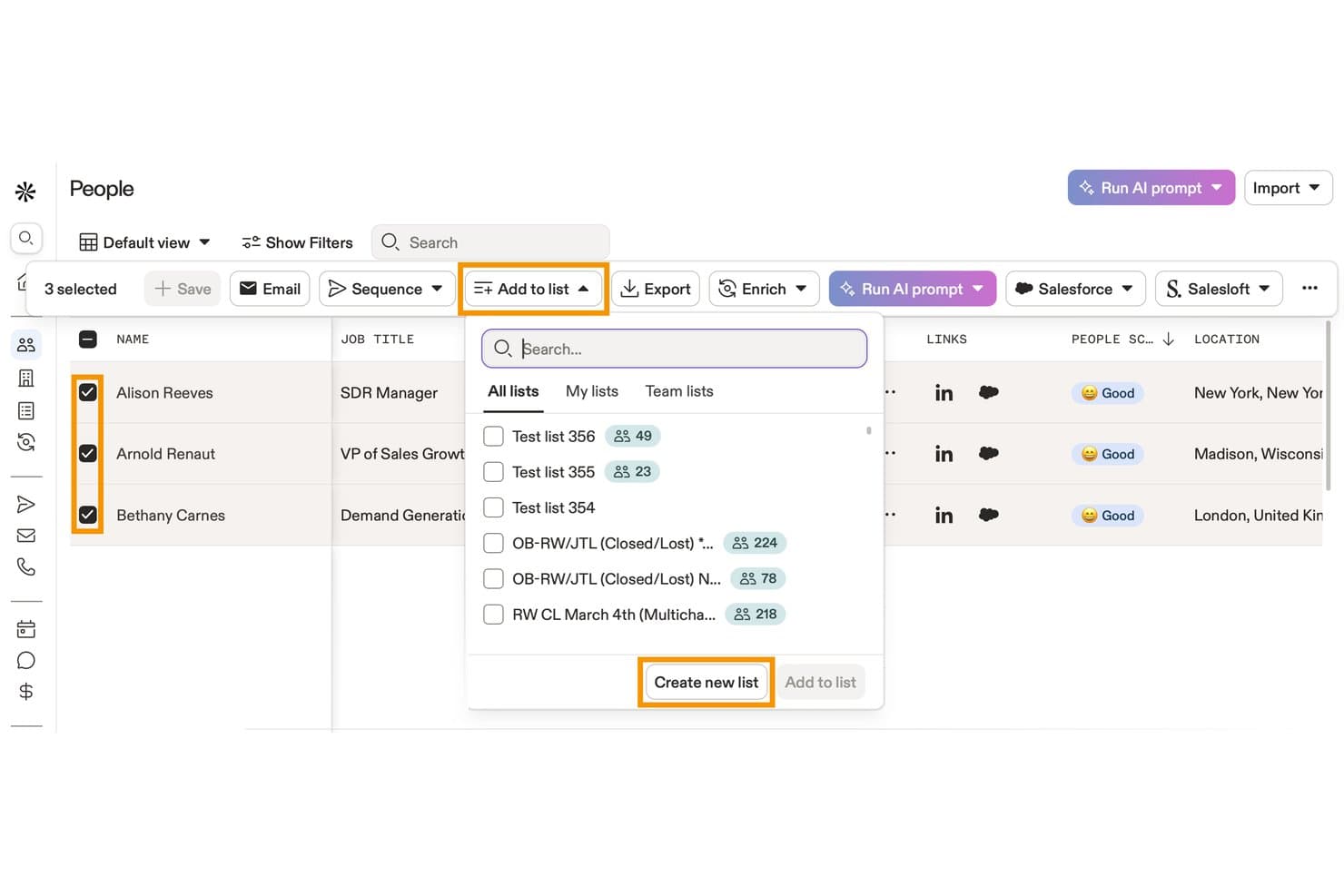
Apollo.io offers an 'Add to list' dropdown feature that lets users add selected contacts to existing lists or create a new list directly from the People view. Apollo.io is a B2B sales intelligence and engagement platform that combines a 210M+ contact database with list building, data enrichment, email sequencing, and CRM sync tools.
Who Is Apollo.io Best For?
Apollo.io suits outbound-focused revenue teams at SMBs and mid-market companies that need to build, enrich, and action prospect lists without juggling multiple tools.
Why I Picked Apollo.io
Apollo.io earns its spot on my shortlist because the enrichment filters go far deeper than most list tools offer. With 65+ attributes spanning job title, technographics, company headcount, funding stage, and topic-level buying intent, I can define an ICP and immediately surface a matching contact list. I also use the saved personas feature to lock those filter combinations in place, so my team builds from the same criteria every time rather than recreating searches from scratch.
Apollo.io Key Features
- Real-time CRM sync: Instantly updates and reflects changes between Apollo and connected CRMs like Salesforce or HubSpot.
- Bulk list import with field mapping: Supports uploading large contact lists and mapping custom fields for accurate data alignment.
- Automated email sequences: Enables users to schedule and send multi-step outreach campaigns to segmented lists.
- Engagement analytics dashboard: Tracks opens, clicks, replies, and unsubscribes at the individual contact level for each campaign.
Apollo.io Integrations
Apollo.io offers native integrations with Salesforce, HubSpot, Pipedrive, Marketo, Outreach, SalesLoft, and SendGrid. It connects with Zapier and provides an API for custom integrations.
Pros and Cons
Pros:
- Saved personas lock in repeatable ICP searches
- Built-in intent signals flag high-priority accounts
- 65+ data filters for precise list segmentation
Cons:
- Email sending limits cap high-volume outreach
- Contact data accuracy inconsistent outside North America
Learn more about Apollo.io: Best for email validation
- Free demo available
- From $15/2,000 credits
Visit WebsiteCustomer Rating:4.7/5
ZeroBounce validates emails, removes invalids, detects spam traps, and enhances data. ZeroBounce is an email validation tool aimed at marketers and businesses needing to maintain clean and accurate mailing lists. It helps in verifying email addresses to improve deliverability and engagement rates.
Why I picked ZeroBounce: ZeroBounce’s main function is to validate and clean email lists, ensuring your messages reach the right people. The tool removes invalid emails and identifies spam traps and abuse emails. It also provides real-time email validation, which is vital for those who frequently update their lists. Along with these top features, ZeroBounce’s email appending feature adds missing information to your contacts, enhancing data quality.
Standout features & integrations:
Features include an email scoring system that ranks emails based on their quality and engagement potential, a data appending service that enriches contacts with missing data such as names and location, and an API integration that allows for real-time validation directly from your platform.
Integrations include HubSpot, Mailchimp, SendGrid, ActiveCampaign, Mailgun, Campaign Monitor, AWeber, Constant Contact, Salesforce, and Zapier.
Pros and Cons
Pros:
- Detects spam traps effectively
- Data appending for contacts
- Accurate email validation
Cons:
- Occasional false positives
- No manual list review
Learn more about ZeroBounce: Best for beginners with templates
- 30-day free trial available
- Pricing upon request
Visit WebsiteCustomer Rating:4.7/5
Moosend is beginner-friendly with easy templates and a drag-drop editor. Moosend is an email marketing tool designed for businesses of all sizes. It helps users create professional email campaigns, manage contacts, and automate marketing processes efficiently.
Why I picked Moosend: Moosend offers a straightforward platform ideal for beginners, thanks to its easy-to-use templates. The drag-and-drop email editor simplifies creating visually appealing campaigns without needing technical skills. It also includes segmentation and personalization features to target your audience effectively, and provides a 30-day free trial, so you can explore its features risk-free.
Standout features & integrations:
Features include a drag-and-drop email newsletter editor, A/B testing for content, and AI subject line optimization. The software also offers countdown timers and list segmentation to further enhance your campaigns.
Integrations include WordPress, Zapier, Magento, WooCommerce, Salesforce, HubSpot, PrestaShop, Mailchimp, and Shopify.
Pros and Cons
Pros:
- Real-time behavioral analytics
- Built-in landing page and form builders
- Advanced AI-powered personalization
Cons:
- Limited reporting customization
- Some advanced features need add-ons
Learn more about Moosend: 4Best for sharing curated product lists
Kit
- 14-day free trial available
- From $33/month (billed annually)
Visit WebsiteCustomer Rating:4.5/5
Kit organizes products visually with affiliate links, themed kits, and mobile support. Kit is a platform for creating and sharing curated product collections, primarily used by content creators, influencers, and enthusiasts. It helps users organize their favorite products into lists, making it easy to share recommendations with their audience.
Why I picked Kit: Kit offers a user-friendly interface that streamlines email marketing campaigns, enabling businesses to effectively manage subscriber lists and target audiences. Its AI-powered automation simplifies tasks like segmentation, personalized messaging, and performance tracking, making it an efficient tool for growing and nurturing email lists. Additionally, it allows users to create and showcase personalized recommendations for specific needs or niches, making it ideal for influencers, creators, and professionals.
Standout features & integrations:
Features include customizable product kits, mobile optimization for easy access, and the ability to embed lists directly on your platforms. It also offers simple tools for adding affiliate links, helping you monetize your recommendations effortlessly.
Integrations include Amazon, YouTube, Instagram, Twitter, Facebook, Pinterest, Shopify, WordPress, Squarespace, and Tumblr.
Pros and Cons
Pros:
- Monetization through affiliate links
- Mobile-friendly interface for easy use
- Ideal for content creators and influencers
Cons:
- Lacks advanced analytics for insights
- Limited customization for list designs
Learn more about Kit: Best for developers managing email at scale
- Free plan + free demo + 30-day free trial available
- From $15/month
Visit WebsiteCustomer Rating:4.4/5
Mailgun offers APIs, email validation, analytics, and bulk email support for developers. Mailgun is an email automation platform primarily used by developers for sending, receiving, and tracking emails. It offers high deliverability and advanced email validation to ensure messages reach the intended inboxes.
Why I picked Mailgun: Mailgun caters specifically to developers, providing powerful APIs for easy integration with various applications. Its email validation services enhance deliverability by verifying addresses before sending. The software’s detailed analytics also give insights into email performance, helping you tweak campaigns effectively, while its flexible infrastructure supports bulk email sending, making it suitable for businesses with large mailing lists.
Standout features & integrations:
Features include a strong API that allows you to send and receive welcome emails with ease. The platform also offers email validation services that help maintain a clean email list and detailed analytics and logs for tracking email performance and engagement.
Integrations include WordPress, Zapier, Slack, Magento, Shopify, Salesforce, HubSpot, WooCommerce, Heroku, and Microsoft Azure.
Pros and Cons
Pros:
- Detailed email analytics
- Flexible API integration
- High email deliverability rates
Cons:
- Can be slow for very large datasets
- Occasional email deliverability issues
Learn more about Mailgun: 6Best for personalized ecommerce marketing
Drip
- 14-day free trial + free demo available
- From $39/month
Visit WebsiteCustomer Rating:4.4/5
Drip offers tailored ecommerce tools with segmentation, automation, and analytics. Drip is an email marketing automation tool designed for ecommerce businesses aiming to boost customer engagement and sales. It focuses on creating personalized customer journeys and automating marketing workflows.
Why I picked Drip: Drip excels in providing tailored marketing solutions for ecommerce businesses. The platform offers advanced segmentation and personalization to target specific customer groups effectively, while its visual workflow builder simplifies the process of setting up automated campaigns. Additionally, the software provides strong analytics to track performance and optimize your marketing strategy.
Standout features & integrations:
Features include advanced segmentation, allowing for precise targeting based on customer behavior, a visual workflow builder to help you create complex automation sequences with ease, and comprehensive analytics to measure the effectiveness of your campaigns and make data-driven decisions.
Integrations include Shopify, WooCommerce, Magento, BigCommerce, Zapier, Facebook, Instagram, PayPal, Stripe, and OptinMonster.
Pros and Cons
Pros:
- Detailed analytics capabilities
- Intuitive workflow builder
- Effective segmentation features
Cons:
- Occasional delays in email delivery
- Limited design options for email templates
Learn more about Drip: Best for all-in-one marketing automation
- Free plan + 14-day trial + demo available
- From $19/month
Visit WebsiteCustomer Rating:4.2/5
GetResponse simplifies campaigns with automation, drag-drop editor, and analytics. GetResponse is a versatile marketing platform designed for businesses of all sizes, focusing on email marketing, lead generation, and campaign automation. It helps users create, manage, and analyze their marketing efforts through an intuitive and flexible interface.
Why I picked GetResponse: GetResponse combines email marketing with automation tools to simplify campaign management and enhance engagement. Its drag-and-drop email editor allows you to quickly design emails that look great on any device. You can also set up automated workflows to nurture leads or follow up with customers based on their behavior, while its built-in analytics help you monitor performance and make data-driven decisions.
Standout features & integrations:
Features include a landing page builder that helps you capture leads effectively, webinar hosting for engaging with your audience directly, and an autoresponder for automated follow-ups. You can also create advanced segmentation for targeting specific audience groups and use the conversion funnel feature for managing the entire customer journey.
Integrations include Shopify, WordPress, PayPal, WooCommerce, Salesforce, Magento, Zapier, Stripe, Facebook, and Google Analytics.
Pros and Cons
Pros:
- A/B testing for optimizing email content
- Conversion funnel to track user journeys
- Built-in webinar hosting for engagement
Cons:
- Occasional lag in reporting updates
- Limited advanced customization
Learn more about GetResponse: Best for managing growing contact lists
- Free plan available
- From $29/month
Visit WebsiteCustomer Rating:4.2/5
Elastic Email's dashboard gives quick access to contacts, campaigns, and reports Elastic Email helps marketing teams and small businesses organize contacts, segment audiences, and automate campaigns from one place. I like that it also combines email marketing with transactional email tools, which is useful if you need to manage subscriber lists and send different types of emails at scale.
Who Is Elastic Email Best For?
Agencies, marketers, and businesses that need to manage large email lists and send high-volume campaigns across multiple brands or clients.
Why I Picked Elastic Email
I picked Elastic Email because it works well for managing growing contact lists with audience segmentation, custom fields, and contact management tools in one place. You can group subscribers based on their data and campaign activity, which helps your team send more relevant emails to different audience segments. I also like that it supports automation, so your lists and campaigns can keep working as your subscriber base grows. This makes it a practical option for teams that need to organize contacts and run targeted email campaigns at scale.
Elastic Email Key Features
Some other features in Elastic Email help your team create, send, and track email campaigns more effectively:
- Contact import tools: Upload contacts through CSV files to add subscribers and keep your lists up to date.
- Email template editor: Create and customize marketing emails with a visual editor for faster campaign setup.
- Signup forms: Build forms to collect new subscribers and grow your contact lists directly from your website.
- Campaign reports: Review delivery, open, and click data to measure campaign performance and adjust future sends.
Elastic Email Integrations
Integrations include HubSpot, ClickUp, PayPal, WooCommerce, WordPress Sender, Integromat, Mautic, and Shopify.
Pros and Cons
Pros:
- Includes automation workflows for triggered and scheduled campaigns
- Offers API and SMTP options for flexible email integrations
- Supports high-volume email sending at a lower starting cost
Cons:
- Template editor offers limited design flexibility for custom emails
- Reporting tools lack the depth needed for advanced analysis
Learn more about Elastic Email: Best for small business email tools
- Free trial available
- From $12/month
Visit WebsiteCustomer Rating:4.2/5
Constant Contact is intuitive and versatile, offering advanced email tools, templates, and analytics. Constant Contact is an email marketing tool geared towards small businesses and entrepreneurs. It focuses on simplifying email campaign management and customer engagement.
Why I picked Constant Contact: Constant Contact offers an intuitive interface that's perfect for small businesses with limited technical resources. Its email marketing features include customizable templates and an easy drag-and-drop editor. The software also provides tools for managing events and social media campaigns, while offering real-time tracking and analytics to help you understand campaign performance.
Standout features & integrations:
Features include event management tools that simplify organizing and promoting events, social media marketing features to help you manage your online presence effectively, and email automation capabilities that allow for personalized follow-ups with your audience.
Integrations include Shopify, WooCommerce, QuickBooks, Eventbrite, Salesforce, WordPress, Outlook, Google Analytics, Facebook, and Instagram.
Pros and Cons
Pros:
- AI content generator
- Event management tools
- High deliverability rates
Cons:
- Basic reporting capabilities
- Limited design customization
Learn more about Constant Contact:

Brevo integrates with ecommerce platforms, offering segmentation, analytics, and SMS marketing. Brevo is an email marketing tool tailored for businesses seeking to enhance their digital marketing efforts. It primarily serves ecommerce businesses by providing tools to drive customer engagement and sales.
Why I picked Brevo: Brevo offers seamless integration with ecommerce platforms, enabling you to manage targeted campaigns effectively. The tool provides advanced segmentation features that help tailor communication to different audience segments, while its real-time analytics offer insights into campaign performance and customer behavior. The platform also supports SMS marketing, expanding your reach beyond email.
Standout features & integrations:
Features include advanced segmentation that allows you to customize your audience groups for more targeted campaigns, real-time analytics to help you track and optimize your marketing performance, and SMS marketing, providing an additional channel to engage your audience.
Integrations include Shopify, WooCommerce, Magento, PrestaShop, Salesforce, WordPress, Zapier, Google Analytics, Facebook, and Instagram.
Pros and Cons
Pros:
- Real-time tracking of email metrics
- Templates designed for mobile devices
- Offers advanced A/B testing options
Cons:
- Learning curve for advanced features
- Limited customization for templates
Learn more about Brevo:
Alte software-uri de gestionare a listelor de e-mail
Iată câteva opțiuni suplimentare de software pentru gestionarea listelor de e-mail care nu au ajuns pe lista mea scurtă, dar merită totuși verificate:
- 11EmailOctopusBest for cost-effective email marketing
- 12MillionVerifierBest for real-time email verification
- 13BrazeBest for cross-channel engagement
- 14BloomreachBest for personalized campaigns
- 15YotpoBest for enhancing ecommerce loyalty programs
- 16MailchimpBest for all-in-one marketing for SMBs
- 17FrontBest for team collaboration
How I Evaluate Email List Management Software
I evaluate tools in two layers: the baseline capabilities a tool must have—like segmentation, data hygiene, and CRM sync—and the differentiators that set one platform apart for RevOps.
Core Functionality (Table Stakes For This List)
When I'm selecting tools for my list, I rank each one on a scale from 0 (does not offer the functionality) to 5 (excels in this area) for each core functionality listed below. Then, I calculate the tool's total score into a percentage. Each tool needs to achieve a minimum total score of 65% to be considered for inclusion.
- List Segmentation: I look for dynamic segment builders that let you filter contacts by lifecycle stage, deal status, or engagement recency—not just static tags.
- Data Hygiene & Validation: Good tools catch duplicates and verify addresses before they tank your sender reputation, so I check for automated hygiene workflows.
- Subscription & Compliance Management: I evaluate how each platform handles opt-ins, suppression lists, and consent tracking across GDPR, CAN-SPAM, and CCPA.
- CRM & Data Sync: Real-time bidirectional sync with platforms like Salesforce or HubSpot matters here, especially for keeping lifecycle stage and owner data aligned.
- List Import & Enrichment: I check whether you can map custom fields during bulk imports and enrich records with firmographic data from native or partner sources.
- Engagement Tracking: Subscriber-level metrics like opens, clicks, and unsubscribes should feed back into list health dashboards, not just sit in campaign reports.
Once I have a list of tools that meet this criteria, I consider what sets each platform apart.
Differentiating Factors (What Sets Vendors Apart)
Here's how I compare and contrast different vendors:
Standout Features
Account-based segmentation is a big differentiator for RevOps teams running ABM motions—I look for tools that group contacts by target account and buying committee role. Deliverability monitoring also matters here, since inbox placement tests and sender reputation scoring protect the lists you've worked hard to build. I check for predictive lead scoring that surfaces high-intent subscribers for sales handoff based on engagement patterns rather than manual tagging.
Beyond Features
Integration depth is one of the first things I evaluate—a tool needs native connectors to your CRM, MAP, and sales engagement platforms, plus API access for custom workflows. Pricing transparency matters just as much for RevOps teams managing budgets across quarters, so I look at whether costs scale predictably with contact volume or send limits. I also check for reporting that ties list engagement back to pipeline metrics, since that's how you justify the tool's value to leadership.
Cum să alegeți un software de gestionare a listelor de e-mail
Este ușor să vă pierdeți în liste lungi de funcții și structuri complexe de prețuri. Pentru a vă ajuta să rămâneți concentrat în timp ce parcurgeți procesul unic de selectare a software-ului, iată o listă de verificare a factorilor de care trebuie să țineți cont:
| Factor | Ce trebuie avut în vedere |
| Scalabilitate | Asigurați-vă că software-ul poate evolua odată cu echipa dumneavoastră. Verificați dacă poate gestiona un număr tot mai mare de abonați fără a compromite performanța. |
| Integrări | Căutați instrumente care se integrează cu CRM-ul existent, platformele de marketing și alte instrumente de afaceri pentru un flux de lucru fără întreruperi. |
| Posibilități de personalizare | Evaluați în ce măsură puteți adapta software-ul la nevoile dumneavoastră specifice, cum ar fi câmpurile personalizate sau șabloanele de e-mail personalizate. |
| Ușurință în utilizare | Alegeți o interfață intuitivă, care nu necesită instruire extinsă, pentru ca echipa dumneavoastră să se poată adapta rapid și să utilizeze eficient instrumentul. |
| Buget | Evaluați costul în raport cu bugetul dumneavoastră. Luați în considerare cheltuielile inițiale și recurente, inclusiv eventualele costuri ascunse. |
| Măsuri de securitate | Acordați prioritate instrumentelor cu măsuri solide de protecție a datelor, mai ales dacă gestionați informații sensibile despre clienți, pentru a menține încrederea și conformitatea. |
| Asistență pentru clienți | Verificați existența unor opțiuni de asistență rapide și accesibile, care să vă ajute atunci când întâmpinați probleme sau aveți nevoie de îndrumare. |
| Instrumente de raportare | Căutați analize avansate pentru a urmări performanța și a lua decizii bazate pe date. |
Tendințe în software-ul de gestionare a listelor de e-mail
În cadrul cercetării mele, am consultat nenumărate actualizări de produse, comunicate de presă și jurnale de lansări de la diferiți furnizori de software pentru gestionarea listelor de e-mail. Iată câteva dintre tendințele emergente pe care le urmăresc:
- Personalizare bazată pe inteligență artificială: Tot mai multe instrumente folosesc inteligența artificială pentru a personaliza conținutul e-mailurilor pe baza comportamentului și preferințelor utilizatorilor. Acest lucru ajută companiile să crească interacțiunea prin transmiterea unor mesaje mai relevante.
- Confidențialitate îmbunătățită a datelor: Pe măsură ce reglementările privind datele devin mai stricte, furnizorii își concentrează atenția asupra oferirii unor funcții avansate de confidențialitate. Această tendință asigură conformitatea cu legi precum GDPR, oferind utilizatorilor liniște sufletească.
- E-mailuri interactive: Furnizorii introduc elemente interactive, precum sondaje și chestionare, direct în e-mailuri. Această tendință stimulează interacțiunea, permițând destinatarilor să interacționeze fără să își părăsească inboxul.
- Analize în timp real: Cererea de informații în timp real pentru optimizarea instantanee a campaniilor de e-mail este în creștere. Drept urmare, furnizorii își îmbunătățesc instrumentele de analiză pentru a oferi date utile despre interacțiunile utilizatorilor.
- Comunicare omnicanal: Instrumentele de gestionare a listelor de e-mail se extind pentru a susține comunicarea pe mai multe canale. Această tendință ajută companiile să transmită un mesaj consecvent prin e-mail, SMS și rețelele sociale.
Ce este software-ul de gestionare a listelor de e-mail?
Software-ul de gestionare a listelor de e-mail este un instrument care vă ajută să vă organizați, segmentați și administrați contactele de e-mail pentru campaniile de marketing. Specialiștii în marketing, proprietarii de mici afaceri și cei care activează în comerțul electronic îl folosesc pentru a menține listele de e-mail organizate, pentru a trimite mesajele potrivite persoanelor potrivite și pentru a vedea ce funcționează. Acesta simplifică gestionarea abonaților, vă permite să vă personalizați e-mailurile și vă ajută să măsurați rezultatele, astfel încât să vă conectați mai bine cu publicul.
Funcționalitățile software-ului de gestionare a listelor de e-mail
Atunci când alegeți un software de gestionare a listelor de e-mail, urmăriți următoarele funcționalități principale:
- Segmentare: Vă permite să vă categorizați contactele în grupuri specifice pentru marketing direcționat, îmbunătățind ratele de interacțiune.
- Personalizare: Permite personalizarea e-mailurilor cu informații specifice destinatarilor, făcând mesajele mai relevante și mai eficiente.
- Analiză: Oferă informații despre performanța campaniilor, ajutându-vă să analizați ratele de deschidere, ratele de clic și eficiența generală.
- Automatizare: Simplifică trimiterea e-mailurilor programate și a secvențelor de urmărire, economisind timp și asigurând o comunicare consecventă.
- Testare A/B: Vă permite să testați diferite variante de e-mail pentru a determina care are cele mai bune rezultate, optimizându-vă campaniile.
- Verificarea e-mailurilor: Menține o listă de contacte curată prin identificarea și eliminarea adreselor de e-mail nevalide, îmbunătățind livrabilitatea.
- Conținut interactiv: Include elemente precum sondaje și chestionare în e-mailuri pentru a crește interacțiunea destinatarilor.
- Instrumente de conformitate: Asigură respectarea de către practicile dumneavoastră de marketing a unor reglementări precum GDPR, protejând datele utilizatorilor și menținând încrederea.
- Asistență omnicanal: Oferă comunicare pe mai multe canale, permițând o abordare unitară a marketingului.
- Actualizări în timp real: Oferă informații și actualizări imediate ale datelor, permițând ajustarea rapidă a strategiilor de marketing prin e-mail.
Beneficiile software-ului de gestionare a listelor de e-mail
Implementarea unui software de gestionare a listelor de e-mail oferă mai multe beneficii pentru echipa și afacerea dumneavoastră. Iată câteva dintre acestea:
- Direcționare îmbunătățită: Funcțiile de segmentare vă ajută să trimiteți mesajul potrivit publicului potrivit, crescând ratele de interacțiune și de conversie.
- Economie de timp: Funcțiile de automatizare reduc sarcinile manuale, permițând echipei să se concentreze pe strategie și conținut creativ.
- Personalizare îmbunătățită: Instrumentele de personalizare fac e-mailurile mai relevante, ducând la rate mai mari de deschidere și de clic.
- Luarea unor decizii mai bune: Analizele oferă informații despre performanța campaniilor, ajutându-vă să luați decizii de marketing în cunoștință de cauză.
- Livrabilitate crescută: Verificarea e-mailurilor menține o listă curată, asigurându-se că mesajele ajung în căsuțele de e-mail dorite.
- Asigurarea conformității: Instrumentele de conformitate ajută echipa să respecte reglementările privind protecția datelor, protejând afacerea și încrederea clienților.
- Consecvență între canale: Asistența omnicanal vă permite să transmiteți un mesaj coerent pe diferite platforme de comunicare.
Costurile și prețurile software-ului de gestionare a listelor de e-mail
Alegerea unui software de gestionare a listelor de e-mail necesită înțelegerea diferitelor modele și planuri de tarifare disponibile. Costurile variază în funcție de funcționalități, dimensiunea echipei, suplimente și alți factori. Tabelul de mai jos sintetizează planurile obișnuite, prețurile medii ale acestora și funcționalitățile incluse de obicei în soluțiile software de gestionare a listelor de e-mail:
Tabel comparativ al planurilor pentru software-ul de gestionare a listelor de e-mail
| Tipul planului | Preț mediu | Funcționalități obișnuite |
| Plan gratuit | $0 | Campanii de e-mail de bază, automatizare limitată și analize simple. |
| Plan personal | $10-$30/utilizator/lună | Șabloane personalizabile, segmentare de bază și e-mailuri programate. |
| Plan pentru afaceri | $30-$100/utilizator/lună | Automatizare avansată, analize aprofundate și funcții de testare A/B. |
| Plan pentru întreprinderi | $100+/utilizator/lună | Asistență personalizată, segmentare avansată, asistență pentru mai multe canale și instrumente de conformitate. |
Întrebări frecvente despre software-ul de gestionare a listelor de e-mail
Iată câteva răspunsuri la întrebările frecvente despre software-ul de gestionare a listelor de e-mail:
Cum gestionez o listă de e-mailuri?
Gestionarea unei liste de e-mailuri implică mai multe bune practici, cum ar fi configurarea unui proces de înscriere cu confirmare dublă și utilizarea etichetelor pentru segmentarea contactelor. Curățați periodic lista de abonați pentru a elimina abonații inactivi și pentru a adăuga abonați noi. Conținutul personalizat al e-mailurilor și campaniile de reimplicare contribuie, de asemenea, la menținerea interesului publicului dumneavoastră.
Cum funcționează curățarea listei de e-mailuri?
Curățarea listei de e-mailuri oferă listei dumneavoastră un nou început prin eliminarea adreselor de e-mail false sau nevalide. Acest proces protejează campaniile împotriva problemelor de livrabilitate și asigură că mesajele ajung la persoanele potrivite. Curățarea periodică a listei contribuie la menținerea unei baze de abonați sănătoase.
Care sunt avantajele gestionării listelor în marketingul prin e-mail?
Gestionarea eficientă a listelor duce la o livrabilitate mai bună și la rate de interacțiune mai ridicate. Îmbunătățește relațiile cu clienții și poate reduce costurile marketingului prin e-mail, concentrând eforturile asupra abonaților activi. Gestionarea corectă a listelor sprijină, de asemenea, strategiile de marketing direcționat.
De ce este importantă segmentarea în gestionarea listelor de e-mailuri?
Segmentarea vă permite să vă clasificați publicul pe baza comportamentului sau a datelor demografice, facilitând marketingul direcționat. Acest lucru duce la mesaje mai personalizate, îmbunătățind interacțiunea și ratele de conversie. Segmentarea contribuie la asigurarea relevanței e-mailurilor pentru fiecare destinatar, sporind eficiența generală a campaniilor de marketing.