

Găsirea adresei de e-mail potrivite poate fi frustrantă, mai ales când gestionați mai multe sarcini și aveți termene limită strânse. În calitate de director financiar, știți cât de important este să ajungeți rapid la contactele potrivite. Aici intervin instrumentele de găsire a adreselor de e-mail — vă ajută să economisiți timp și să vă concentrați asupra lucrurilor cu adevărat importante.
Din experiența mea, un instrument bun de găsire a adreselor de e-mail poate face o diferență semnificativă în fluxul dumneavoastră de lucru. Am testat și analizat mai multe opțiuni pentru a vă prezenta cele mai bune soluții de pe piață. În acest articol, vă voi prezenta principalele mele recomandări, evidențiind punctele forte și beneficiile unice pe care fiecare le oferă echipei dumneavoastră.
Why Trust Our Software Recommendations
6,700+
Reviews
20
Industry experts
16+
Evaluation factors
14
Years
Our reviews reflect our independent judgment—not a sales pitch. Learn how we stay transparent.
For this guide, we evaluated tools using hands-on testing and independent research, scoring tools using our selection criteria.
Our reviews reflect our human editorial judgment, not a sales pitch.
Tabel comparativ al instrumentelor de găsire a adreselor de e-mail
Acest tabel comparativ sintetizează detaliile privind prețurile pentru principalele mele selecții de instrumente de găsire a adreselor de e-mail:
Sorted by: Default
| Tool | Starting Price | Website | |
|---|---|---|---|
Best for real-time multi-source contact enrichment | 4.5 out of 5 | $49/user/month Free plan + 14-day trial + demo available | Book Demo |
Best for CRM integration | 4.9 out of 5 | $49/user/month Free 14-day trial + free plan + free demo available | Website |
Best for small business outreach | 4.8 out of 5 | $27/month Free plan available | Website |
Best for verifying emails quickly | 4.5 out of 5 | $49/month Free plan + demo available | Website |
Best for email tracking | 4.5 out of 5 | $25/month Free 7-day trial available | Website |
Best for sales engagement | Not rated | Pricing upon request Free plan + trial + demo available | Website |
Best for email drip campaigns | Not rated | $29.25/month Free plan + free demo available | Website |
Best for Chrome extension use | Not rated | $39/two users/month Free plan available | Website |
Best for Gmail integration | Not rated | $4.99/sender/month Free plan + free trial available | Website |
Best for bulk email searches | Not rated | $37/month 14-day free trial | Website |


Recenzii ale celor mai bune instrumente de găsire a adreselor de e-mail
Mai jos sunt rezumatele mele detaliate ale celor mai bune instrumente de găsire a adreselor de e-mail care au ajuns pe lista mea scurtă. Recenziile mele oferă o analiză detaliată a funcțiilor principale, avantajelor și dezavantajelor, integrărilor și cazurilor de utilizare ideale pentru fiecare instrument, pentru a vă ajuta să îl găsiți pe cel mai potrivit pentru dumneavoastră.
 Best for real-time multi-source contact enrichment
- Free plan + 14-day trial + demo available
- From $49/user/month (billed annually)
Visit WebsiteCustomer Rating:4.5/5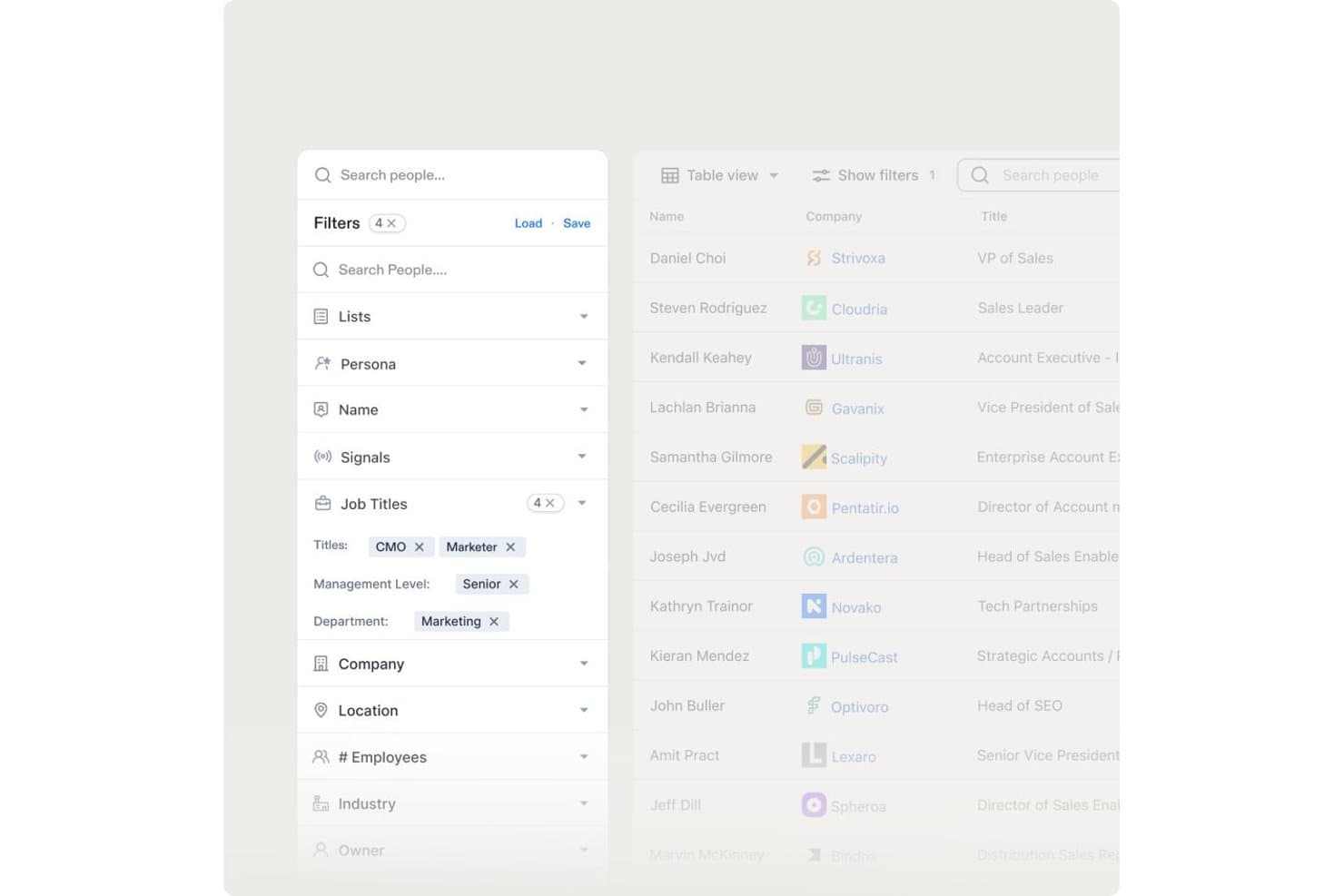
Apollo.io offers advanced people search filters including Job Titles, Management Level, and Department to help users find targeted contacts. Apollo.io is a B2B sales intelligence platform that combines a 200M+ contact database with email finding, multi-source contact enrichment, real-time verification, bulk prospecting, and built-in sales sequencing.
Who Is Apollo.io Best For?
Apollo.io is a strong fit for SDRs and outbound sales teams at startups and SMBs running high-volume, US-focused prospecting campaigns.
Why I Picked Apollo.io
Apollo.io earns its spot on my shortlist because of how it handles enrichment at the source level. Rather than pulling from a single proprietary database, Apollo aggregates contact data from web crawlers, user contributions, and third-party feeds simultaneously. I particularly like the waterfall enrichment setup, where partners like ContactOut, Datagma, and Dropcontact fill gaps when Apollo's own records fall short, giving me the most complete contact record available, not just the first match.
Apollo.io Key Features
- Granular ICP filters: Search using over 65 filters, including job title, department, location, seniority, and tech stack.
- AI assistant for prospecting: Receive automated recommendations for high-potential leads based on intent and engagement signals.
- Built-in sales engagement: Launch multi-step email sequences directly from your contact lists without leaving the platform.
- Real-time CRM enrichment: Sync updated contact, company, and phone data automatically into Salesforce and HubSpot.
Apollo.io Integrations
Apollo.io offers native integrations with Salesforce, HubSpot, Outreach, SalesLoft, Marketo, SendGrid, Chili Piper, Asana, ClickUp, and Airtable. It also provides API access for custom integrations.
Pros and Cons
Pros:
- Real-time verification flags risky email addresses
- 200M+ contact database covers broad prospect reach
- Waterfall enrichment maximizes email match rates
Cons:
- Credit caps limit high-volume bulk enrichment
- Weaker contact coverage outside North America
Learn more about Apollo.io: Best for CRM integration
- Free 14-day trial + free plan + free demo available
- From $49/user/month (billed annually)
Visit WebsiteCustomer Rating:4.9/5
Surfe helps sales teams find accurate professional emails and mobile numbers. Surfe is an email finder for sales teams and professionals, providing accurate email addresses and phone numbers for CRM-based prospecting.
Why I picked Surfe: It integrates with CRMs like HubSpot, Salesforce, and Pipedrive to manage leads within your existing systems. The Pipeline Builder helps your team organize sales workflows, and the Waterfall Enrichment system draws from 15+ contact databases, delivering a 93% find rate for reliable prospecting.
Standout features and integrations:
Features a Waterfall Enrichment system that improves accuracy by selecting the best data source. The Pipeline Builder lets you create sales pipelines quickly, and bulk data enrichment allows efficient management of large contact lists.
Integrations include HubSpot, Salesforce, Google Sheets, and more.
Pros and Cons
Pros:
- Efficient pipeline building
- Smooth CRM integration
- High accuracy in email finding
Cons:
- Waterfall Enrichment system may be less effective for niche or international contacts
- Requires CRM for optimal use
Learn more about Surfe: Best for small business outreach
- Free plan available
- From $27/month (billed annually)
Visit WebsiteCustomer Rating:4.8/5
Prospeo helps small businesses and sales teams find verified email addresses. Prospeo helps small businesses and sales teams find and verify professional email addresses, making outreach and prospecting more efficient.
Why I picked Prospeo: The tool offers a bulk email search feature that lets you upload a list of names and companies to find verified email addresses. Its email verification system helps you pay only for valid emails, reducing wasted resources. With a Chrome extension, you can perform email searches directly from your browser, increasing efficiency. The tool's simplicity and affordability make it accessible for small businesses with limited budgets.
Standout features and integrations:
Features include a bulk email search that lets you find emails by uploading a list of names and companies. The email verification system guarantees over 98% deliverability, giving you confidence in your contact lists. You can also use the Chrome extension to search email addresses on any website.
Integrations are not publicly listed.
Pros and Cons
Pros:
- Simple and user-friendly interface
- High email deliverability rate
- Affordable pricing for small businesses
Cons:
- Basic reporting features
- Relies on Chrome for its extension
Learn more about Prospeo: Best for verifying emails quickly
- Free plan + demo available
- From $49/month
Visit WebsiteCustomer Rating:4.5/5
Hunter helps you find verified professional email addresses. Hunter is an email finding tool designed for professionals looking to locate email addresses using a person's name and company domain. It’s widely used by sales teams and marketers to find email addresses for lead generation.
Why I picked Hunter: Hunter offers a large database of more than 100 million email addresses and provides a confidence score for each result. Its bulk email search and email verification features help reduce bounce rates. With a Google Sheets add-on and API, your team can easily integrate it into existing workflows. The browser extension adds convenience by allowing quick access while searching.
Standout features and integrations:
Features include a bulk email search that helps you gather multiple email addresses at once. Its email verification feature eliminates high bounce rates. The confidence score for each email result provides an idea of reliability.
Integrations include Google Sheets, Salesforce, HubSpot, Pipedrive, Zoho CRM, Zapier, and more.
Pros and Cons
Pros:
- Useful API access
- Accurate verification scores
- Large email database
Cons:
- No built-in email outreach
- Bulk searches and verifications can consume credits quickly
Learn more about Hunter:

Saleshandy helps teams track, schedule, and automate email outreach. Saleshandy is an email productivity tool designed for sales teams and professionals who need to track, schedule, and automate their email outreach. It helps users analyze email performance and optimize their communication strategies.
Why I picked Saleshandy: The tool offers real-time email tracking, letting you know when recipients open your emails. This feature helps you gauge interest and plan follow-ups effectively. With email scheduling, your team can send emails at the best times for engagement. The automated follow-up feature helps you track interactions with each contact, making it a valuable asset for sales teams.
Standout features and integrations:
Features include the ability to create and manage email templates, which saves time on repetitive tasks. The tool provides detailed analytics on email performance, helping you refine your strategies. You can also use mail merge to send personalized emails in bulk.
Integrations include Salesforce, HubSpot, Pipedrive, Zoho CRM, Zapier, and more.
Pros and Cons
Pros:
- Detailed analytics and reports
- Automated follow-up emails
- Real-time email tracking
Cons:
- Bulk email sending may be restricted by plan limits or email provider quotas
- Basic plan limits key features
Learn more about Saleshandy: Best for sales engagement
- Free plan + trial + demo available
- Pricing upon request

Apollo.io helps sales teams improve prospecting and engage leads effectively. Apollo.io is a sales engagement platform that helps sales teams find and engage with leads to boost outreach and prospecting.
Why I picked Apollo.io: The platform provides a vast database of contacts, making it easier for your team to find potential leads. Its sales engagement features, such as automated sequences and task management, help optimize your process. With its advanced analytics, you can track campaign performance and make data-driven decisions. The platform's CRM integration lets you keep all your sales data in one place for a cohesive workflow.
Standout features and integrations:
Features include a large contact database that provides access to millions of leads. The automated sequence feature allows you to set up follow-up emails, saving time and effort. With its task management system, you can prioritize and organize your sales activities efficiently.
Integrations include Salesforce, HubSpot, Pipedrive, and more.
Pros and Cons
Pros:
- Automated email sequences
- Detailed analytics capabilities
- Extensive contact database
Cons:
- Bulk email and sequence limits vary by plan
- Some contact data may be outdated or inaccurate for niche industries
Learn more about Apollo.io:

Snov.io helps teams find emails, manage leads, and run outreach campaigns. Snov.io is a lead generation tool used by sales and marketing teams to verify email addresses, manage leads, and conduct campaigns. It helps businesses automate their outreach efforts, increasing efficiency in contacting potential clients.
Why I picked Snov.io: The email drip campaign feature allows your team to send automated follow-up emails to keep in contact with leads. You can manage your prospects with the built-in CRM, and the email verification tool reduces errors, increasing deliverability. The visual campaign builder helps optimize the frequency of contact.
Standout features and integrations:
Features include a visual campaign builder that simplifies creating and managing email sequences. The email warm-up feature helps improve your sender reputation by gradually increasing email volume. With the automation tool, you can program connections and messages on LinkedIn.
Integrations include Salesforce, HubSpot, Pipedrive, Zoho CRM, Slack, Google Sheets, Asana, Trello, LinkedIn, Zapier, and more.
Pros and Cons
Pros:
- Effective email warm-up
- Intuitive visual campaign builder
- Advanced LinkedIn automation
Cons:
- The interface can feel overwhelming for beginners
- Limited personalization on the free and low-tier plans
Learn more about Snov.io: Best for Chrome extension use
- Free plan available
- From $39/two users/month (billed annually)

Skrapp.io helps professionals find and verify business email addresses. Skrapp.io is an email finder tool for professionals who need to verify business email addresses for lead generation. It's especially popular among marketing teams and sales professionals looking to build targeted email lists.
Why I picked Skrapp.io: The Chrome extension lets you extract emails directly from LinkedIn profiles, making it convenient for those who rely heavily on that platform for networking. You can save contacts directly to your email lists within Skrapp.io for easy access later. The tool also includes an email verification feature to help maintain the quality of your email lists. With its user-friendly interface, your team can quickly start using the tool effectively.
Standout features and integrations:
Features include a bulk email finder that lets you gather numerous emails at once. The verification tool helps confirm the emails you collect are valid and deliverable. You can also organize your leads within the platform using customizable lists.
Integrations include Salesforce, HubSpot, Pipedrive, LinkedIn, and more.
Pros and Cons
Pros:
- Customizable lead lists
- Quick setup with Chrome extension
- Convenient LinkedIn integration
Cons:
- Requires LinkedIn for optimal use
- Can be slow with large lists
Learn more about Skrapp.io: Best for Gmail integration
- Free plan + free trial available
- From $4.99/sender/month

Mailmeteor lets you send personalized bulk emails directly from Gmail. Mailmeteor is an email sending tool that works with Gmail for outreach tasks. It enables users to send personalized bulk emails directly from their Gmail accounts.
Why I picked Mailmeteor: The tool integrates well with Gmail, allowing you to send hundreds of personalized emails at once. Its user-friendly interface helps you manage and track your email campaigns. With personalization fields, you can tailor each email to make it feel more personal to the recipient. The built-in tracking feature provides insights into email opens and clicks, which is valuable feedback.
Standout features and integrations:
Features include email scheduling, which lets you plan your campaigns in advance. The tool supports personalization fields to make your emails more engaging. Additionally, email tracking provides you with insights into how recipients interact with your messages.
Integrations include Gmail, Zoho CRM, Outlook, and more.
Pros and Cons
Pros:
- Efficient bulk sending
- Easy email personalization
- Direct Gmail integration
Cons:
- Limited advanced automation features
- No built-in CRM
Learn more about Mailmeteor:

Emailchaser helps teams find and verify email addresses in bulk. Emailchaser is a tool designed for businesses and professionals who need to find and verify email addresses in bulk. It is useful for marketing teams and sales professionals to support campaigns.
Why I picked Emailchaser: The tool offers a bulk email search feature that allows you to find multiple email addresses at once. Its email verification system verifies that the emails you gather are valid and deliverable. With a user-friendly interface, your team can quickly adapt and start using the tool. The tool’s focus on bulk searching makes it a valuable resource for large-scale outreach efforts.
Standout features and integrations:
Features include bulk email verification for high deliverability, real-time tracking of email searches, and detailed reports to analyze campaign results.
Integrations include Salesforce, HubSpot, Pipedrive, Slack, and more.
Pros and Cons
Pros:
- Simple user interface
- Detailed search reports
- High deliverability rates
Cons:
- Limited customer support options
- Basic reporting capabilities
Learn more about Emailchaser:
Alte instrumente de găsire a adreselor de e-mail
Iată câteva opțiuni suplimentare de instrumente de găsire a adreselor de e-mail care nu au ajuns pe lista mea scurtă, dar care merită totuși verificate:
- 11ContactOutBest for LinkedIn email extraction
- 12GetProspectBest for B2B lead generation
- 13FindymailBest for finding personal emails
- 14RocketReachBest for finding hard-to-reach emails
- 15LeadFuzeBest for automated lead generation
- 16CognismBest for GDPR compliance
- 17KasprBest for LinkedIn contact extraction
How I Evaluate Email Finder
I evaluate email finders on two levels: core table stakes like bulk domain search and SMTP verification, and differentiators like waterfall enrichment and GDPR compliance.
Core Functionality (Table Stakes For This List)
When I'm selecting tools for my list, I rank each one on a scale from 0 (does not offer the functionality) to 5 (excels in this area) for each core functionality listed below. Then, I calculate the tool's total score into a percentage. Each tool needs to achieve a minimum total score of 65% to be considered for inclusion.
- Email Discovery: I check whether a tool can find professional emails from basic inputs like a name and company, and whether it supports LinkedIn URLs or other identifiers.
- Email Verification: Each tool should validate addresses beyond syntax checks, including SMTP and catch-all detection, so your outbound sequences don't tank domain reputation.
- Bulk Search & Enrichment: I look for CSV upload support and batch processing that lets you enrich an entire target account list in one pass rather than searching contacts one by one.
- Domain & Company Search: Searching a company domain should return a filterable contact list by role or seniority, useful when you're mapping out a buying committee at a target account.
- CRM & Sales Tool Integrations: I evaluate native connections to platforms like Salesforce, HubSpot, Outreach, and Salesloft so enriched contacts flow directly into your existing workflows.
- API & Browser Extension Access: A functional API and browser extension matter for day-to-day use, especially when SDRs need to pull contact data while prospecting on LinkedIn or Sales Navigator.
Once I have a list of tools that meet this criteria, I consider what sets each platform apart.
Differentiating Factors (What Sets Vendors Apart)
Here's how I compare and contrast different vendors:
Standout Features
Waterfall enrichment is a big differentiator. Tools that cascade through multiple data providers on a single lookup consistently return higher match rates than those relying on one source. I also look for intent and signal data like job change alerts or technographic triggers, which help SDRs prioritize who to contact first. Automated list building rounds this out by surfacing new ICP-matched prospects on an ongoing basis without manual re-searching.
Beyond Features
Data accuracy matters more than database size. I check whether a vendor publishes bounce rate guarantees and how often they re-verify their records. Compliance is equally important—tools that handle GDPR and CCPA suppression lists protect your team from legal exposure when prospecting across regions. Pricing structure also shapes the decision. Credit-based models vary widely, so I evaluate whether unused credits roll over and how costs scale as your team grows beyond a handful of seats.
Cum să alegeți un instrument de găsire a adreselor de e-mail
Este ușor să vă pierdeți în liste lungi de funcții și structuri de prețuri complexe. Pentru a vă ajuta să rămâneți concentrat în timp ce parcurgeți procesul unic de selecție a software-ului, iată o listă de verificare a factorilor de care trebuie să țineți cont:
| Factor | Ce trebuie avut în vedere |
| Scalabilitate | Se va dezvolta instrumentul odată cu echipa dumneavoastră? Verificați dacă poate gestiona un număr tot mai mare de căutări și utilizatori pe măsură ce compania se extinde. |
| Integrări | Se conectează la sistemele existente? Căutați compatibilitate cu sistemul CRM, platformele de e-mail și celelalte instrumente utilizate zilnic de echipa dumneavoastră. |
| Posibilități de personalizare | Puteți adapta instrumentul la nevoile dumneavoastră? Verificați dacă puteți ajusta setările, fluxurile de lucru sau tablourile de bord pentru a se potrivi proceselor specifice. |
| Ușurință în utilizare | Este instrumentul intuitiv pentru echipa dumneavoastră? Luați în considerare cât de repede poate echipa să învețe să îl utilizeze fără instruire extinsă sau asistență tehnică. |
| Implementare și inițiere | Cât timp va dura până când puteți începe? Evaluați timpul și resursele necesare pentru configurare, inclusiv migrarea datelor și instruirea utilizatorilor. |
| Cost | Se încadrează instrumentul în bugetul dumneavoastră? Comparați planurile tarifare și luați în considerare eventualele taxe ascunse sau angajamente pe termen lung care v-ar putea afecta planificarea financiară. |
| Măsuri de securitate | Vă protejează datele? Confirmați că instrumentul dispune de măsuri de securitate solide, precum criptarea și conformitatea cu legislația privind protecția datelor, pentru a vă proteja informațiile. |
| Disponibilitatea asistenței | Cât de accesibilă este asistența atunci când aveți nevoie de ea? Căutați asistență pentru clienți promptă, disponibilă prin mai multe canale, pentru a vă ajuta echipa atunci când apar probleme. |
Ce este un instrument de găsire a adreselor de e-mail?
Un instrument de găsire a adreselor de e-mail este un instrument care ajută la localizarea și verificarea adreselor de e-mail ale persoanelor sau companiilor. Agenții de vânzări, specialiștii în marketing și recrutorii folosesc adesea aceste instrumente pentru a-și îmbunătăți eforturile de contactare și de creare a rețelelor profesionale. Funcțiile de căutare în masă a adreselor de e-mail, verificare a adreselor de e-mail și integrare cu sistemul CRM ajută la găsirea unor informații exacte despre contacte, precum numele companiei și funcția. Validarea acestor informații îmbunătățește livrabilitatea și ajută la gestionarea clienților potențiali. Aceste instrumente economisesc, de asemenea, timp și fac comunicarea mai eficientă.
Funcții
Atunci când selectați un instrument de găsire a adreselor de e-mail, urmăriți următoarele funcții esențiale:
- Căutare în masă a adreselor de e-mail: Vă permite să găsiți simultan mai multe adrese de e-mail pe site-urile companiilor sau pe rețelele sociale, economisind timp și efort în activitățile de contactare la scară largă.
- Verificarea adreselor de e-mail: Confirmă că adresele de e-mail colectate sunt valide și pot fi livrate, reducând rata de respingere și îmbunătățind eficiența comunicării.
- Integrarea cu CRM: Se conectează la sistemele CRM existente pentru a vă ajuta să gestionați și să organizați eficient clienții potențiali.
- Extragerea adreselor de e-mail de pe LinkedIn: Preia direct informațiile de contact din profilurile LinkedIn, îmbunătățind capacitățile de relaționare profesională.
- Secvențe automatizate de e-mailuri: Permite configurarea unor e-mailuri de urmărire pentru o comunicare consecventă cu potențialii clienți.
- Urmărirea în timp real a e-mailurilor: Oferă informații despre momentul în care sunt deschise e-mailurile, ajutându-vă să evaluați interesul și să planificați mesajele ulterioare.
- Îmbogățirea datelor: Adaugă informații suplimentare, precum numele complet al unei persoane, îmbunătățind calitatea clienților potențiali.
- Șabloane personalizabile: Vă permit să creați și să salvați șabloane de e-mail pentru o comunicare rapidă și consecventă.
- Măsuri de securitate: Vă protejează datele prin criptare și respectarea legislației privind protecția datelor, menținând confidențialitatea și securitatea.
- Interfață ușor de utilizat: Oferă un design intuitiv și ușor de navigat, reducând timpul necesar pentru familiarizarea noilor utilizatori.
Beneficii
Implementarea unui instrument de găsire a adreselor de e-mail oferă mai multe beneficii pentru echipa și compania dumneavoastră. Iată câteva dintre acestea:
- Economisirea timpului: Funcțiile de căutare în masă a adreselor de e-mail vă ajută să colectați rapid mai multe contacte, eliberând timp pentru alte sarcini.
- Precizie îmbunătățită: Verificarea adreselor de e-mail confirmă că lucrați cu adrese valide, reducând rata de respingere și îmbunătățind comunicarea.
- Organizare sporită: Integrarea cu CRM vă permite să gestionați eficient clienții potențiali, păstrând datele de contact organizate și accesibile.
- Contactare mai eficientă: Secvențele automatizate de e-mailuri mențin o comunicare consecventă cu potențialii clienți, stimulând campaniile de dezvoltare a afacerii.
- Vizibilitate sporită: Urmărirea în timp real a e-mailurilor arată când sunt deschise mesajele, ajutându-vă să înțelegeți interesul destinatarilor.
- Clienți potențiali de calitate superioară: Îmbogățirea datelor, combinată cu un instrument de verificare a adreselor de e-mail, oferă un context suplimentar, îmbunătățind profilurile clienților potențiali și eforturile de direcționare.
- Experiență ușor de utilizat: Interfețele intuitive facilitează începerea activității echipei și utilizarea eficientă a instrumentelor.
Costuri și prețuri
Selectarea unui instrument de găsire a adreselor de e-mail necesită înțelegerea diferitelor modele și planuri de tarifare disponibile. Costurile variază în funcție de funcții, dimensiunea echipei, suplimente și alți factori. Tabelul de mai jos rezumă planurile obișnuite, prețurile medii ale acestora și funcțiile incluse de regulă în soluțiile de găsire a adreselor de e-mail:
Tabel comparativ al planurilor pentru instrumentele de găsire a adreselor de e-mail
| Tipul planului | Preț mediu | Funcții comune |
| Plan gratuit | $0 | Căutare de bază a adreselor de e-mail, verificare limitată a adreselor de e-mail și asistență minimă. |
| Plan personal | $4-$25/utilizator/lună | Căutări nelimitate de adrese de e-mail, analize de bază și urmărirea e-mailurilor. |
| Plan pentru companii | $20-$60/utilizator/lună | Verificare avansată a adreselor de e-mail, integrare cu CRM și secvențe automatizate de e-mailuri. |
| Plan pentru întreprinderi | $70-$150/utilizator/lună | Funcții personalizabile, asistență dedicată pentru cont și măsuri de securitate îmbunătățite. |
Întrebări frecvente despre instrumentele de găsire a adreselor de e-mail
Iată câteva răspunsuri la întrebările frecvente despre instrumentele de găsire a adreselor de e-mail:
Pot instrumentele de găsire a adreselor de e-mail să garanteze o precizie de 100%?
Nu, instrumentele de găsire a adreselor de e-mail nu pot garanta o precizie de 100%. Deși multe instrumente au rate ridicate de precizie, pot apărea erori din cauza informațiilor învechite sau a modificărilor adreselor de e-mail. Verificați întotdeauna adresele de e-mail colectate, mai ales dacă sunt esențiale pentru activitățile dumneavoastră de contactare. Unele instrumente oferă funcții de verificare integrate pentru a evita adresele de e-mail nevalide. Este recomandat să testați un lot mic înainte de a începe o campanie la scară largă.
Este legal să utilizați instrumente de găsire a adreselor de e-mail?
Da, utilizarea instrumentelor de găsire a adreselor de e-mail este legală, dar trebuie să respectați legislația privind protecția datelor. Familiarizați-vă cu reglementări precum GDPR sau CAN-SPAM, care stabilesc modul în care puteți colecta și utiliza adresele de e-mail. Obțineți întotdeauna consimțământul dacă adăugați persoane la o listă de distribuție. Este o practică bună să oferiți o opțiune de dezabonare în comunicările dumneavoastră, pentru a respecta preferințele destinatarilor privind confidențialitatea.
Este necesară cunoașterea tehnică pentru utilizarea instrumentelor de găsire a adreselor de e-mail?
Nu, majoritatea instrumentelor de găsire a adreselor de e-mail sunt concepute pentru a fi ușor de utilizat și nu necesită expertiză tehnică. Acestea includ adesea interfețe intuitive și instrucțiuni clare pentru a vă ajuta să începeți. Totuși, dacă intenționați să integrați instrumentul de căutare a adreselor de e-mail cu alte programe sau să utilizați funcții avansate, anumite cunoștințe tehnice pot fi utile. Căutați instrumente care oferă asistență pentru clienți sau tutoriale care să vă ghideze în procesul de configurare.