

O software de gestão do pedido ao recebimento ajuda a sua empresa a gerir todas as etapas, desde o registo de uma venda até à cobrança do pagamento, ligando a faturação, as cobranças e as contas a receber num único sistema. Quando os seus processos são lentos ou fragmentados, os relatórios de receitas tornam-se pouco fiáveis e o fluxo de caixa é afetado.
Este guia vai ajudá-lo a filtrar o excesso de informação e a comparar as principais ferramentas concebidas para automatizar, acompanhar e otimizar todo o ciclo do pedido ao recebimento. Vai descobrir quais as plataformas que se integram com o seu conjunto tecnológico, apoiam o seu crescimento e resolvem os problemas de fluxo de trabalho que sobrecarregam a sua equipa.
Why Trust Our Software Recommendations
6,700+
Reviews
20
Industry experts
16+
Evaluation factors
14
Years
Our reviews reflect our independent judgment—not a sales pitch. Learn how we stay transparent.
For this guide, we evaluated tools using hands-on testing and independent research, scoring tools using our selection criteria.
Our reviews reflect our human editorial judgment, not a sales pitch.
Tabela comparativa: software de gestão do pedido ao recebimento
Compare lado a lado os preços e as especificações dos softwares de gestão do pedido ao recebimento que entraram na minha lista de seleção.
| Tool | Best For | Trial Info | Price | ||
|---|---|---|---|---|---|
| 1 | Best for flexible recurring billing management | Free plan available | Pricing upon request | Website | |
| 2 | Best for integrated financial and order workflows | Free demo available | Pricing upon request | Website | |
| 3 | Best for subscription and usage-based billing | Free demo available | Pricing upon request | Website | |
| 4 | Best for unified communications in AR processes | Free demo available | Pricing upon request | Website | |
| 5 | Best for AR and collections for small teams | Free trial available | From £545/user/month | Website | |
| 6 | Best for enterprise-grade cash application | Free demo available | Pricing upon request | Website | |
| 7 | Best for integrated payment and invoicing | Free demo available | Pricing upon request | Website | |
| 8 | Best for modular automation across finance teams | Free demo available | Pricing upon request | Website | |
| 9 | Best for AI-powered receivables automation | Free demo available | Pricing upon request | Website | |
| 10 | Best for contract-to-cash process automation | Free demo available | Pricing upon request | Website |


Análises dos melhores softwares de gestão do pedido ao recebimento
Apresento abaixo os meus resumos detalhados dos melhores softwares de gestão do pedido ao recebimento que entraram na minha lista de seleção. As minhas análises oferecem uma visão detalhada das funcionalidades, integrações e melhores casos de utilização de cada plataforma, para o ajudar a encontrar a mais adequada para si.
 Best for flexible recurring billing management
- Free plan available
- Pricing upon request
Visit WebsiteCustomer Rating:4.4/5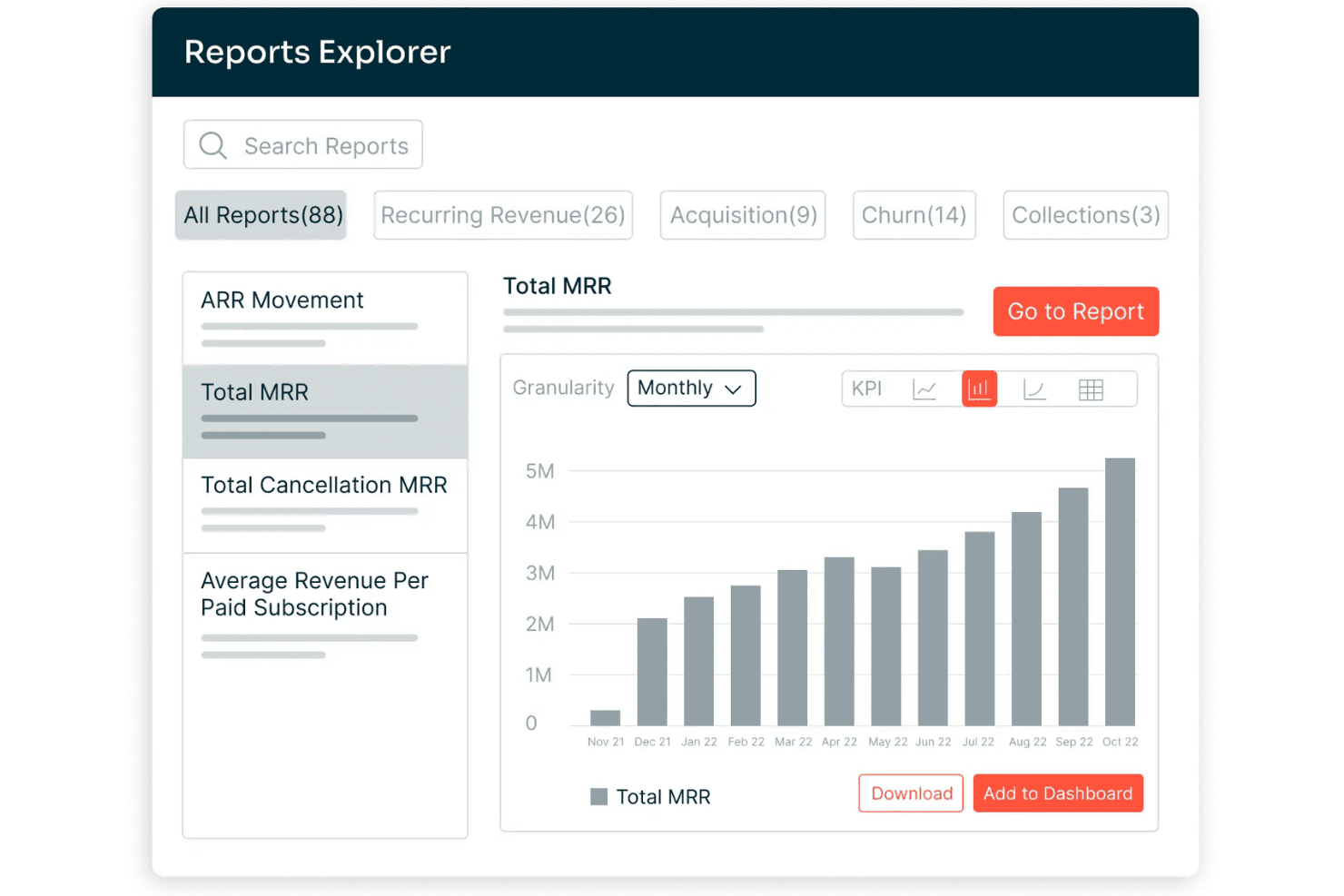
Chargebee offers a Reports Explorer with 88 prebuilt reports, including a Total MRR bar chart showing monthly revenue growth from Nov 2021 to Oct 2022. Chargebee is a billing and monetization platform covering subscription management, usage-based billing, invoicing, payment processing, revenue recognition, and accounts receivable automation across the quote-to-cash cycle.
Who Is Chargebee Best For?
Chargebee is a strong fit for SaaS and digital subscription businesses that run complex, hybrid pricing models combining recurring fees with usage-based charges.
Why I Picked Chargebee
I picked Chargebee as one of the best because its billing engine handles subscription, usage-based, and hybrid pricing models within a single product catalog, which most O2C platforms force you to manage separately. I particularly like how Smart Dunning uses ML to time payment retries based on customer behavior, not a fixed schedule. The Receivables module layers AI-powered collections on top, covering the full billing-to-cash leg.
Chargebee Key Features
- Multi-entity support: Manage billing, invoicing, and reporting for multiple brands, regions, or business units under one account.
- Product catalog management: Configure plans, add-ons, pricing rules, and billing frequencies centrally for all products.
- Compliance with global tax laws: Automate calculations for US Sales Tax, EU-VAT, and other international tax regimes.
- Native ERP and CRM integrations: Connect directly to Salesforce, NetSuite, Xero, and QuickBooks Online for real-time data sync.
Chargebee Integrations
Chargebee offers native integrations with Salesforce, HubSpot, NetSuite, Sage Intacct, Xero, QuickBooks Online, Stripe, Braintree, PayPal, Amazon Payments, Shopify, and Squarespace. An API is available for custom integrations.
Pros and Cons
Pros:
- Smart dunning reduces failed payment churn
- Revenue recognition is ASC 606 compliant
- Handles complex hybrid billing models natively
Cons:
- Cash application limited to gateway-captured payments
- No native credit risk management tools
Learn more about Chargebee: Best for integrated financial and order workflows
- Free demo available
- Pricing upon request
Visit WebsiteCustomer Rating:4.1/5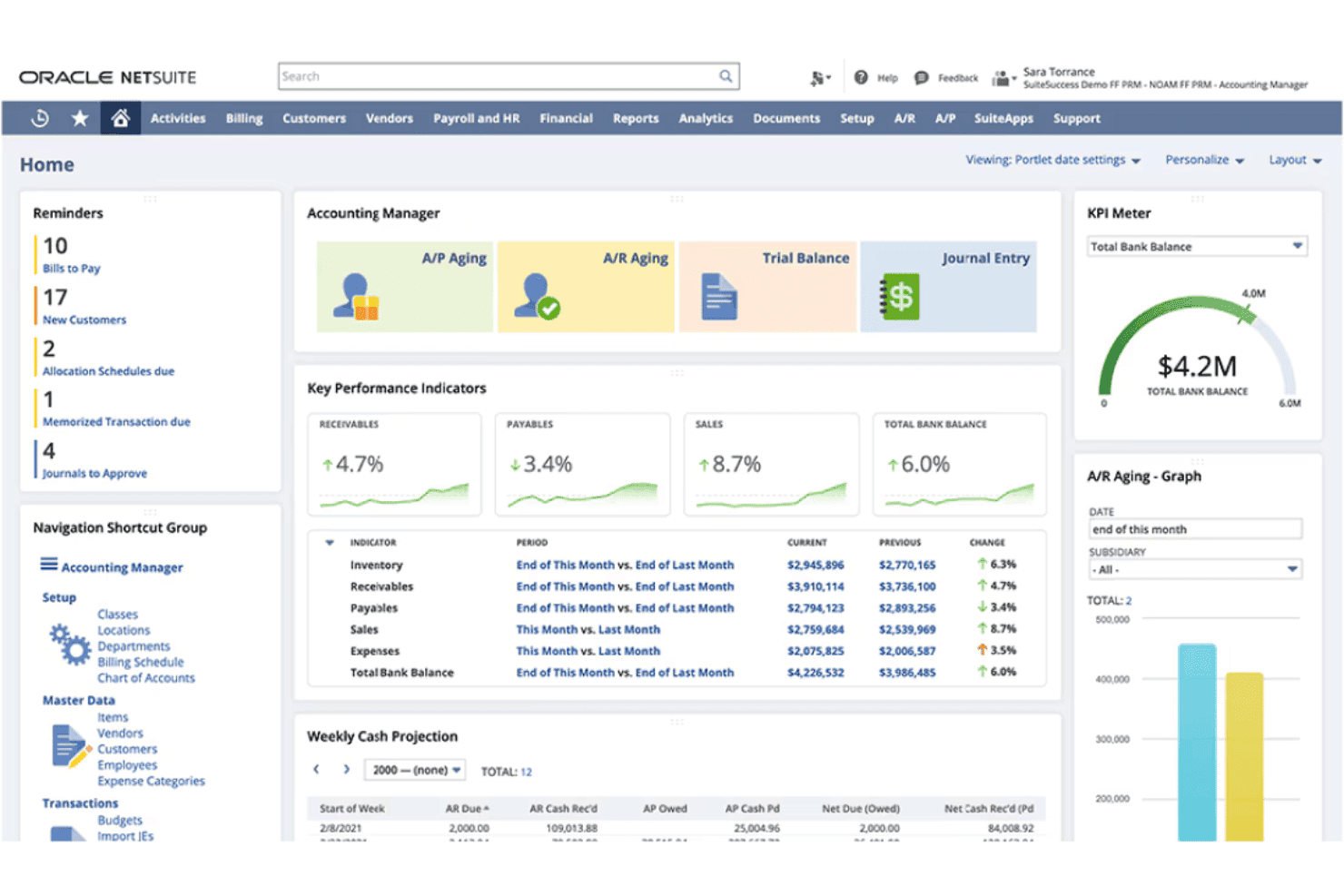
NetSuite ERP offers an Accounting Manager dashboard with KPIs, A/P and A/R aging, weekly cash projections, and a total bank balance KPI meter. NetSuite ERP is a cloud-based enterprise resource planning platform that combines order management, invoicing, accounts receivable, revenue recognition, and financial management in a single unified system.
Who Is NetSuite ERP Best For?
Mid-market companies with multi-entity structures, inventory complexity, or high order volumes that need finance and operations on one platform.
Why I Picked NetSuite ERP
I've included NetSuite ERP in my top picks because the order-to-cash workflow lives entirely within one database. When an order ships, the GL updates, the invoice generates, and AR aging reflects it instantly. I like that Advanced Order Management handles order promising, allocation, and orchestration natively, so my team isn't manually resolving fulfillment exceptions. SuiteBilling layered on top supports transaction, subscription, usage-based, and hybrid billing without a separate tool.
NetSuite ERP Key Features
- SuiteApps marketplace: Access hundreds of certified third-party apps to extend order to cash workflows.
- Native CRM module: Manage customer records, sales pipeline, and order history within the same system as financials.
- Multi-entity and currency management: Handle transactions, reporting, and compliance across subsidiaries and international operations.
- Pre-built ecommerce and POS integrations: Connect online stores and retail locations for unified order processing and fulfillment.
NetSuite ERP Integrations
NetSuite ERP offers native integrations with Salesforce, Shopify, Amazon, HubSpot, Outlook, and a range of POS and 3PL platforms through NetSuite Connector. The SuiteApps marketplace includes hundreds of certified third-party apps, and an API is available for custom integrations.
Pros and Cons
Pros:
- Real-time revenue recognition
- Handles subscription, usage, and hybrid billing
- Single database for orders, billing, and financials
Cons:
- Premium support requires paid add-on package
- Core features split across expensive modules
Learn more about NetSuite ERP: Best for subscription and usage-based billing
- Free demo available
- Pricing upon request
Visit WebsiteCustomer Rating:3.8/5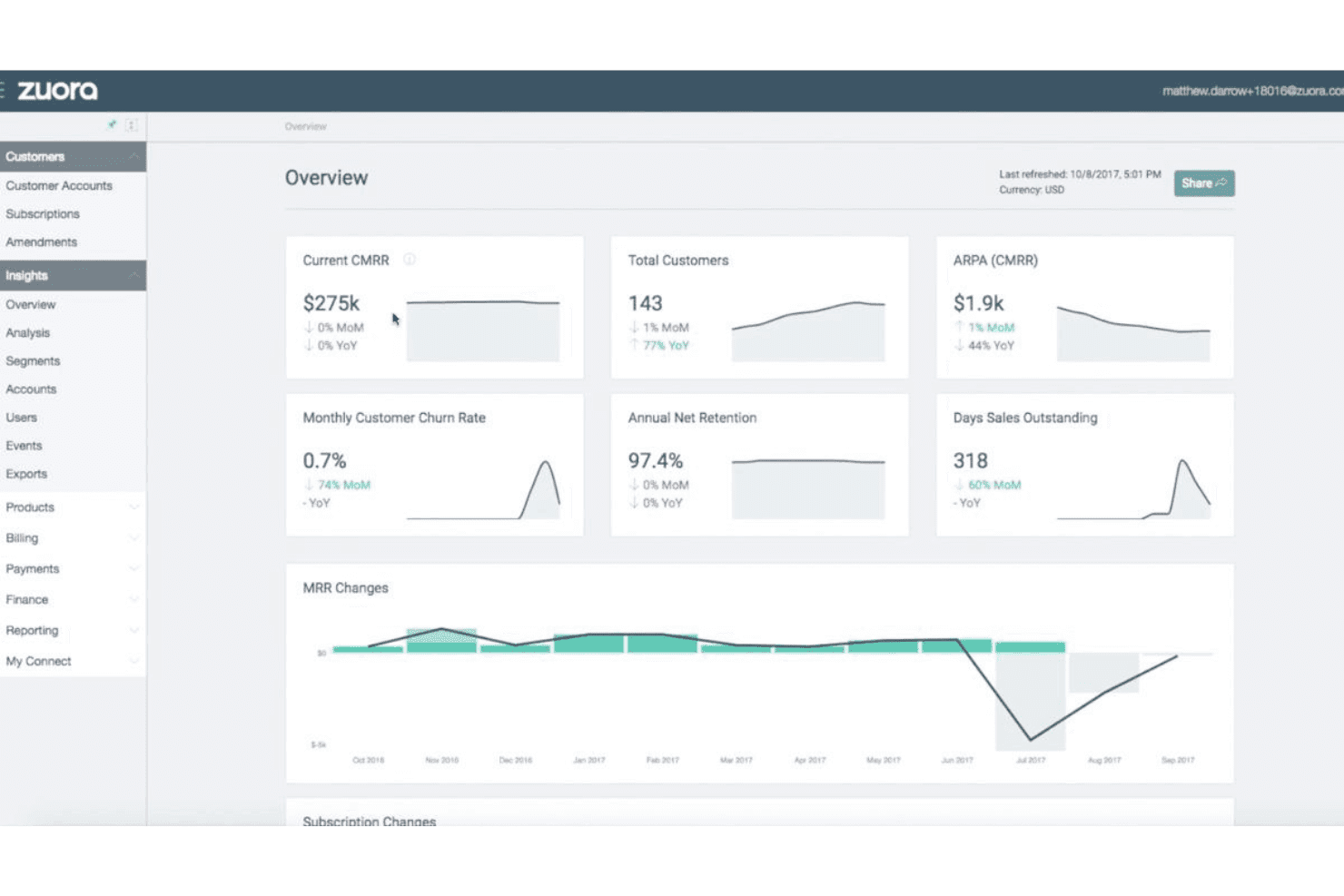
Zuora offers an insights overview dashboard displaying key subscription metrics like CMRR, customer count, churn rate, and MRR changes over time. Zuora is a quote-to-cash platform built around subscription and usage-based monetization, covering CPQ, billing, collections, cash application, and automated revenue recognition in a single system.
Who Is Zuora Best For?
Zuora is a strong fit for mid-market and enterprise companies running recurring revenue models, particularly in SaaS, media, and IoT.
Why I Picked Zuora
Zuora earns its spot as one of the best on my shortlist because no other platform handles the full complexity of usage-based billing at scale quite like this. The Usage Engine tracks real-time consumption and supports tiered, prepaid, overage, and high-water mark models in a single billing run. I also like that hybrid pricing, combining a flat subscription fee with metered usage charges, works natively without custom workarounds.
Zuora Key Features
- Multi-channel order capture: Accepts orders from sales reps, customer self-service portals, APIs, and partner channels with unified validation.
- Automated invoicing engine: Generates invoices for any combination of one-time, recurring, and milestone charges with flexible schedule settings.
- AI-driven collections workflows: Automates payment reminders, dunning schedules, and prioritization for outstanding receivables.
- Native ERP/CRM integrations: Offers real-time, bidirectional sync with platforms like Salesforce, NetSuite, SAP, and Workday.
Zuora Integrations
Zuora offers native integrations with Salesforce, NetSuite, SAP, Workday, HubSpot, and Snowflake, along with over 60 pre-built connectors. An API is available for custom integrations.
Pros and Cons
Pros:
- AI-driven collections with smart dunning routing
- Automated revenue recognition built in (ASC 606/IFRS 15)
- Handles complex usage-based billing models natively
Cons:
- Credit management relies on third-party data sources
- Rigid catalog structure for physical inventory
Learn more about Zuora: Best for unified communications in AR processes
- Free demo available
- Pricing upon request
Visit WebsiteCustomer Rating:2.3/5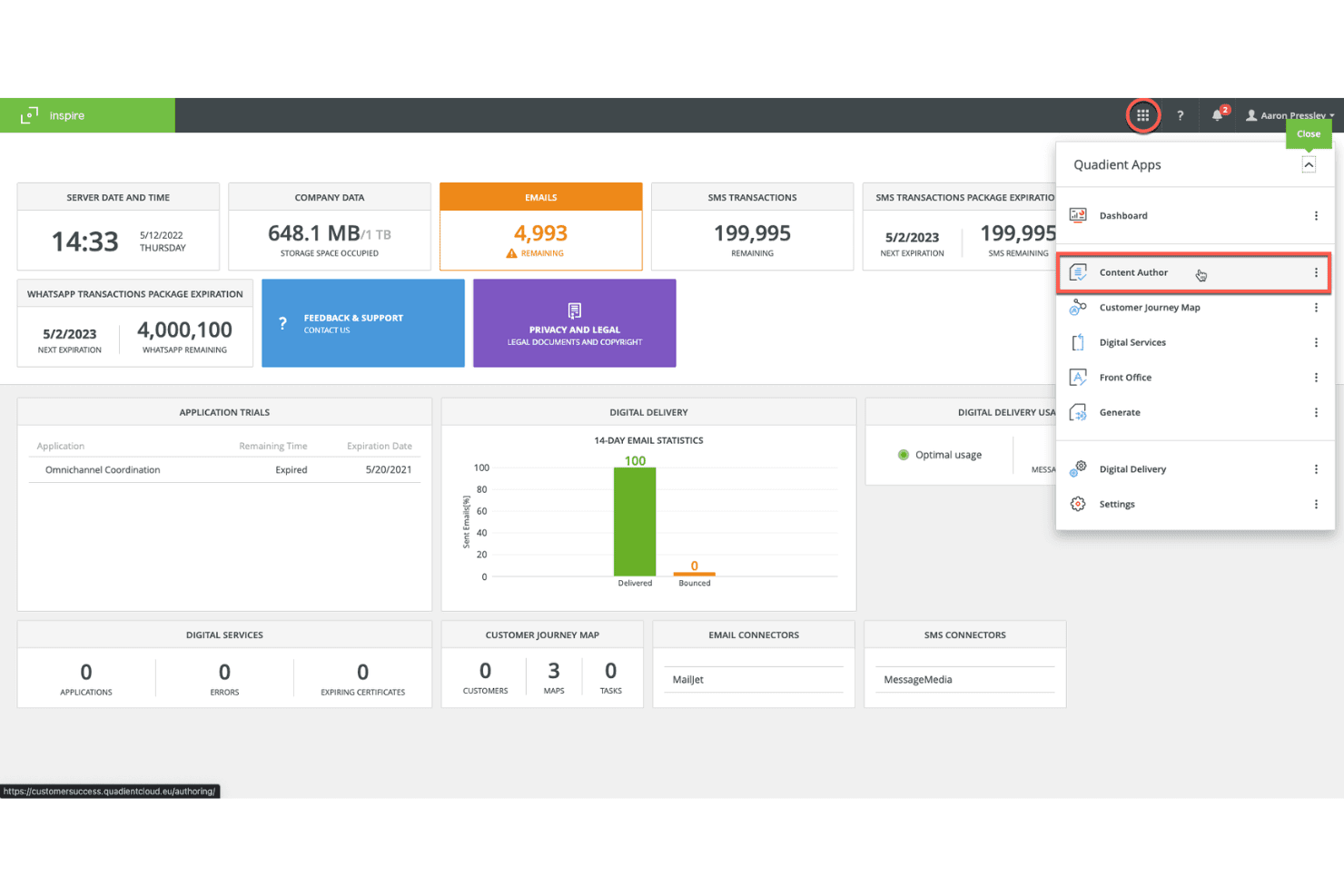
Quadient's Inspire platform displays a centralized dashboard with email, SMS, and WhatsApp transaction metrics alongside a Quadient Apps navigation panel. Quadient is an accounts receivable automation platform covering credit management, invoice delivery, collections workflows, dispute management, cash application, and self-service customer payments.
Who Is Quadient Best For?
Quadient is a good fit for mid-market and enterprise B2B finance teams managing high-volume invoicing, collections, and cash application across complex customer account portfolios.
Why I Picked Quadient
I've included Quadient in my top picks because it centralizes every AR communication touchpoint, from automated collection sequences and dispute tracking to self-service payment portals, in one connected workflow. I particularly like the AI-driven collections prioritization, which tells my team which customers to contact, through which channel, and exactly when. The self-service portal is a practical touch too, letting customers view invoices and submit payments without routing every query through my team.
Quadient Key Features
- Integrated deductions management: Automates categorization, routing, and resolution of disputes and short payments.
- Embedded payment portal: Lets customers view invoices and pay via ACH, card, or virtual card.
- ERP and CRM integration: Connects natively to NetSuite, SAP, Microsoft Dynamics, Salesforce, QuickBooks, and more.
- Cash flow forecasting dashboards: Provides real-time, AI-driven visibility into collections and DSO trends.
Quadient Integrations
Quadient AR offers native integrations with NetSuite, Acumatica, Sage (300, X3, Intacct), Microsoft Dynamics, SAP, SAP Business One, QuickBooks, Xero, Salesforce, and Zuora. An API is available for custom integrations.
Pros and Cons
Pros:
- Dedicated deductions management
- High auto-match rates in cash application
- AI-driven collections prioritization
Cons:
- Implementation timelines can run several months
- Limited order management capabilities
Learn more about Quadient: Best for AR and collections for small teams
- Free trial available
- From £545/user/month
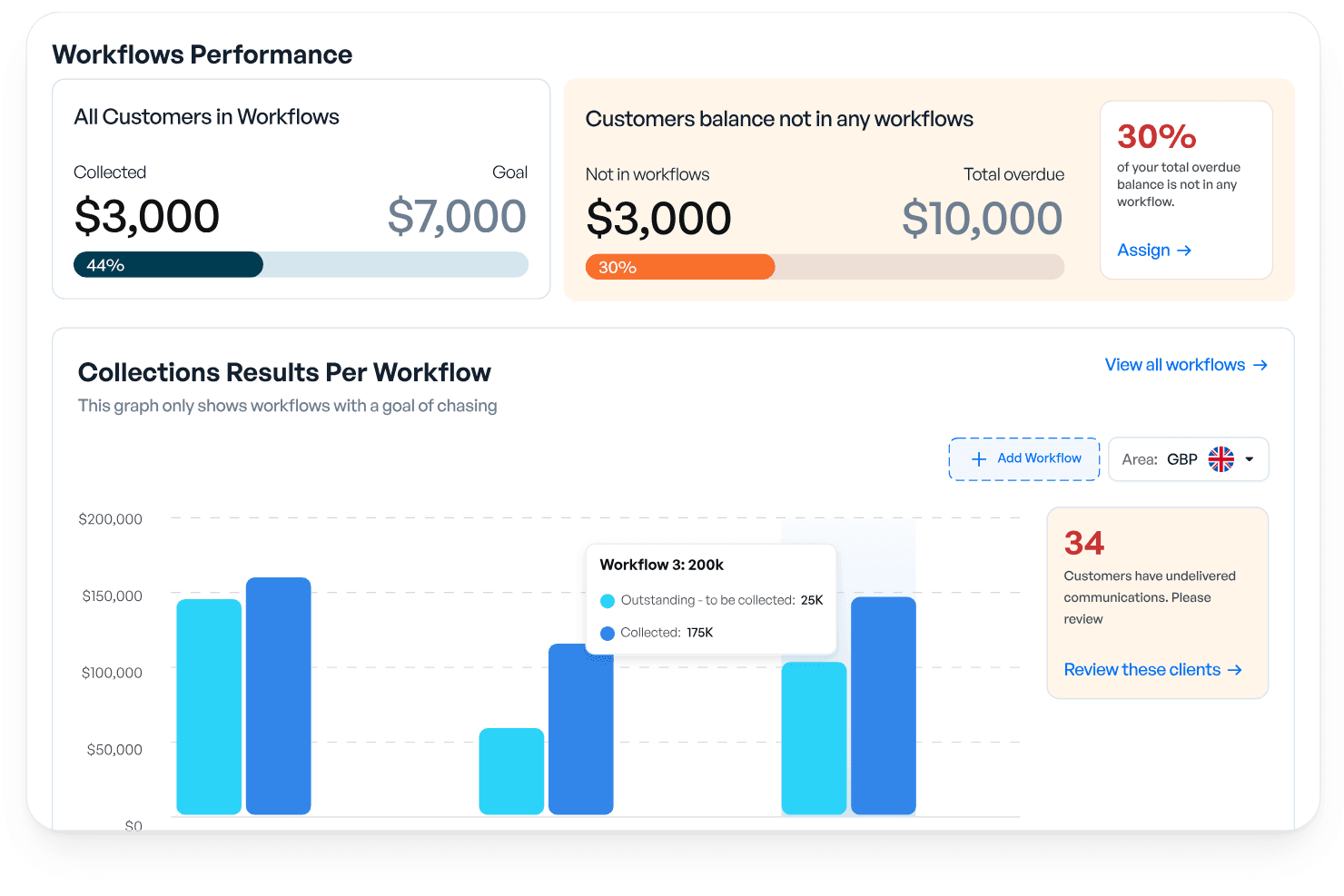
Kolleno offers a Workflows Performance dashboard that tracks collections, overdue balances, and per-workflow results with visual progress indicators. Kolleno is an AI-powered AR and order-to-cash platform covering collections automation, cash application, payments, disputes management, credit risk monitoring, and cash flow forecasting.
Who Is Kolleno Best For?
Kolleno is a strong fit for credit controllers and AR managers at SMBs who need to automate collections without growing their finance team headcount.
Why I Picked Kolleno
I've included Kolleno in my top picks because its AI Agents genuinely change what a small AR team can cover. I can configure each agent's autonomy level, from drafting follow-up emails for my review to firing off multi-channel dunning sequences entirely on its own. I also like that the cash application module uses pattern learning to handle complex matching scenarios, keeping my team out of exception queues.
Kolleno Key Features
- Embedded payment portal: Customers can pay, view invoice status, and resolve disputes directly in a branded online portal.
- Real-time dashboards: Access up-to-date AR analytics and cash flow forecasting from a central workspace.
- Disputes management: Track, categorize, and resolve invoice disputes within an integrated workflow.
- Native ERP and CRM integrations: Connect with systems like NetSuite, Xero, QuickBooks, and Salesforce for synchronized data across platforms.
Kolleno Integrations
Kolleno offers native integrations with NetSuite, Xero, QuickBooks, SAP S/4HANA, Sage Intacct, Microsoft Dynamics 365 Business Central, Salesforce, Clio, Stripe, Adyen, and GoCardless. An API is available for custom integrations.
Pros and Cons
Pros:
- Rapid setup for SMB teams without complex onboarding
- Dispute management is built into the AR workflow
- Prioritizes at-risk accounts before they go overdue
Cons:
- Reporting customization is limited
- Per-seat pricing limits cross-team AR visibility
Learn more about Kolleno: Best for enterprise-grade cash application
- Free demo available
- Pricing upon request
Visit WebsiteCustomer Rating:4.5/5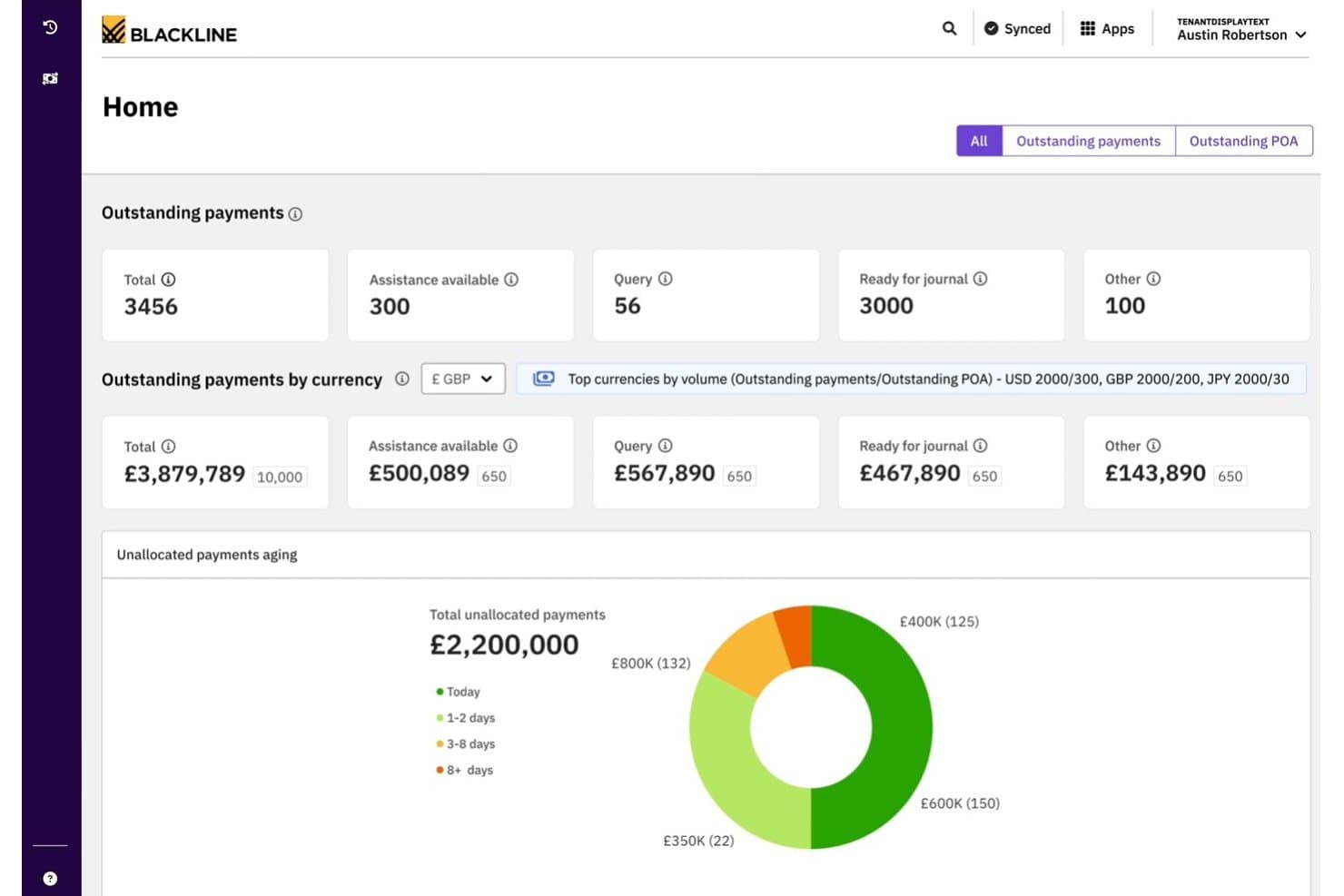
BlackLine offers a cash application dashboard displaying outstanding payments, currency breakdowns, and unallocated payments aging analytics. BlackLine Invoice-to-Cash is an AR automation platform covering cash application, collections management, eInvoicing, credit and risk management, dispute handling, and AI-driven payment matching.
Who Is BlackLine Best For?
BlackLine is a strong fit for enterprise finance teams managing high transaction volumes across multiple ERPs, banks, and regions.
Why I Picked BlackLine
BlackLine earns its spot on my shortlist because its Verity AI cash application consistently delivers match rates that bring unapplied cash close to zero. I particularly like the multi-format remittance ingestion, which handles everything from EDI to scanned documents without manual intervention. The automated deduction coding with reason codes and straight-through journal entries to the GL mean my team spends far less time reconciling exceptions at month-end.
BlackLine Key Features
- Integrated deductions management: Automatically logs, categorizes, and routes short payments and invoice disputes for resolution.
- Embedded payment portal: Provides customers with a self-service portal to view invoices, make payments, and submit inquiries.
- Cash flow forecasting: Includes AI-driven dashboards that forecast collections and predict DSO across segments.
- ERP-certified connectors: Offers native, bidirectional integrations with major ERP systems like SAP, Oracle, and NetSuite.
BlackLine Integrations
BlackLine offers native integrations with SAP, NetSuite, Oracle, Microsoft Dynamics, Acumatica, and Sage, plus native CRM integration for dispute management. An API is also available for custom integrations.
Pros and Cons
Pros:
- Real-time credit risk scoring across customer portfolio
- Automated deduction coding with root-cause analytics
- AI cash application achieves near-zero unapplied cash
Cons:
- Batch processing prevents real-time transaction updates
- High subscription cost for lower transaction volumes
Learn more about BlackLine: Best for integrated payment and invoicing
- Free demo available
- Pricing upon request
Visit WebsiteCustomer Rating:4.4/5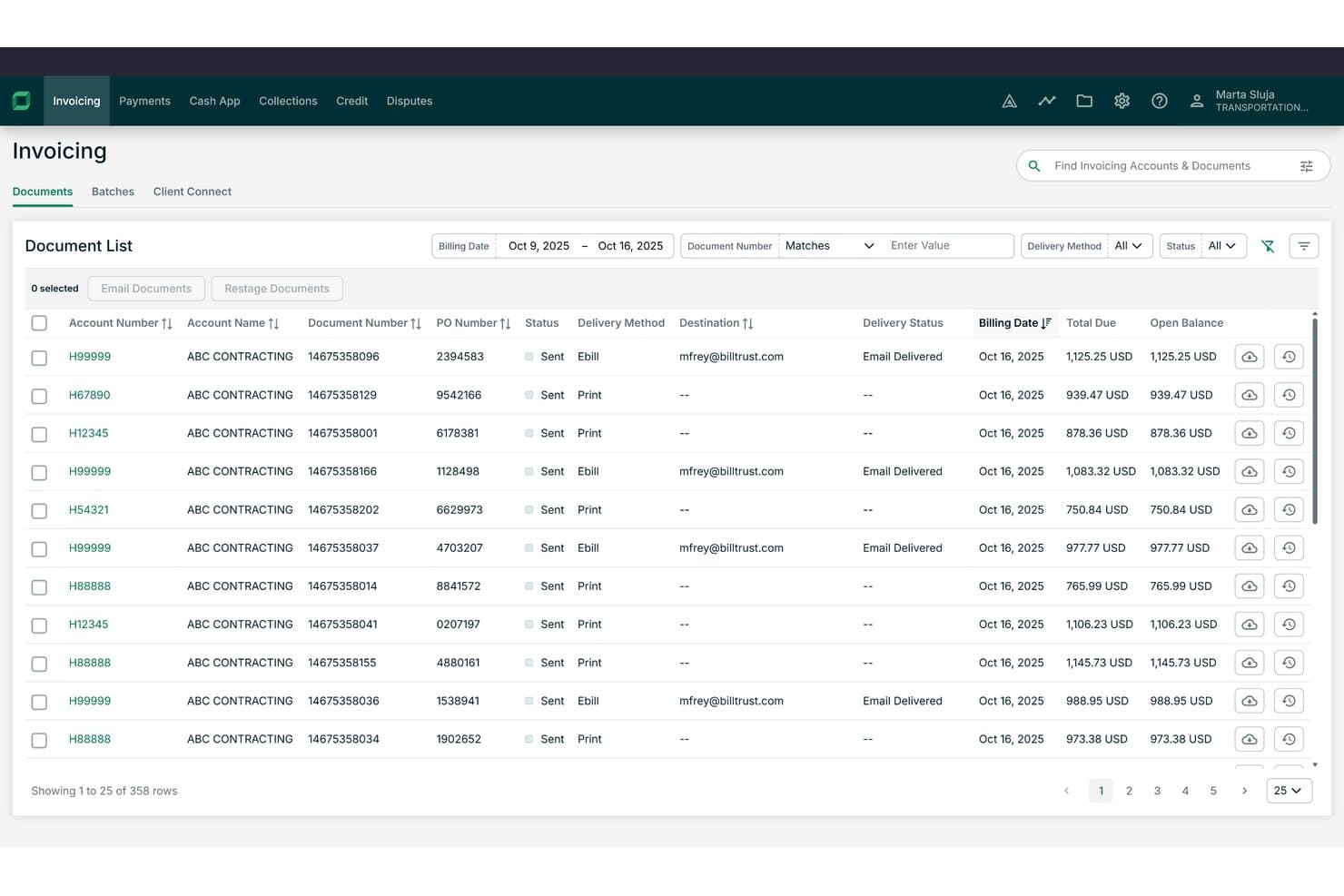
Billtrust offers a detailed invoicing document list with filtering, delivery method tracking, and open balance visibility across hundreds of records. Billtrust is a B2B order-to-cash platform built around invoicing, payments, collections, cash application, and credit management for mid-to-enterprise suppliers.
Who Is Billtrust Best For?
It's a strong fit for AR managers and finance leaders at B2B companies in manufacturing, distribution, or business services with high invoice volumes.
Why I Picked Billtrust
I picked Billtrust as one of the best because its invoicing and payments run as a single platform rather than separate modules. I like that the Digital Lockbox automatically processes emailed virtual cards without manual handling, and the 260+ AP portal connections push invoices directly into buyers' systems like Ariba and Coupa. The ML-based cash application consistently hits 95%+ straight-through processing rates.
Billtrust Key Features
- Agentic credit management: Automatically underwrites and monitors customer credit using real-time bureau data and behavioral signals.
- Collections workflow automation: Prioritizes delinquent accounts and generates agentic outreach through email and VoIP auto-transcription.
- Global e-invoicing compliance: Supports multi-country e-invoicing mandates, covering B2B and government requirements.
- ERP and AP portal integrations: Connects natively with 200+ ERPs, banks, and over 260 AP portals for invoicing and payment workflows.
Billtrust Integrations
Billtrust offers over 200 native integrations, including SAP, NetSuite, Microsoft Dynamics, Oracle, Ariba, Coupa, Basware, OB10, and more than 260 AP portals. An API is available for custom integrations.
Pros and Cons
Pros:
- Covers invoicing, credit, and collections in one platform
- Agentic AI handles collections outreach automatically
- Cash application achieves 95%+ auto-match rates
Cons:
- Implementation typically requires several months
- No order capture or management functionality
Learn more about Billtrust: Best for modular automation across finance teams
- Free demo available
- Pricing upon request
Visit WebsiteCustomer Rating:4.5/5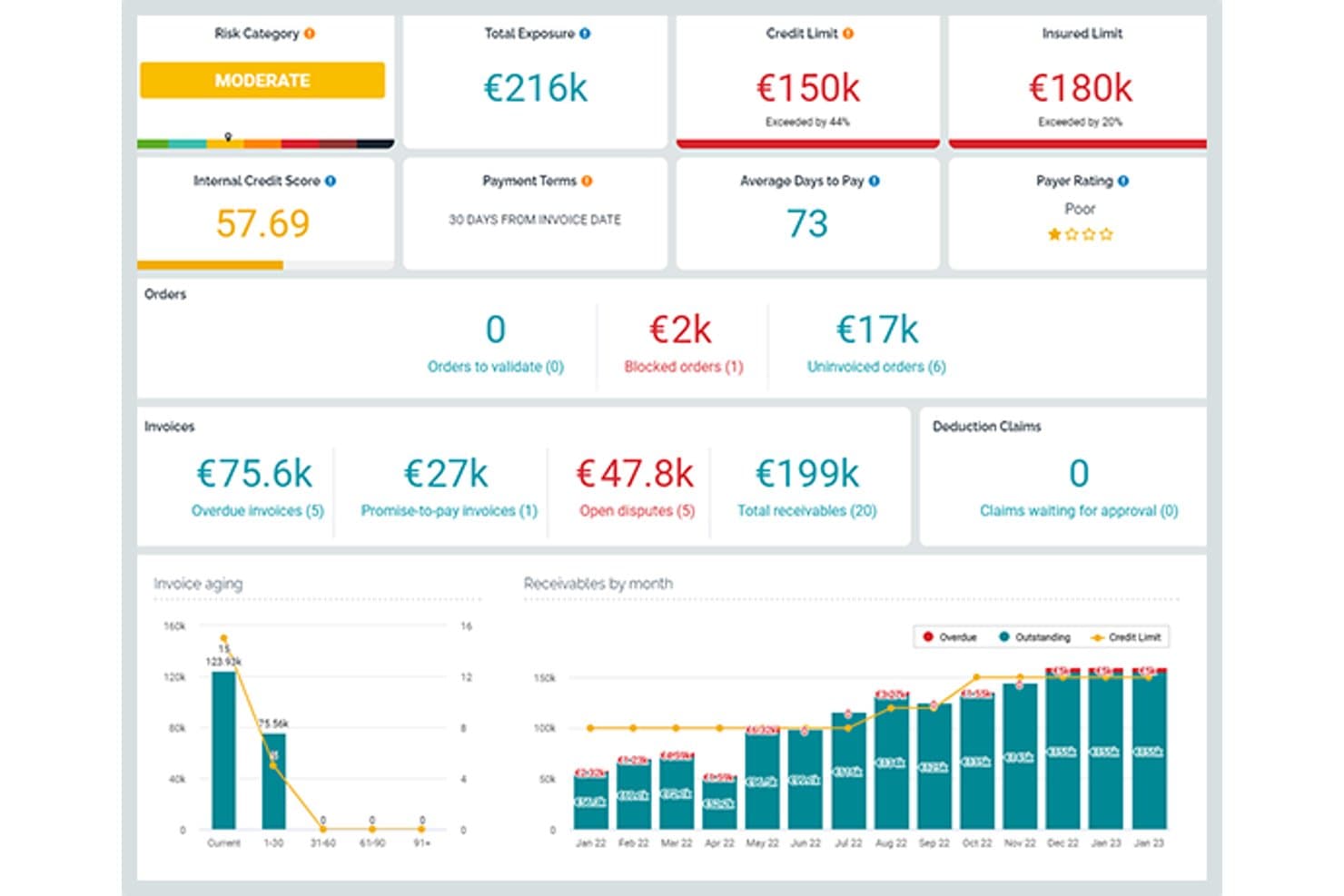
Esker offers a comprehensive order-to-cash dashboard displaying risk categories, credit limits, invoice aging, and receivables by month for streamlined AR management. Esker is a cloud-based order-to-cash platform with modular, AI-powered solutions spanning order management, credit management, invoice delivery, cash application, collections, and deductions management.
Who Is Esker Best For?
Esker is a strong fit for mid-to-large enterprises running SAP or other major ERPs that need modular O2C automation across AR and finance teams.
Why I Picked Esker
Esker earns its spot on my shortlist because its modular architecture lets finance teams activate only the O2C components they need. I like that Credit Management, Cash Application, and Collections can each be deployed standalone or as a full suite, which matters when phasing a rollout across a large finance org. Esker Synergy AI is what really sets the cash application module apart: it uses ML to extract remittance data and auto-match payments, cutting unapplied cash by up to 95%.
Esker Key Features
- Omnichannel order capture: Collects and digitizes B2B orders from email, EDI, customer portals, and fax with real-time tracking.
- Integrated deductions management: Categorizes and routes short-pay and chargeback disputes for fast resolution.
- Embedded payment portal: Allows customers to view, dispute, and pay invoices by ACH, card, or virtual card.
- Cash flow forecasting dashboard: Provides real-time DSO and collections forecasts with segmentation by customer or geography.
Esker Integrations
Esker offers native integrations with SAP, Oracle, Microsoft Dynamics, and NetSuite for bidirectional data sync. An API is available for custom integrations.
Pros and Cons
Pros:
- Strong deductions management with root-cause analytics
- AI cash application cuts unapplied cash significantly
- Modular deployment across individual O2C functions
Cons:
- Data gaps can appear between individual modules
- Implementation timelines can run several months
Learn more about Esker: Best for AI-powered receivables automation
- Free demo available
- Pricing upon request
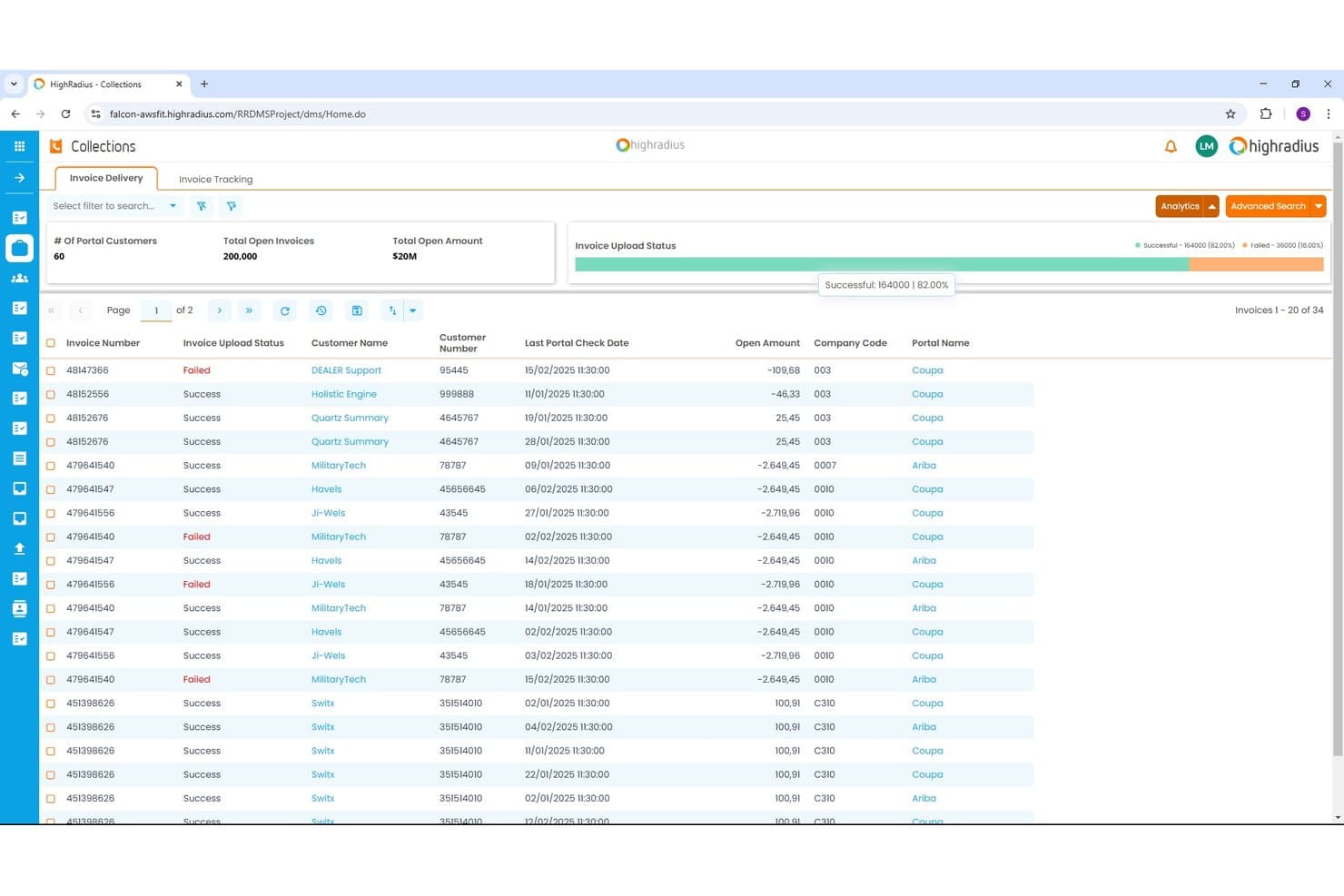
HighRadius offers an Invoice Delivery dashboard within its Collections module, displaying invoice upload status, open amounts, and portal tracking across multiple customers. HighRadius is an AI-powered order-to-cash platform covering collections, cash application, credit management, deductions, and e-invoicing for enterprise finance teams.
Who Is HighRadius Best For?
HighRadius is a strong fit for large enterprises running high-volume receivables across multiple ERPs, business units, or geographies.
Why I Picked HighRadius
HighRadius earns its spot on my shortlist because the Cash Application Cloud achieves 95% no-touch posting rates for checks, ACH, and wires by extracting remittance data from emails and AP portals automatically. I also like the AI Worklist in Collections Cloud, which prioritizes accounts dynamically so my team targets the highest-risk balances first. The Deductions Cloud aggregates portal and email claims into a single queue, so my team isn't chasing backup documents across systems.
HighRadius Key Features
- Predictive credit scoring: Uses real-time bureau data and payment patterns to automate credit risk decisions.
- Integrated deductions management: Centralizes short-pay claim capture and automates backup aggregation from portals and emails.
- Embedded payment portal: Lets customers view invoices and pay online using ACH or credit card.
- ERP-native connectors: Provides prebuilt integrations for SAP, Oracle, NetSuite, and Microsoft Dynamics for bidirectional invoice and payment data sync.
HighRadius Integrations
HighRadius offers native integrations with SAP, Oracle, NetSuite, and Microsoft Dynamics, plus connections to over 100 banks and 40 credit agencies. An API is available for custom integrations.
Pros and Cons
Pros:
- Credit scoring pulls live bureau data
- Centralizes short-pay claims automatically
- Cash posting hits 95% no-touch rates
Cons:
- Go-live takes three to six months
- Batch-based ERP sync delays data updates
Learn more about HighRadius:
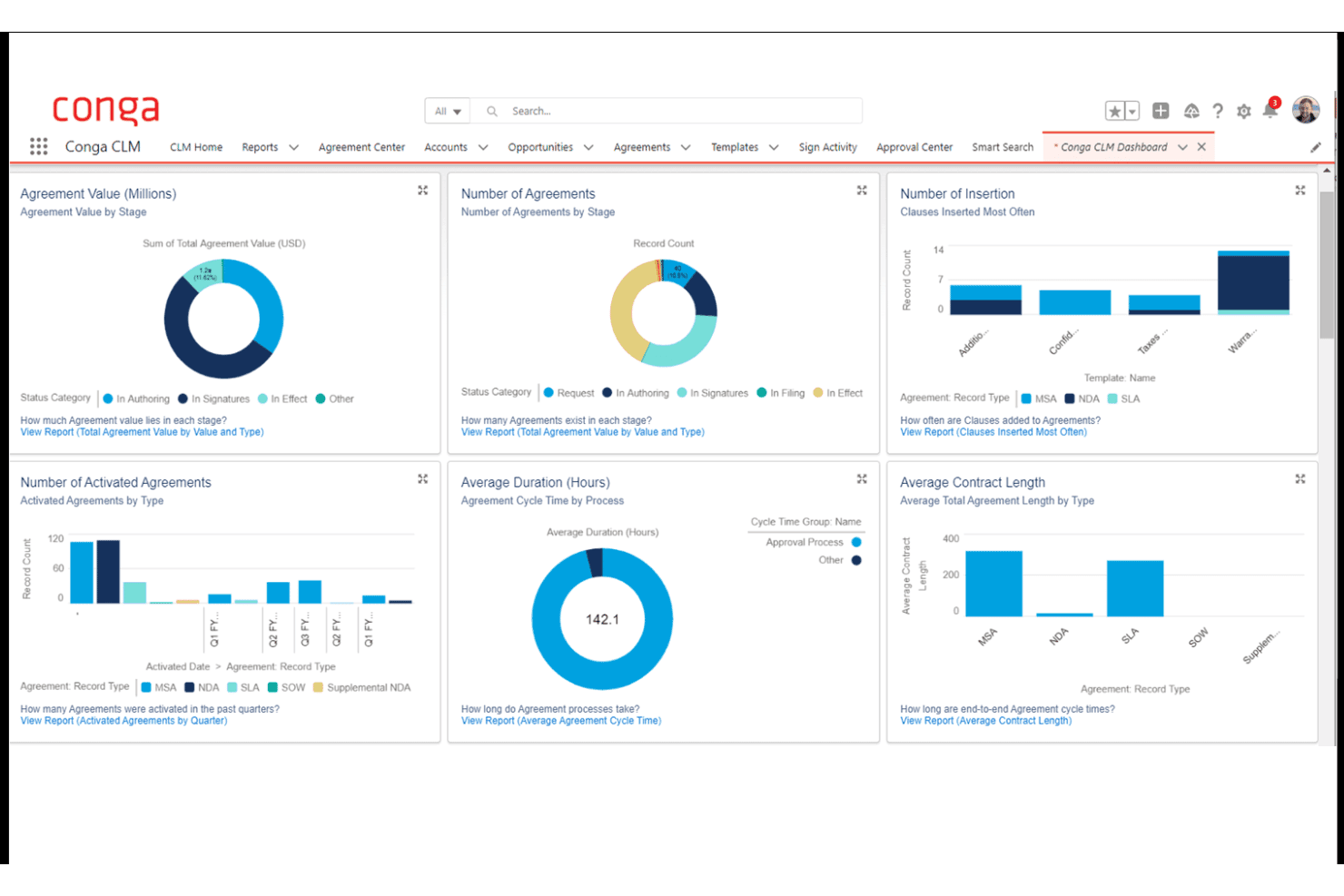
Conga CLM offers a comprehensive dashboard with visual analytics covering agreement value, number of agreements, insertion clauses, activated agreements, cycle time, and contract length by type. Conga is a revenue lifecycle platform that unifies CPQ, contract lifecycle management, billing, and subscription management across the contract-to-cash process.
Who Is Conga Best For?
Conga is a strong fit for enterprise B2B teams running complex, high-volume sales cycles on Salesforce who need CPQ, contracts, and billing managed in one connected system.
Why I Picked Conga
I picked Conga as one of the best because of how tightly it connects CPQ, contract management, and billing in a single data model. Where most O2C tools start at the order stage, Conga starts at the quote, meaning contract terms and pricing rules flow directly into invoices without manual re-entry. I particularly like its Billing module's mixed-order invoicing, where one customer invoice can consolidate subscription, usage, and one-time charges simultaneously.
Conga Key Features
- Salesforce-native integration: Leverages deep, bidirectional sync for product, quote, and contract data between Salesforce and Conga.
- Automated dunning workflows: Supports scheduled reminders and escalations for outstanding invoices and overdue accounts.
- Unified data model: Connects CPQ, contracts, billing, and revenue recognition under one data architecture for central audit trails.
- API and SDK extensibility: Offers APIs and SDKs to embed CPQ and billing processes in customer portals, internal tools, or partner platforms.
Conga Integrations
Conga offers native integrations with Salesforce, Workday, Oracle, HubSpot, Pipedrive, and Microsoft Dynamics 365. An API and SDK are available for building custom integrations and embedding processes in portals or internal systems.
Pros and Cons
Pros:
- Strong Salesforce-native architecture for revenue teams
- Handles complex subscription billing model changes
- Unifies CPQ, contracts, and billing natively
Cons:
- Weak credit management and risk scoring tools
- No native cash application or matching tools
Learn more about Conga:
Outros softwares de gestão do pedido ao recebimento
Eis algumas opções adicionais de software de gestão do pedido ao recebimento que não entraram na minha lista de seleção, mas que vale a pena conhecer:
- 11Agentforce Revenue ManagementBest for CRM-driven revenue lifecycle management
- 12VersapayBest for collaborative AR with customer portal
- 13MaxioBest for SaaS billing complexity management
- 14DealHub AIBest for CPQ-integrated revenue processes
- 15TesorioBest for predictive cash flow insights
- 16UpflowBest for real-time collections analytics
- 17InvoicedBest for automated AR process control
- 18SerralaBest for global multi-ERP cash automation
- 19Paystand Best for blockchain-enabled B2B payments
- 20GavitiBest for collector workflow optimization
How I Evaluate Order-to-Cash Software
I split my evaluation into baseline criteria every tool must hit—like automated cash application and ERP connectivity—and differentiators that separate the best platforms from the rest.
Core Functionality (Table Stakes for This List)
When I'm selecting tools for my list, I rank each one on a scale from 0 (does not offer the functionality) to 5 (excels in this area) for each core functionality listed below. Then, I calculate the tool's total score into a percentage. Each tool needs to achieve a minimum total score of 75% to be considered for inclusion.
- Order Management: I evaluate how each platform captures and orchestrates orders across channels like web portals, EDI, and email, including whether it handles validation rules and exception routing before hitting fulfillment.
- Invoicing & Billing: The billing engine needs to support more than just one-time invoices. I look for platforms that handle recurring, usage-based, and milestone billing models within the same workflow.
- AR Automation: I check whether the tool offers configurable dunning sequences with multi-channel outreach, since teams juggling hundreds of open invoices need prioritized, automated follow-ups rather than manual email chasing.
- Cash Application: Matching payments to invoices manually is where AR teams lose the most time. I look for AI-assisted matching that can parse remittance data from lockbox files, emails, and EDI formats.
- Credit Management: I evaluate whether the platform can pull credit data from third-party bureaus, enforce dynamic credit limits, and flag high-risk accounts before orders ship rather than after invoices age out.
- ERP/CRM Integration: Bidirectional connectors to systems like SAP, NetSuite, and Salesforce matter here. I look for native integrations that sync invoice status, GL postings, and customer master data in real time.
Once I have a list of tools that meet the criteria, I consider what sets each platform apart.
Differentiating Factors (What Sets Vendors Apart)
Here's how I compare and contrast different vendors:
Standout Features
Integrated deductions management is a big differentiator I look for. When customers short-pay invoices, you need automated dispute workflows that categorize and route chargebacks rather than letting them pile up in spreadsheets. Cash flow forecasting also matters—AI-driven DSO predictions by customer or segment give finance leaders rolling visibility for accurate revenue planning. An embedded payment portal where customers can view invoices, raise disputes, and pay via multiple methods is another separator worth evaluating.
Beyond Features
Modularity is a key factor I evaluate—some teams only need a collections module, while others want the full order-to-cash suite. Buying more than you need slows adoption. I also check for global readiness, including multi-currency, multi-entity support, and compliance with regional e-invoicing mandates. Pricing structure matters too. Transaction-based models can balloon costs at high invoice volumes, so I compare those against flat subscription pricing to understand total cost of ownership.
Como escolher um software de gestão do pedido ao recebimento
É fácil ficar atolado em listas extensas de funcionalidades e estruturas de preços complexas. Para o ajudar a manter o foco enquanto percorre o seu processo específico de seleção de software, eis uma lista de fatores a ter em conta:
| Fator | O que considerar |
| Escalabilidade | O software acompanhará o crescimento do volume de transações e da dimensão da equipa? Informe-se sobre a gestão de várias entidades e a expansão para novos mercados. |
| Integrações | Liga-se de forma nativa ao seu ERP, CRM e plataformas de pagamento? Considere a integração direta em comparação com a integração através de middleware, tendo em conta as necessidades atuais e futuras dos sistemas. |
| Possibilidade de personalização | Pode configurar fluxos de trabalho, regras e relatórios sem um forte envolvimento da equipa de TI? As plataformas flexíveis aceleram as alterações à medida que a sua empresa evolui. |
| Facilidade de utilização | Qual é a dificuldade de aprendizagem para as equipas financeiras e operacionais? Os testes práticos ajudam a identificar ferramentas com uma navegação confusa ou definições difíceis de encontrar. |
| Implementação e integração inicial | Qual é o prazo habitual para a entrada em produção? Informe-se sobre o apoio à migração, a documentação da API e se precisará de um parceiro para colmatar lacunas nos seus processos antigos. |
| Custo | Compreenda o custo total de propriedade, incluindo o processamento de pagamentos, as integrações, os módulos adicionais ou as licenças de utilizador — não apenas o preço da licença ou da subscrição. |
| Medidas de segurança | São asseguradas a conformidade com SOC 2, ISO 27001 e RGPD? Verifique a adoção de boas práticas relativas à encriptação de dados, às permissões dos utilizadores e aos registos de auditoria. |
| Requisitos de conformidade | A plataforma manterá a sua empresa em conformidade com as obrigações de faturação eletrónica e as normas do setor? Tenha em conta as necessidades de comunicação do IVA, carregamentos para entidades públicas ou futuras alterações regulamentares. |
O que é um software de gestão do pedido ao recebimento?
O software de gestão do ciclo pedido-recebimento é uma plataforma que permite às empresas automatizar e gerir todo o processo de receitas, desde a captura das encomendas de vendas até à faturação, cobrança de pagamentos e aplicação de recebimentos. Estes sistemas centralizam a gestão de encomendas, a faturação, as contas a receber e as funções de crédito, ajudando as equipas a aumentar a precisão, acelerar o fluxo de caixa e manter a visibilidade em todas as etapas do ciclo de receitas.
Funcionalidades do software de gestão do ciclo pedido-recebimento
Ao selecionar um software de gestão do ciclo pedido-recebimento, procure as seguintes funcionalidades principais:
- Gestão de encomendas: Centraliza a captura de encomendas em todos os canais de vendas, valida os dados e acompanha o estado das encomendas desde a entrada até ao cumprimento.
- Faturação: Automatiza a geração de faturas e suporta vários modelos de faturação — incluindo faturação única, recorrente e por marcos — simplificando todo o processo de faturação.
- Automatização das contas a receber: Envia lembretes de pagamento, gere fluxos de trabalho de cobrança e acompanha os valores a receber pendentes, reduzindo o acompanhamento manual.
- Aplicação de recebimentos: Faz corresponder os pagamentos recebidos às faturas em aberto utilizando os dados de remessa, acelerando a reconciliação e melhorando a precisão.
- Gestão de crédito: Avalia a solvabilidade dos clientes, acompanha os limites e aplica bloqueios ou aprovações antes do envio das encomendas para gerir o risco.
- Integração com ERP e CRM: Liga-se diretamente a sistemas como ERP, CRM e plataformas de pagamento para sincronizar dados e manter os registos atualizados.
- Gestão de deduções: Identifica e processa pagamentos inferiores ao devido ou estornos, automatizando a resolução de litígios e eliminando as causas dos problemas que levam a deduções.
- Portal de pagamentos para clientes: Disponibiliza aos clientes um espaço online seguro para consultar faturas, efetuar pagamentos, descarregar extratos e gerir litígios.
- Suporte para várias moedas: Processa transações em várias moedas, permitindo às equipas operar globalmente enquanto mantêm registos e relatórios precisos.
- Ferramentas de auditoria e relatórios: Disponibiliza registos abrangentes e relatórios financeiros para apoiar auditorias, requisitos de conformidade e supervisão da gestão.
Funcionalidades comuns de IA no software de gestão do ciclo pedido-recebimento
Para além das funcionalidades padrão do software de gestão do ciclo pedido-recebimento acima mencionadas, muitas destas soluções estão a incorporar IA com funcionalidades como:
- Previsão preditiva do fluxo de caixa: Utiliza dados históricos de pagamentos e tendências dos clientes para projetar os recebimentos de caixa futuros, ajudando as equipas financeiras a antecipar défices ou excedentes.
- Correspondência automatizada de pagamentos: Utiliza aprendizagem automática para fazer corresponder automaticamente os pagamentos às faturas em vários formatos, reduzindo a reconciliação manual e as exceções.
- Avaliação dinâmica do crédito: Analisa continuamente o comportamento dos clientes, o histórico de pagamentos e dados externos para atualizar os perfis de risco de crédito e recomendar ajustes aos limites de crédito.
- Priorização das cobranças: Utiliza IA para segmentar contas e dar prioridade aos contactos com base na probabilidade de pagamento, na antiguidade das faturas e no risco do cliente, aumentando a produtividade dos responsáveis pela cobrança.
- Encaminhamento da resolução de litígios: Utiliza o processamento de linguagem natural para categorizar e encaminhar litígios ou deduções para a equipa adequada, acelerando a resolução e reduzindo o volume pendente.
Benefícios do software de gestão do ciclo pedido-recebimento
A implementação de um software de gestão do ciclo pedido-recebimento proporciona vários benefícios à sua equipa e à sua empresa. Eis alguns dos benefícios que pode esperar:
- Fluxo de caixa mais rápido: A faturação, as cobranças e a correspondência automatizadas dos pagamentos ajudam a reduzir o prazo médio de recebimentos e a acelerar a cobrança.
- Maior precisão: As integrações perfeitas e a reconciliação automatizada reduzem o erro humano nos processos de encomendas, faturação e contas a receber.
- Melhor visibilidade: Os painéis centralizados e os relatórios em tempo real proporcionam uma visão clara dos estados das encomendas, das faturas pendentes e dos recebimentos de caixa previstos.
- Menor carga de trabalho manual: Os fluxos de trabalho automatizados para a captura de encomendas, as análises de crédito e a resolução de litígios libertam a sua equipa para tarefas de maior valor.
- Menor risco: As funcionalidades de gestão de crédito e conformidade baseadas em IA ajudam a gerir a exposição e a cumprir os requisitos regulamentares nas operações globais.
- Melhor experiência do cliente: Os portais de pagamento de autosserviço e a resposta mais rápida aos litígios facilitam o pagamento e a resolução de problemas por parte dos clientes.
Custos e preços do software de gestão do ciclo pedido-recebimento
A seleção de um software de gestão do ciclo pedido-recebimento exige uma compreensão dos vários modelos de preços e planos disponíveis. Os custos variam consoante as funcionalidades, a dimensão da equipa, os complementos, entre outros fatores. A tabela abaixo resume os planos comuns, os respetivos preços médios e as funcionalidades normalmente incluídas nas soluções de software de gestão do ciclo pedido-recebimento:
Tabela de comparação de planos para software do pedido ao recebimento
| Tipo de plano | Preço médio | Funcionalidades comuns |
| Plano gratuito | $0 | Introdução básica de encomendas, faturação normalizada, relatórios limitados e acompanhamento manual de pagamentos. |
| Plano pessoal | $20-$50/utilizador/mês | Faturação, automatização de contas a receber, gestão de crédito simples, painéis básicos e portal de pagamentos para clientes. |
| Plano empresarial | $75-$150/utilizador/mês | Aplicação automatizada de recebimentos, fluxos de trabalho personalizáveis, suporte para várias moedas e integração nativa com ERP. |
| Plano empresarial de grande dimensão | $200-$350/utilizador/mês | Funcionalidades avançadas de IA, conformidade global, análise avançada, modularidade total e suporte prioritário. |
Perguntas frequentes sobre software do pedido ao recebimento
Eis algumas respostas a perguntas comuns sobre software do pedido ao recebimento:
Como é que o software do pedido ao recebimento se integra com os sistemas ERP?
O software de automatização do pedido ao recebimento, frequentemente designado por software OTC, liga-se normalmente aos sistemas ERP através de conectores nativos ou APIs. Isto sincroniza encomendas, processamento de faturas, pagamentos, gestão de inventário, atualizações do razão geral e dados de clientes, para que nada fique por tratar entre plataformas ou equipas.
Que tipos de empresas beneficiam mais do software do pedido ao recebimento?
As empresas com elevados volumes de transações, faturação complexa ou presença global são as que obtêm mais valor. Se a sua equipa de operações financeiras passa demasiado tempo a realizar verificações de crédito, gerir a integração de clientes, cobrar pagamentos, assegurar o cumprimento das encomendas ou tratar exceções durante a reconciliação de contas, estas plataformas baseadas em inteligência artificial podem transformar os fluxos de trabalho diários.
O software do pedido ao recebimento suporta transações em várias moedas?
Sim, a maioria das plataformas oferece suporte para várias moedas. Isto significa que pode emitir faturas, cobrar pagamentos, proteger o seu capital circulante, monitorizar indicadores-chave de desempenho (KPIs) e comunicar receitas em várias regiões, o que é especialmente valioso para empresas que operam internacionalmente.
Quanto tempo demora normalmente a implementação?
A implementação pode demorar desde algumas semanas a vários meses, dependendo do âmbito e das integrações. É importante esclarecer os prazos com o fornecedor e garantir que a sua equipa está preparada para quaisquer alterações de processos necessárias.
O que devo saber sobre segurança e conformidade?
Procure conformidade com as normas SOC 2, ISO 27001 e o RGPD, especialmente se tratar dados financeiros sensíveis ou operar internacionalmente. Pergunte aos fornecedores como protegem os seus dados, incluindo através de encriptação, permissões e registos de auditoria.