

O software de gestão de listas de e-mails ajuda a organizar os contactos, automatizar as comunicações e direcionar as mensagens para o público certo — tornando muito mais fácil gerir várias campanhas sem se sentir sobrecarregado.
Como alguém que testou várias destas ferramentas em operações de receita, vou mostrar-lhe os melhores softwares de gestão de listas de e-mails, as funcionalidades que oferecem e como podem ajudar a sua equipa a manter-se organizada e a alcançar o sucesso.
Why Trust Our Software Recommendations
6,700+
Reviews
20
Industry experts
16+
Evaluation factors
14
Years
Our reviews reflect our independent judgment—not a sales pitch. Learn how we stay transparent.
For this guide, we evaluated tools using hands-on testing and independent research, scoring tools using our selection criteria.
Our reviews reflect our human editorial judgment, not a sales pitch.
Tabela de comparação: software de gestão de listas de e-mails
Esta tabela de comparação resume os detalhes de preços das minhas principais escolhas de software de gestão de listas de e-mails.
| Tool | Best For | Trial Info | Price | ||
|---|---|---|---|---|---|
| 1 | Best with advanced B2B data enrichment filters | Free plan + 14-day free trial + free demo available | From $49/user/month (billed annually) | Website | |
| 2 | Best for real-time email verification | Free trial available | from $4.9 for 2000 email credits | Website | |
| 3 | Best for email validation | Free demo available | From $15/2,000 credits | Website | |
| 4 | Best for beginners with templates | 30-day free trial available | Pricing upon request | Website | |
| 5 | Best for sharing curated product lists | 14-day free trial available | From $33/month (billed annually) | Website | |
| 6 | Best for developers managing email at scale | Free plan + free demo + 30-day free trial available | From $15/month | Website | |
| 7 | Best for personalized ecommerce marketing | 14-day free trial + free demo available | From $39/month | Website | |
| 8 | Best for all-in-one marketing automation | Free plan + 14-day trial + demo available | From $19/month | Website | |
| 9 | Best for managing growing contact lists | Free plan available | From $29/month | Website | |
| 10 | Best for small business email tools | 14-day free trial + free demo available | From $12/month | Website |


Avaliações dos melhores softwares de gestão de listas de e-mails
Apresentamos abaixo os meus resumos detalhados dos melhores softwares de gestão de listas de e-mails que chegaram à minha seleção. As minhas avaliações oferecem uma análise aprofundada das principais funcionalidades, vantagens & desvantagens, integrações e casos de utilização ideais de cada ferramenta, para o ajudar a encontrar a melhor opção para si.
 Best with advanced B2B data enrichment filters
- Free plan + 14-day free trial + free demo available
- From $49/user/month (billed annually)
Visit WebsiteCustomer Rating:4.5/5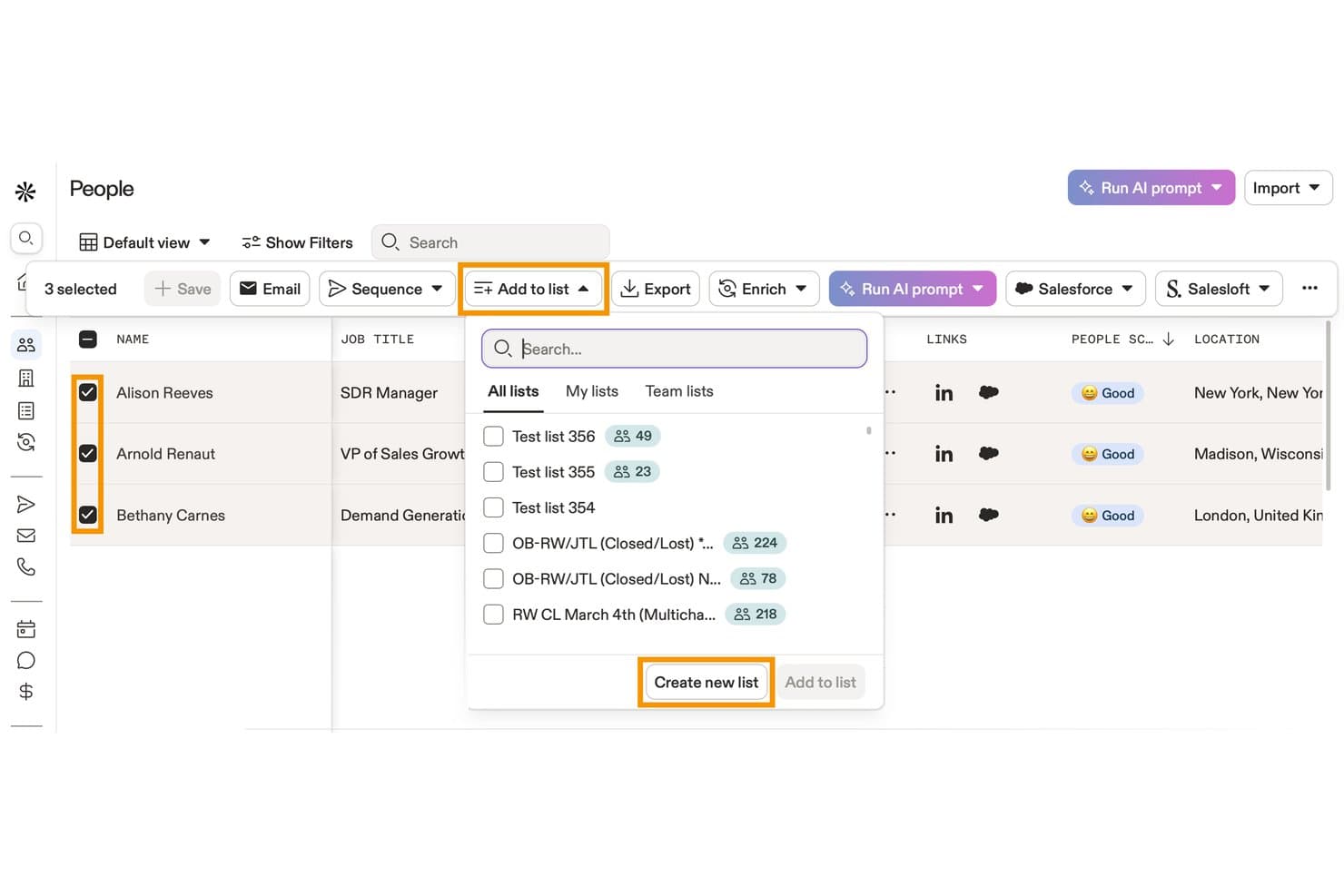
Apollo.io offers an 'Add to list' dropdown feature that lets users add selected contacts to existing lists or create a new list directly from the People view. Apollo.io is a B2B sales intelligence and engagement platform that combines a 210M+ contact database with list building, data enrichment, email sequencing, and CRM sync tools.
Who Is Apollo.io Best For?
Apollo.io suits outbound-focused revenue teams at SMBs and mid-market companies that need to build, enrich, and action prospect lists without juggling multiple tools.
Why I Picked Apollo.io
Apollo.io earns its spot on my shortlist because the enrichment filters go far deeper than most list tools offer. With 65+ attributes spanning job title, technographics, company headcount, funding stage, and topic-level buying intent, I can define an ICP and immediately surface a matching contact list. I also use the saved personas feature to lock those filter combinations in place, so my team builds from the same criteria every time rather than recreating searches from scratch.
Apollo.io Key Features
- Real-time CRM sync: Instantly updates and reflects changes between Apollo and connected CRMs like Salesforce or HubSpot.
- Bulk list import with field mapping: Supports uploading large contact lists and mapping custom fields for accurate data alignment.
- Automated email sequences: Enables users to schedule and send multi-step outreach campaigns to segmented lists.
- Engagement analytics dashboard: Tracks opens, clicks, replies, and unsubscribes at the individual contact level for each campaign.
Apollo.io Integrations
Apollo.io offers native integrations with Salesforce, HubSpot, Pipedrive, Marketo, Outreach, SalesLoft, and SendGrid. It connects with Zapier and provides an API for custom integrations.
Pros and Cons
Pros:
- Saved personas lock in repeatable ICP searches
- Built-in intent signals flag high-priority accounts
- 65+ data filters for precise list segmentation
Cons:
- Email sending limits cap high-volume outreach
- Contact data accuracy inconsistent outside North America
Learn more about Apollo.io: Best for real-time email verification
- Free trial available
- from $4.9 for 2000 email credits
Visit WebsiteCustomer Rating:4.4/5
MillionVerifier identifies invalid addresses in real-time to protect your sender score. MillionVerifier is a specialized deliverability platform built for high-growth marketing teams that need to stop email bounce issues before they start. While many tools focus on cleaning existing databases, this solution prioritizes the point of entry, ensuring only high-value, authentic leads enter your marketing funnel. By providing a secure infrastructure for real-time validation, MillionVerifier addresses the critical need for maintaining a pristine sender reputation across industries where inbox placement is a primary driver of revenue.
Why I Picked MillionVerifier
I selected MillionVerifier as the best for real-time email verification because of its exceptionally low-latency validation engine. While bulk cleaning is common, MillionVerifier excels at "live" verification, allowing you to catch typos, invalid domains, and risky addresses the moment a user hits "submit" on your signup form. This proactive approach not only keeps your database clean but also prevents the damage to sender authority that occurs when sending "welcome" sequences to non-existent accounts.
MillionVerifier Key Features
In addition to its live validation capabilities, MillionVerifier provides several technical tools to maintain long-term list hygiene:
- EverClean Automation: An automated maintenance system that connects directly to your ESP to identify and remove decaying email addresses on a daily basis without manual file uploads.
- Bulk Verifier Pro: A high-speed engine designed to process millions of records at once, providing detailed "safe-to-send" reports for legacy databases or purchased leads.
- Disposable Email Detection: Sophisticated detection logic that identifies and filters out "burnable" or temporary email addresses often used to bypass gated content.
- Global Data Privacy Compliance: Built with a security-first approach, the platform ensures all verification processes fully adhere to GDPR and international data protection standards.
MillionVerifier Integrations
Integrations include Mailchimp, Mailgun, Mailjet, Elastic Email, Campaign Monitor, Active Campaign, Zoho CRM, and Reply.
Pros and Cons
Pros:
- Automated workflows improve list management efficiency
- Flexible with various spreadsheet formats for ease of use
- High accuracy in verifying standard email types
- Automated workflows improve list management efficiency
- Flexible with various spreadsheet formats for ease of use
- High accuracy in verifying standard email types
Cons:
- Absence of an affiliate program noted by users
- Lacks features for email finding or data enrichment
- Absence of an affiliate program noted by users
- Lacks features for email finding or data enrichment
Learn more about MillionVerifier: Best for email validation
- Free demo available
- From $15/2,000 credits
Visit WebsiteCustomer Rating:4.7/5
ZeroBounce validates emails, removes invalids, detects spam traps, and enhances data. ZeroBounce is an email validation tool aimed at marketers and businesses needing to maintain clean and accurate mailing lists. It helps in verifying email addresses to improve deliverability and engagement rates.
Why I picked ZeroBounce: ZeroBounce’s main function is to validate and clean email lists, ensuring your messages reach the right people. The tool removes invalid emails and identifies spam traps and abuse emails. It also provides real-time email validation, which is vital for those who frequently update their lists. Along with these top features, ZeroBounce’s email appending feature adds missing information to your contacts, enhancing data quality.
Standout features & integrations:
Features include an email scoring system that ranks emails based on their quality and engagement potential, a data appending service that enriches contacts with missing data such as names and location, and an API integration that allows for real-time validation directly from your platform.
Integrations include HubSpot, Mailchimp, SendGrid, ActiveCampaign, Mailgun, Campaign Monitor, AWeber, Constant Contact, Salesforce, and Zapier.
Pros and Cons
Pros:
- Detects spam traps effectively
- Data appending for contacts
- Accurate email validation
Cons:
- Occasional false positives
- No manual list review
Learn more about ZeroBounce: Best for beginners with templates
- 30-day free trial available
- Pricing upon request
Visit WebsiteCustomer Rating:4.7/5
Moosend is beginner-friendly with easy templates and a drag-drop editor. Moosend is an email marketing tool designed for businesses of all sizes. It helps users create professional email campaigns, manage contacts, and automate marketing processes efficiently.
Why I picked Moosend: Moosend offers a straightforward platform ideal for beginners, thanks to its easy-to-use templates. The drag-and-drop email editor simplifies creating visually appealing campaigns without needing technical skills. It also includes segmentation and personalization features to target your audience effectively, and provides a 30-day free trial, so you can explore its features risk-free.
Standout features & integrations:
Features include a drag-and-drop email newsletter editor, A/B testing for content, and AI subject line optimization. The software also offers countdown timers and list segmentation to further enhance your campaigns.
Integrations include WordPress, Zapier, Magento, WooCommerce, Salesforce, HubSpot, PrestaShop, Mailchimp, and Shopify.
Pros and Cons
Pros:
- Real-time behavioral analytics
- Built-in landing page and form builders
- Advanced AI-powered personalization
Cons:
- Limited reporting customization
- Some advanced features need add-ons
Learn more about Moosend: 5Best for sharing curated product lists
Kit
- 14-day free trial available
- From $33/month (billed annually)
Visit WebsiteCustomer Rating:4.5/5
Kit organizes products visually with affiliate links, themed kits, and mobile support. Kit is a platform for creating and sharing curated product collections, primarily used by content creators, influencers, and enthusiasts. It helps users organize their favorite products into lists, making it easy to share recommendations with their audience.
Why I picked Kit: Kit offers a user-friendly interface that streamlines email marketing campaigns, enabling businesses to effectively manage subscriber lists and target audiences. Its AI-powered automation simplifies tasks like segmentation, personalized messaging, and performance tracking, making it an efficient tool for growing and nurturing email lists. Additionally, it allows users to create and showcase personalized recommendations for specific needs or niches, making it ideal for influencers, creators, and professionals.
Standout features & integrations:
Features include customizable product kits, mobile optimization for easy access, and the ability to embed lists directly on your platforms. It also offers simple tools for adding affiliate links, helping you monetize your recommendations effortlessly.
Integrations include Amazon, YouTube, Instagram, Twitter, Facebook, Pinterest, Shopify, WordPress, Squarespace, and Tumblr.
Pros and Cons
Pros:
- Monetization through affiliate links
- Mobile-friendly interface for easy use
- Ideal for content creators and influencers
Cons:
- Lacks advanced analytics for insights
- Limited customization for list designs
Learn more about Kit: Best for developers managing email at scale
- Free plan + free demo + 30-day free trial available
- From $15/month
Visit WebsiteCustomer Rating:4.4/5
Mailgun offers APIs, email validation, analytics, and bulk email support for developers. Mailgun is an email automation platform primarily used by developers for sending, receiving, and tracking emails. It offers high deliverability and advanced email validation to ensure messages reach the intended inboxes.
Why I picked Mailgun: Mailgun caters specifically to developers, providing powerful APIs for easy integration with various applications. Its email validation services enhance deliverability by verifying addresses before sending. The software’s detailed analytics also give insights into email performance, helping you tweak campaigns effectively, while its flexible infrastructure supports bulk email sending, making it suitable for businesses with large mailing lists.
Standout features & integrations:
Features include a strong API that allows you to send and receive welcome emails with ease. The platform also offers email validation services that help maintain a clean email list and detailed analytics and logs for tracking email performance and engagement.
Integrations include WordPress, Zapier, Slack, Magento, Shopify, Salesforce, HubSpot, WooCommerce, Heroku, and Microsoft Azure.
Pros and Cons
Pros:
- Detailed email analytics
- Flexible API integration
- High email deliverability rates
Cons:
- Can be slow for very large datasets
- Occasional email deliverability issues
Learn more about Mailgun: 7Best for personalized ecommerce marketing
Drip
- 14-day free trial + free demo available
- From $39/month
Visit WebsiteCustomer Rating:4.4/5
Drip offers tailored ecommerce tools with segmentation, automation, and analytics. Drip is an email marketing automation tool designed for ecommerce businesses aiming to boost customer engagement and sales. It focuses on creating personalized customer journeys and automating marketing workflows.
Why I picked Drip: Drip excels in providing tailored marketing solutions for ecommerce businesses. The platform offers advanced segmentation and personalization to target specific customer groups effectively, while its visual workflow builder simplifies the process of setting up automated campaigns. Additionally, the software provides strong analytics to track performance and optimize your marketing strategy.
Standout features & integrations:
Features include advanced segmentation, allowing for precise targeting based on customer behavior, a visual workflow builder to help you create complex automation sequences with ease, and comprehensive analytics to measure the effectiveness of your campaigns and make data-driven decisions.
Integrations include Shopify, WooCommerce, Magento, BigCommerce, Zapier, Facebook, Instagram, PayPal, Stripe, and OptinMonster.
Pros and Cons
Pros:
- Detailed analytics capabilities
- Intuitive workflow builder
- Effective segmentation features
Cons:
- Occasional delays in email delivery
- Limited design options for email templates
Learn more about Drip: Best for all-in-one marketing automation
- Free plan + 14-day trial + demo available
- From $19/month
Visit WebsiteCustomer Rating:4.2/5
GetResponse simplifies campaigns with automation, drag-drop editor, and analytics. GetResponse is a versatile marketing platform designed for businesses of all sizes, focusing on email marketing, lead generation, and campaign automation. It helps users create, manage, and analyze their marketing efforts through an intuitive and flexible interface.
Why I picked GetResponse: GetResponse combines email marketing with automation tools to simplify campaign management and enhance engagement. Its drag-and-drop email editor allows you to quickly design emails that look great on any device. You can also set up automated workflows to nurture leads or follow up with customers based on their behavior, while its built-in analytics help you monitor performance and make data-driven decisions.
Standout features & integrations:
Features include a landing page builder that helps you capture leads effectively, webinar hosting for engaging with your audience directly, and an autoresponder for automated follow-ups. You can also create advanced segmentation for targeting specific audience groups and use the conversion funnel feature for managing the entire customer journey.
Integrations include Shopify, WordPress, PayPal, WooCommerce, Salesforce, Magento, Zapier, Stripe, Facebook, and Google Analytics.
Pros and Cons
Pros:
- A/B testing for optimizing email content
- Conversion funnel to track user journeys
- Built-in webinar hosting for engagement
Cons:
- Occasional lag in reporting updates
- Limited advanced customization
Learn more about GetResponse: Best for managing growing contact lists
- Free plan available
- From $29/month
Visit WebsiteCustomer Rating:4.2/5
Elastic Email's dashboard gives quick access to contacts, campaigns, and reports Elastic Email helps marketing teams and small businesses organize contacts, segment audiences, and automate campaigns from one place. I like that it also combines email marketing with transactional email tools, which is useful if you need to manage subscriber lists and send different types of emails at scale.
Who Is Elastic Email Best For?
Agencies, marketers, and businesses that need to manage large email lists and send high-volume campaigns across multiple brands or clients.
Why I Picked Elastic Email
I picked Elastic Email because it works well for managing growing contact lists with audience segmentation, custom fields, and contact management tools in one place. You can group subscribers based on their data and campaign activity, which helps your team send more relevant emails to different audience segments. I also like that it supports automation, so your lists and campaigns can keep working as your subscriber base grows. This makes it a practical option for teams that need to organize contacts and run targeted email campaigns at scale.
Elastic Email Key Features
Some other features in Elastic Email help your team create, send, and track email campaigns more effectively:
- Contact import tools: Upload contacts through CSV files to add subscribers and keep your lists up to date.
- Email template editor: Create and customize marketing emails with a visual editor for faster campaign setup.
- Signup forms: Build forms to collect new subscribers and grow your contact lists directly from your website.
- Campaign reports: Review delivery, open, and click data to measure campaign performance and adjust future sends.
Elastic Email Integrations
Integrations include HubSpot, ClickUp, PayPal, WooCommerce, WordPress Sender, Integromat, Mautic, and Shopify.
Pros and Cons
Pros:
- Includes automation workflows for triggered and scheduled campaigns
- Offers API and SMTP options for flexible email integrations
- Supports high-volume email sending at a lower starting cost
Cons:
- Template editor offers limited design flexibility for custom emails
- Reporting tools lack the depth needed for advanced analysis
Learn more about Elastic Email: Best for small business email tools
- 14-day free trial + free demo available
- From $12/month
Visit WebsiteCustomer Rating:4.2/5
Constant Contact is intuitive and versatile, offering advanced email tools, templates, and analytics. Constant Contact is an email marketing tool geared towards small businesses and entrepreneurs. It focuses on simplifying email campaign management and customer engagement.
Why I picked Constant Contact: Constant Contact offers an intuitive interface that's perfect for small businesses with limited technical resources. Its email marketing features include customizable templates and an easy drag-and-drop editor. The software also provides tools for managing events and social media campaigns, while offering real-time tracking and analytics to help you understand campaign performance.
Standout features & integrations:
Features include event management tools that simplify organizing and promoting events, social media marketing features to help you manage your online presence effectively, and email automation capabilities that allow for personalized follow-ups with your audience.
Integrations include Shopify, WooCommerce, QuickBooks, Eventbrite, Salesforce, WordPress, Outlook, Google Analytics, Facebook, and Instagram.
Pros and Cons
Pros:
- AI content generator
- Event management tools
- High deliverability rates
Cons:
- Basic reporting capabilities
- Limited design customization
Learn more about Constant Contact:
Outros softwares de gestão de listas de e-mails
Eis algumas opções adicionais de software de gestão de listas de e-mails que não chegaram à minha seleção, mas que vale a pena conhecer:
- 11BrevoBest for seamless ecommerce integrations
- 12EmailOctopusBest for cost-effective email marketing
- 13BrazeBest for cross-channel engagement
- 14BloomreachBest for personalized campaigns
- 15YotpoBest for enhancing ecommerce loyalty programs
- 16MailchimpBest for all-in-one marketing for SMBs
- 17FrontBest for team collaboration
How I Evaluate Email List Management Software
I evaluate tools in two layers: the baseline capabilities a tool must have—like segmentation, data hygiene, and CRM sync—and the differentiators that set one platform apart for RevOps.
Core Functionality (Table Stakes For This List)
When I'm selecting tools for my list, I rank each one on a scale from 0 (does not offer the functionality) to 5 (excels in this area) for each core functionality listed below. Then, I calculate the tool's total score into a percentage. Each tool needs to achieve a minimum total score of 65% to be considered for inclusion.
- List Segmentation: I look for dynamic segment builders that let you filter contacts by lifecycle stage, deal status, or engagement recency—not just static tags.
- Data Hygiene & Validation: Good tools catch duplicates and verify addresses before they tank your sender reputation, so I check for automated hygiene workflows.
- Subscription & Compliance Management: I evaluate how each platform handles opt-ins, suppression lists, and consent tracking across GDPR, CAN-SPAM, and CCPA.
- CRM & Data Sync: Real-time bidirectional sync with platforms like Salesforce or HubSpot matters here, especially for keeping lifecycle stage and owner data aligned.
- List Import & Enrichment: I check whether you can map custom fields during bulk imports and enrich records with firmographic data from native or partner sources.
- Engagement Tracking: Subscriber-level metrics like opens, clicks, and unsubscribes should feed back into list health dashboards, not just sit in campaign reports.
Once I have a list of tools that meet this criteria, I consider what sets each platform apart.
Differentiating Factors (What Sets Vendors Apart)
Here's how I compare and contrast different vendors:
Standout Features
Account-based segmentation is a big differentiator for RevOps teams running ABM motions—I look for tools that group contacts by target account and buying committee role. Deliverability monitoring also matters here, since inbox placement tests and sender reputation scoring protect the lists you've worked hard to build. I check for predictive lead scoring that surfaces high-intent subscribers for sales handoff based on engagement patterns rather than manual tagging.
Beyond Features
Integration depth is one of the first things I evaluate—a tool needs native connectors to your CRM, MAP, and sales engagement platforms, plus API access for custom workflows. Pricing transparency matters just as much for RevOps teams managing budgets across quarters, so I look at whether costs scale predictably with contact volume or send limits. I also check for reporting that ties list engagement back to pipeline metrics, since that's how you justify the tool's value to leadership.
Como escolher um software de gestão de listas de e-mails
É fácil perder-se em listas extensas de funcionalidades e estruturas de preços complexas. Para o ajudar a manter o foco enquanto realiza o seu processo específico de seleção de software, apresentamos uma lista de verificação dos fatores a ter em conta:
| Fator | O que considerar |
| Escalabilidade | Certifique-se de que o software consegue acompanhar o crescimento da sua equipa. Verifique se permite acomodar um número crescente de subscritores sem comprometer o desempenho. |
| Integrações | Procure ferramentas que se integrem com o seu CRM atual, plataformas de marketing e outras ferramentas empresariais, para garantir um fluxo de trabalho contínuo. |
| Personalização | Avalie até que ponto pode adaptar o software às suas necessidades específicas, por exemplo, através de campos personalizados ou modelos de e-mail personalizados. |
| Facilidade de utilização | Escolha uma interface intuitiva que não exija formação extensa, garantindo que a sua equipa consegue adaptar-se rapidamente e utilizar a ferramenta de forma eficiente. |
| Orçamento | Avalie o custo em função do seu orçamento. Considere as despesas iniciais e contínuas, incluindo possíveis custos ocultos. |
| Medidas de segurança | Dê prioridade a ferramentas com medidas sólidas de proteção de dados, especialmente se tratar informações sensíveis dos clientes, para manter a confiança e a conformidade. |
| Suporte ao cliente | Verifique se existem opções de suporte rápidas e acessíveis para o ajudar quando encontrar problemas ou precisar de orientação. |
| Ferramentas de relatórios | Procure análises avançadas para acompanhar o desempenho e tomar decisões baseadas em dados. |
Tendências no software de gestão de listas de e-mails
Durante a minha pesquisa, consultei inúmeras atualizações de produtos, comunicados de imprensa e registos de lançamentos de diferentes fornecedores de software de gestão de listas de e-mails. Eis algumas das tendências emergentes que estou a acompanhar:
- Personalização orientada por IA: Cada vez mais ferramentas utilizam IA para personalizar o conteúdo dos emails com base no comportamento e nas preferências dos utilizadores. Isto ajuda as empresas a aumentar o envolvimento, fornecendo mensagens mais relevantes.
- Maior privacidade dos dados: À medida que as regulamentações relativas aos dados se tornam mais rigorosas, os fornecedores concentram-se em disponibilizar funcionalidades avançadas de privacidade. Esta tendência garante a conformidade com leis como o RGPD, proporcionando tranquilidade aos utilizadores.
- Emails interativos: Os fornecedores estão a introduzir elementos interativos, como sondagens e inquéritos, diretamente nos emails. Esta tendência aumenta o envolvimento ao permitir que os destinatários interajam sem sair da caixa de entrada.
- Análise em tempo real: Existe uma procura crescente por informações em tempo real para otimizar instantaneamente as campanhas de email. Como resultado, os fornecedores estão a melhorar as suas ferramentas de análise para disponibilizar dados acionáveis sobre as interações dos utilizadores.
- Comunicação omnicanal: As ferramentas de gestão de listas de emails estão a expandir-se para suportar a comunicação através de vários canais. Esta tendência ajuda as empresas a transmitir uma mensagem consistente por email, SMS e redes sociais.
O que é um software de gestão de listas de emails?
O software de gestão de listas de emails é uma ferramenta que ajuda a organizar, segmentar e gerir os seus contactos de email para campanhas de marketing. Os profissionais de marketing, os proprietários de pequenas empresas e os responsáveis por comércio eletrónico utilizam-no para manter as listas de emails organizadas, enviar as mensagens certas às pessoas certas e perceber o que está a funcionar. Simplifica a gestão dos subscritores, permite personalizar os emails e ajuda a medir os resultados para que possa estabelecer uma melhor ligação com o seu público.
Funcionalidades do software de gestão de listas de emails
Ao selecionar um software de gestão de listas de emails, procure as seguintes funcionalidades principais:
- Segmentação: Permite categorizar os seus contactos em grupos específicos para um marketing direcionado, melhorando as taxas de envolvimento.
- Personalização: Permite personalizar os emails com informações específicas do destinatário, tornando as mensagens mais relevantes e eficazes.
- Análise: Fornece informações sobre o desempenho das campanhas, ajudando a analisar as taxas de abertura, as taxas de cliques e a eficácia geral.
- Automação: Simplifica o envio de emails agendados e de sequências de seguimento, poupando tempo e garantindo uma comunicação consistente.
- Testes A/B: Permite testar diferentes versões de emails para determinar qual tem o melhor desempenho, otimizando as suas campanhas.
- Verificação de emails: Mantém uma lista de contactos limpa, identificando e removendo endereços de email inválidos e melhorando a capacidade de entrega.
- Conteúdo interativo: Incorpora elementos como sondagens e inquéritos nos emails para aumentar o envolvimento dos destinatários.
- Ferramentas de conformidade: Garantem que as suas práticas de marketing cumprem regulamentações como o RGPD, protegendo os dados dos utilizadores e mantendo a confiança.
- Suporte omnicanal: Oferece comunicação através de vários canais, permitindo uma abordagem de marketing unificada.
- Atualizações em tempo real: Fornece informações e atualizações de dados imediatas, permitindo ajustes rápidos às suas estratégias de marketing por email.
Benefícios do software de gestão de listas de emails
A implementação de um software de gestão de listas de emails proporciona vários benefícios à sua equipa e à sua empresa. Eis alguns dos benefícios que pode esperar:
- Melhor direcionamento: As funcionalidades de segmentação ajudam a enviar a mensagem certa ao público certo, aumentando as taxas de envolvimento e de conversão.
- Poupança de tempo: As funcionalidades de automação reduzem as tarefas manuais, permitindo que a sua equipa se concentre na estratégia e no conteúdo criativo.
- Personalização melhorada: As ferramentas de personalização tornam os seus emails mais relevantes, conduzindo a taxas de abertura e de cliques mais elevadas.
- Melhor tomada de decisões: A análise fornece informações sobre o desempenho das campanhas, ajudando-o a tomar decisões de marketing fundamentadas.
- Maior capacidade de entrega: A verificação de emails mantém uma lista limpa, garantindo que as suas mensagens chegam às caixas de entrada pretendidas.
- Garantia de conformidade: As ferramentas de conformidade ajudam a sua equipa a cumprir as regulamentações de proteção de dados, salvaguardando a sua empresa e a confiança dos clientes.
- Consistência entre canais: O suporte omnicanal permite transmitir uma mensagem coerente através de diferentes plataformas de comunicação.
Custos e preços do software de gestão de listas de emails
A seleção de um software de gestão de listas de emails exige uma compreensão dos vários modelos de preços e planos disponíveis. Os custos variam consoante as funcionalidades, o tamanho da equipa, os complementos, entre outros fatores. A tabela abaixo resume os planos comuns, os respetivos preços médios e as funcionalidades normalmente incluídas nas soluções de software de gestão de listas de emails:
Tabela de comparação de planos para software de gestão de listas de e-mails
| Tipo de plano | Preço médio | Funcionalidades comuns |
| Plano gratuito | $0 | Campanhas de e-mail básicas, automatização limitada e análises simples. |
| Plano pessoal | $10-$30/utilizador/mês | Modelos personalizáveis, segmentação básica e e-mails agendados. |
| Plano empresarial | $30-$100/utilizador/mês | Automatização avançada, análises aprofundadas e capacidades de testes A/B. |
| Plano empresarial de grande dimensão | $100+/utilizador/mês | Suporte personalizado, segmentação avançada, suporte multicanal e ferramentas de conformidade. |
Perguntas frequentes sobre software de gestão de listas de e-mails
Eis algumas respostas a perguntas comuns sobre software de gestão de listas de e-mails:
Como faço a gestão de uma lista de e-mails?
A gestão de uma lista de e-mails envolve várias boas práticas, como configurar um processo de dupla confirmação e utilizar etiquetas de contactos para a segmentação. Limpe regularmente a sua lista de subscritores para remover subscritores inativos e adicionar novos subscritores. Os conteúdos de e-mail personalizados e as campanhas de reativação também ajudam a manter o seu público envolvido.
Como funciona a limpeza de uma lista de e-mails?
A limpeza de uma lista de e-mails dá um novo começo à sua lista, removendo endereços de e-mail falsos ou inválidos. Este processo protege as suas campanhas contra problemas de entregabilidade e garante que as mensagens chegam às pessoas certas. A limpeza regular da sua lista ajuda a manter uma base de subscritores saudável.
Quais são as vantagens da gestão de listas no marketing por e-mail?
Uma gestão eficaz das listas resulta numa melhor entregabilidade e em taxas de interação mais elevadas. Melhora as relações com os clientes e pode reduzir os custos de marketing por e-mail, concentrando os esforços nos subscritores ativos. Uma gestão adequada das listas também apoia estratégias de marketing direcionadas.
Porque é importante a segmentação na gestão de listas de e-mails?
A segmentação permite categorizar o seu público com base no comportamento ou em dados demográficos, possibilitando um marketing direcionado. Isto resulta em mensagens mais personalizadas, melhorando as taxas de interação e conversão. A segmentação ajuda a garantir que os seus e-mails são relevantes para cada destinatário, aumentando a eficácia geral da campanha de marketing.