

Når det gjelder inntektsstyring, opplever du et konstant press for å forbedre salgseffektiviteten, legge til rette for salgsstøtte og styrke kundeengasjementet. Programvare for AI-salgsassistenter kan hjelpe. Disse AI-salgsverktøyene automatiserer oppgaver, gir innsikt og forbedrer kommunikasjonen.
Jeg har testet og vurdert ulike programvareløsninger uavhengig av hverandre for å gi deg de beste tilgjengelige alternativene for salgsprestasjoner. Jeg forstår utfordringene du står overfor, og behovet for pålitelige løsninger.
I denne oversikten finner du upartiske vurderinger av de beste AI-salgsassistentene. Jeg tar for meg funksjonene og styrkene deres, samt hvordan de kan være til nytte for selgerne dine. La oss se nærmere på hvordan disse verktøyene kan utgjøre en reell forskjell i virksomheten din.
Hvorfor du kan stole på våre programvareanbefalinger
6,700+
Reviews
20
Industry experts
16+
Evaluation factors
14
Years
Anmeldelsene våre bygger på vår uavhengige vurdering, ikke på salgsargumenter. Les hvordan vi sørger for åpenhet.
I denne guiden har vi vurdert verktøyene gjennom praktisk testing og uavhengig research og gitt dem poeng ut fra våre utvelgelseskriterier.
Anmeldelsene våre bygger på vår egen redaksjonelle vurdering. De er ikke et salgsargument.
Sammenligningstabell for programvare til AI-salgsassistenter
Denne sammenligningstabellen oppsummerer prisopplysningene for mine beste utvalgte programvareløsninger for AI-salgsassistenter:
| Tool | Best For | Trial Info | Price | ||
|---|---|---|---|---|---|
| 1 | Best for integrated B2B contact enrichment | Free plan + 14-day free trial + free demo available | From $49/user/month (billed annually) | Website | |
| 2 | Best for dynamic sales playbooks | Free demo available | Pricing upon request | Website | |
| 3 | Best for AI conversation intelligence | Free plan + 14-day trial + free demo available | From $25/user/month (billed annually) | Website | |
| 4 | Best for email outreach | Free trial available | From $37.6/month | Website | |
| 5 | Best for meeting insights | 14-day free trial + free plan + free demo available | From $30/user/month (billed annually) | Website | |
| 6 | Best for meeting notes automation | 14-day free trial + free demo available | From $19/user/month (billed annually) | Website | |
| 7 | Best for conversational marketing | Free demo available | Pricing upon request | Website | |
| 8 | Best for sales pipeline management | 14-day free trial | From $14/user/month (billed annually) | Website | |
| 9 | Best for revenue intelligence | Free demo available | Pricing upon request | Website | |
| 10 | Best for relationship management | Free plan + 14-day free trial + free demo available | From $167/month (billed annually) | Website |


Vurdering av den beste programvaren for AI-salgsassistenter
Nedenfor finner du mine detaljerte sammendrag av de beste programvareløsningene for AI-salgsassistenter som kom med på kortlisten min. Vurderingene mine gir en detaljert gjennomgang av de viktigste funksjonene, fordeler & ulemper, integrasjoner og ideelle bruksområder for hvert verktøy, slik at du kan finne det beste alternativet for deg.
 Best for integrated B2B contact enrichment
- Free plan + 14-day free trial + free demo available
- From $49/user/month (billed annually)
Visit WebsiteCustomer Rating:4.5/5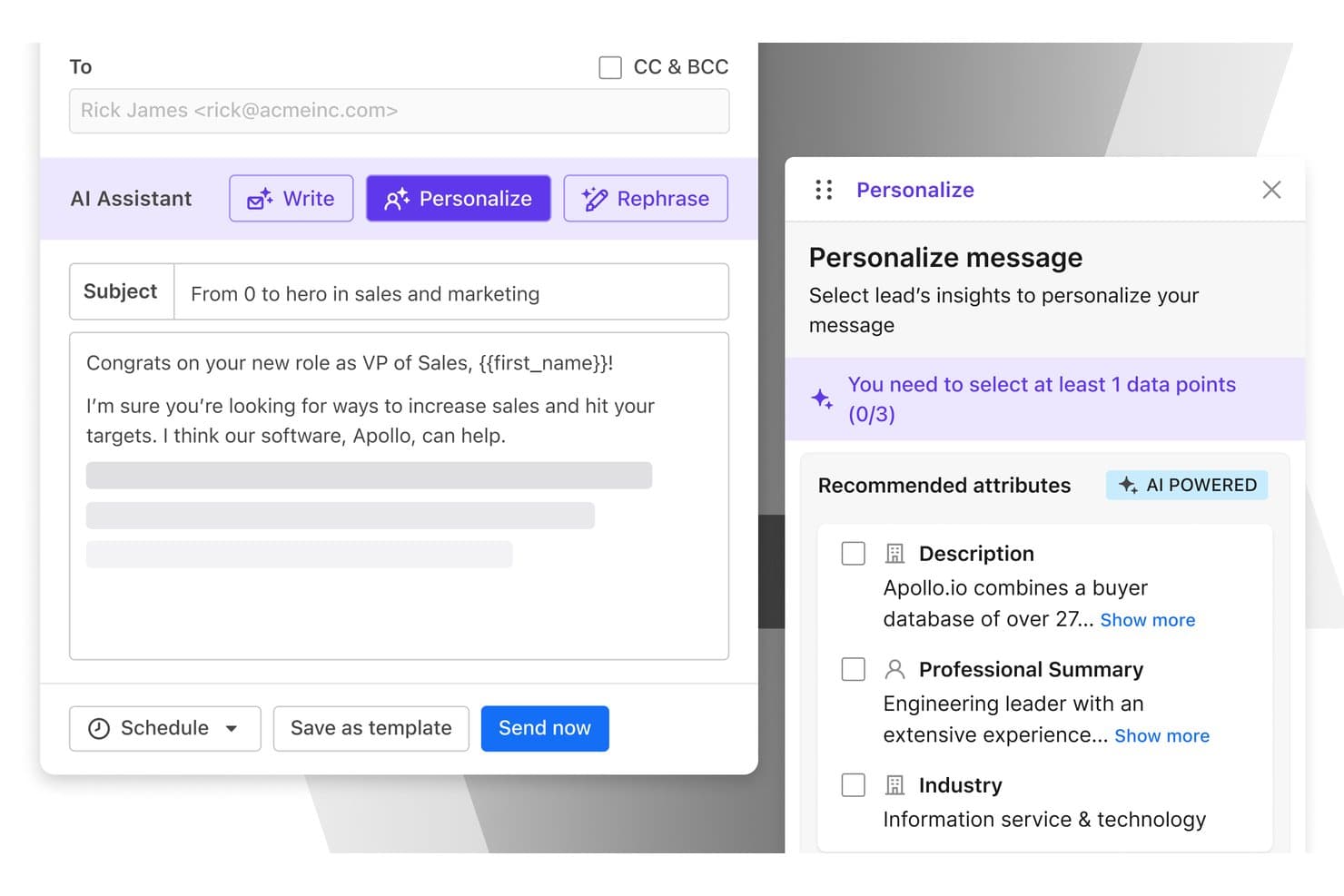
Apollo.io offers an AI-powered Personalize feature that recommends lead attributes like Description, Professional Summary, and Industry to customize sales emails. Apollo.io is an AI-powered sales intelligence and engagement platform that combines a 275M+ B2B contact database with outbound sequencing, meeting intelligence, prospect enrichment, and automated CRM sync.
Who Is Apollo.io Best For?
Apollo.io is a strong fit for SDR teams and sales-led startups that need prospecting, outreach, and contact data in a single platform.
Why I Picked Apollo.io
Apollo.io earns its spot on my shortlist because the contact enrichment is built directly into the outreach engine, not bolted on as an afterthought. I like that I can use the Chrome extension to pull verified contact data from a LinkedIn profile and drop that person straight into an AI-drafted email sequence without leaving my browser. The AI Research Power-ups then layer in account-level context, so the outreach my team sends is grounded in real prospect signals rather than generic templates.
Apollo.io Key Features
- AI-powered meeting intelligence: Records, transcribes, and summarizes sales calls with AI-generated notes and action items.
- Multi-channel sequence builder: Lets users design outbound campaigns combining email, phone, and LinkedIn steps in one workflow.
- Bi-directional CRM sync: Automatically logs calls, emails, and contact updates to Salesforce, HubSpot, Pipedrive, and Zoho.
- Chrome extension for live prospecting: Adds verified contact data and enrichment directly from LinkedIn, Gmail, and company websites.
Apollo.io Integrations
Apollo.io offers native integrations with Salesforce, HubSpot, Pipedrive, Zoho, Gmail, Outlook, LinkedIn, Slack, Gong, Chorus, Aircall, and Dialpad. Zapier and API access are also available for custom integrations.
Pros and Cons
Pros:
- Chrome extension enriches prospects without tab switching
- AI sequences personalize outreach from enriched data
- Massive verified B2B contact database built in
Cons:
- Conversation intelligence lags behind dedicated call tools
- Contact data accuracy varies for niche markets
Learn more about Apollo.io: Best for dynamic sales playbooks
- Free demo available
- Pricing upon request
Visit WebsiteCustomer Rating:4.7/5
DealHub AI offers a guided interface where sales reps can select solutions and define project duration. DealHub AI is a quote-to-revenue platform that uses AI to guide sales reps through deal configuration, pricing decisions, contract management, and engaging buyers throughout complex B2B sales cycles.
Who Is DealHub AI Best For?
DealHub AI suits B2B sales teams at mid-market and enterprise companies managing complex, multi-stakeholder deal cycles.
Why I Picked DealHub AI
I picked DealHub AI as one of the best because its guided quote configuration is where the dynamic playbook angle really comes to life. When a rep is building a quote, the platform walks them through product selection using smart filters and structured bundles, so every configuration stays on-script with your pricing logic. On top of that, configurable bundles and dynamic discounts are tied directly to automated approval workflows, meaning the playbook doesn't just guide reps, it also enforces the right deal structure at every step.
DealHub AI Key Features
- DealRoom: A digital sales room where buyers and reps interact with proposals, share documents, and track deal activity in one shared space.
- AI pricing optimization: Provides data-backed pricing recommendations based on deal attributes, historical data, and configured pricing rules.
- Subscription and renewal management: Tracks recurring contracts, renewal dates, and mid-cycle changes like upgrades or seat expansions.
- AI Decision Intelligence: A conversational interface where reps can query deal data, surface risks, and get pipeline insights using natural language prompts.
DealHub AI Integrations
DealHub AI integrates with Salesforce, Microsoft Dynamics, HubSpot, and SugarCRM, as well as Stripe and Avalara for billing and tax compliance.
Pros and Cons
Pros:
- Can be configured without custom code
- Supports line-item-level approval workflows
- Unified CPQ, CLM, and billing platform
Cons:
- Slow loading with large deal volumes
- Limited reporting on quoting trends
Learn more about DealHub AI: Best for AI conversation intelligence
- Free plan + 14-day trial + free demo available
- From $25/user/month (billed annually)
Visit WebsiteCustomer Rating:4.2/5
CloudTalk dashboard displaying real-time call metrics and performance analytics for sales teams. CloudTalk is designed for businesses aiming to enhance their sales and customer support through AI-driven solutions. By integrating AI Voice Agents and Conversation Intelligence, it addresses the need for efficient customer interaction and insightful analytics, making it a valuable tool for sales teams looking to optimize their outreach and customer engagement strategies.
Why I Picked CloudTalk
I picked CloudTalk for its standout AI Conversation Intelligence and AI Voice Agents, which directly address the needs of sales teams looking for advanced analytics and automated support. The AI Conversation Intelligence provides automatic call summaries and sentiment analysis, enabling teams to gain insights into customer interactions. Additionally, the AI Voice Agents offer 24/7 support, handling routine inquiries and freeing up sales representatives to focus on more complex tasks, making CloudTalk an ideal choice for those seeking to enhance sales efficiency.
CloudTalk Key Features
In addition to its core AI functionalities, I also found several other features that enhance its appeal as an AI sales assistant software:
- Call Management: Offers custom call routing, IVR, and call recording to streamline communication processes.
- Real-Time Monitoring: Provides live call analytics and performance tracking for effective team management.
- Global Number Management: Supports local numbers in over 160 countries, enhancing international sales capabilities.
- SPAM Protection: Safeguards caller ID to maintain communication reach and reliability.
CloudTalk Integrations
Integrations include Salesforce, HubSpot, Zoho, Zendesk, Pipedrive, Intercom, Freshdesk, Slack, Aircall, and Microsoft Teams.
Pros and Cons
Pros:
- AI-powered conversation intelligence tools
- Multiple outbound dialer modes
- Extensive CRM integration options
Cons:
- Parallel dialer stability issues
- International number availability can be inconsistent
Learn more about CloudTalk:

Instantly automates and optimizes email outreach using AI insights. Instantly is an AI-powered email outreach platform designed to help sales teams automate and optimize their email campaigns. It primarily serves businesses looking to increase their email deliverability and open rates through AI-driven insights.
Why I picked Instantly: Instantly excels in email outreach by using AI to optimize send times and personalize content. Its AI features analyze recipient behavior to improve open rates and engagement. The platform's ability to automate follow-ups and track email performance differentiates it from other solutions. These capabilities make Instantly the best choice for teams focused on effective email outreach.
Standout features & integrations:
Features include automated follow-ups, AI-driven send time optimization, and real-time analytics. Instantly helps your team increase email deliverability and engagement. It also provides tools to A/B test email content and strategies.
Integrations include HubSpot, Salesforce, Slack, Outlook, Gmail, Google Sheets, Pipedrive, and Zapier.
Pros and Cons
Pros:
- Real-time engagement analytics
- Automated follow-up sequences
- AI-driven email optimization
Cons:
- 100M+ lead database is an add-on
- Experimentation is required to achieve high deliverability and reply rates
Learn more about Instantly: Best for meeting insights
- 14-day free trial + free plan + free demo available
- From $30/user/month (billed annually)
Visit WebsiteCustomer Rating:4.8/5
Sybill analyzes meetings to deliver actionable sales communication insights. Sybill is an AI-powered platform designed to provide insights from meetings, helping sales teams improve their communication strategies. It primarily serves sales professionals by analyzing conversations to extract actionable insights and enhance client relationships.
Why I picked Sybill: Sybill's AI capabilities focus on delivering detailed meeting insights, making it perfect for teams looking to refine their communication. Its AI analyzes tone, sentiment, and key moments in conversations, offering a deeper understanding of client interactions. This helps your team capture important details and improve follow-up actions. Sybill's ability to provide real-time feedback during meetings sets it apart from other solutions.
Standout features & integrations:
Features include real-time feedback, sentiment analysis, and conversation highlights. Sybill helps your team identify key discussion points and assess client engagement. It also offers tools to record and review meetings for continuous improvement.
Integrations include Salesforce, HubSpot, Slack, Zoom, Microsoft Teams, Google Meet, Webex, Pipedrive, and Outlook.
Pros and Cons
Pros:
- Deal history analysis provides deal health and risks insights
- ‘Magic Summaries’ feature provides sales-specific summaries
- In-depth conversation analysis
Cons:
- Requires training for optimal use
- Reliance on video feeds for some metrics
Learn more about Sybill: Best for meeting notes automation
- 14-day free trial + free demo available
- From $19/user/month (billed annually)
Visit WebsiteCustomer Rating:4.6/5
Avoma automates meeting notes and delivers actionable team insights. Avoma is an AI-powered meeting assistant designed to help teams automate note-taking and improve meeting productivity. It primarily serves sales, customer success, and product teams by transcribing meetings and providing actionable insights.
Why I picked Avoma: Avoma's AI capabilities focus on automating meeting notes and extracting key insights, making it invaluable for teams looking to enhance meeting efficiency. Its AI transcribes conversations and highlights important topics, ensuring your team captures everything discussed. The platform also provides sentiment analysis to gauge participant engagement. These features align with Avoma's USP of being best for meeting notes automation.
Standout features & integrations:
Features include real-time transcription, sentiment analysis, and topic tracking. Avoma helps your team capture every detail of meetings without manual effort. It also offers tools to review and share meeting summaries for improved collaboration.
Integrations include Salesforce, HubSpot, Slack, Zoom, Microsoft Teams, Google Meet, Zoho CRM, and Pipedrive.
Pros and Cons
Pros:
- Searchable meeting recordings and shareable snippets
- Provides sentiment analysis
- AI-generated time-stamped meeting summaries and notes
Cons:
- Reports of slow processing and sync delays
- Limited customization for specific user cases
Learn more about Avoma: Best for conversational marketing
- Free demo available
- Pricing upon request
Visit WebsiteCustomer Rating:4.4/5
Drift enables real-time customer engagement through AI-powered chat. Drift is a conversational marketing platform designed for businesses to engage with website visitors in real-time using chatbots and live chat. It primarily serves sales and marketing teams by facilitating personalized customer interactions and enhancing lead conversion through AI-driven chat features.
Why I picked Drift: Drift excels in conversational marketing by using AI to create personalized chat experiences. Its AI chatbots engage visitors, qualify leads, and route them to your sales team. The platform's ability to automate responses and integrate with CRM systems ensures lead management. Drift's focus on real-time customer interaction aligns perfectly with its USP in conversational marketing.
Standout features & integrations:
Features include real-time chat, lead qualification, and automated meeting scheduling. Drift helps your team capture leads directly from conversations and engage visitors instantly. It also offers analytics to track chat performance and improve engagement strategies.
Integrations include Salesforce, HubSpot, Marketo, Slack, Google Analytics, Zendesk, Intercom, and Microsoft Dynamics 365.
Pros and Cons
Pros:
- Automates meeting scheduling
- Mobile app for iOS and Android
- Real-time visitor engagement via AI-powered chatbots
Cons:
- Limited advanced features without upgrades
- Potential for customer frustration if handoffs from bots to human reps are slow
Learn more about Drift: Best for sales pipeline management
- 14-day free trial
- From $14/user/month (billed annually)
Visit WebsiteCustomer Rating:4.4/5
Pipedrive optimizes sales management with automation and AI insights. Pipedrive is a customer relationship management (CRM) tool designed for sales teams to manage leads and sales processes. It aids in tracking deals, organizing contacts, and automating repetitive tasks, all while offering AI-powered insights to optimize sales strategies.
Why I picked Pipedrive: Pipedrive excels in managing sales pipelines with its intuitive interface and AI-driven insights. Its AI assistant helps you prioritize leads and provides recommendations to close deals. This tool offers visual sales pipelines that keep your team organized and focused on what matters most. Pipedrive's ability to automate tasks and simplify processes makes it the best for sales pipeline management.
Standout features & integrations:
Features include customizable pipelines, sales reporting, and goal tracking. Pipedrive helps your team manage contacts and track communication history. It also offers mobile access to keep your sales process moving wherever you are.
Integrations include Mailchimp, Slack, Trello, Asana, Google Meet, Outlook, QuickBooks, Xero, and Zapier.
Pros and Cons
Pros:
- 500+ integrations to boost workflows
- AI sales assistant AISA
- Built-in AI to improve deal close times
Cons:
- Support limitations on lower plan tiers
- ‘Campaigns’ add-on for email marketing lacks depth
Learn more about Pipedrive:

Clari enhances revenue forecasting and team productivity. Clari is an AI-driven platform designed for enterprise revenue orchestration, enhancing sales productivity and forecasting accuracy. It serves sales, marketing, and finance teams across various industries like technology and healthcare.
Why I picked Clari: Clari's AI capabilities focus on revenue intelligence, using AI-driven insights to guide sellers and improve forecasting. Revenue AI Agents and real-time data capture differentiate it from other tools, offering precise opportunity management and sales engagement. These features align with Clari's USP of being the best for revenue intelligence. The platform's capacity to manage over $5 trillion in revenue for clients showcases its scalability and effectiveness.
Standout features & integrations:
Features include real-time data capture, opportunity management, and conversation intelligence. Clari's AI guides your team with insights for improved forecasting. It also offers sales engagement tools to enhance productivity.
Integrations include Salesforce, Microsoft Exchange, Outlook, HubSpot, Zoom, Google Workspace, HubSpot, LinkedIn, Microsoft Teams, Slack, Google Sheets, and Marketo.
Pros and Cons
Pros:
- Sales engagement tools for prospecting and sales execution
- AI provides accurate sales forecasts to mitigate deal risks
- Real-time data capture and unification of sales activity data
Cons:
- Dependency on CRM hygiene
- Implementation often involves professional services that can incur additional costs
Learn more about Clari: 10Best for relationship management
Clay
- Free plan + 14-day free trial + free demo available
- From $167/month (billed annually)

Clay enhances lead enrichment and outreach with AI-powered automation. Clay is an AI-driven platform designed to enhance relationship management by leveraging data to improve go-to-market strategies. It primarily serves sales and marketing teams seeking to enrich leads and automate outreach.
Why I picked Clay: Clay's AI capabilities focus on relationship management through data integration and personalized communication. The platform's AI tools, like Claygent and Sequencer, automate research and email outreach, helping your team maintain strong connections with prospects. Signals and Audiences provide real-time insights into job changes and social mentions, keeping your team informed. These features make Clay ideal for managing and nurturing relationships.
Standout features & integrations:
Features include dynamic workflows, AI-powered lead enrichment, and intent signals. Clay helps your team automate repetitive tasks and personalize outreach. It also supports account-based marketing strategies to enhance your go-to-market efforts.
Integrations include Salesforce, HubSpot, LinkedIn, Microsoft Dynamics 365, Google Sheets, Slack, and Outlook.
Pros and Cons
Pros:
- Real-time contact enrichment
- Automates lead enrichment
- Unified contact data in a centralized location
Cons:
- Data accuracy varies by source
- No free trial for all features
Learn more about Clay:
Annen programvare for AI-salgsassistenter
Her er noen flere alternativer for programvare til AI-salgsassistenter som ikke kom med på kortlisten min, men som likevel er verdt å sjekke ut:
- 11ArtisanBest for prospecting efficiency
- 12UserGemsBest for contact insights
- 13SalesCloser AIBest for deal closures
- 14CoPilot AIBest for lead generation
- 15LoopioBest for RFP automation
- 16SaleshandyBest for email tracking
- 17OutreachBest for sales engagement
- 18DialpadBest for voice intelligence
- 19CognismBest for B2B lead generation
- 20GongBest for sales call analysis
- 21Salesforce Best for CRM integration
- 22Reply.ioBest for multichannel sequences
- 23Apollo.ioBest for prospecting and outreach
How I Evaluate AI Sales Assistant Software
AI sales assistant software is what a RevOps team turns to when reps aren't logging calls and managers can't tell which deals are actually moving. When I evaluate tools in this space, I first establish what every pick must do to qualify, then look at what actually separates one solution from another.
Core Functionality (Table Stakes for This List)
For AI sales assistant software, the core functionality I test and evaluate is:
- Conversation capture: I check whether the tool records and transcribes calls across Zoom, Teams, and Google Meet with accurate speaker separation.
- CRM sync: Automatic logging of call notes, contacts, and activity data back to Salesforce or HubSpot without reps touching a single field.
- AI summaries: I evaluate whether post-meeting summaries capture actual decisions, objections, and next steps rather than generic recaps.
- Deal intelligence: The tool should flag at-risk deals based on engagement signals, like a champion going silent or pricing never being discussed.
- Coaching insights: I look for talk-to-listen ratios, question frequency, and methodology adherence scoring that managers can act on.
- Follow-up generation: Drafted follow-up emails and action items pulled directly from conversation context, not boilerplate templates.
- Multi-channel coverage: Sales happens across calls, email, and chat. I evaluate whether the tool tracks buyer engagement across all of them.
A tool has to deliver most of these capabilities to earn a spot on the list. From there, I consider what sets each tool apart.
Standout Features (What Separates the Picks)
Other impressive features I look for include real-time sales guidance capabilities that actively assist reps during live conversations, such as surfacing objection-handling recommendations, competitor battle cards, discovery prompts, or next-best actions based on deal context. Sales methodology alignment also stands out, especially when tools can track and coach to frameworks like MEDDIC or Challenger within the workflow. I also consider how vendors handle data privacy and recording consent, since enterprise IT almost always asks about compliance, regional storage, and redaction of sensitive info.
What I Weigh Beyond Features
Pricing model matters here because per-seat costs at $100+/user/month add up fast across a 50-rep org. I evaluate whether a tool fits the buyer's team size and maturity—a five-person startup has very different needs than an enterprise with global sales pods. Tech stack fit is another big factor; I check how deeply a tool connects to existing dialers, sequencers like Outreach or SalesLoft, and BI platforms where RevOps teams build reporting. I also consider onboarding support, since adoption is where most AI sales assistant rollouts stall.
Slik velger du programvare for AI-salgsassistenter
Det er lett å gå seg vill i lange funksjonslister og komplekse prisstrukturer. For å hjelpe deg med å holde fokus mens du arbeider deg gjennom den unike prosessen med å velge programvare, får du her en sjekkliste over faktorer du bør ha i tankene:
| Faktor | Hva du bør vurdere |
|---|---|
| FaktorSkalerbarhet | Hva du bør vurdereKan programvaren vokse sammen med virksomheten din? Sjekk om den støtter flere brukere og funksjoner etter hvert som behovene dine øker. Unngå løsninger som kan begrense fremtidig vekst. |
| FaktorIntegrasjoner | Hva du bør vurdereKan den kobles til verktøyene du allerede bruker? Sørg for kompatibilitet med CRM-systemet, e-post og andre viktige systemer for å unngå datasiloer og forstyrrelser i arbeidsflyten. |
| FaktorTilpasningsmuligheter | Hva du bør vurdereKan du tilpasse den til prosessene dine? Se etter fleksible innstillinger som lar deg justere arbeidsflyter, oversikter og rapporter slik at de passer teamets unike behov. |
| FaktorBrukervennlighet | Hva du bør vurdereEr den brukervennlig for teamet ditt? Vurder læringskurven og om grensesnittet er intuitivt nok til rask innføring uten omfattende opplæring. |
| FaktorImplementering og innføring | Hva du bør vurdereHvor smidig er oppsettsprosessen? Vurder tiden og ressursene som trengs for å komme i gang, inkludert eventuell tilgjengelig støtte eller opplæringsmateriell som kan hjelpe i overgangen. |
| FaktorKostnad | Hva du bør vurderePasser den budsjettet ditt? Sammenlign prisen med budsjettet og forventet avkastning på investeringen. Vær oppmerksom på skjulte gebyrer eller kostnader som kan oppstå når du skalerer eller legger til funksjoner. |
| FaktorSikkerhetstiltak | Hva du bør vurdereEr dataene dine beskyttet? Kontroller om programvaren følger bransjestandarder, for eksempel kryptering og tilgangskontroller, for å holde sensitiv informasjon trygg. |
| FaktorTilgjengelig kundestøtte | Hva du bør vurdereFår du hjelp når du trenger det? Se etter støttealternativer som er tilgjengelige døgnet rundt, responstider og muligheten for dedikerte kundeansvarlige som kan bistå med eventuelle problemer. |
Hva er programvare for AI-salgsassistenter?
Programvare for AI-salgsassistenter er et verktøy som bruker kunstig intelligens til å automatisere og forbedre ulike deler av salgsarbeidsflyten. Salgsmedarbeidere, inkludert selgere og salgsledere, bruker vanligvis disse automatiseringsverktøyene for å øke effektiviteten og forbedre kundeinteraksjonene gjennom hele salgssyklusen. Funksjoner som poengsetting av potensielle kunder, prediktiv analyse og automatisert kommunikasjon bidrar til å identifisere potensielle kunder med høy verdi, prognostisere salg og engasjere kunder. Alt i alt gir disse verktøyene betydelig verdi ved å spare tid og forbedre nøyaktigheten i salgsarbeidet.
Funksjoner
Når du velger programvare for AI-salgsassistenter, bør du se etter følgende viktige funksjoner:
- Poengsetting av potensielle kunder: Bruker AI til å vurdere og prioritere potensielle kunder basert på sannsynligheten for at de konverterer, slik at teamet ditt kan fokusere på potensielle kunder med høy verdi.
- Prediktiv analyse: Analyserer historiske salgsdata for å prognostisere fremtidige salgstrender, noe som bidrar til strategiske beslutninger og planlegging.
- Automatisert kommunikasjon: Automatiserer rutinemessige salgs-e-poster og meldinger og sørger for rettidig og konsekvent engasjement med potensielle kunder og kunder.
- Sentimentanalyse: Vurderer tone og følelser i kundeinteraksjoner for å gi innsikt i kundetilfredshet og engasjement.
- Sanntidstranskripsjon: Transkriberer møter og samtaler umiddelbart, slik at du får nøyaktig dokumentasjon, samtaleoppsummeringer og enkel tilgang til informasjonen.
- Samtaleinnsikt: Analyserer opptak av salgssamtaler for å identifisere vellykkede taktikker og forbedringsområder, noe som styrker teamets prestasjoner.
- Smart planlegging: Automatiserer møteplanlegging basert på tilgjengelighet, reduserer frem-og-tilbake-kommunikasjon og sparer tid.
- Tilpassbare oversikter: Tilbyr skreddersydde visninger og rapporter, slik at brukerne kan fokusere på de mest relevante måleverdiene og dataene.
- AI-drevne anbefalinger: Gir konkrete forslag til neste steg i salgsprosessen og optimaliserer strategier og resultater.
Fordeler
Implementering av programvare for AI-salgsassistenter gir flere fordeler for teamet og virksomheten din. Her er noen av fordelene du kan se frem til:
- Økt effektivitet: Automatiserer rutineoppgaver som oppfølging via e-post, e-postsekvenser og møteplanlegging, slik at teamet ditt får mer tid til å fokusere på å avslutte avtaler.
- Forbedret nøyaktighet: Bruker prediktiv analyse i AI-drevne verktøy til å prognostisere salgstrender, slik at du kan ta velinformerte beslutninger og redusere gjettingen.
- Bedre kundeengasjement: Gir personlig kommunikasjon gjennom AI-drevet innsikt og sørger for mer meningsfulle interaksjoner med kunder ved hjelp av databerikelse.
- Bedre prioritering av potensielle kunder: Bruker poengsetting av potensielle kunder til å identifisere kunder med høy verdi, slik at teamet ditt kan konsentrere innsatsen der den har størst betydning.
- Dypere innsikt: Tilbyr samtaleanalyse og sporing av sentiment, slik at du får en bedre forståelse av kundenes behov og områder som kan forbedres.
- Raskere innføring: Forenkler integreringen av nye teammedlemmer med automatiserte opplæringsressurser og intuitive grensesnitt.
- Kostnadsbesparelser: Reduserer behovet for manuelt arbeid med dataregistrering og analyse, senker driftskostnadene og øker lønnsomheten.
Kostnader og priser
Valg av programvare for AI-salgsassistenter krever en forståelse av de ulike prismodellene og planene som er tilgjengelige. Kostnadene varierer basert på funksjoner, teamstørrelse, tillegg og mer. Tabellen nedenfor oppsummerer vanlige planer, gjennomsnittsprisene deres og typiske funksjoner som er inkludert i programvareløsninger for AI-salgsassistenter:
Sammenligningstabell for programvare for AI-salgsassistenter
| Plantype | Gjennomsnittspris | Vanlige funksjoner |
|---|---|---|
| PlantypeGratisplan | Gjennomsnittspris$0 | Vanlige funksjonerGrunnleggende sporing av potensielle kunder, begrenset e-postautomatisering og enkel rapportering. |
| PlantypePersonlig plan | Gjennomsnittspris$15-$99 | Vanlige funksjonerAvansert personlig tilpasset e-postautomatisering, AI-innsikt, sanntidsveiledning og tilpassbare dashbord. |
| PlantypeForretningsplan | Gjennomsnittspris$100-$350+ | Vanlige funksjonerFull CRM-integrasjon, prediktiv analyse og kommunikasjon på tvers av flere kanaler. |
| PlantypeVirksomhetsplan | Gjennomsnittspris$400-$2,500+ | Vanlige funksjonerTilpassede AI-modeller, dedikert kundestøtte og avanserte sikkerhetsfunksjoner. |
Vanlige spørsmål om programvare for AI-salgsassistenter
Her er noen svar på vanlige spørsmål om programvare for AI-salgsassistenter:
Kan AI-salgsassistenter bidra til overholdelse av personvernkrav?
Ja, AI-salgsassistenter kan bidra til overholdelse av personvernkrav. Mange verktøy tilbyr funksjoner som er i samsvar med GDPR, CCPA og andre forskrifter. Det er viktig å gjennomgå programvarens personvernregler og praksis for datahåndtering for å sikre at de oppfyller selskapets krav. Se etter funksjoner som datakryptering, håndtering av brukersamtykke og revisjonslogger. Disse verktøyene kan hjelpe teamet med å opprettholde samsvar samtidig som kundedata håndteres.
Hvordan måler jeg avkastningen på investeringen med programvare for AI-salgsassistenter?
For å måle avkastningen på investeringen bør du begynne med å fastsette tydelige mål, som økt konvertering av potensielle kunder eller redusert responstid. Følg med på sentrale resultatindikatorer (KPI-er), for eksempel salgsvekst, spart tid og kundetilfredshet. Bruk programvarens analysefunksjoner til å samle inn data og sammenligne dem med målene dine. Gå regelmessig gjennom disse målingene for å vurdere programvarens innvirkning på salgsprosessen. Beregning av avkastningen på investeringen hjelper deg med å forstå verktøyets verdi og gir grunnlag for fremtidige investeringsbeslutninger.
Hvordan bidrar AI-salgsassistenter til å forenkle salgsrapporteringen for RevOps-team?
AI-salgsassistenter kan automatisere dataregistrering, oppfølgings-e-poster og rapportering, slik at du får innsikt i sanntid uten manuelt arbeid. De samler salgsaktiviteter, avtalestatus og resultater i lettleste dashbord. Dette gjør det enklere for RevOps-team å overvåke tilstanden i salgspipelinen, sammenligne representantenes resultater og identifisere flaskehalser raskere.
Kan AI-salgsassistenter analysere data fra salgssamtaler for veiledning og forbedring?
Ja, de fleste AI-salgsassistenter kan gjennomgå transkripsjoner av salgssamtaler og fremheve viktige trender. Disse verktøyene markerer viktige øyeblikk, gir sentimentanalyse og fremhever områder der salgsrepresentanter kan forbedre seg. RevOps-team bruker denne tilbakemeldingen til å gi målrettet veiledning og hjelpe team med å inngå flere avtaler.
Hvor raskt kan RevOps-team forvente å se resultater fra verktøy for AI-salgsassistenter?
Du kan merke innledende forbedringer i løpet av noen uker, avhengig av hvor raskt teamet tar i bruk verktøyet. Tidlige gevinster viser seg ofte i form av ryddigere data, raskere gjennomganger av salgspipelinen og økt oppfølgingsfrekvens. Mer betydelige endringer i avtaletempo eller konverteringsrater kan ta noen måneder før de blir fullt realisert.