

Programvare for tilbud og fakturering er verdifulle verktøy for alle selskaper. Med riktig programvare kan team forbedre faktureringseffektiviteten og øke den økonomiske nøyaktigheten. Men det kan være utfordrende å finne riktig programvare for tilbud og fakturering, særlig når det finnes så mange alternativer.
Med utgangspunkt i min erfaring med programvare for inntektsoperasjoner testet og sammenlignet jeg flere av de beste tilgjengelige programmene for tilbud og fakturering. Deretter samlet jeg resultatene i detaljerte anmeldelser for å hjelpe deg med å finne den beste programvaren for dine behov.
Why Trust Our Software Recommendations
6,700+
Reviews
20
Industry experts
16+
Evaluation factors
14
Years
Our reviews reflect our independent judgment—not a sales pitch. Learn how we stay transparent.
For this guide, we evaluated tools using hands-on testing and independent research, scoring tools using our selection criteria.
Our reviews reflect our human editorial judgment, not a sales pitch.
Sammenligningstabell: Programvare for tilbud og fakturering
Denne sammenligningstabellen oppsummerer prisdetaljene for mine beste utvalg av programvare for tilbud og fakturering.
| Tool | Best For | Trial Info | Price | ||
|---|---|---|---|---|---|
| 1 | Best for subscription lifecycle automation | Free demo available | Pricing upon request | Website | |
| 2 | Best for unified quoting and contracting | Free demo available | Pricing upon request | Website | |
| 3 | Best for mobile use | Free plan + free trial available | From $49/month | Website | |
| 4 | Best for global transactions | Free plan + free demo available | From $0.30/transaction | Website | |
| 5 | Best for advanced reporting | 30-day free trial | From $38/month | Website | |
| 6 | Best for small businesses | 30-day free trial available | From $2.50/month | Website | |
| 7 | Best for branded invoice templates | Free plan available | From $9.99/month | Website | |
| 8 | Best for free invoicing | 30-day free trial | From $40/month | Website | |
| 9 | Best for SaaS companies | Free demo available | From $0.50 + 5% per transaction | Website | |
| 10 | Best for multi-currency support | Free demo available | Pricing upon request | Website |


Anmeldelser av den beste programvaren for tilbud og fakturering
Nedenfor finner du mine detaljerte sammendrag av den beste programvaren for tilbud og fakturering som kom med på kortlisten min. Anmeldelsene mine gir en detaljert gjennomgang av de viktigste funksjonene, fordeler & ulemper, integrasjoner og ideelle bruksområder for hvert verktøy, slik at du kan finne det beste alternativet for deg.
 Best for subscription lifecycle automation
- Free demo available
- Pricing upon request
Visit WebsiteCustomer Rating:4.2/5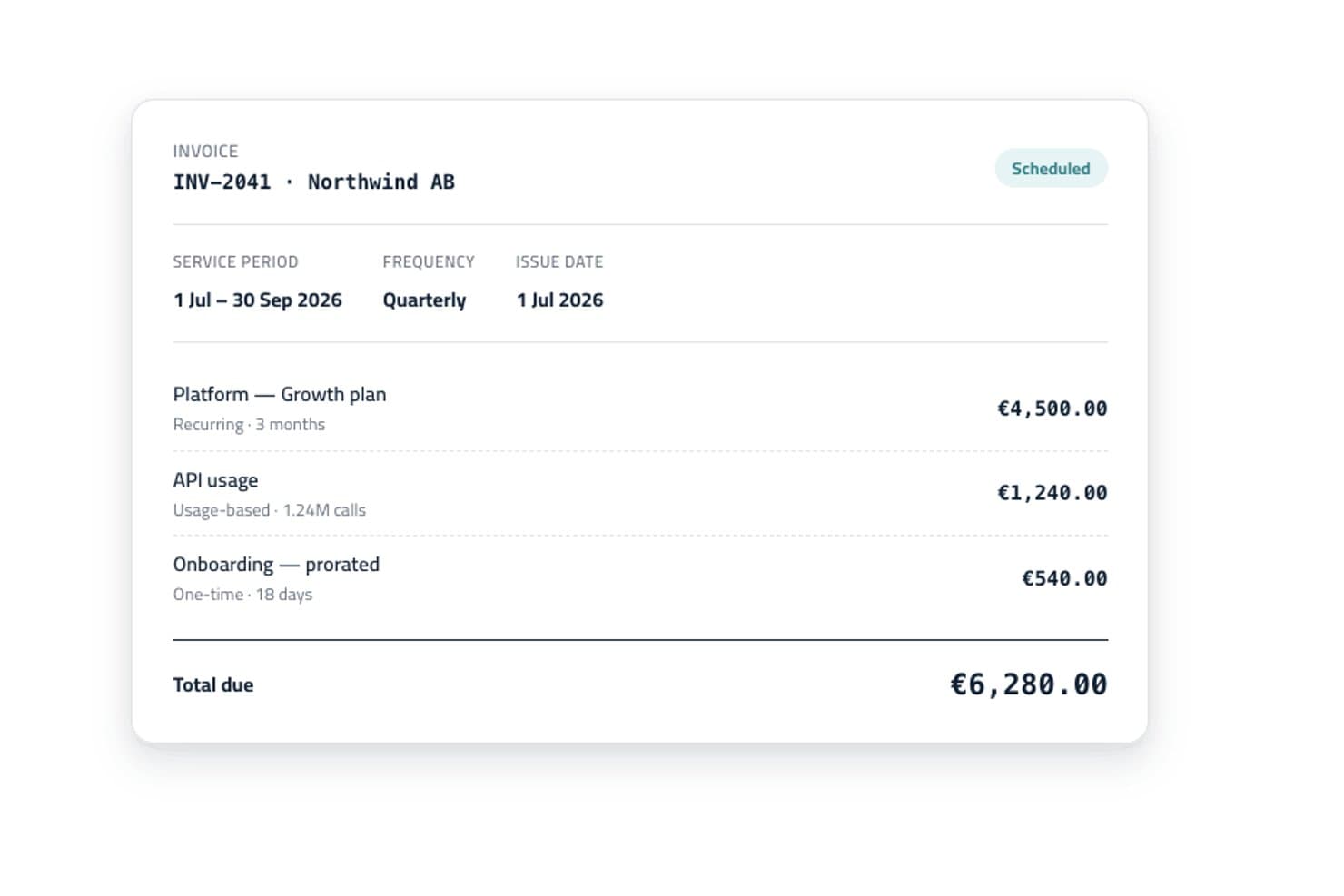
Younium offers automated invoice generation with itemized billing lines, service periods, and scheduling status for recurring and usage-based charges. Younium is a subscription management platform that combines CPQ, automated billing, revenue recognition, and CRM and ERP integrations for B2B recurring revenue businesses.
Who Is Younium Best For?
Younium is a strong fit for mid-market B2B SaaS and tech companies whose finance and RevOps teams manage complex, evolving subscription agreements.
Why I Picked Younium
Younium earns its spot on my shortlist because the connection between quoting and billing is genuinely tight. I like that the AI-powered CPQ Agent lets my team build quotes conversationally, adding products and adjusting pricing in real time, and what's quoted flows directly into subscription billing with no manual re-entry. Multi-level approval workflows trigger automatically on discount thresholds or non-standard terms, keeping every deal governed without slowing the process down.
Younium Key Features
- ASC 606 and IFRS 15 revenue recognition: Automates revenue schedules and compliance for every subscription order.
- Customer self-service portals: Lets your customers view quotes, accept terms, access invoices, and pay balances online.
- Multi-entity and multi-currency support: Handles billing across different legal entities, currencies, and geographies.
- Open API and webhooks: Enables real-time data sync and integration with downstream RevOps and finance systems.
Younium Integrations
Younium offers native integrations with HubSpot, Salesforce, NetSuite, QuickBooks, Xero, Microsoft Dynamics 365, Exact Online, Stripe, and GoCardless. An open API is available for custom integrations.
Pros and Cons
Pros:
- AI-powered CPQ speeds up quote creation
- Revenue recognition is built into billing
- Handles mid-cycle subscription changes natively
Cons:
- Onboarding takes longer than simpler alternatives
- Reporting dashboards have limited out-of-box options
Learn more about Younium: Best for unified quoting and contracting
- Free demo available
- Pricing upon request
Visit WebsiteCustomer Rating:4.7/5
DealHub AI offers a payments dashboard that tracks invoice statuses such alongside invoice numbers and start dates. DealHub AI is a quote-to-revenue platform that combines CPQ, contract lifecycle management, automated billing, and digital sales proposals in a single connected system.
Who Is DealHub AI Best For?
DealHub AI is a strong fit for B2B sales teams at mid-market and enterprise companies that manage complex, multi-stakeholder deals with custom pricing and contract requirements.
Why I Picked DealHub AI
DealHub AI earns its spot on my shortlist because it keeps quoting and contracting inside one platform instead of forcing your team to jump between a CPQ tool and a separate CLM. I like that you can generate a quote and convert it directly into a contract using pre-approved clause libraries and dynamic templates, with redlining and version tracking built in. That means my team isn't manually copying deal terms from one document to another, which is where errors tend to sneak in.
DealHub AI Key Features
- DealRoom: A buyer-facing portal where clients can view quotes, ask questions, and sign documents in one shared space.
- Guided selling playbooks: Rule-based configuration guides reps through product and pricing options based on deal criteria.
- Automated billing: Schedules recurring invoices, handles usage-based billing, and manages mid-cycle amendments like upgrades or co-terming.
- DealSign: A built-in eSign tool that lets buyers sign quotes and contracts without a third-party application.
DealHub AI Integrations
DealHub AI offers native integrations with Salesforce, HubSpot, Microsoft Dynamics 365, Docusign, Gong, Slack, NetSuite, and Avalara. An API is also available for custom integrations, such as connecting additional CRM and ERP systems. Zapier support is not clearly documented.
Pros and Cons
Pros:
- Supports line-item and deal-level approvals
- Unifies CPQ, CLM, and billing natively
- Admins build approval workflows without coding
Cons:
- Gaps in product documentation for admins
- Slow loading times on high-volume deals
Learn more about DealHub AI:

Square Invoices enables easy billing and payment for small to medium businesses. Square Invoices is an invoicing tool tailored for small to medium-sized businesses, enabling efficient billing and payment processing. It serves retail, service-based businesses, and freelancers, making invoicing and payment collection straightforward.
Why I picked Square Invoices: Square Invoices excels with its mobile accessibility, allowing you to manage invoices on the go. Its user-friendly app ensures you can send invoices and track payments easily from almost anywhere. Customizable invoice templates help you maintain brand consistency while the platform's integration with Square's payment processing offers an easy billing experience.
Standout features & integrations:
Features include recurring billing that automates invoice creation for regular clients. Payment reminders help reduce late payments by notifying clients automatically. The reporting tools give you insights into your financial health and help track outstanding invoices.
Integrations include QuickBooks, WooCommerce, BigCommerce, Wix, Adobe Commerce, Google Calendar, Acuity Scheduling, JotForm, Zapier, and Mailchimp.
Pros and Cons
Pros:
- Integrated payment processing
- Recurring billing options
- Automated payment reminders
Cons:
- Limited advanced features
- Not ideal for large enterprises
Learn more about Square Invoices: Best for global transactions
- Free plan + free demo available
- From $0.30/transaction
Visit WebsiteCustomer Rating:4.6/5
PayPal offers versatile payment processing for businesses of all sizes globally. PayPal is a versatile payment processing and invoicing solution widely used by businesses of all sizes. Its main user base includes small to medium-sized enterprises looking for efficient financial transaction management. It facilitates global transactions and offers robust financial services.
Why I picked PayPal: PayPal is distinguished by its global reach and ability to handle international transactions easily. It offers features like multi-currency support and cross-border payment capabilities, essential for businesses operating in multiple countries. The platform's security measures, including encrypted transactions, ensure safe dealings. Its user-friendly interface helps streamline payment processes, making it ideal for businesses looking to expand internationally.
Standout features & integrations:
Features include multi-currency support, allowing your team to handle global transactions at scale. Advanced security measures keep your financial data protected. The "Pay in 4" option provides flexible payment plans for customers, enhancing your sales potential.
Integrations include QuickBooks, Xero, Shopify, WooCommerce, BigCommerce, Adobe Commerce, PrestaShop, Stripe, Salesforce, and Mailchimp.
Pros and Cons
Pros:
- Trusted brand with wide global acceptance
- Strong security features
- Flexible payment options
Cons:
- Transaction fees can be costly
- Holds on funds for new users
Learn more about PayPal:

QuickBooks helps SMBs manage finances, payroll, and tax compliance efficiently. QuickBooks is an accounting and invoicing software widely used by small to medium-sized businesses for managing finances, payroll, and tax compliance. It offers features to streamline bookkeeping and financial reporting.
Why I picked QuickBooks: QuickBooks delivers in-depth reporting capabilities, making it ideal for those needing detailed financial insights. Its customizable reports help you track every aspect of your business finances. The software's invoicing tools automate billing, reducing manual work. Real-time tracking of income and expenses ensures your financial records stay up-to-date.
Standout features & integrations:
Features include automated sales tax calculations that simplify tax compliance for your business. The cash flow planner helps you forecast and manage your finances effectively. Receipt capture allows you to upload and track expenses easily, keeping your records organized.
Integrations include PayPal, Shopify, Square, TSheets, BILL, HubSpot, Salesforce, Expensify, Gusto, and Mailchimp.
Pros and Cons
Pros:
- Extensive reporting capabilities
- Automated sales tax calculations
- Real-time financial tracking
Cons:
- Can be complex for new users
- Limited customization for some features
Learn more about QuickBooks: 6Best for small businesses
Xero
- 30-day free trial available
- From $2.50/month
Visit WebsiteCustomer Rating:4.4/5
Xero offers accounting with bank reconciliation and reporting for small businesses. Xero is an accounting software designed for small businesses and sole traders, offering features like automated bank reconciliation and customizable reporting. It supports various industries, including construction, real estate, and retail.
Why I picked Xero: Xero caters to small businesses with features such as automated transaction reconciliation and invoice reminders. Its customizable reporting tools help you manage finances efficiently. Xero's multi-tier pricing plans accommodate growing businesses, ensuring scalability. Plus, integrations with popular payment processors ensure streamlined invoice payments.
Standout features & integrations:
Features include automated bank reconciliation to keep your accounts updated effortlessly. Customizable reporting tools help you tailor financial insights to your needs. Invoice reminders ensure your clients pay on time, reducing late payments.
Integrations include QuickBooks, Shopify, HubSpot, PayPal, Stripe, Square, Gusto, Vend, Fathom, and Salesforce.
Pros and Cons
Pros:
- Extensive accounting features
- Supports multiple industries
- Flexible pricing plans
Cons:
- Occasional sync issues with banks
- High fees for advanced plans
Learn more about Xero: Best for branded invoice templates
- Free plan available
- From $9.99/month
Visit WebsiteCustomer Rating:4.6/5
Invoicely aids freelancers and SMBs with invoicing, expense, and time tracking. Invoicely is an online invoicing tool geared towards freelancers and small businesses. It provides essential functions like invoicing, expense tracking, and time tracking to help streamline financial management.
Why I picked Invoicely: Invoicely is recognized for its straightforward invoicing capabilities, making it ideal for those who need a simple solution without unnecessary complexity. It offers customizable invoice templates that help maintain your brand identity through customizable branded elements such as logos, icons, and colour schemes. The platform also includes time and expense tracking, allowing you to manage your projects and finances in one place. Its user-friendly interface ensures you can get started quickly with minimal training.
Standout features & integrations:
Features include time tracking, which helps you log billable hours efficiently. Expense tracking allows you to keep an eye on your business costs effortlessly. The customizable templates let you tailor invoices to suit your brand, enhancing your professional appearance.
Integrations include PayPal, Stripe, Authorize.Net, Mollie, WePay, Square, 2Checkout, BitPay, Payoneer, and BlueSnap.
Pros and Cons
Pros:
- Straightforward invoicing process
- Customizable invoice templates
- Time and expense tracking features
Cons:
- No native mobile app
- Not ideal for large teams
Learn more about Invoicely:

Wave provides free accounting with expense tracking and receipt scanning for small businesses. Wave is an online accounting and invoicing platform designed for small businesses and freelancers. It offers essential financial management tools like invoicing, expense tracking, and receipt scanning without monthly fees.
Why I picked Wave: Wave's standout feature is its free invoicing service, making it accessible for small businesses on a budget. It provides unlimited invoices, allowing you to send as many as needed without extra cost. The easy-to-use dashboard helps you stay on top of your finances. Its receipt scanning feature simplifies expense management by digitizing your receipts.
Standout features & integrations:
Features include automated receipt scanning, which helps you track expenses by digitizing paper receipts. Wave's invoicing tool lets you customize invoice templates to match your brand. The dashboard provides a clear overview of your business's financial health, helping you make informed decisions.
Integrations include PayPal, Etsy, Shoeboxed, Google Sheets, Zapier, Stripe, Shopify, Square, QuickBooks, and HubSpot.
Pros and Cons
Pros:
- Free unlimited invoicing
- Automated receipt scanning
- Clear financial dashboard
Cons:
- Limited advanced features
- No inventory management
Learn more about Wave: Best for SaaS companies
- Free demo available
- From $0.50 + 5% per transaction
Visit WebsiteCustomer Rating:4.6/5
Paddle offers billing, subscription management, and global compliance for SaaS companies. Paddle is a billing and subscription management platform tailored for SaaS companies, providing tools for payment processing, subscription management, and global compliance. It serves businesses looking to streamline their billing operations and expand internationally.
Why I picked Paddle: Paddle excels in serving SaaS companies by offering comprehensive billing and subscription management tools. It simplifies global transactions with built-in tax compliance and currency conversion. The platform's subscription management features help you handle recurring billing with ease. Paddle's analytics tools provide insights into customer behavior and revenue trends.
Standout features & integrations:
Features include a built-in tax compliance system that handles VAT and sales tax for global transactions. The currency conversion feature allows you to cater to international customers easily. Paddle’s analytics tools offer detailed insights into revenue and customer metrics, helping you make data-driven decisions.
Integrations include Salesforce, Xero, QuickBooks, Zapier, HubSpot, Slack, Google Analytics, Mailchimp, Shopify, and WordPress.
Pros and Cons
Pros:
- Built-in tax compliance
- Supports global transactions
- Complete subscription management
Cons:
- Limited customization options
- Requires onboarding for new users
Learn more about Paddle: Best for multi-currency support
- Free demo available
- Pricing upon request
Visit WebsiteCustomer Rating:4.3/5
Sage Accounting manages finances with expense tracking and cash flow tools for SMBs. Sage Accounting is a financial management tool designed for small and medium-sized businesses, offering features for invoicing, expense tracking, and cash flow management. It assists businesses in maintaining financial accuracy and compliance.
Why I picked Sage Accounting: Sage Accounting excels in multi-currency support, making it ideal for businesses dealing with international transactions. Its real-time currency conversion helps you manage global financial operations efficiently. The platform's automated invoicing reduces manual work. Additionally, its tax compliance features ensure your business meets local regulations.
Standout features & integrations:
Features include automated bank feeds that keep your transactions updated in real-time. Cash flow forecasts help you plan and manage your finances effectively. The intuitive dashboard provides a clear overview of your financial health.
Integrations include Microsoft 365, Stripe, PayPal, Shopify, Gusto, AutoEntry, Zapier, Expensify, Salesforce, and Paya.
Pros and Cons
Pros:
- Strong multi-currency capabilities
- Automated bank feeds
- Real-time currency conversion
Cons:
- Limited customization options
- Can be complex for beginners
Learn more about Sage Accounting:
Annen programvare for tilbud og fakturering
Her er noen flere alternativer for programvare for tilbud og fakturering som ikke kom med på kortlisten min, men som likevel er verdt å se nærmere på:
- 11InSitu SalesBest for mobile invoicing and inventory
- 12HiveageBest for recurring billing
- 13HarvestBest for time tracking
- 14InvoiceNinjaBest for custom invoicing
- 15PaymoBest for project expense tracking
- 16StripeBest for online payments
- 17Invoice HomeBest for simple templates
- 18HoneyBookBest for creative professionals
- 19Zoho InvoiceBest for automation tools
- 20Float ForecastingBest for cash flow management
- 21XeroBest for accounting features
- 22ThryvBest for estimate approval and prepayment
- 23Paystand Best for blockchain technology
How I Evaluate Quote and Invoice Software
I split my evaluation into baseline requirements—like quote-to-invoice conversion and CRM sync—and the differentiators that separate tools worth recommending from those that fall short.
Core Functionality (Table Stakes For This List)
When I'm selecting tools for my list, I rank each one on a scale from 0 (does not offer the functionality) to 5 (excels in this area) for each core functionality listed below. Then, I calculate the tool's total score into a percentage. Each tool needs to achieve a minimum total score of 65% to be considered for inclusion.
- Quote Creation & Configuration: I look for product catalogs, bundle support, and template flexibility—things like building a multi-tier SaaS deal with add-ons and volume discounts directly in the quote.
- Invoice Generation & Billing: Each tool should handle one-time and recurring invoicing at minimum, with stronger platforms supporting usage-based and milestone billing for complex deal structures.
- Approval & Discount Workflows: I evaluate how a tool routes non-standard deals for sign-off, such as flagging quotes that exceed a set discount threshold before they reach the buyer.
- E-Signature & Quote Acceptance: Whether native or through a third-party integration like DocuSign, I check that buyers can review, accept, and sign quotes without leaving the platform.
- CRM & Accounting Integrations: Real-time sync between tools like Salesforce or HubSpot and accounting systems like QuickBooks or Xero keeps deal and financial data aligned across teams.
- Payment Collection & Tracking: I evaluate whether a platform accepts online payments, supports multiple gateways, and gives clear visibility into aging balances and collection status.
Once I have a list of tools that meet this criteria, I consider what sets each platform apart.
Differentiating Factors (What Sets Vendors Apart)
Here's how I compare and contrast different vendors:
Standout Features
I look for built-in analytics that track quote velocity, win rates, and invoice aging—metrics RevOps teams need to spot pipeline bottlenecks fast. Revenue recognition tied to quote and invoice data matters too, especially for teams managing ASC 606 compliance across mixed deal types. A customer self-service portal where buyers can review quotes, accept terms, and pay invoices on their own cuts back-and-forth and speeds up the quote-to-cash cycle considerably.
Beyond Features
How well a tool fits into your existing quote-to-cash stack matters. I check for bidirectional CRM and ERP sync, open APIs, and native connectors to tax engines like Avalara. Scalability is another key factor—particularly whether a platform handles SaaS, usage-based, and hybrid pricing models as your deal structures evolve. I also evaluate compliance posture, including SOC 2 Type II certification, regional tax support, and audit trail depth for teams operating under financial controls.
Slik velger du programvare for tilbud og fakturering
Det er lett å gå seg vill i lange funksjonslister og kompliserte prismodeller. For å hjelpe deg med å holde fokus mens du går gjennom den unike prosessen din for valg av programvare, får du her en sjekkliste over faktorer du bør ha i tankene:
| Faktor | Hva du bør vurdere |
| Skalerbarhet | Forsikre deg om at programvaren kan vokse sammen med virksomheten din. Se etter løsninger som håndterer økte transaksjonsvolumer uten ytelsesproblemer. |
| Integrasjoner | Kontroller om den integreres med de eksisterende verktøyene dine, for eksempel CRM- eller regnskapsprogramvare, for å sikre uavbrutte arbeidsflyter og konsistente data. |
| Tilpasningsmuligheter | Vurder hvor godt du kan tilpasse programvaren til de spesifikke forretningsprosessene dine, for eksempel med egendefinerte maler eller skreddersydde arbeidsflyter. |
| Brukervennlighet | Se etter intuitive grensesnitt som teamet ditt kan bruke uten omfattende opplæring. Test brukervennligheten med gratis prøveperioder hvis det er tilgjengelig. |
| Budsjett | Forsikre deg om at prisene er i tråd med de økonomiske rammene dine, og ta hensyn til både kostnader på forhånd og mulige fremtidige utgifter til oppgraderinger eller ekstra funksjoner. |
| Sikkerhetstiltak | Kontroller at programvaren tilbyr solide tiltak for databeskyttelse, for eksempel kryptering og overholdelse av regelverk som GDPR, for å beskytte sensitiv informasjon. |
| Kundestøtte | Vurder tilgjengeligheten og kvaliteten på støttekanaler, for eksempel chat eller telefon, slik at du får hjelp når du trenger det. |
| Mobil tilgang | Undersøk om programvaren tilbyr mobil tilgang, slik at teamet ditt kan administrere tilbud og fakturaer på farten og få større fleksibilitet. |
Trender innen programvare for tilbud og fakturering
I arbeidet med undersøkelsen min hentet jeg inn utallige produktoppdateringer, pressemeldinger og lanseringslogger fra ulike leverandører av programvare for tilbud og fakturaer. Her er noen av de fremvoksende trendene jeg følger med på:
- AI-drevet innsikt: AI brukes til å analysere fakturadata og gi virksomheter nyttig innsikt som kan settes ut i praksis. Dette hjelper deg med å forstå kundenes betalingsmønstre og optimalisere kontantstrømmen. Xero integrerer for eksempel AI for å tilby prediktiv analyse i sine økonomiverktøy.
- Blokkjedeteknologi for sikkerhet: Enkelte programvareløsninger bruker blokkjedeteknologi for å forbedre transaksjonssikkerhet og åpenhet. Dette gir en uforanderlig oversikt over alle transaksjoner, noe som er spesielt nyttig for virksomheter som håndterer sensitive økonomiske data.
- Abonnementsadministrasjon: Etter hvert som flere virksomheter går over til abonnementsmodeller, tilpasses verktøyene for å håndtere gjentakende fakturering og administrasjon av abonnementenes livssyklus. Denne trenden er avgjørende for SaaS-selskaper som ønsker å automatisere faktureringsprosessene sine.
- Miljøvennlig fakturering: Digital fakturering reduserer behovet for papir, og enkelte leverandører fokuserer på miljøvennlige løsninger. Dette omfatter funksjoner som sporing av karbonavtrykket for utsendte fakturaer. Det blir stadig mer populært etter hvert som virksomheter ønsker å arbeide mer bærekraftig.
- Tilpassbare kundeportaler: Mange leverandører tilbyr nå kundeportaler som kan tilpasses slik at de samsvarer med merkevaren din. Denne trenden hjelper deg med å forbedre kundeopplevelsen ved å tilby et profilert område for fakturahåndtering og betalinger.
Hva er programvare for tilbud og fakturaer?
Programvare for tilbud og fakturaer er en type digitalt verktøy som hjelper virksomheter med å opprette og administrere tilbud og fakturaer. Disse verktøyene brukes ofte av frilansere, småbedriftseiere og regnskapsførere for å forenkle faktureringen og holde orden på økonomiske opplysninger. Funksjoner som automatisert fakturering, betalingssporing og tilpassbare maler støtter effektiv økonomistyring og forbedrer brukeropplevelsen. Alt i alt gir disse verktøyene verdi ved å spare tid, redusere feil og forbedre håndteringen av kontantstrømmen.
Funksjoner i programvare for tilbud og fakturaer
Når du velger programvare for tilbud og fakturaer, bør du se etter følgende viktige funksjoner:
- Automatisert fakturering: Opprett og send fakturaer automatisk, slik at du sparer tid og reduserer manuelle feil.
- Betalingssporing: Følg med på betalingsstatus og følg opp forfalte fakturaer, slik at du kan opprettholde en sunn kontantstrøm.
- Tilpassbare maler: Tilpass fakturamalene slik at de samsvarer med merkevaren din og sikrer et konsekvent og profesjonelt uttrykk.
- Gjentakende fakturering: Sett opp automatisert fakturering for abonnementstjenester, slik at det blir enklere å administrere løpende kunderelasjoner.
- Støtte for flere valutaer: Håndter transaksjoner i ulike valutaer, noe som er nyttig for virksomheter som arbeider med internasjonale kunder.
- Utgiftssporing: Registrer og kategoriser virksomhetens utgifter, slik at du får en tydelig oversikt over den økonomiske situasjonen.
- Tidssporing: Registrer fakturerbare timer nøyaktig og sørg for presis fakturering av prosjektbasert arbeid.
- AI-drevet innsikt: Bruk AI til å analysere fakturadata og gi nyttig innsikt som kan settes ut i praksis, slik at du kan optimalisere de økonomiske prosessene.
- Kundeportaler: Tilby kundene et personlig område der de kan se og administrere fakturaene sine, noe som forbedrer kundetilfredsheten.
- Verktøy for overholdelse av skatteregler: Automatiser skatteberegninger for å sikre at lokale og internasjonale skatteregler overholdes.
Fordeler med programvare for tilbud og fakturaer
Implementering av programvare for tilbud og fakturaer gir flere fordeler for teamet og virksomheten din. Her er noen av fordelene du kan se frem til:
- Tidsbesparelser: Automatisert fakturering og betalingssporing sparer tid ved å redusere manuelt arbeid og sørge for punktlig fakturering.
- Forbedret kontantstrøm: Betalingssporing og påminnelser hjelper deg med å administrere og følge opp forfalte fakturaer, slik at kontantstrømmen forblir stabil.
- Profesjonell profilering: Tilpassbare maler lar deg opprette fakturaer som samsvarer med merkevaren din og styrker virksomhetens profesjonelle image.
- Nøyaktig fakturering: Tidssporing sikrer at du fakturerer kundene nøyaktig for arbeidede timer, noe som reduserer avvik og tvister.
- Global rekkevidde: Støtte for flere valutaer gjør det mulig å arbeide med internasjonale kunder og utvide virksomhetens muligheter.
- Økonomisk oversikt: Utgiftssporing gir deg et tydelig bilde av virksomhetens økonomiske situasjon og bidrar til bedre beslutninger.
- Kundetilfredshet: Kundeportaler gir kundene en praktisk måte å administrere fakturaene sine på og forbedrer den samlede opplevelsen deres.
Kostnader og priser for programvare for tilbud og fakturaer
Ved valg av programvare for tilbud og faktura er det viktig å forstå de ulike prismodellene og tilgjengelige abonnementene. Kostnadene varierer basert på funksjoner, teamstørrelse, tillegg og mer. Tabellen nedenfor oppsummerer vanlige abonnementer, gjennomsnittsprisene deres og typiske funksjoner som er inkludert i løsninger for tilbuds- og fakturaprogramvare:
Sammenligningstabell for abonnementer for tilbuds- og fakturaprogramvare
| Abonnementstype | Gjennomsnittspris | Vanlige funksjoner |
| Gratisabonnement | $0 | Grunnleggende fakturering, betalingssporing og begrenset antall maler. |
| Personlig abonnement | $5-$25 /bruker /måned | Tilpassbare maler, tidsregistrering, utgiftssporing og grunnleggende rapportering. |
| Bedriftsabonnement | $25-$50 /bruker /måned | Støtte for flere valutaer, automatiske påminnelser, avansert rapportering og kundeportaler. |
| Foretaksabonnement | $50-$100 /bruker /måned | Avansert analyse, tilpassede integrasjoner, dedikert kundestøtte og omfattende sikkerhetsfunksjoner. |
En oversikt over abonnementstyper for tilbuds- og fakturaprogramvare samt kostnadene og funksjonene deres.
Vanlige spørsmål om tilbuds- og fakturaprogramvare
Her er noen svar på vanlige spørsmål om tilbuds- og fakturaprogramvare:
Kan beløpet på en faktura være høyere enn tilbudet?
Ja, en faktura kan være høyere enn det opprinnelige tilbudet. Dette skjer ofte hvis arbeidsomfanget endres eller det er behov for tilleggstjenester. Skatt og servicegebyrer kan også påløpe. Det er viktig å informere kundene om eventuelle endringer på forhånd. Dette bidrar til å unngå overraskelser når fakturaen utstedes.
Kan man bruke et tilbud som en faktura?
Nei, et tilbud og en faktura har ulike formål. Et tilbud er et kostnadsestimat som gis før varer eller tjenester leveres. En faktura er en regning som sendes etter at varene eller tjenestene er levert. Det er viktig å bruke disse dokumentene riktig for å opprettholde tydelige økonomiske oppføringer.
Hvordan fungerer fakturaprogramvare?
Fakturaprogramvare automatiserer faktureringsprosessen for tjenester og produkter. Den hjelper deg med å opprette fakturaer, spore betalinger og administrere kundeinformasjon. Denne programvaren forenkler økonomistyringen ved å gi et nøyaktig bilde av bedriftens økonomi og forbedre kontantstrømmen og lønnsomheten ved å øke sannsynligheten for at du får betalt i tide.
Hva er forskjellen mellom et tilbud og en avgiftsfaktura?
Et tilbud oppgir en estimert kostnad for varer eller tjenester før levering. En avgiftsfaktura utstedes etter at varene eller tjenestene er levert, og viser de faktiske kostnadene samt eventuelle gjeldende avgifter. Det er viktig å utstede disse dokumentene på riktig tidspunkt for å sikre korrekt regnskapsføring.
Hvordan kan jeg sikre at fakturaen blir betalt i tide?
Det er viktig å fastsette tydelige betalingsbetingelser og sende fakturaer raskt. Bruk programvare for fakturastyring til å automatisere påminnelser og tilbakevendende fakturaer, og til å angi varsler for oppfølging av forfalte betalinger. Dette bidrar til å opprettholde god kontantstrøm og reduserer risikoen for at forsinkede betalinger påvirker virksomheten.
Hva bør jeg inkludere i et tilbud?
Et tilbud bør inneholde en detaljert liste over varer eller tjenester, estimerte kostnader og eventuelle gjeldende vilkår og betingelser. Du bør også oppgi datoen for tjenesten eller produktleveransen samt kundeinformasjon. Det kan være lurt å presisere betalingsalternativer, for eksempel nettbaserte debetbetalinger eller ACH-bankoverføringer, og eventuelle ekstra gebyrer, for eksempel tillegg for betaling med kredittkort. Tydelige og detaljerte tilbud bidrar til å avklare forventningene med kundene og redusere misforståelser.